Control Tower’s console Account Factory is fine for a handful of accounts. The moment you need to vend dozens, attach a consistent baseline to every one, and treat that baseline as reviewed code, you want Account Factory for Terraform (AFT). AFT is an AWS-maintained framework that turns account creation into a GitOps workflow: you commit an account request, a pipeline calls Service Catalog to provision the account through Control Tower, and a chain of Terraform/Python customizations then bakes in tagging, networking, IAM, and guardrails — fully automated, fully auditable. This guide builds it end to end and covers the parts that actually break in production.
The promise is simple to say and hard to do safely: one pull request creates a production-ready AWS account. What makes that hard is that an account is the hardest-to-undo unit in AWS — you cannot truly delete one for 90 days, an email can only belong to one account ever, and a mis-placed OU silently changes which guardrails and SCPs apply. AFT exists to make that irreversible operation boring, repeatable, and reviewable: the request is code, the baseline is code, the provisioning trace lives in a Step Functions execution history an auditor can read, and every account’s Terraform state is isolated so a mistake in one never cascades to the fleet.
By the end you will be able to stand AFT up from a working Control Tower landing zone, author account requests, layer global-then-named customizations onto every vended account, hook the provisioning state machine for things that must happen during the vend, run fleet-wide day-two operations through Git, and — the part nobody documents — diagnose a stuck vend in the three places it always shows up: the Step Functions trace, the AFT DynamoDB request tables, and the Service Catalog provisioned product. The prose explains the mechanism; the tables enumerate every flag, variable, IAM role, error, and limit so you can keep them open mid-incident.
What problem this solves
The console Account Factory creates an account and walks away. There is no enforced baseline, no review gate, no record of why the account exists, and no way to re-apply a corrected standard to 140 accounts at once. Teams paper over this with a wiki page of “things to do after you get a new account” — set the password policy, turn on default EBS encryption, delete the default VPCs, attach the Config rules — and that page is always out of date, half-followed, and impossible to audit. Drift starts the day the account is born.
What breaks without AFT, concretely: an account lands in the wrong OU so the wrong SCPs apply and nobody notices until a security review; the same AccountEmail is reused and the request silently fails; a hand-built account ships to production with the default VPC still present in all 17 regions, failing a PCI control; a baseline change (say, a new mandatory tag or a stricter Config conformance pack) has to be clicked into dozens of accounts by hand, so it never fully rolls out. The cost is not one incident — it is a slow, permanent divergence between “what the accounts should look like” and “what they actually look like.”
Who hits this: any platform/landing-zone team past ~10 accounts, anyone with a compliance regime that demands evidence the baseline was applied (PCI-DSS, HIPAA, FedRAMP, SOC 2), and anyone who has been burned by a new account that skipped a control. AFT does not replace Control Tower — it sits on top of it, turning Control Tower’s one-account-at-a-time Account Factory into a GitOps fleet operation with isolated state and an audit trail.
To frame the whole field before the deep dive, here is every failure class this article covers, the question it forces, and the one place to look first:
| Failure class | What it looks like | First question to ask | First place to look | Most common single cause |
|---|---|---|---|---|
| Request never lands | Commit merges, no account appears | Did the request row even get written? | aft-account-request pipeline + aft-request DDB |
Bad OU string / duplicate email / SSO conflict |
| Vend SFN FAILED | Account half-creates then stops | Which state failed, with what error? | Step Functions execution history | Service Catalog rejected the provision |
| Catalog product TAINTED | Provisioned product in error state | What did Control Tower say verbatim? | Service Catalog (CT mgmt account) | OU not registered with CT / email reuse |
| Customize apply denied | Account exists, baseline missing | Did the customize pipeline run / pass? | <acct>-customizations CodeBuild log |
AWSAFTExecution role missing / helper threw |
| State lock / drift | Plans hang or show surprise diffs | Is a lock stuck or did a provider bump break it? | Per-account S3 state + DDB lock table | Crashed build held the lock / unpinned provider |
| Fleet re-run skips accounts | Some accounts never pick up the change | Did the fan-out target them? | aft-invoke-customizations payload + pipelines |
Scoped include/exclude filter wrong |
Learning objectives
By the end of this article you can:
- Explain AFT’s account topology — management, AFT management, and target accounts — and the four repositories that form its contract surface, and name what lives in each.
- Bootstrap AFT from a working Control Tower landing zone using the
aws-ia/control_tower_account_factory/awsdeployment module, with the right account IDs, regions, and VCS backend. - Author an
aft-account-requestmodule block, mappingcontrol_tower_parameters,account_tags,custom_fields, andaccount_customizations_nameto AFT’s behavior. - Layer global, named account, and provisioning customizations correctly — knowing which invariant belongs in which layer and why.
- Use the pre/post-API helper hooks and the provisioning-customization Lambda without conflating them, and write them to be idempotent across fleet-wide re-runs.
- Run day-two operations as GitOps: fan customizations across the fleet with
aft-invoke-customizations, handle drift, and decommission an account safely. - Diagnose a failed vend by walking the Step Functions trace, the
aft-request*DynamoDB tables, and the Service Catalog provisioned product — and apply the right rollback for a provisioning failure versus a customization failure.
Prerequisites & where this fits
You should already have a Control Tower landing zone deployed and understand its account model: the management account (Organizations root), the Log Archive and Audit accounts created by Control Tower, and Organizational Units (OUs) as the placement targets that determine which guardrails and SCPs apply. You should be comfortable with Terraform ≥ 1.6 (backends, modules, providers, state) and with the idea of Service Catalog as the engine Control Tower uses to provision accounts. Familiarity with IAM AssumeRole, Step Functions, and DynamoDB streams helps, because AFT is built from all three.
This sits at the top of the AWS multi-account / landing-zone track. It assumes the foundation from Building a Multi-Account AWS Landing Zone with Control Tower and Account Factory and the guardrail layer from Enforcing Org-Wide Guardrails with AWS Organizations, SCPs, and Delegated Administration. It pairs with AWS IAM Identity Center at Scale: Permission Sets, ABAC, and Federated Multi-Account Access (the SSOUser* parameters point at Identity Center) and with Amazon VPC IPAM: Hierarchical CIDR Planning, Allocation, and BYOIP at Scale (a classic provisioning-customization hook is registering the new account with an IPAM pool).
A quick map of who owns what during an AFT incident, so you call the right person fast:
| Layer | What lives here | Who usually owns it | Failure classes it can cause |
|---|---|---|---|
| VCS / Git (4 repos) | Account requests + customization code | Platform team | Request never lands; fleet re-run skips |
| AFT management account | DDB tables, SFN, CodePipeline/CodeBuild, state | Platform team | Vend FAILED; state lock; customize denied |
| CT management account | Service Catalog, Control Tower, Organizations | Cloud governance / security | Catalog TAINTED; OU/guardrail mismatch |
| Identity Center | The SSOUser* referenced in the request |
Identity team | Request rejected on SSO-user conflict |
| Target (vended) account | The baselined account itself | App team (post hand-off) | Customize apply errors; drift |
| Networking (IPAM, TGW) | CIDR allocation, connectivity | Network team | Provisioning hook fails; no IPAM CIDR |
Core concepts
Five mental models make every later section obvious.
AFT is a layer on top of Control Tower, not a replacement. Control Tower (via Service Catalog) still does the actual account creation, OU placement, and baseline-guardrail attachment. AFT wraps that with a request queue (DynamoDB), an orchestrator (Step Functions), execution (CodeBuild or Terraform Cloud), and isolated state (S3 + DynamoDB lock). You commit a request; AFT calls Control Tower; AFT then customizes the result.
Three account roles, four repos. AFT spans three account types and reads from four Git repos. The management account is only called; the AFT management account holds all the machinery; target accounts are what gets created and customized. The four repos are the contract: one for requests, three for customizations (global, named, provisioning).
The request repo creates; the customization repos shape. A row in the aft-request DynamoDB table is the desired state of one account. A DynamoDB stream on that table triggers the provisioning state machine. After the account exists, global customizations run everywhere, then the account’s one named customization runs.
State is isolated per account, per layer. Every account’s customization Terraform has its own S3 state object and DynamoDB lock in the AFT management account. Nothing is shared. This isolation is the entire reason fleet operations are safe: a broken apply in one account cannot corrupt another’s state, and you can re-run a single account to convergence.
Idempotency is mandatory. Every customization re-runs on every fleet-wide pass. Terraform is naturally convergent, but the pre-api-helpers.sh / post-api-helpers.sh shell hooks are not — they must tolerate “already enabled / already exists” without failing the build, or your fleet re-runs become a minefield.
The vocabulary in one table
Pin down every moving part before the deep sections. The glossary repeats these for lookup; this is the mental model side by side:
| Term | One-line definition | Where it lives | Why it matters |
|---|---|---|---|
| Management account | Organizations root / CT management | The org root | AFT calls it; you never run pipelines here |
| AFT management account | Dedicated account hosting AFT machinery | Separate account | DDB, SFN, CodeBuild, state all live here |
| Target (vended) account | An account AFT creates and baselines | Under an OU | The thing being shaped |
aft-account-request |
Repo: one module block per account | VCS | The only repo app teams touch |
aft-global-customizations |
Repo: Terraform applied to every account | VCS | Org-wide invariants |
aft-account-customizations |
Repo: named customization directories | VCS | Tier-specific posture |
aft-account-provisioning-customizations |
Repo: SFN extension during vend | VCS | Runs before hand-off |
aft-request table |
DynamoDB desired-state of requests | AFT mgmt account | Stream triggers provisioning |
aft-request-metadata |
DynamoDB progress per account | AFT mgmt account | Where a stuck vend shows |
| Provisioning framework SFN | State machine driving the vend | AFT mgmt account | Primary signal on failure |
AWSAFTExecution |
Role AFT assumes into target accounts | Target accounts | Customizations apply through it |
AWSAFTAdmin |
Role in AFT mgmt that assumes execution | AFT mgmt account | The hop into a vended account |
| Service Catalog product | The CT Account Factory provisioned product | CT mgmt account | TAINTED = the verbatim CT error |
terraform_distribution |
Where customization apply runs |
Deployment flag | oss (CodeBuild) / tfc / tfe |
How AFT is wired: three account roles, four repos
AFT spans three account types and depends on four Git repositories. Get this mental model right before touching Terraform.
| Account | Role |
|---|---|
| Management | The Organizations root / Control Tower management account. AFT only touches it to call Service Catalog and read Control Tower state. You do not run the AFT pipelines here. |
| AFT management | A dedicated account that hosts AFT’s own infrastructure: the DynamoDB request tables, Step Functions state machines, CodePipeline/CodeBuild (or GitHub Actions runners), Lambda functions, and the AFT Terraform state. This is where the machinery lives. |
| Target (vended) accounts | The accounts AFT creates. Customizations run into these accounts via an assumed role. |
The four repos are the contract surface:
aft-account-request— one Terraform module invocation per account you want. This is the only repo most app teams ever touch.aft-global-customizations— Terraform/Python applied to every account AFT manages.aft-account-customizations— keyed by a customization name; an account opts in to exactly one.aft-account-provisioning-customizations— a Step Functions extension point that runs during vending, before the account is handed off.
Mental model: the request repo creates the account; the three customization repos shape it. Global runs first and everywhere, then the account-specific layer. State for each is isolated per account.
Here is each repo, what it contains, when it runs, and its blast radius — the table you keep open while deciding where a change belongs:
| Repo | Contains | Runs when | Applies to | Blast radius | Who edits it |
|---|---|---|---|---|---|
aft-account-request |
One module block per account |
On commit → terraform apply |
The org (writes request rows) | One account per block | App teams + platform |
aft-global-customizations |
terraform/, api_helpers/ |
After every vend; on fleet re-run | Every managed account | Whole fleet | Platform only |
aft-account-customizations |
One directory per named tier | After global, per account | Accounts naming that tier | All accounts of that tier | Platform + tier owners |
aft-account-provisioning-customizations |
SFN/Lambda step | During the vend, pre-hand-off | Every account being vended | New accounts only | Platform only |
And the four AFT-managed pipelines (one per concern) that these repos drive inside the AFT management account:
| Pipeline | Triggered by | What it does | Where it runs | Typical runtime |
|---|---|---|---|---|
aft-account-request |
Commit to the request repo | terraform apply → writes/updates DDB request rows |
AFT mgmt (CodeBuild) | 1–3 min |
ct-aft-account-provisioning-customizations |
Vend SFN, during provisioning | Runs the provisioning-customization step | AFT mgmt (SFN/Lambda) | seconds–minutes |
<account-id>-customizations |
Per-account, post-provision + fleet re-run | Runs global then named customizations into the target | AFT mgmt (CodeBuild) → target via AssumeRole | 2–15 min |
aft-invoke-customizations (Lambda) |
Manual / scheduled fan-out | Kicks the per-account customize pipeline across the fleet | AFT mgmt (Lambda) | scales with fleet |
A vend flows roughly as: commit to aft-account-request -> AFT pipeline writes a row to the aft-request DynamoDB table -> a Step Functions state machine drives Service Catalog AWS Control Tower Account Factory -> Control Tower provisions the account -> provisioning customizations run -> global then account customizations run in the new account.
The end-to-end stage sequence, with the signal each stage leaves behind:
| # | Stage | Driven by | Lands in | Success signal | Failure signal |
|---|---|---|---|---|---|
| 1 | PR merged to aft-account-request |
Reviewer | VCS | Merge commit | n/a |
| 2 | Request pipeline apply |
CodeBuild | aft-request DDB |
New/updated row | Pipeline red |
| 3 | Stream triggers provisioning SFN | DDB stream | Provisioning framework SFN | Execution started | No execution |
| 4 | Service Catalog provision | SFN → Catalog | CT mgmt account | Provisioned product AVAILABLE |
TAINTED/ERROR |
| 5 | Control Tower creates + places account | Catalog | Org / OU | Account ACTIVE in OU |
CT error verbatim |
| 6 | Provisioning customizations | SFN/Lambda | Target (pre-hand-off) | Step succeeds | SFN state FAILED |
| 7 | Global customizations | <acct>-customizations |
Target account | CodeBuild green | Build red |
| 8 | Named account customizations | <acct>-customizations |
Target account | CodeBuild green | Build red |
| 9 | Hand-off complete | AFT | aft-request-metadata |
COMPLETED |
Stuck non-COMPLETED |
Step 1 — Prerequisites and the AFT management account
AFT assumes a working Control Tower landing zone already exists. Confirm it, then stand up the dedicated AFT management account (vend it through the console Account Factory once — bootstrapping AFT with AFT is a chicken-and-egg you avoid).
# Confirm Control Tower is deployed and note the home region
aws controltower list-landing-zones --region us-east-1

# Confirm the AFT management account exists in the org
aws organizations list-accounts \
  --query "Accounts[?Name=='aft-management'].[Id,Email,Status]" \
  --output table
You need Terraform >= 1.6 and a place to store the deployment module’s state (an S3 bucket + DynamoDB lock table you own, in the AFT management account). AFT manages its own internal state separately; this bucket is only for the bootstrap module itself.
The hard prerequisites, why each is required, and exactly how to confirm it:
| Prerequisite | Why AFT needs it | Confirm with |
|---|---|---|
| Control Tower landing zone live | AFT provisions through CT, not around it | aws controltower list-landing-zones |
| AFT management account exists | Hosts all AFT machinery, isolated from CT mgmt | aws organizations list-accounts |
| AFT mgmt vended via console Account Factory | Avoids bootstrapping AFT with AFT | Account present + ACTIVE |
| Terraform ≥ 1.6 | Deployment module + customization version floor | terraform version |
| Bootstrap S3 + DDB lock (you own) | State for the deployment module itself | aws s3 ls / aws dynamodb describe-table |
| Home region chosen and fixed | CT home region must match ct_home_region |
CT console / list-landing-zones |
| VCS connection (if external repos) | CodeStar/CodeConnections handshake | CodeConnections console (status AVAILABLE) |
| Org-level CloudTrail (recommended) | Audit the management actions AFT performs | aws cloudtrail describe-trails |
The account-role version of the same checklist — what must be true in each account before terraform apply:
| Account | Must be true before bootstrap |
|---|---|
| Management (CT) | CT landing zone deployed; you can read controltower/organizations |
| Log Archive | Created by CT; ID known (passed to the module) |
| Audit | Created by CT; ID known (passed to the module) |
| AFT management | Vended via console; bootstrap S3 + DDB lock created; admin access available |
Step 2 — Bootstrap AFT with the deployment module
AFT ships as the public module aws-ia/control_tower_account_factory/aws. You run it once, from a context that can assume roles into both the management and AFT management accounts. It builds everything: pipelines, tables, state machines, and the four repos’ backing infrastructure.
# main.tf — AFT deployment
terraform {
  required_version = ">= 1.6.0"
  backend "s3" {
    bucket         = "kv-aft-tfstate"
    key            = "aft/terraform.tfstate"
    region         = "us-east-1"
    dynamodb_table = "kv-aft-tflock"
    encrypt        = true
  }
}

module "aft" {
  source  = "aws-ia/control_tower_account_factory/aws"
  version = "1.14.0"

  # Account wiring
  ct_management_account_id    = "111111111111"
  log_archive_account_id      = "222222222222"
  audit_account_id            = "333333333333"
  aft_management_account_id   = "444444444444"

  # Regions
  ct_home_region        = "us-east-1"
  tf_backend_secondary_region = "us-west-2"

  # VCS backend — CodeCommit is the default; this example uses GitHub
  vcs_provider                                  = "github"
  account_request_repo_name                     = "kloudvin/aft-account-request"
  global_customizations_repo_name               = "kloudvin/aft-global-customizations"
  account_customizations_repo_name              = "kloudvin/aft-account-customizations"
  account_provisioning_customizations_repo_name = "kloudvin/aft-account-provisioning-customizations"

  # Terraform distribution used by the pipelines inside vended accounts
  terraform_distribution = "oss"
  terraform_version      = "1.6.6"

  # Feature flags (see Step 6)
  aft_feature_cloudtrail_data_events      = true
  aft_feature_enterprise_support          = false
  aft_feature_delete_default_vpcs_enabled = true
}
terraform init
terraform apply
GitHub vs. CodeCommit: with
vcs_provider = "github"(orgithub-enterprise/bitbucket/gitlab), AFT wires CodePipeline to your external repos via a CodeStar/CodeConnections connection — you must finish the connection handshake in the console and store the token in the AFT secret it provisions. Leavevcs_providerunset (CodeCommit) if you want the fully self-contained default; AFT then creates the four repos for you.
The four account-wiring inputs are the ones a typo will bite hardest — each one and what a wrong value does:
| Input | What it is | Wrong-value symptom |
|---|---|---|
ct_management_account_id |
The CT/Organizations management account | AFT can’t call Service Catalog; provisioning never starts |
log_archive_account_id |
CT Log Archive account | Logging wiring fails; apply errors |
audit_account_id |
CT Audit account | Cross-account audit role wiring fails |
aft_management_account_id |
Where the machinery is built | Resources land in the wrong account |
The region and backend inputs, with defaults and gotchas:
| Input | What it controls | Default | Gotcha |
|---|---|---|---|
ct_home_region |
Must equal the Control Tower home region | — (required) | Mismatch breaks Service Catalog calls |
tf_backend_secondary_region |
Replica region for AFT state resilience | — | Pick a real second region you operate in |
backend "s3" (this module) |
State for the bootstrap module only | — | Separate from AFT’s internal per-account state |
The VCS inputs — the provider plus four repo names — and what each provider implies:
vcs_provider value |
Repos AFT creates? | Connection needed | Notes |
|---|---|---|---|
(unset) codecommit |
Yes (4 repos) | None | Fully self-contained default |
github |
No (you point at yours) | CodeConnections handshake + token secret | Most common external choice |
github-enterprise |
No | CodeConnections + host config | On-prem/GHES |
bitbucket |
No | CodeConnections handshake | — |
gitlab |
No | CodeConnections handshake | — |
After apply, the AFT management account holds the request tables, Step Functions, and per-repo pipelines. Nothing is vended yet.
Step 3 — Author an account request
Each account is a module block in aft-account-request. The control_tower_parameters map is passed straight to Service Catalog; account_tags, custom_fields, and account_customizations_name drive AFT’s own logic.
# terraform/payments-prod.tf in aft-account-request
module "payments_prod" {
  source = "./modules/aft-account-request"

  control_tower_parameters = {
    AccountEmail              = "aws+payments-prod@kloudvin.io"
    AccountName               = "payments-prod"
    ManagedOrganizationalUnit = "Workloads (ou-abcd-1234abcd)"
    SSOUserEmail              = "cloud-platform@kloudvin.io"
    SSOUserFirstName          = "Platform"
    SSOUserLastName           = "Team"
  }

  account_tags = {
    "kv:cost-center"  = "payments"
    "kv:environment"  = "prod"
    "kv:data-class"   = "pci"
  }

  change_management_parameters = {
    change_requested_by = "platform-team"
    change_reason       = "stand up payments prod account"
  }

  custom_fields = {
    network_zone = "restricted"
  }

  account_customizations_name = "pci-workload"
}
Commit and push. The aft-account-request pipeline runs terraform apply, which writes/updates the row in the aft-request DynamoDB table; a DynamoDB stream triggers the provisioning Step Functions state machine, which invokes Service Catalog. To close an account, you remove its module block (see Step 7) — AFT does not delete an account merely because the file changed unless you opt into that behavior.
The request module inputs, end to end
Every input block on the request module, what it feeds, and whether it is mutable after the account exists:
| Input block | Purpose | Consumed by | Mutable later? |
|---|---|---|---|
control_tower_parameters |
Account identity + OU placement | Service Catalog (CT Account Factory) | Some fields; email is not |
account_tags |
Tags applied to the account | AFT → Organizations | Yes (re-apply) |
change_management_parameters |
Audit metadata (who/why) | AFT request record | Yes |
custom_fields |
Free-form key/values for your hooks | Your provisioning/customization code | Yes |
account_customizations_name |
Which named customization to run | AFT customize stage | Yes (changes tier) |
The control_tower_parameters fields are the ones that fail the vend most often — each field, what it sets, and the failure if it is wrong:
| Field | Sets | Constraint | Failure if wrong |
|---|---|---|---|
AccountEmail |
Root email of the new account | Globally unique, ever | Provision rejected: email in use |
AccountName |
Display name in Organizations | Non-empty | Cosmetic conflicts only |
ManagedOrganizationalUnit |
Target OU (name + id) | Must be registered with CT | Provision rejected: OU not found/registered |
SSOUserEmail |
Identity Center user to grant | Must resolve in Identity Center | SSO-user conflict / no access granted |
SSOUserFirstName |
Identity Center user first name | — | Mismatched user record |
SSOUserLastName |
Identity Center user last name | — | Mismatched user record |
OU string gotcha:
ManagedOrganizationalUnittakes the formName (ou-xxxx-xxxxxxxx)for a nested OU, or justNamefor a top-level one. A trailing space, a wrong id, or an OU that exists in Organizations but was never registered with Control Tower all produce the same “OU not found” provision failure. Copy the exact string from the Control Tower console.
A field-level mutability matrix — what you can change on an existing account and what you cannot:
| Change | Allowed via request edit? | How |
|---|---|---|
| Move account to a different OU | Yes | Edit ManagedOrganizationalUnit, apply (CT moves it) |
| Change tags | Yes | Edit account_tags, apply |
| Switch customization tier | Yes | Edit account_customizations_name, re-run customize |
| Change root email | No | Email is immutable for the life of the account |
| Rename account | Yes (display name) | Edit AccountName |
| Delete the account | Indirect | Remove block (stops mgmt); close via Organizations deliberately |
Step 4 — The three customization layers
This is where AFT earns its keep. Every vended account runs global customizations, then its named account customizations. Each layer is a directory with optional pre-api-helpers.sh, a terraform/ folder, api_helpers/, and post-api-helpers.sh.
Global customizations apply to all accounts — the baseline you never want drifting:
# aft-global-customizations/terraform/baseline.tf
# Default region is injected by AFT; this provider already targets the vended account.
resource "aws_iam_account_password_policy" "strict" {
  minimum_password_length        = 14
  require_symbols                = true
  require_numbers                = true
  require_uppercase_characters   = true
  require_lowercase_characters   = true
  max_password_age               = 90
  password_reuse_prevention      = 24
  allow_users_to_change_password = true
}

resource "aws_ebs_encryption_by_default" "this" {
  enabled = true
}
Account customizations are keyed by directory name under the repo root. The account_customizations_name = "pci-workload" in the request maps to aft-account-customizations/pci-workload/. An account gets exactly one named set, so model your tiers (sandbox, standard-workload, pci-workload) as directories:
aft-account-customizations/
  pci-workload/
    terraform/
      vpc.tf
      config-rules.tf
    api_helpers/
      pre-api-helpers.sh
      post-api-helpers.sh
Layering rule: keep org-wide invariants (encryption defaults, password policy, mandatory tags) in global, and tier-specific posture (network topology, Config conformance packs, stricter SCABs) in account customizations. Resist the urge to branch global on account tags — that’s what the named layer is for.
What belongs in which layer
The decision table for placing any baseline control — read the left column, place it in the right:
| If the control is… | It belongs in… | Because |
|---|---|---|
| True for every account, no exceptions | aft-global-customizations |
One source of truth, applied fleet-wide |
| Specific to a tier (PCI, sandbox, data) | aft-account-customizations/<tier>/ |
An account opts in by name |
| Required before any customization TF runs | provisioning customization (SFN/Lambda) | Runs during the vend, pre-hand-off |
| An account-level service enable TF can’t express | pre-api-helpers.sh of that layer |
Shell runs around the apply |
| A cleanup TF can’t cleanly model | post-api-helpers.sh of that layer |
Shell runs after the apply |
| Branching logic on account tags | A named tier, not if in global |
Keeps global invariant and readable |
The layer execution order and isolation — the order things run for one account, every time:
| Order | Layer | Scope | State object | Re-runs on fleet pass? |
|---|---|---|---|---|
| 1 | Provisioning customization | This account, during vend | (in SFN flow) | No (vend-time only) |
| 2 | Global customizations | This account | Per-account, global key | Yes |
| 3 | Named account customizations | This account | Per-account, named key | Yes |
Concrete examples of controls and where each should live — the table you copy into your own runbook:
| Control | Layer | Why there |
|---|---|---|
| Default EBS encryption on | Global | Universal invariant |
| IAM password policy | Global | Universal invariant |
| Mandatory tags / tag policy | Global | Universal invariant |
| Block Public Access on S3 (account) | Global | Universal invariant |
| Delete default VPCs all regions | Provisioning (feature flag) | Must precede workload TF; auditable |
| PCI Config conformance pack | pci-workload named |
Tier-specific |
| Restricted VPC + no IGW | pci-workload named |
Tier-specific topology |
| Sandbox budget alarm + auto-nuke | sandbox named |
Tier-specific |
| Register account with IPAM pool | Provisioning hook | Needs a CIDR before VPC TF |
| Enable Security Hub before Config rules | pre-api-helpers.sh |
Ordering TF can’t guarantee |
Step 5 — Provisioning customizations and pre/post-API hooks
There are two distinct hook surfaces, and people conflate them.
Account provisioning customizations run inside the Step Functions vend flow, before the account is fully handed off. They’re an aws-ia/.../identify_targets-style state-machine pass-through: you supply a Python/Lambda step name and AFT invokes it during provisioning. Use this for things that must exist before any customization Terraform runs — e.g., registering the account with an IPAM pool or seeding a delegated-admin association.
# aft-account-provisioning-customizations/example/lambda_function.py
def lambda_handler(event, context):
    # 'event' carries account_request + control_tower_parameters
    account_id = event["account_info"]["account"]["id"]
    # ... call your IPAM/registration API here ...
    # Return the event so the state machine continues the chain.
    return event
Pre-API and post-API helpers are the pre-api-helpers.sh / post-api-helpers.sh scripts inside global and account customizations. They run on the CodeBuild host around the terraform apply of that layer. pre-api-helpers.sh is the place to enable an account-level service before Terraform needs it; post-api-helpers.sh handles anything Terraform can’t cleanly express.
#!/bin/bash
# pre-api-helpers.sh — runs BEFORE terraform apply for this layer
set -e

# AFT exports VENDED_ACCOUNT_ID and the assumed-role creds for the target account.
# Enable Security Hub before our Config rules reference it.
aws securityhub enable-security-hub \
  --enable-default-standards \
  --region "$AWS_REGION" || echo "Security Hub already enabled"
Idempotency is non-negotiable. Every customization re-runs on every fleet-wide pass (Step 7). Helpers must tolerate “already enabled / already exists” without failing the build. Guard API calls with
|| trueor explicit describe-then-act logic.
The two hook surfaces, compared
The single most-confused distinction in AFT — provisioning customization versus pre/post-API helper — side by side:
| Aspect | Provisioning customization | Pre/Post-API helpers |
|---|---|---|
| Where it runs | Inside the vend Step Functions flow | On the CodeBuild host of a customize layer |
| When it runs | Before hand-off, during provisioning | Around that layer’s terraform apply |
| Form | Python/Lambda step | pre-api-helpers.sh / post-api-helpers.sh |
| Repo | aft-account-provisioning-customizations |
Inside global or named customization dir |
| Runs on fleet re-run? | No (vend-time only) | Yes (every customize pass) |
| Typical use | IPAM registration, delegated-admin seed | Enable a service, cleanup TF can’t express |
| Input it receives | event (account_request + CT params) |
Env vars incl. VENDED_ACCOUNT_ID, assumed creds |
| Failure effect | SFN state FAILED → vend stops | Build red → that account’s baseline incomplete |
The environment AFT hands a helper script — the variables you can rely on:
| Env var | Holds | Use it for |
|---|---|---|
VENDED_ACCOUNT_ID |
The target account’s ID | Scoping API calls / idempotency keys |
AWS_REGION |
The region the layer runs in | Region-pinned API calls |
AWS_ACCESS_KEY_ID / _SECRET_ / _SESSION_TOKEN |
Assumed-role creds for the target | Any AWS CLI/SDK call into the account |
CUSTOMIZATION (named layer) |
The named customization in play | Branching within a tier |
Pre vs post-API timing — which hook for which job:
| Job | Hook | Reason |
|---|---|---|
| Enable a service a Config rule depends on | pre-api-helpers.sh |
Must exist before apply references it |
| Accept a Marketplace/RAM share | pre-api-helpers.sh |
Precondition for TF resources |
| Emit a compliance evidence record | post-api-helpers.sh |
After the baseline is in place |
| Trigger a downstream registration webhook | post-api-helpers.sh |
Account is fully baselined |
| Tag resources TF created with a derived value | post-api-helpers.sh |
Needs the applied resource IDs |
Idempotency patterns — how to make a helper survive every re-run:
| Pattern | Example | When |
|---|---|---|
| Swallow “already exists” | `… | |
| Describe-then-act | aws X describe ... && skip || create |
Anything with a clear “exists” check |
Unconditional || true |
aws X put ... || true |
Last resort; loses real errors — avoid if possible |
| Tag/marker guard | Check a tag, act only if absent | Expensive or one-shot operations |
Step 6 — State, providers, and feature flags
AFT keeps isolated Terraform state per account, per customization layer, in S3 in the AFT management account, locked with DynamoDB. You never share state across accounts — that isolation is what makes fleet operations safe. Pin your provider and Terraform versions deliberately; a provider bump applied across the whole fleet at once is a real blast radius.
# aft-providers.jinja is rendered by AFT, but you control versions here:
# aft-global-customizations/terraform/versions.tf
terraform {
  required_version = ">= 1.6.0, < 1.8.0"
  required_providers {
    aws = {
      source  = "hashicorp/aws"
      version = "~> 5.40"
    }
  }
}
Key feature flags on the deployment module, with what they actually do:
| Flag | Effect |
|---|---|
aft_feature_cloudtrail_data_events |
Enables CloudTrail S3 data-event logging for the AFT pipelines themselves. |
aft_feature_delete_default_vpcs_enabled |
AFT deletes the default VPC in every region of each vended account during provisioning. |
aft_feature_enterprise_support |
Auto-enrolls vended accounts into AWS Enterprise Support (only if your org has the plan). |
terraform_distribution |
oss, tfc (Terraform Cloud), or tfe — where the customization terraform apply actually executes. |
If you set terraform_distribution = "tfc", AFT drives runs through Terraform Cloud workspaces instead of CodeBuild — useful if Sentinel policy-as-code gating is a hard requirement on every account’s Terraform. Otherwise oss (CodeBuild-local Terraform) is the simplest and what most teams ship.
The feature-flag reference, in full
Every deployment feature flag, its default, what turning it on costs you, and when to use it:
| Flag | Default | What it does | Trade-off / cost | When to enable |
|---|---|---|---|---|
aft_feature_cloudtrail_data_events |
false |
S3 data-event logging on AFT’s own buckets | More CloudTrail volume (cost) | When you must audit AFT pipeline object access |
aft_feature_delete_default_vpcs_enabled |
false |
Deletes default VPCs in all regions during vend | None meaningful; a best practice | Almost always (security baseline) |
aft_feature_enterprise_support |
false |
Enrolls vended accounts in Enterprise Support | Requires org Enterprise Support plan | Only if you hold that plan |
terraform_distribution |
oss |
Where customization apply runs |
tfc/tfe add HCP/TFE dependency + cost |
tfc/tfe only if Sentinel gating is required |
The terraform_distribution options compared — the choice that decides where every account’s apply executes:
| Value | Executor | Policy-as-code | External dependency | Best for |
|---|---|---|---|---|
oss |
CodeBuild-local Terraform | OPA/Conftest in buildspec (DIY) | None | Most teams; simplest, self-contained |
tfc |
Terraform Cloud workspaces | Sentinel native | HCP Terraform org + tokens | Hard Sentinel gating per account |
tfe |
Terraform Enterprise | Sentinel native | Self-hosted TFE | Sentinel + on-prem/regulatory |
The state model — what is isolated, where it lives, and how it’s locked:
| State | Scope | Location | Lock | Why isolated |
|---|---|---|---|---|
| Bootstrap module state | The deployment module itself | Your S3 bucket (AFT mgmt) | Your DDB table | You own the AFT install |
| AFT internal state | AFT’s own resources | AFT-managed S3 (AFT mgmt) | AFT-managed DDB | Framework internals |
| Per-account global customizations | One account | AFT-managed S3, per-account key | AFT-managed DDB | Blast-radius isolation |
| Per-account named customizations | One account | AFT-managed S3, per-account key | AFT-managed DDB | Blast-radius isolation |
Version-pinning strategy — bounded ranges beat both floating and exact pins:
| Approach | Example | Risk | Verdict |
|---|---|---|---|
| Floating (no pin) | aws = ">= 5.0" |
A new provider rolls fleet-wide unreviewed | Avoid |
| Exact pin | aws = "5.40.0" |
Safe but you never get fixes; churny bumps | Too rigid |
| Bounded range | aws = "~> 5.40" |
Patch/minor in, major out | Recommended |
| Bounded TF core | required_version = ">= 1.6.0, < 1.8.0" |
Controlled core upgrades | Recommended |
Step 7 — Day-two operations
The whole point of AFT is that day-two is also GitOps.
Re-run customizations fleet-wide. When you change global customizations, you want every account to pick them up. AFT ships a Lambda, aft-invoke-customizations, that fans the customization pipeline out across accounts. Invoke it with an empty/null payload to target all managed accounts, or a list to scope it:
aws lambda invoke \
  --function-name aft-invoke-customizations \
  --payload '{"include": [{"type": "all"}]}' \
  --cli-binary-format raw-in-base64-out \
  --region us-east-1 response.json
Drift handling. Because each account’s state is isolated, drift is detected the same way as any Terraform: re-run the customization pipeline and read the plan. Treat the customization repos as the source of truth and let the next apply reconcile. Don’t terraform import manually in target accounts — you’ll desync AFT’s managed state.
Closing / decommissioning an account. Remove the module block from aft-account-request and apply. By default Control Tower / Organizations does not auto-delete the account; AFT removes its request record and stops managing it. Final closure of the AWS account (the 90-day suspension flow) is still an Organizations action you perform deliberately — by design, so a deleted Terraform file can’t nuke a production account.
The day-two operations matrix
Every routine day-two task, the trigger, the safe way to do it, and the trap:
| Operation | How you do it | Safe pattern | Trap to avoid |
|---|---|---|---|
| Roll a new global baseline | Edit global repo → aft-invoke-customizations |
Test on a non-prod scope first | Fan-out to all before validating |
| Re-customize one account | Run its <acct>-customizations pipeline |
Isolated state makes it safe | Hand-editing in the account |
| Switch an account’s tier | Edit account_customizations_name, re-run |
Old tier’s TF removes cleanly | Assuming old resources vanish on their own |
| Detect drift | Re-run customize pipeline; read plan | Repo = source of truth | terraform import in the target |
| Move an account’s OU | Edit ManagedOrganizationalUnit, apply |
CT moves it; guardrails follow | Moving it in the console (desyncs request) |
| Close an account | Remove block + deliberate Organizations close | Two-step on purpose | Expecting the file delete to delete the account |
| Bump a provider | Edit bounded range → scoped re-run | Roll through dev → prod | One apply across the whole fleet |
The aft-invoke-customizations payload grammar — how to scope the fan-out precisely:
| Payload | Targets | Use when |
|---|---|---|
{"include":[{"type":"all"}]} |
Every managed account | Fleet-wide baseline roll (after testing) |
{"include":[{"type":"core"}]} |
Core accounts (mgmt/log/audit) | Core-only changes |
{"include":[{"type":"tags","tag":{"kv:environment":"dev"}}]} |
Tag-matched accounts | Test scope by tag |
{"include":[{"type":"accounts","account_ids":["1111..."]}]} |
Explicit account list | One or a few accounts |
{"include":[...],"exclude":[...]} |
Include minus exclude | “All dev except this one” |
Drift classes and the right response — not every diff means the same thing:
| Drift class | Looks like | Response |
|---|---|---|
| Console hand-edit in target | Plan wants to revert a manual change | Let apply reconcile; coach the team off console edits |
| Provider behavior change | Plan shows churny no-op diffs after a bump | Pin tighter; review the changelog |
| Genuine new requirement | Plan adds a resource you intended | Merge the code; re-run |
| Out-of-band deletion | Plan wants to recreate a deleted resource | Investigate who/what deleted it first |
Step 8 — Troubleshooting failed vends
When an account doesn’t appear, walk the pipeline in order. The failure is almost always observable in one of three places.
- Step Functions execution trace. The provisioning state machine in the AFT management account is your primary signal. A failed Service Catalog provision shows the exact state and error.
SM_ARN=$(aws stepfunctions list-state-machines \
  --query "stateMachines[?contains(name,'aft-account-provisioning-framework')].stateMachineArn" \
  --output text --region us-east-1)

aws stepfunctions list-executions \
  --state-machine-arn "$SM_ARN" --status-filter FAILED \
  --region us-east-1
- DynamoDB request tables. The
aft-requesttable holds the desired state;aft-request-metadatarecords progress per account. A row stuck without a corresponding account usually means Service Catalog rejected the request (bad OU name, email already in use, SSO user conflict).
aws dynamodb scan --table-name aft-request-metadata \
  --filter-expression "account_status <> :s" \
  --expression-attribute-values '{":s":{"S":"COMPLETED"}}' \
  --region us-east-1
- Service Catalog provisioned product. The actual Control Tower call. A
TAINTEDorERRORprovisioned product, viewed in the management account’s Service Catalog, gives the underlying Control Tower error verbatim — most often a non-unique account email or an OU that isn’t registered with Control Tower.
Rollback pattern. A failed customization (not provisioning) leaves a real account with a half-applied baseline. Fix the customization code and re-run the customization pipeline for that single account; the isolated state makes re-apply safe and convergent. A failed provisioning before the account exists is safe to retry by re-triggering the request pipeline once the root cause (email/OU/SSO) is corrected — AFT is idempotent on the request key.
The vend troubleshooting playbook
The structured symptom → root cause → confirm → fix table — keep this open at 02:14 when a vend is stuck:
| # | Symptom | Root cause | Confirm (exact command / path) | Fix |
|---|---|---|---|---|
| 1 | PR merged, no account, no DDB row | Request pipeline failed at apply |
aft-account-request pipeline → CodeBuild log |
Fix the Terraform error; re-run pipeline |
| 2 | DDB row exists, no SFN execution | Stream/trigger not firing | aws stepfunctions list-executions (none) |
Check the DDB stream + provisioning Lambda wiring |
| 3 | SFN execution FAILED mid-vend |
Service Catalog rejected the provision | list-executions --status-filter FAILED; open the failing state |
Correct email/OU/SSO; re-trigger request |
| 4 | Provisioned product TAINTED |
OU not registered with CT | Service Catalog (CT mgmt) → product error | Register OU with CT; retry product |
| 5 | Provision fails: email | AccountEmail already used |
CT error string in product | Use a unique +alias email; never reuse |
| 6 | Provision fails: SSO user | Identity Center user conflict/missing | CT error; Identity Center user list | Resolve the user; re-trigger |
| 7 | Account ACTIVE, baseline missing |
Customize pipeline failed | <acct>-customizations CodeBuild log |
Fix customization; re-run that account |
| 8 | Customize fails: AssumeRole denied | AWSAFTExecution role absent/edited |
CodeBuild log: AccessDenied on AssumeRole | Restore the execution role in the account |
| 9 | Customize fails: helper script | Non-idempotent pre/post-api-helpers.sh |
Build log: “already exists” error | Make the helper idempotent; re-run |
| 10 | terraform plan hangs |
Stale DDB state lock | Lock table shows a held lock | terraform force-unlock <id> (carefully) |
| 11 | aft-request-metadata stuck non-COMPLETED |
Any stage above incomplete | scan filter on account_status |
Walk stages 1–8 to find the stuck one |
| 12 | Fleet re-run skipped accounts | include/exclude filter wrong |
The Lambda payload you sent | Fix the scope grammar; re-invoke |
The “which signal first” decision table — three places, and when each is authoritative:
| If you see… | It’s probably… | Look here first |
|---|---|---|
| No account and no DDB row | A request-pipeline failure | aft-account-request pipeline log |
| A DDB row but no account | A provisioning rejection | Step Functions failed execution → the state |
A FAILED SFN state about Catalog |
A Control Tower-level rejection | Service Catalog provisioned product (verbatim error) |
| An account that exists but is bare | A customization failure | <acct>-customizations CodeBuild log |
| A plan that hangs forever | A stuck state lock | The AFT DynamoDB lock table |
The rollback decision — provisioning failure and customization failure are not recovered the same way:
| Failure type | Account state | Safe rollback | Why |
|---|---|---|---|
| Provisioning (before account exists) | No account yet | Fix root cause; re-trigger request pipeline | Idempotent on the request key |
| Customization (after account exists) | Account live, baseline partial | Fix code; re-run that account’s customize | Isolated state → convergent re-apply |
| Wrong OU after vend | Account in wrong OU | Edit ManagedOrganizationalUnit; apply |
CT moves it; never console-move |
| Bad fleet baseline rolled out | Many accounts changed | Revert code; scoped re-run dev→prod | Same fan-out, corrected |
Verify
Confirm the foundation and a real vend end to end:
# 1. AFT machinery is present in the AFT management account
aws dynamodb list-tables --region us-east-1 \
  --query "TableNames[?starts_with(@,'aft-')]"

# 2. The four pipelines exist
aws codepipeline list-pipelines --region us-east-1 \
  --query "pipelines[?contains(name,'aft')].name"

# 3. A vended account landed in the right OU
aws organizations list-accounts-for-parent \
  --parent-id ou-abcd-1234abcd \
  --query "Accounts[?Name=='payments-prod'].[Id,Status]" --output table

# 4. Customizations applied — check a global baseline in the target account
#    (assume the AFT execution role into the vended account first)
aws ec2 get-ebs-encryption-by-default --region us-east-1
A clean run shows: tables present, four pipelines, the account ACTIVE under the intended OU, and EBS default encryption returning true — proof the global customization layer reached the new account.
The verification matrix — each check, what proves it passed, and what a failure points at:
| # | Check | Pass looks like | Failure points at |
|---|---|---|---|
| 1 | aft-* DynamoDB tables present |
aft-request, aft-request-metadata, … listed |
Bootstrap module didn’t fully apply |
| 2 | Four AFT pipelines exist | Request + per-concern pipelines listed | VCS wiring / bootstrap incomplete |
| 3 | Account ACTIVE in target OU |
[Id, ACTIVE] under the OU |
Vend failed or OU wrong |
| 4 | EBS default encryption true |
get-ebs-encryption-by-default → true |
Global customize didn’t reach the account |
| 5 | SFN latest execution SUCCEEDED |
No recent FAILED executions |
A vend stage failed |
| 6 | aft-request-metadata COMPLETED |
Row account_status = COMPLETED |
Some stage is stuck |
Architecture at a glance
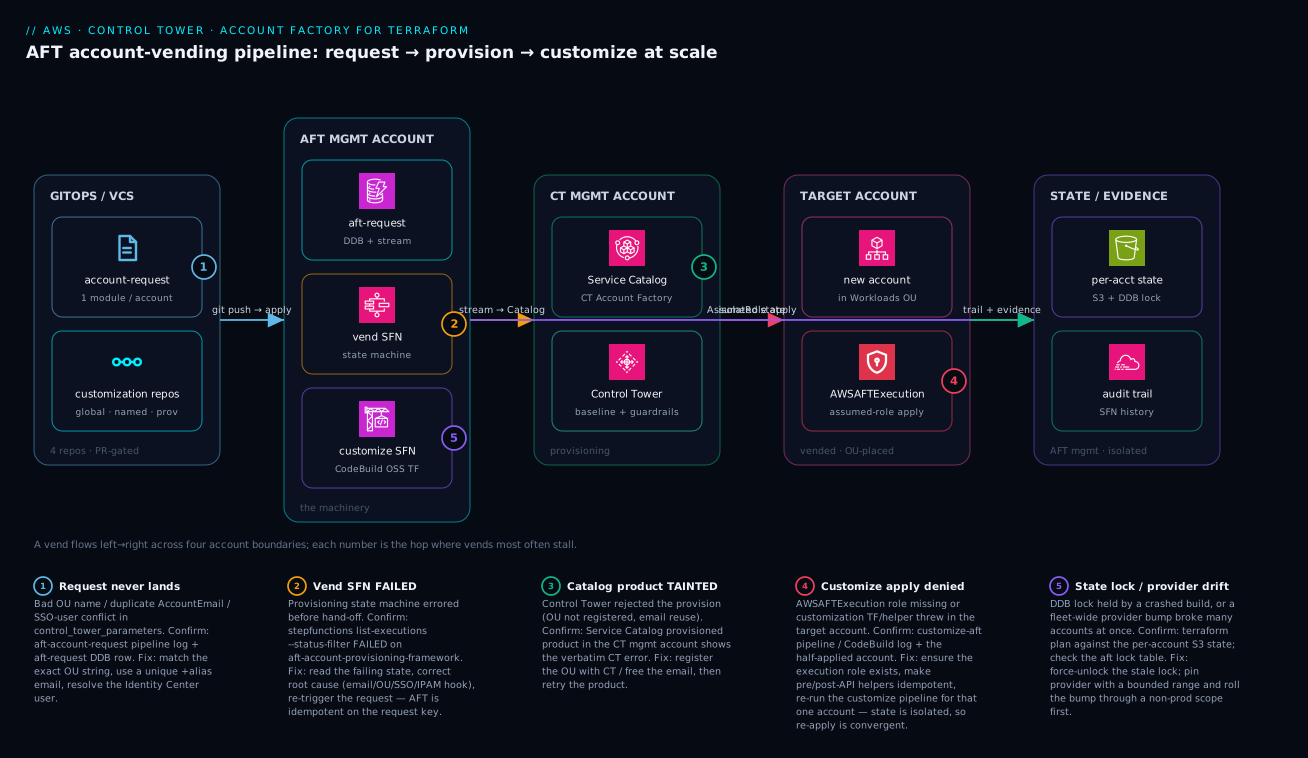
Read this diagram left to right as a single vend crossing four account boundaries. On the far left, GitOps / VCS holds the four repos: a developer’s pull request to aft-account-request (one Terraform module per account) is the only human action, and the three customization repos sit beside it carrying the baseline-as-code. When that PR merges, the request pipeline runs terraform apply and writes a row into the aft-request DynamoDB table in the AFT management account — the second zone, where all the machinery lives. A DynamoDB stream wakes the vend Step Functions state machine, which calls into the third zone, the CT management account, where Service Catalog invokes the Control Tower Account Factory to actually create the account and place it under the right OU with guardrails attached. The newly minted target account is the fourth zone; AFT then assumes the AWSAFTExecution role into it and the customize Step Functions / CodeBuild runs global-then-named Terraform through that assumed role. Throughout, the fifth zone — state & evidence, also in the AFT management account — holds each account’s isolated S3 state with a DynamoDB lock, plus the CloudTrail and Step Functions execution history that an auditor reads.
The five numbered badges mark the exact hops where vends stall, and the legend narrates each as symptom · confirm · fix: (1) the request never lands because of a bad OU string, duplicate email, or SSO-user conflict; (2) the vend Step Functions execution FAILED before hand-off; (3) the Service Catalog product is TAINTED because the OU was never registered with Control Tower; (4) the customize apply is denied because the AWSAFTExecution role is missing or a helper threw; and (5) a stuck state lock or an unpinned provider bump broke many accounts at once. Trace any incident to its badge, then jump to the matching row in the Step 8 playbook.
Real-world scenario
A payments platform team running ~140 accounts hit a hard PCI-DSS control: every account must delete its default VPC in all 17 enabled regions before any workload Terraform runs, and auditors wanted evidence it happened during provisioning, not after. Their original setup deleted default VPCs in a post-API helper, which auditors flagged because there was a window where the account existed with default VPCs present.
The fix was to push it earlier and make it native. They turned on aft_feature_delete_default_vpcs_enabled = true so AFT removes default VPCs as part of the provisioning framework itself, then used the account-provisioning customization Lambda to emit a verification record into a central DynamoDB evidence table keyed by account ID and timestamp — produced inside the vend flow, before hand-off.
# aft-account-provisioning-customizations: emit PCI evidence during vend
import boto3, time

def lambda_handler(event, context):
    acct = event["account_info"]["account"]["id"]
    boto3.client("dynamodb").put_item(
        TableName="pci-vend-evidence",
        Item={
            "account_id": {"S": acct},
            "control":    {"S": "default-vpc-deleted-all-regions"},
            "vended_at":  {"S": str(int(time.time()))},
        },
    )
    return event  # continue the state machine
Result: the control executes inside the audited Step Functions trace, the evidence row is generated by the same flow, and there is no longer a post-provisioning gap. The auditors accepted the Step Functions execution history plus the evidence table as proof — and the team stopped maintaining the brittle post-API script entirely.
The before/after of that migration, made explicit:
| Dimension | Before (post-API helper) | After (provisioning + feature flag) |
|---|---|---|
| When default VPCs deleted | After account hand-off | During the vend, pre-hand-off |
| Compliance window | Account existed with default VPCs briefly | No window — deleted inside provisioning |
| Evidence | Script logs, hard to audit | DDB evidence row + SFN execution history |
| Auditor acceptance | Flagged (gap) | Accepted (in-flow proof) |
| Maintenance | Brittle bash, per-region loop | Native feature flag + small Lambda |
| Idempotency burden | High (re-run safety on helper) | Low (vend-time, runs once) |
What this scenario teaches about layer choice — the same lesson generalized:
| Requirement signal | Layer it implies | Scenario instance |
|---|---|---|
| “Must happen before workload TF” | Provisioning customization | Default-VPC deletion timing |
| “Auditors want in-flow evidence” | Provisioning + SFN history | Evidence DDB row in the vend |
| “Applies to every account” | Feature flag / global | delete_default_vpcs_enabled |
| “Brittle bash re-run risk” | Move out of helpers | Retired the post-API script |
Advantages and disadvantages
AFT is the right tool for fleet-scale, governed account vending — and the wrong tool for three accounts you’ll never grow. The explicit trade-off:
| Advantages | Disadvantages |
|---|---|
| One PR creates a fully baselined account | Real operational surface to run (SFN, DDB, pipelines, state) |
| Baseline is reviewed code, not a wiki page | Steeper setup than console Account Factory |
| Isolated per-account state → safe fleet ops | More moving parts to learn and debug |
| Auditable: SFN history + CloudTrail evidence | Helpers must be written idempotent (a discipline) |
| Fleet-wide re-runs roll a standard everywhere | A bad fleet-wide change has broad blast radius |
| Three clean customization layers | Layer-placement mistakes cause subtle drift |
| AWS-maintained module, tracks CT changes | Module/provider upgrades need deliberate rollout |
| GitOps decommission with a deliberate safety gate | Account closure still a manual two-step (by design) |
When each side dominates — the honest “should you adopt AFT” read:
| Situation | Verdict |
|---|---|
| < ~10 accounts, no growth, no compliance | Console Account Factory is enough; skip AFT |
| Growing fleet, mandatory baseline, reviews | AFT is the right call |
| Strict compliance needing provisioning-time evidence | AFT (provisioning customizations) is hard to beat |
| Want Sentinel policy gating on every account | AFT with terraform_distribution = "tfc"/"tfe" |
| Team unfamiliar with TF/SFN/DDB | Adopt, but budget ramp-up time |
Hands-on lab
This lab assumes a working Control Tower landing zone and a vended AFT management account. It stands AFT up, vends one sandbox account, adds a global baseline, and tears the sample account down. Steps that create accounts cost nothing extra (accounts are free; the resources inside them are what bill), but deleting an AWS account is a deliberate 90-day suspension — only run the teardown on a throwaway sandbox.
- Confirm the foundation.
aws controltower list-landing-zones --region us-east-1
aws organizations list-accounts \
  --query "Accounts[?Name=='aft-management'].[Id,Status]" --output table
- Bootstrap AFT (from a context that can assume into management + AFT management). Use the
main.tffrom Step 2, then:
terraform init
terraform apply   # builds tables, SFN, pipelines, repo wiring
- Verify the machinery exists.
aws dynamodb list-tables --region us-east-1 \
  --query "TableNames[?starts_with(@,'aft-')]"
aws codepipeline list-pipelines --region us-east-1 \
  --query "pipelines[?contains(name,'aft')].name"
- Author a sandbox request in
aft-account-requestand push:
module "kv_sandbox_01" {
  source = "./modules/aft-account-request"
  control_tower_parameters = {
    AccountEmail              = "aws+kv-sandbox-01@kloudvin.io"
    AccountName               = "kv-sandbox-01"
    ManagedOrganizationalUnit = "Sandbox (ou-wxyz-5678wxyz)"
    SSOUserEmail              = "cloud-platform@kloudvin.io"
    SSOUserFirstName          = "Platform"
    SSOUserLastName           = "Team"
  }
  account_tags = { "kv:environment" = "sandbox" }
  account_customizations_name = "sandbox"
}
- Watch the vend in Step Functions:
SM_ARN=$(aws stepfunctions list-state-machines \
  --query "stateMachines[?contains(name,'aft-account-provisioning-framework')].stateMachineArn" \
  --output text --region us-east-1)
aws stepfunctions list-executions --state-machine-arn "$SM_ARN" --region us-east-1
- Add a global baseline — drop the EBS-encryption + password-policy
baseline.tffrom Step 4 intoaft-global-customizations/terraform/, commit, then fan it to the new account:
aws lambda invoke --function-name aft-invoke-customizations \
  --payload '{"include":[{"type":"tags","tag":{"kv:environment":"sandbox"}}]}' \
  --cli-binary-format raw-in-base64-out --region us-east-1 response.json
- Verify the baseline reached the account (assume
AWSAFTExecutioninto it first):
aws ec2 get-ebs-encryption-by-default --region us-east-1 # expect: true
- Teardown (sandbox only). Remove the
kv_sandbox_01block,terraform apply(AFT stops managing it), then close the account deliberately in Organizations.
Expected output and the failure to suspect at each step:
| Step | Expected output | If it fails, suspect |
|---|---|---|
| 1 | A landing zone listed; account ACTIVE |
CT not deployed / wrong region |
| 2 | Apply complete! with resource count |
Account-id typo / VCS connection |
| 3 | aft-* tables + pipelines listed |
Bootstrap didn’t finish |
| 4 | Request pipeline goes green | OU string / email / SSO field |
| 5 | An execution, eventually SUCCEEDED |
Catalog rejection (open the state) |
| 6 | Lambda StatusCode 200 |
Wrong payload scope grammar |
| 7 | true |
Customize pipeline failed / role missing |
| 8 | Block gone; account closure initiated | (Deliberate; no auto-delete) |
Common mistakes & troubleshooting
Eight failure modes that bite real AFT rollouts — symptom, root cause, how to confirm, and the fix:
| # | Symptom | Root cause | Confirm | Fix |
|---|---|---|---|---|
| 1 | Vend fails immediately on a new account | Reused AccountEmail |
Service Catalog product error: email in use | Use a unique +alias email; emails are never reusable |
| 2 | “OU not found” on provision | OU exists in Organizations but not registered with CT | CT console OU list vs the request string | Register the OU with Control Tower; copy its exact string |
| 3 | Account vends but has no baseline | Customize pipeline red | <acct>-customizations CodeBuild log |
Fix the customization; re-run that account |
| 4 | AccessDenied assuming into the account |
AWSAFTExecution role deleted/edited in target |
CodeBuild log: AssumeRole denied | Restore the execution role; don’t hand-edit it |
| 5 | Fleet re-run fails on half the accounts | Non-idempotent helper (“already exists”) | Build logs across accounts | Make pre/post-api-helpers.sh idempotent |
| 6 | A single provider bump breaks many accounts | Unpinned provider, fleet-wide apply | Plans show the same error everywhere | Pin ~> 5.x; roll bumps dev→prod |
| 7 | terraform plan hangs on an account |
Stale DDB lock from a crashed build | Lock table holds a lock id | terraform force-unlock <id> (verify no live run) |
| 8 | Console OU move “didn’t stick” | Moving the account in the console desyncs the request | Request still names the old OU | Move via ManagedOrganizationalUnit in the request |
Two AFT-specific traps that don’t fit a symptom row but cost hours:
| Trap | Why it bites | Avoid by |
|---|---|---|
| Bootstrapping AFT with AFT | Chicken-and-egg: AFT mgmt account doesn’t exist yet | Vend AFT mgmt via the console Account Factory first |
Branching aft-global-customizations on account tags |
Global is meant to be invariant; if logic creeps drift |
Model the difference as a named tier instead |
Best practices
- Vend the AFT management account via the console Account Factory, never with AFT itself — avoid the bootstrap chicken-and-egg.
- Keep global customizations invariant. Org-wide-true controls only; anything tier-specific goes in a named customization.
- Make every helper idempotent. Assume it re-runs on every fleet pass; tolerate “already exists” or guard with describe-then-act.
- Pin providers and Terraform with bounded ranges (
~> 5.40,>= 1.6.0, < 1.8.0) so a major version never rolls fleet-wide unreviewed. - Test fleet-wide changes on a scoped subset first (by tag), then widen to
all. - Use unique
+aliasemails for every account and treat them as permanent — an email belongs to one account forever. - Copy OU strings verbatim from the Control Tower console, including the
(ou-xxxx-…)id, and only target OUs registered with CT. - Prefer provisioning customizations for “must happen before workload TF” and for anything an auditor wants evidenced inside the vend.
- Treat the customization repos as the single source of truth; reconcile drift with a re-run, never
terraform importin a target account. - Make account closure deliberate — removing a module block stops management; final suspension is a separate Organizations action on purpose.
- Pin the AFT deployment module version and read the changelog before bumping; it tracks Control Tower behavior changes.
- Enable default-VPC deletion (
aft_feature_delete_default_vpcs_enabled) as a baseline unless you have a specific reason not to.
Security notes
AFT touches the most sensitive seam in your org — account creation and cross-account access — so its security posture is non-negotiable. The roles, what they can do, and how to keep them least-privilege:
| Identity / control | What it grants | Where | Least-privilege guidance |
|---|---|---|---|
AWSAFTExecution |
Customization apply into a target account | Each target account | AFT-managed; never widen or hand-edit; alarm on changes |
AWSAFTAdmin |
Assumes AWSAFTExecution from AFT mgmt |
AFT mgmt account | Restrict who/what can assume it |
| AFT mgmt account isolation | Houses all machinery + state | Dedicated account | Tightly control human access; treat as Tier-0 |
| VCS connection token | CodePipeline → external repos | Secrets Manager (AFT-provisioned) | Rotate; scope the connection to the org/repos |
| Branch protection on the 4 repos | Review gate before any account change | VCS | Require PR review; protect main |
| KMS on state + DDB | Encrypts isolated per-account state | AFT mgmt | Use CMKs where policy requires; restrict key access |
| CloudTrail (org + data events) | Audit AFT’s management-plane actions | Org / AFT mgmt | Enable; aft_feature_cloudtrail_data_events for object access |
Baseline security controls AFT lets you guarantee on every account — push these into global customizations:
| Control | Where to set it | Effect |
|---|---|---|
| Default EBS encryption | Global customization | No unencrypted volumes, ever |
| S3 account Block Public Access | Global customization | No accidental public buckets |
| Strict IAM password policy | Global customization | Org-wide credential hygiene |
| Default VPC deletion (all regions) | Provisioning (feature flag) | No default network attack surface |
| Config conformance pack | Named (tier) customization | Continuous compliance per tier |
| GuardDuty / Security Hub enablement | pre-api-helpers.sh + TF |
Threat detection from day zero |
The review-gate model — why every account change goes through a PR:
| Gate | Protects against |
|---|---|
PR review on aft-account-request |
Rogue or typo’d account creation |
PR review on aft-global-customizations |
An unreviewed control change hitting the whole fleet |
Branch protection on main |
Direct pushes bypassing review |
| Scoped fan-out (test first) | A bad baseline reaching production accounts |
Cost & sizing
AFT’s own footprint is cheap; the cost is dominated by what the customizations put inside each account, not by AFT. The bill drivers:
| Component | What drives the cost | Rough magnitude | Notes |
|---|---|---|---|
| AWS account itself | Nothing — accounts are free | ₹0 / $0 | You pay for resources inside, not the account |
| DynamoDB request tables | On-demand reads/writes | Pennies/month | Tiny tables, low traffic |
| Step Functions executions | Per state transition | Negligible at vend rates | A vend is a handful of transitions |
| CodeBuild (customize runs) | Build-minutes per apply | Low; scales with fleet × re-runs | Bigger driver on frequent fleet re-runs |
| S3 state + CloudTrail | Storage + data events | Small; data events add volume | cloudtrail_data_events increases it |
| Secrets Manager (VCS token) | Per secret | ~$0.40/secret/month | One secret |
| Terraform Cloud/Enterprise | If terraform_distribution=tfc/tfe |
Per-seat/run pricing | Only if you chose that path |
The cost levers and what each saves:
| Lever | Effect on cost | Trade-off |
|---|---|---|
Use oss distribution (default) |
Avoids TFC/TFE licensing | DIY policy-as-code in buildspec |
Scope fleet re-runs (not always all) |
Fewer CodeBuild minutes | Must target deliberately |
Leave cloudtrail_data_events off unless needed |
Less CloudTrail volume | Less object-level audit on AFT buckets |
| Smaller/faster customization Terraform | Shorter build-minutes | Build discipline |
| Right-size CodeBuild compute | Lower per-minute cost | Slower builds if undersized |
Free-tier and “what’s actually free” reference:
| Item | Free? | Detail |
|---|---|---|
| Creating accounts | Yes | Accounts cost nothing to create or hold |
| AFT DynamoDB/SFN at vend rates | Effectively yes | Volume is tiny; within/near free tier |
| Control Tower | Mostly | You pay for the resources its baselines create (Config, CloudTrail) |
| Resources inside vended accounts | No | This is the real bill — governed by your customizations |
Interview & exam questions
1. What problem does AFT solve that console Account Factory does not? Console Account Factory creates one account at a time with no enforced, reviewed baseline and no audit of why it exists. AFT turns account vending into GitOps: requests and baselines are reviewed code, state is isolated per account, and you can roll a corrected standard across the whole fleet at once. (Relevant: AWS Solutions Architect Pro, Advanced Networking is adjacent.)
2. Name the three account roles AFT spans. The management account (Organizations/CT root, only called), the AFT management account (hosts all machinery and state), and the target accounts (created and customized). You never run AFT pipelines in the management account.
3. What are the four AFT repos and what does each do? aft-account-request (one module per account — creates), aft-global-customizations (applied to every account), aft-account-customizations (named tiers, one per account), and aft-account-provisioning-customizations (a Step Functions hook that runs during the vend, before hand-off).
4. Walk a vend from commit to baselined account. Commit to aft-account-request → request pipeline apply writes a row to aft-request (DDB) → a stream triggers the provisioning Step Functions → Service Catalog/Control Tower create and place the account → provisioning customizations run → global then named customizations apply via the AWSAFTExecution role.
5. Why is per-account state isolation important? It bounds blast radius: a broken apply in one account cannot corrupt another’s state, and you can re-run a single account to convergence. It is what makes fleet-wide operations safe.
6. Global vs named account customizations — how do you decide? Org-wide invariants (EBS encryption, password policy, mandatory tags) go in global; anything tier-specific (PCI Config pack, restricted VPC, sandbox auto-nuke) goes in a named customization the account opts into by account_customizations_name. Never branch global on tags.
7. Provisioning customization vs pre/post-API helper? The provisioning customization is a Lambda/SFN step that runs during the vend, before hand-off (e.g., IPAM registration), and does not re-run on fleet passes. Pre/post-API helpers are shell scripts that run around a layer’s terraform apply on the CodeBuild host and do re-run every pass — so they must be idempotent.
8. Where do you look first when a vend is stuck? Three places in order: the Step Functions execution trace (primary signal), the aft-request/aft-request-metadata DynamoDB tables (desired state vs progress), and the Service Catalog provisioned product in the CT management account (the verbatim Control Tower error).
9. How do you roll a new baseline to every existing account? Edit aft-global-customizations, then invoke the aft-invoke-customizations Lambda — scoped to a test subset by tag first, then {"include":[{"type":"all"}]} for the fleet.
10. How do you close an account with AFT, and why is it two steps? Remove the module block from aft-account-request and apply — AFT stops managing it but does not delete it. Final closure (90-day suspension) is a deliberate Organizations action, by design, so a deleted Terraform file can never nuke a production account.
11. A customization failed after the account was created. What’s the safe recovery? Fix the customization code and re-run that single account’s customize pipeline; the isolated state makes the re-apply convergent. Do not terraform import or hand-edit in the target account.
12. Why must you vend the AFT management account via the console first? To avoid a bootstrap chicken-and-egg — AFT cannot create the account that is supposed to host AFT’s own machinery. Vend it once with the console Account Factory, then bootstrap AFT into it.
Quick check
- Which account hosts the DynamoDB request tables, Step Functions, and pipelines?
- You need a control to run before any customization Terraform runs and be evidenced inside the vend. Which layer?
- A reused value guarantees a vend rejection and can never be changed afterward — which field?
- Your
terraform planagainst one account hangs forever. What’s the most likely cause and the fix? - How do you roll a corrected global baseline to every account, and what should you do before targeting
all?
Answers
- The AFT management account — never the management (CT root) account, where you do not run AFT pipelines.
- A provisioning customization (the Step Functions/Lambda hook), optionally paired with a feature flag like
aft_feature_delete_default_vpcs_enabled. AccountEmail— it must be globally unique and is immutable for the life of the account.- A stale DynamoDB state lock from a crashed build; confirm in the lock table and
terraform force-unlock <id>after verifying no live run holds it. - Edit
aft-global-customizationsand invokeaft-invoke-customizations; first scope it to a test subset by tag, validate, then widen to{"include":[{"type":"all"}]}.
Glossary
- Account Factory for Terraform (AFT) — AWS-maintained framework that turns Control Tower account vending into a GitOps pipeline with customizations and isolated state.
- AFT management account — the dedicated account hosting AFT’s DynamoDB tables, Step Functions, pipelines, Lambdas, and Terraform state.
- Management (CT) account — the Organizations root / Control Tower management account; AFT only calls it.
- Target (vended) account — an account AFT creates and baselines via an assumed role.
aft-account-request— the repo holding one Terraform module block per account; the only repo most app teams touch.- Global customizations — Terraform/Python applied to every AFT-managed account (org-wide invariants).
- Named (account) customizations — directory-keyed customizations; an account opts into exactly one via
account_customizations_name. - Provisioning customization — a Step Functions/Lambda hook that runs during the vend, before hand-off.
- Pre/Post-API helpers —
pre-api-helpers.sh/post-api-helpers.shscripts running around a layer’sterraform applyon the CodeBuild host. AWSAFTExecution— the role AFT assumes into a target account to apply customizations.aft-requesttable — the DynamoDB table holding the desired state of account requests; its stream triggers provisioning.aft-request-metadata— the DynamoDB table tracking per-account provisioning progress (account_status).- Service Catalog provisioned product — the Control Tower Account Factory product whose
TAINTED/ERRORstate surfaces the verbatim CT error. terraform_distribution— deployment flag selecting where customizationapplyruns:oss(CodeBuild),tfc, ortfe.- Idempotency — the property that a helper/customization can re-run on every fleet pass without failing on “already exists”.
Next steps
- Building a Multi-Account AWS Landing Zone with Control Tower and Account Factory — the foundation AFT sits on.
- Enforcing Org-Wide Guardrails with AWS Organizations, SCPs, and Delegated Administration — the guardrail/SCP layer your OUs inherit.
- AWS IAM Identity Center at Scale: Permission Sets, ABAC, and Federated Multi-Account Access — where the
SSOUser*request parameters point. - Amazon VPC IPAM: Hierarchical CIDR Planning, Allocation, and BYOIP at Scale — a classic provisioning-customization hook (register the new account’s CIDR).
- AWS Step Functions in Production: Express vs Standard, Distributed Map, and Resilient Error Handling — the orchestration engine under AFT’s vend flow.
- AWS Capstone: Build a Well-Architected Multi-Account Landing Zone + 3-Tier App — put AFT to work end to end.