A connectivity ticket on a flat VPC is a five-minute job. On a real estate — forty accounts, a hub-and-spoke Transit Gateway, PrivateLink for shared services, a centralized inspection VPC, overlapping intent everywhere — the same ticket means tracing a packet through security groups, NACLs, two subnet route tables, a TGW route table, and a peering attachment that someone deprecated last quarter. Reading VPC Flow Logs to reconstruct that path is archaeology: they tell you what did flow, never why something can’t, and a wide-open-but-idle path leaves no trace until it is exploited. AWS gives you two tools that reason about the configuration instead of waiting for packets. VPC Reachability Analyzer answers “can A reach B, and if not, which exact component blocks it?” — a traceroute that runs before a packet is ever sent. Network Access Analyzer answers the inverse and far more valuable question for security teams — “is there any path from here to the internet, or across this trust boundary, that I did not intend?” — a linter for your network’s trust boundaries.
This guide uses both correctly, then turns the second one into a continuous compliance control wired into CI/CD, EventBridge, Security Hub, and Config. We treat the two analyzers not as one feature but as two complementary modes of static reachability analysis over the entire configuration graph: SGs, NACLs, subnet and TGW route tables, peering, gateways, and endpoints. Neither sends a packet. Neither needs an agent or any change to your workloads. Both bill per analysis run, both reason across accounts in the same AWS Organization, and both will find a misconfiguration on a path that has never carried a single byte of traffic. Because you will return to this mid-incident and mid-audit, the engine’s behaviour — every ExplanationCode, every MatchPaths/ExcludePaths lever, the cross-account gotchas, the real limits — is laid out as scannable tables. Read the prose once; keep the tables open when the pager fires or the auditor asks you to prove a negative.
By the end you will stop reading flow logs to answer “can it reach?” and stop asserting “nothing can get out” without proof. When a connectivity ticket lands you will name the blocking SG, NACL, route, or attachment in ninety seconds from a single ExplanationCode. When an auditor demands evidence that no cardholder-data subnet can reach the internet by any route, you will hand them a static proof that holds even for paths nobody ever exercised — and a pipeline gate plus a daily drift scan that catches the next regression before they ever see it.
What problem this solves
Connectivity debugging on a multi-account estate is a tax you pay on every change. The information you need — which SG rule, which NACL entry, which route target — is real and fully determined by configuration, but it is scattered across a dozen consoles and two account boundaries, and the human method (open four SGs, two NACLs, three route tables, squint) is slow, error-prone, and gets worse linearly with scale. Flow logs make it worse, not better, for the “can’t connect” case: they are an access log of what happened, so a path that is broken produces no rows at all, and a path that is dangerously open but idle is indistinguishable from a path that does not exist.
What breaks without these tools: an on-call engineer spends an hour reconstructing a path from flow logs that, by definition, contain nothing about the failure; a security team “asserts” segmentation in a spreadsheet that an auditor correctly rejects because absence of observed traffic is not proof of absence of a path; a forgotten 0.0.0.0/0 → igw route sits on a data-tier subnet for a quarter because no single-resource check can see a whole-path reachability problem, and nobody sent traffic over it to trip an alarm. The cost is measured in hours of archaeology per incident and in undetected exposure between audits.
Who hits this: anyone past a single flat VPC. It bites hardest on hub-and-spoke Transit Gateway estates (paths cross account boundaries the analyzer must be told to traverse), PCI/regulated workloads (you must prove a negative continuously, not assert it monthly), PrivateLink consumers and providers (endpoint acceptance and SG rules hide behind the routing), and anyone running a centralized egress-inspection VPC who needs to prove no spoke bypasses the firewall. The fix is never “read more flow logs” — it is “ask the configuration graph the exact question, and wire the answer into a gate.”
To frame the whole field before the deep dive, here is every question class this article covers, which tool answers it, and where you look first:
| Question class | What you are really asking | Right tool | Key field | First place to look |
|---|---|---|---|---|
| Point-to-point “can A reach B?” | A named source can/can’t reach a named destination | Reachability Analyzer | NetworkPathFound |
describe-network-insights-analyses |
| “Which component blocks it?” | Exact SG/NACL/route that failed, and direction | Reachability Analyzer | Explanations[].ExplanationCode |
The analysis Explanations array |
| “Does the path I think it takes match reality?” | Confirm the actual hops (right TGW attachment, no stale peering) | Reachability Analyzer | ForwardPathComponents |
The forward/return path arrays |
| “Is there ANY path to the internet?” | No source named — find every egress instance of a shape | Network Access Analyzer | FindingsFound |
describe-network-insights-access-scope-analyses |
| “Does anything violate segmentation?” | PCI→non-PCI, DB-ports-to-internet, bypass-the-firewall | Network Access Analyzer | FindingsFound + AnalyzedEniCount |
The access-scope-analysis findings |
| “What actually flowed?” | Historical, observed packets (after the fact only) | VPC Flow Logs | n/a | CloudWatch Logs / S3 / Athena |
Learning objectives
By the end of this article you can:
- Pick the right tool for a connectivity question — Reachability Analyzer for a named path, Network Access Analyzer for an unnamed shape, Flow Logs for history — and explain why the first two find faults on never-used paths and the third cannot.
- Run a point-to-point reachability analysis end to end (
create-network-insights-path→start-network-insights-analysis→ readNetworkPathFound), and name the blocking component from a singleExplanationCode. - Read
ForwardPathComponentsandReturnPathComponentshop by hop to confirm a packet takes the path you think it takes — catching functional-but-unintended routing over a deprecated peering or stale NAT route. - Follow a path across account and Region boundaries through TGW and PrivateLink, passing the right intermediate account IDs in
--additional-accountsso you never chase a false negative. - Author Network Access Analyzer scopes with the
MatchPaths/ExcludePaths/ThroughResourcesgrammar to assert “no internet egress,” PCI segmentation, DB-ports-to-internet, and firewall-bypass invariants, returning only the violations. - Make the analyzers continuous: a pre-merge CI gate that fails the build on any finding, a scheduled EventBridge drift scan across all accounts from a delegated administrator, and ASFF findings imported to Security Hub correlated with AWS Config.
- Diagnose the analyzers’ own failure modes — false-negative cross-account paths, scopes that silently match nothing, throttled bulk runs — from a symptom→cause→confirm→fix playbook.
Prerequisites & where this fits
You should already understand VPC fundamentals: that a security group is stateful and instance-level, a NACL is stateless and subnet-level, a subnet route table sends traffic to a local/gateway/attachment target, and a Transit Gateway route table decides which attachment a packet leaves by. You should know how to run the AWS CLI (and read JSON / --query JMESPath), what an ENI, IGW, NAT gateway, VPC endpoint (vpce-), and TGW attachment are, and that an AWS Organization with a delegated administrator lets one account reason across many. Familiarity with EventBridge rules, a CI system, and Security Hub helps for the “make it continuous” half.
This sits in the Networking & Troubleshooting track. It assumes the routing and isolation fundamentals from the AWS VPC Deep Dive: Subnets, Routing, IGW, NAT & Endpoints and the rule-evaluation mechanics from Security Groups and NACLs Deep Dive. It pairs tightly with the Transit Gateway Multi-Account VPC Architecture (the hub the cross-account paths traverse) and PrivateLink: Service Provider and Consumer, Cross-Account (the endpoint hop the analyzer validates). The continuous-control half builds on Organizations, SCP Guardrails and Delegated Admin and CloudWatch and CloudTrail Observability. When a finding fires, you fix it with the same method as AWS Troubleshooting Methodology: EC2, VPC, IAM, S3, Lambda.
A quick map of who owns what during a connectivity incident, so you call the right person fast:
| Layer | What lives here | Who usually owns it | Failure classes it can cause |
|---|---|---|---|
| Instance / ENI | The workload, its primary SG attachment | App / dev team | Wrong SG, app not listening, instance stopped |
| Security group | Stateful allow rules (ingress/egress) | App + platform | ENI_SG_RULES_MISMATCH either direction |
| Subnet NACL | Stateless allow/deny, ordered by rule number | Network team | ACL_RULES_MISMATCH, missing return rule |
| Subnet route table | Local + gateway/attachment targets | Network team | NO_ROUTE_TO_DESTINATION, blackhole |
| Transit Gateway | TGW route table, attachments, propagation | Network / shared-svc team | Wrong attachment, missing TGW route |
| PrivateLink endpoint | vpce- endpoint SG + service acceptance |
Consumer + provider | Endpoint SG block, service not accepting |
| Internet / NAT gateway | The egress hop you may or may not intend | Network + security | Unintended egress (a NAA finding, not an RA block) |
Core concepts
Five mental models make every later diagnosis obvious.
Static reasoning beats observation for “can it reach?” Both analyzers evaluate the configuration graph — every SG, NACL, route table, TGW route table, peering connection, gateway, and endpoint — to decide whether a path is satisfiable. They never send a packet. This is the entire reason they beat flow logs for connectivity: a broken path produces no flow-log rows to read, and an open-but-idle path looks identical to no path. The analyzer answers the counterfactual (“could a packet get through?”) that observation fundamentally cannot.
Reachability Analyzer is point-to-point; you name both ends. It is a two-step API: create a network insights path (the source/destination/protocol/port tuple — a durable, reusable object) then start an analysis against it (the cheap, repeatable verification). Sources and destinations are resources — instances, ENIs, IGWs, TGW attachments, VPC endpoints — by ID within an account or by ARN across accounts. The first field you read is NetworkPathFound; if false, the engine has already isolated the one blocking component and names it in an ExplanationCode.
Network Access Analyzer is many-to-many; you describe a shape. You cannot enumerate every source/destination pair to hunt for unintended paths. So you author a scope — MatchPaths (the shape of path to find) minus ExcludePaths (the sanctioned exceptions) — and the engine returns every instance of that shape across the whole VPC or account. The assertion field is FindingsFound: an invariant holds only when it is false; any finding is a real path. AnalyzedEniCount tells you the blast radius it actually reasoned over, so you can tell a clean result from a scope that silently matched nothing.
The two analyzers are inverses, and you want both. Reachability proves a path you named works (or finds why it doesn’t). Network Access finds paths nobody named that should not exist. The first is for the operator with a ticket; the second is for the security team with an invariant. Neither replaces Flow Logs, which remain the access log for forensics and anomaly detection — but Flow Logs answer a different question (what flowed), historically and after the fact.
Direction and layer are the whole diagnosis. When a path fails, the answer is always “which layer (SG / NACL / route / TGW), which direction (ingress / egress / forward / return).” The ExplanationCode encodes exactly that — ENI_SG_RULES_MISMATCH (an SG, your-direction), INGRESS_ACL_RULES_MISMATCH (a NACL, inbound), NO_ROUTE_TO_DESTINATION (routing), BLACKHOLE_ROUTE (a route that drops). The engine does the differential diagnosis you used to do by hand across six objects.
The vocabulary in one table
Before the deep sections, pin down every moving part. The glossary at the end repeats these for lookup; this table is the mental model side by side:
| Concept | One-line definition | Where it lives | Why it matters here |
|---|---|---|---|
| Network insights path | The source/dest/protocol/port tuple you analyze | nip-… object |
Durable + reusable; re-run after each fix |
| Network insights analysis | One run against a path | nia-… object |
Cheap, repeatable; read NetworkPathFound |
NetworkPathFound |
Boolean: is the named path reachable? | RA analysis result | The first field you check |
ExplanationCode |
Machine name of the blocking component | RA Explanations[] |
Answers ~90% of tickets in one read |
ForwardPathComponents |
Ordered hops the packet traverses | RA analysis result | Confirms the actual path (catches stale routes) |
| Access scope | A MatchPaths/ExcludePaths shape definition |
nis-… object |
The invariant you assert |
FindingsFound |
Boolean: does any matching path exist? | NAA analysis result | Invariant holds only when false |
AnalyzedEniCount |
How many ENIs the engine reasoned over | NAA analysis result | Confirms the scope wasn’t empty |
MatchPaths / ExcludePaths |
Paths to find / sanctioned exceptions to subtract | Scope content | The expressive lever for invariants |
--additional-accounts |
Intermediate account IDs a cross-account path may traverse | RA analysis arg | Omit it → false-negative “not found” |
| ASFF | AWS Security Finding Format record | Security Hub import | How a NAA finding becomes a governed control |
When to reach for which tool
These three tools look adjacent and are not interchangeable. Pick by the question you are actually asking — the wrong tool wastes the most time here.
| Tool | Question it answers | Data source | Direction of reasoning | Finds faults on idle paths? |
|---|---|---|---|---|
| Reachability Analyzer | “Can this specific source reach this specific destination?” | Config (static analysis) | Point-to-point; you name both ends | Yes |
| Network Access Analyzer | “Does any path exist matching this pattern?” | Config (static analysis) | Many-to-many; you describe a shape | Yes |
| VPC Flow Logs | “What traffic actually flowed?” | Observed packets | Historical, after the fact | No (only logs real traffic) |
The distinction that matters: the first two are static reasoning over configuration — they will find a misconfiguration even on a path that has never carried traffic. Flow logs are the opposite; they only show what already happened, and a path that is wide open but idle leaves no trace until it is exploited.
Mental model: Reachability Analyzer is
traceroutethat works before you deploy. Network Access Analyzer is a linter for your network’s trust boundaries. Flow logs are the access log. You want all three, for different jobs.
A second cut on the same decision — match the trigger (the situation you’re in) to the tool and the exact first action:
| If you are… | Reach for | First action | Read this field |
|---|---|---|---|
| Handed a “X can’t reach Y” ticket | Reachability Analyzer | Create the path, start an analysis | NetworkPathFound |
| Suspicious a packet takes a stale route | Reachability Analyzer | Read the forward path on a working analysis | ForwardPathComponents |
| Proving “nothing in the data tier egresses” | Network Access Analyzer | Author a no-egress scope, analyze | FindingsFound (want false) |
| Asserting PCI ↔ non-PCI segmentation | Network Access Analyzer | Scope with ExcludePaths exceptions |
FindingsFound (want false) |
| Investigating an actual breach / anomaly | VPC Flow Logs (+ Athena) | Query the historical record | n/a — observed bytes |
| Gating a Terraform merge on invariants | Network Access Analyzer | Run scopes post-apply in CI | FindingsFound per scope |
Both analyzers are part of VPC Network Insights, billed per analysis run, and both reason across accounts in the same Organization. Neither requires an agent or any change to your workloads — they read configuration you already have.
Run a point-to-point reachability analysis
Reachability Analyzer is a two-step API: create a path (the source/destination/protocol tuple), then start an analysis against it. The path is a durable object you keep and re-run; the analysis is the cheap verification. Start with the canonical case: an operator swears the app instance cannot reach the database on 5432.
# Create the path: app ENI -> database ENI, TCP/5432
PATH_ID=$(aws ec2 create-network-insights-path \
  --source eni-0app1234567890abc \
  --destination eni-0db09876543210fed \
  --destination-port 5432 \
  --protocol tcp \
  --query 'NetworkInsightsPath.NetworkInsightsPathId' \
  --output text)

# Run the analysis (takes seconds to a couple of minutes)
ANALYSIS_ID=$(aws ec2 start-network-insights-analysis \
  --network-insights-path-id "$PATH_ID" \
  --query 'NetworkInsightsAnalysis.NetworkInsightsAnalysisId' \
  --output text)

aws ec2 wait network-insights-analysis-succeeded \
  --network-insights-analysis-ids "$ANALYSIS_ID"
The single field you check first is NetworkPathFound. If it is false, the engine has already isolated the blocking component and names it in the explanation.
aws ec2 describe-network-insights-analyses \
  --network-insights-analysis-ids "$ANALYSIS_ID" \
  --query 'NetworkInsightsAnalyses[0].{Found:NetworkPathFound, \
           Explanation:Explanations[0].ExplanationCode}'
{
    "Found": false,
    "Explanation": "ENI_SG_RULES_MISMATCH"
}
That ExplanationCode is the answer to most tickets. Here is the full create-path parameter set — what each field accepts and the gotcha:
create-network-insights-path field |
Accepts | Required? | Default | Gotcha |
|---|---|---|---|---|
--source |
Resource ID (instance/ENI/IGW/TGW/vpce-) or ARN |
Yes | — | ARN form is what unlocks cross-account |
--destination |
Resource ID or ARN | Yes (for most) | — | Point at the vpce- for PrivateLink, not the service |
--protocol |
tcp | udp |
Yes | — | ICMP is not a protocol value here |
--destination-port |
0–65535 | No | all ports | Omit to test reachability irrespective of port |
--source-ip |
An IP on the source resource | No | resolved | Set when the ENI has multiple IPs |
--destination-ip |
Target IP | No | resolved | Useful for a specific secondary IP |
--filter-at-source / --filter-at-destination |
Header filters | No | none | Narrow the analyzed 5-tuple |
--tag-specifications |
Tags on the path | No | none | Name your recurring paths |
And the analysis itself — the run-time knobs:
start-network-insights-analysis field |
Purpose | When to use |
|---|---|---|
--network-insights-path-id |
Which durable path to evaluate | Always |
--additional-accounts |
Intermediate/destination account IDs to traverse | Any cross-account path |
--filter-in-arns |
Restrict analysis to specific resources | Large, ambiguous topologies |
--dry-run |
Validate permissions without running | Pre-flight in CI |
Not every resource can sit on either end of a path. Which resource types are valid as a source, a destination, or an intermediate hop the engine reasons through — pick the right end for your question:
| Resource type | Valid source | Valid destination | Reasoned through | Notes |
|---|---|---|---|---|
| EC2 instance | Yes | Yes | n/a | Resolves to its primary ENI |
Network interface (eni-) |
Yes | Yes | n/a | The most precise endpoint |
| Internet gateway | Yes | Yes | Yes | Use as dest to test public reachability |
| NAT gateway | No | Yes | Yes | Egress hop; common NAA destination |
| Transit gateway / attachment | Yes | Yes | Yes | The hub hop; pass account IDs |
| VPC peering connection | No | No | Yes | Appears in the path, not as an endpoint |
VPC endpoint (vpce-) |
Yes | Yes | Yes | PrivateLink consumer side |
| VPN gateway / VPN connection | Yes | Yes | Yes | Hybrid paths |
| Load balancer (ALB/NLB) | Yes | Yes | Yes | Validated against its listeners |
A path is reusable. Re-run start-network-insights-analysis against the same PATH_ID after every fix; the path is a durable object you keep, the analysis is the cheap, repeatable verification. Author it as code so the recurring paths are version-controlled:
# Terraform: a durable path for the recurring app-to-DB ticket
resource "aws_ec2_network_insights_path" "app_to_db" {
  source           = aws_network_interface.app.id
  destination      = aws_network_interface.db.id
  destination_port = 5432
  protocol         = "tcp"
  tags = { Name = "app-to-db-5432" }
}
Decode every ExplanationCode
The ExplanationCode is the differential diagnosis the engine ran for you. Instead of staring at four SGs and two NACLs, you are told which layer and which direction failed. This is the lookup table you scan first — the code, what it means, the likely cause, the exact place to confirm, and the fix.
ExplanationCode |
Layer | Direction | Likely cause | How to confirm | First fix |
|---|---|---|---|---|---|
ENI_SG_RULES_MISMATCH |
Security group | Your side | No SG rule permits the flow on this hop | describe-security-groups on the named SG |
Add the egress/ingress rule (prefer SG-reference) |
INGRESS_ACL_RULES_MISMATCH |
NACL | Inbound | Subnet NACL has no inbound allow | describe-network-acls for the subnet |
Add an inbound allow rule (numbered low) |
EGRESS_ACL_RULES_MISMATCH |
NACL | Outbound | Subnet NACL has no outbound allow (or no return-port range) | describe-network-acls |
Add outbound allow incl. ephemeral 1024–65535 |
ACL_RULES_MISMATCH |
NACL | Either | A NACL on the path blocks the flow | NACL associations on both subnets | Fix the offending numbered rule |
NO_ROUTE_TO_DESTINATION |
Route table | Forward | No matching route for the dest CIDR | describe-route-tables for the subnet |
Add the route to the right target |
BLACKHOLE_ROUTE |
Route table | Forward | A route exists but its target is gone/detached | Look for a route with state: blackhole |
Repoint to a live attachment/gateway |
NO_ROUTE_TABLE |
Route table | Forward | Subnet has no explicit/main association | Subnet → route-table association | Associate a route table |
MISSING_INTERNET_GATEWAY |
IGW | Forward | Public path needs an IGW the VPC lacks | describe-internet-gateways |
Attach an IGW + public route + public IP |
NO_NAT_GATEWAY |
NAT GW | Forward | Private subnet egress needs a NAT it lacks | NAT gateway + route to it | Create NAT GW, route 0.0.0.0/0 to it |
TGW_ROUTE_TABLE_MISMATCH |
TGW route table | Transit | TGW route table has no route to dest attachment | search-transit-gateway-routes |
Add/propagate the TGW route |
TGW_ATTACHMENT_MISMATCH |
TGW | Transit | Attachment/association wrong or missing | TGW attachment + association | Fix the attachment association/propagation |
VPC_PEERING_CONNECTION_MISMATCH |
Peering | Transit | Peering not active, or no route over it | describe-vpc-peering-connections |
Activate/repair peering + add routes both sides |
ENDPOINT_SERVICE_NOT_ACCEPTED |
PrivateLink | Endpoint | Provider hasn’t accepted the endpoint | describe-vpc-endpoint-connections (provider) |
Accept the connection on the provider side |
LOAD_BALANCER_LISTENER_MISMATCH |
ELB | Forward | No listener for the dest port | describe-listeners |
Add the listener / target group |
A second table the engine fills in on a failed path — the explanation object carries the named objects so you go straight to the right resource, not the right type:
| Explanation sub-field | What it gives you | Use it to… |
|---|---|---|
ExplanationCode |
The machine name of the failure | Pick the row above |
SecurityGroup / SecurityGroupRule |
The exact SG (and rule) on the path | Open that SG, not all four |
Acl / AclRule |
The exact NACL and numbered rule | Edit that rule directly |
RouteTable / Address / Cidr |
The route table and the CIDR with no route | Add the precise missing route |
Subnet / Vpc |
Which subnet/VPC the block sits in | Localize to one subnet |
Component |
The resource that terminated the path | Confirm where analysis stopped |
Direction |
ingress or egress |
Know which way to fix |
Reading note: an SG mismatch and a NACL mismatch are different fixes even though both “block the connection.” The SG fix is usually an SG-reference rule (allow the source SG, not a CIDR); the NACL fix often needs the return ephemeral range (1024–65535 outbound) because NACLs are stateless. The code tells you which, every time.
Read the hop-by-hop forward path
When NetworkPathFound is true, the value is in ForwardPathComponents (and ReturnPathComponents for the reply direction). This is the static traceroute: every component the packet traverses, in order, with the SG and route-table rule that admitted it at each hop. This is where you confirm traffic takes the path you think it takes — not the deprecated peering connection, not a stale NAT route.
aws ec2 describe-network-insights-analyses \
  --network-insights-analysis-ids "$ANALYSIS_ID" \
  --query 'NetworkInsightsAnalyses[0].ForwardPathComponents[].{ \
           Seq:SequenceNumber, \
           Component:Component.Id, \
           RouteTarget:RouteTableRoute.GatewayId, \
           SgRule:SecurityGroupRule.Cidr}' \
  --output table
A representative forward path through a TGW looks like this, hop by hop:
seq 1  : eni-0app...        (source ENI)
seq 2  : sg-0app...         egress rule allowed 5432/tcp
seq 3  : acl-0a...          subnet NACL, outbound rule 100 allow
seq 4  : rtb-0spoke...      route 10.20.0.0/16 -> tgw-0abc...
seq 5  : tgw-0abc...        TGW attachment + TGW route table hop
seq 6  : rtb-0db...         route 10.10.0.0/16 -> local
seq 7  : sg-0db...          ingress rule allowed 5432/tcp from app SG
seq 8  : eni-0db...         (destination ENI)
Reading this, you can see the TGW route table chose the right attachment (seq 5) and the destination SG admitted the source SG by reference, not by CIDR (seq 7). If seq 4 had pointed at a peering connection you expected to be gone, you have just found your real problem — the path works, but over infrastructure you meant to retire. The forward path is as useful for catching unintended-but-functional routing as it is for debugging outright failures.
What each component type in the path tells you, and the field that carries the evidence:
| Component type in path | What it confirms | Evidence field | What “wrong” looks like |
|---|---|---|---|
| ENI (source/dest) | The endpoints the engine resolved | Component.Id |
Not the instance you meant |
| Security group | The rule that admitted the hop | SecurityGroupRule |
A 0.0.0.0/0 rule where you expected SG-ref |
| NACL | The numbered rule that allowed it | AclRule.RuleNumber |
A broad allow masking intent |
| Subnet route table | The route + target chosen | RouteTableRoute.{DestinationCidr,GatewayId,TransitGatewayId} |
Target is a peering you retired |
| Transit gateway | The attachment + TGW route table hop | TransitGateway, TransitGatewayRouteTableRoute |
Wrong attachment / unexpected propagation |
| NAT / Internet gateway | The egress hop taken | NatGateway / InternetGateway |
Egress you did not intend on this tier |
| VPC endpoint | The PrivateLink hop validated | VpcEndpoint |
Bypassed in favour of public route |
Forward vs return is a real distinction worth internalizing — a one-directional NACL gap shows up only in one of them:
| Path direction | Field | What it proves | Common asymmetry it catches |
|---|---|---|---|
| Request | ForwardPathComponents |
The packet can get to the destination | Egress SG rule, forward route |
| Reply | ReturnPathComponents |
The reply can get back | Missing NACL ephemeral-port outbound on the reply subnet |
Cross-account and cross-Region paths
The estate-scale value of Reachability Analyzer is that it follows paths across account boundaries — but only when you tell it which accounts the path may legitimately traverse. Run from the management account or a delegated administrator, reference both endpoints by ARN, and pass the intermediate account IDs via --additional-accounts.
# Spoke A (account 111...) instance -> shared service ENI in account 222...,
# transiting the network account 999... that owns the TGW
aws ec2 create-network-insights-path \
  --source arn:aws:ec2:ap-south-1:111111111111:instance/i-0aaa11112222 \
  --destination arn:aws:ec2:ap-south-1:222222222222:network-interface/eni-0svc3456 \
  --destination-port 443 \
  --protocol tcp \
  --query 'NetworkInsightsPath.NetworkInsightsPathId' --output text
aws ec2 start-network-insights-analysis \
  --network-insights-path-id nip-0crossacct123 \
  --additional-accounts 999999999999 222222222222
Without the relevant account IDs in --additional-accounts, the analysis stops at the boundary it cannot see into and reports the path as not found — a false negative you will chase for an hour if you do not know to look. For PrivateLink, point the destination at the VPC endpoint (vpce-…) on the consumer side; the analyzer understands the endpoint-to-service hop and validates the endpoint security group and the service’s acceptance, not just raw routing. Cross-Region paths through a TGW peering attachment work the same way — both Regions’ resources are addressable by ARN, and the engine reasons across the inter-Region attachment.
The cross-boundary checklist as a table — each row is a thing that silently produces a false negative:
| Scenario | What you must supply | Symptom if you forget | Confirm |
|---|---|---|---|
| Cross-account via TGW | Transit and destination account IDs in --additional-accounts |
“Not found” at the account boundary | Re-run with the IDs; path appears |
| Delegated-admin run | Register the delegated admin for VPC Reachability | UnauthorizedOperation / partial graph |
describe-organizations delegated admins |
| Reference by ARN | Full ARNs for cross-account source/dest | Resource “not found” by bare ID | Use ARN, not i-…/eni-… |
| PrivateLink destination | The consumer-side vpce-…, not the service name |
Endpoint hop unvalidated | Destination resolves to the endpoint |
| Cross-Region | Both Regions’ resources by ARN; inter-Region TGW peering active | Stops at the Region edge | Peering attachment available |
| RAM-shared subnet | The owning account in --additional-accounts |
Shared-subnet hop invisible | Owner account ID present |
Run-context matrix — where you can run an analysis and what it can see:
| Run from | Can analyze | Cannot see (without setup) | Setup needed |
|---|---|---|---|
| A single member account | Its own resources | Anything in other accounts | none |
| Management account | All member accounts in the path | — | be the management account |
| Delegated administrator | All member accounts | — | register as delegated admin |
Without --additional-accounts |
Only the calling account’s hops | Every cross-account hop | pass the account IDs |
Author a Network Access Analyzer scope: “no internet egress”
Reachability Analyzer proves a path you name. The far more dangerous failure is a path nobody named — a forgotten internet-gateway route on a subnet that holds your data tier. You cannot enumerate every source/destination pair to find these. Network Access Analyzer inverts the problem: you describe a shape of path, and it returns every instance of that shape across the entire VPC or account.
A scope is MatchPaths (paths to find) and ExcludePaths (paths that are acceptable, subtracted from the matches). To assert “nothing in my data subnets should reach the internet,” match traffic from those subnets that exits via an internet/NAT gateway:
{
  "MatchPaths": [
    {
      "Source": {
        "ResourceStatement": {
          "Resources": ["subnet-0data1111", "subnet-0data2222"]
        }
      },
      "Destination": {
        "ResourceStatement": {
          "ResourceTypes": [
            "AWS::EC2::InternetGateway",
            "AWS::EC2::NatGateway"
          ]
        }
      }
    }
  ]
}
SCOPE_ID=$(aws ec2 create-network-insights-access-scope \
  --match-paths file://no-egress-scope.json \
  --tag-specifications \
    'ResourceType=network-insights-access-scope,Tags=[{Key=Name,Value=data-tier-no-egress}]' \
  --query 'NetworkInsightsAccessScope.NetworkInsightsAccessScopeId' \
  --output text)

ANALYSIS=$(aws ec2 start-network-insights-access-scope-analysis \
  --network-insights-access-scope-id "$SCOPE_ID" \
  --query 'NetworkInsightsAccessScopeAnalysis.NetworkInsightsAccessScopeAnalysisId' \
  --output text)
When the analysis settles, the assertion is the FindingsFound field. The invariant holds only when it reads false — any finding is a real path out of your data tier.
aws ec2 describe-network-insights-access-scope-analyses \
  --network-insights-access-scope-analysis-ids "$ANALYSIS" \
  --query 'NetworkInsightsAccessScopeAnalyses[0].{ \
           Findings:FindingsFound, ENIs:AnalyzedEniCount, Status:Status}'
{ "Findings": "false", "ENIs": 412, "Status": "succeeded" }
AnalyzedEniCount tells you the blast radius the engine actually reasoned over — useful to confirm the scope covered what you expected and did not silently match nothing. The full grammar of a path statement — every building block you compose scopes from:
| Statement element | What it constrains | Example value | Notes |
|---|---|---|---|
ResourceStatement.Resources |
Specific resource IDs | ["subnet-0data1111"] |
Most precise; pins to exact resources |
ResourceStatement.ResourceTypes |
Resource types | ["AWS::EC2::InternetGateway"] |
The lever for “any IGW/NAT” |
ResourceStatement.ResourceStatement (tags) |
Resources by tag | tag tier=data |
Scales as the estate grows |
PacketHeaderStatement.DestinationPorts |
L4 destination ports | ["3306","5432"] |
Constrain by port, not just resource |
PacketHeaderStatement.Protocols |
tcp / udp |
["tcp"] |
Combine with ports |
PacketHeaderStatement.SourcePrefixLists |
Source by managed prefix list | a PL id | Reuse curated CIDR sets |
ThroughResources |
What the path must/must not transit | firewall endpoints | Assert bypass via absence in matches |
MatchPaths vs ExcludePaths — the two halves and how they combine:
| Clause | Meaning | What goes here | Effect on result |
|---|---|---|---|
MatchPaths |
“Find paths shaped like this” | The broad prohibition (e.g. any IGW dest) | Generates candidate findings |
ExcludePaths |
“…except these sanctioned ones” | Approved exceptions (e.g. one logging endpoint) | Subtracts matches → only violations remain |
| (neither matches) | Nothing of that shape exists | — | FindingsFound: false — invariant holds |
Express segmentation and untrusted-account invariants
The same MatchPaths / ExcludePaths grammar expresses any segmentation rule you can describe as a shape. The expressive lever is ExcludePaths: state the broad prohibition in MatchPaths, then carve out the sanctioned exceptions in ExcludePaths so the analysis returns only the violations.
PCI subnets must not reach non-PCI subnets, with the one approved logging endpoint excepted:
{
  "MatchPaths": [
    {
      "Source":      { "ResourceStatement": { "Resources": ["subnet-0pci01"] } },
      "Destination": { "ResourceStatement": { "ResourceTypes": ["AWS::EC2::NetworkInterface"] } }
    }
  ],
  "ExcludePaths": [
    {
      "Source":      { "ResourceStatement": { "Resources": ["subnet-0pci01"] } },
      "Destination": { "ResourceStatement": { "Resources": ["eni-0approvedlog"] } }
    }
  ]
}
You can also constrain by packet header, not just resource. To assert “nothing should reach the internet on the database ports,” combine an internet-gateway destination with a PacketHeaderStatement on the ports — a finding here means a database is one SG edit away from being exposed:
{
  "MatchPaths": [
    {
      "Source": { "ResourceStatement": { "ResourceTypes": ["AWS::EC2::NetworkInterface"] } },
      "Destination": {
        "PacketHeaderStatement": {
          "DestinationPorts": ["3306", "5432", "1433", "27017"],
          "Protocols": ["tcp"]
        },
        "ResourceStatement": { "ResourceTypes": ["AWS::EC2::InternetGateway"] }
      }
    }
  ]
}
Use ThroughResources in a path statement when the invariant is about what the path must or must not transit — for example, to find any egress that bypasses your inspection appliance by matching paths to the internet that do not pass through the firewall endpoints (assert via the absence of those endpoints in matched ThroughResources). The engine evaluates the entire estate’s SGs, NACLs, route tables, TGW route tables, peering, and endpoints to decide whether each shape is satisfiable.
The four shapes you compose nearly every scope from, as a copy-ready skeleton — the JSON fragment to drop into Source/Destination:
| Shape you want | Fragment | Where it goes |
|---|---|---|
| From specific subnets | "ResourceStatement": {"Resources": ["subnet-…"]} |
Source |
| From anything tagged | "ResourceStatement": {"ResourceStatement": {... tag ...}} |
Source |
| To any internet exit | "ResourceStatement": {"ResourceTypes": ["AWS::EC2::InternetGateway","AWS::EC2::NatGateway"]} |
Destination |
| To a port set | "PacketHeaderStatement": {"DestinationPorts": ["5432"], "Protocols": ["tcp"]} |
Destination |
| Must transit the firewall | "ThroughResources": [{"ResourceStatement": {"Resources": ["vpce-fw…"]}}] |
path statement |
| The sanctioned exception | (same shape, narrower) | ExcludePaths |
A catalogue of the invariants worth encoding as standing scopes — copy this as your starter set:
| Invariant (scope name) | MatchPaths shape |
ExcludePaths exception |
A finding means… |
|---|---|---|---|
data-tier-no-egress |
data subnets → IGW/NAT | (none) | A data subnet can reach the internet |
db-ports-not-internet-exposed |
any ENI → IGW on 3306/5432/1433/27017 | (none) | A DB is one SG edit from exposure |
pci-to-nonpci-blocked |
PCI subnet → any ENI | approved logging ENI | PCI can reach a non-PCI workload |
no-firewall-bypass |
any ENI → IGW, not through firewall endpoints | (none) | Egress that skips inspection |
untrusted-account-isolated |
prod subnets → sandbox CIDRs | shared-services PL | Prod can reach an untrusted account |
mgmt-plane-restricted |
workload subnets → bastion/SSM on 22/3389 | sanctioned bastion ENI | A workload can SSH/RDP where it shouldn’t |
crossing-az-data-only-tls |
tier-A → tier-B not on 443 | health-check ENI | Cleartext crossing a trust boundary |
How the building blocks map to common intents, so you reach for the right element:
| You want to assert… | Use this element | Why |
|---|---|---|
| “From these exact subnets” | ResourceStatement.Resources |
Pin to known IDs |
| “From anything tagged X” | tag-based ResourceStatement |
Scales without editing scope per resource |
| “To any internet exit” | ResourceTypes: [InternetGateway, NatGateway] |
Catch every egress, named or not |
| “Only on these ports” | PacketHeaderStatement.DestinationPorts |
Narrow to the dangerous L4 |
| “Must (not) go through the firewall” | ThroughResources |
Encode the inspection requirement |
| “Except this one sanctioned path” | ExcludePaths |
Return only true violations |
Make it continuous: CI/CD and EventBridge
A one-off scan ages out the moment someone merges a Terraform change. There are two complementary triggers, and mature teams run both.
Pre-merge gate in CI/CD. Run the no-egress and segmentation scopes against the post-apply state in a pipeline stage. Fail the build on any finding so a violating change never reaches production:
# Buildkite / generic CI step — gate the merge on zero findings
steps:
  - label: ":aws: network-invariants"
    command: |
      ANALYSIS=$(aws ec2 start-network-insights-access-scope-analysis \
        --network-insights-access-scope-id "$SCOPE_ID" \
        --query 'NetworkInsightsAccessScopeAnalysis.NetworkInsightsAccessScopeAnalysisId' \
        --output text)
      aws ec2 wait network-insights-access-scope-analysis-succeeded \
        --network-insights-access-scope-analysis-ids "$ANALYSIS"
      FOUND=$(aws ec2 describe-network-insights-access-scope-analyses \
        --network-insights-access-scope-analysis-ids "$ANALYSIS" \
        --query 'NetworkInsightsAccessScopeAnalyses[0].FindingsFound' --output text)
      if [ "$FOUND" != "false" ]; then
        echo "Segmentation invariant violated — see findings"; exit 1
      fi
Scheduled drift detection. Console changes, cross-team SG edits, and out-of-band fixes do not pass through your pipeline. Run the scopes on a schedule and route results to your alerting. Network Access Analyzer emits an Analysis Completed event to EventBridge on source: aws.networkaccessanalyzer, so you can react to every completion:
{
  "source": ["aws.networkaccessanalyzer"],
  "detail-type": ["Analysis Completed"]
}
Pair that with a scheduled EventBridge rule that kicks off the analyses, and a target (Lambda or Step Functions) that reads FindingsFound on completion and pages only when it is not false. The AWS-published reference solution wires exactly this — EventBridge schedule, a Step Functions state machine that starts each scope, polls for succeeded, and forwards violations onward — and is worth adopting rather than rebuilding.
The two triggers, side by side — they catch different regressions and you want both:
| Trigger | Catches | Latency to detect | Blocks the change? | Cost shape |
|---|---|---|---|---|
| Pre-merge CI gate | Violations introduced via the pipeline | Before merge | Yes (fails the build) | Per-analysis, per-PR |
| Scheduled drift scan | Console / out-of-band / cross-team changes | Up to the schedule interval | No (detects, alerts) | Per-analysis × schedule × accounts |
| Both together | Pipeline and out-of-band regressions | Immediate + bounded | Pipeline blocks, drift alerts | Sum of the two |
The EventBridge wiring as a parts list:
| Component | Role | Key config |
|---|---|---|
| EventBridge schedule rule | Kick off analyses periodically | rate(1 day) or a cron |
| Lambda / Step Functions starter | Start each scope analysis | Loops the scope IDs |
| EventBridge event rule | Fire on Analysis Completed |
source: aws.networkaccessanalyzer |
| Lambda reader target | Read FindingsFound, decide to page |
Page only when != false |
| SNS / ticketing | Deliver the alert | On-call routing |
The CI gate snippet is generic; the same pattern slots into any runner. Where the scope-analysis call lives and how each system surfaces a failure:
| CI system | Where the gate goes | Fail signal | Credential model |
|---|---|---|---|
| Buildkite | A command step after apply |
exit 1 from the step |
OIDC → assume-role |
| GitHub Actions | A job step / reusable workflow | non-zero exit / ::error:: |
aws-actions/configure-aws-credentials OIDC |
| GitLab CI | A script: stage |
non-zero exit fails the job | OIDC / ID token → role |
| CodeBuild | A buildspec phase command |
phase failure stops the build | CodeBuild service role |
| Jenkins | A pipeline sh step |
error / non-zero sh |
IAM role on the agent |
| Terraform Cloud | A run task / post-plan check | task failure blocks apply | dynamic provider creds |
Route findings into Security Hub and Config
Operational alerts are for the on-call. Governance needs the finding to land in the same pane as every other control. The pattern is to convert each Network Access Analyzer finding into an ASFF (AWS Security Finding Format) record and import it with BatchImportFindings:
aws securityhub batch-import-findings --findings '[{
  "SchemaVersion": "2018-10-08",
  "Id": "naa/'"$SCOPE_ID"'/'"$ANALYSIS"'",
  "ProductArn": "arn:aws:securityhub:ap-south-1:123456789012:product/123456789012/default",
  "GeneratorId": "network-access-analyzer/'"$SCOPE_ID"'",
  "AwsAccountId": "123456789012",
  "Types": ["Software and Configuration Checks/AWS Security Best Practices"],
  "CreatedAt": "2026-06-08T09:00:00Z",
  "UpdatedAt": "2026-06-08T09:00:00Z",
  "Severity": {"Label": "MEDIUM"},
  "Title": "Unintended network path detected by Network Access Analyzer",
  "Description": "Scope '"$SCOPE_ID"' returned findings; an unsanctioned path exists.",
  "Resources": [{"Type": "Other", "Id": "'"$SCOPE_ID"'"}]
}]'
Once findings are in Security Hub they inherit aggregation across Regions and accounts, severity-based routing, and ticketing integrations you already run. Complement this with AWS Config for the controls Config expresses natively and continuously. The division of labour is clean: Config evaluates individual resource compliance the instant a resource changes; Network Access Analyzer evaluates whole-path reachability that no single-resource rule can see. Both feed Security Hub, which becomes the single governance ledger.
The required ASFF fields and what to put in each:
| ASFF field | What it carries | Value for a NAA finding |
|---|---|---|
SchemaVersion |
ASFF version | 2018-10-08 |
Id |
Stable finding identifier | naa/<scope>/<analysis> |
ProductArn |
The importing product | your default product ARN |
GeneratorId |
What produced it | network-access-analyzer/<scope> |
AwsAccountId |
Owning account | the analyzed account |
Types |
Finding taxonomy | Software and Configuration Checks/... |
Severity.Label |
Triage priority | MEDIUM (raise for CDE scopes) |
Resources[] |
Affected resource(s) | the scope ID (+ ENIs if expanded) |
Where each tool’s strength lies — the clean division that stops you from rebuilding one in the other:
| Concern | Network Access Analyzer | AWS Config | Reachability Analyzer |
|---|---|---|---|
| Reasons over… | Whole-path reachability | Single-resource compliance | One named path |
| Catches a multi-hop egress | Yes | No (no path view) | Only if you named it |
| Catches an open SG in isolation | Sometimes (as a path) | Yes (vpc-sg-open-only-to-authorized-ports) |
If on the path |
| Fires on resource change instantly | No (per analysis) | Yes (config-change triggered) | No |
| Native rules to reuse | (author scopes) | restricted-ssh, subnet-auto-assign-public-ip-disabled |
(author paths) |
| Output to Security Hub | via ASFF import | native | via ASFF import |
Not every finding is a fire drill, and the severity you stamp on the ASFF record should reflect which invariant broke. A triage table so the on-call routes correctly:
| If the finding is from… | It’s probably… | Severity to stamp | Do this |
|---|---|---|---|
db-ports-not-internet (a DB port reachable from IGW) |
A database one SG edit from exposure | CRITICAL | Page now; pivot to RA for the exact route; close the SG |
data-tier-no-egress in a CDE account |
A real egress path out of cardholder data | HIGH | Page; remove the route/NAT same day; attest |
no-firewall-bypass |
Egress skipping inspection | HIGH | Reroute through the firewall endpoints |
data-tier-no-egress in a sandbox |
A test NAT/IGW someone forgot | MEDIUM | Ticket the owner; auto-remediate if policy allows |
mgmt-plane-restricted (SSH/RDP exposure) |
A workload reachable on 22/3389 | HIGH | Confirm intent; lock to the bastion |
| A scope you just edited | A false positive from a too-broad shape | INFORMATIONAL | Fix the scope / add an ExcludePaths exception |
Architecture at a glance
The diagram traces a single connectivity question as it crosses the estate, then maps each place a path can break or leak onto the exact hop where it bites. Read it left to right. A spoke workload (an EC2 instance behind its SG and the subnet NACL) is the source. Its traffic leaves the spoke VPC via the subnet route table, whose target is the Transit Gateway — the hub whose own route table decides which attachment the packet exits by. From the TGW the path forks two ways that the analyzers care about most: toward shared services over PrivateLink (the legitimate destination, validated at the consumer-side vpce- endpoint and the provider’s acceptance) and toward the centralized egress path — a NAT gateway and the inspection VPC’s firewall, beyond which sits the internet gateway. Reachability Analyzer walks this whole chain for a named source/destination and stops at the first blocking component; Network Access Analyzer sweeps the same graph for any unnamed path that reaches the IGW from a subnet that should never egress.
The numbered badges sit on the five hops that produce the failures and findings you meet most. Badge 1 is the source SG/NACL where ENI_SG_RULES_MISMATCH and ACL_RULES_MISMATCH originate. Badge 2 is the subnet route table where a BLACKHOLE_ROUTE or a stale peering route hides — visible only by reading ForwardPathComponents on a working path. Badge 3 is the Transit Gateway, where a missing cross-account hop in --additional-accounts produces a false-negative “not found.” Badge 4 is the PrivateLink endpoint, where ENDPOINT_SERVICE_NOT_ACCEPTED blocks an otherwise-routable path. Badge 5 is the internet gateway — not a Reachability block but the destination of every Network Access Analyzer egress finding: the place where “nothing in the data tier should reach the internet” is proven or violated. The legend narrates each number as symptom, confirm, and fix, so the same picture serves the operator chasing a broken path and the security engineer proving a negative.
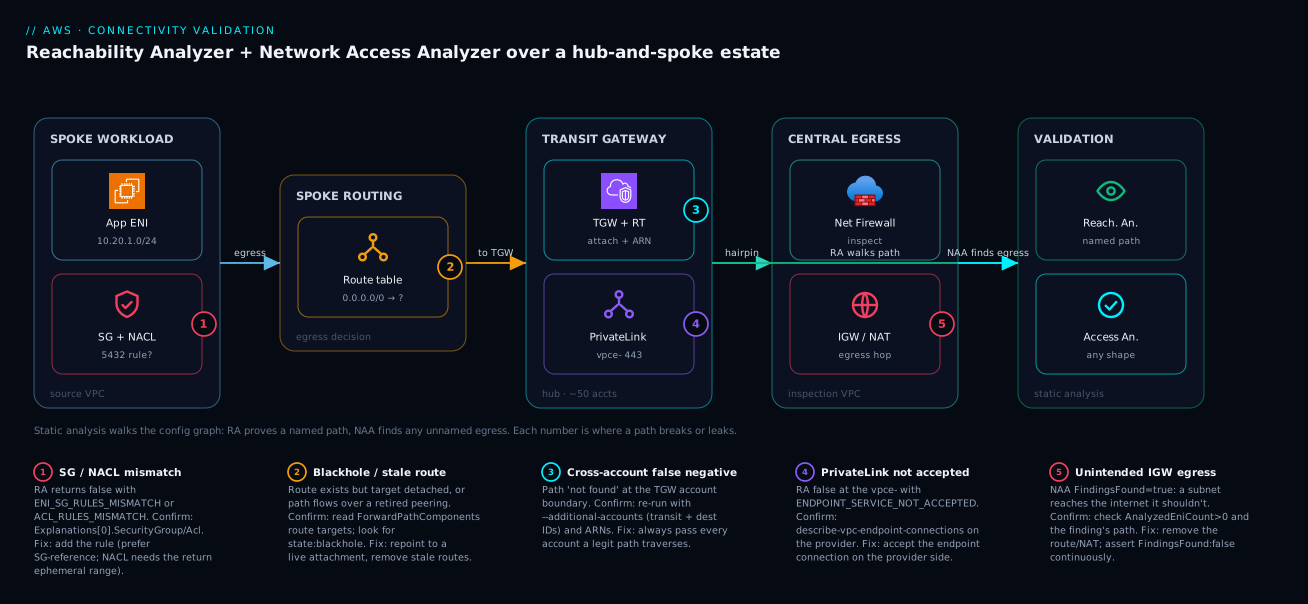
Real-world scenario
Northwind Payments ran a hub-and-spoke Transit Gateway across roughly fifty accounts with a centralized egress-inspection VPC — every spoke’s 0.0.0.0/0 was supposed to point at the TGW so all internet-bound traffic hairpinned through AWS Network Firewall. The platform team was six engineers; the estate carried about 1,400 ENIs across the cardholder-data accounts. Their PCI auditor asked them to prove, not assert, that no cardholder-data subnet could reach the internet by any route. Flow logs only showed the absence of observed egress, which the auditor correctly rejected as proof of a negative — an idle but open path looks identical to no path.
The constraint: 50 accounts, monthly attestation, and a standing fear that a single console SG edit or an accidental NAT route in one spoke would silently open a hole nobody noticed until the next quarter. They had been spending two engineer-days per month assembling a flow-log spreadsheet the auditor distrusted anyway.
They authored one Network Access Analyzer scope per CDE subnet group — internet-gateway and NAT-gateway destinations in MatchPaths, the sanctioned PrivateLink endpoints for logging carved out in ExcludePaths — and ran every scope across all member accounts from the delegated administrator on a daily EventBridge schedule. A Step Functions state machine started each analysis, polled to succeeded, and pushed any FindingsFound != false into Security Hub as a MEDIUM ASFF finding tagged with the scope ID.
# Daily, per CDE scope, from the delegated admin — page only on a real path
ANALYSIS=$(aws ec2 start-network-insights-access-scope-analysis \
  --network-insights-access-scope-id "$CDE_SCOPE_ID" \
  --query 'NetworkInsightsAccessScopeAnalysis.NetworkInsightsAccessScopeAnalysisId' \
  --output text)
aws ec2 wait network-insights-access-scope-analysis-succeeded \
  --network-insights-access-scope-analysis-ids "$ANALYSIS"
FOUND=$(aws ec2 describe-network-insights-access-scope-analyses \
  --network-insights-access-scope-analysis-ids "$ANALYSIS" \
  --query 'NetworkInsightsAccessScopeAnalyses[0].FindingsFound' --output text)
[ "$FOUND" = "false" ] || echo "CDE egress path found — escalate"
Two weeks in, the daily run flagged a finding in a non-production spoke: a developer had attached a NAT gateway and added a 0.0.0.0/0 route to “test something,” accidentally giving a subnet that shared a route table with a CDE subnet a path to the internet. The Network Access Analyzer finding named the offending subnet; they pivoted to Reachability Analyzer to pinpoint the exact route-table entry from the ForwardPathComponents in minutes, and removed it the same morning. The monthly attestation went from a manual, unconvincing flow-log spreadsheet to a screenshot of a clean Security Hub view backed by static proof — and the control caught a real regression before the auditor ever saw it.
The incident as a timeline, because the order of moves is the lesson:
| Day | Event | Action taken | Effect |
|---|---|---|---|
| 0 | Auditor rejects flow-log “proof” | Author per-CDE NAA scopes | Static proof, not observation |
| 1 | Scopes wired to daily schedule | Step Functions + delegated admin | Coverage across 50 accounts |
| 1 | First clean run | FindingsFound: false, ~1,400 ENIs analyzed |
Baseline established |
| 14 | Dev adds NAT + 0.0.0.0/0 in a sandbox spoke |
(no human noticed) | Latent exposure, zero traffic yet |
| 14 | Daily scan flags the CDE finding | Page fires from Security Hub | Caught before exploit |
| 14 | Pivot to Reachability Analyzer | Read ForwardPathComponents |
Exact route entry named in minutes |
| 14 | Remove the route | Re-run scope → false |
Invariant restored |
| 30 | Monthly attestation | Screenshot clean Security Hub | Audit passes on proof |
The cost-and-effort comparison that sold it internally:
| Dimension | Before (flow-log spreadsheet) | After (NAA + Security Hub) |
|---|---|---|
| Effort per attestation | ~2 engineer-days/month | ~0 (screenshot) |
| Proof type | Observed absence (rejected) | Static reachability proof |
| Time to detect a new hole | Up to a quarter | ≤ 1 day |
| Coverage | Sampled, manual | All 50 accounts, every ENI |
| Cost | Engineer time | Per-analysis runs (rupees/day) |
Advantages and disadvantages
Static reachability analysis both replaces the flow-log archaeology that fails for “can’t connect” and proves the negatives observation never can. Weigh it honestly:
| Advantages (why this model helps you) | Disadvantages (why it bites) |
|---|---|
| Finds faults on paths that have never carried traffic — the whole point flow logs miss | Reasons over configuration only — it cannot see an app that isn’t listening or an OS firewall |
One ExplanationCode does the differential diagnosis across SGs, NACLs, routes, TGW |
The code names the config block; a green path with a dead app still says “found” |
| Network Access Analyzer proves a negative an auditor accepts (no path exists) | Scopes are only as good as the shapes you author; a wrong scope silently matches nothing |
| Reasons across accounts/Regions through TGW, peering, PrivateLink | Cross-account needs --additional-accounts and delegated-admin setup or you get false negatives |
| No agent, no workload change, no packet sent — safe to run anytime | Each run is billed per analysis; bulk daily × 50 accounts adds up |
| Authorable as code (paths and scopes) and wirable into CI + EventBridge | The continuous wiring (Step Functions, ASFF, Security Hub) is real plumbing to build |
ForwardPathComponents catches functional-but-unintended routing flow logs would never flag |
Reading the hop list well takes practice; novices miss the stale-route tell |
The model is right whenever the question is “can it reach?” or “is there any path?” — pre-deploy validation, incident triage, and continuous compliance. It is the wrong tool when the question is “what did flow?” (use Flow Logs) or “is the application healthy?” (the analyzer says the network permits it; the app may still refuse the connection). The disadvantages are all manageable — author scopes carefully, pass the account IDs, budget the runs — but only if you know they exist.
Hands-on lab
Reproduce a blocked path, read the exact ExplanationCode, fix it, then assert a no-egress invariant with Network Access Analyzer — all in one VPC and cheap (per-analysis pricing; tear down at the end). Run in CloudShell or any shell with the CLI.
Step 1 — Variables and a VPC with two subnets.
REGION=ap-south-1
VPC=$(aws ec2 create-vpc --cidr-block 10.50.0.0/16 \
  --query 'Vpc.VpcId' --output text)
SUBA=$(aws ec2 create-subnet --vpc-id $VPC --cidr-block 10.50.1.0/24 \
  --query 'Subnet.SubnetId' --output text)
SUBB=$(aws ec2 create-subnet --vpc-id $VPC --cidr-block 10.50.2.0/24 \
  --query 'Subnet.SubnetId' --output text)
Step 2 — Two t3.micro instances, one per subnet, with a deliberately closed SG.
SG=$(aws ec2 create-security-group --group-name lab-sg --description "lab" \
  --vpc-id $VPC --query 'GroupId' --output text)
AMI=$(aws ssm get-parameter \
  --name /aws/service/ami-amazon-linux-latest/al2023-ami-kernel-default-x86_64 \
  --query 'Parameter.Value' --output text)
APP=$(aws ec2 run-instances --image-id $AMI --instance-type t3.micro \
  --subnet-id $SUBA --security-group-ids $SG \
  --query 'Instances[0].InstanceId' --output text)
DB=$(aws ec2 run-instances --image-id $AMI --instance-type t3.micro \
  --subnet-id $SUBB --security-group-ids $SG \
  --query 'Instances[0].InstanceId' --output text)
The SG has no ingress rule for 5432 — that is the bug we will diagnose.
Step 3 — Create the path and run the analysis (expect a block).
PATH_ID=$(aws ec2 create-network-insights-path \
  --source $APP --destination $DB --destination-port 5432 --protocol tcp \
  --query 'NetworkInsightsPath.NetworkInsightsPathId' --output text)
NIA=$(aws ec2 start-network-insights-analysis \
  --network-insights-path-id $PATH_ID \
  --query 'NetworkInsightsAnalysis.NetworkInsightsAnalysisId' --output text)
aws ec2 wait network-insights-analysis-succeeded --network-insights-analysis-ids $NIA
aws ec2 describe-network-insights-analyses --network-insights-analysis-ids $NIA \
  --query 'NetworkInsightsAnalyses[0].{Found:NetworkPathFound, Code:Explanations[0].ExplanationCode}'
Expected: { "Found": false, "Code": "ENI_SG_RULES_MISMATCH" } — the engine named the SG block without you opening a single rule.
Step 4 — Fix the SG (allow 5432 from the SG to itself) and re-run the same path.
aws ec2 authorize-security-group-ingress --group-id $SG \
  --protocol tcp --port 5432 --source-group $SG
NIA2=$(aws ec2 start-network-insights-analysis \
  --network-insights-path-id $PATH_ID \
  --query 'NetworkInsightsAnalysis.NetworkInsightsAnalysisId' --output text)
aws ec2 wait network-insights-analysis-succeeded --network-insights-analysis-ids $NIA2
aws ec2 describe-network-insights-analyses --network-insights-analysis-ids $NIA2 \
  --query 'NetworkInsightsAnalyses[0].NetworkPathFound'
Expected: true. The path object was reused; only the cheap analysis re-ran.
Step 5 — Read the forward path to confirm the hops.
aws ec2 describe-network-insights-analyses --network-insights-analysis-ids $NIA2 \
  --query 'NetworkInsightsAnalyses[0].ForwardPathComponents[].Component.Id' --output table
Expected: a short hop list ending at the DB ENI — the static traceroute over a path that has never carried a packet.
Step 6 — Assert a no-egress invariant with Network Access Analyzer. This VPC has no IGW, so the invariant should hold:
cat > /tmp/no-egress.json <<JSON
{ "MatchPaths": [ { "Source": { "ResourceStatement": { "Resources": ["$SUBA","$SUBB"] } },
  "Destination": { "ResourceStatement": { "ResourceTypes": ["AWS::EC2::InternetGateway","AWS::EC2::NatGateway"] } } } ] }
JSON
SCOPE=$(aws ec2 create-network-insights-access-scope --match-paths file:///tmp/no-egress.json \
  --query 'NetworkInsightsAccessScope.NetworkInsightsAccessScopeId' --output text)
SA=$(aws ec2 start-network-insights-access-scope-analysis \
  --network-insights-access-scope-id $SCOPE \
  --query 'NetworkInsightsAccessScopeAnalysis.NetworkInsightsAccessScopeAnalysisId' --output text)
aws ec2 wait network-insights-access-scope-analysis-succeeded \
  --network-insights-access-scope-analysis-ids $SA
aws ec2 describe-network-insights-access-scope-analyses \
  --network-insights-access-scope-analysis-ids $SA \
  --query 'NetworkInsightsAccessScopeAnalyses[0].{Findings:FindingsFound, ENIs:AnalyzedEniCount}'
Expected: { "Findings": "false", "ENIs": 2 } — no path out, and the engine confirms it reasoned over your two ENIs (not zero).
Validation checklist. You reproduced a real block, read the exact ExplanationCode, fixed it with one SG rule, re-ran the same path, read the forward hops, and proved a no-egress invariant. The lab steps mapped to what each proves:
| Step | What you did | What it proves | Real-world analogue |
|---|---|---|---|
| 3 | Analyze a closed-SG path | The engine names the block, no manual hunt | The 90-second ticket triage |
| 4 | Add SG rule, re-run path | Paths are durable; analyses are cheap re-runs | Verify-after-fix loop |
| 5 | Read ForwardPathComponents |
Static traceroute on a never-used path | Catching stale routing |
| 6 | No-egress scope returns false |
Proving a negative an auditor accepts | Continuous CDE compliance |
Cleanup (avoid lingering charges).
aws ec2 terminate-instances --instance-ids $APP $DB
aws ec2 delete-network-insights-path --network-insights-path-id $PATH_ID
aws ec2 delete-network-insights-access-scope --network-insights-access-scope-id $SCOPE
# then delete subnets, SG, and the VPC once instances are terminated
Cost note. Each reachability analysis and each access-scope analysis is billed per run (single-digit rupees each); two t3.micro instances for a few minutes are negligible, and terminating everything stops all charges. Delete the path and scope objects too — they are free to keep but tidy to remove.
Common mistakes & troubleshooting
This is the playbook — the part you bookmark. First as a scannable table you can read mid-incident, then the same entries with the full confirm-command detail underneath. Note the split: some rows are the network is wrong (Reachability says false); others are the tool is being used wrong (false negatives, empty scopes).
| # | Symptom | Root cause | Confirm (exact cmd / path) | Fix |
|---|---|---|---|---|
| 1 | RA says false, code ENI_SG_RULES_MISMATCH |
An SG on the path lacks the rule (your direction) | Explanations[0].SecurityGroup names it; describe-security-groups |
Add the rule; prefer SG-reference over CIDR |
| 2 | RA says false, code ACL_RULES_MISMATCH |
A subnet NACL blocks it (stateless, both ways) | Explanations[0].Acl + AclRule; check the return ephemeral range |
Add the numbered allow incl. 1024–65535 outbound |
| 3 | RA says false, code NO_ROUTE_TO_DESTINATION |
No route for the dest CIDR on the subnet | describe-route-tables for the source subnet |
Add the route to the correct target |
| 4 | RA says false, code BLACKHOLE_ROUTE |
A route’s target was detached/deleted | Route with state: blackhole in the table |
Repoint to a live attachment/gateway |
| 5 | Cross-account path returns “not found” but you know it works | Missing intermediate account IDs | Re-run with --additional-accounts <ids> |
Always pass transit + dest account IDs |
| 6 | RA false at a PrivateLink dest, ENDPOINT_SERVICE_NOT_ACCEPTED |
Provider never accepted the endpoint | describe-vpc-endpoint-connections (provider) |
Accept the connection on the provider side |
| 7 | RA says true but the app still can’t connect |
Network permits it; the app refuses | App listening? ss -ltnp; OS firewall? |
Fix the app/OS — not a network problem |
| 8 | NAA FindingsFound: false but you expected a finding |
Scope matched nothing (wrong IDs/types) | Check AnalyzedEniCount — is it 0? |
Fix MatchPaths resources/types; verify ENIs > 0 |
| 9 | NAA finding you believe is sanctioned | Approved path not excluded | The finding’s path vs your ExcludePaths |
Add the exception to ExcludePaths, re-run |
| 10 | Bulk daily runs error intermittently | API throttling on many concurrent analyses | ThrottlingException in logs |
Stagger/queue runs; back off; spread over time |
| 11 | RA forward path shows a route you retired | Functional-but-unintended routing (stale peering/NAT) | Read ForwardPathComponents route targets |
Remove the stale route; re-verify the intended one |
| 12 | Delegated-admin run sees a partial graph | Delegated admin not registered for VPC Reachability | UnauthorizedOperation / missing hops |
Register the delegated administrator |
| 13 | EventBridge rule never fires | Wrong source/detail-type filter |
Rule pattern vs aws.networkaccessanalyzer |
Match Analysis Completed exactly |
| 14 | Path analysis stuck or very slow | Huge/ambiguous topology, no scoping | Status not succeeded after minutes |
Use --filter-in-arns to narrow scope |
The expanded form, with the full reasoning for the entries that bite hardest:
1. RA returns false with ENI_SG_RULES_MISMATCH.
Root cause: a security group on the path has no rule permitting the flow in your direction (the explanation’s Direction tells you which).
Confirm: Explanations[0].SecurityGroup.GroupId names the exact SG; aws ec2 describe-security-groups --group-ids <sg> shows its rules.
Fix: add the missing rule — prefer an SG-reference (--source-group) over a CIDR so it survives IP changes and reads as intent.
2. RA returns false with ACL_RULES_MISMATCH / INGRESS_ACL_RULES_MISMATCH / EGRESS_ACL_RULES_MISMATCH.
Root cause: a NACL blocks the flow. Because NACLs are stateless, the trap is forgetting the return path: the reply needs an outbound allow for the ephemeral range.
Confirm: Explanations[0].Acl + AclRule.RuleNumber; inspect with aws ec2 describe-network-acls.
Fix: add the numbered allow rule; for the return direction allow 1024–65535 outbound.
3. RA returns false with NO_ROUTE_TO_DESTINATION or BLACKHOLE_ROUTE.
Root cause: the subnet route table has no route for the destination CIDR, or a route exists but its target is gone (detached IGW/NAT/attachment → blackhole).
Confirm: aws ec2 describe-route-tables for the source subnet; look for the CIDR and a state: blackhole.
Fix: add or repoint the route to a live target.
5. A cross-account path you know works reports “not found.”
Root cause: you omitted an intermediate or destination account ID from --additional-accounts, so the engine stopped at the boundary it cannot see into — a false negative.
Confirm: re-run the identical analysis with the transit and destination account IDs added; the path appears.
Fix: always pass every account a legitimate path traverses; reference endpoints by ARN.
7. RA says true but the application still cannot connect.
Root cause: the analyzers reason over configuration, not the running app — the network permits the connection, but the destination process isn’t listening, or an OS-level firewall (or the app itself) refuses it.
Confirm: on the destination, ss -ltnp for the listening port; check iptables/firewalld/security software.
Fix: this is not a VPC problem — start the service, open the host firewall, or fix the app. The analyzer correctly reported the network is fine.
8. NAA returns FindingsFound: false but you expected a violation.
Root cause: the scope matched nothing — wrong resource IDs, wrong ResourceTypes, or a Source/Destination that resolves to an empty set — so a clean result is meaningless.
Confirm: read AnalyzedEniCount; if it is 0, the scope reasoned over nothing.
Fix: correct the MatchPaths resources/types; re-run and confirm AnalyzedEniCount matches the blast radius you expect.
11. RA ForwardPathComponents shows a route you thought you retired.
Root cause: the path works, but over a deprecated peering or stale NAT route — functional-but-unintended routing flow logs would never flag.
Confirm: read the route targets in ForwardPathComponents (RouteTableRoute.GatewayId / TransitGatewayId).
Fix: remove the stale route, then re-run the path to confirm it now takes the intended attachment.
Best practices
- Keep durable paths for your top recurring tickets. App-to-DB, spoke-to-shared-service, endpoint-to-service — author them as code so verification is one cheap
start-network-insights-analysisre-run, not a fresh setup each incident. - Read the
ExplanationCodebefore you touch a console. It names the layer and direction; opening the four SGs by hand is the slow path you are trying to retire. - Always pass
--additional-accountson cross-account analyses. The transit and destination account IDs — the silent false-negative “not found” is the single biggest cross-account time-sink. - Reference cross-account endpoints by ARN, not bare ID. The ARN form is what lets the engine resolve a resource it doesn’t own.
- Author a
data-tier-no-egressscope for every sensitive subnet group and assertFindingsFound: false. Prove the negative; never assert it from flow logs. - Encode segmentation as scopes with sanctioned exceptions in
ExcludePaths. PCI-to-non-PCI, DB-ports-to-internet, firewall-bypass — return only the violations. - Always check
AnalyzedEniCounton a “clean” NAA result. Afalseover zero ENIs is not a pass; it is a broken scope. - Run both triggers: a pre-merge CI gate and a scheduled drift scan. The gate stops pipeline regressions; the scan catches console and out-of-band changes the gate never sees.
- Centralize from a delegated administrator so one account reasons across all members, and register it for VPC Reachability before you rely on it.
- Import findings to Security Hub as ASFF and correlate with Config. Path-level reachability (NAA) plus resource-level compliance (Config) in one governance ledger.
- Stagger bulk analyses across accounts to avoid
ThrottlingException; queue them rather than firing 50 at once. - Rehearse reading
ForwardPathComponentsso a real incident is a five-minute trace and a stale-route catch, not an hour of flow-log archaeology.
The standing controls worth wiring before the next audit — what to run, where, and how often:
| Control | Tool | Where it runs | Cadence | Pass condition |
|---|---|---|---|---|
| Recurring connectivity paths | Reachability Analyzer | On-demand / incident | Per ticket | NetworkPathFound: true |
| No-egress (per CDE subnet group) | Network Access Analyzer | Delegated admin | Daily | FindingsFound: false |
| DB-ports-not-internet | Network Access Analyzer | All accounts | Daily | FindingsFound: false |
| Segmentation (PCI ↔ non-PCI) | Network Access Analyzer | All accounts | Daily | FindingsFound: false |
| Pre-merge invariant gate | Network Access Analyzer | CI pipeline | Per PR | All scopes false |
| Resource-level posture | AWS Config | All accounts | On change | Rules compliant |
Security notes
- Least-privilege for the analyzers themselves. The IAM principal that runs analyses needs only the
ec2:*NetworkInsights*actions (create/start/describe/delete paths, access scopes, and analyses) plustag— not broad EC2 write. The delegated administrator gets read across the org for the graph, nothing more. - The analyzer is a read-only oracle — treat its output as sensitive.
ForwardPathComponentsand findings reveal your topology, SG references, and trust boundaries; restrict who can read analyses and where the ASFF findings land. - Use Network Access Analyzer as a guardrail, not just a report. A
db-ports-not-internetscope is a tripwire for the exact misconfiguration (an SG opened to0.0.0.0/0on 5432) that precedes a data-exfil incident — page on it, don’t just log it. - Pair path proof with an SCP that prevents the hole. Reachability proves a path is closed today; an Organizations SCP denying
ec2:CreateInternetGateway(or detaching it) in CDE accounts keeps it closed structurally. - Don’t let the CI runner over-permission. The pipeline identity that runs scopes should be able to start and read analyses, not modify the VPC it is validating.
- Keep findings inside the governance boundary. Import to a Security Hub aggregated in a dedicated security account; do not email raw topology findings to broad distribution lists.
- Validate the inspection path explicitly. A
no-firewall-bypassscope (ThroughResourcesrequiring the firewall endpoints) proves no spoke egresses around your Network Firewall — the control auditors actually ask about.
The security-relevant invariants and what each one prevents:
| Scope / control | Prevents | The incident it heads off |
|---|---|---|
data-tier-no-egress |
Any internet path from sensitive subnets | Silent data exfiltration over a forgotten route |
db-ports-not-internet |
DB ports reachable from the internet | An SG one edit from exposing a database |
no-firewall-bypass |
Egress that skips inspection | Malware C2 over an unfiltered path |
mgmt-plane-restricted |
SSH/RDP from workload subnets | Lateral movement to bastions |
| Least-priv analyzer IAM | Over-broad EC2 write on the runner | A compromised pipeline editing the VPC |
| SCP deny IGW in CDE | Structural creation of an egress path | “Test something” NAT/IGW in a CDE account |
Cost & sizing
The bill is driven almost entirely by how many analyses you run, not by data volume — there is no agent and no per-GB ingestion. The drivers and how to right-size them:
- Per-analysis pricing dominates. Each Reachability Analyzer analysis and each Network Access Analyzer access-scope analysis is billed per run (single-digit rupees each, order-of-magnitude). On-demand incident use is negligible; the cost shows up when you run many scopes across many accounts on a frequent schedule.
- Continuous scanning is the real lever. Daily × (number of scopes) × (number of accounts) is your run count. Fifty accounts × five CDE scopes × daily is ~250 runs/day — still modest, but worth bounding: scan sensitive scopes daily and broader ones weekly rather than running everything hourly.
- Paths and scopes are free to keep. The durable
nip-…andnis-…objects cost nothing; only the analyses bill. Keep your recurring paths and standing scopes version-controlled and reuse them. - No instance/SKU sizing. Unlike compute, there is nothing to right-size per workload — the only knobs are which invariants you encode and how often you evaluate them.
- Compare against the cost it removes. The flow-log spreadsheet Northwind replaced was two engineer-days/month; the analysis runs cost a fraction of that, before counting the breach the daily scan prevents.
A rough monthly picture for a 50-account regulated estate, and what each line buys:
| Cost driver | What you pay for | Rough scale | What it buys | Watch-out |
|---|---|---|---|---|
| On-demand RA (incidents) | Per analysis | Tens/month | Five-minute ticket triage | Trivial spend |
| Daily CDE no-egress scopes | Per scope-analysis × accounts | ~250 runs/day | Continuous proof of a negative | Don’t over-schedule low-risk scopes |
| Weekly broad segmentation | Per scope-analysis × accounts | ~50–100 runs/week | Estate-wide drift detection | Weekly is enough for low-churn nets |
| CI pre-merge gate | Per scope-analysis × PRs | Per merge | Blocks violations pre-prod | Cache results within a PR if re-running |
| Step Functions / Lambda glue | Standard service pricing | Pennies | The continuous wiring | Negligible vs the value |
| Security Hub ingestion | Per finding (standard) | Low | One governance pane | Only violations are imported |
Interview & exam questions
1. What is the difference between Reachability Analyzer and Network Access Analyzer? Reachability Analyzer is point-to-point: you name a source and destination and it answers “can A reach B, and if not, which component blocks it?” Network Access Analyzer is many-to-many: you describe a shape of path (e.g. any subnet → any internet gateway) and it returns every instance across the VPC/account. Both are static analysis over configuration; one validates a named path, the other hunts for unnamed ones.
2. Why do both analyzers beat VPC Flow Logs for a “can’t connect” ticket? They reason over configuration, not observed traffic, so they find a fault on a path that has never carried a packet — whereas a broken path produces no flow-log rows to read. Flow logs only show what already flowed; they cannot answer the counterfactual “could a packet get through?”
3. A reachability analysis returns NetworkPathFound: false. What single field tells you the cause? The ExplanationCode in Explanations[0] — e.g. ENI_SG_RULES_MISMATCH (a security group, your direction), ACL_RULES_MISMATCH (a NACL), NO_ROUTE_TO_DESTINATION (routing), or BLACKHOLE_ROUTE (a route whose target is gone). It names the layer and direction, doing the differential diagnosis across all the SGs/NACLs/routes for you.
4. A cross-account path you know works reports “not found.” Why? You omitted the intermediate and/or destination account IDs from --additional-accounts, so the engine stopped at the account boundary it cannot see into and produced a false negative. Re-run with the transit and destination account IDs (and reference endpoints by ARN). This is the most common cross-account mistake.
5. What does ForwardPathComponents give you that a simple pass/fail doesn’t? The ordered list of hops the packet traverses — each SG rule, NACL rule, route table and target, TGW attachment, and endpoint — so you can confirm the path takes the route you intend. It catches functional-but-unintended routing, like a working path that still flows over a peering connection you meant to retire.
6. How do you assert “nothing in my data subnets can reach the internet”? Author a Network Access Analyzer scope with MatchPaths from the data subnets to ResourceTypes: [InternetGateway, NatGateway], run an access-scope analysis, and require FindingsFound: false. Any finding is a real egress path. Check AnalyzedEniCount to confirm the scope actually reasoned over ENIs and didn’t silently match nothing.
7. What is the role of ExcludePaths? It carves sanctioned exceptions out of a broad prohibition: state the wide rule in MatchPaths (e.g. PCI subnet → any ENI), then subtract the approved paths in ExcludePaths (e.g. the one logging endpoint), so the analysis returns only the violations. It is how you express real-world segmentation that has legitimate exceptions.
8. Reachability Analyzer says true but the app still can’t connect. What’s wrong? The analyzers validate the network configuration, not the running application. The network permits the connection, but the destination process may not be listening, or an OS-level firewall (or the app) is refusing it. Check ss -ltnp and host firewalls — the analyzer correctly reported the VPC path is open.
9. How do you make Network Access Analyzer a continuous control rather than a one-off? Two triggers: a pre-merge CI gate that runs the scopes against post-apply state and fails the build on any finding, and a scheduled EventBridge drift scan (reacting to the Analysis Completed event on source: aws.networkaccessanalyzer) that runs scopes across all accounts from a delegated administrator and pages only when FindingsFound != false. Findings import to Security Hub as ASFF.
10. How do Network Access Analyzer and AWS Config divide the work? Config evaluates single-resource compliance the instant a resource changes (restricted-ssh, vpc-sg-open-only-to-authorized-ports); Network Access Analyzer evaluates whole-path reachability that no single-resource rule can see (a multi-hop egress across SGs, routes, and a TGW). Both feed Security Hub as the single governance ledger.
11. What does AnalyzedEniCount tell you, and why does it matter? It is the number of ENIs the engine actually reasoned over. A FindingsFound: false result is only meaningful if AnalyzedEniCount is non-zero — a clean result over zero ENIs means the scope matched nothing (wrong IDs/types), which is a broken assertion, not a pass.
12. You point a reachability path at a PrivateLink destination. What should the destination be, and what does the engine validate? Point it at the consumer-side VPC endpoint (vpce-…), not the service name. The engine then validates the endpoint’s security group and the provider’s service acceptance (ENDPOINT_SERVICE_NOT_ACCEPTED if not accepted), not just raw routing.
These map to AWS Certified Advanced Networking – Specialty (ANS-C01) — network management and operations, hybrid and multi-account connectivity — and Security – Specialty (SCS-C02) — infrastructure security, detection and incident response. The continuous-control and governance angle (EventBridge, Security Hub, Config, delegated admin) touches Solutions Architect Professional (SAP-C02). A compact cert-mapping for revision:
| Question theme | Primary cert | Exam objective area |
|---|---|---|
| RA vs NAA vs Flow Logs | ANS-C01 | Network operations & troubleshooting |
ExplanationCode, forward path |
ANS-C01 | Diagnose connectivity across SG/NACL/route/TGW |
Cross-account --additional-accounts |
ANS-C01 / SAP-C02 | Multi-account connectivity |
| No-egress / segmentation scopes | SCS-C02 | Infrastructure security; data perimeter |
| Continuous control (EventBridge, Step Functions) | SAP-C02 | Operational excellence; governance |
| ASFF → Security Hub + Config | SCS-C02 | Detection & response; security findings |
Quick check
- You’re handed a “the app can’t reach the DB on 5432” ticket. Which tool do you reach for, and which single field do you read first?
- A reachability analysis returns
NetworkPathFound: falsewithExplanationCode: BLACKHOLE_ROUTE. What does that mean and how do you fix it? - A cross-account path you know works comes back “not found.” What did you most likely forget?
- You run a no-egress Network Access Analyzer scope and get
FindingsFound: false. What second field must you check before you trust that result, and why? - Reachability Analyzer says
true, but the application still can’t connect. What is the analyzer telling you, and where do you look next?
Answers
- Reachability Analyzer — create the path (app ENI → DB ENI, TCP/5432) and run an analysis. The first field is
NetworkPathFound; iffalse, readExplanations[0].ExplanationCodefor the named blocking component (most oftenENI_SG_RULES_MISMATCH). - A route for the destination CIDR exists, but its target has been detached or deleted (e.g. a removed NAT gateway or TGW attachment), so the route is in
state: blackholeand drops the packet. Fix by repointing the route to a live target, then re-run the same path. - The intermediate and/or destination account IDs in
--additional-accounts. Without them the engine stops at the account boundary it can’t see into and returns a false negative. Re-run with the transit + destination account IDs and reference endpoints by ARN. AnalyzedEniCount. Afalseover zero ENIs means the scope matched nothing (wrong resource IDs or types), so the “pass” is meaningless. Confirm the count matches the blast radius you expected.- The network configuration permits the connection — it is not a VPC problem. The destination process may not be listening, or an OS-level firewall/the app is refusing it. Check
ss -ltnpon the destination and the host firewall.
Glossary
- VPC Reachability Analyzer — a static-analysis tool that answers whether a named source can reach a named destination, and which component blocks it if not; reasons over configuration, sends no packet.
- Network Access Analyzer — a static-analysis tool that finds every path matching a described shape (e.g. any subnet → any internet gateway); the linter for your network’s trust boundaries.
- Network insights path (
nip-…) — the durable, reusable object describing a source/destination/protocol/port tuple to analyze. - Network insights analysis (
nia-…) — one run of Reachability Analyzer against a path; carriesNetworkPathFoundandExplanations. NetworkPathFound— the boolean result of a reachability analysis: is the named path reachable?ExplanationCode— the machine-readable name of the blocking component on a failed path (e.g.ENI_SG_RULES_MISMATCH,NO_ROUTE_TO_DESTINATION,BLACKHOLE_ROUTE).ForwardPathComponents/ReturnPathComponents— the ordered hop lists for the request and reply directions; the static traceroute.- Access scope (
nis-…) — a Network Access Analyzer definition ofMatchPathsminusExcludePaths; the invariant you assert. FindingsFound— the boolean result of an access-scope analysis: does any path matching the scope exist? The invariant holds only whenfalse.AnalyzedEniCount— how many ENIs the access-scope analysis reasoned over; confirms afalseresult isn’t an empty scope.MatchPaths— the path shape(s) Network Access Analyzer should find.ExcludePaths— sanctioned exceptions subtracted from the matches so only violations remain.ThroughResources— a path-statement element constraining what a path must or must not transit (e.g. the firewall endpoints).PacketHeaderStatement— a path-statement element constraining the flow by L4 (ports, protocols, prefix lists).--additional-accounts— the analysis argument listing intermediate/destination account IDs a cross-account path may traverse; omitting it yields a false negative.- ASFF (AWS Security Finding Format) — the schema a Network Access Analyzer finding is converted into for
BatchImportFindingsinto Security Hub. - Delegated administrator — a member account empowered to run analyses across the whole Organization’s resources.
- VPC Network Insights — the umbrella feature that houses both analyzers; billed per analysis run.
Next steps
You can now answer “can it reach?” and “is there any path?” with static proof, and wire the second into a continuous control. Build outward:
- Next: Security Groups and NACLs Deep Dive — master the stateful/stateless rule layers the
ExplanationCodekeeps pointing you at. - Related: AWS VPC Deep Dive: Subnets, Routing, IGW, NAT & Endpoints — the routing and gateway mechanics behind every hop in
ForwardPathComponents. - Related: Transit Gateway Multi-Account VPC Architecture — the hub the cross-account paths traverse and whose route tables you’ll be reading.
- Related: PrivateLink: Service Provider and Consumer, Cross-Account — the endpoint hop the analyzer validates (
ENDPOINT_SERVICE_NOT_ACCEPTED). - Related: AWS Network Firewall: Egress Filtering and Centralized Inspection — the inspection path a
no-firewall-bypassscope proves no spoke skips. - Related: Organizations, SCP Guardrails and Delegated Admin — the structural guardrails that keep a path closed after you’ve proven it closed.