In a nutshell
Imagine your company office and an AWS data centre. The public internet is the ordinary road network to reach it: usually fine, but with unpredictable traffic, no guaranteed travel time, and the occasional pile-up. AWS Direct Connect (DX) is a private leased highway straight from your building into AWS — consistent speed, low latency, and your packets never touch the public internet. The catch: one highway can still be closed by roadworks (an AWS maintenance) or an accident (a fibre cut). So a serious hybrid network builds two independent highways to two different interchanges, keeps an ordinary-road route (an encrypted VPN over the internet) as an emergency detour, and posts smart signage — the BGP routing protocol — so traffic instantly re-routes the moment a highway closes, and so cars going out and coming back always take the same highway (mismatched paths cause the head-on collisions we call asymmetric routing).
The Transit Gateway (TGW) is the big interchange on the AWS side: instead of wiring every one of your VPCs to on-prem separately, everything meets at one hub and the hub decides where each packet goes. A Direct Connect Gateway (DXGW) is the on-ramp that lets your private highways feed that interchange from any AWS Region. Put together, this lesson builds AWS’s maximum-resiliency model: four connections across two DX locations, all landing on a TGW through a DXGW, with an IPsec VPN backup on the same hub and BGP tuned so failover happens in under a second.
Level: Expert · Time: ~45 min
Prerequisites — this is an advanced networking lesson. You will get the most from it if you already understand VPCs, subnets, and route tables (see VPC deep dive), how a Transit Gateway hubs many VPCs together (see Transit Gateway multi-account architecture), and the basics of BGP (autonomous systems, prefixes, AS-path). If “BGP” and “/30 peering subnet” are new, skim a BGP primer first, then come back.
After this lesson you will be able to:
- Choose the right DX resiliency model (maximum vs high vs single) and say exactly what SLA each one earns and what failure it survives.
- Tell a connection, a LAG, and a VIF apart — and pick transit VIFs for a Transit Gateway design.
- Stand up a Direct Connect Gateway and associate a Transit Gateway, getting the allowed-prefixes list right.
- Shape BGP failover with AS-path prepend, local-preference communities, and BFD so a link or a whole location can drop with sub-second reconvergence and no asymmetric routing.
- Add an encrypted path with MACsec on the port or an IPsec VPN backup on the same TGW — and know which layer each one protects.
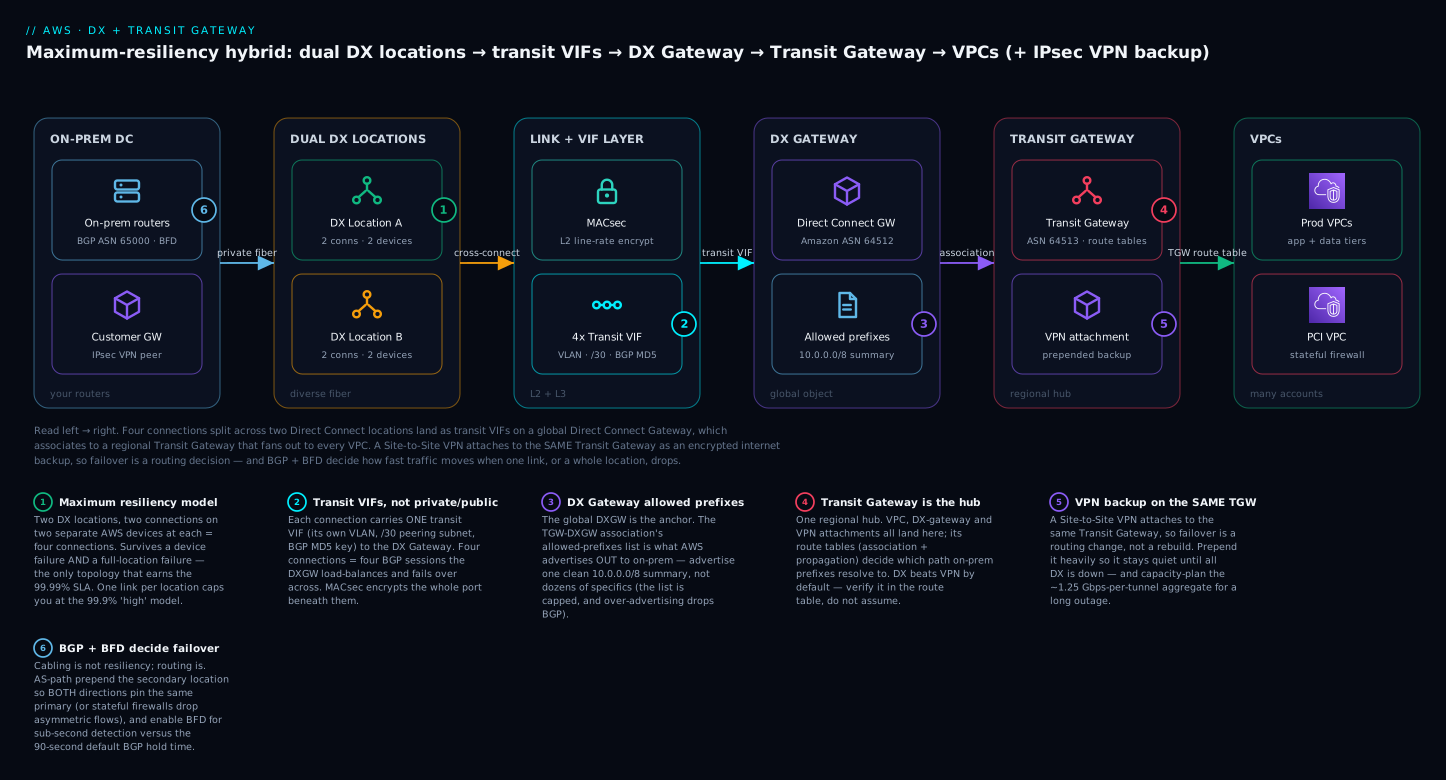
Read the diagram left to right: four connections across two DX locations become transit VIFs on a global Direct Connect Gateway, which associates to a regional Transit Gateway that fans out to every VPC — while a Site-to-Site VPN hangs off the same TGW as a heavily-prepended internet backup, and BGP + BFD (badge 6) decide how fast traffic moves when a link or an entire location fails.
A single Direct Connect circuit is a private 1/10 Gbps pipe with no SLA worth printing. The resiliency lives entirely in how you pair connections across locations and devices, how BGP converges when one fails, and whether you have an encrypted path to fall back to. This guide builds the maximum resiliency model end to end: four connections across two Direct Connect locations, transit VIFs landing on a Transit Gateway through a Direct Connect Gateway, BGP tuned for fast failover, and a Site-to-Site VPN backup riding the public internet.
First principles: what Direct Connect actually is (before the build)
The build steps below move fast because they assume you already know what each object is. If you are newer to hybrid networking, ground yourself here first — it is the “why” that makes the rest stick.
The problem DX solves. A Site-to-Site VPN over the internet is cheap and quick, but it inherits the internet’s weather: variable latency, occasional packet loss, and a hard throughput ceiling (~1.25 Gbps per tunnel). For a database replicating cross-site, a trading feed, or a chatty file protocol, that jitter is unacceptable. Direct Connect gives you a private, physical Ethernet handoff into the AWS network with consistent latency and dedicated bandwidth. It is not encrypted by itself and it is not automatically redundant — those are things you add, which is the entire point of this lesson.
The physical reality. Your router does not plug into AWS directly. Both you and AWS have equipment in the same colocation facility (a “DX location” such as an Equinix or CoreSite building). AWS gives you a Letter of Authorization and Connecting Facility Assignment (LOA-CFA); you hand it to the colo provider, who runs a cross-connect — a literal fibre patch cable — between the AWS cage and your cage (or your network provider’s cage). That cross-connect is the “connection.” Everything logical (VLANs, BGP, VIFs) rides on top of it.
Dedicated vs hosted — pick this before you order. There are two ways to obtain a connection, and they constrain everything downstream:
| Dedicated connection | Hosted connection | |
|---|---|---|
| Ordered from | AWS directly | An AWS Direct Connect Partner |
| Port speeds | 1, 10, or 100 Gbps (a full port) | 50 Mbps → 25 Gbps (a slice of the partner’s port) |
| VIFs per connection | Many (multiple private/public; one transit VIF, which then stands alone) | Exactly one VIF |
| LAG (bundling) | Yes (1–4 same-speed ports on one device) | No |
| MACsec | Yes, on capable 10/100 Gbps ports at supported locations | No |
| Lead time | Weeks (cross-connect + provisioning) | Often days (partner already has the port) |
For the maximum-resiliency TGW design in this lesson you want four dedicated connections (so you can run one transit VIF on each, use MACsec, and control the physical device/location diversity). Hosted connections are perfectly good for smaller or faster-to-stand-up needs, but a single hosted connection carrying a single VIF is not a resiliency story on its own.
Why BGP, not static routes. You could hard-code routes, but then a failed link is a manual outage. Direct Connect speaks BGP (Border Gateway Protocol) so the two sides advertise the networks they can reach and withdraw them when a link dies. That withdrawal is what makes failover automatic. Your router uses a private ASN (autonomous system number, e.g. 65000); the AWS side answers with the Amazon-side ASN you pick on the DXGW (e.g. 64512). BGP is the nervous system of everything that follows — get comfortable with AS-path, local-preference, and prefix length and the rest of this lesson is straightforward.
A worked example: one packet’s round trip
Make it concrete. An on-prem host 10.1.5.10 needs to reach an EC2 instance 10.20.3.40 in a VPC behind the Transit Gateway.
- On-prem lookup (outbound). Your router has learned
10.20.0.0/16via BGP over the DX VIFs (the TGW’s VPC space, re-advertised as part of the10.0.0.0/8summary the DXGW sends). It has learned it on all four VIFs, but you set local-preference 200 on the two Location A VIFs, so the router prefers Location A. The packet leaves toward Location A, device 1. - Across the cross-connect. The frame carries VLAN 101 (this transit VIF’s tag). If MACsec is on, the whole frame is encrypted at line rate on the wire between your router and the AWS device. It arrives at the AWS DX router.
- DXGW → TGW. The transit VIF hands the packet to the Direct Connect Gateway, which is associated with your Transit Gateway. The TGW consults its route table, finds
10.20.0.0/16pointing at the VPC attachment, and forwards it into the VPC. The instance’s subnet route table sends it to10.20.3.40. Delivered. - The return trip (the part that bites people). The instance replies to
10.1.5.10. The TGW has learned10.1.0.0/16(your on-prem space) from BGP over the DXGW. Which of the four VIFs does AWS send it back on? AWS chose based on AS-path length — and because you prepended your ASN on the Location B VIFs, AWS sees Location A as the shorter path and returns traffic via Location A too. Both directions now agree on Location A. If they did not agree, a stateful firewall in front of the VPC would see the outbound SYN on one location and the inbound SYN-ACK on the other and silently drop the flow. That symmetry is the single most important routing outcome in the whole design.
Hold onto that round trip: every failover control in the later steps exists to keep step 1 and step 4 pointed at the same location, and to move both of them, fast, when that location fails.
1. Resiliency models and what the SLA actually covers
AWS publishes three resiliency models, and the SLA you can claim is a direct function of which one you build. The Direct Connect SLA (99.99% for the maximum model) is only honored if your topology matches the requirement.
| Model | Topology | Survives | SLA |
|---|---|---|---|
| Maximum | Two DX locations, each with redundant devices | Device failure and full location failure | 99.99% |
| High | One connection at each of two DX locations | Full location failure, single connection failure | 99.9% |
| Single (dev/test) | Two connections at one location | Single connection or device failure only | None |
The trap is the “high” model: two connections at the same location share a building and sometimes a single AWS router, so a maintenance event or fiber cut takes both down. For production hybrid, the maximum model is the only one that earns the 99.99% number.
The SLA measures availability of the service. If your BGP config blackholes traffic during a failover, the circuit was “up” and you still had an outage. Resiliency is a property of your routing, not just your cabling.
For the maximum model you order two connections at DX Location A (on separate AWS devices) and two more at DX Location B — four connections, four cross-connects, ideally on diverse fiber to each facility.
2. Connections, LAGs, and virtual interfaces decoded
Three layers stack on each physical port; conflating them is the most common design mistake.
- Connection — the physical port (1/10/100 Gbps) at a DX location, terminated by a cross-connect to your router or provider.
- LAG (Link Aggregation Group) — bundles 1-4 connections on the same AWS device into one logical link via LACP. It raises bandwidth and survives a single port failure, but every member lands on one device at one location, so a LAG is not a cross-location resiliency boundary. Do not confuse it with the maximum model.
- Virtual Interface (VIF) — the logical Layer 3 attachment carrying a BGP session. Three types:
| VIF type | Reaches | Use with |
|---|---|---|
| Private VIF | A single VPC via a VGW (or DX Gateway) | One-VPC hybrid |
| Public VIF | AWS public endpoints (S3, public APIs) over private fiber | Avoiding the internet for public endpoints |
| Transit VIF | A Transit Gateway via a Direct Connect Gateway | Many VPCs / many regions |
For a Transit Gateway design you want transit VIFs. A transit VIF attaches to a Direct Connect Gateway (DXGW), which in turn associates to one or more Transit Gateways. With four connections you get four transit VIFs and four BGP sessions, and the DXGW load-balances and fails over across them.
A hard limit: a Direct Connect connection supports at most one transit VIF, and on most port speeds cannot carry private or public VIFs alongside it. For a pure TGW design, make all four transit.
3. Step 1 - Order connections and stand up the Direct Connect Gateway
Order connections from the console or CLI; the cross-connect and Letter of Authorization (LOA-CFA) steps are manual. Request the connections first, on separate devices per location:
# Location A, device 1
aws directconnect create-connection \
  --location "EqDC2" \
  --bandwidth "10Gbps" \
  --connection-name "dx-locA-dev1" \
  --request-macsec-capable

# Location B, device 1 (diverse location)
aws directconnect create-connection \
  --location "CSSEA1" \
  --bandwidth "10Gbps" \
  --connection-name "dx-locB-dev1" \
  --request-macsec-capable
--request-macsec-capable only succeeds on MACsec-supported ports (dedicated 10/100 Gbps at supported locations); request it now, since you cannot retrofit a non-capable port. Repeat for the second device at each location, then download each LOA-CFA and hand it to the colocation provider for the cross-connect:
aws directconnect describe-loa \
  --connection-id "dxcon-aaaa1111" \
  --output text --query loaContent | base64 --decode > loa-locA-dev1.pdf
Once cross-connects are live and the ports show available, create the Direct Connect Gateway — a global, region-agnostic object and the anchor for the whole design. Its Amazon-side ASN is what AWS uses on the BGP sessions toward your router.
aws directconnect create-direct-connect-gateway \
  --direct-connect-gateway-name "dxgw-prod-global" \
  --amazon-side-asn 64512
Choose the Amazon-side ASN deliberately. It must differ from your on-prem ASN, and if you ever attach this DXGW to a Transit Gateway, the DXGW ASN and the TGW ASN must also be distinct. Picking from the private ASN range (64512-65534, or the 32-bit private range) and documenting it now avoids a painful renumber later, since the DXGW ASN is immutable after creation.
4. Step 2 - Associate the Transit Gateway and configure transit VIFs
Create the Transit Gateway (or reuse an existing one) and associate it to the DXGW. The association declares which CIDRs the TGW advertises out to on-prem via the allowed prefixes list — the single most important field in the whole build.
# Create the TGW with its own distinct ASN
aws ec2 create-transit-gateway \
  --description "tgw-prod" \
  --options "AmazonSideAsn=64513,DefaultRouteTableAssociation=enable,DefaultRouteTablePropagation=enable"

# Associate the TGW to the DXGW, declaring the prefixes the TGW will advertise to on-prem
aws directconnect create-transit-gateway-association \
  --direct-connect-gateway-id "dxgw-1234567890abcdef" \
  --gateway-id "tgw-0a1b2c3d4e5f6a7b8" \
  --add-allowed-prefixes-to-direct-connect-gateway "cidr=10.0.0.0/8"
The allowed-prefixes on a transit association are not a filter on inbound routes — they are the summaries the DXGW advertises from AWS to on-prem over every transit VIF. Advertise one clean summary (e.g. 10.0.0.0/8 covering all VPC space) rather than dozens of specifics, since the DXGW caps advertised prefixes.
Create one transit VIF per connection — each with its own VLAN, /30 peering subnet, and BGP session to the DXGW.
aws directconnect create-transit-virtual-interface \
  --connection-id "dxcon-aaaa1111" \
  --new-transit-virtual-interface '{
    "virtualInterfaceName": "tvif-locA-dev1",
    "vlan": 101,
    "asn": 65000,
    "mtu": 8500,
    "directConnectGatewayId": "dxgw-1234567890abcdef",
    "addressFamily": "ipv4",
    "amazonAddress": "169.254.100.1/30",
    "customerAddress": "169.254.100.2/30",
    "authKey": "your-bgp-md5-secret"
  }'
Details that matter:
asnhere is your on-prem/router ASN (customer side); the DXGW answers with its Amazon-side ASN from Step 1.mtu: 8500enables jumbo frames, avoiding fragmentation for the encapsulation overhead TGW adds. Confirm the on-prem path supports it end to end first.authKeysets the BGP MD5 password. Always set one.- Repeat with distinct VLANs, peering /30s, and names for all four connections.
5. Step 3 - Route propagation, allowed prefixes, and asymmetric routing
You now have BGP in both directions and need to make it deterministic.
Outbound from AWS (TGW to on-prem) is controlled by the allowed-prefixes on the TGW-DXGW association (Step 2); the DXGW advertises those summaries equally over all four transit VIFs. With DefaultRouteTablePropagation=enable, learned routes propagate to the TGW route table automatically.
Inbound to AWS (on-prem to TGW) is driven by what your routers advertise. To prefer Location A normally and fail to Location B, shape it with BGP attributes:
! Cisco IOS-XE: prefer Location A, prepend Location B
router bgp 65000
 address-family ipv4 unicast
  ! Location A: higher local-pref preferred for AWS-bound traffic
  neighbor 169.254.100.1 route-map LOCA-PRIMARY in
  ! Location B: prepend our ASN outbound so AWS prefers A
  neighbor 169.254.110.1 route-map LOCB-BACKUP out
!
route-map LOCA-PRIMARY permit 10
 set local-preference 200
!
route-map LOCB-BACKUP permit 10
 set as-path prepend 65000 65000
AWS path selection over Direct Connect goes longest prefix match, then AS_PATH length, then specific local routes. AWS ignores local-preference (your side’s attribute) and does not honor inbound MED across the DXGW reliably, so the durable lever for steering AWS-bound traffic is AS_PATH prepending on the secondary connections, plus a more-specific on the primary for a harder preference.
Asymmetric routing is the classic Direct Connect outage. If AWS returns traffic out Location B while you send out Location A, stateful firewalls drop the mismatched flows. The fix: make both directions agree on the same primary — higher local-pref inbound on A, prepend on B outbound — and keep prefix lengths symmetric per location rather than summarizing one and de-aggregating the other.
6. Step 4 - Encrypting the link: MACsec on the port vs IPsec over the VIF
Direct Connect is private but not encrypted by default. Two options operate at different layers:
| Approach | Layer | Scope | Requirements |
|---|---|---|---|
| MACsec (802.1AE) | L2, on the port | Entire connection, all VIFs | MACsec-capable dedicated port; supported location; CKN/CAK keys |
| IPsec over the VIF | L3, in a VPN tunnel | A Site-to-Site VPN over the DX path | Public VIF + VPN, or the VPN backup itself |
MACsec is line-rate, point-to-point on the cross-connect, and the cleaner answer when both router and port support it (why we passed --request-macsec-capable in Step 1). Associate a MACsec secret — a Connection Key Name (CKN) and Connectivity Association Key (CAK) — to the connection:
aws directconnect associate-mac-sec-key \
  --connection-id "dxcon-aaaa1111" \
  --ckn "0011...your-ckn..." \
  --cak "1122...your-cak..."

# Require encryption: unencrypted frames are dropped, not allowed through
aws directconnect update-connection \
  --connection-id "dxcon-aaaa1111" \
  --encryption-mode "must_encrypt"
Set encryption-mode to must_encrypt only after the key is confirmed on both ends; setting it before the peer is keyed drops the link. Use should_encrypt during cutover.
If MACsec is unavailable (a hosted connection, or a 1 Gbps port), encrypt at L3 by running a Site-to-Site VPN over a public VIF, or rely on the IPsec VPN backup below. You cannot run a VPN over a transit VIF.
7. The Site-to-Site VPN backup and BGP timer tuning
The encrypted, internet-based backup attaches to the same Transit Gateway, so failover is a routing decision, not a topology change. Create a Customer Gateway, then a VPN attachment to the TGW with dynamic BGP routing.
aws ec2 create-customer-gateway \
  --type ipsec.1 \
  --public-ip 203.0.113.10 \
  --bgp-asn 65000

aws ec2 create-vpn-connection \
  --type ipsec.1 \
  --customer-gateway-id "cgw-0abc123" \
  --transit-gateway-id "tgw-0a1b2c3d4e5f6a7b8" \
  --options '{"StaticRoutesOnly":false,"TunnelOptions":[{},{}]}'
The point of the backup is that it stays quiet until Direct Connect fails:
- On the VPN tunnels, AS-path prepend your on-prem prefixes heavily (3-4 times) so AWS prefers DX inbound. (AWS-to-on-prem, the TGW prefers DX over VPN by default — but verify it in the route table.)
- Keep both tunnels per connection up so a single tunnel failure does not drop the backup.
For failover speed, the constraint is BGP convergence. The default 90-second hold time is far too slow for production. Two levers:
- BFD (Bidirectional Forwarding Detection) on the DX VIFs. AWS supports BFD; with the AWS-side defaults (300 ms interval, multiplier 3), enabling it per VIF neighbor gives sub-second detection versus tens of seconds for BGP timers alone. This is the recommended approach.
- Tuned BGP timers where BFD is not available (the VPN). Lower keepalive/hold on your side; AWS negotiates the lower of the two.
! Enable BFD on the Direct Connect VIF neighbors for sub-second failover
router bgp 65000
 neighbor 169.254.100.1 fall-over bfd
 neighbor 169.254.110.1 fall-over bfd
!
interface ...
 bfd interval 300 min_rx 300 multiplier 3
With BFD on DX and a heavily-prepended VPN on the same TGW, a connection or location failure reconverges to the surviving DX path in well under a second, and a total DX failure falls to the VPN automatically.
Enterprise scenario
A payments platform ran the maximum model across two DX locations into a TGW, plus an IPsec VPN backup on the same TGW. During a planned AWS maintenance on one Location A device, both Location A VIFs went down as expected and traffic moved to Location B — but a chunk of flows from on-prem to a PCI VPC started timing out. The circuits were “up”; this was asymmetric routing. On-prem still sent AWS-bound traffic toward Location A’s surviving-but-draining path because of stale local-preference, while AWS, having lost the Location A BGP sessions, returned everything via Location B. The stateful firewalls in front of the PCI VPC saw SYN out one location and SYN-ACK in via the other, and silently dropped the half-open flows.
Root cause: they steered inbound (AWS-to-on-prem) with local-preference, which AWS ignores across the DXGW, and never made outbound (on-prem-to-AWS) agree. The durable fix was AS_PATH prepending on the Location B VIFs so AWS consistently preferred Location A, matched by higher local-pref inbound on A — both directions pinned to the same primary.
! Location B VIFs: prepend outbound so AWS prefers Location A, symmetric with inbound local-pref
route-map LOCB-BACKUP-OUT permit 10
 set as-path prepend 65000 65000 65000
!
router bgp 65000
 neighbor 169.254.110.1 route-map LOCB-BACKUP-OUT out
 neighbor 169.254.100.1 fall-over bfd
 neighbor 169.254.110.1 fall-over bfd
They also enabled BFD on every DX VIF, cutting failover detection from tens of seconds to sub-second. The lesson: a “healthy” circuit count proves nothing when both directions disagree on the primary path.
Going deeper
The build above gets a resilient design running. This section is for the engineer who owns it in production — the internals, the sharper levers, and the features the four steps glossed over.
Transit Gateway route tables: association vs propagation
The TGW is not one route table — it can hold many, and two different verbs decide behaviour. Confusing them is the most common TGW mistake:
- Association — which route table an attachment does its outbound lookups in. Each attachment associates with exactly one route table. “When traffic arrives from this attachment, use this table to decide where it goes.”
- Propagation — whose routes get learned into a route table. Propagating an attachment into a table injects that attachment’s routes (dynamic, from BGP or the VPC CIDR) there. “Advertise this attachment’s networks into this table.”
DefaultRouteTableAssociation=enable and DefaultRouteTablePropagation=enable (set in Step 2) put every attachment into one shared table — fine for a flat network, dangerous for segmentation. To isolate, say, a PCI VPC so it can reach on-prem but not the other VPCs, you give it its own association table that propagates only the DXGW attachment, and you do not propagate the PCI attachment into the shared table. That is segmentation by route table, and it is why production landing zones disable the defaults and build tables per security zone. The multi-account patterns are covered in the Transit Gateway multi-account architecture lesson.
Every attachment type the hub accepts
A TGW is a router with five attachment kinds, and this design uses three of them:
| Attachment | What it connects | Note |
|---|---|---|
| VPC | A VPC (one ENI per AZ you enable) | Routes are the VPC CIDR; no BGP |
| VPN | A Site-to-Site VPN (Customer Gateway) | Dynamic BGP or static; ECMP can aggregate tunnels |
| Direct Connect gateway | A DXGW (and thus your transit VIFs) | The private-path attachment in this build |
| Peering | Another TGW, same or cross-Region | No transitive routing through a peer; static routes only |
| Connect | A GRE + BGP overlay on a VPC or DX attachment | For SD-WAN / third-party routers wanting BGP |
ECMP and appliance mode — two flags that decide symmetry
ECMP (equal-cost multi-path). When the TGW learns the same prefix over multiple paths with an equal cost, it can load-balance across them. For VPN, enabling ECMP lets multiple tunnels aggregate beyond the ~1.25 Gbps single-tunnel ceiling. For Direct Connect, the DXGW spreads flows across the transit VIFs whose BGP advertisements are equal — which is exactly why you advertise the same summary equally on all four VIFs and then bias with AS-path only where you want a preference.
Appliance mode (ApplianceModeSupport=enable on a VPC attachment) is the fix for the asymmetry problem when a stateful appliance sits inside a VPC — a firewall fleet spread across AZs behind a Gateway Load Balancer. Without it, the TGW hashes forward and return flows independently and can land them on different AZ appliances, breaking the stateful session. With appliance mode, the TGW keeps both directions of a flow pinned to the same AZ. If your PCI VPC does inline inspection (see Gateway Load Balancer inline inspection), turn this on — it is the intra-VPC twin of the on-prem AS-path symmetry you fought for over DX.
BGP levers AWS actually honours (beyond raw local-pref)
The core lesson is right that AWS ignores your local-preference attribute across the DXGW — but AWS exposes its own local-preference through BGP communities you tag on the routes you advertise. This is the precise, AWS-native way to steer AWS-to-on-prem traffic:
| Community you tag | Effect on AWS’s return path |
|---|---|
7224:7100 |
Low local preference (least preferred) |
7224:7200 |
Medium local preference |
7224:7300 |
High local preference (most preferred) |
Tag your primary-location advertisements 7224:7300 and your backup-location advertisements 7224:7100, and AWS prefers the primary for return traffic even before AS-path is consulted. AWS’s selection order is roughly: longest prefix match → local preference (from these communities) → shortest AS-path → prefer DX over VPN. AS-path prepending still works and is more portable across routers, so many teams use both belt-and-braces. There are also scope communities for public VIFs (7224:9100 local Region, 7224:9200 continent, 7224:9300 all public Regions) that bound how far AWS re-advertises your prefixes — irrelevant for private/transit VIFs but worth knowing exists.
Hard BGP limits worth memorising: your router may advertise up to 1,000 prefixes to AWS over a private or transit VIF — exceed it and the BGP session drops entirely (not just the extra routes). In the other direction AWS advertises within a cap too (100 prefixes for a VGW association; a transit association’s allowed-prefixes list is limited to 20 entries). This is the real reason the design advertises one
10.0.0.0/8summary instead of every VPC CIDR — summarisation is a stability requirement, not a tidiness preference.
SiteLink: using AWS’s backbone as your WAN
The lesson title promises the “SiteLink mesh,” and here is where it earns its place. Normally a Direct Connect VIF only carries traffic between on-prem and AWS. SiteLink is a per-VIF feature (enableSiteLink / the console toggle) that lets two Direct Connect locations attached to the same DXGW send traffic directly to each other over the AWS global backbone, without hairpinning through a VPC or a Region. In practice that turns AWS’s backbone into your global WAN: a branch on DX in Singapore can reach a branch on DX in Frankfurt, office-to-office, at backbone quality, by enabling SiteLink on both VIFs. It is billed separately (an hourly SiteLink charge plus SiteLink data transfer), and you enable it only on the VIFs that need site-to-site reach. For a company consolidating an MPLS WAN onto AWS, SiteLink is often the feature that justifies the whole DX footprint.
The DX Gateway is what makes this scale across Regions
A single Direct Connect Gateway is a global object, and that is the unlock for many-VPC and multi-Region reach from one DX footprint:
- Many VPCs: you do not need a VIF per VPC. One DXGW → one TGW → dozens of VPC attachments. The transit VIF count follows your resiliency needs (four), not your VPC count.
- Cross-Region: the same DXGW can associate to a TGW in
us-east-1and a TGW ineu-west-1. Your four connections in US DX locations can now reach VPCs in Europe over the AWS backbone. A DXGW associates with multiple TGWs (across Regions), so one physical DX presence serves a global VPC estate. - The transitivity caveat: a DXGW will not route between two VGW associations or let two on-prem sites talk through it by default — for on-prem-to-on-prem you use SiteLink, and for VPC-to-VPC transitivity you use the TGW as the hub. The DXGW moves packets between DX and the gateways; the TGW is the thing that makes VPCs mutually reachable.
Jumbo frames and the path-MTU trap
Step 2 set mtu: 8500 on the transit VIFs (9001 is the ceiling for a private VIF; 8500 is the max for a transit VIF because the TGW adds encapsulation overhead). Jumbo frames cut CPU and boost throughput for bulk transfer — but only if every hop end to end supports the larger MTU. One 1500-byte segment in the on-prem path and you get silent fragmentation or black-holed packets when Don’t-Fragment is set. Confirm the full path first, and remember the VPN backup tunnels are capped far lower (~1500, often 1300–1400 after IPsec overhead), so an application that only works at 8500 over DX may misbehave the moment it fails to the VPN.
The cost model, briefly
Two line items dominate and they are easy to under-budget: port-hours (you pay per connection-hour for all four dedicated ports, whether or not traffic flows — resiliency has a fixed monthly floor) and data transfer out over DX, which is billed per GB but at a lower rate than internet egress (one of DX’s quieter wins). Add SiteLink charges if enabled, and the VPN attachment’s hourly + data cost. The maximum-resiliency model is deliberately expensive at rest — four ports doing nothing most of the time — which is the price of a 99.99% SLA. Right-size by starting some connections smaller (1 Gbps) and growing, rather than dropping to two ports and losing the model.
Verify
Confirm BGP, prefixes, and failover behavior before declaring the design done.
# All four transit VIFs should be 'available' with 'up' BGP
aws directconnect describe-virtual-interfaces \
  --query "virtualInterfaces[].{name:virtualInterfaceName,state:virtualInterfaceState,bgp:bgpPeers[0].bgpStatus}" \
  --output table

# DXGW associations: confirm allowed prefixes and 'associated' state
aws directconnect describe-direct-connect-gateway-associations \
  --direct-connect-gateway-id "dxgw-1234567890abcdef" \
  --query "directConnectGatewayAssociations[].{tgw:associatedGateway.id,state:associationState,prefixes:allowedPrefixesToDirectConnectGateway}"

# TGW route table: on-prem prefixes should resolve to the DXGW attachment, not the VPN
aws ec2 search-transit-gateway-routes \
  --transit-gateway-route-table-id "tgw-rtb-0abc123" \
  --filters "Name=type,Values=propagated"
On the router side, confirm received routes show the expected AS_PATH (prepended from the secondary location) and that BFD sessions are up — show ip bgp neighbors <peer> received-routes and show bfd neighbors. Then test the failure modes deliberately:
- Single connection down: shut one VIF’s interface; traffic rides the second connection at the same location, no asymmetry.
- Full location down: shut both Location A VIFs; traffic moves to Location B. Watch for return-path asymmetry especially here.
- Total DX down: shut all four; traffic falls to the IPsec VPN within seconds, and the TGW route table now resolves on-prem prefixes via the VPN attachment.
Checklist
Monitoring and pitfalls
Direct Connect publishes metrics to CloudWatch under the AWS/DX namespace per connection: ConnectionState, ConnectionBpsEgress/Ingress, ConnectionPpsEgress/Ingress, light levels (ConnectionLightLevelTx/Rx), and CRC/error counters. Alarm on ConnectionState dropping below 1 and on light levels drifting — a degrading optic shows in light levels before the link fully fails.
aws cloudwatch put-metric-alarm \
  --alarm-name "dx-locA-dev1-down" \
  --namespace "AWS/DX" \
  --metric-name "ConnectionState" \
  --dimensions Name=ConnectionId,Value=dxcon-aaaa1111 \
  --statistic Minimum --period 60 --evaluation-periods 1 \
  --threshold 1 --comparison-operator LessThanThreshold
The pitfalls that bite in production:
- Mistaking a LAG for resiliency. A LAG is one device at one location — bandwidth and port-failure protection, not the maximum model. Keep your four connections diverse across locations.
- Forgetting the VPN can become primary. If DX fails and the VPN becomes your only path, capacity-plan for it. A 10 Gbps DX backed by a ~1.25 Gbps VPN aggregate is a brownout waiting to happen during a long outage.
must_encryptset too early. Confirm MACsec keys withshould_encryptfirst, or you drop the link the moment you tighten the policy.
Build to the maximum model, prove every failure mode with a real shutdown test, and keep the VPN quiet but ready. Resiliency you have not tested is just a diagram.
Practice challenges
Work these in order — they climb from “read the model” to “design the failover.” Each has a worked solution; try it before you open it. Commands are illustrative (no live AWS account is assumed); all account IDs and resource IDs are placeholders.
1. (Beginner) Name the model and its SLA. A team has two Direct Connect connections, both at the same DX location, on two separate AWS devices. What resiliency model is this, what does it survive, and what enhanced SLA can they claim?
<details><summary>Solution</summary>
This is the Development and Test (single-location) model. Two devices in one building survive a single connection or device failure, but not a full-location failure (fibre cut, power event, or maintenance affecting the whole facility). It earns no enhanced SLA — the 99.9% and 99.99% numbers require connections in more than one location. To reach 99.9% they need one connection at a second location (high model); for 99.99% they need two connections at each of two locations (maximum model).
Why: the SLA is a function of location diversity, not connection count — two links in one building is still one building. </details>
2. (Beginner) Pick the VIF type. You are attaching four dedicated connections to a Transit Gateway that fronts 30 VPCs across two Regions. Which VIF type do you create, and how many?
<details><summary>Solution</summary>
Create a transit VIF — one per connection, so four transit VIFs. Private VIFs reach a single VPC via a VGW and public VIFs reach AWS public endpoints; only a transit VIF attaches to a Direct Connect Gateway, which then associates to your TGW(s). The VIF count tracks your resiliency (four connections) not your VPC count (30) — the TGW fans out to all 30 VPCs behind the DXGW.
aws directconnect create-transit-virtual-interface \
  --connection-id "dxcon-aaaa1111" \
  --new-transit-virtual-interface '{"virtualInterfaceName":"tvif-locA-dev1","vlan":101,"asn":65000,"directConnectGatewayId":"dxgw-1234567890abcdef","addressFamily":"ipv4"}'
Why: a transit VIF is the only VIF type that speaks to a DXGW/TGW; a connection carries one transit VIF, so four connections = four transit VIFs. </details>
3. (Intermediate) Fix the prefix that breaks BGP. An engineer wants on-prem to receive every VPC route explicitly, so they add 1,400 individual /24s to what AWS advertises out. The BGP session drops entirely. Why, and what is the fix?
<details><summary>Solution</summary>
AWS advertises to on-prem within a hard cap, and your router accepts up to 1,000 prefixes over a private/transit VIF before the whole BGP session is torn down — not just the surplus routes. Advertising 1,400 specifics blows past it. The fix is summarisation: advertise one clean 10.0.0.0/8 (or a handful of aggregates) via the TGW-DXGW association’s allowed-prefixes list, which is itself capped (20 entries for a transit association).
aws directconnect create-transit-gateway-association \
  --direct-connect-gateway-id "dxgw-1234567890abcdef" \
  --gateway-id "tgw-0a1b2c3d4e5f6a7b8" \
  --add-allowed-prefixes-to-direct-connect-gateway "cidr=10.0.0.0/8"
Why: prefix caps are a stability control — one summary keeps the session up where hundreds of specifics kill it. </details>
4. (Intermediate) Make both directions agree. Traffic should normally use Location A. On-prem prefers A with local-preference 200, but during a test AWS keeps returning traffic via Location B and a stateful firewall drops flows. What is happening, and how do you pin AWS to Location A?
<details><summary>Solution</summary>
AWS ignores your local-preference across the DXGW — that attribute only steers your outbound. AWS’s return path is chosen by AS-path length (and its own local-preference communities). Because both locations advertise the same AS-path, AWS is free to pick B. Pin it by prepending your ASN on the Location B VIFs so A is the shorter path, and/or tag Location A advertisements with community 7224:7300 (high) and Location B with 7224:7100 (low):
route-map LOCB-BACKUP-OUT permit 10
 set as-path prepend 65000 65000 65000
 set community 7224:7100
!
route-map LOCA-PRIMARY-OUT permit 10
 set community 7224:7300
Why: both directions must pin the same primary or stateful devices drop the asymmetric half-flows — AS-path prepend + AWS local-pref communities are the levers AWS actually honours. </details>
5. (Advanced) Design sub-second failover. Your architect wants a device or location failure to reconverge in under a second, and a total DX loss to fall to the VPN automatically. List the two mechanisms and where each applies.
<details><summary>Solution</summary>
- BFD (Bidirectional Forwarding Detection) on every DX transit VIF neighbour. With AWS-side defaults (300 ms interval × 3 multiplier ≈ sub-second) it detects a dead link far faster than BGP’s 90-second hold timer.
- A heavily-prepended Site-to-Site VPN on the same TGW. AS-path prepend the VPN 3–4× so AWS prefers DX while any DX path is up; when all four DX VIFs withdraw, the TGW’s only remaining route to on-prem is the VPN attachment, so it fails over automatically.
router bgp 65000
 neighbor 169.254.100.1 fall-over bfd
 neighbor 169.254.110.1 fall-over bfd
!
interface ...
 bfd interval 300 min_rx 300 multiplier 3
Why: BFD gives fast detection on DX; the same-TGW prepended VPN gives an automatic routing fallback — failover becomes a route change, not a rebuild. </details>
6. (Advanced) Add office-to-office reach. A branch on DX in Singapore must reach a branch on DX in Frankfurt, at backbone quality, without hairpinning through a VPC or a Region. Which feature, and what is the constraint?
<details><summary>Solution</summary>
Enable SiteLink on both branches’ VIFs. SiteLink lets two Direct Connect locations attached to the same Direct Connect Gateway exchange traffic directly over the AWS global backbone — turning the backbone into your WAN, no VPC or Region in the path. Constraints: both VIFs must sit on the same DXGW, and SiteLink is billed separately (an hourly charge plus SiteLink data transfer), so enable it only on VIFs that need site-to-site reach.
aws directconnect update-virtual-interface-attributes \
  --virtual-interface-id "dxvif-locSG1" --enable-site-link true
Why: SiteLink is the DX feature purpose-built for on-prem-to-on-prem over AWS’s backbone — the TGW hubs VPCs, but SiteLink hubs sites. </details>
Common beginner mistakes
These are misconceptions about how the pieces work, distinct from the production pitfalls in “Monitoring and pitfalls” above. Each one is a wrong mental model and the right one to replace it with.
-
“A LAG makes me resilient.” A Link Aggregation Group bundles up to four connections for bandwidth and single-port survival, but every member lands on one AWS device in one location. A maintenance event or fibre cut at that facility takes the whole LAG down. Right model: LAG is a capacity tool; cross-location, cross-device diversity is the resiliency tool. The maximum model needs connections in two locations, not a fat bundle in one.
-
“The circuit is up, so I’m fine.” BGP can be established and the port
availablewhile traffic still black-holes — because the two directions disagree on the primary path and a stateful firewall drops the mismatched flows. Right model: resiliency is a property of your routing, not your cabling. A healthy connection count proves nothing until both directions agree and you have tested a real shutdown. -
“AWS will honour my
local-preference.” It will not — across the DXGW, AWS ignores your local-pref attribute for choosing its return path. Beginners set local-pref, see it work for outbound, and assume inbound is handled too. Right model: steer AWS’s return traffic with AS-path prepending and AWS’s local-preference communities (7224:7100/7200/7300); use your own local-pref only for your own outbound choice. -
“Direct Connect is encrypted because it’s private.” Private is not encrypted. A DX connection carries your frames in the clear on the cross-connect unless you add MACsec (L2, on the port) or run IPsec (L3, over a VPN). Right model: “private” means “not on the public internet,” not “confidential.” Add MACsec on capable ports, or an IPsec path, if your compliance regime requires encryption in transit.
-
“One transit VIF can also carry my private and public VIFs.” On a connection dedicated to a transit VIF, you generally cannot also run private/public VIFs — the connection stands alone for the transit VIF. Beginners plan to reuse one port for everything and run out of room. Right model: plan VIF types per connection up front; for a pure TGW build, make all four connections transit and reach public endpoints another way (a public VIF on a separate connection, or VPC endpoints).
-
“I’ll just set
must_encryptto be safe.” Setting MACsec’sencryption-modetomust_encryptbefore the CKN/CAK keys are confirmed on both ends drops the link — unencrypted frames are discarded, and if the peer is not keyed, nothing gets through. Right model: stage encryption — bring the key up withshould_encryptduring cutover, confirm both ends, then tighten tomust_encrypt. -
“The VPN backup is just standby, so its size doesn’t matter.” If DX fails entirely, the VPN becomes your only path — and a 10 Gbps DX estate backed by a ~1.25 Gbps-per-tunnel VPN is a brownout during any long outage. Right model: capacity-plan the backup for the traffic you actually need to survive on, use ECMP across multiple tunnels/attachments to aggregate, and know which non-critical flows you will shed.
-
“The DX Gateway routes my two on-prem sites to each other.” A DXGW moves packets between DX and the gateways attached to it; it does not give you on-prem-to-on-prem transitivity, nor VPC-to-VPC transitivity, by itself. Right model: use SiteLink for site-to-site over the backbone, and the Transit Gateway as the hub that makes VPCs mutually reachable.
Glossary
- Direct Connect (DX) — a private, physical Ethernet connection from your network into AWS at a colocation facility. Consistent latency and dedicated bandwidth; not encrypted or redundant by itself.
- DX location — the colocation facility (e.g. an Equinix building) where you and AWS both have equipment and a cross-connect joins them. “Two locations” means two physically separate facilities.
- Cross-connect — the physical fibre patch cable the colo provider runs between your cage and AWS’s, provisioned from the LOA-CFA AWS gives you. It is the “connection.”
- LOA-CFA — Letter of Authorization and Connecting Facility Assignment: the document authorising the colo to wire your cross-connect to a specific AWS port.
- Dedicated connection — a full 1/10/100 Gbps port you order from AWS; supports LAG, MACsec, and multiple VIFs. The basis of the maximum model.
- Hosted connection — a slice of a partner’s port (50 Mbps–25 Gbps) ordered from an AWS Direct Connect Partner; carries exactly one VIF, no LAG or MACsec.
- Connection — one physical port at a DX location, terminated by a cross-connect. The bottom of the three-layer stack (connection → VIF → BGP).
- LAG (Link Aggregation Group) — 1–4 same-speed connections bundled on one AWS device via LACP for bandwidth and port-failure survival. Not a cross-location resiliency boundary.
- VIF (Virtual Interface) — the logical Layer-3 attachment on a connection that carries a BGP session. Types: private (one VPC via a VGW), public (AWS public endpoints), transit (a DXGW/TGW).
- Transit VIF — the VIF type that attaches to a Direct Connect Gateway; the right choice for a Transit Gateway design. One per connection.
- VGW (Virtual Private Gateway) — the older per-VPC gateway a private VIF attaches to. Superseded by the TGW for multi-VPC designs.
- Direct Connect Gateway (DXGW) — a global, Region-agnostic object that transit/private VIFs attach to and that associates to one or more TGWs (or VGWs), enabling many-VPC and cross-Region reach from one DX footprint.
- Transit Gateway (TGW) — a regional network hub that connects VPC, VPN, DX-gateway, peering, and Connect attachments and routes between them using its route tables.
- Association (TGW) — which route table an attachment uses for its outbound lookups. One per attachment.
- Propagation (TGW) — which route table an attachment’s routes are learned into (dynamically, from BGP or the VPC CIDR).
- Appliance mode — a TGW VPC-attachment option that keeps both directions of a flow on the same AZ, so a stateful appliance (firewall) inside the VPC does not see asymmetric flows.
- BGP (Border Gateway Protocol) — the routing protocol DX and VPN use to advertise and withdraw reachable networks, making failover automatic.
- ASN (Autonomous System Number) — a BGP identity. Your side uses a private ASN (e.g. 65000); the AWS side uses the Amazon-side ASN you set on the DXGW (e.g. 64512). They must differ.
- AS-path prepend — repeating your ASN in an advertisement to make a path look longer, so BGP prefers the shorter (un-prepended) path. The durable lever for steering AWS’s return traffic.
- Local-preference communities — BGP communities (
7224:7100low,7224:7200medium,7224:7300high) you tag on advertisements to influence AWS’s return-path preference (AWS ignores your raw local-pref attribute). - Allowed prefixes — the summarised list on a TGW-DXGW association that AWS advertises out to on-prem. Capped (20 entries for a transit association); advertise one clean summary.
- Asymmetric routing — outbound and return traffic taking different physical paths; stateful firewalls drop the mismatched half-flows. The classic DX failover outage.
- BFD (Bidirectional Forwarding Detection) — a fast liveness protocol (AWS default 300 ms × 3) that detects a dead link in sub-second time, versus BGP’s 90-second hold timer.
- MACsec (802.1AE) — line-rate Layer-2 encryption on the connection itself, keyed with a CKN/CAK pair; available on capable dedicated 10/100 Gbps ports.
- CKN / CAK — the Connectivity Association Key Name and Key that key a MACsec session;
encryption-mode(should_encrypt→must_encrypt) controls enforcement. - SiteLink — a per-VIF DX feature that lets two DX locations on the same DXGW exchange traffic directly over the AWS global backbone (on-prem-to-on-prem), billed separately.
- ECMP (equal-cost multi-path) — load-balancing across multiple equal-cost paths; on a TGW it aggregates VPN tunnels and spreads DX flows across equally-advertised transit VIFs.
- Resiliency model — AWS’s classification of a DX topology: maximum (two locations, redundant devices → 99.99%), high (one connection at each of two locations → 99.9%), single/dev-test (one location → no enhanced SLA).
- Site-to-Site VPN backup — an IPsec VPN over the internet attached to the same TGW as DX, so failover is a routing change; kept quiet with heavy AS-path prepending until DX is fully down.