In a nutshell
Imagine a city that outgrew its one central warehouse. Every shop’s inventory was trucked to that single building, one crew logged and shelved all of it, and anyone who wanted stock filed a request and waited in a queue that never got shorter. A data mesh replaces that warehouse with a farmers’ market: each grower (a business domain — Sales, Finance, Supply Chain) runs their own stall, packages their own goods as clearly-labelled products, and sells directly to buyers. A small market office grows and stores nothing — it sets the rules everyone follows (labelling, weights, who may buy age-restricted goods) and hands out the passes that open specific stalls. Growers own the goods; the office owns the rules and the audit log.
On AWS that market office is a central governance account running AWS Lake Formation; each stall is a producer account with its own S3 storage and Glue Data Catalog; the labels are LF-Tags (domain=sales, sensitivity=pii); the passes are Lake Formation grants that vend short-lived credentials so a buyer’s Athena query reads the grower’s data in place, filtered down to just the rows and columns they’re allowed to see. Nothing is copied, no single team is a bottleneck, and every access is logged in one place.
Why a beginner should care: “data mesh” sounds like a product you buy, but it’s really an operating model wired together from primitives you may already know — Organizations, S3, Glue, IAM, and Lake Formation. Learn how those five snap together here and you can reason about almost any large-company data platform, and read a real one’s architecture diagram without getting lost.
Level: Advanced · Time: ~50 min
Prerequisites — you’ll move faster if you’ve met these first:
- A multi-account landing zone and how accounts/OUs are organised — see AWS Control Tower Multi-Account Landing Zone.
- AWS Organizations & SCPs as org-wide guardrails — see Organizations, SCP Guardrails & Delegated Admin.
- Human sign-in via IAM Identity Center permission sets — see IAM Identity Center Permission Sets & ABAC.
- Working comfort with S3, the Glue Data Catalog, and basic IAM roles/policies.
After this lesson you can:
- Explain the four data-mesh principles and map each to a concrete AWS building block.
- Describe the producer → governance → consumer account model and trace the exact path a single cross-account query takes.
- Write the core Terraform / CLI to register storage, define LF-Tags, and issue a tag-based cross-account grant.
- Enforce column-, row-, and cell-level security with Lake Formation data filters.
- Decide when a mesh is the right call — and recognise the anti-patterns that quietly turn it back into a bottleneck.
A centralized data lake works right up until it doesn’t. One team owns the pipelines, every other team files a ticket, and the backlog grows faster than the data. A data mesh flips the ownership model: the teams that produce the data also own it as a product, publish it through a shared governance layer, and let other domains discover and consume it without a central bottleneck. On AWS the load-bearing primitives for this are AWS Lake Formation (fine-grained, cross-account permissions), the AWS Glue Data Catalog (the technical metadata backbone), and per-domain AWS accounts wired together under AWS Organizations. This article is a reusable reference for standing that up — from a three-domain startup to a fifty-domain enterprise.
The business scenario
Picture a mid-market retailer, growing fast, that has accumulated the classic “data gravity” problem. Sales, Marketing, Supply Chain, and Finance each generate operational data in their own systems. Eighteen months ago a small platform team built a central data lake in a single AWS account and offered to ingest everyone’s data. It worked beautifully for the first three pipelines. Now it’s a chokepoint:
- The platform team has a 9-week backlog of “please add this dataset” requests, and they don’t understand the domain semantics well enough to model the data correctly — so they keep getting it subtly wrong.
- Producers have no incentive to keep schemas clean because “data quality is the lake team’s problem now.”
- Every consumer has read access to the entire bucket because per-table IAM policies became unmanageable past ~40 tables. Finance data, including columns with customer PII, is one
s3:GetObjectaway from anyone in the analytics account. - The single account is now a blast-radius and a billing nightmare: nobody can tell whether Marketing’s ad-hoc Athena habit or Supply Chain’s nightly Spark job is responsible for the spend.
This is the moment a data mesh pays for itself. The four principles — domain ownership, data as a product, self-serve platform, and federated computational governance — map almost one-to-one onto AWS building blocks. The goal isn’t “more technology”; it’s to decentralize the production of data while centralizing the governance of access. Crucially, this is not a big-bang rewrite: the same pattern that serves a 3-domain company scales to 50 domains by adding accounts, not by re-architecting.
What “good” looks like at the end:
- Each business domain owns its own AWS account, its own pipelines, and its own S3 storage. They publish curated data products (well-described tables with SLAs, an owner, and a contact).
- A central governance account holds the authoritative Lake Formation catalog and the tag taxonomy. It grants and audits access; it does not own the data.
- Consumers discover products in a catalog/portal, request access, and — once approved — query data in place via Athena/Redshift/EMR with column- and row-level controls enforced by Lake Formation. No copying, no full-bucket access, no 9-week tickets.
Architecture overview
The end-to-end shape is a hub-and-spoke catalog with in-place, cross-account data sharing. Storage and compute live in the spokes (domains); governance and the source-of-truth catalog live in the hub.
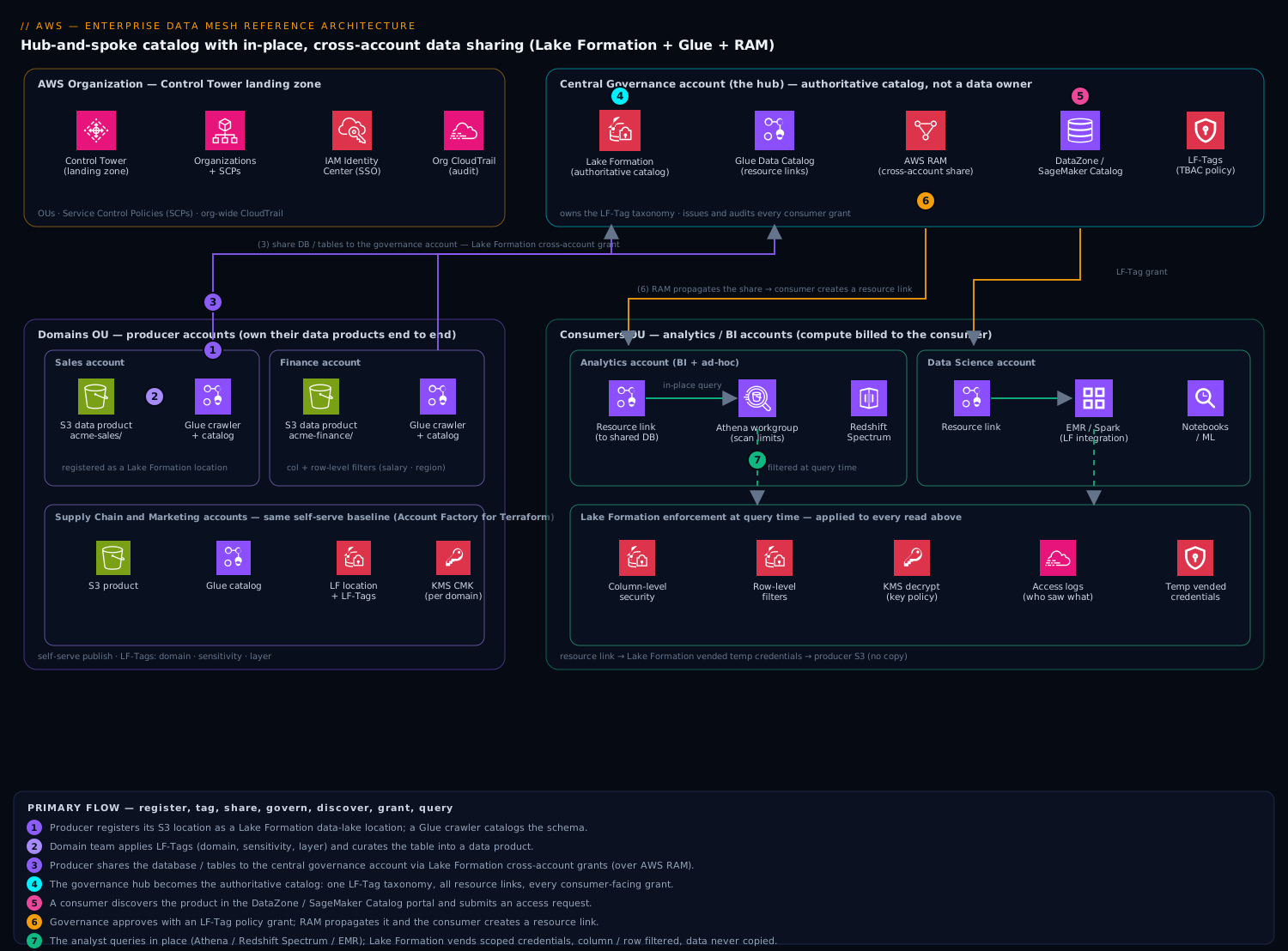
Accounts (the spokes and the hub). Under a single AWS Organization, you create one OU per data concern. A Governance OU holds the central governance account. A Domains OU holds one producer account per domain (Sales, Marketing, Supply Chain, Finance, …). Optionally a Consumers OU holds analytics/BI accounts for teams that consume but don’t produce. AWS Organizations + Service Control Policies (SCPs) provide the guardrails; AWS RAM (Resource Access Manager) is the wire that Lake Formation uses to share catalog resources across these account boundaries.
Producer (domain) path — how data becomes a product. Inside a domain account, source data lands in a domain-owned S3 bucket (e.g. s3://acme-sales-dataproducts/). An AWS Glue crawler or an explicit Glue ETL/CREATE TABLE job registers the schema into that account’s Glue Data Catalog, and the underlying S3 location is registered as a Lake Formation data lake location so that Lake Formation — not raw S3 IAM — mediates access. The domain team curates the table: partitions, a schema contract, and LF-Tags (Lake Formation tag-based access control attributes) such as domain=sales, sensitivity=pii, layer=curated. At this point the table is a candidate data product.
Governance path — the hub takes the source of truth. The recommended pattern (AWS calls it the centralized catalog / central governance account model) is that the producer shares its database/tables to the central governance account via Lake Formation cross-account grants. The central account becomes the authoritative catalog: it owns the LF-Tag taxonomy, holds the resource links, and is where all consumer-facing grants are issued. This gives you one place to define “who can see PII,” one place to audit, and one tag ontology for the whole company — federated governance, decentralized ownership.
Consumer path — discover, request, query in place. A consumer (say, a Marketing analyst in the analytics account) browses available products in a data catalog/portal — Amazon DataZone (now folded into the next-generation SageMaker Catalog / Amazon SageMaker Unified Studio) is the AWS-native option, or a lightweight internal portal backed by Glue Catalog APIs. They submit an access request. Governance approves it by issuing a Lake Formation grant — ideally an LF-Tag policy (“grant SELECT on all tables where domain=sales AND sensitivity=public to the Marketing analytics role”) rather than a per-table grant. AWS RAM propagates the share; the consumer account creates a resource link to the shared database, and the analyst runs Athena (or Redshift Spectrum, or EMR/Spark) directly against the producer’s S3 data. Lake Formation enforces column-level, row-level, and cell-level filters at query time, and the data is never copied — the analyst’s compute reads the producer’s bucket through the Lake Formation credential vending path.
So the request/data path for a single query is: analyst → Athena in consumer account → resource link → Lake Formation (central grant + LF-Tag policy + data-filter) → vended temporary credentials → producer’s registered S3 location → filtered result back to Athena. Metadata flows hub-and-spoke; bytes flow point-to-point from producer storage to consumer compute, governed end to end.
Component breakdown
| Component | What it does | Why it’s here | Key configuration choices |
|---|---|---|---|
| AWS Organizations + OUs | Account hierarchy and policy inheritance | Hard account boundaries give per-domain isolation, blast-radius control, and clean cost attribution | OUs: Governance, Domains, Consumers, Security/Log-archive. Enable trusted access for Lake Formation, RAM, and CloudTrail org trail |
| Service Control Policies (SCPs) | Org-wide guardrails | Prevent domains from disabling encryption, leaving the org, or creating public S3 — governance you can’t opt out of | Deny s3:PutBucketPublicAccessBlock removal, deny disabling default encryption, restrict regions, protect Lake Formation settings |
| Domain S3 buckets | Physical storage of each domain’s data products | Producers own their bytes; storage lives where the domain lives | Bucket-per-domain (or per-layer: raw/curated/product). SSE-KMS with a domain CMK; register the bucket/prefix as a Lake Formation location |
| AWS Glue Data Catalog | Technical metadata (databases, tables, schemas, partitions) | The lingua franca every engine (Athena, Redshift, EMR, Spark) reads; the thing that gets shared across accounts | One catalog per account; per-database settings. Use Glue 4.0+ crawlers or explicit DDL; enable partition indexing for large tables |
| AWS Lake Formation | Fine-grained permissions + cross-account sharing | Replaces unmanageable per-table IAM with column/row/cell-level grants and tag policies; vends scoped credentials | Switch databases to Lake Formation permissions (remove IAMAllowedPrincipals). Define LF-Tags. Use Version 3+ cross-account grants. Set up data filters for row/column security |
| LF-Tags (TBAC) | Attribute taxonomy on catalog resources | Grant on attributes (sensitivity, domain, layer) instead of on hundreds of individual tables — this is what makes the mesh scale |
Centralize tag definitions in the governance account; delegate tag assignment to domains for their own resources |
| AWS RAM | Shares catalog resources across accounts | The transport Lake Formation uses for cross-account grants | Enable sharing within the org; accept shares (or auto-accept for trusted org); creates the cross-account principal plumbing |
| Resource links | Account-local pointer to a shared database/table | Lets consumers query a remote catalog object as if it were local | Create in the consumer account after a share is accepted; point Athena/Redshift at the link |
| Athena / Redshift Spectrum / EMR | Query and compute engines in consumer accounts | In-place query — compute is decentralized and billed to the consumer | Athena workgroups per team with result-location + cost controls; Redshift via Spectrum or data sharing; EMR/Spark with Lake Formation integration enabled |
| Amazon DataZone / SageMaker Catalog | Business catalog, data portal, subscription workflow | Human-facing discovery, glossaries, and a request/approve flow on top of the technical catalog | Map DataZone domains/projects to AWS accounts; let subscriptions drive the underlying Lake Formation grants |
| CloudTrail + Lake Formation access logs + CloudWatch | Audit and observability | Prove who accessed what, across every account, from one place | Org-level CloudTrail to a central log-archive account; Lake Formation audit events; per-domain cost & query dashboards |
A few of these deserve emphasis. LF-Tags are the single most important scaling decision. Without them, every new consumer means a fresh round of per-table grants and your governance team becomes the new bottleneck — you’ve just moved the ticket queue. With them, you grant once against an attribute (SELECT where layer=curated AND sensitivity=public) and every current and future table that carries those tags is automatically in scope. Data filters (row-level expressions and column projections, including cell-level via combining both) are how a single shared table serves both a Finance user who may see salaries and a regional manager who may see only their region’s rows.
Implementation guidance
Bootstrapping the org and accounts. Use AWS Control Tower to lay down the landing zone (OUs, guardrails, centralized logging, an account factory). Provision domain accounts through Account Factory for Terraform (AFT) so every new domain comes pre-baked with the same baseline. The data-mesh-specific wiring is best expressed as Terraform and applied per account from a CI/CD pipeline (CodePipeline or GitHub Actions assuming an OIDC role per account):
- Lake Formation settings (
aws_lakeformation_data_lake_settings): set the governance/admin principals, and critically removeIAMAllowedPrincipalsas a default so that catalog access is governed by Lake Formation rather than legacy IAM-only mode. - Register storage with
aws_lakeformation_resourcepointing the S3 location at a Lake Formation service-linked or custom role that has bucket access (the credential-vending role). - LF-Tags: define the taxonomy centrally with
aws_lakeformation_lf_tag(e.g.sensitivity = [public, internal, confidential, pii],domain = [sales, marketing, …],layer = [raw, curated, product]). - Grants: prefer
aws_lakeformation_permissionswith anlf_tag_policyblock for tag-based grants, plusaws_lakeformation_lf_tag_expressionwhere supported, over enumerating tables. Cross-account grants name the consumer account ID (or an Organization/OU as the principal for org-wide shares). - Glue:
aws_glue_catalog_database,aws_glue_crawler(or explicitaws_glue_catalog_tablefor contract-first schemas), with crawler schedules and a dedicated Glue IAM role.
Networking. The catalog/RAM control plane is account-to-account over AWS’s backbone — no VPC needed for the sharing. For the data plane, keep S3 and analytics traffic private: use S3 Gateway VPC Endpoints in each consumer VPC, Interface (PrivateLink) Endpoints for Glue, Lake Formation, Athena, and KMS, and avoid routing analytics traffic over the public internet. If consumers use Redshift or EMR in private subnets, this keeps the entire query path inside your network perimeter. Cross-account KMS access must be granted in the key policy of each domain’s CMK so consumer roles can decrypt the data they’re authorized to read.
Identity wiring. Standardize on IAM Identity Center (SSO) for human access, mapping enterprise groups (e.g. marketing-analysts) to permission sets that assume the right roles in consumer accounts. The role that actually queries data is registered as a Lake Formation principal and is what grants target. For machine/pipeline access inside domains, use account-scoped IAM roles assumed via OIDC from CI. The chain to internalize: Identity Center group → permission set → consumer-account role → Lake Formation grant (via LF-Tag policy) → data filter → vended S3+KMS credentials. Lake Formation does the last-mile authorization; IAM only gets the principal to the door.
Producer onboarding flow (the self-serve part). A domain team should be able to publish a product without a governance ticket: (1) drop curated data in their registered bucket, (2) run the crawler / apply the table contract, (3) assign LF-Tags they’re delegated to manage, (4) share to the central governance account (a templated Terraform module), and (5) register the product in DataZone. Governance only intervenes to approve cross-domain consumption, and even that can be policy-driven for low-sensitivity tiers.
Worked example: onboarding the Sales domain end to end
The sections above describe the moving parts; here is the actual wiring, step by step, for one producer domain (Sales, account 111111111111) publishing a product that one consumer (Analytics, account 333333333333) queries, through the central governance account (222222222222). Every ARN and account ID is a placeholder — swap in your own. Nothing is run here; the snippets are schema-correct for the aws Terraform provider v5 and the current aws CLI, and any sample output is representative.
Step 0 — one-time governance setup (governance account 222222222222)
Make Lake Formation — not legacy IAM — the authority, and define the tag taxonomy once for the whole company.
# Provider is aliased per account; this block targets the governance account.
resource "aws_lakeformation_data_lake_settings" "governance" {
  admins = [aws_iam_role.lf_admin.arn]

  # Turn OFF the legacy default: no blanket grant to IAMAllowedPrincipals.
  # Empty blocks = new databases/tables are governed by Lake Formation only.
  create_database_default_permissions {}
  create_table_default_permissions {}
}

# The tag taxonomy — defined centrally, this is the backbone of the mesh.
resource "aws_lakeformation_lf_tag" "sensitivity" {
  key    = "sensitivity"
  values = ["public", "internal", "confidential", "pii"]
}
resource "aws_lakeformation_lf_tag" "domain" {
  key    = "domain"
  values = ["sales", "marketing", "supplychain", "finance"]
}
resource "aws_lakeformation_lf_tag" "layer" {
  key    = "layer"
  values = ["raw", "curated", "product"]
}
The empty create_database_default_permissions {} / create_table_default_permissions {} blocks are the Terraform way to say “grant nothing to IAMAllowedPrincipals by default.” Omit them and you keep the legacy ALL-to-everyone behaviour — the single most common mesh misconfiguration, and the one that silently defeats every grant you write below.
Step 1 — register storage and catalog (Sales account 111111111111)
resource "aws_s3_bucket" "sales" {
  bucket = "acme-sales-dataproducts"
}

# Hand the S3 location to Lake Formation via a registration role that can read it.
resource "aws_lakeformation_resource" "sales_bucket" {
  arn      = aws_s3_bucket.sales.arn          # the location, no /* suffix
  role_arn = aws_iam_role.lf_register.arn     # the credential-vending role
}

resource "aws_glue_catalog_database" "sales_curated" {
  name = "sales_curated"
}

# A crawler infers the schema and writes tables into the catalog.
resource "aws_glue_crawler" "orders" {
  name          = "sales-orders-crawler"
  role          = aws_iam_role.glue.arn
  database_name = aws_glue_catalog_database.sales_curated.name
  schedule      = "cron(0 3 * * ? *)"          # nightly at 03:00 UTC
  s3_target {
    path = "s3://acme-sales-dataproducts/curated/orders/"
  }
}
You register the location, not the objects — the ARN has no /*. From now on, reads of anything under that prefix are mediated by Lake Formation and the vending role, not by raw S3 bucket policies.
Step 2 — tag the product (Sales account)
Tags are what you grant on later, so this step is where a table becomes a governable product. The domain team assigns tags to its own resources because governance delegated them that right.
resource "aws_lakeformation_resource_lf_tags" "orders_table" {
  table {
    database_name = aws_glue_catalog_database.sales_curated.name
    name          = "orders"
  }
  lf_tag {
    key   = "domain"
    value = "sales"
  }
  lf_tag {
    key   = "layer"
    value = "curated"
  }
  lf_tag {
    key   = "sensitivity"
    value = "internal"
  }
}
LF-Tags inherit down the hierarchy: a tag on the database is seen by every table and column beneath it unless a lower level overrides it. Tag the database domain=sales once and every future table inherits it — no per-table busywork, which is exactly what makes the taxonomy cheap to run.
Step 3 — share to governance, then govern (cross-account grant)
In the centralized-catalog model the producer grants its tagged resources up to the governance account with grant option, so governance can re-issue access to consumers:
# In the Sales account: share the "sales" slice up to governance (222222222222).
resource "aws_lakeformation_permissions" "share_to_governance" {
  principal                     = "222222222222"
  permissions                   = ["SELECT", "DESCRIBE"]
  permissions_with_grant_option = ["SELECT", "DESCRIBE"]

  lf_tag_policy {
    resource_type = "TABLE"
    expression {
      key    = "domain"
      values = ["sales"]
    }
  }
}
permissions_with_grant_option is the crucial half: without it, governance could read Sales data but could not re-grant it to Analytics. Lake Formation (cross-account share version 3+) creates the underlying AWS RAM share automatically; if your org has RAM sharing enabled with auto-accept, there is no manual acceptance step.
Step 4 — the one grant that scales (governance account)
Instead of hundreds of per-table grants, governance issues one tag-policy grant per consumer role. This is the line that makes the mesh scale.
aws lakeformation grant-permissions \
  --principal DataLakePrincipalIdentifier=arn:aws:iam::333333333333:role/analytics-query \
  --permissions SELECT DESCRIBE \
  --resource '{
    "LFTagPolicy": {
      "ResourceType": "TABLE",
      "Expression": [
        {"TagKey": "sensitivity", "TagValues": ["public", "internal"]}
      ]
    }
  }'
Read it as: “the analytics-query role in account 333333333333 may SELECT any table tagged sensitivity ∈ {public, internal}, in any domain, now or in the future.” Onboard a tenth domain next quarter and its internal tables are already in scope — zero new grants.
Step 5 — consumer creates a resource link and queries (Analytics 333333333333)
A shared database is remote; a resource link is the local pointer Athena can see.
aws glue create-database --database-input '{
  "Name": "sales_curated_link",
  "TargetDatabase": {
    "CatalogId": "222222222222",
    "DatabaseName": "sales_curated"
  }
}'
Then the analyst simply queries — compute is billed to Analytics, the bytes stay in the Sales bucket:
SELECT order_date, category, SUM(amount) AS revenue
FROM   sales_curated_link.orders
WHERE  order_date >= DATE '2026-01-01'
GROUP  BY order_date, category;
Lake Formation intercepts the plan, checks the grant, applies any data filter, vends temporary S3+KMS credentials scoped to exactly the allowed columns/rows, and streams the filtered result back. The Analytics account never held a bucket policy on the Sales bucket.
Step 6 — column and row security with a data filter
Finance’s gl_transactions must hide employee_salary from analysts and show a regional controller only their region. That is one data cells filter:
aws lakeformation create-data-cells-filter --table-data '{
  "TableCatalogId": "222222222222",
  "DatabaseName":   "finance_curated",
  "TableName":      "gl_transactions",
  "Name":           "apac_controller_no_salary",
  "RowFilter":      { "FilterExpression": "region_code = '\''APAC'\''" },
  "ColumnWildcard": { "ExcludedColumnNames": ["employee_salary"] }
}'
Column projection (ColumnWildcard.ExcludedColumnNames) hides the PII column; the row FilterExpression is a static WHERE-style predicate. Combine both and you get cell-level security — the same physical table safely serves a payroll admin and a regional manager. Two things people miss: you grant the filter (not the base table) to the restricted role, and row expressions are static — there is no “current user’s region” function, so per-region isolation is modelled as one filter per region, each granted to the matching controller role (or you push identity into IAM Identity Center session tags and separate roles).
Step 7 — the data contract (both accounts agree on this)
A data product is more than a table; publish a machine-readable contract next to it so consumers know what they’re subscribing to and breaking changes become reviewable events rather than 3 a.m. surprises:
product: sales.orders
owner: sales-data@acme.example
domain: sales
sensitivity: internal
sla:
  freshness: "<= 1h"
  availability: "99.9%"
schema:
  - name: order_id
    type: string
    nullable: false
  - name: order_date
    type: date
    nullable: false
  - name: amount
    type: "decimal(12,2)"
    nullable: false
  - name: category
    type: string
    nullable: true
version: 2
breaking_change_policy: "major version bump + 30-day deprecation"
Keep it in the domain repo beside the Terraform. A CI check can diff the live Glue schema against this contract and fail the pipeline on an unversioned breaking change — governance enforced as code, not as a meeting.
Enterprise considerations
Security & Zero Trust. The mesh is a Zero-Trust data architecture by construction: no principal has standing access to a bucket; every read is an explicit, attribute-based grant evaluated at query time, with temporary vended credentials rather than long-lived bucket policies. Enforce least privilege with LF-Tag policies scoped to the minimum sensitivity tier, column-level security to hide PII columns from analysts who don’t need them, and row-level filters for tenant/region isolation. SCPs make the non-negotiables (encryption, public-access-block, region pinning) un-bypassable. Always remove IAMAllowedPrincipals — leaving it on silently bypasses Lake Formation and is the single most common misconfiguration. Encrypt with per-domain KMS CMKs so a domain can cryptographically revoke access, and audit decrypt usage via CloudTrail.
Cost optimization. Decentralization is itself a cost lever: each domain’s storage and each consumer’s compute hit their own bill, so showback/chargeback is automatic and teams feel their Athena scans. Concretely: store products in Parquet, partitioned and compacted, so Athena/Spectrum scan less; use Glue partition indexes to cut partition-filtering cost; set Athena per-query and per-workgroup data-scanned limits; lifecycle raw data to S3 Intelligent-Tiering / Glacier; and prefer in-place query over copy to avoid duplicating petabytes across accounts. Lake Formation and RAM themselves carry no per-request fee — you pay for Glue, S3, KMS, and the query engines.
Scalability. This architecture scales by adding accounts and tags, not by re-architecting. Going from 5 to 50 domains is 45 more applications of the same Terraform baseline. The LF-Tag taxonomy means grant complexity grows with the number of attributes (a handful) rather than the number of tables (thousands). Watch the real limits: Glue/Lake Formation have account- and region-level quotas on databases, tables, partitions, and concurrent grants — design partitioning to stay well under partition limits, and federate very large domains across multiple accounts if needed.
Reliability & DR (RTO/RPO). S3 gives 11-nines durability per region; for regional resilience, enable S3 Cross-Region Replication on product buckets and replicate the Glue Data Catalog (export/replicate databases and tables, or rebuild via crawlers from replicated data) and the Lake Formation grants (they’re Terraform — re-apply in the DR region). A practical posture: RPO ≈ 15 min for product data via CRR, RTO ≈ 1–2 hours to re-point catalog and re-issue grants in the secondary region, since compute (Athena/EMR) is stateless and stands up quickly. The catalog and grant definitions living in version-controlled IaC is what makes a fast RTO realistic — your “DR plan” is largely terraform apply in another region.
Observability. Centralize an organization CloudTrail in a log-archive account so every cross-account share and data access is captured in one place. Use Lake Formation’s access logging to answer “who queried this PII table last quarter.” Per-domain CloudWatch dashboards track pipeline health and freshness against the product’s SLA; per-consumer Athena dashboards track bytes scanned and cost. Surface data product health (freshness, completeness, last-updated) in the DataZone portal so consumers trust what they subscribe to.
Governance. This is federated computational governance: standards (tag taxonomy, encryption, naming, PII classification) are defined centrally and enforced as code (SCPs, Lake Formation policies, IaC modules), while domains retain autonomy over modeling and publishing. The governance account is the policy authority and the audit point — not a data owner. Define a lightweight data contract per product (schema, SLA, owner, sensitivity) and make breaking-schema-changes a versioned, reviewed event rather than a silent crawler update.
Reference enterprise example
NimbusCart, a mid-market online retailer (~1,200 employees, ₹1,800 crore revenue), ran the exact centralized-lake bottleneck described above: one platform team, a 9-week backlog, and full-bucket access in a shared analytics account. They migrated to a data mesh over two quarters.
What they built. Under a Control Tower landing zone, they created a Governance OU (one central governance account) and a Domains OU with four producer accounts: Sales, Marketing, Supply Chain, and Finance. A separate Consumers OU held a Analytics account (BI + ad-hoc) and a Data Science account.
- Finance registered
s3://nimbus-finance-products/as a Lake Formation location, published agl_transactionstable taggeddomain=finance, layer=curated, sensitivity=confidential, with a column-level filter hidingemployee_salaryand a row-level filter so regional controllers see only theirregion_code. - Sales published
ordersandorder_lines(sensitivity=internal) and a derived public productdaily_sales_by_category(sensitivity=public). - All four domains shared to the central governance account, which owned the LF-Tag taxonomy (
sensitivity ∈ {public, internal, confidential, pii}). - Governance issued exactly two broad LF-Tag grants instead of hundreds of per-table grants: Analytics-team role gets
SELECT where sensitivity IN {public, internal}across all domains; Data Science role gets the same plus specificconfidentialSales tables it requested through DataZone. PII columns were granted to nobody by default.
The numbers.
- Producer onboarding for a new dataset dropped from ~3 weeks (ticket + central modeling) to under a day (self-serve: crawl, tag, share via the templated module).
- The Marketing analyst’s Athena bill became visible and halved once products were Parquet+partitioned — typical ad-hoc queries went from scanning ~120 GB to ~14 GB thanks to partition pruning and column projection.
- Cross-account sharing meant zero data duplication — the previous design had copied Sales data into the analytics account nightly (~4 TB/day of redundant transfer and storage); that disappeared.
- A quarterly access audit that used to take two days of manual IAM spelunking became a single CloudTrail/Lake Formation query in the log-archive account.
A decision they got right. Early on, an engineer proposed per-table grants “to keep it simple for the first three tables.” Governance overruled it and mandated LF-Tags from day one. When the company later onboarded its 5th and 6th domains and tripled its consumers, no new grants were needed for public/internal data — the new tables simply inherited the existing tag policies. That single choice is the difference between a mesh that scales and a mesh that becomes the new bottleneck.
The outcome. Six months in, the central platform team of four had repositioned from “pipeline operators” to “platform + governance,” each domain owned its products end-to-end, PII exposure went from “everyone in the analytics account” to “explicitly granted, audited, and mostly nobody,” and the 9-week backlog was gone because the backlog’s owner — the central team — was no longer in the critical path.
When to use it
Use a data mesh on AWS when you have multiple independent data-producing domains with their own teams, a central lake that has become a bottleneck, and a real need for fine-grained, auditable cross-team data sharing (especially with PII/regulatory pressure). It shines when domains genuinely understand their data better than any central team could, and when organizational ownership can actually be moved — mesh is as much an org change as a tech change.
Trade-offs. You’re trading the simplicity of one account and one catalog for operational complexity across many accounts: more IAM, more Terraform, a tag taxonomy to govern, and RAM/Lake Formation mechanics to learn. There’s real upfront platform investment (Control Tower, AFT, the self-serve modules) before the first domain benefits. And it demands organizational maturity — domains must actually staff data ownership; if they won’t, you get the worst of both worlds (decentralized chaos with no central safety net).
Anti-patterns to avoid.
- Mesh for a single team / small dataset. If one team produces almost all the data, a single governed lake (Lake Formation in one account, LF-Tags, no cross-account sharing) is simpler and sufficient. Don’t pay the multi-account tax for organizational scale you don’t have.
- Leaving
IAMAllowedPrincipalsenabled — it silently bypasses every Lake Formation control you just built. - Per-table grants at scale — recreates the bottleneck under a new name; commit to LF-Tags early.
- A “mesh” with no governance — decentralized ownership without federated computational governance is just data chaos with extra accounts.
- Treating the central account as a data owner — it should govern and audit, not hoard data, or you’ve rebuilt the centralized lake.
Alternatives. A single-account governed lake (Lake Formation + LF-Tags, no RAM) for organizations below the domain-complexity threshold. A lake house with Redshift data sharing when most consumers are warehouse users and producers are few. Amazon DataZone / SageMaker Unified Studio as the primary surface if you want the business-catalog and subscription experience to drive Lake Formation under the hood with less hand-rolled tooling. And for cross-cloud or open-format strategies, an Apache Iceberg + open catalog approach (S3 Tables / Glue Iceberg REST catalog) layered with the same Lake Formation governance — the mesh pattern holds; only the table format and catalog surface change.
Going deeper
Two sharing models: centralized catalog vs direct producer-to-consumer
Lake Formation cross-account sharing supports two topologies, and picking one is an early architectural decision:
- Centralized catalog (hub re-grants). Producers share up to the governance account with grant option; governance holds the resource links and issues all consumer grants. One audit point, one tag ontology, one place to reason about “who can see PII.” This is the model in the worked example and the AWS-recommended default for a true mesh.
- Direct / hybrid. A producer grants straight to a consumer account. Fewer hops and one less place for latency, but governance is now spread across every producer — you’ve traded a central bottleneck for a central blind spot. Reserve it for tightly-coupled domain pairs or where the governance hop is genuinely in the way.
The cross-account share “version” matters
The Data Catalog carries a cross-account version setting (it has incremented over time: 1 → 2 → 3 → 4). Older versions share by named resource and lean on manual RAM shares; version 3+ lets you grant directly to an AWS Organization, an OU, or an IAM principal (not just a bare account ID) and manages the RAM plumbing for you — which is what makes org-wide LF-Tag grants practical instead of a per-account chore. Raising the version changes how existing shares behave and is effectively one-way, so do it deliberately in a non-prod org first, and confirm the current maximum version in the Lake Formation docs before you pin it, since AWS keeps advancing it.
How a query actually gets its bytes — credential vending
The load-bearing idea is credential vending. When Athena, EMR, or Redshift Spectrum plans a query against a governed table, the engine calls Lake Formation’s GetTemporaryGlueTableCredentials / GetTemporaryGluePartitionCredentials APIs. Lake Formation evaluates the grant and any data filter, then returns short-lived credentials scoped to only the S3 prefixes, columns, and rows the principal may see, backed by the registration role you attached in aws_lakeformation_resource. The consumer’s own IAM role never needs s3:GetObject on the producer bucket — which is why it’s safe to strip bucket policies and IAMAllowedPrincipals. If a query returns AccessDenied despite a correct LF grant, the usual suspects are: (1) the table is still in IAMAllowedPrincipals / hybrid mode so LF isn’t actually enforcing; (2) the consumer role lacks lakeformation:GetDataAccess (and glue:GetTable/GetPartitions) in its IAM policy; or (3) the domain’s KMS key policy doesn’t grant kms:Decrypt to the vending path.
Hybrid access mode — migrating off IAMAllowedPrincipals safely
You rarely flip a live lake to full Lake Formation enforcement overnight. Hybrid access mode lets a table be governed by Lake Formation for opted-in principals while everyone else still reads it via classic IAM — so you migrate one team at a time, verify, then remove the IAM path. It’s the pragmatic bridge that the blunt “just remove IAMAllowedPrincipals” advice skips over on a brownfield lake with live consumers.
Data filters, precisely
A data filter has two independent parts: a row filter (FilterExpression, a static SQL-style predicate such as region_code='APAC', or AllRowsWildcard) and a column spec (an explicit include list, or a ColumnWildcard with ExcludedColumnNames). Row-only = row-level security; column-only = column-level security; both together = cell-level. Two caveats that trip people up: expressions are static (no “current user” function — model per-user cohorts as separate filters granted to separate roles), and you grant the filter, not the base table, to the restricted principal — grant the table by mistake and the filter never applies.
Scale, quotas, and performance
- Partitions are the real scaling axis. Athena/Glue cost and latency track partitions and bytes scanned, not table count. Store products as Parquet, partitioned and compacted, add Glue partition indexes (or use Athena partition projection to skip
GetPartitionsentirely on huge tables), and you cut both the bill and throttling risk.GetPartitionsthrottling on a table with millions of partitions is a classic mesh-at-scale incident. - Catalog and LF quotas are per-account/region: databases, tables, and partitions per catalog; LF-Tags cap at roughly 50 tag keys per resource and a bounded number of values per key; there are limits on concurrent grants and on RAM shares. Federate a very large domain across multiple accounts before you hit them, not after.
- Lake Formation and RAM are free; you pay for Glue requests, Athena bytes scanned (or Redshift/EMR compute), S3, KMS, and any cross-region replication transfer. In-place query is the cost win — duplicating petabytes across accounts is precisely the pain the mesh exists to remove.
Table formats and the SageMaker direction
The mesh pattern is table-format-agnostic; only the storage and catalog surface change. Two currents worth tracking:
- Open table formats. Apache Iceberg on S3 (including managed S3 Tables and the Glue Iceberg REST catalog) adds ACID transactions, schema evolution, and time travel while the same Lake Formation LF-Tag governance sits on top. See Apache Iceberg on S3 with the Glue Catalog for the storage half of this story.
- Governance surface. Amazon DataZone was AWS’s business catalog / project / subscription layer over Lake Formation; its capabilities are being folded into the next-generation Amazon SageMaker and SageMaker Unified Studio, with a unified SageMaker Catalog as the discovery surface. The mechanics you learned here — LF-Tags, grants, resource links, credential vending — remain the engine underneath; the portal on top is what’s converging. Check current GA-vs-preview status for your region before committing a portal choice.
Practice challenges
Work these in order — they climb from “can you read the model” to “can you design and debug it.” Try each before opening the solution.
1. Match the symptom to the broken principle (beginner)
A team complains: “Every analyst in the BI account can s3:GetObject the entire Finance bucket, PII columns included.” Which of the four data-mesh principles is most directly violated, and which AWS control fixes it?
<details> <summary>Solution</summary>
Federated computational governance — access isn’t governed at all; it’s blanket bucket IAM. The fix: register the bucket as a Lake Formation location, remove IAMAllowedPrincipals, and grant via LF-Tag policies with a column filter hiding the PII columns.
Why: the governance principle means every read is an explicit, attribute-based, audited grant — never standing bucket access.
</details>
2. Create the tag taxonomy (beginner)
Write the single aws CLI command that defines a sensitivity LF-Tag with the four values used throughout this lesson.
<details> <summary>Solution</summary>
aws lakeformation create-lf-tag \
  --tag-key sensitivity \
  --tag-values public internal confidential pii
Why: LF-Tags are defined once, centrally, in the governance account; every later grant references these attribute values instead of individual table names.
</details>
3. Register storage with Lake Formation (intermediate)
Write the Terraform to register s3://acme-marketing-dataproducts as a Lake Formation location using the role arn:aws:iam::111111111111:role/lf-register.
<details> <summary>Solution</summary>
resource "aws_lakeformation_resource" "marketing_bucket" {
  arn      = "arn:aws:s3:::acme-marketing-dataproducts"
  role_arn = "arn:aws:iam::111111111111:role/lf-register"
}
Why: registration hands the S3 location to Lake Formation’s credential-vending role, so LF — not raw S3 IAM — mediates every read. The bucket ARN has no /* suffix; you register the location, not the objects.
</details>
4. The grant that scales (intermediate)
An analytics-query role in account 333333333333 should be able to SELECT every public and internal table across all domains, forever. Write the tag-policy grant in Terraform.
<details> <summary>Solution</summary>
resource "aws_lakeformation_permissions" "analytics_read" {
  principal   = "arn:aws:iam::333333333333:role/analytics-query"
  permissions = ["SELECT", "DESCRIBE"]

  lf_tag_policy {
    resource_type = "TABLE"
    expression {
      key    = "sensitivity"
      values = ["public", "internal"]
    }
  }
}
Why: one grant on an attribute covers all present and future matching tables — the difference between a mesh that scales and per-table grants that recreate the bottleneck.
</details>
5. Cell-level security (advanced)
Finance’s gl_transactions must (a) never expose employee_salary to the regional-controller role and (b) show that role only region_code = 'APAC' rows. Write the data cells filter.
<details> <summary>Solution</summary>
aws lakeformation create-data-cells-filter --table-data '{
  "TableCatalogId": "222222222222",
  "DatabaseName":   "finance_curated",
  "TableName":      "gl_transactions",
  "Name":           "apac_controller_no_salary",
  "RowFilter":      { "FilterExpression": "region_code = '\''APAC'\''" },
  "ColumnWildcard": { "ExcludedColumnNames": ["employee_salary"] }
}'
Then grant-permissions on the filter (not the table) to regional-controller.
Why: the column exclusion enforces column-level security and the row predicate enforces row-level; together they’re cell-level. Row expressions are static, so APAC is one filter of several — one per region — each granted to the matching role.
</details>
6. Debug the AccessDenied (advanced)
A consumer role has a correct LF-Tag SELECT grant and a resource link, yet SELECT * FROM sales_curated_link.orders returns AccessDenied. List the three most likely causes and how you’d confirm each.
<details> <summary>Solution</summary>
- Table still in
IAMAllowedPrincipals/ hybrid mode — LF isn’t actually enforcing, so the grant is ignored and legacy IAM (which denies) wins. Confirm: Lake Formation console → the database/table still listsIAMAllowedPrincipalsunder permissions. - Consumer role missing
lakeformation:GetDataAccess(andglue:GetTable/GetPartitions) in its IAM policy — LF authorises, but the role can’t call the vending API. Confirm: read the role’s IAM policy. - KMS key policy on the producer’s CMK doesn’t grant
kms:Decryptto the vending path — LF vends creds but the decrypt fails. Confirm: inspect the CMK key policy.
Why: Lake Formation authorises what you can see, but IAM must still let the principal call the LF/Glue APIs and KMS must allow the decrypt — three independent layers that all have to line up.
</details>
Common beginner mistakes
- “Data mesh is a product I turn on.” There’s no
aws create-data-mesh. It’s an operating model assembled from Organizations, S3, Glue, Lake Formation, RAM, and IAM — plus a real change in who owns data. If the org won’t move ownership to the domains, no amount of tooling makes it a mesh. Right model: mesh is roughly 60% org design, 40% AWS wiring. - Leaving
IAMAllowedPrincipalson “just for now.” It silently bypasses every Lake Formation grant you carefully built — the table is effectively open to any IAM principal with S3/Glue access, and your column filters do nothing at all. Right model: removing it (or using hybrid access mode to migrate one team at a time) is step one, not a cleanup task for later. - Making the governance account hold the data. If the central account ingests and stores everyone’s bytes, you’ve just rebuilt the centralized lake with extra RAM shares bolted on. Right model: governance owns policy, the tag taxonomy, and the audit trail — never the data. Bytes live in producer accounts.
- Per-table grants “to keep it simple.” Simple for three tables, a full-time job at three hundred, and the governance team becomes the new ticket queue. Right model: commit to LF-Tag policies from day one; grant on attributes, not table names.
- Thinking a share copies the data. Cross-account sharing moves metadata, not bytes. The consumer’s compute reads the producer’s S3 in place through vended credentials. Right model: “share” = “grant visibility + query rights,” not “make a copy.”
- Confusing LF-Tags with S3 object tags or cost-allocation tags. LF-Tags are catalog attributes for tag-based access control (TBAC) and are unrelated to S3 object tags or billing tags. Tagging an S3 object
sensitivity=piigrants nobody anything and hides nothing. Right model: LF-Tags live on catalog resources (databases/tables/columns) and drive Lake Formation authorisation. - Assuming “share accepted” means “query works.” After the RAM share is accepted you still need a resource link in the consumer account, the querying role granted (via tag policy),
lakeformation:GetDataAccessin that role’s IAM policy, and cross-account KMS decrypt on the domain CMK. Right model: a working cross-account query is a chain; one missing link is anAccessDenied.
Glossary
- Data mesh — an operating model that decentralises data ownership to the business domains that produce it, while centralising governance of access. A pattern, not a product.
- The four principles — (1) domain ownership (producers own their data), (2) data as a product (curated, described, SLA’d, owned), (3) self-serve data platform (domains publish without central tickets), (4) federated computational governance (central standards enforced as code).
- Domain — a business area with its own team and data (Sales, Finance, …); in this architecture, typically its own AWS account.
- Data product — a curated, documented, discoverable dataset with an owner, a contact, and an SLA — not just a raw table someone happened to leave in a bucket.
- Data contract — the agreed schema, SLA, owner, and sensitivity of a product; breaking changes are versioned and reviewed, not silent crawler updates.
- Producer / consumer account — a producer account owns storage + pipelines for a domain; a consumer account runs the analytics/BI that queries products.
- Governance account — the central account that owns the authoritative catalog, the LF-Tag taxonomy, and the audit trail; it governs access but does not own data.
- AWS Lake Formation — the service providing fine-grained (column/row/cell) permissions and cross-account catalog sharing, and that vends short-lived credentials at query time.
- Glue Data Catalog — the technical metadata store (databases, tables, schemas, partitions) every engine reads; the object that gets shared across accounts.
- LF-Tag / TBAC — Lake Formation tag-based access control: attributes (
domain,sensitivity,layer) attached to catalog resources; you grant on the attribute, not the table. - Data filter (row / column / cell) — a Lake Formation object that restricts rows (static predicate), columns (include/exclude list), or both (cell-level) for a granted principal.
IAMAllowedPrincipals— a legacy default grant that makes catalog access fall back to plain IAM; leaving it on bypasses Lake Formation. Remove it, or use hybrid mode to migrate.- Hybrid access mode — a Lake Formation setting that governs a table via LF for opted-in principals while others still use classic IAM — the safe migration bridge on a brownfield lake.
- Credential vending — Lake Formation returning short-lived, scoped S3+KMS credentials (via
GetTemporaryGlue*Credentials) so a consumer queries in place without ever holding a bucket policy. - Resource link — an account-local Glue database/table that points at a shared remote catalog object, letting Athena/Redshift query it as if it were local.
- AWS RAM (Resource Access Manager) — the transport Lake Formation uses to share catalog resources across account boundaries.
- In-place query — querying the producer’s S3 data directly from consumer compute, with no copy; the mesh’s core efficiency win.
- Athena / Redshift Spectrum / EMR — serverless SQL, warehouse-driven external query, and Spark/Hive engines respectively; all read governed tables through Lake Formation.
- AWS Organizations / OU / SCP — the account hierarchy, groupings, and org-wide deny-guardrails that make governance un-bypassable.
- Control Tower / AFT — the landing-zone service and its Account-Factory-for-Terraform vending mechanism that stamp out consistent domain accounts.
- KMS CMK — a customer-managed key; per-domain CMKs let a domain cryptographically revoke access and audit decrypts. Cross-account reads need
kms:Decryptin the key policy. - Amazon DataZone / SageMaker Catalog / SageMaker Unified Studio — the business-facing catalog, discovery, and subscription layer over Lake Formation; DataZone’s capabilities are converging into the next-generation Amazon SageMaker.
- Federated computational governance — the principle that standards (tags, encryption, PII rules) are defined centrally and enforced as code (SCPs, LF policies, IaC modules), while domains keep modelling autonomy.
- Showback / chargeback — attributing storage/compute cost back to the domain or consumer that incurred it; automatic in a mesh because each account has its own bill.