Graviton is the cheapest performance win most AWS estates are leaving on the table. The pitch — “up to ~40% better price-performance over comparable x86 instances” — is real for a large class of workloads, but it is not a checkbox. arm64 (the 64-bit Arm instruction set, also written aarch64) is a different ISA from x86-64, and the migration risk lives in the long tail: a native Python wheel with no aarch64 build, an EDR agent your security team mandates that only ships x86, a base image that silently pulls linux/amd64 and runs your service under QEMU emulation at a third of the throughput. The status you think you’re in — “we’re on Graviton, we’re saving money” — and the status you’re actually in — “half the fleet is emulating x86 and burning the gain” — can differ for weeks if you never run uname -m under load.
This is the migration runbook I actually use, written as a reference you keep open during the cutover. We treat the migration not as one flip but as a sequence of gates, each with a confirming command: audit portability, build honest multi-arch images, stand up arm64 CI on real silicon, roll out on EC2/EKS/Lambda with mixed-architecture scheduling, and prove the win with controlled benchmarks before you commit production traffic. Every decision — instance family, build strategy, scheduling affinity, rollback trigger — is laid out as a scannable table next to the prose and the aws/Terraform/YAML that implements it, because at 02:00 during a canary ramp you want the matrix, not a paragraph.
By the end you will stop migrating on faith. You will know which workloads are Graviton candidates and which need a benchmark first; how to find the single x86-only dependency that can veto an entire tier before week three; how to build one Dockerfile that produces an architecture-correct manifest list; how to keep the x86 path alive so rollback is a scheduling change, not a rebuild; and how to report price-performance (sustained throughput per dollar at your latency SLO) instead of a misleading raw-speed number. The decisive discipline is the same one that separates a clean migration from a stalled one: treat every agent, sidecar, and native binary as a first-class migration dependency, audited up front, not discovered in production.
What problem this solves
The pain is concrete and financial. Compute is the largest line on most AWS bills, and Graviton offers a roughly 20% lower hourly price for comparable capacity plus, on throughput-bound workloads, more work per core — compounding into a price-performance gap that lands on the CFO’s spreadsheet. A platform team told to cut compute spend by a third has, in Graviton, a lever that does not require re-architecting a single service. But the lever has a catch the pitch deck omits: arm64 is a real ISA boundary, and anything with compiled code must have been built for it.
What breaks without a disciplined migration: a team flips an instance type to m7g, the launch “works,” and nobody notices the container image only published linux/amd64, so it runs under QEMU at 30-40% of native throughput — the bill went up (more instances to carry the load) while everyone celebrates the “Graviton win.” Or the EDR DaemonSet that security mandates has no certified arm64 build at the exact version policy requires, and the migration is vetoed in week three after the API tier is already half-ported. Or a single internal library still pulls an x86-only .so for a legacy client, and the service segfaults on an arm64 node in a way that looks like a random crash loop. Each of these is diagnosable in minutes and preventable in the audit — if you know to look.
Who hits this: anyone running more than a handful of EC2 instances, EKS nodes, ECS tasks, Lambda functions, or managed-service nodes (RDS/Aurora, ElastiCache, OpenSearch) and wanting the savings. It bites hardest on native-heavy stacks (Python with C extensions, Node with native addons, anything with hand-written x86 intrinsics), agent-laden fleets (mandated EDR/observability sidecars), and container shops where a wrong base image silently downgrades you to emulation. The fix is almost never “abandon Graviton” — it’s “find the one dependency that isn’t ported, and decide on it deliberately.”
To frame the whole field before the deep dive, here is every migration surface this article covers, the risk that lives there, and the one check that tells you the truth:
| Migration surface | What the front of the migration is saying | First question to ask | First place to look | Most common single blocker |
|---|---|---|---|---|
| Native dependencies | “everything compiles, ship it” | Does every compiled package have an aarch64 build? |
Lockfile audit (pip download --platform manylinux2014_aarch64) |
One wheel with no aarch64 tag |
| Container images | “the image runs” | Is it native arm64 or QEMU-emulated? | docker buildx imagetools inspect; uname -m in-container |
Base image only publishes linux/amd64 |
| Agents & sidecars | “the agent is installed” | Is the exact mandated version GA on arm64? | Vendor release notes; canary node group | EDR/security sensor not certified |
| CI / build farm | “CI is green” | Is arm64 built on real silicon or emulated? | CodeBuild ARM_CONTAINER; GHA *-arm runner |
Emulated builds too slow, adoption stalls |
| Managed services | “we changed the class” | Did you benchmark on a clone before failover? | describe-db-instances class; blue/green |
Engine/version doesn’t offer the Graviton class |
| Benchmark / cutover | “Graviton is faster” | Faster, or better price-performance at SLO? | RPS-at-SLO ÷ on-demand price, like-for-like | Comparing raw speed, not throughput/$ |
Learning objectives
By the end of this article you can:
- Decide whether a given workload is a Graviton candidate or needs a benchmark first, using a portability and price-performance screen rather than the marketing number.
- Audit native dependencies, language runtimes, agents, and sidecars for
aarch64support and produce a portability matrix you can gate the migration on. - Build a single Dockerfile that produces a multi-arch manifest list covering
linux/amd64andlinux/arm64, using$TARGETPLATFORM/$BUILDPLATFORMso cross-builds are explicit and never accidental QEMU emulation. - Stand up arm64 CI on native silicon (CodeBuild
ARM_CONTAINER, GitHub Actionsubuntu-*-armrunners) and stitch a manifest list from per-arch digests. - Roll out on EC2 (arm64 AMIs), EKS (mixed-architecture node groups,
nodeAffinity, Karpenter NodePools), and Lambda (architectures = ["arm64"]) with not-yet-ported workloads safely pinned to x86. - Migrate managed services (RDS/Aurora, ElastiCache, OpenSearch) to Graviton classes via clone/blue-green with a tested rollback.
- Design and run a controlled benchmark that reports price-performance (sustained RPS at your latency SLO per on-demand dollar), like-for-like sizes, and read the result correctly.
- Run a phased, canary-gated cutover where rollback is a
nodeAffinity/target-weight flip with no rebuild, and confirm at every layer that you are running native arm64, not emulation.
Prerequisites & where this fits
You should already be comfortable with the AWS compute building blocks: an EC2 instance type names a family + generation + size (m7g.xlarge = general-purpose, 7th-gen Graviton, 4 vCPU); an AMI is architecture-specific; ECR stores container images and can hold a multi-arch image index under one tag; EKS schedules pods onto nodes and exposes the well-known kubernetes.io/arch label; and Lambda runs a function on a managed x86_64 or arm64 execution environment. You should know how to run the aws CLI, read JSON output, write a basic Dockerfile, and apply a Terraform resource. Familiarity with docker buildx, Kubernetes nodeAffinity, and a load tool (k6, wrk, vegeta) helps.
This sits in the Compute & Cost-Optimization track. It assumes the compute fundamentals from AWS Compute: EC2 vs Lambda vs ECS vs EKS and the EC2 mechanics in Amazon EC2 Deep Dive: Instances, AMIs, EBS, User Data & IMDS. It pairs tightly with EC2 Spot, Mixed Instances & Capacity-Optimized ASGs (Graviton + Spot is the deepest discount stack) and Deploy Karpenter on EKS: Consolidation, Spot & Disruption Budgets (Karpenter provisions Graviton on demand). The container-build half builds on Docker Container Images for CI/CD: Dockerfiles & Registries and the CI on GitHub Actions Fundamentals: Workflows, Jobs, Runners & Secrets.
A quick map of who owns which migration surface, so you pull the right person into the cutover bridge:
| Layer | What lives here | Who usually owns it | Failure classes it can cause |
|---|---|---|---|
| Application code | Compiled binaries, native intrinsics | App / dev team | Segfault on arm64; no aarch64 build |
| Container image | Base image, build args, manifest | Platform / build team | Emulation, wrong-arch pull, slow start |
| Agents / sidecars | EDR, observability, mesh proxy | Security + SRE | Migration veto; sidecar crash on arm64 |
| Scheduling | AMI, node groups, affinity, NodePool | Platform / SRE | Capacity stall; pod stranded on wrong arch |
| Managed data services | RDS/Aurora, ElastiCache, OpenSearch | DBA / data team | Class unavailable; failover risk |
| CI/CD | Build farm, runners, registry push | DevOps / platform | Slow emulated builds; manifest not assembled |
| FinOps | Pricing, savings plans, benchmark sign-off | FinOps + leadership | Wrong metric; savings overstated |
Core concepts
Six mental models make every later decision obvious.
arm64 is a real ISA boundary, not a flag. x86-64 and arm64 (aarch64) are different instruction sets. Source code in a managed/JIT runtime (Go, Rust, Java, .NET, Node, Python) is portable because the toolchain or runtime targets the architecture. But anything compiled to native machine code — a C extension, a .so, a statically-linked Go binary, a prebuilt npm addon — exists per-architecture and must have been built for arm64. The migration’s entire risk surface is “which compiled things do I depend on, and does each have an aarch64 build?”
Graviton competes on throughput-per-dollar, not single-thread clock. Graviton cores (Neoverse-based) are not faster per core than the latest x86 at single-threaded, latency-bound work tuned for x86. They win on aggregate throughput per dollar: more cores at a lower price, strong memory bandwidth, excellent scaling for horizontally parallel work. The decision metric is therefore price-performance (sustained throughput at your SLO ÷ price), never raw latency of one request. A workload that scales out cleanly and runs more than one instance is a candidate; a single fat box tuned for x86 single-thread is not, until proven.
A multi-arch image is one manifest list, not two tags. A correct container artifact is a manifest list (OCI image index): one tag (app:1.4.0) pointing at per-architecture manifests. docker pull and Kubernetes resolve the matching architecture automatically. The failure mode is shipping a single-arch image (only linux/amd64) to an arm64 node — Docker will run it under QEMU user-mode emulation, correct but 30-60% slower, silently burning the price-performance gain. “It runs” is not “it runs native.”
Cross-compilation beats emulated building. Building an arm64 image has two strategies: emulate the arm64 environment on an x86 builder via QEMU (correct, slow), or cross-compile from the builder’s native arch to the target arch, or build on native arm64 hardware. For compiled languages (Go, Rust) cross-compilation via $TARGETARCH is fast and clean. For interpreted/native-heavy stacks (Python wheels, Node addons) cross-compiling is painful, so build that arch on a native arm64 runner (CodeBuild ARM_CONTAINER, GHA ubuntu-24.04-arm) and stitch the manifest from digests. Emulated builds are the fallback, not the default — slow CI kills adoption.
The scheduler decides the architecture, so the scheduler is how you control and roll back. On EKS the kubelet sets kubernetes.io/arch on every node automatically. Your image being multi-arch means a pod scheduled to either arch pulls the right layer. nodeAffinity on kubernetes.io/arch is how you pin a not-yet-ported workload to amd64 (so it never lands on Graviton) and how you roll back instantly (flip the affinity, pods reschedule, no rebuild). Karpenter expresses the same intent in a NodePool’s requirements. This is why keeping the x86 node group alive makes rollback trivial.
The bill driver is the instance-hour, and Graviton lowers it two ways. You pay per instance-hour. Graviton lowers the bill through a ~20% lower hourly price for comparable capacity and, on suitable workloads, more throughput per instance (so you run fewer of them). On Lambda you pay per GB-second and arm64 is priced lower per GB-second — often the lowest-risk, highest-ROI flip in the whole program. The savings are only real if you’re running native; emulation can erase them by needing more instances.
The vocabulary in one table
Before the deep sections, pin down every moving part. The glossary at the end repeats these for lookup; this table is the mental model side by side:
| Concept | One-line definition | Where it lives | Why it matters to the migration |
|---|---|---|---|
| arm64 / aarch64 | The 64-bit Arm instruction set | The whole stack | The ISA boundary; compiled code is per-arch |
| Graviton | AWS-designed Arm Neoverse server CPU | *g instance families |
The thing you’re migrating to |
| Manifest list | One tag → per-arch image manifests | ECR / registry | Right layer pulled per node arch |
| QEMU emulation | Running x86 binaries on arm64 (or vice-versa) | Container runtime / build | Correct but slow; silent gain-killer |
$TARGETPLATFORM / $BUILDPLATFORM |
buildx args naming target vs builder arch | Dockerfile | Makes cross-builds explicit |
kubernetes.io/arch |
Auto-set node label (amd64/arm64) |
Every EKS node | Scheduling key for affinity |
nodeAffinity |
Rule pinning pods to matching nodes | Pod spec | Pin not-ported pods; instant rollback |
| Karpenter NodePool | Just-in-time node provisioning intent | EKS cluster | Provisions Graviton on demand |
CodeBuild ARM_CONTAINER |
Native Arm build compute | CI | Builds arm64 on real silicon |
| Price-performance | Throughput at SLO ÷ price | The benchmark | The only honest migration metric |
| arm64 AMI | Architecture-matched machine image | EC2 launch template | Wrong-arch AMI → launch fails |
| Native addon / wheel | Compiled dependency artifact | Lockfile | Needs an aarch64 build or it breaks |
The architecture & error reference
Before the per-surface detail, here is the lookup table you scan first: every error, symptom, or limit you realistically hit during a Graviton migration, what it means, the likely cause, how to confirm it, and the fix. The non-obvious ones are the silent failures — emulation and wrong-arch pulls that “work” while destroying the gain.
| Symptom / error | What it means | Likely cause | How to confirm | First fix |
|---|---|---|---|---|
exec format error |
Wrong-arch binary executed | x86 binary on arm64 node, no emulation installed | uname -m on host; file ./binary |
Build/pull the arm64 artifact; install qemu only as stopgap |
| Throughput ~⅓ of expected on arm64 | Running under QEMU emulation | Single-arch image pulled to arm64 node | docker buildx imagetools inspect (one platform only) |
Publish a multi-arch manifest list |
no matching manifest for linux/arm64 |
Registry has no arm64 variant | Image pushed amd64-only | docker manifest inspect <tag> |
Rebuild with --platform linux/amd64,linux/arm64 |
ERROR: no matching distribution found (pip) |
No aarch64 wheel | Native package x86-only or pin too old | pip download --platform manylinux2014_aarch64 |
Unpin / source-build with toolchain / swap package |
Pod Pending, node(s) didn't match node affinity |
No node of required arch | required affinity amd64 but only arm64 nodes (or vice-versa) |
kubectl get nodes -L kubernetes.io/arch |
Add matching node group; or fix affinity |
ASG “capacity stall,” instances never InService |
Launch fails silently | x86 AMI on arm64 instance type | Activity history; describe-images Architecture |
Use an arm64 AMI (AL2023/Bottlerocket/Ubuntu) |
Container segfaults / SIGILL on arm64 only |
Illegal instruction | Hand-written x86 intrinsics / AVX path | Crash on arm64, fine on amd64; dmesg |
Use a portable build flag / arm64 codepath / library |
EDR/agent DaemonSet CrashLoopBackOff on Graviton nodes |
Agent not arm64-ready | Sensor version lacks aarch64 build | kubectl logs; vendor matrix |
Pin certified arm64 build; canary one node group |
Node native addon Error: ... invalid ELF header |
x86 prebuilt addon under arm64 | node_modules baked on x86, copied to arm64 |
npm rebuild on target; check addon arch |
Rebuild on arm64 runner; multi-arch image |
| Lambda cold-start failure on arm64 | Bundled binary is x86 | Layer/zip native dep compiled for x86 | aws lambda get-function-configuration Architectures |
Rebuild bundled native dep on arm64 |
| Slower than x86 even when native | Genuinely x86-favored hot path | No Arm-optimized library; single-thread bound | Benchmark native vs native | Profile; swap library; keep on x86 if it loses |
docker manifest inspect returns 1 entry |
Image is single-arch | --load used, or --platform had one arch |
Inspect the tag’s manifests | Rebuild with both platforms; --push |
ECS task stuck PROVISIONING/stops |
Task def runtimePlatform arch mismatch |
cpuArchitecture set to wrong arch for the capacity |
describe-task-definition runtimePlatform |
Set cpuArchitecture: ARM64; arm64 capacity provider |
Spot interruptions spike on *g |
Narrow Graviton instance-type pool | Too few instance types in the pool | Spot allocation; capacity-optimized | Broaden the *g type list; mixed sizes |
Three reading notes that save the most time, because the silent failures cost the most:
| Distinction | The trap | How to tell them apart |
|---|---|---|
| Native arm64 vs QEMU-emulated | “It runs” hides 60% lost throughput | uname -m = aarch64 AND throughput matches benchmark; emulation passes the first, fails the second |
| Single-arch pull vs multi-arch image | A working pod that’s secretly emulated | docker buildx imagetools inspect shows BOTH linux/amd64 and linux/arm64, not one |
| Launch failure vs capacity shortage | Wrong-arch AMI looks like Spot/capacity stall | ASG activity says the launch failed (bad AMI) vs no capacity; the AMI’s Architecture field is the tell |
Surface 1 — Assess portability before you touch infrastructure
The migration fails or succeeds in the dependency audit. Everything compiled must have an aarch64 build, and the one thing that doesn’t will veto a tier in week three if you find it late. Inventory three layers and gate on a matrix.
Native dependencies — audit the lockfile, not the requirements
Anything with compiled code needs an aarch64 build. Audit your lockfiles (resolved, pinned versions), not your top-level requirements.txt/package.json, because a transitive native dependency is exactly what bites.
# Python: find wheels that are x86-only (no aarch64/universal tag)
pip download -r requirements.txt -d /tmp/wheels --only-binary=:all: \
  --platform manylinux2014_aarch64 --python-version 312 --implementation cp \
  --abi cp312 2>&1 | tee /tmp/aarch64-audit.log
# Any package that errors "no matching distribution" needs a source build or a swap.

# Node: native addons surface as prebuilt binaries or node-gyp rebuilds
npm ls --all 2>/dev/null | grep -Ei 'sharp|bcrypt|grpc|canvas|node-sass|re2|argon2'

# Go/Rust: confirm the target triple builds clean
GOARCH=arm64 GOOS=linux go build ./...           # Go: trivial cross-compile
cargo build --target aarch64-unknown-linux-gnu   # Rust: add the target first
The per-language portability picture, because the audit command and the fix differ by ecosystem:
| Ecosystem | How native code surfaces | aarch64 status (2026) | Audit command | If missing, fix |
|---|---|---|---|---|
| Go | Static binary; rare cgo | First-class (GOARCH=arm64) |
GOARCH=arm64 go build ./... |
Cross-compile; avoid cgo or build native |
| Rust | Native binary; some -sys crates |
First-class (aarch64-unknown-linux-gnu) |
cargo build --target aarch64-... |
Add target; native build for C-linked crates |
| Java / JVM | JIT; rare JNI libs | First-class (Corretto ships aarch64) | java -XshowSettings:properties os.arch |
Use current OpenJDK/Corretto; rebuild JNI |
| .NET | JIT; rare native interop | First-class (arm64 runtime) | dotnet --info RID |
Target linux-arm64; rebuild native interop |
| Node.js | Prebuilt addons / node-gyp | Mostly GA; check addons | npm rebuild on arm64 |
npm rebuild on arm64; multi-arch image |
| Python | C extensions as wheels | Most major wheels GA | pip download --platform manylinux2014_aarch64 |
Unpin to a version with a wheel; source-build |
Common native offenders and their typical resolution — the packages that show up in real audits:
| Package | Ecosystem | Why it’s native | Typical resolution |
|---|---|---|---|
grpcio |
Python | C++ core | Pin to a version with an aarch64 manylinux wheel |
cryptography |
Python | Rust/OpenSSL | Unpin old pins; modern versions ship aarch64 wheels |
numpy / scipy / pandas |
Python | BLAS/LAPACK | aarch64 wheels GA; ensure recent versions |
psycopg2 |
Python | libpq | Use psycopg2-binary aarch64 wheel or build libpq |
sharp |
Node | libvips | aarch64 prebuilt available; npm rebuild on arm64 |
bcrypt / argon2 |
Node | C crypto | npm rebuild on arm64 runner |
re2 / node-grpc |
Node | C++ | Rebuild on arm64; prefer pure-JS where viable |
lxml / Pillow |
Python | libxml2 / libjpeg | aarch64 wheels GA; ensure recent versions |
confluent-kafka |
Python | librdkafka C | Use a version with an aarch64 wheel; or build librdkafka |
Legacy HSM/PKCS#11 .so |
Any | Vendor C lib | Get vendor aarch64 build; or keep tier on x86 |
Language runtimes and toolchains
The major managed runtimes are first-class on arm64: Go (GOARCH=arm64), Rust (aarch64-unknown-linux-gnu), Java (a current OpenJDK; Amazon Corretto ships aarch64), .NET (arm64 runtime), Node, and Python. The traps are pinned old runtimes (an ancient JDK or Python with no arm64 build at that exact patch) and base images that only publish linux/amd64. The runtime decision table:
| Runtime decision | x86-only risk | Recommended arm64 path | Gotcha |
|---|---|---|---|
| Old pinned JDK 8u-early | Some early arm64 gaps | Corretto 11/17/21 aarch64 | Match the exact build your app needs |
| Python 3.7 EOL | Fewer aarch64 wheels | Move to 3.11/3.12 (rich wheels) | Bumping Python is the real work |
| Node 16 EOL | Older prebuilt addons | Node 20/22 LTS | Some addons need npm rebuild |
| Distroless/Alpine base | Tag may be amd64-only | Use a multi-arch base tag | Verify the base publishes arm64 |
| Self-managed toolchain image | Built amd64-only | Rebuild toolchain image multi-arch | Build farm itself must be multi-arch |
ISV, agents, and sidecars — where production migrations actually stall
This is where it dies if you find it late. Confirm aarch64 support for everything that runs next to your app, at the exact version your policy mandates:
| Sidecar / agent class | Examples | arm64 readiness (verify version!) | How to validate before fleet-wide |
|---|---|---|---|
| Observability agent | Datadog, Dynatrace, New Relic, OTel Collector | GA on arm64 | Deploy to a single canary node group |
| Security / EDR sensor | CrowdStrike Falcon, SentinelOne, etc. | GA — but pin the mandated build | Security sign-off on certified arm64 version |
| Service mesh sidecar | Envoy/App Mesh, Istio, Linkerd | GA on arm64 | Confirm proxy image is multi-arch |
| Log shipper | Fluent Bit, Vector | GA on arm64 | Multi-arch DaemonSet image |
| Init / secrets sidecar | Vault agent, ESO, secrets-store CSI | GA on arm64 | Multi-arch; test secret injection |
| Vendor licensing/HSM agent | PKCS#11 daemons, license managers | Often the laggard | Vendor matrix; may gate the tier |
One mandated x86-only agent can veto an entire tier. Find it in week one with a single canary node group, not in week three with half the API tier ported. The EDR sensor is the most common single blocker — treat it as a first-class dependency with explicit security sign-off on the certified arm64 build.
The portability matrix you gate on
Produce a simple matrix per service and refuse to start the rollout until every row is green or has an explicit waiver:
| Layer | Component | aarch64 status | Action | Owner | Gate |
|---|---|---|---|---|---|
| Runtime | Go 1.22 | Native | none | dev | PASS |
| Native dep | grpcio 1.x |
Wheel available | pin ≥ version with aarch64 wheel | dev | PASS |
| Native dep | legacy cryptography pin |
No aarch64 wheel at pin | unpin / source-build w/ Rust toolchain | dev | FIX |
| Agent | EDR sensor | Vendor GA on arm64 | validate mandated version; security sign-off | security | GATE |
| Sidecar | Envoy | Native | none | platform | PASS |
| Base image | distroless:nonroot | Multi-arch tag | confirm arm64 manifest present | platform | PASS |
| Internal lib | HSM client .so |
x86-only | rebuild w/ aarch64 toolchain | dev | FIX |
Surface 2 — Build multi-arch container images with buildx and ECR
Do not maintain two Dockerfiles. Build one image as a multi-arch manifest list so docker pull / Kubernetes resolves the right architecture automatically. The correctness rule: use $TARGETPLATFORM/$BUILDPLATFORM and $TARGETARCH so cross-builds are explicit, never accidental emulation.
# syntax=docker/dockerfile:1
FROM --platform=$BUILDPLATFORM golang:1.22 AS build
ARG TARGETOS TARGETARCH
WORKDIR /src
COPY . .
# Cross-compile from the builder's native arch to the target arch (fast, no QEMU)
RUN CGO_ENABLED=0 GOOS=$TARGETOS GOARCH=$TARGETARCH go build -o /out/app ./cmd/app

FROM public.ecr.aws/docker/library/alpine:3.20
COPY --from=build /out/app /usr/local/bin/app
ENTRYPOINT ["/usr/local/bin/app"]
Create a builder and push a manifest list covering both architectures in one command:
# One-time: a buildx builder backed by the docker-container driver
docker buildx create --name multiarch --driver docker-container --use
docker buildx inspect --bootstrap

aws ecr get-login-password --region ap-south-1 \
  | docker login --username AWS --password-stdin \
    111122223333.dkr.ecr.ap-south-1.amazonaws.com

docker buildx build \
  --platform linux/amd64,linux/arm64 \
  --tag 111122223333.dkr.ecr.ap-south-1.amazonaws.com/app:1.4.0 \
  --provenance=false \
  --push .
ECR stores this as a single tag pointing at an image index. Verify both platforms are present — this is the check that catches the silent emulation trap:
docker buildx imagetools inspect \
  111122223333.dkr.ecr.ap-south-1.amazonaws.com/app:1.4.0
# Expect Platform: linux/amd64 AND linux/arm64 in the output.
# If only one appears, every node of the other arch will emulate or fail.
The build-strategy decision — the single most consequential choice, because it sets your CI speed and correctness:
| Strategy | How it works | Speed | Best for | Trade-off / gotcha |
|---|---|---|---|---|
Cross-compile ($TARGETARCH) |
Builder’s native arch compiles for target | Fast | Go, Rust, static binaries | Painful for native-heavy interpreted stacks |
| Native arm64 runner | Build arm64 on Graviton CI | Fast | Python wheels, Node addons | Needs an arm64 runner / fleet |
QEMU emulation (buildx default cross) |
Emulate target arch on x86 builder | Slow (2-10×) | Last resort, rare arch | Slow CI erodes adoption; CPU-heavy |
| Per-arch + manifest merge | Build each arch on its silicon, merge digests | Fast | Mixed/heavy stacks | Two jobs + a merge step |
The buildx flags that matter and what each controls:
| Flag / arg | What it does | Default | When to set |
|---|---|---|---|
--platform linux/amd64,linux/arm64 |
Targets both arches → manifest list | builder arch | Always, for multi-arch |
$BUILDPLATFORM |
The builder’s native platform | auto | FROM --platform=$BUILDPLATFORM for cross-builds |
$TARGETPLATFORM / $TARGETARCH |
The platform being built | auto | Drive GOARCH/conditional steps |
--provenance=false |
Skip SLSA provenance attestation | true (newer) | Avoid an extra unexpected manifest entry |
--push |
Push the manifest list to the registry | off | Publish (vs --load, single-arch local) |
--cache-to/from type=registry |
Layer cache in the registry | off | Speed repeat multi-arch builds |
push-by-digest=true |
Push by digest only (no tag) | off | Per-arch jobs that a merge step assembles |
Common multi-arch build failures and their cause:
| Build symptom | Cause | Fix |
|---|---|---|
Only linux/amd64 in imagetools inspect |
Forgot --platform arm64, or --load used |
Add arm64 to --platform; use --push |
| Build extremely slow on one arch | QEMU emulating that arch | Cross-compile or use a native runner |
| Extra unexpected manifest entries | Provenance/SBOM attestations | --provenance=false --sbom=false if undesired |
npm rebuild fails in cross-build |
Native addon can’t cross-compile | Build that arch on a native arm64 runner |
Image pulls but exec format error |
Manifest list wrong / single-arch | Verify both platforms; rebuild |
| Cache never hits across arches | Per-arch layers, no registry cache | --cache-to/from type=registry |
| Push denied to ECR | CI role lacks repo ecr:Put* |
Scope OIDC role to the repository |
Surface 3 — arm64 CI: native runners and cross-compilation
Emulated arm64 builds under QEMU are correct but slow, and slow CI erodes adoption. Build arm64 artifacts on arm64 hardware.
CodeBuild native Arm compute
CodeBuild offers native Arm compute. Select an ARM_CONTAINER environment with an aarch64 image:
# buildspec.yml -- runs natively on an ARM_CONTAINER compute fleet
version: 0.2
phases:
  pre_build:
    commands:
      - aws ecr get-login-password --region $AWS_REGION | docker login --username AWS --password-stdin $REPO_HOST
  build:
    commands:
      - docker build --platform linux/arm64 -t $REPO_URI:$IMAGE_TAG-arm64 .
      - docker push $REPO_URI:$IMAGE_TAG-arm64
resource "aws_codebuild_project" "app_arm" {
  name         = "app-arm64"
  service_role = aws_iam_role.codebuild.arn

  artifacts { type = "NO_ARTIFACTS" }
  source { type = "CODEPIPELINE" } # or GITHUB / CODECOMMIT

  environment {
    type            = "ARM_CONTAINER"
    compute_type    = "BUILD_GENERAL1_LARGE"
    image           = "aws/codebuild/amazonlinux2-aarch64-standard:3.0"
    privileged_mode = true # required for docker build
  }
}
The CodeBuild Arm knobs and how to reason about each:
| Setting | What it controls | Values / note | When to change |
|---|---|---|---|
type |
Compute platform | ARM_CONTAINER for native Arm |
Always, for native arm64 builds |
image |
Build image arch | *-aarch64-standard:* |
Match arm64; x86 image would emulate |
compute_type |
vCPU/RAM size | GENERAL1_SMALL→2XLARGE |
Larger for heavy native compiles |
privileged_mode |
Docker-in-Docker | true for docker build |
Required to build images |
| Reserved-capacity fleet | Dedicated warm Arm capacity | optional | Cut cold-start build latency at scale |
GitHub Actions native arm64 runners
GitHub Actions provides Linux arm64 hosted runners; build each architecture on native hardware and stitch the manifest from the digests. A clean pattern is a matrix that pushes per-arch digests, then a merge job:
jobs:
  build:
    strategy:
      matrix:
        include:
          - platform: linux/amd64
            runner: ubuntu-24.04
          - platform: linux/arm64
            runner: ubuntu-24.04-arm     # native arm64 runner
    runs-on: ${{ matrix.runner }}
    steps:
      - uses: actions/checkout@v4
      - uses: aws-actions/configure-aws-credentials@v4
        with:
          role-to-assume: arn:aws:iam::111122223333:role/gha-ecr-push
          aws-region: ap-south-1
      - uses: aws-actions/amazon-ecr-login@v2
      - uses: docker/setup-buildx-action@v3
      - uses: docker/build-push-action@v6
        with:
          platforms: ${{ matrix.platform }}
          # Push by digest only; the merge job assembles the manifest list
          outputs: type=image,name=111122223333.dkr.ecr.ap-south-1.amazonaws.com/app,push-by-digest=true,name-canonical=true,push=true
The merge job then runs docker buildx imagetools create -t <repo>:<tag> <digest-amd64> <digest-arm64> to publish the final manifest list. The CI-platform options compared:
| CI platform | Native arm64 path | Auth to ECR | Notes |
|---|---|---|---|
| CodeBuild | ARM_CONTAINER fleet |
Service-role IAM | Tight AWS integration; reserved capacity |
| GitHub Actions | ubuntu-*-arm hosted runner |
OIDC → configure-aws-credentials |
Matrix + merge job pattern |
| GitLab CI | saas-linux-*-arm64 runner / self-hosted |
OIDC / role | Per-arch jobs, manifest merge |
| Self-hosted on EC2 | Graviton runner host | Instance profile | Cheapest at high volume; you operate it |
| Jenkins | Graviton agent label | Instance profile / creds | Label-route arm64 builds to Arm agents |
The two ways to assemble the final image, side by side:
| Assembly method | Command | When it fits | Trade-off |
|---|---|---|---|
| Single buildx build | buildx build --platform a,b --push |
One runner, cross-compile or QEMU | Simplest; emulation if not cross-compiling |
| Per-arch digests + merge | imagetools create -t tag d1 d2 |
Native runner per arch | Architecture-correct, fast; two jobs + merge |
Surface 4 — Roll out on EC2, EKS, and Lambda
With portable images in ECR and arm64 CI, the rollout is a scheduling and instance-type exercise. Match the AMI/runtime to the arch, keep not-yet-ported workloads on x86, and let the scheduler place pods.
EC2 — the arm64 AMI is the whole trap
On EC2 the change is the instance type plus an arm64 AMI (Amazon Linux 2023, Ubuntu, Bottlerocket all publish aarch64). The trap is pulling an x86 AMI for an arm64 instance type — the launch fails, but in an ASG it can look like a capacity stall.
# Resolve the LATEST arm64 AL2023 AMI from SSM Parameter Store (never hardcode)
aws ssm get-parameter --region ap-south-1 \
  --name /aws/service/ami-amazon-linux-latest/al2023-ami-kernel-default-arm64 \
  --query 'Parameter.Value' --output text
# The x86 equivalent ends in -x86_64; using it on a *g instance type fails the launch.
data "aws_ssm_parameter" "al2023_arm64" {
  name = "/aws/service/ami-amazon-linux-latest/al2023-ami-kernel-default-arm64"
}

resource "aws_launch_template" "graviton" {
  name_prefix   = "graviton-"
  image_id      = data.aws_ssm_parameter.al2023_arm64.value
  instance_type = "m7g.xlarge"
}
The arm64 AMI sources and how to pick:
| AMI family | arm64 availability | How to resolve | Best for |
|---|---|---|---|
| Amazon Linux 2023 | Yes | SSM .../al2023-...-arm64 |
General EC2 workloads |
| Bottlerocket | Yes | SSM .../bottlerocket/.../arm64/... |
EKS nodes, minimal/immutable |
| Ubuntu | Yes | Canonical SSM / AMI lookup | Familiar tooling, broad packages |
| EKS-optimized AL2023 | Yes | SSM EKS AMI param (arm64) | Self-managed EKS node groups |
| Windows | Not on Graviton | n/a | Keep Windows workloads on x86 |
EKS — mixed-architecture node groups and affinity
On EKS, run mixed-architecture node groups during the transition and let the scheduler place pods on matching nodes. Two non-negotiables: (1) your images must be multi-arch manifest lists so a pod on either arch pulls the right layer; (2) pods that are not yet arm64-clean must be pinned to x86 with nodeAffinity so they never land on a Graviton node.
apiVersion: apps/v1
kind: Deployment
metadata: { name: app }
spec:
  replicas: 6
  template:
    spec:
      affinity:
        nodeAffinity:
          # Prefer arm64 once the image is validated; flip to required to enforce
          preferredDuringSchedulingIgnoredDuringExecution:
            - weight: 80
              preference:
                matchExpressions:
                  - key: kubernetes.io/arch
                    operator: In
                    values: ["arm64"]
      containers:
        - name: app
          image: 111122223333.dkr.ecr.ap-south-1.amazonaws.com/app:1.4.0
For a workload still pinned to x86, invert it with a required affinity on kubernetes.io/arch: amd64. With Karpenter, express the same intent in the NodePool so it provisions Graviton capacity on demand:
apiVersion: karpenter.sh/v1
kind: NodePool
metadata: { name: graviton }
spec:
  template:
    spec:
      requirements:
        - key: kubernetes.io/arch
          operator: In
          values: ["arm64"]
        - key: karpenter.sh/capacity-type
          operator: In
          values: ["spot", "on-demand"]
        - key: node.kubernetes.io/instance-type
          operator: In
          values: ["c7g.xlarge", "m7g.xlarge", "r7g.xlarge"]
The scheduling-control matrix — the exact knob for each intent and how to roll it back:
| Intent | Mechanism | Rollback move | Gotcha |
|---|---|---|---|
| Prefer arm64, allow x86 | preferred... nodeAffinity weight |
Lower/remove weight | A bad pull can’t strand the pod (preferred) |
| Force arm64 only | required... nodeAffinity In arm64 |
Flip to amd64 |
No arm64 nodes → pod Pending |
| Keep a pod on x86 | required... In amd64 |
Remove once ported | Must exist while the pod isn’t ported |
| Provision Graviton on demand | Karpenter NodePool arch In arm64 |
Disable/scale NodePool | Mind instance-type list breadth |
| Taint Graviton nodes | taint + pod tolerations |
Remove taint | Opt-in migration per workload |
| Spread across arches | Two node groups, no affinity | Drain one | Image MUST be multi-arch |
| Weighted traffic canary | ELB target-group weights | Shift weight to x86 | Independent of pod scheduling |
The well-known label kubernetes.io/arch is set automatically by the kubelet on every node, so you can rely on it without custom labeling.
Managed services — modify the class, but benchmark on a clone first
Most managed services let you flip to Graviton by changing the instance/node class — the heavy lifting is benchmarking, not plumbing:
| Service | Graviton class examples | Migration mechanism | Risk / rollback |
|---|---|---|---|
| RDS / Aurora | db.r7g.*, db.r8g.*, db.m7g.* |
Modify instance class → failover | Low; storage untouched; test on a clone |
| Aurora (blue/green) | same | Blue/green deployment switchover | Reversible; validate green first |
| ElastiCache (Redis/Valkey) | cache.r7g.*, cache.m7g.* |
Scale / node-type change | Validate with real key/value sizes |
| OpenSearch | r7g.*.search, m7g.*.search |
Blue/green domain update | Rolls nodes; watch shard rebalancing |
| Lambda | architectures = ["arm64"] |
Set the architecture | Lowest risk if bundled deps are aarch64 |
| MSK / others | Graviton broker types where offered | Rolling broker update | Per-engine availability varies |
resource "aws_lambda_function" "worker" {
  function_name = "worker"
  role          = aws_iam_role.lambda.arn
  package_type  = "Image"
  image_uri     = "111122223333.dkr.ecr.ap-south-1.amazonaws.com/worker:1.4.0"
  architectures = ["arm64"] # the entire migration for a packaged-correctly function
  memory_size   = 1024
  timeout       = 30
}
For zip-based Lambdas, the only requirement is that any bundled native dependency is an aarch64 build. Layer-packaged binaries compiled for x86 fail at cold start — rebuild them on arm64. For RDS/Aurora, always rehearse on a clone or the blue/green green-side before you fail production over.
The Graviton instance-family landscape, so you pick the right family per workload profile:
| Family | Profile | Graviton gens | Typical workload |
|---|---|---|---|
C*g (c7g, c8g) |
Compute-optimized | G3, G4 | CPU-bound services, encoding, gaming servers |
M*g (m6g, m7g, m8g) |
General-purpose | G2, G3, G4 | Web/API tiers, microservices, app servers |
R*g (r6g, r7g, r8g) |
Memory-optimized | G2, G3, G4 | Caches, in-memory DBs, large heaps |
*gd suffix |
+ local NVMe | per gen | Local-storage-heavy workloads |
*gn suffix |
+ enhanced network | per gen | Network-bound, high-PPS workloads |
X2g* |
Extra-large memory | G2 | SAP HANA-class, very large in-memory |
T4g |
Burstable | G2 | Dev, low-traffic, free-trial-eligible |
Im4gn / Is4gen |
Storage + dense local NVMe | G2 | Storage-dense, high-IOPS local |
Hpc7g |
HPC-optimized | G3 | Tightly-coupled HPC |
Surface 5 — Benchmarking methodology
Never migrate on faith. Run a controlled comparison and report price-performance, not raw speed.
- Identical software, different arch. Same image (multi-arch), same config, same data set. The only variable is instance family — compare like-for-like sizes (
m6i.xlargevsm7g.xlarge). - Representative load. Replay production-shaped traffic, not synthetic hello-world. Measure at a fixed, sustained request rate and report p50/p95/p99 latency and max sustained throughput before SLO breach.
- Warm and steady. Discard warm-up; let JITs compile and caches fill. Run long enough to see GC/compaction behaviour.
- Compute the ratio that matters. Price-performance = sustained RPS at your latency SLO ÷ the On-Demand hourly price of each instance. Compare the ratios, not the raw RPS.
# Fixed-rate, fixed-duration load with a constant-arrival-rate model (k6)
k6 run --vus 200 --duration 10m \
  -e TARGET=https://app.internal/api/checkout load.js

# price-perf = sustained_rps_at_SLO / on_demand_price_per_hour
# Compare the m7g (Graviton) ratio against the m6i (x86) ratio.

# Confirm you are NOT emulating before trusting any number:
ssh ec2-user@<arm-node> 'uname -m'   # expect: aarch64
The benchmark controls — what to hold fixed and why, because an uncontrolled benchmark lies:
| Control | Hold fixed | Why | Failure if you don’t |
|---|---|---|---|
| Image | Same multi-arch tag | Only arch should vary | Comparing two different builds |
| Instance size | Like-for-like (m6i vs m7g, same size) |
Fair vCPU/RAM | Apples-to-oranges sizing |
| Load model | Constant arrival rate | Stable comparison point | Open-loop skews tail latency |
| Warm-up | Discard first N minutes | JIT/caches must settle | Cold numbers favour neither fairly |
| Duration | Long enough for GC/compaction | See steady state | Misses periodic stalls |
| Native check | uname -m = aarch64 |
Rule out emulation | Benchmarking QEMU, not Graviton |
| Metric | RPS-at-SLO ÷ price | Price-performance | Raw speed misleads the decision |
How to read the result — the decision table:
| Benchmark result | It means | Do this |
|---|---|---|
| Graviton higher RPS, lower price | Clear price-perf win | Migrate; ramp the canary |
| Similar RPS, ~20% lower price | Price-performance win | Migrate; the savings are in the price |
| Lower RPS but cheaper, ratio still wins | Net price-perf win | Migrate on the ratio, not the latency |
| Lower RPS, ratio loses, native confirmed | Genuinely x86-favored hot path | Profile; swap library; or keep on x86 |
“Slow” but uname -m ≠ aarch64 |
You benchmarked QEMU | Fix the image; re-run native |
A correct result reads: “m7g.xlarge sustained 9,400 RPS at p99 < 120 ms vs 7,800 RPS on m6i.xlarge, at ~20% lower hourly price — ~45% better price-performance.” If Graviton loses while confirmed native, you have found a workload that needs profiling (often a hot path with no Arm-optimized library), not a reason to abandon the program.
Surface 6 — Phased cutover, canary, and rollback
Migrate one tier at a time, in increasing order of blast radius: batch/async consumers and dev environments first, then stateless API tiers, then anything stateful. For each tier, run a canary on Graviton behind the same load balancer / service and watch SLOs.
The cutover order and why it’s sequenced this way:
| Phase | Tier | Why this order | Rollback cost |
|---|---|---|---|
| 1 | Dev / staging | Catch build & agent issues cheaply | Trivial |
| 2 | Batch / async consumers (SQS, jobs) | No user-facing latency SLO | Re-queue; restart on x86 |
| 3 | Lambda functions | One-flag change, lowest risk | Set architectures back |
| 4 | Stateless API tier | Bulk of the savings; canary-gated | nodeAffinity/weight flip |
| 5 | Caches (ElastiCache) | Validated K/V sizes | Node-type revert |
| 6 | Databases (RDS/Aurora) | Highest blast radius; blue/green | Switch back to x86 (blue) |
The canary ramp and the SLO gate at each step:
| Step | Graviton traffic share | Watch for a full traffic cycle | Promote if | Abort if |
|---|---|---|---|---|
| 1 | 5-10% | p99, error rate, saturation | within x86 baseline | p99 drift > threshold |
| 2 | 25% | + GC/compaction behaviour | stable across peak | error-rate spike |
| 3 | 50% | + cost/throughput trend | price-perf confirmed | any SLO breach |
| 4 | 100% | full peak soak | clean for one business cycle | regression at scale |
| 5 | Drain x86 | residual emulation / stragglers | zero x86 pods needed | keep x86 if unsure |
Rollback is trivial when you keep the x86 path alive. Because the image is multi-arch and the x86 node group still exists, rollback is a scheduling change: flip nodeAffinity back to amd64 (or shift target-group weights), and pods reschedule onto x86 with no rebuild and no image change. Keep both node groups until a tier has soaked at 100% Graviton for at least one full business cycle. The rollback triggers and the corresponding move:
| Rollback trigger | Signal | Rollback move | Time to safe |
|---|---|---|---|
| p99 regression on canary | Latency dashboard vs baseline | Flip affinity/weight to amd64 |
Seconds (reschedule) |
| Error-rate spike | 5xx / app errors climb | Shift ELB target weight to x86 | Seconds |
| Agent crash-loop on Graviton | DaemonSet CrashLoopBackOff |
Cordon Graviton nodes; pin to x86 | Minutes |
| Emulation discovered | uname -m ≠ aarch64 under load |
Fix image; meanwhile pin to x86 | Minutes |
| DB failover regression | Aurora metrics degrade | Blue/green switch back to blue | Minutes |
Architecture at a glance
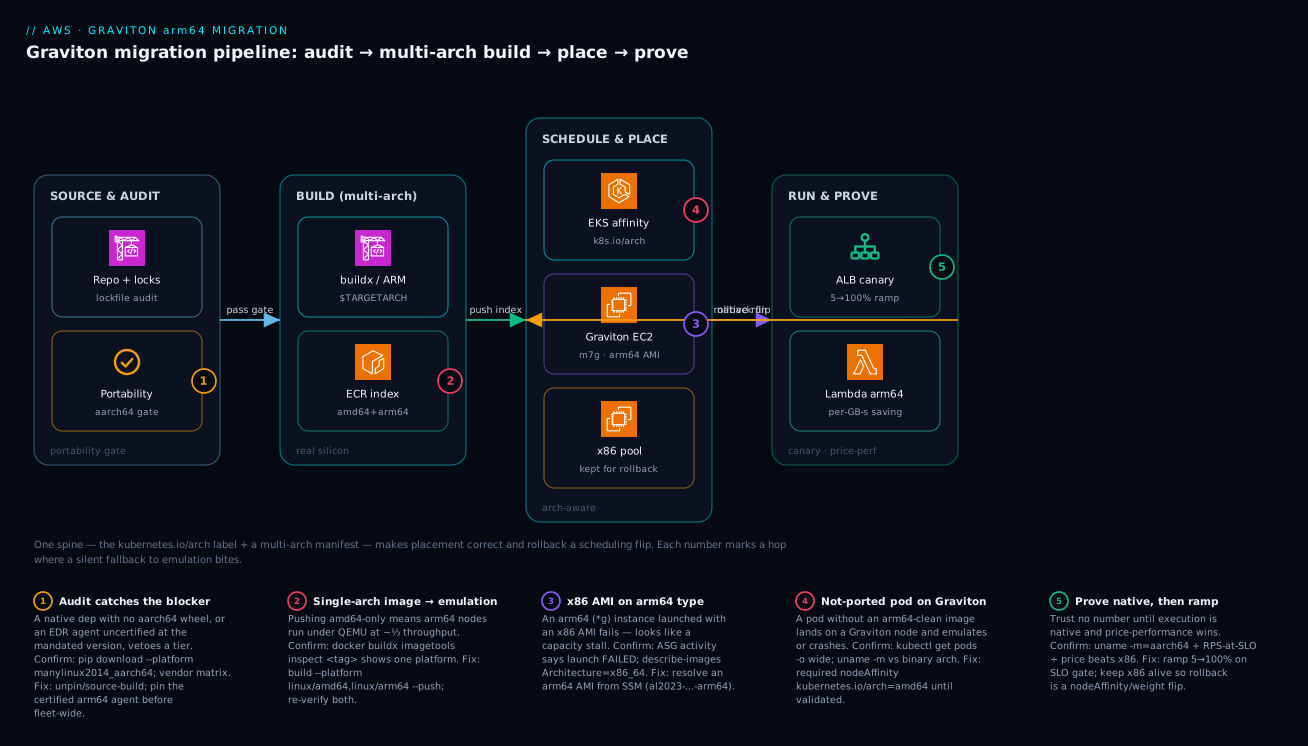
The diagram traces the migration as it actually flows, left to right, as a pipeline from source to running fleet, with the failure point on each hop marked. Read it as four zones. In SOURCE & AUDIT, your repository and lockfiles go through the portability audit — the gate that catches a missing aarch64 wheel or an x86-only agent before anything is built (badge 1). In BUILD (multi-arch), the buildx builder cross-compiles or uses a native arm64 runner and pushes a manifest list to ECR; the failure here is a single-arch image that will silently emulate downstream (badge 2). The SCHEDULE & PLACE zone is where EKS (with nodeAffinity on kubernetes.io/arch) and Karpenter place pods onto Graviton or x86 nodes, and where an arm64 instance launched with an x86 AMI stalls (badge 3) or a not-yet-ported pod lands on Graviton and emulates (badge 4). Finally RUN & PROVE is the canary behind the load balancer, benchmarked for price-performance, with the x86 path kept alive for instant rollback (badge 5).
Notice the spine running through every zone: the same kubernetes.io/arch label and the same multi-arch manifest are what make placement correct and rollback a scheduling flip rather than a rebuild. The first question on every step is the same one that governs the whole migration — “am I running native arm64, or did something quietly fall back to emulation?” — and the diagram marks the exact hop where each silent fallback bites.
Real-world scenario
Paykit, a fintech platform team, ran a Java (Spring Boot) payments API on ~200 m6i.xlarge instances across three EKS clusters in ap-south-1 and wanted Graviton’s savings to hit a board-level cost target: cut platform compute spend by a third. Monthly EKS compute was roughly ₹52 lakh. The platform team was six engineers; the constraint was non-negotiable: a mandated EDR agent ran as a DaemonSet on every node, and the security team would not approve the migration until that exact sensor version was certified on arm64. They also suspected, but had not confirmed, that one internal library still pulled an x86-only native .so for a legacy HSM client.
They sequenced it deliberately, gating on the portability matrix. Week one’s audit caught both blockers — exactly as designed. The pip/npm-equivalent Maven dependency scan flagged the HSM client’s native .so as x86-only at the pinned version; the agent matrix showed the EDR sensor had a GA arm64 build but two patch versions ahead of the mandated one. Finding these in week one, not week three, was the whole point: they opened a vendor ticket for the certified EDR build and rebuilt the HSM client with an aarch64-unknown-linux-gnu toolchain, then published the service as a multi-arch manifest list and verified both platforms with docker buildx imagetools inspect.
The build farm was the next obstacle. Their existing CodeBuild project built amd64-only, and the first attempt to add arm64 via QEMU emulation made the image build take 22 minutes — unacceptable for a team that deployed a dozen times a day. They switched to a CodeBuild ARM_CONTAINER fleet building arm64 natively and a small merge step (imagetools create) to assemble the manifest from two digests; build time dropped back to under 5 minutes per arch in parallel. Slow CI would have stalled adoption regardless of how good Graviton looked on paper.
For the rollout they stood up a Graviton Karpenter NodePool alongside the existing x86 one and started with a 5% weighted canary, using preferred (not required) nodeAffinity so a bad pull could never strand a pod:
affinity:
  nodeAffinity:
    preferredDuringSchedulingIgnoredDuringExecution:
      - weight: 90
        preference:
          matchExpressions:
            - key: kubernetes.io/arch
              operator: In
              values: ["arm64"]
Before trusting a single number they confirmed native execution — kubectl exec deploy/app -- uname -m returned aarch64 on the canary pods, ruling out the silent-emulation trap. The canary held p99 within 4% of the x86 baseline across a full peak cycle, so they ramped 5 → 25 → 50 → 100% over two weeks, draining the x86 node group last and keeping it alive until the API tier had soaked at 100% for a full business week. Benchmarking the API tier showed ~43% better price-performance; combined with a parallel flip of their async workers to arm64 Lambda and the Aurora reader fleet to db.r7g (rehearsed on a blue/green green-side first), the program cut the platform’s monthly compute bill by roughly a third, from ₹52 lakh toward the board target.
The decisive move was treating the EDR agent and the HSM .so as first-class migration dependencies caught by a gating audit, not afterthoughts discovered in production — either one, found late, would have blocked the whole effort after the tier was half-ported. The timeline, because the order of moves is the lesson:
| Week | Step | Action | Effect | What it would have been if skipped |
|---|---|---|---|---|
| 1 | Portability audit | Scan lockfiles + agent matrix | Caught EDR + HSM .so blockers |
Discovered in prod, week-3 veto |
| 1 | Vendor tickets | Request certified EDR arm64 build | Unblocked security sign-off | Tier stalled awaiting approval |
| 2 | Rebuild deps | aarch64 HSM client; multi-arch image | imagetools inspect shows both |
Segfault on first arm64 node |
| 2 | Build farm | QEMU build = 22 min → reject | Adoption-killing CI | Slow CI erodes the rollout |
| 3 | Native CI | CodeBuild ARM_CONTAINER + merge |
< 5 min/arch parallel | Teams avoid arm64 builds |
| 4 | Canary 5% | Karpenter NodePool, preferred affinity |
uname -m = aarch64; p99 +4% |
Bad pull strands a pod (if required) |
| 5-6 | Ramp 25→100% | SLO-gated weighted ramp | Clean through peak | Big-bang risk, hard rollback |
| 6 | Adjacent flips | Lambda arm64 + Aurora db.r7g |
~⅓ bill cut | Savings left on the table |
Advantages and disadvantages
The Graviton migration model — portable artifacts placed by the scheduler with the x86 path kept alive — both delivers the savings and contains the risk. Weigh it honestly:
| Advantages (why this approach works) | Disadvantages (why it bites) |
|---|---|
| ~20% lower hourly price + more throughput/$ on suitable workloads — savings land without re-architecting | The headline ~40% is workload-dependent; single-thread-bound x86-tuned code may lose |
| A multi-arch manifest means one tag serves both arches; the scheduler picks correctly | Ship a single-arch image and it silently emulates — “it runs” hides 60% lost throughput |
Rollback is a nodeAffinity/weight flip — no rebuild, seconds to safe |
You must keep the x86 node group alive (extra cost) for the soak window |
| Lambda arm64 is a one-flag change, lowest-risk highest-ROI flip | One x86-only bundled binary fails at cold start with a confusing error |
| Managed services flip by class with low-risk blue/green / clone testing | A class may be unavailable for your exact engine/version |
| The portability audit catches the one blocking dependency up front | Skip the audit and a mandated x86-only agent vetoes a half-ported tier in week three |
| Graviton + Spot stacks the deepest discount on interruption-tolerant tiers | Native-heavy stacks (Python/Node addons) need native-runner CI, not cross-compile |
The approach is right for any horizontally-scaled, throughput-bound estate — web/API tiers, microservices, caches, queue consumers, JIT/managed runtimes — where the audit is done and CI builds on real silicon. It is wrong, or needs a benchmark-first posture, for single-thread-latency-bound code tuned for x86, hand-written x86 intrinsics/AVX-512 paths, and anything gated by a dependency with no aarch64 build. The disadvantages are all manageable — but only if you treat the audit and the native-execution check (uname -m) as gates, not optional steps.
Hands-on lab
Build a real multi-arch image, push it to ECR, run it on a Graviton instance, and prove it’s running native arm64 — free-tier-friendly where possible (we use a t4g Graviton instance, which has a free-trial allowance; delete at the end). Run from a workstation with Docker + buildx and the aws CLI configured.
Step 1 — Variables and an ECR repository.
ACCOUNT=$(aws sts get-caller-identity --query Account --output text)
REGION=ap-south-1
REPO=graviton-lab
REPO_URI=$ACCOUNT.dkr.ecr.$REGION.amazonaws.com/$REPO
aws ecr create-repository --repository-name $REPO --region $REGION \
  --query 'repository.repositoryUri' --output text
Expected: the repository URI prints.
Step 2 — A tiny multi-arch app and Dockerfile.
cat > main.go <<'EOF'
package main
import ("fmt"; "net/http"; "runtime")
func main() {
  http.HandleFunc("/", func(w http.ResponseWriter, r *http.Request) {
    fmt.Fprintf(w, "hello from %s/%s\n", runtime.GOOS, runtime.GOARCH)
  })
  http.ListenAndServe(":8080", nil)
}
EOF
cat > Dockerfile <<'EOF'
# syntax=docker/dockerfile:1
FROM --platform=$BUILDPLATFORM golang:1.22 AS build
ARG TARGETOS TARGETARCH
WORKDIR /src
COPY main.go .
RUN go mod init lab && CGO_ENABLED=0 GOOS=$TARGETOS GOARCH=$TARGETARCH go build -o /out/app .
FROM public.ecr.aws/docker/library/alpine:3.20
COPY --from=build /out/app /usr/local/bin/app
ENTRYPOINT ["/usr/local/bin/app"]
EOF
Step 3 — Build and push a manifest list for both arches.
aws ecr get-login-password --region $REGION | docker login --username AWS --password-stdin $ACCOUNT.dkr.ecr.$REGION.amazonaws.com
docker buildx create --name multiarch --driver docker-container --use 2>/dev/null || docker buildx use multiarch
docker buildx build --platform linux/amd64,linux/arm64 \
  --tag $REPO_URI:1.0.0 --provenance=false --push .
Step 4 — Prove the image is genuinely multi-arch (the key check).
docker buildx imagetools inspect $REPO_URI:1.0.0
# Expect BOTH:  Platform: linux/amd64  AND  Platform: linux/arm64
If only one platform appears, the build was single-arch and any arm64 node would emulate or fail — that is the trap this lab teaches you to catch.
Step 5 — Launch a Graviton instance and run the image natively. Launch a t4g.micro with an arm64 AL2023 AMI (resolved from SSM, never hardcoded), then on the instance:
# On the Graviton instance (Docker installed):
uname -m                                  # expect: aarch64  (you are on Graviton)
aws ecr get-login-password --region ap-south-1 | docker login --username AWS --password-stdin <acct>.dkr.ecr.ap-south-1.amazonaws.com
docker run --rm -p 8080:8080 -d <acct>.dkr.ecr.ap-south-1.amazonaws.com/graviton-lab:1.0.0
curl localhost:8080                       # expect: hello from linux/arm64
The pair that proves success: uname -m returns aarch64 and the app reports linux/arm64 — native Graviton, not emulation.
Step 6 — (Optional) Confirm the x86 variant exists too. On any x86 host, docker run --rm <repo>:1.0.0 prints hello from linux/amd64 from the same tag — one manifest list, both arches, the scheduler picks correctly.
Validation checklist. You built one Dockerfile into a multi-arch manifest list, verified both platforms with imagetools inspect, ran it native on Graviton confirmed by uname -m + GOARCH, and saw the same tag serve x86. The lab steps mapped to what each proves:
| Step | What you did | What it proves | Real-world analogue |
|---|---|---|---|
| 3 | buildx --platform amd64,arm64 --push |
One build → manifest list | Your production image build |
| 4 | imagetools inspect shows both |
The anti-emulation gate | The check that catches silent QEMU |
| 5 | uname -m=aarch64 + GOARCH=arm64 |
Native Graviton, not emulation | The pre-benchmark sanity check |
| 6 | Same tag on x86 prints amd64 | One tag, both arches | Mixed-arch fleet during transition |
Cleanup (avoid lingering charges).
# Terminate the t4g instance from the console/CLI, then:
aws ecr delete-repository --repository-name graviton-lab --region ap-south-1 --force
docker buildx rm multiarch
Cost note. A t4g.micro is the cheapest Graviton instance (free-trial allowance applies in many accounts; otherwise a few paise per hour). An hour of this lab is well under ₹20, and terminating the instance + deleting the repo stops everything.
Common mistakes & troubleshooting
This is the playbook — the part you bookmark during a cutover. First as a scannable table, then the same entries with the full confirm-command detail underneath.
| # | Symptom | Root cause | Confirm (exact cmd / path) | Fix |
|---|---|---|---|---|
| 1 | Throughput ~⅓ expected on Graviton; “Graviton is slow” | Single-arch image running under QEMU | docker buildx imagetools inspect <tag> (one platform); uname -m vs GOARCH |
Publish a multi-arch manifest list; redeploy |
| 2 | exec format error on an arm64 node |
Wrong-arch binary executed | file ./binary; uname -m on host |
Build/pull arm64 artifact (don’t rely on qemu) |
| 3 | pip install fails: “no matching distribution” |
No aarch64 wheel at the pinned version | pip download --platform manylinux2014_aarch64 ... |
Unpin / source-build w/ toolchain / swap package |
| 4 | ASG instances never InService, “capacity stall” |
x86 AMI on an arm64 instance type | ASG activity = launch failed; describe-images Architecture |
Use an arm64 AMI (resolve via SSM param) |
| 5 | Pod Pending: “didn’t match node affinity” |
required amd64 affinity but only arm64 nodes (or vice-versa) |
kubectl get nodes -L kubernetes.io/arch; describe pod |
Add matching node group; or relax to preferred |
| 6 | Container SIGILL/segfault on arm64 only |
Hand-written x86 intrinsics / AVX path | Crashes arm64, fine amd64; dmesg |
Portable build flag / arm64 codepath / library |
| 7 | EDR/agent DaemonSet CrashLoopBackOff on Graviton |
Agent version not arm64-certified | kubectl logs ds/<agent>; vendor matrix |
Pin certified arm64 build; canary one node group |
| 8 | Node native addon: “invalid ELF header” | x86 prebuilt addon baked, run on arm64 | npm rebuild on arm64; check addon arch |
Rebuild on arm64 runner; multi-arch image |
| 9 | Lambda fails at cold start on arm64 | Bundled native binary is x86 | aws lambda get-function-configuration --query Architectures |
Rebuild the bundled dep on arm64 |
| 10 | Slower than x86 even when confirmed native | Genuinely x86-favored hot path | Native-vs-native benchmark; uname -m=aarch64 |
Profile; swap library; or keep tier on x86 |
| 11 | Multi-arch build takes 20+ min | QEMU emulating the other arch | Build log shows qemu; one slow arch | Cross-compile (Go/Rust) or native arm64 runner |
| 12 | RDS modify to db.r7g fails |
Class unavailable for engine/version | describe-orderable-db-instance-options |
Upgrade engine version; pick an available class |
| 13 | Some pods on arm64, some on x86, inconsistent | No affinity + only one arch ported | kubectl get pods -o wide; node arch labels |
Pin not-ported pods to amd64 until validated |
| 14 | “It’s on Graviton” but bill went up | Emulation needs more instances to carry load | uname -m across fleet; throughput per instance |
Fix to native; re-right-size instance count |
The expanded form, for the entries that bite hardest:
1. Throughput is a third of expected and the team concludes “Graviton is slow.”
Root cause: A single-arch (linux/amd64-only) image was pulled to an arm64 node and is running under QEMU emulation — correct output, 30-60% of native throughput.
Confirm: docker buildx imagetools inspect <tag> shows only linux/amd64; kubectl exec <pod> -- uname -m returns aarch64 while the binary is x86. The pair (aarch64 host, x86 binary) is the signature of emulation.
Fix: Rebuild and push a multi-arch manifest list (--platform linux/amd64,linux/arm64), redeploy, re-verify with imagetools inspect.
2. exec format error when the container or binary starts on arm64.
Root cause: A wrong-architecture binary is being executed directly (no emulation layer present).
Confirm: file ./binary reports x86-64; uname -m on the host is aarch64.
Fix: Build/pull the arm64 artifact. Installing qemu-user-static makes it run but is a slow stopgap, not a fix — produce the native binary.
3. pip install (or npm install) fails with “no matching distribution found.”
Root cause: A native package has no aarch64 wheel/prebuilt at the pinned version.
Confirm: pip download -r requirements.txt --platform manylinux2014_aarch64 --only-binary=:all: ... errors on that package.
Fix: Unpin to a version that ships an aarch64 wheel, source-build it with the appropriate toolchain (e.g. Rust for cryptography), or swap the package. Build on a native arm64 runner so the source build is fast.
4. ASG instances never reach InService; it looks like a Spot/capacity stall.
Root cause: The launch template references an x86 AMI on an arm64 (*g) instance type, so every launch fails.
Confirm: ASG Activity history says the launch failed (not “no capacity”); aws ec2 describe-images --image-ids <ami> --query 'Images[].Architecture' returns x86_64.
Fix: Resolve and use an arm64 AMI from SSM (.../al2023-ami-...-arm64); never hardcode an AMI ID across arches.
7. The EDR/observability DaemonSet crash-loops on Graviton nodes.
Root cause: The agent version deployed has no certified arm64 build (or the wrong build was pulled).
Confirm: kubectl logs ds/<agent> -n <ns> shows an arch/format error; the vendor’s support matrix lists a different arm64-GA version.
Fix: Pin the certified arm64 build with security sign-off; validate on a single canary node group before fleet-wide. This is the classic week-three veto — catch it in the audit.
10. Genuinely slower than x86 even after confirming native execution.
Root cause: A real x86-favored hot path — single-thread-bound code, an x86-only optimized library, or hand-tuned intrinsics with no Arm equivalent.
Confirm: A native-vs-native benchmark (uname -m = aarch64 on both runs) shows Graviton losing on price-performance, not just raw speed.
Fix: Profile the hot path; swap in an Arm-optimized library; or accept that this specific tier stays on x86. A loss here is a data point, not a program failure.
14. The fleet is “on Graviton” but the bill went up.
Root cause: Widespread emulation — single-arch images carrying the load under QEMU at a fraction of throughput, so you provisioned more instances to compensate.
Confirm: uname -m and per-instance throughput across the fleet; imagetools inspect on the deployed tags.
Fix: Make every image native multi-arch, redeploy, then re-right-size the instance count to the real (higher) native throughput. The savings reappear once you’re native.
Best practices
- Gate the rollout on a portability matrix. No tier starts migrating until every native dep, runtime, agent, and sidecar is confirmed
aarch64or has an explicit waiver. The audit is the cheapest insurance in the program. - Audit lockfiles, not requirements. The blocking dependency is almost always transitive and compiled — scan the resolved, pinned graph.
- Validate every mandated agent at the exact policy version. “Has an arm64 build” is not “the version security mandates has an arm64 build.” Get explicit sign-off.
- One Dockerfile, one manifest list. Build
--platform linux/amd64,linux/arm64and verify both withdocker buildx imagetools inspecton every release. Never maintain two Dockerfiles. - Cross-compile compiled languages; native-build the rest. Go/Rust cross-compile cleanly via
$TARGETARCH; build Python/Node native-heavy stacks on a native arm64 runner, not under QEMU. - Build arm64 CI on real silicon. CodeBuild
ARM_CONTAINERor GitHububuntu-*-armrunners. Slow emulated builds quietly kill adoption. - Prove native before you benchmark.
uname -m=aarch64(andGOARCH/os.arch= arm64) is the gate before trusting any performance number — it rules out the silent-emulation trap. - Report price-performance, not raw speed. Sustained RPS at your latency SLO ÷ on-demand price, like-for-like sizes. The decision lives in the ratio.
- Keep not-yet-ported pods pinned to x86. A
requirednodeAffinityonamd64ensures a half-ported workload never lands on Graviton and emulates. - Use
preferredaffinity for the canary. It lets a bad pull fall back to x86 rather than stranding a podPending. - Keep the x86 path alive through the soak. Rollback is then a
nodeAffinity/weight flip with no rebuild; drain x86 only after a full business cycle clean at 100%. - Stack Graviton with Spot on interruption-tolerant tiers for the deepest discount, with capacity-optimized allocation and interruption handling.
- Start with Lambda and async workers. Lowest risk, fastest ROI; they build organizational confidence before you touch the API tier.
The signals worth watching before and during a cutover — leading indicators, not the lagging “it’s slow”:
| Watch | Signal | Threshold (starting point) | Why it’s leading |
|---|---|---|---|
| Native execution | uname -m per node/pod |
any x86_64 on a *g node |
Catches emulation before benchmarking |
| Manifest completeness | imagetools inspect platforms |
< 2 platforms on a deployed tag | Catches single-arch ship before deploy |
| Canary p99 drift | p99 Graviton vs x86 baseline | > a few % sustained | Promote/abort decision input |
| Agent health | DaemonSet ready on Graviton nodes | any CrashLoopBackOff |
The week-three veto, early |
| Per-instance throughput | RPS/instance vs benchmark | well below native number | Emulation or wrong sizing |
| Bill trend | Compute $ per unit work | rising during “migration” | Emulation needing more instances |
Security notes
- Least-privilege CI push. The CI role that pushes to ECR should be scoped to the specific repository and
ecr:Put*/ecr:Batch*actions, via OIDC (configure-aws-credentials) or an instance profile — never long-lived keys in the runner. - Pin image digests, not floating tags. A floating
:latestcan flip architectures or content under you; reference the manifest-list digest so what you scanned is what you run. - Scan both architectures. Vulnerability scanning must cover the arm64 manifest too — an arm64 base image can carry different package versions than its amd64 sibling. ECR enhanced scanning covers the index.
- Treat the EDR/security agent as a security gate, not a checkbox. The arm64 build must be the version your policy certifies; a downgrade to “any arm64 build” to unblock the migration is a security regression. Get explicit sign-off.
- Verify the base image source. Pull base images from a trusted registry (ECR Public, your private ECR) and confirm the arm64 variant is the genuine multi-arch tag, not a typo-squatted or stale mirror.
- Keep the rollback path authenticated. The x86 node group and its launch template/AMI access must remain valid through the soak window — a rollback that fails because the x86 path’s permissions lapsed is a worse incident than the regression it was meant to fix.
- Don’t let
qemu-user-staticlinger in production images. Installing emulation to “make it run” leaves an x86 binary path in a supposedly-arm64 image — a correctness and supply-chain smell. Produce native binaries.
The security controls that also de-risk the migration — secure and correct pull the same way here:
| Control | Mechanism | Secures against | Also prevents |
|---|---|---|---|
| OIDC CI role to ECR | configure-aws-credentials + scoped policy |
Leaked long-lived keys | Unscoped pushes to wrong repos |
| Digest pinning | manifest-list digest in deploy | Tag-flip / supply-chain swap | Accidental single-arch / arch flip |
| Scan the index | ECR enhanced scanning (both arches) | arm64-specific CVEs | Shipping an unscanned arm64 layer |
| Certified agent version | Security sign-off on arm64 build | Downgraded EDR coverage | Agent crash-loop on Graviton |
| Trusted base registry | Private ECR / ECR Public | Tampered base image | Stale/typo-squatted arm64 base |
| No lingering qemu | Native-only images | Hidden x86 execution path | Silent emulation in “arm64” image |
Cost & sizing
The bill drivers and how they interact with the migration:
- Instance-hours dominate, and Graviton lowers them two ways: a roughly 20% lower hourly price for comparable capacity, and — on throughput-bound workloads — more work per instance, so you run fewer of them. The compounded effect is the headline “up to ~40% better price-performance,” but only the price part is guaranteed; the throughput part is workload-dependent and must be benchmarked.
- Emulation can erase the savings. A single-arch image under QEMU at a third of native throughput forces you to provision ~3× the instances — the bill goes up while the dashboard says “Graviton.” This is why
uname -mandimagetools inspectare cost controls, not just correctness checks. - Lambda arm64 is priced lower per GB-second and often runs faster — frequently the best ROI in the program for the least risk. Flip eligible functions early.
- The x86 soak path is a temporary cost. Keeping the x86 node group alive through the canary and one business cycle is duplicate capacity — real money, but cheap insurance for instant rollback. Drain it on schedule so it doesn’t become permanent.
- Graviton + Spot + Savings Plans stack. On interruption-tolerant tiers, Graviton Spot is the deepest discount; Compute Savings Plans apply across instance families including Graviton, so commitment discounts and the architecture discount compound.
A rough monthly picture for a mid-size service: an x86 baseline of ₹4 lakh for ~80 m6i.xlarge-equivalents, migrating to m7g.xlarge at ~20% lower price and ~15% higher throughput, lands around ₹2.7-2.9 lakh once native and right-sized — roughly a third off, matching real-world programs. The cost levers and what each buys:
| Cost lever | What you pay for / save | Rough effect | What it fixes | Watch-out |
|---|---|---|---|---|
| Graviton hourly price | ~20% lower per comparable instance | -20% on the rate | The guaranteed part of the win | Only if running native |
| Throughput per instance | Fewer instances for same load | -0 to -30% on count | The benchmark-dependent part | Workload must scale out |
| Lambda arm64 | Lower per-GB-second | ~20% on eligible fns | Lowest-risk savings | Bundled deps must be aarch64 |
| Graviton Spot | Deep discount on interruptible tiers | up to ~70-90% off on-demand | Batch/async/stateless | Needs interruption handling |
| Compute Savings Plan | Commitment discount incl. Graviton | stacks with the above | Predictable baseline | Right-size before committing |
| x86 soak duplicate | Temporary dual capacity | + short-term cost | Instant rollback safety | Drain on schedule; don’t leave it |
| Karpenter consolidation | Bin-pack + drop idle Graviton nodes | further -10 to -30% | Over-provisioned node count | Mind disruption budgets |
| Emulation tax (anti-lever) | More instances under QEMU | bill rises | (nothing — it’s the bug) | uname -m to detect |
Interview & exam questions
1. What is the single biggest silent risk in a Graviton migration, and how do you detect it? Shipping a single-arch (linux/amd64-only) image to an arm64 node, which runs under QEMU emulation — correct output at 30-60% of native throughput, silently erasing the price-performance gain. Detect it with docker buildx imagetools inspect <tag> (must show both platforms) and uname -m returning aarch64 while the binary is native arm64, confirmed by a healthy throughput number.
2. Why does Graviton compete on price-performance rather than raw speed, and what metric should a benchmark report? Graviton cores aren’t faster per core than the latest x86 at single-threaded, latency-bound work; they win on aggregate throughput per dollar (more cores at a lower price, strong memory bandwidth). The benchmark must report price-performance = sustained RPS at your latency SLO ÷ on-demand hourly price, like-for-like sizes — not the raw latency of one request.
3. How do you build a single image that runs on both x86 and arm64? Build a multi-arch manifest list with docker buildx build --platform linux/amd64,linux/arm64 --push, using $TARGETPLATFORM/$BUILDPLATFORM/$TARGETARCH so cross-builds are explicit. The result is one tag pointing at per-arch manifests; docker pull/Kubernetes resolves the matching architecture automatically.
4. A workload is native-heavy Python. Why prefer a native arm64 CI runner over cross-compiling? Cross-compiling C extensions and native wheels for a different arch is painful and error-prone, and emulated (QEMU) building is slow. Building on a native arm64 runner (CodeBuild ARM_CONTAINER, GHA ubuntu-24.04-arm) compiles the native dependencies on real silicon quickly and correctly, then a merge step stitches the manifest from per-arch digests.
5. How does the EKS scheduler know a node’s architecture, and how do you keep a not-yet-ported pod off Graviton? The kubelet sets the well-known label kubernetes.io/arch (amd64/arm64) on every node automatically. Pin the not-yet-ported pod with a required nodeAffinity matching kubernetes.io/arch: amd64, so it never schedules onto a Graviton node and accidentally emulates.
6. Why use preferred rather than required nodeAffinity during a canary? required makes the pod un-schedulable if no node of that arch is available (it goes Pending); preferred lets the scheduler fall back to x86 if an arm64 node or a correct pull isn’t available, so a transient issue can’t strand a pod. Once the image is validated you can tighten to required.
7. What makes rollback trivial in a well-run Graviton migration? Keeping the x86 node group alive plus shipping a multi-arch image means rollback is a scheduling change, not a rebuild: flip nodeAffinity back to amd64 (or shift ELB target-group weights) and pods reschedule onto x86 with no image change. You drain x86 only after a full business cycle clean at 100% Graviton.
8. An ASG of arm64 instances never reaches InService and looks like a capacity stall. Most likely cause? The launch template references an x86 AMI on an arm64 (*g) instance type, so every launch fails (not “no capacity”). Confirm via ASG Activity history (launch failed) and describe-images Architecture = x86_64. Fix by resolving an arm64 AMI from SSM Parameter Store.
9. Which migration surface most often vetoes a tier in week three, and how do you prevent it? A mandated agent (commonly EDR) with no certified arm64 build at the policy-required version. Prevent it by treating agents and sidecars as first-class, gated dependencies in the week-one portability audit, validating the exact mandated version on a single canary node group with security sign-off before fleet-wide.
10. Why is Lambda usually the first thing you migrate to arm64? It’s the lowest-risk, highest-ROI flip: set architectures = ["arm64"] and Lambda charges less per GB-second while many functions also run faster. The only requirement is that any bundled native dependency is an aarch64 build — packaged-correctly functions migrate with a one-line change.
11. The fleet is “on Graviton” but the bill went up. What happened? Widespread emulation — single-arch images carrying load under QEMU at a fraction of throughput, so the team provisioned more instances to compensate. The price-per-instance dropped but the count rose more. Fix: make every image native multi-arch, redeploy, and re-right-size the instance count to the real native throughput.
12. How do you decide whether a workload is a Graviton candidate before benchmarking? Screen on two axes: portability (does every compiled dependency have an aarch64 build?) and scaling profile (does it scale out cleanly and run more than one instance — throughput-bound, not single-thread-latency-bound x86-tuned code?). Candidates that pass both go straight to a canary; single-thread-bound or intrinsic-heavy code gets a benchmark-first posture.
These map to AWS Certified Solutions Architect – Associate (SAA-C03) — cost-optimized, resilient compute selection — and AWS Certified DevOps Engineer – Professional (DOP-C02) — CI/CD for multi-arch artifacts, deployment strategies, and safe rollout. The FinOps/price-performance angle touches the Cloud Practitioner cost pillar and Well-Architected Cost Optimization. A compact cert-mapping for revision:
| Question theme | Primary cert | Objective area |
|---|---|---|
| Price-performance, instance selection | SAA-C03 | Design cost-optimized, resilient compute |
| Multi-arch build / CI strategy | DOP-C02 | CI/CD; artifact management |
| Canary, rollback, deployment safety | DOP-C02 | Deployment strategies; resilience |
| nodeAffinity, Karpenter, EKS scheduling | SAA-C03 / DOP-C02 | Container orchestration |
| Lambda arm64, cost levers | CLF-C02 | Cloud economics; pricing |
| Spot + Graviton + Savings Plans | SAA-C03 | Cost-optimized purchasing options |
Quick check
- You deploy to Graviton and throughput is a third of what the benchmark promised. What is the most likely cause and the two commands that confirm it?
- What metric must a Graviton benchmark report, and why is raw request latency the wrong one?
- True or false: cross-compiling under QEMU on an x86 builder is the recommended way to build arm64 images for a native-heavy Python service.
- Your async-worker pod must stay on x86 for now. What exact Kubernetes mechanism keeps it off Graviton nodes, and why use
requiredrather thanpreferredhere? - An ASG of
m7ginstances never reachesInServiceand looks like a capacity shortage. What’s the real cause, and how do you confirm it?
Answers
- A single-arch image running under QEMU emulation on the arm64 node. Confirm with
docker buildx imagetools inspect <tag>(it will show onlylinux/amd64, not both platforms) anduname -minside the pod returningaarch64while the binary is x86 — the aarch64-host/x86-binary pair is the signature of emulation. Fix by publishing a multi-arch manifest list and redeploying. - Price-performance = sustained RPS at your latency SLO ÷ on-demand hourly price, like-for-like sizes. Raw latency is wrong because Graviton competes on throughput per dollar, not single-thread speed; a workload can have similar or slightly higher per-request latency yet win decisively on the ratio because the instance is ~20% cheaper and scales out better.
- False. Emulated (QEMU) builds are correct but slow, and slow CI kills adoption. For native-heavy Python, build the arm64 variant on a native arm64 runner (CodeBuild
ARM_CONTAINER/ GHAubuntu-24.04-arm) so native wheels compile on real silicon, then merge the manifest from per-arch digests. - A
requirednodeAffinitymatchingkubernetes.io/arch: amd64. Userequired(notpreferred) because a not-yet-ported workload must never land on Graviton and silently emulate or crash —preferredwould allow it onto an arm64 node if x86 capacity were tight, which is exactly the outcome you’re preventing. - The launch template references an x86 AMI on an arm64 instance type, so every launch fails — it only looks like a capacity stall. Confirm via the ASG Activity history (the entry says the launch failed, not “insufficient capacity”) and
aws ec2 describe-images --image-ids <ami> --query 'Images[].Architecture'returningx86_64. Fix by resolving an arm64 AMI from SSM Parameter Store.
Glossary
- arm64 / aarch64 — the 64-bit Arm instruction set; the ISA boundary the migration crosses. Compiled code exists per-architecture.
- Graviton — AWS-designed Arm Neoverse server processor (Graviton2 powers
*6g, Graviton3*7g, Graviton4*8g); the target of the migration. - Manifest list / image index — one container tag pointing at per-architecture image manifests; lets
docker pull/Kubernetes resolve the matching arch automatically. - QEMU emulation — running x86 binaries on arm64 (or vice-versa) via user-mode emulation; correct but 30-60% slower, the silent killer of the price-performance gain.
$TARGETPLATFORM/$BUILDPLATFORM/$TARGETARCH— buildx build args naming the target vs the builder’s architecture, used to make cross-builds explicit.- Cross-compilation — building for a different target arch from the builder’s native arch (clean for Go/Rust); contrasted with emulated building and native-runner building.
kubernetes.io/arch— the well-known node label (amd64/arm64) set automatically by the kubelet; the key for architecture-based scheduling.nodeAffinity— a pod scheduling rule;requiredenforces an arch,preferredweights toward it with x86 fallback. The pin-and-rollback mechanism.- Karpenter NodePool — just-in-time node provisioning intent for EKS; expresses arch (
arm64), capacity type (spot/on-demand), and instance types. - CodeBuild
ARM_CONTAINER— native Arm build compute in CodeBuild for building arm64 artifacts on real silicon. - arm64 AMI — an architecture-matched machine image (AL2023, Bottlerocket, Ubuntu publish aarch64); an x86 AMI on a
*ginstance type fails the launch. - Native addon / wheel — a compiled dependency artifact (Node addon, Python wheel) that must have an aarch64 build or it breaks on arm64.
- Price-performance — sustained throughput at your latency SLO divided by on-demand price; the only honest migration decision metric.
exec format error— the error when a wrong-architecture binary is executed directly with no emulation present.- Graviton + Spot — running Graviton on Spot capacity for the deepest discount on interruption-tolerant tiers; stacks with Compute Savings Plans.
Next steps
You can now run a portability-gated, benchmark-proven Graviton migration with instant rollback. Build outward:
- Next: EC2 Spot, Mixed Instances & Capacity-Optimized ASGs — stack Graviton with Spot for the deepest discount on interruption-tolerant tiers.
- Related: Deploy Karpenter on EKS: Consolidation, Spot & Disruption Budgets — provision Graviton just-in-time and consolidate for further savings.
- Related: Docker Container Images for CI/CD: Dockerfiles & Registries — the image-build foundation under the multi-arch manifest list.
- Related: GitHub Actions Fundamentals: Workflows, Jobs, Runners & Secrets — wire the arm64 native-runner CI that keeps builds fast.
- Related: Amazon EC2 Deep Dive: Instances, AMIs, EBS, User Data & IMDS — the instance-type and AMI mechanics behind the rollout.
- Related: FinOps Showback & Chargeback Platform on AWS — attribute and prove the price-performance savings the migration delivers.