A docker run on a laptop and an ECS service on AWS Fargate share almost no operational concerns. Fargate is the serverless launch type for Amazon Elastic Container Service — you hand AWS a task definition and a desired count, and it runs your containers on capacity it owns and patches, with no EC2 instances for you to size, drain, or reboot. That removes the host layer, but it does not remove the decisions that decide whether a deploy is safe at 3am: how each task gets an IP and a security group, when a deployment rolls back on its own, and what happens to in-flight requests when a task is told to stop. Those are the knobs that separate a service which drains cleanly on every release from one that drops connections, leaks IPs, and pages you on a Friday.
This guide walks the pieces I actually wire up for a production Fargate service, the same way I’d brief a new engineer joining the on-call rotation. Every section goes option-by-option: the valid CPU/memory matrix, the awsvpc ENI/IP planning math, the choice between target-tracking and step scaling and exactly which metric to scale on, the deployment circuit breaker that auto-rolls-back a bad image, the SIGTERM → stopTimeout → deregistration-delay triad that makes shutdown graceful, the execution-role vs task-role split that is the most common IAM mistake on ECS, and the Fargate Spot + Graviton + right-sizing levers that move the bill. Because this is a reference you’ll return to mid-incident, the options, limits, error codes and the deploy playbook itself are laid out as scannable tables — read the prose once, then keep the tables open when the rollout is stuck.
Assume the AWS provider/region is set, an Application Load Balancer (ALB) exists, and you’re on a recent CLI (aws --version >= 2.x). I use the Linux platform version LATEST throughout, which today resolves to Fargate platform version 1.4.0, and I default to ARM64 (Graviton) because it is the cheapest change you can make. By the end you’ll be able to register a correctly-sized task, place it in private subnets with per-task security groups, scale it on the right signal, deploy it with an automatic safety net, and shut it down without severing a single request.
What problem this solves
ECS on Fargate hides the fleet so you can ship a container without owning servers. That abstraction is a gift until a deploy goes sideways, and then the failure modes are not in your application code — they’re in the wiring between the ALB, the task ENI, the scaling policy, and the lifecycle hooks. The defaults are tuned for “it runs”, not for “it survives a release under load”, and almost every production ECS incident I’ve seen traces back to one of a small set of mis-set knobs.
What breaks without this knowledge, concretely: a service scaled on CPU that is actually I/O-bound scales out after p99 has already tripled, because CPU never crossed the target while request queues grew. A container launched via sh -c "java -jar app.jar" where the shell is PID 1 swallows SIGTERM, so the JVM is SIGKILLed on every task stop and every in-flight request dies. An ALB target group left at the default 300-second deregistration delay keeps routing to tasks ECS has already begun stopping. A bad image with no circuit breaker leaves ECS replacing failing tasks forever, draining the subnet’s IP pool until new tasks can’t even be placed. And the single most common IAM mistake — conflating the execution role (used by the agent to pull the image and read secrets before the container starts) with the task role (used by your code at runtime) — silently grants your application code permissions it should never have.
Who hits this: every team running containers on Fargate behind a load balancer. It bites hardest on services with chatty downstreams (the scaling-metric trap), services that were lifted from EC2 without revisiting PID 1 and signal handling (the dropped-connection trap), large services in small subnets (the IP-exhaustion trap), and anyone who has never actually seen their circuit breaker fire — because a safety net you’ve never tested is a configuration you don’t really have.
To frame the whole field before the deep dive, here is every failure class this article covers, the question it forces, and the one place to look first:
| Failure class | What it looks like | First question to ask | First place to look | Most common single cause |
|---|---|---|---|---|
| Deploy-time 502s | 502s on every release and every scale-in | Did the ALB cut a connection the task was still serving? | ALB target group settings | target_type not ip, or dereg delay still 300s |
| Dropped in-flight requests | Errors spike exactly when a task stops | Does PID 1 receive and handle SIGTERM? | Task definition command/entryPoint |
Shell wrapper is PID 1, swallows the signal |
| Scales late / flaps | p99 climbs before scale-out; thrash on scale-in | Does load map to the metric you scaled on? | Auto Scaling policy + CloudWatch | CPU target tracking on an I/O-bound service |
| Tasks stuck PROVISIONING | RESOURCE:ENI / IP-not-available stopped reason |
Are there free IPs for the deploy surge? | Subnet free-IP count vs maximumPercent |
/26 subnet, 40-task service at maximumPercent: 200 |
| Bad deploy never recovers | Failing tasks replaced forever, IP pool drains | Is the circuit breaker on with rollback? |
describe-services → rolloutState |
deploymentCircuitBreaker not enabled |
| Code has perms it shouldn’t | App can read secrets it never references | Which role is your code actually using? | executionRoleArn vs taskRoleArn |
Secrets perms on the task role, not exec role |
Learning objectives
By the end of this article you can:
- Pick a valid Fargate
cpu/memorycombination for the whole task (app + sidecars), choose ARM64 vs X86_64, and pin images to an immutable digest so two tasks in one deployment never run different code. - Plan awsvpc networking: one ENI and security group per task, the subnet IP-consumption math during a rolling deploy, and reaching ECR/Secrets Manager/CloudWatch via VPC interface endpoints instead of a NAT gateway.
- Register a service as a scalable target and choose between target-tracking (and which predefined metric) and step scaling, layer multiple policies safely, and get the
ResourceLabelright so the policy isn’t silently a no-op. - Configure a rolling deployment with
minimumHealthyPercent/maximumPercent, a deployment circuit breaker withrollback, and a health-check grace period — and know when to reach for native blue/green instead. - Make shutdown graceful by coordinating SIGTERM, PID 1,
stopTimeout, and the ALB deregistration delay so in-flight requests always drain. - Separate the execution role from the task role, inject secrets via the
secretsblock (neverenvironment), and scope each role to specific ARNs. - Wire Container Insights, structured JSON logs (
awslogsvs FireLens), and ADOT/X-Ray tracing, then pull the cost levers: Fargate Spot via a capacity-provider strategy, Graviton, and right-sizing. - Read a symptom → root cause → confirm → fix deploy playbook and localize any Fargate deploy/scale failure to one hop.
Prerequisites & where this fits
You should already understand the container basics: an image is built and pushed to a registry (Amazon ECR), a task definition is the immutable, versioned spec of what to run, a task is one running instance of that spec, and a service keeps a desired number of tasks running and registered behind a load balancer. You should know how to run aws in a shell, read JSON output, and that a VPC has subnets spread across Availability Zones, security groups (stateful, allow-only), and route tables. Familiarity with HTTP status codes, basic Linux process/signal concepts, and IAM policy JSON helps.
This sits in the Containers track and assumes the fundamentals from Amazon ECS & ECR Fundamentals: Task Definitions, Services & Fargate and the first deploy in Your First Container Deployment on ECS Fargate. It pairs tightly with Elastic Load Balancing Deep Dive: ALB, NLB & GWLB (the ALB and target group are half the deploy story) and VPC Deep Dive: Subnets, Routing, IGW, NAT & Endpoints (where the per-task ENIs and VPC endpoints live). For the choice of whether Fargate is even the right runtime, Choose Your Container Path: ECS vs EKS vs Fargate is upstream of this.
A quick map of who owns what during a Fargate incident, so you page the right person fast:
| Layer | What lives here | Who usually owns it | Failure classes it can cause |
|---|---|---|---|
| Client / DNS / TLS | Name resolution, cert, retries | Frontend / SRE | 502/503 only if misrouted; mostly red herrings |
| ALB + target group | Routing, health checks, deregistration | Platform / network | Deploy-time 502s (dereg delay, target type) |
| VPC subnets / ENIs | Per-task IPs, route to endpoints/NAT | Network team | Tasks stuck PROVISIONING (RESOURCE:ENI) |
| Security groups | Inbound from ALB, egress to deps | Platform + security | Connection refused / timeouts to the task |
| Task definition | CPU/mem, image, ports, lifecycle | App / dev team | Crash loops, dropped requests, OOM |
| Auto Scaling policy | Scalable target, metric, cooldowns | Platform + app | Scales late, flaps, hits max capacity |
| IAM roles (exec + task) | Image pull, secrets, runtime APIs | Security + app | Image-pull denied, over-broad app perms |
| ECS control plane | Rollout state, circuit breaker | Managed (AWS) | Bad deploy that never rolls back |
Core concepts
Six mental models make every later decision obvious.
A task is a first-class network citizen, not a process sharing a host. On Fargate the network mode is always awsvpc: each task gets its own elastic network interface (ENI) with a private IP from the subnet you place it in, and its own security group(s). You get per-task security groups, per-task VPC Flow Logs, and clean blast-radius isolation — at the cost of consuming one subnet IP (and one ENI) per running task. That IP consumption is the planning trap, because during a rolling deploy you briefly run more tasks than steady state.
The task definition is immutable and versioned; the service points at one revision. Every register-task-definition produces a new revision (family:N). The service runs whatever revision you set, and a deploy is “make the service converge from revision N to revision N+1”. This is why pinning the image to a digest matters: if the task definition says :latest, ECS resolves the tag at each task launch, so two tasks in the same deployment can pull different code. Immutability of the task definition doesn’t help if the image tag moves underneath it.
A deploy is a controlled overlap of two task sets. ECS brings up tasks from the new revision before draining the old ones, bounded by two percentages of desired count: minimumHealthyPercent (the floor it keeps healthy) and maximumPercent (the ceiling it may temporarily exceed). The overlap is what gives zero-downtime — and what consumes extra IPs and extra Fargate vCPU-seconds for the duration. The deployment circuit breaker watches for a run of failed task launches and, if rollback is on, reverts to the last known-good revision instead of replacing failing tasks forever.
Scaling is a separate control loop on top of the service. ECS services scale through Application Auto Scaling, registered against a scalable target with a min and max. A policy adjusts desiredCount based on a CloudWatch metric. The hard part is not the mechanics — it’s choosing a metric that leads load. For a request-driven service, request count per target leads; CPU often lags because the work is I/O-bound.
Shutdown is a negotiation between three timers. When ECS stops a task it sends SIGTERM to each container’s PID 1, waits up to stopTimeout (default 30s, max 120s), then SIGKILL. Simultaneously it deregisters the task from the ALB target group, and the ALB waits the deregistration delay for in-flight connections to finish. Graceful shutdown means PID 1 receives SIGTERM, the app drains (stop accepting, finish in-flight, exit) inside stopTimeout, and the deregistration delay is long enough to cover the drain but no longer.
A task has two identities, and conflating them is the classic mistake. The execution role is assumed by the ECS agent before your container starts — to pull the image from ECR, write to the log group, and resolve secrets references. The task role is assumed by your application code at runtime to call AWS APIs (S3, DynamoDB, SQS). They are different principals doing different things at different times; secrets-reading belongs to the execution role, not the task role.
The vocabulary in one table
Before the deep sections, pin down every moving part. The glossary at the end repeats these for lookup; this table is the mental model side by side:
| Concept | One-line definition | Where it lives | Why it matters in production |
|---|---|---|---|
| Task definition | Immutable, versioned spec of containers + envelope | ECS, family:revision |
Pin the image digest or two tasks differ |
| Task | One running instance of a task definition | On Fargate capacity | The unit that gets an ENI and is stopped |
| Service | Keeps N tasks running + ALB-registered | ECS | Owns deploys, scaling, placement |
awsvpc |
One ENI + IP + SG per task | Fargate (always) | IP planning; per-task isolation |
| ENI | The task’s network interface | In a subnet | Finite per subnet; deploy surge consumes more |
| Execution role | Agent identity (pull, logs, secrets) | Task def executionRoleArn |
Pre-start; reads secrets |
| Task role | App identity at runtime | Task def taskRoleArn |
What your code’s SDK uses |
stopTimeout |
SIGTERM→SIGKILL grace per container | Container def | Must exceed app drain time |
| Deregistration delay | ALB wait for in-flight on stop | Target group | Must cover drain; default 300s is too long |
| Scalable target | The thing Auto Scaling adjusts | App Auto Scaling | Min/max bound on desiredCount |
| Target-tracking | Keep a metric near a value | Scaling policy | The default; pick the right metric |
| Circuit breaker | Auto-rollback on failed launches | Deploy config | Stops a bad image looping forever |
| Capacity provider | FARGATE vs FARGATE_SPOT mix | Cluster + service | The biggest cost lever |
| Platform version | Fargate runtime version (1.4.0) | Service | Feature/behavior baseline |
1. Task definition: sizing, platform, and the CPU/memory matrix
A Fargate task definition declares the container(s), the CPU/memory envelope, the network mode (awsvpc), and two distinct IAM roles. The CPU/memory pair is not free-form: Fargate only accepts specific combinations, and the valid memory range is constrained by the CPU value you pick. The whole task shares this budget — a sidecar’s usage comes out of the same pool — so size the task for the sum, then optionally cap individual containers with container-level cpu/memory.
cpu (vCPU) |
Valid memory values |
Step | Typical use |
|---|---|---|---|
| 256 (.25) | 512, 1024, 2048 MiB | fixed list | Tiny sidecar-free APIs, cron tasks |
| 512 (.5) | 1024 – 4096 MiB | 1 GiB | Small web service + log router |
| 1024 (1) | 2048 – 8192 MiB | 1 GiB | Standard API with sidecars |
| 2048 (2) | 4096 – 16384 MiB | 1 GiB | Memory-heavier services, JVM apps |
| 4096 (4) | 8192 – 30720 MiB | 1 GiB | Large workers, in-memory caches |
| 8192 (8) | 16384 – 61440 MiB | 4 GiB | Big batch / data tasks (PV 1.4.0) |
| 16384 (16) | 32768 – 122880 MiB | 8 GiB | Largest single-task workloads (PV 1.4.0) |
The container-level fields that shape sizing and lifecycle, each with its default and the trade-off:
| Field | What it does | Default | When to set | Trade-off / gotcha |
|---|---|---|---|---|
cpu (container) |
Caps/reserves vCPU for one container | unset (shares task) | Pin a sidecar’s slice | Sum can’t exceed task cpu |
memory (hard) |
Hard cap; container killed if exceeded | unset | Bound a leaky sidecar | OOM-kills the container at the cap |
memoryReservation (soft) |
Soft floor; can burst above | unset | Most app containers | Needs headroom in task memory |
essential |
If true, its exit stops the task | true | Keep on the app; sidecars vary | A non-essential sidecar dying is silent |
stopTimeout |
SIGTERM→SIGKILL grace (s) | 30 | Raise to cover drain | Max 120 on Fargate |
user |
UID/GID the process runs as | root | Always set non-root | Image must support the UID |
readonlyRootFilesystem |
Mounts / read-only |
false | Harden | App must write only to mounts/tmpfs |
portMappings.containerPort |
Port the app listens on | — | Always (web) | Must match ALB target group + health check |
healthCheck |
Container-level health command | none | Catch hangs ALB can’t see | Counts toward task health |
The platform/runtime choices, where the biggest cost decision (ARM64) hides:
| Setting | Values | Default | When to change | Trade-off |
|---|---|---|---|---|
runtimePlatform.cpuArchitecture |
X86_64, ARM64 |
X86_64 |
ARM64 for ~20% cheaper vCPU-hr |
Image must be arm64/multi-arch |
runtimePlatform.operatingSystemFamily |
LINUX, WINDOWS_* |
LINUX |
Windows containers only | Windows on Fargate has fewer SKUs |
| Platform version | 1.4.0, LATEST |
LATEST→1.4.0 |
Pin for reproducibility | Pinning misses new behavior/fixes |
image |
tag or @sha256: digest |
— | Always pin a digest | Tag moves; two tasks diverge |
networkMode |
awsvpc (only on Fargate) |
awsvpc |
n/a on Fargate | Always per-task ENI |
ephemeralStorage.sizeInGiB |
21–200 GiB | 20 GiB | Large scratch/space needs | Billed above the 20 GiB free |
A correct task definition, ARM64, digest-pinned, with a sane health check and bounded non-blocking logs:
{
  "family": "checkout-api",
  "networkMode": "awsvpc",
  "requiresCompatibilities": ["FARGATE"],
  "cpu": "512",
  "memory": "1024",
  "runtimePlatform": { "cpuArchitecture": "ARM64", "operatingSystemFamily": "LINUX" },
  "executionRoleArn": "arn:aws:iam::111122223333:role/checkout-execution",
  "taskRoleArn": "arn:aws:iam::111122223333:role/checkout-task",
  "containerDefinitions": [
    {
      "name": "app",
      "image": "111122223333.dkr.ecr.us-east-1.amazonaws.com/checkout@sha256:9b2c…e41",
      "essential": true,
      "user": "10001:10001",
      "readonlyRootFilesystem": true,
      "portMappings": [{ "containerPort": 8080, "protocol": "tcp" }],
      "stopTimeout": 60,
      "healthCheck": {
        "command": ["CMD-SHELL", "curl -f http://localhost:8080/healthz || exit 1"],
        "interval": 15, "timeout": 5, "retries": 3, "startPeriod": 30
      },
      "logConfiguration": {
        "logDriver": "awslogs",
        "options": {
          "awslogs-group": "/ecs/checkout-api",
          "awslogs-region": "us-east-1",
          "awslogs-stream-prefix": "app",
          "mode": "non-blocking",
          "max-buffer-size": "25m"
        }
      }
    }
  ]
}
Register it:
aws ecs register-task-definition --cli-input-json file://checkout-api.task.json
The same in Terraform, with the digest passed in from CI so it’s never :latest:
resource "aws_ecs_task_definition" "checkout" {
  family                   = "checkout-api"
  requires_compatibilities = ["FARGATE"]
  network_mode             = "awsvpc"
  cpu                      = "512"
  memory                   = "1024"
  execution_role_arn       = aws_iam_role.exec.arn
  task_role_arn            = aws_iam_role.task.arn

  runtime_platform {
    cpu_architecture        = "ARM64"
    operating_system_family = "LINUX"
  }

  container_definitions = jsonencode([{
    name        = "app"
    image       = var.image_digest        # "...checkout@sha256:..."
    essential   = true
    user        = "10001:10001"
    portMappings = [{ containerPort = 8080, protocol = "tcp" }]
    stopTimeout = 60
  }])
}
The two choices worth repeating: ARM64 (Graviton) is typically ~20% cheaper per vCPU-hour and usually performs as well or better on typical web workloads — covered in depth in Graviton/ARM64 Migration: Multi-Arch Builds & Benchmarking. And pin a digest — a moving tag is a correctness bug, not a convenience.
The other task-definition fields you’ll touch on a real service, with their defaults and the trade-off:
| Field | What it does | Default | When to set | Trade-off / gotcha |
|---|---|---|---|---|
requiresCompatibilities |
Declares FARGATE vs EC2 | — | Always ["FARGATE"] here |
Mismatch rejects invalid combos |
volumes + mountPoints |
Shared/EFS volumes | none | Persistent or shared data | Fargate supports EFS, not host bind |
dependsOn |
Order containers by condition | none | Sidecar must be up first (FireLens) | START/HEALTHY/COMPLETE conditions |
pidMode |
Share PID namespace | per-container | Rarely; task for shared tooling |
Security blast radius |
runtimePlatform (OS) |
LINUX vs WINDOWS family | LINUX | Windows containers | Fewer Windows SKUs/AZs |
proxyConfiguration |
App Mesh / Envoy proxy | none | Service-mesh sidecar | Adds an Envoy container |
tags / propagateTags |
Cost-allocation tags | none | Always tag for FinOps | Propagate from service or task def |
2. awsvpc networking: one ENI and IP per task, and the deploy-surge math
On Fargate the network mode is always awsvpc, so each task is a first-class network citizen with its own ENI, private IP, and security group(s). This is the single most important networking fact about Fargate, and it has two consequences you must plan for: IP consumption and egress routing.
The IP-consumption trap is the rolling deploy. During a deploy you briefly run more tasks than steady state, and each consumes a subnet IP. Plan subnets for the peak, not the average:
Peak task IPs during a deploy ≈
desired_count × (maximumPercent / 100). For a 40-task service atmaximumPercent: 200, plan for up to 80 task IPs across your subnets during the deploy, on top of everything else (other services, ENIs, reserved addresses) in those subnets.
A subnet also reserves 5 addresses (network, router, DNS, future, broadcast), so the usable count is smaller than the raw CIDR size. The math by subnet size:
| Subnet CIDR | Total IPs | Usable (AWS reserves 5) | Steady tasks @ 50% headroom | Max service @ maximumPercent: 200 |
|---|---|---|---|---|
| /28 | 16 | 11 | ~7 | ~5 tasks (too small for prod) |
| /27 | 32 | 27 | ~18 | ~13 tasks |
| /26 | 64 | 59 | ~39 | ~29 tasks |
| /25 | 128 | 123 | ~82 | ~61 tasks |
| /24 | 256 | 251 | ~167 | ~125 tasks |
| /23 | 512 | 507 | ~338 | ~253 tasks |
Spread tasks across at least two private subnets in different AZs, and give each a /24 or larger for any sizeable service. The service network config disables public IPs and references security groups by ID:
{
  "awsvpcConfiguration": {
    "subnets": ["subnet-0aaa1111", "subnet-0bbb2222"],
    "securityGroups": ["sg-0task55555"],
    "assignPublicIp": "DISABLED"
  }
}
assignPublicIp must be DISABLED for tasks in private subnets — they reach AWS services through a NAT gateway or, better, VPC interface endpoints. The egress choices, side by side:
| Egress path | What it covers | Cost shape | When to use | Gotcha |
|---|---|---|---|---|
| NAT gateway | All outbound to internet + AWS | Hourly + per-GB processed | Quick start, mixed egress | Per-GB on every ECR pull adds up |
Interface endpoint (ecr.api, ecr.dkr, secretsmanager, logs, sts) |
Those AWS APIs privately | Hourly per endpoint + per-GB | Keep image pulls on AWS net | One per service used; needs SG |
| Gateway endpoint (S3, DynamoDB) | S3 (ECR layers!), DynamoDB | Free | Always add S3 (ECR uses it) | Route-table entry, not SG |
| PrivateLink to a partner service | A specific SaaS/partner endpoint | Hourly per endpoint + per-GB | Reach a partner privately | One endpoint per service; see PrivateLink |
| Public IP + IGW | Direct internet (no NAT) | IGW free, IP churn | Rarely for prod tasks | Exposes tasks; usually wrong |
The minimum endpoint set to pull an image and read secrets without a NAT gateway is: com.amazonaws.<region>.ecr.api, ecr.dkr, secretsmanager, logs, sts (interface), plus an S3 gateway endpoint (ECR stores layers in S3). The security-group rules — reference SGs by ID, never CIDR:
| Rule | Direction | Source/Dest | Port | Why |
|---|---|---|---|---|
| Task SG: allow ALB | Inbound | ALB’s SG (by ID) | 8080 (containerPort) | Only the ALB reaches the task |
| Task SG: egress to DB | Outbound | DB SG (by ID) | 5432 | Least-privilege egress |
| Task SG: egress to endpoints | Outbound | Endpoint SG (by ID) | 443 | ECR/Secrets/Logs over HTTPS |
| ALB SG: allow clients | Inbound | 0.0.0.0/0 or CDN range | 443 | Public ingress |
| ALB SG: egress to tasks | Outbound | Task SG (by ID) | 8080 | ALB → task |
| Endpoint SG: allow tasks | Inbound | Task SG (by ID) | 443 | Tasks → endpoint |
Terraform for the two essential ECR-related endpoints (S3 gateway is free and mandatory):
resource "aws_vpc_endpoint" "s3" {
  vpc_id            = var.vpc_id
  service_name      = "com.amazonaws.${var.region}.s3"
  vpc_endpoint_type = "Gateway"
  route_table_ids   = var.private_route_table_ids   # ECR layer pulls go via S3
}

resource "aws_vpc_endpoint" "ecr_dkr" {
  vpc_id              = var.vpc_id
  service_name        = "com.amazonaws.${var.region}.ecr.dkr"
  vpc_endpoint_type   = "Interface"
  subnet_ids          = var.private_subnet_ids
  security_group_ids  = [aws_security_group.endpoints.id]
  private_dns_enabled = true
}
The Fargate limits and quotas that actually shape a production design (many are soft/adjustable via Service Quotas — confirm against your account):
| Limit / quota | Value | Adjustable? | Why it matters |
|---|---|---|---|
| Network mode on Fargate | awsvpc only |
No | One ENI/IP per task — drives subnet sizing |
| Max vCPU per task | 16 vCPU | No | Largest single task; split bigger work |
| Max memory per task | 120 GiB | No | Ceiling for in-memory workloads |
| Ephemeral storage per task | 20 GiB free, up to 200 GiB | Configurable | Scratch space; billed above 20 |
stopTimeout max |
120 s | No | Caps the drain window |
| Containers per task definition | 10 | No | App + sidecars must fit |
| Tasks per service | 5,000 (default, soft) | Yes (Service Quotas) | Very large services |
| Services per cluster | 5,000 (soft) | Yes | Cluster packing |
| Subnet reserved IPs | 5 per subnet | No | Reduces usable task IPs |
| Spot interruption warning | ~120 s (SIGTERM) | No | Drain budget on reclaim |
| Platform version | 1.4.0 (current) | n/a | Feature/behavior baseline |
Networking details — subnet design, route tables, endpoint policies — are covered end to end in VPC Deep Dive: Subnets, Routing, IGW, NAT & Endpoints, and the inbound/outbound rule model in Security Groups & NACLs Deep Dive.
3. Service Auto Scaling: target tracking vs step scaling
ECS services scale through Application Auto Scaling, registered as a scalable target against the ecs:service:DesiredCount dimension with a min and max. The mechanics are easy; the metric choice is the whole game. For a request-driven service behind an ALB, ALBRequestCountPerTarget is the cleanest signal — it scales on actual load per task, independent of how CPU-bound the work is, and reacts before CPU saturates.
# Register the service as a scalable target (min/max bound on desiredCount)
aws application-autoscaling register-scalable-target \
  --service-namespace ecs \
  --resource-id service/prod-cluster/checkout-api \
  --scalable-dimension ecs:service:DesiredCount \
  --min-capacity 4 --max-capacity 40
The predefined target-tracking metrics, and exactly when each is the right one:
| Predefined metric | Scales on | Use when | Don’t use when | Needs ResourceLabel |
|---|---|---|---|---|
ALBRequestCountPerTarget |
Requests/min per task | Web/API behind an ALB | No ALB; or work ≠ per-request | Yes (ALB + TG names) |
ECSServiceAverageCPUUtilization |
Avg task CPU % | CPU-bound compute | I/O-bound work (lags) | No |
ECSServiceAverageMemoryUtilization |
Avg task memory % | Memory-bound caches | Leaky apps (scales on the leak) | No |
A request-count target-tracking policy. The ResourceLabel is <ALB full name>/<target group full name> — the portion after loadbalancer/ and targetgroup/ in the respective ARNs. Get it wrong and the policy silently does nothing:
{
  "TargetValue": 1000.0,
  "PredefinedMetricSpecification": {
    "PredefinedMetricType": "ALBRequestCountPerTarget",
    "ResourceLabel": "app/checkout-alb/50dc6c495c0c9188/targetgroup/checkout-tg/6d0ecf831eec9f09"
  },
  "ScaleInCooldown": 300,
  "ScaleOutCooldown": 60
}
aws application-autoscaling put-scaling-policy \
  --service-namespace ecs --resource-id service/prod-cluster/checkout-api \
  --scalable-dimension ecs:service:DesiredCount \
  --policy-name reqcount-tt --policy-type TargetTrackingScaling \
  --target-tracking-scaling-policy-configuration file://reqcount-tt.json
The target-tracking knobs and how to reason about each:
| Knob | What it does | Default | When to change | Trade-off |
|---|---|---|---|---|
TargetValue |
The metric value to hold | — | Set to ~70% of a task’s safe max | Too low = over-provision; too high = late |
ScaleOutCooldown |
Wait after scaling out (s) | 300 | Lower (60) to react faster | Too low risks over-shoot |
ScaleInCooldown |
Wait after scaling in (s) | 300 | Raise to avoid flapping | Too low = thrash on noisy load |
DisableScaleIn |
Only scale out, never in | false | True for cost-blind reliability | Pay for peak forever |
Reach for step scaling when you need asymmetric or aggressive reactions — for example, add capacity hard when a queue-depth alarm crosses a threshold (a worker draining SQS, not a web service):
aws application-autoscaling put-scaling-policy \
  --service-namespace ecs --resource-id service/prod-cluster/worker \
  --scalable-dimension ecs:service:DesiredCount \
  --policy-name queue-step --policy-type StepScaling \
  --step-scaling-policy-configuration '{
    "AdjustmentType": "ChangeInCapacity",
    "MetricAggregationType": "Maximum",
    "StepAdjustments": [
      { "MetricIntervalLowerBound": 0,   "MetricIntervalUpperBound": 1000, "ScalingAdjustment": 2 },
      { "MetricIntervalLowerBound": 1000,                                   "ScalingAdjustment": 5 }
    ]
  }'
Target tracking vs step scaling, decided:
| Dimension | Target tracking | Step scaling |
|---|---|---|
| Mental model | “Hold this metric near X” | “When the alarm is this far over, add Y” |
| Alarms | AWS manages a pair for you | You define the metric + thresholds |
| Best for | Web/API steady-state load | Queues, asymmetric bursts |
| Scale-in | Automatic, symmetric | You define separate step(s) |
| Risk | Wrong metric lags | Mis-tuned steps over/under-shoot |
| Combine? | Yes — multiple policies allowed | Yes — layer with target tracking |
The CloudWatch metrics worth alerting on for a Fargate service (leading indicators, not just “service down”), with a starting threshold:
| Alert on | Metric (namespace) | Threshold (starting point) | Why it’s leading |
|---|---|---|---|
| Per-task request load | RequestCountPerTarget (ALB) |
near your TargetValue |
Predicts scale-out before latency spikes |
| Latency creep | TargetResponseTime (ALB) p95 |
> your SLO | Cold start / saturation before users feel it |
| Unhealthy targets | UnHealthyHostCount (ALB) |
≥ 1 for 5 min | Catches eviction before capacity drops |
| CPU saturation | CPUUtilization (ECS) |
> 80% for 10 min | Backstop signal for CPU-bound paths |
| Memory pressure | MemoryUtilization (ECS) |
> 85% for 10 min | Predicts OOM kills (exit 137) |
| Failed task launches | service events / failedTasks |
> 0 during deploy | The circuit breaker’s trigger |
| 5xx from targets | HTTPCode_Target_5XX_Count (ALB) |
> 1% of requests | The symptom — alert as confirmation |
| Running vs desired | RunningTaskCount vs DesiredCount |
gap > 0 sustained | Deploy stuck or capacity starved |
You can attach multiple policies to one service. A common pattern: request-count target tracking for steady state, plus a CPU target-tracking policy as a safety net so a CPU-heavy code path can’t starve before request count reacts. When policies disagree, Application Auto Scaling takes the largest desired count — so layering scale-out policies is safe; combining aggressive scale-in policies is what gets you into flapping. A decision table for picking the primary signal:
| If your service is… | Scale primarily on… | Backstop with… |
|---|---|---|
| A web API behind an ALB | ALBRequestCountPerTarget |
CPU target tracking |
| A gRPC streaming service | CPU utilization | Memory target tracking |
| An SQS/queue worker | Step scaling on queue depth (ApproximateNumberOfMessagesVisible) |
CPU as a floor |
| A CPU-bound batch transformer | CPU utilization | — |
| A memory-bound cache/aggregator | Memory utilization | CPU as a floor |
4. Deployments: rolling updates and the circuit breaker
ECS rolling deployments are governed by two knobs on the service. minimumHealthyPercent is the floor of healthy tasks ECS keeps during a deploy; maximumPercent is the ceiling it may temporarily exceed desired count to bring up replacements. For a zero-downtime rolling deploy on an even-sized service, 100/200 is the safe default: never drop below desired count, allow a full extra set while rolling.
The deploy-config matrix — every knob, its default, and the trade-off:
| Setting | What it controls | Default | Safe prod value | Trade-off / gotcha |
|---|---|---|---|---|
minimumHealthyPercent |
Floor of healthy tasks during deploy | 100 | 100 (50 if cost-sensitive + tolerant) | <100 risks a capacity dip mid-deploy |
maximumPercent |
Ceiling above desired during deploy | 200 | 200 | Higher = faster but more IPs/cost |
deploymentCircuitBreaker.enable |
Auto-detect a failing deploy | false | true | Off = bad image loops forever |
deploymentCircuitBreaker.rollback |
Revert to last good on failure | false | true | Without it, breaker only stops |
healthCheckGracePeriodSeconds |
Ignore ALB health fails after start | 0 | ~60 (≥ cold-start) | Too low kills slow-booting tasks |
deploymentController.type |
ECS, CODE_DEPLOY, EXTERNAL |
ECS |
ECS (rolling) |
Blue/green needs CodeDeploy/native |
minimumHealthyPercent (during scale) |
Same floor applies to scale-in | 100 | 100 | Affects how fast scale-in drains |
The piece people skip is the deployment circuit breaker. Without it, a bad image that never passes health checks leaves the service replacing failing tasks indefinitely — draining your IP pool and paging you. With it, ECS watches for a run of failed task launches and, if rollback is on, automatically reverts to the last known-good task definition.
aws ecs update-service \
  --cluster prod-cluster --service checkout-api \
  --task-definition checkout-api:87 \
  --deployment-configuration '{
    "minimumHealthyPercent": 100,
    "maximumPercent": 200,
    "deploymentCircuitBreaker": { "enable": true, "rollback": true }
  }' \
  --health-check-grace-period-seconds 60
resource "aws_ecs_service" "checkout" {
  name            = "checkout-api"
  cluster         = aws_ecs_cluster.prod.id
  task_definition = aws_ecs_task_definition.checkout.arn
  desired_count   = 4
  launch_type     = "FARGATE"
  health_check_grace_period_seconds = 60

  deployment_circuit_breaker { enable = true, rollback = true }
  deployment_minimum_healthy_percent = 100
  deployment_maximum_percent         = 200

  load_balancer {
    target_group_arn = aws_lb_target_group.checkout.arn
    container_name   = "app"
    container_port   = 8080
  }
  network_configuration {
    subnets          = var.private_subnet_ids
    security_groups  = [aws_security_group.task.id]
    assign_public_ip = false
  }
}
--health-check-grace-period-seconds tells ECS to ignore ALB health-check failures for the first N seconds after a task starts, so a slow-booting app isn’t killed before it’s ready. Set it slightly above your real cold-start time. The circuit breaker counts failures relative to desired count (it scales the threshold with service size, with a floor), so it behaves sensibly for both a 3-task and a 300-task service.
The deployment-controller and strategy options, decided:
| Strategy | How it works | Rollback | Extra cost | Use when |
|---|---|---|---|---|
| Rolling (ECS) + circuit breaker | Overlap old/new, auto-revert on failure | Automatic (last good) | One extra task set briefly | Default for most services |
| Native blue/green (ECS) | Full parallel green env, shift, cut over | Instant cutover/revert | Full second env during shift | High-stakes, instant rollback |
| CodeDeploy blue/green | CodeDeploy shifts ALB listener (linear/canary) | Instant + traffic-shift hooks | Full second env + CodeDeploy | Canary/linear traffic control |
| External | Your own orchestrator manages task sets | Yours to build | Varies | Custom CD systems |
The rollout states you watch during a deploy, and what each means:
rolloutState |
Meaning | What to do |
|---|---|---|
IN_PROGRESS |
Converging to the new revision | Wait; watch runningCount vs desiredCount |
COMPLETED |
New revision fully healthy | Done — verify targets healthy |
FAILED |
Circuit breaker tripped | Read rolloutStateReason; check task stopped reasons |
| (rolling back) | Reverting to last good revision | Confirm the prior revision is what’s running |
The most common task stopped reasons you’ll read in describe-tasks during a failed rollout, and what each points at:
| Stopped reason (substring) | What it means | Likely fix |
|---|---|---|
CannotPullContainerError |
Image pull failed (bad digest or no route) | Fix digest; add ECR endpoints / NAT |
ResourceInitializationError: unable to pull secrets |
Exec role can’t read a secret | Grant exec role secret ARN + KMS |
RESOURCE:ENI |
No free ENI/IP in the subnet | Larger subnets; lower maximumPercent |
Task failed ELB health checks |
ALB marked the task unhealthy | Fix port/path/matcher; raise grace |
OutOfMemoryError (exit 137) |
Container exceeded its memory | Raise task memory; fix leak |
Essential container in task exited |
An essential container exited non-zero |
Read its logs; fix crash/entrypoint |
Scaling activity initiated by ... |
Normal scale-in stop | None — expected |
Task stopped by deployment (rollback) |
Circuit breaker removed a bad task | Confirm prior revision is healthy |
5. Graceful shutdown: SIGTERM, stopTimeout, and deregistration
When ECS stops a task — a deploy, a scale-in, or a Spot interruption — it sends SIGTERM to each container’s entrypoint process (PID 1), waits up to stopTimeout (default 30s on Fargate, max 120s), then sends SIGKILL. Two failure modes hide here, and they are the number-one cause of deploy-time errors.
First: PID 1 must actually receive and handle SIGTERM. If your container starts the app via a shell (sh -c "node server.js"), the shell is PID 1 and may not forward the signal — your app gets SIGKILLed with in-flight requests. Either run the app as PID 1 directly (exec form CMD, or ENTRYPOINT ["node", "server.js"]) or set "initProcessEnabled": true in linuxParameters to get a tini-style init that reaps zombies and forwards signals. The combinations:
| How PID 1 is set up | Receives SIGTERM? | Reaps zombies? | Verdict |
|---|---|---|---|
CMD ["node","server.js"] (exec form) |
Yes | No (but app rarely forks) | Fine for most apps |
CMD node server.js (shell form) |
Often no (shell swallows) | No | Broken — drops requests |
ENTRYPOINT ["app"], exec |
Yes | No | Fine |
initProcessEnabled: true + any CMD |
Yes (init forwards) | Yes | Best for multi-process / forking apps |
| Custom init (tini/dumb-init) in image | Yes | Yes | Fine; init handles it |
Second: drain before you exit. On SIGTERM the app should stop accepting new work, finish in-flight requests, then exit — inside stopTimeout:
const server = app.listen(8080);

process.on('SIGTERM', () => {
  console.log('SIGTERM received, draining');
  server.close(() => {                 // stop accepting, finish in-flight
    console.log('drained, exiting');
    process.exit(0);
  });
  // safety net well under stopTimeout (60s here)
  setTimeout(() => process.exit(1), 50_000).unref();
});
Coordinate three timers so they nest correctly. The order that must hold: deregistration delay ≥ app drain grace ≤ stopTimeout, and stopTimeout ≥ drain grace. ECS deregisters the task from the target group on stop; the ALB stops sending new connections and waits the deregistration delay for existing ones to finish. If stopTimeout is shorter than the drain, SIGKILL cuts the app mid-drain; if the deregistration delay is shorter than the drain, the ALB cuts connections the app is still serving.
| Timer | Where set | Default | Recommended (fast service) | If too low | If too high |
|---|---|---|---|---|---|
| ALB deregistration delay | Target group deregistration_delay.timeout_seconds |
300 | 30 | ALB cuts in-flight requests | Slow deploys/scale-in |
| App drain grace | Your SIGTERM handler | n/a | ~25–45 | App exits before draining | Risks > stopTimeout |
stopTimeout |
Container def | 30 | 60 | SIGKILL mid-drain | Max 120; slow stops |
| Health-check grace | Service | 0 | 60 | New task killed before ready | Slow to detect real failures |
The target group itself must register tasks by IP, not instance, because each Fargate task is its own ENI:
resource "aws_lb_target_group" "checkout" {
  name                 = "checkout-tg"
  port                 = 8080
  protocol             = "HTTP"
  target_type          = "ip"          # REQUIRED for awsvpc/Fargate tasks
  vpc_id               = var.vpc_id
  deregistration_delay = 30            # drain fast, well inside stopTimeout

  health_check {
    path                = "/healthz"
    healthy_threshold   = 2
    unhealthy_threshold = 3
    interval            = 15
    timeout             = 5
    matcher             = "200"
  }
}
6. Secrets, config, and least-privilege roles
Fargate tasks have two roles, and conflating them is the most common IAM mistake on ECS. The split, in one table:
| Role | Assumed by | When | Used for | The wrong instinct |
|---|---|---|---|---|
Execution role (executionRoleArn) |
The ECS agent | Before the container starts | ECR pull, log group writes, resolving secrets |
Forgetting it → image-pull/secret failures |
Task role (taskRoleArn) |
Your application code | At runtime | S3, DynamoDB, SQS, etc. via the SDK | Putting secrets-read perms here |
Keep them separate and minimal. Inject secrets via the secrets block so plaintext never lands in the task definition or in describe-tasks output, and keep non-sensitive config in environment:
"secrets": [
  { "name": "DB_PASSWORD", "valueFrom": "arn:aws:secretsmanager:us-east-1:111122223333:secret:prod/checkout/db-AbCdEf" }
],
"environment": [
  { "name": "LOG_LEVEL", "value": "info" }
]
The execution role needs secretsmanager:GetSecretValue (and kms:Decrypt if the secret uses a customer-managed key) on exactly those secret ARNs — not * — plus the ECR and Logs actions:
| Action | On the execution role for… | Scope to |
|---|---|---|
ecr:GetAuthorizationToken |
Authenticating to ECR | * (token is account-wide) |
ecr:BatchGetImage, ecr:GetDownloadUrlForLayer |
Pulling the image | The specific repo ARN |
logs:CreateLogStream, logs:PutLogEvents |
Writing app logs | The log-group ARN |
secretsmanager:GetSecretValue |
Resolving secrets |
The exact secret ARN(s) |
kms:Decrypt |
CMK-encrypted secrets/SSM | The specific key ARN |
ssm:GetParameters |
SSM Parameter Store secrets |
The parameter ARN(s) |
{
  "Effect": "Allow",
  "Action": "secretsmanager:GetSecretValue",
  "Resource": "arn:aws:secretsmanager:us-east-1:111122223333:secret:prod/checkout/*"
}
The task role carries only the runtime permissions your code uses. If your app writes to one bucket, scope it to that bucket’s ARN and the s3:PutObject action — nothing more. Static environment entries are visible in plaintext via the API, so never put credentials there; that’s what secrets is for. The config-injection options compared:
| Mechanism | Plaintext in API? | Rotates without redeploy? | Cost | Use for |
|---|---|---|---|---|
environment |
Yes | No | Free | Non-secret config (log level, region) |
secrets → Secrets Manager |
No | Yes (new value picked up on task launch) | Per-secret/month + API calls | Passwords, API keys |
secrets → SSM Parameter Store (SecureString) |
No | Yes (on launch) | Free std / paid advanced | Cheaper secrets, config hierarchy |
| App reads at runtime via task role | No | Yes (live) | API calls | Hot-reload of secrets without restart |
Secrets-rotation patterns and Parameter Store vs Secrets Manager are covered in Secrets Manager & Parameter Store Deep Dive; scoping roles tightly is the subject of IAM Least Privilege & Permission Boundaries.
7. Observability: Container Insights, structured logs, tracing
Turn on Container Insights at the cluster level for per-task/service CPU, memory, and network metrics plus curated dashboards. Enable the enhanced observability tier for container-level granularity:
aws ecs update-cluster-settings \
  --cluster prod-cluster \
  --settings name=containerInsights,value=enhanced
The three observability pillars and how to wire each on Fargate:
| Pillar | Tool on Fargate | Wire it via | Cost driver | Gotcha |
|---|---|---|---|---|
| Metrics | Container Insights | Cluster setting containerInsights=enhanced |
Per-metric ingestion | enhanced = container-level, costs more |
| Logs | awslogs driver |
logConfiguration per container |
Per-GB ingest + storage | Use non-blocking + buffer cap |
| Logs (routed) | FireLens (Fluent Bit) | firelensConfiguration sidecar |
Sidecar CPU/mem + destinations | Sidecar must be essential for ordering |
| Traces | ADOT collector | Sidecar + task-role X-Ray perms | Per-trace | Instrument app with OTel SDK |
For logs, the awslogs driver is the simplest path; set mode=non-blocking with a bounded max-buffer-size so a slow log backend can’t block your application threads. The log-driver options:
| Option | What it does | Default | Set to | Why |
|---|---|---|---|---|
mode |
blocking or non-blocking |
blocking |
non-blocking |
A slow backend won’t stall the app |
max-buffer-size |
Buffer when non-blocking | 1m | 25m |
Headroom for bursts; bounds memory |
awslogs-stream-prefix |
Stream name prefix | — | app |
Required for readable stream names |
awslogs-datetime-format |
Multiline grouping | — | your pattern | Stack traces stay one event |
When you need routing — duplicate to S3 and a SIEM, parse, or sample — use FireLens with a Fluent Bit sidecar:
{
  "name": "log_router",
  "image": "public.ecr.aws/aws-observability/aws-for-fluent-bit:stable",
  "essential": true,
  "firelensConfiguration": { "type": "fluentbit" },
  "memoryReservation": 50
}
Then the app container’s logConfiguration uses "logDriver": "awsfirelens" with output options. Emit logs as JSON from the app so they’re queryable in CloudWatch Logs Insights:
fields @timestamp, level, msg, latency_ms
| filter level = "error"
| sort @timestamp desc
| limit 50
For distributed tracing, add the AWS Distro for OpenTelemetry (ADOT) collector as a sidecar and grant the task role AWSXRayDaemonWriteAccess; instrument the app with OTel and export to X-Ray for end-to-end spans. The full tracing setup is in AWS X-Ray: Service Map, Segments & ADOT Tracing; the metrics/logs foundation in CloudWatch & CloudTrail Observability Deep Dive.
8. Cost levers: Fargate Spot, capacity providers, right-sizing
Three levers move the bill, in order of impact.
Capacity providers + Fargate Spot. Fargate Spot runs the same tasks at a steep discount but can reclaim them with a ~2-minute SIGTERM warning. Run a mixed strategy via a capacity-provider strategy: a base of on-demand FARGATE for a guaranteed floor, then FARGATE_SPOT for the elastic, interruption-tolerant remainder:
aws ecs put-cluster-capacity-providers \
  --cluster prod-cluster \
  --capacity-providers FARGATE FARGATE_SPOT \
  --default-capacity-provider-strategy \
    capacityProvider=FARGATE,base=2,weight=1 \
    capacityProvider=FARGATE_SPOT,weight=4
This keeps 2 tasks always on-demand, then splits additional tasks 1:4 on-demand:Spot. The capacity-provider parameters:
| Parameter | What it does | Example | Effect |
|---|---|---|---|
base |
Minimum tasks on this provider first | FARGATE base=2 |
2 tasks always on-demand |
weight |
Relative share of the rest | FARGATE=1, SPOT=4 |
Remainder split 20% / 80% |
| (Spot interruption) | ~2-min SIGTERM then reclaim | — | Needs graceful shutdown (Section 5) |
Only do this for stateless services that handle SIGTERM cleanly — Spot reclamation uses the same graceful-stop path, so a service that drains correctly tolerates it. The three cost levers ranked:
| Lever | Typical saving | Effort | Risk / precondition | Covered in |
|---|---|---|---|---|
| Fargate Spot (mixed strategy) | Up to ~70% on the Spot portion | Low | Must tolerate ~2-min reclaim | Section 5 (graceful stop) |
| Graviton (ARM64) | ~20% per vCPU-hr | Low–medium | Image must be arm64/multi-arch | Graviton migration |
| Right-sizing | Varies (often 30–60%) | Medium | Measure first; redeploy task def | Container Insights / Compute Optimizer |
Graviton (ARM64) — already covered in Section 1, the cheapest change you can make for compatible images. Right-sizing — use Container Insights and Compute Optimizer’s ECS recommendations to find tasks provisioned at 4 vCPU that peak at 0.8. Fargate bills per vCPU-second and GB-second from pull to stop, so an oversized task definition costs you on every running replica, every hour. Resize the task definition, redeploy, re-measure. Spot interruption handling at scale is the subject of EC2 Spot & Mixed Instances with ASG Interruption Handling — the same draining discipline applies.
Architecture at a glance
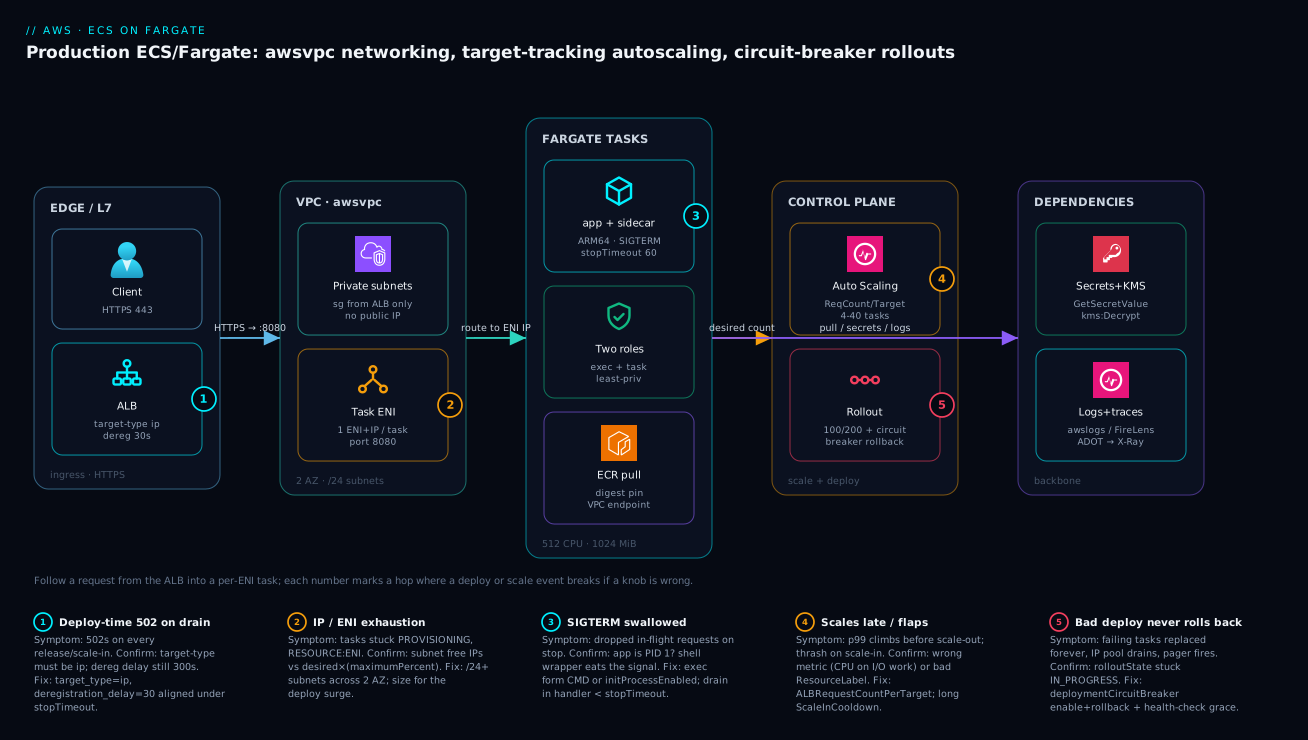
Follow a single request left to right and the whole system falls into place. A client hits the ALB on 443; the ALB terminates TLS and forwards to a healthy target on the container port (8080). Because the tasks run awsvpc, the target group is target_type = ip and the ALB routes straight to a task ENI’s private IP inside two private subnets across two AZs — each task its own ENI, its own security group that only accepts the ALB’s SG, no public IP. The task itself runs the app container plus any sidecars on a valid CPU/memory envelope (here 512/1024, ARM64), with two IAM roles: the execution role pulled the digest-pinned image from ECR (via a VPC endpoint, layers over the free S3 gateway endpoint) and read secrets before start, while the task role is what the app’s SDK uses at runtime. Two control loops sit beside the data path: Application Auto Scaling watches ALBRequestCountPerTarget and moves desiredCount between 4 and 40, and the rollout runs at 100/200 with the deployment circuit breaker armed to roll back a bad revision. Downstream, the task reaches Secrets Manager + KMS and ships logs and traces to CloudWatch / X-Ray.
The five numbered badges mark exactly where a deploy or scale event breaks if a knob is wrong: a deploy-time 502 when the target type isn’t ip or the deregistration delay is still 300s (badge 1); IP/ENI exhaustion when the subnets can’t absorb the deploy surge (badge 2); swallowed SIGTERM dropping in-flight requests when a shell is PID 1 (badge 3); late or flapping scaling from the wrong metric (badge 4); and a bad deploy that never rolls back when the circuit breaker is off (badge 5). Read the diagram once with the legend, and the troubleshooting playbook below maps one-to-one onto these hops.
Real-world scenario
Lumio Pay, a fintech platform team, ran a payment-authorization service on Fargate behind an ALB, scaled on CPU target tracking, 6 tasks steady. It worked until a Friday evening release: under a traffic spike, p99 latency tripled and the team saw a steady trickle of 502s on every deploy and every scale-in event — even though CPU never crossed the 70% target. The on-call engineer’s first instinct was to scale up the task size, which did nothing, then to roll back, which also threw 502s on the way down.
Three root causes, none of them the application logic. First, the service used CPU target tracking, but the workload was I/O-bound on a downstream HSM — CPU stayed low while request queues grew, so scaling reacted late, after latency had already spiked. Second, and worse, the app was launched via sh -c "java -jar app.jar": the shell was PID 1, swallowed SIGTERM, and the JVM was SIGKILLed on every task stop, severing in-flight authorizations the instant a task drained. Third, the ALB target group still had the default 300-second deregistration delay, so during deploys the ALB kept routing new connections to tasks ECS had already begun stopping — a second source of cut connections layered on top of the first.
They confirmed each in minutes. The scaling lag showed up as CloudWatch CPU flat at ~40% while the ALB target-response-time and request-count climbed. The PID 1 problem was visible in the task definition ("command": ["sh","-c","java -jar app.jar"]) and in the stopped-task pattern — every deploy logged tasks SIGKILLed, not gracefully exited. The deregistration delay was a one-line describe-target-group.
The fix was three coordinated changes, no new infrastructure. They switched the primary scaling signal to ALBRequestCountPerTarget (keeping a CPU policy as a backstop), changed the container entrypoint to exec the JVM as PID 1 with a real SIGTERM handler that drained the in-flight queue, and aligned the timers: deregistration delay to 30s, stopTimeout to 60s, drain grace to ~45s.
"deploymentConfiguration": {
  "minimumHealthyPercent": 100,
  "maximumPercent": 200,
  "deploymentCircuitBreaker": { "enable": true, "rollback": true }
}
resource "aws_lb_target_group" "auth" {
  name                 = "auth-tg"
  port                 = 8080
  protocol             = "HTTP"
  target_type          = "ip"          # required for awsvpc/Fargate tasks
  vpc_id               = var.vpc_id
  deregistration_delay = 30

  health_check {
    path                = "/healthz"
    healthy_threshold   = 2
    unhealthy_threshold = 3
    interval            = 15
    timeout             = 5
    matcher             = "200"
  }
}
Note target_type = "ip" — Fargate tasks register by IP, not instance, because each task is its own ENI. After the change, deploy-time 502s went to zero, and the service scaled out ahead of the latency curve instead of behind it. While they were in there, they also enabled the circuit breaker with rollback (they’d never had one) and tested it by deploying a deliberately-broken revision in staging — it flipped to FAILED and restored the prior revision in under two minutes. The lesson the team took away: on Fargate, “graceful shutdown” is not one setting — it’s PID 1, stopTimeout, and the target-group deregistration delay all agreeing with each other, and “scaling” only works if the metric you chose actually leads your load.
Advantages and disadvantages
The serverless-container model both removes real toil and introduces failure modes that live in the wiring rather than your code. Weigh it honestly:
| Advantages (why Fargate helps you) | Disadvantages (why it bites) |
|---|---|
| No EC2 to size, patch, drain, or reboot — AWS owns the host fleet | You can’t ssh to “the box”; debugging is via ECS Exec, logs, and Insights |
| Per-task ENI gives clean isolation, per-task SGs and Flow Logs | Each task consumes a subnet IP + ENI; deploy surge can exhaust small subnets |
| Pay per vCPU-second/GB-second, scale to zero idle cost | Per-second billing means an oversized task def bleeds on every replica, every hour |
| Circuit breaker auto-rolls-back a bad deploy with no tooling | Off by default — a bad image loops forever until you enable it |
| Fargate Spot cuts the elastic portion ~70% | Only safe if the app drains on SIGTERM; reclaim is a ~2-min warning |
| Application Auto Scaling is a managed control loop | Wrong metric scales late; aggressive scale-in policies flap |
| Graviton/ARM64 is a ~20% saving for one flag | Image must be arm64/multi-arch first |
| Two-role model enforces least privilege by design | Conflating exec vs task role is the most common ECS IAM bug |
Fargate is the right default when you want to ship containers, not operate servers, and your services are stateless and ALB-fronted. It bites hardest on chatty/I/O-bound services scaled on the wrong metric, services lifted from EC2 without revisiting PID 1 and signal handling, large services packed into small subnets, and anyone who deploys with the defaults (no circuit breaker, 300s deregistration delay) and never tunes them. The disadvantages are all manageable — but only if you know they exist, which is the entire point of this article. When the constraints argue for self-managed nodes (GPU, daemons, very high task density, specialized kernels), Choose Your Container Path: ECS vs EKS vs Fargate is the decision to revisit.
Hands-on lab
Stand up a minimal Fargate service, deploy a deliberately-broken revision, and watch the circuit breaker roll it back — then prove graceful drain. Free-tier-friendly-ish (Fargate has no free tier, but a 512/1024 task for under an hour is a few rupees; tear down at the end). Run in any shell with the AWS CLI configured.
Step 1 — Variables and a cluster.
REGION=us-east-1
CLUSTER=lab-cluster
aws ecs create-cluster --cluster-name $CLUSTER --region $REGION \
  --settings name=containerInsights,value=enhanced
Step 2 — A log group and a minimal task definition (good image). Use a public sample that listens on 80:
aws logs create-log-group --log-group-name /ecs/lab-web --region $REGION
cat > lab-web.task.json <<'JSON'
{
  "family": "lab-web",
  "networkMode": "awsvpc",
  "requiresCompatibilities": ["FARGATE"],
  "cpu": "256", "memory": "512",
  "executionRoleArn": "arn:aws:iam::ACCOUNT:role/ecsTaskExecutionRole",
  "containerDefinitions": [{
    "name": "web",
    "image": "public.ecr.aws/nginx/nginx:stable",
    "essential": true,
    "portMappings": [{ "containerPort": 80, "protocol": "tcp" }],
    "stopTimeout": 30,
    "logConfiguration": { "logDriver": "awslogs", "options": {
      "awslogs-group": "/ecs/lab-web", "awslogs-region": "us-east-1", "awslogs-stream-prefix": "web" } }
  }]
}
JSON
aws ecs register-task-definition --cli-input-json file://lab-web.task.json --region $REGION
Expected: a taskDefinition JSON with "revision": 1 and "status": "ACTIVE".
Step 3 — Create the service with the circuit breaker armed. Use two private subnets and a task SG you already have (or a default-VPC subnet + SG for the lab):
aws ecs create-service --cluster $CLUSTER --service-name lab-web \
  --task-definition lab-web:1 --desired-count 2 --launch-type FARGATE \
  --deployment-configuration '{"deploymentCircuitBreaker":{"enable":true,"rollback":true},"minimumHealthyPercent":100,"maximumPercent":200}' \
  --network-configuration 'awsvpcConfiguration={subnets=[subnet-AAA,subnet-BBB],securityGroups=[sg-XXX],assignPublicIp=ENABLED}' \
  --region $REGION
Expected: a service with "rolloutState": "IN_PROGRESS" that reaches COMPLETED once 2 tasks are running.
Step 4 — Prove each task has its own ENI + private IP (awsvpc).
aws ecs list-tasks --cluster $CLUSTER --service-name lab-web --query 'taskArns' --output text --region $REGION \
  | xargs aws ecs describe-tasks --cluster $CLUSTER --region $REGION --tasks \
  --query 'tasks[].attachments[].details[?name==`privateIPv4Address`].value' --output text
Expected: two distinct private IPs — one per task.
Step 5 — Register a deliberately-broken revision and deploy it. A task def pointing at an image that will never become healthy (a non-existent tag):
sed 's#nginx/nginx:stable#nginx/nginx:THIS-TAG-DOES-NOT-EXIST#' lab-web.task.json > lab-web.broken.json
aws ecs register-task-definition --cli-input-json file://lab-web.broken.json --region $REGION
aws ecs update-service --cluster $CLUSTER --service lab-web --task-definition lab-web:2 --region $REGION
Step 6 — Watch the circuit breaker fire and roll back.
aws ecs describe-services --cluster $CLUSTER --services lab-web --region $REGION \
  --query 'services[0].deployments[].{status:status,rollout:rolloutState,reason:rolloutStateReason,desired:desiredCount,running:runningCount,failed:failedTasks}'
Expected: the new deployment moves to rolloutState: FAILED with a rolloutStateReason mentioning the circuit breaker, and the service converges back onto revision 1 (the last known-good) — running stays at 2 throughout.
Validation checklist. You created a service with the breaker armed, proved per-task ENIs, deployed a broken revision, and watched ECS automatically restore the good one without you touching it. The steps mapped to what each proves:
| Step | What you did | What it proves | Real-world analogue |
|---|---|---|---|
| 3 | Service with deploymentCircuitBreaker |
The safety net is on, not assumed | Every prod service should have this |
| 4 | Two distinct private IPs | awsvpc = one ENI/IP per task |
IP-planning the deploy surge |
| 5 | Deploy an unhealthy revision | A bad image would loop forever without the breaker | A failed release at 3am |
| 6 | rolloutState: FAILED → rollback |
The breaker fires and reverts to last good | The incident that doesn’t page you |
Cleanup (avoid lingering Fargate charges).
aws ecs update-service --cluster $CLUSTER --service lab-web --desired-count 0 --region $REGION
aws ecs delete-service --cluster $CLUSTER --service lab-web --force --region $REGION
aws ecs delete-cluster --cluster $CLUSTER --region $REGION
aws logs delete-log-group --log-group-name /ecs/lab-web --region $REGION
Cost note. Two 256/512 tasks for under an hour is well under ₹40; deleting the service stops the per-second billing immediately. Container Insights enhanced adds a small ingestion cost — fine for a lab, watch it at scale.
Common mistakes & troubleshooting
This is the playbook — the part you bookmark. First as a scannable table you read mid-incident, then the entries that bite hardest with full confirm-command detail.
| # | Symptom | Root cause | Confirm (exact cmd / console path) | Fix |
|---|---|---|---|---|
| 1 | 502s on every deploy and scale-in; fine at steady state | Target group not draining: target_type wrong or dereg delay 300s |
aws elbv2 describe-target-groups --query 'TargetGroups[].{type:TargetType,dereg:...}' |
target_type=ip; deregistration_delay=30; align under stopTimeout |
| 2 | In-flight requests error exactly when a task stops | PID 1 is a shell, swallows SIGTERM → app SIGKILLed | Inspect task def command/entryPoint; stopped tasks show no graceful exit |
exec form CMD or initProcessEnabled:true; drain in handler |
| 3 | p99 climbs before scale-out; thrash on scale-in | Wrong scaling metric (CPU on I/O work) or bad ResourceLabel |
CloudWatch CPU flat while ALB request count/latency climb | Switch to ALBRequestCountPerTarget; raise ScaleInCooldown |
| 4 | Scaling policy does nothing at all | ResourceLabel malformed (wrong ALB/TG name portion) |
aws application-autoscaling describe-scaling-policies → inspect label |
Use <ALB full name>/<TG full name> exactly |
| 5 | Tasks stuck PROVISIONING; stopped reason RESOURCE:ENI |
Subnet out of free IPs for the deploy surge | Subnet free-IP count vs desired × maximumPercent |
/24+ subnets across 2 AZ; lower maximumPercent temporarily |
| 6 | Bad image: failing tasks replaced forever, IP pool drains | Circuit breaker off (or rollback off) |
describe-services → rolloutState stuck IN_PROGRESS, rising failedTasks |
Enable deploymentCircuitBreaker with rollback:true |
| 7 | Task fails to start: CannotPullContainerError |
Bad digest/tag, or no route to ECR (no endpoint/NAT) | describe-tasks → stoppedReason; check subnet route + endpoints |
Fix digest; add ECR api/dkr + S3 endpoints or NAT |
| 8 | ResourceInitializationError: unable to pull secrets |
Execution role missing GetSecretValue/kms:Decrypt, or no route |
stoppedReason; exec-role policy; Secrets Manager endpoint |
Grant exec role the secret ARN + KMS key; add endpoint |
| 9 | App can read secrets/buckets it never references | Secrets/runtime perms on the task role (or both *) |
Diff taskRoleArn policy vs what code uses |
Move secret-read to exec role; scope task role to used ARNs |
| 10 | New task killed seconds after start, never goes healthy | No healthCheckGracePeriodSeconds; ALB fails it during cold start |
describe-services events show health-check failures right after start |
Set grace ≥ cold-start; speed up boot |
| 11 | Task OOM-killed; container exits 137 | memory (hard cap) too low or a leak |
stoppedReason “OutOfMemory”; Container Insights memory ~100% |
Raise task memory to a valid combo; fix leak |
| 12 | Fargate Spot tasks vanish under load | Spot reclamation (~2-min SIGTERM), app didn’t drain | Service events: tasks stopped, capacity-provider FARGATE_SPOT |
Handle SIGTERM (Section 5); raise on-demand base |
| 13 | Two tasks in one deploy run different code | Image is a moving tag (:latest), resolved per launch |
Task def image is a tag, not @sha256: |
Pin an immutable digest in CI |
| 14 | Deploy hangs at IN_PROGRESS, never completes |
Tasks never pass ALB health check (wrong port/path/matcher) | describe-target-health → unhealthy; reason |
Align health-check port/path/matcher to the container |
| 15 | assign_public_ip task can’t reach internet/ECR |
Private subnet, assignPublicIp=DISABLED, no NAT/endpoint |
Subnet route table has no NAT/IGW; no endpoints | Add NAT gateway or the VPC endpoints; keep IP disabled |
The expanded form for the entries that bite hardest:
1. 502s on every deploy and every scale-in; fine at steady state.
Root cause: The ALB target group isn’t draining gracefully — either target_type isn’t ip (so registration is wrong for awsvpc) or the deregistration delay is the default 300s, longer than ECS’s stop sequence, so the ALB keeps sending new connections to a task ECS is stopping.
Confirm: aws elbv2 describe-target-groups --target-group-arns <arn> --query 'TargetGroups[].{type:TargetType,dereg:Attributes}' (or read the deregistration-delay attribute). Inspect stopped tasks for SIGKILL vs graceful exit.
Fix: target_type=ip, deregistration_delay=30, and make sure that delay sits under stopTimeout (e.g. 60) so both the ALB and ECS finish draining together.
2. In-flight requests error exactly when a task stops.
Root cause: PID 1 is a shell (sh -c "...") that swallows SIGTERM, so the app never gets the signal and is SIGKILLed after stopTimeout with requests still in flight.
Confirm: Inspect the task definition’s command/entryPoint for a shell wrapper; stopped tasks show no graceful-exit log line, just an abrupt stop.
Fix: Run the app as PID 1 via the exec form (CMD ["node","server.js"]) or set "initProcessEnabled": true in linuxParameters; implement a SIGTERM handler that stops accepting and finishes in-flight inside stopTimeout.
3. p99 climbs before scale-out; service thrashes on scale-in.
Root cause: Wrong scaling metric — CPU target tracking on an I/O-bound service, so CPU stays low while queues grow and scaling reacts late; and/or a too-short ScaleInCooldown causing flapping.
Confirm: CloudWatch shows CPU flat (e.g. 40%) while the ALB’s RequestCountPerTarget and TargetResponseTime climb.
Fix: Make ALBRequestCountPerTarget the primary signal (keep CPU as a backstop), and raise ScaleInCooldown to stop thrash.
5. Tasks stuck PROVISIONING; stopped reason RESOURCE:ENI or IP-not-available.
Root cause: The subnet(s) ran out of free IPs/ENIs during the deploy surge — desired × maximumPercent exceeded usable addresses (often a /26 or smaller hosting a 30+ task service at maximumPercent: 200).
Confirm: Compare each subnet’s free-IP count to desired_count × (maximumPercent/100); describe-tasks shows stoppedReason with RESOURCE:ENI.
Fix: Move tasks to /24-or-larger subnets across ≥2 AZs; as an immediate unblock, lower maximumPercent (e.g. to 150) so the surge is smaller.
6. A bad image leaves failing tasks replaced forever, IP pool draining.
Root cause: The deployment circuit breaker is off (or on without rollback), so ECS keeps launching tasks from a revision that never becomes healthy.
Confirm: aws ecs describe-services --query 'services[0].deployments[].{rollout:rolloutState,failed:failedTasks}' shows IN_PROGRESS with failedTasks climbing.
Fix: update-service --deployment-configuration '{"deploymentCircuitBreaker":{"enable":true,"rollback":true}}'; redeploy and test it once in non-prod so you’ve actually seen it fire.
8. ResourceInitializationError: unable to pull secrets or registry auth.
Root cause: The execution role lacks secretsmanager:GetSecretValue (or kms:Decrypt for a CMK), or the task has no network route to the Secrets Manager / ECR endpoints.
Confirm: describe-tasks → stoppedReason; check the exec-role policy and whether a secretsmanager interface endpoint (or NAT) exists.
Fix: Grant the exec role the exact secret ARN and KMS key; add the secretsmanager (and ECR) VPC endpoints or a NAT route.
9. The app can read secrets or buckets it never references.
Root cause: Secret-read or broad runtime permissions were attached to the task role (the one your code assumes), or both roles use *. Your application now holds privileges it should never have.
Confirm: Diff the taskRoleArn policy against what the code actually calls; look for secretsmanager:* or s3:* on the task role.
Fix: Move secrets-reading to the execution role; scope the task role to only the specific actions and ARNs the code uses.
Best practices
- Pin an immutable image digest, never
:latest. ECS resolves a tag at each task launch, so a moving tag means two tasks in one deployment run different code. Pass the digest from CI. - Size the task for the whole task (app + sidecars) and pick a valid CPU/memory combination; cap individual containers only when a sidecar needs bounding.
- Default to ARM64 (Graviton) for compatible images — ~20% cheaper for the same size, usually equal or better performance.
- Spread tasks across ≥2 private subnets in different AZs with IP headroom for
maximumPercent. Plan subnets for the deploy surge, not steady state. - Disable public IPs; reach AWS via VPC endpoints (ECR
api/dkr,secretsmanager,logs,stsinterface + S3 gateway) — cheaper than NAT per-GB and keeps pulls on the AWS network. - Scale on a metric that leads load —
ALBRequestCountPerTargetfor web, queue depth for workers, CPU/memory only when work maps to them. Layer a CPU backstop; avoid aggressive scale-in policies that flap. - Always enable the deployment circuit breaker with
rollback: trueand ahealthCheckGracePeriodSecondsabove your cold-start time. Test it once so you’ve seen it fire. - Make shutdown graceful as a triad: PID 1 receives SIGTERM (exec form or
initProcessEnabled), the app drains insidestopTimeout, and the ALB deregistration delay (≈30s) covers the drain but no longer. - Register targets by IP (
target_type = ip) — Fargate tasks are ENIs, not instances. - Keep the execution role and task role separate and minimal, each scoped to specific ARNs; inject secrets via
secrets, neverenvironment. - Turn on Container Insights, emit structured JSON logs (
non-blocking), and wire ADOT/X-Ray tracing from day one — diagnosis is a lookup, not an archaeology dig. - Use Fargate Spot via a capacity-provider strategy (with an on-demand
base) only for stateless services that drain on SIGTERM; right-size with Compute Optimizer and re-measure.
Security notes
- Two-role least privilege. The execution role pulls images, writes logs, and reads
secretsbefore start; the task role is what your code uses at runtime. Scope each to specific ARNs — never*— and never put secrets-reading on the task role. - Secrets out of plaintext. Inject via the
secretsblock (Secrets Manager or SSM SecureString), encrypted with a CMK where it matters;environmentis visible indescribe-tasksand the API, so it’s for non-secret config only. - Network isolation by default. Tasks run in private subnets with
assignPublicIp: DISABLED, security groups that accept only the ALB’s SG on the container port, and least-privilege egress (DB SG, endpoint SG) — reference SGs by ID, never CIDR. - Private AWS access. VPC interface/gateway endpoints keep ECR pulls, secret reads, and log writes on the AWS backbone instead of traversing a NAT to the public internet.
- Harden the container. Run as a non-root
user, setreadonlyRootFilesystem: true(write only to mounts/tmpfs), and scan images in ECR; pin digests so a tampered or moved tag can’t slip in. - Lock down ECS Exec. If you enable ECS Exec for debugging, gate it with IAM and log sessions; it’s a shell into a running task and should not be broadly granted.
- Front with a WAF where it’s internet-facing. Put the ALB behind AWS WAF and restrict the ALB SG to your CDN/edge ranges so tasks are never directly reachable.
The security controls that also prevent these incidents — secure and resilient pull the same direction:
| Control | Mechanism | Secures against | Also prevents |
|---|---|---|---|
| Two-role split | executionRoleArn vs taskRoleArn |
App holding excess privilege | Secret-pull failures (right role scoped) |
secrets block + CMK |
Secrets Manager / SSM + KMS | Plaintext creds in task def | Rotation breaking the app (picked up on launch) |
| Private subnets + SG-by-ID | awsvpc + SG references |
Direct internet exposure | Connection-refused from CIDR drift |
| VPC endpoints | Interface/gateway endpoints | Egress over public internet | NAT per-GB cost on every pull |
| Digest pinning + ECR scan | @sha256: + image scanning |
Tampered/unknown images | Two-tasks-differ at deploy |
| Non-root + read-only root FS | user, readonlyRootFilesystem |
Container escape blast radius | Accidental writes corrupting state |
Cost & sizing
The bill drivers and how they interact with the fixes:
- vCPU-seconds and GB-seconds dominate. Fargate bills per vCPU-second and GB-second from image pull to task stop, per running task. An oversized task definition (4 vCPU peaking at 0.8) costs you on every replica, every hour — right-sizing is often the biggest single saving.
- ARM64 is ~20% off the same size for one flag, on compatible images — the cheapest change you can make.
- Fargate Spot cuts the elastic portion up to ~70% but reclaims with a ~2-minute warning; only for stateless, SIGTERM-clean services, with an on-demand
basefor the floor. - Networking adds up quietly. A NAT gateway charges per-GB on every ECR pull; VPC endpoints (interface hourly + per-GB, S3 gateway free) are usually cheaper at scale and keep traffic on AWS.
- Observability is per-GB / per-metric. Container Insights
enhancedand CloudWatch ingest are worth it, but sample high-volume logs/traces so a traffic spike doesn’t spike the telemetry bill.
A rough monthly picture for a small production API (steady ~6 tasks, bursting to ~12), us-east-1, indicative — confirm against the live pricing page:
| Cost driver | What you pay for | Rough INR / month | What it buys | Watch-out |
|---|---|---|---|---|
| 6× 0.5 vCPU / 1 GB on-demand | Steady Fargate compute | ~₹9,000–12,000 | Always-on floor | Per-second; right-size first |
| Burst 6× more on Spot | Elastic peak portion | ~₹1,500–3,000 | ~70% off the burst | Must drain on SIGTERM |
| ARM64 vs X86_64 | Same size, cheaper arch | −~20% of compute | The free saving | Image must be arm64 |
| NAT gateway | Hourly + per-GB egress | ~₹3,000–5,000 | Internet/AWS egress | Per-GB on every pull |
| VPC endpoints (3 interface + S3) | Hourly per endpoint + per-GB | ~₹2,000–3,500 | Private pulls/secrets/logs | Cheaper than NAT at volume |
| Container Insights + logs | Per-metric + per-GB ingest | ~₹1,500–4,000 | Diagnosis itself | Sample high-traffic |
| ALB | Hourly + LCU | ~₹2,000–3,000 | Ingress + health checks | LCUs scale with traffic |
What exactly Fargate meters, so you know which knob each line item responds to:
| Billed dimension | Metered as | From → to | Lever that reduces it |
|---|---|---|---|
| vCPU | per vCPU-second | image pull start → task stop | Right-size cpu; ARM64; Spot; scale-in faster |
| Memory | per GB-second | image pull start → task stop | Right-size memory; fewer over-provisioned tasks |
| Ephemeral storage | per GB-month above 20 GiB | provisioned duration | Keep within the 20 GiB free tier |
| Architecture | ~20% lower rate on ARM64 | n/a | Build arm64/multi-arch images |
| Capacity provider | Spot rate on FARGATE_SPOT |
n/a | Mix on-demand base + Spot weight |
| Data egress | per-GB (NAT/internet) | per byte | VPC endpoints; same-region pulls |
Right-sizing workflow: read Container Insights / Compute Optimizer’s ECS recommendations, find tasks over-provisioned versus their peak, resize the task definition to the next valid combo down, redeploy, and re-measure after a full traffic cycle. Lumio’s post-incident bill dropped once they right-sized back down after fixing the scaling metric — the fix is usually configuration, not a bigger task.
Interview & exam questions
1. Why must a Fargate ALB target group use target_type = ip? Because every Fargate task runs awsvpc networking and has its own ENI and private IP — there’s no shared EC2 instance to register. instance target type registers EC2 instance IDs, which don’t exist on Fargate; ip registers each task’s private IP directly. Mapping to the SAA/DVA container objectives.
2. A service throws 502s on every deploy and scale-in but is fine at steady state. What’s the cause? The ALB target group isn’t draining gracefully — typically the default 300-second deregistration delay keeps routing new connections to tasks ECS is stopping, and/or PID 1 swallows SIGTERM so the app is SIGKILLed mid-request. Fix: deregistration_delay≈30 aligned under stopTimeout, and a real SIGTERM handler with the app as PID 1.
3. What does the deployment circuit breaker do, and what happens without it? It watches for a run of failed task launches during a deploy and, with rollback: true, automatically reverts to the last known-good task definition. Without it, a bad image that never passes health checks leaves ECS replacing failing tasks indefinitely, draining the subnet IP pool and paging on-call. It scales its failure threshold with service size.
4. Difference between the execution role and the task role? The execution role is assumed by the ECS agent before the container starts — to pull the image from ECR, write to the log group, and resolve secrets. The task role is assumed by your application code at runtime to call AWS APIs (S3, DynamoDB). Secrets-reading belongs to the execution role; the task role carries only runtime permissions. Conflating them is the classic ECS IAM mistake.
5. Which scaling metric should a web API behind an ALB use, and why not CPU? ALBRequestCountPerTarget — it scales on actual per-task load and reacts before CPU saturates. CPU target tracking lags for I/O-bound services because CPU stays low while request queues grow, so scaling reacts after latency has already spiked. Keep a CPU policy as a backstop, not the primary.
6. How do you plan subnet sizing for a Fargate deploy? Each task consumes one subnet IP via its ENI, and during a rolling deploy you run up to desired × (maximumPercent/100) tasks. For a 40-task service at maximumPercent: 200, plan for ~80 IPs during the deploy, plus AWS’s 5 reserved addresses per subnet and anything else in those subnets — so a /24 or larger across ≥2 AZs.
7. A task is stuck in PROVISIONING with stopped reason RESOURCE:ENI. What happened? The subnet ran out of free IPs/ENIs during the deploy surge — the task can’t get an ENI. Confirm by comparing free IPs to desired × maximumPercent. Fix by using larger subnets (/24+) across more AZs, or temporarily lowering maximumPercent to shrink the surge.
8. Why pin an image digest instead of a tag? ECS resolves the image reference at each task launch. A moving tag like :latest means two tasks in the same deployment can pull different code, producing nondeterministic behavior that’s brutal to debug. A @sha256: digest is immutable, so every task in a deployment runs identical bits.
9. How does graceful shutdown work on Fargate, and what are the three timers? On stop, ECS sends SIGTERM to PID 1, waits stopTimeout (default 30s, max 120s), then SIGKILL — while the ALB deregisters the task and waits its deregistration delay for in-flight connections. The three timers must nest: deregistration delay ≥ app drain grace ≤ stopTimeout. PID 1 must actually receive SIGTERM (exec form or initProcessEnabled).
10. When would you choose blue/green over rolling deployments? Rolling with a circuit breaker is the right default for most services. Reach for blue/green (native ECS or CodeDeploy) when you need a full parallel environment with instant cutover and rollback, or canary/linear traffic shifting — high-stakes changes where you want to validate the green environment before sending it real traffic. The cost is running a full second environment during the shift.
11. How does Fargate Spot save money, and what’s the precondition? It runs the same tasks at up to ~70% off but can reclaim them with a ~2-minute SIGTERM warning. The precondition is that the service is stateless and drains cleanly on SIGTERM — Spot reclamation uses the same graceful-stop path. Use a capacity-provider strategy with an on-demand base for the guaranteed floor and Spot for the elastic remainder.
12. Your scaling policy seems to do nothing. What’s the most likely silent cause? A malformed ResourceLabel on an ALBRequestCountPerTarget policy. It must be <ALB full name>/<target group full name> — the portions after loadbalancer/ and targetgroup/ in the ARNs. Get it wrong and Application Auto Scaling can’t read the metric, so the policy silently never acts.
These map to AWS Certified Solutions Architect – Associate (SAA-C03) and Developer – Associate (DVA-C02) for ECS/Fargate, task definitions, IAM roles, and deployments; the networking depth (awsvpc, endpoints, SGs) touches Advanced Networking – Specialty (ANS-C01). A compact cert-mapping for revision:
| Question theme | Primary cert | Objective area |
|---|---|---|
| Task def, roles, deploys, circuit breaker | DVA-C02 / SAA-C03 | Deploy & operate containerized apps |
| awsvpc, ENIs, endpoints, SGs | SAA-C03 / ANS-C01 | Design resilient/secure networking |
| Auto Scaling metric choice | SAA-C03 | Design scalable architectures |
| Two-role IAM least privilege | SAA-C03 / SCS-C02 | Secure access; least privilege |
| Spot/Graviton/right-sizing cost | SAA-C03 | Cost-optimized architectures |
Quick check
- A Fargate service throws 502s on every deploy and scale-in but is healthy at steady state. Name the two most likely causes and the one target-group setting you check first.
- Your container starts via
sh -c "node server.js". Why might in-flight requests be dropped on every task stop, and what are two fixes? - True or false: scaling out to more tasks fixes a service whose tasks are getting OOM-killed.
- A web API behind an ALB is scaling late under load even though CPU stays at 40%. What metric should it scale on instead, and why?
- A bad image is deployed and ECS keeps replacing failing tasks until the subnet runs out of IPs. What one feature would have prevented this, and how do you turn it on?
Answers
- Cause A: the ALB target group’s deregistration delay is the default 300s, longer than ECS’s stop sequence, so the ALB keeps sending new connections to a stopping task. Cause B: PID 1 swallows SIGTERM so the app is SIGKILLed mid-request. First setting to check:
deregistration_delay(set it to ≈30s and align it understopTimeout). Also confirmtarget_type = ip. - The shell is PID 1 and may not forward SIGTERM, so the app never gets the signal and is SIGKILLed after
stopTimeoutwith requests in flight. Fixes: run the app as PID 1 via theexecform (CMD ["node","server.js"]), or set"initProcessEnabled": trueinlinuxParametersto get a signal-forwarding init — plus implement a SIGTERM handler that drains. - False. OOM is against the per-task
memorycap; every scaled-out task hits the same ceiling and OOMs. Fix by raising the taskmemoryto a valid CPU/memory combination (scale up) and/or fixing the leak — scaling out doesn’t change the per-task limit. ALBRequestCountPerTarget. It scales on actual per-task request load and reacts before CPU saturates; CPU target tracking lags for I/O-bound work because CPU stays low while request queues grow. Keep CPU as a backstop policy.- The deployment circuit breaker with
rollback: true. Enable it viaupdate-service --deployment-configuration '{"deploymentCircuitBreaker":{"enable":true,"rollback":true}}'(and set ahealthCheckGracePeriodSeconds); it auto-detects the failing deploy and reverts to the last known-good revision.
Glossary
- AWS Fargate — the serverless launch type for ECS (and EKS); you run containers without provisioning or managing EC2 hosts, billed per vCPU-second and GB-second.
- Task definition — the immutable, versioned (
family:revision) blueprint of containers, CPU/memory, network mode, and the two IAM roles. - Task — one running instance of a task definition; on Fargate it gets its own ENI and private IP.
- Service — the controller that keeps a desired number of tasks running, registered behind a load balancer, and owns deployments and scaling.
awsvpcnetwork mode — the Fargate-mandatory mode giving each task its own ENI, IP, and security group(s).- ENI (elastic network interface) — the virtual NIC attached to each task; finite per subnet, which constrains the deploy surge.
- Execution role — the IAM role the ECS agent assumes before the container starts (ECR pull, log writes, resolving
secrets). - Task role — the IAM role your application code assumes at runtime to call AWS APIs.
minimumHealthyPercent/maximumPercent— the floor of healthy tasks ECS keeps and the ceiling it may temporarily exceed during a deploy.- Deployment circuit breaker — the deploy safeguard that detects a run of failed task launches and (with
rollback) reverts to the last known-good revision. stopTimeout— the grace period (default 30s, max 120s on Fargate) between SIGTERM and SIGKILL when a container is stopped.- Deregistration delay — the time the ALB waits for in-flight connections to finish before fully removing a target (default 300s; set ≈30s for fast services).
- Application Auto Scaling — the service that adjusts a scalable target’s
desiredCountbased on a CloudWatch metric via target-tracking or step policies. ALBRequestCountPerTarget— the predefined target-tracking metric that scales on requests-per-task; the leading signal for ALB-fronted web services.ResourceLabel— the<ALB full name>/<target group full name>string a request-count policy needs; if malformed, the policy silently does nothing.- Capacity provider —
FARGATE(on-demand) orFARGATE_SPOT; a strategy withbase/weightmixes them for cost. - Fargate Spot — discounted capacity (up to ~70% off) that can be reclaimed with a ~2-minute SIGTERM warning; for stateless, drain-clean services only.
- VPC endpoint — an interface (ECR, Secrets Manager, Logs, STS) or gateway (S3, DynamoDB) endpoint that keeps AWS API traffic on the backbone instead of via NAT.
- PID 1 / init — the entrypoint process that must receive SIGTERM to shut down gracefully;
initProcessEnabledadds a signal-forwarding, zombie-reaping init. - Container Insights — the CloudWatch feature giving per-task/service (and, in
enhancedmode, per-container) metrics and dashboards.
Next steps
You can now wire a production Fargate service: correctly sized, isolated per-task, scaled on the right signal, deployed with a tested safety net, and shut down without dropping a request. Build outward:
- Next: Elastic Load Balancing Deep Dive: ALB, NLB & GWLB — the target groups, health checks, and listeners that are half of every Fargate deploy.
- Related: VPC Deep Dive: Subnets, Routing, IGW, NAT & Endpoints — design the subnets and endpoints your per-task ENIs live in.
- Related: ECS Service Connect vs Load Balancers: Discovery & Resilience — service-to-service discovery once you have more than one Fargate service.
- Related: Graviton/ARM64 Migration: Multi-Arch Builds & Benchmarking — make the ~20% ARM64 saving real with multi-arch images.
- Related: Secrets Manager & Parameter Store Deep Dive — inject and rotate the secrets your execution role resolves at launch.
- Related: AWS X-Ray: Service Map, Segments & ADOT Tracing — add the distributed tracing sidecar referenced in the observability section.