“Lambda is slow” is almost never true. What is true is that an under-tuned function pays for a cold start it could have priced away, runs on a fraction of a vCPU because someone set 128 MB and forgot, and opens a fresh database connection on every invocation because the handler does its work in the wrong scope. Latency on AWS Lambda — the event-driven compute service that runs your code in ephemeral, auto-scaled execution environments — is a tuning problem, not a platform limit. The platform gives you a precise set of levers; the skill is reaching for them in the right order and proving each one moved the number you care about.
This guide walks those levers in order of leverage: understand the cold start, tune memory (which is also CPU), then decide whether provisioned concurrency or SnapStart is justified, fix connection reuse, and plan concurrency so a load spike does not turn into a wall of throttles. Because this is a reference you will return to mid-incident — when p99 has blown past your SLA at 18:03 on a flash-sale Friday — the playbook itself, the metrics, the runtime support matrix, the limits and the cost drivers are all laid out as scannable tables. Read the prose once to build the mental model, then keep the tables open when you are actually tuning.
By the end you will stop guessing. You will know whether a slow request is an oversized init phase, a CPU-starved 128 MB function, a spillover cold start past your provisioned pool, a SnapStart restore that cloned a UUID across every environment, a connection blowup against max_connections, or a throttle wall you could have seen coming in the Throttles metric. Knowing which — from the REPORT line and three CloudWatch metrics — is what separates a five-minute tune from a two-hour stare at the wrong dashboard.
What problem this solves
Serverless promises you ship a handler and forget the fleet. That abstraction is a gift until latency matters, and then the very thing that makes Lambda elastic — spinning a fresh execution environment on demand — becomes the thing your p99 trips over. A synchronous API behind API Gateway has a hard ceiling (29 seconds at the gateway), a card network might hold you to a contractual p99 under 800 ms, and a flash sale can ask for 10x your steady-state concurrency in ninety seconds. Under that pressure the defaults betray you: 128 MB of memory means a sliver of a vCPU, no provisioned warmth means every scale-out instance cold-starts, and a handler that opens a connection per call melts your database long before Lambda itself complains.
What breaks without this knowledge is predictable and expensive. An engineer “fixes” a latency spike by nailing provisioned concurrency to a flat 300 around the clock — paying for 300 warm JVMs at 3 AM for a daytime workload — and the finance team notices. Another sets 128 MB to “save money” and the CPU-bound function runs 14x slower at the same GB-second cost, so the bill is identical and the latency is terrible. A third moves heavy init into the handler, so every warm invocation re-opens a connection, and at 500 concurrent environments the relational database hits max_connections and starts refusing everyone. None of these are platform limits. Every one is a tuning decision made blind.
Who hits this: anyone running Lambda on a latency-sensitive or high-concurrency path. It bites hardest on JVM and .NET functions (heavy init, JIT/class-load tax on cold start), synchronous APIs with a strict tail-latency SLO, relational-database-backed functions at scale (connection exhaustion), and spiky workloads (throttles and burst-limit walls). The fix is almost never “use more memory blindly” or “buy warmth everywhere” — it is measure the init, right-size first because it is free, then buy down only the cold start that remains on the paths whose SLO actually requires it.
To frame the whole field before the deep dive, here is every latency symptom this guide addresses, the question it forces, and the first lever to reach for:
| Symptom | What is actually happening | First question to ask | First place to look | First lever |
|---|---|---|---|---|
| Slow first request after idle | Fresh environment paying init | Is this cold (has Init Duration) or warm? |
REPORT line in CloudWatch Logs |
Trim init; consider PC/SnapStart |
| Function feels slow, no SLO pressure | Under-provisioned CPU at low memory | Is it CPU-bound at the current memory? | Lambda Power Tuning sweep | Right-size memory (free) |
| High p99 on a synchronous API | Cold starts on the critical path | Is p99 driven by Init Duration? |
X-Ray init subsegment; Logs Insights | Provisioned concurrency on the alias |
| JVM/.NET cold starts dominate, cost-sensitive | Class-load + JIT tax per cold env | Is the runtime SnapStart-eligible here? | Runtime + region support matrix | SnapStart with priming hooks |
| DB connection errors at scale | New connection per invocation | Are connections opened in the handler? | RDS connection count vs cap | Init-scope reuse + RDS Proxy |
| 429s / requests dropped under spike | Concurrency limit / burst ceiling hit | Reserved cap, account cap, or burst? | Throttles + ConcurrentExecutions |
Reserve to partition; raise quota |
Learning objectives
By the end of this article you can:
- Decompose a cold start into its three measurable parts (environment download/init, your init phase, warm invoke) and read each from the CloudWatch
REPORTline. - Right-size memory with AWS Lambda Power Tuning, understanding that Lambda allocates CPU proportionally to memory, and prove the change cut both latency and cost with a representative payload.
- Decide between provisioned concurrency and SnapStart for a given function — and configure both correctly (alias/version, never
$LATEST; CRaC hooks for SnapStart) — driving PC with Application Auto Scaling rather than a flat 24x7 number. - Move connection and client setup into init scope for reuse, and front a relational database with Amazon RDS Proxy to survive high concurrency without exhausting
max_connections. - Plan concurrency: reserved vs provisioned vs the regional limit, the burst ceiling, and how throttles surface differently for synchronous vs asynchronous vs event-source invocations.
- Instrument with CloudWatch Logs Insights, Lambda Insights, and AWS X-Ray to quantify cold-start frequency, init cost, p99, peak memory, spillover and throttles.
- Read the limits, the runtime support matrix, and the cost drivers as reference tables, and pick the cheapest configuration that meets a stated latency SLO.
Prerequisites & where this fits
You should already be comfortable authoring and deploying a Lambda function (a handler, a deployment package or container image, an execution role), reading JSON, and running the aws CLI. You should understand what an alias and a version are, that API Gateway can front a function synchronously, and the basics of how Lambda scales (one environment serves one request at a time; concurrency is the count of in-flight executions). Familiarity with a VPC, security groups, and a relational database connection pool helps for the RDS Proxy material.
This sits in the performance and cost-optimization layer of the serverless track. The mechanics underneath it — runtimes, triggers, layers, the full concurrency model — are covered in AWS Lambda, In Depth: Runtimes, Triggers, Layers, Concurrency & Every Setting, which is upstream of this article. The synchronous entry path and its 29-second ceiling come from Amazon API Gateway, In Depth: REST vs HTTP vs WebSocket APIs, Integrations & Authorizers. The connection-pooling fix is a deep topic in its own right — see RDS Proxy in Production: Connection Pooling, Failover Acceleration, and IAM Authentication. And the measurement layer that proves every lever worked lives in AWS Observability, In Depth: CloudWatch, CloudTrail, Config & EventBridge and Distributed Tracing on AWS with X-Ray: Service Maps, Segments, and ADOT on EKS.
A quick map of who owns which lever, so you pull the right one and call the right person:
| Layer | What lives here | Who usually owns it | Latency failure it can cause |
|---|---|---|---|
| Client / API Gateway | TLS, request routing, 29 s timeout | Frontend / API team | Timeout if function exceeds 29 s; retries amplify load |
| Function config | Memory, timeout, alias, PC, SnapStart | App / platform team | Slow CPU at low memory; cold starts; spillover |
| Function code (init scope) | Imports, SDK clients, connections | App / dev team | Oversized init; per-invocation connection blowup |
| Concurrency controls | Reserved, provisioned, account quota | Platform / SRE | Throttles (429); burst-ceiling wall |
| Downstream (RDS / DynamoDB) | Connection pool, capacity | Data team | max_connections exhaustion; dependency latency |
| Observability | Logs, metrics, traces | SRE / platform | Tuning blind; can’t prove a change worked |
Core concepts
Five mental models make every later decision obvious.
A cold start is the work before your handler runs on a fresh environment. When Lambda needs a new execution environment it does three things: provisions the microVM and pulls your package or image, runs your init phase (everything outside the handler — imports, SDK clients, static config, connection setup), then runs your handler. The first two parts happen once per environment and are billed; after the first invocation the environment is reused (a warm invocation) until it is recycled. “Cold start” is those first two parts; everything you do to fight latency is either making them cheaper, making them happen ahead of traffic, or avoiding them entirely.
Memory is CPU. Lambda allocates CPU proportionally to the memory you configure. At 1,769 MB a function gets the equivalent of one full vCPU; below that you get a fraction, above it more than one (up to ~6 vCPUs at 10,240 MB). A CPU-bound function at 128 MB is not “cheap” — it runs roughly 14x slower than at 1,769 MB, and because Lambda bills GB-seconds (memory × duration), the slower run can cost the same or more while delivering far worse latency. This is the single highest-leverage knob and the most misunderstood.
Warmth is something you buy, two ways. Provisioned concurrency keeps a pool of environments fully initialized and ready, so the init phase has already happened before traffic arrives — you pay for that warmth continuously, whether or not it is invoked. SnapStart instead runs init once at publish time, snapshots the initialized microVM, and restores from the snapshot on cold start — no idle charge, but you inherit snapshot caveats (cloned uniqueness, stale connections, JIT priming). They solve the same problem with opposite cost shapes.
Concurrency is finite and shared. Concurrency is the number of in-flight executions. Your account has a regional concurrency limit (1,000 by default, raisable). Reserved concurrency carves a guaranteed-and-capped slice out of that pool for one function; provisioned concurrency is a pre-warmed subset of reserved. There is also a burst ceiling governing how fast you can scale from cold. Exceed any of these and Lambda throttles — and how that throttle surfaces depends on how the function was invoked.
Connections must live in init scope. Anything expensive to create — a database connection, an HTTP client, a secret fetch — belongs outside the handler, in init scope, so it is created once per environment and reused by every warm invocation. Put it inside the handler and it runs on every call, adding latency and, at scale, exhausting downstream connection limits. This single discipline prevents most self-inflicted Lambda latency.
The vocabulary in one table
Before the deep sections, pin down every moving part. The glossary repeats these for lookup; this is the model side by side:
| Concept | One-line definition | Where it lives | Why it matters to latency |
|---|---|---|---|
| Execution environment | The microVM that runs one invocation at a time | Lambda-managed | Cold when new; warm when reused |
| Init phase | Code outside the handler, run once per env | Your code (module scope) | Dominates cold-start cost you control |
| Cold start | Env provision + init before first invoke | Lifecycle | The latency you are fighting |
| Warm invoke | Handler on a reused environment | Lifecycle | The fast path; skips init |
| Memory (MB) | Configured RAM; also sets CPU share | Function config (128–10240) | More memory = more CPU = faster |
| Provisioned concurrency | Pre-initialized, always-ready pool | On a version/alias | Removes cold start; idle cost |
| SnapStart | Snapshot-restore instead of re-init | On published versions | Removes most init; no idle cost |
| Reserved concurrency | Guaranteed + capped slice of the account | Per function | Partitions; protects downstreams |
| Throttle | Invocation rejected at a concurrency limit | Runtime behaviour | 429 sync; retries async |
| RDS Proxy | Pools/multiplexes DB connections | In front of RDS/Aurora | Stops connection blowup at scale |
| GB-second | Billing unit: memory × duration | Billing | Why slow-and-small ≠ cheap |
Anatomy of a cold start
A cold start has three measurable parts, and only one of them is fully yours to control. Knowing which part dominates tells you which lever to pull.
| Part | What happens | Billed? | Who controls it | How to reduce |
|---|---|---|---|---|
| Download / env init | Provision microVM, pull package/image, start runtime | No (platform) | Mostly AWS; you affect package/image size | Smaller artifact; zip over large container; fewer layers |
| Init phase (your code) | Imports, SDK clients, static config, connections | Yes | You (module scope) | Trim deps, lazy-init, mark SDK external |
| Invoke (warm path) | Your handler body | Yes | You | Right-size memory; efficient code |
The init phase is where you have the most leverage, and two things dominate it: package size and what your code does at import time. A 250 MB unzipped bundle that eagerly constructs a dozen SDK clients and reads SSM parameters synchronously will have an init phase measured in seconds. Trim both.
# What is actually in the bundle? Init time tracks closely with this.
unzip -l function.zip | tail -1

# For Node, prune dev deps and bundle/tree-shake so only used code ships
npm prune --omit=dev
npx esbuild src/handler.js --bundle --minify --platform=node \
  --target=node20 --external:@aws-sdk/* --outfile=dist/handler.js
The AWS SDK v3 (
@aws-sdk/*) and boto3 are already present in the managed runtimes. Marking the SDK--externaland not bundling it keeps your artifact small. Pin to a layer only if you need behaviour the runtime’s bundled SDK lacks.
You read the init duration directly from the REPORT line in CloudWatch Logs — Init Duration appears only on cold-start invocations, which makes it a clean signal to filter on. Here is exactly what each REPORT field tells you and how to act on it:
REPORT field |
What it measures | Read it as | Action if it’s high |
|---|---|---|---|
Init Duration |
Time in your init phase (cold only) | Cold-start cost you own | Trim package/init; PC or SnapStart |
Duration |
Handler execution time | Warm-path latency | Right-size memory; profile code |
Billed Duration |
What you pay for (rounded up to 1 ms) | The bill driver | Lower memory only if not CPU-bound |
Max Memory Used |
Peak memory of the invocation | Headroom vs configured | Drop memory if far below; raise if near |
Memory Size |
Configured memory | Your setting | The knob you tune |
XRAY TraceId (if active) |
Trace correlation | Where to drill in X-Ray | Open the trace for segment breakdown |
Two cold-start facts worth internalizing, because they shape everything downstream. First, the init phase runs with a brief CPU boost in unprovisioned environments — AWS gives init extra CPU regardless of your memory setting — which is why a heavy init isn’t quite as slow as the same work mid-handler, but it is still billed and still on the critical path. Second, init has a 10-second soft budget before the platform may retry the initialization; an init that legitimately needs longer is a design smell. The init-cost contributors, ranked:
| Init cost | Typical magnitude | Reduce it by | Trade-off |
|---|---|---|---|
| Package / image pull | 100 ms – several s (size-dependent) | Smaller artifact; zip vs big container; layer hygiene | Build discipline |
| Runtime boot | 50 ms – 1 s | Lighter runtime; avoid heavy frameworks | Framework features lost |
| SDK client construction | 50–500 ms each | Construct in init scope once; only what you use | Slightly more module code |
| Synchronous config fetch (SSM/Secrets) | 50 ms – seconds | Cache; fetch fewer params; batch | Less granular config refresh |
| Framework / DI graph (Spring etc.) | 1–10+ s (JVM/.NET) | SnapStart + priming; lighter framework | Complexity; framework lock-in |
| First DB connect / pool prime | 50 ms – seconds | Init scope; pooled driver; RDS Proxy | First real request still primes |
Memory is CPU: right-size with Lambda Power Tuning
This is the highest-leverage knob and the one most teams get wrong by guessing. Because CPU scales with memory, a CPU-bound function at 128 MB is slow and not actually cheaper — it just runs longer at fewer GB per second. Do not guess. Run AWS Lambda Power Tuning, an open-source Step Functions state machine that invokes your function across a memory sweep and plots cost against speed. (Step Functions itself is covered in AWS Step Functions in Production: Express vs Standard, Distributed Map, and Resilient Error Handling.)
# Deploy the tuner from the Serverless Application Repository
sam deploy \
  --template-file template.yaml \
  --stack-name lambda-power-tuning \
  --capabilities CAPABILITY_IAM \
  --parameter-overrides "PowerValues=128,256,512,1024,1536,1769,3008"
{
  "lambdaARN": "arn:aws:lambda:us-east-1:111122223333:function:order-processor",
  "powerValues": [128, 256, 512, 1024, 1536, 1769, 3008],
  "num": 50,
  "payload": { "orderId": "test-123" },
  "strategy": "balanced"
}
The strategy you pick changes what the tuner optimizes for — choose it for the path’s actual goal, not by reflex:
| Strategy | Optimizes for | Use it when | Risk if misused |
|---|---|---|---|
cost |
Cheapest acceptable config | Batch / async, no latency SLO | Picks low memory → slow for users |
speed |
Fastest config | Latency-critical synchronous path | Overspends on memory you don’t need |
balanced |
Best cost-vs-speed tradeoff | Default; most functions | May miss a strict p99 target |
The single most important rule: tune with a representative payload. A synthetic empty event under-exercises the function and lies about the optimum; a real-shaped payload reveals the true CPU profile. I have repeatedly found that moving a JSON-crunching function from 512 MB to 1024 MB halves duration and lowers cost because the work finishes in less than half the GB-seconds. Memory is also the only knob that changes both axes at once — most levers trade cost for latency, this one can improve both:
| Memory | Approx vCPU share | Best for | Cost note |
|---|---|---|---|
| 128 MB | ~0.07 vCPU (a sliver) | Trivial glue, no CPU work | “Cheap” only if truly I/O-bound and idle-fast |
| 512 MB | ~0.28 vCPU | Light transforms | Often slower and not cheaper than 1024 for CPU work |
| 1024 MB | ~0.58 vCPU | Common sweet spot for APIs | Frequently the balanced-strategy winner |
| 1769 MB | ~1.00 vCPU (full) | CPU-bound work; JVM | Below this, single-threaded code can’t use a full core |
| 3008 MB | ~1.79 vCPU | Parallel / heavy compute | More cores; watch GB-second cost |
| 10240 MB | ~6 vCPU (max) | Multi-threaded, compute-heavy | Max CPU; only if the code parallelizes |
Apply the winner explicitly, and verify it took:
aws lambda update-function-configuration \
  --function-name order-processor --memory-size 1024

aws lambda get-function-configuration \
  --function-name order-processor --query 'MemorySize'
# Terraform — pin the tuned memory as code
resource "aws_lambda_function" "order_processor" {
  function_name = "order-processor"
  role          = aws_iam_role.lambda.arn
  handler       = "handler.handler"
  runtime       = "nodejs20.x"
  memory_size   = 1024   # from Power Tuning, balanced strategy
  timeout       = 10
}
The common right-sizing mistakes, and the REPORT/Power-Tuning evidence that exposes each:
| Mistake | What you see | Evidence | Fix |
|---|---|---|---|
| Stuck at 128 MB “to save money” | High Duration, same/worse cost |
CPU-bound; duration drops sharply with memory | Move to the Power-Tuning winner |
| Over-allocated memory | Max Memory Used far below Memory Size |
Logs Insights peakMemMB |
Drop memory toward peak + headroom |
| Tuned with empty payload | “Optimum” disagrees with prod latency | p99 in prod ≠ tuner result | Re-tune with a representative event |
| One size for all functions | Some over-, some under-provisioned | Per-function peakMemMB spread |
Tune each function independently |
Provisioned concurrency: pre-warmed capacity
If your tuned function still cannot tolerate cold starts on the critical path — a synchronous API behind API Gateway, a checkout flow — provisioned concurrency (PC) keeps a pool of environments initialized and ready, so the init phase has already happened before traffic arrives. It is configured against a version or alias — never $LATEST, which forces a clean deploy-then-shift model.
# Publish an immutable version, then point PC at the alias
aws lambda publish-version --function-name order-processor

aws lambda update-alias \
  --function-name order-processor \
  --name live \
  --function-version 42

aws lambda put-provisioned-concurrency-config \
  --function-name order-processor \
  --qualifier live \
  --provisioned-concurrent-executions 20
Static provisioning wastes money outside peak. Drive it with Application Auto Scaling on a schedule or a utilization target so you pay for warmth only when you need it:
aws application-autoscaling register-scalable-target \
  --service-namespace lambda \
  --resource-id function:order-processor:live \
  --scalable-dimension lambda:function:ProvisionedConcurrency \
  --min-capacity 5 --max-capacity 100

aws application-autoscaling put-scaling-policy \
  --service-namespace lambda \
  --resource-id function:order-processor:live \
  --scalable-dimension lambda:function:ProvisionedConcurrency \
  --policy-name pc-utilization \
  --policy-type TargetTrackingScaling \
  --target-tracking-scaling-policy-configuration '{
    "TargetValue": 0.7,
    "PredefinedMetricSpecification": {
      "PredefinedMetricType": "LambdaProvisionedConcurrencyUtilization"
    }
  }'
Key facts to internalize: you pay for provisioned concurrency for the time it is enabled, whether or not it is invoked, plus a (reduced) per-request and duration charge when it is used. If demand exceeds your provisioned pool, the overflow spills to standard on-demand concurrency and those requests do cold-start. The ProvisionedConcurrencySpilloverInvocations metric is your floor-too-low alarm. Here is every PC configuration knob and how to reason about it:
| Setting | What it controls | Values | When to change | Gotcha |
|---|---|---|---|---|
--qualifier |
Version/alias PC attaches to | a version number or alias | Always an alias for deploy-shift | $LATEST is rejected — by design |
--provisioned-concurrent-executions |
Size of the warm pool | 1 … (≤ reserved/account) | Match the warm floor you need | Counts against account concurrency |
AutoScaling min-capacity |
Floor PC never drops below | ≥ 0 | Always-on readiness baseline | Too high = idle waste |
AutoScaling max-capacity |
Ceiling for scale-up | ≤ account limit | Cap the spend / protect downstreams | Too low = spillover under spike |
TargetValue (utilization) |
Target PC utilization | 0.0–1.0 (e.g. 0.7) | Tighter = more headroom, more cost | Too high = spill before scale reacts |
| Scheduled action | Time-based floor changes | cron/rate | Predictable diurnal peaks | Time-zone mistakes ramp at the wrong hour |
The states a PC config moves through, and what each means for traffic — do not shift traffic until it is READY:
PC Status |
Meaning | Safe to serve? | What to do |
|---|---|---|---|
IN_PROGRESS |
Environments still initializing | No (serves cold meanwhile) | Wait; don’t promote the alias yet |
READY |
Pool fully warm and allocated | Yes | Shift traffic to this alias |
FAILED |
Allocation failed | No | Check account concurrency / quota; retry |
# Don't promote until READY — and confirm the allocated count
aws lambda get-provisioned-concurrency-config \
  --function-name order-processor --qualifier live \
  --query '{status:Status, allocated:AllocatedProvisionedConcurrentExecutions}'
The decision of how much PC to provision is a small table of trade-offs, not a guess:
| If your traffic is… | Provision… | Driven by… | Why |
|---|---|---|---|
| Flat, predictable | A static floor near steady-state concurrency | Fixed PC | Simplicity; no spill |
| Diurnal (business hours) | Low floor + scheduled ramp | Scheduled AutoScaling | Pay for peak only when it exists |
| Spiky but gradual | Utilization target (0.7) | Target-tracking | Scales with demand; some lead time |
| Flash-spike (seconds) | Higher static floor for the window | Pre-scaled scheduled action | Target-tracking can’t react in seconds |
SnapStart: snapshot-restore instead of re-init
SnapStart attacks cold starts from a different angle. Instead of keeping environments warm and paying for idle capacity, Lambda runs your init once at publish time, takes a Firecracker microVM snapshot of the initialized memory and disk, and restores from that snapshot on cold start instead of re-running init. It carries no provisioned-concurrency idle cost. SnapStart began on Java and AWS has extended it to Python and .NET runtimes; always confirm the runtimes available in your account’s region before committing.
# AWS SAM — enable SnapStart on a Java function
OrderProcessor:
  Type: AWS::Serverless::Function
  Properties:
    Runtime: java21
    Handler: com.example.Handler::handleRequest
    MemorySize: 1024
    SnapStart:
      ApplyOn: PublishedVersions
    AutoPublishAlias: live
SnapStart eligibility and behaviour differ by runtime family, and the wrong assumption here wastes a sprint — confirm your runtime and region before designing around it:
| Runtime family | SnapStart support | Priming hook needed? | Typical cold-start win | Note |
|---|---|---|---|---|
| Java (Corretto 11/17/21) | Yes (original target) | Yes — JIT/class-load priming pays off most | Large (multi-second init → sub-second restore) | CRaC org.crac hooks; biggest beneficiary |
| Python (3.12+) | Yes (region-dependent) | Rarely — interpreted, less JIT | Moderate (import-heavy init) | Use lifecycle hooks for re-seed/refresh |
| .NET (8+) | Yes (region-dependent) | Sometimes — JIT/tiered-compilation | Moderate–large | Confirm regional availability |
| Node.js | No | n/a | Use provisioned concurrency instead | No snapshot model for Node |
| Go / Rust (custom runtime) | No | n/a | Fast init already; PC if needed | Native binaries cold-start fast |
| Container image functions | No (SnapStart is zip-based) | n/a | Trim image; PC for warmth | SnapStart doesn’t apply to images |
The caveats are real and you must design for them. They fall into three classes, each with a concrete failure mode:
| Caveat class | What goes wrong | Why | Where you fix it |
|---|---|---|---|
| Uniqueness | Same UUID/seed/timestamp across every restored env | Generated once at snapshot, then cloned | afterRestore — regenerate per-env values |
| Stale state | Dead DB connections, expired tokens/creds | Captured live at snapshot, expire by restore | afterRestore — re-establish/refresh |
| Priming | First real request still slow (JIT/lazy-load) | Restore is fast but JVM defers compilation | beforeCheckpoint — exercise hot paths |
Anything generated once during init and captured in the snapshot — a random seed, a UUID, a cached timestamp — is now identical across every restored environment. Re-seed SecureRandom and regenerate per-invocation values after restore, not at class load. The AWS Cryptography libraries handle this for you; hand-rolled randomness does not. Network connections, credentials, and ephemeral tokens captured in the snapshot may be dead or expired on restore — re-establish them in a runtime hook. And while restore is fast, the JVM may still JIT-compile and lazy-load on the first real request, so use the beforeCheckpoint hook to prime hot paths (dummy invocations of your serialization, an SDK call) so that work is captured in the snapshot.
import org.crac.Core;
import org.crac.Resource;

public class Handler implements Resource {
  public Handler() {
    Core.getGlobalContext().register(this);
  }

  @Override
  public void beforeCheckpoint(org.crac.Context<? extends Resource> c) {
    // Prime: exercise hot paths so JIT/class-load is captured in the snapshot
    warmSerializers();
    warmSdkClients();
  }

  @Override
  public void afterRestore(org.crac.Context<? extends Resource> c) {
    // Re-establish anything that must be fresh per environment
    reSeedSecureRandom();
    refreshDbCredentials();
  }
}
The CRaC lifecycle hooks, and exactly what belongs in each — putting work in the wrong hook is the most common SnapStart bug:
| Hook | Runs… | Put here | Never put here |
|---|---|---|---|
beforeCheckpoint |
Once, at publish (pre-snapshot) | Priming: serializers, SDK warm-up, class-load | Anything that must be unique per env |
afterRestore |
On every restore (cold start) | Re-seed randomness, refresh creds, reconnect | Heavy one-time work (defeats the purpose) |
SnapStart vs provisioned concurrency is a real decision, not a default. SnapStart removes most of the init cold start with no idle charge but does nothing for sub-millisecond consistency and adds restore + priming complexity; provisioned concurrency gives the flattest tail latency but you pay for warm capacity continuously. Many teams run SnapStart by default and reserve PC for the few endpoints with the strictest p99. Side by side:
| Dimension | Provisioned Concurrency | SnapStart |
|---|---|---|
| Cold start removed? | Yes (fully, within the pool) | Mostly (restore replaces init) |
| Idle cost | Yes — pay while enabled | No — pay only per invocation |
| Runtime support | All runtimes | Java, Python, .NET (region-dependent) |
| Tail-latency consistency | Flattest (no restore variance) | Restore + JIT priming variance |
| Code changes required | None | CRaC hooks (re-seed, refresh, prime) |
| Spillover behaviour | Overflow cold-starts on-demand | Each cold start restores (still fast) |
| Best for | Strict p99, any runtime | Cost-sensitive JVM/.NET/Python cold starts |
| Configured on | Version/alias | Published versions |
The combined pattern many teams settle on, expressed as a decision table:
| Constraint | Reach for | Why |
|---|---|---|
| Strict p99 on a Node/Go function | Provisioned concurrency | No SnapStart for Node/Go; PC flattens the tail |
| JVM cold starts dominate, cost matters | SnapStart + priming | Removes class-load/JIT tax for free |
| JVM with both cost pressure and strict p99 | SnapStart for the floor + PC for the peak | Free init removal + bought tail flatness |
| Python with heavy imports, cost-sensitive | SnapStart | Snapshots the import-heavy init |
Connection management and reuse across invocations
The most common self-inflicted latency bug: opening a database connection, HTTP client, or secret fetch inside the handler. That work then runs on every warm invocation. Move it to module/static scope so it is created once during init and reused across invocations on the same environment.
import os
import boto3
import psycopg2

# INIT SCOPE: runs once per environment, reused by every warm invocation
_secrets = boto3.client("secretsmanager")
_conn = None

def _get_conn():
    global _conn
    if _conn is None or _conn.closed:
        _conn = psycopg2.connect(host=os.environ["DB_HOST"], connect_timeout=3)
    return _conn

def handler(event, context):
    cur = _get_conn().cursor()           # reuse the connection
    cur.execute("SELECT 1")
    return {"ok": cur.fetchone()[0]}
For Node, set AWS_NODEJS_CONNECTION_REUSE_ENABLED=1 so the SDK reuses keep-alive TCP connections (the default in SDK v3, but harmless to set explicitly). What belongs in init scope versus the handler is a clean rule you can audit code against:
| Work | Where it belongs | Why | Cost of getting it wrong |
|---|---|---|---|
| SDK / service clients | Init scope | Constructed once, thread-safe, reusable | Per-invocation construction latency |
| DB connection / pool | Init scope (lazy-guarded) | Reuse the TCP/auth handshake | Connection blowup; handshake per call |
| Static config / secrets | Init scope (cached) | Fetch once, reuse | Repeated SSM/Secrets calls, throttling |
| HTTP keep-alive client | Init scope | Reuse the connection pool | New TCP per call; SNAT/port pressure |
| Per-request state | Handler | Must be fresh each invocation | Cross-request data bleed (a real bug) |
| Per-request randomness / timestamps | Handler | Must differ per call | Duplicate IDs (worse under SnapStart) |
The deeper problem at scale is connection-count blowup: 500 concurrent Lambda environments each holding a Postgres connection will exhaust max_connections on a db.r6g.large. Amazon RDS Proxy solves this by pooling and multiplexing connections on Lambda’s behalf, and it lets functions fetch DB credentials via IAM instead of embedding secrets. (The full operational treatment is in RDS Proxy in Production: Connection Pooling, Failover Acceleration, and IAM Authentication.)
aws rds create-db-proxy \
  --db-proxy-name app-proxy \
  --engine-family POSTGRESQL \
  --auth '[{"AuthScheme":"SECRETS","SecretArn":"arn:aws:secretsmanager:us-east-1:111122223333:secret:db-creds","IAMAuth":"REQUIRED"}]' \
  --role-arn arn:aws:iam::111122223333:role/rds-proxy-role \
  --vpc-subnet-ids subnet-0a1b2c subnet-0d4e5f
Point the function’s DB_HOST at the proxy endpoint, attach the function to the same VPC subnets, and let the proxy absorb the connection churn. This is non-negotiable above a few hundred concurrent executions against a relational database. The choices for taming connections, and what each buys:
| Approach | What it does | Effort | When it’s enough | Limit / watch-out |
|---|---|---|---|---|
| Init-scope reuse (code) | One connection per env, reused | Code change | Low/moderate concurrency | Still 1 conn × concurrency at the DB |
AWS_NODEJS_CONNECTION_REUSE_ENABLED=1 |
SDK keep-alive reuse | One env var | Node SDK HTTP reuse | SDK v3 already does it |
| RDS Proxy | Pools + multiplexes; IAM auth | Proxy + IAM + subnets | High concurrency on RDS/Aurora | Small hourly cost; VPC plumbing |
| DynamoDB instead of RDS | No connection model at all | Re-architecture | Key-value access patterns | Different data model |
| Reserved concurrency cap | Bounds connections from this fn | One setting | Protecting a fragile DB | Throttles past the cap |
A worked sizing example: a relational instance has a finite max_connections (a few hundred on mid-size classes). With one connection per environment and 500 concurrent environments, you need 500 connections — past the ceiling, and the database starts refusing connects, which surfaces in Lambda as dependency timeouts, not as an obvious “too many connections” on the Lambda side. RDS Proxy multiplexes those 500 environments onto a far smaller pool of actual backend connections.
Concurrency controls: reserved, throttles, and quota planning
Concurrency is the number of in-flight executions. Your account has a regional concurrency limit (1,000 by default, raisable via a Service Quotas request). Two controls shape how that pool is shared:
- Reserved concurrency caps a function at a maximum and guarantees that floor for it, carving it out of the shared pool. Use it to (a) protect a downstream like a database from being overwhelmed and (b) stop one noisy function from starving the rest of the account.
- Provisioned concurrency (above) is a subset of reserved that is also pre-warmed.
# Cap order-processor at 200 concurrent executions
aws lambda put-function-concurrency \
  --function-name order-processor \
  --reserved-concurrent-executions 200
The three concurrency concepts confuse everyone at first; side by side they are clear:
| Concept | What it is | Guarantees a floor? | Caps a max? | Pre-warmed? | Charged when idle? |
|---|---|---|---|---|---|
| Account/regional limit | Total in-flight for the region | No (shared) | Yes (account-wide) | No | No |
| Reserved concurrency | A function’s carved-out slice | Yes | Yes | No | No |
| Provisioned concurrency | Pre-initialized subset of reserved | Yes (warm) | Yes | Yes | Yes |
| Unreserved pool | What’s left after reservations | No | Implicitly | No | No |
When a function hits its reserved limit (or the account hits the regional limit), Lambda throttles — and how the throttle surfaces depends entirely on the invocation type. This is the table to keep open during a spike incident:
| Invocation type | Examples | On throttle | Retries? | What the caller sees |
|---|---|---|---|---|
| Synchronous | API Gateway, ALB, direct invoke | Rejected immediately | No (caller must) | 429 TooManyRequestsException |
| Asynchronous | S3, SNS, EventBridge | Lambda retries with backoff | Yes (up to ~6 h, then DLQ) | Delayed processing; DLQ on exhaustion |
| Event source mapping | SQS, Kinesis, DynamoDB Streams | Batch retried per source rules | Yes (source-dependent) | Backlog grows; iterator age climbs |
There is also a burst concurrency ceiling that governs how fast you can scale from cold — you get an initial burst, then a slower per-minute ramp toward your account limit. A flash spike can outrun the ramp even when you are nowhere near the account limit. The signals that tell you which wall you hit, and the fix:
| Signal | Metric / where | Means | Fix |
|---|---|---|---|
Throttles climbing, ConcurrentExecutions at account limit |
CloudWatch Lambda metrics | Account/regional cap hit | Service Quotas increase; reserve to partition |
Throttles on one function only |
Per-function Throttles |
That function’s reserved cap hit | Raise its reserved; or it’s protecting a downstream, leave it |
ProvisionedConcurrencySpilloverInvocations > 0 |
Per-alias metric | Demand exceeded the PC pool | Raise PC floor / AutoScaling max |
| Throttles during a fast ramp, below account limit | ConcurrentExecutions slope |
Burst ceiling outrun | Pre-scale PC for the window; smooth the spike |
The hard limits that shape every concurrency and performance decision — the real numbers, what they cap, and whether you can raise them:
| Limit | Default value | What it caps | Raisable? | Hit it and you get… |
|---|---|---|---|---|
| Account concurrency (per region) | 1,000 | Total in-flight executions | Yes (Service Quotas) | Account-wide throttles (429) |
| Memory per function | 128 MB – 10,240 MB | RAM (and CPU share) | No (it’s the range) | Can’t exceed 10,240 MB |
| Function timeout | 3 s default, 900 s max | Max single-invocation duration | No (max is 900 s) | Invocation killed at the cap |
| API Gateway integration timeout | 29 s | Sync request behind API GW | No | 504/timeout to the client |
| Deployment package (zip, direct) | 50 MB zipped | Upload size via API | Use S3 / image instead | Upload rejected |
| Deployment package (unzipped) | 250 MB | Code + layers unzipped | No | Deploy rejected |
| Layers per function | 5 | Attached layers | No | Can’t add a 6th |
/tmp ephemeral storage |
512 MB – 10,240 MB | Scratch disk | Configurable in range | Disk-full errors |
| Environment variables size | 4 KB total | Env var payload | No | Config rejected |
| Provisioned concurrency | ≤ reserved/account | Pre-warmed pool size | Via the above | Can’t exceed the slice |
| Burst concurrency | Initial burst + per-min ramp | Scale-from-cold rate | No (managed) | Throttles during sharp ramps |
| Invocation payload (sync) | 6 MB | Request/response body | No | RequestEntityTooLarge |
| Invocation payload (async) | 256 KB | Event body | No | Event rejected |
| Function + layer storage (account) | 75 GB (default) | Total code storage | Yes (Service Quotas) | CodeStorageExceeded on deploy |
| Concurrent executions per PC config | = allocated PC | Warm pool ceiling | Via account/reserved | Spillover to on-demand (cold) |
Plan for it: set reserved concurrency on the function fronting your most fragile dependency, alarm on the Throttles metric, and request a regional quota increase before a launch, not during the incident.
# Terraform — reserve concurrency to partition + protect a downstream
resource "aws_lambda_function" "order_processor" {
  function_name                  = "order-processor"
  role                           = aws_iam_role.lambda.arn
  handler                        = "handler.handler"
  runtime                        = "nodejs20.x"
  memory_size                    = 1024
  reserved_concurrent_executions = 200   # cap + guarantee
}
Observability: see the cold starts you are paying for
You cannot tune what you cannot measure. Three layers, and each answers a different question. First, the layer map:
| Layer | What it gives you | Setup | Best for |
|---|---|---|---|
| CloudWatch Logs Insights | Query REPORT fields at scale |
None (logs exist) | Cold-start %, init cost, p99, peak memory |
| CloudWatch metrics | Throttles, ConcurrentExecutions, spillover |
None (emitted) | Alarms; spike/throttle/spillover signals |
| Lambda Insights | Per-function CPU/mem/network/init | One layer + policy | Resource view without parsing logs |
| AWS X-Ray | Per-request segment breakdown | Active tracing flag | “Is the latency mine or a dependency’s?” |
CloudWatch Logs Insights — quantify cold-start frequency and init cost straight from the REPORT lines:
filter @type = "REPORT"
| fields @initDuration, @duration, @billedDuration, @maxMemoryUsed / 1000000 as memUsedMB
| stats count(*) as invocations,
        count(@initDuration) as coldStarts,
        avg(@initDuration) as avgInitMs,
        pct(@duration, 99) as p99DurationMs,
        max(memUsedMB) as peakMemMB
If peakMemMB sits far below your configured memory, you over-allocated; if coldStarts / invocations is high on a latency-sensitive function, that is your provisioned-concurrency / SnapStart signal. The questions you will ask in an incident, each as a one-line query target:
| Question | Field(s) | Read it as |
|---|---|---|
| How often do we cold-start? | count(@initDuration) / count(*) |
High on a sync API → buy warmth |
| How expensive is init? | avg(@initDuration) |
Drives the cold-start tail |
| Is p99 inside SLO? | pct(@duration, 99) |
The number the SLA is written against |
| Did we over-allocate memory? | max(@maxMemoryUsed) vs Memory Size |
Far below → drop memory |
| Are we paying for rounding? | @billedDuration vs @duration |
Sub-1 ms rounds up |
Lambda Insights — a managed CloudWatch layer that surfaces CPU, memory, network, and init metrics per function with one config flag:
OrderProcessor:
  Type: AWS::Serverless::Function
  Properties:
    Policies:
      - CloudWatchLambdaInsightsExecutionRolePolicy
    Layers:
      - !Sub "arn:aws:lambda:${AWS::Region}:580247275435:layer:LambdaInsightsExtension:53"
AWS X-Ray — turn on active tracing to break a request into segments. The init subsegment shows cold-start cost, and downstream segments (DynamoDB, RDS, an HTTP call) reveal whether your latency is actually in your code or in a dependency you mistuned:
aws lambda update-function-configuration \
  --function-name order-processor \
  --tracing-config Mode=Active
The CloudWatch metrics worth an alarm, with starting thresholds — these are the leading indicators, not the lagging “errors spiked”:
| Metric | What it signals | Starting threshold | Why it’s leading |
|---|---|---|---|
Throttles |
Concurrency limit hit | > 0 sustained 5 min | Requests being rejected/queued now |
ProvisionedConcurrencySpilloverInvocations |
PC floor too low | > 0 sustained | Cold starts leaking past the pool |
ConcurrentExecutions |
Approaching account/reserved cap | > 80% of limit | Predicts throttles before they bite |
Duration p99 |
Warm-path latency creeping | > your SLO | Tail drifting toward a timeout |
Errors |
Function failures | > 1% of invocations | Confirmation; pair with the cause |
ProvisionedConcurrencyUtilization |
PC right-sized? | sustained < 0.3 or > 0.9 | Over- or under-provisioned warmth |
IteratorAge (stream/queue sources) |
Event-source backlog growing | > your freshness target | Throttles/slow consumers fall behind |
DeadLetterErrors |
Async failures not reaching DLQ | > 0 | Lost events; DLQ misconfigured |
ClaimedAccountConcurrency |
Account headroom consumed | > 80% of limit | Region nearing the global cap |
Cost vs latency: a decision framework
There is no universal “fastest” setting — there is the cheapest setting that meets your latency SLO. Walk it in this order; each row is symptom → first lever → then consider:
| Symptom | First lever | Then consider |
|---|---|---|
| Function feels slow, no SLO pressure | Power Tuning (right-size memory) | Trim package / init code |
| High p99 on a synchronous API | Power Tuning, then PC on the alias | SnapStart if JVM/Python/.NET |
| JVM cold starts dominate, cost-sensitive | SnapStart with priming hooks | PC for the few strict-p99 paths |
| DB connection errors at scale | Init-scope reuse + RDS Proxy | Reserved concurrency on the DB-facing fn |
| Throttles under spike | Request regional quota increase | Reserved concurrency to protect/partition |
| Spillover cold starts past the PC pool | Raise PC floor / AutoScaling max | Pre-scale for known flash windows |
| Sub-millisecond tail consistency required | Provisioned concurrency | (SnapStart alone won’t flatten it) |
The guiding principle: tune memory before you buy warmth. Right-sizing is free and often cuts both latency and cost; provisioned concurrency and SnapStart are how you buy down the cold start that remains, and they trade money or complexity for tail latency. Spend that money only on the paths whose SLO actually requires it. The full lever menu, ranked by what it costs and what it fixes:
| Lever | What it fixes | Cost | Effort | Trade-off |
|---|---|---|---|---|
| Right-size memory | Slow warm path; wasted GB-s | Free (often saves) | Low (Power Tuning) | Must tune with real payload |
| Trim package / init | Oversized init phase | Free | Medium | Build discipline |
| Init-scope reuse | Per-invocation connection cost | Free | Low (code move) | None — pure win |
| SnapStart | Init cold start (JVM/Py/.NET) | Free (per-invoke only) | Medium (CRaC hooks) | Snapshot caveats |
| Provisioned concurrency | Cold start on any runtime | Idle charge while enabled | Low | Pay for warmth |
| RDS Proxy | Connection blowup at scale | Small hourly | Medium (VPC/IAM) | Plumbing |
| Reserved concurrency | Throttle blast radius | Free | Low | Caps the function |
| Quota increase | Account-limit throttles | Free (request) | Low (lead time) | Must ask ahead |
Architecture at a glance
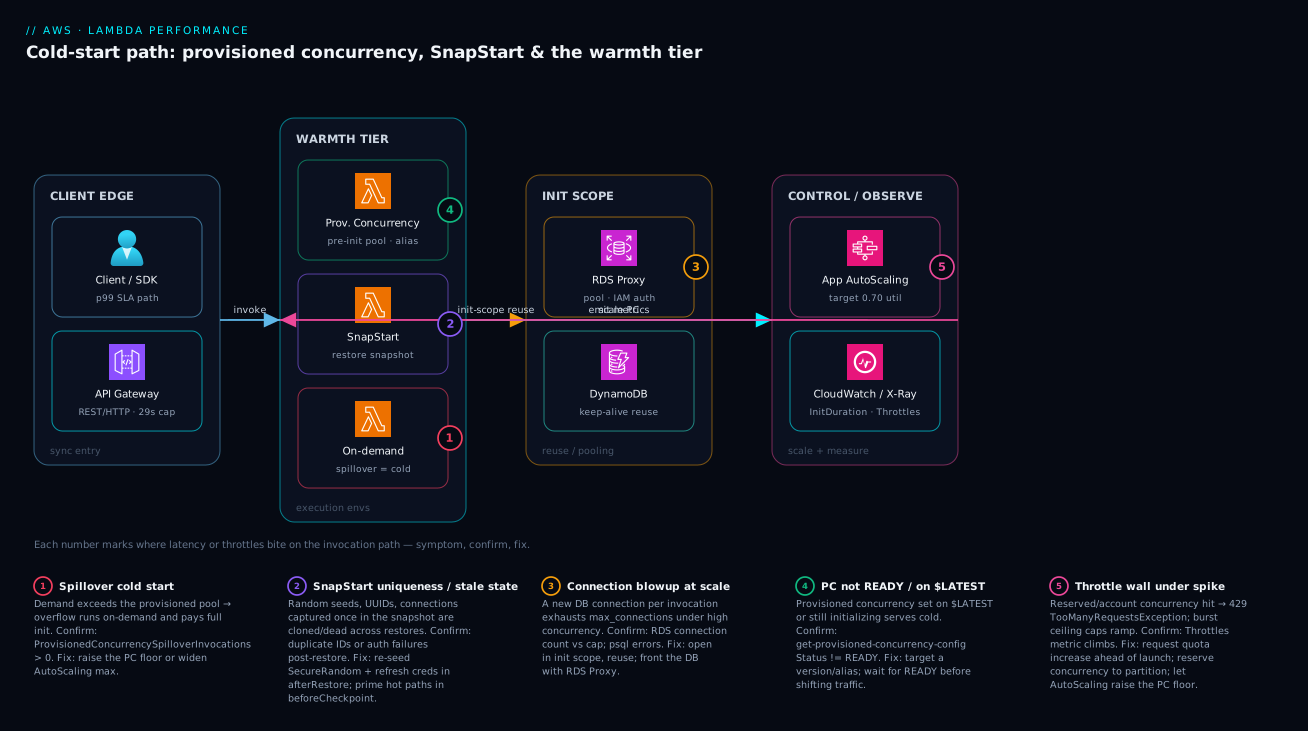
The diagram traces a single synchronous invocation across four zones, left to right, and marks the five places latency or throttles actually bite. A client calls API Gateway (the sync entry, with its 29-second ceiling), which invokes the function. The function lands in the warmth tier, where one of three things serves it: a provisioned-concurrency environment that is already initialized and ready (the flat-tail path), a SnapStart environment that restores from a snapshot instead of re-running init, or — when demand exceeds the warm pool — an on-demand environment that pays a full cold start (the spillover path, marked in red). Inside any of those, well-written code reuses init-scope connections into the RDS Proxy (which pools and multiplexes onto the database) and DynamoDB (keep-alive reuse), rather than opening a connection per call.
The fourth zone is the control and observability loop that makes the rest work. Application Auto Scaling watches provisioned-concurrency utilization (target 0.70) and raises or lowers the warm pool, closing the loop back into the warmth tier — that is the arrow from control back to the function. CloudWatch and X-Ray capture Init Duration, Throttles, spillover and per-segment latency, which is how you prove a lever worked rather than assuming it did. Follow the five numbered badges in order — spillover cold start, SnapStart uniqueness/stale state, connection blowup, PC-not-ready/on-$LATEST, and the throttle wall — and the legend narrates each as symptom, the metric that confirms it, and the fix.
Real-world scenario
Solvent Pay, a payments platform, ran a synchronous “authorize transaction” Lambda (Java 17, Spring) behind API Gateway in ap-south-1. p50 was a healthy 40 ms, but p99 spiked to 6+ seconds whenever traffic stepped up — classic JVM cold starts as new environments spun to meet demand. The constraint was hard: a contractual p99 < 800 ms with the card network, and a finance mandate to cut Lambda spend that had ballooned after a previous engineer “fixed” an earlier latency issue by setting provisioned concurrency to a flat 300 around the clock — paying for 300 warm JVMs at 3 AM for a daytime workload. Monthly Lambda spend on that one function had crossed ₹2.4 lakh.
The team reworked it in three moves, in the right order. First, Power Tuning (run with a real authorization payload, not an empty event) showed the function was CPU-bound; moving from 1024 MB to 1769 MB cut warm duration by ~45% at roughly neutral cost — fewer GB-seconds per call offsetting the higher memory. That was the free win, taken first. Second, they enabled SnapStart with a beforeCheckpoint hook that primed the Spring context, the Jackson serializers, and the SDK clients, and an afterRestore hook that re-seeded SecureRandom and refreshed the database credentials. This removed the multi-second class-load/JIT penalty from cold starts entirely, at zero idle cost — and the afterRestore work was not optional: an early test build skipped the re-seed and two restored environments generated the same idempotency key, which their integration suite caught before it reached production.
Third, they replaced the flat 300 provisioned concurrency with Application Auto Scaling: a small floor (10) for always-on readiness, a target-tracking policy at 0.70 utilization, and a scheduled action that pre-ramped to 150 fifteen minutes before the daily 18:00 peak (because target-tracking alone reacts too slowly for a sharp diurnal step).
# The combination that hit the SLO: SnapStart for the floor, scheduled PC for the peak
AuthorizeTxn:
  Type: AWS::Serverless::Function
  Properties:
    Runtime: java17
    MemorySize: 1769
    SnapStart:
      ApplyOn: PublishedVersions
    AutoPublishAlias: live
    ProvisionedConcurrencyConfig:
      ProvisionedConcurrentExecutions: 10   # baseline; Application Auto Scaling ramps to 150 on schedule
The validation was disciplined: they ran the Logs Insights query over a window after each change and watched avgInitMs collapse toward the restore floor, p99DurationMs settle, ProvisionedConcurrencySpilloverInvocations go to zero during the ramped peak, and peakMemMB justify the 1769 MB. Result: p99 settled under 500 ms even during step-ups, and the provisioned-concurrency bill dropped roughly 70% versus the flat-300 configuration — to about ₹72,000/month. The lesson the team wrote into their runbook: “SnapStart removes the init tax for free; provisioned concurrency is for the peak tail you still cannot tolerate — and you scale it, you do not nail it to the floor. And never ship SnapStart without testing the afterRestore path, or you will clone an idempotency key into production.”
The incident-to-fix sequence, because the order of moves is the lesson:
| Phase | State | Action | Effect |
|---|---|---|---|
| Baseline | p99 6+ s on step-up, ₹2.4 L/mo | (flat PC 300, 1024 MB) | Slow tail and overspending |
| Move 1 | CPU-bound at 1024 MB | Power Tuning → 1769 MB | Warm duration −45%, ~neutral cost |
| Move 2 (bug) | SnapStart on, no re-seed | Skipped afterRestore |
Duplicate idempotency key in test |
| Move 2 (fixed) | SnapStart + CRaC hooks | Prime + re-seed + refresh creds | Init tax gone, zero idle cost |
| Move 3 | Flat 300 PC wasteful | AutoScaling floor 10 + scheduled 150 | Pay for peak only when it exists |
| Result | p99 < 500 ms, ₹72 k/mo | Validated via Logs Insights | SLO met, bill −70% |
Advantages and disadvantages
The buy-or-build-warmth model — right-size free, then choose PC or SnapStart — gives you precise control, but each lever has a cost shape you must weigh honestly:
| Advantages (why this model helps) | Disadvantages (why it bites) |
|---|---|
| Memory tuning improves latency and cost at once — the only free lever | “Memory is CPU” is unintuitive; teams set 128 MB and get slow, equal-cost functions |
| Provisioned concurrency gives a flat, predictable tail for any runtime | You pay for PC whether or not it’s invoked — flat 24x7 PC is a classic overspend |
| SnapStart removes the init tax with zero idle cost | Snapshot caveats are subtle: cloned UUIDs and dead connections cause real, hard-to-spot bugs |
| Reserved concurrency partitions the account and protects fragile downstreams | Set too low it throttles legitimate traffic; the cap is also a ceiling |
| RDS Proxy makes relational DBs survive high concurrency | Adds VPC/IAM plumbing and a small hourly cost; another hop to operate |
Every lever is measurable (REPORT, metrics, X-Ray) |
Tuning blind is easy if you skip instrumentation; the optimum is payload-specific |
| Application Auto Scaling makes warmth follow demand | Target-tracking reacts in minutes, not seconds — flash spikes need pre-scaling |
The model is right for any latency- or cost-sensitive serverless workload where you are willing to measure first and tune deliberately. It bites teams that reach for warmth before right-sizing (overspending on a problem free tuning would have solved), that enable SnapStart without testing the restore path (cloning state into production), or that nail PC to a flat number (paying for 3 AM warmth). Every disadvantage is manageable — but only if you know it exists, which is the entire point of measuring before you tune.
Hands-on lab
Right-size a function with Power Tuning, then add provisioned concurrency on an alias and prove it’s READY — all from the CLI. Free-tier-friendly (a few short invocations; we delete PC at the end so there’s no lingering idle charge). Run in CloudShell or any shell with the aws CLI configured.
Step 1 — Variables.
REGION=ap-south-1
FN=lab-cold-start-$RANDOM
ROLE_ARN=$(aws iam get-role --role-name lambda-basic-exec --query 'Role.Arn' --output text)
Step 2 — Create a tiny CPU-bound function (Node) at 128 MB to reproduce the problem.
cat > handler.js <<'EOF'
// Init scope: runs once per environment
const start = Date.now();
exports.handler = async () => {
  // A little CPU work so memory-as-CPU is visible
  let x = 0;
  for (let i = 0; i < 5_000_000; i++) x += Math.sqrt(i);
  return { ok: true, sinceInitMs: Date.now() - start, x };
};
EOF
zip function.zip handler.js

aws lambda create-function --function-name $FN --runtime nodejs20.x \
  --handler handler.handler --zip-file fileb://function.zip \
  --role "$ROLE_ARN" --memory-size 128 --timeout 10 --region $REGION
Step 3 — Invoke a few times and read the REPORT line. The first call is cold (Init Duration present); note Duration at 128 MB.
for i in 1 2 3; do
  aws lambda invoke --function-name $FN --region $REGION /dev/null \
    --log-type Tail --query 'LogResult' --output text | base64 -d | grep REPORT
done
Expected: a REPORT line on the first call with Init Duration: ...; subsequent calls warm. The CPU loop’s Duration will be high at 128 MB.
Step 4 — Raise memory to 1024 MB and re-measure. Same code, more CPU.
aws lambda update-function-configuration --function-name $FN \
  --memory-size 1024 --region $REGION
aws lambda invoke --function-name $FN --region $REGION /dev/null \
  --log-type Tail --query 'LogResult' --output text | base64 -d | grep REPORT
Expected: Duration drops sharply versus 128 MB — that’s CPU scaling with memory. Note Max Memory Used is far below 1024, so for a non-CPU-bound function you’d drop back down; here the CPU work justifies the memory.
Step 5 — Publish a version, point an alias at it, and add provisioned concurrency.
VER=$(aws lambda publish-version --function-name $FN --region $REGION --query Version --output text)
aws lambda create-alias --function-name $FN --name live \
  --function-version "$VER" --region $REGION
aws lambda put-provisioned-concurrency-config --function-name $FN \
  --qualifier live --provisioned-concurrent-executions 2 --region $REGION
Step 6 — Wait for PC to be READY, then confirm no cold start on the alias.
# Poll until READY (don't serve traffic before this)
aws lambda get-provisioned-concurrency-config --function-name $FN \
  --qualifier live --region $REGION \
  --query '{status:Status, allocated:AllocatedProvisionedConcurrentExecutions}'

# Invoke the ALIAS — REPORT should have NO "Init Duration"
aws lambda invoke --function-name $FN:live --region $REGION /dev/null \
  --log-type Tail --query 'LogResult' --output text | base64 -d | grep REPORT
Expected: Status: READY, allocated: 2; the alias invocation’s REPORT has no Init Duration — the cold start is gone because the environment was pre-warmed.
The lab steps mapped to what each proves:
| Step | What you did | What it proves | Real-world analogue |
|---|---|---|---|
| 3 | Invoke at 128 MB, read REPORT |
Init Duration only on cold starts; CPU is throttled |
The “Lambda is slow” complaint |
| 4 | Raise to 1024 MB, re-measure | Memory is CPU — duration drops | The free right-sizing win |
| 5 | Version + alias + PC | PC must target a version/alias, never $LATEST |
The deploy-then-shift model |
| 6 | Wait for READY, invoke alias |
A warm pool removes the cold start | Buying down the tail on a sync API |
Cleanup (remove the idle PC charge first, then the function).
aws lambda delete-provisioned-concurrency-config --function-name $FN \
  --qualifier live --region $REGION
aws lambda delete-function --function-name $FN --region $REGION
Cost note. A handful of sub-second invocations is effectively free under the Lambda free tier; the only chargeable item is provisioned concurrency, which bills for the time it’s enabled — deleting it in cleanup (before the function) stops that immediately. The whole lab runs to a few rupees at most.
Common mistakes & troubleshooting
This is the playbook — the part you bookmark. First, the error/exception reference: the specific strings and codes you’ll see, what they mean on Lambda, and the fix — scan this before the symptom table.
| Error / code | Where it surfaces | What it means | Likely cause | Fix |
|---|---|---|---|---|
429 TooManyRequestsException |
Sync caller (API GW, invoke) | Concurrency limit hit | Reserved/account cap or burst ceiling | Raise reserved; quota increase; pre-scale PC |
Rate Exceeded / ThrottlingException |
Control-plane calls | API throttled | Too many config/list calls | Back off; batch; cache |
ProvisionedConcurrencyConfigNotFoundException |
get-provisioned-concurrency-config |
No PC on that qualifier | PC not set, or wrong alias/version | Attach PC to the alias traffic uses |
InvalidParameterValueException ($LATEST) |
put-provisioned-concurrency-config |
PC rejected on $LATEST |
Targeted $LATEST |
Publish a version; target an alias |
Status: FAILED (PC) |
PC config status | Allocation failed | Not enough account concurrency | Raise account limit; lower other PC |
Task timed out after N seconds |
Function logs | Hit the configured timeout | Slow code/dependency; timeout too low | Speed up; raise timeout (≤900 s) |
Endpoint request timed out (504) |
API Gateway | Function exceeded 29 s | Long sync work behind API GW | Make async; shorten; Step Functions |
Runtime exited ... signal: killed |
Function logs | OOM — exceeded memory | Memory too low for the workload | Raise memory; fix leak |
connection ... too many connections |
DB / dependency logs | DB max_connections hit |
Connection blowup at scale | Init-scope reuse; RDS Proxy |
ResourceConflictException |
Deploy / config update | Concurrent update in progress | Overlapping deploys/config calls | Serialize; retry after settle |
ENILimitReached / slow VPC cold start |
VPC-attached function | Hyperplane ENI pressure | Many subnets/functions, small subnet | Right-size subnet CIDR; consolidate |
Unable to import module 'handler' |
Init phase | Init crashed before handler | Missing dep, bad layer, import error | Fix dependency/layer; check unzip -l |
Now the symptom → cause → confirm → fix table you read mid-incident, then the entries that bite hardest expanded with the exact commands.
| # | Symptom | Root cause | Confirm (exact cmd / metric) | Fix |
|---|---|---|---|---|
| 1 | High p99 on a sync API; p50 fine | Cold starts on the critical path | Logs Insights: high coldStarts/invocations; X-Ray init subsegment |
PC on the alias; SnapStart if eligible |
| 2 | Function “slow”, cost unchanged at 128 MB | CPU-starved at low memory | Power Tuning shows duration drops with memory | Raise to the Power-Tuning winner |
| 3 | Provisioned concurrency “not working” | PC on $LATEST, or not READY, or wrong qualifier |
get-provisioned-concurrency-config Status ≠ READY |
Target a version/alias; wait for READY |
| 4 | p99 still spikes despite PC | Demand exceeds the PC pool (spillover) | ProvisionedConcurrencySpilloverInvocations > 0 |
Raise PC floor / AutoScaling max; pre-scale |
| 5 | Duplicate IDs / “same value” across requests | SnapStart cloned a UUID/seed | IDs identical post-restore; only on SnapStart fns | Regenerate in afterRestore, not at init |
| 6 | Auth/connection failures right after deploy | SnapStart restored stale creds/connections | Failures cluster on cold (restored) envs | Refresh creds/reconnect in afterRestore |
| 7 | First request slow even with SnapStart | JVM JIT/lazy-load not primed | First post-restore call slow, then fast | Prime hot paths in beforeCheckpoint |
| 8 | DB dependency timeouts at scale, fine at rest | Connection blowup (per-invocation connects) | RDS connection count near max_connections |
Init-scope reuse; front with RDS Proxy |
| 9 | 429 TooManyRequestsException under load |
Reserved/account concurrency limit hit | Throttles climbing; ConcurrentExecutions at cap |
Raise reserved; Service Quotas increase |
| 10 | Throttles during a fast ramp, below account limit | Burst-concurrency ceiling outrun | ConcurrentExecutions slope caps then throttles |
Pre-scale PC for the window; smooth spike |
| 11 | Async events delayed / landing in DLQ | Throttled async invocations retrying | Throttles on an async-triggered fn; DLQ depth |
Raise concurrency; check the DLQ cause |
| 12 | Init phase takes seconds | Oversized package / eager init work | High Init Duration; large unzip -l |
Trim deps, mark SDK external, lazy-init |
| 13 | Memory bill high, function fast | Over-allocated memory | Max Memory Used ≪ Memory Size |
Drop memory toward peak + headroom |
| 14 | Costs jumped after a “latency fix” | Flat 24x7 provisioned concurrency | PC config shows a high static floor | AutoScaling: low floor + scheduled/target ramp |
The expanded form for the entries that cause the most wasted hours:
1. High p99 on a synchronous API, p50 healthy.
Root cause: cold starts on the critical path — new environments paying init as traffic steps up.
Confirm: Logs Insights shows a high count(@initDuration)/count(*) ratio on that function; X-Ray’s init subsegment shows the time landing in init, not your handler.
Fix: right-size memory first (free), then provisioned concurrency on the alias for a flat tail; SnapStart if the runtime is Java/Python/.NET and cost matters more than absolute consistency.
3. Provisioned concurrency “isn’t doing anything.”
Root cause: PC was put on $LATEST (rejected) or on a different qualifier than the one traffic hits, or it isn’t READY yet and traffic was shifted early.
Confirm: aws lambda get-provisioned-concurrency-config --qualifier <alias> returns Status: IN_PROGRESS/FAILED, or the alias your API points to has no PC config.
Fix: attach PC to the version/alias your traffic actually uses; wait for READY before promoting; ensure the API stage points at the PC-backed alias.
5 & 6. SnapStart cloned state / restored stale connections.
Root cause: values generated once at snapshot (UUIDs, SecureRandom seed, timestamps) are identical across every restore; connections/creds captured live are dead/expired on restore.
Confirm: duplicate IDs appear only on SnapStart-enabled functions and cluster on cold (restored) environments; auth/connection failures cluster immediately post-deploy.
Fix: regenerate per-environment values and re-seed SecureRandom in afterRestore; refresh credentials and re-establish connections there too. Never rely on init-time randomness under SnapStart.
8. Relational dependency times out under load, fine at rest.
Root cause: the handler opens a connection per invocation, so at N concurrent environments you need N connections; past max_connections the database refuses connects, surfacing as Lambda-side dependency timeouts.
Confirm: RDS/Aurora connection count climbs toward max_connections exactly as Lambda concurrency rises; the failures are connects, not query errors.
Fix: move the connection to init scope and reuse it; for high concurrency front the database with RDS Proxy so it multiplexes many environments onto a small backend pool.
9 & 10. Throttles — but which wall?
Root cause: either a reserved-concurrency cap on the function, the account/regional limit, or the burst ceiling during a sharp ramp.
Confirm: Throttles rising with ConcurrentExecutions pinned at the account limit → account cap; Throttles on one function with others fine → its reserved cap; throttles while ConcurrentExecutions is still climbing and below the limit → burst ceiling.
Fix: Service Quotas increase ahead of a launch for the account cap; raise (or accept, if it’s protecting a downstream) the reserved cap; pre-scale provisioned concurrency for a known flash window the burst ramp can’t keep up with.
14. The bill jumped after someone “fixed” latency.
Root cause: provisioned concurrency nailed to a flat 24x7 number, paying for warmth at 3 AM for a daytime workload.
Confirm: the PC config shows a high static provisioned-concurrent-executions with no Application Auto Scaling target/schedule attached.
Fix: set a small always-on floor and let Application Auto Scaling raise it on a schedule (diurnal peaks) or a utilization target; reserve a higher static floor only for genuine flash windows.
Best practices
- Right-size memory before you buy warmth. It’s the only free lever and often cuts latency and cost. Run Power Tuning with a representative payload, not an empty event.
- Treat init scope as sacred. SDK clients, connections, and static config go outside the handler; only per-request state goes inside. This single discipline kills most self-inflicted latency.
- Trim the package. Mark the bundled SDK external, prune dev deps, tree-shake. Init time tracks package size closely.
- Put provisioned concurrency on an alias, never
$LATEST, and drive it with Application Auto Scaling — a low floor plus a schedule/target, not a flat 24x7 number. - Wait for
READYbefore shifting traffic to a PC-backed alias; serving whileIN_PROGRESSstill cold-starts. - For SnapStart, always implement
afterRestoreto re-seed randomness, regenerate per-env values, and refresh credentials/connections — andbeforeCheckpointto prime hot paths. Test the restore path; an un-re-seeded UUID is a production bug. - Reuse connections; front relational DBs with RDS Proxy above a few hundred concurrent executions, so you never exhaust
max_connections. - Reserve concurrency on functions fronting fragile downstreams to partition the account and protect the dependency — and to stop one noisy function starving the rest.
- Request a regional quota increase before a launch, not during the incident, and pre-scale PC for known flash windows the burst ceiling can’t ramp into.
- Instrument from day one: active X-Ray tracing, Lambda Insights, and alarms on
Throttles,ProvisionedConcurrencySpilloverInvocations, and p99. Tuning blind is guessing. - Verify the number moved after every change — run the Logs Insights query over an after-window and confirm
avgInitMs, p99, peak memory and spillover went the right way. Don’t assume; measure. - Pick the cheapest config that meets the SLO, per path. Spend on warmth only where the tail-latency SLO actually requires it.
Security notes
- Fetch DB credentials via IAM, not embedded secrets. RDS Proxy lets the function authenticate with IAM and pull the database secret from Secrets Manager, so no password sits in an environment variable. Pair with least-privilege on the proxy’s role. (See AWS Secrets Manager vs SSM Parameter Store, In Depth: Secrets, Rotation & Config.)
- Least-privilege execution role. Grant only the actions the function uses (specific DynamoDB tables, the one Secrets Manager secret ARN, the KMS key). A broad
*role is a blast-radius and a finding. - Re-seed cryptographic randomness under SnapStart. A
SecureRandomcaptured in the snapshot is predictable and identical across restores — a genuine security defect, not just a duplicate-ID bug. Use the AWS Cryptography libraries or re-seed inafterRestore. - Don’t log secrets or full payloads. Logs Insights queries should target
REPORTand metadata, not request bodies; scrub PII before it reaches CloudWatch. - Keep the function in a VPC only when it needs private resources (RDS Proxy, private endpoints). VPC-attached functions reach AWS APIs via interface endpoints or a NAT path — design egress deliberately rather than opening it wide.
- Encrypt environment variables with a customer-managed KMS key when they hold anything sensitive, and rotate the underlying secrets (Secrets Manager rotation) rather than the env var.
- Scope reserved concurrency as a safety control too — it bounds how many connections or downstream calls a compromised or runaway function can make.
The security controls that also improve resilience — they pull the same direction here:
| Control | Mechanism | Secures against | Also prevents |
|---|---|---|---|
| IAM DB auth via RDS Proxy | Proxy IAMAuth: REQUIRED |
Embedded DB passwords | Credential staleness under SnapStart |
| Least-privilege exec role | Scoped IAM policy | Over-broad blast radius | Accidental calls to wrong resources |
Re-seed SecureRandom (afterRestore) |
CRaC hook | Predictable/cloned randomness | Duplicate idempotency keys |
| Reserved concurrency cap | reserved-concurrent-executions |
Runaway downstream abuse | DB connection exhaustion |
| KMS-encrypted env vars | Customer-managed key | Plaintext secret exposure | (audit/rotation hygiene) |
| Secrets Manager rotation | Automatic rotation | Long-lived static creds | Credential drift breaking the app |
Cost & sizing
The bill drivers, how they interact with the fixes, and what to watch:
- GB-seconds (memory × billed duration) is the core cost. Right-sizing can lower it even while raising memory, because the work finishes in fewer seconds — which is why “memory is CPU” is also a cost lever, not just a latency one.
- Provisioned concurrency has two parts: a charge for the time it’s enabled (idle or not) plus a reduced per-request/duration charge when used. A flat 24x7 floor is the classic overspend; AutoScaling with a low floor and a schedule/target is far cheaper.
- SnapStart adds no idle charge — you pay only per invocation (with a small per-restore element on some runtimes) — which is exactly why cost-sensitive JVM workloads favour it over PC.
- Requests are billed per invocation; high-throughput functions accumulate request cost independent of duration.
- RDS Proxy adds a small hourly per-vCPU charge on the proxied instance — trivial next to the cost of a database falling over from connection exhaustion during a sale.
- CloudWatch Logs/metrics/X-Ray are billed per GB ingested / per trace — worth it, but use log retention and trace sampling on high-traffic functions so a flash sale doesn’t spike the telemetry bill.
A rough monthly picture for a single busy synchronous function, before vs after deliberate tuning:
| Cost driver | What you pay for | Rough INR / month | What it fixes | Watch-out |
|---|---|---|---|---|
| GB-seconds (right-sized) | Memory × duration, tuned | varies with traffic | Slow warm path | Bills more if over-allocated |
| Provisioned concurrency (flat 300) | 24x7 warm pool | ~₹2.4 L (the anti-pattern) | Cold starts | Pays for 3 AM warmth |
| Provisioned concurrency (floor 10 + ramp) | Warm only at peak | ~₹70–80 k | Cold starts, cost-aware | Pre-scale for flash spikes |
| SnapStart | Per-invoke restore only | ~₹0 idle | JVM init tax | Snapshot caveats to code around |
| RDS Proxy | Hourly per-vCPU | ~₹1.5–3 k | Connection blowup | Needs VPC/IAM |
| Requests | Per invocation | scales with traffic | (inherent) | High-throughput accumulates |
| Observability | Logs/metrics/traces per GB | ~₹1–3 k | Tuning blind | Sample + set retention |
The sizing rule in one line: find the cheapest memory that meets the warm-path latency, add only the warmth (PC or SnapStart) the cold-start SLO needs, and scale that warmth to demand. Solvent Pay landed at ~₹72,000/month after doing exactly this — down 70% from the flat-300 anti-pattern — proof that the fix is usually deliberate tuning, not a bigger anything.
Interview & exam questions
1. Why is a Lambda function at 128 MB not necessarily “cheap”? Lambda allocates CPU proportionally to memory, so a CPU-bound function at 128 MB runs on a sliver of a vCPU and takes far longer — and since billing is GB-seconds, the slower run can cost the same or more than a higher-memory run that finishes quickly, while delivering worse latency. Right-sizing with Power Tuning often lowers both latency and cost.
2. What are the three parts of a cold start, and which do you control most? Environment download/init (microVM provision, package/image pull, runtime start — mostly AWS), your init phase (imports, SDK clients, connections — the part you control and that’s billed), and the warm invoke (your handler). You have the most leverage over the init phase via package trimming and lazy initialization.
3. Provisioned concurrency vs SnapStart — when do you pick each? Provisioned concurrency pre-initializes a pool for the flattest tail on any runtime, but you pay for it whenever it’s enabled. SnapStart restores from a snapshot of init (Java/Python/.NET) with no idle cost but adds snapshot caveats and restore/priming variance. Pick PC for strict p99 or unsupported runtimes; pick SnapStart for cost-sensitive JVM/.NET/Python cold starts; combine them for JVM workloads with both pressures.
4. Why must provisioned concurrency target a version or alias, never $LATEST? $LATEST is mutable, so PC can’t guarantee a stable, pre-initialized snapshot of code/config against it — AWS rejects it. Targeting an immutable version (usually via an alias) enforces a deploy-then-shift model where you publish, warm, confirm READY, then move traffic.
5. What breaks if you don’t implement afterRestore under SnapStart? Anything generated once at snapshot — SecureRandom seeds, UUIDs, timestamps — is cloned identically across every restored environment, and captured connections/credentials may be dead or expired. You get duplicate IDs (e.g. idempotency keys), predictable randomness (a security flaw), and auth/connection failures on cold starts. afterRestore re-seeds and refreshes these per environment.
6. How does SnapStart’s beforeCheckpoint hook help latency? Restore is fast, but the JVM still JIT-compiles and lazy-loads on the first real request, so the first post-restore call can be slow. beforeCheckpoint runs at publish time and lets you prime hot paths (exercise serializers, make a dummy SDK call) so that compiled/loaded state is captured in the snapshot and the first real request is already fast.
7. What is SNAT-style connection blowup on Lambda, and how do you fix it? Each concurrent environment that opens its own database connection multiplies connections by concurrency; at a few hundred concurrent executions you exhaust the database’s max_connections and it refuses connects, surfacing as dependency timeouts. Fix by opening connections in init scope and reusing them, and by fronting the database with RDS Proxy, which multiplexes many environments onto a small backend pool.
8. Reserved vs provisioned concurrency? Reserved concurrency carves a guaranteed-and-capped slice of the account limit for a function (protecting downstreams and partitioning the account) but does not pre-warm anything. Provisioned concurrency is a subset of reserved that is also kept initialized and ready. Reserved bounds; provisioned bounds and warms.
9. How does a throttle surface differently for synchronous, asynchronous, and event-source invocations? Synchronous callers (API Gateway, direct invoke) get an immediate 429 TooManyRequestsException and must retry themselves. Asynchronous invocations (S3, SNS, EventBridge) are retried by Lambda with backoff and eventually go to a DLQ. Event source mappings (SQS, Kinesis, DynamoDB Streams) retry per the source’s rules, so the backlog and iterator age grow.
10. You enabled provisioned concurrency but p99 still spikes under load. Why and what do you check? Demand is exceeding the provisioned pool, so the overflow runs on-demand and cold-starts. Check ProvisionedConcurrencySpilloverInvocations — any sustained non-zero value means raise the PC floor or the Application Auto Scaling max, and pre-scale for known flash windows since target-tracking reacts too slowly for sharp spikes.
11. What’s the single fastest way to tell a cold start from a warm one in the logs? The REPORT line includes Init Duration only on cold starts. Filter on its presence (e.g. count(@initDuration) in Logs Insights) to measure cold-start frequency and cost without any extra instrumentation.
12. Why pre-scale provisioned concurrency for a flash sale instead of relying on target-tracking? Target-tracking Application Auto Scaling reacts over minutes, and even on-demand scale-out is bounded by the burst-concurrency ceiling, so a spike that arrives in seconds outruns both and cold-starts (or throttles). A scheduled action that ramps the PC floor before the known window keeps the pool warm ahead of the traffic.
These map to AWS Certified Developer – Associate (DVA-C02) — develop, deploy and troubleshoot serverless applications, Lambda configuration, concurrency, and observability — and AWS Certified Solutions Architect – Associate (SAA-C03) for the architecture trade-offs (PC vs SnapStart, RDS Proxy, API Gateway fronting). The performance-and-cost optimization angle touches AWS Certified DevOps Engineer – Professional (DOP-C02). A compact cert mapping:
| Question theme | Primary cert | Objective area |
|---|---|---|
| Memory-as-CPU, right-sizing, GB-seconds | DVA-C02 | Optimize serverless cost/performance |
| PC vs SnapStart, aliases/versions | DVA-C02 | Deploy & configure Lambda |
| Concurrency model, throttles, quotas | DVA-C02 / SAA-C03 | Resilient serverless design |
| RDS Proxy, connection reuse | SAA-C03 | Design scalable data tiers |
| CloudWatch/X-Ray, Logs Insights | DVA-C02 / DOP-C02 | Instrument & troubleshoot |
| AutoScaling PC, pre-scaling for spikes | DOP-C02 | Automation & scaling |
Quick check
- A synchronous API’s p50 is 40 ms but p99 is 6 seconds under load. What’s the most likely cause, and the first (free) lever before you spend money?
- True or false: scaling a function to more memory always costs more.
- You put provisioned concurrency on a function but it still cold-starts. Name two things to check.
- Under SnapStart, two environments returned the same idempotency key. What went wrong and where do you fix it?
- Your relational database starts refusing connections exactly as Lambda concurrency climbs past a few hundred. What’s happening and what’s the fix?
Answers
- Cold starts on the critical path as new environments spin up under load (p50 is the warm path, p99 the cold tail). The first lever is right-sizing memory with Power Tuning — it’s free and often cuts the warm duration too; only then do you buy warmth (provisioned concurrency on the alias, or SnapStart if the runtime supports it).
- False. Memory is CPU, so more memory can make a CPU-bound function finish in far fewer GB-seconds — lowering the bill and the latency. You only overspend if you allocate memory the function doesn’t use (check
Max Memory Used). - Check (a) that PC targets a version or alias your traffic actually hits, never
$LATEST, and (b) that itsStatusisREADY(notIN_PROGRESS/FAILED) before traffic was shifted. Also watchProvisionedConcurrencySpilloverInvocations— non-zero means demand exceeds the pool. - SnapStart captured a value generated once at snapshot (a UUID/
SecureRandomseed) and cloned it across every restored environment. Regenerate per-environment values and re-seed randomness in theafterRestorehook, not at init/class-load. - Connection blowup — each concurrent environment opened its own connection, exhausting the database’s
max_connections. Fix by reusing the connection in init scope and fronting the database with RDS Proxy, which multiplexes many environments onto a small backend pool.
Glossary
- Execution environment — the Firecracker microVM that runs one Lambda invocation at a time; cold when newly created, warm when reused.
- Cold start — the latency of provisioning an environment and running the init phase before the first invocation; visible as
Init Durationin theREPORTline. - Init phase — code outside the handler (imports, SDK clients, static config, connections) that runs once per environment and is billed; the cold-start cost you most control.
- Warm invocation — a handler call on a reused environment that skips environment init and the init phase.
- Memory-is-CPU — Lambda allocates CPU proportionally to configured memory; ~1,769 MB ≈ one full vCPU.
- GB-second — the billing unit: configured memory (GB) × billed duration (seconds).
- Provisioned concurrency (PC) — a pool of environments kept initialized and ready on a version/alias; removes cold starts but is charged while enabled.
- SnapStart — runs init once at publish, snapshots the microVM, and restores from it on cold start (Java/Python/.NET); no idle charge, with snapshot caveats.
- CRaC (
beforeCheckpoint/afterRestore) — the runtime hooks SnapStart uses: prime hot paths before the snapshot; re-seed/refresh per-environment state after restore. - Reserved concurrency — a guaranteed-and-capped slice of the account concurrency limit for one function; partitions the account and protects downstreams.
- Regional/account concurrency limit — total in-flight executions allowed in a region (default 1,000, raisable).
- Burst concurrency — the ceiling on how fast you can scale from cold before the per-minute ramp toward the account limit.
- Throttle — an invocation rejected at a concurrency limit;
429for synchronous callers, retried-then-DLQ for async, source-dependent for event source mappings. - Spillover — invocations that exceed the provisioned-concurrency pool and run on-demand (cold); tracked by
ProvisionedConcurrencySpilloverInvocations. - RDS Proxy — a managed connection pooler that multiplexes many Lambda environments onto a small set of backend database connections and supports IAM auth.
- Init scope (module/static scope) — code outside the handler whose objects (clients, connections) persist across warm invocations on the same environment.
- Lambda Power Tuning — an open-source Step Functions state machine that sweeps memory settings and plots cost vs speed to find the optimum.
REPORTline — the per-invocation CloudWatch Logs summary carryingInit Duration(cold only),Duration,Billed Duration,Max Memory Used, andMemory Size.
Next steps
You can now decompose Lambda latency, right-size for free, buy down the cold start that remains, and prove every change. Build outward:
- Next: AWS Lambda, In Depth: Runtimes, Triggers, Layers, Concurrency & Every Setting — the full mechanics under every knob in this article.
- Related: RDS Proxy in Production: Connection Pooling, Failover Acceleration, and IAM Authentication — go deep on the connection fix for high-concurrency relational access.
- Related: Amazon API Gateway, In Depth: REST vs HTTP vs WebSocket APIs, Integrations & Authorizers — the synchronous entry path and its 29-second ceiling.
- Related: Distributed Tracing on AWS with X-Ray: Service Maps, Segments, and ADOT on EKS — segment-level latency attribution to prove the cost is yours or a dependency’s.
- Related: AWS Step Functions in Production: Express vs Standard, Distributed Map, and Resilient Error Handling — the orchestration engine behind Power Tuning, and where long-running work belongs instead of a Lambda.