Service mesh promised uniform connectivity, mTLS, and traffic policy across every workload. It also delivered Envoy on every pod, a control plane to operate, certificate rotation to babysit, and a sidecar tax on latency and memory. Amazon VPC Lattice is AWS’s answer to the same problem at a different layer: it pushes Layer 7 routing and IAM-based authorization into the VPC data path itself, so a Lambda function, an EKS pod, and an EC2 instance in three different accounts can call each other by a stable DNS name with no proxy in the request path that you operate. A client makes a plain HTTP call; nothing runs in your pod or on your host; AWS’s managed data plane intercepts the call, applies routing, evaluates an IAM policy against the SigV4-signed caller identity, and forwards to a healthy target.
This is a build guide for wiring that together correctly — and for knowing when Lattice is the wrong tool. We will get the nouns right (service, service network, listener, target group), associate the two boundaries that make traffic flow, share the network across accounts with AWS RAM, write auth policies that replace mesh mTLS-plus-SPIFFE with plain IAM, and integrate EKS (via the Gateway API controller), Lambda, and EC2 targets under one policy language. Because this is a reference you will return to mid-incident, the resource options, the auth condition keys, the error codes, the limits, and the failure-mode playbook are all laid out as scannable tables — read the prose once, then keep the tables open when a cross-account call starts returning 403 or timing out.
By the end you will stop guessing whether a failed call is a networking problem or an authorization problem — the two have completely different signatures (a timeout with no HTTP code versus a clean 403 AccessDeniedException) and completely different fixes. You will know which security group is the egress gate (the most-missed control in all of Lattice), why a CIDR overlap that would defeat Transit Gateway simply stops mattering here, and how to make the identity your workload runs as and the identity your policy allows become the same object.
What problem this solves
In a multi-account estate, two services in different VPCs that need to call each other face three separate problems at once, and the traditional toolbox solves them with three different tools that you then have to operate together. Reachability: the packets have to get there — Transit Gateway or VPC peering, plus route tables, plus non-overlapping CIDRs. Authorization: only the right caller should be allowed — a service mesh with mTLS and SPIFFE identities, or hand-rolled token checks. Traffic policy: path routing, weighted canaries, retries — an ALB per service, or Envoy rules. Each layer has its own control plane, its own failure modes, and its own on-call.
What breaks without a unifying layer: an acquired business unit ships a VPC with an overlapping 10.20.0.0/16 that you cannot renumber for two quarters, and now no amount of TGW routing makes the real IPs reachable — service mesh does not help, because it rides on top of L3 reachability you do not have. Sidecars add p99 latency and a steady stream of certificate-rotation pages. Cross-account authorization lives in Envoy AuthorizationPolicy YAML that your security team cannot review in the same pipeline as the rest of your IAM. And every new service is another ALB, another DNS name to wire, another peering decision.
Who hits this: platform teams running tens to hundreds of microservices across multiple accounts under an AWS Organization, especially anyone who has inherited a service mesh and is paying the sidecar tax, anyone blocked by CIDR overlap, and anyone whose security review of “who can call payments” is archaeology across Envoy config and security groups. VPC Lattice collapses the three problems into one resource graph: a service network that carries reachability and IAM authorization, addressing services by name and a link-local range so CIDR overlap is irrelevant, with the data plane fully managed by AWS.
To frame the whole field before the build, here is every failure class this article covers, the question it forces, and the one place to look first:
| Failure class | What it looks like | First question to ask | First place to look | Most common single cause |
|---|---|---|---|---|
| Connection timeout | No HTTP code at all; client hangs | Is the data path even programmed? | DNS resolves to 169.254.171.x? |
VPC-association security group blocks egress |
| 403 at the network | AccessDeniedException, fast |
Did the network-level policy deny it? | Access-log authDeniedReason |
Caller outside the org / not SigV4-signed |
| 403 at the service | AccessDeniedException, fast |
Does the service policy allow this role+method? | Access-log principal + method | Role ARN or HTTP method not in the policy |
| 404 from Lattice | HTTP 404, request reached Lattice | Did any listener rule match? | Listener rule priorities | No rule matched; default action wrong |
Targets UNHEALTHY → 503 |
503, intermittent or total | Are targets passing health checks? | list-targets status |
Wrong health path/port; SG blocks managed prefix |
Learning objectives
By the end of this article you can:
- Name the four core Lattice resources — service, service network, listener, target group — and explain the double association (service-into-network, VPC-into-network) that is the reachability and security boundary.
- Create a service network and a service, register the correct target-group type (
IP,INSTANCE,LAMBDA,ALB) for each compute kind, and add listeners with path/header/weighted routing rules for blue-green and canary shifts. - Share a service network across accounts with AWS RAM to an OU or the whole organization, and reason about which side (network owner, service owner, VPC owner) does what.
- Write IAM auth policies keyed on principal ARNs and constrained by
vpc-lattice-svcscondition keys (method, path, source VPC), and gate the network byaws:PrincipalOrgID. - Make callers SigV4-sign for service
vpc-lattice-svcs, and wire EKS Pod Identity / IRSA so the workload’s role ARN is the auth-policy principal. - Integrate EKS (AWS Gateway API Controller), Lambda (
LAMBDAtarget group), and EC2/IP targets under one authorization model. - Localise any failed call to either the network layer (timeout) or the auth layer (403), confirm the cause with the exact CLI/log query, and apply the fix — and choose correctly between Lattice, PrivateLink, App Mesh, and an open-source mesh by the boundary you actually have.
Prerequisites & where this fits
You should be comfortable with core VPC networking (subnets, route tables, security groups, DNS resolution) and with IAM at the level of roles, resource policies, and condition keys — if either is shaky, read AWS VPC Deep Dive: Subnets, Routing, IGW, NAT, Endpoints and AWS IAM Fundamentals: Users, Roles, Policies & Evaluation first. You should know what SigV4 request signing is, and how a workload obtains short-lived credentials — on EKS that is EKS IRSA to Pod Identity: Migration & Fine-grained Access. Familiarity with running aws CLI and reading JSON output is assumed.
This sits in the multi-account networking & identity track. It is downstream of AWS Organizations & IAM Foundations (Lattice cross-account sharing leans on Organizations and RAM) and is a sibling of AWS PrivateLink: Service Provider/Consumer Cross-Account and AWS Transit Gateway Multi-Account VPC Architecture — you will choose between these three constantly, and a later section is dedicated to that choice. If you front Lattice targets with EKS, EKS at Scale: Pod Identity, Karpenter, Networking is the cluster-side context.
A quick map of who owns what during a cross-account Lattice incident, so you call the right team fast:
| Layer | What lives here | Who usually owns it | Failure classes it can cause |
|---|---|---|---|
| Caller workload | The signing identity (Pod Identity role) | App / dev team | 403 (wrong/missing SigV4 principal) |
| Client VPC + association | Egress SG, the data-path program | Consumer-account network team | Connection timeout (SG / missing assoc) |
| Service network | Network auth policy, RAM share | Platform / network-owner account | 403 at network; share not visible |
| Service + listener + rules | Routing, per-service auth policy | Service-owner team | 404 (no rule), 403 at service |
| Target group + targets | Health checks, target SG | App + platform | 503 (UNHEALTHY), connection refused |
| Observability | Access logs, CloudWatch metrics | Platform / SRE | “Debugging 403 in the dark” |
Core concepts
Five mental models make every later step and every diagnosis obvious.
Four resources carry the whole design. Get the nouns right and the rest follows. A service is a callable application (orders, payments) that owns a DNS name, listeners, and routing rules — think “an ALB plus its DNS name”. A target group is the compute behind a service (instances, IPs, a Lambda, or an ALB), health-checked — think “an ALB target group”. A listener is a protocol/port on the service (HTTP/HTTPS) carrying rules that route to target groups. A service network is the trust-and-reachability domain that joins services to the VPCs allowed to call them and carries the auth policy — think “the mesh itself”.
| Resource | What it is | Owns | Analogy | Auth-type lives here? |
|---|---|---|---|---|
| Service | A logical callable application | DNS name, listeners, rules | ALB + its DNS name | Yes (per-service) |
| Target group | The compute behind a service | Targets, health check | ALB target group | No |
| Listener | A protocol/port with routing rules | Rules, default action | ALB listener | No |
| Service network | The trust + reachability boundary | Associations, auth policy | The mesh itself | Yes (network-wide) |
The double association is the security boundary. You associate services into a service network (making them callable inside it), and you associate VPCs into the same service network (giving clients in those VPCs the ability to resolve and reach it). A client reaches a service only if both the client’s VPC and the target service share a service network. Reason about this double association before any IAM — it is the coarse, network-level gate that IAM then refines.
There is no sidecar; the data path is programmed link-local. When a VPC is associated, Lattice programs the VPC’s data path so that traffic to a Lattice-managed link-local range (169.254.171.0/24) and the service’s managed DNS name is intercepted and routed by the AWS-managed Lattice data plane. Your application makes a plain HTTP call. The single most useful diagnostic fact in this whole article: if the service DNS name resolves to a 169.254.171.x address, the data path is programmed — so a timeout is a security-group problem, not a missing association.
The data-path facts you reason from, and what each tells you when it is or isn’t true:
| Data-path fact | What it means | Confirm with | If it’s wrong |
|---|---|---|---|
| Service has a managed DNS name | Service is associated into a network | get-service dnsEntry.domainName |
Associate the service into the network |
Name resolves to 169.254.171.x |
Client VPC’s data path is programmed | nslookup/dig from inside the VPC |
Create the VPC-into-network association |
| Name resolves but call times out | Path is up; gate is the egress SG/auth | curl returns timeout vs 403 |
Open the VPC-association SG, then check auth |
Call returns a fast 403 |
Reached Lattice; auth denied | Access-log responseCode=403 |
Fix the auth policy, not networking |
| No managed DNS name at all | Service not callable in any network | get-service returns empty dnsEntry |
Associate the service first |
Identity is the IAM role, not a certificate. When auth-type is AWS_IAM, every request must be SigV4-signed with the caller’s IAM credentials, and Lattice evaluates an auth policy (a resource policy on the service and/or the service network) against the signed principal. No certificates, no SPIFFE IDs. On EKS, Pod Identity / IRSA gives the pod a role, and that role’s ARN is exactly the principal your policy allows — the identity the workload runs as and the identity in the policy become the same object. That equality is the property that makes this simpler than mesh PKI.
Auth is evaluated at two independent levels. auth-type exists on both the service network and the service, evaluated independently. NONE disables auth at that level; AWS_IAM enforces SigV4 and applies the auth policy at that level. A request must satisfy both when both are AWS_IAM. The production posture is AWS_IAM on the network (a broad aws:PrincipalOrgID guardrail) and AWS_IAM on each service (per-service exact-role rules).
The vocabulary in one table
Before the deep sections, pin down every moving part. The glossary at the end repeats these for lookup; this table is the mental model side by side:
| Concept | One-line definition | Where it lives | Why it matters |
|---|---|---|---|
| Service | A callable application with a DNS name | Producer account | The thing clients call by name |
| Service network | Trust + reachability boundary | Network-owner account | Carries auth policy; shared via RAM |
| Listener | Protocol/port + routing rules | On a service | Where canary/blue-green weights live |
| Target group | Health-checked compute behind a service | Producer VPC | Wrong type/health = no traffic |
| Service-into-network assoc | Makes a service callable in the network | Service network | Half of the reachability gate |
| VPC-into-network assoc | Lets a client VPC resolve + reach | Service network | Other half; carries the egress SG |
| Auth policy | IAM resource policy on svc/network | Service + network | SigV4 principal authorization |
vpc-lattice-svcs |
The IAM service name to sign for | Caller’s SigV4 | Sign for this, not vpc-lattice |
| Pod Identity / IRSA | Gives an EKS pod an IAM role | EKS cluster | Workload role = policy principal |
| Managed prefix | Source of Lattice health checks/traffic | Per region | Target SG must allow it |
| AWS RAM | Shares the service network cross-account | Org / OU | Cross-account is via RAM on the network |
| Link-local range | 169.254.171.0/24 data-path address |
Associated VPC | Resolving to it proves the path is up |
The Lattice resource model: services, networks, listeners, target groups
Four resources, two associations. This section nails the model with the option matrices you will reference constantly; later sections build on top of it.
auth-type at the two levels
auth-type is the coarsest control. It is set independently on the network and the service, and both are evaluated. The combination determines whether SigV4 and the auth policy apply at all.
Network auth-type |
Service auth-type |
Net effect | When to use |
|---|---|---|---|
AWS_IAM |
AWS_IAM |
Both policies evaluated; SigV4 required | Production default — org guardrail + per-service rules |
AWS_IAM |
NONE |
Only network policy enforces; SigV4 required | Service trusts the whole network’s gate |
NONE |
AWS_IAM |
Only service policy enforces; SigV4 required | Service owns its own authz; network is open reachability |
NONE |
NONE |
No auth at all; anyone reachable can call | Lab / migration only — never production |
Setting
auth-type NONEdoes not add a deny; it removes the check at that level. A common mistake is to assume a network-levelAWS_IAMprotects a service whose ownauth-typeisNONE— it does, but only the network policy runs, so per-service constraints (method, path) silently do not apply.
Target-group types — pick by the compute
Lattice target groups are not EC2/ELB target groups and live in a different API namespace (aws vpc-lattice, not aws elbv2). Do not reuse an elbv2 ARN here — they are incompatible resources. Pick the type by the compute behind the service:
| Type | What registers | Use for | Health check | Gotcha |
|---|---|---|---|---|
IP |
Pod / ENI IPs (id=10.0.12.31) |
EKS pods, fixed-IP workloads | HTTP/HTTPS/TCP | IPs must be in the configured vpcIdentifier |
INSTANCE |
EC2 instance IDs | Classic EC2 fleets | HTTP/HTTPS/TCP | Instance must be in the target-group VPC |
LAMBDA |
A function ARN | Serverless targets | N/A (no probe) | One function per TG; no health check |
ALB |
An Application Load Balancer ARN | Fronting an existing ALB | Inherits ALB | Lattice does not re-health-check behind the ALB |
TG_ARN=$(aws vpc-lattice create-target-group \
  --name orders-ip \
  --type IP \
  --config '{
    "port": 8080,
    "protocol": "HTTP",
    "vpcIdentifier": "vpc-0aa11bb22cc33dd44",
    "ipAddressType": "IPV4",
    "healthCheck": {
      "enabled": true,
      "protocol": "HTTP",
      "path": "/healthz",
      "healthyThresholdCount": 3,
      "unhealthyThresholdCount": 2
    }
  }' \
  --query 'arn' --output text)

aws vpc-lattice register-targets \
  --target-group-identifier "$TG_ARN" \
  --targets id=10.0.12.31,port=8080 id=10.0.12.78,port=8080
The health-check fields, their defaults, and when to change them:
| Health-check field | Default | Valid range | When to change | Gotcha if wrong |
|---|---|---|---|---|
protocol |
HTTP | HTTP / HTTPS / TCP | HTTPS targets, raw TCP services | TCP can’t validate app health |
path |
/ |
any path | Use a shallow /healthz |
/ may be slow or 302 → flaps |
port |
traffic port | 1–65535 / traffic-port |
Separate health port | Probe hits wrong port → UNHEALTHY |
healthyThresholdCount |
5 | 2–10 | Faster recovery → lower | Too low → flapping in/out |
unhealthyThresholdCount |
2 | 2–10 | Ride transient blips → higher | Too low → premature eviction |
healthCheckIntervalSeconds |
30 | 5–300 | Faster detection → lower | Lower = more probe load |
healthCheckTimeoutSeconds |
5 | 1–120 | Slow targets → higher | Must be < interval |
matcher (HTTP codes) |
200 | e.g. 200-299 |
App returns 204/301 healthy | Default 200 fails a 204 |
Listener protocols and rule matching
A listener binds a port to rules. Rules carry a numeric priority (lower wins) and a match, and forward to one or more weighted target groups — this is where blue-green and canary shifts live.
| Listener attribute | Values | Default | Notes |
|---|---|---|---|
protocol |
HTTP, HTTPS, TLS_PASSTHROUGH | — | HTTPS terminates at Lattice; passthrough is opaque TLS |
port |
1–65535 | 80 (HTTP) / 443 (HTTPS) | The port clients hit on the service |
defaultAction |
forward (weighted TGs) or fixedResponse |
— | What runs when no rule matches |
Rule priority |
1–100 | — | Lower number evaluated first; must be unique |
Rule match |
path / header / method | — | httpMatch with exact/prefix matches |
LISTENER_ARN=$(aws vpc-lattice create-listener \
  --service-identifier "$SVC_ARN" \
  --name http \
  --protocol HTTP --port 80 \
  --default-action '{
    "forward": { "targetGroups": [ { "targetGroupIdentifier": "'"$TG_ARN"'", "weight": 100 } ] }
  }' \
  --query 'arn' --output text)
The rule-match types and what each is for:
| Match type | Field | Operators | Example use |
|---|---|---|---|
| Path | pathMatch |
exact, prefix | Route /v2/* to the v2 target group |
| Header | headerMatches |
exact, prefix, contains | x-release-channel: canary → canary TG |
| Method | method |
exact | Send POST to a write-optimised TG |
| Query string | queryParameterMatches |
exact, prefix | Feature-flag routing |
| Default action | — | — | Everything unmatched; weighted shift lives here |
TLS handling differs by listener protocol — choose by where TLS must terminate and whether Lattice needs to see the path for L7 routing:
| Listener protocol | TLS terminates at | Can Lattice route on path/header? | Cert lives | Use when |
|---|---|---|---|---|
| HTTP | nowhere (plaintext) | Yes | n/a | Internal traffic on a trusted network |
| HTTPS | Lattice | Yes | ACM (on the listener) | You want L7 routing + encryption in transit |
| TLS_PASSTHROUGH | the target | No (opaque) | on the target app | App must terminate end-to-end TLS itself |
| HTTPS + re-encrypt to target | Lattice, then re-TLS | Yes | ACM + target cert | Defence-in-depth, target also speaks TLS |
Step 1 — Create a service network and a service
Create the network first; it is the anchor everything binds to.
# The trust boundary. AWS_IAM means every request must be SigV4-signed.
SN_ARN=$(aws vpc-lattice create-service-network \
  --name platform-mesh \
  --auth-type AWS_IAM \
  --query 'arn' --output text)

# A service = one callable application.
SVC_ARN=$(aws vpc-lattice create-service \
  --name orders \
  --auth-type AWS_IAM \
  --query 'arn' --output text)
In Terraform the same two resources, so the boundary is reviewable as code:
resource "aws_vpclattice_service_network" "platform" {
  name      = "platform-mesh"
  auth_type = "AWS_IAM"
}

resource "aws_vpclattice_service" "orders" {
  name      = "orders"
  auth_type = "AWS_IAM"
}
A short note on naming and identifiers, because the CLI accepts several forms and mixing them is a common error:
| Identifier form | Example | Accepted by | Notes |
|---|---|---|---|
| ARN | arn:aws:vpc-lattice:...:service/svc-0a1b |
All commands | Unambiguous; prefer in scripts |
| Service ID | svc-0a1b2c3d4e5f6a7b8 |
All commands | Shorter; from get-service |
| Name | orders |
Create only | Not unique across accounts; not an identifier |
| Managed DNS | orders-0123.7d67.vpc-lattice-svcs... |
Clients (HTTP) | The callable name; not a CLI identifier |
Step 2 — Define a target group and register targets
Covered in the model section above for the option matrices; the operational note that bites here: a freshly registered target sits INITIAL, transitions to HEALTHY only after it passes healthyThresholdCount probes, and a HEALTHY count of 0 means no traffic flows no matter how correct everything else is. The target lifecycle states:
| State | Meaning | Traffic? | What to check if stuck |
|---|---|---|---|
INITIAL |
Registered, first probes pending | No | Wait one interval; SG allows managed prefix? |
HEALTHY |
Passing health checks | Yes | — |
UNHEALTHY |
Failing health checks | No | Path/port/matcher; target SG; app up? |
UNUSED |
No listener forwards to this TG | No | Add/attach a listener rule |
DRAINING |
Deregistering, finishing in-flight | Bleeding | Deregistration delay elapsing |
UNAVAILABLE |
Lattice can’t determine health | No | Target outside TG VPC; ENI gone |
Step 3 — Add a listener with routing rules
The listener and rule option matrices are in the model section; here is the operational pattern that matters most — weighted blue-green and header canaries, which is the single biggest reason teams pick an L7 layer over PrivateLink.
# Header-based route: send internal callers to the v2 target group only.
aws vpc-lattice create-rule \
  --service-identifier "$SVC_ARN" \
  --listener-identifier "$LISTENER_ARN" \
  --name canary-by-header \
  --priority 10 \
  --match '{
    "httpMatch": {
      "headerMatches": [
        { "name": "x-release-channel", "match": { "exact": "canary" } }
      ]
    }
  }' \
  --action '{
    "forward": { "targetGroups": [ { "targetGroupIdentifier": "'"$TG_V2_ARN"'", "weight": 100 } ] }
  }'

# Weighted 90/10 shift on the default path for everyone else.
aws vpc-lattice update-rule \
  --service-identifier "$SVC_ARN" \
  --listener-identifier "$LISTENER_ARN" \
  --rule-identifier default \
  --action '{
    "forward": { "targetGroups": [
      { "targetGroupIdentifier": "'"$TG_ARN"'",    "weight": 90 },
      { "targetGroupIdentifier": "'"$TG_V2_ARN"'", "weight": 10 }
    ] }
  }'
A blue-green cutover is then just moving the weights to 0/100, observing, and deregistering the old target group. No DNS change, no client reconfiguration — the service name is stable across the shift. The deployment patterns this enables, side by side:
| Pattern | How to express it | Rollback | Best for |
|---|---|---|---|
| Blue-green | Two TGs, weights 100/0 → 0/100 |
Flip weights back | Big-bang cutover, instant revert |
| Weighted canary | Default rule weights 90/10, then 50/50 |
Lower the canary weight | Gradual % rollout with metrics gate |
| Header canary | Rule matching x-release-channel: canary |
Delete the rule | Internal testers / specific callers |
| Path split | Rule on pathMatch /v2/* |
Delete the rule | Versioned API surfaces |
| Shadow (manual) | Mirror at the app, not Lattice | n/a | Lattice has no native traffic mirroring |
Step 4 — Associate the service and the VPCs
Two associations make traffic flow. The service into the network (so it is callable), and each client VPC into the network (so clients can resolve and reach it).
# Make the service callable inside the network.
aws vpc-lattice create-service-network-service-association \
  --service-network-identifier "$SN_ARN" \
  --service-identifier "$SVC_ARN"

# Let a client VPC reach everything in the network.
aws vpc-lattice create-service-network-vpc-association \
  --service-network-identifier "$SN_ARN" \
  --vpc-identifier vpc-0client1111aaaa22 \
  --security-group-ids sg-0latticeclients0001
The
--security-group-idson the VPC association is the egress gate for Lattice traffic leaving that VPC. This is the single most-missed control: it is not the service’s security group and not the pod’s SG. If clients get connection timeouts, check this SG before anything else.
The two associations, what each enables, and the failure if it is missing:
| Association | Direction | Enables | If missing | Carries |
|---|---|---|---|---|
| Service → network | Producer side | Service is callable in the network | 404/timeout — service unknown to the network | nothing |
| VPC → network | Consumer side | Clients in the VPC resolve + reach | Timeout — DNS won’t resolve to link-local | the egress security group |
Cardinality rules that shape your network design — get these wrong and you box yourself in:
| Relationship | Cardinality | Implication |
|---|---|---|
| Service → service networks | A service belongs to one network at a time | Design networks around blast radius, not per-team convenience |
| VPC → service networks | A VPC can associate with multiple networks | A client VPC can consume several meshes |
| Service network → services | Many services per network | The network is the shared trust domain |
| Service network → VPCs | Many VPCs per network | Each carries its own egress SG |
Step 5 — Share the service network across accounts with AWS RAM
Cross-account is the whole point. You share the service network (not individual services) with AWS Resource Access Manager, then each consuming account associates its own VPCs.
# In the network-owner account: share the service network with an OU or accounts.
aws ram create-resource-share \
  --name lattice-platform-mesh \
  --resource-arns "$SN_ARN" \
  --principals arn:aws:organizations::111122223333:ou/o-abc123/ou-root-xxxxxxxx \
  --permission-arns arn:aws:ram::aws:permission/AWSRAMPermissionVpcLatticeServiceNetworkVpcAssociation
Sharing within an AWS Organization with trusted access enabled means consumers see the share immediately without an explicit accept. In the consumer account, the team then runs create-service-network-vpc-association against the shared ARN — they control which of their VPCs join, and they attach their own client security group. Service owners and network owners can be different accounts entirely; a producer account associates its service into the shared network from its side.
Who does what in a three-account split (network owner, producer, consumer):
| Action | Network-owner acct | Producer acct | Consumer acct |
|---|---|---|---|
| Create the service network | Yes | — | — |
| Create the service + target group | — | Yes | — |
| Associate service → network | — | Yes (shared ARN) | — |
| RAM-share the network | Yes | — | — |
| Associate own VPC → network | — | — | Yes (shared ARN) |
| Attach the egress SG | — | — | Yes |
| Own the network auth policy | Yes | — | — |
| Own the service auth policy | — | Yes | — |
The RAM managed permission you attach controls what a consumer may do with the shared network — pick the right one:
| RAM managed permission | Lets the consumer… | Use when |
|---|---|---|
...VpcLatticeServiceNetworkVpcAssociation |
Associate their VPCs to consume services | The common consumer case |
...VpcLatticeServiceNetworkServiceAssociation |
Associate their services into the network | Cross-account producers |
| Custom RAM permission | A narrowed subset of the above | Tight, audited delegation |
A subtlety teams trip on: sharing outside an AWS Organization requires an explicit invitation accept in the consumer account, and trusted access must be enabled for the no-accept experience inside the org. The sharing-scope matrix:
| Share target | Auto-accept? | Requires | Notes |
|---|---|---|---|
| Account in the same org (trusted access on) | Yes | RAM ↔ Organizations trusted access | Frictionless; the production norm |
| OU in the same org | Yes | Same | New accounts in the OU inherit the share |
| Whole organization | Yes | Same | Broadest; pair with a strict auth policy |
| Account outside the org | No | Invitation accepted in consumer | Manual step; rare for internal estates |
Step 6 — Auth policies: IAM-based service-to-service authorization
This is where Lattice replaces mesh mTLS-plus-SPIFFE with plain IAM. When auth-type is AWS_IAM, every request must be SigV4-signed with the caller’s IAM credentials, and Lattice evaluates an auth policy — a resource policy attached to the service (and/or the service network) — against the signed principal. No certificates, no SPIFFE IDs; the identity is the IAM role.
Attach a policy that allows only specific caller roles, constrained by HTTP method and path via the vpc-lattice-svcs condition keys.
{
  "Version": "2012-10-17",
  "Statement": [
    {
      "Sid": "AllowCheckoutToReadOrders",
      "Effect": "Allow",
      "Principal": {
        "AWS": "arn:aws:iam::444455556666:role/checkout-service"
      },
      "Action": "vpc-lattice-svcs:Invoke",
      "Resource": "*",
      "Condition": {
        "StringEquals": { "vpc-lattice-svcs:RequestMethod": "GET" },
        "ArnLike":      { "aws:PrincipalArn": "arn:aws:iam::444455556666:role/checkout-service" }
      }
    },
    {
      "Sid": "DenyAnonymous",
      "Effect": "Deny",
      "Principal": "*",
      "Action": "vpc-lattice-svcs:Invoke",
      "Resource": "*",
      "Condition": {
        "BoolIfExists": { "aws:PrincipalIsAWSService": "false" },
        "Null":         { "aws:PrincipalArn": "true" }
      }
    }
  ]
}
aws vpc-lattice put-auth-policy \
  --resource-identifier "$SVC_ARN" \
  --policy file://orders-auth-policy.json
The condition keys worth knowing
The Lattice-specific condition keys let you constrain by the HTTP request itself; the principal keys are standard IAM. A useful pattern is to gate by org at the network level and by exact role at the service level.
| Condition key | Type | Example value | What it constrains |
|---|---|---|---|
vpc-lattice-svcs:RequestMethod |
String | GET, POST |
HTTP method of the call |
vpc-lattice-svcs:RequestPath |
String | /v1/orders/* |
Request path (supports wildcards) |
vpc-lattice-svcs:RequestQueryString |
String | status=open |
Query string |
vpc-lattice-svcs:SourceVpc |
String | vpc-0client... |
The originating VPC ID |
vpc-lattice-svcs:ServiceNetworkArn |
ARN | arn:...:servicenetwork/sn-.. |
Which network the call came through |
aws:PrincipalArn |
ARN | arn:aws:iam::*:role/payments-* |
The signed caller’s role ARN |
aws:PrincipalOrgID |
String | o-abc123 |
The caller’s AWS Organization |
aws:PrincipalTag/<k> |
String | team=payments |
ABAC on the caller’s tags |
aws:SourceIp |
IP | n/a here | Not meaningful — traffic is link-local |
aws:SourceIpis a trap: because Lattice traffic rides a managed link-local path, the source IP is not the caller’s VPC IP, so do not authorize on it. Usevpc-lattice-svcs:SourceVpcinstead when you need a network-origin constraint.
There are two distinct IAM namespaces here and confusing them is a common policy bug: vpc-lattice:* governs the control plane (creating/modifying resources, attached to the operator’s identity policy), while vpc-lattice-svcs:* governs the data plane (invoking a service, used in the auth policy). They are never interchangeable:
| Namespace / action | Plane | Where it goes | Example |
|---|---|---|---|
vpc-lattice-svcs:Invoke |
Data | The auth policy (resource policy) | Allow a role to call the service |
vpc-lattice:CreateService |
Control | Operator identity policy | Who may create services |
vpc-lattice:CreateServiceNetworkVpcAssociation |
Control | Operator identity policy | Who may associate VPCs |
vpc-lattice:PutAuthPolicy |
Control | Operator identity policy | Who may change authorization |
vpc-lattice:CreateAccessLogSubscription |
Control | Operator identity policy | Who may enable access logs |
ram:CreateResourceShare |
Control | Operator identity policy | Who may share the network |
Auth-policy evaluation: how a request is decided
The decision combines the network policy, the service policy, and the standard IAM explicit-deny rule. Reading order, as a decision table:
| If… | …then the request is | Why |
|---|---|---|
Either policy has a matching explicit Deny |
Denied (403) | Explicit deny always wins |
Network auth-type NONE and service NONE |
Allowed (no authz) | No policy evaluated — reachability only |
| No SigV4 signature present | Denied (403) | AWS_IAM requires a signed principal |
| Network policy denies (e.g. wrong org) | Denied (403) at the network | Network gate runs first conceptually |
| Network allows but service policy has no matching Allow | Denied (403) at the service | Resource policy is allow-list; no match = deny |
Both levels have a matching Allow, no Deny |
Allowed (200) | The happy path |
Making the caller sign
The caller must send SigV4 for service vpc-lattice-svcs. From an SDK, use the standard signing path; the simplest correct example is Python with the AWS-maintained request signer:
import boto3, requests
from botocore.auth import SigV4Auth
from botocore.awsrequest import AWSRequest

session = boto3.Session()
creds = session.get_credentials().get_frozen_credentials()
region = "eu-west-1"

url = "https://orders-0123456789.7d67968.vpc-lattice-svcs.eu-west-1.on.aws/v1/orders/42"
req = AWSRequest(method="GET", url=url)
# Service name is "vpc-lattice-svcs", not "vpc-lattice".
SigV4Auth(creds, "vpc-lattice-svcs", region).add_auth(req)

resp = requests.get(url, headers=dict(req.headers))
print(resp.status_code, resp.text)
On EKS, the cleanest way to get those credentials into the pod is EKS Pod Identity (or IRSA): the pod assumes an IAM role, and that role’s ARN is exactly the principal your auth policy allows. The identity in the auth policy and the identity the workload runs as become the same object — that is the property that makes this simpler than mesh PKI. The ways to obtain signing credentials, and what to authorize on:
| Caller runtime | Credential source | Policy principal to allow | Note |
|---|---|---|---|
| EKS pod | Pod Identity / IRSA role | The pod’s IAM role ARN | Cleanest; role = principal |
| EC2 instance | Instance profile role | The instance role ARN | Standard SDK signing |
| Lambda (as caller) | Execution role | The function’s execution role ARN | Sign in code with the SDK |
| On-prem / CI | Assumed role via STS | The assumed role ARN | Short-lived creds; rotate via STS |
| Service-linked / AWS service | AWS service principal | aws:PrincipalIsAWSService |
Rare for app-to-app |
The SigV4 signing mistakes that produce a 403 even when the policy is correct — check these before touching the policy:
| Signing mistake | Symptom | Confirm | Fix |
|---|---|---|---|
Signed for vpc-lattice not vpc-lattice-svcs |
403, principal looks valid |
Inspect the Authorization header’s service segment |
Sign for vpc-lattice-svcs |
| Wrong region in the signature | 403 / signature mismatch |
Region in the request vs the service region | Sign with the service’s region |
| Unsigned proxy/sidecar in front re-issues the call | 403, principal is the proxy not the app |
Access-log principal ARN | Sign at the originating workload |
| Clock skew on the caller host | 403 SignatureDoesNotMatch |
Host time vs NTP | Fix NTP; SigV4 is time-sensitive |
| Body changed after signing (e.g. gzip) | 403 on POST/PUT |
Sign the exact bytes sent | Sign after the final body transform |
| Credentials expired mid-flight | Intermittent 403 |
STS expiry vs request time | Use a refreshing credential provider |
Step 7 — Integrating EKS and Lambda targets
EKS. Run the AWS Gateway API Controller. You define standard Kubernetes Gateway API objects, and the controller reconciles them into Lattice services, listeners, target groups, and rules, registering pod IPs automatically.
apiVersion: gateway.networking.k8s.io/v1
kind: HTTPRoute
metadata:
  name: orders
  annotations:
    application-networking.k8s.aws/lattice-assigned-domain-name: "true"
spec:
  parentRefs:
    - name: platform-mesh        # a Gateway mapped to the service network
      sectionName: http
  rules:
    - backendRefs:
        - name: orders-svc        # a Kubernetes Service
          kind: Service
          port: 8080
          weight: 100
The controller maps the Gateway to a service network and each HTTPRoute to a Lattice service, so application teams stay in Kubernetes-native YAML while platform gets Lattice’s cross-account reach. Pod churn re-registers targets without manual register-targets calls. The Gateway API ↔ Lattice mapping, so you know which knob lives where:
| Gateway API object | Maps to Lattice | Owned by | Notes |
|---|---|---|---|
GatewayClass (lattice) |
The controller itself | Platform | Installs once per cluster |
Gateway |
A service network association | Platform | sectionName = listener |
HTTPRoute |
A service + listener rules | App team | parentRefs binds to the Gateway |
backendRefs (Service) |
A target group (IP, pod IPs) |
App team | weight does canary splits |
TargetGroupPolicy (CRD) |
Health-check / protocol config | App team | Tune probe path/port here |
Lambda. Register the function as a LAMBDA target group and forward to it. Lattice invokes the function over its managed integration; no function URL, no API Gateway in front.
aws vpc-lattice create-target-group --name notify-fn --type LAMBDA
aws vpc-lattice register-targets \
  --target-group-identifier "$FN_TG_ARN" \
  --targets id=arn:aws:lambda:eu-west-1:444455556666:function:notify
The same auth policy model applies: a caller’s IAM role must be allowed vpc-lattice-svcs:Invoke on the service fronting the Lambda. You have unified authorization across EKS, EC2, and Lambda with one policy language. Integration specifics per target kind:
| Target kind | Registration | Auto-registration | Health check | Auth model |
|---|---|---|---|---|
| EKS pods | Gateway API Controller | Yes (pod churn) | TG policy /healthz |
Pod Identity role ARN |
| EC2 (IP/INSTANCE) | register-targets / ASG hook |
With ASG lifecycle | HTTP/TCP probe | Instance role ARN |
| Lambda | register-targets (function ARN) |
n/a (single fn) | None | Execution role / caller role |
| ALB | register-targets (ALB ARN) |
n/a | ALB’s own | Whatever sits behind the ALB |
Architecture at a glance
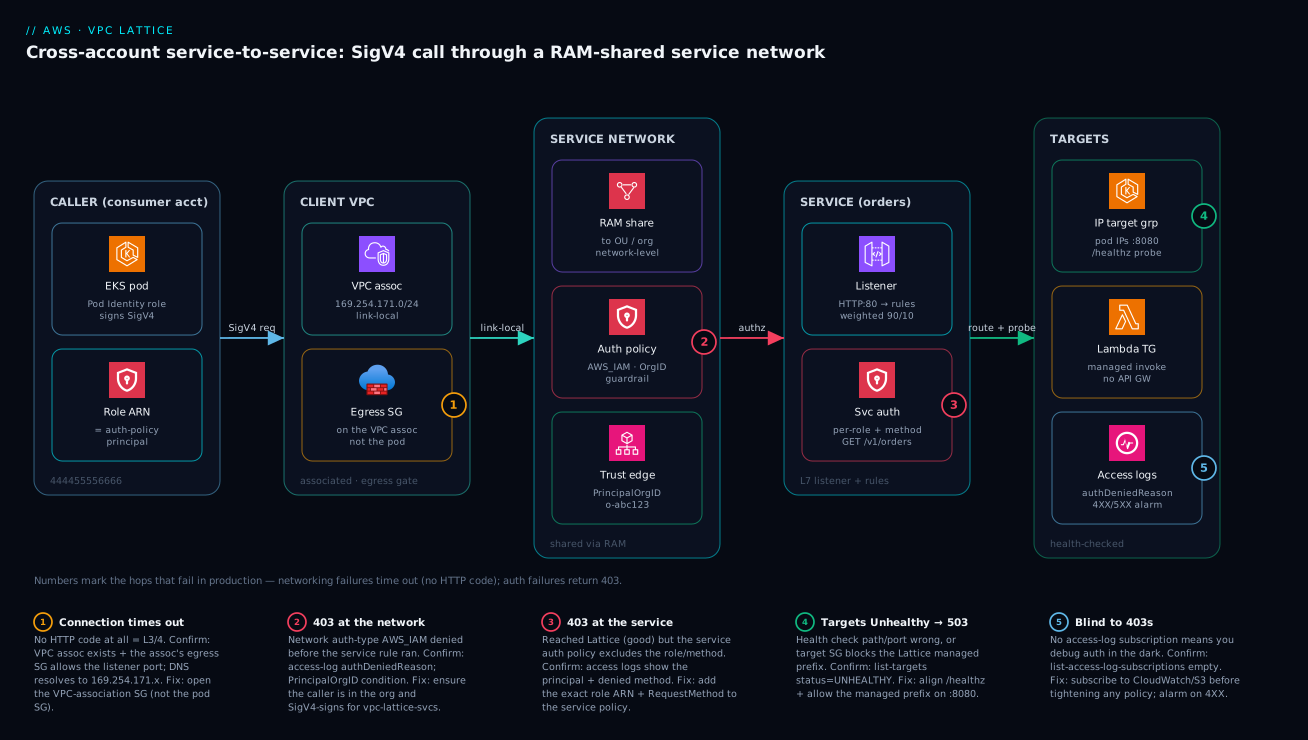
The diagram traces a single cross-account call exactly as it flows, left to right, and pins the five hops that actually fail in production onto the precise node where each bites. Read it as a path. A caller in the consumer account (444455556666) — here an EKS pod whose Pod Identity role both runs the workload and signs the request — emits a SigV4-signed HTTP call. That call enters the client VPC, where the VPC-into-network association has programmed the data path to the 169.254.171.0/24 link-local range; the association’s egress security group is the first gate, and badge ① marks it as the cause of a silent connection timeout. The request crosses into the service network, which is RAM-shared to the org’s OU and carries the network-level auth policy — badge ② is a 403 here when the caller is outside the aws:PrincipalOrgID guardrail or never signed. It reaches the service (orders), whose listener routes by rule (a weighted 90/10 shift) and whose per-service auth policy checks the exact role and method — badge ③ is a 403 at this level. Finally the request forwards to targets — an IP target group of pod IPs on :8080 with a /healthz probe (badge ④, UNHEALTHY → 503) or a Lambda target group — while CloudWatch access logs capture the authenticated principal and any authDeniedReason (badge ⑤, the difference between debugging a 403 with evidence and in the dark).
Notice the two signatures the diagram makes visual: a networking failure (badges ① and ④) produces a timeout or a 503 with no clean authorization story, while an authorization failure (badges ② and ③) produces a fast, unambiguous 403 AccessDeniedException that proves the network is fine — the request reached Lattice to be denied. That single fork — “did I get no answer, or did I get a clean 403?” — is the first question on every Lattice incident, and the column you land in tells you whether to open the security-group config or the auth policy. The whole method is on one canvas: follow the path, read the badge, run the named check, apply the fix.
Real-world scenario
A payments platform team ran 30+ microservices spread across four accounts — a shared platform account, plus payments-prod, risk-prod, and partner-integrations. They had inherited an Istio mesh that worked, but every cross-account call required Transit Gateway routes, and two acquired business units shipped VPCs with overlapping 10.20.0.0/16 CIDRs they could not renumber without a multi-quarter migration. The Istio sidecars also added p99 latency and a steady stream of cert-rotation pages.
The constraint was concrete: the risk-scoring service in risk-prod had to call an enrichment service in partner-integrations, but the two VPCs had overlapping address space, so no amount of TGW routing could make the real IPs reachable. Service mesh did not help — it still rode on top of L3 reachability they did not have.
They moved cross-account service calls to a single Lattice service network, shared from platform via RAM to the org’s prod OU. Because Lattice addresses services by name and a link-local range rather than the target’s real IP, the CIDR overlap simply stopped mattering — the enrichment service was reachable as enrichment.platform.internal regardless of what 10.20/16 meant in either VPC. They replaced Istio AuthorizationPolicy objects with Lattice auth policies keyed on EKS Pod Identity role ARNs, and gated the whole network by aws:PrincipalOrgID so nothing outside the org could ever sign a valid request.
{
  "Version": "2012-10-17",
  "Statement": [{
    "Effect": "Allow",
    "Principal": "*",
    "Action": "vpc-lattice-svcs:Invoke",
    "Resource": "*",
    "Condition": {
      "StringEquals": { "aws:PrincipalOrgID": "o-abc123" },
      "ArnLike": {
        "aws:PrincipalArn": "arn:aws:iam::*:role/payments-*"
      }
    }
  }]
}
The outcome: sidecars came out of the payments path (p99 dropped and the cert-rotation pager went quiet), the overlapping-CIDR blocker was retired without renumbering, and cross-account authorization became reviewable IAM JSON in the same pipeline as the rest of their policies. They kept Istio inside each cluster for intra-cluster traffic where they wanted fine-grained Envoy control, and used Lattice strictly for the cross-account, cross-VPC hops — the boundary where its managed data plane and IAM model earned their keep.
The migration as a before/after ledger, because the deltas are the lesson:
| Dimension | Before (Istio + TGW) | After (Lattice) | Net effect |
|---|---|---|---|
| Cross-account reachability | TGW routes + non-overlapping CIDRs | Name + 169.254.171.x, CIDR-agnostic |
Overlap blocker retired |
| Data-path proxy | Envoy sidecar per pod | AWS-managed, none to operate | p99 down; memory back |
| Cert rotation | SPIFFE/PKI rotation pages | None (IAM, no certs) | Pager quiet |
| Authorization | Envoy AuthorizationPolicy YAML |
IAM auth policy JSON | Reviewable in the IAM pipeline |
| Intra-cluster traffic | Istio | Kept Istio | Right tool per boundary |
| Org-wide guardrail | Ad hoc | aws:PrincipalOrgID deny-by-default |
One condition, whole estate |
Advantages and disadvantages
The managed-L7-plus-IAM model both removes a class of operational pain and introduces its own sharp edges. Weigh it honestly:
| Advantages (why this model helps you) | Disadvantages (why it bites) |
|---|---|
| No sidecar to operate — AWS runs the data plane; no Envoy, no cert rotation, no per-pod proxy tax | Less traffic-policy depth than Envoy — no native mirroring, limited retry/outlier-detection knobs |
| Authorization is plain IAM JSON, reviewable in the same pipeline as the rest of your policies | A new policy language to learn (vpc-lattice-svcs keys); SigV4 signing must be added to callers |
| CIDR overlap is irrelevant — services reached by name + link-local, not real IPs | The 169.254.171.0/24 link-local range can collide with existing use of that space |
| Cross-account is first-class via RAM on the network; one share covers an OU | The egress SG on the VPC association is easy to forget → silent timeouts |
| One authorization model spans EKS, EC2, and Lambda targets | Lattice target groups are a separate API from ELB — no reuse of existing TGs |
| L7 routing (path/header/weighted) without standing up an ALB per service | Per-request and per-hour charges scale with traffic — not free at high RPS |
| Identity = the workload’s IAM role; no PKI to manage | Auth failures are opaque without access logs enabled up front |
The model is right when you have many services across many accounts that must talk under reviewable policy without operating a mesh, and especially when CIDR overlap or sidecar tax is already hurting. It is the wrong tool when you need deep Envoy-grade traffic control (keep or adopt a mesh), when you are exposing a single endpoint to a consumer with zero network reachability (use PrivateLink), or when your call volume is so high that per-request pricing dominates and a flat data-plane cost would be cheaper.
Lattice vs App Mesh vs PrivateLink: choosing the right primitive
These are not interchangeable. Pick by the boundary you actually have.
| Concern | VPC Lattice | App Mesh (Envoy) | PrivateLink |
|---|---|---|---|
| Data-path proxy you operate | None (AWS-managed) | Envoy sidecar per workload | None (ENI) |
| Layer | L7 routing + IAM authz | L7, full Envoy feature set | L4 (TCP), single service |
| Cross-account / cross-VPC | First-class via RAM | Possible, heavy to wire | First-class, 1 service per endpoint |
| AuthZ model | IAM auth policies + SigV4 | mTLS / your own | Endpoint policies, no app identity |
| CIDR overlap | Irrelevant (name + link-local) | Rides on L3 — overlap breaks it | Irrelevant (ENI in consumer) |
| Traffic shaping | Path/header/weighted | Full Envoy (retries, mirror, outlier) | None |
| Best when | Many services across accounts need policy-driven L7 without sidecars | You need deep Envoy control and portability beyond AWS | You expose one service across a trust boundary, no IP routing |
AWS App Mesh has been deprecated — new designs that would have reached for App Mesh should evaluate Lattice or an open-source mesh (Istio, Cilium) instead. Use PrivateLink when you are publishing a single endpoint to a consumer and want zero network-layer reachability; use Lattice when you have a fleet of services that must talk under IAM policy across accounts; reach for an open-source mesh only when you need Envoy-grade traffic policy or multi-cloud portability that Lattice cannot give you.
The decision as a “if you have this boundary” table:
| If your boundary is… | …choose | Because |
|---|---|---|
| Many services, many accounts, IAM-reviewable authz, no sidecars | VPC Lattice | L7 + IAM, RAM cross-account, CIDR-agnostic |
| One service published to a consumer, zero reachability otherwise | PrivateLink | Single ENI endpoint, no IP routing |
| Need Envoy retries/mirroring/outlier detection or multi-cloud | Open-source mesh (Istio/Cilium) | Full dataplane control, portability |
| Pure L3 connectivity between accounts (not service-scoped) | Transit Gateway | Routes whole VPCs; needs non-overlapping CIDRs |
| Intra-cluster pod-to-pod policy only | CNI / mesh in-cluster | Lattice is for the cross-account hop |
A subtlety that matters at scale: Lattice operates at the application layer, so it sidesteps CIDR overlap between client and target VPCs entirely — the service is reached by name and link-local address, not by routing the target’s real IP. That alone is a reason to prefer it over Transit Gateway peering for service-to-service calls in an estate where renumbering is impossible.
Hands-on lab
Stand up a service network, a service backed by a single EC2/IP target, an AWS_IAM auth policy, and prove that an unsigned call returns 403 while a signed call returns 200 — then tear it down. Run in CloudShell in one account (single-account is enough to demonstrate the auth model; cross-account just adds the RAM share).
Step 1 — Variables.
REGION=eu-west-1
VPC=vpc-0aa11bb22cc33dd44      # an existing VPC with a subnet + an instance
SG=sg-0latticeclients0001      # an SG you control for the VPC association
Step 2 — Create the network and service (both AWS_IAM).
SN_ARN=$(aws vpc-lattice create-service-network --name lab-mesh \
  --auth-type AWS_IAM --query 'arn' --output text)
SVC_ARN=$(aws vpc-lattice create-service --name lab-orders \
  --auth-type AWS_IAM --query 'arn' --output text)
Expected: two ARNs printed. Confirm the service has no DNS name yet (it appears after association).
Step 3 — Target group + register one target, then a listener.
TG_ARN=$(aws vpc-lattice create-target-group --name lab-tg --type IP \
  --config '{"port":8080,"protocol":"HTTP","vpcIdentifier":"'"$VPC"'","ipAddressType":"IPV4",
             "healthCheck":{"enabled":true,"protocol":"HTTP","path":"/"}}' \
  --query 'arn' --output text)
aws vpc-lattice register-targets --target-group-identifier "$TG_ARN" \
  --targets id=10.0.12.31,port=8080
aws vpc-lattice create-listener --service-identifier "$SVC_ARN" --name http \
  --protocol HTTP --port 80 \
  --default-action '{"forward":{"targetGroups":[{"targetGroupIdentifier":"'"$TG_ARN"'","weight":100}]}}'
Step 4 — Associate the service and the VPC.
aws vpc-lattice create-service-network-service-association \
  --service-network-identifier "$SN_ARN" --service-identifier "$SVC_ARN"
aws vpc-lattice create-service-network-vpc-association \
  --service-network-identifier "$SN_ARN" --vpc-identifier "$VPC" --security-group-ids "$SG"
Step 5 — Attach an auth policy that allows only your role on GET.
MY_ROLE=$(aws sts get-caller-identity --query Arn --output text)
cat > lab-auth.json <<JSON
{ "Version":"2012-10-17","Statement":[{
  "Effect":"Allow","Principal":{"AWS":"$MY_ROLE"},
  "Action":"vpc-lattice-svcs:Invoke","Resource":"*",
  "Condition":{"StringEquals":{"vpc-lattice-svcs:RequestMethod":"GET"}}
}]}
JSON
aws vpc-lattice put-auth-policy --resource-identifier "$SVC_ARN" --policy file://lab-auth.json
Step 6 — Get the DNS name and prove the auth model.
DNS=$(aws vpc-lattice get-service --service-identifier "$SVC_ARN" \
  --query 'dnsEntry.domainName' --output text)
# From an instance inside the VPC:
# Unsigned → expect 403 (no SigV4 header):
curl -s -o /dev/null -w "unsigned=%{http_code}\n" "https://$DNS/"
# Signed (run the Python SigV4 snippet from Step 6 earlier) → expect 200.
Expected: unsigned=403. A correctly wired service returns 403 to an unsigned request and 200 to a SigV4-signed request from the allowed role.
Step 7 — Teardown (reverse order).
aws vpc-lattice delete-auth-policy --resource-identifier "$SVC_ARN"
aws vpc-lattice delete-service-network-vpc-association --service-network-vpc-association-identifier <id>
aws vpc-lattice delete-service-network-service-association --service-network-service-association-identifier <id>
# delete listener, target group, service, then the network
aws vpc-lattice delete-service --service-identifier "$SVC_ARN"
aws vpc-lattice delete-service-network --service-network-identifier "$SN_ARN"
The lab checkpoints, so you know each step worked before moving on:
| After step | Check | Expected | If wrong |
|---|---|---|---|
| 2 | get-service-network auth-type |
AWS_IAM |
Recreate with the flag |
| 3 | list-targets status |
INITIAL → HEALTHY |
Target SG must allow managed prefix on :8080 |
| 4 | get-service dnsEntry.domainName |
a ...vpc-lattice-svcs... name |
Re-check both associations |
| 5 | get-auth-policy |
your JSON returned | Re-put-auth-policy |
| 6 | unsigned curl |
403 |
If 200, a level is still NONE; if timeout, egress SG |
| 6 | DNS resolves | 169.254.171.x |
If not, VPC association missing |
Common mistakes & troubleshooting
Decode the symptom before touching config — the single most important fork is timeout (no HTTP code) = network layer versus clean 403 = auth layer. A 403 is good news for your networking: the request reached Lattice to be denied. Scan the playbook, then read the matching detail.
| # | Symptom | Root cause | Confirm (exact command / path) | Fix |
|---|---|---|---|---|
| 1 | Connection timeout, no HTTP code | VPC-association egress SG blocks the listener port | Check the SG on the VPC association (not the pod/instance) | Allow egress to the service port on the association’s SG |
| 2 | Timeout; DNS won’t resolve to link-local | VPC-into-network association missing | list-service-network-vpc-associations; resolve the name |
Create the VPC association on the consumer side |
| 3 | Timeout; service unknown | Service-into-network association missing | list-service-network-service-associations |
Associate the service into the network |
| 4 | 403 AccessDeniedException, fast |
Caller did not SigV4-sign for vpc-lattice-svcs |
Access log authDeniedReason; check signing service name |
Sign with service vpc-lattice-svcs (not vpc-lattice) |
| 5 | 403 at the network |
aws:PrincipalOrgID / network policy excludes caller |
Access log; get-auth-policy on the network |
Add the org/principal to the network policy |
| 6 | 403 at the service |
Service policy lacks the role ARN or method | Access log principal + method; get-auth-policy on the service |
Add exact role ARN + RequestMethod to the service policy |
| 7 | 404 from Lattice |
No listener rule matched | list-rules; check priorities + default action |
Add a matching rule or fix the default action |
| 8 | Targets UNHEALTHY → 503 |
Health path/port wrong, or target SG blocks managed prefix | list-targets status + reasonCode |
Fix /healthz path/port; allow the managed prefix on the target |
| 9 | Unsigned request succeeds (200) | A level’s auth-type is still NONE |
get-service / get-service-network auth-type |
Set AWS_IAM on the intended level |
| 10 | Tried to reuse an elbv2 TG ARN |
Wrong API namespace | The ARN says elasticloadbalancing, not vpc-lattice |
Create a Lattice target group (aws vpc-lattice) |
| 11 | Consumer can’t see the shared network | RAM share not accepted / wrong scope | ram get-resource-shares; trusted access status |
Enable RAM↔Organizations trusted access or accept invite |
| 12 | Authorized on aws:SourceIp, never matches |
Source IP is link-local, not the caller VPC | Policy condition never satisfied | Use vpc-lattice-svcs:SourceVpc instead |
Connection timeout / no response (the network class)
Layer 3/4. Check, in order: the VPC association exists, the association’s security group allows the egress, and the service is associated into the same network. DNS resolving to a 169.254.171.x address confirms the data path is programmed — if it resolves, your problem is the SG or auth, not the association.
# Is the data path programmed? (run from inside the client VPC)
nslookup orders-0123456789.7d67968.vpc-lattice-svcs.eu-west-1.on.aws
# A 169.254.171.x answer = path is up → look at the egress SG / auth, not the association.

aws vpc-lattice list-service-network-vpc-associations \
  --service-network-identifier "$SN_ARN" --query 'items[].{vpc:vpcId,status:status,sg:securityGroupIds}'
HTTP 403 AccessDeniedException (the auth class)
The request did reach Lattice (good — networking is fine). Either the caller did not SigV4-sign for vpc-lattice-svcs, or the principal/condition in the auth policy excludes them. Turn on access logs and read the authDeniedReason — it tells you which level denied and why.
# Read the denial reason straight from access logs in CloudWatch Logs Insights.
aws logs start-query --log-group-name /aws/vpclattice/orders \
  --start-time $(date -d '-1 hour' +%s) --end-time $(date +%s) \
  --query-string 'fields @timestamp, authPolicy, authDeniedReason, requestMethod, requestPath | filter responseCode = 403 | sort @timestamp desc | limit 50'
Targets UNHEALTHY
The health-check path/port is wrong, or the app/target SG does not allow the Lattice managed prefix on the target port. Lattice health checks originate from the managed data plane, not your client VPC — so a target SG scoped to the client VPC’s CIDR will fail the probe.
aws vpc-lattice list-targets --target-group-identifier "$TG_ARN" \
  --query 'items[].{ip:id,status:status,reason:reasonCode}' --output table
HTTP 404 from Lattice
No listener rule matched. Check rule priorities (lower wins) and the default action; a too-specific set of rules with a fixedResponse default 404s everything unmatched.
The error & limit reference
The status codes and exceptions you realistically see, what they mean on Lattice, and the fix:
| Code / exception | Where | Meaning | Likely cause | Fix |
|---|---|---|---|---|
| (no response / timeout) | Client | Data path not reachable | Egress SG, missing assoc | Open SG; create association |
403 AccessDeniedException |
Lattice | Authorization denied | Unsigned, or policy excludes caller | Sign for vpc-lattice-svcs; fix policy |
404 |
Lattice | No rule matched | Rule priorities / default action | Add rule or fix default |
500 |
Target | App error behind Lattice | Your code threw | Fix the target app |
503 |
Lattice | No healthy target | All targets UNHEALTHY/UNUSED |
Fix health check / attach rule |
ThrottlingException |
Control plane | API rate exceeded | Rapid create/update calls | Back off; batch changes |
ConflictException |
Control plane | Concurrent modification | Overlapping updates | Serialise; retry |
ResourceNotFoundException |
Control plane | Bad identifier | Wrong ARN/ID | Use the correct identifier form |
Service quotas and limits worth knowing before you design (defaults; many are adjustable via Service Quotas):
| Limit | Default (typical) | Adjustable? | Design implication |
|---|---|---|---|
| Services per service network | 500 | Yes | Group services per blast-radius network |
| Service networks per account | 10 | Yes | Few networks, many services |
| VPC associations per service network | 1,000 | Yes | Plenty for large consumer fleets |
| Service network associations per VPC | 5 | Yes | A VPC can consume several meshes |
| Targets per target group (IP) | 100s–1,000s | Yes | Large pods fleets are fine |
| Listeners per service | small (single digits) | Yes | Usually one HTTP + one HTTPS |
| Rules per listener | ~100 | Yes | Keep rule sets lean for clarity |
| Auth policy size | tens of KB | No | Prefer ArnLike/org conditions over long lists |
| Link-local range | 169.254.171.0/24 |
No | Avoid colliding uses of this space |
Observability with access logs and CloudWatch
Lattice emits access logs and metrics per service and per service network. Enable access logs to a destination (CloudWatch Logs, S3, or Firehose) on the resource you want visibility into — before you tighten any policy, so a 403 is diagnosable instead of opaque.
aws vpc-lattice create-access-log-subscription \
  --resource-identifier "$SVC_ARN" \
  --destination-arn arn:aws:logs:eu-west-1:444455556666:log-group:/aws/vpclattice/orders
Access log records include the source/target, the resolved path, response code, processing time, and the authenticated principal and auth-deny reason — exactly what you need to debug a 403. The fields you will actually query:
| Log field | What it tells you | Use it to |
|---|---|---|
responseCode |
200/403/404/503 | Split auth vs network vs routing failures |
authPolicy / authDeniedReason |
Which level denied and why | Crack a 403 in seconds |
requestMethod / requestPath |
The HTTP request | Confirm a method/path-conditioned policy |
sourceIpPort / sourceVpcId |
Where the call came from | Map a caller back to a VPC |
targetGroupArn / destinationIpPort |
Which target served it | Confirm routing / canary split |
requestToTargetDuration |
Target latency | Spot slow targets vs Lattice overhead |
Query the 403s in CloudWatch Logs Insights:
fields @timestamp, sourceIpPort, requestMethod, requestPath, responseCode, authDeniedReason, requestToTargetDuration
| filter responseCode = 403
| sort @timestamp desc
| limit 50
On the metrics side, Lattice publishes to the AWS/VpcLattice CloudWatch namespace. The metrics to alarm on, dimensioned by service and target group:
| Metric | Namespace | Alarm when | Catches |
|---|---|---|---|
HTTPCode_4XX_Count |
AWS/VpcLattice |
Rises after a policy change | An over-tightened auth policy (403 spike) |
HTTPCode_5XX_Count |
AWS/VpcLattice |
Non-zero sustained | Unhealthy targets / app errors |
RequestTime |
AWS/VpcLattice |
p95 climbs | Slow targets, capacity issues |
ActiveConnectionCount |
AWS/VpcLattice |
Unexpected spikes/drops | Traffic anomalies |
NewConnectionCount |
AWS/VpcLattice |
Step changes | Caller behaviour shifts |
TotalRequestCount |
AWS/VpcLattice |
Baseline drift | Routing/association regressions |
The single highest-value alarm: a rising 4XX rate right after any auth-policy change — the canary that catches an over-tightened policy in minutes, before a partner pages you.
Best practices
- Set
auth-type AWS_IAMon both levels deliberately — a network-wideaws:PrincipalOrgIDguardrail plus per-service exact-role rules. TreatNONEas a lab-only setting. - Gate the network by
aws:PrincipalOrgIDso nothing outside the org can ever sign a valid request, then refine per service. One condition protects the whole estate. - Pin principals with
ArnLikepatterns (role/payments-*), not long literal lists — auth policies have a size budget and patterns age better. - Enable access-log subscriptions before tightening any policy. Debugging a 403 without
authDeniedReasonis guesswork; with it, it is a ten-second read. - The VPC-association security group is the egress gate — manage it as code. It is the most-missed control; put it in Terraform next to the association.
- Use the correct target-group type (
IPfor EKS pods,INSTANCE/LAMBDA/ALBas needed) and confirm targets reportHEALTHY— aHEALTHYcount of 0 means no traffic regardless of everything else. - Allow the Lattice managed prefix on target security groups for the health-check and listener ports — probes originate from the managed data plane, not your client VPC.
- Let the AWS Gateway API Controller own EKS targets so pod churn re-registers automatically; keep app teams in Kubernetes-native YAML.
- Make EKS workloads sign with their Pod Identity / IRSA role so the policy principal and the workload identity are the same object — no PKI to manage.
- Share the network via RAM on the service network, not per service, with the right managed permission; new accounts in a shared OU inherit reachability.
- Alarm on a rising 4XX rate after any policy change — the fastest signal that you over-tightened authorization.
- Choose the primitive by boundary (Lattice vs PrivateLink vs mesh vs TGW), not by default; document the decision in the design.
Security notes
- Identity is the IAM role. There are no certificates to rotate. Make the role short-lived (STS, Pod Identity) and least-privilege; the auth policy authorizes exactly that ARN.
- Deny-by-default at the network. A resource policy is an allow-list — no matching
Allowis already a deny. Add an explicitDenyfor anonymous/unsigned callers as belt-and-suspenders, and gate byaws:PrincipalOrgID. - Two levels, two owners. The network policy (platform) and the service policy (service owner) are evaluated independently — a clean separation of duties; review both in the same IAM pipeline.
- Encryption in transit. Use HTTPS listeners where the target supports TLS;
TLS_PASSTHROUGHkeeps end-to-end TLS opaque to Lattice when the app must terminate it. - Constrain by method and path with
vpc-lattice-svcs:RequestMethod/RequestPathso a read-only caller cannotPOST. Do not authorize onaws:SourceIp(link-local). - Network isolation is structural. A service is reachable only from VPCs associated into a shared network — the double association is a hard boundary before IAM even runs.
- Audit via access logs. The authenticated principal and
authDeniedReasongive you a full who-called-what trail; ship them to a central log account. - Least-privilege the control plane too. Scope who can
put-auth-policy,create-service-network-vpc-association, and RAM-share — these are the levers that widen the blast radius.
Cost & sizing
Lattice has no upfront cost; you pay for what flows. The cost drivers, roughly:
| Cost driver | Unit | What grows it | Mitigation |
|---|---|---|---|
| Service-network-hours | Per service associated per hour | Number of services in the network | Consolidate; retire unused services |
| Data processed | Per GB through Lattice | Payload size × request volume | Smaller payloads; keep chatty calls intra-VPC |
| Requests | Per request (volume-tiered) | High RPS service-to-service | Batch; cache; reduce fan-out |
| CloudWatch Logs (access logs) | Per GB ingested + stored | Verbose logging at high RPS | Sample; ship to S3 for cheap retention |
| NAT / egress (if applicable) | Per GB | Calls leaving to the internet | Keep traffic on the AWS backbone |
Rough sizing intuition (illustrative — confirm against the current AWS price list for your region):
| Estate | Services in network | Approx monthly traffic | Where the bill lands | Rough monthly |
|---|---|---|---|---|
| Small (dev) | 3 | < 50 GB | Service-hours dominate | ~ $20–40 / ₹1.7k–3.4k |
| Medium (one product) | 15 | ~ 1 TB | Data + requests | ~ $150–400 / ₹12k–34k |
| Large (platform) | 60+ | 10+ TB | Requests + data + logs | $1,000+ / ₹85k+ |
The cost lesson from the field: at very high RPS, per-request pricing can exceed what a flat-cost data plane (a self-run mesh on instances you already pay for) would cost — so for the hottest internal paths, model both. Lattice wins on operational cost (no sidecars, no PKI ops) and on the cross-account/CIDR-overlap boundary; a mesh can win on raw unit cost at extreme volume. There is no always-free tier for Lattice — keep lab resources short-lived and tear them down.
Interview & exam questions
-
What are the four core VPC Lattice resources and how do they relate? Service (a callable application with a DNS name, listeners, and rules), target group (health-checked compute behind a service), listener (a protocol/port carrying routing rules), and service network (the trust + reachability boundary that joins services to VPCs and carries the auth policy). You associate services into a network and VPCs into the same network. (SAP-C02, ANS-C01.)
-
What is the “double association” and why does it matter? A client reaches a service only if both the client’s VPC and the target service are associated into the same service network. It is the coarse, network-level reachability and security gate that IAM auth policies then refine — reason about it before any IAM.
-
How does Lattice authorize a call, and what identity does it use? When
auth-typeisAWS_IAM, the caller must SigV4-sign for servicevpc-lattice-svcs, and Lattice evaluates an auth policy (a resource policy on the service and/or network) against the signed IAM principal — the role ARN, not a certificate. On EKS, Pod Identity/IRSA makes the workload’s role the policy principal. -
A cross-account call returns
403 AccessDeniedException. Is this a networking problem? No — a 403 proves the request reached Lattice, so networking is fine. The cause is auth: either the caller did not sign forvpc-lattice-svcs, or the principal/condition in the network or service policy excludes them. ReadauthDeniedReasonin the access logs. -
A cross-account call times out with no HTTP code. Where do you look first? The network layer: the VPC-association egress security group (the most-missed control), then whether the VPC and service are both associated into the same network. If DNS resolves to
169.254.171.x, the data path is programmed and the problem is the SG or auth, not the association. -
How do you share a service network across accounts? With AWS RAM, sharing the service network (not individual services) to an OU or the organization, attaching the appropriate managed permission (e.g.
...VpcLatticeServiceNetworkVpcAssociation). Consumers then associate their own VPCs and attach their own egress security groups. -
When do you choose PrivateLink over Lattice? PrivateLink when you publish a single endpoint to a consumer with zero network-layer reachability (an ENI in the consumer VPC, no IP routing, no app identity). Lattice when you have a fleet of services that must talk under IAM policy across accounts with L7 routing.
-
Why does CIDR overlap stop mattering with Lattice? Lattice operates at the application layer — services are reached by a managed DNS name and a link-local range (
169.254.171.0/24), not by routing the target’s real IP — so overlapping10.20.0.0/16between client and target VPCs is irrelevant, unlike Transit Gateway which needs non-overlapping CIDRs. -
Which target-group type do you use for EKS pods, and why not reuse an existing ELB target group? Type
IP, so pod IPs register directly (the Gateway API Controller automates this on pod churn). Lattice target groups are a separate API namespace fromelbv2and are incompatible — you cannot reuse an ELB target-group ARN. -
How do you run a canary with Lattice? A listener rule with weighted target groups (e.g. default rule
90/10, shifting to0/100) or a header match (x-release-channel: canary) routing to the v2 target group. The service DNS name is stable across the shift — no client reconfiguration. Gate the cutover on a 4XX/5XX alarm. -
Why is
aws:SourceIpthe wrong condition key in a Lattice auth policy? Because Lattice traffic rides a managed link-local path, the source IP is not the caller’s VPC IP, so anaws:SourceIpcondition never matches as intended. Usevpc-lattice-svcs:SourceVpcfor a network-origin constraint. -
What should you enable before tightening an auth policy, and what alarm should you wire? Enable an access-log subscription (CloudWatch/S3/Firehose) so a 403 carries an
authDeniedReason, and alarm on a risingHTTPCode_4XX_Countafter any policy change — the fastest signal that you over-tightened authorization.
Quick check
- A service’s
auth-typeisAWS_IAMbut the network’s isNONE. An unsigned request — allowed or denied, and by which level? - You get a connection timeout (no HTTP status) on a cross-account call. Name the first control to check.
- Which resource do you RAM-share to enable cross-account consumption — the service or the service network?
- What does it prove if the service DNS name resolves to a
169.254.171.xaddress? - You want a read-only caller to be unable to
POST. Which condition key enforces that?
Answers
- Denied — the service-level policy is
AWS_IAM, so it requires SigV4; an unsigned request fails to satisfy the service policy regardless of the network beingNONE. (Only the service policy runs here, since the network level isNONE.) - The security group on the VPC association (the egress gate) — not the pod/instance SG. Then confirm both associations exist.
- The service network. Consumers associate their own VPCs to it; you never RAM-share individual services.
- That the data path is programmed in the client VPC — so a timeout is a security-group or auth problem, not a missing association.
vpc-lattice-svcs:RequestMethod(e.g.StringEqualsallow onlyGET), optionally withvpc-lattice-svcs:RequestPath.
Glossary
- VPC Lattice — An AWS-managed application-layer service-to-service connectivity layer providing L7 routing and IAM-based authorization with no sidecar in the request path.
- Service — A logical callable application in Lattice that owns a managed DNS name, listeners, and routing rules.
- Service network — The trust-and-reachability boundary that joins services to the VPCs allowed to call them and carries the auth policy; the unit shared across accounts via RAM.
- Listener — A protocol/port (HTTP/HTTPS/TLS-passthrough) on a service carrying priority-ordered rules that forward to weighted target groups.
- Target group — The health-checked compute behind a service; type
IP,INSTANCE,LAMBDA, orALB. A separate API from ELB target groups. - Double association — Associating a service into a network and a VPC into the same network; both are required for a client to reach a service.
- Auth policy — An IAM resource policy attached to a service and/or service network, evaluated against the SigV4-signed caller when
auth-typeisAWS_IAM. auth-type—NONE(no authorization) orAWS_IAM(SigV4 required + auth policy evaluated); set independently on the network and the service.- SigV4 — AWS Signature Version 4 request signing; callers must sign for the service name
vpc-lattice-svcs. vpc-lattice-svcs— The IAM service name a caller signs for and the namespace of the request condition keys (RequestMethod,RequestPath,SourceVpc).- Pod Identity / IRSA — Mechanisms that give an EKS pod an IAM role, making the workload identity and the auth-policy principal the same object.
- AWS RAM — Resource Access Manager; shares the service network with an OU/organization for cross-account consumption.
- Managed prefix — The source prefix Lattice uses for health checks and traffic; target security groups must allow it.
- Link-local range —
169.254.171.0/24, the address space Lattice programs into associated VPCs for the data path; resolving to it proves the path is up. - AWS Gateway API Controller — The EKS controller that reconciles Kubernetes Gateway API objects into Lattice services, listeners, target groups, and rules.
Next steps
- AWS PrivateLink: Service Provider/Consumer Cross-Account — the single-endpoint alternative you choose when you want zero network-layer reachability.
- AWS Transit Gateway Multi-Account VPC Architecture — the L3 option Lattice complements (and sidesteps when CIDRs overlap).
- EKS IRSA to Pod Identity: Migration & Fine-grained Access — get the workload identity that becomes your Lattice auth-policy principal.
- Cross-Account IAM Roles: External ID, Confused Deputy, Session Policies — the deeper cross-account IAM patterns behind the auth model.
- AWS Organizations & IAM Foundations — the org and RAM groundwork that makes one network share cover an OU.