Quick take: AWS accounts are the walls between workloads. Organizations and IAM are the keys and the locks. Get this right early and scaling is painless; get it wrong and every new account is a security incident waiting to happen.
A small fintech started with one AWS account shared by the whole engineering team. Root credentials lived in a shared password manager. When the team grew to thirty people, nobody knew who had created which IAM user, access keys were pasted into laptops, and a contractor still had console access three months after leaving. The fix was not more policies in the same account — it was a proper multi-account structure with centralized identity and least-privilege roles. That is the subject of this article, and it is the cheapest, highest-leverage security investment you will make on AWS.
The thing that makes this hard is that “permissions on AWS” is not one mechanism — it is a chain of them, evaluated in a specific order, where an explicit Deny anywhere wins, where an SCP on an organizational unit can cap an admin who has AdministratorAccess, and where a role with perfect permissions still fails because its trust policy names the wrong principal. Most “why can’t I do this?” and far more dangerous “why could they do that?” incidents come from not holding the whole chain in your head. This article builds that chain explicitly — principal → STS → org guardrails → policy evaluation → resource — and then enumerates, in tables you can keep open during an incident, every account type, OU layout, identity option, policy type, evaluation rule, error code and failure mode that sits along it.
By the end you will design an account structure that isolates blast radius, hand humans temporary credentials instead of long-lived keys, write trust policies that are gates rather than rubber stamps, use SCPs as guardrails (not as a permissions system), and read an AccessDenied message back to the exact line of the exact policy that produced it. We use real service names, real default limits, real aws CLI and Terraform, and the actual IAM policy-evaluation order — not a simplified cartoon of it.
What problem this solves
A single account with many users and resources becomes impossible to audit and dangerous to operate. Everything shares one trust boundary: a misconfigured Lambda in “dev” runs in the same account as the production database; one over-broad IAM user is a path to every resource; one leaked root credential is total compromise. There is no natural place to set a guardrail that says “nothing in this part of the company may ever create a public S3 bucket,” because there is no “part” — there is just one flat namespace of users and resources.
What breaks without this structure, concretely: you cannot answer “who can delete the production database?” because permissions are scattered across dozens of inline policies and ad-hoc users. You cannot give a contractor access to one project without risking the whole account. You cannot prove to an auditor that dev cannot reach prod, because they share an account. Cost attribution is guesswork because one bill covers everything. And the day someone’s laptop with an access key is stolen, the blast radius is everything, not one workload.
Who hits this: every team that grows past a handful of people or past a single environment. It bites hardest on regulated workloads (fintech, health, anyone facing an audit), on teams onboarding contractors or third parties, and on anyone who started with one account “just to try AWS” and never restructured. The fix is structural — accounts as boundaries, an organization to govern them, Identity Center for humans, roles for everything — and the rest of this article is how each piece works and the exact ways each one fails.
To frame the whole field before the deep sections, here is every layer this article covers, the question it answers, and where it lives:
| Layer | The question it answers | Where it lives | Primary failure if you skip it |
|---|---|---|---|
| AWS account | What is the blast-radius boundary? | The org | One breach = everything |
| Organization + OUs | How do I group and govern accounts? | Management account | No place to attach a guardrail |
| IAM Identity Center | How do humans sign in? | Delegated/management account | Long-lived IAM users sprawl |
| IAM roles | How does anything get temporary access? | Each account | Long-lived keys everywhere |
| Identity & resource policies | What actions are allowed? | Each account / resource | Over-broad or missing grants |
| SCP / RCP / boundary | What is the maximum anyone can do? | OUs / roles | Admins can do anything |
| CloudTrail | Who did what, and why was it denied? | Org trail → Log Archive | No audit, no AccessDenied reason |
Learning objectives
By the end of this article you can:
- Design an AWS Organizations structure — management account, organizational units, member accounts — that isolates blast radius and gives every account a clear governance home.
- Choose between an IAM user, an IAM role, and IAM Identity Center access for any caller, and explain why humans should almost never have long-lived IAM users.
- Write an IAM identity policy, a resource policy and a trust policy, and say exactly what each one controls and which one is the real gate for
AssumeRole. - Recite the IAM policy-evaluation order and predict the decision for any combination of Allow, explicit Deny, SCP, RCP, permissions boundary and session policy.
- Use service control policies (SCPs) and resource control policies (RCPs) as guardrails — capping maximum permissions — without mistaking them for a permissions-granting system.
- Apply a permissions boundary to safely delegate IAM administration without letting a junior admin escalate their own privileges.
- Diagnose an
AccessDeniedto the exact policy that produced it using CloudTrail, the IAM Policy Simulator andsts decode-authorization-message. - Stand up the whole foundation with
awsCLI and Terraform, and avoid the dozen mistakes that turn a clean foundation into a sprawl.
Prerequisites & where this fits
You should already have signed in to the AWS console at least once and know that an AWS account has a 12-digit ID, a root user (the email you signed up with), and a billing relationship. You should be comfortable running the aws CLI with a configured profile, reading JSON, and editing a small JSON policy document. Nothing here requires prior IAM depth — that is what we build — but knowing what an S3 bucket and an EC2 instance are makes the examples land.
This is the foundation layer of an AWS estate: everything else sits on top of it. The account and OU structure here is what AWS Control Tower Guardrails: Building a Secure Multi-Account Foundation automates and enforces at scale — Control Tower is Organizations plus a managed landing zone plus baked-in guardrails, so understanding the raw pieces first makes Control Tower legible rather than magic. The audit story — who did what, and why a call was denied — is AWS CloudTrail and Config: Audit and Compliance at Scale, and CloudTrail is the single most useful tool when an IAM decision surprises you. The network boundary that complements the account boundary is AWS VPC, Subnets and Security Groups Explained, and the question of where accounts and resources physically live is AWS Regions and Availability Zones: Resiliency from the Ground Up.
A quick map of who owns what during an access incident, so you call the right person fast:
| Layer | What lives here | Who usually owns it | Failure classes it causes |
|---|---|---|---|
| Root user / billing | Account creation, payment, account-level locks | Finance + cloud lead | Total compromise if root leaks |
| Organization / OUs | Account grouping, SCP/RCP attachment | Platform / security | Guardrail too broad or missing |
| Identity Center | SSO, permission sets, MFA | Identity / platform | Wrong people get wrong roles |
| IAM (per account) | Roles, identity policies, boundaries | App + platform | Over-broad or denied permissions |
| Resource policies | Bucket/key/queue cross-account access | Resource owner team | Cross-account AccessDenied |
| CloudTrail / audit | Every API call + deny reason | Security | “We can’t tell who did it” |
Core concepts
Six mental models make every later section obvious.
An account is the real security boundary. On AWS, the blast radius of almost any failure — a leaked key, a wrong policy, a runaway script, a compromised dependency — is bounded by the AWS account it happened in. Separate accounts share nothing by default: no VPC, no IAM principal, no resource. That isolation is the whole reason multi-account exists. A “dev” account that gets compromised cannot touch “prod” because there is no path between them you did not explicitly create. Accounts are cheap (free to create; you pay only for what runs in them), so you use them generously — per environment, per team, per workload, per blast-radius unit.
An organization groups accounts and lets you govern them centrally. AWS Organizations ties accounts together under a single management account (the payer), gives you consolidated billing, and — critically — lets you attach policies to organizational units (OUs) that inherit downward to every account inside them. An OU is a folder of accounts (and OUs can nest, up to five levels deep). The OU tree is where governance lives: you put all production accounts in a Workloads/Prod OU and attach a guardrail to the OU, not to thirty accounts one by one.
Humans get temporary credentials; only machines and break-glass get keys. The modern pattern is IAM Identity Center (formerly AWS SSO): a human authenticates once (against Identity Center’s own directory or your corporate IdP via SAML/SCIM), is matched to a permission set, and STS mints temporary credentials (valid for up to 12 hours) by having them assume a role in the target account. No human IAM user, no long-lived access key, no key to rotate when they leave — you just remove their group membership. IAM users with access keys still exist, but for narrow cases: a few break-glass admins, and legacy automation that cannot use a role.
A role is a set of permissions anything can temporarily wear. An IAM role is not a person; it is a named bundle of permissions plus a trust policy saying who is allowed to assume it. An EC2 instance, a Lambda function, a user in another account, or an Identity Center session can all assume a role and act with its permissions for a bounded session. Roles are the universal mechanism for temporary, auditable access — and the trust policy, not the permissions, is what decides whether the assumption is allowed at all.
Every permission is the outcome of a chain, and an explicit Deny always wins. A request is allowed only if it survives the full policy-evaluation chain: organization SCPs/RCPs (which cap what is reachable), the permissions boundary (which caps the principal), the identity policy (which must Allow), any session policy, and the resource policy (for cross-account, which must also agree). At every layer, an explicit Deny ends evaluation immediately. There is no “mostly allowed.” This single rule — explicit Deny beats any Allow; SCP/boundary can only subtract — explains nearly every IAM surprise.
Policies are JSON, and the building blocks are always the same. Every policy is a JSON document of statements, each with an Effect (Allow/Deny), one or more Actions (s3:GetObject), a Resource (an ARN), an optional Principal (who — only in resource/trust policies), and optional Conditions (when — MFA present, source IP, aws:PrincipalOrgID). Learn this shape once and every policy type reads the same.
The vocabulary in one table
Before the deep sections, pin down every moving part. The glossary at the end repeats these for lookup; this table is the mental model side by side:
| Concept | One-line definition | Where it lives | Why it matters |
|---|---|---|---|
| AWS account | Isolated container for resources + its own ID | The org | The blast-radius boundary |
| Root user | The sign-up identity; unrestricted | Per account | Compromise = total; lock it down |
| Organization | Group of accounts under one payer | Management account | Central billing + governance |
| Management account | The payer; owns the org | Top of the org | Keep it empty of workloads |
| OU | A folder of accounts (nests 5 deep) | The org tree | Where policies attach + inherit |
| IAM user | Long-term identity + access keys | Per account | Avoid for humans; break-glass only |
| IAM group | A set of users sharing policies | Per account | Attach policy once, not per user |
| IAM role | Assumable permission bundle + trust | Per account | Temporary, auditable access |
| Trust policy | Who may assume a role | On the role | The real gate for AssumeRole |
| Identity policy | What a principal may do | On user/group/role | Grants permissions |
| Resource policy | Who may touch a resource | On the resource | Enables cross-account access |
| SCP | Max-permission cap for principals | On OU/account | Guardrail; cannot grant |
| RCP | Max-access cap for resources | On OU/account | Caps resource exposure |
| Permissions boundary | Max permissions for one principal | On a role/user | Safe delegation of IAM |
| STS | Issues temporary credentials | Regional/global endpoint | Powers AssumeRole / SSO |
| Identity Center | SSO + permission sets | Delegated/mgmt account | Human access without IAM users |
| Permission set | Reusable role template for SSO | Identity Center | Maps people → account access |
The AWS account: the blast-radius boundary
Everything starts with the account, so be precise about what it is. An AWS account is an isolated tenancy with its own 12-digit ID, its own resource namespace, its own service quotas, its own root user, and (under an org) a billing relationship to the payer. Two accounts share nothing by default — that is the entire point. You create accounts liberally because isolation is the cheapest security control you have.
Why separate accounts at all
Strong, hard isolation is the headline, but it buys you several distinct things at once. Each row below is a reason teams move from one account to many:
| Benefit of a separate account | What it isolates / enables | What you lose by not separating |
|---|---|---|
| Blast-radius containment | A breach/mistake is bounded to one account | One compromise reaches everything |
| Hard environment separation | dev cannot touch prod (no shared anything) | “dev” Lambda can hit the prod DB |
| Clean cost attribution | Per-account bill, no tag discipline needed | Cost is a guessing game |
| Independent service quotas | One team’s quota use doesn’t starve another | Noisy-neighbour quota exhaustion |
| Simpler least-privilege | Permissions scoped to one account’s resources | Sprawling cross-resource policies |
| Per-account guardrails | Different SCPs for prod vs sandbox | One-size-fits-all or none |
| Delegated ownership | A team owns its account end-to-end | Central bottleneck for every change |
Common account roles in an estate
Mature estates converge on a small set of named account purposes. You do not need all of these on day one, but knowing the target shape prevents painting yourself into a corner:
| Account | Purpose | Keep workloads here? | Who accesses it |
|---|---|---|---|
| Management (payer) | Owns the org, billing, SCPs | No — keep it empty | A tiny set of org admins |
| Log Archive | Central, immutable CloudTrail + Config logs | No (logs only) | Security (read), nobody writes |
| Audit / Security Tooling | GuardDuty, Security Hub, IAM Access Analyzer | Security tooling only | Security team |
| Network / Shared Services | Transit Gateway, central DNS, shared infra | Shared infra only | Network team |
| Prod workload | One production app/domain | Yes (prod only) | App team via prod role |
| Non-prod / Staging | Pre-prod of the same app | Yes (non-prod) | App team, broader access |
| Sandbox / Dev | Experimentation, high freedom | Yes (throwaway) | Engineers, loose guardrails |
The cardinal rule is the first row: the management account holds no workloads. It can administer the entire organization, so anything running there is a maximum-blast-radius target, and several org-level actions cannot be guarded by SCPs (SCPs do not restrict the management account). Treat it as a vault you visit, not an office you work in.
Securing the root user
Every account — management and member — has a root user that bypasses IAM. You lock it down once and ideally never use it again. The actions that genuinely require root are few and worth memorising, because they tell you when you are forced to break the glass:
| Root-only action | Why it’s root-only | Frequency |
|---|---|---|
| Change the account email / root password | It is the account’s owner identity | Rare |
| Close the AWS account | Irreversible ownership action | Once, at end of life |
| Change/cancel AWS Support plan | Billing-owner action | Rare |
| Restore an IAM/key policy that locked everyone out | The break-glass path | Emergency only |
| Enable/disable some billing & tax settings | Payer-owner action | Setup |
| Register as a seller / certain Marketplace ops | Account-owner contract action | Rare |
The hardening checklist for root, in priority order — do every row:
| Step | Action | Why |
|---|---|---|
| 1 | Set a long, unique password in a vault | Stops credential-stuffing |
| 2 | Enable MFA (hardware token preferred) | Stops password-only takeover |
| 3 | Delete root access keys if any exist | Root keys are the worst possible leak |
| 4 | Don’t create root access keys, ever | Nothing should authenticate as root programmatically |
| 5 | Set up account-recovery contacts | Avoids being locked out |
| 6 | Add an SCP denying member-account root use | Defence in depth for member accounts |
# Confirm the root user has NO access keys (run as an admin role, not as root)
aws iam get-account-summary --query "SummaryMap.AccountAccessKeysPresent"
# 0 = good (no root keys). 1 = delete them immediately.
AWS Organizations and OUs
An organization is the container that ties accounts together. You create it from the account that becomes the management account; every other account is a member account, either created inside the org (it gets a member-managed OrganizationAccountAccessRole you can assume) or invited in (an existing account accepts an invitation).
Organization feature sets
Organizations has two modes, and you almost always want the second:
| Feature set | What it enables | When you’d use the other |
|---|---|---|
| Consolidated Billing only | One bill, volume discounts, shared Savings Plans | Almost never — too limited |
| All Features | Consolidated billing plus SCPs/RCPs, tag policies, AI opt-out, integration with Control Tower, GuardDuty org admin, etc. | Always, for any governance |
# Create an organization with ALL features (run once, from the management account)
aws organizations create-organization --feature-set ALL
Designing the OU tree
OUs are folders; policies attach to them and inherit down to every account and sub-OU inside. A clean starting tree separates governance intent, not just team names. A widely used baseline:
| OU | Holds | Typical guardrail intent |
|---|---|---|
| Security | Log Archive + Audit accounts | Deny anyone disabling logging/security |
| Infrastructure | Network, shared services | Restrict to approved regions; protect shared infra |
| Workloads/Prod | Production accounts | Strict: deny risky services, require encryption |
| Workloads/NonProd | Staging/test accounts | Looser than prod, tighter than sandbox |
| Sandbox | Throwaway experimentation | Spend caps; deny expensive/dangerous services |
| Suspended | Quarantined accounts | Deny (almost) everything; isolation pen |
| PolicyStaging (optional) | One account to test new SCPs | Try a guardrail before org-wide rollout |
# Create the root-level OUs (capture the org root id first)
ROOT_ID=$(aws organizations list-roots --query "Roots[0].Id" -o text)
aws organizations create-organizational-unit --parent-id "$ROOT_ID" --name "Security"
aws organizations create-organizational-unit --parent-id "$ROOT_ID" --name "Workloads"
# Terraform: an org with all features, plus two OUs
resource "aws_organizations_organization" "this" {
  feature_set = "ALL"
  enabled_policy_types = ["SERVICE_CONTROL_POLICY", "RESOURCE_CONTROL_POLICY"]
}

resource "aws_organizations_organizational_unit" "security" {
  name      = "Security"
  parent_id = aws_organizations_organization.this.roots[0].id
}

resource "aws_organizations_organizational_unit" "workloads" {
  name      = "Workloads"
  parent_id = aws_organizations_organization.this.roots[0].id
}
Organizations limits that shape your design
These are the real defaults you design around (many are soft and raisable via a quota request, but the structure limits below are firm):
| Limit | Default value | Soft or hard | Design implication |
|---|---|---|---|
| Accounts per org | 10 (initial) → raise via Support | Soft | Request an increase early for big estates |
| OU nesting depth | 5 levels below root | Hard | Don’t model your whole org chart as OUs |
| SCPs attached to one entity | 5 | Hard | Keep guardrails consolidated, not sprawling |
| RCPs attached to one entity | 5 | Hard | Same — consolidate |
| Policy document size (SCP) | 5,120 characters | Hard | Be terse; reuse statements |
| OUs under a single parent | 1,000 | Hard | Rarely a real constraint |
| Account creation rate | Throttled (a few/min) | Soft | Bulk-vend via automation, expect throttling |
| Management accounts per org | 1 | Hard | Choose it carefully; it cannot be changed |
IAM identities: users, groups, roles
Inside each account, IAM answers “who can do what.” The “who” is a principal — and choosing the right kind of principal is the most consequential decision you make repeatedly.
Choosing the right principal type
| Caller | Right identity | Why | Anti-pattern to avoid |
|---|---|---|---|
| An employee | Identity Center SSO → assume a role | Temporary creds, central lifecycle, MFA | A personal IAM user with keys |
| A contractor / third party | A role they assume cross-account (with ExternalId) | Time-boxed, no key handover | Sending them an access key |
| An EC2 instance | An instance-profile role | Auto-rotated creds via the metadata service | Baking a key into the AMI/userdata |
| A Lambda / ECS task | An execution role | Creds injected, rotated, scoped | An access key in an env var |
| Another AWS account | A role with a trust policy | Auditable, revocable, conditioned | A shared IAM user |
| Legacy on-prem automation | Roles Anywhere or a tightly scoped IAM user | Cert-based temp creds, or last-resort key | A long-lived key with * |
| Break-glass human admin | A few IAM users with MFA | A path in if SSO/IdP is down | Many standing IAM users |
The pattern is loud: roles for almost everything; IAM users only at the edges. Long-lived access keys are the leading cause of real-world AWS breaches because they do not expire, travel in plaintext, and rarely get rotated.
IAM entity limits per account
The defaults you bump into (most adjustable via Service Quotas, but know the starting numbers):
| Entity / limit | Default per account | Adjustable? | Note |
|---|---|---|---|
| IAM roles | 1,000 | Yes (to ~5,000) | Roles proliferate; request more early |
| IAM users | 5,000 | Yes | If you need many, you probably want SSO |
| IAM groups | 300 | Yes | Groups are cheap; use them |
| Managed policies attached to a principal | 10 | Yes (to 20) | Consolidate or use inline for the rest |
| Access keys per user | 2 | No | Two exist only to enable rotation |
| Customer-managed policies | 1,500 | Yes | Prefer fewer, reusable policies |
| Inline policy size (per principal) | 2,048 chars (user/group), 10,240 (role) | No | Large inline = use a managed policy |
| Role max session duration | 1h default, up to 12h | Configurable | Lower is safer; raise only when needed |
| Trusted entities (principals) in a trust policy | Practical, by doc size | — | Keep it specific, not a wildcard |
Groups: attach policy once, not per user
For the IAM users that do exist, never attach policies to individuals — attach to a group and add users to it. When someone changes role, you change group membership, not a pile of inline policies.
# Create a group, attach a managed policy, add a (break-glass) user to it
aws iam create-group --group-name BreakGlassAdmins
aws iam attach-group-policy --group-name BreakGlassAdmins \
  --policy-arn arn:aws:iam::aws:policy/AdministratorAccess
aws iam add-user-to-group --group-name BreakGlassAdmins --user-name alice-breakglass
resource "aws_iam_group" "breakglass" {
  name = "BreakGlassAdmins"
}

resource "aws_iam_group_policy_attachment" "breakglass_admin" {
  group      = aws_iam_group.breakglass.name
  policy_arn = "arn:aws:iam::aws:policy/AdministratorAccess"
}
IAM roles and trust policies
A role has two policies that do completely different jobs, and conflating them is the single most common IAM mistake.
Two policies, two jobs
| Policy on a role | Question it answers | Effect if wrong | Where you edit it |
|---|---|---|---|
Trust policy (AssumeRolePolicyDocument) |
Who is allowed to assume this role? | Nobody can assume it — or everybody can | Role → Trust relationships |
| Permissions policy (identity policy) | What can the assumed role do? | Too little (broken) or too much (dangerous) | Role → Permissions |
The trust policy is the gate: if it does not name your principal, you get AccessDenied on sts:AssumeRole before any permission is ever checked. Conversely, a wildcard Principal in a trust policy is a gaping hole — any account can assume the role and inherit its permissions.
A trust policy that lets a specific other account’s role assume this one, only with an ExternalId and only from inside your org:
{
  "Version": "2012-10-17",
  "Statement": [{
    "Effect": "Allow",
    "Principal": { "AWS": "arn:aws:iam::111122223333:role/ci-deployer" },
    "Action": "sts:AssumeRole",
    "Condition": {
      "StringEquals": {
        "sts:ExternalId": "kloudvin-deploy-7f3a",
        "aws:PrincipalOrgID": "o-abcd1234ef"
      }
    }
  }]
}
# Assume a role and get temporary credentials (15 min – 12 h session)
aws sts assume-role \
  --role-arn arn:aws:iam::444455556666:role/AppDeployRole \
  --role-session-name alice-deploy \
  --external-id kloudvin-deploy-7f3a \
  --duration-seconds 3600
Trust-policy principal types
The Principal element in a trust policy can name several kinds of caller — each with a different security profile:
| Principal type | Example value | Use for | Risk if too broad |
|---|---|---|---|
| AWS account | arn:aws:iam::111122223333:root |
Any principal in that account (with their own perms) | Trusts the whole account |
| IAM role / user ARN | .../role/ci-deployer |
A specific role assuming in | Precise — preferred |
| AWS service | lambda.amazonaws.com |
A service assuming the role (exec roles) | Pair with aws:SourceArn |
| SAML / OIDC provider | a federation ARN | Federated workforce / GitHub OIDC | Scope by claims/conditions |
* (wildcard) |
"AWS": "*" |
Almost never | Anyone, anywhere can assume |
Conditions that harden a trust policy
The Condition block is where you turn a broad principal into a safe one. The high-value condition keys:
| Condition key | What it enforces | Defends against |
|---|---|---|
sts:ExternalId |
Caller must present a shared secret | Confused-deputy (third-party SaaS) |
aws:PrincipalOrgID |
Caller must be in your org | Random external accounts |
aws:MultiFactorAuthPresent |
Session was MFA’d | Stolen static creds |
aws:SourceIp |
Call from an allowed IP/CIDR | Off-network use |
aws:SourceArn / aws:SourceAccount |
A specific service resource is the caller | Service-side confused-deputy |
aws:RequestTag / aws:PrincipalTag |
ABAC: tags must match | Over-broad coarse roles |
DateGreaterThan / DateLessThan |
Time-boxed assumption | Standing third-party access |
IAM policies: the JSON building blocks
Every policy — identity, resource, trust, SCP — is the same JSON shape. Learn the elements once.
Anatomy of a policy statement
| Element | Required? | Meaning | Example |
|---|---|---|---|
Version |
Yes | Policy language version (always this) | "2012-10-17" |
Statement |
Yes | One or more permission statements | array |
Sid |
No | Human label for the statement | "AllowReadBucket" |
Effect |
Yes | Allow or Deny |
"Allow" |
Action |
Yes* | API actions, wildcards allowed | "s3:GetObject" |
NotAction |
* | Everything except these actions | exempt global services |
Resource |
Yes* | ARN(s) the statement applies to | "arn:aws:s3:::bkt/*" |
NotResource |
* | Everything except these resources | rare |
Principal |
resource/trust only | Who (only in resource & trust policies) | { "AWS": "...root" } |
Condition |
No | When the statement applies | { "Bool": {...} } |
Policy types and where each attaches
There are more policy types than most people realise, and they do different things in evaluation:
| Policy type | Attaches to | Grants or caps? | Cross-account? |
|---|---|---|---|
| Identity policy (managed/inline) | User, group, role | Grants | No (single account) |
| Resource policy | A resource (bucket, key, queue, role-trust) | Grants + enables cross-account | Yes |
| Trust policy | A role | Grants assume + names principals | Yes (it’s a resource policy) |
| Permissions boundary | A user or role | Caps (never grants) | No |
| SCP | OU / account | Caps for principals | Org-wide |
| RCP | OU / account | Caps for resources | Org-wide |
| Session policy | Passed at AssumeRole time |
Caps the session | No |
| VPC endpoint policy | A VPC endpoint | Caps what flows through it | No |
Managed vs inline vs customer-managed
| Policy flavour | What it is | When to use | Downside |
|---|---|---|---|
| AWS-managed | AWS-authored, e.g. AdministratorAccess, ReadOnlyAccess |
Quick starts, broad roles | Often too broad (*) |
| Customer-managed | You author it, reusable, versioned | The default for real least-privilege | You maintain it |
| Inline | Embedded in one principal | A one-off policy that should die with the principal | Not reusable; easy to lose track |
{
  "Version": "2012-10-17",
  "Statement": [
    {
      "Sid": "ReadAppBucket",
      "Effect": "Allow",
      "Action": ["s3:GetObject", "s3:ListBucket"],
      "Resource": [
        "arn:aws:s3:::kloudvin-app-data",
        "arn:aws:s3:::kloudvin-app-data/*"
      ]
    },
    {
      "Sid": "DenyUnlessTLS",
      "Effect": "Deny",
      "Action": "s3:*",
      "Resource": "arn:aws:s3:::kloudvin-app-data/*",
      "Condition": { "Bool": { "aws:SecureTransport": "false" } }
    }
  ]
}
# Create a reusable customer-managed policy from a file, then attach to a role
aws iam create-policy --policy-name ReadAppBucket \
  --policy-document file://read-app-bucket.json
aws iam attach-role-policy --role-name AppRole \
  --policy-arn arn:aws:iam::444455556666:policy/ReadAppBucket
How a permission is actually decided: evaluation order
This is the heart of IAM and the reason for nine out of ten surprises. A request runs the full chain, and the order — plus “explicit Deny always wins” — is non-negotiable.
The decision flow, step by step
| Step | Question | Result if it fails |
|---|---|---|
| 1 | Is there an explicit Deny anywhere (identity, resource, SCP, RCP, boundary, session)? |
DENY — stop. Deny always wins |
| 2 | Do the SCPs (on the account’s OUs) allow this action? | DENY (action is outside the org cap) |
| 3 | Does the resource control policy (RCP) allow it (for in-scope services)? | DENY (resource exposure capped) |
| 4 | Does the permissions boundary (if set on the principal) allow it? | DENY (principal capped) |
| 5 | Does a session policy (if passed) allow it? | DENY (session capped) |
| 6 | Does an identity policy or resource policy explicitly Allow it? | DENY (implicit — nothing allowed it) |
| 7 | Otherwise | ALLOW |
Two foundational truths fall out of this table:
| Truth | Consequence |
|---|---|
| Default is implicit deny | If nothing explicitly Allows, the answer is no |
| Explicit Deny beats any Allow | One Deny statement overrides all grants |
| SCP/RCP/boundary only subtract | They never grant; they cap a maximum |
| Allow can come from identity OR resource | Cross-account needs the resource side too |
Same-account vs cross-account
The Allow side has a subtle but critical difference depending on whether the caller and resource are in the same account:
| Scenario | What must Allow | Common failure |
|---|---|---|
| Same account | Identity policy OR resource policy (either suffices) | Forgetting an explicit Deny elsewhere |
| Cross-account | Identity policy AND resource policy (both must Allow) | Identity allows it, resource policy doesn’t → AccessDenied |
| Cross-account + KMS | Both of the above plus the KMS key policy | Object readable, but kms:Decrypt denied |
| Through a VPC endpoint | All of the above plus the endpoint policy allows it | Endpoint policy silently blocks |
Worked example: who wins?
Take a role with AdministratorAccess (identity Allow on *), in an account whose OU has an SCP denying s3:DeleteBucket outside region ap-south-1, with a permissions boundary limited to s3:* and ec2:*:
| Requested action | SCP | Boundary | Identity | Outcome | Why |
|---|---|---|---|---|---|
s3:GetObject in ap-south-1 |
allows | allows (s3:*) |
allows (*) |
ALLOW | Survives every layer |
s3:DeleteBucket in us-east-1 |
Deny | allows | allows | DENY | SCP explicit Deny wins |
iam:CreateUser |
allows | not in boundary | allows | DENY | Boundary caps to s3/ec2 |
rds:CreateDBInstance |
allows | not in boundary | allows | DENY | Boundary cap (implicit) |
ec2:RunInstances |
allows | allows (ec2:*) |
allows | ALLOW | All layers agree |
The lesson the table teaches: AdministratorAccess is not a guarantee. An SCP or a boundary above it silently subtracts, which is exactly how you safely let teams hold broad roles without holding god-mode.
Service control policies and resource control policies
SCPs and RCPs are the org-level guardrails. They are filters, not grants — they define the maximum that principals (SCP) or resources (RCP) in an OU can ever do, no matter what an in-account admin writes. This is how you enforce “nobody in production may disable CloudTrail” across thirty accounts with one policy.
SCP vs RCP vs permissions boundary
These three “capping” mechanisms confuse everyone; here they are side by side:
| Mechanism | Caps what | Scope | Set by | Typical use |
|---|---|---|---|---|
| SCP | What principals (users/roles) can do | OU / account | Org admin | “Deny risky services org-wide” |
| RCP | How resources can be accessed (incl. by external principals) | OU / account | Org admin | “Only our org may access our S3/KMS” |
| Permissions boundary | What one principal can do | A single role/user | Account admin | “This junior admin can’t escalate” |
SCP strategies: allow-list vs deny-list
| Strategy | How it works | Pros | Cons |
|---|---|---|---|
| Deny list (recommended start) | Default FullAWSAccess stays; you attach Deny statements for specific risky actions |
Simple, low-friction, hard to lock yourself out | A new risky service is allowed until you add a Deny |
| Allow list | Remove FullAWSAccess; explicitly Allow only approved services |
Very tight; new services blocked by default | High maintenance; easy to break legitimate work |
A classic deny-list SCP — block leaving the org, disabling CloudTrail, and using member-account root:
{
  "Version": "2012-10-17",
  "Statement": [
    {
      "Sid": "DenyLeaveOrg",
      "Effect": "Deny",
      "Action": ["organizations:LeaveOrganization"],
      "Resource": "*"
    },
    {
      "Sid": "ProtectCloudTrail",
      "Effect": "Deny",
      "Action": ["cloudtrail:StopLogging", "cloudtrail:DeleteTrail"],
      "Resource": "*"
    },
    {
      "Sid": "DenyRootUser",
      "Effect": "Deny",
      "Action": "*",
      "Resource": "*",
      "Condition": { "StringLike": { "aws:PrincipalArn": "arn:aws:iam::*:root" } }
    }
  ]
}
# Attach an SCP to an OU (the policy must be created first)
aws organizations attach-policy \
  --policy-id p-examplescp \
  --target-id ou-root-prod1234
resource "aws_organizations_policy" "deny_leave_org" {
  name    = "deny-leave-org"
  type    = "SERVICE_CONTROL_POLICY"
  content = file("${path.module}/scp-deny-leave-org.json")
}

resource "aws_organizations_policy_attachment" "prod" {
  policy_id = aws_organizations_policy.deny_leave_org.id
  target_id = aws_organizations_organizational_unit.workloads.id
}
The region-lock gotcha (read before you ship an SCP)
A favourite guardrail is “only operate in ap-south-1.” Naively denying everything outside the region locks you out of global services (IAM, STS, Route 53, CloudFront, Support) because they authenticate through us-east-1. Always exempt them with NotAction:
| You want | Naive (broken) | Correct |
|---|---|---|
Deny actions outside ap-south-1 |
Deny * when aws:RequestedRegion != ap-south-1 |
Same, but NotAction: [iam:*, sts:*, route53:*, cloudfront:*, support:*, organizations:*] |
| Result of the naive version | IAM/STS calls denied → console half-broken | Global services keep working, regional ones are pinned |
What SCPs/RCPs do not do
| Misconception | Reality |
|---|---|
| “An SCP grants permissions” | No — it only caps. You still need an identity Allow |
| “SCPs restrict the management account” | No — the management account is exempt; keep it empty |
| “SCPs apply to service-linked roles” | They generally do not restrict service-linked roles’ own actions |
| “An RCP and a resource policy are the same” | RCP is an org-wide cap on resources; a resource policy grants on one resource |
| “One SCP per account is fine” | Effective permissions are the intersection of all SCPs along the OU path |
IAM Identity Center: human access done right
For humans, the destination is IAM Identity Center: one sign-in, MFA, and time-boxed role sessions in any account — zero IAM users to manage. It is the answer to “how does Alice get admin in staging and read-only in prod without a single long-lived key?”
The Identity Center vocabulary
| Term | What it is |
|---|---|
| Identity source | Where users/groups come from: Identity Center’s own store, AD, or an external IdP (Okta, Entra) via SAML + SCIM |
| Permission set | A reusable template (managed/inline policies + session duration) that becomes an IAM role in each assigned account |
| Account assignment | The mapping of user/group → permission set → account |
| Access portal | The web URL where users pick an account + role and get a console or CLI session |
Identity Center vs IAM users — the contrast that ends the debate
| Dimension | IAM users (per account) | IAM Identity Center |
|---|---|---|
| Credentials | Long-lived password + access keys | Temporary, per-session (STS) |
| Lifecycle on offboarding | Delete user in every account, rotate keys | Remove from one group — done |
| MFA | Per user, easy to skip | Enforced centrally |
| Multi-account | A user per account (sprawl) | One identity, many accounts |
| Key rotation burden | Constant, manual | None (no static keys) |
| Audit | Scattered across accounts | Central assignment view |
| CLI access | Static keys in ~/.aws/credentials |
aws sso login short-lived creds |
# After enabling Identity Center, log in for short-lived CLI credentials
aws configure sso          # one-time: set start URL + region
aws sso login --profile prod-readonly
aws s3 ls --profile prod-readonly   # uses temporary creds, auto-expires
# A permission set + assignment (Terraform)
resource "aws_ssoadmin_permission_set" "readonly" {
  name             = "ProdReadOnly"
  instance_arn     = local.sso_instance_arn
  session_duration = "PT4H"   # 4-hour sessions
}

resource "aws_ssoadmin_managed_policy_attachment" "readonly" {
  instance_arn       = local.sso_instance_arn
  permission_set_arn = aws_ssoadmin_permission_set.readonly.arn
  managed_policy_arn = "arn:aws:iam::aws:policy/ReadOnlyAccess"
}

resource "aws_ssoadmin_account_assignment" "platform_readonly_prod" {
  instance_arn       = local.sso_instance_arn
  permission_set_arn = aws_ssoadmin_permission_set.readonly.arn
  principal_id       = local.platform_group_id
  principal_type     = "GROUP"
  target_id          = local.prod_account_id
  target_type        = "AWS_ACCOUNT"
}
Permission-set design table
| Permission set | Managed policy | Session | Assigned to | Accounts |
|---|---|---|---|---|
OrgAdmin |
AdministratorAccess + boundary |
1h | Platform leads (small group) | Mgmt (rare), all (break-glass) |
ProdReadOnly |
ReadOnlyAccess |
4h | All engineers | Prod accounts |
ProdOperator |
Scoped custom (deploy/restart) | 2h | On-call group | Prod accounts |
NonProdAdmin |
AdministratorAccess |
8h | App teams | Non-prod/staging |
SandboxAdmin |
AdministratorAccess + spend SCP |
8h | Engineers | Sandbox |
BillingViewer |
Billing (view) |
2h | Finance | Mgmt account |
Permissions boundaries: delegating IAM safely
The hardest delegation problem is “let a team create their own roles without letting them grant themselves more than they have.” The tool is a permissions boundary: a managed policy that sets the maximum permissions a principal can have, regardless of its identity policies. You require — via SCP or condition — that any role the team creates must carry the boundary.
Why boundaries matter
| Without a boundary | With a boundary |
|---|---|
A delegated admin grants their new role * and escalates |
New roles can never exceed the boundary, even with * policies |
You can’t safely give iam:CreateRole to a team |
You can — boundary caps anything they create |
| Privilege escalation via self-granted policies | Escalation is structurally impossible above the cap |
{
  "Version": "2012-10-17",
  "Statement": [{
    "Sid": "BoundaryMaxPerms",
    "Effect": "Allow",
    "Action": ["s3:*", "dynamodb:*", "logs:*", "cloudwatch:*"],
    "Resource": "*"
  }]
}
# Create a role that MUST carry the boundary (the boundary caps its real power)
aws iam create-role --role-name TeamAppRole \
  --assume-role-policy-document file://trust.json \
  --permissions-boundary arn:aws:iam::444455556666:policy/TeamBoundary
Boundary mechanics — the rules that trip people up
| Rule | Implication |
|---|---|
| Effective perms = identity policy ∩ boundary | Both must allow; the boundary never grants on its own |
| A boundary is not an SCP | Boundary = one principal; SCP = a whole OU |
The boundary must allow iam:* actions too |
Or the delegated admin can’t manage their own roles |
| Forgetting to require the boundary defeats it | Pair with an SCP: deny iam:CreateRole unless boundary is attached |
Architecture at a glance
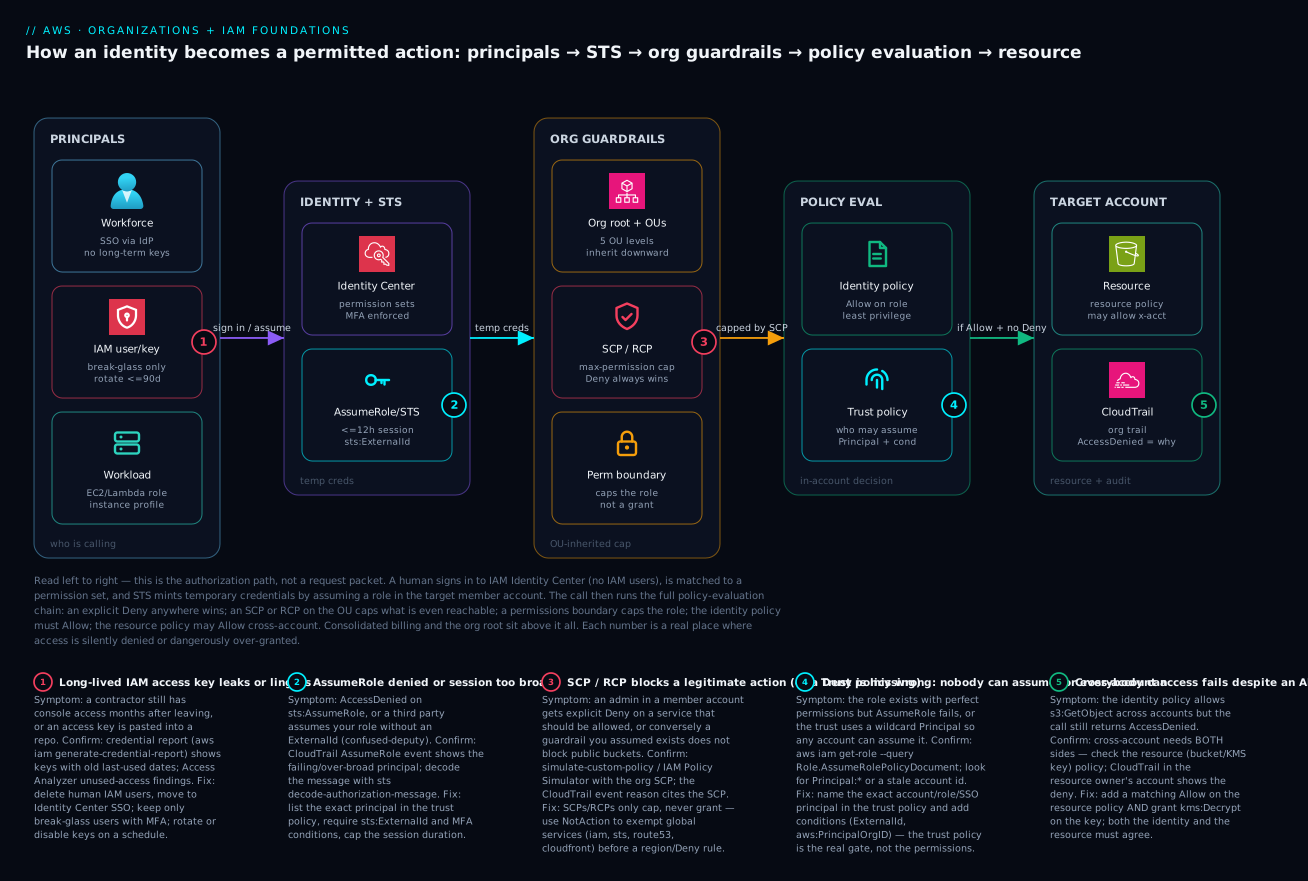
The diagram is not a request packet — it is the authorization path: how an identity becomes a permitted action, read left to right. Start at the principals: a workforce user signing in via SSO (no long-term keys), a narrow set of break-glass IAM users, and workloads carrying instance/execution roles. They flow into IAM Identity Center and STS, where a permission set is matched and AssumeRole mints temporary credentials (≤12 h, optionally gated by sts:ExternalId and MFA). The call then enters the org guardrails zone: the org root and OUs inherit an SCP/RCP cap downward, and a permissions boundary caps the assumed role — neither grants anything, they only subtract. Surviving that, the call reaches policy evaluation inside the target account, where the identity policy must Allow and the trust policy must have permitted the assumption in the first place. Only then does it touch a resource in the target account — whose own resource policy may extend access cross-account — with CloudTrail recording the call and, on failure, the exact AccessDenied reason. Above the whole path sit consolidated billing and the management account, which governs but holds no workloads.
Follow the five numbered badges and you have the complete failure map: a leaked or lingering long-lived key (1) on the principals; an AssumeRole denied or session too broad / confused-deputy (2) at STS; an SCP/RCP that blocks a legitimate action — or a missing Deny (3) in the guardrails; a wrong trust policy that lets nobody (or everybody) assume the role (4) in evaluation; and a cross-account Allow that still fails because the resource side never agreed (5) at the target. The legend narrates each as symptom · confirm · fix — the same method as the rest of the article: localise to a layer, read the cause, run the named check, apply the fix.
Real-world scenario
Paywave Fintech is the company from the opening: one shared AWS account, root in a shared vault, thirty engineers, a contractor still holding console access months after their contract ended. Their monthly AWS spend was about ₹9,00,000, all on one bill nobody could attribute. The trigger to act was an audit finding ahead of a payments licence: the auditor asked “prove dev cannot reach the production card-data store,” and the honest answer was “we can’t — it’s the same account.”
The platform team (three engineers) rebuilt the foundation over six weeks, deliberately and in order. Week 1 — the org. They promoted the existing account to a management account, created the organization with All Features, and built the OU tree: Security, Infrastructure, Workloads/Prod, Workloads/NonProd, Sandbox, Suspended. Week 2 — security accounts. They vended a Log Archive account (org-wide CloudTrail to an Object-Lock S3 bucket) and an Audit account (GuardDuty + Security Hub delegated admin), both in the Security OU. Crucially, they moved no workloads into the management account.
Week 3 — identity. They enabled IAM Identity Center, connected it to the company’s Okta via SAML + SCIM, and defined permission sets: ProdReadOnly (4 h) for all engineers, ProdOperator (2 h) for on-call, NonProdAdmin (8 h) for app teams, SandboxAdmin for everyone in sandbox. Every employee’s daily access became “log in to the portal, pick an account and role, get a temporary session.” Week 4 — kill the keys. They inventoried IAM users with generate-credential-report, found 41 human users and 6 with access keys unused for over 90 days (including the departed contractor’s), and deleted all human IAM users — leaving exactly two break-glass admins with MFA. The contractor’s access evaporated the moment their Okta account was disabled.
Week 5 — guardrails. They attached SCPs: org-wide deny on organizations:LeaveOrganization, cloudtrail:StopLogging, and member-account root use; a region-lock SCP pinning operations to ap-south-1 with the global-service NotAction exemption; and a sandbox spend guardrail. They tested each SCP in a PolicyStaging account before attaching it to a live OU. Week 6 — least privilege + delegation. App teams got iam:CreateRole in their own accounts, but gated by an SCP requiring every created role to carry a permissions boundary — so a team could move fast without granting themselves more than their cap.
The day the migration finished, the auditor’s question had a clean answer: the production card-data store lived in its own account in Workloads/Prod, dev lived in Workloads/NonProd, and there was no IAM principal, VPC peering, or resource policy linking them — provably isolated. When an engineer moved teams the next month, the change was a single Okta group edit: no keys to rotate, no orphaned users, no console access left behind. Spend became attributable per account, and Finance finally saw which workload cost what. The lesson the platform lead wrote on the wall: “Accounts are the walls. Identity Center is the door. SCPs are the locks. We stopped guarding one big room and built a building.”
The migration as a sequence, because the order is the lesson:
| Week | Action | What it fixed |
|---|---|---|
| 1 | Org + All Features + OU tree | A place to attach governance |
| 2 | Log Archive + Audit accounts | Central, tamper-resistant audit |
| 3 | Identity Center + Okta SSO | Humans get temporary creds |
| 4 | Delete human IAM users; 2 break-glass left | No lingering access, no key sprawl |
| 5 | SCP guardrails (tested in staging first) | Org-wide prevention of risky acts |
| 6 | Delegated IAM + permissions boundaries | Teams move fast, can’t escalate |
Advantages and disadvantages
The multi-account-plus-central-identity model both prevents a class of problems and adds some operational surface. Weigh it honestly:
| Advantages (why this model helps you) | Disadvantages (why it bites) |
|---|---|
| Hard blast-radius isolation — a compromised dev account cannot reach prod | More accounts to provision, baseline and track (needs automation) |
| No long-lived keys for humans — offboarding is one group edit | Cross-account access requires roles + trust policies, which confuses tooling at first |
| Guardrails (SCPs/RCPs) enforce “can never” org-wide in one place | A too-broad SCP silently breaks legitimate work and is hard to debug |
| Per-account cost attribution falls out for free | Consolidated billing complexity; reserved-capacity sharing needs thought |
| Least-privilege is simpler when permissions are scoped per account | More roles and policies to author and review |
| Central audit (org CloudTrail) answers “who did what” cleanly | Standing up the Log Archive/Audit accounts is upfront work |
| Permissions boundaries enable safe delegation at scale | Boundaries are subtle; forgetting to require one defeats the purpose |
The model is right for any organisation past a single environment or a handful of people, and mandatory for anyone facing an audit. It costs you upfront structure and a steeper mental model (the evaluation chain), but every one of the disadvantages is a one-time or automatable cost, while the advantages compound with every new account and every new hire. The teams that regret it are the ones who built the structure but never automated account vending — which is exactly the gap AWS Control Tower Guardrails: Building a Secure Multi-Account Foundation closes.
Hands-on lab
Build a minimal but real foundation: create an org (if you have a spare standalone account), make an OU, attach a deny-list SCP, create a cross-account role with a hardened trust policy, and assume it. Free to run — you pay nothing for Organizations, IAM, or STS calls. Run with an admin profile, not as root.
Note:
create-organizationis irreversible-ish (you’d have to delete the org to undo). Use a throwaway/sandbox account, or skip Step 1 and use an existing org’s OU.
Step 1 — Create the organization (all features).
aws organizations create-organization --feature-set ALL
aws organizations describe-organization --query "Organization.{Id:Id,FeatureSet:FeatureSet}"
Expected: an org Id like o-xxxxxxxxxx and FeatureSet: ALL.
Step 2 — Create an OU under the root.
ROOT_ID=$(aws organizations list-roots --query "Roots[0].Id" -o text)
aws organizations create-organizational-unit --parent-id "$ROOT_ID" --name "LabSandbox" \
  --query "OrganizationalUnit.{Id:Id,Name:Name}"
Expected: an OU Id like ou-xxxx-xxxxxxxx.
Step 3 — Enable the SCP policy type, then create and attach a deny-list SCP.
aws organizations enable-policy-type --root-id "$ROOT_ID" \
  --policy-type SERVICE_CONTROL_POLICY 2>/dev/null || echo "already enabled"

cat > /tmp/scp-deny-leave.json <<'JSON'
{ "Version": "2012-10-17",
  "Statement": [{ "Sid":"DenyLeaveOrg","Effect":"Deny",
    "Action":["organizations:LeaveOrganization"],"Resource":"*" }] }
JSON

POLICY_ID=$(aws organizations create-policy --name lab-deny-leave \
  --type SERVICE_CONTROL_POLICY --description "lab" \
  --content file:///tmp/scp-deny-leave.json --query "Policy.PolicySummary.Id" -o text)

OU_ID=$(aws organizations list-organizational-units-for-parent --parent-id "$ROOT_ID" \
  --query "OrganizationalUnits[?Name=='LabSandbox'].Id | [0]" -o text)

aws organizations attach-policy --policy-id "$POLICY_ID" --target-id "$OU_ID"
Expected: no error; the SCP is now attached to LabSandbox.
Step 4 — Create a cross-account role with a hardened trust policy.
ACCT=$(aws sts get-caller-identity --query Account -o text)
cat > /tmp/trust.json <<JSON
{ "Version":"2012-10-17","Statement":[{
  "Effect":"Allow",
  "Principal":{"AWS":"arn:aws:iam::${ACCT}:root"},
  "Action":"sts:AssumeRole",
  "Condition":{"StringEquals":{"sts:ExternalId":"lab-12345"}} }] }
JSON

aws iam create-role --role-name LabAssumeMe \
  --assume-role-policy-document file:///tmp/trust.json
aws iam attach-role-policy --role-name LabAssumeMe \
  --policy-arn arn:aws:iam::aws:policy/ReadOnlyAccess
Step 5 — Assume the role and confirm temporary credentials.
aws sts assume-role --role-arn "arn:aws:iam::${ACCT}:role/LabAssumeMe" \
  --role-session-name lab --external-id lab-12345 \
  --query "Credentials.{AKID:AccessKeyId,Expiry:Expiration}"
Expected: an AccessKeyId starting ASIA… (temporary) and an expiry timestamp. Omit --external-id and you’ll get AccessDenied — proof the condition is the gate.
Step 6 — Teardown.
aws iam detach-role-policy --role-name LabAssumeMe \
  --policy-arn arn:aws:iam::aws:policy/ReadOnlyAccess
aws iam delete-role --role-name LabAssumeMe
aws organizations detach-policy --policy-id "$POLICY_ID" --target-id "$OU_ID"
aws organizations delete-policy --policy-id "$POLICY_ID"
aws organizations delete-organizational-unit --organizational-unit-id "$OU_ID"
Common mistakes & troubleshooting
This is the differentiator. Most IAM pain is one of these failure modes — match your symptom to the row, run the confirm step, apply the fix. The playbook as a table:
| # | Symptom | Root cause | Confirm (exact command) | Fix |
|---|---|---|---|---|
| 1 | AccessDenied on sts:AssumeRole |
Trust policy doesn’t name your principal (or missing ExternalId/MFA condition) | aws iam get-role --role-name R --query Role.AssumeRolePolicyDocument |
Add your exact principal ARN + required conditions to the trust policy |
| 2 | Role exists, perfect perms, still denied | Trust policy is the gate — permissions are never reached | CloudTrail AssumeRole event shows the deny before any action |
Fix the trust policy, not the permissions |
| 3 | Any account can assume your role | Principal: "*" or a :root wildcard in trust |
Search trust doc for "*" / stale account id |
Name the exact account/role + add aws:PrincipalOrgID |
| 4 | Admin gets AccessDenied on a normal action |
An SCP on the OU explicitly denies it | Decode: aws sts decode-authorization-message --encoded-message <msg> |
Adjust the SCP (or add a NotAction exemption) |
| 5 | IAM/STS/Route 53 calls denied after a region SCP | Region-lock SCP didn’t exempt global services | Test an iam: call; it returns explicit Deny |
Add NotAction: [iam:*, sts:*, route53:*, cloudfront:*, support:*] |
| 6 | Cross-account s3:GetObject denied despite an identity Allow |
Resource (bucket) policy doesn’t also Allow | Read the bucket policy in the owner account | Add a matching Allow on the resource policy |
| 7 | Cross-account read works but data is unreadable | KMS key policy denies kms:Decrypt |
aws kms get-key-policy in the owner account |
Grant the caller kms:Decrypt on the key |
| 8 | A contractor still has access after offboarding | Long-lived IAM user/key never removed | aws iam generate-credential-report then read it |
Delete the user; move humans to Identity Center SSO |
| 9 | Access keys leaked / found in a repo | Long-lived keys in source or laptop | Access Analyzer findings; key last-used |
Deactivate + delete the key; rotate; switch to roles |
| 10 | Third-party SaaS can be tricked into accessing your account | No sts:ExternalId (confused-deputy) |
Trust policy has no ExternalId condition |
Require a unique sts:ExternalId per integration |
| 11 | A “guardrail you assumed exists” doesn’t block | SCP only caps; you expected it to grant/enforce a missing Deny | IAM Policy Simulator with the SCP | Add the explicit Deny; remember SCP can’t grant |
| 12 | Management account ignores your SCP | SCPs don’t restrict the management account | Action succeeds in mgmt, fails in members | Keep the mgmt account empty; don’t rely on SCP there |
| 13 | A delegated team escalated their own privileges | New roles created without a permissions boundary | Inspect the created role’s PermissionsBoundary (empty) |
Require the boundary via SCP (Deny iam:CreateRole unless boundary set) |
| 14 | iam:PassRole denied when launching EC2/Lambda |
Principal can’t pass the service role | CloudTrail shows iam:PassRole deny |
Grant iam:PassRole scoped to the specific role ARN |
Reading an AccessDenied properly
The error message tells you almost everything if you read it. AWS now returns which policy type produced the deny:
| Message fragment | What it means | Where to fix |
|---|---|---|
with an explicit deny in a service control policy |
An SCP on the OU blocked it | The SCP |
with an explicit deny in a resource-based policy |
The resource/bucket/key policy denied | The resource policy |
with an explicit deny in an identity-based policy |
An identity policy has a Deny |
The identity policy |
with an explicit deny in a permissions boundary |
The boundary caps it out | The boundary |
because no identity-based policy allows |
Implicit deny — nothing allowed it | Add an Allow on the principal |
is not authorized to perform: iam:PassRole |
Missing iam:PassRole grant |
Grant PassRole on the target role |
For an encoded message (common with explicit denies), decode it:
# Turn the opaque "encoded authorization failure message" into readable JSON
aws sts decode-authorization-message --encoded-message <the-long-blob> \
  --query DecodedMessage --output text | python3 -m json.tool
And to predict a decision before shipping, simulate it:
# Will this principal be allowed to do this action on this resource?
aws iam simulate-principal-policy \
  --policy-source-arn arn:aws:iam::444455556666:role/AppRole \
  --action-names s3:GetObject \
  --resource-arns arn:aws:s3:::kloudvin-app-data/key
Best practices
- Treat the account as the unit of isolation. One account per environment/workload/blast-radius unit; never run dev and prod in the same account.
- Keep the management account empty. No workloads, a tiny set of admins, MFA-protected root with no access keys.
- Humans use Identity Center, never IAM users. Federate to your IdP; enforce MFA; keep only a couple of MFA’d break-glass IAM users.
- Roles for everything machine. Instance/execution roles for compute; cross-account roles (with
ExternalId) for third parties; no long-lived keys baked anywhere. - The trust policy is the gate — make it specific. Name exact principals; add
aws:PrincipalOrgID,sts:ExternalId, and MFA conditions; neverPrincipal: "*". - SCPs are guardrails, not a permissions system. Start deny-list; protect logging, root, and org membership; remember they only cap.
- Exempt global services in any region-lock SCP.
NotActionforiam,sts,route53,cloudfront,support,organizations. - Least privilege via customer-managed policies. Avoid blanket
AdministratorAccess; scope actions and resources; review with Access Analyzer. - Delegate IAM with a permissions boundary, and require it via SCP so teams can’t create roles without the cap.
- Centralise audit. Org-wide CloudTrail to a locked-down Log Archive account; you cannot debug
AccessDeniedwithout it. - Test SCPs in a staging account first. A bad guardrail breaks everyone; the IAM Policy Simulator and a
PolicyStagingaccount prevent org-wide outages. - Rotate or eliminate access keys. If a key must exist, rotate ≤90 days and scope it hard; prefer Roles Anywhere for on-prem.
Security notes
Least privilege, encryption-in-transit and identity hygiene for this foundation, concretely:
| Control | What to do | Why |
|---|---|---|
| MFA everywhere | Enforce on root, break-glass users, and Identity Center | Stops credential-only takeover |
| No long-lived human keys | Identity Center sessions only | Removes the #1 breach vector |
ExternalId for third parties |
Unique per integration in the trust policy | Blocks the confused-deputy attack |
aws:PrincipalOrgID conditions |
Scope cross-account trust to your org | Random external accounts can’t assume |
| Deny non-TLS | aws:SecureTransport=false Deny on data resources |
Encryption in transit, enforced |
| Protect the audit trail | SCP deny on cloudtrail:StopLogging/DeleteTrail; Object Lock on the log bucket |
Tamper-resistant audit |
| Least-privilege roles | Customer-managed policies, scoped actions + ARNs | Smaller blast radius per principal |
| Permissions boundaries | Cap delegated IAM admins | Structural anti-escalation |
| Access Analyzer | Enable org-wide; review external-access + unused-access findings | Surfaces over-sharing and dead creds |
| Credential reports | Generate + review regularly | Finds stale users/keys (e.g. departed staff) |
| SCP deny member-account root | Org-wide guardrail | Member root should never be used |
Cost & sizing
The good news: the foundation itself is free. The cost lives in what runs inside the accounts and in the audit/logging you (rightly) turn on.
| Item | Cost | Note |
|---|---|---|
| AWS Organizations | Free | Accounts, OUs, SCPs, RCPs cost nothing |
| IAM (users, roles, groups, policies) | Free | No charge for the identities themselves |
STS / AssumeRole calls |
Free | Temporary credentials cost nothing |
| IAM Identity Center | Free | The SSO service has no per-user charge |
| Creating member accounts | Free | You pay only for resources inside them |
| CloudTrail management events (first copy) | Free | One trail’s management events; extra copies bill |
| CloudTrail data events / Insights | Per-event | Optional; can add up at high volume |
| Log Archive S3 storage | Per-GB | Lifecycle to Glacier to cut cost over time |
| GuardDuty / Security Hub (Audit account) | Per-resource/event | Worth it; size by account count |
| Config (if enabled for drift) | Per-rule-evaluation | Optional but common in the foundation |
Sizing guidance, not dollars: the dominant foundation cost is CloudTrail data events + Log Archive storage, which scales with API volume and retention, not with how many accounts you have. Adding accounts is free; isolating workloads into more accounts does not raise your IAM/Org bill. The one trap is enabling CloudTrail data events (S3 object-level, Lambda invoke) org-wide on high-traffic buckets — that can surprise you; scope data events to the buckets that need them, and lifecycle the log bucket to Glacier after 90 days. For a ~30-account fintech, expect the foundation overhead (logging + security tooling) to be a low-single-digit percentage of total spend — cheap insurance for provable isolation.
Interview & exam questions
Q1. What is the security boundary on AWS, and why? The AWS account. Accounts share nothing by default — no IAM principal, VPC, or resource crosses an account line unless you explicitly create the path. That makes the account the natural blast-radius container, which is why multi-account design exists. (SAA-C03, SCS-C02.)
Q2. Explain the IAM policy-evaluation order. Start from implicit deny. An explicit Deny anywhere wins immediately. Otherwise the request must pass the SCP/RCP cap, the permissions boundary, any session policy, and then be explicitly Allowed by an identity or resource policy. SCPs/boundaries only subtract; they never grant. (SCS-C02.)
Q3. A role has AdministratorAccess but a call is denied. Name two reasons.
(1) An SCP on the account’s OU explicitly denies that action — the management cap overrides the identity grant. (2) A permissions boundary on the role caps it below *. Both subtract from AdministratorAccess. (SCS-C02.)
Q4. What is the difference between a trust policy and a permissions policy on a role?
The trust policy says who may assume the role (AssumeRole); the permissions policy says what the assumed role may do. The trust policy is evaluated first and is the real gate — perfect permissions are unreachable if the trust policy doesn’t name your principal. (SAA-C03, SCS-C02.)
Q5. How do SCPs differ from IAM identity policies? SCPs are organization-level caps attached to OUs/accounts that define the maximum permissions for principals beneath them; they cannot grant anything. IAM identity policies attach to a principal and grant permissions. Effective permission = intersection of SCPs and an identity Allow. (SCS-C02.)
Q6. Why use IAM Identity Center over IAM users for employees? Identity Center issues temporary, per-session credentials via STS, enforces MFA centrally, maps one identity to many accounts via permission sets, and makes offboarding a single group removal — no long-lived keys to rotate or leak. IAM users sprawl per account and carry static keys. (SAA-C03, SCS-C02.)
Q7. What is the confused-deputy problem and how do you prevent it?
A third party with permission to act on your account could be tricked by another customer into accessing your resources. Prevent it by requiring a unique sts:ExternalId (and/or aws:SourceArn/aws:SourceAccount) in the role’s trust policy, so the third party must present a secret only you and they share. (SCS-C02.)
Q8. What is a permissions boundary and when do you use it?
A managed policy that sets the maximum permissions a principal can have, regardless of its identity policies. You use it to safely delegate IAM (e.g. let a team CreateRole) — anything they create is capped by the boundary, so they cannot escalate above it. (SCS-C02.)
Q9. A region-lock SCP broke the console. Why, and how do you fix it?
Global services (IAM, STS, Route 53, CloudFront, Support) authenticate through us-east-1, so a blanket deny outside your region blocks them. Fix it with a NotAction exemption listing those global services before the region condition. (SCS-C02.)
Q10. Why must the management account stay empty of workloads? It owns the organization and can administer every account, and SCPs do not restrict it — so anything running there is maximum blast radius with no guardrail above it. Keep it to a tiny set of org-admin tasks. (SCS-C02.)
Q11. Cross-account access: an identity policy allows s3:GetObject but it’s denied. Why?
Cross-account requires both sides to Allow: the caller’s identity policy and the resource (bucket) policy. If the bucket policy doesn’t also Allow the external principal, the call is denied. If the objects are KMS-encrypted, the key policy must also grant kms:Decrypt. (SAA-C03, SCS-C02.)
Q12. What does iam:PassRole control, and why does it matter?
It governs whether a principal may hand a role to a service (e.g. attach an execution role to a Lambda/EC2). Without a scoped PassRole grant, launching the resource fails; granted too broadly, a user could attach a more privileged role and escalate — so scope PassRole to specific role ARNs. (SCS-C02.)
Quick check
- What is the primary security/blast-radius boundary on AWS, and what do two accounts share by default?
- In the policy-evaluation chain, what always wins, and can an SCP ever grant a permission?
- On a role, which policy decides whether you can assume it at all — the trust policy or the permissions policy?
- Why should employees use IAM Identity Center instead of IAM users?
- A region-lock SCP denies everything outside
ap-south-1and the console breaks. What did it forget?
Answers
- The AWS account is the boundary; two accounts share nothing by default — no IAM principal, VPC, or resource crosses the line unless you create the path.
- An explicit Deny always wins; an SCP can only cap (subtract) — it never grants, so you still need an identity/resource Allow.
- The trust policy — if it doesn’t name your principal, you’re denied on
sts:AssumeRolebefore any permission is evaluated. - Identity Center issues temporary credentials (no long-lived keys), enforces MFA centrally, spans many accounts with permission sets, and makes offboarding one group edit.
- It forgot to exempt global services (
iam,sts,route53,cloudfront,support) withNotAction— they authenticate viaus-east-1and get blocked.
Glossary
| Term | Definition |
|---|---|
| AWS account | An isolated tenancy with its own 12-digit ID, resource namespace, quotas, and root user; the blast-radius boundary. |
| Root user | The sign-up identity of an account; bypasses IAM. Lock it down, enable MFA, never create keys for it. |
| Organization | A collection of accounts under one management (payer) account, governed centrally. |
| Management account | The payer that owns the org; SCPs do not restrict it. Keep it free of workloads. |
| Member account | Any account in the org other than the management account. |
| Organizational Unit (OU) | A folder of accounts (nestable to 5 levels) to which policies attach and inherit downward. |
| IAM user | A long-term identity with a password and/or access keys. Avoid for humans; use for break-glass and legacy only. |
| IAM group | A collection of users that share attached policies. |
| IAM role | A bundle of permissions plus a trust policy that anything permitted can temporarily assume. |
| Trust policy | The policy on a role naming who may assume it; the real gate for AssumeRole. |
| Identity policy | A policy attached to a principal granting what it may do. |
| Resource policy | A policy attached to a resource (bucket, key, queue, role) controlling who may access it; enables cross-account. |
| Permissions boundary | A managed policy that caps the maximum permissions of a single principal; never grants. |
| SCP (service control policy) | An org policy on an OU/account capping the maximum permissions of principals beneath it. |
| RCP (resource control policy) | An org policy capping how resources beneath it can be accessed, including by external principals. |
| STS (Security Token Service) | The service that issues temporary credentials for AssumeRole and federation. |
| IAM Identity Center | AWS’s SSO service: federated sign-in, permission sets, and temporary multi-account access for humans. |
| Permission set | A reusable template of policies + session duration in Identity Center that becomes an IAM role per assigned account. |
| ExternalId | A shared secret required in a trust policy condition to prevent the confused-deputy problem with third parties. |
| Consolidated billing | One bill for all accounts in the org, with shared volume discounts and Savings Plans. |
Next steps
- AWS Control Tower Guardrails: Building a Secure Multi-Account Foundation — automate the account vending, OU baselines, and guardrails this article built by hand.
- AWS CloudTrail and Config: Audit and Compliance at Scale — the audit trail that tells you who did what and why a call was denied.
- AWS VPC, Subnets and Security Groups Explained — the network boundary that complements the account boundary.
- AWS Regions and Availability Zones: Resiliency from the Ground Up — where your accounts and resources physically live, and how region-lock SCPs interact with it.
- AWS Compute: EC2, Lambda, ECS and EKS — Which One to Choose? — the workloads that run inside the accounts you just isolated, each carrying an execution role.