“Artificial intelligence” is one of the most over-used phrases in technology, and that makes it strangely hard to learn. Marketing slaps “AI-powered” on everything; films imagine conscious robots; vendors promise magic. Underneath the noise, though, AI is a concrete, learnable engineering discipline — and the foundational ideas are genuinely approachable. This lesson strips away the hype and teaches you what AI and machine learning actually are, the handful of problem shapes (“workloads”) they solve, how a model is built and evaluated, what Azure gives you to do it, and — crucially — how Microsoft expects you to build AI responsibly.
This is a foundation lesson in the Azure Zero-to-Hero course, so we assume zero prior knowledge of AI or statistics and define every term the first time it appears. We still go deeper than a typical intro: you will finish able to hold a sensible conversation about model types, recognise which Azure service fits which job, and explain all six Responsible AI principles with real examples. Everything here maps directly to the AI-900: Microsoft Azure AI Fundamentals certification, where these topics are worth a large share of the exam.
In a nutshell
Think about how you first learned to tell a cat from a dog. Nobody handed you a rulebook — “if it barks and stands over 40 cm tall, it’s a dog.” Instead you saw hundreds of cats and dogs as a child, someone told you which was which, and your brain quietly worked out the pattern. Machine learning is exactly that, done by a computer. Instead of a programmer writing the rules, you show the machine thousands of already-labelled examples (“this email is spam”, “this one is not”) and it discovers the pattern itself. That learned pattern is called a model, and you then use it to make predictions about new things it has never seen. This one idea — teach by examples, not by rules — is the single most important thing to carry out of the whole lesson.
Responsible AI is the other half of the story. The moment a computer is learning patterns from real-world data and making decisions that affect people — who gets a loan, whose CV gets read, what a self-driving car does next — those learned patterns can be unfair, unsafe, or impossible to explain. Responsible AI is the set of safety rails that keep the pattern fair, reliable, private, inclusive, transparent and accountable. Microsoft bundles these rails into six principles you will meet later in the lesson, and the exam takes them every bit as seriously as the technology itself.
Level: Beginner · Time: ~37 min
Before you start you need only basic IT literacy — no maths beyond arithmetic and no programming (the optional lab is entirely no-code). After this lesson you will be able to explain what AI, machine learning and deep learning are and how they nest inside one another; recognise the common AI workloads and name the Azure service for each; tell regression, classification and clustering apart; walk through the model lifecycle from question to monitored deployment; and state all six Responsible AI principles with a concrete example. The detailed objectives and prerequisites follow immediately below.
Learning objectives
By the end of this lesson you can:
- Explain in plain English what artificial intelligence and machine learning are, and how AI, ML and deep learning relate to one another.
- Name and describe the common AI workloads — machine learning, computer vision, natural language processing, document intelligence, knowledge mining and generative AI — and give an example of each.
- Distinguish supervised learning (regression and classification) from unsupervised learning (clustering), and define features, labels, and the train/validate/test split.
- Walk through the machine-learning lifecycle from a business question to a deployed, monitored model.
- Describe Azure Machine Learning at a fundamentals level — the workspace, Automated ML, the Designer, and compute options — and say when you would reach for each.
- State and apply Microsoft’s six Responsible AI principles: fairness, reliability & safety, privacy & security, inclusiveness, transparency, and accountability.
Prerequisites & where this fits
You need only basic IT literacy and a little comfort with the idea that computers follow instructions — no maths beyond arithmetic, and no programming, is assumed for the concepts (the optional lab uses a no-code tool). It helps to have read the earlier Azure foundation lessons so terms like subscription, resource group and region are familiar, but it is not essential. This is the first lesson of the AI Fundamentals module in the Azure Zero-to-Hero course; it builds the vocabulary and mental model that the applied-AI lessons (Azure AI Vision, Language, Speech, Document Intelligence) and the generative-AI lesson all assume.
What is artificial intelligence?
The clearest working definition for our purposes: artificial intelligence is software that performs tasks which normally require human intelligence — recognising objects in a photo, understanding written or spoken language, spotting patterns, making predictions, or generating new content. It is not consciousness, and (today) it is not general reasoning across any task a person can do; it is a collection of techniques that each do something narrow surprisingly well.
It helps to nest three terms that are often used loosely as if they were synonyms:
| Term | What it means | Relationship |
|---|---|---|
| Artificial intelligence (AI) | The broad field: any technique that makes software behave “intelligently”. | The outermost umbrella. |
| Machine learning (ML) | A subset of AI in which the system learns patterns from data rather than being explicitly programmed with rules. | Inside AI. |
| Deep learning | A subset of ML that uses neural networks with many layers, especially good for images, audio and language. | Inside ML. |
The pivotal shift to understand is the one between traditional programming and machine learning. In traditional programming a developer writes the rules: if the email contains the word “lottery” and three exclamation marks, mark it as spam. That works until spammers change tactics, and someone must keep rewriting rules. In machine learning you do not write the rules at all — you show the system thousands of examples already labelled “spam” or “not spam”, and an algorithm discovers the patterns itself, producing a model. The model is the learned thing you then use to make predictions on new, unseen emails. This is why ML dominates modern AI: for messy, high-variety problems (images, speech, fraud, language), learning patterns from data beats hand-writing rules.
The common AI workloads
The AI-900 exam thinks in terms of workloads — the recognisable shapes of problem that AI solves. Recognising the shape is the most useful skill, because it tells you which family of services to reach for. Here are the ones you must know:
| Workload | What it does | Everyday example | Typical Azure service (covered next lesson) |
|---|---|---|---|
| Machine learning | Predict a value or category from data; find patterns. | Forecast tomorrow’s sales; predict which customers will churn. | Azure Machine Learning |
| Computer vision | Interpret the visual world — images and video. | Detect defects on a production line; read a number plate. | Azure AI Vision, Face |
| Natural language processing (NLP) | Understand and work with written and spoken language. | Gauge the sentiment of reviews; extract names from contracts; power a chatbot. | Azure AI Language, Azure AI Speech |
| Document intelligence | Extract structured information (fields, tables) from documents. | Read invoices and receipts into a database automatically. | Azure AI Document Intelligence |
| Knowledge mining | Index large volumes of mixed content so it becomes searchable and queryable. | Make a decade of PDFs and scanned reports instantly searchable. | Azure AI Search |
| Generative AI | Create new content — text, code, images — in response to a prompt. | Draft an email, summarise a report, generate an image. | Azure OpenAI (its own lesson) |
A few notes that examiners like to probe. Computer vision and NLP are themselves usually powered by machine learning underneath — they are not separate from ML so much as ML applied to a particular kind of input (pixels, or words). Document intelligence is a focused blend of computer vision (reading the page) and NLP (understanding the fields). Generative AI is the newest workload and the one most people now mean when they say “AI”; it is built on very large deep-learning models and gets its own lesson because it behaves quite differently from the predictive workloads.
How machine learning learns: features, labels, and types
To talk sensibly about ML you need four words. Imagine a spreadsheet of past house sales used to predict prices:
- Features — the input columns the model learns from: floor area, number of bedrooms, suburb, age of the building. Features are what you know.
- Label — the output column the model learns to predict: the sale price. The label is the answer you want.
- Training — the process of feeding the algorithm many rows (features and their known labels) so it learns the relationship between them.
- Model — the resulting trained artefact that, given new features (a house not in your data), produces a predicted label (its likely price).
Machine learning then splits into two big families based on whether your training data has labels:
Supervised learning (you have labelled answers)
In supervised learning every training example comes with the correct answer (the label), and the model learns to reproduce it. There are two sub-types you must distinguish for the exam:
| Type | Predicts | Output | Example | Example algorithms |
|---|---|---|---|---|
| Regression | A numeric, continuous value. | A number. | House price, tomorrow’s temperature, expected revenue. | Linear regression, decision-tree/forest regressors |
| Classification | A category (a class). | A label from a fixed set. | Spam vs not-spam (binary); cat/dog/bird (multi-class); is this transaction fraud? | Logistic regression, decision trees, neural networks |
The quick test: “how much / how many?” is regression; “which one / is it X?” is classification. Both are supervised because both need historic examples with known answers to learn from.
Unsupervised learning (no labels — find structure)
In unsupervised learning the data has no labels; the algorithm finds structure on its own. The headline technique for AI-900 is clustering — grouping similar items together without being told the groups in advance. For example, an online shop can cluster customers by purchasing behaviour to discover natural segments (“bargain hunters”, “premium buyers”) that nobody defined up front. Because there is no “correct answer” to check against, evaluating unsupervised models is more subjective than supervised ones.
Note: you may hear of a third family, reinforcement learning (an agent learns by trial-and-error from rewards, as in game-playing or robotics). It is good to recognise the term, but supervised and unsupervised are the two the fundamentals exam concentrates on.
Train, validate, test — and why you split the data
A model that simply memorises its training data is useless — it would score perfectly on what it has seen and fail on anything new. This failure is called overfitting. To detect and avoid it, you never evaluate a model on the same data you trained it on. You split your data into three parts:
| Split | Purpose | Rough share |
|---|---|---|
| Training set | The data the model learns from. | ~70% |
| Validation set | Used during development to tune the model and compare options without touching the test set. | ~15% |
| Test set | Held back untouched until the very end to give an honest estimate of how the model performs on unseen data. | ~15% |
The discipline is simple but vital: the test set is your stand-in for the real world, so peeking at it during training quietly inflates your confidence and undermines the whole exercise.
How do you know if a model is any good?
Different workloads use different scorecards (evaluation metrics), and AI-900 expects you to recognise a few:
- Regression uses error measures such as Mean Absolute Error (MAE) and Root Mean Squared Error (RMSE) — smaller is better — and R² (how much of the variation the model explains).
- Classification uses accuracy (share of correct predictions), plus precision and recall (which matter when one kind of mistake is costlier — e.g. missing a fraud vs a false alarm), often summarised in a confusion matrix.
You do not need to compute these by hand for the exam, but you should know that “a good model” means good on data it has never seen, measured by the right metric for the task.
The machine-learning lifecycle
Building a model is a repeatable, iterative process — not a one-shot event. Knowing the stages helps you place every Azure tool in context:
- Define the problem. Turn a business question (“which customers will churn?”) into an ML task (binary classification) with a measurable goal.
- Collect and prepare data. Gather data, clean it (fix missing values, remove duplicates), and engineer features. This is usually the largest, least glamorous part of the work, and its quality caps everything downstream — garbage in, garbage out.
- Train the model. Choose an algorithm, feed it the training set, and let it learn. Often you try many algorithms and settings.
- Evaluate. Measure performance on the validation/test data using the right metric; iterate back to data or training if it is not good enough.
- Deploy. Package the model behind an endpoint (a web address other software can call) so applications can get predictions in real time or in batches.
- Monitor and retrain. Watch the live model. The world changes and data drifts, so accuracy decays over time; you periodically retrain on fresh data. This loop is often called MLOps (machine-learning operations).
The crucial mindset: ML is circular, not linear. You will revisit data and training many times, and a deployed model is the beginning of an operational responsibility, not the end of a project.
Azure Machine Learning at a fundamentals level
Azure Machine Learning (Azure ML) is Azure’s end-to-end, managed platform for the whole lifecycle above — preparing data, training, evaluating, deploying and monitoring models. For AI-900 you do not need to operate it deeply; you need to recognise its main building blocks and what each is for.
- Workspace — the top-level Azure resource that ties everything together: your datasets, compute, experiments, trained models and endpoints all live inside a workspace. It is the unit you create, secure and bill, and the home base for the Azure ML Studio web portal where you do the work.
- Compute — the processing power your jobs run on. Azure ML separates several kinds so you pay for the right thing at the right time:
| Compute type | What it is | Used for |
|---|---|---|
| Compute instance | A personal, managed cloud workstation (a VM) for one developer. | Writing and running notebooks during development. |
| Compute cluster | A pool of VMs that scales up for training and back down to zero when idle. | Training jobs and Automated ML runs. |
| Inference cluster / endpoint | Managed compute that hosts a deployed model. | Serving live (real-time) or batch predictions. |
| Attached compute | External resources you connect (e.g. a Databricks or Kubernetes cluster). | Reusing compute you already run. |
- Automated machine learning (Automated ML / AutoML) — you supply the data and say what you want to predict; Azure ML automatically tries many algorithms and settings, evaluates them, and ranks the best model for you. It is the fastest way for a non-expert to get a strong model and a great teaching tool for how algorithm choice affects results. It supports common tasks such as classification, regression and time-series forecasting.
- Designer — a drag-and-drop, visual canvas for building ML pipelines without writing code. You connect modules (import data → clean → split → train → evaluate → deploy) on a graph. It makes the lifecycle tangible and is ideal for learning and for citizen data scientists.
- Notebooks & the SDK/CLI — for code-first practitioners, Azure ML offers hosted Jupyter notebooks plus a Python SDK and a CLI to script the entire lifecycle. (You will not be tested on the code at fundamentals level, only that these options exist for professionals.)
The way to hold this in your head: Designer is the visual/low-code path, Automated ML is the “let Azure find the best model” path, and notebooks/SDK is the full-control code path — all inside one workspace, running on compute you provision and (importantly) shut down when idle.
Microsoft’s six Responsible AI principles
AI makes consequential decisions about people — who gets a loan, which CV is shortlisted, what a self-driving car does. That power demands responsibility, and the AI-900 exam takes this seriously: expect several questions. Microsoft frames its approach as six guiding principles. Learn all six, in this order, each with a concrete example of what violating it looks like and how you uphold it.
| Principle | Core idea | What it looks like in practice |
|---|---|---|
| Fairness | AI systems should treat all people fairly and not discriminate. | A hiring model trained on biased history must not disadvantage candidates by gender or ethnicity. Uphold it by testing performance across groups and mitigating bias in data and features. |
| Reliability & safety | Systems must operate reliably, safely and consistently, including under unexpected conditions. | A self-driving car or a medical-triage model must be rigorously tested and fail safe. Uphold it with thorough testing, monitoring, and human oversight for high-stakes decisions. |
| Privacy & security | AI must respect privacy and keep data secure throughout its lifecycle. | Personal data used to train a model must be protected, consented to, and not leak through the model’s outputs. Uphold it with encryption, access control, data minimisation and de-identification. |
| Inclusiveness | AI should empower everyone and engage people of all abilities and backgrounds. | Speech recognition should work across accents and dialects; interfaces should support assistive technology. Uphold it by designing for accessibility and diverse users from the start. |
| Transparency | People should understand how an AI system works and its limitations. | Users should know they are interacting with AI and roughly why it decided as it did (interpretability). Uphold it with clear documentation, model explainability and honest communication of limits. |
| Accountability | People — not the AI — are responsible for the systems they build and run, under appropriate governance. | A human and an organisation must answer for an AI decision; “the algorithm did it” is not an excuse. Uphold it with governance, oversight, audit trails and clear ownership. |
Two of these are best thought of as the foundation that supports the other four: transparency and accountability. You can only achieve fairness, reliability, privacy and inclusiveness if a system is transparent enough to inspect and if real people are accountable for it. A simple way to remember all six is the mnemonic “FRPITA” — Fairness, Reliability & safety, Privacy & security, Inclusiveness, Transparency, Accountability — or just rehearse them as three pairs: fair & safe, private & inclusive, transparent & accountable.
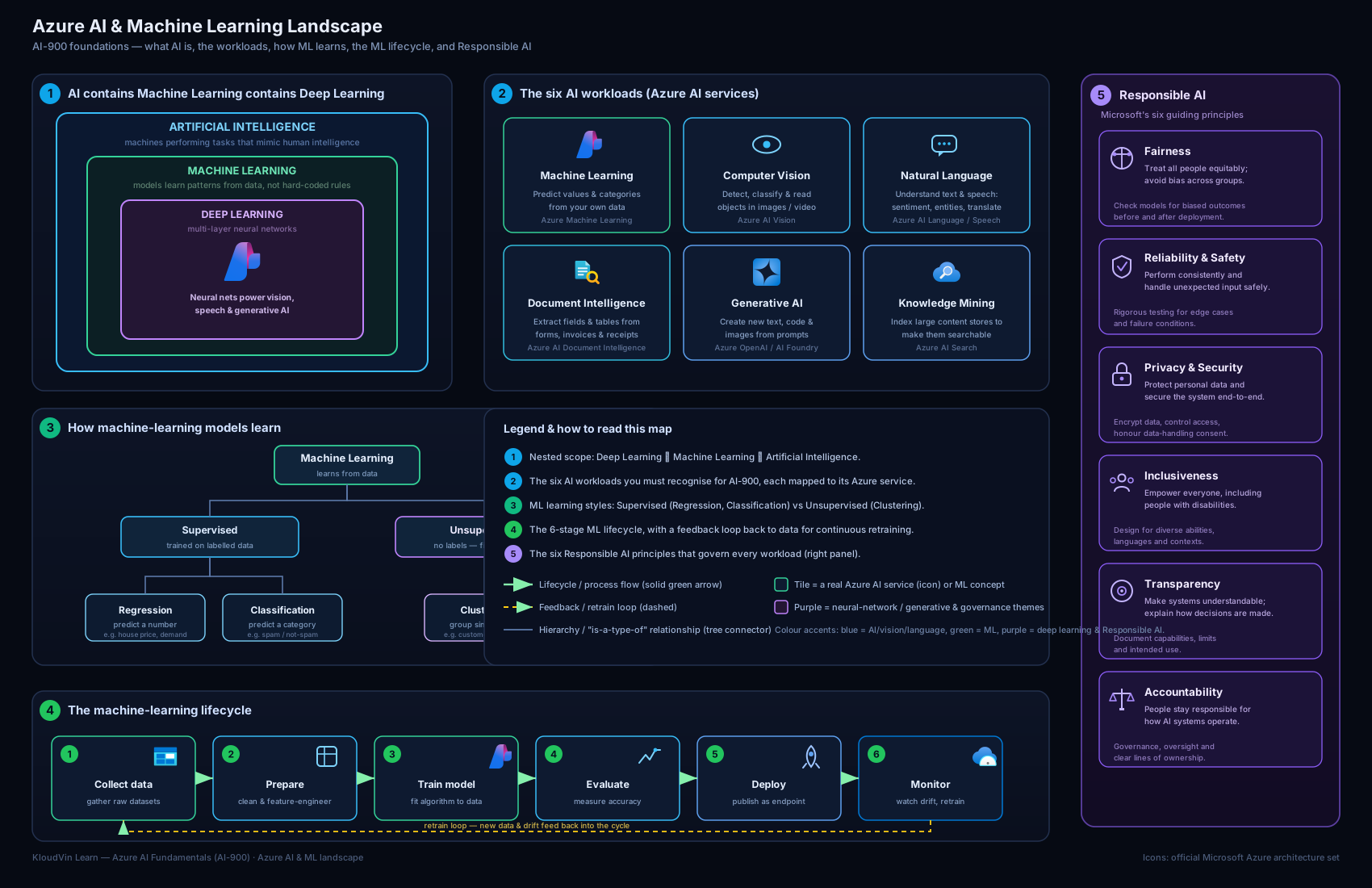
The diagram above ties the lesson together: the AI → ML → deep-learning nesting, the common workloads fanning out to their Azure services, the train-evaluate-deploy lifecycle running through Azure Machine Learning, and the six Responsible AI principles framing the whole picture.
Going deeper
The core of the lesson gives you the mental model; this section adds the precision an exam question turns on and the nuance an experienced engineer wants. Nothing here replaces what you have already read — it sharpens it. Skim it on a first pass and return to it when the basics feel solid.
The workload map at exam resolution
Fundamentals questions rarely ask “what is computer vision?” outright; they describe a scenario and ask which workload or service fits. The skill being tested is recognising the sub-type. Each workload breaks down into named tasks you are expected to identify:
| Workload | Named sub-tasks the exam tests | Azure service to name |
|---|---|---|
| Computer vision | Image classification (one label for the whole image), object detection (a label and a bounding box per object), OCR (read printed/handwritten text), facial detection & analysis (find faces and attributes). | Azure AI Vision; Azure AI Face for faces |
| NLP | Key-phrase extraction, entity recognition (named entities), sentiment analysis, language modeling, speech recognition & synthesis (speech-to-text / text-to-speech), translation. | Azure AI Language; Azure AI Speech; Azure AI Translator |
| Document processing | Extract fields, key–value pairs and tables from forms, invoices, receipts and IDs. | Azure AI Document Intelligence |
| Knowledge mining | Index and enrich large volumes of mixed content so it becomes searchable and queryable. | Azure AI Search |
| Generative AI | Generate text, code and images from a prompt; summarise; power chatbots and copilots. | Azure OpenAI inside Azure AI Foundry |
Two distinctions examiners love to probe: image classification vs object detection (one label for the whole image, versus a box drawn around each object), and OCR vs document intelligence (OCR just reads the text off the page; Document Intelligence understands the structure — it knows that “£412.50” is the Total field). Get those two pairs straight and you will answer most vision and document scenarios correctly.
Under the hood: deep learning, neural networks and the Transformer
The body placed deep learning inside ML as “neural networks with many layers.” At the resolution the current syllabus expects, add three ideas:
- A neural network is a stack of simple mathematical units (“neurons”) arranged in layers; “deep” simply means many layers. Each layer transforms the data a little, and training nudges millions of internal weights until the network’s output matches the labels. This is why deep learning is data- and compute-hungry — and why it shines on messy inputs (pixels, audio, language) where hand-written rules collapse.
- Features can be learned, not just handed over. In classic ML you engineer features yourself (floor area, number of bedrooms); a deep network learns its own features from raw data. That is the whole reason deep learning beats classic ML on images and language.
- The Transformer architecture — now explicitly named on the syllabus — is the neural-network design behind modern language models and generative AI. Its key trick, attention, lets the model weigh how strongly each word relates to every other word in the input, so it captures context across a whole passage rather than one word at a time. Every “GPT” model — the engine inside Azure OpenAI — is a Transformer. You are not asked to build one; you are asked to recognise that generative AI and large language models are Transformer-based.
Reading a scorecard: metrics beyond “accuracy”
The body introduced evaluation metrics; here is the extra depth a data-savvy reader (and a handful of exam items) will want:
- Classification is judged from a confusion matrix — a grid of true positives, false positives, true negatives and false negatives. From it you derive accuracy (overall share correct), precision (of the items flagged positive, how many really were), recall (of the truly positive items, how many were caught) and F1 (the balance of precision and recall). Which one matters depends on the cost of each error: for fraud or disease screening you favour recall (missing a real case is worse than a false alarm); for a spam filter you favour precision (binning a genuine email is worse than letting one spam through).
- Regression is judged on MAE and RMSE (average error size — smaller is better; RMSE punishes large misses harder) and R² (0–1: how much of the variation the model explains).
- Clustering, having no labels, is judged by cohesion/separation heuristics rather than a single right answer — which is exactly why the body called unsupervised evaluation more subjective.
These metrics are also how you see overfitting: a model that scores 0.99 on the training data but 0.60 on the held-out test set is memorising, not learning — the gap between the two numbers is the tell.
The Azure AI platform in 2026: the names that matter
Service names on this exam have been renamed more than once, and the current names are what you must recognise:
- Azure AI services is the umbrella brand for the ready-made, pre-trained APIs (Vision, Face, Language, Speech, Translator, Document Intelligence, Content Safety and more). This is the family formerly called Azure Cognitive Services — expect the newer name in questions.
- Azure Machine Learning is the build-your-own-model platform (workspace, Automated ML, Designer, compute) from the core lesson — reached for when no pre-built service fits.
- Azure AI Foundry is the unified platform for building generative-AI applications and agents; it superseded the earlier “Azure AI Studio” name. Inside it, the model catalog lets you choose from OpenAI and open models, and Azure OpenAI provides the GPT, embeddings and image models. The current syllabus names Azure AI Foundry, Azure OpenAI and the Foundry model catalog explicitly.
- Azure AI Search provides the retrieval half of retrieval-augmented generation (RAG) — grounding a generative model in your own documents so it answers from your data rather than only its training.
A clean way to hold the three tiers together: pre-built API (Azure AI services) → your own trained model (Azure Machine Learning) → generative app on a foundation model (Azure AI Foundry + Azure OpenAI). Most “which service?” scenarios are really asking which of these three tiers the problem needs.
Responsible AI: from six principles to actual tools
The six principles are examined as concepts, but the exam — and any real project — also expects awareness that Microsoft ships tooling to enforce them, not just slogans:
- The Responsible AI dashboard in Azure Machine Learning bundles components that operationalise the principles: error analysis (where does the model fail?), model interpretability / explanations (which features drove a prediction — serving transparency), a fairness assessment built on the open-source Fairlearn toolkit (compare performance across groups — serving fairness), plus counterfactual “what-if” and causal analysis. Explainability and fairness stop being adjectives and become measurements you can put on a chart.
- Azure AI Content Safety is a service that detects and filters harmful content across hate, sexual, violence and self-harm categories with severity levels, and adds generative-AI guards such as Prompt Shields (against jailbreak and prompt-injection attacks), groundedness detection (is the answer actually supported by the source material?) and protected-material detection. It is a primary way to uphold reliability & safety for generative systems.
- For generative AI specifically, responsible-AI practice adds grounding (RAG), metaprompts / system messages that set guardrails, and layered content filters. The current generative-AI exam domain explicitly includes “responsible AI considerations for generative AI,” so treat these as first-class, not optional extras.
The AI-900 exam blueprint — and its 2026 status
AI-900 measured five skill areas. Knowing the weightings tells you where the marks — and your study time — concentrate:
| AI-900 skill area | Weight |
|---|---|
| Describe Artificial Intelligence workloads and considerations (includes the six Responsible AI principles) | 15–20% |
| Describe fundamental principles of machine learning on Azure | 15–20% |
| Describe features of computer vision workloads on Azure | 15–20% |
| Describe features of Natural Language Processing (NLP) workloads on Azure | 15–20% |
| Describe features of generative AI workloads on Azure | 20–25% |
The single heaviest area was generative AI — a clear signal of where Microsoft sees the field heading. This lesson anchors the first two areas (AI concepts, Responsible AI, and ML fundamentals); the applied-AI and generative-AI lessons that follow cover the remaining three.
Exam status (2026 — read this): Microsoft retired exam AI-900 on 30 June 2026 and replaced it with exam AI-901, which grants the same credential — Microsoft Certified: Azure AI Fundamentals, still a beginner-level fundamentals certification. If you already passed AI-900, your certification remains valid for life (fundamentals certifications do not expire). AI-901 leans further into generative AI and Microsoft Foundry, restructuring into two broad areas — Identify AI concepts and capabilities (~40–45%) and Implement AI solutions by using Microsoft Foundry (~55–60%) — and expects a little familiarity with Python, REST APIs and SDKs. Everything you learn in this lesson still applies: the AI/ML concepts, the workloads, Azure Machine Learning and the six Responsible AI principles all map directly onto AI-901’s first area, so treat this as current foundational knowledge whichever exam code you end up sitting.
Hands-on lab
This lab is no-code and free — you will explore Azure Machine Learning’s Automated ML to see the lifecycle without writing a line of code. Creating a workspace is free; you incur cost only while compute runs, and you will delete everything at the end. To keep this lab at essentially zero cost you may simply walk through the create blades and Studio (most learning value is in seeing the options) — only start compute if you want to run an actual training job.
Steps
- Sign in to the Azure portal (
portal.azure.com) with your free account. - In the search bar type “Azure Machine Learning” and select Create. On the Basics blade choose your subscription and resource group (create one called
rg-aml-lab), give the workspace a name (e.g.mlw-ai900-lab), pick a nearby region, and accept the defaults for the supporting resources (a storage account, Key Vault and Application Insights are created automatically). Select Review + create, then Create, and wait for deployment to finish. - Open the resource and click Launch studio to open Azure Machine Learning Studio.
- In the left menu open Automated ML → New Automated ML job. Browse the steps: select or create a dataset, choose the task type (e.g. Classification), pick the target column (the label), and review the compute step where you would create a small compute cluster. Stop here if you want to avoid all cost — you have now seen the full set-up.
- (Optional, incurs cost): create a tiny compute cluster (one small node, minimum 0 nodes so it scales to zero), submit the job on a sample dataset, and after it completes inspect the leaderboard of models and the metrics for the best one.
- Explore Designer from the left menu to see the drag-and-drop pipeline canvas and its pre-built modules.
Validation
You have succeeded when you can: see your workspace in the portal, open Studio, reach the Automated ML job-creation screen and identify where you choose the task type, target column and compute, and open the Designer canvas. (If you ran the optional job, success also means seeing a ranked leaderboard of trained models.)
Cleanup
To avoid any ongoing charges, delete the lab when done. The simplest, most reliable way is to delete the whole resource group:
az group delete --name rg-aml-lab --yes --no-wait
If you created a compute cluster, deleting the resource group removes it; if you want to be doubly sure first, set its minimum and maximum nodes to 0 in Studio so it cannot run.
Cost note
Creating the workspace and clicking through the blades costs nothing. The only charge is compute time if you run the optional job. A single small/burstable node (e.g. a B-series VM) for a short demo run is a few rupees — well under ₹50 for a brief session — provided the cluster scales to zero when idle and you delete the resource group afterwards. The cardinal rule with Azure ML cost: idle compute that is not scaled to zero is the thing that quietly runs up a bill.
Common mistakes & troubleshooting
| Symptom / mistake | Cause | Fix |
|---|---|---|
| “AI” and “machine learning” used as synonyms | Conflating the umbrella with a subset | ML is a subset of AI; deep learning is a subset of ML. Use the nested model. |
| Confusing regression with classification | Both are supervised, so they blur | Numeric output = regression; category output = classification. “How much?” vs “which one?”. |
| Model scores brilliantly in training, poorly in production | Overfitting — evaluated on data it trained on | Always hold back a test set; judge the model only on unseen data. |
| Compute cluster keeps billing after the demo | Minimum nodes not set to 0, or resources left running | Scale clusters to 0 minimum nodes and delete the resource group when finished. |
| Treating Responsible AI as optional paperwork | Seeing it as compliance, not design | The six principles are design requirements; bias and safety must be tested, not assumed. |
| Expecting AutoML to fix bad data | Believing the tool replaces data quality | AutoML picks algorithms, not facts. Garbage in, garbage out — data prep still dominates. |
| Mixing up the workloads in exam questions | Not recognising the problem shape | Map the scenario: pixels → computer vision; words → NLP; forms → document intelligence; create content → generative AI. |
Common beginner mistakes
The troubleshooting table above catches symptoms and their fixes. These are different — they are the misconceptions newcomers hold before they have the right mental model. Spotting the wrong belief is often what unlocks the correct exam answer.
-
“More data automatically means a better model.” Why it’s wrong: volume without quality just teaches the model faster — including the wrong things. A million rows of biased or mislabelled data produce a confidently biased model. Right mental model: aim for data that is representative, clean and correctly labelled first; quantity helps only once quality and coverage are there. This is the everyday meaning of garbage in, garbage out.
-
“Any column can be the label.” Why it’s wrong: a beginner will happily pick a column that secretly contains the answer — e.g. predicting “loan defaulted” while leaving “sent to debt collections” in the features. The model scores brilliantly, then fails in the real world. This trap is called data leakage. Right mental model: the label must be what you genuinely want to predict, and every feature must be information you would realistically have before the outcome is known.
-
“Generative AI is a different thing from machine learning.” Why it’s wrong: generative AI feels magical and separate, so people file it under “not ML.” Right mental model: generative AI is deep learning — large Transformer models trained on huge datasets. It is a workload within AI/ML, not a rival to it. The same nesting still holds: generative AI ⊂ deep learning ⊂ machine learning ⊂ AI.
-
“Accuracy is the one number that tells me if a model is good.” Why it’s wrong: on imbalanced data, accuracy lies. A fraud model that always predicts “not fraud” can be 99.8% accurate and completely useless. Right mental model: pick the metric that matches the cost of being wrong — recall when misses are expensive (fraud, disease), precision when false alarms are expensive (spam), and read the confusion matrix rather than a single headline number.
-
“Azure AI services and Azure Machine Learning are the same product.” Why it’s wrong: both live under “AI on Azure,” so newcomers use the names interchangeably and pick the wrong one in scenario questions. Right mental model: Azure AI services are pre-built APIs you simply call (no training); Azure Machine Learning is where you build and train your own model; Azure AI Foundry + Azure OpenAI is where you build a generative app on a foundation model. Ask “do I need to train anything, and is it generative?” to choose the tier.
-
“Once a model is deployed, the project is finished.” Why it’s wrong: deployment feels like the finish line. Right mental model: deployment is the start of an operational responsibility. The world changes, data drifts, and accuracy quietly decays, so you monitor the live model and retrain on fresh data. That ongoing loop is MLOps — a deployed model is a running system to be cared for, not a delivered artefact to forget.
Best practices
- Start with the question, not the algorithm. Define the business problem and the metric of success before choosing any model or tool.
- Invest in data quality first. Clean, representative, well-labelled data beats a fancier algorithm almost every time.
- Never evaluate on training data. Keep a held-out test set and trust the unseen-data score, not the training score.
- Prefer the highest-level tool that meets your need. Use Automated ML or Designer before hand-coding; reach for the SDK only when you need full control.
- Scale compute to zero. Treat idle ML compute the way you treat a running VM — a meter that is on. Configure auto-scale-down and clean up.
- Bake in Responsible AI from day one. Test across groups for fairness, document limitations for transparency, and assign a human owner for accountability — retrofitting these later is far harder.
Security notes
- Protect training data. Training data is often personal or sensitive; store it in encrypted storage, apply least-privilege access (RBAC), and consider de-identification — this directly serves the privacy & security principle.
- Secure the workspace and its secrets. An Azure ML workspace provisions a Key Vault, storage account and Application Insights; secure them as you would any production resource, and use managed identities rather than embedding keys.
- Lock down endpoints. A deployed model endpoint is a public-facing API by default — require authentication keys or Entra tokens, restrict network access (private endpoints/VNets), and monitor usage.
- Guard against model and data leakage. Models can memorise and leak sensitive training data through their outputs; mind what the model could reveal, and apply content and access controls.
- Keep an audit trail. Logging who trained, deployed and queried models underpins accountability and is essential for investigating issues.
Practice challenges
Six original, exam-style questions that escalate from warm-up to advanced. Try to answer before opening each solution — and, more importantly, make sure you can say why the wrong options are wrong.
1. (Warm-up) A retailer wants to predict next month’s total sales revenue from several years of historical figures. Which type of machine learning is this?
- A) Classification
- B) Regression
- C) Clustering
- D) Reinforcement learning
<details> <summary><strong>Answer & why</strong></summary>
B) Regression. Revenue is a continuous numeric value, so predicting it is regression (“how much?”). Classification predicts a category, not a number; clustering finds groups in unlabelled data with nothing to predict; reinforcement learning is trial-and-error from rewards and is not what a forecast-from-history problem needs. </details>
2. (Warm-up) A marketing team wants to divide customers into natural segments, but nobody has defined the segments in advance. Which approach fits?
- A) Supervised classification
- B) Regression
- C) Unsupervised clustering
- D) Object detection
<details> <summary><strong>Answer & why</strong></summary>
C) Unsupervised clustering. There are no predefined labels, so the algorithm must find structure on its own — the definition of unsupervised clustering. Classification and regression are supervised and need known answers to learn from; object detection is a computer-vision task on images. </details>
3. (Core) An application must locate every car in a photograph and draw a rectangle around each one. Which computer-vision task is this, and which Azure service provides it?
- A) Image classification, Azure AI Language
- B) Object detection, Azure AI Vision
- C) OCR, Azure AI Document Intelligence
- D) Facial analysis, Azure AI Face
<details> <summary><strong>Answer & why</strong></summary>
B) Object detection, Azure AI Vision. Returning a bounding box per object is object detection; image classification would give only one label for the whole image (no boxes). OCR reads text, not cars; facial analysis is for faces. Azure AI Vision is the computer-vision service. </details>
4. (Core) A finance team wants to read scanned supplier invoices and automatically extract the “Invoice Number”, “Date” and “Total” fields into a database. Which Azure service is the best fit?
- A) Azure AI Vision (OCR only)
- B) Azure AI Search
- C) Azure AI Document Intelligence
- D) Azure OpenAI
<details> <summary><strong>Answer & why</strong></summary>
C) Azure AI Document Intelligence. The task is not just reading text but understanding structure — knowing which text is the Total versus the Date. Plain OCR (Azure AI Vision) returns the characters but not the field meaning; Azure AI Search indexes content for search; Azure OpenAI generates content. Document Intelligence is purpose-built for fields, key–value pairs and tables in forms. </details>
5. (Advanced) An audit finds a recruitment model has a noticeably higher error rate for one demographic group than another. Which Responsible AI principle is most directly at stake, and which Azure tool helps you measure it?
- A) Transparency; the model catalog
- B) Fairness; the Responsible AI dashboard’s fairness assessment (Fairlearn)
- C) Accountability; Azure AI Content Safety
- D) Privacy & security; Prompt Shields
<details> <summary><strong>Answer & why</strong></summary>
B) Fairness; the Responsible AI dashboard’s fairness assessment (built on Fairlearn). Unequal performance across groups is the textbook fairness concern, and the RAI dashboard’s fairness component (Fairlearn) quantifies it by comparing metrics across groups. Content Safety filters harmful content; Prompt Shields defend against prompt-injection; the model catalog is for choosing models — none of those measure group fairness. </details>
6. (Advanced) You need a chatbot that answers strictly from your company’s internal policy PDFs, not from the language model’s general training. Which pattern achieves this, and which service supplies the retrieval?
- A) Raise the model’s temperature
- B) Retrieval-augmented generation (RAG), with Azure AI Search providing retrieval
- C) Cluster the PDFs first
- D) Switch to a regression model
<details> <summary><strong>Answer & why</strong></summary>
B) Retrieval-augmented generation (RAG), with Azure AI Search. RAG grounds the generative model in your own documents, so it answers from your data rather than only its training; Azure AI Search retrieves the relevant passages to feed the model. Temperature only changes randomness; clustering and regression solve entirely different problems. (Groundedness detection in Azure AI Content Safety can then check that answers really are supported by the retrieved text.) </details>
Interview & exam questions
- What is the difference between AI, machine learning and deep learning? AI is the broad field of “intelligent” software; ML is a subset where systems learn patterns from data instead of being explicitly programmed; deep learning is a subset of ML using multi-layer neural networks, especially for images, audio and language.
- How does machine learning differ from traditional programming? Traditional programming: a human writes explicit rules. ML: you provide labelled examples and an algorithm learns the rules itself, producing a model.
- Define features and labels. Features are the input variables the model learns from; the label is the output value the model is trained to predict.
- Contrast supervised and unsupervised learning. Supervised learning trains on labelled data (known answers); unsupervised learning finds structure in unlabelled data (e.g. clustering).
- Regression vs classification — give an example of each. Regression predicts a continuous number (e.g. house price); classification predicts a category (e.g. spam vs not-spam).
- Why split data into training, validation and test sets? To detect and avoid overfitting and to get an honest estimate of performance on unseen data; the test set must stay untouched until the end.
- Name the stages of the machine-learning lifecycle. Define the problem → collect/prepare data → train → evaluate → deploy → monitor & retrain (iterating throughout).
- What is Automated ML and who is it for? A capability that automatically trains and compares many algorithms/settings and ranks the best model; ideal for non-experts and for quickly establishing a strong baseline.
- What is the Azure Machine Learning Designer? A drag-and-drop visual canvas for building ML pipelines without code, by connecting modules for import, clean, train, evaluate and deploy.
- Name Microsoft’s six Responsible AI principles. Fairness; reliability & safety; privacy & security; inclusiveness; transparency; accountability.
- Which two Responsible AI principles are considered foundational, and why? Transparency and accountability — you can only ensure the other four if systems are understandable and real people are answerable for them.
- Give a concrete example of the fairness principle. A recruitment model must not disadvantage candidates based on gender or ethnicity; you uphold fairness by evaluating performance across groups and mitigating bias in data.
Quick check
- Deep learning is a subset of which broader field — AI, or machine learning, or both?
- You want to predict a customer’s lifetime spend in rupees. Is that regression or classification?
- Grouping customers into segments without predefined labels is an example of which learning type and which technique?
- Which Azure ML capability automatically tries many algorithms and ranks the best model?
- Which Responsible AI principle is violated if a speech model fails to recognise certain regional accents?
Answers
- Both — deep learning is a subset of machine learning, which is itself a subset of AI.
- Regression — the output is a continuous numeric value.
- Unsupervised learning, using clustering.
- Automated ML (AutoML).
- Inclusiveness — the system fails to work for people of all backgrounds (and arguably touches fairness too).
Exercise
Pick a real decision in your own world — for example, “which support tickets should be escalated to a senior engineer?” Write a short half-page that:
- States the business question and reframes it as an ML task (regression, classification, or clustering — and say which and why).
- Lists three plausible features and the label you would predict.
- Notes which AI workload it belongs to and which Azure service you would investigate.
- Identifies one Responsible AI risk in your scenario (e.g. could the model be unfair, or leak private data?) and one concrete step to mitigate it.
This exercise forces you to practise the most valuable fundamentals skill: turning a fuzzy problem into a well-shaped ML task while thinking about responsibility from the start.
Certification mapping
This lesson maps to the AI-900: Microsoft Azure AI Fundamentals certification, primarily the domains “Describe Artificial Intelligence workloads and considerations” (the workloads and the Responsible AI principles) and “Describe fundamental principles of machine learning on Azure” (model types, the lifecycle, features/labels, and Azure Machine Learning’s workspace, Automated ML, Designer and compute). The Responsible AI content here is examined across the AI-900 syllabus and is also valuable background for the AI-102: Azure AI Engineer Associate certification.
Glossary
-
Algorithm — the procedure that learns patterns from data during training.
-
Model — the trained artefact produced by an algorithm; you use it to make predictions on new data.
-
Feature — an input variable the model learns from.
-
Label — the output value the model is trained to predict (supervised learning).
-
Supervised learning — training on labelled examples; includes regression and classification.
-
Unsupervised learning — finding structure in unlabelled data; e.g. clustering.
-
Regression — predicting a continuous numeric value.
-
Classification — predicting a category/class.
-
Clustering — grouping similar items without predefined labels.
-
Overfitting — when a model memorises training data and fails to generalise to unseen data.
-
Training / validation / test sets — the splits used to learn, tune, and honestly evaluate a model.
-
Endpoint — a web address that hosts a deployed model so applications can request predictions.
-
MLOps — the practice of deploying, monitoring and retraining models in production.
-
Workspace — the top-level Azure Machine Learning resource that holds datasets, compute, models and endpoints.
-
Automated ML (AutoML) — Azure ML capability that auto-trains and ranks many models.
-
Designer — Azure ML’s drag-and-drop, no-code pipeline builder.
-
Compute instance / cluster — managed VMs for development / scalable training.
-
Responsible AI — Microsoft’s framework of six principles for building AI ethically and safely.
-
Deep learning — a subset of machine learning using multi-layer neural networks; excels at images, audio and language.
-
Neural network — layers of simple connected units (“neurons”) whose internal weights are tuned during training.
-
Transformer — the neural-network architecture (using “attention”) behind modern language and generative-AI models.
-
Feature engineering — creating and selecting the input features a model learns from; central to classic ML.
-
Confusion matrix — the grid of true/false positives and negatives from which classification metrics are derived.
-
Precision / recall — of items flagged positive, how many were right (precision); of truly positive items, how many were caught (recall).
-
Accuracy — the overall share of predictions a classifier gets right (misleading on imbalanced data).
-
MAE / RMSE / R² — regression error and fit measures; MAE/RMSE smaller is better, R² closer to 1 is better.
-
Data drift — the gradual change in real-world data over time that erodes a deployed model’s accuracy.
-
Generative AI — an AI workload that creates new content (text, code, images) from a prompt; built on large Transformer models.
-
Large language model (LLM) — a very large Transformer trained on text; the engine behind Azure OpenAI’s GPT models.
-
Prompt — the input instruction or question you give a generative model.
-
Grounding / RAG — retrieval-augmented generation: feeding a generative model your own documents so it answers from your data.
-
Azure AI services — the umbrella brand for pre-built AI APIs (Vision, Language, Speech, Document Intelligence, Content Safety…); formerly Azure Cognitive Services.
-
Azure AI Foundry — Microsoft’s unified platform for building generative-AI apps and agents (formerly Azure AI Studio); hosts the model catalog and Azure OpenAI.
-
Azure OpenAI Service — Azure-hosted access to GPT, embeddings and image models, governed by Azure security and Responsible AI controls.
-
Azure AI Content Safety — a service that detects and filters harmful content and adds generative-AI guards (Prompt Shields, groundedness, protected-material detection).
-
Responsible AI dashboard — Azure Machine Learning tooling (error analysis, interpretability, fairness/Fairlearn, counterfactual and causal analysis) that operationalises the six principles.
-
Object detection vs image classification — detection returns a box per object; classification returns a single label for the whole image.
-
OCR (optical character recognition) — reading printed or handwritten text from images and documents.
Next steps
You now have the mental model for AI and machine learning, know your way around Azure Machine Learning at a fundamentals level, and can explain all six Responsible AI principles. Next, move from concepts to the ready-made building blocks Microsoft provides — pre-trained services you can call without training a model yourself — in AI-900: Azure AI Services — Vision, Language, Speech, Document Intelligence & Search. After that, the course turns to generative AI and Azure OpenAI, where these foundations and the Responsible AI principles become essential.