In a nutshell
Imagine you could hire, by the minute, a room full of world-class specialists: a translator who speaks 100+ languages, a proofreader who reads the mood of every email, a pair of eyes that describes any photo and reads the text inside it, and a form-reader who pulls the total off any invoice. You never train them, interview them, or manage them — you send a request over the internet and get a clean answer back. That is exactly what Azure AI services are: pre-trained AI specialists you rent by the API call. Microsoft already did the machine learning; you bring an HTTPS request and a credential. No data science, no GPUs, no model to train.
That single idea is the lesson. The mistake almost every beginner makes is assuming that “doing AI” means building and training a model. For the tasks on the AI-900 syllabus — reading text off an image, scoring a review’s sentiment, transcribing a call, extracting invoice fields, searching your own documents — you virtually never train anything. You call a specialist. Below we name the specialists (the five service families), give you the one table that says which to hire for a given job, and show how you actually place the call (endpoint, key or identity, SDK or REST).
Level: Beginner · Time: ~30 min (including the hands-on lab)
Before you start, it helps to know: what a model and inference are, and the Azure words resource, resource group and region — both are recapped in the two linked lessons at the end. No coding beyond copy-pasting an az/curl command is needed for the lab.
After this lesson you will be able to:
- Say, in one sentence each, what Vision, Language, Speech, Document Intelligence and Search do — and pick the right one straight from a plain-English requirement.
- Explain why a prebuilt API usually beats training your own model, and name the few cases where it does not.
- Authenticate to any Azure AI service two ways — by key and by Microsoft Entra ID — and say which one production should use and why.
- Tell a single-service resource from the multi-service Azure AI services resource, and place Azure AI Foundry, Azure OpenAI and Content Safety on the map.
- Call a live service end-to-end in the lab, then reason about cost, quotas and Responsible-AI gates like an engineer, not just an exam-taker.
Heads-up on the exam code (2026): this lesson keeps the familiar AI-900 title, the code that named the Azure AI Fundamentals exam for years. AI-900 retired on 30 June 2026, and the same certification — Microsoft Certified: Azure AI Fundamentals — is now earned through the AI-901 exam. Everything you learn here still applies; AI-901 simply folds in more generative-AI and Microsoft Foundry content. The “Going deeper” section below has the details and what changed, and any AI-900 certification you already hold stays valid for life.
In the previous lesson we covered how machine learning works — features and labels, training and evaluation, the six Responsible AI principles. That knowledge matters, but here is the liberating truth for most projects: you rarely need to train a model at all. For the overwhelming majority of everyday AI tasks — reading text from a photo, detecting the sentiment of a review, transcribing a call, pulling line items out of an invoice — Microsoft has already trained a world-class model, exposed it as a cloud API, and asked you to bring nothing but an HTTPS request. These prebuilt, ready-to-call models are the Azure AI services, and they are the single most practical thing on the entire AI-900 syllabus.
This lesson is the applied half of AI-900. We tour the five families a fundamentals candidate must know — Azure AI Vision, Azure AI Language, Azure AI Speech, Azure AI Document Intelligence, and Azure AI Search — answering for each the only questions that matter here: what can it do, and when would I reach for it? We then cover what trips up beginners more than any single capability: how you actually consume these services — the resource you create, the endpoint and key (or Microsoft Entra) you authenticate with, the SDK or REST call you make, the pricing tiers including the free one, and the multi-service resource that unifies them inside Azure AI Foundry. A capability-to-service table sits in the middle. Everything maps to AI-900, and it is the natural on-ramp to AI-102: Azure AI Engineer.
Learning objectives
By the end of this lesson you can:
- Explain what an Azure AI service is and why a prebuilt API beats training your own model for most tasks.
- Describe the capabilities of Azure AI Vision (image analysis, OCR, Face), Azure AI Language, Azure AI Speech, Azure AI Document Intelligence, and Azure AI Search.
- Use a capability-to-service table to pick the right service for a given business problem.
- Describe how you consume an Azure AI service: the resource, the endpoint + key or Microsoft Entra authentication, and SDK vs REST.
- Tell a single-service resource apart from a multi-service resource, and say where Azure AI Foundry fits.
- Read the pricing-tier model — free (F0) vs standard (S) — and name the levers that move the bill.
- Call a real Azure AI service from the command line in the hands-on lab and clean it up afterwards.
Prerequisites & where this fits
You should have finished the previous lesson, AI-900: AI & Machine Learning Fundamentals (incl. Responsible AI), so the words model, inference, natural language processing and computer vision are already familiar. You also want the basics from What Is Azure? Accounts, Subscriptions, Regions & Resource Groups — you will create a resource in a resource group in a region, and that vocabulary is assumed. An Azure account (the free tier is plenty) and a working Azure CLI or Cloud Shell session are all you need for the lab. This is Part of the AI Fundamentals module of the Azure Zero-to-Hero course, sitting between the ML-concepts lesson and the generative-AI lesson that follows.
Core concept: a prebuilt model behind an HTTPS call
Picture the spectrum of “doing AI” on Azure. At one end sits Azure Machine Learning, where you gather data, choose an algorithm, train, evaluate and deploy your own model — maximum control, maximum effort. At the other end sit the Azure AI services: Microsoft has done the data-gathering, training and evaluation on enormous datasets, and you simply send your input (an image, some text, an audio clip, a PDF) to an endpoint and read back a structured result (a caption, a sentiment score, a transcript, a table of fields). No training code, no infrastructure. This is why they were once marketed as Cognitive Services — the name on the exam and in the portal today is Azure AI services.
Three properties define them and explain almost every design choice that follows:
- Prebuilt and managed. The model already exists; you consume it as a metered API. Microsoft patches, scales and improves it. (Some services also let you customise — Custom Vision, a custom Document Intelligence model, Custom Speech, Conversational Language Understanding — but the default is “use it as-is”.)
- Accessed over HTTPS with a key or an identity. Every call goes to a regional endpoint URL and must prove who you are — historically with a subscription key, increasingly with Microsoft Entra ID (formerly Azure AD). More on this below.
- Billed per use. You pay per transaction (per 1,000 images, per million characters, per audio hour, per page). There is almost always a free tier (F0) with a low monthly cap — perfect for learning and the lab in this lesson.
One more foundational idea: an Azure AI service can be deployed as a single-service resource (just Vision, say) or as a multi-service resource that exposes many capabilities behind one endpoint, one key and one bill. Modern practice is to create the multi-service Azure AI services resource inside Azure AI Foundry, the unified portal and SDK for building AI solutions. We return to this after the tour; for now, the building blocks come in five families.
Azure AI Vision — making sense of images
Azure AI Vision is the computer-vision family: give it an image and it tells you what is in it, reads any text it contains, and (with the Face capability) analyses human faces. The AI-900 syllabus expects you to recognise its three pillars.
- Image Analysis. Generates a human-readable caption (“a person riding a bicycle on a city street”), returns tags and objects with bounding boxes and confidence scores, performs smart-cropping (thumbnails that keep the subject centred), detects whether content is adult/racy/gory, and — with the latest models — supports dense captions and image retrieval via vector embeddings. The newest unified endpoint is Image Analysis 4.0.
- Optical Character Recognition (OCR). Extracts printed and handwritten text from images and PDFs via the Read capability — receipts, signs, whiteboards, scanned forms. (When the document is structured — an invoice with fields — you graduate to Azure AI Document Intelligence, below. Plain “get me the text” is Vision OCR; “get me the fields” is Document Intelligence. That distinction is a classic exam trap.)
- Face. Detects faces and returns attributes (head pose, glasses, occlusion, blur), finds facial landmarks, and supports verification (“are these two faces the same person?”) and identification against an enrolled group. Note the Responsible AI gate: the more sensitive face-recognition and identification features are Limited Access — you must apply and be approved — and some attribute predictions (emotion, gender, age) were retired for ethical reasons. Expect AI-900 to test that face recognition is gated.
A handy related service is Azure AI Custom Vision, where you upload a few dozen of your own labelled images to train a bespoke image-classification or object-detection model without writing ML code — the bridge between “prebuilt” and “train your own”.
Azure AI Language — making sense of text
Azure AI Language unifies Azure’s natural-language-processing capabilities behind one resource. You send text; it returns structure and meaning. The capabilities you must know for AI-900:
| Capability | What it does | Typical use |
|---|---|---|
| Sentiment analysis & opinion mining | Scores text as positive / neutral / negative (with confidence) and links opinions to the thing they are about | Triaging reviews, support tickets, social posts |
| Key phrase extraction | Pulls out the main talking points (noun phrases) | Summarising feedback at a glance |
| Named entity recognition (NER) | Identifies people, places, organisations, dates, quantities | Tagging and enriching documents |
| PII detection | Finds and can redact personally identifiable information (names, emails, IDs) | Privacy, compliance, data minimisation |
| Language detection | Returns the language of the input with a confidence score | Routing to the right pipeline or translator |
| Entity linking | Disambiguates entities to a knowledge base (e.g. Wikipedia) | “Mars” the planet vs the company |
| Text summarisation | Extractive (pick key sentences) and abstractive (generate a new summary) | Condensing long documents or call transcripts |
| Question answering | Builds a knowledge base from FAQs/docs and answers natural-language questions over it | A help-desk or website FAQ bot |
| Conversational Language Understanding (CLU) | Predicts the user’s intent and extracts entities from an utterance | The “brain” of a chatbot or voice assistant |
| Custom text classification / custom NER | Train the service on your labels/entities | Domain-specific tagging and extraction |
Two of these deserve emphasis because beginners confuse them. Question answering turns a pile of documents into a queryable FAQ (“How do I reset my password?” → the stored answer). Conversational Language Understanding (CLU) is different: it reads an utterance such as “book me a flight to Mumbai next Tuesday” and returns the intent (BookFlight) plus the entities (destination = Mumbai, date = next Tuesday) so your application can act. CLU is the successor to the older LUIS; if you see LUIS on a question, the modern answer is CLU in Azure AI Language.
Azure AI Translator is a sibling text service (sometimes grouped under the same heading): real-time machine translation across 100+ languages, with document translation that preserves layout and custom translation for your terminology. If the requirement says “translate text”, the answer is Translator.
Azure AI Speech — making sense of (and producing) audio
Azure AI Speech handles everything where audio meets language. Its three headline capabilities:
| Capability | Direction | What it does |
|---|---|---|
| Speech to text (STT) | Audio → text | Transcribes speech in real time or in batch; Custom Speech adapts it to your jargon, accents and audio conditions |
| Text to speech (TTS) | Text → audio | Synthesises lifelike voices, including neural and custom neural voices; controlled with SSML for pronunciation, pitch and pace |
| Speech translation | Audio → audio/text | Translates spoken input into another language, in near real time |
Two further features show up: speaker recognition (verify or identify a speaker by voice — a Limited Access, Responsible-AI-gated feature like Face) and pronunciation assessment (scoring how clearly someone speaks, used in language-learning apps). For AI-900 the load-bearing facts are simply the direction of each capability — STT is audio→text, TTS is text→audio, speech translation is audio→audio — and that Custom Speech and custom neural voice exist for when the prebuilt models are not enough.
Azure AI Document Intelligence — turning documents into data
Azure AI Document Intelligence (formerly Form Recognizer) is the answer whenever the requirement is “extract structured fields, key-value pairs and tables from documents”. Where Vision OCR gives you raw text, Document Intelligence gives you meaning — it knows that this number is the invoice total and that block is the vendor address. It comes in three flavours you must distinguish:
| Model type | What it is | Examples |
|---|---|---|
| Prebuilt models | Ready-trained for common document types | Invoices, receipts, ID documents, business cards, W-2/tax forms, health insurance cards, contracts |
| Layout (general) model | Extracts text, tables, selection marks and structure from any document, without field labels | Generic document parsing, RAG pre-processing |
| Custom models | You train on a handful of your form samples to extract your fields | A bespoke purchase-order or claim form |
Custom models split further into custom template (for forms with a consistent layout — fast, needs as few as five samples) and custom neural (for documents whose layout varies — more robust, slightly more data). There is also custom classification to route a mixed pile of documents to the right extraction model first. The mental model for the exam: prebuilt = common documents, layout = any document’s structure, custom = your specific forms.
Azure AI Search — finding the right information
Azure AI Search (formerly Azure Cognitive Search) is a managed search-as-a-service: you give it your content, it builds an index, and your application runs fast, relevant queries over it — full-text, faceted, geospatial, and now vector and semantic search. Its standout feature for an AI course is AI enrichment / knowledge mining: a skillset runs your documents through other Azure AI services during indexing — OCR-ing images, extracting key phrases and entities, translating, even calling Document Intelligence — so unstructured content (PDFs, images, audio transcripts) becomes richly searchable structured data.
It matters for a second reason beyond classic search: it is the standard retrieval layer for generative AI. The Retrieval-Augmented Generation (RAG) pattern — grounding a large language model on your data so it answers from your documents rather than hallucinating — uses Azure AI Search (with vector search) to find the relevant passages to feed the model. We build that next lesson; for now, file Azure AI Search under both “enterprise search” and “the memory that grounds a Copilot”.
The capability → service map
This is the single most exam-relevant table in the lesson. Read a requirement, find the capability, pick the service.
| You need to… (capability) | Use this Azure AI service |
|---|---|
| Caption, tag, or detect objects in an image | Azure AI Vision (Image Analysis) |
| Read printed/handwritten text from an image or PDF | Azure AI Vision (OCR / Read) |
| Detect, verify or identify a face | Azure AI Vision (Face) — Limited Access |
| Train a classifier on your own images | Azure AI Custom Vision |
| Score sentiment, extract key phrases / entities, detect PII | Azure AI Language |
| Detect the language of some text | Azure AI Language (language detection) |
| Summarise text or answer questions from a FAQ/knowledge base | Azure AI Language (summarisation / question answering) |
| Understand a user’s intent in a chatbot | Azure AI Language (Conversational Language Understanding) |
| Translate text or documents between languages | Azure AI Translator |
| Transcribe speech to text | Azure AI Speech (speech to text) |
| Synthesise text to speech | Azure AI Speech (text to speech) |
| Translate spoken language | Azure AI Speech (speech translation) |
| Extract fields, key-value pairs and tables from invoices, receipts, IDs, or your own forms | Azure AI Document Intelligence |
| Build an enterprise search index with AI enrichment (knowledge mining) | Azure AI Search |
| Provide the retrieval / grounding layer for a generative-AI app (RAG) | Azure AI Search (vector search) |
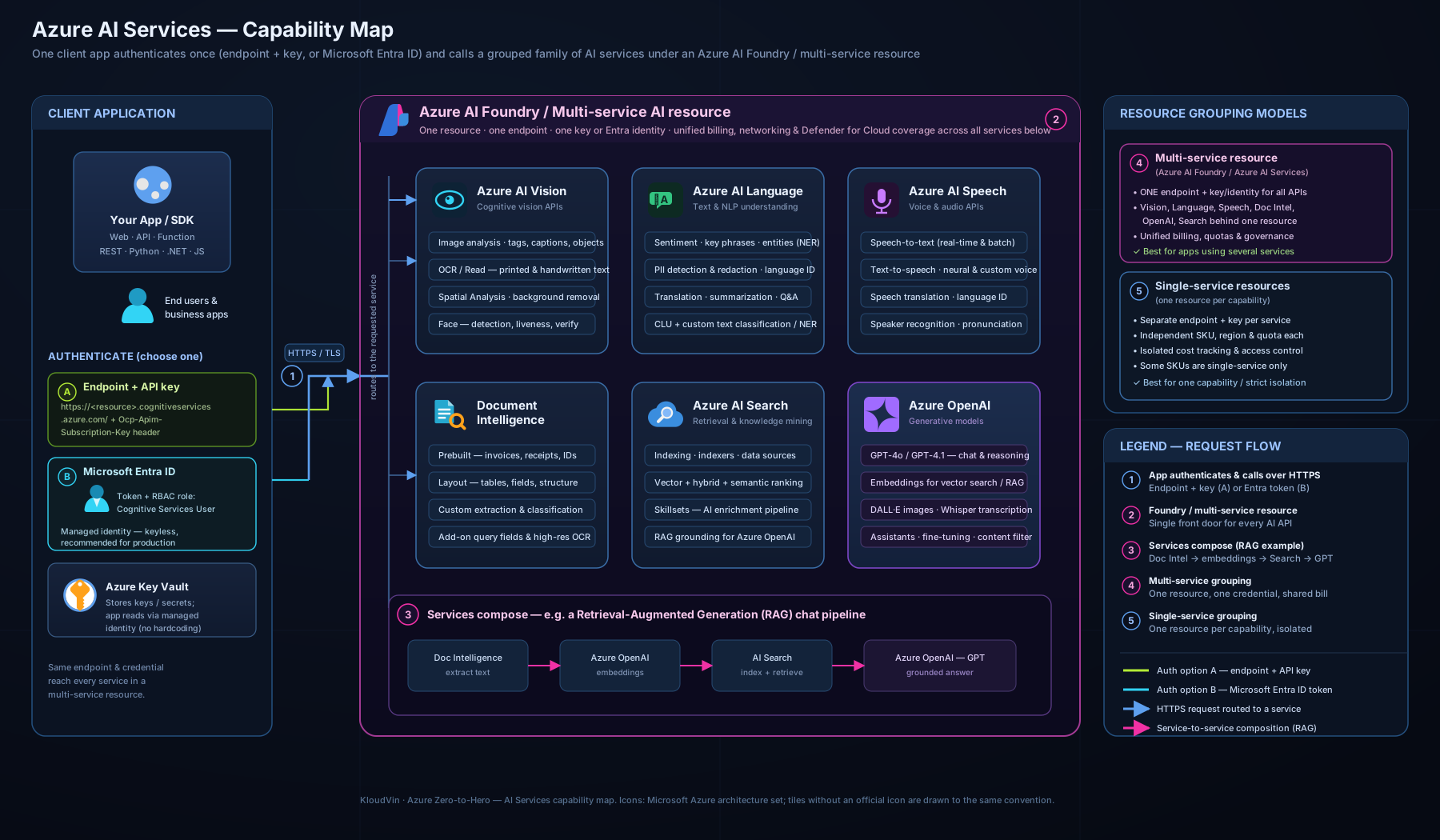
The diagram above lays the five families out side by side — Vision, Language, Speech, Document Intelligence and Search — with their headline capabilities beneath each, and shows them all consumed through a single multi-service Azure AI services resource (an endpoint + key or Microsoft Entra, surfaced in Azure AI Foundry). Keep this picture in your head: it is, in effect, the whole lesson on one page, and the capability column is exactly what the exam tests.
How you consume an Azure AI service
Knowing what each service does is half of AI-900; the other half is how you call it. The pattern is identical across every service, which is the good news.
1. Create a resource. In the portal, CLI, or Azure AI Foundry you create either a single-service resource (e.g. Computer Vision, Language, Speech, Document Intelligence, Translator, Search) or a multi-service Azure AI services resource. Creating it gives you two things you need: an endpoint (a regional HTTPS URL like https://<name>.cognitiveservices.azure.com/) and access keys.
2. Authenticate. Two ways, and the exam expects you to know both:
| Method | How it works | When to use |
|---|---|---|
| Key (subscription key) | Pass Ocp-Apim-Subscription-Key: <key> in the header; two keys are issued so you can rotate without downtime |
Quickest to start, fine for learning and prototypes |
| Microsoft Entra ID | Authenticate with a token from an identity (a user or, in production, a managed identity) and a role assignment | The recommended, more secure production approach — no secrets to leak; pairs with Key Vault if you must use keys |
3. Call it via the REST API (a plain HTTPS request — language-agnostic) or a client-library SDK for .NET, Python, JavaScript, Java and more (which wraps the REST call in idiomatic code). REST is great for testing and exotic languages; the SDK is what you ship.
4. Read the structured result — JSON describing the caption, the sentiment, the transcript, the extracted fields — and act on it in your app.
A few cross-cutting points: every resource is regional (pick a region for latency and data residency); calls can be governed with networking controls (private endpoints, IP firewall) and content-safety features; and some services run in containers on-premises or at the edge for sovereignty or latency, while still billing through Azure.
Single-service vs multi-service, and where Azure AI Foundry fits
A single-service resource is scoped to one capability family — handy when you want separate keys, quotas or billing per capability. A multi-service Azure AI services resource gives you one endpoint, one key and one bill across Vision, Language, Speech, Translator and more — the usual choice once you use more than one. Azure AI Foundry is the unified studio and SDK that ties it together: create a connection, experiment in the playground, and build Copilots, RAG apps and agents — it is also where Azure OpenAI (next lesson) lives. For AI-900, remember the relationship: individual services → optionally unified by a multi-service resource → orchestrated in Azure AI Foundry.
Pricing tiers
Every Azure AI service offers a free tier (F0) and one or more standard tiers (S0, S1…). The free tier has a generous-enough monthly allowance for learning and small demos (e.g. a few thousand image transactions or a number of free text records per month) but is rate-limited and usually allows only one F0 resource of a given kind per subscription. Standard tiers are pay-as-you-go, billed per transaction with the unit varying by service:
| Service family | Typical billing unit |
|---|---|
| Azure AI Vision | per 1,000 transactions (images) |
| Azure AI Language | per 1,000 text records (≈ 1,000 characters each) |
| Azure AI Speech | per audio hour (STT/TTS) or per character (TTS) |
| Azure AI Document Intelligence | per 1,000 pages (prebuilt/layout/custom priced differently) |
| Azure AI Search | per search unit per hour (a provisioned tier, not pure pay-per-call) |
Note that Azure AI Search is the odd one out: it is provisioned capacity (you pay for a tier — Free, Basic, Standard — by the hour, scaled by replicas and partitions), not per-transaction. The cost levers: volume (transactions/characters/pages), tier, which features you call (custom models and neural voices cost more), and for Search, how much capacity you provision. For the lab below, the free F0 tier costs ₹0 — which is exactly why we use it.
Hands-on lab: call Azure AI Language from the CLI
We will create a free Azure AI Language resource and run a sentiment and key-phrase call against it with nothing but the Azure CLI and curl. Use Azure Cloud Shell (it has the CLI and curl preinstalled) or a local terminal with az logged in.
1. Set variables and create a resource group:
RG="rg-ai900-lab"
LOC="eastus"          # AI services are widely available here
NAME="ai900lang$RANDOM"

az group create --name "$RG" --location "$LOC" --output table
2. Create a free-tier Language resource (kind = TextAnalytics is the Language service; --sku F0 is the free tier; the --yes accepts the Responsible AI terms):
az cognitiveservices account create \
  --name "$NAME" \
  --resource-group "$RG" \
  --kind TextAnalytics \
  --sku F0 \
  --location "$LOC" \
  --yes \
  --output table
3. Fetch the endpoint and a key:
ENDPOINT=$(az cognitiveservices account show \
  --name "$NAME" --resource-group "$RG" \
  --query "properties.endpoint" --output tsv)

KEY=$(az cognitiveservices account keys list \
  --name "$NAME" --resource-group "$RG" \
  --query "key1" --output tsv)

echo "Endpoint: $ENDPOINT"
4. Call the sentiment endpoint with a couple of sentences:
curl -s -X POST "${ENDPOINT}language/:analyze-text?api-version=2023-04-01" \
  -H "Ocp-Apim-Subscription-Key: ${KEY}" \
  -H "Content-Type: application/json" \
  -d '{
    "kind": "SentimentAnalysis",
    "parameters": { "opinionMining": false },
    "analysisInput": {
      "documents": [
        { "id": "1", "language": "en", "text": "The Azure AI services are fantastic and easy to use." },
        { "id": "2", "language": "en", "text": "The portal was slow and the docs were confusing." }
      ]
    }
  }'
Expected output (abridged): JSON with a results.documents array; document 1 shows "sentiment": "positive" with a high confidenceScores.positive, and document 2 shows "sentiment": "negative".
5. (Optional) Try key-phrase extraction by changing "kind" to "KeyPhraseExtraction" and removing parameters — you will get back the main phrases per document.
Validation: you have created an Azure AI service, authenticated with an endpoint + key, sent a REST request, and read a structured AI result — the exact consumption pattern described above, end to end.
Cleanup (do this — it avoids surprise charges):
az group delete --name "$RG" --yes --no-wait
Cost note: the F0 (free) tier used here is ₹0 within its monthly free allowance, so this lab costs nothing. If you later switch to the S (standard) tier, Language is billed per 1,000 text records at a few rupees per thousand — still trivial for experiments. Deleting the resource group removes the resource entirely so no stray meter keeps running.
Going deeper
The tour above is the exam-facing half. This section is for when you leave the exam behind and actually build: how the resource, endpoint, identity and API really behave, the two families AI-900 has quietly grown to include (Azure OpenAI and Content Safety), how Responsible AI is enforced rather than merely suggested, and the current state of the exam itself.
The multi-service resource, up close
When you create the multi-service Azure AI services resource, Azure provisions one Cognitive Services account of kind = CognitiveServices. The single-service kinds are the family members: ComputerVision, TextAnalytics (Language), SpeechServices, FormRecognizer (Document Intelligence), TextTranslation, Face, OpenAI and ContentSafety. All of them answer on the host *.cognitiveservices.azure.com — the old brand name survives in the DNS, the SDK packages and the RBAC role names long after the marketing rename to Azure AI services.
Two endpoint facts matter in production:
- Custom subdomain vs regional endpoint. A resource created with a name gets a custom-subdomain endpoint (
https://my-ai.cognitiveservices.azure.com/). You need that custom subdomain to authenticate with Microsoft Entra tokens and to attach private endpoints — the shared regional endpoint (https://eastus.api.cognitive.microsoft.com/) supports key auth only. Multi-service resources always get a custom subdomain; some older single-service ones did not. - Regional by design. Each resource lives in one region and processes your data there. Choose the region for latency and data residency, and confirm the feature is available there — the newest models (Image Analysis 4.0, the latest Document Intelligence models and neural voices) light up in a subset of regions first.
Authentication in depth: keys, Entra ID and disableLocalAuth
The exam wants “key or Microsoft Entra.” Production wants the nuance underneath it:
- Keys are a shared secret. Two are issued (
key1,key2) so you can rotate one while the other serves traffic. Anyone holding the key is fully authenticated — there is no user identity, no least-privilege, no record of who called. Fine for a lab; a liability at scale. - Microsoft Entra ID replaces the secret with a token minted for an identity — ideally a managed identity, so there is no credential to store at all. You grant that identity a data-plane role on the resource: the broad Cognitive Services User, or a service-specific one such as Cognitive Services Language Reader, Cognitive Services Speech User, or — for Azure OpenAI — Cognitive Services OpenAI User. The token’s audience is
https://cognitiveservices.azure.com. Control-plane roles (Owner/Contributor) let you manage the resource but do not grant data-plane calls — a distinction that trips up many first RBAC attempts. - Turn keys off entirely with the resource property
disableLocalAuth: true, which forces every caller onto Entra ID. Pair it with a private endpoint and an IP firewall and the service is unreachable both without an identity and from the public internet.
# Grant a managed identity data-plane access to the AI resource (representative)
az role assignment create \
  --assignee-object-id "$PRINCIPAL_ID" --assignee-principal-type ServicePrincipal \
  --role "Cognitive Services User" \
  --scope "$RESOURCE_ID"

# Forbid key-based auth entirely — Entra ID only (control-plane property)
az resource update --ids "$RESOURCE_ID" \
  --set properties.disableLocalAuth=true
(The $PRINCIPAL_ID / $RESOURCE_ID values are placeholders; there is no live subscription in this lesson, so treat the effect as representative.)
Calling the API: REST, SDKs and long-running operations
Simple calls are synchronous — POST text, get JSON back, exactly as in the lab. But several capabilities are asynchronous long-running operations: Document Intelligence analyze, Vision Read OCR over multi-page PDFs, and Speech batch transcription. These return 202 Accepted plus an Operation-Location header — a URL you poll until the body reports status: succeeded, then read the result. Beginners who expect the answer in the first response conclude “it returned nothing”; the answer is one poll away.
Three more production reflexes:
- Pin
api-version. Every REST call and SDK carries a datedapi-version. Pin it so a service update never silently changes your JSON shape or your scores. - Expect throttling. Handle
429 Too Many Requestswith exponential back-off honouring theRetry-Afterheader — the free tier throttles aggressively, and even standard tiers have per-resource limits. - SDK over REST for shipping code. The SDKs (.NET, Python, JavaScript, Java) wrap polling, retries and auth — including
DefaultAzureCredential, which picks up a managed identity automatically. Reach for REST to test, to script, or from an unsupported language.
Azure OpenAI and Azure AI Content Safety — the two families AI-900 has grown
The classic five families are no longer the whole picture, and the newer exam expects two more:
- Azure OpenAI Service hosts OpenAI’s models — GPT-4o / 4o-mini, the o-series reasoning models, embeddings (
text-embedding-3-large/small), DALL·E and Whisper — inside your Azure tenant, under Azure’s RBAC, networking and regional residency, with your prompts and data not used to train the base models. You create a resource ofkind = OpenAI, then create a deployment of a specific model and version; quota is measured in tokens-per-minute (TPM), not per call. It is the engine of the next lesson; here, place it on the map as “the generative family, governed like every other Azure AI service.” - Azure AI Content Safety scores text and images across four harm categories — hate, sexual, violence, self-harm — each with a severity level, plus Prompt Shields (jailbreak and indirect prompt-injection detection), protected-material detection, and groundedness detection for RAG answers. It is both a standalone service and the moderation layer wired into Azure OpenAI. If a requirement says “block harmful content” or “detect jailbreak prompts,” the answer is Content Safety — not Language’s PII detection or Vision’s adult/racy flag.
Responsible AI as an enforced gate, not a slogan
The six Responsible AI principles from the previous lesson are, for these services, operationalised:
- Limited Access registration. Face recognition/identification, Speaker recognition and Custom Neural Voice require an application and approval before the API will work — the gate is the control. Some Face attributes (emotion, gender, age) were retired outright for ethical reasons.
- Content Safety by default on generative deployments, with configurable severity thresholds and human-review hooks for low-confidence or high-risk output.
- Transparency and data handling. Each service documents its data retention, and sensitive workloads can add customer-managed keys (CMK) and disable content logging. Run PII detection/redaction before you log any text.
Quotas, rate limits and scale
- F0 (free) is one-per-kind-per-subscription and tightly rate-limited — a learning tier, never production.
- Standard tiers scale by transactions, but each resource still has a calls-per-second / TPM ceiling; scale out with multiple resources (or higher Azure OpenAI quota) behind your own routing, and cache idempotent results.
- Azure AI Search is the outlier again: capacity is replicas × partitions = search units, provisioned by the hour — you scale it, you do not “call more.”
Exam status in 2026: AI-900 has retired; the credential is now AI-901
This lesson’s title keeps the familiar AI-900 label, but the exam itself has moved on, and it is worth stating plainly and additively:
- AI-900 retired on 30 June 2026. Per Microsoft Learn, the Microsoft Certified: Azure AI Fundamentals certification is now earned through the AI-901 exam (its beta ran in April 2026; the certification page was updated mid-2026 to list AI-901 as the only required exam).
- Same certification, new exam code — not a new credential. Any AI-900 certification you already hold remains valid; Microsoft fundamentals certifications do not expire.
- What changed: AI-901 rebalances the classic-AI weighting to fold in generative AI (large language models, Copilot fundamentals, RAG and grounding) and centres the applied half on Microsoft Foundry (the studio this lesson calls Azure AI Foundry). In effect, the two families in the section above — Azure OpenAI and the generative workloads — moved from “nice to know” to “on the exam.”
- What did not change: every capability, service, auth method and pricing idea in this lesson is still exactly what you need. Read it as AI-901-ready; the only delta is more generative-AI content, which the next lesson covers.
Names and renames you will trip over
Microsoft has renamed nearly everything in this space; the portal and the exam are not always in sync, and old names persist in code:
| You may see… | Current name | Note |
|---|---|---|
| Cognitive Services | Azure AI services | Old name lives on in endpoints (cognitiveservices.azure.com), SDKs, the kind field, and RBAC roles |
| Form Recognizer | Azure AI Document Intelligence | Same service |
| Azure Cognitive Search | Azure AI Search | Same service |
| LUIS | Conversational Language Understanding (CLU) | LUIS retired; CLU is its successor in Azure AI Language |
| QnA Maker | Question answering (in Azure AI Language) | Feature folded into Language |
| Azure AI Studio | Azure AI Foundry → Microsoft Foundry | The unified studio; rebranded again in 2026 |
Common mistakes & troubleshooting
| Symptom / mistake | Cause | Fix |
|---|---|---|
401 Unauthorized |
Wrong key, key from a different resource, or the resource is in another region than the endpoint you called | Re-fetch the key for this resource; ensure the endpoint and key come from the same account |
403 / cannot create a second free resource |
Only one F0 resource per kind per subscription is allowed | Delete the old F0 resource or use a different kind, or move to S0 |
429 Too Many Requests |
Free tier is rate-limited; you exceeded calls per second/minute | Throttle/retry with back-off, or upgrade to a standard tier |
| Using Vision OCR but you wanted invoice fields | OCR returns raw text, not structured fields | Use Azure AI Document Intelligence for key-value pairs and tables |
| Face recognition/identification call rejected | These are Limited Access, Responsible-AI-gated features | Apply for access; for AI-900 simply know it is gated |
| Confusing question answering with CLU | They solve different problems | Q&A = answer from a knowledge base; CLU = detect intent + entities |
| Translator vs Language mix-up | Both touch text | “Translate” → Translator; “analyse/understand” → Language |
| Hard-coded key checked into source control | Key used as a literal string | Store in Key Vault or, better, authenticate with Microsoft Entra managed identity |
Common beginner mistakes
These are misconceptions — wrong mental models — rather than the symptom→fix rows in the troubleshooting table above. Fix the model and the errors never happen.
- “Doing AI means training a model.” For the AI-900 workloads you almost never train anything — you call a prebuilt specialist. Reach for Custom Vision, a custom Document Intelligence model, Custom Speech or Azure Machine Learning only when your task is genuinely bespoke. Default to prebuilt; customise as the exception.
- “OCR and Document Intelligence do the same thing.” OCR returns raw text; Document Intelligence returns structured meaning — this number is the invoice total, that block is the vendor. “Get the text” = Vision OCR; “get the fields” = Document Intelligence. This one distinction is the most-tested trap on the exam.
- “Azure OpenAI is just ChatGPT.” Same models, completely different governance: Azure OpenAI runs them inside your Azure tenant with RBAC, private networking, regional data residency and no training on your data. It is an Azure AI service like the others, not a consumer app.
- “A key is fine for production.” A key is an un-scoped shared secret with no identity and no audit trail. It is a bootstrap, not a security model. Production uses Microsoft Entra ID + managed identity; if you must use a key, keep it in Key Vault and rotate with the two-key design.
- “The multi-service resource is always the right choice.” It unifies endpoint, key and bill — convenient once you use several capabilities — but you lose per-capability isolation of keys, quota and cost. Choose single-service when a workload needs its own limits, its own blast radius, or separate chargeback.
- “The free F0 tier is basically unlimited.” F0 is rate-limited and capped, and you may create only one F0 per kind per subscription. It is for learning and demos; size a standard tier from observed volume before you ship.
- “Cognitive Services is deprecated because it was renamed.” It is the same service, renamed to Azure AI services. The old name deliberately persists in endpoints (
cognitiveservices.azure.com), SDK packages, thekindfield and RBAC roles (“Cognitive Services User”) — seeing it is not a sign of stale docs.
Best practices
- Prefer the prebuilt service over training a model unless your task is genuinely bespoke — it is faster, cheaper and maintained for you.
- Start on F0 to prototype, then size the standard tier from observed volume rather than guessing.
- Use a multi-service resource once you consume more than one capability — one endpoint, one key, one bill.
- Pin an
api-versionin REST calls and SDK versions in code, so a service update never silently changes your results. - Pick the region deliberately for latency and data residency; not every feature is in every region.
- Handle confidence scores — act on a threshold, and design a human-in-the-loop path for low-confidence results.
- Build on Azure AI Foundry when you move beyond single calls toward Copilots, RAG and agents.
Security notes
The data and identity you bring to an AI service are still yours to protect — the shared-responsibility line does not move just because the model is Microsoft’s. Practical controls for AI-900 and beyond:
- Authenticate with Microsoft Entra ID and managed identities in production rather than keys; if you must use keys, keep them in Azure Key Vault and rotate using the two-key design.
- Restrict network access with the resource firewall (allowed IPs / VNet) and private endpoints so the service is not reachable from the public internet.
- Mind the data you send: use PII detection/redaction before logging text, and check each service’s data-retention and customer-managed-key options for sensitive workloads.
- Respect the Responsible AI gates — Face recognition, speaker recognition and custom neural voice are Limited Access by design; the gate is the security control.
- Enable diagnostic logging to Azure Monitor for an audit trail of who called what.
Interview & exam questions
- What is an Azure AI service, and how does it differ from building a model in Azure Machine Learning? A prebuilt, Microsoft-trained model exposed as a managed API you call over HTTPS; you write no training code and manage no infrastructure, whereas Azure ML is where you train, evaluate and deploy your own models.
- You need to read printed text from scanned photos. Which service? Azure AI Vision — OCR (Read). If you needed structured fields from a form, you would use Document Intelligence instead.
- What is the difference between Azure AI Vision OCR and Azure AI Document Intelligence? OCR returns raw text; Document Intelligence returns structured key-value pairs, tables and fields (prebuilt, layout or custom models). This is the classic trap.
- A chatbot must understand “book a table for two at 7pm”. Which capability? Conversational Language Understanding (CLU) in Azure AI Language — it returns the intent plus entities. (CLU is the successor to LUIS.)
- Name the three model types in Document Intelligence. Prebuilt (common documents), layout/general (structure of any document), and custom (your own forms — template or neural).
- Which service builds a search index and can run an AI-enrichment pipeline over your documents? Azure AI Search — the engine of knowledge mining, and the retrieval layer for RAG.
- What are the two ways to authenticate to an Azure AI service, and which is recommended? A subscription key in the request header, or Microsoft Entra ID (token + role assignment). Entra ID — ideally via a managed identity — is recommended because there are no secrets to leak.
- Single-service vs multi-service resource — when would you choose each? Single-service for separate keys/quota/billing per capability; multi-service for one endpoint, one key, one bill across many capabilities once you use more than one.
- Which Azure AI capability is gated for Responsible AI reasons? Face recognition/identification (and speaker recognition, custom neural voice) are Limited Access — you must apply.
- Speech to text vs text to speech vs speech translation — what is the direction of each? STT: audio→text; TTS: text→audio; speech translation: spoken input→translated output. Custom Speech and custom neural voice exist for bespoke needs.
- You want to translate documents while preserving their layout. Which service? Azure AI Translator (document translation).
- How are Azure AI services priced, and what is special about Azure AI Search? Mostly per transaction (per 1,000 images / text records / pages, or per audio hour) with a free F0 tier; Azure AI Search is the exception — provisioned capacity billed per search unit per hour.
Quick check
- Match each to a service: (a) detect sentiment in a review, (b) read text from a sign in a photo, © extract the total from an invoice, (d) transcribe a podcast, (e) translate a paragraph.
- What is the difference between a single-service and a multi-service Azure AI resource?
- Which authentication method should production apps prefer, and why?
- Name the three model types in Azure AI Document Intelligence and what each is for.
- Which service provides the retrieval/grounding layer for a RAG generative-AI app, and what is the indexing-time AI pipeline called?
Answers
- (a) Azure AI Language (sentiment); (b) Azure AI Vision (OCR/Read); © Azure AI Document Intelligence (prebuilt invoice model); (d) Azure AI Speech (speech to text); (e) Azure AI Translator.
- A single-service resource exposes one capability family with its own key, quota and bill; a multi-service Azure AI services resource exposes many capabilities behind one endpoint, one key and one bill — preferred once you use more than one.
- Microsoft Entra ID, ideally via a managed identity — there are no keys to leak, store or rotate, and access is governed by role assignments. If keys must be used, keep them in Key Vault.
- Prebuilt (ready-trained for common documents like invoices, receipts, IDs); layout/general (text, tables, selection marks and structure from any document); custom (trained on your own forms — template for fixed layouts, neural for variable ones).
- Azure AI Search (with vector search) provides retrieval/grounding; the indexing-time enrichment pipeline is called knowledge mining (built from a skillset).
Practice challenges
Six AI-900/AI-901-style multiple-choice questions, graded easiest → hardest. Decide your answer first, then open the solution for the correct option and why the distractors are wrong.
1. (Beginner) Read the text off a photographed street sign — nothing more. Which service and capability?
A. Azure AI Document Intelligence — prebuilt model B. Azure AI Vision — OCR (Read) C. Azure AI Language — key-phrase extraction D. Azure AI Translator
<details><summary>Show answer</summary>
B — Azure AI Vision, OCR (Read). “Get me the text” from an image is Vision OCR. A is for structured fields (invoice total, vendor) pulled from documents — overkill for a sign and the classic trap. C analyses text you already have; it cannot see an image. D translates, which was not asked. </details>
2. (Beginner) Match the direction. Speech-to-text, text-to-speech and speech translation transform, respectively:
A. text→audio, audio→text, text→text B. audio→text, text→audio, audio→audio/text C. audio→audio, text→text, audio→text D. text→text, audio→text, audio→audio
<details><summary>Show answer</summary>
B. STT is audio→text, TTS is text→audio, speech translation is spoken input→translated output (audio/text). Knowing the direction of each is a load-bearing AI-900 fact; Custom Speech and custom neural voice exist for bespoke jargon and voices. </details>
3. (Intermediate) A chatbot must turn “cancel the order I placed last Tuesday” into an action — identify what the user wants and the key details. Which capability?
A. Question answering B. Conversational Language Understanding (CLU) C. Named entity recognition alone D. LUIS
<details><summary>Show answer</summary>
B — CLU returns the intent (CancelOrder) plus entities (date = last Tuesday) so your app can act. A answers FAQ-style questions from a knowledge base — a different job. C finds entities but never the intent. D LUIS is the retired predecessor; the modern answer is always CLU in Azure AI Language.
</details>
4. (Intermediate) A production app must authenticate to the AI service with no secret that could leak. How?
A. Subscription key in the request header B. Subscription key stored in Key Vault C. Microsoft Entra ID via a managed identity with the Cognitive Services User role D. Connection string in an environment variable
<details><summary>Show answer</summary>
C. A managed identity means there is no credential to store or leak; a role assignment governs access and calls are audited. B is better than plaintext but a key is still a shared secret. A and D put a secret in the app. For the strongest posture, also set disableLocalAuth: true to reject keys entirely.
</details>
5. (Advanced) A generative chat app must block hateful or violent replies and detect jailbreak prompts. Which service?
A. Azure AI Language — PII detection B. Azure AI Vision — adult/racy flag C. Azure AI Content Safety D. Azure AI Search — semantic ranker
<details><summary>Show answer</summary>
C — Azure AI Content Safety scores hate / sexual / violence / self-harm with severity levels and includes Prompt Shields for jailbreak and indirect prompt-injection detection. A finds personal data, not harm. B flags only adult imagery, not text-harm categories. D ranks search results. Content Safety is also wired into Azure OpenAI by default. </details>
6. (Advanced) Ground a company Q&A bot on internal PDFs so answers come from your documents, with citations. Which combination implements the retrieval step of RAG?
A. Fine-tune a model on the PDFs B. Azure AI Search vector index feeding Azure OpenAI C. Azure AI Custom Vision D. Document Intelligence prebuilt invoice model
<details><summary>Show answer</summary>
B. RAG retrieves relevant passages from an Azure AI Search (vector/semantic) index and feeds them to Azure OpenAI as grounding — no retraining, and answers can cite the source. A is expensive, slow to update and does not ground on live data. C is for images. D extracts invoice fields — unrelated to grounded chat. (Document Intelligence layout can help prepare the PDFs for indexing, but it is not the retrieval step.) </details>
Exercise
Take a small business scenario — say, an insurance company that wants to (1) let customers ask policy questions on its website, (2) automatically read uploaded claim forms, (3) gauge the sentiment of feedback emails, and (4) offer an English↔Hindi voice assistant. For each requirement, write down (a) the exact Azure AI service and capability you would use, (b) whether a prebuilt model suffices or you would customise/train, and © one Responsible AI or security consideration. Then sketch how a multi-service resource and Azure AI Foundry would let one team build all four. Compare your answers against the capability→service table above — if any choice was hard, that is the row to re-read.
Certification mapping
This lesson maps to the “Describe features of computer vision workloads”, “Describe features of Natural Language Processing (NLP) workloads” and document-processing areas of AI-900: Microsoft Azure AI Fundamentals:
- Computer vision — image analysis, OCR, and Face via Azure AI Vision; custom image models via Custom Vision.
- NLP — sentiment, key phrases, entities, PII, language detection, summarisation, question answering and CLU via Azure AI Language; translation via Azure AI Translator; speech via Azure AI Speech.
- Document & knowledge — Azure AI Document Intelligence for structured extraction and Azure AI Search for knowledge mining.
- Consuming services — the endpoint/key vs Microsoft Entra authentication, single- vs multi-service resources, SDK/REST, and pricing tiers.
It is also the natural on-ramp to AI-102: Azure AI Engineer Associate, which goes deep on exactly these services — provisioning, securing, customising and integrating them in production.
Glossary
-
Azure AI services — Microsoft’s family of prebuilt, managed AI models (formerly Cognitive Services) consumed as HTTPS APIs.
-
Azure AI Vision — computer-vision service: image analysis, OCR (Read), and Face.
-
OCR (Optical Character Recognition) — extracting printed/handwritten text from images and PDFs.
-
Azure AI Language — NLP service: sentiment, key phrases, NER, PII, language detection, summarisation, question answering, CLU.
-
CLU (Conversational Language Understanding) — predicts a user’s intent and extracts entities from an utterance; successor to LUIS.
-
Azure AI Speech — speech to text, text to speech, and speech translation (plus speaker recognition and pronunciation assessment).
-
Azure AI Translator — machine translation of text and documents across many languages.
-
Azure AI Document Intelligence — extracts structured fields, key-value pairs and tables from documents (prebuilt, layout, custom); formerly Form Recognizer.
-
Azure AI Search — managed search-as-a-service with AI enrichment (knowledge mining) and vector search; formerly Azure Cognitive Search.
-
Knowledge mining — running unstructured content through AI services during indexing to make it searchable.
-
Endpoint / key — the regional HTTPS URL of a resource and the subscription key used to authenticate to it.
-
Microsoft Entra ID — Microsoft’s identity service (formerly Azure AD); the recommended way to authenticate to AI services, ideally via a managed identity.
-
Single-service / multi-service resource — a resource scoped to one capability vs one exposing many behind a single endpoint, key and bill.
-
Azure AI Foundry — the unified portal and SDK for building AI solutions on Azure, including Copilots, RAG and agents (and where Azure OpenAI lives).
-
Free tier (F0) — the no-cost, rate-limited tier available for each AI service, used for learning and prototyping.
-
RAG (Retrieval-Augmented Generation) — grounding a generative model on your own data, retrieved (often) via Azure AI Search.
-
Azure OpenAI Service — Azure-hosted OpenAI models (GPT-4o, o-series, embeddings, DALL·E, Whisper) governed by Azure RBAC, networking and data residency; consumed via model deployments, with quota measured in TPM.
-
Azure AI Content Safety — service that scores text/images for hate, sexual, violence, self-harm (with severity) and provides Prompt Shields, protected-material and groundedness detection.
-
Prompt Shields — a Content Safety feature that detects jailbreak and indirect prompt-injection attempts against a generative model.
-
Managed identity — an Entra ID identity for an Azure resource with no stored credential; the recommended way for an app to authenticate to AI services.
-
Role assignment (RBAC) — grants an identity a role (e.g. Cognitive Services User, Cognitive Services OpenAI User) at a scope; data-plane roles — not Owner/Contributor — are what permit AI calls.
-
disableLocalAuth— a resource property that turns off key-based auth entirely, forcing Microsoft Entra ID. -
Custom subdomain — a named endpoint (
https://<name>.cognitiveservices.azure.com/) required for Entra token auth and private endpoints, unlike the shared regional endpoint. -
Long-running operation — an async API (Document Intelligence analyze, Vision Read, batch transcription) that returns
202plus anOperation-LocationURL you poll untilsucceeded. -
Control plane vs data plane — managing a resource (ARM / RBAC Owner/Contributor) versus calling its AI API (data-plane roles + endpoint); different permissions.
-
TPM (tokens per minute) — the quota unit for Azure OpenAI deployments, unlike the per-transaction billing of the classic services.
-
Azure AI Custom Vision — train an image-classification or object-detection model on your own labelled images without writing ML code.
-
Form Recognizer / Azure Cognitive Search / LUIS / QnA Maker — former names of, respectively, Document Intelligence, Azure AI Search, CLU, and Language question answering.
-
Microsoft Foundry — the 2026 rebrand of Azure AI Foundry (itself formerly Azure AI Studio); the unified studio for building AI solutions, and the applied focus of AI-901.
-
AI-901 — the exam that replaced AI-900 (retired 30 Jun 2026) for the Microsoft Certified: Azure AI Fundamentals certification; adds generative-AI and Microsoft Foundry coverage.
-
api-version — the dated version string pinned on every REST/SDK call so a service update cannot silently change results.
Next steps
You now know the applied AI building blocks — Vision, Language, Speech, Document Intelligence and Search — how to choose between them with the capability table, and how to consume any of them with an endpoint and key or a Microsoft Entra identity. The final piece of the AI-900 picture is the part of AI that has reshaped the industry: generative AI.
- Next lesson: AI-900: Generative AI & Azure OpenAI Fundamentals — large language models, tokens and prompts, the Azure OpenAI Service, and the RAG pattern that puts Azure AI Search to work grounding a model on your data.
Related reading to reinforce the foundations:
- AI-900: AI & Machine Learning Fundamentals (incl. Responsible AI) — the concepts and the six Responsible AI principles these services are built to honour.
- What Is Azure? Accounts, Subscriptions, Regions & Resource Groups — the resource, region and resource-group vocabulary every AI service create uses.