In a nutshell
Imagine you commute into the city every day. You can buy a single ticket each morning at full price and stay completely free to travel however you like (that is pay-as-you-go). You can buy a season pass for one specific route, which is the cheapest per trip but is worthless the day your commute changes (that is a reservation — locked to one VM size and region). Or you can buy a flexible travelcard that discounts any route up to a fixed daily spend — a little less deep than the season pass, but it follows you wherever you go (that is a compute savings plan — you commit dollars-per-hour, not a specific shape). And if you already own a railcard from another arrangement, it knocks a fee off whatever ticket you hold, on top of everything else (that is Azure Hybrid Benefit — you bring licenses you already own, and it stacks). This lesson is how a real team decides which of those to buy, for which part of its cloud bill, and how much.
The single idea underneath everything: a commitment is a bet that some usage will stay stable, and you are paid a discount for making that bet. Win the bet (you really do run that usage) and you save 30–65%. Lose it (the workload moves, shrinks, or was never that steady) and every unused hour you pre-paid is money you will mostly never get back. So the whole craft is honestly separating the part of your estate that never moves (reserve it deeply), the part that is steady in spend but moves in shape (savings-plan it), and the part that is spiky or uncertain (leave it on pay-as-you-go). Get that classification right and the rest is mechanics.
Level: Beginner on-ramp to an Advanced FinOps reference · Time: ~80 min read
You’ll get the most from this if you already know what an Azure VM and subscription are, have opened Cost Management once, and understand that your bill is mostly compute. Everything else is explained as it arrives. After the nutshell you can name the four instruments and the one question each answers; after the full lesson you can size a commitment from real data, pick its scope, stack Hybrid Benefit, and run the monthly review that keeps it all fitted to a moving estate. The detailed learning objectives and prerequisites follow immediately below; the deep tables are the reference you keep open at every renewal.
Commitment discounts are the single largest lever in an Azure bill, and the one teams most often pull wrong. The failure mode is not “we forgot to buy reservations” — it is buying the wrong instrument, at the wrong scope, for a baseline that drifts, and then discovering at renewal that half the commitment went unused while pay-as-you-go (PAYG) charges piled up next to it. Every rupee of unused commitment is a negative discount: you paid up front and got nothing back. A 3-year reservation that under-utilizes at 60% is more expensive than the PAYG it was supposed to beat.
This guide is the decision logic, not a feature tour. We pick the right instrument per workload, size it from real utilization data, choose scope deliberately, stack Azure Hybrid Benefit (AHB) on top, and build the exchange-and-review cadence that keeps the portfolio matched to a moving estate. Because this is a reference you will return to at every renewal and every monthly FinOps review, the instruments, scopes, eligibility, exchange rules, error conditions and the sizing playbook are all laid out as scannable tables — read the prose once, then keep the tables open when finance asks “why did coverage drop.” Numbers here are illustrative; pull live rates from the Azure pricing calculator and your EA/MCA price sheet before committing.
By the end you will stop over-committing out of optimism and under-committing out of fear. You will know — within one query — what fraction of your estate is genuinely immovable (reserve it), what is stable-in-spend but mobile-in-shape (savings-plan it), and what is spiky (leave it on PAYG). You will know that VM reservation exchanges ended for new purchases, that savings plans cannot be cancelled, and therefore why conservatism at purchase is the entire game.
Mental model. Reservations and savings plans discount compute and a few other resource types. AHB discounts licensing (Windows Server, SQL Server) and is independent — it stacks. PAYG is your liquidity reserve for the part of the baseline you are not yet confident is permanent. Most mature estates run all three at once, layered: reservation on the floor, savings plan on the flexible band, PAYG on the peak.
What problem this solves
The pain is concrete and it is large. A mid-size Azure estate spends ₹40–₹80 lakh/month, of which 50–70% is compute that could carry a commitment discount of 30–65%. Leave it all on PAYG and you overpay by lakhs every month. But the naive fix — “buy 3-year reservations for everything” — is worse, because an estate is never static: teams migrate VM families, stand up new regions for data residency, autoscale fleets up and down, refactor VMs into App Service or AKS. Every one of those moves can strand a SKU-pinned reservation, and since like-for-like VM reservation exchanges ended for new purchases, a stranded VM reservation is now cash you mostly cannot recover.
What breaks without a deliberate strategy: a team buys reservations off a single peak month and under-utilizes through every trough; a platform team buys at single-subscription scope and watches a perfectly-sized reservation sit idle next to PAYG usage in the subscription next door; someone flips AHB onto a dev/test subscription that already zeroes the license, burning a Software Assurance entitlement a production VM needed; a savings plan is sized off Azure’s optimistic recommendation and then under-runs every weekend. None of these show up as an outage — they show up as a finance review six months later asking why the “optimized” estate costs more than the unoptimized one did.
Who hits this: every team past the experimentation phase. It bites hardest on estates in active migration (D→E series, single→multi region, IaaS→PaaS), on regulated workloads with data-residency-driven region sprawl, on cost-sensitive teams (the ones who most need the discount and can least afford a stranded commitment), and on platform teams that own commitments centrally but cannot see per-team utilization without amortized cost data. The fix is almost never “buy more” — it is “buy only the immovable floor, cover the probable band with the flexible instrument, and review monthly against a moving estate.”
To frame the whole field before the deep dive, here is every instrument this article covers, the part of the bill it touches, what it locks you to, and the one question that decides whether to use it:
| Instrument | Discounts | Locks you to | Deciding question | Reversibility |
|---|---|---|---|---|
| Pay-as-you-go (PAYG) | nothing (list price) | nothing | “Is this usage spiky or uncertain?” | Walk away any hour |
| Reservation | compute (and storage/DB/etc. by product) | a SKU + region (or size-flex group), 1/3 yr | “Is this SKU+region stable for 1+ year?” | Refund (fee + cap); no VM exchange |
| Compute savings plan | broad compute spend | an hourly $/₹ spend, 1/3 yr | “Is spend stable but shape mobile?” | None — non-cancellable |
| Azure Hybrid Benefit (AHB) | Windows/SQL license portion | nothing (it’s a property) | “Do I own SA licenses for this?” | Flip the property off any time |
| Dev/Test subscription | Windows/SQL license (non-prod) | a non-prod subscription type | “Is this non-production, VS-subscriber owned?” | Move workloads out |
Learning objectives
By the end of this article you can:
- Choose, for any compute baseline, the right instrument — reservation, savings plan, or PAYG — from the stability of its SKU/region versus the stability of its spend, and justify the choice to finance.
- Size a commitment from real utilization: pull amortized cost, compute the 5th-percentile hourly floor per SKU, and commit only the floor while layering a savings plan on the flexible band.
- Pick reservation scope (single-subscription, single-RG, management-group, shared) deliberately, and re-point scope at no cost to chase utilization when a workload moves.
- Apply Azure Hybrid Benefit correctly to Windows Server VMs, SQL on Azure VMs, Azure SQL Database and Managed Instance — and not to dev/test subscriptions where it double-counts.
- Stack AHB with reservations/savings plans and dev/test pricing so compute and license discounts compound on different parts of the meter.
- Navigate the exchange, refund and cancellation mechanics — including the end of like-for-like VM reservation exchanges and the non-cancellability of savings plans — and size conservatively because of them.
- Run a monthly commitment-review cadence that catches under-utilization early (re-scope, which is free) before it becomes a refund (capped, fee-bearing).
- Read every reference table in this article — instrument matrix, scope matrix, eligibility grid, exchange rules, error conditions, sizing playbook — to make purchase decisions without re-deriving the mechanics each time.
Prerequisites & where this fits
You should already understand the Azure billing hierarchy: an Enterprise Agreement (EA) or Microsoft Customer Agreement (MCA) billing account contains billing profiles and invoice sections; under it sit subscriptions, optionally organized under management groups. You should know that a reservation and a savings plan are billing artifacts purchased against a billing scope, not resources deployed into a resource group. Familiarity with Cost Management (cost analysis, exports, budgets), running az in Cloud Shell, and reading amortized vs actual cost views is assumed. You should know roughly what an Azure VM SKU name encodes (D8s_v5 = D-series, 8 vCPU, premium-storage-capable, v5 generation).
This sits in the Governance & FinOps track. It is downstream of the broad cost-management foundation in the Azure FinOps & Cost Engineering Guide and the operating model in Azure FinOps Cost Management at Scale, and it depends on accurate cost allocation, which comes from Tagging & resource organization for cloud cost visibility. The compute it discounts is the subject of the Azure VM Deep Dive: Every Setting; for the non-committable, interruptible end of the spectrum see Azure specialized compute: dedicated hosts, Spot, confidential, HPC & batch. Where SQL licensing dominates the bill, Azure SQL Database: Hyperscale, elastic pools, ledger & Always Encrypted is the workload AHB pays down hardest, and you gate the whole thing with Azure Policy & governance at scale.
A quick map of who owns each decision, so the right person is in the room at purchase time:
| Decision | Data it needs | Who usually owns it | Where it lives |
|---|---|---|---|
| Which instrument per workload | Stability of SKU/region vs spend | Platform / FinOps | This strategy doc |
| How much to commit | Amortized utilization floor | FinOps + workload owner | Cost Management exports |
| Which scope | Chargeback rules, org boundaries | FinOps + finance | Reservation properties |
| AHB entitlement allocation | Owned SA seats vs usage | SAM / licensing | SAM tool / spreadsheet |
| Renew / resize / lapse | Current floor vs commitment | FinOps + platform | Monthly review |
| Refund vs re-scope | Utilization, refund cap remaining | Finance + FinOps | Reservation order |
Core concepts
Six mental models make every later decision obvious.
A commitment is a bet on stability, priced in flexibility. The three compute instruments trade discount depth against flexibility, and that single trade is the entire decision. A reservation is the deepest discount and the least flexible: you lock a specific SKU in a specific region (or an instance-size-flexible group within a family) for 1 or 3 years. A compute savings plan is shallower but flexes across SKU family, region, OS and even service: you lock an hourly spend, not a shape. PAYG is full list price but free to abandon any hour. Azure’s billing engine applies the deepest applicable discount first each hour, so a correctly-fitted reservation beats a savings plan on price for the same usage — the savings plan wins only when the shape of usage is uncertain even though the spend is stable.
Coverage and utilization are two different numbers, and you need both. Coverage is the fraction of eligible usage that already sits under a commitment — low coverage on a stable workload is money on the table. Utilization is the fraction of a purchased commitment you actually consumed — utilization below ~95–100% on a reservation means you over-bought and are paying for hours you did not use. You can have high coverage and terrible utilization (you bought too much) or low coverage and perfect utilization (you bought too little). The goal is high on both, and the only way to see them honestly is amortized cost, which spreads an upfront purchase across its term so a day’s true run-rate is visible instead of a lump on purchase day.
Size to the floor, never the average and never the peak. The defensible reservation quantity is the minimum sustained concurrency — the count you run essentially all the time, which the 5th-percentile hourly running count approximates. Commit the floor to reservations, cover the band between floor and median with a savings plan, and let the peak ride on PAYG. Committing to the mean guarantees you under-utilize during every trough; committing to the peak guarantees you over-buy.
Scope decides which usage a reservation is even allowed to pay down. A reservation has an applied scope — single subscription, single resource group, a management group, or shared across the whole billing context. A perfectly-sized reservation at single-subscription scope sits idle next to matching PAYG usage in the subscription next door, because scope forbade it from reaching across. Scope is mutable after purchase at no cost — this is the cheapest lever you have to fix under-utilization.
AHB discounts a different part of the meter than the compute commitment. A reservation or savings plan discounts the compute portion; Azure Hybrid Benefit removes the license portion (Windows Server, SQL Server) when you bring your own licenses with active Software Assurance. They are orthogonal and they stack. In fact the published reserved-VM rate for Windows already assumes AHB (it excludes the license), so the deepest Windows price is reserved-compute-rate plus your owned license at zero — both levers at once.
The exits are narrow, so the entry must be conservative. VM reservation exchanges ended for purchases after a cutoff date — the intended path to flexibility is now the savings plan, by design. Reservation refunds exist but carry an early-termination fee and an annual cap (currently $50,000 per billing scope in a rolling 12 months). Savings plans cannot be cancelled, refunded or exchanged at all — the commitment is to a dollar amount and Azure auto-applies it broadly, so there is nothing to exchange. Because the exits are narrow, you buy reservations only for the floor you are certain is permanent, cover the merely-probable with a savings plan sized below your true floor, and let the rest ride PAYG.
The vocabulary in one table
Before the deep sections, pin down every moving part. The glossary at the end repeats these for lookup; this table is the mental model side by side:
| Concept | One-line definition | Where it lives | Why it matters to the bill |
|---|---|---|---|
| Reservation | Pre-pay a SKU+region for 1/3 yr | Billing scope artifact | Deepest discount; strands if SKU moves |
| Compute savings plan | Commit hourly $ on broad compute | Billing scope artifact | Flexes across SKU/region/OS; non-cancellable |
| PAYG | List-price, no commitment | Default meter | Liquidity reserve for the spiky top |
| Azure Hybrid Benefit (AHB) | BYO Windows/SQL license, drop license meter | Resource property | Removes license cost; stacks on compute discount |
| Coverage | % of eligible usage under a commitment | Cost Management | Low on stable workload = money left on table |
| Utilization | % of a purchased commitment consumed | Cost Management | <95% on a reservation = over-bought |
| Amortized cost | Upfront purchase spread across term | Cost view / export | The only honest run-rate and per-team rate |
| Applied scope | Which usage a reservation may discount | Reservation property | Wrong scope = idle reservation next to PAYG |
| Instance size flexibility | One reservation flexes within a SKU family | VM reservation property | Covers resize within the family ratio |
| Software Assurance (SA) | License benefit enabling AHB | Licensing agreement | The entitlement AHB asserts; auditable |
| Exchange | Swap one reservation for another | Reservation operation | Ended for VM/compute on new purchases |
| Refund / cancellation | Return a reservation for prorated value | Reservation operation | Fee + annual cap; escape hatch, not a plan |
| Recommendation engine | Azure’s suggested commit + projected utilization | Cost Management | Optimistic — haircut it 5–10% |
The commitment-instrument reference
Before the per-instrument deep dives, here is the lookup table you scan first when a new workload arrives: every eligible Azure commitment product, what it discounts, the terms, the typical discount band, and the one gotcha that decides whether it fits. The non-obvious ones are that savings plans are compute-only and non-cancellable, and that several resource types (storage, databases, even software) have their own reservation products distinct from VM reservations.
| Product | What it covers | Terms | Typical discount | Scope options | Key gotcha |
|---|---|---|---|---|---|
| VM reservation | Specific VM SKU + region (size-flex within family) | 1 / 3 yr | up to ~55–65% (3 yr) | sub / RG / MG / shared | No like-for-like exchange on new purchases |
| Compute savings plan | VMs, App Service, ACI, Functions Premium, dedicated hosts | 1 / 3 yr | up to ~30–65% vs PAYG | sub / shared | Non-cancellable; covers spend, not a shape |
| Azure SQL DB reserved capacity | vCore compute for SQL DB / Managed Instance | 1 / 3 yr | up to ~55% | sub / shared | Per-vCore + tier; AHB stacks separately |
| Cosmos DB reserved capacity | Provisioned RU/s throughput | 1 / 3 yr | up to ~65% | sub / shared | Sized in RU/s; not autoscale max |
| Storage reserved capacity | Blob (block/ADLS) committed capacity | 1 / 3 yr | up to ~38% | sub / shared | Capacity tier specific; still exchangeable |
| Azure Disk reservation | Premium SSD (P30 and up) capacity | 1 yr | up to ~5% | sub / shared | Thin discount; only large stable disks |
| Software plan (RHEL/SLES) | Linux subscription software meter | 1 / 3 yr | varies | sub / shared | Software, not compute; separate artifact |
| Synapse / Databricks (DBU) plans | Pre-purchase analytics units | 1 yr | tiered | account | Pre-purchase commitment units, not hourly |
| Azure Hybrid Benefit | Windows Server / SQL license | n/a (property) | removes license meter | per resource | Compliance asserted, not verified |
| Reserved-capacity (App Service Isolated) | ASE / Isolated stamp | 1 / 3 yr | up to ~55% | sub / shared | Only Isolated tier; not standard plans |
Three reading notes that save the most money:
| Distinction | The trap | How to tell them apart |
|---|---|---|
| Reservation vs savings plan | Buying a savings plan “because it’s easier” leaves the deeper reservation discount on the immovable floor | A reservation pins SKU+region; a savings plan pins $/hr. Floor that never moves → reservation. Mobile shape → savings plan. |
| VM reservation vs compute savings plan coverage | Assuming a VM reservation pays down App Service / Functions | A VM reservation is per-resource-type (VMs only). A compute savings plan sweeps VMs plus App Service, ACI, Functions Premium, dedicated hosts. |
| AHB vs compute discount | Thinking AHB is a “discount you buy” or that it conflicts with a reservation | AHB is a property that drops the license meter and stacks on any compute discount; reserved Windows rates already assume it. |
1. PAYG vs reservations vs savings plans: where each wins
The three instruments trade discount depth against flexibility. That is the entire decision. The hierarchy is simple: reservations are the deepest discount but the least flexible; savings plans are shallower but flex across SKU family, region, and OS; PAYG is full price but free to walk away. Azure’s billing engine applies the deepest applicable discount first each hour. A reservation, when it fits, beats a savings plan on price for the same usage; savings plans win when the shape of usage is uncertain even though the spend is stable.
| Dimension | Pay-as-you-go | Compute savings plan | Reservation |
|---|---|---|---|
| Discount depth | 0% (baseline) | moderate (~30–65%) | deepest (~55–65% at 3 yr) |
| Commits you to | nothing | an hourly $ spend | a SKU + region (or size-flex group) |
| Flexes across SKU family | n/a | yes | only within instance-size-flex ratio |
| Flexes across region | n/a | yes | no (region-pinned) |
| Flexes across OS | n/a | yes | no (Windows vs Linux distinct) |
| Flexes across service | n/a | yes (VM/App Service/ACI/Functions) | no (per resource type) |
| Term options | none | 1 / 3 yr | 1 / 3 yr |
| Reversibility | walk away any hour | none (non-cancellable) | refund (fee + cap); no VM exchange |
| Best for | spiky / short-lived / uncertain | stable spend, mobile shape | stable long-lived predictable footprint |
The decision flow as a table
For any compute baseline, answer the questions top to bottom; the first match is your instrument:
| If the footprint is… | …then it is | Choose | Why |
|---|---|---|---|
| Stable in SKU and region for 1+ year | immovable | Reservation (size-flex where supported) | Deepest discount on the part that never moves |
| Stable in spend but mobile in SKU/region/OS | flexible | Compute savings plan | Survives migration, autoscale churn, region adds |
| Multi-service (VM + App Service + Functions) and stable spend | broad + flexible | Compute savings plan | One commit sweeps all eligible compute |
| Neither stable nor predictable | spiky | PAYG (revisit next cycle) | Don’t lock cash to a moving target |
| Interruptible / fault-tolerant batch | opportunistic | Spot (separate from commitments) | Up to ~90% off but evictable; not committable |
A nuance that trips people: the compute savings plan covers a broad set of compute services under one hourly-dollar commitment, automatically applying to the highest-PAYG-rate eligible usage first. Reservations are per-resource-type — a VM reservation does not pay down an App Service plan. That breadth is exactly why savings plans absorb migration churn that would strand a reservation. What the savings plan covers, and what it pointedly does not:
| Eligible for compute savings plan | NOT covered by compute savings plan |
|---|---|
| VMs (most series) | Storage (own reserved-capacity product) |
| App Service (excluding Free/Shared) | Networking / egress / bandwidth |
| Azure Container Instances (ACI) | SQL DB / Cosmos DB (own reservations) |
| Azure Functions Premium plan | Spot VMs (already deeply discounted) |
| Azure Dedicated Hosts | Software/licensing meters (use AHB / software plans) |
| Azure Spring Apps (eligible plans) | Anything on PAYG-only meters by design |
Do not assume a savings plan blankets the bill. It is compute, broadly defined — not the whole invoice.
Payment option and purchase settings
Both reservations and savings plans expose a small set of purchase-time settings that change cash-flow and renewal behaviour, not the discount shape. Get them right at the order, because some are awkward to change later:
| Setting | Values | Default | When to change | Trade-off / gotcha |
|---|---|---|---|---|
| Payment option | Upfront / Monthly | Monthly (savings plan), choice (reservation) | Cash-flow planning | Upfront occasionally slightly cheaper; ties up capital |
| Term | 1 yr / 3 yr | choice | 3 yr only on a proven floor | 3 yr deeper but a longer, narrower-exit lock |
| Auto-renew | On / Off | On | Turn off unless floor is stable | On re-buys last year’s quantity blindly |
| Applied scope | Shared / MG / Sub / RG | Shared (typical) | Strict chargeback → narrower | Wider = higher utilization, lower attribution |
| Billing subscription | which sub funds it | first eligible | Cost-center alignment | Funding sub ≠ consuming sub under shared scope |
| Reservation quantity / commit | count or $/hr | from recommendation | Haircut to the p5 floor | The recommendation runs optimistic |
2. Reading utilization and coverage to size commitments correctly
Never size a commitment off a single month or a portal eyeball. You need two numbers per workload, tracked over time — coverage (how much eligible usage is already committed) and utilization (how much of a purchase you consumed) — and you size to the stable floor of the last 30–60 days, not the average and never the peak. The classic mistake is committing to the mean, which guarantees you under-utilize during the troughs.
The metrics that drive the decision, what each tells you, and the action each threshold triggers:
| Metric | Definition | Healthy target | What low means | Action |
|---|---|---|---|---|
| Reservation utilization | % of purchased reservation hours used | ~98–100% | over-bought / SKU moved | Re-scope first (free), then consider refund |
| Savings-plan utilization | % of hourly commitment consumed | ~95–100% | commit set above floor | Trim only via new (smaller) future buys |
| Coverage (stable workloads) | % of eligible stable usage committed | high (70–90%+) | money left on PAYG | Buy reservation/savings plan for the gap |
| Coverage (whole estate) | % of all eligible usage committed | moderate by design | — | Don’t chase 100%; leave peak on PAYG |
| Amortized vs actual delta | Upfront spread vs lump booking | smooth daily | lumpy = reading actual | Switch reports to amortized |
| Effective rate vs list | Post-discount $/unit vs PAYG | visibly below list | not below = discount not landing | Investigate scope / eligibility mismatch |
Pull the raw signal from amortized cost data via Cost Management. The amortized view spreads an upfront reservation purchase across its term so a day’s true run-rate is visible instead of a lump on purchase day.
# Export amortized usage so reservation/savings-plan cost is spread across the term,
# not booked as a lump on the purchase date.
az costmanagement export create \
  --name amortized-daily \
  --type AmortizedCost \
  --scope "subscriptions/<sub-id>" \
  --storage-account-id "<storage-resource-id>" \
  --storage-container "cost-exports" \
  --storage-directory "amortized" \
  --timeframe MonthToDate \
  --recurrence Daily \
  --recurrence-period from="2026-06-01T00:00:00Z" to="2026-12-31T00:00:00Z"
Then query the exported data (or the same fields in a Log Analytics / cost workspace) to find the stable hourly floor per SKU. The shape that matters is the minimum sustained concurrency, which is your safe reservation quantity:
// Stable VM concurrency floor per SKU over 60 days.
// The 5th-percentile hourly running count is a defensible reservation quantity:
// you run at least this many essentially all the time.
Usage
| where TimeGenerated > ago(60d)
| where MeterCategory == "Virtual Machines"
| summarize RunningVMs = dcount(ResourceId) by SkuName, bin(TimeGenerated, 1h)
| summarize FloorQty = percentile(RunningVMs, 5),
            MedianQty = percentile(RunningVMs, 50),
            PeakQty   = max(RunningVMs)
  by SkuName
| order by FloorQty desc
Commit the FloorQty to reservations, cover the band between floor and median with a savings plan, and let the peak ride on PAYG. That layering is the whole strategy in one query. How the three layers map to the percentiles, the instrument, and the risk if you mis-size:
| Layer | Statistic | Instrument | If you over-commit here | If you under-commit here |
|---|---|---|---|---|
| Immovable floor | ~p5 hourly concurrency | Reservation (size-flex) | Idle reservation, capped refund | Lose deepest discount on safe usage |
| Flexible band | p5 → p50 spend | Compute savings plan | Unused hourly commit (no refund) | A little discount missed on probable usage |
| Spiky peak | p50 → max | PAYG (+ autoscale) | n/a (no commitment) | n/a |
| Interruptible | any, fault-tolerant | Spot | n/a | Pay PAYG for evictable work |
The Cost Management surfaces you actually open to read these numbers, and what each is the source of truth for:
| Surface | What it shows | Source of truth for | How to reach it |
|---|---|---|---|
| Cost analysis (Amortized) | spend with purchases spread over term | true run-rate, effective rates | Cost Management → Cost analysis → metric: Amortized |
| Reservations → utilization | % of each reservation consumed | over/under-buy on reservations | Cost Management → Reservations |
| Savings plans → utilization | % of hourly commit consumed | savings-plan over-sizing | Cost Management → Savings plans |
| Advisor → Reservations | sized recommendations + projected util | the buy starting point | Advisor → Cost → Reservations |
| Cost exports (storage) | raw daily/monthly cost rows | offline analysis, KQL, BI | Cost Management → Exports |
| Coverage view | committed vs eligible usage | coverage gaps on stable workloads | Cost analysis → group by Reservation |
For savings-plan sizing specifically, Azure’s own recommendation engine is worth consulting — Cost Management surfaces a recommended hourly commitment at 1-yr and 3-yr terms based on your last 7/30/60 days of eligible usage, with a projected utilization. Treat it as a starting point, then haircut it 5–10% toward the conservative side because the recommendation assumes your recent past repeats exactly. How to read the recommendation inputs:
| Recommendation input | What it controls | Conservative choice | Aggressive choice |
|---|---|---|---|
| Look-back window | 7 / 30 / 60 days of usage analyzed | 60 day (smooths spikes) | 7 day (chases recent peak) |
| Term | 1 yr vs 3 yr | 1 yr if estate is moving | 3 yr if floor is proven |
| Scope assumed | shared vs single | shared (max utilization) | single (strict chargeback) |
| Projected utilization | engine’s expected % consumed | require ≥98% projected | accept lower for deeper buy |
| Recommended commit | $/hr the engine suggests | take 90–95% of it | take 100%+ |
3. Reservation scope: shared, single-subscription, and management-group
Scope decides which usage a reservation is allowed to pay down. Get it wrong and a perfectly-sized reservation sits idle next to PAYG usage it was never permitted to touch. The four scopes, what each lets a reservation reach, and when each is right:
| Scope | A reservation here applies to | Use when | Utilization tendency | Chargeback clarity |
|---|---|---|---|---|
| Single resource group | matching usage in one RG | tightest chargeback boundary | lowest (narrowest) | highest |
| Single subscription | matching usage in one subscription | one team owns and funds it; strict isolation | low | high |
| Management group | matching usage across subs under that MG | shared, but bounded to an org unit | high (bounded) | medium (per-MG) |
| Shared | matching usage across all subs in the billing context | maximize utilization; central platform owns it | highest | lowest (cross-subsidy risk) |
The default and usually correct choice for a platform team is shared (or management-group scope when you want a boundary): it lets one reservation float to wherever the matching SKU is running, which maximizes utilization — the number that actually determines ROI. Pin to single-subscription only when a business unit funds its own commitment and must not subsidize another, or when chargeback rules forbid cross-charging.
The operationally valuable fact: scope is mutable after purchase, at no cost. If a shared reservation is under-utilizing because the workload it was bought for shrank, narrow or re-point its scope to where the matching usage actually lives — no exchange, no refund, just a property change. The scope-change levers and what each costs:
| Operation | Cost | Downtime | Counts against refund cap | Typical use |
|---|---|---|---|---|
| Single → Shared | free | none | no | Chase idle capacity across subs |
| Shared → Management group | free | none | no | Bound discount to an org unit |
| Re-point to a different sub | free | none | no | Workload moved subscriptions |
| Narrow Shared → single RG | free | none | no | Tighten chargeback |
| Split a reservation | free | none | no | Allocate slices to teams |
| Refund (cancel) | early-termination fee | none | yes ($50k/yr cap) | Last resort when no usage matches |
# List reservations and their current utilization so you can spot misallocation.
az reservations reservation-order list -o table

# Show utilization for a specific order before deciding to re-scope.
az consumption reservation summary list --grain monthly \
  --reservation-order-id "<order-id>" \
  --start-date 2026-05-01 --end-date 2026-05-31 -o table

# Re-point a reservation to a management group (or flip to Shared) to chase usage.
az reservations reservation update \
  --reservation-order-id "<order-id>" \
  --reservation-id "<reservation-id>" \
  --applied-scope-type ManagementGroup \
  --applied-scope-groups "/providers/Microsoft.Management/managementGroups/landing-zones"
Governance gotcha. A shared reservation can be consumed by any subscription in the billing scope, which can quietly cross-subsidize teams and muddy showback. If your chargeback model is strict, prefer management-group scope so the discount stays inside an org boundary, and reconcile with amortized cost so each team sees its effective (post-discount) rate, not the list price.
Instance size flexibility
A VM reservation purchased for a size within a family can apply its discount to other sizes in the same family in proportion to a published ratio, so a resize within the family does not strand the reservation. This is distinct from the savings plan’s cross-family flexibility. The mechanics and limits:
| Aspect | Behaviour | Limit / gotcha |
|---|---|---|
| Granularity | Discount measured in “ratio units” per family | Only within one family (e.g. Dsv5), not across |
| Resize coverage | One D8s_v5 reservation ≈ two D4s_v5 or half a D16s_v5 |
Ratio fixed by the size series |
| Cross-family | Not covered | Use a compute savings plan for cross-family |
| Constrained-core / specialty SKUs | May be excluded | Check the family supports size flexibility |
| Region | Still region-pinned | Size flex does not add region flexibility |
| Windows vs Linux | Tracked separately | OS change still affects the license, not the flex |
4. Compute savings plans for flexible, cross-SKU and cross-region coverage
A compute savings plan is a commitment to spend a fixed dollars-per-hour on eligible compute for 1 or 3 years, in exchange for savings-plan rates on usage up to that hourly amount. Usage above the commitment bills at PAYG; usage below means you paid for hours you did not consume — the same under-utilization trap as a reservation, just denominated in dollars. You do not assign a savings plan to a resource: the billing engine sweeps each hour and discounts the most expensive eligible usage first until your hourly commitment is exhausted. You buy flexibility, and you pay for it with a slightly shallower discount than the equivalent reservation.
Why platform teams reach for it over reservations, and the limit on each axis:
| Flexibility axis | What it lets you do | Reservation equivalent | Limit |
|---|---|---|---|
| SKU family | Rebalance D→E series, old→new gen | strands (size-flex only within family) | Must stay in compute product set |
| Region | Move/add regions without losing discount | strands (region-pinned) | Eligible region must offer savings-plan rate |
| OS | Windows ↔ Linux without losing discount | distinct reservations | License (AHB) is separate, unaffected |
| Service | VM ↔ App Service ↔ ACI ↔ Functions Premium | per-resource-type | Only the eligible service list |
| Application order | Auto-applies to highest-rate usage first | manual scope assignment | No control over which usage it lands on |
# Inspect savings-plan recommendations (hourly commitment + projected utilization)
# before you buy. Look-back of 30 days, 3-year term, shared scope.
az billing-benefits savings-plan-order list -o table

# Validate a hypothetical commitment against your usage before purchase.
az billing-benefits savings-plan-order-alias create \
  --order-alias-name sp-prod-3yr \
  --billing-scope-id "/subscriptions/<sub-id>" \
  --term P3Y --billing-plan Monthly \
  --applied-scope-type Shared \
  --commitment amount=12.50 currencyCode=USD grain=Hourly
In Bicep you can codify the savings-plan order so commitments are reviewed like infrastructure rather than clicked in the portal:
// Codify a compute savings plan so the commitment is PR-reviewed, not portal-clicked.
resource savingsPlan 'Microsoft.BillingBenefits/savingsPlanOrders@2022-11-01' = {
  name: 'sp-prod-3yr'
  properties: {
    displayName: 'Prod compute floor — 3yr'
    billingScopeId: '/subscriptions/${subscriptionId}'
    term: 'P3Y'
    billingPlan: 'Monthly'
    appliedScopeType: 'Shared'
    commitment: {
      amount: 12.50          // $/hr — sized BELOW the proven floor
      currencyCode: 'USD'
      grain: 'Hourly'
    }
  }
}
A worked example of the auto-apply order, because it surprises people: the engine spends your hourly commitment on the most expensive eligible usage first, so a fixed $/hr buys down different usage as your fleet changes. Given a $12.50/hr commitment:
| Hour’s eligible usage (by rate) | PAYG rate | Savings-plan rate | Commitment spent | Covered? |
|---|---|---|---|---|
| 1× E32s_v5 (memory-optimized) | $5.10/hr | $3.40/hr | $3.40 (first) | yes — highest rate |
| 2× D8s_v5 (general) | $1.60/hr ea | $1.10/hr ea | +$2.20 | yes |
| App Service P2v3 plan | $2.40/hr | $1.70/hr | +$1.70 | yes |
| 4× D4s_v5 (general) | $0.80/hr ea | $0.55/hr ea | +$2.20 → $9.50 used | yes |
| Functions Premium EP2 | $1.40/hr | $0.98/hr | +$0.98 → $10.48 used | yes |
| Remaining D-series burst | $0.80/hr ea | — | commit exhausted | no — bills PAYG |
Notice you never told Azure which resources to cover — the engine chose, highest-rate first, until $12.50/hr ran out. That is exactly why a savings plan survives a D→E migration: the dollars follow whatever runs.
Practical rule: layer savings plans under reservations, not instead of them. Reservations cover the immovable floor at the deepest discount; the savings plan covers the flexible band above it at a still-meaningful discount; PAYG handles the spiky top. Buying only savings plans because they are “easier” leaves the deepest reservation discount on the table for the part of the estate that genuinely never moves. The 1-yr vs 3-yr term trade-off:
| Factor | 1-year term | 3-year term |
|---|---|---|
| Discount depth | shallower | deeper (best available) |
| Lock risk | lower (re-decide sooner) | higher (3 yr to a $ amount, no exit) |
| Best when | estate is migrating / shape moving | floor is proven and durable |
| Cash exposure if estate shrinks | one year of unused commit max | up to three years, non-recoverable |
| Renewal cadence | annual re-sizing opportunity | infrequent; commit must be robust |
5. Azure Hybrid Benefit for Windows Server and SQL licensing
AHB is a licensing discount, orthogonal to compute commitments. If you own Windows Server or SQL Server licenses with active Software Assurance (or qualifying subscription licenses), AHB lets you bring them to Azure and stop paying the license portion of the meter — you pay the base compute rate only. For Windows Server VMs the savings are substantial; for SQL the savings can be larger still because SQL licensing is expensive. The core entitlements:
| Product | AHB applies to | Entitlement (typical) | Notes |
|---|---|---|---|
| Windows Server | Azure VMs | 1 license w/ SA ≈ up to 16 vCPU (2× factor, 8-core min) | Datacenter edition allows on-prem and Azure concurrently |
| SQL Server Enterprise (SA) | SQL on VM, SQL MI, SQL DB (vCore) | 1 core license ≈ 1 vCore (4-core min) | Enterprise → can map to up to 4× General Purpose vCores |
| SQL Server Standard (SA) | SQL on VM, SQL MI, SQL DB (vCore) | 1 core license ≈ 1 vCore | Standard maps to GP tier |
| Dual-use rights | migration window | run on-prem + Azure under one license | Time-boxed; for cutovers, not steady state |
| SQL DB / MI | vCore purchasing model only | converts license-included → base rate | Not available on DTU model |
The entitlement details that decide how many cores you actually cover:
| Rule | Windows Server | SQL Server |
|---|---|---|
| Minimum per license | 8 cores | 4 cores |
| Core conversion factor | up to 2 vCPU per licensed core (with SA) | 1 vCore (Std/GP) or up to 4 vCore (Ent→GP) |
| Edition that allows concurrent on-prem use | Datacenter | n/a (dual-use is the migration window) |
| Where the property lives | VM licenseType |
SQL VM resource / DB / MI licenseType |
| Verified by Azure? | No (you assert it) | No (you assert it) |
| Audit exposure | yes — track against owned SA | yes — track against owned SA |
Enabling AHB is a property, not a purchase — flip it on existing resources:
# Windows Server VM: switch the license type to bring your own Windows license.
az vm update -g rg-prod -n vm-app-01 --license-type Windows_Server

# Convert back to pay-as-you-go licensing (e.g., if you run out of entitlements).
az vm update -g rg-prod -n vm-app-01 --license-type None
For SQL on Azure VMs you set the license type on the SQL virtual machine resource (the IaaS extension), not the VM:
# SQL Server IaaS: AHB / bring-your-own-license at the SQL VM resource level.
az sql vm update -g rg-prod -n vm-sql-01 --license-type AHUB
Azure SQL Database and Managed Instance expose AHB as a property of the database/instance:
# Azure SQL Database: enable Azure Hybrid Benefit (base-rate licensing).
az sql db update -g rg-prod -s sql-logical-01 -n salesdb --license-type BasePrice
The licenseType / equivalent values you will set, per resource, and what each means:
| Resource | Property | “Bring my license” value | “Pay for license” value | CLI |
|---|---|---|---|---|
| Windows VM | licenseType |
Windows_Server |
None |
az vm update --license-type |
| RHEL/SLES VM | licenseType |
RHEL_BYOS / SLES_BYOS |
(PAYG image) | az vm update --license-type |
| SQL on VM (IaaS) | sqlServerLicenseType |
AHUB |
PAYG |
az sql vm update --license-type |
| Azure SQL Database | licenseType |
BasePrice |
LicenseIncluded |
az sql db update --license-type |
| SQL Managed Instance | licenseType |
BasePrice |
LicenseIncluded |
az sql mi update --license-type |
| SQL elastic pool | licenseType |
BasePrice |
LicenseIncluded |
az sql elastic-pool update |
In Bicep, make AHB the default for managed compute so nobody forgets it at deploy time:
resource sqlMi 'Microsoft.Sql/managedInstances@2023-08-01-preview' = {
  name: 'mi-prod-01'
  location: location
  sku: { name: 'GP_Gen8', tier: 'GeneralPurpose' }
  properties: {
    // BasePrice = Azure Hybrid Benefit; LicenseIncluded = pay for the license.
    licenseType: 'BasePrice'
    vCores: 8
    storageSizeInGB: 256
    subnetId: subnetId
  }
}
Compliance is on you. Azure does not verify you actually hold the licenses you claim. AHB is an entitlement you assert; a license audit can claw it back. Track AHB usage against owned SA seats in a spreadsheet or your SAM tool, and gate the property behind policy so it is a deliberate, attributable choice — not a default someone flipped to cut their bill.
Where AHB lands per SQL deployment model — the nuance that decides whether the property even exists and how many cores it covers:
| SQL deployment | AHB property location | Purchasing model required | Max core mapping | Reserved capacity stacks? |
|---|---|---|---|---|
| SQL Server on Azure VM | SQL VM resource (sqlServerLicenseType) |
n/a (IaaS) | per owned core license | VM reservation, separately |
| Azure SQL Database (single) | DB licenseType |
vCore only (not DTU) | Ent → up to 4× GP vCore | SQL DB reserved capacity |
| Azure SQL Database (elastic pool) | pool licenseType |
vCore only | pool eDTU/vCore | reserved capacity on pool |
| SQL Managed Instance | MI licenseType |
vCore (always) | Ent → up to 4× GP vCore | MI reserved capacity |
| Azure SQL on Hyperscale | DB licenseType |
vCore | per Hyperscale vCore | reserved capacity |
| SQL on DTU model | no AHB | DTU | n/a | move to vCore for AHB |
You can enforce that with Azure Policy so AHB is never silently toggled outside the SAM-tracked process:
// Audit any SQL DB that turns on AHB so licensing can reconcile it against owned SA.
resource ahbAudit 'Microsoft.Authorization/policyAssignments@2022-06-01' = {
  name: 'audit-sql-ahb'
  properties: {
    displayName: 'Audit AHB (BasePrice) on SQL databases'
    policyDefinitionId: auditIfNotExistsPolicyId
    parameters: { effect: { value: 'Audit' } }
  }
}
6. Stacking AHB with reservations and dev/test pricing
The discounts compose, and the savings multiply because they hit different parts of the meter: a reservation (or savings plan) discounts the compute portion, AHB removes the license portion, and reserved VM pricing for Windows is published assuming AHB — i.e., the deepest published Windows reservation rate already excludes the license, which you then satisfy with your owned license. Stack them and you pay reserved-compute rate plus zero license. How the layers compose on one Windows VM:
| Meter component | PAYG, no benefits | + Reservation | + AHB | + Both (stacked) |
|---|---|---|---|---|
| Compute (infra) | full | discounted | full | discounted |
| Windows license | full | full (RI excludes it) | removed | removed |
| Net effect | most expensive | compute saved | license saved | both saved (cheapest) |
| Typical combined saving | 0% | ~30–60% | license portion | up to ~80% |
For non-production there is a fourth lever: an Enterprise Dev/Test or Pay-As-You-Go Dev/Test subscription removes the Windows/SQL license charge entirely for Visual Studio subscribers’ dev/test workloads, with no SA required. You generally would not apply AHB there — the dev/test subscription already zeroes the license. The discount layering therefore differs by environment:
| Environment | Compute discount | License treatment | Do NOT also apply |
|---|---|---|---|
| Production | reservation / savings plan | AHB (bring SA licenses) | — |
| Dev/Test (EA or PAYG Dev/Test) | reservation / savings plan (dev/test rates) | covered by Dev/Test subscription | AHB (would double-count, burns SA) |
| Sandbox / experiments | none (PAYG, short-lived) | dev/test or PAYG | long-term commitments |
The trap is applying AHB to a dev/test subscription and assuming it stacks — it does not double-discount the license, and you have now consumed an SA entitlement that a production VM could have used. Reserve AHB entitlements for production, where they are the only way to drop the license charge. A combined view of every lever by environment so the whole stack is visible at once:
| Lever | Prod | Dev/Test | Sandbox | Stacks with |
|---|---|---|---|---|
| Reservation | yes (proven floor) | yes (dev/test rate) | no | AHB, savings plan layering |
| Compute savings plan | yes (flexible band) | yes | rarely | AHB |
| AHB | yes | no (already zeroed) | no | reservation / savings plan |
| Dev/Test license waiver | no | yes | yes | reservation / savings plan |
| Spot | fault-tolerant only | yes | yes | none (already cheapest) |
7. Exchanges, refunds, and avoiding underutilized commitments
Estates drift. The instrument that fit at purchase will not fit forever, so you must know the exit mechanics before you buy. The exits, side by side:
| Exit operation | Reservations (compute/VM) | Reservations (non-compute, e.g. storage) | Savings plans |
|---|---|---|---|
| Exchange (swap product) | Ended for new purchases | still supported | not applicable |
| Refund / cancel | yes — fee + annual cap | yes — fee + annual cap | no — non-cancellable |
| Annual refund cap | $50,000 per billing scope (rolling 12 mo) | $50,000 per billing scope | n/a |
| Early-termination fee | yes (prorated) | yes (prorated) | n/a |
| Re-scope (no cost) | yes | yes | n/a (auto-applied) |
| Resize within family | yes (instance size flexibility) | n/a | n/a (spend-based) |
| Intended flexibility path | the compute savings plan | exchange | size conservatively up front |
Reservations. Refunds (cancellations) return a prorated value subject to an early-termination fee and an annual cap on total refunds per billing scope (currently $50,000 in a 12-month window). Refunds are the escape hatch, not a planning tool. Exchanges historically let you swap one reservation for another of equal-or-greater value with no fee — but Microsoft ended like-for-like compute (VM, dedicated host, etc.) reservation exchanges for purchases made after a cutoff date. The intended migration path for flexibility is now the compute savings plan. Non-compute reservations (storage, some databases) still support exchange. Do not architect a strategy around freely exchanging VM reservations; it no longer exists for new purchases.
Savings plans. Effectively non-cancellable and non-refundable for the term — no exchanges, no early termination. This is the price of their flexibility: the commitment is to a dollar amount, and Azure auto-applies it broadly, so there is nothing to “exchange” for. Size them conservatively.
Because VM reservation exchanges are gone and savings plans cannot be canceled, conservatism at purchase is the entire game. Buy reservations only for the part of the floor you are certain is permanent. Cover everything merely “probable” with a savings plan sized below your true floor. Let the rest ride PAYG. Under-committing costs you a little discount; over-committing costs you cash you cannot get back.
Catch under-utilization early with a recurring report. Reservation utilization below 100% over a trailing window is the first signal to re-scope (cheap) before considering a refund (expensive, capped):
# Trailing reservation utilization. Anything under ~95% is a re-scope candidate.
az consumption reservation summary list \
  --grain daily \
  --start-date 2026-05-01 \
  --end-date 2026-05-31 \
  -o table
The under-utilization & misallocation playbook
This is the differentiator. A commitment portfolio fails operationally in a handful of recognizable ways, and the order of the right move matters: re-scope (free) before refund (capped, fee-bearing), and never confuse low utilization (over-bought) with low coverage (under-bought). Match the symptom, confirm with the exact command, then apply the fix — and note the band-aid that masks each so you do not reach for it:
| # | Symptom | Root cause | Confirm (exact command / path) | Fix | Band-aid that masks it |
|---|---|---|---|---|---|
| 1 | Reservation utilization drops to ~55% overnight | Workload migrated SKU family or region | az consumption reservation summary list --grain daily |
Re-scope to where matching usage runs; let it lapse; move flexible part to savings plan | Refund (capped, wasteful) |
| 2 | Reservation idle next to PAYG in another sub | Scope too narrow (single-sub) | az reservations reservation-order list + compare to usage location |
Change applied scope to Shared / MG (free) | Buy a second reservation |
| 3 | Savings-plan utilization persistently <90% | Hourly commit set above true floor | az billing-benefits savings-plan-order list + amortized export |
Let it run; size the next buy below floor (no cancel exists) | “Wait for usage to grow” |
| 4 | Coverage low on a stable workload | Never committed the immovable floor | Cost Management → coverage report | Buy a right-sized reservation for the gap | Assume PAYG “is fine” |
| 5 | AHB shows zero savings on a Windows VM | licenseType not set / reverted |
az vm show --query licenseType returns None |
az vm update --license-type Windows_Server |
Ignore the line item |
| 6 | SA seats exhausted, prod VM still PAYG-licensed | AHB applied to dev/test (double-count) | Audit dev/test subs for licenseType set |
Remove AHB from dev/test; reclaim seat for prod | Buy more SA than needed |
| 7 | Effective rate not below list for a team | Reservation scope excludes that sub | Amortized cost per sub vs list | Re-point scope; reconcile chargeback | Manual credit memo |
| 8 | Renewal auto-bought at last year’s quantity | Auto-renew on, estate shrank | Reservation order → auto-renew flag | Disable auto-renew; re-size from current floor | Refund after the fact |
| 9 | 3-yr reservation, estate now migrating | Locked the floor when it wasn’t durable | Compare current p5 floor to reservation qty | Let lapse on residual; savings-plan the mobile part | Attempt VM exchange (gone) |
| 10 | Refund request rejected / capped | Hit the $50k/12-mo refund cap | Track YTD refunds per billing scope | Re-scope instead; stagger refunds across cap windows | Cancel anyway (blocked) |
| 11 | SQL DB AHB toggled off by a redeploy | IaC default is LicenseIncluded |
az sql db show --query licenseType |
Set BasePrice in Bicep so deploys don’t revert it |
Re-toggle in portal each time |
| 12 | Shared reservation cross-subsidizing teams | Shared scope + strict chargeback model | Amortized cost shows one team consuming another’s discount | Move to management-group scope; reconcile showback | Spreadsheet true-up |
The error / blocked-operation reference
The specific conditions Azure will refuse or warn on, what triggers each, how to confirm, and the resolution:
| Condition | Trigger | How to confirm | Resolution |
|---|---|---|---|
| VM reservation exchange unavailable | Purchased after the compute-exchange cutoff | Reservation order → exchange option absent | Use a compute savings plan for flexibility |
| Refund cap exceeded | >$50k refunded in rolling 12 mo per scope | Billing → returns history | Re-scope instead; wait for cap window to roll |
| Savings plan cancel rejected | Any attempt to cancel/refund a savings plan | Operation returns not-supported | None — size next buy conservatively |
| AHB not applied / no saving | licenseType unset or None |
az vm show --query licenseType |
Set the correct license type |
| AHB on unsupported SKU/model | DTU-model SQL DB, or non-eligible image | Property rejected or no rate change | Move to vCore model; use eligible image |
| Reservation not discounting usage | Scope excludes the usage, or SKU/region mismatch | Amortized cost shows list price | Fix scope; verify exact SKU + region + OS |
| Insufficient permission to purchase | Not Reservation Purchaser / EA admin | Purchase blade greyed out | Grant EA “Reservation Purchaser” or owner |
| Self-service exchange of non-compute | Allowed, equal-or-greater value | Exchange flow proceeds | Permitted — storage/DB still exchangeable |
| Quantity exceeds usage at purchase | Buying above the floor | Recommendation warns low projected utilization | Lower quantity to the p5 floor |
| Auto-renew bought stale quantity | Auto-renew enabled, estate changed | Order shows renewed at old qty | Disable auto-renew; re-size manually |
Going deeper
The sections above give you the decision logic and the reference tables. This section is for the reader who wants the mechanics under the discount — the exact order the billing engine applies benefits, the break-even math that decides whether a commitment was worth it, how instance-size flexibility is actually counted, who is even allowed to click Buy, and the maturity ladder a team climbs from all-PAYG to a fully layered portfolio.
How the discounts stack in a single hour
Everything the prose calls “layering” is really an application order the billing engine runs once per hour, per eligible usage record. The order is fixed and it matters:
- Reservations apply first. For each hour, the engine matches reservation benefits to the most specific eligible usage (right SKU family, region, scope). This is the deepest discount, so it is spent first on the usage it fits.
- The compute savings plan applies second, to whatever eligible usage the reservations did not cover, spending the hourly dollar commitment on the highest pay-as-you-go-rate usage first until the commitment is exhausted.
- Pay-as-you-go covers the remainder at list price.
- Azure Hybrid Benefit runs orthogonally — it strips the license portion of the meter for the resources whose
licenseTypesays so, independent of steps 1–3, so it composes with any of them.
A worked fleet-hour makes the order concrete. Say this hour you are running 10× D8s_v5 Windows VMs; you hold a 4-unit D8s_v5 reservation and a $6.00/hr compute savings plan; AHB is on across the fleet. Rates are representative:
| Step | Usage in this hour | Rate applied | Cost this hour | Running total |
|---|---|---|---|---|
| 1. Reservation | 4× D8s_v5 |
reserved compute rate (pre-paid) | already paid | — |
| 2. Savings plan | next 3× D8s_v5 @ ~$1.10/hr SP rate |
$1.10 ea → $3.30 | $3.30 of $6.00 | $3.30 used |
| 2. Savings plan | 2× more D8s_v5 @ ~$1.10/hr |
$1.10 ea → $2.20 | +$2.20 | $5.50 used |
| 2. Savings plan | part of the 10th VM until commit runs out | ~$0.50 | +$0.50 | $6.00 exhausted |
| 3. PAYG | remainder of the 10th VM | ~$1.60/hr list | billed PAYG | — |
| 4. AHB | all 10 VMs’ Windows license meter | removed | $0 license | — |
Notice you never told Azure which VMs each layer covers — the engine chose, deepest-benefit-first then highest-rate-first. This is exactly why a reservation and a savings plan complement rather than compete: the reservation nails the immovable floor at the best price, the savings plan mops up the flexible band, and AHB rides underneath removing the license line regardless. Buying only one layer leaves money on the table on the part of the estate the other layer fits better.
The break-even math: when a commitment actually pays
A reservation (and a savings plan) is pre-paid whether or not you use it, so there is a hard threshold below which it costs more than just paying list price. Call the discount depth d (e.g. d = 0.60 for 60% off, so the committed rate is (1 − d) × PAYG). You pay for the full committed quantity every hour; you only benefit on the fraction you actually run. Setting committed cost equal to what pay-as-you-go would have cost for the usage you truly consumed gives a clean result:
Break-even utilization = 1 − d. A commitment beats PAYG only when your actual utilization exceeds
(1 − discount depth). Below that line, you would have paid less on pure PAYG.
That single formula reframes the whole “don’t over-commit” warning as arithmetic:
| Discount depth (d) | Committed rate vs PAYG | Break-even utilization | Read it as |
|---|---|---|---|
| 30% (shallow 1-yr) | 0.70× | 70% | A 1-yr buy under-water below 70% util is easy to hit |
| 40% | 0.60× | 60% | The classic “looked fine, lost money at the trough” case |
| 50% | 0.50× | 50% | Half-used is exactly break-even |
| 62% (deep 3-yr) | 0.38× | 38% | A deep 3-yr still beats PAYG down to ~38% util |
Two lessons fall out. First, the shallower the discount, the higher the utilization you need just to not lose — a 1-year reservation at ~30% off is under water the moment it dips below 70% utilization, which is why the intro warns that a modestly-discounted reservation under-utilizing “at 60%” is more expensive than PAYG. Second, break-even is not the goal — it is the disaster line. Clearing 38% on a deep 3-year reservation means you are not losing money versus PAYG, but you are still wasting the gap between what you paid (100% of the quantity) and what a smaller commitment plus PAYG would have cost. The regret you actually manage against is “should I have committed less,” and the answer is yes whenever utilization sits below ~95–98%. Break-even tells you when a commitment turned actively toxic; the 95%+ target tells you when it is merely sub-optimal.
Instance size flexibility, counted properly
Section 3 introduced instance size flexibility; here is how Azure actually counts it. Within a VM series, every size carries a published ratio (a normalization factor), and a reservation is denominated in those ratio units rather than in a specific size. Representative ratios for a general-purpose v5 family:
| Size | Ratio units | One D8s_v5 reservation (4 units) covers… |
|---|---|---|
D2s_v5 |
1 | 4× D2s_v5 |
D4s_v5 |
2 | 2× D4s_v5 |
D8s_v5 |
4 | 1× D8s_v5 (the purchased size) |
D16s_v5 |
8 | half of one D16s_v5 |
D32s_v5 |
16 | a quarter of one D32s_v5 |
So a reservation you bought as “one D8s_v5” is really “four ratio units in the Dsv5 family, this region,” and the engine spends those four units on whatever mix of family sizes runs — one D8s_v5, or two D4s_v5, or four D2s_v5, or a partial discount on a D16s_v5. The gotchas that strand people: the ratios are per family and region, so they do not carry across families (Dsv5 → Esv5 needs a savings plan, not size flex) or across regions; constrained-vCPU and some specialty SKUs are excluded from the group; and Windows vs Linux are tracked separately because the license, not the compute, differs. Confirm the exact ratios for your family against the current Azure documentation before you assume a resize is covered — they are representative here, published there.
Who is even allowed to buy — the purchase RBAC
Buying a commitment is one of the highest-blast-radius clicks in the tenant: a single purchase can lock six figures for three years with a narrow exit. Azure gates it deliberately, and the gate differs by billing account type.
| Billing account | Who can purchase | Where it is granted / toggled |
|---|---|---|
| Enterprise Agreement (EA) | Enterprise Admin, or an Account Owner only if the enrollment policy allows it, or anyone holding the Reservation Purchaser role on the billing scope | EA portal → Policies → “Reserved Instances” toggle (add-purchase permission for account owners); role assignment on the billing account |
| Microsoft Customer Agreement (MCA) | Billing profile owner / contributor, or a delegated reservation-purchaser role on the billing profile | Cost Management + Billing → billing profile → Access control (IAM) |
| Microsoft Partner Agreement (CSP) | The partner, on the customer’s behalf | Partner Center |
Two practical consequences. First, the EA “Reserved Instances” policy toggle is the switch platform teams forget: even a user with the right RBAC role cannot purchase if the enrollment policy blocks account-owner purchases — the Buy blade simply greys out. Second, managing an existing commitment (changing applied scope, requesting a refund) is a separate grant from buying one: the reservation order has its own Owner/Contributor roles under “Add roles,” so you can let FinOps re-scope a reservation for free without giving them the power to buy new ones. Grant purchase narrowly, audit who holds it, and keep read-only cost access broad — most engineers need to see utilization, not sign commitments.
The commitment ladder — what a team buys, in what order
Teams do not arrive at a fully layered portfolio on day one; they climb to it as confidence in their baseline grows. The ladder, cheapest-and-safest first:
- All pay-as-you-go, and measure. New or fast-changing estates start here. Turn on the amortized daily export and watch 30–60 days before committing a rupee — you cannot size a floor you have not measured.
- Move fault-tolerant work to Spot. Batch, CI runners, dev fleets, and stateless scale-out that tolerates eviction go to Spot for up to ~90% off, with no commitment. This is the safest saving because there is nothing to strand.
- Buy a compute savings plan below the proven floor. Your first real commitment should be the flexible one, sized conservatively (90–95% of the p5 hourly spend), because it survives migration and autoscale churn. A savings plan is the forgiving first rung.
- Add reservations on the truly immovable floor. Once a SKU+region has held steady across several review cycles, reserve it for the deepest discount. This rung is where the biggest savings live and the biggest stranding risk, so it comes after you have proof.
- Layer AHB and consider 3-year terms. Turn AHB on across every eligible production Windows/SQL resource, and reserve 3-year terms only for the floor you have proven durable. This is the top rung: maximum discount, minimum flexibility, earned by evidence.
The ladder is the same layering the article teaches, read as a timeline: you add commitment only as your certainty about the baseline rises, so you never lock cash against usage you have not yet proven permanent.
Architecture at a glance
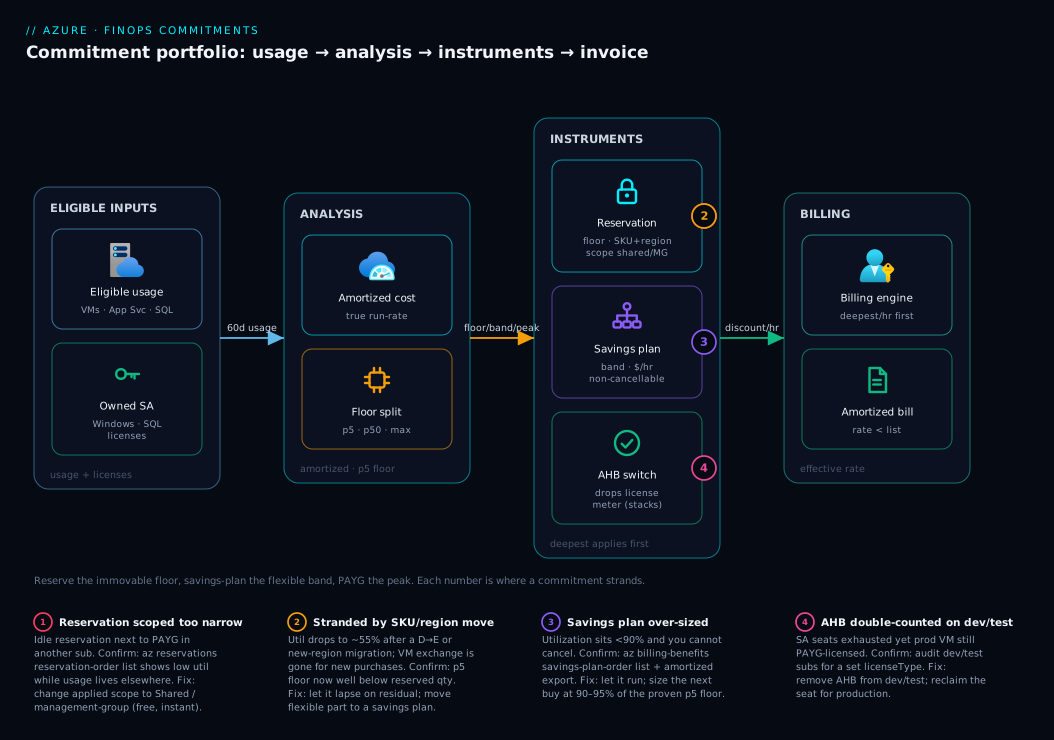
The diagram is not a network path — it is the decision and money flow of a commitment portfolio, read left to right as a request for discount travels from your usage to your invoice. On the far left, your eligible usage (running VMs, App Service plans, SQL) and your owned Software Assurance licenses are the two raw inputs. They feed an analysis stage where amortized cost and the 5th-percentile floor query split the estate into three bands: the immovable floor, the flexible band, and the spiky peak. That split is the whole strategy, and it is where the badges cluster, because every expensive mistake is a mis-classification at this stage.
From analysis, each band routes to its matching instrument: the floor to a reservation (deepest discount, SKU/region-pinned, scoped shared or to a management group), the flexible band to a compute savings plan (cross-SKU, cross-region, non-cancellable), and AHB runs alongside as a license-meter switch that stacks on either. Finally the billing engine applies the deepest applicable discount each hour and emits an amortized invoice that — if everything landed — shows every team an effective rate below list. Follow the numbered badges: they sit on the exact nodes where commitments strand (wrong scope, migrated SKU, over-sized savings plan, AHB double-counted on dev/test), and the legend narrates each as symptom · confirm · fix. The footer truth is the same as the prose: reserve only the floor, savings-plan the probable, PAYG the peak, and review monthly because the bands move.
Real-world scenario
Meridian Assurance, a regulated insurance carrier, ran a stable production fleet of roughly 120 D8s_v5 Windows VMs in westeurope and bought 3-year VM reservations against it at shared scope, with AHB enabled across the fleet from owned SQL Enterprise and Windows Datacenter SA. Monthly Azure spend was about ₹62 lakh, of which the committed compute was ₹28 lakh. For six months the portfolio looked exemplary: reservation utilization sat at 99%, AHB zeroed the Windows and SQL license meters, and amortized cost showed every business unit a rate well below list. The FinOps lead presented it as a model engagement.
Then two things happened in the same quarter. The application team kicked off a migration to E-series memory-optimized VMs (a heavier in-memory rating engine), and a new data-residency requirement forced a second region in northeurope. Reservation utilization on the D8s_v5 order cratered to ~55% almost overnight: the E-series and northeurope usage billed at full PAYG while the paid-for D8s_v5 reservation sat idle. The on-call instinct was to exchange the reservations into E-series — but those reservations were purchased after the compute-exchange cutoff, so like-for-like VM exchange was unavailable. The second instinct was to refund and re-buy — but the refund was both capped ($50k/12 months per billing scope) and wasteful, eating an early-termination fee on a 3-year purchase only six months in.
The constraint, then: a deep but now-mismatched 3-year reservation that could not be exchanged, against a fleet that had become flexible by nature — active migration, multi-region, changing SKU family. Fighting the reservation model was the wrong move.
The fix was to stop fighting it. They let the reservation expire gracefully on the residual D8s_v5 footprint (which was still ~50 VMs and falling), and moved the flexible portion of the estate onto a compute savings plan, which is SKU- and region-agnostic by design and therefore immune to exactly this churn. Critically, they sized the savings plan from the 5th-percentile hourly spend across both regions and both SKU families combined — not per-SKU — so the commitment floated to wherever usage landed:
// Cross-SKU, cross-region hourly spend floor that a savings plan can safely commit to.
// Summing eligible compute spend (not per-SKU) is what makes the commitment
// resilient to the D->E migration and the new region.
Usage
| where TimeGenerated > ago(60d)
| where MeterCategory in ("Virtual Machines")
| where ResourceLocation in ("westeurope", "northeurope")
| summarize HourlySpend = sum(PreTaxCost) by bin(TimeGenerated, 1h)
| summarize CommitFloorPerHour = percentile(HourlySpend, 5)
They committed ~80% of that floor as a 1-year savings plan (short term, because the migration meant the future shape was still moving), kept AHB enabled across both SKU families and regions to hold the Windows and SQL license savings constant through the migration, and let the old D8s_v5 reservations amortize out. They also moved the reservation scope from shared to the landing-zones management group, so the residual discount stayed inside the production org boundary and stopped cross-subsidizing a dev subscription that had quietly started consuming it.
Blended effective discount recovered to within a couple of points of the original target within one billing cycle, with zero stranded commitment going forward. The lesson the team wrote into their standards: reserve only the immovable floor; everything that can migrate goes on a savings plan — and AHB rides through both because it discounts the license, not the shape. The portfolio that resulted, before and after:
| Component | Before (mismatched) | After (re-layered) |
|---|---|---|
D8s_v5 reservation (westeurope) |
120 VMs, 99% → 55% util | residual ~50 VMs, amortizing out |
E-series + northeurope |
full PAYG (stranded) | covered by 1-yr compute savings plan |
| Savings-plan sizing basis | n/a | p5 hourly spend, both regions+families |
| AHB | Windows + SQL, westeurope only | unchanged across both regions/families |
| Reservation scope | shared (cross-subsidizing) | management group (landing-zones) |
| Blended effective discount | target, then collapsed | within ~2 pts of target, stable |
Advantages and disadvantages
The commitment model is the largest cost lever on the platform and also the one most able to backfire. Weigh it honestly:
| Advantages (why commitments help you) | Disadvantages (why they bite) |
|---|---|
| Deepest available discount on stable compute (up to ~65% at 3 yr) | A SKU/region-pinned reservation strands the moment the workload moves |
| Savings plans flex across SKU/region/OS/service — survive migration churn | Savings plans are non-cancellable; over-sizing is unrecoverable cash |
| AHB stacks on compute discounts and removes the license meter entirely | AHB compliance is asserted, not verified — a license audit can claw it back |
| Scope is mutable for free — re-point to chase utilization | Wrong scope silently idles a perfectly-sized reservation |
| Amortized cost exposes effective per-team rates below list | Read in actual view, a purchase looks like a lump and hides the run-rate |
| Recommendation engine gives a sized starting point | The engine is optimistic — taken at face value it over-buys |
| Layering (reservation+savings plan+PAYG) matches a moving estate precisely | Layering requires discipline and a monthly cadence most teams skip |
| Dev/Test subscriptions zero non-prod license cost | Apply AHB there too and you double-count, burning a prod SA seat |
The model is right for any estate past experimentation with a meaningful stable compute floor — which is almost all of them. It bites hardest on estates in active migration (where reservations strand), on teams that buy off a single peak month (over-utilization at the trough), and on anyone who treats a purchase as fire-and-forget rather than a portfolio reviewed monthly against a moving estate. The disadvantages are all manageable — but only if you classify usage honestly (floor vs band vs peak), buy the matching instrument, and review on a cadence. That discipline is the entire point of this article.
Hands-on lab
This lab is analysis-only and free — you will read your own utilization, coverage and recommendations, and verify AHB state, without buying anything. (Purchasing a commitment costs real money and is not reversible for savings plans; never do that in a lab.) Run in Cloud Shell (Bash).
Step 1 — Variables and confirm your billing context.
SUB=$(az account show --query id -o tsv)
echo "Operating on subscription: $SUB"
az account show --query "{name:name, state:state}" -o table
Step 2 — Stand up an amortized daily cost export so true run-rate (not purchase lumps) flows to storage. Create a throwaway storage account first.
RG=rg-finops-lab; LOC=centralindia
SA=stfinopslab$RANDOM
az group create -n $RG -l $LOC -o table
az storage account create -n $SA -g $RG -l $LOC --sku Standard_LRS -o table
SAID=$(az storage account show -n $SA -g $RG --query id -o tsv)

az costmanagement export create \
  --name amortized-daily-lab \
  --type AmortizedCost \
  --scope "subscriptions/$SUB" \
  --storage-account-id "$SAID" \
  --storage-container "cost-exports" \
  --storage-directory "amortized" \
  --timeframe MonthToDate --recurrence Daily \
  --recurrence-period from="2026-06-01T00:00:00Z" to="2026-12-31T00:00:00Z"
Expected: the export is created and will run daily; the first run lands a CSV under cost-exports/amortized/.
Step 3 — List any existing reservations and their utilization. (Empty output is fine — it just means none are purchased yet.)
az reservations reservation-order list -o table
az consumption reservation summary list --grain monthly \
  --start-date 2026-05-01 --end-date 2026-05-31 -o table 2>/dev/null \
  || echo "No reservations to summarize — expected if none purchased."
Step 4 — Pull savings-plan recommendations (the sized starting point you would haircut before buying):
az billing-benefits savings-plan-order list -o table 2>/dev/null \
  || echo "No savings-plan orders yet — expected."
# Recommendations also surface in Cost Management → Advisor → Reservations/Savings plans.
Step 5 — Verify AHB state across your VMs and SQL (read-only — this is the audit you run monthly):
# Which Windows VMs are bringing their own license vs paying for it?
az vm list --query "[].{name:name, rg:resourceGroup, license:licenseType}" -o table

# SQL on VMs carrying AHUB?
az sql vm list --query "[].{name:name, license:sqlServerLicenseType}" -o table 2>/dev/null \
  || echo "No SQL VMs — expected."
Expected: each Windows VM shows Windows_Server (AHB on) or None (paying for the license). A None on a production VM you do hold a license for is money on the floor.
Step 6 — Reconcile against amortized cost in the portal. Open Cost Management → Cost analysis, switch the metric to Amortized cost, group by Reservation and by Resource group. Effective rates on committed resources should sit visibly below list; coverage on stable workloads should be high.
Step 7 — Teardown. The export and storage cost essentially nothing, but clean up:
az costmanagement export delete --name amortized-daily-lab --scope "subscriptions/$SUB" --yes 2>/dev/null
az group delete -n $RG --yes --no-wait
You never purchased a commitment, so there is nothing irreversible to undo — exactly the point: the analysis is free; only the purchase is permanent.
Practice challenges
Work these in order — they escalate from “classify a workload” to “design and defend a full portfolio.” Each has a worked solution; try it before you open the toggle. All analysis is free (nothing here purchases a commitment), so you can safely reason through them against your own Cost Management data.
Challenge 1 (beginner) — classify three workloads. For each, pick the instrument: reservation, compute savings plan, PAYG, or Spot. (a) 30 domain-controller VMs, same SKU and region, running 24/7 for years. (b) A nightly genomics batch job that can restart if interrupted. © A service whose spend is steady but is actively migrating D-series → E-series across two regions.
<details> <summary>Solution</summary>
(a) Reservation — stable in both SKU and region long-term is the textbook reservation case; take the deepest discount on the part that never moves (3-year if it has proven durable). (b) Spot — fault-tolerant and interruptible; up to ~90% off with no commitment to strand. © Compute savings plan — steady spend but mobile shape; the savings plan is SKU/region/OS-agnostic and rides the migration where a reservation would strand.
</details>
Why: the instrument follows one question — is the shape stable (reserve), the spend stable but shape mobile (savings plan), or is it spiky/interruptible (PAYG/Spot)?
Challenge 2 (beginner) — split by the percentiles. Your 60-day floor query returns, for D8s_v5 in westeurope: p5 = 40, p50 = 70, max = 110. Which layer covers which count, and what stays on PAYG?
<details> <summary>Solution</summary>
- Reservation: the ~40-unit floor (the p5) — the count you run essentially all the time.
- Compute savings plan: the 40 → 70 band (floor to median), sized at ~90% of that band’s hourly spend so it never over-runs.
- PAYG (+ autoscale): everything above ~70, up to the 110 peak — the spiky top you never commit.
</details>
Why: committing to the mean (70) guarantees under-utilization every trough; committing to the peak (110) guarantees over-buy. Reserve the floor, savings-plan the band, PAYG the peak.
Challenge 3 (intermediate) — fix an idle reservation. A shared-scope check shows a reservation sitting at 55% utilization in subscription A while identical D8s_v5 PAYG usage runs in subscription B. Write the cheapest fix (a command), and say what you would not do.
<details> <summary>Solution</summary>
The reservation’s applied scope is too narrow to reach subscription B’s usage. Re-point it — free and instant — to Shared or the relevant management group:
az reservations reservation update \
  --reservation-order-id "<order-id>" \
  --reservation-id "<reservation-id>" \
  --applied-scope-type Shared
Do not buy a second reservation for subscription B (double-commit), and do not refund the first (fee + $50k/12-month cap). Re-scope is the first move on any under-utilizing reservation.
</details>
Why: scope is a mutable property at no cost; buying or refunding to solve a scope problem spends real money to fix free-to-fix metadata.
Challenge 4 (intermediate) — turn on the license benefit. A production Windows VM vm-app-01 in rg-prod shows licenseType = None, and you own Windows Server Datacenter with active Software Assurance. Enable AHB, and make it survive the next IaC deploy.
<details> <summary>Solution</summary>
Flip the property on the existing VM:
az vm update -g rg-prod -n vm-app-01 --license-type Windows_Server
Then set it as the deployed default so a redeploy does not silently revert to paying for the license — in Bicep the VM’s osProfile/licenseType (or Windows_Server on the VM resource) is pinned, and for SQL Managed Instance you pin licenseType: 'BasePrice'. Reconcile the entitlement against owned SA seats so an audit cannot claw it back.
</details>
Why: AHB removes the license meter (which a reservation never touches) and is a property, not a purchase — but an IaC default of None/LicenseIncluded will revert it on the next deploy unless you pin it.
Challenge 5 (advanced) — decide with the break-even math. You hold a 3-year VM reservation bought at a representative 60% discount. After a partial migration it now runs at 62% utilization. Is it still cheaper than PAYG for the usage you actually run, and what is your move?
<details> <summary>Solution</summary>
Break-even utilization = 1 − d = 1 − 0.60 = 40%. At 62% utilization you are above break-even, so the reservation is still cheaper than PAYG for the usage you run — do not refund it (you would eat a fee and it is genuinely still saving). But 62% is far below the ~95%+ you want: the gap is waste versus a smaller commitment. The move is (1) re-scope to pull matching usage under it and lift utilization for free, and (2) at renewal, re-size down to the current p5 floor and move the mobile part to a savings plan. Let it ride to term; do not exchange (VM exchange is gone) or refund.
</details>
Why: break-even (1 − d) tells you when a commitment turned toxic; the 95% target tells you when it is merely sub-optimal — 62% is the second, not the first, so you optimize rather than refund.
Challenge 6 (advanced) — design and defend a portfolio. An estate: ~50 D8s_v5 running 24/7 in westeurope (proven durable 18 months); a band that autoscales from 50 → ~90 daily; a new northeurope region just added for data residency; nightly Spark batch that tolerates eviction; owned SQL Server Enterprise with SA on two Managed Instances. Lay out every lever, its scope, its term, and the review cadence.
<details> <summary>Solution</summary>
- Reservation: ~50×
D8s_v5,westeurope, 3-year (durability proven), shared or management-group scope so it floats to matching usage; use instance-size flexibility for in-family resizes. - Compute savings plan: cover the 50 → 90 band and the new
northeuropeusage, sized at ~90% of the p5 hourly spend across both regions, 1-year term (the estate is still moving with the new region). - PAYG + autoscale: the spiky top above ~90.
- Spot: the nightly Spark batch — up to ~90% off, evictable, no commitment.
- AHB:
BasePriceon both SQL MIs (Enterprise → up to 4× GP vCore mapping), pinned in IaC; not on any dev/test subscription. - Cadence: monthly review — reservation and savings-plan utilization, coverage gaps, AHB on every eligible prod resource and off dev/test, expiries in 60–90 days, and scope vs where usage now runs.
</details>
Why: it is the whole article in one answer — reserve the proven floor deeply, savings-plan the flexible/migrating band, Spot the interruptible, stack AHB on the license meter, scope for utilization, and review monthly because every band drifts.
Common beginner mistakes
These are misconceptions, not operational symptoms — the wrong mental model a newcomer brings, and the right one to replace it with. (The symptom → cause → fix table above handles the operational failures; this handles the thinking that causes them.)
-
“A reservation reserves capacity — it guarantees me the VMs.” No. A pricing reservation is a billing discount applied to matching usage; it does not hold hardware for you. If you need Azure to guarantee capacity, that is a different, separate product (on-demand capacity reservations), which you can pair with a pricing reservation but is not the same thing. Right model: a reservation is a pre-paid discount, not a hotel booking for silicon.
-
“Buying a reservation will change or restart my VMs.” Nothing deploys and nothing restarts. A reservation and a savings plan are billing artifacts purchased against a billing scope, not resources in a resource group. Your running VMs are untouched; the discount simply starts applying to hours that match. Right model: you are buying a line-item discount, not provisioning infrastructure.
-
“A savings plan is just a cheaper, easier reservation.” They sit on a different axis. A reservation pins a shape (SKU + region) for the deepest discount; a savings plan pins a spend ($/hr) for flexibility, at a shallower discount, and is non-cancellable. Buying only savings plans “because they’re easier” leaves the deeper reservation discount unclaimed on the floor that never moves. Right model: reservation = deepest on the immovable; savings plan = flexible on the mobile; you usually want both.
-
“I should aim for 100% coverage — commit everything.” No. You deliberately leave the spiky peak on PAYG. Committing the peak means every trough falls below your commitment and you under-utilize. Full coverage is a worse portfolio than floor-reserved, band-savings-planned, peak-PAYG. Right model: the goal is high utilization on what you did commit, not maximum coverage.
-
“Azure Hybrid Benefit is a discount I purchase or negotiate.” AHB is a property you toggle (
licenseType), free to flip on and off, asserting that you own Windows/SQL licenses with Software Assurance. There is nothing to buy and no negotiation — but the compliance is on you: Azure does not verify it, and an audit can claw it back. Right model: AHB is a switch backed by a license you must actually hold, not a coupon. -
“I have to choose between a reservation and Hybrid Benefit.” They stack, because they discount different meters — the reservation (or savings plan) cuts the compute portion, AHB removes the license portion. The published reserved Windows rate already assumes AHB. Most production runs both at once. Right model: compute discount and license discount are orthogonal and compound.
-
“The Advisor / recommendation number is the amount I should buy.” The recommendation is a starting point, and it runs optimistic — it assumes your recent usage repeats exactly. Take it at face value and you over-buy. Right model: haircut the recommendation 5–10% toward the p5 floor; the engine suggests, you decide conservatively because the exits are narrow.
Common mistakes & troubleshooting
The portfolio-level failure modes, each as symptom → root cause → how to confirm → fix. These complement the playbook table above with the reasoning behind each.
1. Committing to the average (or the peak) instead of the floor. Symptom: a reservation that looked right under-utilizes every weekend and overnight. Root cause: sized to the mean, so every trough falls below the commitment. Confirm: the p5/p50/max query shows a wide gap between floor and median. Fix: re-size future buys to the p5 floor; cover the floor→median band with a savings plan, not a bigger reservation.
2. Single-subscription scope on a platform-team reservation. Symptom: a perfectly-sized reservation idles while identical PAYG usage runs in a sibling subscription. Root cause: scope forbids cross-subscription application. Confirm: az reservations reservation-order list shows low utilization while usage lives elsewhere. Fix: change applied scope to Shared or the relevant management group — free, instant.
3. Trying to exchange a VM reservation after a migration. Symptom: the exchange option is gone. Root cause: like-for-like compute exchanges ended for purchases after the cutoff. Confirm: the reservation order has no exchange action. Fix: let the reservation lapse on the residual footprint; move the migrated/flexible portion to a compute savings plan.
4. Over-sizing a savings plan off the optimistic recommendation. Symptom: savings-plan utilization sits at 85% indefinitely. Root cause: took the recommendation at face value; it assumed the recent peak repeats. Confirm: az billing-benefits savings-plan-order list plus amortized export shows persistent unused commitment. Fix: you cannot cancel — let it run, and size the next buy at 90–95% of the proven floor.
5. AHB applied to a dev/test subscription. Symptom: SA seats exhausted, yet a production VM still pays for its Windows license. Root cause: AHB was toggled on a dev/test subscription that already zeroes the license, consuming the entitlement for nothing. Confirm: audit dev/test subs for a set licenseType. Fix: remove AHB from dev/test; reclaim the seat for production.
6. IaC reverting AHB on redeploy. Symptom: a SQL database’s AHB silently turns off after a pipeline run. Root cause: the Bicep/Terraform default is LicenseIncluded. Confirm: az sql db show --query licenseType returns LicenseIncluded right after a deploy. Fix: set BasePrice explicitly in the template so deploys preserve it; gate with policy.
7. Reading cost in actual instead of amortized. Symptom: the bill shows a huge lump on reservation purchase day and “looks wrong.” Root cause: the actual view books the upfront purchase as a lump; the amortized view spreads it. Confirm: toggle Cost analysis between Actual and Amortized — the lump vanishes in amortized. Fix: standardize all FinOps reporting on amortized.
8. Auto-renew re-buying a stale quantity. Symptom: at term end a reservation renews at last year’s count even though the estate shrank. Root cause: auto-renew was left on. Confirm: the reservation order shows the auto-renew flag and a renewal at the old quantity. Fix: disable auto-renew; re-size from the current floor at each renewal.
9. Hitting the refund cap. Symptom: a refund request is blocked. Root cause: you exceeded $50k in refunds in a rolling 12 months for that billing scope. Confirm: the returns history in billing. Fix: re-scope instead (free); if a refund is truly needed, stagger across cap windows.
10. Assuming a savings plan covers storage/DB/egress. Symptom: coverage looks low and storage still bills at PAYG. Root cause: savings plans are compute; storage, databases and egress have their own products. Confirm: the eligibility table — storage/DB are excluded. Fix: buy the dedicated storage/SQL/Cosmos reservation for those workloads.
11. Cross-subsidy muddying showback under shared scope. Symptom: one team’s effective rate looks better than its own purchases justify. Root cause: shared scope let it consume another team’s reservation discount. Confirm: amortized cost per subscription against each team’s own commitments. Fix: move to management-group scope; reconcile showback to the org boundary.
12. 3-year lock on a floor that wasn’t durable. Symptom: a 3-year reservation strands mid-term during a re-platform. Root cause: the “floor” included usage that was about to migrate. Confirm: current p5 floor is well below the reserved quantity. Fix: let it lapse on the residual; savings-plan the mobile part; next time gate 3-yr buys behind an explicit “is this genuinely permanent?” sign-off.
Best practices
Crisp, production-grade rules distilled from the above:
- Reserve only the immovable floor. Use the p5 hourly concurrency per SKU as the defensible quantity; never commit to the mean or the peak.
- Layer, don’t choose. Reservation on the floor, compute savings plan on the flexible band, PAYG on the peak, Spot on the interruptible — most estates run all of them.
- Default reservation scope to shared (or management-group). It maximizes utilization, which is what actually determines ROI; pin to single-subscription only for strict chargeback.
- Re-scope before you refund. Scope changes are free and instant; refunds carry a fee and a $50k/12-month cap. Re-scope is the first move on any under-utilizing reservation.
- Buy conservatively because the exits are narrow. VM reservation exchanges are gone and savings plans cannot be cancelled — size below your true floor and let probable usage ride a savings plan or PAYG.
- Prefer 1-year terms while the estate is moving. Reserve 3-year terms for a floor you have proven durable across multiple review cycles.
- Apply AHB to every eligible production Windows/SQL resource — and never to dev/test. Dev/test already zeroes the license; AHB there double-counts and burns an SA seat.
- Gate AHB and license types behind policy and IaC. Make
BasePrice/Windows_Serverthe deployed default so a redeploy never silently reverts the benefit. - Report exclusively on amortized cost. It is the only view that shows true run-rate and effective per-team rates; the actual view hides the run-rate behind purchase lumps.
- Haircut the recommendation 5–10%. The engine assumes the recent past repeats exactly; trim toward the conservative side.
- Reconcile AHB usage against owned SA seats monthly. Compliance is asserted, not verified; track it in a SAM tool so an audit cannot claw it back.
- Run a fixed monthly review with finance and platform in the room. Commitments decay against a moving estate; treat the portfolio as a living thing, not a one-time purchase.
The monthly commitment-review checklist
Run this on a fixed cadence; each row is a question with a clear owner and a fix:
| Check | Trigger to act | Action |
|---|---|---|
| Amortized daily export live and flowing | Export missing/stale | Recreate the export to storage/workspace |
| Reservation utilization reviewed | Any order <95% | Re-scope first (free); refund only as last resort |
| Savings-plan utilization reviewed | Persistent <90% | Size the next buy lower (no cancel exists) |
| Coverage gap on stable workloads | Stable usage still on PAYG | Buy a right-sized reservation for the gap |
| AHB on every eligible prod resource | A prod Windows/SQL on None/LicenseIncluded |
Set the license type; reconcile SA seats |
| AHB off on all dev/test subs | AHB found on dev/test | Remove it; reclaim the SA seat for prod |
| Upcoming expiries (60–90 days) triaged | Term ending | Renew / resize / lapse against current floor |
| Scope vs where usage now runs | Usage moved subs | Re-point scope to chase utilization |
| Chargeback uses amortized rates | Teams see list price | Switch showback to amortized; bound shared scope |
| New 3-yr commitments signed off | A 3-yr buy proposed | Require explicit “floor is genuinely permanent” approval |
Security notes
Commitments are billing artifacts, but they carry real security and governance weight:
- Purchase is a privileged action. Buying reservations/savings plans requires the EA Reservation Purchaser role (or appropriate MCA billing role / subscription owner). Grant it narrowly — an over-broad assignment lets someone lock six-figure, hard-to-reverse commitments. Audit who holds it.
- Least privilege on billing scope. Reservation and savings-plan management (scope changes, refunds) should be limited to the FinOps/platform team; most engineers need only read on cost data. Use Azure RBAC on the billing account and management groups, not blanket owner.
- AHB is a compliance assertion — protect its integrity. Because Azure does not verify the license, the only control is process: gate
licenseTypebehind Azure Policy (audit or deny outside the SAM-approved process) and IaC so AHB is attributable and reviewed, never silently flipped. An unauthorized AHB toggle is both a cost and a compliance event. - Cost-export storage holds sensitive financial data. Amortized exports reveal spend, effective rates and per-team allocation. Put the export storage account behind private endpoints, restrict access with RBAC, and treat the data as confidential — competitors and bad actors find spend patterns useful.
- Separate duties between buying and approving. The person who recommends a commitment should not be the only one who approves it; require a finance sign-off on large or 3-year purchases, mirroring change control.
- Tag and attribute every commitment. Even though reservations aren’t tagged like resources, record their intent, owner and the floor analysis that justified them, so an auditor (or your future self) can see why each commitment exists.
- Policy-gate the dev/test AHB trap. A policy that flags AHB on dev/test subscriptions prevents the silent SA-seat leak that is both a cost and a licensing-compliance problem.
Cost & sizing
What drives the bill, how to right-size, and rough figures (illustrative — confirm against your EA/MCA price sheet):
| Lever | What drives it | Right-size rule | Rough impact |
|---|---|---|---|
| Reservation term | 1 vs 3 yr | 3 yr only on a proven floor | 3 yr ~10–15 pts deeper than 1 yr |
| Reservation quantity | committed SKU count | p5 hourly concurrency | Each idle unit is a negative discount |
| Savings-plan commit | $/hr | 90–95% of p5 hourly spend | Under-run is unrecoverable (no cancel) |
| Payment option | upfront vs monthly | monthly unless cash-flow favors upfront | Upfront occasionally slightly cheaper |
| AHB coverage | owned SA seats | every eligible prod core | Removes the entire license meter |
| Scope | utilization reach | shared/MG to maximize util | Wider scope → higher utilization → better ROI |
| Spot for batch | interruptible work | move fault-tolerant jobs to Spot | up to ~90% off (evictable) |
Rough sizing math for a stable production fleet: with a p5 floor of, say, 40 D8s_v5 running essentially always, a 3-year reservation on those 40 at shared scope captures the deepest discount on the part that never moves; the band from 40→~70 (median) rides a compute savings plan sized at ~90% of that band’s hourly spend; everything above ~70 stays on PAYG with autoscale. AHB on all 40 (and the savings-plan-covered band) removes the Windows license meter on top. In INR terms, on a fleet spending ~₹28 lakh/month of committable compute, moving from all-PAYG to this layering commonly recovers 35–55% of the committable portion — lakhs per month — provided utilization stays high; a reservation under-utilizing at 60% gives back a chunk of that and can net out worse than PAYG.
Free-tier note for learning this topic: the analysis is free. Cost exports, utilization queries, recommendation reads and AHB audits cost essentially nothing. The only thing that costs money is the purchase itself — which is exactly why you practice the analysis until you are confident, and treat the purchase as the irreversible, finance-approved step it is.
Interview & exam questions
Mapped to AZ-104, AZ-305, and the FinOps Certified Practitioner body of knowledge.
1. When does a reservation beat a compute savings plan? When the footprint is stable in both SKU and region for the term. The reservation gives a deeper discount for the same usage; the savings plan only wins when the shape (SKU/region/OS/service) is uncertain even though the spend is stable.
2. What does a compute savings plan cover that a VM reservation does not? Breadth across services and shape: VMs plus App Service, Container Instances, Functions Premium and dedicated hosts, and across SKU family, region and OS — applied automatically to the highest-rate eligible usage first. A VM reservation is per-resource-type and SKU/region-pinned.
3. Explain the difference between coverage and utilization. Coverage is the fraction of eligible usage already under a commitment (low = money on the table). Utilization is the fraction of a purchased commitment actually consumed (low = over-bought). You want both high; they fail independently.
4. Why size to the 5th-percentile floor rather than the average? The floor is the minimum sustained concurrency — the quantity you run essentially all the time, so a reservation on it stays ~100% utilized. Committing to the average guarantees under-utilization during every trough.
5. What changed about VM reservation exchanges, and what is the intended flexibility path now? Microsoft ended like-for-like compute reservation exchanges for purchases after a cutoff date. The intended path to flexibility is the compute savings plan, which is SKU/region/OS-agnostic by design.
6. Can you cancel a savings plan? What is the implication? No — savings plans are non-cancellable and non-refundable for the term. The implication is that you size them conservatively, below your true floor, because over-committing is cash you cannot recover.
7. How does Azure Hybrid Benefit relate to a reservation on a Windows VM? They stack — AHB removes the license meter while the reservation discounts the compute meter. The published reserved Windows rate already excludes the license, so reserved-rate-plus-owned-license is the deepest Windows price.
8. Why must you NOT apply AHB to a dev/test subscription? A Dev/Test (EA or PAYG Dev/Test) subscription already zeroes the Windows/SQL license charge for VS subscribers. Applying AHB there double-counts — it doesn’t discount further and it consumes an SA entitlement a production VM could have used.
9. A reservation is under-utilizing. What is the first, cheapest fix? Re-scope it — change the applied scope (e.g., single-subscription → shared or management-group) to reach matching usage elsewhere. Scope changes are free and instant; refunds carry a fee and a $50k/12-month cap.
10. Why report on amortized rather than actual cost? Amortized spreads an upfront purchase across the term, revealing true daily run-rate and effective per-team rates; actual books the purchase as a lump on buy-day, hiding the run-rate and making utilization impossible to read.
11. What is instance size flexibility and how does it differ from a savings plan’s flexibility? A VM reservation flexes within a single SKU family by a published ratio (e.g., one D8s_v5 covers two D4s_v5). A savings plan flexes across families, regions, OS and services. Size flexibility does not add region flexibility.
12. How do you decide reservation scope for a central platform team with strict chargeback? Use management-group scope: it maximizes utilization within an org boundary while preventing cross-subscription subsidy that shared scope allows. Reconcile per-team cost using amortized (effective) rates.
Quick check
- You have a fleet stable in spend but actively migrating from D-series to E-series across two regions. Which instrument fits, and why?
- A 3-year VM reservation drops to 55% utilization after a migration. Rank your options from cheapest to most expensive.
- Your savings-plan utilization sits at 85% indefinitely. Can you cancel it? What do you do?
- A production Windows VM shows
licenseType = Noneand you own the SA. What are you losing, and how do you fix it? - Why should AHB never be applied to a Dev/Test subscription?
Answers
- A compute savings plan — it is SKU-, region- and OS-agnostic, so it keeps applying through the D→E migration and the second region. A reservation would strand on the abandoned SKU/region. Size it from the p5 hourly spend across both regions and families combined.
- Cheapest to most expensive: (a) re-scope to where matching usage runs (free); (b) let it lapse on the residual footprint while moving the flexible part to a savings plan (no cost, just time); © refund (early-termination fee + $50k/12-month cap — last resort). VM exchange is unavailable for post-cutoff purchases.
- No — savings plans are non-cancellable. Let the current one run to term and size the next purchase at ~90–95% of the proven floor. The 85% tells you the original commit was set above the true floor.
- You are paying the Windows license portion of the meter that AHB would remove — money on the floor. Fix with
az vm update --license-type Windows_Server(and set it in IaC so a redeploy doesn’t revert it). Reconcile the seat against owned SA. - A Dev/Test subscription already zeroes the Windows/SQL license charge for VS subscribers. AHB there does not discount further and consumes an SA entitlement a production VM could have used — a double-count that wastes a license seat.
Glossary
-
Reservation — A pre-paid commitment to a specific compute SKU + region (or instance-size-flexible group) for 1 or 3 years, in exchange for the deepest discount; strands if the workload moves off the SKU/region.
-
Compute savings plan — A commitment to a fixed hourly dollar spend on eligible compute (VMs, App Service, ACI, Functions Premium, dedicated hosts) for 1 or 3 years; flexes across SKU/region/OS/service; non-cancellable.
-
Pay-as-you-go (PAYG) — List-price billing with no commitment; the liquidity reserve for spiky or uncertain usage.
-
Azure Hybrid Benefit (AHB) — A licensing benefit that lets you bring owned Windows Server / SQL Server licenses (with Software Assurance) to Azure and drop the license portion of the meter; a resource property, not a purchase; stacks on compute discounts.
-
Software Assurance (SA) — The Microsoft licensing benefit that enables AHB; the entitlement AHB asserts and that a license audit can verify.
-
Coverage — The fraction of eligible usage already under a commitment; low coverage on a stable workload means money left on PAYG.
-
Utilization — The fraction of a purchased commitment actually consumed; below ~95% on a reservation means you over-bought.
-
Amortized cost — A cost view that spreads an upfront commitment purchase across its term, revealing true daily run-rate and effective per-team rates.
-
Applied scope — The property that decides which usage a reservation may discount: single resource group, single subscription, management group, or shared.
-
Instance size flexibility — A VM reservation’s ability to apply its discount to other sizes within the same family by a published ratio.
-
Exchange — Swapping one reservation for another; ended for compute/VM reservations on new purchases (use a savings plan instead); still allowed for non-compute reservations.
-
Refund / cancellation — Returning a reservation for prorated value, subject to an early-termination fee and a $50,000-per-billing-scope annual cap.
-
Dev/Test subscription — An EA or PAYG subscription type that zeroes the Windows/SQL license charge for Visual Studio subscribers’ non-production workloads; AHB should not be added on top.
-
Recommendation engine — Cost Management’s suggested hourly/quantity commitment with a projected utilization, based on recent usage; optimistic — haircut it 5–10%.
-
Effective rate — The post-discount per-unit price a team actually pays, visible only in amortized cost; should sit below list when a commitment is landing.
-
Enterprise Agreement (EA) — A volume licensing/billing account type; reservation and savings-plan purchase is gated by an enrollment policy toggle plus the Reservation Purchaser role.
-
Microsoft Customer Agreement (MCA) — The modern billing account type; purchase rights live on the billing profile (owner/contributor or a delegated reservation-purchaser role).
-
Billing scope — The account/profile a commitment is purchased against and the boundary the $50,000 rolling-12-month refund cap is measured against; distinct from a reservation’s applied scope.
-
Reservation Purchaser — The RBAC role that lets a non-admin buy reservations/savings plans on a billing scope; separate from the roles that manage an existing commitment (re-scope, refund).
-
Break-even utilization — The utilization at which a commitment costs exactly the same as PAYG, equal to
1 − discount depth; below it a commitment costs more than list price. -
Commitment ladder — The maturity sequence a team climbs — PAYG → Spot → savings plan → reservation → 3-year + AHB — adding commitment only as confidence in the baseline grows.
-
Ratio units — The per-family normalization factor in which a VM reservation is counted, so one purchased size can flex to other sizes in the same family by their published ratios.
-
On-demand capacity reservation — A separate product that reserves actual Azure hardware capacity for a SKU/zone; unlike a pricing reservation it guarantees capacity, and the two can be paired.
-
Spot VM / eviction — Deeply discounted (up to ~90%) surplus capacity that Azure can reclaim (“evict”) on short notice; for interruptible, fault-tolerant work only, and never a committable instrument.
-
Auto-renew — A reservation/savings-plan setting that re-buys the same quantity at term end; leave it off unless the floor is proven, so a shrunk estate is not silently re-committed.
Next steps
- Build the cost-management foundation this depends on with the Azure FinOps & Cost Engineering Guide and operationalize it at scale via Azure FinOps Cost Management at Scale.
- Get accurate allocation — the prerequisite for honest coverage and showback — from Tagging & resource organization for cloud cost visibility.
- Understand the compute these commitments discount, end to end, in the Azure VM Deep Dive: Every Setting, and the interruptible end of the spectrum in Azure specialized compute: dedicated hosts, Spot, confidential, HPC & batch.
- Pay down the licensing that AHB targets hardest with Azure SQL Database: Hyperscale, elastic pools, ledger & Always Encrypted.
- Enforce the AHB and license-type defaults as guardrails with Azure Policy & governance at scale.