In a nutshell
Picture a busy restaurant kitchen. The old Linux Consumption plan was a food truck: you paid the cooks only while they were actually cooking (cheap!), but the truck had no private door into the members-only supplier warehouse (no VNet), and every morning the grill started stone cold, so the first orders crawled out late (cold start). The Premium plan was the opposite extreme — a full restaurant with a brigade of cooks clocked in 24×7 whether anyone ordered or not (always warm, always billed). Flex Consumption is the smart kitchen that finally gives you both at once: keep a handful of cooks pre-stationed for the lunch rush (always-ready instances), call in extra hands only as the ticket rail fills (elastic scale-out), pay each cook by the minute they actually cook (execution billing), send everyone home when the dining room empties (scale-to-zero) — and it has a private delivery door straight into the members-only warehouse (VNet integration). It even enforces one house rule that keeps the kitchen from collapsing under a rush: never seat more diners than the line can plate (concurrency × max-instances = backpressure).
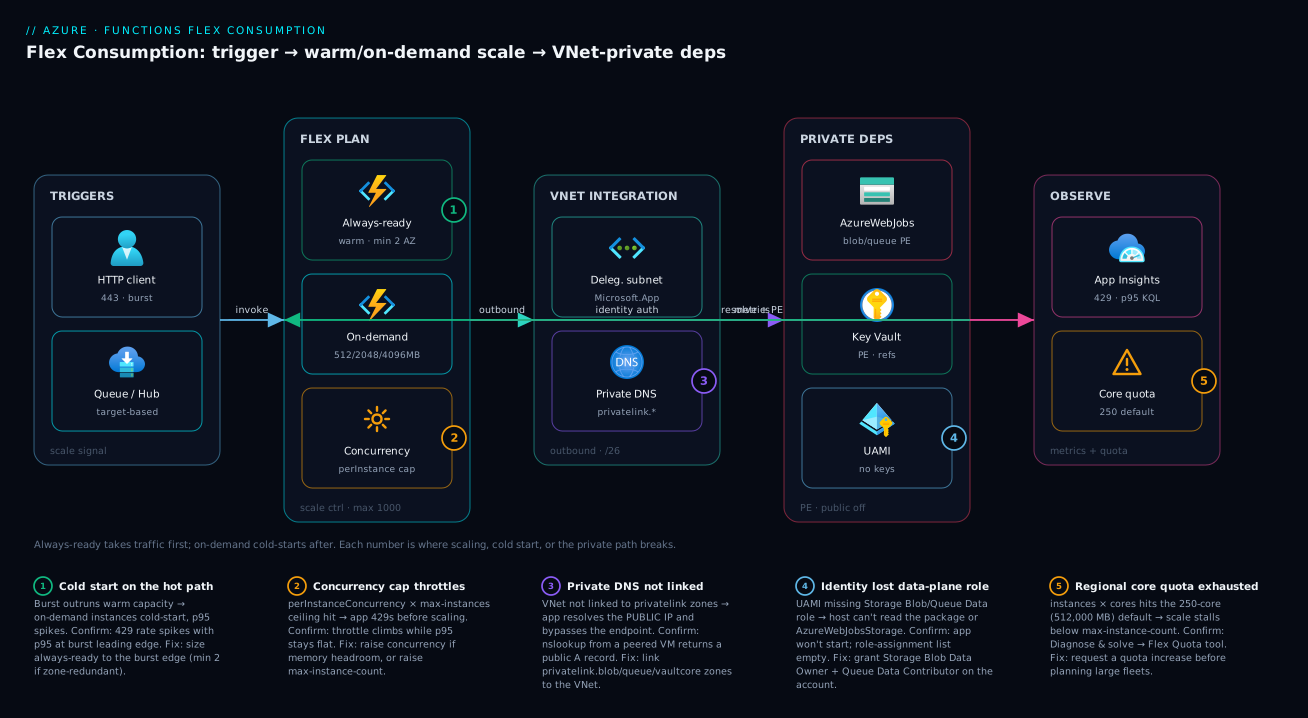
That single image is the whole lesson. Flex lets a serverless function reach private resources, hold a latency promise on its busiest path, and refuse to overwhelm a fragile database — while still costing almost nothing when idle. Everything below is how to set each of those five dials correctly, because every one of them ships with a default that is wrong for production and a failure mode that bites under load.
Level: Advanced, with a beginner on-ramp · Time: ~71 min
You’ll be comfortable here if you’ve already met a function app, a trigger, and a managed identity — if any of those is new, start with Build a Simple Serverless API and come back. By the end you can choose Flex over Consumption or Premium on purpose, provision it on a private network, tune concurrency and always-ready the way the scale controller actually reasons, and tell a capped burst from a cold one in ninety seconds. The formal objectives and prerequisites are spelled out just below — this box is only the map you keep in your head.
The Linux Consumption plan gave you scale-to-zero and execution billing, but you paid for it with no VNet integration, opaque scaling, and cold starts you could only pray about. Flex Consumption is Microsoft’s answer: the same serverless billing model, but now with true virtual network integration, selectable instance memory, deterministic per-function concurrency, and always-ready instances to kill cold starts on the functions that matter. It is the plan you reach for when a function has to live on a private network, take a burst without a cold-start cliff, and never leak a storage key — all while still scaling to zero when idle.
This is how to provision it correctly, tune it, and prove the scale controller behaves under load. We treat Flex not as a checkbox but as a system with five tunable surfaces — plan choice, instance memory, concurrency, always-ready capacity, and the private network path — each of which has a default that is wrong for production and a failure mode that bites under load. You will learn every setting end to end: what it is, the values it accepts, the default, when to change it, the trade-off, and the limit or gotcha that turns it into a 2am incident. Because this is a reference you will return to mid-incident, every deep section anchors to a table you can scan, and the operational failure modes are laid out as a symptom→cause→confirm→fix playbook.
By the end you will stop guessing about serverless scale. When a burst lands you will know whether you were capped (concurrency × max-instances ceiling) or cold (burst outran the warm pool), whether your private dependency is actually private (or silently resolving a public IP because a DNS zone link is missing), and whether your bill is execution-only or quietly paying an always-ready baseline you forgot you reserved. Knowing which within ninety seconds is what separates a tuned serverless platform from one that pages you every flash sale.
What problem this solves
Serverless on Azure used to force a brutal trade. Linux Consumption billed only for active execution and scaled to zero — perfect economics — but it had no VNet integration, so a function could not reach a private database, an on-prem service over ExpressRoute, or a Key Vault behind a private endpoint. Its scaling was a black box you could not tune, and its cold starts were unbounded and unmitigated. The moment your function needed a private network or a latency SLA, you were pushed onto the Premium (Elastic Premium / EP) plan, which fixed networking and cold starts by keeping instances always on — and billing you for every reserved instance whether it ran code or not, with no scale-to-zero.
Flex Consumption dissolves that trade. It keeps scale-to-zero and execution billing like Consumption, but adds VNet integration, always-ready instances (warm capacity you reserve only where you need it), selectable instance memory, and explicit per-instance concurrency — the Premium capabilities, available à la carte on a consumption-billed plan. You pay the Premium-style baseline only on the slice of capacity you explicitly reserve, and nothing for the rest when it is idle.
What breaks without it: teams either over-pay for idle Premium compute to get a private network they barely use, or they ship on Consumption and discover too late that a synchronous API cold-starts past an upstream timeout, the upstream retries, and the retries stampede a backend with a fixed connection pool. Who hits this: anyone running serverless that must (a) reach private resources, (b) hold a tail-latency SLA on a hot path, © cap fan-out against a fragile downstream, or (d) eliminate storage connection strings for compliance. Flex is the plan that lets you do all four without abandoning serverless economics. To frame the whole surface before the deep dive, here is every tunable, the production-wrong default, and the failure it prevents:
| Tunable surface | Default (often wrong for prod) | What you set it to | Failure it prevents |
|---|---|---|---|
| Plan choice | Consumption (no VNet, opaque scale) | Flex Consumption | Cannot reach private deps; un-tunable cold starts |
| Instance memory | 2048 MB | 512 / 2048 / 4096 by workload | Over-paying cores, or OOM on heavy payloads |
| HTTP concurrency | Memory-derived (implicit) | Explicit perInstanceConcurrency |
Silent scale-math drift; runaway fan-out |
| Max instance count | High (scales toward 1,000) | Capped to your downstream’s limit | DDoS-ing your own database under burst |
| Always-ready | 0 (everything cold) | Sized to the burst leading edge | Cold-start latency on the hot path |
| VNet + Private DNS | Public outbound, no zone links | Delegated subnet + linked zones | Traffic bypassing private endpoints |
| Storage auth | Connection string in AzureWebJobsStorage |
Identity-based connection (UAMI) | A storage key sitting in app settings |
Learning objectives
By the end of this article you can:
- Choose Flex over Consumption or Premium with a concrete decision table — by VNet need, cold-start SLA, scale ceiling, and billing shape — and explain exactly what each plan bills.
- Provision a Flex app with a subnet delegated to
Microsoft.App/environments, the rightMicrosoft.AppRP registration, and VNet integration, in bothazCLI and Bicep. - Size instance memory (512 / 2048 / 4096 MB) and cap maximum instance count against the regional 250-core quota, computing cores as
instances × cores-per-instance. - Tune per-instance concurrency for HTTP (the
perInstanceConcurrencyflag) and non-HTTP triggers (target-based scaling inhost.json), and use it as a backpressure mechanism against a fragile downstream. - Eliminate cold starts on latency-critical groups with always-ready instances, and reason about their billing baseline and the zone-redundant minimum of 2.
- Deploy with one-deploy and replace the
AzureWebJobsStorageconnection string with an identity-based connection, plus lock down dependencies behind private endpoints and linked Private DNS zones. - Diagnose HTTP 429s as either an instance/quota cap or a cold-start cascade, using
InstanceCount, execution-unit metrics, and a Kusto query that correlates throttle rate against live instance count.
Prerequisites & where this fits
You should already understand Azure Functions basics: a function app is a deployment and scale unit, triggers (HTTP, Service Bus, Event Hubs, Timer) start executions, and bindings wire inputs/outputs. You should be comfortable with az in Cloud Shell, reading JSON output, and the idea of a managed identity (system- or user-assigned) granting an Azure resource access without secrets. Familiarity with VNet, subnets, private endpoints, and Private DNS zones helps, because half of Flex’s value is the private network path.
This sits in the Serverless track and assumes the trigger/binding fundamentals from Azure Functions: Serverless Patterns, Triggers & Bindings. It is the scaling-and-networking layer beneath orchestration — pair it with Durable Functions: Orchestration Patterns & Fan-Out/Fan-In when your workload needs stateful coordination, since the Durable trigger is one of Flex’s scale groups. The plan-choice question is upstream: Containers vs Serverless vs VMs: Choosing a Compute Model frames when serverless wins at all. For the private path, the dependency-side mechanics live in Azure Private Endpoints & Private DNS at Scale, and the egress-exhaustion story it shares with App Service is in Azure NAT Gateway: Deterministic Egress & SNAT Exhaustion.
A quick map of who owns what during a Flex incident, so you call the right person fast:
| Layer | What lives here | Who usually owns it | Failure classes it can cause |
|---|---|---|---|
| Trigger source | HTTP edge, Service Bus, Event Hubs | App / integration team | Burst shape that triggers cold starts; poison messages |
| Flex plan / scale controller | Concurrency, max-instances, always-ready | App + platform | 429 throttling (capped) or cold-start cascades |
| Regional core quota | 250-core (512,000 MB) budget | Subscription owner | Scale stalls below configured max |
| VNet integration subnet | Delegated /26, outbound route |
Network team | No outbound; subnet too small to scale |
| Private DNS zones | privatelink.* resolution |
Network / platform | App resolves public IP, bypasses PE |
| Backing storage / Key Vault | Package, host metadata, secrets | Platform + security | Boot failure on missing identity role |
| Managed identity (UAMI) | Data-plane roles, deploy auth | Security / platform | Host can’t read package → app won’t start |
Core concepts
Five mental models make every later tuning decision obvious.
Flex bills two pools, not one. Unlike Consumption (active execution only) or Premium (every reserved instance always), Flex splits capacity into on-demand instances that bill only while actively executing (a 1,000 ms minimum per execution, then rounded up to 100 ms) and always-ready instances that bill a baseline for provisioned memory continuously plus execution memory while running. You pay the Premium-style baseline only on the slice you explicitly reserve. The whole cost model collapses to: reserve the minimum warm capacity your latency SLA needs, let everything else scale to zero.
The scale controller is deterministic — you give it the math. On Consumption the scale heuristics were opaque. On Flex, instances are added based on the concurrency you configure: for HTTP, the scale controller adds an instance when existing instances are saturated at their perInstanceConcurrency; for non-HTTP, target-based scaling computes a desired instance count from queue depth and the batch settings. Scaling is no longer a mystery — it is traffic ÷ concurrency, bounded by your max-instance-count and the regional quota.
Concurrency is a backpressure valve, not just a perf knob. perInstanceConcurrency × maximum-instance-count is a hard ceiling on total in-flight executions. That product is the most important number on the plan: set it equal to (or below) your weakest downstream’s capacity — a database connection pool, a third-party rate cap — and overload becomes structurally impossible. The app throttles at the edge with 429s long before the downstream falls over. Size concurrency against your fragile dependency, not against incoming traffic.
The private path is two halves: route and resolve. VNet integration handles outbound routing — it puts the worker’s egress on a delegated subnet. But reaching a private endpoint also requires DNS resolution to the private IP, which only happens if the integration VNet is linked to the relevant Private DNS zones (privatelink.blob.core.windows.net, etc.). Get the route without the resolve and the app silently resolves the public IP, traffic skips the private endpoint, and your “private” architecture is a fiction. Both halves must be present.
Cold start is latency on the leading edge, not a constant. With always-ready capacity, steady-state traffic never cold-starts — the warm pool absorbs it. Cold start only appears when a burst outruns the warm pool, spilling onto on-demand instances that pay runtime boot, JIT, DI build, and connection-pool prime on their first request. The fix is never “warm everything” (that is just Premium); it is to size always-ready to the burst’s leading edge so the cold instances come up behind already-served traffic.
The vocabulary in one table
Before the deep sections, pin down every moving part. The glossary at the end repeats these for lookup; this table is the mental model side by side:
| Concept | One-line definition | Where it lives | Why it matters |
|---|---|---|---|
| Flex Consumption | Serverless plan with VNet, warm pool, selectable memory | The plan SKU | The whole subject; scale-to-zero + private + tunable |
| On-demand instance | Bills only while executing (1s min, 100ms round) | The plan | The scale-to-zero economics |
| Always-ready instance | Warm capacity, baseline-billed | Per scale group | Kills cold start on the hot path |
| Scale group | Functions that scale together (http/blob/durable) |
Runtime | Concurrency/always-ready apply per group |
perInstanceConcurrency |
HTTP executions per instance before scale-out | Scale config | The HTTP scale denominator + backpressure |
| Target-based scaling | Non-HTTP desired-instance from queue depth | host.json |
How Service Bus/queues/hubs scale |
| Instance memory | 512 / 2048 / 4096 MB per worker | Scale config | Drives vCPU, bandwidth, and core cost |
| Maximum instance count | Horizontal ceiling (40–1,000) | Scale config | The other half of the backpressure cap |
| Regional core quota | 250 cores (512,000 MB) per sub+region default | Subscription | Real scale ceiling under the configured max |
| Delegated subnet | /26+ delegated to Microsoft.App/environments |
VNet | Required for VNet integration |
| Private DNS link | VNet linked to privatelink.* zones |
Private DNS | Makes the private endpoint actually private |
| Identity-based connection | AzureWebJobsStorage__accountName + MI |
App settings | Removes the storage key entirely |
Flex vs Consumption vs Premium: the scaling and billing model
Pick the wrong plan and you either overpay for idle compute (Premium) or hit a wall you cannot tune around (Consumption). Here is the decision matrix that actually matters:
| Concern | Consumption | Premium (EP) | Flex Consumption |
|---|---|---|---|
| Scale to zero | Yes | No (min 1) | Yes |
| Max scale-out instances | 200 | 100 | 1,000 |
| VNet integration | No | Yes | Yes (subnet delegation) |
| Cold-start mitigation | None | Pre-warmed instances | Always-ready instances |
| Instance memory | Fixed | Fixed per SKU | Selectable: 512 / 2048 / 4096 MB |
| Concurrency control | Implicit | Implicit | Explicit per-instance |
| Billing | Execution only | Per-instance (always on) | Execution + always-ready baseline |
| OS | Linux/Windows | Linux/Windows | Linux only |
| In-place migration | — | — | No (create new app, redeploy) |
The billing distinction is the crux. Consumption bills only GB-seconds of active execution. Premium bills the full lifetime of every reserved instance whether it runs code or not. Flex Consumption splits the difference: on-demand instances bill only while actively executing (1,000 ms minimum, then rounded up to 100 ms), while any always-ready instances you configure bill a baseline for provisioned memory whether or not they execute. You only pay the Premium-style baseline on the slice of capacity you explicitly reserve. Read the three billing shapes side by side:
| Billing dimension | Consumption | Premium (EP) | Flex on-demand | Flex always-ready |
|---|---|---|---|---|
| Charged when idle | No | Yes (full instance) | No | Yes (memory baseline) |
| Execution rounding | GB-s of active time | n/a (always on) | 1,000 ms min, then 100 ms | Baseline + execution memory |
| Free grant | Monthly GB-s + executions | None | None on Flex | None on Flex |
| Scales to zero | Yes | No | Yes | No (it’s the warm floor) |
| Drives the bill | Active GB-seconds | Reserved instances | Active GB-seconds | Reserved memory × time |
And the decision rule as a table — match your hard constraint to the plan:
| If your hard constraint is… | Then choose… | Because |
|---|---|---|
| “Must reach a private DB / on-prem / private endpoint” | Flex (or Premium) | Consumption has no VNet integration |
| “Tail-latency SLA on a synchronous hot path” | Flex with always-ready | Warm pool defeats cold start, scoped to the hot group |
| “Spiky, scale-to-zero, no private network, cost-first” | Consumption | Cheapest when idle dominates; no warm baseline |
| “Always-on, predictable load, want max throughput” | Premium | Reserved instances + pre-warmed for steady high load |
| “Cap fan-out against a fragile downstream” | Flex | Explicit concurrency × max-instances is a hard valve |
| “Need a hard, low instance ceiling (e.g. max 5)” | Consumption / Premium | Flex floor for max-instance-count is 40 |
| “Windows runtime required” | Consumption / Premium | Flex is Linux only |
| “C# in-process model, can’t re-target” | Consumption / Premium | Flex requires the isolated worker |
| “Remove every storage key from config” | Flex | Identity-based AzureWebJobsStorage connection |
The C# in-process model is not supported on Flex Consumption — you must be on the isolated worker model (.NET 8 / 9 / 10). There is also no in-place migration in or out: moving to Flex means creating a new app and redeploying. The supported isolated stacks are .NET isolated, Node.js, Python, Java, and PowerShell; check
az functionapp list-flexconsumption-locationsand the runtime support matrix before you commit.
The supported runtime stacks on Flex, with the --runtime token and the model constraint:
| Runtime | --runtime token |
Model | Supported on Flex | Note |
|---|---|---|---|---|
| .NET (isolated) | dotnet-isolated |
Isolated worker | Yes (8/9/10) | In-process dotnet is not supported |
| Node.js | node |
n/a | Yes | LTS versions offered per region |
| Python | python |
n/a | Yes | Use --build-remote true for native wheels |
| Java | java |
n/a | Yes | Check version availability per region |
| PowerShell | powershell |
n/a | Yes | For automation/ops workloads |
| .NET (in-process) | dotnet |
In-process | No | Re-target the isolated worker |
| Windows-only stacks | — | — | No | Flex is Linux only |
Provision a Flex app with subnet delegation
VNet integration on Flex requires a subnet delegated to Microsoft.App/environments, at least /27 in size (use /26 to leave scaling headroom), and the Microsoft.App resource provider registered on the subscription. The portal and CLI enforce the RP registration at create time. Here is the full set of provisioning prerequisites — miss any one and create fails or the app can’t scale:
| Prerequisite | Exact value / command | Why it’s required | Gotcha if wrong |
|---|---|---|---|
| Resource provider | az provider register --namespace Microsoft.App |
Backs subnet delegation | “RP not registered” at create |
| Region supports Flex | az functionapp list-flexconsumption-locations |
Flex isn’t in every region | Silent fallback / create error |
| Delegated subnet | --delegations Microsoft.App/environments |
Flex joins via App environment | Microsoft.Web/... delegation fails |
| Subnet size | /27 minimum, /26 recommended |
Each instance consumes an IP | Subnet exhaustion caps scale-out |
| Subnet is empty/dedicated | One subnet per Flex app | Delegation is exclusive | Sharing it breaks integration |
| Backing storage | Standard_LRS/LZRS, TLS1_2, no public blob |
Host metadata + package | Public blob access fails policy |
| Runtime is isolated | dotnet-isolated, node, python, java, powershell |
No in-process C# | In-process never starts |
RG=rg-fnflex-prod
LOC=eastus
VNET=vnet-app
SUBNET=snet-func-flex
STORAGE=stfnflexprod$RANDOM

# 1. Register the provider that backs subnet delegation
az provider register --namespace Microsoft.App --wait

# 2. Network + a dedicated, delegated subnet (/26 leaves headroom)
az network vnet create -g $RG -n $VNET --address-prefixes 10.40.0.0/16 \
  --subnet-name $SUBNET --subnet-prefixes 10.40.1.0/26
az network vnet subnet update -g $RG --vnet-name $VNET -n $SUBNET \
  --delegations Microsoft.App/environments

# 3. Backing storage account (host metadata + deployment container)
az storage account create -g $RG -n $STORAGE -l $LOC --sku Standard_LRS \
  --allow-blob-public-access false --min-tls-version TLS1_2
The --delegations value is exact — Microsoft.App/environments, not Microsoft.Web/.... This trips up everyone coming from App Service VNet integration. With the subnet ready, create the app and join it to the VNet in one shot:
SUBNET_ID=$(az network vnet subnet show -g $RG --vnet-name $VNET -n $SUBNET --query id -o tsv)

az functionapp create \
  --resource-group $RG \
  --name fn-orders-prod \
  --storage-account $STORAGE \
  --flexconsumption-location $LOC \
  --runtime dotnet-isolated --runtime-version 8.0 \
  --vnet "$VNET" --subnet "$SUBNET"
--flexconsumption-location (not --consumption-plan-location) is what selects the Flex plan. Confirm the region supports it first with az functionapp list-flexconsumption-locations -o table — Flex is not in every region. To attach a VNet to an existing Flex app instead, use az functionapp vnet-integration add -g $RG -n fn-orders-prod --vnet "$VNET" --subnet "$SUBNET". The equivalent in Bicep, which is how you should actually ship this:
resource plan 'Microsoft.Web/serverfarms@2023-12-01' = {
  name: 'plan-fn-orders'
  location: location
  sku: { tier: 'FlexConsumption', name: 'FC1' }
  kind: 'functionapp,linux'
  properties: { reserved: true }
}

resource site 'Microsoft.Web/sites@2023-12-01' = {
  name: 'fn-orders-prod'
  location: location
  kind: 'functionapp,linux'
  properties: {
    serverFarmId: plan.id
    virtualNetworkSubnetId: subnet.id   // the delegated /26
    functionAppConfig: {
      runtime: { name: 'dotnet-isolated', version: '8.0' }
      scaleAndConcurrency: {
        instanceMemoryMB: 2048
        maximumInstanceCount: 120
      }
      deployment: {
        storage: {
          type: 'blobContainer'
          value: '${storage.properties.primaryEndpoints.blob}app-package'
          authentication: { type: 'SystemAssignedIdentity' }
        }
      }
    }
  }
}
The key reference table for create-time arguments — the flags people most often get wrong:
Flag (az functionapp create) |
Accepts | Selects / sets | Common mistake |
|---|---|---|---|
--flexconsumption-location |
a Flex region | The Flex plan | Using --consumption-plan-location (picks Consumption) |
--runtime |
dotnet-isolated/node/python/java/powershell |
Worker stack | dotnet (in-process) — unsupported |
--runtime-version |
e.g. 8.0, 20, 3.11 |
Stack version | Version not offered in the region |
--instance-memory |
512 / 2048 / 4096 |
Per-instance memory (MB) | Arbitrary value rejected |
--maximum-instance-count |
40–1000 |
Horizontal ceiling | 5 (below the 40 floor) |
--vnet / --subnet |
name or ID | VNet integration target | Subnet not delegated to Microsoft.App |
--deployment-storage-auth-type |
…ConnectionString/UserAssignedIdentity/SystemAssignedIdentity |
Package auth | MI lacks Blob Data role |
Configure instance memory and maximum instance count
Two knobs govern how big each worker is and how far the app can spread. Memory comes in three sizes; CPU and network bandwidth scale proportionally with it:
| Instance memory (MB) | vCPU cores | Network bandwidth | Use for | Cost note |
|---|---|---|---|---|
| 512 | 0.25 | Lowest | High fan-out, light per-request work | Cheapest cores; fits more in the quota |
| 2048 | 1 | Medium | Default for most workloads | The balanced default |
| 4096 | 2 | Highest | CPU/memory-heavy work, large payloads, ML inference | 2 cores each → halves quota headroom |
Every instance also gets an extra ~272 MB platform buffer that you are not billed for. Set memory at create time with --instance-memory, or change it later:
# Larger instances for a CPU-bound transform app
az functionapp scale config set -g $RG -n fn-orders-prod --instance-memory 4096

# Cap horizontal scale (40 is the lowest allowed max; 1000 the ceiling)
az functionapp scale config set -g $RG -n fn-orders-prod --maximum-instance-count 120
--maximum-instance-count accepts 40 to 1,000. The floor of 40 surprises people — you cannot pin a Flex app to “max 5 instances.” If you need a hard, low ceiling, Flex is the wrong plan. The two scale-config knobs and their boundaries:
| Setting | Values | Default | When to change | Trade-off | Limit / gotcha |
|---|---|---|---|---|---|
instanceMemoryMB |
512 / 2048 / 4096 | 2048 | CPU-bound → up; high fan-out → down | More memory = more cores = more quota burn | Only three discrete values |
maximumInstanceCount |
40–1000 | high (~100s) | Cap against downstream limits | Lower cap = earlier 429s under burst | Floor is 40 — no low ceiling |
alwaysReady[group] |
0–N per group | 0 | Latency-critical groups | Warm baseline billing | Min 2 if zone-redundant |
perInstanceConcurrency |
1–N (HTTP) | memory-derived | Pin explicitly in prod | Higher = fewer instances but more thrash risk | HTTP-only flag |
Mind the regional subscription quota: every Flex app in a subscription+region shares a default budget of 250 cores (512,000 MB). Cores are instances × cores-per-instance, so a single 4096-MB app maxes out the default quota at 125 instances (125 × 2). Always-ready instances count against it; scaled-to-zero apps do not. Request an increase via support before you plan for thousands of large instances. The quota math worked through, so you can see the ceiling your --maximum-instance-count actually hits:
| Instance memory | Cores / instance | Max instances at 250-core quota | Effective ceiling vs your --maximum-instance-count |
|---|---|---|---|
| 512 MB | 0.25 | 1,000 | Quota never binds before the 1,000 hard cap |
| 2048 MB | 1 | 250 | Quota binds if you set max-count > 250 |
| 4096 MB | 2 | 125 | Quota binds if you set max-count > 125 |
The limits and quotas you will actually hit on Flex, with the real numbers:
| Limit / quota | Value | Scope | What hitting it looks like | How to raise |
|---|---|---|---|---|
| Regional core quota | 250 cores / 512,000 MB (default) | Subscription + region | Scale stalls below --maximum-instance-count |
Support request |
| Max instance count | 1,000 | Per app | Hard horizontal ceiling | Cannot exceed |
| Min instance count (max-count floor) | 40 | Per app | Can’t pin a low ceiling | Use a different plan |
| Instance memory choices | 512 / 2048 / 4096 MB | Per app | Other values rejected | Fixed set |
| Subnet size | /27 min (/26 recommended) |
Integration subnet | IP exhaustion caps scale-out | Larger subnet at create |
| Always-ready min (zone-redundant) | 2 per group | Per scale group | Single warm instance rejected | n/a — by design |
| Always-ready min (non-zonal) | 1 per group | Per scale group | — | Raise to 2 when enabling AZ |
| Platform memory buffer | ~272 MB / instance | Per instance | Extra unbilled headroom | Not part of your memory size |
| Execution billing minimum | 1,000 ms, then 100 ms rounding | Per execution | Short calls cost a 1s floor | n/a |
| Deployment package source | one blob container | Per app | — | One-deploy pulls from it on start |
Per-instance concurrency: HTTP and non-HTTP triggers
This is the single most impactful tuning lever on Flex. Concurrency is how many parallel executions each instance handles. Set it too high and instances thrash under memory pressure; set it too low and you scale out (and bill) more instances than you need.
Flex groups functions into scale groups that scale together: all HTTP/SignalR triggers (http), Event Grid blob triggers (blob), and Durable orchestration/activity/entity triggers (durable). Everything else scales individually as function:<NAME>. Know which group a trigger lands in, because concurrency and always-ready apply per group:
| Trigger | Scale group | Concurrency mechanism | Notes |
|---|---|---|---|
| HTTP / SignalR | http |
perInstanceConcurrency flag |
The only type valid for that flag |
| Event Grid blob | blob |
Target-based (host.json) |
Event-Grid-sourced blob events |
| Durable orchestrator / activity / entity | durable |
Target-based + Durable settings | One group for all Durable functions |
| Service Bus queue / topic | function:<NAME> |
Target-based (serviceBus in host.json) |
Scales individually |
| Event Hubs | function:<NAME> |
Target-based (partition-bound) | Bounded by partition count |
| Storage Queue | function:<NAME> |
Target-based (queues in host.json) |
batchSize + newBatchThreshold |
| Timer | function:<NAME> |
n/a (single execution) | One instance per fire |
HTTP concurrency is set explicitly and, once set, is honored regardless of instance memory size:
# Each instance handles up to 10 concurrent HTTP executions before
# the scale controller adds another instance.
az functionapp scale config set -g $RG -n fn-orders-prod \
  --trigger-type http --trigger-settings perInstanceConcurrency=10
http is the only trigger type valid for perInstanceConcurrency. The default HTTP concurrency is derived from instance memory when you do not set it — bigger instances default higher. Pin it explicitly in production so a later memory change doesn’t silently shift your scale math. How the choice plays out:
perInstanceConcurrency |
Effect on scale-out | Effect per instance | Pick when |
|---|---|---|---|
| Low (e.g. 1–4) | Scales out aggressively (more instances) | Light load per worker, low thrash | Heavy per-request CPU/memory; isolation matters |
| Medium (e.g. 8–16) | Balanced | Good utilization | Typical I/O-bound APIs |
| High (e.g. 24–64) | Scales out reluctantly (fewer instances) | Dense, risk of memory pressure | Light, async, high-fan-out handlers with memory headroom |
| Unset (memory-derived) | Drifts when you change memory | Implicit | Never, in production — pin it |
For non-HTTP triggers (Service Bus, Event Hubs, Storage Queue), concurrency is governed by target-based scaling through host.json, not the CLI flag above. You tune the batch/concurrency knobs of the binding and the runtime computes a target instance count from queue depth:
{
  "version": "2.0",
  "extensions": {
    "serviceBus": {
      "maxConcurrentCalls": 16,
      "maxConcurrentSessions": 8,
      "prefetchCount": 32
    },
    "queues": {
      "batchSize": 16,
      "newBatchThreshold": 8
    }
  }
}
For a queue trigger, target-based scaling computes desired instances as roughly messages ÷ (batchSize + newBatchThreshold). Lowering batchSize makes the app scale out more aggressively per message backlog; raising it packs more work onto each instance. Tune this against downstream throughput limits (database connection pools, third-party API rate caps) — uncontrolled fan-out is how you DDoS your own backend. The host.json concurrency knobs that matter for target-based scaling:
host.json setting |
Binding | Default | Raise it to… | Lower it to… | Gotcha |
|---|---|---|---|---|---|
serviceBus.maxConcurrentCalls |
Service Bus (no sessions) | 16 | Pack more per instance | Throttle downstream | Per-instance, not global |
serviceBus.maxConcurrentSessions |
Service Bus (sessions) | 8 | Handle more sessions/instance | Preserve ordering pressure | Session-bound |
serviceBus.prefetchCount |
Service Bus | 0 | Cut receive latency | Reduce lock churn | Prefetch holds locks |
queues.batchSize |
Storage Queue | 16 | Fewer, denser instances | Scale out per backlog | Max 32; with threshold drives target |
queues.newBatchThreshold |
Storage Queue | batchSize/2 | Fetch next batch sooner | — | Adds to scale denominator |
eventHubs.maxEventBatchSize |
Event Hubs | varies | Bigger batches | Lower memory/latency | Scale also bounded by partitions |
The backpressure ceiling is the product of the two halves — size it against the weakest downstream:
| Downstream constraint | Concurrency | Max instances | In-flight ceiling | Safe vs the constraint? |
|---|---|---|---|---|
| DB pool = 200 connections | 24 | 8 | 24 × 8 = 192 | Yes — 192 < 200 |
| DB pool = 200 connections | 50 | 8 | 50 × 8 = 400 | No — pool exhausts |
| Partner API = 100 req/s cap | 10 | 10 | 10 × 10 = 100 | At the edge — add margin |
| No hard downstream limit | 16 | 120 | 16 × 120 = 1,920 | Bounded only by quota/latency |
Always-ready instances to kill cold starts
On-demand instances cold-start. For latency-critical paths — a synchronous checkout API, a webhook with a tight SLA — reserve always-ready instances that stay warm and take traffic first. The platform only spins up on-demand instances after the always-ready pool is saturated.
# Keep 3 warm instances for the HTTP group
az functionapp scale config always-ready set -g $RG -n fn-orders-prod \
  --settings http=3

# Mix: warm Durable group + warm a single hot function
az functionapp scale config always-ready set -g $RG -n fn-orders-prod \
  --settings durable=2 function:ProcessPayment=2
At create time the equivalent is --always-ready-instances http=3. Remove reservations with az functionapp scale config always-ready delete -g $RG -n fn-orders-prod --setting-names http function:ProcessPayment. What you can reserve, and the syntax for each:
| Always-ready target | Syntax | Covers | When to use |
|---|---|---|---|
| HTTP group | http=N |
All HTTP/SignalR triggers | Synchronous APIs with a latency SLA |
| Durable group | durable=N |
All Durable orchestrators/activities/entities | Orchestrations that must start instantly |
| Blob group | blob=N |
Event Grid blob triggers | Latency-sensitive blob processing |
| Single function | function:<NAME>=N |
One named function | One hot function inside a larger app |
| Remove a reservation | --setting-names <group> (delete verb) |
Frees the warm pool | Scaling reservation down to zero |
Two things to internalize. First, billing: always-ready instances bill a baseline for provisioned memory continuously, plus execution memory while running, with no free grant — this is the Premium-style cost, scoped to only the instances you reserve. Reserve the minimum that holds your steady-state concurrency. Second, zone redundancy: if you enable availability zones, the minimum always-ready count per group is 2, not 1, so the warm pool survives a zone outage. How to size the warm pool against the burst you actually get:
| Scenario | Steady-state concurrent reqs | Concurrency | Always-ready to reserve | Cold start exposure |
|---|---|---|---|---|
| Flat low traffic, tight SLA | ~20 | 10 | http=2 |
None at steady state |
| Predictable diurnal peak | ~120 at peak | 24 | http=5 (peak ÷ 24, rounded) |
Only above peak |
| Spiky flash-sale burst | base 50, spike 1,800 | 24 | http=6 (covers the leading edge) |
On-demand absorbs the tail |
| Zone-redundant, any load | any | any | min 2 per group | Survives one zone down |
| No latency SLA (async) | any | any | 0 (let it scale from zero) |
Accepted; cheapest |
A worked sizing rule: always-ready instances ≈ ceil(steady-state concurrent requests ÷ perInstanceConcurrency). Reserve that, let on-demand take everything above it, and the warm pool pays the cold-start cost once at deploy — never on a user request.
Not every trigger needs a warm pool. Match cold-start sensitivity to trigger shape before you spend on always-ready:
| Trigger type | Cold-start sensitivity | Reserve always-ready? | Why |
|---|---|---|---|
| Synchronous HTTP with latency SLA | High | Yes (http=N) |
A user/acquirer is blocked on the response |
| Durable orchestration (must start fast) | High | Yes (durable=N) |
Start latency is visible to the caller |
| Webhook with a tight timeout | High | Yes (http=N) |
Caller retries on slow start → amplification |
| Service Bus / queue (async backlog) | Low | Usually no | A few seconds of warm-up is invisible to a backlog |
| Event Hubs stream processing | Low–Medium | Rarely | Throughput matters more than first-call latency |
| Timer / scheduled batch | None | No | Nobody is waiting on the first execution |
Deploy with one-deploy and managed-identity storage
Flex has exactly one deployment path: build, zip, push the package to a blob container. The app pulls and runs from that package on startup. No WEBSITE_RUN_FROM_PACKAGE gymnastics — that behavior is built in.
# Build + zip your project, then one-deploy it
func azure functionapp publish fn-orders-prod
# or push a prebuilt package and run the build remotely on the platform:
az functionapp deployment source config-zip \
  -g $RG -n fn-orders-prod --src ./app.zip --build-remote true
--build-remote true runs Oryx build (restore/compile) on the platform — use it for Python/Node where native wheels must match the Linux host. For precompiled .NET isolated output, ship the built artifact and skip remote build. The deployment options compared:
| Path | Command | Build runs | Use for | Watch-out |
|---|---|---|---|---|
| Core Tools publish | func azure functionapp publish |
Local | Quick local→cloud loop | Local toolchain must match runtime |
| Zip + remote build | config-zip --build-remote true |
Platform (Oryx) | Python/Node native deps | Slower first deploy |
| Zip + prebuilt | config-zip (no remote build) |
Pre-done | Precompiled .NET isolated | Artifact must be Linux-correct |
| CI/CD (Bicep + zip) | pipeline pushes to container | Pipeline | Reproducible prod deploys | Identity needs Blob Data role |
The security upgrade is removing storage secrets entirely. By default the host talks to storage via a connection string in AzureWebJobsStorage. Replace it with an identity-based connection so no key ever lands in app settings:
# Assign a user-assigned identity and grant it data-plane access to storage
UAMI_ID=$(az identity show -g $RG -n id-fn-orders --query id -o tsv)
UAMI_CLIENT=$(az identity show -g $RG -n id-fn-orders --query clientId -o tsv)
STORAGE_ID=$(az storage account show -g $RG -n $STORAGE --query id -o tsv)

az functionapp identity assign -g $RG -n fn-orders-prod --identities "$UAMI_ID"

# Host needs Blob + Queue + Table data roles on the backing account
for ROLE in "Storage Blob Data Owner" "Storage Queue Data Contributor" "Storage Account Contributor"; do
  az role assignment create --assignee "$UAMI_CLIENT" --role "$ROLE" --scope "$STORAGE_ID"
done

# Swap the connection string for an identity-based connection
az functionapp config appsettings set -g $RG -n fn-orders-prod --settings \
  "AzureWebJobsStorage__accountName=$STORAGE" \
  "AzureWebJobsStorage__credential=managedidentity" \
  "AzureWebJobsStorage__clientId=$UAMI_CLIENT" && \
az functionapp config appsettings delete -g $RG -n fn-orders-prod \
  --setting-names AzureWebJobsStorage
The __accountName syntax is specific to AzureWebJobsStorage. Omit __clientId and Flex falls back to the system-assigned identity (use az functionapp identity assign -g $RG -n fn-orders-prod with no --identities). The exact roles the host needs on the backing storage account, and what each one is for:
| Role | Scope | What the host uses it for | Omit it and… |
|---|---|---|---|
| Storage Blob Data Owner | Backing account | Host metadata, lease blobs, package read | Host can’t start / scale |
| Storage Queue Data Contributor | Backing account | Internal control queues | Queue-driven scale breaks |
| Storage Account Contributor | Backing account | Management-plane ops the host performs | Some host operations fail |
| Storage Blob Data Contributor | Deployment account/container | Read/write the deployment package | Package pull fails → app won’t run |
For the deployment container specifically, you can authenticate the same way at create time:
az functionapp create -g $RG -n fn-orders-prod --storage-account $STORAGE \
  --runtime dotnet-isolated --runtime-version 8.0 --flexconsumption-location $LOC \
  --deployment-storage-name $STORAGE \
  --deployment-storage-container-name app-package \
  --deployment-storage-auth-type UserAssignedIdentity \
  --deployment-storage-auth-value "$UAMI_ID"
--deployment-storage-auth-type accepts StorageAccountConnectionString, UserAssignedIdentity, or SystemAssignedIdentity. The identity needs Storage Blob Data Contributor on the deployment account. The three identity-connection app-setting keys, decoded:
| App setting | Value | Meaning | Default if omitted |
|---|---|---|---|
AzureWebJobsStorage__accountName |
the storage account name | Target account (no key) | Falls back to connection string |
AzureWebJobsStorage__credential |
managedidentity |
Use a managed identity | Connection-string mode |
AzureWebJobsStorage__clientId |
the UAMI client ID | Which user-assigned identity | System-assigned identity |
Private endpoints, Key Vault references, and outbound lockdown
VNet integration handles outbound traffic. To lock down inbound access to your dependencies, pair it with private endpoints and disable public network access on each backing resource.
# Private endpoint for the storage blob service
az network private-endpoint create -g $RG -n pe-st-blob \
  --vnet-name $VNET --subnet snet-pe \
  --private-connection-resource-id "$STORAGE_ID" \
  --group-id blob --connection-name conn-st-blob

# Force all storage traffic through the private path
az storage account update -g $RG -n $STORAGE --public-network-access Disabled
For the function app to resolve *.privatelink.blob.core.windows.net to the private IP through its VNet, ensure the integration subnet’s VNet is linked to the relevant Private DNS zones. Without that DNS link the app resolves the public IP and the endpoint is bypassed. The zones you must link, per dependency:
| Dependency | Private DNS zone to link | Group ID (--group-id) |
Symptom if zone is unlinked |
|---|---|---|---|
| Blob storage | privatelink.blob.core.windows.net |
blob |
App reads/writes over public IP |
| Queue storage | privatelink.queue.core.windows.net |
queue |
Control queues bypass PE |
| Table storage | privatelink.table.core.windows.net |
table |
Table ops bypass PE |
| File storage | privatelink.file.core.windows.net |
file |
File share bypasses PE |
| Key Vault | privatelink.vaultcore.azure.net |
vault |
Secret pull over public IP |
| Service Bus | privatelink.servicebus.windows.net |
namespace |
Messaging bypasses PE |
| SQL Database | privatelink.database.windows.net |
sqlServer |
DB traffic over public IP |
Pull secrets from Key Vault behind its own private endpoint via Key Vault references — the secret value is never stored in app settings:
az functionapp config appsettings set -g $RG -n fn-orders-prod --settings \
  "DbConnection=@Microsoft.KeyVault(SecretUri=https://kv-orders.vault.azure.net/secrets/db-conn/)"
Grant the app’s managed identity Key Vault Secrets User on the vault. To force all outbound through the VNet (so it can traverse a firewall or NAT gateway and the resolver sees private records), set vnetRouteAllEnabled:
az resource update -g $RG --namespace Microsoft.Web --resource-type sites \
  --name fn-orders-prod --set properties.vnetRouteAllEnabled=true
The outbound-networking settings and what each one controls:
| Setting / control | What it does | Default | Set it when |
|---|---|---|---|
virtualNetworkSubnetId |
Binds outbound to the delegated subnet | unset | Always, for VNet integration |
vnetRouteAllEnabled |
Routes all outbound through the VNet | false | Must traverse firewall/NAT or see private DNS |
| Private DNS zone link | Resolves privatelink.* to private IP |
unlinked | Any private endpoint dependency |
--public-network-access Disabled (on dep) |
Blocks public inbound to the dependency | Enabled | Lock the dependency to the private path |
| Key Vault reference | @Microsoft.KeyVault(SecretUri=...) |
none | Keep secrets out of app settings |
| NAT gateway on the subnet | Deterministic, large SNAT pool | none | Chatty egress to a single destination |
Architecture at a glance
The diagram traces a request through Flex the way it actually flows, then maps each scaling and private-path failure onto the exact hop where it bites. Read it left to right. A trigger — an HTTP client on 443 or a Service Bus / Event Hubs message — arrives and signals the scale controller. The controller routes to the always-ready pool first (warm, with a minimum of 2 per group when zone-redundant); only when that pool saturates does it spin up on-demand instances (512 / 2048 / 4096 MB), which cold-start on their first request. The perInstanceConcurrency knob is the denominator that decides how many instances the controller adds, and together with maximum-instance-count forms the backpressure ceiling. Outbound from the workers goes through the VNet integration zone — a delegated /26 subnet plus the Private DNS zones that resolve privatelink.* to private IPs — into the private dependencies: the AzureWebJobsStorage account and Key Vault behind private endpoints, authenticated by a user-assigned identity so no key is ever in app settings.
Five numbered badges mark where this breaks. (1) A burst outruns the warm pool and on-demand cold-starts on the hot path. (2) The concurrency × max-instances ceiling throttles with 429s before scaling further. (3) A missing Private DNS link makes the app resolve the public IP and silently bypass the private endpoint. (4) The identity loses its Storage data role and the host can’t even read the package to start. (5) The regional 250-core quota is exhausted and scale stalls below your configured max. The observability zone on the right — Application Insights for the 429/p95 KQL and the core-quota tool — is how you tell badge (1) apart from badge (2): throttle rate climbing while p95 stays flat means you were capped; throttle spiking alongside a p95 spike at the burst edge means you were cold. That single distinction is the whole diagnostic method for serverless scale.
Real-world scenario
Solvix Payments runs a synchronous card-authorization API. It had lived on the Linux Consumption plan until a Black Friday incident exposed two structural problems at once. First, cold starts pushed p99 past their acquirer’s 800 ms timeout; the acquirer retried, and the retries stampeded a backend whose PostgreSQL pool capped at 200 connections. Second — and the reason they could not just move to Premium and forget it — the auth function had to reach an on-prem fraud-scoring service over a private ExpressRoute path, which Consumption could not do at all because it has no VNet integration. The team is six engineers; the workload averages 50 concurrent authorizations with a flash-sale spike to ~1,800, and the hard rule from the DBA was simple: total in-flight executions must never exceed ~150 backend connections regardless of incoming spike.
The first instinct on the bridge was to scale the Consumption plan “bigger” — but Consumption gives you no such knob, and even on Premium the cold-start-on-scale-out problem and the lack of a fan-out cap would have remained. They moved to Flex Consumption and solved all three constraints with three coordinated settings, deployed as Bicep and reviewed in a PR.
VNet integration over a delegated Microsoft.App/environments subnet gave them the private route to on-prem — the thing Consumption could never do. They reserved always-ready instances to absorb the burst’s leading edge so the acquirer never saw a cold start on the hot path. And crucially, they capped fan-out by pinning per-instance concurrency and max instances so total in-flight executions could never exceed the database pool:
# 6 warm instances x 24 concurrency = 144 steady-state in-flight,
# hard-capped at 8 instances so peak <= 192 < the 200-conn pool.
az functionapp scale config always-ready set -g rg-payments -n fn-auth \
  --settings http=6
az functionapp scale config set -g rg-payments -n fn-auth \
  --trigger-type http --trigger-settings perInstanceConcurrency=24
az functionapp scale config set -g rg-payments -n fn-auth \
  --maximum-instance-count 8 --instance-memory 2048
The result: p99 dropped under 300 ms because the warm pool never cold-started on the hot path, and the explicit concurrency × max-instances ceiling made backend overload structurally impossible — the function throttled with 429s at the edge (which the acquirer handled gracefully) long before the database pool exhausted. The next flash sale ran at 1,900 rps with zero backend-pool incidents. The always-ready baseline added a predictable, small monthly cost (6 warm 2048-MB instances), which the team accepted as the price of the SLA — far cheaper than a fully always-on Premium plan sized for peak.
The migration as a before/after, because the shape of the fix is the lesson:
| Dimension | Before (Linux Consumption) | After (Flex Consumption) |
|---|---|---|
| Private path to on-prem | Impossible (no VNet) | VNet integration over ExpressRoute |
| Cold start on hot path | Unbounded, tripped 800 ms timeout | http=6 warm → p99 < 300 ms |
| Fan-out cap | None → stampeded 200-conn pool | 24 × 8 = 192 hard ceiling |
| Behavior at overload | Backend pool exhaustion | 429 at the edge, acquirer retries gracefully |
| Storage secret | Connection string in settings | Identity-based connection, no key |
| Billing shape | Execution only, but un-tunable | Execution + small warm baseline |
The lesson that generalizes: on Flex, concurrency and max-instance-count are not just performance knobs, they are a backpressure mechanism. Size them against your weakest downstream dependency, not against incoming traffic — and reserve always-ready only on the hot path, not everywhere.
Advantages and disadvantages
The “serverless-but-tunable” model both unlocks production serverless and introduces knobs that are wrong by default. Weigh it honestly:
| Advantages (why Flex helps you) | Disadvantages (why it bites) |
|---|---|
| Scale-to-zero economics plus VNet integration — no Premium tax for a private network | Linux only; no in-place migration in or out (create new app + redeploy) |
| Always-ready instances kill cold starts on exactly the groups that need it | Always-ready bills a continuous baseline with no free grant — forget one and it costs |
| Deterministic scale controller: instances = traffic ÷ concurrency, not a black box | The maximum-instance-count floor is 40 — you can’t pin a low ceiling |
| Concurrency × max-instances is a hard backpressure valve against fragile downstreams | Mis-set high, that same product becomes a self-inflicted DDoS on your backend |
| Identity-based storage connection removes the last storage key from config | The host needs several data-plane roles; miss one and the app won’t even start |
| Selectable memory (512/2048/4096) right-sizes cores to the workload | Only three discrete sizes; the 250-core regional quota binds large fleets |
| Private endpoints + Key Vault references make a genuinely private serverless app | DNS zone links are easy to forget → traffic silently goes public |
Flex is the right model for serverless that must reach a private network, hold a latency SLA, or cap fan-out — and still scale to zero when idle. It is the wrong model when you need a Windows runtime, a hard low instance ceiling, or you have no private/latency requirement at all (plain Consumption is cheaper and simpler). The disadvantages are all manageable — but only if you know they exist, which is the point of this article.
Hands-on lab
Provision a Flex app with VNet integration, pin concurrency and a low-ish max-instance cap, reserve a warm instance, and prove the scale and private-path settings are actually in effect. Run in Cloud Shell (Bash). This uses real (billed) resources — delete the resource group at the end; an hour is a few rupees of always-ready baseline plus storage.
Step 1 — Variables, RP registration, and resource group.
RG=rg-fnflex-lab
LOC=eastus
VNET=vnet-lab
SUBNET=snet-flex
STORAGE=stflexlab$RANDOM
APP=fn-lab-$RANDOM
az group create -n $RG -l $LOC -o table
az provider register --namespace Microsoft.App --wait
Step 2 — Confirm the region offers Flex, then build the delegated subnet.
az functionapp list-flexconsumption-locations -o table | grep -i $LOC   # must appear
az network vnet create -g $RG -n $VNET --address-prefixes 10.50.0.0/16 \
  --subnet-name $SUBNET --subnet-prefixes 10.50.1.0/26
az network vnet subnet update -g $RG --vnet-name $VNET -n $SUBNET \
  --delegations Microsoft.App/environments
Expected: the subnet update returns JSON with delegations[0].serviceName = Microsoft.App/environments.
Step 3 — Backing storage and the Flex app, joined to the VNet.
az storage account create -g $RG -n $STORAGE -l $LOC --sku Standard_LRS \
  --allow-blob-public-access false --min-tls-version TLS1_2
az functionapp create -g $RG -n $APP --storage-account $STORAGE \
  --flexconsumption-location $LOC --runtime dotnet-isolated --runtime-version 8.0 \
  --vnet "$VNET" --subnet "$SUBNET" -o table
Expected: a function app row; kind contains functionapp,linux.
Step 4 — Pin the scale math: memory, max instances, concurrency, one warm instance.
az functionapp scale config set -g $RG -n $APP --instance-memory 2048 --maximum-instance-count 40
az functionapp scale config set -g $RG -n $APP \
  --trigger-type http --trigger-settings perInstanceConcurrency=10
az functionapp scale config always-ready set -g $RG -n $APP --settings http=1
(Note: http=1 is fine for a non-zone-redundant lab; production with AZ enabled requires a minimum of 2.)
Step 5 — Verify every layer is actually in effect, not just configured.
az functionapp scale config show -g $RG -n $APP -o jsonc          # memory, max-count, concurrency
az functionapp scale config always-ready list -g $RG -n $APP -o table   # http=1 present
az functionapp vnet-integration list -g $RG -n $APP -o table      # bound to snet-flex
Expected: scale config shows instanceMemoryMB: 2048, maximumInstanceCount: 40, HTTP concurrency 10; always-ready lists http=1; VNet integration lists the delegated subnet. The lab steps mapped to what each proves:
| Step | What you did | What it proves | Real-world analogue |
|---|---|---|---|
| 2 | Delegate the subnet to Microsoft.App |
The delegation is exact and required | First Flex VNet setup of any team |
| 3 | --flexconsumption-location + --vnet |
Flex is selected and VNet-joined in one shot | Production provisioning |
| 4 | Pin memory / max-count / concurrency / warm | The scale math is explicit, not implicit | Hardening before a launch |
| 5 | Read it back with scale config show |
“Configured” ≠ “in effect” — verify both | The 90-second pre-incident check |
Step 6 — Cleanup (stop the always-ready baseline and storage charges).
az group delete -n $RG --yes --no-wait
Cost note. The only non-trivial charge in this lab is the single always-ready instance’s memory baseline (pennies per hour at 2048 MB) plus storage. Deleting the resource group stops everything.
Common mistakes & troubleshooting
This is the playbook — the part you bookmark. First as a scannable table you can read mid-incident, then the detail on the entries that bite hardest. The unifying diagnostic is the 429 fork: capped (instance/quota ceiling) versus cold (burst outran the warm pool).
| # | Symptom | Root cause | Confirm (exact cmd / portal path) | Fix |
|---|---|---|---|---|
| 1 | 429s under burst; throttle rate climbs while p95 stays flat | App-level cap: concurrency × max-instances ceiling, or core quota |
App Insights KQL (throttle vs instance count); Diagnose & solve → Flex Quota | Raise --maximum-instance-count / concurrency, or request quota |
| 2 | 429s + p95 spike at the start of a burst, settling after | Cold-start cascade: burst outran the warm pool | InstanceCount climbing from zero at burst edge; p95 spike |
Add always-ready sized to the burst leading edge |
| 3 | App reads/writes storage over the public IP despite a PE | Private DNS zone not linked to the VNet | nslookup <acct>.blob.core.windows.net from a peered VM returns public A record |
Link privatelink.blob/queue/... zones to the VNet |
| 4 | App won’t start; host errors on storage | UAMI missing a Storage data-plane role | az role assignment list --assignee <clientId> --scope <storageId> empty |
Grant Blob Data Owner + Queue Data Contributor |
| 5 | Scale stalls below your --maximum-instance-count |
Regional 250-core quota exhausted | Diagnose & solve → Flex Consumption Quota tool | Request a core-quota increase via support |
| 6 | create fails with a delegation/RP error |
Subnet not delegated to Microsoft.App, or RP unregistered |
az network vnet subnet show --query delegations; az provider show -n Microsoft.App |
Delegate to Microsoft.App/environments; register the RP |
| 7 | Scale-out plateaus early under load | Integration subnet too small (IP exhaustion) | Subnet /27 with many instances; available IPs near zero |
Recreate with a larger subnet (/26 or bigger) |
| 8 | C# app never starts on Flex | In-process model deployed (unsupported) | Worker logs; project targets in-process | Re-target the isolated worker (.NET 8/9/10) |
| 9 | Key Vault reference resolves empty → app misbehaves | MI lacks Key Vault Secrets User, or vault PE/DNS missing | Portal → Environment variables (red error); az role assignment list |
Grant Secrets User; link privatelink.vaultcore; open vault firewall |
| 10 | Deploy “succeeds” but app runs old/empty | Deployment-container auth/role wrong; package not pulled | Diagnose & solve → Flex Deployment tool; package container empty/denied | Set --deployment-storage-auth-type; grant Blob Data Contributor |
| 11 | Backend (DB/API) overwhelmed under spike | Fan-out uncapped: concurrency × max-instances > downstream limit |
Compute the product; compare to pool/rate cap | Lower the product below the weakest downstream |
| 12 | Outbound doesn’t traverse the firewall / sees public DNS | vnetRouteAllEnabled is false |
az functionapp show --query properties.vnetRouteAllEnabled |
Set vnetRouteAllEnabled=true |
The expanded form, with the full reasoning for the entries that bite hardest:
1 & 2 — Capped vs cold: the central 429 fork. Both look like “we got 429s under load,” and treating one as the other wastes the incident. Capped means instances are saturated at their concurrency limit and the app cannot add more — either --maximum-instance-count is too low or the regional core quota is exhausted; the tell is a throttle rate that climbs while p95 stays flat (the served requests are fine, you just can’t serve more). Cold means a burst arrived faster than on-demand instances warm up, an upstream timed out and retried, and the retries amplified load; the tell is a throttle spike alongside a p95 spike at the burst’s leading edge. Use this Kusto query to separate them — it correlates 429 rate against the cause signals:
let window = 5m;
requests
| where timestamp > ago(1h)
| summarize
    total = count(),
    throttled = countif(resultCode == 429),
    p95_ms = percentile(duration, 95)
  by bin(timestamp, window)
| extend throttle_rate = round(100.0 * throttled / total, 2)
| order by timestamp asc
A throttle rate that climbs while p95 stays flat points to a hard instance cap (capped → raise max-count/concurrency or request quota). A throttle rate that spikes alongside a p95 latency spike at the start of a burst points to cold starts (cold → add always-ready sized to the burst’s leading edge). Read against the live InstanceCount metric, the two are unmistakable:
| Signal pattern | Diagnosis | Why | First fix |
|---|---|---|---|
Throttle ↑, p95 flat, InstanceCount pinned at max |
Capped (instances) | Saturated and can’t add more | Raise --maximum-instance-count |
Throttle ↑, p95 flat, InstanceCount below max |
Capped (quota) | Quota stalls scale below your cap | Request core-quota increase |
| Throttle spike + p95 spike at burst edge, then settles | Cold | On-demand cold-starting behind the burst | Add always-ready for the leading edge |
| Throttle 0, p95 spike on first request after idle | Cold (no SLA breach yet) | Warm pool empty at idle | Reserve a small warm floor |
The metrics that explain scaling decisions — read these first:
APP_ID=$(az functionapp show -g $RG -n fn-orders-prod --query id -o tsv)
az monitor metrics list --resource "$APP_ID" --metric "InstanceCount" --interval PT1M -o table
az monitor metrics list --resource "$APP_ID" --metric "OnDemandFunctionExecutionUnits" --interval PT1H -o table
az monitor metrics list --resource "$APP_ID" --metric "AlwaysReadyFunctionExecutionUnits" --interval PT1H -o table
| Metric | What it tells you | Use it to… |
|---|---|---|
InstanceCount |
Live instances over time | See capped (pinned at max) vs cold (climbing from zero) |
OnDemandFunctionExecutionUnits |
GB-s of on-demand execution | Attribute the variable part of the bill |
AlwaysReadyFunctionExecutionUnits |
GB-s on the warm pool | Confirm the warm pool is sized/used right |
FunctionExecutionCount |
Total executions | Correlate throttle rate to volume |
MemoryWorkingSet |
Per-instance memory in use | Spot pressure that argues for a larger memory size |
AverageMemoryWorkingSet |
Fleet-average memory | Right-size 512 vs 2048 vs 4096 |
Http5xx / Http429 |
Edge error rates | The symptom; confirm against the cause above |
3 — The “private but actually public” trap. VNet integration routed the egress, but the integration VNet was never linked to the privatelink.blob.core.windows.net zone, so the app resolved the public IP and the private endpoint was bypassed entirely. Confirm: nslookup <account>.blob.core.windows.net from a peered VM (not your laptop) returns a public A record instead of a 10.x private IP. Fix: link every relevant privatelink.* zone to the VNet, then re-test resolution from inside the VNet.
4 — App won’t start because the host can’t read storage. The UAMI was assigned but never granted the Storage data-plane roles, so the host can’t read its own metadata/package and never starts — which looks like a generic “app down,” not an auth problem. Confirm: az role assignment list --assignee <UAMI clientId> --scope <storage id> is empty. Fix: grant Storage Blob Data Owner + Storage Queue Data Contributor (+ Account Contributor) on the backing account, and Blob Data Contributor on the deployment container.
5 & 11 — Quota vs self-DDoS. Two opposite failure modes around the same product. (5) Scale stalls below your --maximum-instance-count because the regional 250-core quota is exhausted (remember 4096-MB instances burn 2 cores each, so 125 of them is the whole default budget). Confirm: the Flex Consumption Quota tool in Diagnose & solve. Fix: request an increase. (11) The opposite — scale runs too far and concurrency × max-instances exceeds your downstream’s capacity, so the backend pool exhausts under spike. Confirm: compute the product and compare to the pool/rate cap. Fix: lower the product below the weakest downstream; this is the backpressure discipline.
Best practices
- Pin
perInstanceConcurrencyexplicitly in production. The memory-derived default silently shifts your scale math the day someone changes instance memory. Set it; review it as code. - Size
concurrency × max-instancesto your weakest downstream, not to traffic. That product is a hard backpressure ceiling — make backend overload structurally impossible, then let the edge 429. - Reserve always-ready only on latency-critical groups. It bills a continuous baseline; warm the hot HTTP/Durable group, leave everything else to scale from zero. Use
min 2per group when zone-redundant. - Size the warm pool to the burst’s leading edge, roughly
ceil(steady-state concurrency ÷ perInstanceConcurrency). You’re not warming everything (that’s Premium) — you’re covering the front of the spike. - Use an identity-based
AzureWebJobsStorageconnection. Remove the connection string entirely; grant the host the exact data-plane roles it needs (Blob/Queue) and nothing broader. - Delegate a dedicated
/26integration subnet toMicrosoft.App/environments— never share it, and leave IP headroom so scale-out isn’t capped by subnet exhaustion. - Link every
privatelink.*zone the app talks to. VNet integration without DNS linking is “private” in name only; verify resolution from inside the VNet, not your laptop. - Set
vnetRouteAllEnabled=truewhen outbound must traverse a firewall/NAT or see private DNS — otherwise some egress leaks to the public path. - Cap
--maximum-instance-countagainst the 250-core quota, computinginstances × cores/instance; request an increase before a launch, not during the incident. - Wire Application Insights from day one and keep the capped-vs-cold KQL handy — it turns a serverless scaling mystery into a 90-second read of throttle rate vs
InstanceCount. - Ship the whole plan as Bicep, reviewed in PRs. Memory, concurrency, max-count, always-ready, VNet, and identity roles are all a wrong-value-away from an incident; treat them as code.
- Stay on a supported isolated runtime. No in-process C#; confirm the stack/version is offered in your Flex region before you commit.
The alerts worth wiring before the next burst — leading indicators, not “app down”:
| Alert on | Signal | Threshold (starting point) | Why it’s leading |
|---|---|---|---|
| Throttling | Http429 rate |
> 1% sustained 5 min | First sign of capped-or-cold before users feel it |
| Scale ceiling | InstanceCount at max |
= maximum-instance-count for 10 min |
You’re capped — raise the cap or quota |
| Cold-start latency | request p95 | > your SLO at burst edges | Warm pool too small for the spike |
| Core quota | Flex Quota tool / scale stall | scale flat below max-count | Quota, not your config, is the cap |
| Always-ready cost | AlwaysReadyFunctionExecutionUnits |
trending up unexpectedly | A forgotten reservation billing a baseline |
| Private-path drift | dependency failures over public IP | any, post-deploy | A DNS zone link went missing |
Security notes
- Managed identity over secrets, everywhere. Use a user-assigned (or system-assigned) managed identity for the storage connection (
AzureWebJobsStorage__credential=managedidentity) and for Key Vault references, so no connection string or key sits in app settings. Grant least privilege — the specific Storage data roles and Key Vault Secrets User, not broad management roles. - Lock dependencies to the private path. Put backing storage, Key Vault, and data stores behind private endpoints, set
--public-network-access Disabledon each, and confirm the app resolves them privately via linked DNS zones. A private endpoint with public access still enabled is a false sense of security. - Force outbound through the VNet with
vnetRouteAllEnabled=trueso egress can traverse a firewall / NAT gateway and the resolver sees private records — and so you can apply egress controls (deterministic SNAT, allow-listed destinations) the way Azure NAT Gateway: Deterministic Egress & SNAT Exhaustion describes. - Scope storage roles to the exact account. The host needs Blob/Queue data roles on the backing account and Blob Data Contributor on the deployment container — assign them at that scope, not at subscription or resource-group level.
- Keep secrets in Key Vault behind its own private endpoint, referenced via
@Microsoft.KeyVault(...); the secret value never lands in app settings and rotates centrally. See Azure Key Vault: Secrets, Keys & Certificates. - Disable public blob access and enforce TLS 1.2 on the backing account (
--allow-blob-public-access false --min-tls-version TLS1_2) — both are required-shaped for a compliant Flex deployment. - Treat the deployment container as sensitive. It holds your runnable package; restrict its access to the deploy identity and the host identity, and prefer identity auth over a connection string for it too.
The security controls that also prevent these incidents — secure and resilient pull the same way here:
| Control | Setting / mechanism | Secures against | Also prevents |
|---|---|---|---|
| Identity-based storage connection | AzureWebJobsStorage__credential=managedidentity |
A storage key in app settings | Key rotation breaking the host |
| Least-privilege storage roles | Blob/Queue data roles at account scope | Over-broad access | Surprise blast radius if the identity leaks |
| Private endpoints + public access off | PE + --public-network-access Disabled |
Data exfiltration over public IP | Accidental public exposure of deps |
| Linked Private DNS zones | privatelink.* zone → VNet link |
Traffic resolving the public path | “Private but actually public” drift |
| Key Vault references | @Microsoft.KeyVault(SecretUri=...) |
Secrets in plaintext config | Hand-rolled secret rotation breaking the app |
| Force VNet routing | vnetRouteAllEnabled=true |
Egress bypassing the firewall | Private DNS not being consulted |
Cost & sizing
The bill drivers on Flex and how they interact with the tuning:
- On-demand execution dominates a scale-to-zero workload — you pay GB-seconds of active execution (1,000 ms minimum per call, then 100 ms rounding) and nothing while idle. Short, frequent calls pay the 1-second floor, so very chatty tiny functions can cost more than their wall-clock suggests.
- Always-ready baseline is the Premium-style cost, scoped to what you reserve. Every warm instance bills its provisioned memory continuously —
instances × memory × time— plus execution while running. Reserve the minimum that covers your steady-state concurrency; a forgottenhttp=10on a 4096-MB app is a real monthly line item. - Instance memory sets both performance and cost: a 4096-MB instance bills (and quota-counts) double a 2048-MB one. Right-size down for high-fan-out light work; only go to 4096 for genuine CPU/memory pressure.
- The 250-core quota is free but bounds the fleet — large always-ready pools of 4096-MB instances eat it fast (125 instances = the whole default budget).
- VNet / NAT / private endpoints add small hourly + per-GB charges, but they are the price of a private serverless app and far cheaper than the alternative (a fully always-on Premium plan sized for peak).
A rough monthly picture, and what each lever buys you:
| Cost driver | What you pay for | Rough INR / month | What it fixes | Watch-out |
|---|---|---|---|---|
| On-demand execution | Active GB-seconds (1s min) | Scales with traffic; ₹0 idle | The scale-to-zero economics | Chatty tiny calls pay the 1s floor |
| 2× always-ready (2048 MB) | Warm memory baseline | ~₹6,000–10,000 | Cold start on the hot path | Forgetting it bills 24×7 |
| 6× always-ready (2048 MB) | Larger warm floor | ~₹18,000–30,000 | Bigger burst leading edge | Size to peak ÷ concurrency, not “lots” |
| 4096-MB sizing | 2× cores per instance | ~2× the above | CPU/memory-heavy work | Doubles quota burn |
| Private endpoints | Per endpoint hourly | ~₹1,000–2,000 each | Genuinely private deps | One per dependency |
| NAT gateway | Hourly + per-GB egress | ~₹1,500–3,000 | Deterministic egress at scale | Needs VNet integration |
| App Insights ingestion | Per-GB telemetry | ~₹1,000–3,000 | The capped-vs-cold diagnosis | Sample high-traffic apps |
The sizing rule in one line: let on-demand carry the variable load to zero, reserve always-ready only for the hot path’s burst edge (ceil(steady concurrency ÷ perInstanceConcurrency)), and cap concurrency × max-instances below your weakest downstream. That combination is cheaper than Premium-for-peak and safer than uncapped Consumption.
Going deeper
The reference tables above are the what. This section is the why underneath — the platform mechanics that explain why the defaults behave as they do, and the corners the deep sections above didn’t reach.
Where Flex actually sits among all the hosting options
The decision matrix earlier pits Flex against Consumption and Premium because those are the three you agonize over. But Functions runs on a wider spectrum, and knowing the full shelf keeps you from forcing Flex onto a workload another plan fits better:
| Hosting option | Scale-to-zero | VNet | Cold-start control | Reach for it when |
|---|---|---|---|---|
| Consumption (Linux/Windows) | Yes | No | None | Cheapest spiky work with no private-network or latency need |
| Flex Consumption (Linux, GA) | Yes | Built-in | Always-ready | Private network and burst and backpressure — this lesson |
| Premium / Elastic Premium (EP) | No (min 1) | Yes | Pre-warmed | Steady, predictable high load; Windows; long-running |
| Dedicated (App Service plan) | No | Yes | Always on | Reuse an existing plan; co-locate with a web app |
| Container Apps hosting | Yes (KEDA) | Yes | Min replicas | You already run on Azure Container Apps or need Dapr/KEDA sidecars |
Flex is the newest and the only one that combines scale-to-zero with a built-in private network — which is precisely why it replaces the old “Consumption for cost or Premium for networking” fork.
The scale controller is a separate process — you just gave it the math
The scale controller is not part of your app. It is an out-of-process platform component that samples trigger signals — HTTP saturation, queue depth, event backlog — on a short, fixed cadence and decides when to add or remove instances. On Consumption its heuristics were opaque; on Flex it runs the same way but you feed it deterministic inputs (perInstanceConcurrency for HTTP, target-based settings for everything else), so instances ≈ traffic ÷ concurrency is a formula you can predict.
Two behaviors surprise people. First, scale-out is rate-limited: the controller adds instances in bounded increments per interval, not in one leap from 1 to 500 — which is exactly why a spike that outruns the ramp still cold-starts on the leading edge (failure badge 1), and why always-ready exists. Second, scale-in is a graceful drain: idle instances finish their in-flight executions before shutdown, so you rarely lose a request to scale-in, but you also don’t snap to zero the instant traffic stops.
For non-HTTP triggers you can hand concurrency tuning back to the runtime with dynamic concurrency instead of hand-picking batch sizes:
{
  "version": "2.0",
  "concurrency": { "dynamicConcurrencyEnabled": true, "snapshotPersistenceEnabled": true }
}
The runtime watches errors and latency, raises or lowers per-instance concurrency automatically for select triggers (Queue, Blob, Service Bus), and persists the learned value so a fresh instance starts near the sweet spot rather than re-learning from cold. HTTP on Flex uses perInstanceConcurrency instead — the two do not stack for HTTP.
Cold-start anatomy, and why Flex’s VNet penalty is (mostly) gone
Cold start is really two clocks. Platform cold start is the time to place your app on a worker and mount its package; application cold start is your own process initializing — runtime boot, JIT (or AOT), DI-container build, static constructors, and the first-request connection-pool prime. Always-ready hides both for warm-served traffic; a burst that spills past the warm pool pays them on the first request of each new on-demand instance.
The platform shortens the platform half with placeholders: pre-initialized workers that already have the language stack loaded and are “specialized” into your app on demand, far faster than booting a bare worker. You shorten the application half yourself — shrink the deployment package, publish .NET isolated with ReadyToRun (<PublishReadyToRun>true</PublishReadyToRun>) so less JIT happens at startup, trim the DI graph, and defer non-critical work off the startup path. Python and Node pay import/require time, so a heavy dependency tree is a cold-start tax; use --build-remote true so native wheels match the Linux host.
The Flex-specific win worth internalizing: on Elastic Premium, enabling VNet integration added a measurable cold-start penalty because the worker had to inject into the VNet before it could serve. On Flex, VNet integration is built into the platform, so that injection penalty is largely gone — you no longer trade cold-start latency for a private network. That alone is a reason to prefer Flex over EP for private, latency-sensitive workloads.
Extension bundles vs direct references — the piece the CLI hides
Triggers and bindings are not baked into the core runtime; they ship as extensions. For non-.NET languages (Node, Python, Java, PowerShell) you never install them one by one — you declare an extension bundle in host.json and the platform resolves the matching set:
{
  "version": "2.0",
  "extensionBundle": { "id": "Microsoft.Azure.Functions.ExtensionBundle", "version": "[4.*, 5.0.0)" }
}
.NET isolated is the exception: it uses no bundle. You reference each extension as an explicit NuGet package (Microsoft.Azure.Functions.Worker.Extensions.ServiceBus, ...Extensions.Storage.Blobs, and so on) and version them in the project file. Pin the bundle’s major range deliberately — a bundle bump can shift a binding’s default behavior, and on Flex a behavior surprise at deploy time is a cold-start-shaped incident you’ll be diagnosing at 2am.
Making the function itself private, and the forward-path facts
VNet integration secures outbound only; it does nothing for inbound. To make the function’s own trigger surface private, put a private endpoint on the site (--group-id sites) and turn off public access:
APP_ID=$(az functionapp show -g $RG -n fn-orders-prod --query id -o tsv)
az network private-endpoint create -g $RG -n pe-fn-sites \
  --vnet-name $VNET --subnet snet-pe \
  --private-connection-resource-id "$APP_ID" --group-id sites \
  --connection-name conn-fn-sites
az resource update -g $RG --namespace Microsoft.Web --resource-type sites \
  --name fn-orders-prod --set properties.publicNetworkAccess=Disabled
Now the HTTP trigger answers only from inside the VNet — clients reach it from a peered network, or you front it with Application Gateway / Front Door Premium over Private Link (link the privatelink.azurewebsites.net zone so the name resolves privately). Pair inbound (PE on the sites resource) with outbound (VNet integration) and the function is private end to end — the inbound half the outbound-focused section above deliberately left for here.
Two forward-path facts to bank. Flex is isolated-worker only: the legacy in-process C# model has no path onto Flex at all and is deprecated platform-wide (end of support November 10, 2026), so treat the isolated worker (.NET 8/9/10) as the only option and re-target early — there is no flag and no in-place migration. And if you run Durable Functions, remember Durable persists orchestration and entity state in a task hub backed by storage (Azure Storage by default, or Netherite / MSSQL for higher throughput); that backend lives behind the same private endpoints and identity roles as AzureWebJobsStorage, and the whole durable scale group warms together when you reserve durable=N.
Finally, observability has a cost tail of its own: on a high-traffic Flex app the Application Insights bill can rival compute. Turn on adaptive sampling in host.json so telemetry volume — and cost — is capped without losing the shape of the data, as covered in Application Insights: Distributed Tracing, OTel & Sampling. The capped-vs-cold KQL still works under sampling because it reads rates, not raw counts.
Practice challenges
Six exercises that escalate from “confirm the basics” to “make it private and prove the backpressure math.” Try each before opening its solution. Commands assume the lab variables ($RG, $APP, $VNET, $STORAGE) from the hands-on lab; all names and IDs are placeholders.
1. (Beginner) Is Flex even available where you want it? Before writing a line of Bicep, confirm your target region offers Flex Consumption and see which runtimes it lists.
<details> <summary>Solution</summary>
az functionapp list-flexconsumption-locations -o table
# narrow to one region:
az functionapp list-flexconsumption-locations --query "[?name=='East US']"
Why: Flex is not in every region, and a missing region is a silent create failure, not a warning — the CLI list is the source of truth. </details>
2. (Beginner) Delegate a subnet the way Flex demands. Create a VNet with a /26 subnet and delegate it correctly for Flex VNet integration.
<details> <summary>Solution</summary>
az network vnet create -g $RG -n vnet-app --address-prefixes 10.60.0.0/16 \
  --subnet-name snet-flex --subnet-prefixes 10.60.1.0/26
az network vnet subnet update -g $RG --vnet-name vnet-app -n snet-flex \
  --delegations Microsoft.App/environments
Why: the delegation must be Microsoft.App/environments — the App Service value Microsoft.Web/serverFarms is the most common wrong answer and fails at create time.
</details>
3. (Intermediate) Turn a downstream limit into a hard ceiling. A partner API caps you at 250 req/s. Pick a perInstanceConcurrency × maximum-instance-count that stays safely under it, then set both.
<details> <summary>Solution</summary>
# 20 x 10 = 200 in-flight max, comfortably < 250
az functionapp scale config set -g $RG -n $APP \
  --trigger-type http --trigger-settings perInstanceConcurrency=20
az functionapp scale config set -g $RG -n $APP --maximum-instance-count 10
Why: the product is a hard backpressure ceiling — keep it below the weakest downstream and overload becomes structurally impossible; the app 429s at the edge before the partner does. </details>
4. (Intermediate) Size the warm pool to steady state. A checkout API holds at ~300 concurrent requests with perInstanceConcurrency=25. Reserve exactly enough always-ready capacity that steady traffic never cold-starts.
<details> <summary>Solution</summary>
# ceil(300 / 25) = 12 warm instances
az functionapp scale config always-ready set -g $RG -n $APP --settings http=12
Why: always-ready ≈ ceil(steady concurrency ÷ perInstanceConcurrency) covers the burst’s leading edge; on-demand absorbs anything above it, so you pay a warm baseline for steady load only, not for the peak.
</details>
5. (Advanced) Delete the storage key entirely. Replace the AzureWebJobsStorage connection string with a user-assigned identity-based connection, granting only the data-plane roles the host needs.
<details> <summary>Solution</summary>
UAMI_CLIENT=$(az identity show -g $RG -n id-fn --query clientId -o tsv)
UAMI_ID=$(az identity show -g $RG -n id-fn --query id -o tsv)
STORAGE_ID=$(az storage account show -g $RG -n $STORAGE --query id -o tsv)

az functionapp identity assign -g $RG -n $APP --identities "$UAMI_ID"
for R in "Storage Blob Data Owner" "Storage Queue Data Contributor" "Storage Account Contributor"; do
  az role assignment create --assignee "$UAMI_CLIENT" --role "$R" --scope "$STORAGE_ID"
done
az functionapp config appsettings set -g $RG -n $APP --settings \
  "AzureWebJobsStorage__accountName=$STORAGE" \
  "AzureWebJobsStorage__credential=managedidentity" \
  "AzureWebJobsStorage__clientId=$UAMI_CLIENT"
az functionapp config appsettings delete -g $RG -n $APP --setting-names AzureWebJobsStorage
Why: the identity-based connection leaves no key in config; miss any one of the Blob/Queue/Account roles and the host can’t read its own metadata and never starts — which looks like a generic “app down,” not an auth error. </details>
6. (Advanced) Make the function itself private, not just its egress. VNet integration only secured outbound. Add an inbound private endpoint on the function app and disable public access, then explain how a client still reaches it.
<details> <summary>Solution</summary>
APP_ID=$(az functionapp show -g $RG -n $APP --query id -o tsv)
az network private-endpoint create -g $RG -n pe-fn-sites \
  --vnet-name $VNET --subnet snet-pe \
  --private-connection-resource-id "$APP_ID" --group-id sites \
  --connection-name conn-fn-sites
az resource update -g $RG --namespace Microsoft.Web --resource-type sites \
  --name $APP --set properties.publicNetworkAccess=Disabled
Why: --group-id sites puts the trigger surface on a private IP and publicNetworkAccess=Disabled closes the public one, so clients must originate inside the VNet (peered network) or arrive via Application Gateway / Front Door Premium over Private Link — and link the privatelink.azurewebsites.net zone so the name resolves privately.
</details>
Common beginner mistakes
These are misconceptions about the model, distinct from the symptom→cause→fix playbook above. Fix the mental model and the incidents don’t happen.
-
“Flex is just Consumption but better, so it’s always cheaper.” The right model: Flex adds a warm floor you can reserve. On-demand still scales to zero, but every always-ready instance bills its provisioned memory continuously with no free grant. A forgotten
http=10on a 4096-MB app is a real 24×7 line item. Flex beats Premium on cost only when you reserve the minimum warm capacity your SLA needs — reserve the peak and you’ve just rebuilt Premium. -
“VNet integration makes my app private.” The right model: integration only routes outbound onto a subnet. Reaching a private endpoint also needs resolution — the integration VNet linked to the
privatelink.*DNS zones. Route without resolve and the app quietly dials the public IP and skips the endpoint entirely. Private = route and resolve; verify withnslookupfrom inside the VNet, never from your laptop. -
“Higher
perInstanceConcurrencymeans more performance.” The right model: concurrency is a scale denominator and a backpressure valve, not a throughput dial. Set it too high and instances thrash under memory pressure while your fan-out DDoSes a fragile downstream; too low and you over-scale and over-bill. Size it against the weakest downstream, then measureMemoryWorkingSet. -
“Always-ready should cover the whole peak so nothing ever cold-starts.” The right model: warming the peak is Premium — you’ve thrown away scale-to-zero and its economics. Reserve always-ready for the burst’s leading edge (
ceil(steady concurrency ÷ concurrency)) and let on-demand absorb the tail. Cold start is leading-edge latency, not a constant tax on every request. -
“I’ll cap the app at 5 instances to protect my database.” The right model: the
maximum-instance-countfloor is 40 — Flex can’t pin a low ceiling at all. Protection comes from the productconcurrency × max-instancessized under the DB pool, not from a tiny instance count. If you genuinely need “max 5 instances, ever,” you’re on the wrong plan (use Consumption or Premium). -
“I can lift my in-process C# app onto Flex with a config setting.” The right model: Flex is isolated-worker only — there is no in-process path and no in-place migration in or out. Re-target the isolated worker (.NET 8/9/10) and redeploy into a new app; the in-process model is deprecated everywhere (end of support November 10, 2026), so this is a move worth making regardless of Flex. Don’t hunt for a flag that doesn’t exist.
Interview & exam questions
1. What does Flex Consumption add over Linux Consumption, and what does it keep? It keeps scale-to-zero and execution billing, and adds VNet integration, always-ready instances, selectable instance memory (512/2048/4096), and explicit per-instance concurrency — the Premium capabilities available à la carte on a consumption-billed plan, so you pay a warm baseline only on the slice you reserve.
2. How does Flex billing differ from Consumption and Premium? Consumption bills only active GB-seconds; Premium bills every reserved instance always-on. Flex bills on-demand instances only while executing (1,000 ms minimum, then 100 ms rounding) and always-ready instances a continuous memory baseline plus execution. You pay the Premium-style cost only on reserved warm capacity.
3. A burst causes 429s. How do you tell whether you were capped or cold? Correlate the 429 rate against p95 and InstanceCount. Capped: throttle climbs while p95 stays flat and InstanceCount is pinned at max (or stalled by quota) — raise --maximum-instance-count/concurrency or request quota. Cold: throttle and p95 spike at the burst’s leading edge while InstanceCount climbs from zero — add always-ready sized to the leading edge.
4. What subnet requirement does Flex VNet integration impose, and what’s the common mistake? A subnet delegated to Microsoft.App/environments, at least /27 (use /26), with the Microsoft.App RP registered. The common mistake is delegating to Microsoft.Web/... (App Service’s delegation) — Flex joins via the App environment, so that delegation fails.
5. Why might an app reach a dependency over the public IP even though it has VNet integration and a private endpoint? Because VNet integration only routes outbound; reaching the private endpoint also needs DNS resolution to the private IP, which requires the integration VNet to be linked to the privatelink.* zone. Without that link the app resolves the public IP and bypasses the endpoint.
6. How do you turn concurrency into a backpressure mechanism? perInstanceConcurrency × maximum-instance-count is a hard ceiling on total in-flight executions. Set that product at or below your weakest downstream’s capacity (DB pool, API rate cap) and overload becomes structurally impossible — the app 429s at the edge before the downstream falls over.
7. What is the regional core quota and how do you compute against it? A default 250 cores (512,000 MB) per subscription+region, shared by all Flex apps. Cores are instances × cores-per-instance (512 MB = 0.25, 2048 = 1, 4096 = 2), so 125 instances of 4096 MB exhaust the default. Always-ready counts; scaled-to-zero doesn’t. Request increases via support.
8. How do you remove the storage key from a Flex app? Replace the AzureWebJobsStorage connection string with an identity-based connection: set AzureWebJobsStorage__accountName, __credential=managedidentity, and __clientId (UAMI), then delete AzureWebJobsStorage. Grant the identity the Storage Blob/Queue data roles on the backing account.
9. What’s the minimum always-ready count when availability zones are enabled, and why? 2 per group, not 1 — so the warm pool survives a single zone outage. A single warm instance would be a single point of failure that defeats the purpose of zone redundancy.
10. Which runtimes/models are unsupported on Flex, and what’s the migration path? The C# in-process model is unsupported — you must use the isolated worker (.NET 8/9/10). Flex is Linux only. There is no in-place migration in or out: you create a new app and redeploy.
11. How is non-HTTP trigger concurrency tuned, since perInstanceConcurrency is HTTP-only? Via target-based scaling in host.json — the binding’s batch/concurrency knobs (serviceBus.maxConcurrentCalls, queues.batchSize/newBatchThreshold, Event Hubs batch size) — from which the runtime computes a desired instance count from queue depth.
12. The function app deploys “successfully” but runs old or empty code. What do you check? The deployment container auth/role: the deploy identity needs Storage Blob Data Contributor on the deployment account, and --deployment-storage-auth-type must match how it’s authenticated. Use the Flex Consumption Deployment tool in Diagnose & solve to see package status.
These map to AZ-204 (Developer Associate) — develop, configure, monitor and troubleshoot Azure Functions, scaling and networking — and AZ-305 (Solutions Architect) for the plan-choice and private-network design. The networking-cost angle (VNet integration, NAT, SNAT) touches AZ-700, and the identity/least-privilege angle touches AZ-500. A compact cert-mapping for revision:
| Question theme | Primary cert | Exam objective area |
|---|---|---|
| Flex vs Consumption vs Premium, billing | AZ-204 / AZ-305 | Choose & configure compute; cost |
| Concurrency, max-instances, always-ready | AZ-204 | Configure & scale Functions |
| VNet integration, delegated subnet, Private DNS | AZ-700 | Design & implement network connectivity |
| Identity-based storage connection, KV references | AZ-500 / AZ-204 | Secure app config; manage identities |
| 429 capped-vs-cold, metrics, KQL | AZ-204 | Monitor & troubleshoot solutions |
| Core quota, scale ceilings | AZ-305 | Design for scale & limits |
Quick check
- You see 429s under load; the throttle rate climbs but p95 latency stays flat. Were you capped or cold, and what’s the first fix?
- Your Flex app has VNet integration and the storage account has a private endpoint, yet
nslookupfrom a peered VM returns a public IP. What’s missing? - You want a hard ceiling of “no more than 5 instances ever.” Can Flex do it? Why or why not?
- A 4096-MB Flex app needs to scale to 200 instances. Does the default regional quota allow it? Show the math.
- How do you make total in-flight executions never exceed a 150-connection database pool?
Answers
- Capped. Throttle climbing while p95 stays flat means served requests are fine but the app can’t add capacity — you’re at the
concurrency × max-instancesceiling or the core quota. First fix: raise--maximum-instance-count(orperInstanceConcurrencyif instances have memory headroom), or request a core-quota increase. (Cold would show a p95 spike at the burst’s leading edge.) - The integration VNet isn’t linked to the
privatelink.blob.core.windows.netPrivate DNS zone. VNet integration routes outbound but doesn’t resolve names; without the zone link the app gets the public IP and bypasses the endpoint. Link the relevantprivatelink.*zones to the VNet. - No. The floor for
--maximum-instance-countis 40 — you cannot pin a Flex app to a low ceiling like 5. If you need a hard low ceiling, use Consumption or Premium instead. - No. 4096 MB = 2 cores per instance, so 200 instances = 400 cores, which exceeds the default 250-core quota (which caps 4096-MB apps at 125 instances). Request a quota increase before planning for 200.
- Set
perInstanceConcurrency × maximum-instance-count ≤ 150— e.g. concurrency 18 × max 8 = 144, or 24 × 6 = 144. The product is a hard backpressure ceiling; the app 429s at the edge before the pool exhausts.
Glossary
-
Flex Consumption — a serverless Functions plan combining scale-to-zero and execution billing with VNet integration, always-ready instances, selectable memory, and explicit concurrency.
-
On-demand instance — a Flex instance that bills only while actively executing (1,000 ms minimum per execution, then 100 ms rounding) and scales to zero when idle.
-
Always-ready instance — reserved warm capacity that takes traffic first and bills a continuous memory baseline plus execution; minimum 2 per group when zone-redundant.
-
Scale group — the unit Flex scales together:
http(HTTP/SignalR),blob(Event Grid blob),durable(all Durable functions), orfunction:<NAME>for everything else. -
perInstanceConcurrency— the explicit number of concurrent HTTP executions an instance handles before the scale controller adds another; the only trigger type valid for the flag ishttp. -
Target-based scaling — the mechanism (configured in
host.json) by which non-HTTP triggers compute a desired instance count from queue depth and batch settings. -
Instance memory — the per-worker memory size (512 / 2048 / 4096 MB); vCPU and bandwidth scale with it, and it sets the core-quota cost (0.25 / 1 / 2 cores).
-
Maximum instance count — the horizontal ceiling (40–1,000); together with concurrency it forms the backpressure cap on in-flight executions.
-
Regional core quota — the default budget of 250 cores (512,000 MB) per subscription+region; cores =
instances × cores-per-instance; always-ready counts, scaled-to-zero doesn’t. -
Delegated subnet — the integration subnet, at least
/27(use/26), delegated toMicrosoft.App/environments; required for Flex VNet integration. -
Private DNS link — linking the integration VNet to a
privatelink.*zone so the app resolves a dependency’s private endpoint IP instead of its public IP. -
Identity-based connection —
AzureWebJobsStorage__accountName+__credential=managedidentity(+__clientId), replacing the storage connection string so no key is stored. -
One-deploy — Flex’s single deployment path: build, zip, push the package to a blob container; the app pulls and runs from it on startup (no
WEBSITE_RUN_FROM_PACKAGEneeded). -
vnetRouteAllEnabled— the setting that forces all outbound through the VNet so it can traverse a firewall/NAT and the resolver sees private DNS records. -
Capped vs cold — the 429 diagnostic fork: capped = instance/quota ceiling (throttle up, p95 flat); cold = burst outran the warm pool (throttle + p95 spike at the burst edge).
-
Execution unit — the GB-seconds metric (
OnDemandFunctionExecutionUnits/AlwaysReadyFunctionExecutionUnits) that attributes the bill to on-demand vs warm capacity. -
Scale controller — the out-of-process platform component that samples trigger load (HTTP saturation, queue depth, event backlog) on a fixed cadence and decides when to add or drain instances; on Flex you feed it deterministic inputs (
perInstanceConcurrency, target-based settings) instead of trusting a black box. -
Isolated worker model — the .NET model where function code runs in a separate process from the Functions host; the only .NET model supported on Flex. The legacy in-process model is deprecated (end of support November 10, 2026).
-
Extension bundle — the versioned set of trigger/binding extensions declared in
host.json(Microsoft.Azure.Functions.ExtensionBundle, e.g.[4.*, 5.0.0)) for non-.NET languages; .NET isolated references each extension as a NuGet package instead. -
Placeholder / specialization — the platform’s pre-initialized worker (language stack already loaded) that is “specialized” into your app on demand, shortening cold start versus booting a bare worker.
-
Dynamic concurrency — a
host.jsonoption (concurrency.dynamicConcurrencyEnabled) that lets the runtime auto-tune per-instance concurrency for select non-HTTP triggers (Queue, Blob, Service Bus) and persist the learned value; HTTP on Flex usesperInstanceConcurrencyinstead. -
Inbound private endpoint — a private endpoint on the function app’s own
sitesresource (--group-id sites) that, withpublicNetworkAccess=Disabled, makes the trigger surface reachable only from the VNet — the inbound half that VNet integration (outbound only) does not provide. -
Task hub — the storage-backed store (Azure Storage by default, or Netherite / MSSQL) where Durable Functions persist orchestration and entity state; it sits behind the same private endpoints and identity roles as
AzureWebJobsStorage. -
Adaptive sampling — the Application Insights setting (
host.jsonlogging.applicationInsights.samplingSettings) that caps telemetry volume and cost on high-traffic apps while preserving the shape of the data.
Next steps
You can now provision, tune, and diagnose a Flex Consumption app on a private network. Build outward:
- Next: Azure Functions: Serverless Patterns, Triggers & Bindings — the trigger/binding fundamentals beneath every Flex scale decision.
- Related: Durable Functions: Orchestration Patterns & Fan-Out/Fan-In — stateful coordination on the
durablescale group you warm with always-ready. - Related: Azure Private Endpoints & Private DNS at Scale — the dependency-side mechanics that make the Flex private path actually private.
- Related: Azure NAT Gateway: Deterministic Egress & SNAT Exhaustion — controlling and scaling the outbound path your VNet-integrated functions egress through.
- Related: Troubleshooting Azure App Service: 502/503, Cold Starts & Restart Loops — the PaaS cousin’s failure playbook; many patterns (cold start, SNAT, identity) carry over.
- Related: Azure Cost: Reservations, Savings Plans & Hybrid Benefit Strategy — putting the always-ready baseline and execution bill in a broader cost-engineering frame.