In a nutshell
Running in one Azure region is like running a restaurant with a single kitchen: when that kitchen floods, the restaurant closes until it is dry. Multi-region means keeping a fully-staffed second kitchen in another city. There are two ways to run that second kitchen, and the difference between them is the whole subject of this lesson:
- Active-active — both kitchens cook and serve at the same time. Diners are seated in whichever is nearer, and if one floods the other simply keeps serving. Nobody notices the outage, but you pay to staff two kitchens at full capacity, every single day.
- Active-passive — the second kitchen is lit, stocked, and staffed at a skeleton level, but serves no diners until the first one fails. Cheaper to run, but there is a scramble — a failover — while it spins up to full service, and any orders taken in the instant of the flood can be lost.
Two numbers decide which kitchen you build and how much it costs. RTO (Recovery Time Objective) is how long you may stay closed — active-active is seconds, warm standby is minutes, restoring from backup is hours. RPO (Recovery Point Objective) is how many in-flight orders you may lose — and, crucially, that number is bought in the data tier (how you replicate the order book between cities), not at the front door. A load balancer can reopen the doors in seconds and you can still lose the last few seconds of orders. Promise a smaller RTO/RPO and the bill climbs steeply — the last stretch toward “zero” is the expensive part.
The rest of this lesson is the engineering for the demanding end of that spectrum: a true active-active Azure system with global ingress, byte-for-byte identical per-region stamps, multi-write data, and automated failover. Then Going deeper widens the lens to the cheaper patterns — warm standby, pilot light, and Azure Site Recovery for plain lift-and-shift VMs — that hit a looser target for a fraction of the cost.
Level: Advanced · Time: ~34 min
Prerequisites
- Comfort with core Azure regional building blocks — VNets, a compute tier (App Service / AKS / VM scale sets), and a managed database. A quick refresher on Azure global infrastructure: regions, zones, fault & update domains makes the region-versus-zone distinction click.
- Familiarity with global traffic routing — see Azure Front Door & Traffic Manager global failover.
- Working knowledge of at least one Azure data service’s replication story (Azure SQL, Cosmos DB, or Storage).
After this lesson you will be able to
- State honest RTO/RPO/RLO targets and map each to a concrete Azure DR pattern and its cost.
- Choose deliberately between active-active, warm standby, pilot light, and backup-and-restore.
- Stand up global ingress with health-probe-driven failover, and design a health probe that tells the truth.
- Pick the right data-tier replication (SQL failover groups, Cosmos multi-write, Storage GRS/GZRS) for a stated RPO — and name the data-loss window each one admits.
- Reason about split-brain, quorum, and conflict resolution once both regions accept writes.
- Plan and run a DR game day that measures real RTO/RPO instead of assuming it.
“Multi-region” gets written into architecture decision records far more often than it gets exercised under fire. Standing up a second region is a weekend; making both regions take live traffic, replicating state continuously, and failing over with no human in the loop is the actual engineering. This is the blueprint for a true active-active Azure system whose recovery time and recovery point both sit near zero — and it is blunt about where “near zero” stops being free.
Defining real RTO/RPO targets and the cost of each nine
Before any topology, fix two numbers and defend them with money, not adjectives.
- RTO (Recovery Time Objective): how long the service may be unavailable. Done right, this is the time for the edge to stop routing to a sick region — seconds.
- RPO (Recovery Point Objective): how much data you may lose, governed entirely by your replication model, not your routing. Synchronous replication gives RPO 0 but taxes write latency; asynchronous gives single-digit-second RPO but admits loss on a hard regional failure.
The trap is conflating the two. Front Door can give you a 10-second RTO while your asynchronously replicated database still loses the last few seconds of writes. You do not get RPO 0 from a load balancer — you buy it in the data tier and pay in latency or dollars.
| Availability target | Downtime / year | Realistic architecture |
|---|---|---|
| 99.9% | ~8.8 hours | Single region, zone-redundant |
| 99.95% | ~4.4 hours | Single region + warm DR region |
| 99.99% | ~52 minutes | Active-passive multi-region, automated failover |
| 99.999% | ~5 minutes | Active-active multi-region, multi-write data |
Each nine roughly multiplies cost and complexity. Active-active at five nines means full capacity in two regions, cross-region replication egress, and the muscle to fail over on demand. Decide which nine the business will actually fund before you design for it.
Reference topology: paired regions, global front door, and per-region stamps
The pattern that holds up is the deployment stamp: a complete, self-sufficient copy of the application in one region, with a thin global layer above.
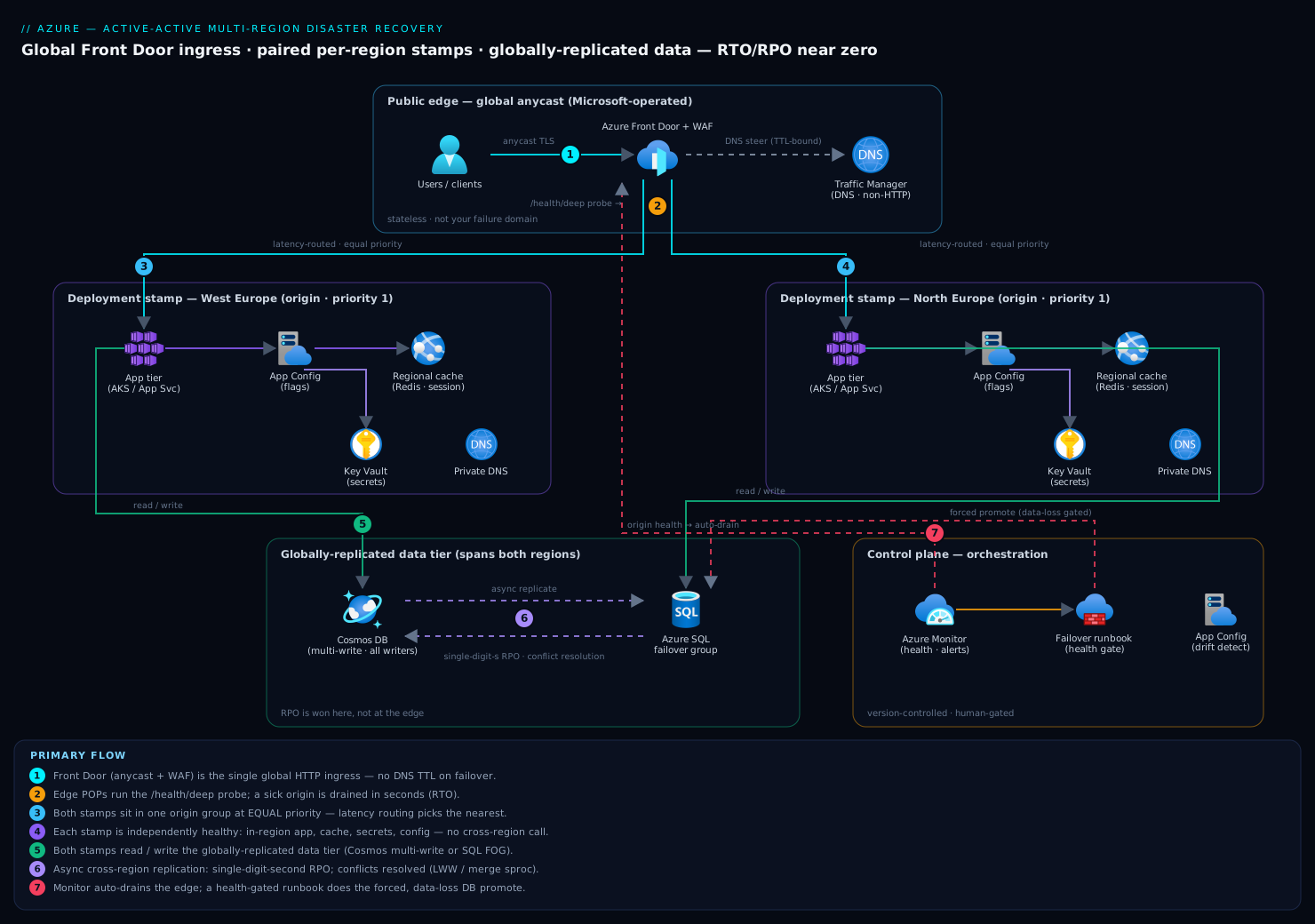
Two rules make this work.
- A stamp is independently healthy. Every dependency a request touches — compute, cache, config, secrets, private DNS — exists in-region. A request served by West Europe must never make a synchronous call to North Europe; that fuses one regional outage into two.
- Pick paired or near regions deliberately. Azure region pairs (e.g. West Europe / North Europe) get sequential platform updates and prioritized recovery; for latency-sensitive active-active you may instead pick two low-RTT regions on one continent. Both are valid — know which you optimized for.
The global layer is stateless and Microsoft-operated, so it is not your failure domain. The stamp is — and the whole design is about making one disposable.
Step 1 — Global ingress with Azure Front Door and health-probe-driven failover
Front Door is the right front for HTTP because it is anycast and decides per request at the edge: when an origin fails its probes, the edge POP stops routing to it with no DNS TTL to wait out, so RTO is bounded by probe settings, not client resolver caches. (For non-HTTP protocols, Traffic Manager does DNS-level steering, but its failover is bound by DNS TTL — keep it off the critical path.) For active-active, put both stamps in one origin group at equal priority and let latency routing send each client to its nearest healthy origin.
RG=rg-aa-prod
PROFILE=afd-aa-prod
ENDPOINT=app-aa

az afd profile create \
  --resource-group $RG \
  --profile-name $PROFILE \
  --sku Premium_AzureFrontDoor

az afd endpoint create \
  --resource-group $RG \
  --profile-name $PROFILE \
  --endpoint-name $ENDPOINT \
  --enabled-state Enabled
The probe cadence is your RTO dial. It lives on the origin group, not the origins.
az afd origin-group create \
  --resource-group $RG --profile-name $PROFILE \
  --origin-group-name og-app \
  --probe-request-type GET \
  --probe-protocol Https \
  --probe-path /health/deep \
  --probe-interval-in-seconds 30 \
  --sample-size 4 \
  --successful-samples-required 3 \
  --additional-latency-in-milliseconds 50
The math that matters: with a 30s interval and 3-of-4 samples required to flip state, worst-case detection is two to three probe cycles. Tightening the interval shortens RTO but multiplies probe load, because every edge POP probes independently. Tune interval and sample counts together against a real drill.
Register both stamps at equal priority and weight so latency routing governs. Repeat this for the second region with its own --origin-name and --host-name:
az afd origin create \
  --resource-group $RG --profile-name $PROFILE \
  --origin-group-name og-app --origin-name westeurope \
  --host-name app-we.example.internal \
  --origin-host-header app-we.example.internal \
  --http-port 80 --https-port 443 \
  --priority 1 --weight 1000 --enabled-state Enabled
The single most important decision here is the probe path. /health/deep must exercise the in-region dependencies that make a request succeed — database, cache, a critical downstream — and return non-200 when any is broken; a shallow probe quietly destroys RTO.
Disable session affinity for active-active unless you genuinely need sticky sessions — it pins a client to one origin and undercuts the point of two live regions. If the app needs session state, externalize it (Step 2) rather than pinning at the edge.
Step 2 — Stateless tier replication and config drift control across regions
Active-active only works if either stamp can serve any request — which requires a stateless app tier and two stamps that are byte-for-byte identical except for region-specific values.
Externalize all session state. No in-process sessions, no sticky local disk — push session and ephemeral state to the regional cache or global data tier so a client can land on either stamp between requests.
Deploy one artifact to both regions, from one region-parameterized module. Build once, then fan out the same immutable image digest (never a floating tag) to both regions in a single pipeline run. Terraform (or Bicep) with a per-region variable set keeps the rest from drifting: the module is identical, only the inputs differ.
module "stamp" {
  source   = "../modules/regional-stamp"
  for_each = toset(["westeurope", "northeurope"])

  location            = each.value
  resource_group_name = "rg-stamp-${each.value}"
  image_digest        = var.image_digest # same digest to every stamp
  app_config_endpoint = var.app_config_endpoint
}
Centralize configuration. Use Azure App Configuration so both stamps read the same flags from one source of truth, with regional overrides as labels. Feature-flag drift is a classic active-active bug: the same user gets different behavior depending on which region the edge picked.
Detect drift, don’t hope for its absence. Run
terraform planagainst both stamps on a schedule and alert on any non-empty diff. A drifted stamp behaves differently the moment it takes failover traffic — exactly when you can least afford a surprise.
Step 3 — Data layer choices: zone-redundant vs geo-replicated vs multi-write
This is where RPO is won or lost — three tiers of resilience, in increasing cost and capability:
| Model | Scope | RPO | Write topology | When to use |
|---|---|---|---|---|
| Zone-redundant | Within one region | 0 (zone loss) | Single region | Baseline HA; survives a datacenter, not a region |
| Geo-replicated (async) | Cross-region, one writer | Seconds (lag) | Active-passive | Most apps; simple, cheap, accepts tiny data-loss window |
| Multi-write | Cross-region, all writers | Near 0 with conflict handling | Active-active | True active-active where both regions accept writes |
Zone redundancy is the floor, not the ceiling. Configure every regional resource as zone-redundant first; it is cheap and removes the single-datacenter failure mode, but it still dies with its region.
Geo-replicated, single-writer (Azure SQL failover group) is the pragmatic default for active-active reads with one write region. The secondary takes read traffic and is promotable on failover; replication is asynchronous, so plan for an RPO measured in seconds.
# Create a failover group spanning the primary and secondary SQL servers.
az sql failover-group create \
  --name app-fog \
  --resource-group $RG \
  --server sql-we-primary \
  --partner-server sql-ne-secondary \
  --failover-policy Automatic \
  --grace-period 1 \
  --add-db appdb
Route read-only workloads to the geo-secondary with ApplicationIntent=ReadOnly against the failover-group listener; writes always reach whichever server currently holds the primary role.
Multi-write (Cosmos DB) is the only model that lets both regions accept writes with single-digit-millisecond latency and near-zero RPO. Enable multiple write regions and choose a conflict resolution policy deliberately, because the default has real semantics.
az cosmosdb create \
  --name cosmos-aa-prod \
  --resource-group $RG \
  --locations regionName=westeurope failoverPriority=0 isZoneRedundant=true \
  --locations regionName=northeurope failoverPriority=1 isZoneRedundant=true \
  --enable-multiple-write-locations true \
  --default-consistency-level Session
Consistency level is the RPO-vs-latency knob. Strong is unavailable across multiple write regions; Session (the default) gives read-your-writes while keeping cross-region writes fast. A weaker level widens the window in which two regions can disagree — the exact problem Step 4 solves.
Step 4 — Handling split-brain and write conflicts in active-active
The moment both regions accept writes, two users can update the same record within the replication window. The system will produce conflicts; your only choice is to decide their resolution or discover it in production. Cosmos DB multi-write gives two policies:
Last Writer Wins (LWW). The default. The item with the highest value on a chosen path wins — a system timestamp by default, or any numeric property you nominate (e.g. a monotonic version) — and all regions converge on the same winner. One sharp edge: in delete-vs-update conflicts, delete always wins. Correct when writes are idempotent or last-update-wins is genuinely the business rule.
{
  "conflictResolutionPolicy": {
    "mode": "LastWriterWins",
    "conflictResolutionPath": "/_ts"
  }
}
Custom (merge procedure). Where silently dropping the losing write is unacceptable — inventory counts, financial balances — register a merge stored procedure that reconciles conflicts under a server transaction. If it is absent or throws, conflicts land in the conflicts feed for your application to resolve out of band. An unread conflicts feed is unresolved data loss in waiting — monitor it.
{
  "conflictResolutionPolicy": {
    "mode": "Custom",
    "conflictResolutionProcedure": "dbs/appdb/colls/orders/sprocs/resolveConflict"
  }
}
Two design principles blunt the problem before resolution:
- Partition to keep an entity’s writes regional. Route a customer or tenant predominantly to one region (sharded ownership) so conflicts become rare — active-active across the fleet, single-writer per entity in practice.
- Prefer commutative operations. Model state changes as appends or counters that merge rather than destructive overwrites. An event-sourced ledger has no write conflicts because nothing is overwritten.
Split-brain is not only a database concern. A partition can leave both stamps believing they are primary for a coordination task (a scheduler, a leader-elected job). Use a single global coordination authority for anything that must run exactly once, and make regional jobs idempotent.
Step 5 — Automating failover and failback with runbooks and health gates
In active-active, the HTTP data-plane failover is automatic — Front Door drains a sick origin on its own. What still needs orchestration is the stateful failover (promoting a database) and the failback, both too consequential for reflex.
The decision that needs a runbook is whether to force a database failover that may incur data loss. Azure SQL failover groups distinguish planned (set-primary alone, succeeds only with zero data loss) from forced (--allow-data-loss, completes even if the primary is gone) — and that difference is your RPO. Wrap the forced path in a runbook with a health gate so it cannot fire on a transient blip:
#!/usr/bin/env bash
set -euo pipefail
# Confirm the primary region is actually down before any data-loss failover.
PRIMARY_HEALTH=$(curl -s -o /dev/null -w "%{http_code}" \
  --max-time 5 https://app-we.example.internal/health/deep || echo 000)

if [[ "$PRIMARY_HEALTH" == "200" ]]; then
  echo "Primary still healthy ($PRIMARY_HEALTH) - refusing forced failover."
  exit 1
fi

echo "Primary unhealthy ($PRIMARY_HEALTH) - promoting North Europe with data-loss accepted."
az sql failover-group set-primary \
  --name app-fog --resource-group "$RG" \
  --server sql-ne-secondary --allow-data-loss
Failback is deliberate and planned — never automatic. Failing back the instant a probe flips green turns one outage into two: the region reports healthy at the edge while its data tier is still re-syncing. Make failback a planned failover (no --allow-data-loss) during a quiet window, only after replication lag is confirmed zero.
Codify both runbooks as Azure Automation runbooks or pipeline jobs, version them alongside the infrastructure, and require human approval on the data-loss path. The goal is not zero humans, but zero improvisation.
Step 6 — Chaos game days: proving the failover before the outage does
A failover path you have never executed is a hypothesis, not a capability. Start cheap and reversible: disable one origin at the edge and watch traffic continue from the survivor.
# Game-day step 1: take West Europe out of rotation at the edge.
az afd origin update \
  --resource-group $RG --profile-name $PROFILE \
  --origin-group-name og-app --origin-name westeurope \
  --enabled-state Disabled

# Drive load (e.g. a 60s curl loop) and confirm 200s keep flowing from North Europe,
# then restore.
az afd origin update \
  --resource-group $RG --profile-name $PROFILE \
  --origin-group-name og-app --origin-name westeurope \
  --enabled-state Enabled
Then escalate the blast radius, measuring time-to-recovery at each tier:
- Single instance / pod — proves in-region redundancy.
- One origin disabled — proves edge failover (above).
- Forced database failover in a drill — proves the stateful runbook and measures real RPO by reconciling what was written just before the cut.
- Full regional simulation — block the region’s inbound at the NSG or fault every probe, and let the whole mechanism react.
Run game days on a schedule (quarterly at minimum). A drill revealing the real RTO is 90 seconds against a 30-second target is a success — you found the gap in a controlled window, not during a real outage. For in-line fault injection, Azure Chaos Studio applies faults (VM shutdown, NSG block, AKS pod failure) as repeatable experiments.
Enterprise scenario
A payments platform we ran went active-active across West Europe and North Europe on Cosmos DB multi-write, Session consistency, LWW on /_ts. The edge failover drilled clean for months. Then a real West Europe degradation flipped both stamps live under full write load, and the ledger started disagreeing: a handful of wallet balances settled to the wrong value after convergence. The gotcha was LWW semantics colliding with our delete path. Reversal records were modeled as deletes; under LWW, delete always wins a delete-vs-update conflict, so a concurrent legitimate debit in the other region lost to a stale reversal that happened to replicate last. No conflict surfaced in the app — LWW converges silently — and the conflicts feed was empty because LWW never populates it.
The fix was two-layered. First, we stopped overwriting balances at all: the wallet became an append-only event stream, balance derived by fold, so there is nothing to conflict on. Second, for the few collections that genuinely needed reconciliation, we moved off LWW to a custom merge sproc and alerted on conflict-feed depth like a dead-letter queue.
function resolveConflict(incoming, existing, conflicting) {
  var ctx = getContext();
  // Never let a delete silently win over a newer monetary update.
  if (incoming.deleted && existing && existing._ts >= incoming._ts) {
    ctx.getResponse().setBody(existing);   // keep the live record
  } else {
    ctx.getResponse().setBody(incoming);
  }
}
The lesson: in active-active, the default conflict policy is a business decision, not a database setting — and delete-wins LWW is wrong for money.
Going deeper
The steps above build the demanding end of the spectrum. This section widens the aperture: the objectives that drive the pattern, the cheaper patterns you may actually need, and the Azure surfaces — DNS steering, storage redundancy, VM-level DR, zones, quorum, cache replication — that the active-active blueprint glosses over because it assumes the most expensive option everywhere.
The three objectives: RTO, RPO, and RLO
RTO and RPO are the famous pair, but a third objective quietly decides how much you build.
- RTO — Recovery Time Objective. The maximum tolerable time to restore service. It is a routing/orchestration property: how fast can traffic reach a working stamp.
- RPO — Recovery Point Objective. The maximum tolerable data loss, measured backward in time from the failure. It is a data-tier property: how far behind the replica is allowed to be.
- RLO — Recovery Level Objective. The completeness of function you must restore to. Full service, or a degraded core? A checkout path that can take money with reporting and recommendations offline is a perfectly good RLO for the first hour of a disaster — and admitting that is what makes pilot-light and warm-standby patterns affordable.
RLO is the objective that lets you not build active-active everywhere. If the business accepts “core payment path within 5 minutes, analytics within 4 hours,” you fund near-zero RTO only for the payment stamp and a cheap restore for analytics. Writing RLO down per capability, rather than one blanket number for the whole system, is the single biggest cost lever in DR planning.
The DR spectrum: four patterns, four price points
Active-active is the top of a four-rung ladder. The lower rungs cost dramatically less and are the right answer for most workloads.
| Pattern | Typical RTO | Typical RPO | Standing cost in DR region | Azure realization |
|---|---|---|---|---|
| Backup & restore | Hours | Hours (last backup) | Near zero (just storage) | Azure Backup / geo-redundant vault; redeploy IaC, restore data |
| Pilot light | Tens of min | Seconds–minutes | Low (data replicating, compute off/minimal) | Geo-replica DB + Storage GRS; compute scaled to zero, scale up on failover |
| Warm standby | Minutes | Seconds | Medium (scaled-down but always running) | Smaller VMSS/AKS + SQL failover group; scale out on failover |
| Active-active | Seconds | Near zero | High (full capacity ×2 + cross-region egress) | Two full stamps behind Front Door + multi-write data |
Cost climbs and RTO/RPO fall as you move down the table. The mental model: pilot light keeps the data warm but the compute cold — a spark you fan into flame on failover; warm standby keeps a small, fully-working copy always running so failover is “scale up,” not “build up”; active-active keeps both at full size serving live. Most teams over-buy here — they design active-active because it sounds strongest, when a warm standby with a rehearsed forced-failover runbook meets the SLA at a third of the cost and none of the write-conflict complexity.
The global front: Front Door, Traffic Manager, and cross-region Load Balancer
Step 1 used Front Door because it is HTTP-native and fails over at the edge. The full picture has three global front-ends, and the right one depends on protocol and latency tolerance. (This is covered in depth in Azure Front Door & Traffic Manager global failover.)
| Front | Layer | How it steers | Failover speed | Use it for |
|---|---|---|---|---|
| Azure Front Door | L7 (HTTP/S) | Anycast; per-request decision at the edge POP | Seconds (probe-bound, no DNS TTL) | Web/API traffic; adds WAF, TLS offload, caching, path routing |
| Traffic Manager | DNS | Returns an endpoint by routing method; client caches per TTL | TTL-bound (minutes) | Any protocol; steering non-HTTP or whole-endpoint (e.g. *.database) |
| Cross-region Load Balancer | L4 (TCP/UDP) | Global anycast frontend over regional standard LBs | Seconds | Non-HTTP that still needs fast global failover |
Traffic Manager’s routing method is the knob most people meet first: Priority (active-passive failover), Weighted (split by ratio), Performance (lowest latency), Geographic (route by client geography, e.g. data-residency rules), Multivalue (return several healthy IPs), and Subnet (map client IP ranges to endpoints). Its Achilles heel is the DNS TTL: even with a 30-second probe, a client that cached the old answer keeps hitting the dead region until its resolver expires the record. That is why Front Door (no client-side caching of the origin choice) beats Traffic Manager on RTO for HTTP, and why you keep DNS-level steering off the critical path when seconds matter.
Whatever the front, the health probe is the truth source — and it must be deep. A probe that returns 200 while the in-region database is unreachable is worse than no probe: it holds a dead stamp in rotation, serving errors, and multiplies RTO. The probe endpoint should touch every dependency a real request needs and fail fast when any is down (see the beginner mistakes below).
The data tier in depth: replication and the data-loss window
Every DR pattern lives or dies on how the data replicates. Three surfaces cover most systems.
Azure SQL auto-failover groups. A group replicates one or more databases to a partner server in another region, with read-write and read-only listener endpoints that follow the primary automatically — so the app’s connection string never changes across a failover. Replication is asynchronous; Microsoft documents objectives of RPO 5 seconds and RTO 1 hour for the group’s automatic failover. The --grace-period (in hours, minimum 1) is a deliberate delay before automatic failover fires, trading RTO for protection against failing over on a transient blip and losing the un-replicated tail. Forced failover (--allow-data-loss) skips the wait and completes even if the primary is gone — that is your genuine data-loss path. The same failover-group model covers SQL Managed Instance.
Cosmos DB multi-region writes. Covered in Step 4 and in depth in Cosmos DB multi-region writes & conflict resolution. The key reminder: Strong consistency is not available with multiple write regions, so multi-write always admits a small divergence window that your conflict policy — LWW or a custom merge sproc — must resolve. Single-region-write Cosmos with automatic failover behaves like a geo-replicated single-writer instead, sidestepping conflicts entirely.
Storage redundancy (blobs, files, queues, tables). Storage is where “geo-redundant” is most misunderstood. The options, cheapest to strongest:
| SKU | Copies | Survives | Secondary readable? |
|---|---|---|---|
| LRS | 3, one datacenter | Disk/rack failure | No |
| ZRS | 3, across zones in one region | Datacenter (zone) loss | No |
| GRS | LRS local + async copy to paired region | Region loss | No |
| RA-GRS | GRS + read access to secondary endpoint | Region loss | Yes (read-only) |
| GZRS | ZRS local + async copy to paired region | Zone and region loss | No |
| RA-GZRS | GZRS + read access to secondary | Zone and region loss | Yes (read-only) |
LRS gives at least eleven nines of durability over a year, ZRS twelve, and the geo tiers sixteen. Two facts trip people up. First, a plain GRS/GZRS secondary is not readable — you must pick the RA- variant to serve reads from it before a failover. Second, geo-replication is asynchronous: Microsoft’s objective is an RPO of less than 15 minutes, and it is not covered by an SLA, so a hard regional loss can drop the last several minutes of writes. Customer-initiated account failover promotes the secondary to primary; afterward the account is downgraded to LRS and you must re-enable geo-redundancy. The general law across all of this: any asynchronous replica has a data-loss window equal to its replication lag — you cannot route your way out of it, you can only shrink it (more cost/latency) or accept it.
Lift-and-shift DR: Azure Site Recovery for VMs
The active-active blueprint assumes PaaS with native replication. Plenty of the estate is still IaaS — VMs you cannot re-architect into stateless stamps. Azure Site Recovery (ASR) is the disaster-recovery-as-a-service answer for those: it continuously replicates a VM’s disks to a secondary region (or zone-to-zone), so you can fail the whole machine over without re-platforming. See Azure Site Recovery: zone-to-zone & region failover runbooks for the mechanics.
What matters for DR design:
- Continuous replication yields crash-consistent recovery points roughly every 5 minutes and application-consistent snapshots on a schedule you set (e.g. hourly, using VSS on Windows) — so RPO is minutes, not the hours of backup-and-restore.
- Recovery plans orchestrate ordered, multi-tier failover (bring up the database VMs, then app, then web) with pre/post scripts and Automation runbooks — the IaaS equivalent of the failover runbook in Step 5.
- Test failover spins the replica up in an isolated network, proving the DR copy boots and the app works without touching production or interrupting replication. This is the single most valuable ASR feature: it turns “we think DR works” into “we ran it Tuesday.”
ASR sits at the pilot-light/warm-standby rungs: the DR region holds replicated disks and pays little until you fail over, at which point the VMs are created and started.
Regions, zones, and region pairs
Two independent axes of physical resilience, often conflated:
- Availability Zones (AZs) are physically separate datacenters within one region, each with independent power, cooling, and networking, connected by a high-speed low-latency network (round-trip typically under 2 ms). A zone-redundant service survives the loss of an entire datacenter synchronously — RPO 0 — because the low latency makes synchronous replication practical. Zones are the floor: cheaper than multi-region, no cross-region egress, and they eliminate the single-datacenter failure mode. Not every region offers zones, and where they do there are at least three.
- Regions are hundreds of miles apart. Crossing a region protects against a geography-scale event (a metro-wide power or network failure, a natural disaster) but forces asynchronous replication — hence a non-zero RPO — plus cross-region latency and egress cost.
- Region pairs are two regions in the same geography that Microsoft updates sequentially (never both at once) and recovers with priority in a broad outage, keeping most data within the geo for residency. Current guidance has shifted, though: Microsoft now ships some regions without a pair and recommends availability zones as the primary in-region resilience mechanism, with a self-selected secondary region for DR. So the modern default is zones for HA, a chosen second region for disaster — pairs are a bonus (sequential patching, prioritized recovery) where they exist, not a requirement. Foundations in regions, zones, fault & update domains.
The practical takeaway: reach for zone-redundancy first. Many workloads that think they need multi-region actually need zone-redundant single-region — which is cheaper, synchronous (RPO 0), and removes the failure mode that actually occurs most often.
Split-brain and quorum
Step 4 met split-brain in the data. The general problem is deciding who is primary when the network partitions and each side can no longer see the other. If both sides assume “the other is dead, I’m in charge,” both accept writes and the histories diverge — split-brain.
The classic defence is quorum: only the side holding a majority of votes may act as primary. The catch is arithmetic — two regions cannot form a majority of two (a 1-1 tie is not a majority). Robust automatic failover therefore needs an odd number of voters, usually two regions plus a lightweight witness/arbiter in a third location, so a partition always leaves exactly one side with 2-of-3. This is why Azure SQL auto-failover groups rely on Microsoft-managed failover logic with a grace period rather than letting each server decide for itself, and why Cosmos runs its own global consensus. For anything you build that must run exactly once — a scheduler, a leader-elected batch job — either lean on a single global coordination authority or make the work idempotent so a double-run is harmless. Never trust two regions to agree on “who is primary” without a tie-breaker.
Statelessness, sessions, and cache replication
Active-active demands a stateless app tier (Step 2), which pushes the hard problem into shared state — chiefly session and cache. Options, from simplest:
- Externalize session to the data tier (Cosmos, SQL) so it replicates with everything else. Simplest; inherits the data tier’s RPO and conflict story.
- Route session-affine users to one region (sharded ownership, as in Step 4) so a user’s session only ever lives in one place — active-active across the fleet, single-region per user.
- Replicate the cache. Azure Cache for Redis offers two shapes: the Premium tier’s passive geo-replication links a primary to a read-only secondary (one-directional, manual failover) — fine for warm standby; the Enterprise tier’s active geo-replication makes multiple regions all read-write, using conflict-free replicated data types (CRDTs) to merge concurrent writes automatically — the cache-tier analogue of Cosmos multi-write, and the right fit for true active-active sessions.
Match the cache’s replication mode to the pattern: passive geo-replication for active-passive, active geo-replication (Enterprise) for active-active. Pinning users to a region is the pragmatic middle path when you want two live regions without paying for active cache replication.
DR drills and chaos engineering
Step 6 made the case for game days; the discipline deserves a name. Chaos engineering is the practice of injecting controlled failure to validate that resilience mechanisms actually fire. Azure Chaos Studio provides a library of faults — VM shutdown, NSG block (to simulate a region-inbound cut), AKS pod failure, CPU/memory pressure, Key Vault access denial — runnable as repeatable, scheduled experiments with a blast radius you control and a one-click stop. Pair it with ASR/SQL test failover (isolated-network drills that never touch production) so every layer — edge, compute, data, VM — has a rehearsed, measured failover. The rule of thumb: if you cannot state your measured (not designed) RTO and RPO from a drill in the last quarter, you do not know them.
Verify
Confirm the system behaves as designed.
Both stamps serve, and the deep probe is honest. The X-Azure-Ref header proves a request transited Front Door. Then break the in-region database in a non-prod stamp and confirm /health/deep returns non-200 and the edge drains that origin.
# Edge transit, then the deep probe (expect non-200 when a dependency is down).
curl -sSI https://$ENDPOINT.z01.azurefd.net/ | grep -iE 'x-azure-ref|x-cache'
curl -s -o /dev/null -w "%{http_code}\n" https://app-we.example.internal/health/deep
Data is replicating with the expected lag. Inspect the failover group’s replication state; for Cosmos, write in one region and read in the other to observe convergence.
az sql failover-group show \
  --name app-fog --resource-group $RG \
  --server sql-we-primary \
  --query "{role:replicationRole, state:replicationState}"
Stamps have not drifted. A scheduled terraform plan -detailed-exitcode against both should return exit 0 (exit 2 signals drift to alert on).
Failover meets the target. During a drill, capture the wall-clock from fault injection to the survivor’s first 200, and the writes lost across a forced database failover — both inside your stated RTO/RPO.
Production checklist
Pitfalls
- Buying RTO and assuming you got RPO. Front Door gives fast routing failover; it does nothing for data loss. RPO 0 is purchased in the data tier — synchronous replication or multi-write with conflict handling — and paid for in latency or money.
- Shallow health probes. A
/healththat returns 200 while the database is unreachable keeps a dead stamp serving errors and quietly multiplies RTO. Probe the real dependencies; return non-200 the instant the stamp can’t serve a request. - Ignoring the conflicts feed. Custom conflict resolution that nobody monitors is silent data loss with extra steps. Alert on conflict-feed depth like a dead-letter queue.
- Config drift between stamps. The same user getting different behavior depending on which region the edge picked is maddening to debug. Deploy one artifact to both regions and alert on any non-empty
terraform plan.
Next steps
Wire origin-health-flip and replication-lag alerts into the on-call rotation, add a synthetic canary exercising the full path through Front Door every minute from multiple geographies, and put a recurring game day on the calendar. Once active-active reads are solid, decide honestly whether the write side needs multi-write at all — for many systems a geo-replicated single-writer with a tight, well-rehearsed forced-failover runbook hits the target at a fraction of the cost of multi-write conflict handling. Architect for the nine the business will actually pay for, prove it on a schedule, and let the measured numbers — not the ADR — be the source of truth.
Practice challenges
Work these top to bottom — they escalate from picking a pattern to designing the mechanics that make it safe. Try each before opening the solution.
1. Downtime budget arithmetic (Beginner). A stakeholder wants “four nines.” How many minutes of downtime per year does that allow, and which DR pattern from the spectrum table realistically hits it?
<details> <summary>Show solution</summary>
99.99% availability allows roughly 52 minutes of downtime per year (0.0001 × 525,600 min). That rules out backup-and-restore (hours) and points at active-passive multi-region with automated failover — a warm standby behind Front Door with a rehearsed forced-failover runbook. Five nines (~5 min/yr) is where you actually need active-active multi-write. Why: each nine roughly multiplies cost; match the pattern to the funded number, don’t over-buy.
</details>
2. Pick the cheapest sufficient pattern (Beginner). An internal reporting app must be back within 4 hours and may lose up to 1 hour of data. Budget is tight. Which rung of the DR spectrum do you choose?
<details> <summary>Show solution</summary>
Backup & restore (or at most pilot light). RTO 4h / RPO 1h is loose enough that paying for warm standby — let alone active-active — is waste. Keep a geo-redundant Azure Backup vault, store the infrastructure as code, and rehearse a redeploy-and-restore. Why: RLO and loose objectives are the biggest cost lever — spend near-zero where the business tolerates hours.
</details>
3. Design an honest deep health probe (Intermediate). Your stamp runs an API on App Service that needs Azure SQL and Azure Cache for Redis, plus a downstream payments API. Write the pass/fail rule for /health/deep.
<details> <summary>Show solution</summary>
The probe must touch every in-region dependency a real request needs and return non-200 if any fails, with a short timeout so a hung dependency doesn’t hang the probe:
- open a SQL connection and run
SELECT 1; PINGRedis;- call the payments API’s own health endpoint (short timeout);
- return 200 only if all succeed, else 503.
Do not return 200 just because the web process is up. Why: a shallow probe holds a dead stamp in rotation — the classic silent RTO killer.
</details>
4. Choose storage redundancy from a requirement (Intermediate). A blob container must survive both a single-zone failure and a full region loss, and the application needs to serve reads from the secondary region during a regional outage. Which storage SKU?
<details> <summary>Show solution</summary>
RA-GZRS. GZRS gives zone redundancy in the primary and an async geo-copy to the paired region (survives zone and region loss); the RA- prefix adds the read-access secondary endpoint the app needs. Plain GZRS would replicate but the secondary would not be readable. Why: geo-redundant does not imply readable — only the RA- variants expose the secondary before a failover.
</details>
5. Spot the silent-loss risk (Advanced). Your system uses an Azure SQL failover group (async, single-writer) for orders and Cosmos multi-write (LWW on /_ts) for the shopping cart. Two regions each accept a write to the same cart item inside the replication window. Which store can silently lose a write, and how do you prevent it?
<details> <summary>Show solution</summary>
Cosmos can. With LWW, the write with the lower /_ts is silently discarded on convergence and never appears in the conflicts feed — pure silent loss. Prevent it by (a) partitioning so a cart’s writes stay regional, (b) modeling cart changes as commutative appends/counters, or © switching that container to a custom merge sproc and alerting on conflict-feed depth. The SQL failover group has only one writer, so it cannot conflict — but a forced failover during the outage drops its own async tail (RPO seconds). Why: routing never creates or resolves conflicts; the write topology does.
</details>
6. Gate the forced failover and justify manual failback (Advanced). Write the guard that stops a data-loss failover firing on a transient blip, and explain why failback must never be automatic.
<details> <summary>Show solution</summary>
Gate the forced failover behind a health check that confirms the primary is genuinely down before invoking set-primary --allow-data-loss (the runbook in Step 5: probe /health/deep, refuse if it returns 200). Better still, require a majority signal (two independent probes plus a third-location witness) so a single false negative can’t trigger it. Failback must be manual and planned because a freshly-recovered region reports healthy at the edge while its data tier is still re-syncing; auto-failback on a green probe would cut writes over to a stale replica and turn one outage into two. Fail back only after replication lag is confirmed zero, using a planned failover (no --allow-data-loss). Why: the data-loss path and the split-brain risk both demand a human gate, not a reflex.
</details>
Common beginner mistakes
- “Two regions means high availability automatically.” A second region you never route to and never test is a hope, not a capability — it will be misconfigured or drifted precisely when you need it. The right model: resilience comes from rehearsed failover (active-active that serves live, or active-passive drilled on a schedule), not from the mere existence of a second region.
- “A load balancer gives me RPO 0.” Front Door / Traffic Manager move traffic; they do nothing for data. Your RPO is whatever your replication lag is. Buy RPO in the data tier (synchronous within a region, multi-write across regions with conflict handling), and know the async data-loss window you accepted.
- “Availability zones and regions are the same kind of protection.” Zones survive a datacenter failure synchronously (RPO 0) and cost little; regions survive a geography-scale event but force asynchronous replication and cross-region cost. Use zone-redundancy as the floor and add a second region only for the disasters zones can’t cover.
- “Geo-redundant storage means I can read the secondary and fail over instantly.” A plain
GRS/GZRSsecondary is not readable — you needRA-GRS/RA-GZRS. And failover is asynchronous with a data-loss window (objective <15 min, no SLA); customer-initiated account failover even downgrades the account to LRS afterward. - “Active-active is always the best choice.” It is the most expensive pattern and it introduces write-conflict complexity that can silently corrupt data (see the payments scenario). Many systems hit their SLA with warm standby plus a single-writer database and a well-rehearsed forced-failover runbook — at a fraction of the cost.
- “Set up multi-region once and it’s done.” Untested failover rots, config drifts between stamps, and probe paths go shallow as the app grows. DR is a standing practice — scheduled drift detection, synthetic canaries, and quarterly game days — not a one-time project.
Glossary
- RTO (Recovery Time Objective): the maximum acceptable time to restore service after a failure. Governed by routing and orchestration speed.
- RPO (Recovery Point Objective): the maximum acceptable amount of data loss, measured as time backward from the failure. Governed by replication lag in the data tier.
- RLO (Recovery Level Objective): the completeness of function that must be restored — full service versus a degraded core. Setting it per capability is what makes cheaper DR patterns affordable.
- Active-active: both regions serve live traffic simultaneously; failure of one is invisible. Lowest RTO, highest cost, introduces write conflicts.
- Active-passive: one region serves; a standby waits and takes over on failover. Cheaper, with a failover scramble and a data-loss tail.
- Pilot light: an active-passive pattern where only the data stays warm in the DR region; compute is off or minimal and is scaled up on failover.
- Warm standby: an active-passive pattern where a scaled-down but fully working copy runs continuously and is scaled up on failover.
- Backup & restore: the cheapest pattern — redeploy infrastructure and restore data from backups; RTO and RPO in hours.
- Deployment stamp: a complete, self-sufficient copy of the application in one region, with every dependency it needs present in-region.
- Availability Zone (AZ): a physically separate datacenter within a region with independent power/cooling/network; zone-redundant services survive a zone loss with RPO 0 (synchronous).
- Region pair: two regions in the same geography that Microsoft updates sequentially and recovers with priority. Modern guidance favors zones for HA and a self-selected secondary for DR; some regions have no pair.
- Zone-redundant: a resource replicated synchronously across zones in one region — the resilience floor, cheaper than multi-region.
- Azure Front Door: a global, anycast, layer-7 (HTTP/S) front-end that fails over at the edge per request, with no DNS TTL to wait out; adds WAF, TLS, and caching.
- Traffic Manager: a global, DNS-based traffic router supporting Priority, Weighted, Performance, Geographic, Multivalue, and Subnet routing methods; failover is bound by DNS TTL.
- Cross-region Load Balancer: a global, anycast, layer-4 (TCP/UDP) load balancer over regional standard load balancers — fast global failover for non-HTTP protocols.
- Health probe: the periodic request a front-end sends to decide whether an origin is healthy; a deep probe exercises in-region dependencies and returns non-200 when any fails.
- Failover group (Azure SQL): a set of databases replicated to a partner region with listener endpoints that follow the primary; documented objectives RPO 5 s / RTO 1 h for automatic failover.
- Grace period: the delay before a SQL failover group fails over automatically — trades RTO for protection against reacting to a transient blip.
- Multi-write (multi-master): a data topology where every region accepts writes; requires conflict resolution because two regions can update the same item within the replication window.
- Last Writer Wins (LWW): the default Cosmos conflict policy — the highest value on a chosen path wins; converges silently and never populates the conflicts feed (delete wins delete-vs-update).
- Conflicts feed: the queue where unresolved multi-write conflicts land for out-of-band resolution; an unread feed is data loss in waiting.
- GRS / GZRS / RA-GRS / RA-GZRS: geo-redundant Storage SKUs;
Zadds zone redundancy in the primary,RA-makes the secondary readable. All geo-replicate asynchronously (objective RPO <15 min, no SLA). - Azure Site Recovery (ASR): disaster-recovery-as-a-service for VMs — continuous disk replication to a secondary region/zone, recovery plans for ordered failover, and isolated-network test failover.
- Split-brain: a network partition in which both sides believe they are primary and accept divergent writes.
- Quorum / witness: the majority-vote rule that prevents split-brain; two regions can’t form a majority, so automatic failover needs an odd voter count — typically a third-location witness.
- Session affinity: pinning a client to one origin; disable it for active-active (or externalize session state) so both regions can serve any request.
- Geo-replication (Redis): passive (Premium tier — one-directional to a read-only secondary) versus active (Enterprise tier — all regions read-write, merged via CRDTs).
- Failover vs failback: failover promotes the standby to primary during an incident; failback returns to the original — always planned and manual, only after replication lag reaches zero.