Going multi-region is the easy part. Routing users to the right region, detecting a regional brownout in seconds, and failing over without manual intervention is where most designs fall apart. This article combines Azure Front Door’s anycast Layer-7 edge with Traffic Manager’s DNS steering to build active-active and active-passive topologies, with health probes, WAF at the edge, and origin lockdown.
In a nutshell
Imagine your app has offices (regions) in several cities, and a visitor needs to reach a working one — ideally the closest.
Traffic Manager is the phone directory. You call directory assistance, it looks up which office is nearest to you and currently open, and reads you that office’s phone number. You then dial the office directly. The directory never handles your call — it only tells you which number to dial. That is DNS: Traffic Manager answers a name lookup with the address of a healthy endpoint, and your client connects there itself. It is quick to set up and works for any protocol — but if you wrote the number down five minutes ago and the office has since closed, you will keep dialling the dead line until your note (the DNS cache / TTL) expires.
Front Door is a global receptionist standing at the front door of every city at once. You always walk up to the nearest reception desk — that is anycast: one address, many doors, and the network routes you to the closest one. The receptionist checks your ID (terminates TLS), screens you at the door (runs the WAF), hands you a brochure straight off the shelf if they already have a copy (edge caching / CDN), and only then walks your request to whichever back office is healthy — switching desks instantly if one goes dark. Front Door sits in the request path at Layer 7 and decides per request, so failover is effectively immediate. The catch: it only speaks HTTP(S).
So the mental model is simple: Traffic Manager steers at the DNS layer (global, any protocol, but failover is gated by DNS caching), while Front Door steers at the Layer-7 edge (global, HTTP-only, but failover is instant and you get TLS offload, caching, and a WAF for free). They are not rivals. A mature design frequently nests Traffic Manager above Front Door as a coarse, cross-stack DNS safety net while Front Door does the fast, fine-grained regional work underneath.
Level: Advanced · Time: ~35 min
Prerequisites
- Comfort with the Azure portal and the
azCLI, plus Contributor (or Network Contributor) on the resource group you will use. - The core networking mental model: DNS, TLS, HTTP vs raw TCP, and the difference between Layer 4 (connections/ports) and Layer 7 (HTTP requests) — plus a rough idea of what a WAF and a reverse proxy do.
- Familiarity with regional building blocks (App Service or VMs behind a regional load balancer) and, for true active-active, a multi-region data store such as Cosmos DB. The Application Gateway v2 and Azure Load Balancer lessons are the on-ramp.
After this lesson you will be able to
- Choose correctly between Front Door, Traffic Manager, Application Gateway, and (cross-region) Load Balancer for a given workload.
- Build a Front Door Premium profile with a multi-region origin group, deep health probes, and latency routing.
- Configure active-passive (priority) and active-active (weighted) topologies, and explain why weights interact with the latency window.
- Attach a WAF with managed rule sets plus a rate-limit rule, and lock origins to your profile with the service tag and the
X-Azure-FDIDheader. - Nest Traffic Manager above Front Door for cross-stack DNS failover, and reason quantitatively about the DNS-TTL failover lag.
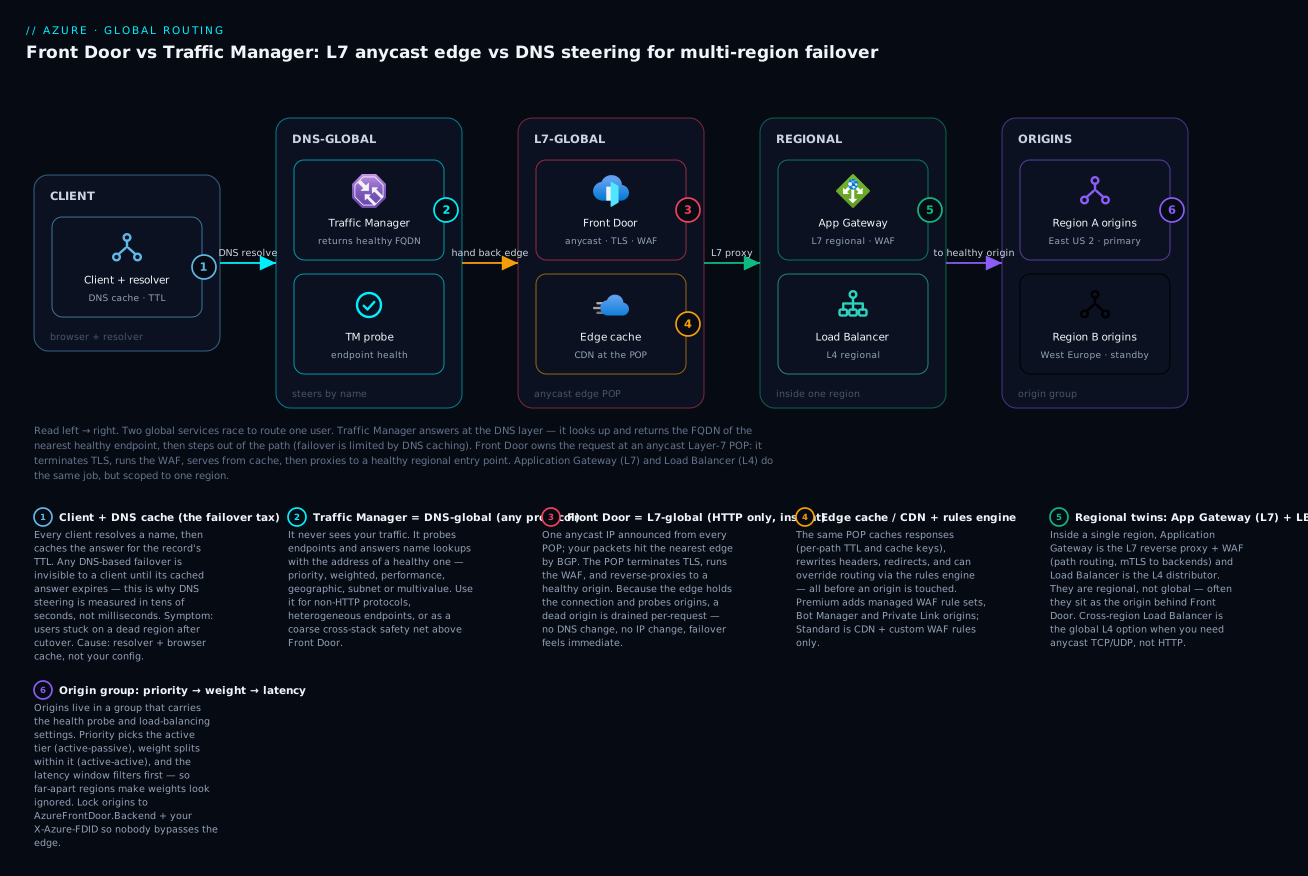
Read left to right: a client resolves a name through Traffic Manager (DNS-global) which hands back a healthy endpoint, while Front Door (L7-global anycast) terminates TLS, runs the WAF, and caches at the edge before proxying to a regional entry point — Application Gateway (L7) or Load Balancer (L4) — and on to the healthy region’s origins.
Choosing the right global tier
Azure has three “global-ish” load balancing services and they are not interchangeable. Pick wrong and you either pay for capability you can’t use or hit a protocol wall later.
| Service | OSI layer | Steering mechanism | Failover trigger | Best for |
|---|---|---|---|---|
| Front Door (Standard/Premium) | L7 (HTTP/HTTPS) | Anycast + reverse proxy | Backend health probe at the edge | Web apps, APIs, anything HTTP that wants caching/WAF/TLS offload |
| Traffic Manager | DNS (L-none, it never sees traffic) | DNS responses (CNAME/A) | Endpoint health probe, reflected in DNS answers | Any protocol; non-HTTP endpoints; nesting other globals |
| Cross-region Load Balancer | L4 (TCP/UDP) | Anycast frontend IP | Regional LB health | Non-HTTP TCP/UDP that still wants a single anycast IP and connection-level failover |
The decisive question is the protocol. If everything is HTTP(S), Front Door alone covers the common case and gives you a WAF and edge caching for free. The moment you have SMTP, a game server, a custom TCP service, or you need to route between heterogeneous endpoint types, you reach for Traffic Manager or cross-region Load Balancer.
Front Door and Traffic Manager are not mutually exclusive. A robust pattern is Front Door for the web tier with Traffic Manager nested above it to add DNS-level failover across endpoint types Front Door cannot represent. We build exactly that in Step 4.
Anycast Layer-7 vs DNS-based steering
This distinction drives your failover latency budget, so be precise about it.
Front Door uses anycast. The same IP is announced from every Microsoft edge POP, so a client’s packets land at the nearest POP by BGP. The POP terminates TLS, runs the WAF, and reverse-proxies to a healthy origin. Because the edge probes origins and holds the connection, when an origin dies the edge simply stops sending it traffic - no DNS change, no IP change. Failover is effectively immediate from the client’s perspective; the edge decides per request.
Traffic Manager uses DNS. It returns the address (or CNAME) of a healthy endpoint, and clients then connect directly. Failover speed is therefore gated by DNS TTL plus resolver caching plus probe interval. Even with a 30-second TTL, a client that resolved 25 seconds ago keeps hitting the dead endpoint until its cache expires. You cannot make DNS-based failover sub-second; plan for tens of seconds to a couple of minutes in the real world.
The takeaway: put HTTP traffic behind Front Door for fast, edge-driven failover, and use Traffic Manager only where you need protocol breadth or nesting, accepting its DNS-bound latency.
Step 1 - Multi-region origin group with health probes and latency routing
We’ll define an origin group with two regional backends (East US 2 and West Europe) and let latency-based routing send each client to the lowest-latency healthy origin. I’ll use the az afd CLI throughout; it maps cleanly to Bicep/Terraform if you prefer declarative.
RG=rg-gtm-prod
PROFILE=afd-gtm-prod
ENDPOINT=app-gtm

# Premium tier is required if you want managed/custom WAF rules and Private Link origins.
az afd profile create \
  --resource-group $RG \
  --profile-name $PROFILE \
  --sku Premium_AzureFrontDoor

az afd endpoint create \
  --resource-group $RG \
  --profile-name $PROFILE \
  --endpoint-name $ENDPOINT \
  --enabled-state Enabled
Now the origin group. The health probe and load-balancing settings live on the group, not the individual origins.
az afd origin-group create \
  --resource-group $RG \
  --profile-name $PROFILE \
  --origin-group-name og-web \
  --probe-request-type GET \
  --probe-protocol Https \
  --probe-path /healthz \
  --probe-interval-in-seconds 30 \
  --sample-size 4 \
  --successful-samples-required 3 \
  --additional-latency-in-milliseconds 50
A few of these flags carry real weight:
--probe-path /healthzshould hit a deep endpoint that checks downstream dependencies (DB, cache), not a static 200. A shallow probe keeps an origin “healthy” while it’s failing real requests.--additional-latency-in-milliseconds 50is the latency sensitivity. Front Door treats any origin within this margin of the fastest as “equally close” and load-balances across them. Widen it to spread load across regions; narrow it to pin clients to the nearest.--sample-size 4with--successful-samples-required 3means an origin must pass 3 of the last 4 probes to stay in rotation.
Add the two regional origins. --priority and --weight are what we tune in Step 2; for pure latency routing, leave them equal.
az afd origin create \
  --resource-group $RG --profile-name $PROFILE \
  --origin-group-name og-web --origin-name eastus2 \
  --host-name app-eastus2.azurewebsites.net \
  --origin-host-header app-eastus2.azurewebsites.net \
  --http-port 80 --https-port 443 \
  --priority 1 --weight 1000 --enabled-state Enabled

az afd origin create \
  --resource-group $RG --profile-name $PROFILE \
  --origin-group-name og-web --origin-name westeurope \
  --host-name app-westeurope.azurewebsites.net \
  --origin-host-header app-westeurope.azurewebsites.net \
  --http-port 80 --https-port 443 \
  --priority 1 --weight 1000 --enabled-state Enabled
Finally a route ties the endpoint to the origin group:
az afd route create \
  --resource-group $RG --profile-name $PROFILE \
  --endpoint-name $ENDPOINT --route-name web-route \
  --origin-group og-web \
  --supported-protocols Https \
  --https-redirect Enabled \
  --forwarding-protocol HttpsOnly \
  --link-to-default-domain Enabled
With both origins at equal priority and weight, Front Door now performs latency routing: each edge POP picks the closest healthy origin, and probes it every 30s.
Step 2 - Priority routing (active-passive) vs weighted (active-active)
Front Door’s load-balancing algorithm is a two-level decision: priority first, then weight within the lowest healthy priority tier.
Active-passive with priority
Set the standby region to a higher --priority number (higher number = lower precedence). Front Door only sends traffic to priority 2 when all priority 1 origins are unhealthy.
# Promote eastus2 to primary, demote westeurope to warm standby.
az afd origin update \
  --resource-group $RG --profile-name $PROFILE \
  --origin-group-name og-web --origin-name eastus2 \
  --priority 1

az afd origin update \
  --resource-group $RG --profile-name $PROFILE \
  --origin-group-name og-web --origin-name westeurope \
  --priority 2
Now all traffic flows to East US 2. If its probes fail, the edge drains it and shifts everything to West Europe; when East US 2 recovers, traffic fails back automatically. This is the classic warm-standby model: cheap and simple, but clients far from the surviving region pay a latency penalty during failover.
Active-active with weights
Keep all origins at the same priority and let weight split traffic. Weights are proportional, not percentages.
# 70/30 split across two active regions at equal priority.
az afd origin update \
  --resource-group $RG --profile-name $PROFILE \
  --origin-group-name og-web --origin-name eastus2 \
  --priority 1 --weight 700

az afd origin update \
  --resource-group $RG --profile-name $PROFILE \
  --origin-group-name og-web --origin-name westeurope \
  --priority 1 --weight 300
Important nuance: at equal priority, latency routing takes precedence over weight. Front Door first filters to origins within the
additional-latency-in-millisecondswindow, then applies weights among that filtered set. If your two regions are far apart, most edges see only one region as “closest” and weights appear to be ignored. Weighted distribution is most visible when origins are latency-comparable from a given edge, or when you deliberately widen the latency window.
For genuine active-active where both regions take live writes, the hard problem is not routing but data: you need multi-region writes (Cosmos DB multi-region, or app-level conflict handling). Front Door will happily send a user to either region; your data layer has to cope.
Step 3 - WAF policy and custom rules at the edge
A core reason to front everything with Front Door is the WAF running at the POP, blocking attacks before they reach your origins. Create a Premium WAF policy, attach the managed rulesets, and add a custom rule.
# WAF policies live under the 'network front-door' command group.
az network front-door waf-policy create \
  --resource-group $RG \
  --name wafGtmProd \
  --sku Premium_AzureFrontDoor \
  --mode Prevention
Add the Microsoft-managed Default Rule Set (DRS) and the Bot Manager ruleset. In Prevention mode these actively block; start in Detection mode in a new environment to baseline false positives before flipping to Prevention.
az network front-door waf-policy managed-rules add \
  --resource-group $RG --policy-name wafGtmProd \
  --type Microsoft_DefaultRuleSet --version 2.1 --action Block

az network front-door waf-policy managed-rules add \
  --resource-group $RG --policy-name wafGtmProd \
  --type Microsoft_BotManagerRuleSet --version 1.0
A common custom rule: rate-limit by client IP to blunt credential-stuffing. This is a rate-limit rule allowing 100 requests per minute per IP.
az network front-door waf-policy rule create \
  --resource-group $RG --policy-name wafGtmProd \
  --name rateLimitLogin --priority 10 \
  --rule-type RateLimitRule \
  --rate-limit-duration 1 \
  --rate-limit-threshold 100 \
  --action Block --defer

az network front-door waf-policy rule match-condition add \
  --resource-group $RG --policy-name wafGtmProd \
  --name rateLimitLogin \
  --match-variable RequestUri --operator Contains \
  --values "/api/login"
Now associate the policy with the endpoint domain through a security policy on the AFD profile:
WAF_ID=$(az network front-door waf-policy show \
  --resource-group $RG --name wafGtmProd --query id -o tsv)

az afd security-policy create \
  --resource-group $RG --profile-name $PROFILE \
  --security-policy-name sp-web \
  --domains $(az afd endpoint show -g $RG --profile-name $PROFILE \
              --endpoint-name $ENDPOINT --query id -o tsv) \
  --waf-policy $WAF_ID
The WAF now evaluates every request at the edge before any origin is contacted. Geo-filtering, IP allowlists for admin paths, and header-based rules all live here too.
Step 4 - Layering Traffic Manager for nested DNS failover
Front Door covers HTTP. Suppose you also expose a non-HTTP service - an MQTT broker or SMTP relay - and want a single hostname that fails over across regions for all of it. Traffic Manager sits above Front Door as a DNS-level coordinator.
Create a profile with priority routing. The primary endpoint is the Front Door endpoint (an externalEndpoints target by FQDN); the secondary can be another global service or a regional endpoint.
az network traffic-manager profile create \
  --resource-group $RG --name tm-gtm-prod \
  --routing-method Priority \
  --unique-dns-name gtm-prod-app \
  --ttl 30 \
  --protocol HTTPS --port 443 --path "/healthz" \
  --interval 30 --timeout 10 --max-failures 3
Add Front Door as the primary external endpoint. Because Front Door is itself anycast and highly available, this endpoint rarely fails - but Traffic Manager gives you a DNS escape hatch to a separate stack (another cloud, or a static maintenance page) if Front Door ever returns unhealthy.
az network traffic-manager endpoint create \
  --resource-group $RG --profile-name tm-gtm-prod \
  --name afd-primary --type externalEndpoints \
  --target app-gtm-xxxx.z01.azurefd.net \
  --endpoint-status Enabled --priority 1

az network traffic-manager endpoint create \
  --resource-group $RG --profile-name tm-gtm-prod \
  --name dr-secondary --type externalEndpoints \
  --target dr-static.example.net \
  --endpoint-status Enabled --priority 2
Nesting caveat: when an endpoint is itself another Traffic Manager profile, use the
nestedEndpointstype and setmin-child-endpointsso the parent only considers the child “healthy” when enough of its children are up. For anexternalEndpointsFront Door target, Traffic Manager just probes the FQDN’s health path directly.
Be honest about what this buys you: the DNS failover here is bound by the 30s TTL and resolver caching, so it is slow relative to Front Door’s in-line failover. Use Traffic Manager as the coarse, cross-stack safety net and let Front Door handle the fast, fine-grained regional decisions underneath it.
Origin lockdown: only accept traffic from your Front Door
A latency-routed, WAF-protected edge is pointless if attackers can hit your origins directly and bypass all of it. Lock origins down with two complementary controls.
1. Restrict inbound to the AzureFrontDoor.Backend service tag. On the NSG protecting your origins (or via App Service access restrictions), allow inbound only from that service tag.
az network nsg rule create \
  --resource-group $RG --nsg-name nsg-origins \
  --name Allow-AFD-Backend --priority 100 \
  --direction Inbound --access Allow --protocol Tcp \
  --source-address-prefixes AzureFrontDoor.Backend \
  --destination-port-ranges 443 \
  --destination-address-prefixes VirtualNetwork
The service tag alone is necessary but not sufficient - it permits any Front Door tenant in Azure, not just yours. That’s why you also validate a per-profile header.
2. Validate the X-Azure-FDID header. Every Front Door profile has a unique ID sent in the X-Azure-FDID request header. Your origin (or the App Service / APIM in front of it) must reject requests whose header doesn’t match your profile ID.
# Retrieve your profile's Front Door ID.
az afd profile show \
  --resource-group $RG --profile-name $PROFILE \
  --query frontDoorId -o tsv
For App Service, enforce it via an access-restriction rule on the X-Azure-FDID header so only your profile’s traffic is admitted:
az webapp config access-restriction add \
  --resource-group $RG --name app-eastus2 \
  --rule-name allow-our-afd --priority 100 --action Allow \
  --http-header x-azure-fdid=<your-front-door-id>
Together these mean packets can only arrive from the Front Door backend range and must carry your unique profile ID. Direct-to-origin attacks are shut down.
Enterprise scenario
A payments platform ran active-passive across East US 2 and West Europe behind Front Door, priority routing, /healthz probing the API only. During a Cosmos DB regional incident East US 2 stayed “healthy” - the API was up, but every write 500’d. Front Door kept all traffic on the broken primary; the probe never saw the dependency. The fix was a probe that exercised the real failure mode: a dedicated /healthz/deep that does a lightweight Cosmos point-read against the region’s write endpoint and returns 503 when the SDK reports the region isn’t writable.
app.MapGet("/healthz/deep", async (CosmosClient c) =>
{
    try
    {
        var db = c.GetContainer("ledger", "txn");
        // Point-read forces a round-trip to the regional write endpoint.
        await db.ReadItemAsync<object>("probe", new PartitionKey("probe"),
            new ItemRequestOptions { ConsistencyLevel = ConsistencyLevel.Strong });
        return Results.Ok();
    }
    catch (CosmosException ex) when (ex.StatusCode is HttpStatusCode.ServiceUnavailable
                                        or HttpStatusCode.TooManyRequests)
    {
        return Results.StatusCode(503); // Drain this origin.
    }
});
The gotcha is tuning: a strong-consistency read every 30s from every edge POP adds real RU cost and can itself trip 429s, which would falsely drain a healthy region. They moved the probe to --probe-interval-in-seconds 30 with --sample-size 4 --successful-samples-required 2 (tolerate one transient 429) and pinned the probe to a tiny dedicated container with its own throughput. After that, the next regional write outage drained East US 2 in under two minutes with zero failed customer writes.
Verify
Confirm routing, failover, and lockdown actually behave as designed - never trust the config alone.
Traffic flows through the edge. The X-Cache and X-Azure-Ref response headers prove the request went through Front Door.
curl -sSI https://app-gtm-xxxx.z01.azurefd.net/ \
  | grep -iE 'x-cache|x-azure-ref|server'
Origin lockdown holds. A direct request to the origin without the header should be rejected (403), while traffic via Front Door succeeds.
# Direct to origin - expect 403 from the access restriction.
curl -sS -o /dev/null -w "%{http_code}\n" https://app-eastus2.azurewebsites.net/
Traffic Manager answers with the primary. Resolve the DNS name and verify the TTL and target.
dig +noall +answer gtm-prod-app.trafficmanager.net
The WAF blocks. Send a request that trips the managed ruleset and expect a 403.
curl -sS -o /dev/null -w "%{http_code}\n" \
  "https://app-gtm-xxxx.z01.azurefd.net/?q=' OR 1=1--"
Run a failover drill. Disable the primary origin and watch the edge shift traffic without any client-side change:
az afd origin update -g $RG --profile-name $PROFILE \
  --origin-group-name og-web --origin-name eastus2 \
  --enabled-state Disabled
# Repeated curls should keep returning 200, now served by West Europe.
Observe routing decisions in logs. Enable diagnostic settings on the profile and query the access log; the OriginName / BackendHostname column shows which origin served each request.
AzureDiagnostics
| where Category == "FrontDoorAccessLog"
| summarize count() by OriginName_s, httpStatusCode_s
| order by count_ desc
Production checklist
Pitfalls
A handful of traps catch even experienced teams:
- Shallow health probes. A probe that returns 200 while the app can’t reach its database keeps a broken origin in rotation. Exercise real dependencies, but keep the probe cheap enough that a 30s interval across every edge POP doesn’t hammer your backend.
- Expecting weighted routing to override latency. At equal priority, Front Door filters by latency window first. If regions are far apart, weights barely move traffic. Use priority for failover and treat weighting as a same-latency-tier tool.
- Forgetting the
X-Azure-FDIDcheck. The service tag permits every Front Door tenant in Azure. Without header validation, your “locked down” origin is open to anyone willing to stand up their own Front Door profile. - Treating DNS failover as fast. Traffic Manager failover is bound by TTL plus resolver caching. Don’t put it on the critical path for sub-minute RTOs; that’s Front Door’s job.
- Tuning probe interval in isolation. Lowering the interval speeds detection but multiplies probe load (every edge POP probes independently). Tune interval, sample size, and samples-required together against a real drill, not in theory.
Next steps
Wire origin-health-flip alerts into your on-call rotation, add a synthetic canary that exercises the full path through Front Door every minute, and rehearse a full regional failover quarterly. Once active-passive is solid and your data layer supports it, graduate to active-active and measure the latency win against the added operational complexity.
Going deeper
The four Steps above get a working topology on the board. This section is the “why it behaves the way it does” layer — the map of Azure’s routing services, Front Door’s internals, every Traffic Manager routing method, and the sharp edges of origin groups and session affinity. Read it once you have the mental model of anycast-L7 vs DNS from the nutshell.
The four-way map: global vs regional, L7 vs L4 vs DNS
Beginners conflate Front Door, Traffic Manager, Application Gateway, and Load Balancer because all four “balance load.” They live on two independent axes: scope (does it route across regions or within one?) and layer (does it understand HTTP, or only connections, or only names?). Get these two axes right and the choice is almost always obvious.
| Service | Scope | Layer | Sees your traffic? | Failover unit | Typical role |
|---|---|---|---|---|---|
| Front Door (Std/Premium) | Global | L7 (HTTP/S) | Yes — terminates + proxies | Per request, at the edge | The internet-facing front of a multi-region web app |
| Traffic Manager | Global | DNS (no layer) | No — only answers name lookups | Per DNS resolution (TTL-bound) | Any-protocol steering; a coarse cross-stack safety net |
| Application Gateway (v2) | Regional | L7 (HTTP/S) | Yes — terminates + proxies | Per request, in one region | The regional L7 entry / WAF; often an origin behind Front Door |
| Load Balancer | Regional* | L4 (TCP/UDP) | Yes — forwards packets | Per connection, in one region | The regional L4 distributor in front of a VM/VMSS pool |
* Standard Load Balancer is regional; cross-region Load Balancer is the global L4 sibling — one anycast frontend IP that fronts several regional Standard Load Balancers, for TCP/UDP workloads that need anycast but are not HTTP.
Two rules collapse most decisions:
- If it is HTTP and needs to be global → Front Door. You get anycast, TLS offload, caching/CDN, WAF, and per-request failover in one service.
- If it is not HTTP, or you must steer across service types Front Door cannot represent → Traffic Manager (DNS, any protocol) or cross-region Load Balancer (L4, anycast IP).
Application Gateway and Load Balancer are the regional twins of Front Door and cross-region LB. A very common enterprise shape is Front Door (global L7) → Application Gateway (regional L7 + mTLS to private backends) → your app, with the App Gateway reached over Private Link. Front Door does the global decision; App Gateway does the in-region, VNet-aware one. The Application Gateway v2 lesson and the Load Balancer deep dive cover those regional layers end to end.
Inside Front Door: anycast, split TCP, and why the edge feels instant
Three mechanisms explain why Front Door’s failover and latency behaviour differ so sharply from DNS steering.
Anycast frontend. Front Door announces the same set of IP addresses via BGP from every Microsoft edge POP worldwide. When a client opens a connection, the internet’s routing fabric delivers the packets to the topologically nearest POP automatically — no DNS decision involved. That is why moving a client to a different edge is not something you (or DNS) do; the network does it.
Split TCP (connection termination at the edge). The client’s TCP and TLS handshake completes against the nearby POP, not the distant origin. Handshakes are chatty — several round trips — so terminating them a few milliseconds away instead of hundreds of milliseconds away is a large latency win, especially on mobile and lossy links. Front Door then reuses a pooled, often already-warm connection from the POP to your origin for the actual request. This “split” of the single logical client-to-origin path into client↔edge and edge↔origin segments is what people mean by split TCP.
In-path health decisions. Because the POP holds the connection and probes origins continuously, an origin that starts failing is drained on the next request — the edge just routes to a different healthy origin in the group. No IP changes, no name re-resolves, no client cache to wait out. Contrast that with DNS steering, where the client has already been handed an address and will keep using it until its cache expires.
Front Door Standard vs Premium — what the tier actually buys
Both current tiers (SKUs Standard_AzureFrontDoor and Premium_AzureFrontDoor) share the anycast edge, CDN caching, custom-domain TLS, the rules engine, health probes, and latency/priority/weighted routing. The tier gates the security and connectivity features:
| Capability | Standard | Premium |
|---|---|---|
| Anycast L7 edge, TLS offload, split TCP | Yes | Yes |
| CDN caching + compression | Yes | Yes |
| Rules engine (headers, redirects, route/cache overrides) | Yes | Yes |
| Health probes + latency / priority / weighted routing | Yes | Yes |
| WAF — custom rules (rate-limit, geo, IP, match) | Yes | Yes |
| WAF — Microsoft-managed rule sets (DRS) | No | Yes |
| WAF — Bot Manager managed ruleset | No | Yes |
| Private Link origins (private connectivity to origin) | No | Yes |
| Security analytics / enhanced reports | Basic | Yes |
The two Premium-only features that most often force the tier are managed WAF rule sets (you want Microsoft’s DRS + Bot Manager, not just hand-written custom rules) and Private Link origins (Front Door reaches an internal App Service, Application Gateway, storage, or private load balancer over the Microsoft backbone, so the origin has no public IP at all — the strongest form of the “only accept traffic from Front Door” lockdown from the Origin lockdown section). “Classic” Front Door is the legacy tier; new builds use Standard/Premium.
Caching, the CDN, and the rules engine
Front Door Standard/Premium is Azure’s modern CDN — the standalone classic CDN profiles are being retired in favour of it. Caching is configured on the route (enable caching, choose the cache key: query-string handling, and whether to honour origin cache-control) and refined in the rules engine:
- Per-path cache policy. Cache static assets aggressively (long TTL, immutable), never cache authenticated API responses, and give HTML a short TTL. Getting this wrong — caching a per-user response, or not caching a heavy static asset — is the single most common Front Door performance/correctness bug.
- Rules engine actions. Match on request properties (path, headers, query, device, geo) and act: rewrite/append request or response headers, redirect (HTTP→HTTPS, apex→www), URL rewrite, override the origin group for a path, or override cache behaviour. This is where you add security headers (HSTS, CSP), strip server banners, or route
/api/*to a different origin group than/.
A subtle point: a single route targets exactly one origin group. “Fail over from origin group A to origin group B” is not a built-in behaviour — within-group failover (priority/weight) is automatic, but between groups you either use the rules engine to switch, or model everything you want to fail over inside one origin group.
Health probes and latency routing internals
Front Door decides which origin serves a request with a layered filter, evaluated per edge:
- Health filter. Only origins currently passing the probe are candidates. An origin is healthy when it passes
successful-samples-requiredof the lastsample-sizeprobes (e.g. 3 of 4). This hysteresis is deliberate — it stops a single blip from flapping an origin out. - Priority filter. Among healthy origins, only the lowest priority number is considered. Priority 2 is invisible while any priority-1 origin is healthy — that is active-passive.
- Latency filter. Among that set, Front Door keeps origins whose measured latency is within
additional-latency-in-millisecondsof the fastest. This is what makes routing “closest-region.” - Weight split. Only now, among the origins that survived all three filters, does weight distribute traffic proportionally.
The order matters enormously and explains the recurring “my weights are ignored” confusion: if your two regions are far apart, most edges see only one region inside the latency window, so the weight split never gets a second candidate to split across. Widen the window to force a genuine split, or accept that weighting is a same-latency-tier tool.
On probe cost: probes originate from Front Door’s edge environments, so a short interval multiplies real requests against your origin. The Standard/Premium tiers reduced probe volume compared with classic Front Door (fewer probe agents, GET/HEAD support), but the mental model of “many independent probers” still holds when you size a deep probe’s cost — as the Enterprise scenario’s Cosmos RU story showed. Tune --probe-interval-in-seconds, --sample-size, and --successful-samples-required together, against a real drill.
Traffic Manager routing methods
Traffic Manager’s power is the routing method — the rule it uses to choose which endpoint’s address to return. There are six, plus nesting:
| Method | How it chooses | Reach for it when |
|---|---|---|
| Priority | Ordered failover list; return the highest-priority healthy endpoint | Active-passive DR — primary, then standby |
| Weighted | Distribute answers proportionally to weights (round-robin by weight) | Blue/green, canary, gradual migration, crude load spread |
| Performance | Return the endpoint with the lowest network latency from the client, via an internet latency table keyed on resolver IP | Global apps where “nearest/fastest region” is the goal |
| Geographic | Return an endpoint mapped to the geographic origin of the DNS query (country/region/state) | Data sovereignty / GDPR — EU users must hit EU endpoints |
| Subnet | Map specific client IP ranges to specific endpoints | Send your corporate egress ranges to an internal build; everyone else to prod |
| MultiValue | Return multiple healthy endpoint addresses in one answer (IPv4/IPv6 only) | Client-side retry/failover — the client tries the next address if one is down |
Nested profiles combine methods: e.g. a top-level Performance profile whose endpoints are child profiles, each doing Weighted within a region. When nesting, an endpoint’s type is nestedEndpoints and you set min-child-endpoints — the parent treats the child as healthy only while at least that many of its children are up. A classic footgun is leaving min-child-endpoints at 1: the parent keeps sending traffic to a region running on its last leg.
Geographic gotcha: an unmatched query returns no answer (NXDOMAIN/NODATA) unless you configure a catch-all endpoint mapped to World (or a broad region). Always add the catch-all, or clients in an unmapped country get a hard resolution failure rather than a fallback.
The DNS-TTL failover lag — quantified
DNS-based failover is never instant, and it is worth being able to put a number on it. Worst-case client recovery time is roughly:
detection  =  interval × (tolerated_failures + 1)     # probe notices the endpoint is down
propagation ≈ record_TTL                               # your authoritative answer's cache lifetime
resolver    ≈ 0 … downstream_resolver_TTL_override     # ISP/corporate resolvers may cache longer than you set
client      ≈ 0 … client_cache (browser/OS)            # the client's own cache, often ignoring small TTLs
────────────────────────────────────────────
worst_case  ≈ detection + propagation + resolver + client
With --interval 30 --max-failures 3 --ttl 30, detection alone is up to ~120s, and a client that resolved just before the flip waits out its own cache on top of that. Some resolvers and clients floor very small TTLs (they will not honour a 5-second TTL), so cranking TTL to 0 does not buy sub-second failover. Negative-caching of NXDOMAIN answers can extend it further. This is the whole reason Front Door — which never re-resolves anything — is the tool for tight RTOs, and Traffic Manager is the tool for protocol breadth and coarse, minutes-scale cross-stack failover.
Combining Traffic Manager and Front Door
The two services layer cleanly because they operate at different levels:
- Front Door underneath does the fast, per-request, HTTP-only work: anycast edge, TLS, WAF, caching, sub-second regional failover.
- Traffic Manager on top does the slow, DNS-level, any-protocol work: a single hostname that can fail the entire Front Door stack over to a completely separate DR stack (a second cloud, a static “we’ll be back” site, or a non-HTTP endpoint) when even Front Door is returning unhealthy.
You point Traffic Manager at your Front Door endpoint as an externalEndpoints target (Step 4). Keep the Front Door endpoint priority 1; the DR target priority 2. Understand that flipping this layer is TTL-bound and therefore minutes-scale — it is the outer safety net, not the primary failover mechanism. If you never need cross-stack or non-HTTP failover, you do not need Traffic Manager at all; Front Door alone is the complete answer for an all-HTTP estate.
Origin groups, failover, and session affinity
The origin group is the real unit of high availability in Front Door. It carries the origins and the health probe settings and the load-balancing settings (sample-size, successful-samples-required, additional-latency-in-milliseconds). The route points at the group; the group’s priority/weight/latency logic (above) does the rest.
Session affinity pins a given client to the same origin for the duration of a session, via a Front Door-issued cookie set at the edge. Turn it on when your app keeps server-side session state that is not shared across origins (a legacy in-memory session, a stateful websocket). But understand the cost: affinity overrides the per-request latency and weight logic for pinned clients, so it works against clean active-active distribution and against fast failover (a pinned client only moves when its origin fails outright). The right long-term answer is almost always to make the app stateless (externalise session to Redis/Cosmos) and leave affinity off, so every request is free to take the optimal, healthiest path. Reach for affinity as a bridge for apps you cannot yet make stateless — not as a default.
One more failover nuance worth internalising: within a group, recovery is automatic and symmetric — when a drained origin’s probes go green again, Front Door fails back to it (subject to the priority/weight/latency rules). That is usually what you want, but if a region is flapping, automatic fail-back can bounce traffic. The hysteresis in sample-size/successful-samples-required is your damping control; widen it for a flappy dependency.
Practice challenges
Work these in order; they escalate from beginner to advanced. Every command is real and schema-correct for the current az afd / az network surfaces, but they touch a live subscription and incur cost — read each one before you run it and use a throwaway resource group.
1. (Beginner) Match the service to the workload. For each, name the single best Azure global/regional service: (a) a public REST API served from three regions that wants a WAF and edge caching; (b) an SMTP relay that must fail over across two regions; © EU-only data-residency routing for a web app; (d) a VM pool behind one region needing L4 TCP distribution.
<details><summary>Solution</summary>
| Workload | Service | Why |
|---|---|---|
| (a) Multi-region REST API + WAF + cache | Front Door (Premium) | HTTP + global + wants WAF/CDN → the L7 anycast edge is the exact fit |
| (b) SMTP relay failover | Traffic Manager (Priority) | SMTP is not HTTP; only DNS steering can front it globally |
| © EU-only data residency | Traffic Manager (Geographic) | Routing by the geographic origin of the DNS query is what Geographic method is for |
| (d) Regional L4 TCP pool | Standard Load Balancer | Regional, connection-level (L4), non-HTTP |
Why: the two axes — scope (global vs regional) and layer (L7 / DNS / L4) — decide every case. HTTP+global is always Front Door; non-HTTP+global is Traffic Manager or cross-region LB. </details>
2. (Beginner) Stand up the profile with a deep probe. Create a Premium profile, an endpoint, and an origin group whose health probe hits /healthz/deep every 30s and requires 3 of the last 4 samples to pass.
<details><summary>Solution</summary>
az afd profile create -g $RG --profile-name $PROFILE --sku Premium_AzureFrontDoor
az afd endpoint create -g $RG --profile-name $PROFILE --endpoint-name app-gtm --enabled-state Enabled
az afd origin-group create -g $RG --profile-name $PROFILE --origin-group-name og-web \
  --probe-request-type GET --probe-protocol Https --probe-path /healthz/deep \
  --probe-interval-in-seconds 30 --sample-size 4 --successful-samples-required 3 \
  --additional-latency-in-milliseconds 50
Why: the probe path, interval, and sample math live on the origin group, not the individual origins — a beginner’s most common misplacement. /healthz/deep exercises dependencies so a broken-but-up origin is drained.
</details>
3. (Intermediate) Flip active-passive to an 80/20 active-active split. Two origins are currently priority 1 and priority 2. Make them share load 80/20, and explain in one line why the split may not appear on a given edge.
<details><summary>Solution</summary>
az afd origin update -g $RG --profile-name $PROFILE --origin-group-name og-web \
  --origin-name eastus2 --priority 1 --weight 800
az afd origin update -g $RG --profile-name $PROFILE --origin-group-name og-web \
  --origin-name westeurope --priority 1 --weight 200
Why: both must sit at equal priority for weight to apply — but Front Door filters by the additional-latency-in-milliseconds window before weighting, so an edge that sees only one region inside the window sends 100% there regardless of weights. Widen the window to force a real split.
</details>
4. (Intermediate) Lock the origins to your Front Door. Add both controls: an NSG rule allowing only the Front Door backend service tag, and an App Service access restriction validating your profile’s X-Azure-FDID.
<details><summary>Solution</summary>
# 1) Service tag — necessary but not sufficient (permits ALL AFD tenants)
az network nsg rule create -g $RG --nsg-name nsg-origins --name Allow-AFD-Backend \
  --priority 100 --direction Inbound --access Allow --protocol Tcp \
  --source-address-prefixes AzureFrontDoor.Backend \
  --destination-port-ranges 443 --destination-address-prefixes VirtualNetwork

# 2) Per-profile header — this is what makes it *yours*
FDID=$(az afd profile show -g $RG --profile-name $PROFILE --query frontDoorId -o tsv)
az webapp config access-restriction add -g $RG --name app-eastus2 \
  --rule-name allow-our-afd --priority 100 --action Allow \
  --http-header x-azure-fdid=$FDID
Why: the service tag alone leaves your origin reachable by anyone else’s Front Door profile. The X-Azure-FDID check is the half people forget — it is what pins acceptance to your specific profile. (Premium’s Private Link origins remove the public IP entirely, the strongest version of this.)
</details>
5. (Advanced) Nest Traffic Manager for cross-stack failover and compute the lag. Put a Priority Traffic Manager profile above your Front Door endpoint (primary) and a static DR site (secondary), TTL 30, probe interval 30, max-failures 3. Then compute the worst-case client failover time for the DNS layer.
<details><summary>Solution</summary>
az network traffic-manager profile create -g $RG --name tm-gtm-prod \
  --routing-method Priority --unique-dns-name gtm-prod-app --ttl 30 \
  --protocol HTTPS --port 443 --path "/healthz" --interval 30 --timeout 10 --max-failures 3
az network traffic-manager endpoint create -g $RG --profile-name tm-gtm-prod \
  --name afd-primary --type externalEndpoints --target app-gtm-xxxx.z01.azurefd.net \
  --priority 1 --endpoint-status Enabled
az network traffic-manager endpoint create -g $RG --profile-name tm-gtm-prod \
  --name dr-secondary --type externalEndpoints --target dr-static.example.net \
  --priority 2 --endpoint-status Enabled
Worst case ≈ detection 30 × (3+1) = 120s + TTL 30s + downstream resolver/client cache (often another 30–60s) ≈ ~3 minutes.
Why: this proves why DNS failover is the coarse outer net, not the primary path — Front Door’s in-path failover is seconds, the TM layer is minutes. Both together give you fast regional failover and a cross-stack escape hatch. </details>
6. (Advanced) Design a probe that catches a silent write outage without self-inflicting 429s. Your API stays “up” during a Cosmos regional write failure. Describe the probe and the sample tuning that drains the region safely.
<details><summary>Solution</summary>
Point the probe at a /healthz/deep that performs a lightweight strong-consistency point-read against the region’s write endpoint and returns 503 on ServiceUnavailable/TooManyRequests (see the Enterprise scenario’s C# handler). Then tune to tolerate a transient throttle:
az afd origin-group update -g $RG --profile-name $PROFILE --origin-group-name og-web \
  --probe-path /healthz/deep --probe-interval-in-seconds 30 \
  --sample-size 4 --successful-samples-required 2
Pin the probe to a tiny dedicated Cosmos container with its own throughput so probe RU cost cannot starve real traffic.
Why: a shallow /healthz never sees the dependency, so Front Door keeps traffic on the broken region. successful-samples-required 2 (of 4) tolerates a single transient 429 without falsely draining a healthy region — the balance between “detects real outages” and “does not flap.”
</details>
Common beginner mistakes
These are misconceptions about what the services are, distinct from the operational traps in Pitfalls. Each is a belief, why it is wrong, and the correct mental model.
-
“Traffic Manager is a load balancer that sees my traffic.” It is not. Traffic Manager operates purely at DNS — it answers name lookups with the address of a healthy endpoint and then steps out of the path entirely. Your client connects directly to whatever address it was handed. Right model: Traffic Manager is a smart phone directory, not a receptionist. If you need something in the traffic path, that is Front Door (L7) or Load Balancer (L4).
-
“Front Door and Traffic Manager do the same thing, so I pick one.” They operate at different layers and routinely stack. Front Door is per-request L7 with instant failover; Traffic Manager is DNS-level with any-protocol reach and TTL-bound failover. Right model: Front Door for the fast HTTP work, Traffic Manager (optionally, on top) for cross-stack or non-HTTP failover.
-
“Set the DNS TTL to 0 and failover is instant.” Resolvers and clients cache — many floor tiny TTLs and ignore a 5-second value entirely, and negative answers get cached too. Right model: DNS failover is inherently tens of seconds to minutes; if you need sub-minute RTO, that job belongs to Front Door, which never re-resolves anything.
-
“Front Door can front my SMTP server / game server / raw TCP service.” Front Door is HTTP(S) only. Right model: for non-HTTP global steering use Traffic Manager (DNS, any protocol) or cross-region Load Balancer (anycast L4).
-
“A 200 from
/healthmeans the region is healthy.” A shallow probe checks that the web process is alive, not that it can reach its database, cache, or write region. Right model: probe a deep endpoint that exercises the real dependencies — but keep it cheap enough that 30s intervals across many edge probers do not hammer (or throttle) the backend. -
“Weighted routing gives me an exact 70/30 split everywhere.” Front Door applies the latency window before weights. Far-apart regions mean most edges see only one origin as “closest,” so weights barely move traffic globally. Right model: priority is your failover control; weighting only splits meaningfully among latency-comparable origins (or when you widen the latency window on purpose).
-
“The
AzureFrontDoor.Backendservice tag locks my origin to me.” The service tag permits every Front Door tenant in Azure, not just yours. Right model: the service tag is the coarse network filter; theX-Azure-FDIDheader check (or a Premium Private Link origin) is what actually restricts access to your profile. -
“Session affinity is a free ‘stick users to a region’ toggle.” Affinity overrides the latency/weight logic and slows failover for pinned clients. Right model: make the app stateless and leave affinity off; use affinity only as a temporary bridge for apps that keep un-shareable server-side state.
Glossary
- Anycast — one IP address announced from many locations at once; the network routes each client to the nearest one by BGP. Front Door’s frontend is anycast; a normal (unicast) IP lives in exactly one place.
- POP (Point of Presence) / edge — a Microsoft edge location where Front Door terminates client connections, runs the WAF, and caches. There are many, worldwide.
- Split TCP — terminating the client’s TCP/TLS handshake at the nearby edge POP, then using a separate, often pre-warmed connection from the POP to the origin. Cuts handshake latency dramatically.
- TLS termination / offload — decrypting HTTPS at the edge so the WAF and cache can read the request and the origin is relieved of crypto work.
- WAF (Web Application Firewall) — a rules layer that inspects HTTP requests and blocks attacks (SQLi, XSS, bots) before they reach the origin. On Front Door it runs at the POP.
- DRS (Default Rule Set) — Microsoft’s managed WAF ruleset (Premium tier) covering common attack classes; contrast with hand-written custom rules (available on both tiers).
- Origin — a backend Front Door forwards to (an App Service, VM, storage account, App Gateway, etc.). AWS calls this a “target”; classic Front Door called it a “backend.”
- Origin group — the collection of origins plus the shared health-probe and load-balancing settings. The real unit of failover; a route points at exactly one origin group.
- Route — the Front Door object that maps an endpoint/domain + path pattern to an origin group, and carries protocol, redirect, forwarding, and caching settings.
- Endpoint (Front Door) — the addressable hostname (
*.azurefd.net) clients hit; one profile can host several. - Health probe — a periodic request Front Door/Traffic Manager sends to check an origin/endpoint is serving;
sample-size+successful-samples-requiredadd hysteresis so one blip doesn’t flap it out. - Latency routing / additional-latency window — Front Door treats origins within
additional-latency-in-millisecondsof the fastest as equally close and load-balances across them; the filter runs before weights. - Priority routing (active-passive) — lowest priority number wins; standbys only take traffic when all higher-priority origins/endpoints are unhealthy.
- Weighted routing (active-active) — proportional distribution by weight among equal-priority, in-window origins/endpoints.
- Rules engine — Front Door’s match-and-act layer for header manipulation, redirects, URL rewrites, and route/cache overrides at the edge.
- Private Link origin — Premium-only feature letting Front Door reach an origin over a private endpoint (no public IP on the origin at all) via the Microsoft backbone.
- Traffic Manager — a DNS-based global steering service; it never sees traffic, only answers name lookups with the address of a healthy endpoint.
- Routing method (Traffic Manager) — the rule for choosing which endpoint to return: Priority, Weighted, Performance, Geographic, Subnet, or MultiValue.
- Nested endpoint /
min-child-endpoints— a Traffic Manager endpoint that is itself another TM profile; the parent counts it healthy only while at leastmin-child-endpointsof its children are up. - TTL (Time To Live) — how long a DNS answer may be cached. It sets the floor on how fast DNS-based failover can reach a client; resolvers/clients may cache even longer.
- RTO (Recovery Time Objective) — the maximum acceptable time to restore service after a failure. Front Door targets seconds; DNS failover targets minutes.
- Service tag (
AzureFrontDoor.Backend) — an Azure-maintained set of IP ranges used in NSG rules to allow inbound only from Front Door’s backend — but all tenants’, hence the header check. X-Azure-FDID— the request header carrying your Front Door profile’s unique ID; validating it at the origin restricts traffic to your profile specifically.- Session affinity — pinning a client to one origin for a session via a Front Door cookie; overrides latency/weight logic, so prefer stateless apps.
- Cross-region Load Balancer — the global, anycast L4 sibling of Standard Load Balancer, for non-HTTP TCP/UDP that still wants a single anycast frontend IP.
- Application Gateway — Azure’s regional L7 reverse proxy + WAF; commonly sits as an origin behind Front Door for in-region, VNet-aware routing and mTLS to backends.