In a nutshell
Think of every powerful Azure role - Owner on a production subscription, Global Administrator in your tenant - as a key hanging in a locked cabinet. In the old world, admins carried those keys in their pocket all day, every day, whether they were using them or not. Privileged Identity Management (PIM) puts the keys back in the cabinet. An admin is made eligible for a role - allowed to sign the key out - but holds no live power until they actually do. When real work comes up, they check the key out just-in-time: prove who they are with MFA, write down why and against which ticket, and often wait for an approver to say yes. They get the key for a bounded window - an hour, maybe eight - and when the timer runs out the key returns itself to the cabinet automatically. Nobody has to remember to hand it back.
That single shift - from standing access to eligible access - is the whole idea. You stop asking “who is an Owner?” and start asking “who is eligible to become an Owner, for how long, with whose sign-off, and where is that written down?” A standing administrator becomes the rare exception you have to justify, not the silent default. Every check-out is logged, every key expires on its own, and a recurring review quietly takes back the keys nobody has touched.
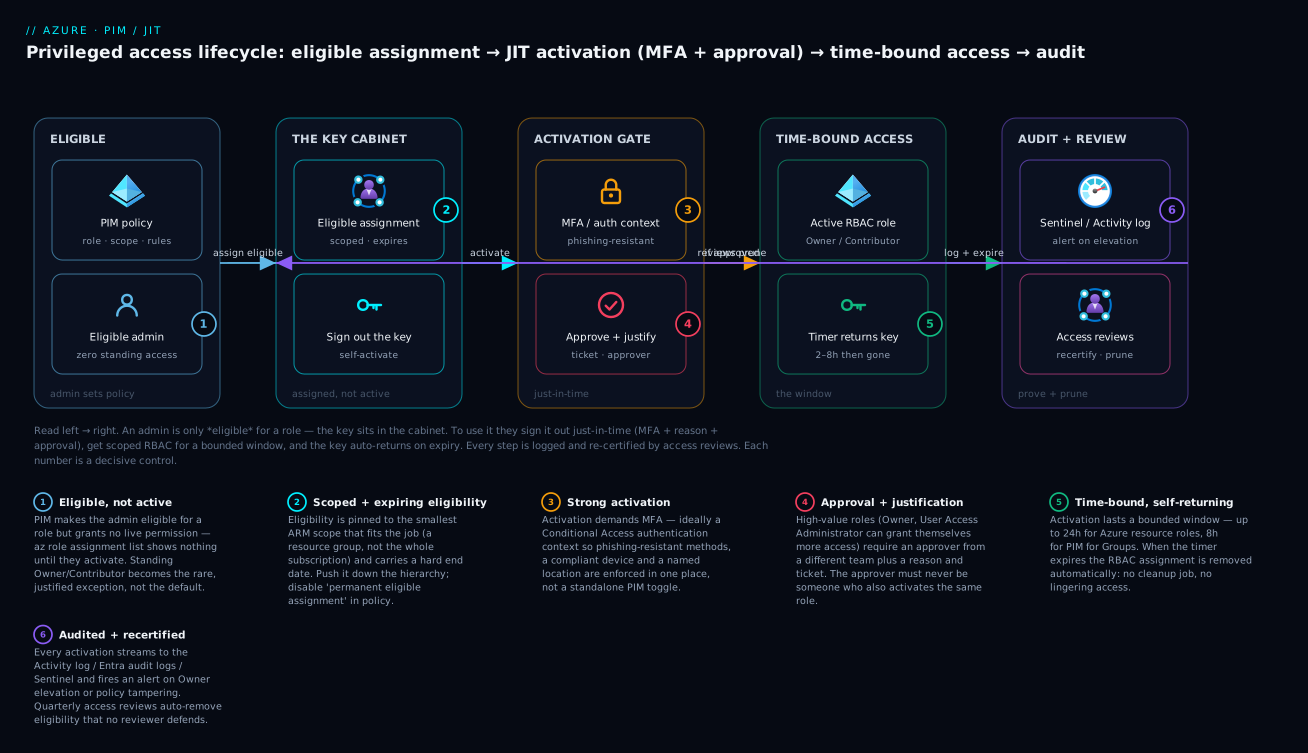
Left to right: an admin is granted a scoped, expiring eligible assignment (the key in the cabinet), signs it out just-in-time through an MFA + approval gate, receives time-bound RBAC that auto-expires, and every step is streamed to the audit log and re-checked by access reviews that prune whatever nobody defends.
Level: Advanced · Time: ~33 min
Prerequisites. You should be comfortable with Azure RBAC - roles, role assignments, and the management-group → subscription → resource-group → resource scope hierarchy - and with Microsoft Entra ID sign-in and MFA. If any of that is fuzzy, start with Entra ID fundamentals: tenants, users, groups, RBAC and the Entra RBAC governance deep dive. The activation gate leans on Conditional Access authentication contexts, covered in Conditional Access, authentication context, and protected actions.
What you’ll be able to do after this lesson:
- Explain the difference between an eligible and an active assignment, and why eligibility grants zero live permission.
- Distinguish the three PIM control planes - Entra roles, Azure resource roles, and PIM for Groups - and pick the right one for a given privilege.
- Create a scoped eligible assignment on a single resource group and tune its role management policy (max duration, MFA, justification, ticket, approval).
- Automate eligibility with Terraform (
azurerm_pim_eligible_role_assignment), ARM/Bicep, and Microsoft Graph - and know exactly which piece you cannot put in IaC. - Stand up recurring access reviews and Sentinel alerts so elevation is visible in seconds and stale eligibility is pruned automatically.
- Design a break-glass path that survives a PIM outage without becoming a silent backdoor.
Most teams stand up Privileged Identity Management for Entra directory roles - Global Administrator, User Administrator - and stop there. But the blast radius in a mature Azure estate is on the resource control plane: a standing Owner on a production subscription can delete a resource group, exfiltrate Key Vault secrets, and rewrite RBAC. This guide extends JIT elevation to Azure resource roles, scopes eligibility down to individual resource groups, gates activation behind approval and ticketing, and brings in PIM for Groups for privileges that don’t map cleanly to a single Azure role.
The two PIM control planes
PIM governs two separate systems, and conflating them is the most common design error.
| PIM for Entra roles | PIM for Azure resources | |
|---|---|---|
| Governs | Directory roles (Global Admin, etc.) | Azure RBAC role assignments |
| Scope | Tenant / administrative units | Management group, subscription, RG, resource |
| Backing API | Microsoft Graph (roleManagement/directory) |
ARM (Microsoft.Authorization/*) |
| Max activation | Up to 24 hours | Up to 24 hours (per role policy) |
The resource side is what we focus on here. It maps directly onto the ARM hierarchy, which is what makes scoping powerful: you can make someone eligible for Contributor on one resource group without giving them anything on the subscription.
The mental shift: stop thinking “who is an Owner” and start thinking “who is eligible to become an Owner, for how long, with whose approval, against which ticket.” Standing assignments become the exception you justify, not the default.
Prerequisites: Microsoft Entra ID P2 (or Entra ID Governance) for every user who activates, and Owner or User Access Administrator on the target scope to manage its eligible assignments and policy.
1. Onboard subscriptions and discover what’s already there
PIM auto-discovers subscriptions once you have the right directory role, but the first practical step is inventorying the standing assignments you’re about to replace. Do not start by deleting - start by seeing.
# Every role assignment on a subscription, including inherited from the MG
az role assignment list \
  --scope /subscriptions/00000000-0000-0000-0000-000000000000 \
  --include-inherited \
  --query "[].{principal:principalName, role:roleDefinitionName, type:principalType, scope:scope}" \
  -o table
Flag every Owner, Contributor, and User Access Administrator held by a human (filter principalType == User). Those are your conversion candidates. Service principals and managed identities stay as standing assignments - PIM activation requires interactive sign-in, so workload identities cannot activate eligible roles.
In the portal, the same surface is Entra admin center -> Identity governance -> Privileged Identity Management -> Azure resources, where you select the subscription (or management group) to manage.
2. Create scoped eligible assignments
This is the core move. Instead of an active Contributor on the whole subscription, grant eligible Contributor on a single resource group. The principal sees the role in PIM but holds no permission until they activate.
RG_SCOPE="/subscriptions/00000000-0000-0000-0000-000000000000/resourceGroups/rg-payments-prod"
PRINCIPAL_OID="11111111-1111-1111-1111-111111111111"   # the user's object ID

# Contributor role definition ID (stable, well-known GUID)
CONTRIB="b24988ac-6180-42a0-ab88-20f7382dd24c"

az role assignment create \
  --assignee-object-id "$PRINCIPAL_OID" \
  --assignee-principal-type User \
  --role "$CONTRIB" \
  --scope "$RG_SCOPE"
Caveat:
az role assignment createcreates a standing (active) assignment, not an eligible one. The classic CLI predates PIM. To create eligible assignments you go through the ARM PIM provider - the portal, the REST API, or IaC (covered in step 6). I show the active form here only because you’ll use it for the rare standing exceptions; the default path is eligible.
The eligible-assignment ARM resource is Microsoft.Authorization/roleEligibilityScheduleRequests. You can create one with a raw ARM call:
GUID=$(uuidgen)
az rest --method put \
  --url "https://management.azure.com${RG_SCOPE}/providers/Microsoft.Authorization/roleEligibilityScheduleRequests/${GUID}?api-version=2022-04-01-preview" \
  --body '{
    "properties": {
      "principalId": "11111111-1111-1111-1111-111111111111",
      "roleDefinitionId": "'"${RG_SCOPE}"'/providers/Microsoft.Authorization/roleDefinitions/b24988ac-6180-42a0-ab88-20f7382dd24c",
      "requestType": "AdminAssign",
      "scheduleInfo": {
        "startDateTime": null,
        "expiration": { "type": "AfterDuration", "duration": "P180D" }
      },
      "justification": "JIT eligibility for payments platform team"
    }
  }'
Note roleDefinitionId is fully qualified with the scope, requestType is AdminAssign (an admin granting eligibility, versus SelfActivate when the user activates), and expiration gives the eligibility a hard 180-day end date so it doesn’t live forever.
3. Tune the role policy per scope
Eligibility without guardrails is just deferred standing access. The role management policy at each scope controls what activation requires: maximum duration, MFA, justification, ticketing, and approval. Configure the high-value roles (Owner, Contributor, User Access Administrator) tightly, and lower-risk roles more loosely.
In the portal: PIM -> Azure resources -> <subscription> -> Settings -> <role> -> Edit. A defensible production baseline for Owner:
Activation
  Max activation duration:        2 hours
  Require MFA on activation:      Yes (or "Require Authentication Context")
  Require justification:          Yes
  Require ticket information:     Yes
  Require approval to activate:   Yes  -> approvers: "Cloud Platform Approvers" group

Assignment
  Allow permanent eligible assignment:  No  (force an expiry on eligibility)
  Expire eligible assignments after:    180 days
  Allow permanent active assignment:    No
Authentication Context is the modern way to require MFA: instead of the policy’s built-in “require MFA” toggle, you reference a Conditional Access authentication context (for example c1) so activation is gated by a full CA policy - phishing-resistant methods, compliant device, named location. That keeps your MFA strength definition in one place (CA) rather than split across PIM.
Owner and User Access Administrator are the roles that can grant themselves more access. Always require approval on those two, and never make the approver a member of the same team that activates.
A critical gap to know about: role management policies cannot be updated through Bicep or ARM templates. The Microsoft.Authorization/roleManagementPolicyAssignments resource is readable but the rules are not writable via standard ARM deployment. You set policy through the portal or the Authorization REST API (PATCH .../roleManagementPolicies/<id>); you automate assignments via IaC. Plan your tooling accordingly - I see teams burn a sprint trying to push policy through azapi before discovering this.
4. PIM for Groups: JIT into privileged access groups
Some privileges don’t map to one Azure role. You want a single activation that grants Contributor on three resource groups plus a Key Vault data-plane role, or you want JIT ownership of a group so someone can manage its membership only when needed. PIM for Groups solves this: a group is onboarded to PIM, principals are made eligible for membership or ownership, and the group itself holds the standing role assignments.
The pattern:
- Create a role-assignable security group (it must be
isAssignableToRoleor onboarded as a privileged access group). - Give that group the standing Azure RBAC assignments it needs (the three RGs + the Key Vault role).
- In PIM, make engineers eligible members. Activation drops them into the group for a bounded window; on expiry they fall out and lose every role the group carried.
az ad group create \
  --display-name "pag-payments-operators" \
  --mail-nickname "pag-payments-operators" \
  --is-assignable-to-role true
Then assign the group its standing roles (Contributor on each RG, Key Vault Secrets User on the vault), and onboard it in PIM -> Groups -> <group> -> Settings, configuring the Member role with the same activation/approval rules as in step 3.
PIM for Groups activation is capped at 8 hours maximum - shorter than the 24-hour ceiling for direct Azure resource roles. For nested ownership scenarios (eligible owner of a group so you can rotate its members JIT) this is usually plenty.
This also cleans up nested ownership: rather than standing owners on dozens of access groups, make a platform team eligible-owner across them. They activate ownership only to make a membership change, and that activation is logged and approvable like any other.
5. A break-glass path that still gets logged
PIM is in the critical path of getting access, so a PIM, Graph, or Conditional Access outage cannot lock everyone out of production. The answer is not a quiet permanent Owner that bypasses everything - it’s a break-glass account that has standing access but is loud.
Design it so the emergency path is auditable:
- Two cloud-only
*.onmicrosoft.comaccounts, excluded from the Conditional Access policies that could block sign-in, but monitored so any use fires an alert. - Standing Owner at the management group (or per critical subscription) - the one deliberate exception to “no standing Owner.”
- A high-severity alert on every sign-in by these accounts and on any role activation they perform, routed to on-call, not just an inbox.
// Sentinel / Log Analytics: alert on any break-glass sign-in
let breakGlassUPNs = dynamic(["breakglass-01@contoso.onmicrosoft.com",
                              "breakglass-02@contoso.onmicrosoft.com"]);
SigninLogs
| where UserPrincipalName in~ (breakGlassUPNs)
| project TimeGenerated, UserPrincipalName, AppDisplayName, IPAddress,
          ResultType, Location
The test that matters: tabletop a “PIM is down” scenario. If your engineers cannot reach the break-glass credential (sealed in a separate vault, two-person retrieval) and your alert does not actually page someone, you have a break-glass account that is just an unmonitored backdoor.
6. Automate eligibility with IaC and the PIM APIs
Click-ops eligibility does not survive a real estate. Two automation surfaces matter, and they cover different objects.
Azure resource roles via ARM/Bicep/Terraform. Eligible assignments are first-class ARM resources, so you can declare them. In Terraform, the azurerm_pim_eligible_role_assignment resource handles this cleanly:
data "azurerm_subscription" "prod" {
  subscription_id = "00000000-0000-0000-0000-000000000000"
}

data "azurerm_role_definition" "contributor" {
  name  = "Contributor"
  scope = data.azurerm_subscription.prod.id
}

resource "azurerm_pim_eligible_role_assignment" "payments_contrib" {
  scope              = "${data.azurerm_subscription.prod.id}/resourceGroups/rg-payments-prod"
  role_definition_id = data.azurerm_role_definition.contributor.role_definition_id
  principal_id       = "11111111-1111-1111-1111-111111111111"

  schedule {
    expiration {
      duration_days = 180
    }
  }

  justification = "Payments platform team - JIT Contributor (managed by IaC)"
}
The Bicep/ARM equivalent is the roleEligibilityScheduleRequests resource shown in step 2. Remember the limitation from step 3: you can declare assignments in IaC, but the policy (duration, approval, MFA) is not writable through ARM templates - drive it via the REST API or portal.
PIM for Groups via Microsoft Graph. Group eligibility lives in Graph, not ARM. Make a principal an eligible member with an eligibilityScheduleRequest:
az rest --method post \
  --url "https://graph.microsoft.com/v1.0/identityGovernance/privilegedAccess/group/eligibilityScheduleRequests" \
  --headers "Content-Type=application/json" \
  --body '{
    "accessId": "member",
    "principalId": "11111111-1111-1111-1111-111111111111",
    "groupId": "22222222-2222-2222-2222-222222222222",
    "action": "adminAssign",
    "scheduleInfo": {
      "startDateTime": "2026-05-21T00:00:00Z",
      "expiration": { "type": "afterDuration", "duration": "P180D" }
    },
    "justification": "Eligible member of pag-payments-operators"
  }'
Key fields: accessId is member or owner (this is how you grant nested JIT ownership), action is adminAssign, and expiration bounds the eligibility itself. The same endpoint family handles assignmentScheduleRequests for the rare standing assignment.
Source-control your eligibility. A pull request that adds someone as eligible-Owner is itself an approval artifact and an audit trail - far better than a portal change nobody can reconstruct six months later.
7. Recurring access reviews with auto-removal
Eligibility rots. People change teams, projects end, and “temporary” eligibility quietly becomes permanent. Access reviews are the garbage collector. Schedule a recurring review over the eligible assignments at each high-value scope, and configure it to auto-apply results and remove access when a reviewer doesn’t respond.
In the portal: Identity governance -> Access reviews -> New access review, scoped to “Azure resource roles” for the subscription/RG, reviewing eligible assignments.
Review:            Eligible "Owner" + "Contributor" on rg-payments-prod
Reviewers:         Resource owners (or named "Cloud Platform Approvers")
Recurrence:        Quarterly
Auto-apply:        Yes
If reviewers don't respond:  Remove access
Justification required:      Yes (reviewer must state why access is kept)
“If reviewers don’t respond -> Remove access” is the setting that actually shrinks standing risk. A review that defaults to keep on silence is theater. Make the safe default removal, and require a justification to retain.
For PIM for Groups, run the equivalent review over the group’s eligible members and owners. Reviews and the underlying eligibility share the same governance plane, so a removal here drops the eligibility everywhere it propagated.
8. Audit activations in Sentinel and alert on elevation
Every activation is an audit event. The goal is to make Owner/Contributor elevation visible in seconds, not discoverable in a quarterly export. Stream the Azure Activity log and Entra audit logs into Log Analytics / Microsoft Sentinel, then alert on the activations that matter.
PIM for Azure resource activations surface in the Activity log under the Microsoft.Authorization provider. This rule flags any activation of Owner or User Access Administrator:
AzureActivity
| where OperationNameValue has "roleAssignmentScheduleRequests"
| where ActivityStatusValue == "Success"
| extend props = parse_json(Properties)
| where tostring(props.requestbody) has_any ("Owner", "User Access Administrator")
| project TimeGenerated, Caller, ResourceGroup,
          SubscriptionId = tostring(props.subscriptionId), OperationNameValue
For Entra-role and PIM-for-Groups activity, query the audit logs instead:
AuditLogs
| where Category == "RoleManagement"
| where ActivityDisplayName has "Add member to role completed (PIM activation)"
| extend actor = tostring(InitiatedBy.user.userPrincipalName)
| project TimeGenerated, ActivityDisplayName, actor,
          target = tostring(TargetResources[0].displayName), Result
Turn these into scheduled analytics rules. The two alerts every estate should have: activation of Owner/User Access Administrator on production, and any modification of a PIM role policy (someone weakening duration or removing approval is a strong tampering signal).
Enterprise scenario
A payments platform team converted every production subscription to eligible-only Owner and Contributor, approval gated, and the auditors were happy. Two weeks later the on-call engineer hit a wall during a Sev2: activation of Contributor on rg-payments-prod sat in “pending approval” for forty minutes because the only approver group member was on a flight. The constraint they had missed: PIM approvals are synchronous and single-stage, with no built-in escalation or timeout-to-auto-approve. A break-glass account exists for full outages, but burning it for a routine activation hiccup is exactly the loud event you do not want during an incident.
The fix was twofold. First, the approver group got real depth - on-call leads from a different team plus the platform manager, so duty separation held but coverage did not depend on one person. Second, they split the role policy: incident-response Contributor on the production RGs requires approval, but a separate, tightly scoped eligible assignment for the active on-call rotation activates with MFA and justification only, no approval, capped at one hour.
# Grant the current on-call principal self-activatable (no-approval) eligibility,
# bounded to the rotation window; renewed each handoff by the pipeline.
az rest --method put \
  --url "https://management.azure.com${RG_SCOPE}/providers/Microsoft.Authorization/roleEligibilityScheduleRequests/$(uuidgen)?api-version=2022-04-01-preview" \
  --body '{"properties":{"principalId":"'"$ONCALL_OID"'","roleDefinitionId":"'"${RG_SCOPE}"'/providers/Microsoft.Authorization/roleDefinitions/b24988ac-6180-42a0-ab88-20f7382dd24c","requestType":"AdminAssign","scheduleInfo":{"expiration":{"type":"AfterDuration","duration":"P14D"}},"justification":"On-call rotation - JIT incident Contributor"}}'
The Sentinel rule from step 8 still fires on every activation, so the no-approval path stays visible. Approval is a control, not a goal; the goal is least standing privilege with an auditable, survivable elevation path.
Verify
Before you call it done, prove the controls actually behave:
# 1. The eligible principal holds NO standing permission yet
az role assignment list \
  --assignee 11111111-1111-1111-1111-111111111111 \
  --scope "$RG_SCOPE" --query "[].roleDefinitionName" -o tsv
# Expect: empty (eligibility is not an active assignment)

# 2. Eligible assignments exist at the scope
az rest --method get \
  --url "https://management.azure.com${RG_SCOPE}/providers/Microsoft.Authorization/roleEligibilitySchedules?api-version=2020-10-01" \
  --query "value[].{principal:properties.principalId, role:properties.roleDefinitionId}" -o table
Then the human-loop checks no script can do for you:
- Activate the role in
PIM -> My roles -> Azure resources. Confirm it demands MFA, justification, and a ticket, and routes to the approver. - After the approver consents, re-run check #1 - the role now appears as active.
- Wait past the activation window (or deactivate) and confirm the permission is gone.
- Trigger a test activation and confirm your Sentinel rule fires end to end.
Rollout checklist
Pitfalls and next steps
- Workload identities can’t activate. Service principals and managed identities have no interactive sign-in, so they cannot use eligible assignments - keep their RBAC as scoped standing assignments and govern those with reviews instead.
- Eligibility with no expiry is standing access in disguise. Always set an eligibility end date and an activation duration. Disable “permanent eligible assignment” in policy.
- Policy is not Terraformable. Don’t architect a pipeline assuming you can push duration/approval rules through ARM - you can’t. Assignments are IaC; policy is REST/portal.
- Scope creep upward. Granting eligible Owner at the subscription when the work only ever touches one RG defeats the point. Push eligibility down the ARM hierarchy as far as it will go.
- The approver paradox. If the people who activate also approve, you have no control. Separate the duties.
The end state is an estate with effectively zero standing Owners on production: access is something engineers request and earn for the duration of a task, gated by approval, bounded by time, and fully reconstructable from the audit log. Pair this with Conditional Access authentication contexts for the activation gate and Defender for Cloud for the posture it protects, and least privilege stops being an aspiration and becomes the default state of the system.
Going deeper
The eight-step build above is the what. This section is the how it actually works - the object model underneath, the three planes side by side, the licensing math, and the seams where PIM meets (and is often confused with) Conditional Access. Read it once and the portal blades stop feeling arbitrary.
The request/schedule object model
Every PIM object comes in two halves: a request (an action you take) and a schedule (the resulting state). You never edit a schedule directly - you submit a request, and PIM materialises or tears down the schedule for you.
| You submit… | …which produces | For Azure resource roles |
|---|---|---|
roleEligibilityScheduleRequest |
roleEligibilitySchedule |
the “you may activate this” record |
roleAssignmentScheduleRequest |
roleAssignmentSchedule |
a real, time-bound RBAC assignment |
When a user activates an eligible role, the portal (or API) submits a roleAssignmentScheduleRequest with requestType: SelfActivate. PIM validates the policy (MFA satisfied? justification present? approver consented?), then writes a live Microsoft.Authorization/roleAssignments entry for the window and schedules its own removal at expiry. There is no cleanup job you own - the expiry is the schedule’s end date, enforced by the platform. This is why “the permission is just gone afterward” is literally true, not a convention.
The same pattern repeats on the other two planes with different endpoints:
| Plane | Backing API | Eligibility request object | accessId / target |
|---|---|---|---|
| Entra (directory) roles | Microsoft Graph roleManagement/directory |
roleEligibilityScheduleRequests |
a directory roleDefinitionId |
| Azure resource roles | ARM Microsoft.Authorization |
roleEligibilityScheduleRequests |
a scoped roleDefinitionId |
| Groups (PIM for Groups) | Graph identityGovernance/privilegedAccess/group |
eligibilityScheduleRequests |
accessId: member or owner |
Three planes, one mental model. The confusion that costs teams a day is assuming a single API covers all three - it doesn’t. Entra roles and Groups live in Graph; Azure resource roles live in ARM. A token scoped for graph.microsoft.com cannot touch resource-role eligibility, and an ARM token cannot touch group eligibility.
Eligible vs active, restated precisely
- An active assignment is a live
roleAssignmentsentry: the principal has the permission right now. It can be permanent or time-bound. - An eligible assignment is potential: no
roleAssignmentsentry exists until activation.az role assignment listreturns nothing for an eligible-only principal - which is exactly the check in the Verify section, and the single most common “wait, why can’t I see it?” moment for newcomers.
Activation is governed by the role management policy attached to each role at each scope. Its knobs, and what each defends against:
| Setting | What it does | Why it matters |
|---|---|---|
| Max activation duration | Caps the window (≤24h resource/Entra roles, ≤8h Groups) | Shorter window = smaller exposure if a session is hijacked mid-activation |
| Require MFA / auth context | Forces step-up at activation time | A stolen refresh token alone can’t elevate |
| Require justification | Free-text reason, logged | Creates the “why” half of the audit trail |
| Require ticket | Ticket system + number | Ties elevation to a change record for auditors |
| Require approval | Routes to approver(s) before grant | Second pair of eyes on the roles that can self-escalate |
| On/off “permanent eligible” | Whether eligibility can be forever | Forcing an expiry stops “temporary” becoming permanent |
The P2 licensing requirement (the part finance asks about)
PIM is a Microsoft Entra ID P2 feature (also included in the standalone Microsoft Entra ID Governance SKU, and in bundles like EMS E5 / Microsoft 365 E5). The rule of thumb that keeps you compliant: every user who touches the privileged-access workflow needs a P2 license - anyone made eligible for or assigned a role through PIM, anyone who activates, anyone configured as an approver, and anyone who is a reviewer in an access review over PIM-managed access.
Two practical consequences. First, licensing is per user, not per tenant - you count heads in the workflow, not a flat fee. Second, your break-glass accounts, which you deliberately keep out of PIM (standing access, never eligible), do not consume a PIM license for that reason - though they’ll typically carry other licensing for their own sign-in. Budget for P2 across your whole admin population plus approvers/reviewers, not just the people who elevate.
Approval workflows and delegated approvers
PIM approvals are single-stage and synchronous: one approver group, one decision, no built-in multi-stage chain and - as the enterprise scenario showed - no timeout-to-auto-approve and no automatic escalation. Design around that:
- Give the approver group depth and duty separation: enough members that coverage never depends on one person, drawn from a different team than the one that activates.
- If no approver is configured but approval is required, the fallback approvers are the scope’s Owners / User Access Administrators (resource roles) or Privileged Role Administrators (Entra roles) - which may not be who you intend, so set approvers explicitly.
- Split policies by urgency: keep approval on general privileged work, but carve out a tightly scoped, short (≤1h), MFA-and-justification-only eligible assignment for the live on-call rotation so a Sev2 is never blocked on a sleeping approver.
Discovery, insights, and alerts
PIM ships two governance surfaces beyond the assignment blades. Discovery and insights (Azure resource roles) enumerates existing standing assignments across your onboarded subscriptions and offers a one-click path to convert permanent assignments to eligible - this is how you find the Owners you forgot about. Alerts (Entra roles) flag risky posture: “There are too many global administrators,” “Roles are being assigned outside of PIM,” “Administrators aren’t using their privileged roles” (a signal you can down-scope them), and “Accounts aren’t using MFA on activation.” Each alert carries a remediation action. Wire the two Sentinel rules from step 8 (Owner/UAA elevation, and any policy edit) on top of these - the built-in alerts describe posture; your analytics rules catch events in real time.
PIM vs Conditional Access - complementary, not interchangeable
This is the distinction most people get muddy. They answer different questions:
| PIM | Conditional Access (CA) | |
|---|---|---|
| Question | Should this person be able to become this admin, for how long, with whose sign-off? | Under what conditions may this sign-in or action proceed right now? |
| Governs | The assignment lifecycle - eligibility, activation, approval, expiry | The session - device state, location, sign-in risk, MFA strength |
| Time model | Just-in-time, bounded windows | Per sign-in / per session, continuous |
They compose. PIM’s activation policy can invoke a CA authentication context (c1, c2, …), so at the moment of activation CA enforces your one canonical definition of “strong” - phishing-resistant MFA, compliant device, named location - rather than PIM carrying a weaker duplicate toggle. Going the other way, CA protected actions can gate the sensitive PIM operations themselves (editing role settings, for instance) behind step-up auth. Use PIM to decide who may hold power and for how long, and CA to decide whether this exact session is trustworthy enough to exercise it.
The IaC / API surface, and its one hard limit
Automating PIM means picking the right surface per object, and accepting a real boundary:
| Object | Automate with | Notes |
|---|---|---|
| Resource-role eligible assignment | azurerm_pim_eligible_role_assignment (Terraform), ARM roleEligibilityScheduleRequests, azapi |
Stable in azurerm v4; also azurerm_pim_active_role_assignment for standing exceptions |
| Entra-role eligible assignment | Graph roleManagement/directory/roleEligibilityScheduleRequests |
No first-class azurerm resource - use Graph or the azuread provider tooling |
| Group eligibility (member/owner) | Graph identityGovernance/privilegedAccess/group/eligibilityScheduleRequests |
accessId selects member vs owner |
| Role management policy (duration, MFA, approval) | REST PATCH roleManagementPolicies/<id> or portal only |
Not writable via ARM/Bicep templates - the limit from step 3 |
The one hard limit worth tattooing on the runbook: assignments are Infrastructure-as-Code; policy is not. You can declare who is eligible in Terraform and review it in a pull request, but the rules of activation must be pushed through the Authorization REST API or clicked in the portal. Architect the pipeline around that split before you build it, not after.
Practice challenges
Work these in order - they escalate from “read the model” to “design the survivable system.” Each has a worked solution; try it before you open it.
<details> <summary><strong>Challenge 1 (beginner).</strong> An engineer is <em>eligible</em> for Contributor on <code>rg-payments-prod</code> but has not activated. What does <code>az role assignment list --assignee <their-oid> --scope <the-rg></code> return, and why?</summary>
Solution. It returns nothing (an empty list). Eligibility is not a live Microsoft.Authorization/roleAssignments entry - it only becomes one after activation, and only for the activation window. az role assignment list reads active assignments, so an eligible-only principal is invisible to it.
Why it matters: this is the whole point of PIM - “eligible” is potential access, not held access. If the command returned the role, you would have standing access, not JIT. </details>
<details> <summary><strong>Challenge 2 (beginner).</strong> You want to grant a teammate eligible Contributor on one resource group, at the ARM scope. Write the fully-qualified <code>roleDefinitionId</code> you’d put in the request body (Contributor GUID <code>b24988ac-6180-42a0-ab88-20f7382dd24c</code>).</summary>
Solution.
/subscriptions/00000000-0000-0000-0000-000000000000/resourceGroups/rg-payments-prod/providers/Microsoft.Authorization/roleDefinitions/b24988ac-6180-42a0-ab88-20f7382dd24c
The roleDefinitionId must be fully qualified with the scope, then /providers/Microsoft.Authorization/roleDefinitions/<guid>. Using the bare GUID, or qualifying it at the subscription when you mean the RG, is the most common 400/403 in step 2.
Why it matters: the scope in the path is what pins eligibility to that RG and nothing broader - the qualification is not boilerplate, it is the scoping. </details>
<details> <summary><strong>Challenge 3 (intermediate).</strong> Design the role management policy for <strong>Owner</strong> on a production subscription so that (a) elevation can’t exceed 2 hours, (b) MFA strength is defined once in Conditional Access, © a reason and change ticket are recorded, and (d) a second person from another team must approve. List the settings.</summary>
Solution.
Max activation duration:        2 hours
Require MFA on activation:      Require Authentication Context  (-> CA policy c1)
Require justification:          Yes
Require ticket information:     Yes
Require approval to activate:   Yes  -> approvers: a group with NO members who also activate Owner
Allow permanent eligible:       No   (expire eligibility, e.g. 180 days)
Allow permanent active:         No
Why it matters: choosing Authentication Context over the built-in MFA toggle keeps your “what counts as strong MFA” in one place (CA) - change it once and every PIM activation follows. Requiring approval from a different team is what makes the control real rather than self-signed. </details>
<details> <summary><strong>Challenge 4 (intermediate).</strong> A platform team needs a single activation to grant Contributor on <em>three</em> resource groups plus <code>Key Vault Secrets User</code> on a vault. Which PIM plane, and what are the three build steps?</summary>
Solution. Use PIM for Groups, because the bundle spans multiple roles/scopes that no single Azure role covers.
- Create a role-assignable security group (
--is-assignable-to-role true). - Give the group the standing RBAC it needs: Contributor on each of the three RGs, plus
Key Vault Secrets Useron the vault. - Onboard the group to PIM and make engineers eligible members (with activation policy). Activation drops them into the group for the window; expiry pulls them out and they lose all four roles at once.
Why it matters: the group holds the standing roles; the humans only ever hold time-bound membership. One activation, one expiry, four permissions - no per-role juggling. (Note the 8-hour Groups activation cap.) </details>
<details> <summary><strong>Challenge 5 (advanced).</strong> Your pipeline declares eligible assignments in Terraform and, in the same run, tries to set each role’s activation policy (duration, approval) via ARM. The assignments apply; the policy changes silently no-op. Why, and what’s the fix?</summary>
Solution. Role management policies are not writable through ARM/Bicep templates. Microsoft.Authorization/roleManagementPolicyAssignments is readable, and azurerm_pim_eligible_role_assignment handles assignments, but the rules (max duration, MFA, approval, justification, ticket) must be pushed via the Authorization REST API (PATCH .../roleManagementPolicies/<id>) or the portal.
Fix: split the pipeline. Terraform/ARM owns eligibility assignments; a separate step calls the REST API (or a script) to reconcile policy. Do not architect a single apply that assumes both.
Why it matters: teams routinely lose a sprint discovering this seam. Assignments are IaC; policy is REST/portal - design around the split up front. </details>
<details> <summary><strong>Challenge 6 (advanced).</strong> During a Sev2, on-call Contributor activation sits in “pending approval” for 40 minutes because the sole approver is unreachable. You must not weaken security or turn Owner into standing access. Design a fix.</summary>
Solution. Two moves, both preserving least privilege:
- Deepen and separate the approver group - multiple members drawn from a different team plus a manager, so duty separation holds but coverage never depends on one person. (PIM approval is single-stage with no auto-escalation, so depth is the escalation.)
- Split the policy by urgency. Keep approval on general production Contributor, but create a separate, tightly scoped eligible assignment for the active on-call rotation that activates with MFA + justification only, no approval, capped at ~1 hour, renewed each handoff by the pipeline.
The step-8 Sentinel rule still fires on every activation, so the no-approval path stays fully visible.
Why it matters: approval is a control, not the goal. The goal is least standing privilege with an elevation path that is auditable and survivable - a control that blocks incident response fails at its actual job. </details>
Common beginner mistakes
Distinct from the architectural pitfalls above, these are the mental-model errors newcomers make on their first PIM rollout.
- “Eligible means they have the role.” No - eligible means they may become the role. Until activation there is no live RBAC assignment and
az role assignment listshows nothing. If you see the role in that list, it’s active (standing), and you haven’t actually adopted JIT. - “
az role assignment createsets up PIM.” It creates a standing, active assignment - the exact thing PIM is meant to replace. Eligible assignments come from the PIM/ARM provider (roleEligibilityScheduleRequests), the portal, or Terraform’sazurerm_pim_eligible_role_assignment, never the classiccreate. - “I’ll make service principals eligible too.” Workload identities have no interactive sign-in, so they cannot activate. Keep managed identities and service principals on scoped standing assignments and govern those with access reviews instead.
- “Eligibility is safe because it’s temporary.” Only if you set an expiry. Eligibility with no end date is standing access wearing a disguise - it just defers the grant, not the risk. Set both an eligibility end date and a per-activation duration, and disable “permanent eligible” in policy.
- “Owner on the subscription is fine, they’ll only touch one RG.” Scope creep upward defeats the purpose. Make them eligible at the resource group, the smallest scope that fits the work. PIM’s power is that it rides the ARM hierarchy - use it.
- “The activators can approve each other.” If the people who activate also sit in the approver group, the approval is theater. Approvers must come from a different duty than the activators - that separation is the control.
- “PIM replaces Conditional Access.” They answer different questions - PIM governs who may hold power and for how long; CA governs whether this session is trustworthy enough to use it. Use both; let PIM activation invoke a CA authentication context.
- “Break-glass should go through PIM too.” No - break-glass accounts deliberately keep standing access and are excluded from PIM and from the CA policies that gate activation, precisely so a PIM/Graph/CA outage can’t lock you out. You make them loud (alert on every sign-in), not gated.
Glossary
- PIM (Privileged Identity Management) - the Microsoft Entra service that manages time-bound, approval-gated, audited access to privileged roles. An Entra ID P2 / Entra ID Governance feature.
- Eligible assignment - a record that a principal may activate a role. Grants no live permission until activation; invisible to
az role assignment list. - Active assignment - a live
Microsoft.Authorization/roleAssignmentsentry: the principal holds the permission now. Can be permanent (standing) or the time-bound result of an activation. - Activation - the just-in-time act of turning an eligible assignment into a live, time-bound active one, subject to the role management policy (MFA, justification, ticket, approval).
- Role management policy - the per-role, per-scope settings that govern activation and assignment: max duration, MFA/auth context, justification, ticket, approval, and whether permanent eligibility/assignment is allowed. Not writable via ARM/Bicep - use REST or the portal.
- Standing access - a permanent active assignment. PIM’s goal is to reduce standing access (especially Owner) to near zero on production.
- JIT (just-in-time) - access granted only for the moment it’s needed and automatically removed afterward, versus held continuously.
- Scope - the ARM node an assignment targets: management group, subscription, resource group, or resource. Push eligibility to the smallest scope that fits the task.
- PIM for Groups - onboarding a (role-assignable) group to PIM so principals become eligible members or owners; the group carries the standing role bundle. Activation cap: 8 hours.
- Authentication context - a Conditional Access construct (e.g.
c1) that PIM activation can require, so MFA strength/device/location are defined once in CA rather than duplicated in PIM. - Break-glass account - an emergency account with standing privileged access, excluded from PIM and CA gating so an identity-plane outage can’t lock you out, and heavily monitored/alerted.
- Access review - a recurring recertification of who holds (or is eligible for) access, with auto-apply and remove-on-no-response so stale eligibility is pruned automatically.
- User Access Administrator (UAA) - the Azure RBAC role that can manage others’ role assignments; alongside Owner, one of the two roles that can grant itself more access, so both should always require approval.
roleEligibilityScheduleRequest/roleAssignmentScheduleRequest- the ARM/Graph request objects you submit; PIM turns them into the corresponding...Schedulestate (eligibility, or a time-bound active assignment).azurerm_pim_eligible_role_assignment- the Terraform resource that declares an eligible assignment for an Azure resource role. Manages assignments only, not policy.- Discovery and insights / Alerts - PIM’s governance surfaces that surface standing assignments to convert, and risky posture (too many Global Admins, roles assigned outside PIM, unused privileged roles, no MFA on activation).