In a nutshell
Think of signing in to Microsoft Entra as being handed a wristband that gets you into the building all day. Multi-factor authentication (MFA) is the guard at the front door who checked your face and your phone before printing that wristband. The catch: once the wristband is printed, it is a bearer item - whoever wears it gets in. If a pickpocket lifts it (steals your token or session cookie), they walk straight past the guard, because the wristband already says “MFA done”. That is exactly how modern adversary-in-the-middle (AiTM) phishing works: the attacker steals the session, not the password, and MFA never fires again.
The three Conditional Access controls in this lesson each close a different part of that gap:
- Token protection makes the wristband tamper-proof and personal - it is bound to a secret held by your specific device, so a copy waved around on the attacker’s laptop is refused at the door. A stolen ticket that only works in your own hand.
- Authentication context is a bouncer on the VIP room. Your all-day wristband gets you into the lobby, but the finance floor or the admin console asks for fresh, strong ID again - every time - no matter how you got the original band.
- Protected actions put a second lock on the most dangerous switches in the building. Even an admin who is already inside must re-prove themselves the instant they try to delete a security policy or change how everyone signs in.
Layer all three and a stolen token stops being a skeleton key. Where the platform can bind it, the copy is worthless; where it cannot, the attacker still cannot produce the fresh phishing-resistant proof the VIP room and the dangerous switches demand.
Level: Advanced · Time: ~37 min
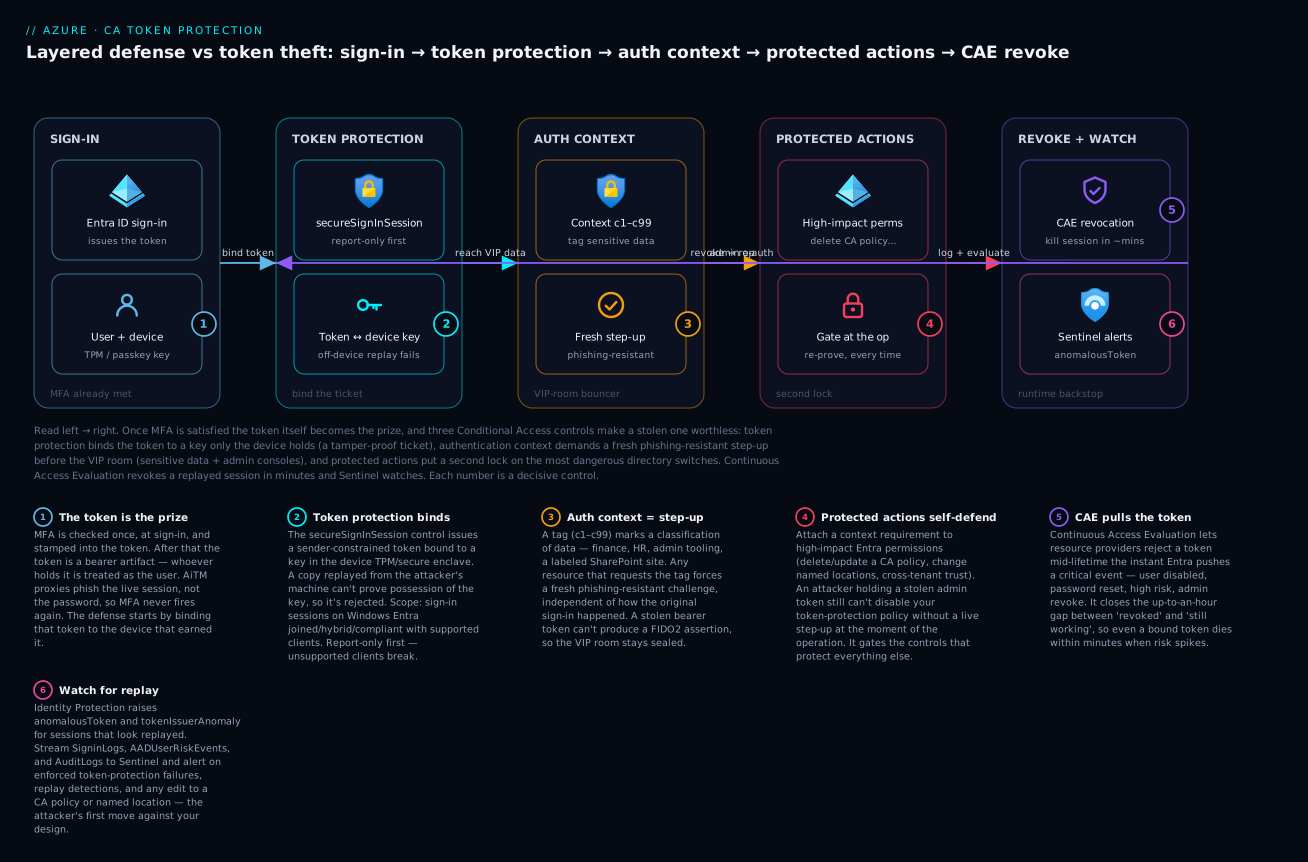
The diagram traces the same defense left to right: a sign-in on a known device gets a token bound to that device (token protection), sensitive data and admin consoles demand a fresh phishing-resistant step-up (authentication context), the most dangerous directory operations sit behind a second lock (protected actions), and Continuous Access Evaluation revokes a replayed session within minutes while Sentinel watches.
Prerequisites - you will get the most from this if you already understand:
- How Conditional Access assigns users + target resources + conditions to grant/session controls - the Authentication, SSO, MFA & passwordless lesson is the on-ramp.
- What a token, a refresh token, and a session cookie are, and why MFA alone does not stop replay (the kill-chain section below fills this in).
- Least-privilege admin and just-in-time elevation from PIM for resources & groups, and the Zero Trust multi-layer model.
- Licensing: token protection needs Entra ID P1; the sign-in-risk and user-risk pieces need Entra ID P2.
After this lesson you will be able to:
- Explain the token-theft kill chain and why “MFA everywhere” still leaves a hole an AiTM proxy drives through.
- Stand up a token-protection Conditional Access policy in report-only, read its signal, and enforce it only where clients can bind.
- Design authentication-context tags (
c1-c99) and route sensitive apps, SharePoint sites, and admin operations through a fresh phishing-resistant step-up. - Attach protected actions to your highest-impact Entra permissions so an attacker with a stolen admin token still cannot dismantle your controls.
- Reason about how Continuous Access Evaluation (CAE), authentication strengths, PIM, and Zero Trust compose into one layered defense.
MFA stops password spray. It does almost nothing against token theft. Once an attacker has lifted a refresh token, a Primary Refresh Token (PRT), or a session cookie off an endpoint, they replay it from their own infrastructure and Entra hands them an access token - no password, no MFA prompt, because the original sign-in already satisfied those controls. This is the dominant pattern behind modern AiTM (adversary-in-the-middle) campaigns: phish the session, not the credential.
The defense is to make stolen artifacts useless off the device they were minted on. This guide wires together three Entra controls that, layered, collapse the token-replay kill chain: token protection (cryptographically binds the session to the client device), authentication context (tags sensitive apps and operations so they demand a fresh, stronger sign-in), and protected actions (forces step-up before tenant-level configuration changes - including changes to the very policies below).
The token theft kill chain
Understand what you are actually defending before you write a policy. Three artifacts matter:
| Artifact | Where it lives | What replaying it grants |
|---|---|---|
| Primary Refresh Token (PRT) | TPM-bound on Entra joined / hybrid joined Windows | SSO across all Entra apps on that device |
| Refresh token | Token cache (browser, MSAL, app) | New access tokens for a resource, silently, for the token’s lifetime |
| Session cookie | Browser cookie store | An authenticated web session, replayed in the attacker’s browser |
The PRT is the hardest target - it is protected by the TPM and, on a healthy device, the keys never leave hardware. The soft targets are refresh tokens and session cookies, which are bearer artifacts: whoever holds them is treated as the user. A “pass-the-cookie” attack is exactly that - copy the cookie, import it into a browser, and you are signed in. AiTM proxies (Evilginx and its descendants) automate the capture mid-sign-in, so even MFA gets relayed.
The core problem is that a bearer token has no notion of who is presenting it. Token protection fixes this by binding the issued token to a key the client device holds, so a copy presented from elsewhere fails validation.
1. Enable token protection session controls
Token protection (historically “token binding”) issues a session token cryptographically bound to a key held by the client device. A replayed token without proof-of-possession of that key is rejected. Build the policy in report-only first - this control has real platform constraints (covered in step 8) and will break sessions on unsupported clients if you enforce it blindly.
Portal path:
Entra admin center -> Protection -> Conditional Access -> Create new policy
  Name:    CA-TokenProtection-CoreApps
  Users:   pilot ring group  (exclude break-glass)
  Target:  Cloud apps -> Office 365 Exchange Online, Office 365 SharePoint Online
  Session: Require token protection for sign-in sessions
  Enable:  Report-only
Or as code via Microsoft Graph PowerShell - the session control is secureSignInSession:
Connect-MgGraph -Scopes "Policy.ReadWrite.ConditionalAccess","Policy.Read.All"

$params = @{
  displayName = "CA-TokenProtection-CoreApps"
  state       = "enabledForReportingButNotEnforced"   # report-only first
  conditions  = @{
    users = @{
      includeGroups = @("<pilot-ring-group-id>")
      excludeUsers  = @("<break-glass-object-id>")
    }
    applications = @{
      # Exchange Online + SharePoint Online app IDs (well-known, stable)
      includeApplications = @(
        "00000002-0000-0ff1-ce00-000000000000",  # Exchange Online
        "00000003-0000-0ff1-ce00-000000000000"   # SharePoint Online
      )
    }
    clientAppTypes = @("all")
  }
  sessionControls = @{
    secureSignInSession = @{ isEnabled = $true }
  }
}
New-MgIdentityConditionalAccessPolicy -BodyParameter $params
Scope it to Exchange Online and SharePoint Online deliberately - at the time of writing these are the resources where the supported native clients (new Outlook, Teams, OneDrive sync) honor token protection on Entra joined / hybrid joined / compliant Windows endpoints. Targeting “All cloud apps” with this control today guarantees broken sessions on anything that does not yet support binding.
2. Validate device binding before you enforce
Report-only generates the signal you need without locking anyone out. After a few days of pilot traffic, query the sign-in logs for the token protection evaluation. The signal surfaces under the session controls in the sign-in detail; in Log Analytics you expand the applied policies:
SigninLogs
| where TimeGenerated > ago(7d)
| mv-expand pol = ConditionalAccessPolicies
| where tostring(pol.displayName) == "CA-TokenProtection-CoreApps"
// reportOnlyFailure here = the session WOULD have been blocked once enforced
| summarize attempts = count() by
    Result = tostring(pol.result),
    AppDisplayName,
    ClientAppUsed,
    DeviceDetail_OS = tostring(DeviceDetail.operatingSystem)
| order by attempts desc
You are looking for reportOnlyFailure rows. Each one is a session that real enforcement would have broken. Triage them by client and OS:
- Unsupported client (legacy Outlook, third-party mail app, mobile): expected - do not enforce against these until you have a migration plan.
- Unmanaged device: token protection needs a registered device with a usable key; an unregistered BYOD endpoint cannot bind. Pair this policy with a compliant-device requirement (step 6).
- Supported client failing: investigate before flipping to enforce - this is the population that would generate help-desk tickets.
Only when reportOnlyFailure is essentially zero for your supported-client population do you change state to enabled.
3. Design authentication context tags
Token protection hardens sessions. Authentication context lets you demand stronger, fresher auth for specific applications, SharePoint sites, or sensitive operations - independent of how the user signed in originally. It is the foundation for step-up.
An authentication context is a small tag (IDs c1 through c99) that you define once, then reference from Conditional Access and from applications that are auth-context-aware.
# Define a context tag for high-value resources
$ctx = @{
  id          = "c1"
  displayName = "High-Value Data (step-up)"
  description = "Finance, HR, and admin tooling - requires fresh phishing-resistant auth"
  isAvailable = $true
}
New-MgIdentityConditionalAccessAuthenticationContextClassReference `
  -AuthenticationContextClassReferenceId "c1" -BodyParameter $ctx
Then author a Conditional Access policy whose target is the context tag rather than an app. Any resource that requests c1 triggers it:
$stepUp = @{
  displayName = "CA-AuthContext-c1-StepUp"
  state       = "enabledForReportingButNotEnforced"
  conditions  = @{
    users        = @{ includeUsers = @("All"); excludeUsers = @("<break-glass-object-id>") }
    applications = @{ includeAuthenticationContextClassReferences = @("c1") }
  }
  grantControls = @{
    operator        = "OR"
    authenticationStrength = @{
      # built-in "Phishing-resistant MFA" strength
      id = "00000000-0000-0000-0000-000000000004"
    }
  }
}
New-MgIdentityConditionalAccessPolicy -BodyParameter $stepUp
Now wire resources to the tag. The high-value patterns:
- SharePoint / OneDrive: label-driven. A sensitivity label with the “Use Conditional Access” setting points at
c1, so any site or document carrying that label inherits step-up. - Microsoft Defender for Cloud Apps: a session policy can trigger an auth-context challenge mid-session for risky in-app actions (downloads, admin operations).
- Your own apps: an app that uses MSAL can request the
acrsclaim forc1via theclaimsparameter, forcing the platform to satisfy your step-up policy before issuing a token.
The power here is decoupling. You are not protecting an app - you are protecting a classification of data, and the tag travels with it.
4. Wire protected actions to gate high-value operations
Protected actions take authentication context one layer deeper: they attach a context requirement to specific Entra directory permissions. The point is to stop an attacker who has already compromised an admin session from making catastrophic configuration changes - because the protected action forces a fresh, interactive step-up at the moment of the operation, not at sign-in.
This is the control that protects the rest of your design. Tie Conditional Access policy management itself to a protected action and an attacker with a stolen admin token cannot quietly disable your token-protection policy.
Configuration order matters - the context tag and its CA policy must exist first:
1. Define auth context (step 3) - e.g. "c2 : Tenant Config Change"
2. Create a CA policy targeting c2 with sign-in frequency = every time
   + phishing-resistant authentication strength (step 5)
3. Entra admin center -> Roles & admins -> Protected actions -> Add
     Authentication context: c2
     Permissions to protect, e.g.:
       microsoft.directory/conditionalAccessPolicies/basic/update
       microsoft.directory/conditionalAccessPolicies/delete
       microsoft.directory/namedLocations/basic/update
       microsoft.directory/crossTenantAccessPolicy/allowedCloudEndpoints/update
High-value permissions worth protecting:
| Permission | Why it is a protected-action candidate |
|---|---|
conditionalAccessPolicies/basic/update |
Stops an attacker disabling the controls in this article |
conditionalAccessPolicies/delete |
Same blast radius - deletion is not update |
namedLocations/basic/update |
Prevents adding an attacker IP as a “trusted” location |
crossTenantAccessPolicy/.../update |
Blocks opening B2B trust to a hostile tenant |
Protected actions also gate PIM activation when you point a role’s activation flow at the context. In the role setting under PIM, set “On activation, require Conditional Access authentication context” and select your tag - so activating Global Administrator forces the same fresh phishing-resistant challenge as your most sensitive data.
Identity Governance -> PIM -> Entra roles -> Global Administrator -> Settings
  Activation:
    [x] On activation, require Conditional Access authentication context -> "c2 : Tenant Config Change"
5. Step-up enforcement: phishing-resistant, every time
The grant control that makes step-up meaningful is a combination of authentication strength and sign-in frequency = every time. Sign-in frequency “every time” disables silent token reuse for that policy scope - the user must interactively re-authenticate on each evaluation, so a stolen token gets you nothing because the platform will not honor it without a live challenge.
$everyTime = @{
  displayName = "CA-AuthContext-c2-TenantConfig"
  state       = "enabledForReportingButNotEnforced"
  conditions  = @{
    users        = @{ includeUsers = @("All"); excludeUsers = @("<break-glass-object-id>") }
    applications = @{ includeAuthenticationContextClassReferences = @("c2") }
  }
  grantControls = @{
    operator               = "AND"
    authenticationStrength = @{ id = "00000000-0000-0000-0000-000000000004" }  # phishing-resistant MFA
  }
  sessionControls = @{
    signInFrequency = @{
      isEnabled         = $true
      frequencyInterval = "everyTime"
      authenticationType = "primaryAndSecondaryAuthentication"
    }
  }
}
New-MgIdentityConditionalAccessPolicy -BodyParameter $everyTime
Two design notes that matter:
frequencyInterval = "everyTime"is specifically supported for authentication-context and a small set of risk-based scenarios. It is not a general “re-auth every login” hammer; pairing it with a context tag is exactly its intended use.- Phishing-resistant authentication strength means FIDO2 security keys, Windows Hello for Business, or device-bound passkeys / certificate-based auth. Plain push or OTP does not satisfy strength
...0004. That is the point - AiTM proxies cannot relay a FIDO2 assertion the way they relay an OTP.
6. Combine with compliant-device and risk-based policies
Token protection assumes a registered device with a usable key, so it composes naturally with device compliance. Layer the controls as single-purpose policies rather than one mega-policy:
| Policy | Grant / Session control | Job |
|---|---|---|
| Token protection (step 1) | secureSignInSession |
Bind sessions to the device |
| Require compliant device | compliantDevice / domainJoinedDevice |
Guarantee a managed, healthy endpoint that can bind |
| Sign-in risk | High -> block, Medium -> require step-up auth context | Catch anomalous replay from new geo/IP |
| Auth context step-up (steps 3-5) | phishing-resistant + every-time | Fresh strong auth for sensitive data and actions |
The risk-based piece is the interesting interaction. AiTM replay from attacker infrastructure frequently lands as medium or high sign-in risk (impossible travel, anonymous IP, unfamiliar properties). Route medium sign-in risk into your authentication-context step-up so a risky session cannot touch c1 data without re-proving identity with a phishing-resistant method:
$riskStepUp = @{
  displayName = "CA-Risk-StepUp-to-AuthContext"
  state       = "enabledForReportingButNotEnforced"
  conditions  = @{
    users           = @{ includeUsers = @("All"); excludeUsers = @("<break-glass-object-id>") }
    applications    = @{ includeApplications = @("All") }
    signInRiskLevels = @("high","medium")
  }
  grantControls = @{
    operator               = "AND"
    authenticationStrength = @{ id = "00000000-0000-0000-0000-000000000004" }
  }
  sessionControls = @{
    signInFrequency = @{ isEnabled = $true; frequencyInterval = "everyTime"; authenticationType = "primaryAndSecondaryAuthentication" }
  }
}
New-MgIdentityConditionalAccessPolicy -BodyParameter $riskStepUp
Sign-in risk policies require Entra ID P2. Token protection itself requires Entra ID P1 plus supported endpoints.
7. Monitor for token protection failures and replay attempts
Three signals tell you whether the controls are working and whether you are under attack.
Token protection enforcement results - watch the transition from report-only failures to enforced blocks, and alert on supported clients failing (a possible replay attempt or a binding regression):
SigninLogs
| where TimeGenerated > ago(1d)
| mv-expand pol = ConditionalAccessPolicies
| where tostring(pol.displayName) startswith "CA-TokenProtection"
| where tostring(pol.result) in ("failure","reportOnlyFailure")
| project TimeGenerated, UserPrincipalName, AppDisplayName, ClientAppUsed,
          IPAddress, Result = tostring(pol.result),
          OS = tostring(DeviceDetail.operatingSystem),
          Device = tostring(DeviceDetail.deviceId)
| order by TimeGenerated desc
Cookie / token replay detection - Entra ID Protection raises an Anomalous Token and Token Issuer Anomaly risk detection specifically for sessions that look replayed. Surface them:
AADUserRiskEvents
| where TimeGenerated > ago(7d)
| where RiskEventType in ("anomalousToken", "tokenIssuerAnomaly")
| project TimeGenerated, UserPrincipalName, RiskEventType, RiskLevel,
          IpAddress, Source, DetectionTimingType
| order by TimeGenerated desc
Protected action / config-change auditing - any change to the policies themselves should be loud:
AuditLogs
| where TimeGenerated > ago(7d)
| where OperationName has_any ("conditional access policy", "Update conditional access policy",
                              "Add named location", "Update named location")
| project TimeGenerated, OperationName,
          Actor = tostring(InitiatedBy.user.userPrincipalName),
          Target = tostring(TargetResources[0].displayName), Result
| order by TimeGenerated desc
Stream SigninLogs, AADUserRiskEvents, and AuditLogs to Microsoft Sentinel and alert on: any enforced token-protection failure on a supported client, any anomalousToken detection, and any modification to a CA policy or named location.
8. Phased deployment and known limitations
Roll this out in rings, never tenant-wide on day one. Report-only first, every policy. The platform limitations are real and will bite an aggressive rollout:
- Token protection is currently limited to sign-in sessions on Windows (Entra joined, hybrid joined, or compliant) with a narrow set of supported native clients (new Outlook, Teams, OneDrive sync). macOS, iOS, Android, browsers, and many third-party clients do not yet bind - enforcing against them breaks sessions. Scope tightly and watch report-only signal before enforcing.
frequencyInterval = "everyTime"is supported for authentication-context and specific risk scenarios, not as a universal control.- Protected actions apply to a defined set of Entra directory permissions; not every operation is eligible, and they govern directory operations, not Azure resource RBAC.
- Break-glass exclusion is mandatory. Exclude two monitored cloud-only emergency accounts from every policy here, and do not put auth-context or token-protection requirements on them - a misconfiguration must never strand recovery.
A sane sequence: pilot ring -> wider ring -> targeted enforcement on supported clients only -> expand coverage as Microsoft broadens platform support.
Going deeper
The three controls above are the what. This section is the why underneath - the token mechanics, the policy object, and the runtime machinery that decide whether a stolen token actually pays off for an attacker. Read it once you have the walkthrough in your head; it is where the design stops being a checklist and starts being a threat model.
Bearer vs proof-of-possession: what “binding” really means
Every OAuth 2.0 / OpenID Connect token Entra issues by default is a bearer token: the protocol says the holder is authorized, full stop, with no check on who holds it. That is deliberate - bearer tokens are simple and stateless, which is why they scaled the web. It is also the entire weakness AiTM exploits. The fix is a sender-constrained (or proof-of-possession, PoP) token: one the client must prove it owns a matching private key for, every time it is presented.
There are two industry mechanisms for this, and it helps to know them because Entra’s token protection is Microsoft’s implementation of the same idea:
- mTLS-bound tokens (RFC 8705) - the token is bound to the client’s TLS certificate; a copy presented over a different mutual-TLS connection is rejected.
- DPoP - Demonstrating Proof-of-Possession (RFC 9449) - the client signs a small JWT (the “DPoP proof”) with a private key on each request, and the access token carries the matching public-key thumbprint. No key, no valid proof, no access.
Microsoft’s token protection binds the session token to a cryptographic key the device holds - in the TPM or secure enclave on hardware that has one. When the client presents the token it must prove possession of that key, and a mere copy of the token cannot: the attacker never lifted the private key, only the bearer artifact. This is the same PoP property the PRT already has (it is TPM-bound from birth); token protection extends it to the session tokens that flow onward to apps like Exchange Online. That is why the PRT was always the hard target and refresh tokens/cookies were soft - token protection is the mechanism that hardens the soft ones.
The current scope is narrow on purpose, and you must design around it: sign-in session tokens, Windows Entra joined / hybrid joined / compliant, supported native clients only (new Outlook, Teams, OneDrive sync). Browsers, macOS, iOS, Android, and most third-party clients cannot yet bind. Treat “can this client bind?” as a first-class dimension of every rollout ring, and never assume a control that is GA-labelled is universally available across your fleet.
Authentication context internals: the acrs claim
An authentication context is an ACR (authentication context class reference) tag - a two-character id c1 through c99 (99 slots), a display name, and an isAvailable flag. You define it once at the tenant level and it becomes a target you can point Conditional Access at instead of an application. The decoupling is the whole trick: the policy protects a classification, and any resource that asks for the tag inherits the protection.
What can “ask for the tag”? More than most people realise:
- SharePoint / OneDrive via sensitivity labels with the “Use Conditional Access” setting - the label carries the tag, so a document inherits step-up wherever it travels.
- Defender for Cloud Apps session policies - trigger a mid-session challenge on a risky in-app action (bulk download, admin operation).
- Your own MSAL apps - request the
acrsclaim forc1through theclaimsrequest parameter. Entra will not mint a token until the linked CA policy is satisfied, and the issued token carries anacrsclaim proving it. Your app checks for that claim and, if it is missing, sends the user back through the challenge. This is the “claims challenge” pattern, and it is how a custom app participates in step-up without you re-implementing MFA. - PIM role activation and, through protected actions, specific directory operations.
The caveat that bites people: a resource that never requests the tag is never protected by it. You cannot retrofit auth context onto a legacy app that has no notion of acrs and no CA-aware front door - for those you fall back to app-level CA (target the app directly) or a reverse proxy that enforces the challenge.
Protected actions: Conditional Access on permissions
Ordinary Conditional Access evaluates at sign-in. Protected actions move the evaluation to the operation: they attach an authentication-context requirement to specific Entra directory permissions - RBAC actions such as microsoft.directory/conditionalAccessPolicies/basic/update. The enforcement happens in the resource (Microsoft Graph, the admin center) at the moment the admin attempts the action, so even a valid, already-elevated session must re-satisfy the linked policy - fresh phishing-resistant strength, sign-in frequency every time - to go through.
Two boundaries matter. First, the eligible permission set is curated by Microsoft - CA policy CRUD, named locations, cross-tenant access settings, custom security attributes, some PIM and per-user MFA operations - not an arbitrary any-permission switch; check the current list before you promise coverage. Second, protected actions govern directory operations, not Azure Resource Manager RBAC. Deleting a resource group or reassigning an ARM Owner role is a different control plane; gate those with PIM and, where supported, ARM-level Conditional Access / authentication context. Protected actions are what make this design self-defending - they let you put the management of Conditional Access itself behind the strongest challenge you have, so the first thing an attacker with a stolen admin token wants to do (turn off your policies) is the thing they cannot do.
The Conditional Access policy object, decomposed
It is worth seeing the object all three controls plug into, because they occupy different rows of the same structure. Every CA policy is an IF (assignments) THEN (access controls) rule:
| Part | Field | Examples used in this lesson |
|---|---|---|
| Assignment | Users / groups / roles / guests (+ exclusions) | pilot ring included, break-glass excluded |
| Assignment | Target resources | cloud apps (EXO, SPO), authentication context c1/c2, user actions |
| Assignment | Conditions | sign-in risk, user risk, device platform, location, client apps, device filters |
| Grant control | Block, or require (AND/OR) | authentication strength (phishing-resistant), compliant device, hybrid joined |
| Session control | Shape the session | secureSignInSession (token protection), sign-in frequency, persistent browser, CAE, app-enforced restrictions |
Two rules govern how they combine: all policies that match a sign-in are evaluated, and all their grant controls must be satisfied - and block always wins over grant. That is why single-purpose policies are safer than one mega-policy: each is easy to reason about, report-only independently, and exclude break-glass from. Report-only is effectively a fourth policy state (alongside on, off, and the enforced states) that evaluates and logs without enforcing - your rehearsal mode.
Continuous Access Evaluation: closing the token-lifetime gap
Here is a gap the controls above do not, by themselves, close. A normal access token lives roughly 60-90 minutes. If you disable a compromised user or an admin revokes their sessions, the already-issued token keeps working until it expires - up to an hour of access after you thought you cut them off. Continuous Access Evaluation (CAE) removes that window.
With CAE, capable resource providers (Exchange Online, SharePoint Online, Teams, Microsoft Graph) and Entra hold an open channel. Entra pushes critical events - user disabled or deleted, password reset, sessions revoked, high user risk raised by Identity Protection, admin-forced revocation - and the resource rejects the token near-real-time, typically within minutes, without waiting for expiry. CAE also enforces IP location changes in near-real-time (strict location enforcement): a token that suddenly appears from a disallowed network is challenged mid-lifetime.
The trade-off is elegant: CAE-capable tokens are actually longer-lived (up to about 28 hours) rather than shorter, but they are revocable. You give up fixed short lifetimes and get event-driven revocation instead, which is strictly better for both security and user experience. In this lesson’s threat model CAE is the runtime backstop: even a device-bound token, or a phishing-resistant session on a platform that could not bind, gets pulled the moment Identity Protection flags the replay - so anomalousToken is not just an alert, it can be a kill switch.
Phishing-resistant MFA and authentication strengths
“Require MFA” is not one thing. Authentication strengths are named policies that list exactly which method combinations are acceptable. Three are built in, each with a fixed well-known id:
| Strength | Built-in id (suffix) | Accepts |
|---|---|---|
| Multifactor authentication | ...0002 |
password + OTP/push, and stronger |
| Passwordless MFA | ...0003 |
passwordless methods (e.g. Authenticator passwordless, FIDO2, WHfB) |
| Phishing-resistant MFA | ...0004 |
FIDO2 security keys, Windows Hello for Business, certificate-based auth, device-bound passkeys |
Why does step-up insist on ...0004? Because a FIDO2 / WebAuthn assertion is cryptographically bound to the origin - the real login domain - and to a hardware authenticator. An AiTM proxy sitting on a look-alike domain cannot relay it: the browser refuses to sign for the wrong origin, so there is nothing for the proxy to forward. Contrast OTP and push, which are relayable - the proxy simply forwards the six digits or the approval tap, and MFA is defeated in real time. That single property - unrelayable, origin-bound - is the reason “any MFA” is not good enough for the VIP room, and why the whole design leans on phishing-resistant strength rather than a generic MFA toggle. You can also build custom authentication strengths (for example, FIDO2 only) when a built-in is too broad.
How it all layers: PIM, Zero Trust, and compounding factors
Map the three controls onto the Zero Trust pillars and the design’s shape becomes obvious:
- Verify explicitly - token protection folds the device-key signal into the token itself, and the compliant-device grant proves the endpoint is healthy before it can bind.
- Use least-privilege access - authentication context gates the classification of data behind a fresh strong proof, and PIM replaces standing admin rights with just-in-time, time-bound activation. Point a privileged role’s PIM activation at your auth context so activating Global Administrator forces the same phishing-resistant challenge as opening finance data.
- Assume breach - protected actions plus CAE make the blast radius small and short-lived: the attacker cannot disable your controls, and a flagged session is revoked within minutes; Sentinel detections on
anomalousTokenturn the assumption into an operational response.
The reason to layer rather than pick one is compounding independent factors. To actually use a stolen session against your most sensitive data, an attacker would need the device key (defeats token protection), a live phishing-resistant credential (defeats auth-context step-up and authentication strength), and to survive CAE revocation and Sentinel detection - several independent things, not one bearer token. Any single control has a seam: token protection cannot bind macOS today, an un-tagged legacy app ignores auth context, protected actions do not cover ARM. The union covers the seams. That is the entire thesis - not one perfect control, but overlapping ones whose gaps do not line up.
Enterprise scenario
A platform team at a financial-services firm had a clean Conditional Access estate - MFA everywhere, compliant devices for admins, risk policies on P2 - and still took a hit. An engineer was phished through an AiTM proxy; the attacker captured the session and replayed the refresh token from a hosting provider in another region. Because the original sign-in had satisfied MFA, Entra issued access tokens silently. The attacker reached Exchange Online and began mailbox rules exfiltration before Identity Protection flagged the session as anomalousToken - roughly 30 minutes of access.
The constraint was that they could not simply turn on token protection tenant-wide. Their fleet was mixed: Windows for engineering, but a large macOS population in the business units and heavy mobile Outlook use. Enforcing secureSignInSession broadly would have broken thousands of sessions overnight.
The solution was to split the problem by data value, not by user. They enforced token protection only on the Windows engineering ring against Exchange and SharePoint - where every endpoint was Entra joined and ran supported clients, so reportOnlyFailure was already near zero. For everyone else, they leaned on authentication context plus every-time phishing-resistant step-up routed off sign-in risk: a replayed session lands as medium/high risk, which now forced a FIDO2 challenge before any c1-labeled finance data could be opened. The replay token the attacker held could not produce a FIDO2 assertion, so the high-value data stayed sealed even on platforms that could not bind tokens. They then put CA-policy management itself behind a protected action so the attacker - even with an admin token - could not have disabled the new controls.
# The hinge: medium/high sign-in risk -> phishing-resistant step-up, no silent reuse.
# This covered the macOS/mobile population that token protection could not yet bind.
$params = @{
  displayName = "CA-Risk-ForcePhishResistant-StepUp"
  state       = "enabled"
  conditions  = @{
    users            = @{ includeUsers = @("All"); excludeUsers = @("<break-glass-object-id>") }
    applications     = @{ includeAuthenticationContextClassReferences = @("c1") }
    signInRiskLevels = @("high","medium")
  }
  grantControls   = @{ operator = "AND"; authenticationStrength = @{ id = "00000000-0000-0000-0000-000000000004" } }
  sessionControls = @{ signInFrequency = @{ isEnabled = $true; frequencyInterval = "everyTime"; authenticationType = "primaryAndSecondaryAuthentication" } }
}
New-MgIdentityConditionalAccessPolicy -BodyParameter $params
The lesson was that token protection is the strongest control but the most platform-constrained, so it cannot be your only answer. Bind what you can; for everything else, make the stolen token worthless by demanding a fresh phishing-resistant proof the attacker physically cannot produce.
Verify
Confirm each control end to end before declaring victory:
- Token binding works - from a supported Windows client in the pilot ring, sign in to Outlook/Teams and confirm in
SigninLogsthat the token-protection policy result issuccess. Then attempt to replay that session’s cookie from a different machine and confirm it fails. - Auth context fires - open a
c1-labeled SharePoint document and confirm you are prompted for the step-up phishing-resistant method even though you already had a session. - Protected action gates config - as a privileged admin with a normal (non-stepped-up) session, attempt to edit a Conditional Access policy and confirm Entra forces the
c2step-up challenge before the change is allowed. - PIM activation steps up - activate a role wired to the context and confirm the every-time phishing-resistant challenge appears at activation.
- Monitoring is live - trigger a deliberate failure on an unsupported client and confirm the
SigninLogsKQL and the Sentinel alert both fire.
Rollout checklist
Token theft is the post-MFA attack, and the answer is post-MFA defense. Token protection makes a stolen session cryptographically worthless where the platform supports it; authentication context and protected actions cover the rest by demanding a fresh, phishing-resistant proof at the moment of access - one an attacker holding only a bearer token cannot produce. Layer all three, gate your own controls behind a protected action, and the replay kill chain has nowhere to land.
Practice challenges
Work these top to bottom - they escalate from “read the threat model” to “design the compensating control chain”. Try each before opening the solution.
1. Spot the soft target (beginner). An attacker exfiltrates three artifacts from a healthy Entra joined Windows laptop: the PRT, a refresh token from a browser cache, and a session cookie. Which are the bearer soft targets an attacker can replay off-device, and which is the hard one - and why?
<details><summary>Solution</summary>
The refresh token and the session cookie are the soft targets: both are bearer artifacts with no notion of who presents them, so a copy replayed from the attacker’s machine is accepted. The PRT is the hard target - it is TPM-bound on a healthy device and its private key never leaves hardware, so it cannot be meaningfully replayed elsewhere. Why it matters: token protection exists to give the soft targets the same proof-of-possession property the PRT already has.
</details>
2. Why report-only, not off (beginner). You are about to create the token-protection policy. A colleague says “just leave it Off until we are ready, then flip it On.” What state do you actually set first, and how is it different from Off?
<details><summary>Solution</summary>
Set report-only (enabledForReportingButNotEnforced), not Off. Off evaluates nothing; report-only evaluates the policy and logs the outcome (reportOnlyFailure / reportOnlySuccess) without enforcing it. That is precisely the signal you need to see which clients and devices would break before you enforce. Why: report-only is your rehearsal mode and blast-radius meter; Off tells you nothing.
</details>
3. Name the control and scope it (intermediate). In Microsoft Graph, which session control key enables token protection, and which two cloud apps should the pilot policy target today - and why only those two?
<details><summary>Solution</summary>
The session control is secureSignInSession (sessionControls = @{ secureSignInSession = @{ isEnabled = $true } }). Scope to Exchange Online (00000002-0000-0ff1-ce00-000000000000) and SharePoint Online (00000003-0000-0ff1-ce00-000000000000), because those are the resources whose supported native clients (new Outlook, Teams, OneDrive sync) honor binding on Windows today. Targeting “All cloud apps” would break every client that cannot yet bind. Why: match the control’s scope to the platforms that actually support it.
</details>
4. Design an HR step-up (intermediate). You must protect HR data so that opening it always demands a fresh phishing-resistant proof, regardless of how the user originally signed in. Outline the two objects you create and the exact grant + session controls that make the step-up meaningful.
<details><summary>Solution</summary>
Create (a) an authentication context tag (say c3 : HR Data) and (b) a Conditional Access policy whose target is c3 (not an app). Grant control: authentication strength = phishing-resistant MFA (...0004). Session control: sign-in frequency everyTime so silent token reuse is disabled for that scope. Then wire the HR SharePoint site / label (or app requesting acrs=c3) to the tag. Why: strength makes the proof unrelayable; every-time makes a stolen token useless because a live challenge is forced each access.
</details>
5. Make the design self-defending (advanced). You want an attacker holding a stolen Global Admin token to be unable to switch off your token-protection policy. Which protected-action permission(s) do you attach to your c2 context, and why is protecting .../basic/update not enough on its own?
<details><summary>Solution</summary>
Attach the context to both microsoft.directory/conditionalAccessPolicies/basic/update and microsoft.directory/conditionalAccessPolicies/delete. basic/update covers modifying a policy, but deleting a policy is a separate permission with the same blast radius - an attacker who cannot edit your policy could simply delete it. Add namedLocations/basic/update too, so they cannot add their own IP as a “trusted” location to bypass conditions. Why: protected actions must cover every path to the same outcome, or the weakest uncovered verb wins.
</details>
6. Cover the fleet you cannot bind (advanced). Token protection cannot bind macOS and mobile clients today, yet those users still open c1 finance data. Design the compensating control chain and explain precisely why a replayed token fails it even though the platform never bound the token.
<details><summary>Solution</summary>
Route sign-in risk into authentication context: a policy on signInRiskLevels = ("high","medium") (Entra ID P2) with grant = phishing-resistant strength and session = sign-in frequency everyTime, targeting c1. AiTM replay from attacker infrastructure typically lands as medium/high risk (impossible travel, anonymous IP, unfamiliar properties), which now forces a FIDO2/WebAuthn challenge before c1 data opens. The attacker holds only a bearer token - they cannot produce a FIDO2 assertion (it is origin-bound to a hardware key), so the step-up fails and the data stays sealed. CAE can then revoke the flagged session within minutes. Why: when you cannot bind the token, you make it worthless by demanding a proof the attacker physically cannot generate.
</details>
Common beginner mistakes
These are misconceptions, not typos - each one is a wrong mental model that leads to a confidently broken deployment.
- “We have MFA everywhere, so phishing can’t hurt us.” MFA is checked once and stamped into the token; AiTM steals the post-MFA session, so MFA never fires again. Right model: assume the token is the target and defend the token - bind it, force fresh step-up for sensitive access, and revoke fast with CAE.
- “Turn token protection on for All cloud apps for maximum coverage.” That breaks every client that cannot bind - macOS, mobile, browsers, third-party mail - overnight. Right model: scope to Exchange + SharePoint on supported Windows clients, in report-only first, and expand only as platform support broadens.
- “Report-only isn’t doing anything, so skip it.” Report-only is generating the exact
reportOnlyFailuresignal that tells you who would break before you enforce. Right model: report-only is a safety net and a sizing tool, not a no-op - it is the most important step, not an optional one. - “Any MFA satisfies a step-up.” OTP and push are relayable - an AiTM proxy just forwards the digits or the approval. Only phishing-resistant methods (FIDO2, Windows Hello for Business, certificate-based auth) resist it because the assertion is origin-bound. Right model: step-up must require authentication strength
...0004, not a generic “require MFA”. - “Protected actions will secure my Azure subscriptions and resource groups.” They gate Entra directory permissions (CA policies, named locations, cross-tenant settings), not Azure Resource Manager RBAC. Right model: use PIM and ARM-level Conditional Access / authentication context for the resource plane; protected actions are for the directory plane.
- “Sign-in frequency
everyTimeeverywhere is the safest setting.” Blanket every-time re-auth is a UX disaster that trains users to click through prompts (and it is not the control’s intended use). Right model: paireveryTimewith an authentication-context tag or a risk condition, so it applies to the VIP room - not the whole building. - “Break-glass accounts should be protected too, for consistency.” Putting token-protection or auth-context requirements on your emergency accounts can strand recovery when a policy or platform assumption breaks. Right model: exclude two monitored, cloud-only break-glass accounts from every policy here, and never gate them behind these controls.
Glossary
- Bearer token - a token that authorizes whoever holds it, with no check on identity. Simple and stateless, but replayable if stolen. The weakness token protection addresses.
- Proof-of-possession (PoP) / sender-constrained token - a token the client must prove it owns a matching private key for on every use, so a stolen copy is useless. Realized industry-wide via mTLS-bound tokens (RFC 8705) and DPoP (RFC 9449).
- Token protection (token binding) - Entra’s PoP implementation; issues a session token cryptographically bound to a device-held key so a replayed copy fails validation. Session control
secureSignInSession. Currently Windows-only, supported native clients. - PRT (Primary Refresh Token) - a TPM-bound token that grants SSO across Entra apps on a device. The hard target: its key never leaves hardware.
- Refresh token - cached token used to silently obtain new access tokens for the lifetime of the token. A bearer soft target.
- Session cookie - browser cookie representing an authenticated web session; replayed in a “pass-the-cookie” attack. A bearer soft target.
- AiTM (adversary-in-the-middle) - phishing via a reverse proxy (e.g. Evilginx) that relays the real login and captures the live session, defeating relayable MFA. Phishes the session, not the credential.
- Pass-the-cookie - copying a session cookie and importing it into the attacker’s browser to inherit the victim’s authenticated session.
- Authentication context (ACR) - a tenant-level tag
c1-c99you point Conditional Access at instead of an app, so a classification of data or an operation demands step-up. Proven by theacrsclaim in the issued token. acrsclaim - the authentication-context class reference(s) stamped into a token to prove the required context was satisfied; auth-context-aware apps check for it and issue a claims challenge if absent.- Protected actions - Conditional Access attached to specific high-impact Entra directory permissions (e.g. delete/update a CA policy), enforced at the moment of the operation. Governs the directory plane, not ARM RBAC.
- Conditional Access (CA) - Entra’s policy engine: IF (users + target resources + conditions) THEN (grant / session controls). All matching policies must be satisfied; block wins.
- Grant control - the “must satisfy” side of a CA policy: block, or require MFA / authentication strength / compliant device / hybrid join, combined with AND/OR.
- Session control - the “shape the session” side of a CA policy: token protection, sign-in frequency, persistent browser, CAE, app-enforced restrictions.
- Report-only - a CA policy state that evaluates and logs (
reportOnlyFailure/reportOnlySuccess) without enforcing. Your rehearsal mode. - CAE (Continuous Access Evaluation) - near-real-time token revocation: resource providers reject a token mid-lifetime when Entra pushes a critical event (user disabled, password reset, high risk, admin revoke). Trades short lifetimes for event-driven revocation.
- Authentication strength - a named CA policy listing acceptable method combinations. Built-ins: MFA (
...0002), Passwordless MFA (...0003), Phishing-resistant MFA (...0004). - Phishing-resistant MFA - methods whose proof is origin-bound and unrelayable: FIDO2 security keys, Windows Hello for Business, certificate-based auth, device-bound passkeys. What step-up should require.
- FIDO2 / WebAuthn - the standard behind phishing-resistant keys and passkeys; the authenticator signs a challenge bound to the real origin, so an AiTM proxy on a look-alike domain cannot relay it.
- Sign-in frequency (
everyTime) - a session control that forces interactive re-authentication on each evaluation, disabling silent token reuse. Intended for auth-context and specific risk scenarios, not blanket use. - Sign-in risk / user risk - Identity Protection signals (P2). AiTM replay often surfaces as medium/high sign-in risk (impossible travel, anonymous IP), which you route into auth-context step-up.
- Named location - a defined IP range / country used as a CA condition. A protected-action candidate, because adding a “trusted” attacker IP bypasses conditions.
- Break-glass account - a monitored, cloud-only emergency admin account excluded from every CA policy so a misconfiguration can never strand recovery.
- PIM (Privileged Identity Management) - just-in-time, time-bound, approval-gated role activation. Wire its activation to an authentication context so elevating an admin role forces the same phishing-resistant step-up as your most sensitive data.