In a nutshell
Think of Azure Virtual Desktop (AVD) as a hotel of cloud desktops. Your 5,000 people don’t each own a room they leave their things in; they check into whatever pooled room is free when they arrive, from any device — a managed laptop, a $200 thin client, or a browser in an acquired office. FSLogix is the bellhop that packs each guest’s belongings into a suitcase (a profile container) and has it waiting in the room the moment they check in, so a different room every morning still feels like their desk. And because a hotel doesn’t staff every floor at 3 a.m., you size the building to the crowd: open enough rooms for the morning rush, close floors overnight, and pay for the rooms in use — not for 5,000 rooms sitting empty.
That single picture carries the whole architecture. The desktop and its data never leave the hotel (the Azure VNet), so a contractor’s personal machine only ever sees a picture of the room, never the policyholder files inside it. The front desk — the AVD control plane Microsoft runs for you — checks guests in without ever opening a door to the street (no inbound port on any VM). And the cost lever everyone fixates on is simply how many floors are open at any hour, which is exactly what the autoscale schedule controls.
Level: Expert · Time: ~40 min
Before this lesson, you should be comfortable with: core Azure networking (VNets, subnets, private endpoints, private DNS), Microsoft Entra ID sign-in and Conditional Access, Azure Files versus Azure NetApp Files at a basic level, and what a Windows user profile is. If “reverse connect”, “multi-session”, or “Kerberos to a file share” are new phrases, read slowly — the rest of the lesson leans on them.
After working through it you will be able to:
- Explain the three AVD planes (control, session-host, operating) and why the endpoint holds nothing.
- Choose pooled vs personal host pools and breadth-first vs depth-first load balancing for a given workload — and defend the choice.
- Size a session-host fleet and a FSLogix storage tier from a concurrency and IOPS budget rather than a guess.
- Wire identity correctly: Entra ID join vs Entra Domain Services vs AD DS, Okta as the federated IdP, and the storage-auth choice that must line up with it.
- Design the autoscale scaling plan, the Compute Gallery image pipeline, MSIX app attach, and the private-endpoint network so a 5,000-seat estate stays operable by a small team.
A multinational insurance carrier finishes a merger and inherits the problem every regulated, distributed enterprise eventually hits: 5,000 claims adjusters, underwriters, and actuaries spread across three continents, half of them now contractors, all of them needing the same locked-down Windows desktop with the same line-of-business apps — and the security committee has just ruled that policyholder PII may never reside on an endpoint the company does not control. The old answer was to ship managed laptops; with a third of the workforce now temporary and two acquired offices on someone else’s network, that answer costs a fortune and leaks data the moment a contractor’s personal machine touches a claims file. The CIO’s mandate is blunt: “Every one of these people gets the exact same desktop, the data stays in our cloud, and I am not paying to run 5,000 VMs around the clock.” This article is the reference architecture for delivering that on Azure Virtual Desktop (AVD) — pooled session hosts, FSLogix profiles on Azure Files, schedule-driven autoscale, Okta-brokered identity, and Defender for Endpoint on every host — at a scale and under a compliance regime that a CISO will actually sign.
The pressures in insurance stack predictably. Regulation (state insurance commissioners, GDPR for the European book, SOC 2 for the reinsurance partners) means claims data cannot live on uncontrolled endpoints and every session needs an audit trail. Workforce churn means onboarding a 200-person seasonal claims surge in a week and de-provisioning them the day the catastrophe season ends, without re-imaging hardware. Cost means you cannot run 5,000 always-on VMs when the actual concurrent peak is 3,200 during business hours in each region and near-zero overnight. AVD is the pattern that satisfies all three: the desktop and its data live in Azure, the endpoint is a disposable thin client or a browser, and you pay for compute that scales to the shift, not the headcount.
Why not the obvious alternatives
Three shortcuts will be proposed in the first design meeting, and each fails for a nameable reason.
Managed laptops everywhere put regulated data on 5,000 endpoints you must patch, encrypt, track, and wipe — and contractors will not accept corporate MDM on personal machines, so you buy and ship hardware to temps you keep for ten weeks. Windows 365 Cloud PCs (the per-user, always-assigned sibling of AVD) are excellent for permanent staff with a fixed desk, but at 5,000 seats with heavy churn and overnight idle, paying a flat monthly price per persistent Cloud PC is dramatically more expensive than pooled, autoscaled session hosts that you shut off at night. A third-party VDI stack (Citrix or VMware Horizon on Azure) layers a licensing and broker tier — and an extra vendor — on top of the Azure infrastructure you are already paying for; AVD’s broker, gateway, and load balancer are a managed Azure service at no separate cost.
AVD with pooled host pools is the fit here: many users share a smaller fleet of multi-session Windows 11 Enterprise hosts, the fleet grows and shrinks on a schedule, and FSLogix makes every login feel personal even though the user lands on a different VM each morning. The endpoint holds nothing; the session, the profile, and the data all stay in the carrier’s Azure tenant.
Architecture overview
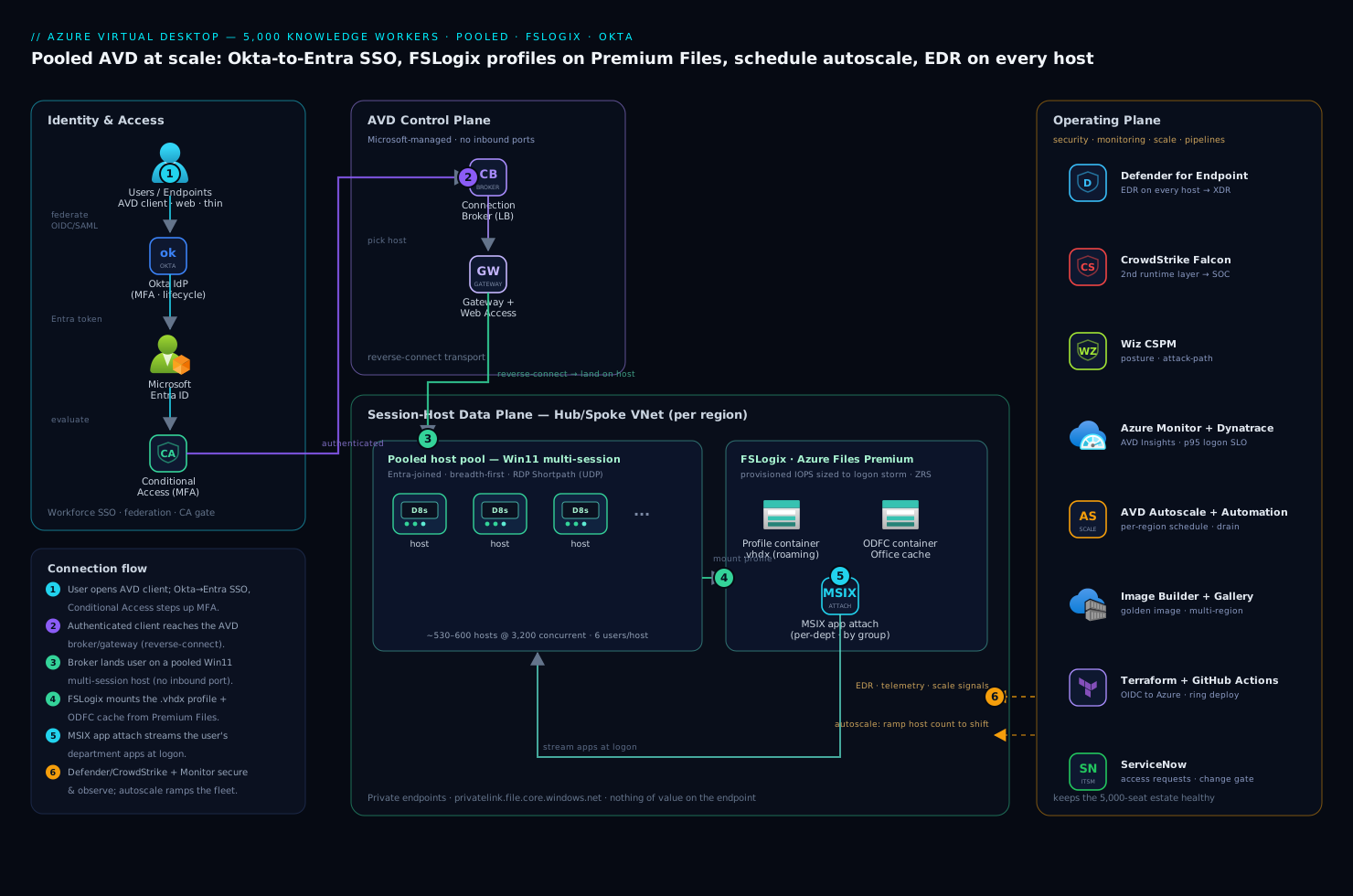
The platform has three planes that are worth separating in your head: the Microsoft-managed control plane (broker, gateway, diagnostics — you configure it but never run it), the session-host data plane (the VMs your users actually compute on, plus their profiles and apps), and the operating plane (identity, security, monitoring, and the pipelines that keep the first two healthy). Getting the boundaries right is what keeps a 5,000-seat estate operable by a small team.
The defining property the security committee cares about most: nothing of value lives on the user’s endpoint. The session runs on a session host inside the carrier’s VNet, the profile lives in Azure Files, policyholder data is accessed over the wire and rendered as pixels, and the client device — managed laptop, contractor’s browser, or a $200 thin client in an acquired office — receives only an encrypted display stream.
Connection path, following the control flow:
- A user opens the AVD client (desktop, web, or thin client). Authentication federates through Okta as the workforce IdP — the carrier’s standing SSO with its MFA and lifecycle rules — which is brokered to Microsoft Entra ID so AVD sees a first-class Entra token. Entra Conditional Access then evaluates device compliance, location, and risk, and steps up MFA before any session is brokered.
- The authenticated client reaches the AVD control plane — the Connection Broker, Gateway, and Web Access services Microsoft runs. The broker picks a session host in the user’s assigned host pool using a load-balancing algorithm (breadth-first to spread load, or depth-first to pack hosts before starting new ones), and the Gateway brokers a reverse-connect transport so no inbound port is ever opened on a session host.
- The user lands on a pooled session host — a multi-session Windows 11 Enterprise VM in a host pool, joined to Entra ID (or hybrid-joined to the on-prem AD that some line-of-business apps still need). RDP Shortpath establishes a direct UDP transport for low latency where the network allows it.
- At logon, FSLogix attaches the user’s profile container — a
.vhdxmounted from Azure Files Premium — so their Outlook cache, OneDrive state, browser profile, and app settings appear instantly even though they have never touched this specific VM before. A separate ODFC (Office) container holds the Outlook/OneDrive cache to keep the main profile lean. - The session host has the user’s department-specific apps already streamed in via MSIX app attach — claims adjusters see the claims workbench, actuaries see the modeling suite, and neither image carries the other’s software.
- Throughout the session, Microsoft Defender for Endpoint runs on the host for EDR, CrowdStrike Falcon provides a second runtime-detection layer feeding the carrier’s SOC, and session diagnostics stream to Azure Monitor / Log Analytics. The user’s work on claims data never leaves the VNet.
Scaling path, running independently against the clock: the AVD Autoscale feature (and Azure Automation for the ramp logic) starts and stops session hosts on a per-region schedule — spin up to the morning peak before the shift, ramp down through the evening, and run a skeleton crew overnight for the few off-hours users — draining sessions gracefully so nobody is kicked mid-claim. That schedule is the single biggest cost lever in the entire architecture.
Component breakdown
| Component | Service / tool | Role in the platform | Key configuration choices |
|---|---|---|---|
| Identity / SSO | Okta + Microsoft Entra ID | Workforce SSO (Okta) federated to Entra for native AVD auth and RBAC | OIDC/SAML federation; group claims drive host-pool assignment; Conditional Access on Entra |
| Control plane | AVD Broker / Gateway / Web Access | Connection brokering, reverse-connect transport, session diagnostics | Breadth-first load balancing; reverse connect (no inbound ports); validation host pool for ring-0 |
| Session hosts | Windows 11 Enterprise multi-session | The pooled VMs users compute on | D-series for office work; per-department host pools; Trusted Launch + disk encryption |
| Profiles | FSLogix on Azure Files Premium | Roaming user profile + Office cache as mounted VHDX | Cloud Cache or single-share; ODFC split; per-region profile storage |
| App delivery | MSIX app attach | Per-department app streaming, decoupled from the image | App attach packages on Azure Files; assignment by Entra group |
| Autoscale | AVD Autoscale + Azure Automation | Schedule-based ramp of host count to match shifts | Per-region schedules; drain mode; off-peak minimum host % |
| Image build | Azure Image Builder + Compute Gallery | Golden-image pipeline, versioned and replicated | Monthly patched image; multi-region gallery replication |
| Endpoint security | Microsoft Defender for Endpoint | EDR on every session host | Onboarding via policy; AV + EDR; alerts to Defender XDR |
| Runtime security | CrowdStrike Falcon | Second runtime-detection layer on hosts | Sensor baked into the image; detections to the SOC |
| Posture / CSPM | Wiz | Cloud posture, exposure, attack-path analysis across the estate | Agentless scan of Files/VMs; alert on any public-exposure or RBAC drift |
| Observability | Dynatrace + Azure Monitor | Logon-time, session health, profile-mount latency, capacity | OneAgent on hosts; AVD Insights workbook; logon-duration SLO |
| ITSM / approvals | ServiceNow | Access requests, host-pool changes, incident records | Self-service desktop request; change gate for image promotion |
| CI / IaC | GitHub Actions + Terraform + Ansible | Infra as code; image config; pipeline-driven ring deployment | OIDC to Azure (no stored creds); Ansible host hardening; ring promotion |
A few of these choices deserve the why, because they are the ones teams get wrong at this scale.
Why pooled, not personal, host pools. A personal host pool assigns each user a dedicated VM that persists — simpler, but you are back to paying for 5,000 always-on machines, which defeats the cost mandate. A pooled host pool lets, say, six office users share one multi-session host, so a 3,200-concurrent peak needs a fleet on the order of 530–600 D8s hosts rather than 5,000 — and that fleet shrinks overnight. The price is that nothing user-specific can live on the host’s local disk between sessions, which is exactly the problem FSLogix exists to solve.
Why FSLogix on Premium Files, and the I/O trap. FSLogix moves the entire Windows user profile into a VHDX mounted from a file share, so a user roams seamlessly across a stateless fleet. The non-obvious failure is storage I/O: at 9 a.m. on Monday, hundreds of users in a region log in within minutes, each mounting a profile and hydrating an Office cache — a logon storm that will saturate a Standard file share and turn a 20-second logon into four minutes. The fix is Azure Files Premium (provisioned IOPS, scaled to the concurrent-logon rate, not the total profile size) and splitting the Office cache into a separate ODFC container so the main profile stays small.
Why MSIX app attach instead of baking apps into the image. If every department’s software lives in one golden image, a single image serves everyone — but it is bloated, every app update means rebuilding and re-replicating the whole image, and the actuarial modeling suite ends up installed on adjusters’ hosts who must never run it (a licensing and attack-surface problem). MSIX app attach keeps apps in versioned packages on a file share and attaches them to a session at logon based on the user’s Entra group, so one lean OS image serves all departments and an app update is a package swap, not an image rebuild.
Implementation guidance
Provision with Terraform, and treat identity and profile storage as the first deliverables. The deployment order matters because a wrong identity or storage decision is expensive to unwind at 5,000 seats.
- The network: hub/spoke with a spoke VNet per region, subnets for session hosts and for the private endpoints on Azure Files; private DNS for
privatelink.file.core.windows.netso profiles never traverse a public path. - Identity: Okta federated to Entra over OIDC/SAML; Entra-join the session hosts where possible (hybrid-join only where a legacy app demands Kerberos to on-prem AD); Conditional Access policies requiring MFA and compliant or AVD-network access.
- Profile storage: an Azure Files Premium share per region, sized to the concurrent-logon IOPS, with the FSLogix RBAC and NTFS ACLs set so users can create but not enumerate each other’s containers.
- Host pools: a pooled host pool per department per region, each backed by a versioned image from the Compute Gallery, with a small validation host pool that takes the new image first (ring 0).
- Autoscale schedules per region, plus the Defender/CrowdStrike onboarding and Dynatrace OneAgent baked into the image.
A minimal Terraform shape for a pooled host pool communicates the intent — breadth-first load balancing, start-on-connect for the autoscale ramp, reverse-connect only:
resource "azurerm_virtual_desktop_host_pool" "claims_emea" {
  name                     = "hp-claims-emea-prod"
  resource_group_name      = azurerm_resource_group.avd.name
  location                 = "westeurope"
  type                     = "Pooled"
  load_balancer_type       = "BreadthFirst"   # spread users across hosts
  maximum_sessions_allowed = 6                 # density per D8s host
  start_vm_on_connect      = true              # autoscale can stop idle hosts
  custom_rdp_properties    = "audiocapturemode:i:1;targetisaadjoined:i:1"
  validate_environment     = false             # true only on the ring-0 pool
}
The pipeline that applies this runs in GitHub Actions, authenticating to Azure via OIDC federation so there is no stored service-principal secret to leak — a lesson the platform team intends never to repeat. Ansible handles in-guest configuration that does not belong in the image bake (last-mile policy, agent registration checks), and Argo CD is overkill for VMs but earns its place if you also run the supporting microservices (the licensing service, the self-service portal backend) on AKS.
Image as code: the golden image is a build artifact, not a pet. Build the Windows 11 multi-session image monthly with Azure Image Builder, capturing the current Patch Tuesday updates, the FSLogix agent, the Defender and CrowdStrike sensors, the Dynatrace OneAgent, and the AVD agents — then publish it to an Azure Compute Gallery replicated to every region the carrier operates in, so a host pool in Singapore pulls a local copy rather than dragging the image across the planet. Promotion is a ring deployment: the new image lands on the validation host pool first, a synthetic-logon smoke test runs, and only after it passes does the pipeline roll the image to the production pools — draining and replacing hosts in waves so no user is interrupted.
FSLogix wiring, concretely. Point FSLogix at the regional Premium share, enable the ODFC split, and decide the redundancy model deliberately: a single share with zone-redundant storage (ZRS) is simpler and the right default; Cloud Cache (which mirrors the profile across two storage accounts, even cross-region) buys profile resilience to a storage-account outage at the cost of more I/O and complexity — reserve it for the populations who genuinely cannot lose a session. Set a profile-size quota and a VHDX compaction job so abandoned contractor profiles do not silently consume the share.
Enterprise considerations
Security & Zero Trust. The architecture is Zero Trust by construction: identity-based access only, no inbound ports on hosts (reverse connect), and nothing of value on the endpoint. Layer on top: (a) Entra Conditional Access gating every connection on MFA, device compliance, and risk — the contractor on an unmanaged machine still authenticates strongly and lands in a controlled session that cannot exfiltrate to the local disk because clipboard, drive, and printer redirection are disabled by RDP policy for the regulated pools; (b) Microsoft Defender for Endpoint on every session host for EDR, feeding Defender XDR; © CrowdStrike Falcon as an independent runtime-detection layer into the SOC, because defense in depth on a shared multi-session host matters when one compromised session sits beside five others; (d) Wiz running continuous CSPM and attack-path analysis across the VMs and the Azure Files shares, alerting the moment a share drifts to public exposure or an RBAC change widens who can read profiles — the posture backstop behind the policy controls; (e) HashiCorp Vault holding the few service credentials the supporting automation needs (the licensing-service tokens, the image-build signing key), leased dynamically rather than sitting in a pipeline variable. Azure Policy denies a session host built without disk encryption or Trusted Launch, and Wiz independently verifies the policy is holding.
Cost optimization. Compute dominates and is almost entirely about not running idle hosts.
| Lever | Mechanism | Typical effect |
|---|---|---|
| Schedule autoscale | Ramp host count to the shift; skeleton crew overnight | The single largest saving — often 40–60% vs. always-on |
| Right-sized density | Tune maximum_sessions_allowed to real per-host load |
Fewer hosts for the same concurrency |
| Reserved Instances / savings plan | Commit to the steady baseline fleet (the always-on minimum) | ~30–40% on the committed compute |
| Existing Windows licensing | AVD includes the Windows 11 multi-session right under M365/E3+ | No per-VM Windows OS charge |
| Premium Files sized to IOPS | Provision for concurrent-logon I/O, not total profile GB | Avoids over-buying capacity to get throughput |
Meter cost per department by tagging host pools and pipe the metric to Dynatrace, which the platform team uses for the chargeback dashboard each business unit sees.
Scalability. Each plane scales independently. The session-host fleet scales horizontally by adding hosts to a pool (autoscale handles the daily curve; you add headroom to the schedule for a seasonal claims surge). Azure Files Premium scales by provisioning more IOPS/throughput on the share, and crucially per region so a logon storm in EMEA does not starve APAC. The control plane is Microsoft-managed and scales itself. The practical ceiling is regional vCPU quota and the IOPS ceiling of a single Premium share — which is why a 5,000-seat estate is partitioned into regional, per-department host pools rather than one giant pool, both for blast-radius and for scaling each axis on its own.
Failure modes, and what each one looks like. Name them before they page you.
- Logon storm saturates the profile share — Monday 9 a.m., hundreds of mounts at once, the Premium share hits its IOPS ceiling, and logons crawl to minutes. Mitigation: size Premium Files to the concurrent-logon rate, split the ODFC container, and stagger autoscale warm-up before the shift starts.
- FSLogix VHDX corruption / failed mount — a profile fails to attach and the user gets a temporary local profile with none of their settings, or worse, a half-mounted container. Mitigation: VHDX compaction and health checks, a documented profile-reset runbook in ServiceNow, and Cloud Cache for the populations that cannot tolerate it.
- Image regression — a bad monthly image breaks an app or balloons logon time across the fleet. Mitigation: the ring-0 validation host pool, a synthetic-logon gate in the pipeline, and one-click rollback to the prior gallery version.
- Autoscale under-provisions a surge — the catastrophe-season ramp outpaces the schedule and users wait for a host. Mitigation: schedule headroom for known seasonal peaks plus a manual scale-out runbook, and alerting on session-host saturation.
- Regional outage — see DR below.
Reliability & DR (RTO/RPO). Decide the numbers per population. Session state is ephemeral — a dropped session reconnects to another host — so the things to protect are profiles and the ability to broker sessions in a surviving region. Azure Files Premium with ZRS survives a zone loss transparently; surviving a region loss means either GRS on the profile storage or Cloud Cache mirroring profiles to the paired region, plus a warm host pool in that region that autoscale can ramp on demand. The golden image is already replicated to every region via the Compute Gallery, so standing up capacity elsewhere is minutes, not a rebuild. A pragmatic target for the carrier: RTO 30 minutes (ramp the paired-region pool, repoint users) and RPO near-zero for profiles under Cloud Cache, accepting that any unsaved in-session work is lost on a hard regional failure — the same risk a physical desktop carries on a power cut.
Observability. Instrument logon duration end to end in Dynatrace and the AVD Insights workbook on Log Analytics: time-to-connect, profile-mount latency, app-attach time, and session-host CPU/RAM/disk under load. Emit the metrics the business actually feels — p95 logon time (the number users complain about), profile-mount failure rate, session-host saturation, concurrent sessions per region, and cost per department. Alert on logon-time SLO breaches and on Defender/CrowdStrike detections. New images and host-pool changes pass through a ServiceNow change approval before going live, giving the operations board a documented gate, and a desktop-access request is a ServiceNow self-service item that, on approval, adds the user to the right Entra group — which automatically assigns the correct host pool and MSIX apps.
Governance. Pin the image version explicitly and promote through the ring gate so behavior does not drift across 5,000 seats. Keep RDP property templates, FSLogix settings, and autoscale schedules in version control, reviewable and revertable. Apply Azure Policy to deny non-compliant session hosts (no encryption, public storage exposure) and to require diagnostic settings on every host pool, with Wiz as the independent check that the controls are real. Govern app delivery: every MSIX package is signed, versioned, and assigned by group, so you always know which population can run which software — a licensing and audit requirement, not a nicety. Contractor identities carry an Entra access-review expiry so a seasonal hire’s access lapses automatically when the catastrophe season ends, rather than lingering as orphaned risk.
Explicit tradeoffs
Accept these or do not build it. Pooled AVD trades per-user persistence for cost: nothing user-specific survives on the host between sessions, so the entire experience leans on FSLogix and Azure Files being fast and healthy — your profile storage is now a tier-0 dependency, and a logon storm or a share outage is a fleet-wide incident, not a one-user problem. The schedule-based autoscale that saves the budget means a user who logs in off-schedule may wait for a host to start (start_vm_on_connect mitigates but does not eliminate the cold-start delay). MSIX app attach decouples apps from the image beautifully, but packaging legacy or badly-behaved installers into MSIX is real work, and a few stubborn apps may still have to live in the base image. The Okta-to-Entra federation adds a hop and a token-translation step the single-IdP shops will not need. And the whole multi-region, per-department, ringed-image operating model is overhead you can skip for a 50-seat departmental pilot and absolutely cannot skip for 5,000 regulated, churning seats across three continents.
The alternatives, and when they win. If your users are permanent, fixed-desk staff with no overnight idle, Windows 365 Cloud PCs are simpler — a persistent per-user desktop, no pooling math, no autoscale to tune — and they compose with AVD (Cloud PCs for the steady core, pooled AVD for the surge and the contractors). If you have deep existing investment in Citrix or Horizon and the operational muscle for it, running that stack on Azure session hosts is defensible, though you pay the extra licensing and vendor. If the requirement is genuinely just a few SaaS apps with no Windows desktop, skip VDI entirely and publish those apps through Entra and the browser. And if you only need to deliver one or two legacy Windows apps rather than a full desktop, AVD RemoteApp (the same architecture, streaming a single app instead of a desktop) is the lighter answer. Graduate to this full pooled, autoscaled, FSLogix-backed platform when scale, churn, residency, and cost discipline all demand it at once — which, for a 5,000-seat regulated carrier, they do.
The shape of the win
For the carrier, the payoff is not “remote desktops.” It is that a 200-person catastrophe-response team is onboarded in a week with zero hardware shipped — each adjuster logs in from a thin client or their own browser, lands on a fresh host with their profile and only the claims workbench attached, works policyholder PII that never once leaves the Azure VNet, and is de-provisioned automatically when the season ends and their access review lapses. The fleet ran at the morning shift’s size and idled overnight, so the bill matched the work and not the headcount. Everything upstream — the Okta-to-Entra federation, the FSLogix containers on Premium Files, the ringed golden image, the schedule autoscale, the Defender and CrowdStrike sensors, the Wiz posture scan, the Dynatrace logon-time SLO — exists to make a CIO, a CISO, and a CFO each say yes to the same platform. Start with one department in one region if you must; this is where a regulated, at-scale, churn-heavy “everyone gets the same controlled desktop” has to land.
Going deeper
The AVD control plane, object by object
AVD is not one resource; it is a small graph of them, and getting the graph right is most of the job. Microsoft runs the control plane — the Connection Broker, the Gateway, Web Access, and diagnostics — as a managed service you configure but never patch or scale. You own the objects hanging off it:
- Host pool — the unit of capacity and policy: a collection of identical session hosts plus the settings that govern them (load-balancing algorithm, max sessions per host, RDP properties, validation flag). A host pool is either Pooled (many users share multi-session hosts) or Personal (each user is bound 1:1 to a dedicated host). You do not mix the two in one pool.
- Session hosts — the VMs users actually compute on. For pooled office work these run Windows 11 Enterprise multi-session (a SKU licensed specifically for AVD that lets many users share one OS instance); personal pools and specialist workloads may use single-session Windows 11 Enterprise or Windows Server.
- Application groups — what a user is entitled to inside a pool. Two kinds: a Desktop app group publishes the full desktop; a RemoteApp app group publishes individual apps that stream in their own window. A pooled host pool has at most one Desktop app group but can carry many RemoteApp groups. You assign users/Entra groups to app groups, not to host pools — that indirection is what lets one pool serve several audiences.
- Workspace — the logical bundle the user sees in their client. App groups must be registered to a workspace before anyone can launch them. One workspace can gather app groups from several host pools, which is how “Claims Desktop” and “Actuarial Modeling (RemoteApp)” show up side by side in the same feed.
- Scaling plan — the schedule (below) that turns hosts on and off. It attaches to one or more host pools of the same type.
The reason the carrier runs per-department, per-region host pools rather than one giant pool falls straight out of this object model: the host pool is simultaneously the blast-radius boundary, the RBAC boundary, the image boundary, and the scaling boundary. Splitting it is how you scale each axis independently and stop a bad image or a saturated share from taking down all 5,000 seats.
Sizing the fleet for 5,000 — and the breadth-first/depth-first choice
Headcount does not size the fleet; concurrency does. Of 5,000 badged users, the carrier peaks near 3,200 concurrent in a region during business hours and near zero overnight. Two numbers turn that into VMs:
- Sessions per host — how many users a single multi-session VM comfortably carries, which depends on workload weight. Microsoft’s rough virtual-machine sizing guidance puts a medium knowledge worker (Office, browser, a line-of-business app) at roughly one user per ~2 vCPU, so a D8s v5 (8 vCPU / 32 GiB) carries about 6 before responsiveness suffers. That is where the original’s
maximum_sessions_allowed = 6comes from. - Peak concurrency ÷ sessions per host — 3,200 ÷ 6 ≈ 534 hosts at the peak, plus 10–15% headroom for host maintenance, uneven load, and a seasonal surge. Overnight the same pool might hold a handful.
The load-balancing algorithm decides which running host a new session lands on, and it is a direct cost/experience trade:
- Breadth-first sends each new session to the least-busy running host. Users get more headroom and a snappier session, but you keep more hosts running, so it costs more. It is the right default during ramp-up and peak.
- Depth-first packs one host to
maximum_sessions_allowedbefore touching the next. Fewer hosts run, so it is cheaper — but the last user on a full host feels it, and a single host failure hits more people. It is the right choice during ramp-down and off-peak, when you want to consolidate survivors onto as few hosts as possible so autoscale can shut the empties.
Mature scaling plans therefore switch algorithm by phase — breadth-first while filling up, depth-first while draining — which is exactly what the scaling plan below expresses.
The autoscale scaling plan (native, and now GA)
The original wired the ramp logic with an Azure Automation account — the historical pattern, and still the note in the diagram. The current mechanism is the native AVD scaling plan, generally available for both pooled and personal host pools, and it should be your default: no Automation account, no Logic App, no Function to babysit. A scaling plan is a time zone plus a set of schedules, each schedule covering a set of weekdays split into four phases — ramp-up, peak, ramp-down, off-peak — with a load-balancing algorithm, a minimum-hosts percentage, and a capacity threshold per phase. During ramp-down you additionally choose whether to force log-offs and how long to warn users.
resource "azurerm_virtual_desktop_scaling_plan" "claims_emea" {
  name                = "sp-claims-emea"
  resource_group_name = azurerm_resource_group.avd.name
  location            = "westeurope"
  time_zone           = "GMT Standard Time"

  schedule {
    name         = "Weekdays"
    days_of_week = ["Monday", "Tuesday", "Wednesday", "Thursday", "Friday"]

    # Fill up before the shift — spread users for a snappy logon.
    ramp_up_start_time                 = "06:00"
    ramp_up_load_balancing_algorithm   = "BreadthFirst"
    ramp_up_minimum_hosts_percent      = 20
    ramp_up_capacity_threshold_percent = 60

    peak_start_time               = "08:00"
    peak_load_balancing_algorithm = "BreadthFirst"

    # Consolidate survivors so empty hosts can be stopped.
    ramp_down_start_time                 = "18:00"
    ramp_down_load_balancing_algorithm   = "DepthFirst"
    ramp_down_minimum_hosts_percent      = 10
    ramp_down_capacity_threshold_percent = 90
    ramp_down_force_logoff_users         = false
    ramp_down_wait_time_minutes          = 30
    ramp_down_notification_message       = "This host is going offline soon; please save your work."
    ramp_down_stop_hosts_when            = "ZeroSessions"

    off_peak_start_time               = "22:00"
    off_peak_load_balancing_algorithm = "DepthFirst"
  }

  host_pool {
    hostpool_id          = azurerm_virtual_desktop_host_pool.claims_emea.id
    scaling_plan_enabled = true
  }
}
Three subtleties bite teams here. First, the scaling plan needs an Azure RBAC role with permission to start and deallocate the VMs and read the host pool — grant the AVD service principal (the Azure Virtual Desktop enterprise application, formerly Windows Virtual Desktop) a custom role scoped to the pool’s resource group; skip this and the plan silently does nothing. Second, start_vm_on_connect = true on the host pool is what lets a user who arrives off-schedule wake a stopped host — without it, off-peak users hit “no resources available.” Third, ramp_down_force_logoff_users = false is the humane default: drain by waiting for sessions to end rather than kicking people mid-claim; set it true only for pools where a hard nightly reset is a feature, not an outage.
FSLogix profile containers, for real
FSLogix moves the entire Windows user profile into a VHDX that is mounted from an SMB share at sign-in and detached at sign-out, so a user roams seamlessly across a stateless, pooled fleet. Two container types exist:
- Profile Container — the whole profile (registry hive, AppData, desktop, documents if not redirected). This is the one everyone needs.
- ODFC (Office) Container — a second VHDX holding just the Office/Outlook OST and OneDrive cache. Splitting it keeps the main profile small and lets you put the big, churny Office cache on different or cheaper storage. Microsoft’s current guidance is don’t split by default — a single Profile Container is simpler and correct for most estates — but at 5,000 seats with fat Outlook caches the split earns its keep, which is why the original enables it.
Where the VHDX lives is the tier-0 decision:
| Backend | When it fits | Watch out for |
|---|---|---|
| Azure Files Standard | Small/pilot, cost-first | Transaction-metered; a logon storm wrecks responsiveness and the bill |
| Azure Files Premium | The default at scale — provisioned IOPS | A single share ceilings near ~100,000 IOPS / 100 TiB — you shard per region/department |
| Azure NetApp Files | Very high scale, lowest latency, huge shares | Higher floor cost; another service to run |
The IOPS math is the part people skip and then page on. FSLogix’s own planning guidance budgets roughly 10 IOPS per active user at steady state and a burst near 50 IOPS per user during sign-in/sign-out (representative figures — validate against your workload). A region running 1,200 concurrent needs ~12,000 steady IOPS; but the number that hurts is the logon storm — 600 people signing in across ten minutes, each spiking to ~50 IOPS, is tens of thousands of IOPS in a narrow window. Now the ceilings matter: on Azure Files Premium, provisioned IOPS scale with provisioned capacity (a baseline plus roughly 1 IOPS per provisioned GiB, with 3× bursting), so you frequently provision terabytes you do not need just to buy the IOPS you do — and even then a single share caps near 100,000 IOPS. That ceiling, not disk space, is why a 5,000-seat estate is partitioned into per-region, per-department shares, and why the extreme top end reaches for Azure NetApp Files. Size the share to the concurrent-logon IOPS, never to total profile GB.
Container bloat and redirections.xml. A dynamic VHDX only ever grows: delete 10 GB inside the profile and the file stays its high-water size, so abandoned contractor profiles silently eat the share. Two levers keep it flat: (1) exclusions/redirections — a redirections.xml placed via the RedirXMLSourceFolder setting tells FSLogix which folders not to roam (throwaway caches, Teams media, temp), so they never enter the container; and (2) disk compaction (FSLogix 2210 and later) which shrinks the dynamic VHDX on sign-out. Pair both with a per-profile size quota (SizeInMBs) and a documented reset runbook.
Cloud Cache is the resiliency upgrade. Ordinary Profile Container mounts one VHDX from one share — lose that share and those users lose their profile. Cloud Cache keeps a local cache on the session host and writes through to two or more storage providers (CCDLocations), even in different regions, so a storage-account or zone loss is transparent. The cost is real: extra write I/O and more moving parts. Reserve it for populations that genuinely cannot lose a session, and take a plain ZRS-backed single share for everyone else.
The core Profile Container settings, as they actually appear (registry HKLM\SOFTWARE\FSLogix\Profiles, or the equivalent GPO/ADMX policy):
# Representative — set via GPO/Intune in production; shown as registry for clarity.
$k = "HKLM:\SOFTWARE\FSLogix\Profiles"
New-ItemProperty $k Enabled      -Value 1 -PropertyType DWord -Force
New-ItemProperty $k VHDLocations -Value "\\stavdemea.file.core.windows.net\profiles" -PropertyType MultiString -Force
New-ItemProperty $k SizeInMBs    -Value 30000 -PropertyType DWord -Force        # per-profile quota (~30 GB)
New-ItemProperty $k VolumeType   -Value "vhdx" -PropertyType String -Force
New-ItemProperty $k FlipFlopProfileDirectoryName         -Value 1 -PropertyType DWord -Force  # username-first folder
New-ItemProperty $k DeleteLocalProfileWhenVHDShouldApply -Value 1 -PropertyType DWord -Force
Identity: what “join” means, and where Okta fits
Three questions must be answered together, because the wrong combination fails at the file share, not at sign-in:
- How are session hosts joined? Options: Microsoft Entra ID join (cloud-only, the modern default), Entra hybrid join (also joined to on-prem AD DS — needed only when a legacy app demands Kerberos to on-prem), or classic AD DS domain join.
- How does the user authenticate to the profile share? Azure Files SMB needs Kerberos, and it must line up with the join model: on-prem AD DS, Microsoft Entra Domain Services (a managed domain — formerly Azure AD DS — when you want Kerberos with no on-prem footprint), or Microsoft Entra Kerberos (which lets cloud-only Entra-joined hosts get Kerberos tickets for Azure Files without any domain controller at all). Pick one, enable it on the storage account, then grant users the Storage File Data SMB Share Contributor RBAC role and set NTFS ACLs so a user can create but not enumerate a neighbour’s container.
- Who is the front-door IdP? Here it is Okta, the carrier’s workforce identity. Okta federates to Entra (WS-Fed/SAML/OIDC), performs the interactive sign-in and its own MFA, and hands AVD an Entra token — AVD only ever trusts Entra, so the federation is what makes Okta first-class. Conditional Access still runs on the Entra side: target the Azure Virtual Desktop cloud app (and its companion apps that cover the client feed and the session-host sign-in) to require MFA, a compliant or hybrid-joined device, and an acceptable risk level before any session is brokered. On Entra-joined hosts using Entra Kerberos you also flip one client setting —
CloudKerberosTicketRetrievalEnabled = 1under the Lsa Kerberos parameters — or the share mount fails with a Kerberos error that sends teams down a rabbit hole.
The trap to internalize: the identity you sign in with and the identity the file share trusts are two different configurations that must agree. Entra-joined hosts pointed at an Azure Files share still configured for on-prem-AD Kerberos is the single most common “profiles won’t load” outage.
Image management: golden image → Compute Gallery → MSIX app attach
The session host is cattle, and its OS is a build artifact. Build a Windows 11 multi-session image (Azure Image Builder, Packer, or a captured and sysprepped VM) carrying the month’s patches, the FSLogix agent, the AVD agents, and the security sensors. Publish it to an Azure Compute Gallery (the service formerly called Shared Image Gallery) as a versioned image definition → image version, and replicate each version to every region you run in — with enough replica count that hundreds of hosts can deploy in parallel without throttling on a single source. The host pool references a specific gallery version, so promotion is deliberate: land the new version on the ring-0 validation host pool, run a synthetic-logon smoke test, and only then roll it to production pools in waves.
MSIX app attach (in the portal now simply app attach) is what keeps that OS image lean. Instead of baking every department’s software into the golden image — which bloats it, couples every app update to an image rebuild, and installs the actuarial suite on adjusters’ hosts that must never run it — you package each app as MSIX on a VHDX/CIM image on a share and attach it at sign-in based on the user’s Entra group. One thin OS serves every department; an app update is a package swap, not an image bake; and entitlement is a group membership, which doubles as your licensing boundary.
# .github/workflows/avd-image-promote.yml  (representative)
name: avd-image-promote
on:
  workflow_dispatch:
    inputs:
      image_version:
        description: Compute Gallery image version to promote
        required: true
permissions:
  id-token: write   # OIDC federation to Azure — no stored secret
  contents: read
jobs:
  ring0-smoke:
    runs-on: ubuntu-latest
    environment: ring0
    steps:
      - uses: actions/checkout@v4
      - name: Azure login (OIDC)
        uses: azure/login@v2
        with:
          client-id: "${{ vars.AZURE_CLIENT_ID }}"
          tenant-id: "${{ vars.AZURE_TENANT_ID }}"
          subscription-id: "${{ vars.AZURE_SUBSCRIPTION_ID }}"
      - name: Deploy image to the validation host pool
        run: ./scripts/deploy-image.sh "${{ inputs.image_version }}" hp-validation
      - name: Synthetic-logon smoke test
        run: ./scripts/synthetic-logon.sh hp-validation
  promote-prod:
    needs: ring0-smoke
    runs-on: ubuntu-latest
    environment: production   # manual approval gate lives here
    steps:
      - name: Roll image to production pools in waves
        run: ./scripts/roll-image.sh "${{ inputs.image_version }}"
Networking, and the FSLogix private endpoint
Session hosts live in a spoke VNet per region (hub-and-spoke), in a subnet with no inbound rule at all — the AVD Gateway’s reverse connect means the host dials out to the control plane and the transport is established back down that outbound connection, so there is nothing to port-scan. Egress needs the Windows Virtual Desktop / AVD service tag and the control-plane FQDNs allowed through the firewall.
The profile share must never traverse a public path. Put a private endpoint on the storage account for the file sub-resource, link the privatelink.file.core.windows.net private DNS zone to the spoke (and the hub), and the hosts resolve the share to a private IP inside the VNet. RDP Shortpath then adds a direct UDP transport — over the private network for managed sites, or via STUN/TURN for remote users — cutting the latency users feel on a graphics-heavy claims workbench. Size per-session bandwidth to the workload: a document-and-browser user is light, a user dragging PDFs and maps is not.
Cost per user, and where reservations fit
Per-user cost is total monthly spend ÷ users, and compute dominates it. Four levers, in order of impact:
- Autoscale schedule — the single biggest lever; running the fleet at the shift’s size instead of 24×7 routinely removes 40–60% of compute cost. It is pure saving because idle hosts do no work.
- Reservations / savings plans on the baseline. Autoscale still leaves an always-on minimum — the off-peak floor plus the steady daytime baseline. That predictable slice is what you buy a 1- or 3-year Reserved VM Instance or an Azure savings plan against, for roughly 30–40% off that committed compute. Reserve the floor; let autoscale and pay-as-you-go absorb the peaks. Reserving the whole peak would just re-buy the 24×7 bill you deleted.
- Windows licensing is already yours. The Windows 11 multi-session right is included with Microsoft 365 E3/E5/A3/Business Premium (or a per-user AVD license for external users), so there is no per-VM Windows OS charge — a large line most first estimates get wrong by adding it.
- Storage sized to IOPS, not GB, with profile bloat kept flat, so you are not over-buying a share to survive Monday 9 a.m.
A representative shape (illustrative, not a quote): if a region’s autoscaled D8s fleet averages, say, the equivalent of a modest per-active-user monthly all-in (compute + Premium Files + egress) after the schedule and reservations, the same seats run always-on would be roughly double — which is precisely the difference the CFO signed off on. Tag host pools by department and pipe the cost metric to your observability stack for chargeback.
Practice challenges
Work these top to bottom; they escalate from arithmetic to a full design decision. Each solution says why, not just what. There is no live Azure subscription behind this lesson, so treat the commands as schema-correct templates to adapt, not as runs to copy blindly.
1. Size the fleet (beginner). A region peaks at 2,700 concurrent users doing medium office work, and you have settled on 6 sessions per D8s v5 host. How many session hosts does the peak need, and what do you actually deploy as the pool maximum?
<details><summary>Solution</summary>
2,700 ÷ 6 = 450 hosts at the raw peak. Deploy with ~10–15% headroom → about 500–520 as the pool’s autoscale maximum, to cover host maintenance, uneven load, and drain-and-replace during image rolls. Why: concurrency ÷ density gives the floor; headroom keeps a full host or a maintenance wave from turning users away. </details>
2. Create the pooled host pool (beginner). Write the az command to create a pooled, breadth-first host pool named hp-claims-apac-prod in resource group rg-avd (Southeast Asia), max 6 sessions, start-VM-on-connect enabled.
<details><summary>Solution</summary>
az desktopvirtualization hostpool create \
  --resource-group rg-avd \
  --name hp-claims-apac-prod \
  --location southeastasia \
  --host-pool-type Pooled \
  --load-balancer-type BreadthFirst \
  --max-session-limit 6 \
  --start-vm-on-connect true \
  --preferred-app-group-type Desktop
Why: --host-pool-type Pooled with --load-balancer-type BreadthFirst is the office-work default; --start-vm-on-connect true lets off-schedule users wake a stopped host. Requires the desktopvirtualization CLI extension.
</details>
3. Budget the profile IOPS (intermediate). A region runs 1,500 concurrent profiles. Using the planning figures of ~10 IOPS/user steady and ~50 IOPS/user during a sign-in storm, estimate steady and storm IOPS — and say what that means for a single Azure Files Premium share.
<details><summary>Solution</summary>
Steady ≈ 1,500 × 10 = 15,000 IOPS. A storm where, say, half sign in inside the same window ≈ 750 × 50 = ~37,500 IOPS burst. Both sit under a single Premium share’s ~100,000-IOPS ceiling, so one well-provisioned share per region works here — but you provision for the storm, not the steady state, and you shard to a second share before a region approaches the ceiling. Why: logon storms, not average load, set the storage tier. </details>
4. Turn on the Profile Container (intermediate). Give the FSLogix registry values that enable a Profile Container pointing at \\stavd.file.core.windows.net\profiles, with a ~30 GB per-profile cap and username-first folder names.
<details><summary>Solution</summary>
Under HKLM\SOFTWARE\FSLogix\Profiles: Enabled=1, VHDLocations=\\stavd.file.core.windows.net\profiles, SizeInMBs=30000, VolumeType=vhdx, FlipFlopProfileDirectoryName=1, and DeleteLocalProfileWhenVHDShouldApply=1. Why: Enabled + VHDLocations are the two that actually switch it on; SizeInMBs caps bloat, FlipFlopProfileDirectoryName makes folders human-readable, and deleting the stale local profile prevents a local/roaming clash. Ship it via GPO/Intune, not by hand.
</details>
5. Author the scaling schedule (advanced). In an azurerm_virtual_desktop_scaling_plan schedule, which load-balancing algorithm belongs in ramp-up versus ramp-down, and why — and which two settings make the drain humane?
<details><summary>Solution</summary>
Ramp-up → BreadthFirst (spread users for headroom and fast logons); ramp-down → DepthFirst (pack survivors so empty hosts can be stopped). Humane drain: ramp_down_force_logoff_users = false (wait for sessions to end) plus ramp_down_wait_time_minutes with a ramp_down_notification_message. Why: the algorithm is a cost/experience dial — spread when growing, consolidate when shrinking — and forcing log-offs mid-claim is an outage, not a saving.
</details>
6. Align identity with storage (advanced, design). Session hosts are Entra ID-joined (cloud-only, no on-prem AD). Which Azure Files authentication do you enable for FSLogix, what RBAC role do users need, and which client setting must be on?
<details><summary>Solution</summary>
Enable Microsoft Entra Kerberos on the storage account (it issues Kerberos tickets for Azure Files to cloud-only Entra identities — no domain controller). Grant users Storage File Data SMB Share Contributor and set NTFS ACLs so each user can create but not read others’ containers. On each host set CloudKerberosTicketRetrievalEnabled = 1 under the Lsa Kerberos parameters. Why: the sign-in identity and the share’s Kerberos source must match; Entra-joined hosts against an on-prem-AD share is the classic “profiles won’t load” failure.
</details>
Common beginner mistakes
- Sizing the fleet by headcount, not concurrency. Beginners multiply 5,000 users by a VM and gasp at the bill. The fleet is sized by peak concurrent sessions ÷ sessions-per-host, and it shrinks overnight. Right model: you are opening hotel floors for the crowd that shows up, not one room per badge.
- Treating the profile share as ordinary file storage. With pooled hosts, FSLogix plus the share become a tier-0 dependency: if it is slow or down, every user’s logon is slow or down. Provision Premium Files (or NetApp) to the concurrent-logon IOPS, not to profile GB, and never park profiles on a Standard, transaction-metered share “to save money.”
- Assuming sign-in success means the profile will load. The identity you authenticate with and the identity the file share trusts are separate settings. Entra-joined hosts pointed at an on-prem-AD Kerberos share fail after a clean sign-in. Match the storage auth (Entra Kerberos / Entra DS / AD DS) to the join model.
- Baking every app into the golden image. It bloats the image, chains every app update to a full rebuild-and-replicate, and puts software on hosts whose users must never run it. Use MSIX app attach and assign by Entra group; keep one lean OS image.
- Leaving load balancing on breadth-first all day. Breadth-first is right at peak, but if it never switches to depth-first at ramp-down, sessions stay smeared across many half-empty hosts that autoscale then cannot stop — and your saving evaporates. Switch algorithm by phase.
- Forgetting the autoscale RBAC grant. A scaling plan with no permission to start/stop the VMs looks configured and does nothing. Grant the AVD service principal a role scoped to the pool’s resource group, and set
start_vm_on_connectso off-hours users can wake a host. - Ignoring VHDX bloat. Dynamic profile disks only grow. Without a
SizeInMBscap,redirections.xmlexclusions, and disk compaction, abandoned contractor profiles quietly fill the share until Monday’s logon storm hits a full disk. - Confusing personal with pooled — or AVD with Windows 365. Personal pools are 1:1 and always-on (simple, pricey); pooled pools are shared and autoscaled (cheaper, needs FSLogix); Windows 365 is the flat-priced persistent Cloud PC. Pick per population — they compose rather than compete.
Glossary
- AVD (Azure Virtual Desktop) — Microsoft’s managed VDI/DaaS platform: you run the session-host VMs, Microsoft runs the broker/gateway control plane.
- Host pool — a set of identical session hosts plus their policy; Pooled (shared, multi-session) or Personal (dedicated 1:1).
- Session host — a VM users compute on; for pooled office work, Windows 11 Enterprise multi-session.
- Multi-session — a Windows client SKU, licensed only for AVD, that lets many users share one OS instance concurrently.
- Application group — the entitlement object: a Desktop (full desktop) or RemoteApp (individual apps) group that users/Entra groups are assigned to.
- Workspace — the logical bundle of application groups a user sees in their client feed.
- Control plane — the Microsoft-managed Connection Broker, Gateway, Web Access, and diagnostics; configured by you, operated by Microsoft.
- Reverse connect — the transport model where the host dials out to the gateway, so no inbound port is ever opened on a session host.
- Breadth-first / depth-first — load-balancing algorithms: spread new sessions across hosts (headroom, higher cost) versus pack a host to its max first (fewer hosts, cheaper).
- Scaling plan — the native AVD autoscale object: a time zone plus schedules with ramp-up/peak/ramp-down/off-peak phases that start and stop hosts.
start_vm_on_connect— host-pool setting that lets an arriving user power on a stopped host, so autoscale can safely deallocate idle ones.- FSLogix — the agent that stores a user’s whole profile in a VHDX mounted from an SMB share, so profiles roam across a stateless pool.
- Profile Container / ODFC Container — the VHDX holding the full profile / an optional second VHDX holding just the Office (Outlook, OneDrive) cache.
- Cloud Cache — FSLogix mode that writes the profile through to two or more storage locations for resilience, at the cost of extra I/O.
redirections.xml— the file (viaRedirXMLSourceFolder) listing folders FSLogix should not roam, used to keep the container from bloating.- Logon storm — the burst of simultaneous profile mounts at shift start that spikes storage IOPS and can turn a 20-second logon into minutes.
- IOPS — I/O operations per second; the storage metric FSLogix shares are sized against (planning ~10/user steady, ~50/user at sign-in).
- Azure Files Premium — provisioned-IOPS SMB file storage; the default FSLogix backend at scale, ceilinged near 100,000 IOPS / 100 TiB per share.
- Azure NetApp Files (ANF) — high-performance, low-latency file service for the top end of FSLogix scale, above what a single Premium share serves.
- Entra ID / Entra Domain Services / AD DS — cloud identity / a managed domain giving Kerberos with no on-prem footprint / classic on-prem Active Directory Domain Services.
- Entra Kerberos — lets cloud-only, Entra-joined hosts obtain Kerberos tickets for Azure Files without any domain controller.
- Federated IdP (Okta) — the external identity provider that performs sign-in and MFA and federates to Entra, which AVD trusts natively.
- Conditional Access — Entra policy that gates each connection on MFA, device compliance, location, and risk before a session is brokered.
- MSIX app attach — dynamically attaching MSIX-packaged apps to a session at sign-in from a share, decoupling apps from the OS image.
- Azure Compute Gallery — the versioned, region-replicated image store (formerly Shared Image Gallery) that host pools deploy from.
- RDP Shortpath — a direct UDP transport for the session that lowers latency versus the default TCP reverse-connect path.
- Private endpoint /
privatelink.file.core.windows.net— the private IP plus DNS zone that keeps profile-share traffic on the VNet, off the public internet. - Reserved Instance / savings plan — a 1- or 3-year compute commitment (~30–40% off) applied to the always-on baseline fleet, not the autoscaled peak.