In a nutshell
Think of BGP attributes as the priority rules a postal sorting network uses to pick a route for every envelope:
- AS-path length is how many depots a letter passes through on the way — a route through three depots looks “shorter” than one through six, so all else equal the sorter picks the shorter chain.
- Local-preference is a house rule stamped on everything leaving your own mailroom: “always go out the east loading dock.” It never leaves your building, but inside it, it overrides the hop-counting.
- Communities are colored tags stapled to the envelope that trigger policies at depots downstream — “red = express handling,” “blue = do not forward past this hub.” The next depot reads the tag and acts on it without you touching its rulebook.
In a hybrid Azure estate you have two doors into Microsoft’s network — an ExpressRoute circuit (the dedicated, paid express lane) and a VPN gateway (the internet backup) — and you typically advertise the same address ranges over both. Left to its defaults, BGP picks a “best” path using rules that have nothing to do with which door you are paying for. Route control is the craft of setting those attributes so the path you intend is the path traffic actually takes, in both directions, and so failover lands on the standby you provisioned instead of a black hole.
Beginners should care because “the network is up” is not the same as “traffic is going where you think.” A circuit can be online, every host reachable by ping, and still returning traffic over the wrong door — an asymmetry that looks healthy and quietly breaks TCP through a stateful firewall. This lesson teaches the small set of knobs that make hybrid routing deterministic and testable.
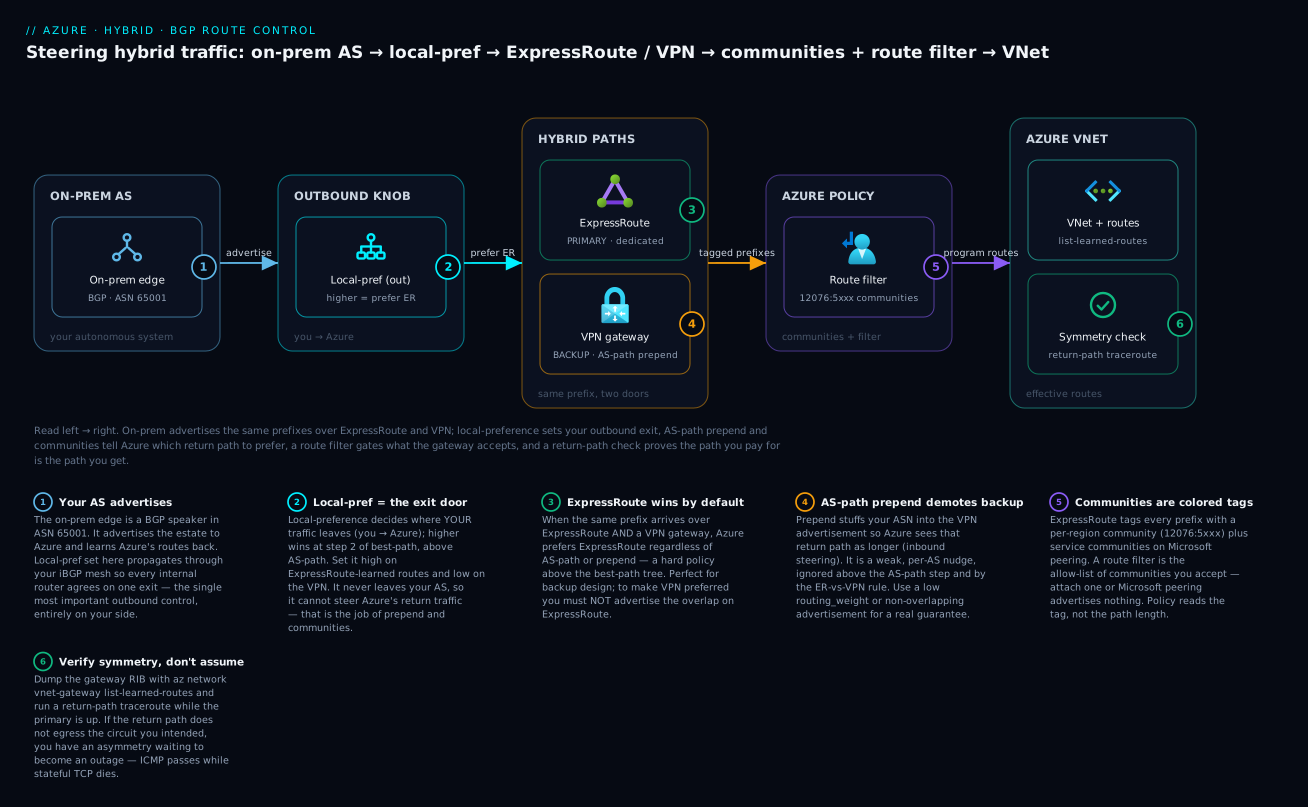
Read it left to right: your on-prem AS advertises the same prefixes over ExpressRoute (primary) and VPN (backup); local-preference sets your outbound exit door, AS-path prepending and BGP communities tell Azure which return path to prefer, a route filter gates which Microsoft prefixes the gateway accepts, and a return-path check on the VNet side proves the path you pay for is the path you actually get.
Level: Expert · Time: ~39 min
Before you start, you should know:
- What an autonomous system (AS) and its ASN are, and that BGP is the protocol that exchanges routes between autonomous systems.
- The basics of Azure hybrid connectivity — what a virtual network gateway, an ExpressRoute circuit, and a site-to-site VPN are.
- CIDR notation and the idea of a “more specific” prefix (a
/24is more specific than the/16that contains it).
After this lesson you will be able to:
- Recite the BGP best-path decision tree and name which knob acts on inbound versus outbound traffic.
- Set local-preference to steer your outbound traffic onto ExpressRoute, and use AS-path prepending to demote a VPN backup inbound.
- Use ExpressRoute BGP communities and route filters to scope which Microsoft and per-region prefixes you accept.
- Explain why Azure prefers ExpressRoute over VPN before AS-path is ever evaluated, and design coexistence around that rule instead of fighting it.
- Dump learned and advertised routes with
az network vnet-gateway list-learned-routesand prove path symmetry before you ever test failover.
Default BGP path selection is not your friend in a hybrid estate. Plug in ExpressRoute, Direct Connect, and a VPN backup, advertise the same prefixes over all three, and the router picks a “best” path using rules that have nothing to do with your contract, your bandwidth, or your intent. When the primary drops, traffic does not always fail to the standby you provisioned — it fails to whatever the decision tree picks next, and sometimes that is a black hole because each side thinks the other path is live. This guide walks the best-path algorithm, then shows which knob to turn on which side so the path you pay for is the path you get, and failover is deterministic and measurable.
1. The best-path decision tree and which knobs each cloud lets you turn
Every BGP speaker runs the same ordered tie-break when it has multiple routes to the same prefix. Stop at the first step that produces a single winner:
| Order | Attribute | Direction it influences | Who sets it |
|---|---|---|---|
| 1 | Weight (Cisco-proprietary, local) | Outbound from this router | Your edge router only |
| 2 | Local-Preference | Outbound from your AS | Your edge, propagated via iBGP |
| 3 | Locally originated / aggregate | Outbound | Origination config |
| 4 | Shortest AS-path | Both (prepend on advertise) | Either side |
| 5 | Lowest origin type (IGP < EGP < Incomplete) | Both | Origination |
| 6 | Lowest MED | Inbound to your AS | Neighbor, between paths from same AS |
| 7 | eBGP over iBGP | Internal preference | Topology |
| 8 | Lowest IGP metric to next-hop | Internal | Your IGP |
| 9 | Oldest route / lowest router-id | Tie-break | Arbitrary |
Two facts drive everything that follows. Weight and Local-Preference decide where your traffic exits (outbound toward the cloud) and you control them on your edge. AS-path length and MED are how you ask the cloud to prefer one of its return paths (inbound), honored only within the cloud’s own policy. You cannot set Local-Pref inside Microsoft’s or AWS’s network; you influence their decision only with attributes they agree to read — which is what published BGP communities are for.
The cruel part: clouds short-circuit this tree with their own policy before AS-path matters.
- Azure ExpressRoute vs VPN: if the same prefix arrives over both ExpressRoute and a VPN gateway, Azure prefers ExpressRoute by default regardless of AS-path. That is documented behavior, not a tie-break you won. Prepending the VPN advertisement 50 times changes nothing — you need connection weight, or to not advertise the overlap.
- AWS Direct Connect: AWS evaluates longest-prefix-match first, then local-preference BGP communities you tag, and only then AS-path length. A more-specific route always wins over prepending, and a
7224:7100community beats a shorter AS-path.
Internalize this: AS-path prepending is a weak, last-resort lever that any more-specific route or any cloud policy override will defeat. Reach for communities and prefix scoping first; prepend only to break ties between otherwise-equal paths.
2. Primary-vs-backup design: transport preferred, VPN as standby
The target topology across both clouds is the same shape:
on-prem edge (ASN 65001)
  |-- ExpressRoute / Direct Connect  (PRIMARY, low latency, high bw)
  |-- IPsec VPN over internet        (BACKUP, standby only)
cloud VNet/VPC
Four things must be simultaneously true:
- Outbound (you to cloud) prefers the dedicated circuit. Set a higher Local-Preference on routes learned over ExpressRoute/Direct Connect than over the VPN.
- Inbound (cloud to you) also prefers the circuit. Make the cloud see the VPN path as worse — via AS-path prepend, a low-pref community, or (cleanest) by not advertising the prefix over the VPN until needed.
- The backup is actually viable. The VPN session must be up and advertising in steady state, so failover is a withdraw-and-reconverge, not a cold start. A standby that only comes up after the primary dies adds tunnel-negotiation time to the outage.
- No prefix is advertised in a way that creates a return-path mismatch — where black holes live (Section 7).
On your edge router, outbound preference is a Local-Pref policy keyed off the neighbor:
! Cisco IOS-XE: prefer the Direct Connect / ExpressRoute neighbor outbound
route-map FROM_PRIMARY permit 10
 set local-preference 200
route-map FROM_BACKUP permit 10
 set local-preference 100
!
router bgp 65001
 address-family ipv4 unicast
  neighbor 169.254.10.1 route-map FROM_PRIMARY in
  neighbor 169.254.20.1 route-map FROM_BACKUP in
Higher Local-Pref wins (step 2), and because it propagates through your iBGP mesh, every internal router agrees to exit via the primary. That is the single most important outbound control, and it is entirely on your side.
3. AS-path prepending to deprioritize a path, and where it gets ignored
Prepending makes a path look longer by stuffing your own ASN into the AS-path, so a remote AS comparing AS-path length picks the other path. Apply it outbound, on the advertisement over the path you want demoted (the VPN).
! Cisco IOS-XE: prepend on the VPN advertisement so the cloud prefers the circuit
route-map TO_BACKUP_VPN permit 10
 set as-path prepend 65001 65001 65001
!
router bgp 65001
 address-family ipv4 unicast
  neighbor 169.254.20.1 route-map TO_BACKUP_VPN out
On Azure VPN Gateway you do the symmetric thing without touching a router — the gateway demotes the connection via its routing weight. In Terraform:
resource "azurerm_virtual_network_gateway_connection" "vpn_backup" {
  name                       = "vpn-backup"
  resource_group_name        = azurerm_resource_group.net.name
  location                   = azurerm_resource_group.net.location
  type                       = "IPsec"
  virtual_network_gateway_id = azurerm_virtual_network_gateway.vpn.id
  local_network_gateway_id   = azurerm_local_network_gateway.onprem.id
  shared_key                 = var.vpn_psk
  enable_bgp                 = true

  # Make Azure see on-prem as "farther" via the VPN; the gateway prepends outbound.
  # Higher value = stronger demotion of this connection for Azure-egress traffic.
  routing_weight = 0
}
Three hard limits you must respect:
- It is ignored before the AS-path step is reached. Direct Connect’s longest-prefix-match and local-pref communities, and Azure’s ExpressRoute-over-VPN preference, all sit above AS-path. Prepend is invisible to them.
- Per-AS, not global. Some upstreams cap or collapse prepends, and an AS that selects on Local-Pref or MED never looks at your padding. You cannot guarantee a distant AS honors it.
- More than 3-5 prepends buys nothing. Two or three extra hops already make your path strictly longer to a peer comparing paths. Padding to 20 is cargo-cult, and only widens the blast radius if a leak re-originates the path elsewhere.
Prepend nudges a neighbor that has two equal-length paths from you. It is not a failover mechanism. If correctness depends on a prepend being honored three ASes away, the design is wrong.
4. Local-preference and weight for inbound vs outbound steering
These two are frequently confused. Keep the scope straight:
| Lever | Scope | Honored by | Use for |
|---|---|---|---|
| Weight | Single router (Cisco-local, never advertised) | Only the router it is set on | Pinning one edge box’s outbound choice |
| Local-Preference | Entire AS (propagated in iBGP) | Every iBGP speaker in your AS | Your whole network’s outbound exit |
| AS-path prepend | Advertised to neighbors | Neighbors that compare AS-path | Asking the cloud to demote a return path |
| MED | Advertised to one neighbor AS | That neighbor, comparing its own paths | Steering inbound when you own both links to one AS |
Weight is the highest-priority, lowest-scope lever — a hard local override on a single edge router with both a Direct Connect VIF and a VPN tunnel, independent of iBGP propagation:
! Weight: highest wins, applies only to THIS router's outbound decision
router bgp 65001
 address-family ipv4 unicast
  neighbor 169.254.10.1 weight 200   ! Direct Connect VIF
  neighbor 169.254.20.1 weight 100   ! VPN tunnel
Use Local-Preference when multiple edge routers must agree (the common enterprise case). Use weight only when a single box must override regardless of iBGP — for example a regional edge that should always prefer its local circuit even if a remote site advertises a better Local-Pref.
For inbound steering when both links land on the same neighbor AS (e.g. two Direct Connect VIFs to AWS in one Region), MED is correct: AWS compares MED between paths from your same ASN and prefers the lower. MED does not survive crossing into a different AS, so it only works link-to-link with one provider.
5. BGP communities: tagging routes and using cloud-published communities
A BGP community is a 32-bit tag (ASN:value) on a prefix. Two uses: your own internal signaling, and — far more powerful in cloud — cloud-published communities the provider’s policy reads to change its own routing or scope your advertisements.
AWS Direct Connect inbound local-preference communities. AWS sets its local-preference for traffic returning to you based on the community you tag on the advertised prefix:
| Community | AWS local-pref | Meaning |
|---|---|---|
7224:7100 |
Low | Least-preferred return path |
7224:7200 |
Medium | Default if untagged |
7224:7300 |
High | Most-preferred return path |
Tag your primary VIF advertisement 7224:7300 and your backup VIF 7224:7100, and AWS returns traffic over the primary deterministically — this beats AS-path length, so it is far more reliable than prepending:
! Tag the primary Direct Connect advertisement HIGH, backup LOW
ip community-list standard DX_HIGH permit 7224:7300
ip community-list standard DX_LOW  permit 7224:7100
!
route-map TO_DX_PRIMARY permit 10
 set community 7224:7300
route-map TO_DX_BACKUP permit 10
 set community 7224:7100
!
router bgp 65001
 address-family ipv4 unicast
  neighbor 169.254.10.1 route-map TO_DX_PRIMARY out
  neighbor 169.254.30.1 route-map TO_DX_BACKUP out
  neighbor 169.254.10.1 send-community
  neighbor 169.254.30.1 send-community
AWS Direct Connect scope communities (public VIFs). On public VIFs, AWS publishes scope tags that limit how far your prefix propagates within AWS’s network:
| Community | Scope |
|---|---|
7224:9100 |
Local AWS Region only |
7224:9200 |
Same continent |
7224:9300 |
Global (all public Regions) |
You also receive AWS’s own region-scope communities on routes it advertises to you (7224:8100 local region, 7224:8200 continent, 7224:8300 global on private/transit VIFs), which you match on to filter what you accept.
Azure ExpressRoute communities. ExpressRoute tags every advertised prefix with a per-region BGP community (a region-specific value like 12076:5xxx) plus a service community for Microsoft peering routes. You match on these to scope what you accept and re-advertise. To send a community Azure acts on — notably NO_EXPORT semantics to keep a prefix from leaking past Microsoft’s edge — set it on the advertisement; Azure honors standard well-known communities on private peering. Confirm current published values in the provider docs before hard-coding; region tags change as regions are added.
! Accept only the home-region ExpressRoute prefixes; drop everything else
ip community-list standard ER_HOME_REGION permit 12076:5010
route-map FROM_EXPRESSROUTE permit 10
 match community ER_HOME_REGION
 set local-preference 200
route-map FROM_EXPRESSROUTE deny 20
6. Prefix filtering, max-prefix limits, and summarization
Communities steer; filters protect. Three controls keep a hybrid table from leaking or exploding:
Prefix lists / route filters — accept only what you expect. Never accept a default route or an unplanned aggregate. Azure ExpressRoute Route Filters gate which Microsoft-peering BGP community prefixes you receive:
az network route-filter create \
  --name rf-m365 --resource-group net-rg --location eastus2

az network route-filter rule create \
  --resource-group net-rg --route-filter-name rf-m365 \
  --name allow-exchange --access Allowed \
  --communities 12076:5010 12076:5020
On your edge, an inbound prefix-list is non-negotiable:
ip prefix-list FROM_CLOUD seq 5 permit 10.50.0.0/16 le 24
ip prefix-list FROM_CLOUD seq 10 deny 0.0.0.0/0 le 32
route-map FROM_PRIMARY permit 10
 match ip address prefix-list FROM_CLOUD
 set local-preference 200
Max-prefix limits — bound the blast radius of a leak. A misconfigured neighbor that suddenly advertises the full table should tear down the session, not melt your control plane:
router bgp 65001
 address-family ipv4 unicast
  neighbor 169.254.10.1 maximum-prefix 100 80 restart 15
That caps the neighbor at 100 prefixes, warns at 80%, and auto-restarts the session after 15 minutes. ExpressRoute itself enforces a hard route limit (4000 prefixes on standard, 10000 with the premium add-on) — exceed it and the entire BGP session drops, taking the circuit with it. Summarize aggressively so you never approach that ceiling.
Summarization — advertise aggregates, not host routes. Send an estate as a handful of /16s, not hundreds of /24s. Fewer prefixes means faster reconvergence and headroom under the limit. Beware the longest-prefix-match interaction: if your primary advertises a /16 and a leak injects a /24 inside it over the backup, the /24 wins on AWS regardless of your communities (Section 1). Summarize symmetrically on every path, or not at all on one.
7. Asymmetric-routing and route-leak traps
The black holes are almost always the same two failure modes.
Same prefix on both paths with mismatched preference. If outbound prefers the circuit (Local-Pref) but inbound prefers the VPN (you forgot to demote the VPN advertisement, or a more-specific leaked), traffic leaves over ExpressRoute and returns over the VPN. Stateful firewalls and NAT devices that expect both directions drop the asymmetric flow — a “half-open” outage that pings fine but breaks TCP. Fix it by making inbound and outbound preference agree: demote the backup in both directions, or do not advertise the overlap on the backup until failover.
The leak that silently wins. Direct Connect’s longest-prefix-match means one stray more-specific — a /32 a teammate redistributed, an aggregate someone forgot to suppress — pulls traffic onto a path your communities and prepends never touch, because the cloud never reaches the AS-path step. Guard with strict outbound prefix-lists on every advertisement and aggregate-address ... summary-only so components cannot leak past the aggregate:
router bgp 65001
 address-family ipv4 unicast
  aggregate-address 10.50.0.0 16 summary-only
  neighbor 169.254.20.1 prefix-list ONLY_AGGREGATE out
!
ip prefix-list ONLY_AGGREGATE seq 5 permit 10.50.0.0/16
The black-hole test that catches both: from a host behind the cloud, traceroute back to on-prem while the primary is up. If the return path does not traverse the circuit you intended, you have an asymmetry waiting to become an outage — fix it before you ever pull a cable.
Verify
Prove the steady state before trusting failover. Confirm the attributes, not just reachability — a path can be reachable and still be the wrong one.
! Best path and the attributes that chose it
show bgp ipv4 unicast 10.50.0.0/16
!  Look for: ">" on the circuit path, Local-Pref 200, your communities, AS-path length
show ip bgp neighbors 169.254.10.1 advertised-routes   ! what you SEND the cloud
show ip bgp neighbors 169.254.10.1 received-routes      ! what the cloud SENDS you
show ip bgp 10.50.0.0/16 bestpath                       ! why this path won
On Azure, dump the effective routes the gateway actually programmed and the prefixes it learned over BGP:
# Routes the ExpressRoute/VPN gateway learned via BGP
az network vnet-gateway list-learned-routes \
  --name er-gw --resource-group net-rg -o table

# Prefixes the gateway is advertising to on-prem
az network vnet-gateway list-advertised-routes \
  --name er-gw --resource-group net-rg --peer 169.254.21.2 -o table
On AWS, confirm VIF state and the right communities (the Direct Connect console and aws directconnect describe-virtual-interfaces show BGP status; verify learned routes on the Transit Gateway / VGW route table). Match every received prefix against your expected list — anything extra is a leak in progress.
Enterprise scenario
A retail platform team ran ExpressRoute into Azure East US 2 as primary, a VPN gateway as backup, and a stateful Palo Alto pair on-prem inspecting all hybrid traffic. They had set a higher Local-Pref on ExpressRoute routes, so outbound correctly preferred the circuit, and failover testing “passed.” Then a routine VNet expansion added 10.60.0.0/16, advertised over both the ExpressRoute and VPN connections — with the VPN left at routing_weight = 0 and no prepend. The firewall policy had only ever been built around the original prefix range.
The result was textbook asymmetry on the new range. Azure-egress traffic for 10.60.0.0/16 returned over the VPN (Azure had no reason to prefer ExpressRoute for an equally advertised prefix), while on-prem sent to it over ExpressRoute because of the Local-Pref. The Palo Altos saw SYNs on the ExpressRoute interface and SYN-ACKs on the VPN interface, flagged the flow asymmetric, and silently dropped it. ICMP worked, monitoring stayed green, and one new subnet was unreachable over TCP for forty minutes during business hours.
The fix had two parts. First, stop advertising the overlap on the backup in steady state — the VPN advertises the estate aggregate only when ExpressRoute withdraws. Second, where an overlap was genuinely needed, demote the VPN path with prepend so Azure’s return path matched the firewall’s expectation. The corrected connection:
resource "azurerm_virtual_network_gateway_connection" "vpn_backup" {
  name                       = "vpn-backup"
  resource_group_name        = azurerm_resource_group.net.name
  location                   = azurerm_resource_group.net.location
  type                       = "IPsec"
  virtual_network_gateway_id = azurerm_virtual_network_gateway.vpn.id
  local_network_gateway_id   = azurerm_local_network_gateway.onprem.id
  shared_key                 = var.vpn_psk
  enable_bgp                 = true
  routing_weight             = 0          # never preferred for Azure egress while ER is up
}
On-prem, the VPN advertisement was prepended 65001 65001 65001 and gated to the aggregate only, so no more-specific could leak and win on longest-prefix. They added a synthetic monitor that runs a return-path traceroute per advertised prefix and alarms if it does not egress the expected circuit — turning the asymmetry class of bug into a dashboard, not an incident.
Reconvergence drill checklist
Going deeper
The sections above are transport-agnostic — the same levers apply whether the cloud is Azure or AWS. This section drills into the Azure-specific surface: where the BGP speaker lives, what ASNs and peer IPs you actually configure, and the handful of Azure behaviors (ExpressRoute-over-VPN, Route Server transit, active-active ECMP) that decide whether your design works.
Azure gateways are the BGP speakers — ASN and APIPA peer IPs
On the Azure side you rarely run a router; the virtual network gateway is your BGP speaker. Both the VPN gateway and the ExpressRoute gateway can speak BGP, and each carries two things you must reason about:
- A gateway ASN. VPN gateways default to 65515. You may override it, but Microsoft reserves 65515–65520 for its own use, so keep your on-prem ASN well clear of that block (the original lesson uses the private ASN
65001, which is fine). ExpressRoute private peering uses a fixed Microsoft-side ASN of 12076 on the Microsoft Enterprise Edge routers (MSEEs); you never set that one. - BGP peer IP addresses. For ExpressRoute private peering, each side takes a
/30(or/29) and you get two BGP sessions — one to the primary MSEE, one to the secondary — which you must both configure; a single session is a silent single point of failure. For a VPN gateway the peer address comes from the gateway subnet, and for active-active or ExpressRoute/VPN coexistence Azure uses APIPA (169.254.x.x) addresses for the BGP peering. Your on-prem APIPA peers must match and fall inside Azure’s allowed APIPA range (historically169.254.21.0–169.254.22.255).
Enabling BGP on a VPN gateway in Terraform makes the ASN and APIPA peers explicit:
resource "azurerm_virtual_network_gateway" "vpn" {
  name                = "vpn-gw"
  resource_group_name = azurerm_resource_group.net.name
  location            = azurerm_resource_group.net.location
  type                = "Vpn"
  vpn_type            = "RouteBased"
  sku                 = "VpnGw2"      # BGP needs VpnGw1+; the Basic SKU cannot do BGP
  active_active       = true          # two instances, two tunnels, ECMP-capable

  # ...two ip_configuration blocks (one public IP per instance) omitted for brevity...

  bgp_settings {
    asn = 65515                        # Azure-side ASN; keep on-prem ASN (65001) distinct
    peering_addresses {
      ip_configuration_name = "vnetGatewayConfig1"
      apipa_addresses       = ["169.254.21.2"]   # instance 1 BGP peer (APIPA)
    }
    peering_addresses {
      ip_configuration_name = "vnetGatewayConfig2"
      apipa_addresses       = ["169.254.22.2"]   # instance 2 BGP peer (APIPA)
    }
  }
}
Read the values back with az network vnet-gateway show -g net-rg -n vpn-gw --query bgpSettings — the asn, bgpPeeringAddresses, and peerWeight fields are the source of truth for what the gateway will actually negotiate.
The best-path order, restated for Azure
Section 1 has the full nine-step tie-break. The practical subset Azure exposes to you is weight → local-pref → AS-path → origin → MED, with two Azure translations:
- Azure gateways do not give you a Cisco-style per-neighbor weight. The equivalent knob is the connection’s routing weight (
azurerm_virtual_network_gateway_connection.routing_weight) and the gateway’s peer weight (bgp_settings.peer_weight), which bias which learned route the gateway installs when it hears the same prefix from more than one source. - ExpressRoute-over-VPN is a hard Azure policy that sits above the entire tree. No amount of local-pref, AS-path, or MED tuning reaches it (covered below). Treat it as step zero.
Local-preference for outbound, prepend for inbound — the Azure mapping
The golden rule from Sections 3 and 4, mapped onto Azure’s levers:
- Outbound (your traffic → the other side): you cannot set local-pref inside Azure’s fabric. You set local-pref on your on-prem edge for traffic leaving your AS toward Azure. For traffic leaving Azure toward on-prem when several paths exist, Azure decides with connection routing weight plus the ExpressRoute-over-VPN rule.
- Inbound (making Azure prefer one of its return paths): AS-path prepend on your on-prem advertisement over the VPN, or a lower connection
routing_weight, or — cleanest — simply not advertising the overlap on the VPN. Azure honors AS-path length between two paths of the same class (two VPN connections, or two ExpressRoute circuits) but never to override ExpressRoute-vs-VPN.
The mnemonic: local-pref points your traffic out; prepend and communities ask the other network to point its traffic back the way you want.
ExpressRoute communities and route filters
ExpressRoute Microsoft peering (used for Microsoft 365 and Azure PaaS public endpoints) advertises a large set of public prefixes, each tagged with BGP community values. Microsoft publishes two families:
- Service communities grouping prefixes by service — Exchange Online, SharePoint Online, Teams, and Azure PaaS such as Storage and SQL, often per-region.
- Regional communities (the
12076:5xxxvalues) identifying which Azure region a prefix belongs to.
A route filter is the object that says “of all those Microsoft-peering prefixes, give me only these communities.” This is opt-in: without a route filter attached, Microsoft peering advertises nothing. You create the filter, add a rule listing the community values you want, and attach it to the peering:
# 1. Create the route filter
az network route-filter create -g net-rg -n rf-m365 -l eastus2

# 2. Allow specific service / region communities (values are representative)
az network route-filter rule create -g net-rg --route-filter-name rf-m365 \
  --name allow-services --access Allowed \
  --communities 12076:5010 12076:5040

# 3. Attach the filter to the ExpressRoute Microsoft peering
az network express-route peering update -g net-rg \
  --circuit-name er-circuit --name MicrosoftPeering \
  --route-filter rf-m365
On private peering (your own VNets) there are no service communities; you receive per-region communities on the learned routes, and you can set standard well-known communities such as NO_EXPORT on what you advertise to keep a prefix from propagating past Microsoft’s edge. Always confirm the current published community values in Microsoft’s documentation — regional values change as new regions come online, so hard-coding a list without a review step will silently drift.
Active-active gateways and ECMP
For both resiliency and throughput, run the gateway active-active: two gateway instances, each with its own public IP and its own BGP peering, both forwarding at once. On-prem you peer with both. When both instances advertise the same prefixes with equal attributes, on-prem installs both next-hops and load-shares via ECMP (equal-cost multi-path) — roughly doubling tunnel throughput and giving near-instant failover because the second path is already in the forwarding table.
Three caveats:
- ECMP can reintroduce asymmetry with a stateful on-prem firewall. A flow may hash to tunnel A on the way out and tunnel B on the return; a firewall that pinned the flow to one interface then sees an asymmetric flow and drops it — the same failure class as Section 7. Make the firewall flow-symmetric (state-synced cluster, consistent hashing) or do not ECMP across its interfaces.
- Active-active needs distinct APIPA peers per instance — the two
peering_addressesblocks in the Terraform above. - ExpressRoute is inherently dual (primary + secondary MSEE). Always bring up both BGP sessions; running one is a hidden single point of failure that testing rarely catches.
Azure Route Server and NVA integration
When you run a network virtual appliance — a third-party firewall, SD-WAN, or router NVA — inside a VNet, it needs to exchange routes with the Azure fabric without you hand-maintaining User-Defined Routes on every subnet. Azure Route Server is a managed BGP endpoint that lives in your VNet for exactly this. The NVA peers with Route Server, advertises its prefixes, and Azure programs those routes into the VNet’s effective routes automatically; in return the NVA learns the VNet and gateway routes.
Key facts:
- Route Server uses ASN 65515; your NVA must use a different ASN or the peering will not form the eBGP relationship you want.
- With branch-to-branch enabled, Route Server also provides transit between the ExpressRoute and VPN gateways — without it, ExpressRoute and VPN do not exchange routes through the VNet, so a VPN branch cannot reach an ExpressRoute branch.
- It is control-plane only — it exchanges routes; it never sits in the data path. Traffic still flows through the gateways and NVAs, not through Route Server.
- Inspect the exchange with
az network routeserver peering list-learned-routesandlist-advertised-routes.
ExpressRoute-vs-VPN preference and coexistence
This is the single most important Azure-specific rule, and Section 1 flagged it: when the same prefix is learned over both ExpressRoute and a VPN gateway, Azure always prefers ExpressRoute, regardless of AS-path length, local-preference, or how many times you prepend. It is by design and sits above the best-path tree.
The consequences shape every hybrid design:
- You cannot make a VPN the preferred path over ExpressRoute for an overlapping prefix by tuning BGP — Azure never evaluates your attributes for that decision.
- To use VPN as a backup for the same prefixes, this default is exactly what you want: while ExpressRoute is up it wins; when ExpressRoute withdraws, the VPN route is the only one left and traffic fails over.
- To make VPN preferred for specific prefixes, advertise those prefixes only over the VPN (non-overlapping) so ExpressRoute never offers a competing route.
- Coexistence topologies: an ExpressRoute gateway and a VPN gateway in the same VNet is supported. For ExpressRoute-to-VPN transit (a VPN branch reaching an ExpressRoute branch through the hub) you need Azure Route Server with branch-to-branch enabled — plain gateways will not transit between the two.
Reading what the gateway learned and advertised
Never trust intent — dump the actual routing information base. Azure gives you per-gateway commands (the Verify section introduced list-learned-routes; here is the fuller set):
# Every route the gateway learned via BGP (prefix, source, AS-path, next-hop, weight)
az network vnet-gateway list-learned-routes \
  -g net-rg -n er-gw -o table

# What the gateway is advertising to a specific BGP peer
az network vnet-gateway list-advertised-routes \
  -g net-rg -n er-gw --peer 169.254.21.2 -o table

# Are the BGP sessions even up? (state per peer)
az network vnet-gateway list-bgp-peer-status \
  -g net-rg -n er-gw -o table
Read the asPath and weight columns, not just the prefix list. A prefix can be present yet arriving with the wrong AS-path (a prepend that never applied) or from the wrong source — both invisible if you only check reachability. Match every learned prefix against your expected set; an extra one is a leak in progress. Finally, az network nic show-effective-route-table -g net-rg -n vm-nic shows what one specific VM will actually use after gateway routes, UDRs, and system routes combine — the last-word source of truth for “why is this VM’s traffic going there.”
Practice challenges
Work each one before opening the solution. They escalate from recall to design.
1. (Beginner) Inbound vs outbound levers. Name the BGP attribute that decides where your entire AS sends traffic outbound toward Azure, and the attribute you use to ask Azure to demote one of its return paths to you. Why can only one of them leave your network?
<details> <summary>Show solution</summary>
Local-preference decides outbound for your whole AS — it propagates through your iBGP mesh, so every internal router agrees on the exit. AS-path prepending (or a low-pref community, or a lower connection routing weight) is how you ask the far side to demote a return path inbound. Why: local-pref is evaluated inside your AS and is never advertised to neighbors, so it cannot influence Azure; prepend travels in the advertisement, which is exactly why a neighbor can act on it. </details>
2. (Beginner) Enabling BGP on an Azure VPN gateway. What must be true of an Azure VPN gateway before it can run BGP, and what ASN does it use by default?
<details> <summary>Show solution</summary>
It must be a route-based VPN gateway on SKU VpnGw1 or higher (the Basic SKU has no BGP), with BGP enabled and an ASN set. It defaults to ASN 65515. Keep your on-prem ASN different — Microsoft reserves 65515–65520. Why: a matching ASN on both ends would form an iBGP (not eBGP) adjacency and break the route exchange you intend; and BGP is simply not implemented on the Basic SKU. </details>
3. (Intermediate) Prepend that does nothing. You advertise 10.50.0.0/16 over both ExpressRoute and VPN and prepend the VPN advertisement five times, yet Azure still returns that prefix only over ExpressRoute. Why does prepend not flip it, and how would you actually make the VPN the preferred return path for it?
<details> <summary>Show solution</summary>
Azure prefers ExpressRoute over VPN for the same prefix as a hard policy that sits above the best-path tree — it never reaches the AS-path step, so any amount of prepend is invisible. To make the VPN preferred for that prefix you must remove the competition: advertise 10.50.0.0/16 only over the VPN and not over ExpressRoute. Why: attribute tuning only breaks ties Azure actually evaluates; ExpressRoute-vs-VPN is decided before attributes are read.
</details>
4. (Intermediate) Route filter for Microsoft peering. Write the az commands to create an ExpressRoute route filter that allows one regional community and attach it to Microsoft peering. What do you receive on Microsoft peering if you forget to attach it?
<details> <summary>Show solution</summary>
az network route-filter create -g net-rg -n rf-region -l eastus2
az network route-filter rule create -g net-rg --route-filter-name rf-region \
  --name allow-region --access Allowed --communities 12076:5010
az network express-route peering update -g net-rg \
  --circuit-name er-circuit --name MicrosoftPeering --route-filter rf-region
Without a route filter attached, Microsoft peering advertises nothing — you receive zero M365/PaaS prefixes. Why: the route filter is the explicit allow-list for community-tagged public prefixes; no filter means no routes are offered at all. </details>
5. (Advanced) Active-active + ECMP. Give the bgp_settings block for an active-active VPN gateway with two APIPA BGP peers, and name the one asymmetry risk ECMP introduces with a stateful on-prem firewall.
<details> <summary>Show solution</summary>
bgp_settings {
  asn = 65515
  peering_addresses {
    ip_configuration_name = "vnetGatewayConfig1"
    apipa_addresses       = ["169.254.21.2"]
  }
  peering_addresses {
    ip_configuration_name = "vnetGatewayConfig2"
    apipa_addresses       = ["169.254.22.2"]
  }
}
Risk: with ECMP a flow can hash to tunnel A outbound and tunnel B on the return, so a stateful firewall that pinned the flow to one interface sees an asymmetric flow and drops it. Why: ECMP load-shares per flow, while statefulness assumes both directions traverse the same box — fix it with a state-synced firewall cluster or by not ECMP-ing across its interfaces. </details>
6. (Advanced) Transit between VPN and ExpressRoute branches. A partner VNet reachable only over VPN must reach a branch reachable only over ExpressRoute, transiting your hub VNet. Plain gateways will not transit between the two. What Azure component enables it, what ASN does it use, and what setting must be on?
<details> <summary>Show solution</summary>
Azure Route Server, deployed in the hub, which uses ASN 65515, with branch-to-branch enabled so the ExpressRoute and VPN gateways exchange routes through it. Any NVA you also peer must use a different ASN. Why: Route Server is the managed control-plane BGP endpoint that lets the two gateway types learn each other’s routes; without branch-to-branch, ExpressRoute and VPN stay isolated and the branches cannot reach each other. </details>
Common beginner mistakes
- “More prepends make a path definitely lose.” Prepend is a weak, per-AS, comparison-only nudge that is ignored above the AS-path step — and completely invisible to Azure’s ExpressRoute-over-VPN policy and to AWS longest-prefix-match. Right model: prepend only breaks ties between otherwise-equal paths; for a guarantee, use communities, connection weight, or prefix scoping.
- “If ping works, routing is correct.” ICMP is stateless, so it survives an asymmetric path that a stateful firewall will kill for TCP. A subnet can ping perfectly and still be unreachable over TCP. Right model: verify the return path with a traceroute from behind the cloud, not with ping.
- “I set local-pref high on the Azure side so Azure prefers my circuit.” You cannot set local-pref inside Azure’s fabric — local-pref is your AS’s outbound lever only. Right model: local-pref = outbound (you → Azure); to steer Azure’s return path, use prepend, communities, connection routing weight, or non-overlapping advertisement.
- “Azure will read my AS-path to choose ExpressRoute over VPN.” ExpressRoute-over-VPN is a hard policy above the best-path tree; attributes are never consulted for that choice. Right model: for overlapping prefixes ExpressRoute always wins — design the VPN as a true backup around that rule instead of fighting it.
- “A route filter is optional; Microsoft peering just works.” Without a route filter attached, Microsoft peering advertises nothing. Right model: the filter is the allow-list — no filter, no M365 or PaaS prefixes at all.
- “Advertising more-specifics is a fine way to prefer a path.” Longest-prefix-match sits above your attributes, so a stray
/24silently steals traffic your communities never touch — and every extra prefix eats into ExpressRoute’s hard route cap. Right model: summarize symmetrically on every path and guard with strict outbound prefix-lists.
Glossary
- BGP (Border Gateway Protocol): the protocol that exchanges routes between autonomous systems and chooses a single best path per prefix.
- AS / ASN (Autonomous System / Number): a network under one administrative routing policy, identified by a number (e.g. your on-prem
65001, Azure VPN65515, ExpressRoute Microsoft edge12076). - eBGP vs iBGP: BGP between different ASNs (external) vs within one ASN (internal). Local-preference propagates over iBGP; a matching ASN on both ends of a link accidentally makes it iBGP.
- Best-path decision tree: the ordered tie-break (weight → local-pref → AS-path → origin → MED → …) a router runs to pick one route among many to the same prefix.
- Weight: a Cisco-proprietary, router-local preference (highest wins) that is never advertised; on Azure the nearest equivalent is connection routing weight / peer weight.
- Local-preference: an AS-wide outbound preference (highest wins) that propagates in iBGP so the whole network agrees on the exit; never leaves your AS.
- AS-path / AS-path prepending: the list of ASNs a route crossed (shorter is preferred); prepending stuffs your own ASN in to make a path look longer and be demoted by a neighbor comparing paths.
- MED (Multi-Exit Discriminator): an inbound hint (lowest wins) compared only between paths from the same neighbor AS; it does not survive crossing into another AS.
- BGP community: a
ASN:valuetag on a prefix that downstream networks read to apply policy — the “colored tag” of the analogy. - Well-known community (e.g.
NO_EXPORT): a standard community with predefined meaning;NO_EXPORTtells the receiving AS not to re-advertise the prefix beyond its own edge. - ExpressRoute: Azure’s private, dedicated hybrid circuit (not over the public internet) with a Microsoft-side ASN of 12076 and a hard route-prefix limit.
- ExpressRoute circuit: the logical connection object; private peering carries your VNet traffic, Microsoft peering carries M365/PaaS public prefixes.
- Microsoft peering vs private peering: Microsoft peering advertises public service prefixes (needs a route filter); private peering carries your VNet address space and uses two BGP sessions to the redundant MSEEs.
- MSEE (Microsoft Enterprise Edge): the paired Microsoft edge routers an ExpressRoute circuit peers with — always two, for redundancy.
- Route filter: the opt-in allow-list of BGP community values that gates which Microsoft-peering prefixes you receive; without it, Microsoft peering advertises nothing.
- Service / regional community: Microsoft-published communities identifying a service (Exchange, SharePoint, Azure Storage…) or an Azure region (
12076:5xxx) so you can filter by either. - VPN gateway / virtual network gateway: the Azure managed gateway that terminates site-to-site VPN or ExpressRoute connections and acts as your BGP speaker; BGP needs VpnGw1+ (not Basic).
- APIPA peer (
169.254.x.x): the link-local addresses Azure uses for BGP peering in active-active and coexistence setups; on-prem peers must match Azure’s allowed APIPA range. - Active-active: two gateway instances forwarding simultaneously, each with its own public IP and BGP peering, for resiliency and throughput.
- ECMP (equal-cost multi-path): installing multiple equal next-hops and load-sharing across them; doubles throughput but can create asymmetry through a stateful firewall.
- Azure Route Server: a managed, control-plane-only BGP endpoint (ASN 65515) that exchanges routes with NVAs and enables ExpressRoute↔VPN transit when branch-to-branch is on.
- NVA (network virtual appliance): a third-party firewall/router/SD-WAN VM in a VNet that peers with Route Server to inject and learn routes.
- UDR / effective routes: User-Defined Routes override system routes on a subnet; the effective route table on a NIC is the merged result of BGP-learned, UDR, and system routes — the final source of truth.
- Longest-prefix-match: the rule that a more-specific route (e.g.
/24) always beats a less-specific one (/16) regardless of BGP attributes — the reason a stray more-specific silently wins. - Route leak: advertising a prefix (often a stray more-specific) you did not intend, pulling traffic onto the wrong path.
- Black hole: traffic forwarded toward a path that silently drops it — the failure this whole lesson exists to prevent.
- Asymmetric routing: traffic leaving over one path and returning over another; harmless for stateless ICMP, fatal for TCP through a stateful firewall.
- BFD (Bidirectional Forwarding Detection): a fast liveness protocol that detects a dead peer in milliseconds, cutting BGP failover time below the default hold timer.
- Reconvergence: the time for the network to withdraw a failed path and install the backup as best — the number your failover SLO is really measuring.