A hand-built hub-and-spoke works beautifully until you have five of them on three continents, a mesh of VNet peerings nobody can draw from memory, and an NVA whose route tables are load-bearing tribal knowledge. Azure Virtual WAN is Microsoft’s answer: a managed global backbone where hubs are a resource type, transit is automatic, and the routing you maintained by hand becomes declarative. This is the build, end to end.
In a nutshell
If you have ever wired two offices together, you know the drill: run a cable, configure both ends, and repeat for every new pair of offices. Three offices is three links; six offices is fifteen. Hand-built Azure networking has the same shape — every region you add means more VNet peerings, more VPN tunnels, and more route tables to keep in sync. Azure Virtual WAN replaces all of that hand-wiring with Microsoft’s own global backbone, rented as a managed service.
The mental model: picture each region as an airport, and Microsoft’s worldwide network as the flight routes that already exist between airports. Your job shrinks to deciding which cities get an airport — a Virtual Hub — and plugging the local buildings into the nearest one. Spoke VNets, branch offices (over VPN or SD-WAN), remote laptops (point-to-site), and private circuits (ExpressRoute) all connect to a hub. The routes between hubs you never build; Microsoft already runs them, and any hub can reach any other automatically. One hub-of-hubs mesh, instead of a spaghetti of peerings you drew on a whiteboard and prayed nobody would touch.
That is the whole promise: the hub, its router, and the transit between regions become the platform’s problem, and the topology you used to maintain by hand becomes a handful of declarative settings. The rest of this lesson is the end-to-end build — but if you remember only one thing, remember the airports.
Level: Advanced · Time: ~37 min
Before you start, you should be comfortable with:
- Azure VNets, subnets, and peering — see Virtual network basics: subnets, NSGs, peering. Virtual WAN is what you reach for when peering stops scaling, so knowing the manual version makes the managed one click.
- The hub-and-spoke topology and why traffic is forced through a central firewall — the companion Azure Firewall, forced tunneling, and hub-spoke routing covers the pattern Virtual WAN automates.
- Basic routing vocabulary: a route table, a next hop, and what BGP does (advertise prefixes between routers). A one-line refresher for each is in the Glossary at the end.
After this lesson you will be able to:
- Explain when hub-and-spoke stops scaling and why Virtual WAN takes over, in terms a non-network engineer understands.
- Stand up a Standard Virtual WAN with regional hubs and attach spokes, branches, ExpressRoute, and remote users.
- Turn a hub into a secured hub with Azure Firewall and routing intent, and know exactly what routing intent programs for you.
- Segment production from development with custom route tables and labels while keeping shared services reachable.
- Choose Virtual WAN vs. classic hub-and-spoke on cost and control, and diagnose a cross-region flow when it breaks.
When hub-and-spoke stops scaling and Virtual WAN takes over
Classic hub-and-spoke is a pattern you assemble: a hub VNet, a VPN or ExpressRoute gateway, an NVA or Azure Firewall, and User-Defined Routes (UDRs) on every spoke forcing traffic through it. One region is fine; the pain compounds when you go global:
- No native hub-to-hub transit. Two regional hubs do not talk unless you peer them and hand-craft UDRs and gateway transit on both sides. Branch-to-branch across regions becomes a routing project.
- UDR sprawl. Every spoke needs route tables pointing at the firewall’s private IP. Multiply by spokes, regions, environments — drift is inevitable.
- Gateway and peering limits. Spoke and peering counts per VNet are bounded, and you feel it before you expect to.
Virtual WAN inverts the model. A Virtual Hub is a Microsoft-managed VNet containing a built-in router; you attach spokes, gateways, and firewalls as connections rather than wiring them. Hubs in different regions are joined by Microsoft’s backbone automatically, giving any-to-any transit — spoke-to-spoke, branch-to-branch, cross-region — without a single peering you maintain.
Use the Standard SKU. The Basic SKU only supports site-to-site VPN and gives you none of the transit, ExpressRoute, or routing features this article relies on. Basic exists for the smallest VPN-only cases; for an enterprise backbone it is a dead end.
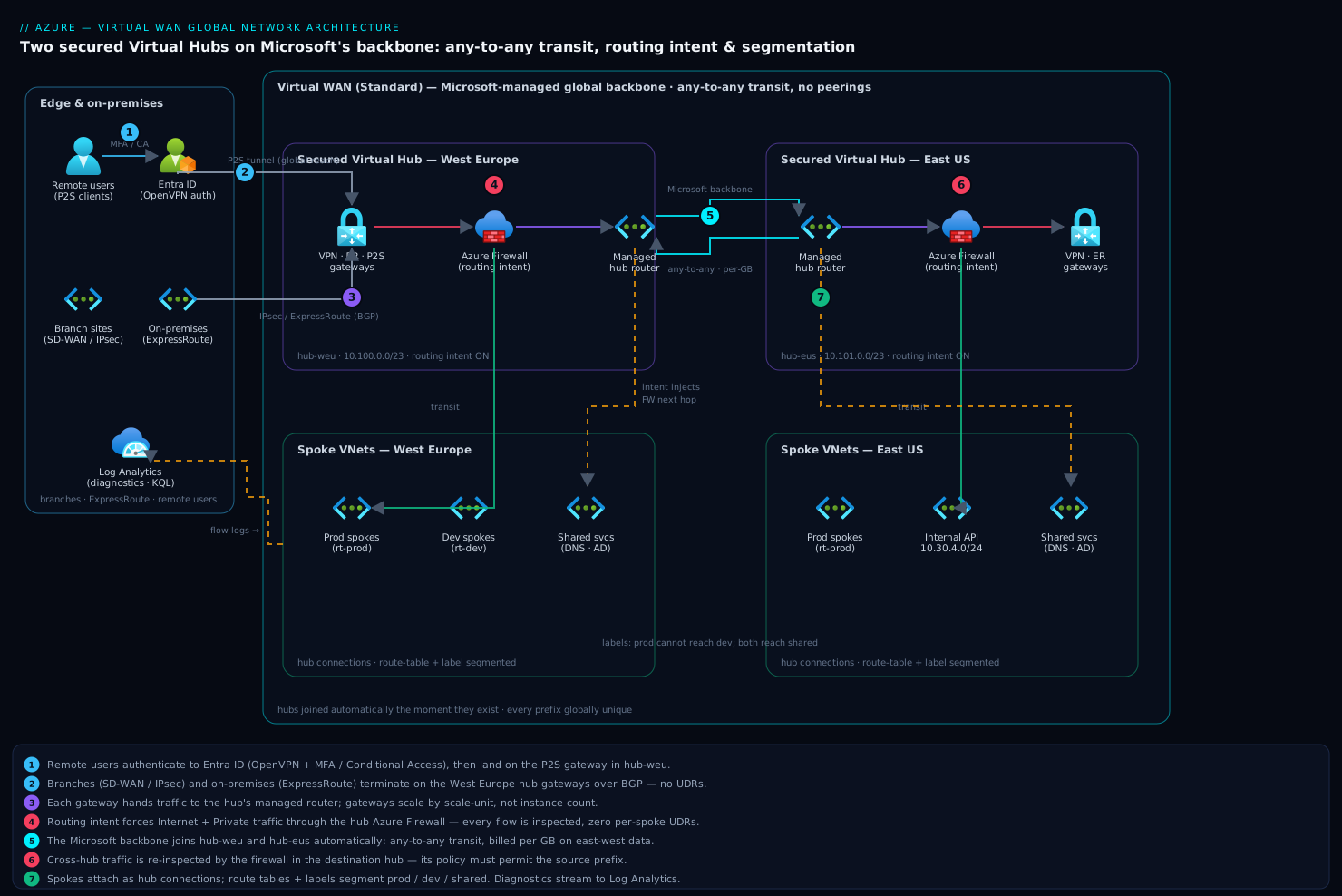
The spokes, branches, and gateways stay yours. The hub, its router, and inter-hub transit are the platform’s problem now.
Step 1 - Virtual WAN topology: hubs, regions, and the global backbone
The Virtual WAN resource itself is just a logical container and a global setting; the hubs do the work. Provision one Virtual WAN, then a hub per region where you need a connectivity anchor.
LOCATION_EU=westeurope
LOCATION_US=eastus
RG=rg-vwan-global
VWAN=vwan-global

az group create --name $RG --location $LOCATION_EU

# Logical Virtual WAN container (Standard enables full transit + branch features)
az network vwan create \
  --resource-group $RG \
  --name $VWAN \
  --location $LOCATION_EU \
  --type Standard

# A managed hub per region. The /23 address space is internal to the hub
# and must NOT overlap any spoke, on-prem, or other hub range.
az network vhub create \
  --resource-group $RG \
  --vwan $VWAN \
  --name hub-weu \
  --location $LOCATION_EU \
  --address-prefix 10.100.0.0/23 \
  --sku Standard

az network vhub create \
  --resource-group $RG \
  --vwan $VWAN \
  --name hub-eus \
  --location $LOCATION_US \
  --address-prefix 10.101.0.0/23 \
  --sku Standard
Two address-planning rules will save you a rebuild:
- The hub prefix must be at least /24; /23 is the safe default. The hub packs a router, gateways, and firewall into that space, and you cannot resize it after creation. Undersize it and you cannot add a gateway later.
- Every prefix in the WAN must be globally unique — hubs, spokes, on-prem, branches. Virtual WAN advertises everything to everything by default; overlapping ranges produce black holes that are miserable to diagnose.
Hubs are joined the moment they exist under the same Virtual WAN. There is no peering step between hub-weu and hub-eus — that is the entire point.
Step 2 - Connecting spokes, branches (SD-WAN), and ExpressRoute
Spokes attach as hub virtual network connections. No peering, no gateway transit toggle, no UDRs to force traffic to the hub.
SPOKE_ID=$(az network vnet show -g rg-apps-weu -n vnet-app-weu --query id -o tsv)

az network vhub connection create \
  --resource-group $RG \
  --vhub-name hub-weu \
  --name conn-app-weu \
  --remote-vnet $SPOKE_ID
That connection alone gives the spoke transit to every other spoke and, across the backbone, to spokes behind hub-eus. Branch and ExpressRoute connectivity each need a gateway in the hub first. Gateways scale in scale units, not instance counts — one S2S VPN scale unit is roughly 500 Mbps aggregate, sized by total branch demand.
# Site-to-site VPN gateway in the hub (for IPsec branches / SD-WAN)
az network vpn-gateway create \
  --resource-group $RG \
  --name vpngw-weu \
  --location $LOCATION_EU \
  --vhub hub-weu \
  --vpn-gateway-scale-unit 2

# ExpressRoute gateway in the hub (scale unit ~ 2 Gbps each)
az network express-route gateway create \
  --resource-group $RG \
  --name ergw-weu \
  --location $LOCATION_EU \
  --virtual-hub hub-weu \
  --min-val 1 \
  --max-val 2
For branches, model each physical site as a VPN Site (its public IP and on-prem prefixes, or BGP ASN) and connect it to the VPN gateway. At scale you do not click these one by one — Virtual WAN integrates with SD-WAN partners (Cisco, VMware, Barracuda, Fortinet and others) whose controllers provision the sites and IPsec tunnels into the hub automatically. The hub becomes the single managed concentrator instead of an NVA you patch.
ExpressRoute circuits connect to the ExpressRoute gateway and immediately gain transit to every spoke and, via the backbone, to remote regions — a single circuit in Europe can reach US workloads. Branch and ExpressRoute prefixes propagate into the hub over BGP; there is no UDR step.
Step 3 - Secured virtual hubs with Azure Firewall and routing intent
A hub with a firewall in it is a secured virtual hub. Historically you secured one by writing custom route tables that pointed 0.0.0.0/0 and the RFC1918 ranges at the firewall. That still works, but routing intent is the modern, far cleaner mechanism: you declare intent and the platform programs every route table in the hub for you.
First, deploy Azure Firewall into the hub via a firewall policy.
# Firewall policy (define rules, threat intel, premium features here)
az network firewall policy create \
  --resource-group $RG \
  --name fwpol-global \
  --location $LOCATION_EU

# Azure Firewall anchored to the hub
az network firewall create \
  --resource-group $RG \
  --name azfw-weu \
  --location $LOCATION_EU \
  --vhub hub-weu \
  --firewall-policy fwpol-global \
  --sku AZFW_Hub \
  --tier Standard \
  --count 1
Then turn on routing intent. Two policy types exist: InternetTraffic (0.0.0.0/0) and PrivateTraffic (RFC1918 plus any custom private prefixes). Setting both to route through the firewall means every flow the hub sees — spoke-to-spoke, spoke-to-internet, branch-to-spoke, and cross-hub — is inspected, with no per-spoke UDRs anywhere.
{
  "routingPolicies": [
    {
      "name": "InternetTrafficPolicy",
      "destinations": ["Internet"],
      "nextHop": "<azure-firewall-resource-id>"
    },
    {
      "name": "PrivateTrafficPolicy",
      "destinations": ["PrivateTraffic"],
      "nextHop": "<azure-firewall-resource-id>"
    }
  ]
}
Routing intent is configured per hub — enable it on every secured hub. Once both policies route to the firewall, inter-hub traffic is inspected by the firewall in each hub it transits, so plan firewall capacity for east-west volume, not just internet egress.
This is the single biggest operational win of Virtual WAN: the security posture that used to be hundreds of brittle UDRs becomes two declarative policies the platform keeps consistent.
Step 4 - Custom route tables and controlling any-to-any traffic flow
Any-to-any is the default, and for many estates that is exactly wrong. You usually want isolation — production cannot reach development; a shared-services spoke (DNS, AD, management) is reachable by everyone but cannot freely initiate into the rest.
The control plane is hub route tables plus labels. Each connection has two properties:
- Associated route table - the single table the connection consults to decide where its outbound traffic goes.
- Propagated route tables / labels - which tables learn this connection’s prefixes (i.e., who can reach it).
Every hub ships a Default and a None route table. Add your own for segmentation.
# A route table that production spokes associate with
az network vhub route-table create \
  --resource-group $RG \
  --vhub-name hub-weu \
  --name rt-prod \
  --labels prod

az network vhub route-table create \
  --resource-group $RG \
  --vhub-name hub-weu \
  --name rt-dev \
  --labels dev
To isolate prod from dev while both reach shared services: associate prod spokes with rt-prod propagating to prod and shared; associate dev spokes with rt-dev propagating to dev and shared; have the shared-services spoke propagate to all three. Because prod’s table never learns dev’s prefixes, segmentation is enforced in the route tables themselves — not in a firewall rule you might fat-finger.
| Connection | Associated table | Propagates to labels | Reachable from |
|---|---|---|---|
| Prod spokes | rt-prod | prod, shared | Prod, shared |
| Dev spokes | rt-dev | dev, shared | Dev, shared |
| Shared services | Default | prod, dev, shared | Everyone |
| ExpressRoute / branches | Default | prod, dev, shared | Everyone (tune as needed) |
When routing intent is enabled, the platform injects the firewall next hop into these tables for you, so segmentation by route table and inspection by the firewall compose cleanly. Use static routes in a route table only for the exceptions — e.g. forcing a specific prefix to a third-party NVA the firewall does not front.
Step 5 - Integrating point-to-site and remote-user access at scale
Remote users land on the same backbone as everything else through a point-to-site (P2S) VPN gateway in the hub. Once connected, a user reaches any spoke or on-prem prefix the hub knows — global reach from a single client profile.
# P2S gateway sized by concurrent users; scale unit ~500 connections
az network p2s-vpn-gateway create \
  --resource-group $RG \
  --name p2sgw-weu \
  --location $LOCATION_EU \
  --vhub hub-weu \
  --scale-unit 2 \
  --vpn-server-config <vpn-server-config-id> \
  --address-space 10.200.0.0/24
Two things matter at enterprise scale:
- Authenticate against Entra ID (OpenVPN protocol), not certificates. A VPN server configuration with Entra ID auth gives you Conditional Access and MFA on the tunnel and kills certificate distribution. RADIUS and certificate auth exist but do not scale as cleanly for a global workforce.
- The P2S client address pool is just another prefix in the WAN — keep it globally unique and size it for peak concurrency. Users on the EU hub reach US spokes over the backbone, so you rarely need a gateway in every hub; place P2S gateways where your users physically are to minimize first-hop latency.
With routing intent on, remote-user traffic to private prefixes (and internet, if force-tunneled) is inspected by the hub firewall like any other flow — same policy, no special cases.
Step 6 - Observability, routing diagnostics, and cost control
The managed router is convenient until you need to know why a packet went somewhere. The tools that help:
- Effective routes. First stop for any reachability problem — it shows the routes the hub actually programmed, including intent-injected firewall next hops.
az network vhub get-effective-routes \
  --resource-group $RG \
  --name hub-weu \
  --resource-type RouteTable \
  --resource-id <route-table-resource-id>
- VPN gateway BGP peer status to confirm branches and on-prem are exchanging the prefixes you expect.
az network vpn-gateway list-bgp-peer-status \
  --resource-group $RG \
  --name vpngw-weu
- Diagnostic settings to Log Analytics on hub gateways and the firewall, so tunnel events, route changes, and firewall verdicts are queryable in KQL rather than guessed at.
- VNet flow logs on spokes and Connection Monitor for synthetic hub-to-hub and branch-to-spoke probes.
On cost, Virtual WAN bills on axes hub-and-spoke does not:
| Cost driver | What to watch |
|---|---|
| Hub deployment + routing infra | Per-hour charge per hub — consolidate regions; do not spin a hub per environment |
| Connection units | Per-hour charge scaling with the number of connected VNets/branches |
| Data processed by the hub router | Per-GB on traffic the hub routes — east-west across hubs adds up |
| Gateway scale units | VPN/ER/P2S billed per scale unit whether or not saturated |
| Azure Firewall in hub | Standard firewall pricing applies on top of the hub |
The data-processing charge is the one that bites: chatty cross-region spoke-to-spoke traffic that was “free” intra-region peering is now metered per GB. Keep high-volume pairs in the same region’s hub, and reserve cross-hub transit for genuinely global flows.
Verify
Confirm the backbone behaves before you migrate production onto it.
# 1. Both hubs exist and are provisioned under one Virtual WAN
az network vhub list --resource-group $RG \
  --query "[].{name:name, state:provisioningState, addr:addressPrefix}" -o table

# 2. Routing intent is active on the secured hubs
az network vhub routing-intent list \
  --resource-group $RG --vhub-name hub-weu -o table

# 3. The firewall in the hub is healthy
az network firewall show \
  --resource-group $RG --name azfw-weu \
  --query "{name:name, state:provisioningState}" -o table

# 4. A spoke connection sees the firewall next hop and remote-region prefixes
az network vhub get-effective-routes \
  --resource-group $RG --name hub-weu \
  --resource-type RouteTable --resource-id <route-table-resource-id>
End-to-end functional checks:
- From a prod spoke VM, reach a prod spoke behind the other hub (cross-region transit works).
- From a prod spoke, confirm you cannot reach a dev spoke (segmentation holds).
- Connect a P2S client and reach a spoke in a remote region (global remote access works).
- Inspect Azure Firewall logs in Log Analytics and confirm the above flows appear as inspected (routing intent is actually in path).
Migration checklist: hub-spoke to Virtual WAN without downtime
The move is incremental — run both topologies side by side and cut spokes over one at a time.
Enterprise scenario
A retail group ran two secured hubs (hub-weu, hub-eus) with routing intent on both. Months after go-live, a new product team in West Europe complained their spoke could not reach a SaaS-style internal API hosted on a spoke behind East US. Connectivity to other EU spokes was fine, so it looked like a cross-region transit failure.
It was not. get-effective-routes on the EU spoke showed the East US prefix learned correctly, next-hop the local firewall — routing was healthy. The drops were in the East US Azure Firewall: when both InternetTraffic and PrivateTraffic route through the firewall, cross-hub east-west traffic is inspected in the destination hub too, and that hub’s policy had no rule permitting the EU spoke range.
The fix was a network rule in the shared parent policy (so both hubs inherit it), scoped to the actual prefixes rather than a blanket allow:
az network firewall policy rule-collection-group collection add-filter-collection \
  --resource-group $RG \
  --policy-name fwpol-global \
  --rule-collection-group-name rcg-eastwest \
  --name allow-weu-to-eus-api \
  --collection-priority 200 \
  --action Allow \
  --rule-name weu-spokes-to-api \
  --rule-type NetworkRule \
  --source-addresses 10.20.0.0/16 \
  --destination-addresses 10.30.4.0/24 \
  --destination-ports 443 \
  --ip-protocols TCP
The lesson the team wrote into their runbook: with routing intent, a packet crossing two hubs is inspected by two firewalls. Effective routes proving reachability is only half the diagnosis — always check the firewall logs in the destination hub before suspecting the backbone.
Going deeper
This section is for the reader who will own the backbone. It goes under the hood of the managed router, the connectivity types, and the levers you only reach for at scale.
Standard vs Basic: what the SKU actually gates
The Virtual WAN type (set with --type on the WAN, and mirrored by the hub --sku) decides which features exist at all:
| Capability | Basic | Standard |
|---|---|---|
| Site-to-Site VPN | Yes | Yes |
| Hub-to-hub transit (any-to-any) | No | Yes |
| VNet-to-VNet transit through the hub | No | Yes |
| ExpressRoute connections | No | Yes |
| Point-to-Site (remote user) VPN | No | Yes |
| Azure Firewall + routing intent (secured hub) | No | Yes |
| Custom route tables | No | Yes |
Basic is a Site-to-Site-VPN concentrator and nothing more — none of the transit, ExpressRoute, remote-user, or security features an enterprise backbone is built on. The SKU is a one-way ratchet: you can upgrade a Basic Virtual WAN to Standard in place, but you cannot downgrade Standard to Basic. Because no enterprise backbone ever wants the Basic feature set, provision Standard from the first az network vwan create and never think about it again.
The virtual hub is a managed router that auto-scales
A Virtual Hub is not just an address range — it is a Microsoft-operated router plus the gateways and firewall you attach. That router is what makes any-to-any transit work: every connection’s prefixes land in the hub’s route tables, and the router forwards between them without a peering or UDR from you.
The router’s throughput scales in routing infrastructure units. The floor is 2 units (roughly 3 Gbps and a few thousand spoke VMs); it scales toward 50 units (roughly 50 Gbps and tens of thousands of VMs) as you attach more connections. You do not manage instances — you size the gateways (in scale units) and let the hub router capacity follow the estate. The one thing you cannot change after creation is the hub address prefix, because the router, gateways, and firewall are all carved out of it. /23 is the safe default precisely so a future gateway always has room.
The four ways things connect to a hub
Everything that plugs into Virtual WAN is one of four connection types. Knowing which gateway each needs — and how each scales — is most of capacity planning:
| Connection type | What connects | Gateway in the hub | Scales in | Typical auth |
|---|---|---|---|---|
| VNet connection | A spoke VNet | None (native hub connection) | Hub router units | N/A — a peering the platform owns |
| Site-to-Site (S2S) VPN | Branch offices, SD-WAN, on-prem edge | VPN gateway | Scale units (~500 Mbps each) | IPsec/IKE, optional BGP |
| Point-to-Site (P2S) VPN | Individual remote users / laptops | P2S VPN gateway | Scale units (~500 connections each) | Entra ID (OpenVPN), RADIUS, or certs |
| ExpressRoute | Private circuits from on-prem / colo | ExpressRoute gateway | Scale units (~2 Gbps each) | BGP over the circuit |
A spoke (VNet connection) needs no gateway — that is why it is cheap and instant. The other three each require their gateway to exist in the hub first, which is why you deploy vpn-gateway, p2s-vpn-gateway, and express-route gateway before their sites, circuits, or clients can attach. All four, once connected, share the same any-to-any reachability: a P2S laptop on the EU hub can reach an ExpressRoute-attached datacenter behind the US hub with no extra configuration.
Secured hub: routing intent vs. the old way
There are two generations of “secure the hub with a firewall,” and you will meet both in real estates:
- The old way — Firewall Manager security configuration + custom route tables. You marked the hub secured in Azure Firewall Manager and it programmed hidden route tables so Internet and/or private traffic pointed at the firewall. It worked, but it was opaque, it did not cleanly inspect inter-hub (east-west) traffic, and adding custom private prefixes was awkward.
- The modern way — routing intent. You declare two policies — InternetTraffic (
0.0.0.0/0) and PrivateTraffic (RFC1918 plus any custom private prefixes) — and the platform programs every route table in the hub to send those classes through the firewall, including cross-hub traffic. It is transparent (you can read the injected next hop in effective routes), it inspects east-west between hubs, and it composes with your own custom route tables for segmentation.
Routing intent does not replace custom route tables — it layers on top. You still use route tables and labels to decide who can reach whom (segmentation); routing intent decides what gets inspected (security). A prod spoke associated with rt-prod still only learns the prefixes you propagate to it, and separately its traffic to those prefixes is steered through the firewall. Segmentation and inspection are orthogonal — which is exactly why the combination is powerful.
Codified, routing intent is a first-class Terraform resource — no portal clicks, reviewable in a PR:
# Azure Firewall anchored to the hub, then routing intent pointing at it.
resource "azurerm_firewall" "weu" {
  name                = "azfw-weu"
  resource_group_name = azurerm_resource_group.vwan.name
  location            = "westeurope"
  sku_name            = "AZFW_Hub" # hub-anchored firewall
  sku_tier            = "Standard"
  firewall_policy_id  = azurerm_firewall_policy.global.id

  virtual_hub {
    virtual_hub_id  = azurerm_virtual_hub.weu.id
    public_ip_count = 1
  }
}

resource "azurerm_virtual_hub_routing_intent" "weu" {
  name           = "intent-weu"
  virtual_hub_id = azurerm_virtual_hub.weu.id

  routing_policy {
    name         = "InternetTrafficPolicy"
    destinations = ["Internet"]
    next_hop     = azurerm_firewall.weu.id
  }

  routing_policy {
    name         = "PrivateTrafficPolicy"
    destinations = ["PrivateTraffic"]
    next_hop     = azurerm_firewall.weu.id
  }
}
Pin your provider:
azurermv4 madesubscription_idmandatory and turned several once-optional attributes into required ones. The vWAN resource names above are stable across v3 and v4, but a blind>= 3.0constraint can still surprise you onterraform init.
Hub routing preference and BGP path selection
When the hub learns the same prefix from more than one place — say an on-prem 10.0.0.0/16 arriving over both ExpressRoute and a Site-to-Site VPN, or from a local branch and a remote hub — something has to break the tie. That lever is hub routing preference:
# Prefer ExpressRoute (default), the VPN gateway, or shortest AS path
az network vhub update \
  --resource-group $RG \
  --name hub-weu \
  --hub-routing-preference ExpressRoute   # or VpnGateway | ASPath
- ExpressRoute (default) — ER-learned routes win; the usual choice when ER is primary and VPN is backup.
- VpnGateway — VPN-learned routes win; useful during migrations or when VPN is intentionally primary.
- ASPath — ignore connection type and prefer the shortest BGP AS path, letting your on-prem routing policy decide.
Getting this wrong is a classic asymmetric-routing trap: traffic leaves over ExpressRoute but returns over VPN because two hubs disagree on preference. Set it deliberately and identically where it matters.
Azure Route Server vs. the hub’s built-in router
Newcomers often ask where Azure Route Server (ARS) fits. ARS is a standalone service you drop into an ordinary VNet (in its own RouteServerSubnet) so a Network Virtual Appliance can exchange routes with the VNet over BGP instead of you maintaining UDRs — it is the dynamic-routing answer for classic hub-and-spoke. Virtual WAN does not need a separate Route Server: the virtual hub already contains that capability. When you must peer an NVA (a third-party SD-WAN or firewall appliance) with the hub, you create a BGP connection to the virtual hub (az network vhub bgpconnection create) rather than deploying ARS. Same BGP idea — but the route server is baked into the managed hub. Recognising they are one concept in two packagings ends a lot of “which one do I use?” churn.
Global reach, branch-to-branch, and ER-to-ER
Any-to-any is powerful enough that Microsoft gates some of it for safety:
- Branch-to-branch (one VPN/SD-WAN site reaching another through the hub) is governed by the
allowBranchToBranchTrafficflag on the Virtual WAN — on by default, but worth confirming. - ExpressRoute-to-ExpressRoute transit through the hub (using Microsoft’s backbone to bridge two of your private circuits) is deliberately more restricted, because it turns Azure into a transit carrier between two on-prem sites. Where two circuits genuinely must talk, ExpressRoute Global Reach links them directly over the backbone and is often the sanctioned path.
- Global reach in the vWAN sense is simply the default hub-to-hub backbone: a spoke behind the EU hub reaching a spoke behind the US hub is already “global reach,” no add-on required — that traffic just crosses the metered hub-to-hub path.
Firewall Manager and where this sits in a landing zone
Azure Firewall Manager is the central plane for secured hubs: it converts hubs to secured, manages the firewall policy hierarchy (a parent policy with per-region child policies), and can configure routing intent across every hub from one place. In a mature estate, Virtual WAN lives in the connectivity subscription of your Azure Landing Zone, with Firewall Manager governing its security posture — see Azure landing zone: network topology and connectivity for where the backbone slots into the platform.
When NOT to use Virtual WAN
The honest tradeoff: Virtual WAN trades control and per-GB cost for operational simplicity and global scale. It is the right call for multi-region, many-branch, ExpressRoute-plus-VPN estates. It is overkill — and pricier — for:
- A single region with a handful of spokes and no branches: a classic hub VNet with Azure Firewall is cheaper and gives you full control of the route tables.
- Workloads needing a routing behaviour the managed hub does not expose (some exotic NVA-insertion patterns, or fine-grained control the hub deliberately abstracts away).
- Cost-sensitive estates with heavy, chatty cross-region east-west traffic — the per-GB hub data-processing charge can dwarf what intra-region peering cost you for free. Model the data-processing meter before assuming vWAN is cheaper.
Practice challenges
Work these in a throwaway resource group. Nothing here needs production data; every command is real az CLI (schema shown, not run here — swap in your own IDs and prefixes). Try each before opening the solution.
Challenge 1 (beginner) — Stand up a Standard WAN and one hub
Create a Standard Virtual WAN and a single virtual hub in West Europe with a correctly sized address prefix that overlaps nothing.
<details> <summary>Solution</summary>
az group create --name rg-vwan-lab --location westeurope

az network vwan create \
  --resource-group rg-vwan-lab \
  --name vwan-lab \
  --location westeurope \
  --type Standard

az network vhub create \
  --resource-group rg-vwan-lab \
  --vwan vwan-lab \
  --name hub-weu \
  --location westeurope \
  --address-prefix 10.100.0.0/23 \
  --sku Standard
Why: --type Standard (not Basic) unlocks transit, ExpressRoute, P2S, and secured-hub features, and the /23 gives the hub room for the gateways and firewall you cannot add later if you undersize it. The prefix is chosen to overlap no spoke, branch, or on-prem range.
</details>
Challenge 2 (beginner) — Attach a spoke and observe any-to-any
Attach an existing spoke VNet to the hub as a hub virtual network connection, without peering or UDRs, and predict what it can now reach.
<details> <summary>Solution</summary>
SPOKE_ID=$(az network vnet show -g rg-apps-weu -n vnet-app-weu --query id -o tsv)

az network vhub connection create \
  --resource-group rg-vwan-lab \
  --vhub-name hub-weu \
  --name conn-app-weu \
  --remote-vnet $SPOKE_ID
Why: A single connection gives the spoke transit to every other spoke on this hub and, once a second hub exists, to spokes behind it across the Microsoft backbone — with zero peerings or route tables authored by you. That default reachability is exactly what you will later have to restrict with route tables (Challenge 5). </details>
Challenge 3 (intermediate) — Add a VPN gateway and model a branch
Deploy a Site-to-Site VPN gateway into the hub and model one branch office as a VPN site so an IPsec tunnel can form.
<details> <summary>Solution</summary>
# 1. VPN gateway in the hub (2 scale units ~ 1 Gbps aggregate)
az network vpn-gateway create \
  --resource-group rg-vwan-lab \
  --name vpngw-weu \
  --location westeurope \
  --vhub hub-weu \
  --vpn-gateway-scale-unit 2

# 2. The branch, as a VPN site (public IP + on-prem prefixes or BGP ASN)
az network vpn-site create \
  --resource-group rg-vwan-lab \
  --name site-london \
  --location westeurope \
  --virtual-wan vwan-lab \
  --ip-address 203.0.113.10 \
  --address-prefixes 192.168.10.0/24
Why: Branches never attach directly to a hub — they attach to the hub’s VPN gateway, and each physical site is modelled as a VPN site (its public IP and the prefixes behind it). 203.0.113.10 and 192.168.10.0/24 are documentation ranges standing in for a real branch edge and its LAN. At scale, an SD-WAN partner’s controller creates these sites for you instead of you hand-running this command.
</details>
Challenge 4 (intermediate) — Send everything through the firewall with routing intent
Azure Firewall is already deployed in the hub. Turn the hub into a secured hub so both internet and private traffic are inspected — without writing a single per-spoke UDR.
<details> <summary>Solution</summary>
FW_ID=$(az network firewall show -g rg-vwan-lab -n azfw-weu --query id -o tsv)

# routing-policies.json:
# [
#   { "name": "InternetTrafficPolicy", "destinations": ["Internet"],       "nextHop": "<FW_ID>" },
#   { "name": "PrivateTrafficPolicy",  "destinations": ["PrivateTraffic"], "nextHop": "<FW_ID>" }
# ]

az network vhub routing-intent create \
  --resource-group rg-vwan-lab \
  --vhub hub-weu \
  --name intent-weu \
  --routing-policies @routing-policies.json
Why: Routing intent programs every route table in the hub to send 0.0.0.0/0 and the RFC1918 ranges to the firewall’s private IP. Two declarative policies replace what used to be hundreds of UDRs, and — critically — the injected next hop shows up in get-effective-routes, so it is inspectable, not magic. Enable it on every secured hub; it is per-hub.
</details>
Challenge 5 (advanced) — Segment prod from dev with route tables and labels
Both prod and dev spokes must reach a shared-services spoke (DNS/AD), but prod and dev must not reach each other. Design and create the route tables.
<details> <summary>Solution</summary>
az network vhub route-table create \
  --resource-group rg-vwan-lab --vhub-name hub-weu \
  --name rt-prod --labels prod

az network vhub route-table create \
  --resource-group rg-vwan-lab --vhub-name hub-weu \
  --name rt-dev --labels dev
Associations and propagation (set on each connection):
| Connection | Associated table | Propagates to labels |
|---|---|---|
| Prod spokes | rt-prod | prod, shared |
| Dev spokes | rt-dev | dev, shared |
| Shared services | Default | prod, dev, shared |
Why: A connection’s associated table decides where its traffic can go; its propagated labels decide who learns its prefixes. Because rt-prod never learns dev’s prefixes (dev only propagates to dev and shared), prod literally has no route to dev — segmentation enforced in the route tables, not in a firewall rule you could fat-finger. Shared services propagate everywhere, so both environments reach them.
</details>
Challenge 6 (advanced) — Codify it and wire a deployment pipeline
Portal-built hubs drift. Express the WAN, hub, and routing intent in Terraform, then add a CI job that plans and applies on merge using OIDC (no stored secrets).
<details> <summary>Solution</summary>
resource "azurerm_virtual_wan" "lab" {
  name                = "vwan-lab"
  resource_group_name = azurerm_resource_group.vwan.name
  location            = "westeurope"
  type                = "Standard"
}

resource "azurerm_virtual_hub" "weu" {
  name                = "hub-weu"
  resource_group_name = azurerm_resource_group.vwan.name
  location            = "westeurope"
  virtual_wan_id      = azurerm_virtual_wan.lab.id
  address_prefix      = "10.100.0.0/23"
}
# (azurerm_firewall + azurerm_virtual_hub_routing_intent as shown in "Going deeper")
name: vwan-deploy
on:
  push:
    branches: [main]
    paths: ["vwan/**"]
permissions:
  id-token: write # OIDC federated login — no client secret stored
  contents: read
jobs:
  apply:
    runs-on: ubuntu-latest
    steps:
      - uses: actions/checkout@v4
      - uses: azure/login@v2
        with:
          client-id: ${{ secrets.AZURE_CLIENT_ID }}
          tenant-id: ${{ secrets.AZURE_TENANT_ID }}
          subscription-id: ${{ secrets.AZURE_SUBSCRIPTION_ID }}
      - uses: hashicorp/setup-terraform@v3
      - run: terraform init && terraform apply -auto-approve
        working-directory: vwan
Why: The topology — hubs, route tables, labels, routing intent — becomes reviewable in a pull request instead of living as click-ops nobody can reproduce. The pipeline authenticates with a federated (OIDC) credential (id-token: write + azure/login@v2), so there is no long-lived client secret in GitHub. This is the “codify it” next step the closing section points to.
</details>
Common beginner mistakes
These are the misconceptions that trip people new to Virtual WAN — distinct from the architect-level pitfalls in the next section. Each is the wrong mental model, then the right one.
- “Any-to-any means I’m finished.” The default is everything reaches everything, which feels like a feature until dev can reach prod and an auditor asks why. Any-to-any is a starting point, not a security posture. Right model: design route tables and labels for segmentation before you attach production spokes; open reachability deliberately, do not discover it.
- “Basic is the cheap way to start; I’ll upgrade later.” Basic is a VPN-only concentrator — no transit, no ExpressRoute, no P2S, no secured hub. You can upgrade Basic to Standard, but you will hit the wall on your first ExpressRoute or firewall requirement. Right model: no enterprise scenario wants Basic — start Standard.
- “I’ll pick the hub address space later, or make it small to save space.” The hub prefix is immutable, and the router, gateways, and firewall all live inside it. A
/25that seemed generous leaves no room for the gateway you add in month three. Right model:/23, chosen up front to overlap nothing, every time. - “Effective routes show the prefix, so traffic will flow.” Reachability in the route table is necessary but not sufficient once routing intent is on — the firewall in the path still has to allow the flow. The enterprise scenario earlier is exactly this: routes healthy, firewall in the destination hub silently dropping. Right model: prove the route and check the firewall logs, in the destination hub, for cross-region flows.
- “One firewall inspects all my traffic.” Routing intent is per hub. A packet crossing two hubs is inspected by two firewalls, and each hub’s policy must permit it. Right model: one policy hierarchy (parent + child) applied to every hub, with capacity sized for east-west volume, not just internet egress.
- “P2S and branch address pools are just gateway settings.” The point-to-site client pool and every branch LAN are prefixes in the WAN — overlap one with a spoke and you get black holes that are miserable to trace. Right model: treat every pool as part of the global address plan; keep them unique and sized for peak concurrency.
- “Route it through the backbone, it’s free.” Intra-region VNet peering was effectively free; the Virtual WAN hub bills per GB for data it routes, and cross-hub east-west is the expensive axis. Right model: keep high-volume pairs on the same hub and reserve cross-hub transit for genuinely global flows.
Pitfalls and next steps
The mistakes that cause re-architecture, not just tickets:
- Choosing Basic SKU. It cannot be upgraded to the feature set you need. Start Standard.
- Undersizing the hub prefix. The address space is immutable; too small forces a full hub rebuild to add a gateway.
- Forgetting routing intent is per hub. One secured hub and one wide-open hub on the same WAN is a silent security gap.
- Assuming any-to-any is desirable. Default transit means dev can reach prod until you say otherwise. Design route tables and labels before you attach production spokes.
- Ignoring the data-processing meter. Cross-hub east-west traffic is billed per GB; “just route it through the backbone” has a line item.
From here, codify the topology in Terraform or Bicep so hubs, route tables, labels, and routing intent are reviewed and reproducible rather than portal artifacts; structure firewall policy into a parent/child hierarchy for per-region overrides; and fold the Virtual WAN into your Azure Landing Zone connectivity subscription so it becomes the sanctioned global network, not a one-off.
Glossary
- Virtual WAN — A Microsoft-managed global networking service; a logical container plus a global backbone that joins your regional hubs automatically. The
Standardtype is required for the enterprise feature set. - Virtual Hub — A Microsoft-operated VNet in one region containing a built-in router and any gateways/firewall you attach. Hubs under one Virtual WAN are automatically interconnected. Its address prefix is immutable — use
/23. - Standard vs Basic SKU — Basic supports only Site-to-Site VPN; Standard adds transit, ExpressRoute, P2S, custom route tables, and secured hubs. Basic → Standard is a one-way upgrade.
- Spoke / VNet connection — A workload VNet attached to a hub as a hub virtual network connection (no peering or UDRs authored by you). Instantly gains any-to-any transit.
- Any-to-any transit — The default reachability where every spoke, branch, and circuit can reach every other across the Microsoft backbone, without hand-built peerings.
- Scale unit — The sizing dial for a gateway: ~500 Mbps per S2S VPN unit, ~2 Gbps per ExpressRoute unit, ~500 connections per P2S unit. You size scale units; the platform provisions the capacity.
- Routing infrastructure unit — The capacity dial for the hub’s built-in router (roughly a 2-unit/3 Gbps floor scaling toward 50 units/50 Gbps), scaling with the number of connections.
- Secured virtual hub — A hub with Azure Firewall in it, so hub traffic can be inspected. Turned on with routing intent (modern) or the older Firewall Manager security configuration.
- Routing intent — Two declarative policies —
InternetTraffic(0.0.0.0/0) andPrivateTraffic(RFC1918 + custom) — that make the platform program every hub route table to send those classes through the firewall. Configured per hub. - Custom route table + label — The segmentation mechanism. A connection associates with one table (where its traffic may go) and propagates to labels (who learns its prefixes). Prod/dev isolation lives here.
- Associated route table — The single table a connection consults for its outbound routing decision.
- Propagated route table / label — The tables that learn a connection’s prefixes, i.e., which other connections can reach it.
- Hub routing preference — The tie-breaker when the hub learns the same prefix from multiple sources:
ExpressRoute(default),VpnGateway, orASPath(shortest BGP AS path). - VPN gateway (S2S) — The hub gateway that terminates IPsec tunnels from branches and SD-WAN edges.
- VPN site — The model of one physical branch (its public IP and on-prem prefixes or BGP ASN) that connects to the S2S VPN gateway.
- Point-to-Site (P2S) — Remote-user VPN into the hub; authenticate with Entra ID over OpenVPN for Conditional Access and MFA. The client address pool is a WAN-wide prefix.
- ExpressRoute gateway — The hub gateway that terminates private ExpressRoute circuits; on-prem prefixes propagate into the hub over BGP.
- ExpressRoute Global Reach — Links two ExpressRoute circuits directly over Microsoft’s backbone so on-prem sites on different circuits can talk; the sanctioned path for ER-to-ER where the hub does not transit it.
- Azure Firewall Manager — The central plane for secured hubs: converts hubs to secured, manages firewall policy hierarchy, and configures routing intent across hubs.
- Azure Route Server (ARS) — A standalone service that gives a classic VNet BGP route exchange with an NVA. Virtual WAN has the equivalent built into the hub — use a BGP connection to the virtual hub instead.
- BGP — Border Gateway Protocol; how routers advertise prefixes to one another. Branch, on-prem, and ExpressRoute prefixes reach the hub over BGP rather than via UDRs.
- UDR (User-Defined Route) — A manual route-table entry. The thing Virtual WAN and routing intent largely eliminate; classic hub-and-spoke is full of them.
- NVA (Network Virtual Appliance) — A third-party firewall/router/SD-WAN appliance. Can be deployed in the hub or a spoke and BGP-peered with the hub.
- Effective routes — The routes the hub actually programmed for a connection (including intent-injected firewall next hops); first stop for any reachability diagnosis.
- allowBranchToBranchTraffic — The Virtual WAN flag controlling whether branches can route to each other through the hub (default on).