In a nutshell
If you have ever installed an app from a company app-store, you already understand a Bicep private module registry. Someone builds a component once — a hardened storage account, a VNet with its subnets, a Key Vault wired for diagnostics — publishes a single versioned copy to a shared, trusted store, and from then on every team installs that exact copy instead of hand-rolling their own. Nobody re-writes the storage account; they pick storage-account:1.2.0 off the shelf and know it behaves the same in dev, test, and prod.
That shared store, for Bicep, is an Azure Container Registry (ACR). Bicep modules are pushed to it as OCI artifacts — the same packaging format container images use — and referenced with a br: (Bicep registry) path and a semantic-version tag. Publish 1.2.0 once, and a consumer three repositories away writes module storage 'br/platform:storage-account:1.2.0' and gets the byte-identical module. Fix a bug or harden a default, bump the version, and everyone upgrades on their own schedule — no copy-paste, no drift, no chasing a renamed parameter across N repositories by hand.
This lesson is the principal-level playbook for running that ecosystem: designing modules as stable APIs, publishing and versioning them on ACR, sharing types and functions, linting and testing the compiled output, previewing changes with what-if, and wiring the whole thing into a CI/CD pipeline that publishes on merge with no stored secrets. Beyond your own registry, we cover the public Azure Verified Modules (AVM) registry (br/public:) — the same idea run by Microsoft: a store of pre-hardened, Well-Architected building blocks you can consume without publishing anything yourself.
Level: Advanced · Time: ~34 min
Prerequisites
- Comfortable authoring basic Bicep —
resource,param/output, andmodulereferences (relative-path modules are enough to start). azCLI 2.60+ (which bundles a current Bicep) and an ACR you can push to, or permission to create one.- Familiarity with Azure RBAC roles and the idea of a CI/CD pipeline. Managed identity / OIDC helps, but we explain it here.
After this lesson you can
- Design a Bicep module with a typed, versioned interface that consumers can pin to.
- Publish it to an ACR-backed private registry with
az bicep publishand query the result. - Reference modules through
bicepconfig.jsonaliases and pin immutable semantic versions. - Consume Microsoft’s public Azure Verified Modules via
br/public:. - Assign
AcrPush/AcrPullcorrectly and publish from CI using OIDC federation with no stored secrets. - Lint, test (ARM-TTK / Pester / PSRule for Azure), and
what-if-preview modules before they ship.
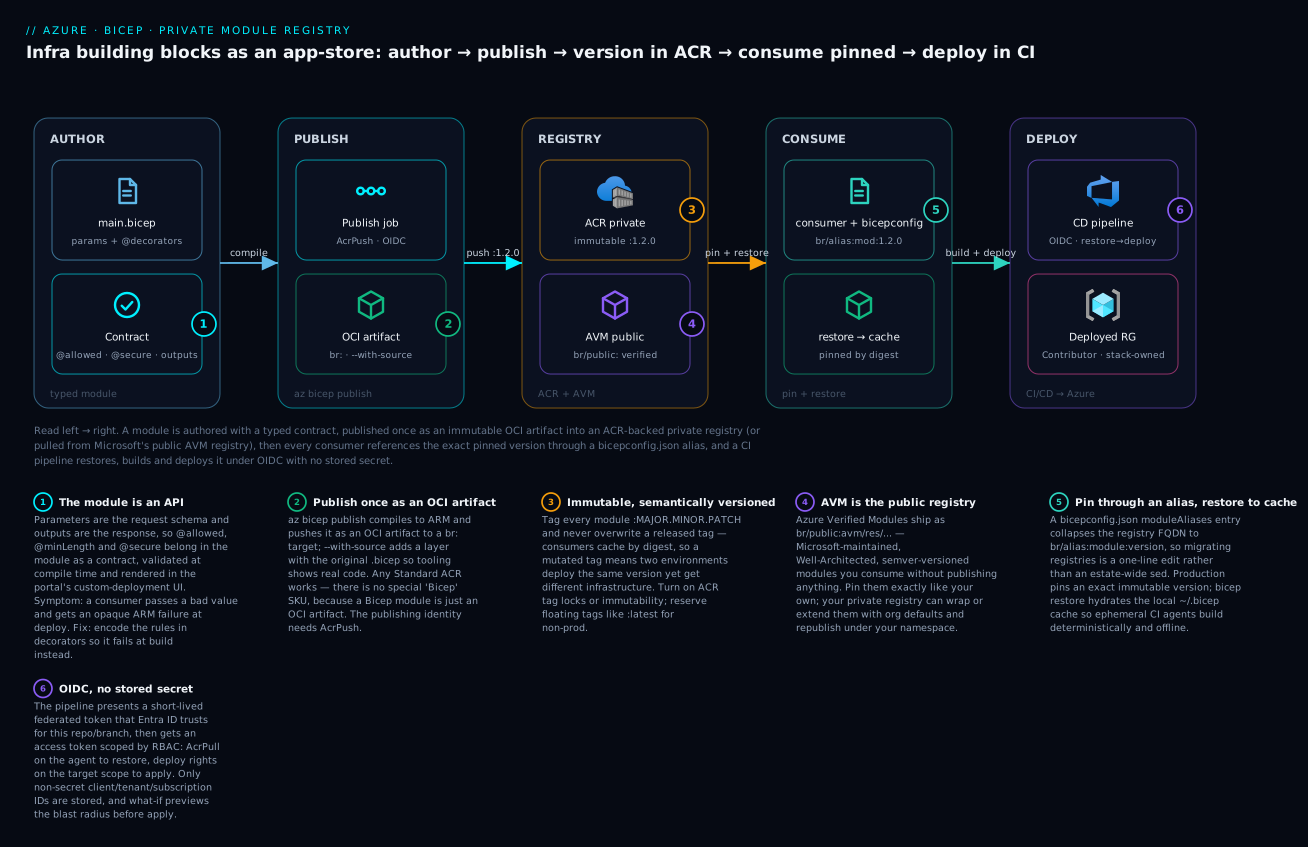
The diagram traces one module left to right — authored with a typed contract, published once as an immutable OCI artifact into ACR (or pulled from the public AVM registry), then pinned by every consumer through a bicepconfig.json alias and deployed by a CI pipeline that authenticates with OIDC and no stored secret.
A single team writing Bicep can get away with relative-path module references and a folder of .bicep files in one repo. An organization cannot. The moment three teams need the same hardened storage account, the same VNet-with-subnets pattern, or the same diagnostic-settings wiring, copy-paste becomes the architecture, and every drift, every CVE, every renamed parameter has to be chased across N repositories by hand. The fix is to treat Bicep modules like real software: typed interfaces, semantic versions, a private registry, automated tests, and a publishing pipeline. This is the principal-level playbook for running that ecosystem on an Azure Container Registry (ACR).
I assume az 2.60+ (which bundles a current Bicep CLI), an ACR you can push to, and that you have read or written Bicep before. Everything here targets GA features in Bicep 0.30+; I call out where the standalone CLI lags the az-bundled one.
1. Design reusable modules with typed params and decorators
A registry module is an API. Its parameters are the request schema, its outputs are the response, and consumers will pin to a version and expect both to be stable. Treat parameters with the same rigor you would a public function signature.
// modules/storage-account/main.bicep
metadata name = 'Hardened Storage Account'
metadata description = 'StorageV2 account with TLS1.2, no public blob, optional private endpoint.'

@description('Globally unique storage account name (3-24 lowercase alphanumeric).')
@minLength(3)
@maxLength(24)
param name string

@description('Azure region. Defaults to the resource group location.')
param location string = resourceGroup().location

@allowed([
  'Standard_LRS'
  'Standard_ZRS'
  'Standard_GRS'
])
param skuName string = 'Standard_LRS'

@description('Tags applied to every resource this module creates.')
param tags object = {}

resource sa 'Microsoft.Storage/storageAccounts@2023-05-01' = {
  name: name
  location: location
  tags: tags
  sku: { name: skuName }
  kind: 'StorageV2'
  properties: {
    minimumTlsVersion: 'TLS1_2'
    allowBlobPublicAccess: false
    supportsHttpsTrafficOnly: true
    publicNetworkAccess: 'Disabled'
  }
}

@description('Resource ID, for RBAC assignments and diagnostic wiring.')
output id string = sa.id

@description('The account name, echoed for convenience.')
output name string = sa.name
Three rules I enforce on every registry module:
- Decorators are contract, not decoration.
@minLength,@maxLength,@allowed, and@descriptionare validated at compile time, surface inwhat-if, and render in the portal’s custom-deployment UI. A consumer who passes a bad value gets a clear error at build time instead of an opaque ARM failure at deploy time. - Secure inputs are marked
@secure(). Any password, key, or connection string parameter must carry@secure()so it never lands in deployment history or logs. Thesecure-parameter-defaultanalyzer rule (below) will fail the build if you give a@secure()param a default literal. - Outputs never carry secrets. ARM deployment outputs are stored and readable by anyone with reader on the deployment. Emit resource IDs and names; never emit
listKeys()results.
Rule of thumb: if you cannot describe what a module produces in one sentence, it is doing too much. A module is one cohesive thing a team reasons about as a unit: a storage account with its network rules; a VNet with its subnets and NSG associations. Split anything with independent lifecycles.
2. Publish modules to an ACR-backed private registry
ACR is the OCI registry Bicep speaks natively. You do not need a special “Bicep registry” SKU; any ACR works, because Bicep modules are pushed as OCI artifacts. Create one with anonymous pull disabled:
az group create -n rg-platform-bicep -l eastus

az acr create \
  --resource-group rg-platform-bicep \
  --name contosoplatform \
  --sku Standard \
  --admin-enabled false
Keep --admin-enabled false. Authentication is Azure AD via your az login session; the admin account is a shared secret you do not want in a registry that gates production infrastructure. Pushing requires the AcrPush role and pulling requires AcrPull; assign them to the publishing service principal and to consumer identities respectively.
Publishing a module is one command. The target is a br: reference of the form br:<registry-login-server>/<module-path>:<tag>:
az bicep publish \
  --file modules/storage-account/main.bicep \
  --target "br:contosoplatform.azurecr.io/bicep/storage-account:1.0.0" \
  --documentation-uri "https://github.com/contoso/bicep-modules/tree/main/modules/storage-account" \
  --with-source
Two flags worth knowing. --documentation-uri stamps a link into the artifact manifest so tooling and the VS Code Bicep extension can point users at docs. --with-source embeds the original .bicep source alongside the compiled ARM, which lets consumers and the language service show the real module code (and lets you reconstruct it if the source repo is ever lost). There is also --force, which overwrites an existing tag.
The standalone bicep publish command is identical in shape:
bicep publish modules/storage-account/main.bicep \
  --target br:contosoplatform.azurecr.io/bicep/storage-account:1.0.0 \
  --with-source
Verify the artifact landed:
az acr repository show-tags \
  --name contosoplatform \
  --repository bicep/storage-account \
  --output table
3. Versioning, aliases in bicepconfig.json, and consumption
A consumer references a published module by its full br: path and a tag:
module storage 'br:contosoplatform.azurecr.io/bicep/storage-account:1.0.0' = {
  name: 'app-storage'
  params: {
    name: 'stappdata${uniqueString(resourceGroup().id)}'
    skuName: 'Standard_ZRS'
    tags: { env: 'prod', owner: 'app-team' }
  }
}
Typing the full registry FQDN everywhere is brittle. If you migrate registries or geo-replicate, you do not want to sed your entire estate. Define a module alias in bicepconfig.json at the consumer repo root:
{
  "moduleAliases": {
    "br": {
      "platform": {
        "registry": "contosoplatform.azurecr.io",
        "modulePath": "bicep"
      }
    }
  }
}
Now the reference collapses to the alias platform, and the modulePath prefix is implied:
module storage 'br/platform:storage-account:1.0.0' = {
  name: 'app-storage'
  params: { /* ... */ }
}
Versioning strategy
Tag modules with semantic versions and treat them as a public API:
| Change | Bump | Example |
|---|---|---|
| New optional parameter (has a default) | MINOR | 1.0.0 -> 1.1.0 |
| New output | MINOR | 1.1.0 -> 1.2.0 |
| Bug fix, no interface change | PATCH | 1.2.0 -> 1.2.1 |
| New required parameter | MAJOR | 1.2.1 -> 2.0.0 |
| Removed/renamed param or output | MAJOR | 2.0.0 -> 3.0.0 |
Changed @allowed to a narrower set |
MAJOR | breaks existing callers |
Two hard rules that save you from incident reviews:
- Tags are immutable in practice. Never re-publish a different artifact under an existing version tag. Consumers cache by digest; a mutated tag means two environments deploying “1.2.0” get different infrastructure. Enable ACR’s lock or a policy that blocks overwrites in production registries, and reserve
--forcefor pre-release tags only. - Pin exact versions in production, float only in dev.
:1.2.0is reproducible. There is no:^1.2range operator in Bicep, so “floating” means a mutable tag like:latestor:1, which you should use only for fast-moving internal modules in non-prod. Production deployments pin to an exact immutable version.
When a consumer first references a registry module, Bicep restores it into a local cache. CI agents are ephemeral, so restore explicitly before build:
bicep restore consumer/main.bicep
bicep build consumer/main.bicep --stdout > /dev/null
4. User-defined types, functions, and the import keyword
The biggest lever for a coherent module ecosystem is shared types and functions. Without them, every module re-declares its own subnetConfig shape and its own tag-building logic, and they drift. Bicep lets you export type aliases and functions from a module and import them elsewhere with the import keyword (GA since Bicep 0.30; the older standalone CLI may require the UserDefinedFunctions experimental flag, so build with the az-bundled Bicep).
Publish a shared library module:
// modules/shared/types.bicep
@export()
type storageSku = 'Standard_LRS' | 'Standard_ZRS' | 'Standard_GRS'

@export()
type subnetConfig = {
  name: string
  addressPrefix: string
}

@export()
@description('Returns the org-standard tag set.')
func buildTags(env string, owner string) object => {
  environment: env
  owner: owner
  managedBy: 'bicep'
  costCenter: 'platform'
}
Publish it like any other module:
az bicep publish \
  --file modules/shared/types.bicep \
  --target "br:contosoplatform.azurecr.io/bicep/shared/types:1.0.0" \
  --with-source
Consume the type and the function. Note that you import named symbols, and the imported type is then usable as a real parameter type:
import { storageSku, buildTags } from 'br/platform:shared/types:1.0.0'

param env string
param skuName storageSku = 'Standard_LRS'

var tags = buildTags(env, 'platform-team')

module storage 'br/platform:storage-account:1.2.0' = {
  name: 'app-storage'
  params: {
    name: 'stappdata${uniqueString(resourceGroup().id)}'
    skuName: skuName
    tags: tags
  }
}
When you compile this, Bicep emits ARM with languageVersion: "2.0" and stamps imported definitions with __bicep_imported_from! metadata pointing at the source template, so the provenance of every shared type is traceable in the compiled artifact. The payoff: change buildTags once, bump the shared/types version, and every module that adopts the new version gets consistent tagging without a single copy-paste.
5. Linting and analyzer rules, plus template tests
Bicep ships a built-in linter (the “core” analyzer). Configure it in bicepconfig.json and treat warnings as errors in CI:
{
  "analyzers": {
    "core": {
      "enabled": true,
      "rules": {
        "no-unused-params": { "level": "error" },
        "no-unused-vars": { "level": "error" },
        "no-hardcoded-env-urls": { "level": "error" },
        "secure-parameter-default": { "level": "error" },
        "secure-secrets-in-params": { "level": "error" },
        "use-stable-resource-identifiers": { "level": "warning" },
        "outputs-should-not-contain-secrets": { "level": "error" }
      }
    }
  }
}
Run the linter and emit SARIF so the results render in GitHub/Azure DevOps code-scanning UIs:
bicep lint modules/storage-account/main.bicep --diagnostics-format sarif > lint.sarif
bicep lint exits non-zero when any rule set to error fires, which is what gates the pipeline. The standalone and bundled CLIs accept the same --diagnostics-format sarif flag.
Template tests, ARM-TTK and Pester style
Linting checks Bicep hygiene; it does not assert that your compiled output meets organizational policy (“storage must disable public blob access”, “every resource must be tagged”). For that, compile to ARM and assert against the JSON. The classic tool is ARM Template Test Toolkit (ARM-TTK), a set of Pester tests Microsoft maintains:
# Compile Bicep to ARM, then run ARM-TTK over the output
bicep build modules/storage-account/main.bicep --outfile out/storage.json

Import-Module ./arm-ttk/arm-ttk.psd1
$results = Test-AzTemplate -TemplatePath ./out

# Fail the build if any test failed
if ($results.Where({ -not $_.Passed })) {
  $results.Where({ -not $_.Passed }) | Format-Table Name, Errors
  throw "ARM-TTK validation failed"
}
For assertions ARM-TTK does not cover, write plain Pester tests against the compiled JSON. This is where you encode your own guardrails:
Describe 'storage-account module' {
  BeforeAll {
    bicep build ./modules/storage-account/main.bicep --outfile ./out/storage.json
    $arm = Get-Content ./out/storage.json -Raw | ConvertFrom-Json
    $sa  = $arm.resources | Where-Object { $_.type -eq 'Microsoft.Storage/storageAccounts' }
  }

  It 'disables public blob access' {
    $sa.properties.allowBlobPublicAccess | Should -Be $false
  }

  It 'enforces TLS 1.2' {
    $sa.properties.minimumTlsVersion | Should -Be 'TLS1_2'
  }

  It 'exposes no secret outputs' {
    ($arm.outputs.PSObject.Properties.Value.value -join ' ') | Should -Not -Match 'listKeys'
  }
}
Run with Invoke-Pester -Path ./tests -CI, which sets a non-zero exit code on failure.
6. What-if analysis and deployment stacks for safe rollouts
Tests prove the template is correct. what-if proves what a specific deployment will do to a specific environment before it does it. Always preview before you apply:
az deployment group what-if \
  --resource-group rg-app-prod \
  --template-file consumer/main.bicep \
  --parameters consumer/prod.bicepparam
Read the symbols carefully: + create, - delete, ~ modify, = no change. A surprise - in a registry-module rollout almost always means a property changed identity (a name expression that now resolves differently), and it will orphan or recreate a resource. Stop and investigate before applying.
For lifecycle management, deploy through a deployment stack rather than a bare deployment. A stack tracks the set of resources it manages and can deny-delete or cleanly remove them, which prevents the classic failure mode where someone deletes a module from main.bicep and the underlying Azure resource silently lingers forever:
az stack group create \
  --name app-platform \
  --resource-group rg-app-prod \
  --template-file consumer/main.bicep \
  --parameters consumer/prod.bicepparam \
  --action-on-unmanage deleteResources \
  --deny-settings-mode denyDelete
--action-on-unmanage deleteResources means resources removed from the template get deleted from Azure (use detachAll if you want them left in place instead). --deny-settings-mode denyDelete blocks out-of-band deletion of stack-managed resources, so nobody can portal-click away a storage account that a versioned module owns. This pairs naturally with the registry: the stack pins exact module versions, and the deny settings keep the managed surface honest.
7. CI/CD publishing pipeline with semantic versioning and changelogs
The module repo and the consumer repos are separate concerns. The module repo’s job is: on merge to main, lint, test, derive the next semantic version, publish to ACR, and write a changelog. Here is the publishing pipeline in GitHub Actions, using OIDC federation so there are no stored secrets:
name: publish-bicep-modules
on:
  push:
    branches: [main]
permissions:
  id-token: write
  contents: write
jobs:
  publish:
    runs-on: ubuntu-latest
    steps:
      - uses: actions/checkout@v4
        with:
          fetch-depth: 0          # full history for version derivation

      - uses: azure/login@v2
        with:
          client-id: ${{ secrets.AZURE_CLIENT_ID }}
          tenant-id: ${{ secrets.AZURE_TENANT_ID }}
          subscription-id: ${{ secrets.AZURE_SUBSCRIPTION_ID }}

      - name: Lint
        run: |
          for f in modules/*/main.bicep; do
            az bicep lint --file "$f" --diagnostics-format sarif
          done

      - name: Test (Pester)
        shell: pwsh
        run: Invoke-Pester -Path ./tests -CI

      - name: Determine version
        id: semver
        run: |
          # Derive next version from conventional-commit history.
          # semantic-release (or release-please) computes this; output a tag.
          echo "version=1.3.0" >> "$GITHUB_OUTPUT"

      - name: Publish changed modules
        run: |
          VER="${{ steps.semver.outputs.version }}"
          for dir in modules/*/; do
            mod=$(basename "$dir")
            [ "$mod" = "shared" ] && target="bicep/shared/types" || target="bicep/$mod"
            az bicep publish \
              --file "$dir/main.bicep" \
              --target "br:contosoplatform.azurecr.io/$target:$VER" \
              --with-source \
              --force
          done
Notes from running this in anger:
- Derive the version, never type it. Use
semantic-releaseor Google’srelease-pleaseto compute the next version from conventional-commit messages (feat:-> MINOR,fix:-> PATCH,feat!:/BREAKING CHANGE-> MAJOR). Both tools also generate theCHANGELOG.md, which is your consumers’ upgrade guide. - Only
--forceis acceptable on a fresh, just-computed version. Because the tag is newly derived per merge, the overwrite never clobbers an existing release. If you ever publish a static tag (:latest,:1), keep that as a separate step pointing at the same digest. - Publish per changed module, not the whole catalog, once your catalog is large. Diff against the previous commit and publish only the directories that changed, so unrelated modules keep their existing versions.
The Azure DevOps equivalent uses the AzureCLI@2 task with a workload-identity service connection and the identical az bicep publish commands; the only real difference is $(System.AccessToken) versus GitHub OIDC for auth.
8. Migrating from JSON ARM and interop with existing templates
You will not greenfield this. Most shops have years of ARM JSON. Bicep decompiles it:
az bicep decompile --file legacy/azuredeploy.json
Decompilation is a starting point, not a finished module. It produces correct but ugly Bicep: generic parameter names, no decorators, no typed shapes. Treat the output as a draft, then add @description/@allowed decorators, replace stringly-typed objects with exported types, and split monoliths into per-resource modules before publishing.
Interop runs both directions, which is what makes incremental migration safe:
- Bicep can consume ARM JSON directly. A
modulereference can point at a.jsonARM template, so a half-migrated estate works: new Bicep orchestration calling legacy JSON modules that have not been rewritten yet. az bicep publishaccepts ARM JSON as input. You can publish a.jsontemplate to the registry under a versioned tag and consume it as abr:module, which lets you put existing ARM behind the same registry interface while you rewrite it.- Everything compiles to ARM anyway. Bicep is a transparent transpiler; the deployment that hits Azure Resource Manager is ARM JSON. There is no runtime to adopt and nothing to roll back to if you change your mind about a module.
The migration order that works: stand up the registry, publish your 5-10 highest-leverage patterns as clean Bicep modules first, point new workloads at them, and decompile-then-rewrite legacy templates opportunistically as you touch them. Do not attempt a big-bang rewrite of an existing ARM estate.
Verify
Run this end to end against a scratch resource group and registry to confirm the whole loop works:
# 1. Module compiles and lints clean (exit 0)
az bicep lint --file modules/storage-account/main.bicep --diagnostics-format sarif
echo "lint exit: $?"

# 2. Publish to ACR
az bicep publish \
  --file modules/storage-account/main.bicep \
  --target "br:contosoplatform.azurecr.io/bicep/storage-account:0.0.1-rc1" \
  --with-source --force

# 3. Artifact is queryable
az acr repository show-tags \
  --name contosoplatform --repository bicep/storage-account -o table

# 4. A consumer restores and builds against the registry
bicep restore consumer/main.bicep
bicep build consumer/main.bicep --stdout > /dev/null && echo "consumer build OK"

# 5. what-if previews cleanly (no unexpected deletes)
az deployment group what-if \
  --resource-group rg-app-dev \
  --template-file consumer/main.bicep \
  --parameters consumer/dev.bicepparam
If step 1 exits non-zero, a lint rule fired; fix it before publishing. If step 4 fails with a BCP restore error, your moduleAliases path or the published tag is wrong. If step 5 shows a - you did not expect, a resource identity changed between versions and you are about to recreate infrastructure.
Checklist
Going deeper
The sections above are the working loop. This section is the layer underneath it — what az bicep publish actually pushes, how the public AVM registry fits, when a template spec is the better tool, how to harden the registry itself, and the exact identity plumbing that lets CI publish and consume without a stored secret. Read it once you have the basic loop working.
The OCI artifact: what az bicep publish actually pushes
az bicep publish is not a bespoke upload. It compiles your .bicep to ARM JSON, then packages that JSON as an OCI artifact — a manifest plus one or more layers with Bicep-specific media types (for example application/vnd.ms.bicep.module.artifact) — and pushes it to ACR over the standard OCI distribution API, exactly as a container image would be pushed. That is why any ACR works and why there is no “Bicep SKU”: to the registry, your module is just another artifact addressed by a repository name and a tag.
--with-source adds an extra layer containing the original .bicep (and any locally-referenced files), so the language service can show real source in “go to definition” and you can recover a module whose source repo is lost. Without it, consumers only ever see the compiled ARM.
The registry stores every artifact by content digest (a sha256:... hash); a tag like :1.2.0 is merely a mutable pointer to a digest. Inspect what is really there:
# List manifests with their digests and the tags pointing at them
az acr manifest list-metadata \
  --registry contosoplatform \
  --name bicep/storage-account \
  --output table
This digest-vs-tag distinction is the whole reason “immutable tags” matter: unless you lock a tag, someone can --force-republish a different digest under :1.2.0, and the two environments that already cached the old digest now silently diverge from a fresh consumer that pulls the new one.
Azure Verified Modules (AVM) and the public registry br/public:
Before you write a storage-account module, check whether Microsoft already ships one. Azure Verified Modules (AVM) is Microsoft’s curated, Well-Architected module library, published to a public registry (Microsoft Container Registry) and reachable through Bicep’s built-in br/public: alias — no bicepconfig.json entry required.
module sa 'br/public:avm/res/storage/storage-account:0.19.0' = {
  name: 'sa'
  params: {
    name: 'st${uniqueString(resourceGroup().id)}'
    skuName: 'Standard_ZRS'
    // AVM resource modules default to hardened settings (TLS1.2, no public blob).
  }
}
Pin whatever tag is current — check the module’s page on the AVM site, because versions advance quickly and each module is versioned independently. The naming convention tells you what you are getting:
| Prefix | Kind | Contains |
|---|---|---|
avm/res/<provider>/<resource> |
Resource module | One primary resource, hardened (e.g. avm/res/storage/storage-account) |
avm/ptn/<pattern> |
Pattern module | A multi-resource architecture (e.g. a hub-spoke, an AKS landing zone) |
avm/utl/<utility> |
Utility module | Cross-cutting helpers (types, role definitions) |
AVM does not replace a private registry — it complements one. Two patterns work well: consume AVM modules directly where the defaults suit you, or wrap an AVM module in a thin org module that sets your mandatory defaults (naming, tags, diagnostic settings) and publish that to your private registry under your own namespace. Either way, pin exact versions; AVM modules follow semver and change like any other dependency. (AVM also ships Terraform modules, so the same building blocks are available if part of your estate is Terraform.)
Template specs vs private registry vs AVM — when to use which
There are three ways to share a reusable Azure deployment artifact. They are not interchangeable:
| Template spec | ACR private registry | AVM (br/public:) |
|
|---|---|---|---|
| What it stores | An ARM/Bicep template as a first-class Azure resource | Any Bicep/ARM module as an OCI artifact | Microsoft-maintained Bicep/Terraform modules |
| Addressing | Resource ID + version | br:<registry>/<path>:<tag> |
br/public:avm/...:<tag> |
| Versioning | Named versions on the resource | OCI tags (immutable if locked) | SemVer tags |
| Access control | Azure RBAC on the resource | AcrPush/AcrPull on the registry |
Public, anonymous read |
| Source visibility | Template only | Compiled ARM + optional --with-source |
Public source on GitHub |
| Best for | Sharing a whole deployable template across subscriptions in one tenant | A versioned library of building blocks consumed by many repos | Not reinventing hardened primitives |
Rule of thumb: template specs shine when the unit of sharing is a complete, deployable template (a governance team publishes “the approved landing-zone deployment” and app teams deploy it as-is). An ACR registry shines when the unit of sharing is a library of composable modules that consumers assemble into their own templates. AVM is the primitive layer under both — build your registry modules on top of AVM rather than from scratch.
Hardening the registry itself
A registry that gates production infrastructure deserves the same care as the infrastructure. On a Premium ACR:
# Lock a released tag so it can never be overwritten or deleted
az acr repository update \
  --name contosoplatform \
  --image bicep/storage-account:1.2.0 \
  --write-enabled false \
  --delete-enabled false

# Take the registry off the public internet; consumers/CI reach it via Private Link
az acr update --name contosoplatform --public-network-enabled false

# Geo-replicate so restore is local (and resilient) in each consumer region
az acr replication create --registry contosoplatform --location westeurope

# Purge accumulated untagged manifests (old digests orphaned when a tag moved)
az acr config retention update \
  --registry contosoplatform --status enabled --days 30 --type UntaggedManifests
A few caveats. Standard ACR is enough to publish and consume; the hardening above (tag locks, Private Link, geo-replication, retention policy) is Premium-tier. Never purge tagged, released versions — a consumer somewhere is pinned to them; retention should only reap untagged orphans. And if you disable public network access, your CI agents need a route in: a private endpoint on a self-hosted agent’s network, or ACR’s “trusted Azure services” allowance for Microsoft-hosted flows.
Managed identity in CI: the exact auth chain
The GitHub Actions pipeline in section 7 uses OIDC, and it is worth understanding precisely why there is no secret. The pipeline’s identity is an Entra ID (formerly Azure AD) app registration — or a user-assigned managed identity — carrying a federated identity credential that trusts the CI provider’s OIDC issuer for one specific subject:
az ad app federated-credential create \
  --id <APP_OBJECT_ID> \
  --parameters '{
    "name": "gh-main",
    "issuer": "https://token.actions.githubusercontent.com",
    "subject": "repo:contoso/bicep-modules:ref:refs/heads/main",
    "audiences": ["api://AzureADTokenExchange"]
  }'
At runtime the runner asks GitHub for a short-lived OIDC token whose subject claim is repo:contoso/bicep-modules:ref:refs/heads/main. azure/login presents it to Entra ID, which — seeing a federated credential that matches that exact subject — returns an access token. RBAC then decides what that token can do: AcrPush on the registry to publish, and on the consumer side AcrPull to restore. Only non-secret client/tenant/subscription IDs are stored anywhere; there is nothing to rotate or leak. This is strictly better than --admin-enabled true (a shared static password) or a service-principal client secret (a long-lived credential in a variable group).
One subtlety that trips people up: who needs AcrPull? The identity that runs bicep restore/bicep build — your CI agent — needs it, because restore is what pulls the module from ACR. The build inlines the restored module into the compiled ARM JSON, so at deploy time Azure Resource Manager never talks to the registry at all. The deployment principal therefore needs deployment rights (for example Contributor on the target scope) but not AcrPull. Granting the deploy identity AcrPull in the belief that ARM pulls the module is a common and harmless-looking misconfiguration that hides the real dependency.
Restore, caching, and offline builds
bicep restore downloads a referenced registry module into a local cache — under ~/.bicep on Linux/macOS (%USERPROFILE%\.bicep on Windows), keyed by registry, repository, and digest. Because the entry is keyed by digest, a pinned version is byte-identical on every machine and every rebuild. bicep build then reads from that cache and inlines the module; it does not hit the network if the cache is warm.
This enables deterministic and air-gapped builds. Restore on a connected agent, cache the ~/.bicep directory (a CI cache key on the module set works well), and subsequent builds run offline against the cached digests. bicep restore --force refreshes the cache when you deliberately want to re-pull. In ephemeral CI, always restore explicitly before build — a fresh agent has an empty cache, and an implicit restore inside build can mask a wrong alias or a missing AcrPull as a confusing build failure.
Testing the compiled output with PSRule for Azure
Section 5 covers ARM-TTK and hand-written Pester. The modern, higher-coverage option is PSRule for Azure — a PowerShell rules engine with hundreds of Well-Architected checks that can expand your .bicep to ARM and evaluate the result, so you test the same JSON that will deploy. Configure it with a ps-rule.yaml at the repo root:
# ps-rule.yaml
configuration:
  # Let PSRule expand .bicep to ARM before evaluating rules (needs az bicep on PATH).
  AZURE_BICEP_FILE_EXPANSION: true
input:
  pathIgnore:
    - '**/*.md'
    - '**/*.bicepparam'
output:
  culture:
    - 'en-US'
Run it locally, or add a step to CI that emits SARIF into code scanning:
- name: Analyze with PSRule for Azure
  uses: microsoft/ps-rule@v2
  with:
    modules: PSRule.Rules.Azure
    inputPath: modules/
    outputFormat: Sarif
    outputPath: reports/ps-rule.sarif
PSRule complements, rather than replaces, your own Pester assertions: PSRule enforces Microsoft’s Well-Architected best practices broadly, while your Pester tests encode the guardrails specific to your org (“every account is Standard_ZRS or better”, “diagnostic settings point at the platform Log Analytics workspace”). Gate the pipeline on both.
Azure DevOps: the publish equivalent
The section-7 pipeline is GitHub Actions; the Azure DevOps shape is a one-to-one translation using the AzureCLI@2 task and a workload-identity federation service connection (the ADO equivalent of OIDC — again, no stored secret):
# azure-pipelines.yml — Azure DevOps publish equivalent
trigger:
  branches:
    include: [ main ]
pool:
  vmImage: ubuntu-latest
steps:
  - task: AzureCLI@2
    inputs:
      azureSubscription: 'sc-platform-bicep'   # workload-identity service connection
      scriptType: bash
      scriptLocation: inlineScript
      inlineScript: |
        az bicep publish \
          --file modules/storage-account/main.bicep \
          --target "br:contosoplatform.azurecr.io/bicep/storage-account:$(version)" \
          --with-source --force
The az bicep publish invocation is identical to GitHub Actions; only the auth wrapper and the variable syntax ($(version) vs ${{ }}) differ.
Practice challenges
Work these against a scratch resource group and a throwaway ACR. They escalate from beginner to advanced. Each has a worked solution with a one-line “why”.
<details> <summary><strong>Challenge 1 (Beginner):</strong> Create a private registry the right way, and grant push access without the admin account.</summary>
# Create ACR with the admin account OFF
az acr create \
  --resource-group rg-platform-bicep \
  --name contosoplatform --sku Standard --admin-enabled false

# Grant the publishing service principal AcrPush (scoped to the registry)
ACR_ID=$(az acr show --name contosoplatform --query id -o tsv)
az role assignment create \
  --assignee <PUBLISHER_SP_OBJECT_ID> \
  --role AcrPush --scope "$ACR_ID"
Why: AcrPush via Entra RBAC is auditable and scoped; the admin account is a single shared static password you never want gating production modules.
</details>
<details> <summary><strong>Challenge 2 (Beginner):</strong> Publish a module with its source embedded, then prove the tag exists.</summary>
az bicep publish \
  --file modules/storage-account/main.bicep \
  --target "br:contosoplatform.azurecr.io/bicep/storage-account:1.0.0" \
  --with-source

az acr repository show-tags \
  --name contosoplatform --repository bicep/storage-account -o table
Why: --with-source embeds the original .bicep so tooling (and future you) can read real code, not just compiled ARM; listing tags confirms the artifact landed under the version you intended.
</details>
<details>
<summary><strong>Challenge 3 (Intermediate):</strong> Add a bicepconfig.json alias, consume the module through it, and explain why :latest would be unsafe here.</summary>
// bicepconfig.json (consumer repo root)
{
  "moduleAliases": {
    "br": {
      "platform": { "registry": "contosoplatform.azurecr.io", "modulePath": "bicep" }
    }
  }
}
module storage 'br/platform:storage-account:1.0.0' = {
  name: 'app-storage'
  params: { name: 'stappdata${uniqueString(resourceGroup().id)}' }
}
Why: the alias means a registry move is a one-line edit, not an estate-wide find-and-replace; pinning :1.0.0 (not :latest) guarantees every environment resolves the same immutable digest, so prod and dev cannot silently diverge.
</details>
<details> <summary><strong>Challenge 4 (Intermediate):</strong> Consume a Microsoft-maintained Azure Verified Module from the public registry and build it offline.</summary>
// consumer/main.bicep
module sa 'br/public:avm/res/storage/storage-account:0.19.0' = {
  name: 'avm-sa'
  params: { name: 'st${uniqueString(resourceGroup().id)}' }
}
bicep restore consumer/main.bicep     # pulls AVM module into ~/.bicep cache
bicep build   consumer/main.bicep --stdout > /dev/null && echo "built offline OK"
Why: br/public: is Bicep’s built-in alias for AVM, so no bicepconfig.json entry is needed; restore hydrates the digest-keyed cache so the subsequent build is deterministic and network-free. (Pin whatever the current AVM tag is.)
</details>
<details> <summary><strong>Challenge 5 (Advanced):</strong> Wire OIDC federation and publish only the modules that changed in the last commit.</summary>
# Trust GitHub's OIDC issuer for the main branch of this repo (no secret stored)
az ad app federated-credential create --id <APP_OBJECT_ID> --parameters '{
  "name": "gh-main",
  "issuer": "https://token.actions.githubusercontent.com",
  "subject": "repo:contoso/bicep-modules:ref:refs/heads/main",
  "audiences": ["api://AzureADTokenExchange"]
}'
# In CI: publish only directories that changed since the previous commit
VER="${{ steps.semver.outputs.version }}"
git diff --name-only HEAD~1 HEAD | awk -F/ '/^modules\//{print $2}' | sort -u | while read mod; do
  az bicep publish \
    --file "modules/$mod/main.bicep" \
    --target "br:contosoplatform.azurecr.io/bicep/$mod:$VER" \
    --with-source --force
done
Why: the federated credential removes any stored secret (the token is minted per run and scoped to repo:...:ref:refs/heads/main); publishing only changed modules avoids bumping versions on modules that did not change, keeping each module’s history clean.
</details>
<details> <summary><strong>Challenge 6 (Advanced):</strong> Make a released version un-overwritable AND add a policy gate that fails if a storage module ever allows public blob access.</summary>
# Lock the released tag: no overwrite, no delete (Premium ACR)
az acr repository update \
  --name contosoplatform --image bicep/storage-account:1.2.0 \
  --write-enabled false --delete-enabled false
# Guardrail test over the compiled ARM (runs in CI, fails the build on regression)
Describe 'storage guardrails' {
  It 'never allows public blob access' {
    bicep build ./modules/storage-account/main.bicep --outfile ./out/sa.json
    $sa = (Get-Content ./out/sa.json -Raw | ConvertFrom-Json).resources |
      Where-Object { $_.type -eq 'Microsoft.Storage/storageAccounts' }
    $sa.properties.allowBlobPublicAccess | Should -Be $false
  }
}
Why: defense in depth — the tag lock means the artifact for 1.2.0 can never be swapped out from under consumers, and the CI assertion means a new version can never regress the public-blob guardrail before it is ever published.
</details>
Common beginner mistakes
-
“I need a special Bicep-registry service or a Premium ACR to publish.” No. A Bicep module is an ordinary OCI artifact, so any ACR — Basic or Standard — stores and serves it. Premium buys you hardening (Private Link, geo-replication, tag-lock/immutability policies, retention), not the ability to publish. Start on Standard; upgrade when you need the hardening.
-
“To ship a fix, I’ll just re-publish over
:1.2.0.” This is the cardinal sin of a module registry. Consumers cache by digest, so environments that already pulled the old1.2.0keep it while a fresh consumer gets the new one — same version string, different infrastructure. Bump the version (1.2.1) and lock released tags so the mistake is impossible. -
“The deployment identity needs
AcrPull.” The identity that runsbicep restore/build(your CI agent) needsAcrPull; the module is then inlined into the compiled ARM, so at deploy time Resource Manager never contacts the registry. Give the agentAcrPulland the deploy principal its deployment role — not the other way round. -
“Enable the admin account so CI can log in.” The admin account is a shared static username/password that lands in pipeline variables and never rotates. Use Entra RBAC with OIDC federation instead:
AcrPushfor publishers,AcrPullfor consumers, zero stored secrets. -
“
:latestis fine — it’s just the newest version.”latestis a mutable pointer; two deploys a week apart can resolve to different digests and therefore different infrastructure. Pin exact immutable versions in production; reserve floating tags for fast-moving non-prod modules only. -
“Outputs are a convenient way to hand back the storage key.” ARM deployment outputs are stored and readable by anyone with reader on the deployment, so
output key string = listKeys(...)leaks a secret into deployment history. Emit resource IDs and names; fetch secrets at runtime through a managed identity and Key Vault. -
“AVM modules from
br/public:don’t need pinning — Microsoft maintains them.” They are semver-versioned and change like any dependency; a floating reference drifts just as badly as your own. Pin the exact AVM tag and upgrade deliberately after reading its changelog. -
“I’ll decompile our ARM estate and publish the output straight to the registry.” Decompiled Bicep is a draft: generic parameter names, no decorators, stringly-typed objects. Publishing it as-is enshrines the mess as an immutable version. Add decorators and typed shapes, split monoliths, then publish.
Glossary
- ACR (Azure Container Registry): Azure’s managed OCI registry. Because Bicep modules are OCI artifacts, an ordinary ACR doubles as a Bicep module registry — no special SKU required.
- OCI artifact: The generic package format (manifest + layers, addressed by digest) that container registries use.
az bicep publishwraps your compiled ARM as one of these. br:reference: The Bicep-registry module path syntax,br:<registry-login-server>/<module-path>:<tag>— how a consumer names a module that lives in a registry.br/public:: Bicep’s built-in alias for the public Azure Verified Modules registry, e.g.br/public:avm/res/storage/storage-account:<version>. Nobicepconfig.jsonentry needed.- AVM (Azure Verified Modules): Microsoft’s curated, Well-Architected module library, published publicly and consumable via
br/public:.res/= one resource,ptn/= a multi-resource pattern,utl/= utilities. - Module alias: A
bicepconfig.jsonmoduleAliasesentry that maps a short name to a registry + path, so references readbr/platform:module:1.2.0instead of the full FQDN. bicepconfig.json: Per-repo Bicep config file holding module aliases and analyzer (linter) rules.AcrPush/AcrPull: The Azure RBAC roles for writing to and reading from an ACR. Publishers hold Push; the identity that restores modules holds Pull.- Managed identity / federated credential (OIDC): An Entra ID identity whose access is proven by a short-lived, provider-issued OIDC token trusted for a specific repo/branch — so CI authenticates to Azure with no stored secret.
- Digest: The
sha256:...content hash that uniquely identifies an artifact. A tag is a mutable pointer to a digest; pinning by version resolves to a fixed digest, which is why builds are reproducible. - Immutable tag: A released version tag locked (
--write-enabled false) so it can never be re-pointed to a different digest — the guarantee that1.2.0means the same thing forever. bicep restore: Downloads referenced registry modules into the local~/.bicepcache sobicep buildcan inline them; run it explicitly on ephemeral CI agents.bicep build: Compiles Bicep to ARM JSON, inlining any restored registry modules. The resulting ARM is what actually deploys.--with-source: A publish flag that embeds the original.bicepalongside the compiled ARM, so tooling can show real source and the module can be recovered.- Template spec: An Azure resource that stores a whole deployable ARM/Bicep template with named versions — best for sharing a complete template across subscriptions, versus a registry’s library of building blocks.
- Deployment stack (
az stack ...): A resource that tracks the set of resources a deployment manages and can deny-delete or cleanly remove them, preventing orphaned resources when a module is dropped from the template. what-if: A dry-run that reports+create,-delete,~modify,=no change before a deployment runs — read it before every apply.- PSRule for Azure: A rules engine that expands Bicep to ARM and evaluates hundreds of Well-Architected best practices; complements your own Pester guardrail tests.
- ARM-TTK: The ARM Template Test Toolkit, a set of Pester tests Microsoft maintains for validating compiled ARM output.
- User-defined type / function (
@export()+import): Bicep type aliases and functions exported from a shared module and imported elsewhere, so the whole ecosystem shares one definition of a shape or a tag-builder instead of drifting copies.