Most application teams adopt Bicep, write one giant main.bicep, deploy it with az deployment group create, and then spend the next year afraid to run it again because nobody knows what it will change or what it will orphan. This is a practitioner’s guide to doing it properly: decompose the workload into modules, preview every change with what-if, manage lifecycle with deployment stacks, and gate the whole thing behind a CI pipeline that fails loud before anything reaches a subscription.
I assume you already have the Azure CLI installed and an az login session. Everything here targets the current Bicep toolchain (Bicep CLI bundled with az 2.50+) and the GA deployment stacks feature.
In a nutshell
Think of a deployment stack as a managed shopping-cart of Azure resources that comes with a receipt. When you “check out” (deploy the stack), Azure records exactly which resources it created and keeps that list attached to the stack. Take an item out of your template and re-checkout, and the stack reads its receipt, notices the item is gone, and cleans it up for you — no orphaned disks, no forgotten NICs quietly billing you next month. Delete the stack and it removes everything on the receipt in one command, in the right dependency order.
what-if is the itemized preview before you pay. Before you commit, it shows you line by line what will be added (+), changed (~), or removed (-) — the same way a checkout screen shows your order before it charges your card. You read the preview, catch the surprise “we’re about to delete the production database” line, and back out before anything happens instead of after.
Put those two habits inside a CI pipeline and you get the discipline that makes Bicep safe at team scale: every pull request shows reviewers the itemized preview, and only an approved merge is allowed to “check out” the stack — using short-lived OIDC credentials, never a stored password. The rest of this lesson builds that pipeline from the ground up: modular templates, a shared module registry, accurate previews, lifecycle-managed stacks, and the gates that fail loud before anything touches a subscription.
Level: Intermediate · Time: ~36 min
Prerequisites — You should be comfortable on the Azure CLI (az login, subscriptions, resource groups) and have met basic Bicep or ARM templates at least once. Knowing what a resource group and an RBAC role are will help. If Git pull-request workflows are new, skim any CI/CD primer first; the pipeline section assumes you have seen a pull_request trigger before.
After this lesson you will be able to:
- Decompose a workload into reusable Bicep modules and publish them to an ACR-backed registry with pinned versions.
- Read a
what-ifdiff correctly — including its false positives and the!“Deploy” lines it cannot evaluate. - Deploy and tear down workloads as deployment stacks with the right
--action-on-unmanageand--deny-settings-modefor the environment. - Keep secrets out of source with
.bicepparamfiles and Key VaultgetSecret. - Gate the whole flow behind a CI pipeline that builds, lints, scans (PSRule), previews on PR, and deploys on merge with OIDC federated credentials.
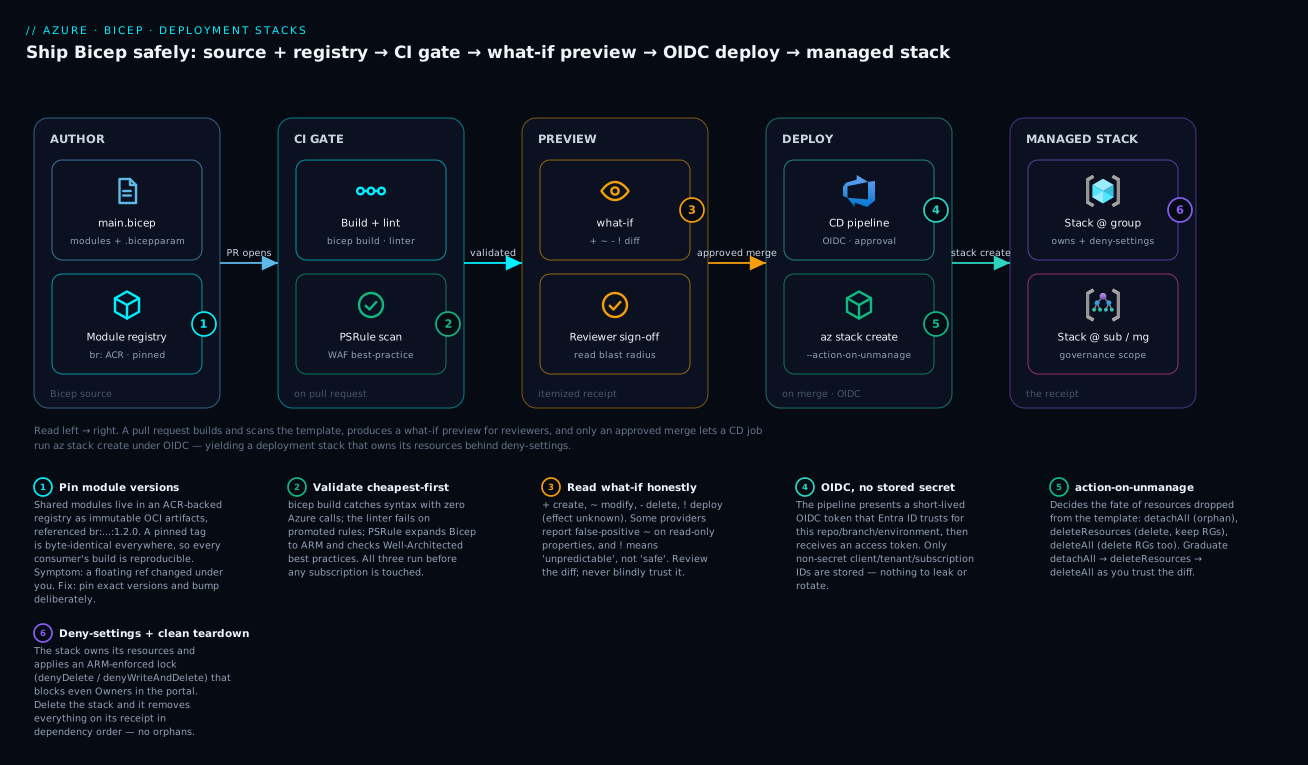
The pipeline reads left to right: Bicep source and pinned registry modules feed a PR gate (build, lint, PSRule) that produces a what-if preview for reviewers, and only an approved merge lets the CD job run az stack ... create under OIDC to produce a deployment stack that owns its resources behind deny-settings.
1. Bicep fundamentals that matter day to day
You do not need the whole language. Three concepts carry 90% of real work: parameters, modules, and scopes.
A minimal resource declaration with a typed, validated parameter looks like this:
@description('Globally unique storage account name')
@minLength(3)
@maxLength(24)
param storageName string

@allowed(['Standard_LRS', 'Standard_ZRS', 'Standard_GRS'])
param skuName string = 'Standard_LRS'

param location string = resourceGroup().location

resource sa 'Microsoft.Storage/storageAccounts@2023-05-01' = {
  name: storageName
  location: location
  sku: {
    name: skuName
  }
  kind: 'StorageV2'
  properties: {
    minimumTlsVersion: 'TLS1_2'
    allowBlobPublicAccess: false
    supportsHttpsTrafficOnly: true
  }
}

output storageId string = sa.id
The decorators (@minLength, @allowed, @description) are not cosmetic. They are enforced at compile time and surface in what-if, in the portal’s custom-deployment UI, and in lint output. Use them.
Scopes are the other thing to internalize. A .bicep file has a targetScope, and the default is resourceGroup. The four that matter:
| targetScope | What it deploys to | Typical use |
|---|---|---|
resourceGroup |
One resource group | App workloads (the common case) |
subscription |
A subscription | Creating resource groups, policy, RBAC |
managementGroup |
A management group | Org-wide governance |
tenant |
The tenant root | Rare; landing-zone bootstrap |
As an app team you live almost entirely in resourceGroup scope. You hit subscription scope only when a module needs to create the resource group itself. Mixing scopes is done by deploying a module at a different scope, which I cover next.
2. Decompose the workload into modules
A module is just another .bicep file consumed via the module keyword. Decompose by lifecycle and ownership, not by resource type. A pragmatic web-app layout:
infra/
  main.bicep            # orchestration only
  modules/
    storage.bicep
    appplan.bicep
    webapp.bicep
    keyvault.bicep
  env/
    dev.bicepparam
    prod.bicepparam
main.bicep wires modules together and passes outputs from one as inputs to the next. Bicep infers dependency order from these references, so you rarely write dependsOn by hand.
targetScope = 'resourceGroup'

@allowed(['dev', 'prod'])
param env string
param location string = resourceGroup().location

var namePrefix = 'kv${env}'

module plan 'modules/appplan.bicep' = {
  name: 'appplan'
  params: {
    name: '${namePrefix}-plan'
    location: location
    sku: env == 'prod' ? 'P1v3' : 'B1'
  }
}

module web 'modules/webapp.bicep' = {
  name: 'webapp'
  params: {
    name: '${namePrefix}-web'
    location: location
    serverFarmId: plan.outputs.planId
  }
}
The name property on a module is the nested deployment name in Azure, not the resource name. Keep it short and stable; long generated names are what produce the dreaded DeploymentName length exceeds limit error in large templates.
Publishing modules to a Bicep registry
When more than one repo consumes the same module, stop copying files and publish to a registry. The registry is just an Azure Container Registry; Bicep modules are stored as OCI artifacts.
# One-time: create the ACR (or reuse an existing one)
az acr create \
  --resource-group rg-platform-shared \
  --name kvplatformacr \
  --sku Basic

# Publish a module version
az bicep publish \
  --file modules/storage.bicep \
  --target br:kvplatformacr.azurecr.io/bicep/storage:1.2.0
Consumers reference it with a br: path and a pinned version:
module sa 'br:kvplatformacr.azurecr.io/bicep/storage:1.2.0' = {
  name: 'storage'
  params: {
    storageName: 'kvdevstg001'
    skuName: 'Standard_LRS'
  }
}
Pin exact versions. Bicep’s registry references are immutable tags, not floating ranges, which is exactly what you want for reproducible deployments. Add an alias in bicepconfig.json so consumers do not repeat the full registry URL:
{
  "moduleAliases": {
    "br": {
      "platform": {
        "registry": "kvplatformacr.azurecr.io",
        "modulePath": "bicep"
      }
    }
  }
}
That turns the reference into br/platform:storage:1.2.0.
3. Preview changes with what-if (and actually read it)
what-if is the single most important habit for safe Bicep. It calls the ARM what-if API to compute the difference between the deployed state and your template, then prints a color-coded diff.
az deployment group what-if \
  --resource-group rg-kvdev-web \
  --template-file infra/main.bicep \
  --parameters infra/env/dev.bicepparam
Read the change-type symbols carefully:
| Symbol | Type | Meaning |
|---|---|---|
+ |
Create | New resource |
- |
Delete | Resource removed (stacks only act on this; see below) |
~ |
Modify | In-place update of properties |
! |
Deploy | Resource will be redeployed; effect unknown to the engine |
| (no change) | NoChange / Ignore | No diff, or a property the engine cannot evaluate |
Two honest caveats. First, what-if has noise: some resource providers report spurious ~ modifications on read-only or default-populated properties. You learn your workload’s false positives. Second, a ! “Deploy” line means the engine could not predict the effect, not that nothing happens; treat those as “review by hand.”
For pipeline gating you want machine-readable output and a summary that hides the no-change clutter:
az deployment group what-if \
  --resource-group rg-kvdev-web \
  --template-file infra/main.bicep \
  --parameters infra/env/dev.bicepparam \
  --result-format ResourceIdOnly \
  --no-pretty-print > whatif.json
--result-format FullResourcePayloads (the default) gives property-level diffs; ResourceIdOnly gives just the resource list and change type, which is plenty for a PR comment.
4. Lifecycle management with deployment stacks
A plain deployment is fire-and-forget: it creates and updates, but it never cleans up resources you delete from the template. A deployment stack is a managed resource that owns a set of resources. Remove a resource from the template, redeploy the stack, and the stack deletes the orphan. This is the closest Bicep gets to terraform destroy and state-tracked drift.
Create or update a stack at resource-group scope:
az stack group create \
  --name stack-kvdev-web \
  --resource-group rg-kvdev-web \
  --template-file infra/main.bicep \
  --parameters infra/env/dev.bicepparam \
  --action-on-unmanage deleteResources \
  --deny-settings-mode denyDelete \
  --yes
Two flags do the heavy lifting:
--action-on-unmanagedecides what happens to resources that fall out of the stack’s management.deleteResourcesdeletes the resources but leaves their resource groups;deleteAllremoves resource groups too;detachResourcesorphans them (leaves them running, unmanaged). Start withdetachResourcesin production until you trust the diff, then move todeleteResources.--deny-settings-modeapplies a write/delete lock on the managed resources so humans cannot mutate them out-of-band in the portal.denyDeleteblocks deletion;denyWriteAndDeleteblocks both. Usenoneonly while iterating.
Callout: deny-settings are enforced by Azure on the managed resources, independent of RBAC. Even an Owner gets blocked. That is the point. Use
--deny-settings-excluded-actionsto punch specific holes (for example, allowing a key rotation) without disabling the lock entirely.
Tear the whole thing down cleanly when the environment is retired:
az stack group delete \
  --name stack-kvdev-web \
  --resource-group rg-kvdev-web \
  --action-on-unmanage deleteResources \
  --yes
That deletes every resource the stack manages, in dependency order, with one command. No leftover NICs, no orphaned disks, no surprise bill next month.
5. Parameterize per environment with .bicepparam and Key Vault
Stop passing a wall of --parameters key=value on the command line. Use typed .bicepparam files, which are real Bicep and get compiled and type-checked against the template.
env/dev.bicepparam:
using '../main.bicep'

param env = 'dev'
param location = 'eastus'
env/prod.bicepparam:
using '../main.bicep'

param env = 'prod'
param location = 'eastus2'
The using statement binds the param file to its template, so your editor flags a missing or mistyped parameter immediately.
For secrets, never put values in the param file. Reference Key Vault and let ARM pull the secret at deploy time. This requires the getSecret function on an existing vault resource, used inside a module parameter:
resource kv 'Microsoft.KeyVault/vaults@2023-07-01' existing = {
  name: 'kv-shared-secrets'
  scope: resourceGroup('rg-platform-shared')
}

module web 'modules/webapp.bicep' = {
  name: 'webapp'
  params: {
    name: 'kvprod-web'
    location: location
    sqlConnectionString: kv.getSecret('sql-conn-string')
  }
}
The secret value never enters your template text, your logs, or what-if output; it is resolved server-side. The deploying identity needs get permission on that secret (RBAC role Key Vault Secrets User or an equivalent access policy), and the vault must have enabledForTemplateDeployment set if you use access policies rather than RBAC.
6. Validate and lint in CI
Three layers of validation, cheapest first.
Build / compile. bicep build catches syntax errors and unresolved references with zero Azure calls. Run it on every file:
az bicep build --file infra/main.bicep --stdout > /dev/null
Lint. The Bicep linter runs during build and is configured in bicepconfig.json. Promote the rules you care about to error so CI fails on them:
{
  "analyzers": {
    "core": {
      "enabled": true,
      "rules": {
        "no-hardcoded-env-urls": { "level": "error" },
        "secure-parameter-default": { "level": "error" },
        "no-unused-params": { "level": "warning" },
        "prefer-interpolation": { "level": "warning" }
      }
    }
  }
}
Policy / best-practice scanning. PSRule for Azure evaluates your Bicep against the Well-Architected Framework and Azure best practices (TLS versions, public access, diagnostic settings, and so on). It runs as a PowerShell module or a packaged GitHub Action / Azure DevOps task:
Install-Module -Name PSRule.Rules.Azure -Scope CurrentUser -Force
Assert-PSRule -InputPath './infra/' -Module 'PSRule.Rules.Azure' -Format File
PSRule expands Bicep to ARM internally, so it sees the resolved resource graph, catching issues the linter cannot.
7. A gated pipeline: what-if on PR, stack deploy on merge
Tie it together: on a pull request, build, lint, scan, and post a what-if so reviewers see the blast radius. On merge to main, require an approval, then deploy the stack. Here is a GitHub Actions skeleton using OIDC federated credentials (no stored secrets):
name: bicep-deploy
on:
  pull_request:
    paths: ['infra/**']
  push:
    branches: [main]
    paths: ['infra/**']

permissions:
  id-token: write   # required for OIDC login
  contents: read
  pull-requests: write

jobs:
  validate:
    runs-on: ubuntu-latest
    steps:
      - uses: actions/checkout@v4
      - uses: azure/login@v2
        with:
          client-id: ${{ secrets.AZURE_CLIENT_ID }}
          tenant-id: ${{ secrets.AZURE_TENANT_ID }}
          subscription-id: ${{ secrets.AZURE_SUBSCRIPTION_ID }}
      - name: Build and lint
        run: az bicep build --file infra/main.bicep --stdout > /dev/null
      - name: PSRule scan
        uses: microsoft/ps-rule@v2
        with:
          modules: PSRule.Rules.Azure
          inputPath: infra/

  preview:
    needs: validate
    if: github.event_name == 'pull_request'
    runs-on: ubuntu-latest
    steps:
      - uses: actions/checkout@v4
      - uses: azure/login@v2
        with:
          client-id: ${{ secrets.AZURE_CLIENT_ID }}
          tenant-id: ${{ secrets.AZURE_TENANT_ID }}
          subscription-id: ${{ secrets.AZURE_SUBSCRIPTION_ID }}
      - name: what-if
        run: |
          az deployment group what-if \
            --resource-group rg-kvdev-web \
            --template-file infra/main.bicep \
            --parameters infra/env/dev.bicepparam

  deploy:
    needs: validate
    if: github.event_name == 'push'
    runs-on: ubuntu-latest
    environment: prod   # attach required reviewers here
    steps:
      - uses: actions/checkout@v4
      - uses: azure/login@v2
        with:
          client-id: ${{ secrets.AZURE_CLIENT_ID }}
          tenant-id: ${{ secrets.AZURE_TENANT_ID }}
          subscription-id: ${{ secrets.AZURE_SUBSCRIPTION_ID }}
      - name: Deploy stack
        run: |
          az stack group create \
            --name stack-kvprod-web \
            --resource-group rg-kvprod-web \
            --template-file infra/main.bicep \
            --parameters infra/env/prod.bicepparam \
            --action-on-unmanage deleteResources \
            --deny-settings-mode denyWriteAndDelete \
            --yes
The approval gate is the GitHub environment named prod with required reviewers configured in repo settings; the job blocks on it before the deploy step runs. Azure DevOps achieves the same with an environment + approval check before the stack task.
8. Bicep vs. ARM JSON: decompiling and interop
Bicep compiles to ARM JSON; ARM JSON is the only thing Azure actually executes. That makes interop a non-issue most of the time:
- You inherited ARM templates. Decompile them as a starting point:
az bicep decompile --file azuredeploy.json. Treat the output as a draft, not gold. The decompiler does a mechanical translation and frequently emits// @TODOmarkers, awkward names, and verbose expressions you should clean up by hand. - A tool only emits ARM JSON (some exported templates, marketplace artifacts). You can consume an ARM JSON file directly as a Bicep module:
module x 'foo.json' = { ... }. No conversion required. - You need to hand someone JSON.
az bicep buildis your export; the generated ARM is committed nowhere and produced on demand.
Rule of thumb: author in Bicep, never hand-edit the generated JSON, and decompile only to migrate, not as an ongoing workflow.
Going deeper
Sections 1–8 gave you a working pipeline. This section is for when you own it: the internals, the edge cases, and the flags that separate “it worked in dev” from “it is safe in production.”
Bicep is a transpiler, not a runtime
Bicep never talks to Azure directly. az bicep build (or the build that az deployment / az stack runs for you) transpiles your .bicep into an ARM JSON template, and that JSON is the only artifact the Azure Resource Manager engine actually executes. Everything Bicep gives you — modules, loops, the ?: operator, string interpolation, typed parameters — is resolved at compile time and flattened into plain ARM. There is no “Bicep engine” at deploy time.
Two practical consequences:
- The generated JSON is a build artifact, never a source file. Read it to debug (
az bicep build --file main.bicep --stdout), but never hand-edit it — your next build overwrites it. This is why “author in Bicep, decompile only to migrate” (section 8) is a rule, not a preference. - A Bicep feature can only do what ARM can do. If a property is not expressible in an ARM template, Bicep cannot express it either. When a deployment behaves oddly, inspect the transpiled JSON — the bug is almost always visible there, in the shape ARM actually received.
You can see the mapping yourself. This Bicep:
param env string
var name = 'kv-${env}'
becomes, in the compiled template, a parameters block plus a variables block whose value is "[format('kv-{0}', parameters('env'))]". The interpolation you wrote as ${env} is just sugar for the ARM format() function.
Deployment stacks exist at every scope: group, sub, and mg
Section 4 used az stack group create (resource-group scope). A stack is a first-class Azure resource of type Microsoft.Resources/deploymentStacks, and it can live at three scopes, each with its own CLI command group:
| Command | Stack scope | Deploys resources into | Typical use |
|---|---|---|---|
az stack group create |
Resource group | That resource group | App workloads |
az stack sub create |
Subscription | The subscription (can create RGs) | Env bootstrap, RBAC, policy |
az stack mg create |
Management group | The MG (and child subscriptions) | Org-wide governance / landing zones |
Subscription- and management-group-scoped stacks require a --location (the stack resource itself needs a home region, even though the resources it manages may be elsewhere) and, for mg, a --management-group-id:
az stack sub create \
  --name stack-platform-bootstrap \
  --location eastus \
  --template-file platform/main.bicep \
  --parameters platform/prod.bicepparam \
  --action-on-unmanage detachAll \
  --deny-settings-mode denyDelete \
  --yes
The stack keeps a snapshot of the resources it manages. az stack group show ... --query resources lists exactly what is on the receipt; a template change moves resources on and off that list on the next update.
The full grammar of --action-on-unmanage and --deny-settings-mode
These two required flags are where teams get burned, so here is the precise behaviour.
--action-on-unmanage decides the fate of a resource that was managed by the stack but is no longer in the template on the next update (or when the stack is deleted). The CLI accepts exactly three preset values:
| Value | Resources no longer in template | Their resource groups |
|---|---|---|
detachAll |
Left running, unmanaged (orphaned) | Left as-is |
deleteResources |
Deleted | Left as-is |
deleteAll |
Deleted | Deleted |
The enum is detachAll, not detachResources: detaching is all-or-nothing (detaching a resource group would not delete it anyway), so there is no per-resource detach preset — worth knowing if you meet the older detachResources wording. Graduate a production stack in this order: detachAll while you learn the diff, deleteResources once you trust it, and deleteAll only for genuinely disposable environments where losing the resource group is the intended outcome.
--deny-settings-mode applies an Azure-enforced lock on the resources the stack currently manages, independent of RBAC — even an Owner is blocked:
| Value | Blocks |
|---|---|
none |
Nothing (use only while iterating) |
denyDelete |
Deletion of managed resources |
denyWriteAndDelete |
Both writes and deletion |
Three refinements matter in production:
--deny-settings-excluded-actionspunches specific holes (for exampleMicrosoft.KeyVault/vaults/secrets/writeto allow a rotation) without dropping the whole lock.--deny-settings-excluded-principalsexempts named principals (a break-glass identity, a rotation automation) by object ID.--deny-settings-apply-to-child-scopesextends the lock to resources created underneath the managed ones, closing the gap where someone edits a child resource the stack does not directly list.
Because deny-settings are enforced by ARM on the resource — not by role assignment — they hold even against a principal who has escalated to Owner. That is the whole point.
what-if internals, accuracy, and --confirm-with-what-if
what-if calls the ARM what-if API, which does a full evaluation: it submits the same template ARM would deploy, asks each resource provider to predict the result, and diffs that prediction against current state. That “asks each provider” step is the source of both its power and its noise:
- False positives (
~). Some providers report a change on a property that is read-only, default-populated server-side, or normalised (casing, ordering). You learn your workload’s recurring false positives and stop over-reacting to those specific lines. !“Deploy” / Ignore. When a provider does not implement the what-if contract for a resource, the engine cannot predict the effect and prints!(or treats a property as NoChange / Ignore).!means “unknown,” not “safe” — review it by hand.- It is a prediction, not a lock. Between what-if and the actual deploy, state can change; what-if is not a transaction. In CI, keep the window short and re-run against the same parameters just before deploying.
For interactive use, fold the preview and the deploy into one gated command:
az deployment group create \
  --resource-group rg-kvdev-web \
  --template-file infra/main.bicep \
  --parameters infra/env/dev.bicepparam \
  --confirm-with-what-if
--confirm-with-what-if (-c) runs what-if, prints the diff, and prompts y/n before deploying — the CLI equivalent of reading the receipt at the till. Note it lives on az deployment ... create, not on az stack ... create; for stacks, run what-if (or the PR gate) as a separate step, then deploy. Result formats control verbosity: FullResourcePayloads (the default) gives property-level diffs; ResourceIdOnly gives just resource + change type, which is what you want for a compact PR comment (section 3).
Modules, registries, and bicepconfig.json at scale
A br: module reference is an OCI artifact in an Azure Container Registry — the same storage that holds your Docker images. az bicep publish pushes it; on first use az bicep restore (run automatically by build) pulls and caches it under ~/.bicep. Because the tag is immutable, a pinned :1.2.0 is byte-identical everywhere, forever — the reproducibility guarantee section 2 relies on.
bicepconfig.json is the per-tree control file. Beyond module aliases (section 2) and linter rules (section 6) it configures the registry-restore cache, experimental feature flags, and analyzer severity. Bicep discovers the nearest bicepconfig.json walking up from the .bicep file, so a repo-root config governs the whole tree.
Azure Verified Modules (AVM) are Microsoft’s supported, WAF-aligned module library, published to the public registry aliased as br/public:
module storage 'br/public:avm/res/storage/storage-account:0.9.0' = {
  name: 'storage'
  params: {
    name: 'kvdevstg001'
    skuName: 'Standard_LRS'
  }
}
Reach for AVM before writing a module from scratch: it encodes the security defaults (TLS, private endpoints, diagnostic settings) you would otherwise get wrong, and it is versioned exactly like your own registry modules.
User-defined types and functions
Bicep is not limited to primitive parameters. User-defined types give you named, reusable, validated shapes:
type storageSku = 'Standard_LRS' | 'Standard_ZRS' | 'Standard_GRS'

type subnet = {
  name: string
  prefix: string
  delegation: string?   // optional
}

param sku storageSku
param subnets subnet[]
The | union is a discriminated set checked at compile time — pass 'Standard_XRS' and the build fails before any Azure call. Mark a type or function with @export() and other files import { subnet } from 'types.bicep', so a platform team ships one source of truth for shapes.
User-defined functions remove copy-pasted expressions:
func resourceName(prefix string, env string) string =>
  toLower('${prefix}-${env}-${uniqueString(resourceGroup().id)}')

param name string = resourceName('web', 'dev')
Both features are GA and evaluated at compile time — they cost nothing at deploy and catch a whole class of “typo in a name” and “wrong SKU string” bugs in the linter instead of in production.
Template specs vs. a module registry
A template spec (Microsoft.Resources/templateSpecs) is a different way to share a whole template as a versioned Azure resource, governed by RBAC:
az ts create \
  --name webapp-baseline \
  --version 1.0.0 \
  --resource-group rg-platform-shared \
  --location eastus \
  --template-file infra/main.bicep
Consume it as a module with a ts: reference: module app 'ts:<subscription-id>/rg-platform-shared/webapp-baseline:1.0.0' = { ... }. Rule of thumb: use a registry for building-block modules that other Bicep composes; use a template spec for a finished, blessed deployment you hand to another team to run as-is (it shows up in the portal’s “Deploy a template spec” flow). Registries are the day-to-day choice for app teams.
CI patterns: OIDC federated credentials, GitHub vs. Azure DevOps
The section-7 pipeline logs in with OIDC federated credentials and no stored secret. The mechanism: you register an app (or a user-assigned managed identity) in Entra ID (formerly Azure AD) and add a federated credential that trusts the CI system’s OIDC issuer for a specific subject — a repo + branch, a GitHub environment, or an Azure DevOps service connection. At run time the pipeline requests a short-lived OIDC token, Azure validates the subject against the federated credential, and mints an access token. Nothing long-lived is stored; there is no secret to leak or rotate.
- GitHub Actions uses
azure/login@v2withclient-id/tenant-id/subscription-idandpermissions: id-token: write. Thesecrets.AZURE_*values in section 7 are just the non-secret client / tenant / subscription IDs — safe to store, useless without the federated trust. - Azure DevOps uses a workload-identity-federation service connection; the equivalent gate is an Environment with an approval check before the deploy stage. The same PSRule task and a
what-ifstep apply:
trigger:
  branches:
    include: [main]
  paths:
    include: [infra]

stages:
  - stage: validate
    jobs:
      - job: build
        pool:
          vmImage: ubuntu-latest
        steps:
          - task: AzureCLI@2
            inputs:
              azureSubscription: sc-oidc-prod   # workload-identity federation
              scriptType: bash
              scriptLocation: inlineScript
              inlineScript: az bicep build --file infra/main.bicep --stdout > /dev/null
  - stage: deploy
    dependsOn: validate
    condition: succeeded()
    jobs:
      - deployment: deployStack
        environment: prod   # attach the approval check here
        strategy:
          runOnce:
            deploy:
              steps:
                - task: AzureCLI@2
                  inputs:
                    azureSubscription: sc-oidc-prod
                    scriptType: bash
                    scriptLocation: inlineScript
                    inlineScript: |
                      az stack group create \
                        --name stack-kvprod-web \
                        --resource-group rg-kvprod-web \
                        --template-file infra/main.bicep \
                        --parameters infra/env/prod.bicepparam \
                        --action-on-unmanage deleteResources \
                        --deny-settings-mode denyWriteAndDelete \
                        --yes
Whichever system you use, the invariants are the same: build + lint + PSRule as a cheap pre-gate, what-if posted for human eyes, an approval on the protected environment, and a stack deploy under a federated identity that has only the RBAC it needs on only the target scope.
Verify
Confirm each layer works before trusting the pipeline.
# 1. Template compiles with no errors or promoted-lint failures
az bicep build --file infra/main.bicep --stdout > /dev/null && echo "build ok"

# 2. what-if returns a sensible diff (and the CLI exit code is 0)
az deployment group what-if \
  --resource-group rg-kvdev-web \
  --template-file infra/main.bicep \
  --parameters infra/env/dev.bicepparam

# 3. The stack exists and reports a succeeded provisioning state
az stack group show \
  --name stack-kvdev-web \
  --resource-group rg-kvdev-web \
  --query "provisioningState" -o tsv

# 4. The stack is actually managing the resources you expect
az stack group show \
  --name stack-kvdev-web \
  --resource-group rg-kvdev-web \
  --query "resources[].id" -o tsv

# 5. Deny-settings are enforced: this delete should FAIL with a deny error
az resource delete --ids <managed-resource-id>   # expect: blocked
If step 5 succeeds, your deny-settings mode is none or the resource is not actually managed by the stack. That is the most common silent misconfiguration.
Checklist
Pitfalls
- Treating what-if as ground truth. It has false positives on certain providers and cannot evaluate
!Deploy effects. Review, do not blindly trust. deleteAllin production by reflex. A wrong template diff can delete a resource group. Start stacks withdetachResources, graduate todeleteResources, and reservedeleteAllfor genuinely disposable environments.- Floating module references. Always pin registry module versions; an unpinned move makes deployments irreproducible.
- Secrets in
.bicepparam. They land in source control and pipeline logs. UsegetSecretso the value resolves server-side. - Hand-editing decompiled JSON. Once you author in Bicep, the JSON is a build artifact. Editing it breaks the source-of-truth model and your next
bicep buildoverwrites it.
Practice challenges
Work these in order; each builds on the last. The commands are real and current, but since they touch a live subscription, read every what-if before you deploy and use a throwaway resource group.
1. (Beginner) Add a typed, validated parameter. Extend the storage module so the SKU accepts only the three allowed values and the account name is length-checked. Which decorator enforces each rule?
<details><summary>Solution</summary>
@allowed(['Standard_LRS', 'Standard_ZRS', 'Standard_GRS'])
param skuName string = 'Standard_LRS'

@minLength(3)
@maxLength(24)
param storageName string
@allowed constrains to a fixed set; @minLength / @maxLength bound the string length. Both are enforced at compile time and surface in what-if. Why: a rule the linter enforces is a bug you never ship.
</details>
2. (Beginner) Preview before you touch anything. Run a what-if against a dev resource group and identify one +, one ~, and (if present) one ! line. What does ! mean?
<details><summary>Solution</summary>
az deployment group what-if \
  --resource-group rg-kvdev-web \
  --template-file infra/main.bicep \
  --parameters infra/env/dev.bicepparam
+ create, ~ modify, ! “Deploy” = the engine could not predict the effect. Why: ! is “unknown,” not “safe” — it is exactly the line you review by hand.
</details>
3. (Intermediate) Turn a deployment into a stack. Convert an existing plain deployment into a resource-group stack that detaches (never deletes) on unmanage and blocks portal deletion. Which two flags do that?
<details><summary>Solution</summary>
az stack group create \
  --name stack-kvdev-web \
  --resource-group rg-kvdev-web \
  --template-file infra/main.bicep \
  --parameters infra/env/dev.bicepparam \
  --action-on-unmanage detachAll \
  --deny-settings-mode denyDelete \
  --yes
--action-on-unmanage detachAll orphans (never deletes) resources dropped from the template; --deny-settings-mode denyDelete blocks deletion even for Owners. Why: detachAll is the safe first setting while you still distrust the diff.
</details>
4. (Intermediate) Publish and pin a module. Publish the storage module to an ACR-backed registry at version 1.3.0, then consume it through a bicepconfig.json alias so the reference reads br/platform:storage:1.3.0.
<details><summary>Solution</summary>
az bicep publish \
  --file modules/storage.bicep \
  --target br:kvplatformacr.azurecr.io/bicep/storage:1.3.0
{ "moduleAliases": { "br": { "platform": {
  "registry": "kvplatformacr.azurecr.io", "modulePath": "bicep" } } } }
module sa 'br/platform:storage:1.3.0' = {
  name: 'storage'
  params: { storageName: 'kvdevstg001', skuName: 'Standard_LRS' }
}
Why: an immutable pinned tag makes every consumer’s build byte-identical and reproducible. </details>
5. (Advanced) Gate deletion with deny-settings — and prove it. Deploy the stack with denyWriteAndDelete, then try to delete a managed resource by ID and confirm it is blocked. How would you allow only a Key Vault secret rotation through the lock?
<details><summary>Solution</summary>
az resource delete --ids <managed-resource-id> # expect: blocked by a deny-assignment
Punch a targeted hole instead of dropping the lock:
az stack group create ... \
  --deny-settings-mode denyWriteAndDelete \
  --deny-settings-excluded-actions Microsoft.KeyVault/vaults/secrets/write \
  --yes
Why: deny-settings are enforced by ARM independent of RBAC, so --deny-settings-excluded-actions is the surgical way to permit one operation without lifting the guardrail.
</details>
6. (Advanced) Make the pipeline safe by construction. Design the merge job so it cannot deploy without (a) a green PSRule scan, (b) a human approval, and © a federated identity with no stored secret. Name the mechanism for each.
<details><summary>Solution</summary>
- (a) PSRule runs in the
validatejob thatdeploydeclares asneeds:/dependsOn— a red scan fails the gate and the deploy job never starts. - (b) A protected environment (
environment: prod) with required reviewers blocks the deploy job until a human approves. - © OIDC federated credentials (
permissions: id-token: write+azure/login@v2, or an Azure DevOps workload-identity service connection) — the repo stores only non-secret client / tenant / subscription IDs.
Why: each control is a structural gate, not a convention — the pipeline cannot skip them, so safety does not depend on anyone remembering. </details>
Common beginner mistakes
These are conceptual traps — wrong mental models rather than wrong commands. (For operational gotchas, see Pitfalls above.)
-
“A deployment stack is just a resource group.” It is not. A resource group is a container; a deployment stack is a managed resource (
Microsoft.Resources/deploymentStacks) that tracks a specific list of resources and enforces lifecycle plus deny-settings on them. One resource group can hold resources from several stacks, and a stack can span resource groups (at sub / mg scope). Right model: the RG is the shelf; the stack is the receipt for the items you put on it. -
“
what-ifguarantees the deploy will match.” It is a prediction, computed by asking providers, and it has known false positives plus!lines it cannot evaluate. Between preview and apply, state can drift. Right model: what-if is the itemized preview at checkout, not a signed contract — it catches the obvious disasters, but you still read it. -
“Modules need
dependsOnto order correctly.” Bicep infers dependencies from references: when module B usesA.outputs.something, Bicep orders A before B automatically. Hand-writtendependsOnis a last resort for the rare case with no data dependency. Right model: wire modules by passing outputs as inputs and the graph builds itself. -
“Bicep is a different deployment engine than ARM.” There is only one engine — ARM. Bicep transpiles to ARM JSON and disappears at deploy time. Right model: Bicep is a friendlier language; ARM is the runtime. If something is impossible in ARM, Bicep cannot do it either.
-
“Deny-settings are just RBAC.” RBAC controls who has a permission; deny-settings are ARM-enforced deny-assignments on the stack’s managed resources that block the action even for principals who hold the RBAC. Right model: an Owner can be blocked by deny-settings — that is the feature, not a bug.
-
“The module’s
nameis the resource’s name.” Thename:on amoduleblock is the nested deployment name in Azure, not the name of the resource it creates (that comes from the module’s own parameters). Long or duplicated module names cause theDeploymentName length exceeds limiterror. Right model: modulename= the deployment label; the resource name = a parameter you pass in. -
“Secrets in
.bicepparamare fine if the repo is private.” Private repos still leak through clones, forks, backups, and pipeline logs. Right model: reference Key Vault withgetSecretso the value resolves server-side and never enters template text, source control, orwhat-ifoutput.
Glossary
- ARM (Azure Resource Manager) — the deployment and management engine for Azure. Every deploy, whatever the authoring language, is executed by ARM from a JSON template.
- Bicep — a domain-specific language that transpiles to ARM JSON. Friendlier syntax, same engine.
- Transpile / build — compiling Bicep to ARM JSON (
az bicep build). The JSON is a disposable build artifact, not source. - Module — a
.bicepfile consumed with themodulekeyword; the unit of reuse and composition. - Bicep registry — an Azure Container Registry (ACR) that stores modules as OCI artifacts, referenced with a
br:path and an immutable version tag. - AVM (Azure Verified Modules) — Microsoft’s supported, WAF-aligned module library on the public
br/publicregistry. bicepconfig.json— the per-tree config file for module aliases, linter rule severity, and experimental feature flags.- Scope /
targetScope— the level a template deploys to:resourceGroup,subscription,managementGroup, ortenant. - Deployment — a single fire-and-forget apply of a template. It creates and updates but never cleans up removed resources.
- Deployment stack — a managed resource (
Microsoft.Resources/deploymentStacks) that owns a tracked set of resources and enforces their lifecycle and locks. Exists at group, sub, or mg scope. --action-on-unmanage— required stack flag deciding the fate of resources dropped from the template:detachAll,deleteResources, ordeleteAll.--deny-settings-mode— required stack flag applying an ARM-enforced lock on managed resources:none,denyDelete, ordenyWriteAndDelete.- Deny-settings / deny-assignment — an ARM-level block that stops writes / deletes on managed resources independent of RBAC (even Owners are blocked).
what-if— the ARM API (andaz deployment ... what-if) that previews a deployment as a+ ~ - !diff before you apply it.--confirm-with-what-if(-c) — a flag onaz deployment ... createthat runs what-if and prompts before deploying..bicepparam— a typed, compiled parameter file bound to a template withusing, replacing loose--parameters key=valuepairs.getSecret— a Bicep function that pulls a Key Vault secret at deploy time so the value never enters template text or logs.- User-defined type / function — named, reusable, compile-time-checked shapes (
type) and expressions (func), shareable across files with@export(). - Template spec — a whole template published as an RBAC-governed Azure resource (
Microsoft.Resources/templateSpecs), consumed with ats:reference. - OIDC federated credentials — a login method where CI presents a short-lived OpenID Connect token that Entra ID trusts for a specific repo / branch / environment, so no secret is stored.
- Entra ID — Microsoft’s identity service, formerly Azure Active Directory (Azure AD); it issues the tokens and holds the federated-credential trust.
- PSRule for Azure — a validation tool that expands Bicep to ARM and checks it against Well-Architected Framework best practices in CI.