In a nutshell
Imagine every app your company buys needs a human to hand-create a login for each new hire, tweak it when they change teams, and — the part everyone forgets — switch it off the minute they leave. Do that across 200 SaaS apps and 20,000 employees and you get two problems at once: an army of ticket-drenched admins, and a security hole made of the accounts nobody remembered to disable.
SCIM (System for Cross-domain Identity Management) is the standard plug that makes that problem disappear. Your app exposes one SCIM-shaped socket; Entra ID plugs into it; and from then on Entra pushes every joiner, mover, and leaver into your app automatically. HR marks someone as hired in the source directory and Entra creates their account in your app within the hour. HR marks them as terminated and Entra sends your app the signal to switch the account off — no human, no ticket, no forgotten access. The “standard” part is what makes it powerful: you build the socket once, to a public spec, and it works for Entra, Okta, Ping, and anything else that speaks SCIM, with zero per-customer code.
This lesson is the builder’s view. You will implement the SCIM 2.0 service — the /Users and /Groups REST endpoints, the discovery documents, PATCH, and the all-important active: false “switch it off” path — and then wire it into Entra ID’s automatic provisioning so the joiner/mover/leaver flow actually runs end to end. The recurring theme: deprovisioning is the whole point, SCIM failures are quiet, and honesty plus idempotency matter more than cleverness.
Level: Advanced · Time: ~30 min
Prerequisites. You are comfortable building a REST API (routing, status codes, JSON bodies), you understand bearer-token auth and TLS, and you know Entra ID basics — tenants, users, groups, and enterprise applications. If enterprise apps and service principals are new, skim Entra ID fundamentals: tenants, users, groups, RBAC first. Provisioning is a sibling of sign-in, not the same thing — see Authentication: SSO, MFA, passwordless for how tokens are issued to users, which is a separate flow from the token that guards your SCIM endpoint.
After this lesson you can:
- Explain the SCIM 2.0 resource model (
/Users,/Groups, core schema + enterprise extension) and whyid,externalId, anduserNameare three different identifiers. - Build compliant
POST/GET/PATCH/DELETEhandlers with correct status codes, 1-based pagination, and idempotent writes. - Implement deprovisioning as a soft delete driven by
PATCH active: false, the way Entra actually sends it. - Configure an Entra enterprise application for automatic provisioning: tenant URL, secret token, attribute mappings, scoping filters, and the
Switch([IsSoftDeleted])expression. - Test the whole loop with Provision on demand, read the provisioning logs, and recognise quarantine before it becomes an outage.
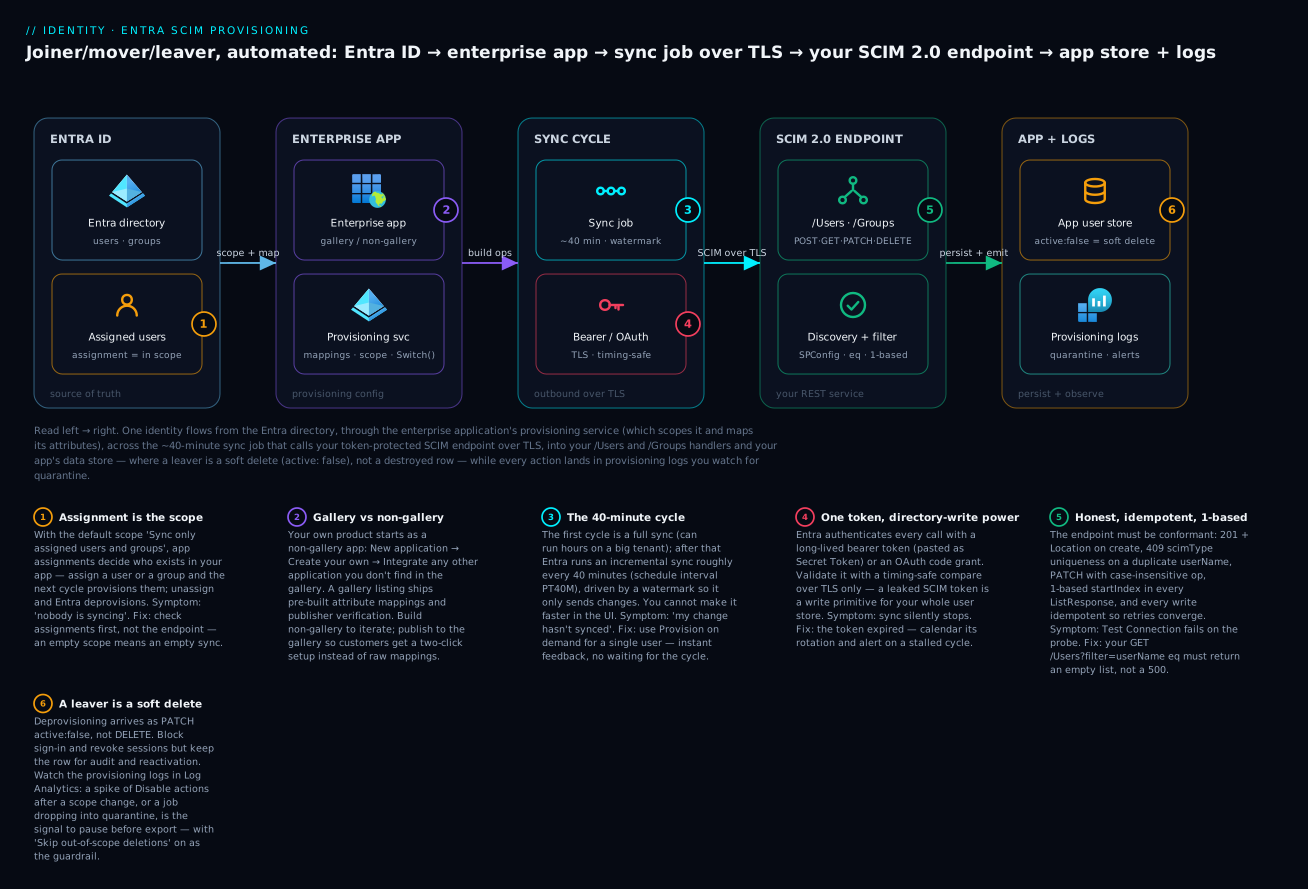
The diagram traces one identity left to right: Entra ID holds the source users and groups, the enterprise application’s provisioning service scopes and maps them, the sync job calls your token-protected SCIM endpoint over TLS roughly every 40 minutes, and your /Users and /Groups handlers persist the change — where active: false is a soft delete, not a row you destroy — while every action lands in the provisioning logs you watch for quarantine.
If you run a SaaS or an internal platform that enterprises consume, sooner or later a customer’s IT team will ask: “Do you support SCIM?” What they mean is they want Entra ID (or Okta, or anything else) to push their joiners, movers, and leavers into your app automatically. This guide builds a compliant SCIM 2.0 endpoint for Users and Groups, then connects it to Entra ID’s automatic provisioning with the attribute mappings, scoping, and deprovisioning behavior that survive a real production rollout.
1. SCIM 2.0 protocol essentials
SCIM (System for Cross-domain Identity Management) 2.0 is defined by RFC 7643 (schema) and RFC 7644 (protocol). It is a REST API over JSON with a fixed set of resources and conventions. The three things you must get right before writing any handler are the resource shapes, the discovery endpoints, and the media type.
Every SCIM resource carries a schemas array, an immutable id assigned by your service, and a meta block. The canonical User looks like this:
{
  "schemas": ["urn:ietf:params:scim:schemas:core:2.0:User"],
  "id": "8a4f2c1e-0b6d-4a2a-9b1c-2f0e7d9a3c11",
  "externalId": "0a8b1c2d3e",
  "userName": "ada@contoso.com",
  "name": { "givenName": "Ada", "familyName": "Lovelace" },
  "emails": [{ "value": "ada@contoso.com", "type": "work", "primary": true }],
  "active": true,
  "meta": {
    "resourceType": "User",
    "created": "2026-04-22T10:00:00Z",
    "lastModified": "2026-04-22T10:00:00Z",
    "location": "https://scim.example.com/scim/v2/Users/8a4f2c1e-0b6d-4a2a-9b1c-2f0e7d9a3c11"
  }
}
A note on identifiers that trips up almost everyone: id is yours, opaque and immutable. externalId is the client’s identifier for the same object. userName is the unique login handle. Entra ID matches existing objects on userName by default, so treat it as a unique key.
SCIM also mandates discovery endpoints. Entra ID does not strictly require all three, but a compliant service exposes:
| Endpoint | Purpose |
|---|---|
GET /ServiceProviderConfig |
Advertises supported features: PATCH, filtering, bulk, sort, etag, auth schemes |
GET /ResourceTypes |
Lists User and Group resource types and their endpoints |
GET /Schemas |
Returns full attribute definitions for each schema |
The media type for SCIM bodies is application/scim+json. Accept application/json on input for tolerance, but emit application/scim+json. A minimal ServiceProviderConfig:
{
  "schemas": ["urn:ietf:params:scim:schemas:core:2.0:ServiceProviderConfig"],
  "patch": { "supported": true },
  "bulk": { "supported": false, "maxOperations": 0, "maxPayloadSize": 0 },
  "filter": { "supported": true, "maxResults": 200 },
  "changePassword": { "supported": false },
  "sort": { "supported": false },
  "etag": { "supported": false },
  "authenticationSchemes": [{
    "type": "oauthbearertoken",
    "name": "OAuth Bearer Token",
    "description": "Authentication via the OAuth Bearer Token Standard",
    "primary": true
  }]
}
Advertise only what you actually implement. If
patch.supportedistruebut your PATCH handler is broken, Entra ID will send PATCH and your sync will silently fail. Honesty inServiceProviderConfigis operationally cheaper than a half-working feature flag.
2. Implementing the core User endpoints
The lifecycle Entra ID exercises is: create on assignment, read to reconcile, PATCH to update, and PATCH active: false to deprovision. Build these five handlers.
POST /Users creates a resource. Assign a server id, persist, and respond 201 Created with the full object and a Location header. If userName already exists, you must return 409 Conflict with scimType: "uniqueness" so the connector switches to an update path instead of looping.
HTTP/1.1 409 Conflict
Content-Type: application/scim+json

{
  "schemas": ["urn:ietf:params:scim:api:messages:2.0:Error"],
  "scimType": "uniqueness",
  "detail": "userName already exists",
  "status": "409"
}
GET /Users/{id} returns one resource or 404. GET /Users supports filtering and pagination. Entra ID’s most common query is an equality filter on userName to find an existing object before deciding create vs. update:
GET /scim/v2/Users?filter=userName eq "ada@contoso.com"&startIndex=1&count=100
You only need to support eq on userName and externalId for the Entra ID happy path, but parse the filter defensively. List responses are wrapped in a ListResponse:
{
  "schemas": ["urn:ietf:params:scim:api:messages:2.0:ListResponse"],
  "totalResults": 1,
  "startIndex": 1,
  "itemsPerPage": 1,
  "Resources": [ { "id": "8a4f2c1e-...", "userName": "ada@contoso.com" } ]
}
Note startIndex is 1-based, not 0-based. Returning a 0-based index is one of the most common interop bugs and causes Entra ID to skip or duplicate the first record on each page.
PATCH /Users/{id} applies partial updates (covered in detail below). DELETE /Users/{id} is where you make a design decision. SCIM defines DELETE as a hard delete returning 204 No Content, but Entra ID’s default deprovisioning action is to send PATCH active: false (a soft delete), not DELETE. So implement DELETE for compliance, but expect the disable path to dominate. Persist a deleted or active flag rather than destroying rows; you will want the audit trail and the ability to reactivate.
A pragmatic Express handler sketch:
app.post("/scim/v2/Users", async (req, res) => {
  const { userName } = req.body;
  if (await store.findByUserName(userName)) {
    return res.status(409).json(scimError("uniqueness", "userName already exists", 409));
  }
  const user = await store.createUser({
    ...req.body,
    id: crypto.randomUUID(),
    active: req.body.active ?? true,
  });
  res.status(201)
     .location(`${BASE_URL}/Users/${user.id}`)
     .type("application/scim+json")
     .json(toScimUser(user));
});
3. Handling PATCH operations correctly
PATCH is where most SCIM implementations break, and it is also the operation Entra ID leans on hardest. A PATCH body uses the PatchOp message with an Operations array. Each operation has an op (add, replace, remove), an optional path, and a value.
The subtle parts:
opvalues from Entra ID may arrive capitalized ("Add","Replace","Remove"). Compare case-insensitively.- A
replacewith nopathmeans “merge these top-level attributes into the resource.” - Disabling a user arrives as
replaceonpath: "active"withvalue: false.
{
  "schemas": ["urn:ietf:params:scim:api:messages:2.0:PatchOp"],
  "Operations": [
    { "op": "replace", "path": "active", "value": false }
  ]
}
For group membership, Entra ID adds members like this. Note the path filter syntax for removal, which targets a specific member by value:
{
  "schemas": ["urn:ietf:params:scim:api:messages:2.0:PatchOp"],
  "Operations": [
    {
      "op": "add",
      "path": "members",
      "value": [{ "value": "8a4f2c1e-0b6d-4a2a-9b1c-2f0e7d9a3c11" }]
    },
    {
      "op": "remove",
      "path": "members[value eq \"7c3e1b0a-...\"]"
    }
  ]
}
Your PATCH engine therefore needs three behaviors for members: append on add, remove a single member matched by the value eq filter, and replace the entire collection when op is replace with path: "members". Make add idempotent. Entra ID retries on transient failures, so adding a member who is already present must be a no-op that still returns success, not a duplicate or an error.
function applyPatch(resource, ops) {
  for (const raw of ops) {
    const op = raw.op.toLowerCase();
    if (op === "replace" && !raw.path) {
      Object.assign(resource, raw.value);     // merge top-level attrs
    } else if (raw.path === "active") {
      resource.active = raw.value;
    } else if (raw.path === "members" && op === "add") {
      const existing = new Set(resource.members.map(m => m.value));
      for (const m of raw.value) {
        if (!existing.has(m.value)) resource.members.push({ value: m.value });
      }
    } else if (op === "remove" && raw.path?.startsWith("members[")) {
      const id = parseMemberFilter(raw.path);  // extract value eq "..."
      resource.members = resource.members.filter(m => m.value !== id);
    }
  }
  resource.meta.lastModified = new Date().toISOString();
  return resource;
}
Respond to a successful PATCH with 200 OK and the updated resource (or 204 No Content if you advertise that, but returning the body is safer for connector reconciliation).
4. Authentication and securing the endpoint
Entra ID supports two auth schemes for SCIM: a long-lived bearer token you paste into the provisioning config, or OAuth 2.0 authorization code grant against your own authorization server.
For most integrations the long-lived bearer token is the pragmatic choice. Generate a high-entropy token, store its hash, and validate on every request:
app.use("/scim/v2", (req, res, next) => {
  const header = req.get("authorization") || "";
  const token = header.replace(/^Bearer\s+/i, "");
  if (!token || !timingSafeEqualHash(token, EXPECTED_TOKEN_HASH)) {
    return res.status(401)
      .set("WWW-Authenticate", "Bearer")
      .json(scimError(null, "Unauthorized", 401));
  }
  next();
});
Hardening that actually matters:
- TLS only. SCIM carries PII and a bearer token; never expose it over plain HTTP. Entra ID will refuse non-HTTPS endpoints anyway.
- Use timing-safe comparison for the token (Node’s
crypto.timingSafeEqual) to avoid leaking it byte-by-byte. - Set an expiry and rotate. Entra ID’s generated tokens are valid for a limited period; if you mint your own, give it a known expiry and a rotation runbook. The provisioning job stops the moment the token expires, so calendar the rotation.
- Scope the token to the SCIM path and rate-limit it. A leaked SCIM token is a directory write primitive.
If your security posture mandates short-lived credentials, configure the OAuth code grant in the provisioning UI instead, registering Entra ID as a client of your IdP. It is more moving parts; reach for it when policy requires it, not by default.
5. Registering the SCIM app in Entra ID and the test connection
Create a gallery or non-gallery enterprise application, then configure provisioning. The portal flow is well known, but the same can be driven via Microsoft Graph. The key object is the synchronization resource on the service principal.
In the portal: Entra ID > Enterprise applications > New application > Create your own application > Integrate any other application you don’t find in the gallery. Then open Provisioning, set Provisioning Mode to Automatic, and fill in Tenant URL and Secret Token.
- Tenant URL is your SCIM base, e.g.
https://scim.example.com/scim/v2 - Secret Token is the bearer token from step 4
Click Test Connection. Entra ID performs a real handshake: it authenticates with the token and issues a probe request (typically a filtered GET /Users for a random userName that will not exist, expecting an empty ListResponse, plus reading your schema). If this fails, the error names the failing request. The usual culprits:
- Token rejected -> your auth middleware or token hash is wrong.
- Probe returns
500-> your filter parser throws on the randomuserName eqquery. It must return an empty list, not crash. - Wrong content type or non-1-based
startIndex-> Entra ID flags the response as non-conformant.
Test Connection failing on the GET probe is almost never an auth problem if the token validated. It is your
GET /Users?filter=...handler. Hit it yourself withcurl -H "Authorization: Bearer <token>" "https://scim.example.com/scim/v2/Users?filter=userName%20eq%20%22nobody%22"and confirm you get200withtotalResults: 0.
6. Designing attribute mappings, expressions, and scoping filters
Under Provisioning > Mappings there are two flows: Provision Microsoft Entra ID Users and Provision Microsoft Entra ID Groups. Each maps source (Entra) attributes to your SCIM target attributes.
The mappings that matter most:
| Source (Entra ID) | Target (SCIM) | Matching | Notes |
|---|---|---|---|
userPrincipalName |
userName |
Precedence 1 | Primary matching key; keep it unique |
Switch([IsSoftDeleted]...) |
active |
Drives enable/disable | |
mail |
emails[type eq "work"].value |
Multi-valued, use type filter | |
givenName |
name.givenName |
||
surname |
name.familyName |
||
objectId |
externalId |
Precedence 2 (optional) | Stable secondary match |
Two mapping techniques to know:
Expressions. The mapping editor supports an expression language. The default active mapping uses a Switch on IsSoftDeleted so that soft-deleted or unassigned users map to active: false. You can also use Join, Replace, and Mid to reshape values, for example constructing a userName from Join("@", mailNickname, "example.com").
Matching attributes. A mapping marked as a matching attribute is how Entra ID decides whether an object already exists in your app. Assign Matching precedence 1 to userName. Optionally add externalId/objectId as precedence 2 so a renamed UPN still reconciles to the right target via the immutable object id.
Scoping filters. Under Settings, the default Scope is “Sync only assigned users and groups,” which means provisioning is driven by app assignments. If you choose “Sync all users and groups,” constrain it with a scoping filter so you do not push the entire directory:
Attribute: department   Operator: EQUALS   Value: Engineering
Attribute: accountEnabled Operator: EQUALS Value: true
Objects that fail the scoping filter are treated as out of scope and, if previously provisioned, get deprovisioned. That is a feature, but it surprises people, so understand it before flipping the scope.
7. Deprovisioning and lifecycle: disable vs. delete
This is the section that determines whether your integration is safe to leave running. Entra ID deprovisions an object when it is unassigned, soft-deleted, or falls out of a scoping filter. The default action is disable, sent as PATCH active: false. Hard DELETE is only sent after the object is permanently deleted in Entra ID, and even then the default skips it unless configured.
Decide your semantics deliberately:
- Disable (recommended default). On
active: false, block sign-in and revoke sessions but keep the record. Reactivation is a singleactive: truePATCH. This matches Entra’s behavior and preserves data and audit history. - Delete. Only hard-delete if downstream compliance demands it. Even then, prefer a soft-delete column so the row is recoverable for a retention window.
Under Provisioning > Settings there is a behavior controlling what happens when a user goes out of scope (“Skip out-of-scope deletions” toggle). With it off (default), out-of-scope users are deprovisioned. Turning it on prevents accidental mass-disables when you change a scoping filter, which is exactly the kind of change that causes an incident at 2 a.m.
Reconciling drift. Entra ID runs an incremental sync roughly every 40 minutes after the initial cycle, using a watermark so it only sends changes. Drift creeps in when changes are made directly in your app, or when a sync error leaves an object half-updated. To force a clean reconciliation, use Restart provisioning (or Clear current state and restart synchronization), which discards the watermark and re-evaluates every in-scope object. Do this after fixing a mapping bug; otherwise corrected objects will not re-sync until they change again on the source side.
Provisioning > (Stop) > Restart provisioning
-> next cycle is a full sync, not incremental
Going deeper
The numbered sections give you a working endpoint. This section is the internals: the parts of the spec Entra exercises that the happy path hides, and the operational mechanics of the provisioning service on the other side of the wire.
The resource model in full: core schema + the enterprise extension
The User you saw in section 1 is the core schema. Real HR-driven provisioning almost always also sends the enterprise extension, urn:ietf:params:scim:schemas:extension:enterprise:2.0:User, which carries the org-chart attributes. It appears as a nested object keyed by its URN, and the URN is listed in the resource’s schemas array:
{
  "schemas": [
    "urn:ietf:params:scim:schemas:core:2.0:User",
    "urn:ietf:params:scim:schemas:extension:enterprise:2.0:User"
  ],
  "userName": "ada@contoso.com",
  "urn:ietf:params:scim:schemas:extension:enterprise:2.0:User": {
    "employeeNumber": "E-10432",
    "department": "Engineering",
    "costCenter": "CC-4400",
    "manager": { "value": "d41f8c...", "$ref": "../Users/d41f8c...", "displayName": "Grace Hopper" }
  }
}
| Extension attribute | Maps from (typical) | Note |
|---|---|---|
employeeNumber |
employeeId |
Stable HR key; good secondary match candidate |
department |
department |
Common scoping-filter attribute |
costCenter |
extensionAttribute* |
Often a custom directory extension |
division / organization |
custom | Free-form org strings |
manager |
manager |
A reference — value (the manager’s id) + $ref |
Two things bite people here. First, when you PATCH an extension attribute, the path is the full URN-qualified attribute name, e.g. path: "urn:ietf:params:scim:schemas:extension:enterprise:2.0:User:department" — not just department. Second, manager is a reference to another User; you must provision the manager first (or tolerate a dangling reference and let the next cycle resolve it), because Entra does not guarantee manager-before-report ordering within a page.
Your /Schemas and /ResourceTypes documents should describe exactly what you accept. /ResourceTypes returns one entry per resource type with its endpoint and any schemaExtensions; /Schemas returns the full attribute list (with mutability, returned, uniqueness, caseExact). Entra reads these during Test Connection to build its default mapping list, so an incomplete /Schemas shows up as “attribute not available to map” in the portal.
PATCH paths, filtering, and the parts of the grammar Entra can reach
Section 3 handled the three PATCH shapes you see daily. The spec is larger, and a conformance validator (below) will push on the rest:
- Complex-attribute paths.
path: "name.givenName"targets a sub-attribute;path: "emails[type eq \"work\"].value"targets thevalueof the work email inside a multi-valued attribute. Your path parser needs to handle a value-filter and a trailing sub-attribute in the same expression. removeon a sub-attribute clears just that field;removeon a filtered multi-valued element drops that element. Entra uses the filtered form to remove a single group member.- Filtering operators. RFC 7644 defines
eq ne co sw ew gt ge lt le prplusand or notand grouping. Entra’s provisioning connector, in practice, only sendseqonuserName(and sometimesexternalId), so you can implement a narrow parser — but return a clean400withscimType: "invalidFilter"for anything you do not support, rather than a500. A crash on an unexpected operator is what fails Test Connection.
| Operator | Meaning | Entra uses it? |
|---|---|---|
eq |
equals | Yes — the matching query |
ne |
not equal | Rare |
co / sw / ew |
contains / starts / ends with | No (validator may) |
pr |
present (attribute has a value) | No (validator may) |
and / or / not |
boolean composition | No (validator may) |
Inside the Entra provisioning service: the sync cycle
On the Entra side, provisioning is a synchronization job attached to the app’s service principal. It has three moving parts you can see in Graph: the schema (your mappings), the secrets (the bearer token / OAuth config), and the schedule.
The lifecycle is two-phase. The initial cycle is a full sync: Entra reads every in-scope object and provisions it, which for a large tenant can run for hours. After that, incremental cycles run on a fixed cadence — the schedule interval is PT40M, i.e. roughly every 40 minutes — and use a watermark (a high-water-mark cookie) so each cycle only carries changes since the last one. You cannot make the 40-minute cadence faster in the UI; that is by design, and it is why Provision on demand exists for fast feedback.
Here is a representative recap of everything you configure on that job, as a portable YAML summary — the mappings, the scope, and the two settings that decide whether a scope change is safe:
# Enterprise app > Provisioning (settings recap — representative)
provisioningMode: Automatic
tenantUrl: https://scim.example.com/scim/v2
secretToken: "<bearer-token>"          # rotate on a calendar; the job stops when it expires
scope: Sync only assigned users and groups
settings:
  skipOutOfScopeDeletions: true         # guardrail: never mass-disable on a scope change
  schedule: PT40M                        # incremental cycle interval (not user-tunable)
mappings:
  users:
    - source: userPrincipalName
      target: userName
      matchingPrecedence: 1
    - source: objectId
      target: externalId
      matchingPrecedence: 2
    - source: 'Switch([IsSoftDeleted], , "False", "True", "True", "False")'
      target: active
  groups:
    - source: displayName
      target: displayName
      matchingPrecedence: 1
That active expression is the canonical default: Switch on IsSoftDeleted maps a live user (IsSoftDeleted = False) to active: true and a soft-deleted or unassigned user to active: false. It is the single most important mapping in the whole config, because it is the leaver signal.
The mapping expression language
The mapping editor is not just field-to-field. Each mapping is one of four types — Direct (copy a value), Constant (a literal), Expression (a function), or None — and the expression set is a bounded function library. You will not write general code; you compose these:
| Function | Does | Example use |
|---|---|---|
Switch |
multi-branch value map | the active / IsSoftDeleted default |
Join |
concatenate with a separator | build userName from mailNickname + domain |
Replace / Mid / Left |
substring surgery | strip a prefix, take first N chars |
IIF |
inline if-then-else | conditional constant |
IsPresent / IsNullOrEmpty |
null checks | guard a downstream IIF |
SingleAppRoleAssignment |
pick the app role | map an Entra app role to a SCIM role |
The trap is that the function set is finite. If a customer needs a transform it cannot express (some multi-valued or reference reshaping simply is not available), there is no escape hatch on the Entra side — the reshaping has to happen in your endpoint. Design your target schema so the common mappings are Direct, and reserve expressions for the handful that genuinely need them.
Testing without Entra: on-demand, the SCIM validator, and Graph
Three feedback loops, fastest first:
- Microsoft’s SCIM validator. Microsoft publishes a hosted SCIM validator plus a Postman collection that exercise the spec — discovery documents, CRUD, PATCH, filtering, pagination — against your endpoint before you ever create the Entra app. Run this first; it catches the 1-based/
409/content-type class of bugs in minutes. - Provision on demand. In the app’s Provisioning > Provision on demand, pick a single user (up to five objects at a time) and watch the steps: import the user, match against your endpoint, determine the actions, and export. It shows the exact request and response for each step, and — crucially — it does not advance the watermark, so it is a safe, repeatable probe that does not disturb the real cycle.
- Microsoft Graph. Everything the portal does is scriptable on the
synchronizationresource, which is how you put provisioning in CI or infra-as-code:
PUT  /servicePrincipals/{id}/synchronization/secrets                     # set the bearer token / OAuth
POST /servicePrincipals/{id}/synchronization/jobs/validateCredentials    # the Test Connection handshake
POST /servicePrincipals/{id}/synchronization/jobs/{jobId}/provisionOnDemand
POST /servicePrincipals/{id}/synchronization/jobs/{jobId}/start          # begin the schedule
Gallery vs non-gallery, and publishing your app
You register your SCIM integration one of two ways. A non-gallery app is what you build during development — New application > Create your own application > Integrate any other application you don’t find in the gallery — and you configure the mappings by hand. A gallery app is a pre-integrated listing in the Entra application gallery that ships pre-built attribute mappings (and usually SSO) and a publisher-verified badge, so a customer’s admin gets a two-click setup instead of a blank mapping table.
The practical path for an ISV: build and iterate as non-gallery, prove it with the validator and a pilot customer, then apply to publish your app to the gallery so every future customer inherits your tested mappings. Until then, ship your customers a short runbook (tenant URL shape, how to generate the token, which attributes you expect) — the non-gallery mapping table is otherwise the part they get wrong.
Quarantine and the failure economics
When a job fails systematically — invalid credentials, the endpoint returning errors for a sustained window, or repeated 500s — Entra puts the synchronization job into quarantine. In quarantine, the retry cadence backs off: instead of every 40 minutes, Entra retries on a slowing schedule down to roughly once a day, and a job left in quarantine for about four weeks is disabled entirely. Quarantine is a status you can read in the provisioning logs and via Graph (GET .../synchronization/jobs/{jobId} shows status.quarantine).
The operational point: quarantine is the signal that your endpoint has been failing systematically, not transiently. A single flaky cycle is normal and gets retried; a job in quarantine means something structural is broken (expired token, an endpoint that 500s on a shape Entra sends, TLS/cert problems). Alert on it. A quarantined job that nobody notices for a month is a provisioning outage that ends with the job switched off and no new joiners landing in your app.
Enterprise scenario
A platform team shipped SCIM for their B2B SaaS and onboarded a 22,000-seat customer. The initial cycle ran clean, then two weeks later the customer’s helpdesk reported a wave of users locked out overnight. The provisioning logs showed thousands of Disable actions with reason “Skipping export: user is not in scope.” Nobody had touched assignments.
Root cause: the customer’s IT admin had switched the app’s Scope from “Sync only assigned users and groups” to “Sync all users and groups” and added a scoping filter on department EQUALS Engineering. Every account whose department was blank or differently cased fell out of scope, and with Skip out-of-scope deletions off (the default), Entra ID dutifully sent PATCH active: false for each one. The endpoint was behaving correctly; it was honoring exactly what the connector sent.
The fix had two parts. First, stop the bleed: enable the guardrail so out-of-scope objects are never auto-disabled, then restart with a full reconciliation so the wrongly disabled users flip back to active: true.
Provisioning > Settings:
  Skip out-of-scope deletions = Yes
Provisioning > (Stop) > Restart provisioning   # full sync, re-evaluates every in-scope object
Second, they made the endpoint defensive against the gap that turned a config mistake into an outage: any single cycle reporting more than 5% of the in-scope population as Disable now trips a Log Analytics alert and the on-call pauses the job before export. The lesson is that “Skip out-of-scope deletions” is not optional polish for a large tenant. Leave it on by default and treat any scope or filter change as a staged operation validated through Provision on demand first.
Verify
Validate the endpoint independently of Entra ID first, then confirm end to end.
TOKEN="<your-bearer-token>"
BASE="https://scim.example.com/scim/v2"

# Discovery
curl -s -H "Authorization: Bearer $TOKEN" "$BASE/ServiceProviderConfig" | jq .

# Create
curl -s -X POST "$BASE/Users" \
  -H "Authorization: Bearer $TOKEN" \
  -H "Content-Type: application/scim+json" \
  -d '{"schemas":["urn:ietf:params:scim:schemas:core:2.0:User"],
       "userName":"ada@contoso.com","active":true,
       "name":{"givenName":"Ada","familyName":"Lovelace"}}' | jq .

# Filter (the Test Connection probe shape) -> expect totalResults: 0
curl -s -H "Authorization: Bearer $TOKEN" \
  "$BASE/Users?filter=userName%20eq%20%22nobody@contoso.com%22" | jq '.totalResults'

# Disable via PATCH
curl -s -X PATCH "$BASE/Users/<id>" \
  -H "Authorization: Bearer $TOKEN" -H "Content-Type: application/scim+json" \
  -d '{"schemas":["urn:ietf:params:scim:api:messages:2.0:PatchOp"],
       "Operations":[{"op":"replace","path":"active","value":false}]}' | jq '.active'
Then, in Entra ID: run Provision on demand for a single test user (Provisioning > Provision on demand), which shows each step (import, match, determine actions, export) with the exact payload sent. This is the fastest feedback loop. Finally, read the provisioning logs (Enterprise app > Provisioning logs, also queryable via GET /servicePrincipals/{id}/synchronization/jobs/{jobId}/... in Graph or surfaced in Log Analytics) and confirm Status = Success with no skipped or failed entries.
Operating at scale
A SCIM endpoint that works for 10 users can fall over at 50,000. Build for the cycle behavior up front.
- Pagination. Honor
startIndex(1-based) andcount, and capcountserver-side. Entra ID pages through yourGET /Usersduring full syncs; an unbounded list response will time out or exhaust memory. - Throttling with 429. When overloaded, return
429 Too Many Requestswith aRetry-Afterheader (seconds). Entra ID respectsRetry-Afterand backs off, which is far healthier than serving 500s. Do not return 429 without the header. - Retries and idempotency. Entra ID retries failed operations across cycles with backoff. Every write must be idempotent: repeated
addof an existing member, repeated create of an existinguserName(-> 409 uniqueness), and repeated disable must all converge without side effects. - Quarantine. If the provisioning job sees sustained failures (commonly a high failure rate over a window), Entra ID puts the job in quarantine and slows to a daily retry. Watch for quarantine status in the logs; it is the signal that your endpoint has been failing systematically, not transiently.
- Reading the logs. Provisioning logs record per-object actions with reasons. The columns to scan are Action (Create/Update/Disable/Delete/Skip), Status, and the skip/failure reason. Stream them to Log Analytics and alert on failure-rate and quarantine.
Checklist
Pitfalls
- 0-based
startIndex. Silently skips or duplicates the first record per page. The single most common SCIM bug. - Crashing on the unknown-user filter. The Test Connection probe queries a
userNamethat does not exist; it must return an empty list, not a 500. - Non-idempotent member adds. Retries create duplicates or errors; group membership drifts.
- Mis-set scoping filter triggering mass disable. Changing scope deprovisions everyone newly out of scope unless “Skip out-of-scope deletions” is on. Stage scope changes and watch the on-demand preview.
- Forgetting to restart after a mapping fix. Incremental sync only re-sends changed objects; corrected mappings need a full restart to reconcile already-synced users.
- Token expiry. A silent provisioning stop usually means the secret token expired. Calendar rotation and alert on a stalled sync (no successful cycle in the expected window).
Build the endpoint to be honest about its capabilities, idempotent on every write, and 1-based on pagination, and the Entra ID side becomes the easy part. The hard-won lesson is that SCIM failures are almost always quiet, so the logs and on-demand preview are your real test harness, not a one-time green check.
Practice challenges
Work these in order — they escalate from “read the spec” to “run an incident.” Each solution says not just what but why.
<details>
<summary><strong>1. Beginner — Spot the pagination bug.</strong> A GET /Users handler returns <code>{“startIndex”: 0, “itemsPerPage”: 50, …}</code> for the first page. What is wrong, and what does Entra do with it?</summary>
startIndex must be 1-based. Returning 0 means Entra’s paging math is off by one on every page boundary, so it skips or duplicates the first record of each page during a full sync. Fix: emit startIndex: 1 for the first page and echo back the 1-based index the client asked for.
Why: RFC 7644 defines startIndex as 1-based; a full-sync connector trusts it literally, so an off-by-one here corrupts the whole population, not just one record.
</details>
<details> <summary><strong>2. Beginner — Return the right code for a duplicate.</strong> Entra sends <code>POST /Users</code> for a <code>userName</code> that already exists in your store. Your handler currently returns <code>500</code>. What should it return, and what changes in Entra’s behavior?</summary>
Return 409 Conflict with an Error body carrying scimType: "uniqueness". On seeing 409 uniqueness, Entra stops trying to create and switches to the update path (it re-queries by userName, then PATCHes). A 500 instead makes Entra retry the create forever and the object never reconciles.
{ "schemas": ["urn:ietf:params:scim:api:messages:2.0:Error"],
  "scimType": "uniqueness", "detail": "userName already exists", "status": "409" }
Why: the status code is the protocol here — 409 uniqueness is how you tell the connector “this exists, go update it,” and any other code loops.
</details>
<details>
<summary><strong>3. Intermediate — Reproduce the Test Connection probe.</strong> Test Connection fails but the token is valid. Write the exact curl that mimics Entra’s probe and state the expected response.</summary>
Entra probes with a filtered GET /Users for a userName that will not exist, expecting an empty ListResponse:
curl -s -H "Authorization: Bearer $TOKEN" \
  "$BASE/Users?filter=userName%20eq%20%22nobody@contoso.com%22"
# expect: HTTP 200 and { ..., "totalResults": 0, "Resources": [] }
If you get a 500, your filter parser threw on the unknown-user query. Return 200 with totalResults: 0.
Why: if the token validated, the failure is your GET /Users?filter=... handler crashing on a legitimate query — the probe is a normal empty-result filter, not an error case.
</details>
<details> <summary><strong>4. Intermediate — Make member add idempotent.</strong> This group-PATCH handler duplicates members when Entra retries. Fix it so a repeated add is a no-op.
if (raw.path === "members" && op === "add") {
  for (const m of raw.value) resource.members.push({ value: m.value });
}
</summary>
Dedupe against the existing set before pushing:
if (raw.path === "members" && op === "add") {
  const existing = new Set(resource.members.map(m => m.value));
  for (const m of raw.value) {
    if (!existing.has(m.value)) resource.members.push({ value: m.value });
  }
}
Why: Entra retries transient failures across cycles, so the same “add member” can arrive twice; a non-idempotent add silently doubles membership and the group drifts from the directory. </details>
<details>
<summary><strong>5. Advanced — Wire the leaver signal.</strong> A disabled Entra user is not being disabled in your app. The mapping table has no expression on active. What expression do you set, and what does each branch mean?</summary>
Map active with the canonical Switch on IsSoftDeleted:
Switch([IsSoftDeleted], , "False", "True", "True", "False")
Read it as: switch on IsSoftDeleted; when it is "False" (user is live) output "True" → active: true; when it is "True" (soft-deleted/unassigned) output "False" → active: false. Without this expression, disabling in Entra never reaches your endpoint as active: false, so leavers keep their access.
Why: deprovisioning is the entire point of SCIM, and it travels through exactly this one mapping — an unmapped active means offboarding silently does nothing.
</details>
<details>
<summary><strong>6. Advanced — Run the mass-disable incident.</strong> Overnight, 4,000 users flipped to <code>active: false</code>. Logs show <code>Disable</code> with reason “user is not in scope.” An admin had changed Scope and added a department filter. Give the two-step remediation and the follow-up guardrail.</summary>
- Stop the bleed: set Provisioning > Settings > Skip out-of-scope deletions = Yes, so out-of-scope objects are never auto-disabled.
- Reconcile: Stop, then Restart provisioning — a full sync re-evaluates every in-scope object and flips the wrongly disabled users back to
active: true. (Incremental sync alone will not fix them; nothing changed on the source side to re-trigger them.)
Guardrail: alert when any single cycle reports more than a small % of the population as Disable, and treat every scope/filter change as staged — validate through Provision on demand before it runs against everyone.
Why: the endpoint did nothing wrong; it honored the connector. The safety lives in the Entra settings, and “Skip out-of-scope deletions” is the difference between a config typo and a 2 a.m. lockout. </details>
Common beginner mistakes
These are conceptual traps — wrong mental models — distinct from the symptom-first Pitfalls list above.
- “SCIM is just single sign-on / the same as SAML.” No. Authentication (SAML/OIDC) proves who is signing in, at sign-in time. Provisioning (SCIM) creates and maintains the account itself, on a schedule, whether or not anyone signs in. They are separate flows with separate credentials — the token guarding your SCIM endpoint has nothing to do with the tokens Entra issues to users. An app can have one, the other, or both.
- “DELETE is how offboarding works.” Entra’s default deprovisioning action is
PATCH active: false, a soft delete — notDELETE. If you only implement hard delete, offboarding either does nothing (you ignore the PATCH) or destroys audit history. Build the disable path first; treat DELETE as the rare, configured case. - “
id,externalId, anduserNameare basically the same.” Three different identifiers with three owners:idis yours (opaque, immutable),externalIdis the client’s,userNameis the login handle Entra matches on. Conflate them and you get duplicate users or matches that silently fail. - “Test Connection is green, so provisioning works.” Green only proves auth succeeded and the empty-filter probe returned
200. It never exercisesPOST,PATCH, paging, or youractivemapping. The real proof is Provision on demand on a live user, watching the export step. - “My change should appear instantly.” The incremental cycle is ~40 minutes and you cannot speed it up in the UI. Waiting and refreshing is not debugging — use Provision on demand for immediate feedback.
- “More attributes mapped is better.” Every mapped attribute is another thing that can mismatch, churn, or fail validation and push the job toward quarantine. Map what the app needs (
userName,active, name, email, and the extension fields you use), and leave the rest unmapped.
Glossary
- SCIM — System for Cross-domain Identity Management: the open REST/JSON standard (RFC 7643 schema, RFC 7644 protocol) for provisioning users and groups between an identity provider and an app.
- Provisioning — automatically creating, updating, and disabling accounts in a target app from a source directory. Distinct from authentication (sign-in).
- Resource — a SCIM object: a
Useror aGroup. Each has aschemasarray, a server-assignedid, and ametablock. - Core schema / enterprise extension — the base
User/Groupattributes vs. the org-chart add-on (urn:...:extension:enterprise:2.0:User) carryingdepartment,manager,employeeNumber, etc. id/externalId/userName— your immutable object id / the client’s id for the same object / the unique login handle Entra matches on by default.active— the boolean that enables or disables the account.active: falseis the leaver signal (soft delete).- Discovery endpoints —
GET /ServiceProviderConfig(features you support),/ResourceTypes(which resources + endpoints),/Schemas(full attribute definitions). Entra reads these to build its mapping list. ListResponse— the wrapper forGETcollections, withtotalResults,startIndex(1-based),itemsPerPage, andResources[].PatchOp— the PATCH message: anOperations[]array of{ op, path, value }, whereopmay beadd/replace/removeand may arrive capitalized.- Enterprise application / service principal — the Entra object representing your integration in a customer tenant; provisioning config (the
synchronizationjob) hangs off it. - Gallery vs non-gallery app — a pre-integrated listing with pre-built mappings vs. a custom app you configure by hand (“Integrate any other application you don’t find in the gallery”).
- Sync cycle — the provisioning run. The first is a full sync; later ones are incremental every ~40 minutes (schedule interval
PT40M), using a watermark to send only changes. - Watermark — the high-water-mark the incremental sync uses to know what changed since last time. Restarting provisioning discards it and forces a full re-evaluation.
- Attribute mapping / expression — source-to-target field rules; expressions (
Switch,Join,Replace,IIF, …) transform values. Theactivemapping usesSwitch([IsSoftDeleted]...). - Matching attribute / precedence — the attribute(s) Entra uses to decide whether an object already exists in your app.
userNameis precedence 1;externalId/objectIdoptionally precedence 2. - Scoping filter — a rule (e.g.
department EQUALS Engineering) that limits which objects are in scope when Scope is “Sync all users and groups.” Out-of-scope objects get deprovisioned unless the guardrail is on. - Skip out-of-scope deletions — the setting that stops Entra from auto-disabling objects that fall out of scope. Turn it on before changing scope to avoid mass disables.
- Soft delete / deprovision — disabling (
active: false) and keeping the record for audit/reactivation, vs. hardDELETE. The recommended default. - Provision on demand — the portal tool that runs the full import → match → determine → export flow for up to five objects, without advancing the watermark. The fastest test loop.
- Provisioning logs — the per-object audit of Action (Create/Update/Disable/Delete/Skip), Status, and reason. Stream to Log Analytics and alert on failure-rate and quarantine.
- Quarantine — the state Entra puts a job in after sustained failures; retries slow toward daily and a job left ~4 weeks is disabled. The signal that something is structurally broken.
- Bearer token — the long-lived secret Entra sends on every SCIM call (pasted as Secret Token). Validate timing-safe over TLS; rotate on a calendar; a leaked one is a directory-write primitive.