In a nutshell
Picture your company moving out of an old office block into a shiny new one across the street. You do not hand everyone a new key on the same Monday morning and hope for the best. You move one department at a time. Accounting goes first; if the lifts or the Wi-Fi misbehave on their floor, you walk them straight back to the old building - which you deliberately kept open and running - while you fix the problem. Only once every department is settled and happy do you finally lock the old building and hand back the keys.
That is exactly what migrating from AD FS to Entra ID authentication looks like when you do it well. AD FS is the old building: a farm of Windows Servers, a DMZ tier, and certificates that expire at inconvenient hours, all doing one job - proving who a user is when they sign in. Entra ID is the new building, and it can do that job directly in the cloud. Staged Rollout is the department-by-department move: you shift small groups of users to cloud authentication while the old federation stays fully open, prove each group works, then expand. If a group has trouble, you remove it from the rollout group and those users are back on AD FS instantly - no downtime, no drama.
The single mental shift for a beginner: this is a migration with a reversible, per-group cutover, not a switch you flip on the domain. The scary-sounding final step - converting the domain from “federated” to “managed” - is the anticlimax at the end, not the event. All the real work is inventory, making sure each app still trusts the new identity provider, and proving one small group at a time.
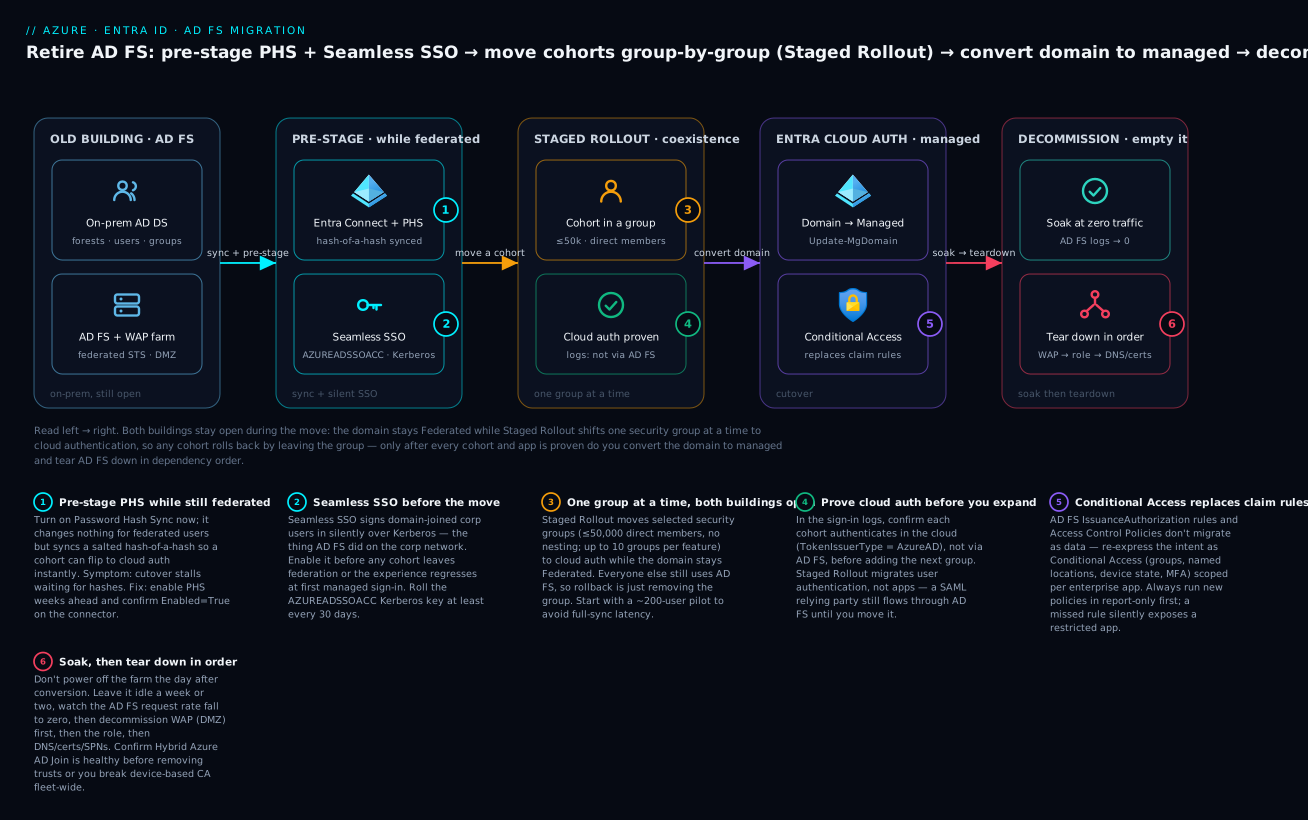
Left to right: pre-stage Password Hash Sync and Seamless SSO while everyone is still federated, move user cohorts to cloud authentication one security group at a time (the old AD FS building stays open the whole time), convert the domain to managed only once every cohort and app is proven, then soak AD FS at zero traffic and decommission it in dependency order.
Level: Advanced · Time: ~39 min
Prerequisites
- Comfortable with how a sign-in works in Entra ID - Authentication: SSO, MFA, and passwordless is the on-ramp.
- A working Entra Connect (or Cloud Sync) already syncing your on-prem identities - see Hybrid identity architecture and migrating Connect Sync to Cloud Sync.
- Familiarity with Conditional Access - Conditional Access token protection.
- Roles: Hybrid Identity Administrator + Application Administrator; Entra ID P1 (P2 for risk-based Conditional Access).
After this lesson you can
- Explain why a modern estate retires AD FS - and when you legitimately cannot.
- Choose between Password Hash Sync, Pass-through Authentication, and staying federated, and defend the choice.
- Run Staged Rollout as reversible, group-by-group waves and read the sign-in logs to prove each cohort authenticates in the cloud.
- Translate AD FS claims rules into Entra claims mapping policies and app roles without breaking NameID.
- Convert a domain from federated to managed, then decommission AD FS in safe dependency order - with a rehearsed rollback at every step.
AD FS was the right answer in 2014 and it is technical debt in 2026: a Windows Server farm, a WAP DMZ tier, certificates that expire at 2 a.m., and claims rules written in a language only one person on the team still reads. The destination is Entra ID handling authentication directly, with the AD FS estate gone. The trap is treating this as a flag flip on the domain - it is a migration with a reversible, per-cohort cutover so you can prove each step before the next. This runbook walks the full path: inventory, authentication method, Staged Rollout cohorts, translating claims issuance rules into claims mapping policies, moving relying parties to enterprise apps, reproducing access control in Conditional Access, the domain conversion, and the decommission.
I assume Hybrid Identity Administrator plus Application Administrator, Entra Connect already syncing the relevant forests, and Entra ID P1 (P2 if you want risk-based Conditional Access).
1. Assess the AD FS estate: relying parties, claims rules, access-control policies
The single most expensive mistake is discovering a relying party in production after you decommissioned the farm. Pull everything from AD FS as data first.
# On a primary AD FS server. Export every relying party trust with its rules.
$rps = Get-AdfsRelyingPartyTrust
$rps | Select-Object Name, Identifier, Enabled, WSFedEndpoint, `
    @{n='SamlACS';e={$_.SamlEndpoints.Location}}, SignatureAlgorithm |
    Export-Csv C:\adfs-migration\relying-parties.csv -NoTypeInformation

# Dump the claims issuance rules and access-control policy per RP, as code to diff later
foreach ($rp in $rps) {
    $safe = ($rp.Name -replace '[^\w\-]','_')
    $rp.IssuanceTransformRules     | Out-File "C:\adfs-migration\rules\$safe.issuance.txt"
    $rp.IssuanceAuthorizationRules | Out-File "C:\adfs-migration\rules\$safe.authz.txt"
    $rp.AccessControlPolicyName    | Out-File "C:\adfs-migration\rules\$safe.acp.txt"
}

# Custom claim descriptions, endpoints, and the farm's signing/token-decrypt certs
Get-AdfsClaimDescription | Export-Csv C:\adfs-migration\claim-descriptions.csv -NoTypeInformation
Get-AdfsCertificate | Select-Object CertificateType, Thumbprint, NotAfter, IsPrimary |
    Export-Csv C:\adfs-migration\certs.csv -NoTypeInformation
Microsoft ships AD FS migration scripts (the ADFSToAADAppMigration / ADFSAADMigrationUtils module) that score each RP’s automatic-migration readiness. Use it for a triage list, but anything with custom claim rules or an unusual NameID needs a human.
Bucket every relying party into four lanes: (1) gallery app - migrate to the first-party gallery template; (2) OIDC-capable - re-platform onto OpenID Connect and retire SAML; (3) SAML/WS-Fed, keep the protocol - federate as a non-gallery enterprise app; (4) cannot move - smart-card-only, a third-party MFA adapter with no cloud equivalent, or a legacy WS-Trust client. Lane 4 decides whether you fully decommission or keep a minimal AD FS island.
Two findings matter most before you commit: RPs using non-standard NameID formats, and any RP whose IssuanceAuthorizationRules is more than “permit all” - those become Conditional Access work in step 6.
2. Choose the target: PHS or PTA, and the role of Seamless SSO
Authentication after AD FS means cloud authentication. Two supported methods:
| Method | Where the password is validated | On-prem dependency at sign-in | When to pick it |
|---|---|---|---|
| Password Hash Sync (PHS) | In the cloud, against a synced hash-of-a-hash | None | The default. Survives an on-prem outage. |
| Pass-through Authentication (PTA) | On-prem DC via lightweight agents | Live agent + reachable DC | “Passwords never leave the building” mandates |
Default to PHS even if compliance pushes you toward PTA: Staged Rollout, leaked-credential detection (Entra ID Protection), and instant failover all depend on it. If you must run PTA, deploy at least three agents on separate hosts before cutover - PTA reintroduces the exact on-prem runtime dependency you are trying to delete.
Enable PHS now, while still federated. It changes nothing about how federated users sign in but pre-stages the hashes so a cohort can flip to cloud auth instantly.
# Confirm PHS is on for the connector even while the domain is still Federated
$c = Get-ADSyncConnector | Where-Object { $_.Type -eq 'Extensible2' }
Get-ADSyncAADPasswordSyncConfiguration -SourceConnector $c.Name   # Enabled should be True
Seamless SSO is orthogonal: it silently signs in domain-joined, corporate-network users via Kerberos - the thing AD FS did for you on the corp network. Enable it before cutover so the experience does not regress the moment a cohort leaves federation. It creates the AZUREADSSOACC computer object, whose Kerberos key must be rolled at least every 30 days.
3. Use Staged Rollout to migrate user cohorts off federation safely
Staged Rollout makes this reversible. It moves selected groups to cloud authentication (PHS or PTA) while the domain remains Federated: those users authenticate against Entra, everyone else still goes to AD FS. You validate one cohort, then expand - no big-bang flip, and rollback is removing a group.
Prerequisites the portal will not always shout at you: PHS (or PTA) configured, Seamless SSO on, and security groups of at most 50,000 users with direct membership - nested groups are not honored.
Enable it under Entra Connect > Connect Sync > Staged Rollout of cloud authentication in the portal, or drive it through Microsoft Graph as a featureRolloutPolicy:
# Create a Staged Rollout policy for Password Hash Sync
az rest --method POST \
  --url "https://graph.microsoft.com/v1.0/policies/featureRolloutPolicies" \
  --headers "Content-Type=application/json" \
  --body '{
    "displayName": "PHS Staged Rollout - Wave 1",
    "feature": "passwordHashSync",
    "isEnabled": true,
    "isAppliedToOrganization": false
  }'
# Add a pilot security group to the policy (appliesTo references the group object)
az rest --method POST \
  --url "https://graph.microsoft.com/v1.0/policies/featureRolloutPolicies/<policyId>/appliesTo/\$ref" \
  --headers "Content-Type=application/json" \
  --body '{ "@odata.id": "https://graph.microsoft.com/v1.0/directoryObjects/<groupId>" }'
The feature value is passwordHashSync, passThroughAuthentication, or seamlessSso. Run waves - a 20-user IT cohort, then a non-critical business unit, then broader - and confirm in the sign-in logs that each cohort authenticates in the cloud, not via AD FS, before expanding.
// Entra sign-in logs: are Staged Rollout users hitting the cloud, not AD FS?
SigninLogs
| where TimeGenerated > ago(1d)
| extend authDetail = tostring(parse_json(AuthenticationProcessingDetails))
| where UserPrincipalName in ("pilot1@contoso.com","pilot2@contoso.com")
| project TimeGenerated, UserPrincipalName, AppDisplayName,
          ResultType, AuthenticationRequirement, authDetail
| order by TimeGenerated desc
Staged Rollout migrates user authentication, not applications. A user in a rollout group still reaches a SAML relying party through AD FS until you move that RP (steps 4-5). Sequence it: prove cloud auth for the cohort, migrate the apps, then convert the domain - do not jump ahead because a pilot looked clean.
4. Translate AD FS claims issuance rules into Entra claims mapping and policies
This is the hard part. AD FS uses the claims rule language (acceptance and issuance transform rules over a claims pipeline). Entra has no equivalent language - it has claims mapping policies plus claim transformations and directory extensions per service principal. You are not porting syntax, you are re-expressing intent.
A typical AD FS issuance rule emitting an email NameID and a UPN claim:
@RuleName = "Email as NameID and UPN"
c:[Type == "http://schemas.microsoft.com/ws/2008/06/identity/claims/windowsaccountname"]
 => issue(
      store = "Active Directory",
      types = ("http://schemas.xmlsoap.org/ws/2005/05/identity/claims/nameidentifier",
               "http://schemas.xmlsoap.org/ws/2005/05/identity/claims/upn"),
      query = ";mail,userPrincipalName;{0}", param = c.Value);
In Entra the equivalent is the app’s Attributes & Claims blade, or for advanced cases a claimsMappingPolicy bound to the service principal. The default NameID is UPN; to emit mail as NameID and add UPN as a separate claim:
{
  "definition": [
    "{\"ClaimsMappingPolicy\":{\"Version\":1,\"IncludeBasicClaimSet\":\"true\",\"ClaimsSchema\":[{\"Source\":\"user\",\"ID\":\"mail\",\"SamlClaimType\":\"http://schemas.xmlsoap.org/ws/2005/05/identity/claims/nameidentifier\"},{\"Source\":\"user\",\"ID\":\"userprincipalname\",\"SamlClaimType\":\"http://schemas.xmlsoap.org/ws/2005/05/identity/claims/upn\"}]}}"
  ],
  "displayName": "billing-saml-claims",
  "isOrganizationDefault": false
}
# Create the policy, then assign it to the app's service principal
POLICY_ID=$(az rest --method POST \
  --url "https://graph.microsoft.com/v1.0/policies/claimsMappingPolicies" \
  --headers "Content-Type=application/json" \
  --body @billing-claims.json --query id -o tsv)

az rest --method POST \
  --url "https://graph.microsoft.com/v1.0/servicePrincipals/<spId>/claimsMappingPolicies/\$ref" \
  --headers "Content-Type=application/json" \
  --body "{ \"@odata.id\": \"https://graph.microsoft.com/v1.0/policies/claimsMappingPolicies/$POLICY_ID\" }"
Mapping table for the rules you will actually hit:
| AD FS construct | Entra equivalent |
|---|---|
LDAP attribute -> claim (store = "Active Directory") |
Source user, an attribute ID, mapped to a SamlClaimType |
| Constant / literal issuance | Transformation with a constant input, or a fixed value claim |
RegexReplace / string manipulation |
Claim transformation (Join, ExtractMailPrefix, ToLowercase, RegexReplace, etc.) |
| Group membership -> role claim | App roles assigned to groups, emitted as the roles claim |
| Custom claim type | Custom claim with the original URI as SamlClaimType |
Synced custom attribute (e.g. employeeId) |
Directory extension synced by Entra Connect, used as the claim source |
Two rules cause most post-cutover breakage. NameID mismatch: if AD FS emitted
objectId(default) or on-prem group names (which requires syncing the right attribute).
The SAML SSO flow attaches the policy to the service principal for you, so per-app claim customization takes effect without hand-managing signing keys.
5. Migrate SAML and WS-Fed relying parties to enterprise applications
Move the relying parties one lane at a time. Gallery apps are easiest: add from the gallery, configure SSO with the SP’s metadata, inherit a maintained connector. Non-gallery SAML/WS-Fed apps are instantiated from the generic SAML template and configured by metadata exchange.
# Instantiate a non-gallery SAML enterprise app from the generic template
az rest --method POST \
  --url "https://graph.microsoft.com/v1.0/applicationTemplates/8adf8e6e-67b2-4cf2-a259-e3dc5476c621/instantiate" \
  --headers "Content-Type=application/json" \
  --body '{"displayName": "acme-billing-saml"}'
The contract fields must match what AD FS published so the SP needs no change beyond trusting a new IdP: Identifier (Entity ID) = the RP Identifier (the assertion audience must equal this); Reply URL (ACS) = the SAML SamlEndpoints.Location (WS-Fed apps use WSFedEndpoint); plus Sign-on URL / RelayState for IdP-initiated or deep-link flows.
Then hand the SP Entra’s app-specific IdP metadata so it can validate the new signature, and import the new signing certificate:
https://login.microsoftonline.com/<tenant-id>/federationmetadata/2007-06/federationmetadata.xml?appid=<application-id>
Sequence the SP change to the moment of app cutover. While AD FS still serves an RP, do not point the SP at Entra; once the SP trusts Entra, that app no longer flows through AD FS - independent of any Staged Rollout group. App migration and user-auth migration are two switches; flip apps deliberately, one by one, with a rollback (re-point the SP at AD FS) ready for each.
WS-Fed RPs map to enterprise apps too (Entra supports WS-Fed as an SSO mode), but a WS-Trust client that cannot speak SAML 2.0 or OIDC is lane 4 - possibly your reason to keep a minimal AD FS island.
6. Reproduce access-control policies with Conditional Access equivalents
AD FS IssuanceAuthorizationRules and Access Control Policies (“permit intranet only”, “require MFA from extranet”, “permit specific groups”) do not migrate as data - they become Conditional Access. Map the intent:
| AD FS access-control intent | Conditional Access equivalent |
|---|---|
| Permit specific AD groups only | CA assignment: include those groups; block others / assign-to-all-and-exclude |
| Require MFA from extranet | CA grant: require MFA, scoped by network location (named locations) |
| Permit only from intranet IP ranges | CA condition: locations, block outside trusted IPs |
| Device-bound access (registered/compliant) | CA grant: require compliant or Hybrid Azure AD joined device |
| Per-RP authorization | CA policy scoped to that cloud app (the enterprise app) |
A representative policy: “this app requires MFA except from the trusted corporate network”:
{
  "displayName": "CA200 - Billing app requires MFA off-network",
  "state": "enabledForReportingButNotEnforced",
  "conditions": {
    "applications": { "includeApplications": ["<billing-app-appId>"] },
    "users": { "includeGroups": ["<billing-users-groupId>"] },
    "locations": {
      "includeLocations": ["All"],
      "excludeLocations": ["<trusted-corp-named-location-id>"]
    }
  },
  "grantControls": {
    "operator": "OR",
    "builtInControls": ["mfa"]
  }
}
Always create these in report-only mode first (
enabledForReportingButNotEnforced). CA decisions surface in the sign-in logs’ Conditional Access tab - run the cohort through report-only, confirm the right policies would apply, then enforce. A missed authorization rule that silently lets everyone into a previously restricted app is a security regression, not just a bug.
The AD FS “intranet only” pattern is not a single Entra toggle - it is a CA policy referencing named locations, so enumerate your egress IPs as a named location first or you lock out on-network users.
7. Cutover: convert domains from federated to managed and monitor sign-ins
Once a domain’s users are validated under Staged Rollout and its relying parties are moved, convert the domain from federated to managed. It feels irreversible (it is reversible, but it re-touches every federated user), so do it per domain, off-hours, with a rollback rehearsed.
Use the Microsoft Graph PowerShell SDK - the legacy MSOnline Set-MsolDomainAuthentication path is deprecated and being retired.
Connect-MgGraph -Scopes "Domain.ReadWrite.All","Directory.AccessAsUser.All"

# Confirm current state before touching anything
Get-MgDomain -DomainId contoso.com | Select-Object Id, AuthenticationType, IsVerified

# Convert federated -> managed (cloud authentication via PHS/PTA)
Update-MgDomain -DomainId contoso.com -AuthenticationType "Managed"

# Verify it flipped
(Get-MgDomain -DomainId contoso.com).AuthenticationType   # expect: Managed
On conversion, users in a Staged Rollout group for that domain are removed from the rollout (the domain is now managed, a superset). Conversion is a control-plane operation; existing sessions and tokens stay valid until they expire, so the experience change is gradual.
Plan for the MFA-registration nuance before converting. Federated users may never have registered cloud MFA (AD FS or a third-party adapter handled it). After conversion, MFA is enforced by Conditional Access against Entra-registered methods - so drive registration before cutover (Staged Rollout is the window) or users hit an MFA wall at first managed sign-in. Pre-register via a CA “register security information” flow during the pilot.
Watch the sign-in logs closely for the first hours after conversion:
// Post-conversion health: surface failures by app and result code
SigninLogs
| where TimeGenerated > ago(2h)
| summarize Total=count(),
            Failures=countif(ResultType != 0),
            DistinctUsers=dcount(UserPrincipalName)
        by AppDisplayName, ResultType, ResultDescription
| where Failures > 0
| order by Failures desc
A spike in ResultType 50126 (invalid credentials) right after conversion usually means PHS was not actually flowing for some users - investigate before the next domain. 50076/50079 indicate MFA registration gaps, exactly what the pre-registration step prevents.
8. Decommission AD FS, WAP, and clean up DNS, certificates, and trusts
Do not power off the farm the day after conversion. Leave it idle for a soak period (a week or two) so any forgotten relying party announces itself in the AD FS logs, and watch the request rate drop to zero before removing anything.
# On AD FS: is anything still authenticating? Watch this trend to zero before decommission.
Get-WinEvent -LogName "AD FS/Admin" -MaxEvents 200 |
    Where-Object { $_.Id -in 299,324,412 } |
    Select-Object TimeCreated, Id, Message | Format-Table -Wrap
When traffic is genuinely zero, decommission in dependency order - DMZ first, trust last:
- WAP (DMZ) tier first. Remove the Web Application Proxy nodes from the load balancer, then the servers. They are the internet-facing attack surface; kill them first.
- Repoint or retire DNS. The
sts.contoso.com/adfs.contoso.comA records (internal and external) and anyenterpriseregistrationrecords. Lower TTL ahead of time, then remove. - Remove the AD FS role from the internal farm nodes, then delete the configuration database (WID or SQL).
- Certificates and trusts. Retire the token-signing and token-decrypting certificates, remove the SSL binding, and revoke if they were dedicated to AD FS. Remove device registration artifacts only if you have moved device registration to Entra - do not orphan Hybrid Azure AD Join.
- Service account and SPNs. De-provision the AD FS gMSA/service account and clean up the
host/sts.contoso.comSPNs so they cannot be reused.
# Confirm Entra no longer thinks any domain is federated before you wipe the farm
Get-MgDomain | Where-Object { $_.AuthenticationType -eq 'Federated' } |
    Select-Object Id, AuthenticationType
# Empty result == safe to decommission AD FS for authentication purposes
The order matters: device registration and certain hybrid-join flows can ride on the AD FS device registration service. Confirm Hybrid Azure AD Join is healthy in the Entra device inventory before tearing down trusts, or you silently break device-based Conditional Access for the whole fleet.
Enterprise scenario
A financial-services platform team ran AD FS for 40-odd relying parties and was three months into a “flip to managed” plan that had stalled twice. The blocker: their flagship SAML payments app emitted the user’s on-prem sAMAccountName as the NameID (an AD FS rule querying ;sAMAccountName;{0}), and the SP keyed every payment record to that value. A naive cutover would make Entra emit UPN, the SP would create shadow accounts, and every payment mandate would orphan - a customer-visible failure. They were about to keep AD FS indefinitely.
The constraint was real: the NameID had to stay the legacy sAMAccountName, which is not a default Entra claim source. The fix was a directory-extension-backed claims mapping policy. They had Entra Connect sync sAMAccountName into a directory extension, then bound a policy emitting that extension as the NameID with the original claim URI - byte-for-byte what AD FS produced.
{
  "definition": [
    "{\"ClaimsMappingPolicy\":{\"Version\":1,\"IncludeBasicClaimSet\":\"true\",\"ClaimsSchema\":[{\"Source\":\"user\",\"ExtensionID\":\"extension_<appId>_onPremSamAccountName\",\"SamlClaimType\":\"http://schemas.xmlsoap.org/ws/2005/05/identity/claims/nameidentifier\",\"SamlNameIdentifierFormat\":\"urn:oasis:names:tc:SAML:1.1:nameid-format:unspecified\"}]}}"
  ],
  "displayName": "payments-nameid-sam",
  "isOrganizationDefault": false
}
They migrated that one app under a Staged Rollout cohort of ten back-office users, ran a synthetic payment end to end, confirmed the SP matched the existing record by NameID, then expanded. The conversion stuck for three months completed in one off-hours window once NameID parity was proven. Lesson: the hard part is almost never the domain flip - it is one or two relying parties with a load-bearing claim that has no default Entra source. Solve those with directory extensions and a claims mapping policy on a tiny cohort, and the rest is mechanical.
Verify
Prove each layer before moving to the next domain.
# 1. Authentication method actually flowing in the cloud
$c = Get-ADSyncConnector | Where-Object { $_.Type -eq 'Extensible2' }
Get-ADSyncAADPasswordSyncConfiguration -SourceConnector $c.Name   # Enabled = True

# 2. Domain state is what you intend (Managed after cutover, Federated before)
Get-MgDomain | Select-Object Id, AuthenticationType, IsVerified | Sort-Object Id

# 3. Staged Rollout policies and their target groups
Get-MgPolicyFeatureRolloutPolicy | Select-Object DisplayName, Feature, IsEnabled
Then validate from the user’s chair: a cutover user signs in at https://myapps.microsoft.com, opens a migrated SAML app, and lands authenticated with the same identity (NameID) the SP recorded under AD FS. On a domain-joined corp machine they should not be prompted (Seamless SSO). Confirm in SigninLogs that sign-in is no longer federated and the expected Conditional Access policies applied, and that the AD FS request rate is zero before any teardown.
Checklist
Going deeper
The runbook above is the what and the when. This section is the why and the under-the-hood - the parts a beginner needs to trust the plan and an experienced engineer needs to defend it in a design review.
Why leave AD FS at all?
AD FS was the correct answer when the cloud could not authenticate your users for you. In 2026 it is mostly liability:
- Attack surface. AD FS + WAP is an internet-facing, on-prem authentication service. It has been the target of high-profile attacks - most notably Golden SAML, where a stolen token-signing key lets an attacker forge assertions for any user against any relying party, invisible to the applications trusting it. Deleting the farm deletes that entire class of attack.
- Operational cost. A supported AD FS deployment is a farm of servers, a DMZ WAP tier, load balancers, and token-signing / token-decrypting certificates that must be rotated on schedule (an expired signing cert is a full outage). That is real headcount and real 2 a.m. pages.
- No Conditional Access. This is the big one. AD FS makes an allow/deny decision from static claim rules at sign-in; it has no native concept of device compliance, sign-in risk, real-time session revocation, or named-location policy the way Conditional Access does. Every modern control - risk-based MFA, block-legacy-auth, require-compliant-device, Continuous Access Evaluation - lives in Entra and cannot be expressed in AD FS. Staying federated caps your security posture at 2014.
- It gates other cloud features. Leaked-credential detection (Entra ID Protection), password-protection reporting, and passwordless / passkey rollouts all assume cloud authentication and the synced hash that PHS provides.
The honest counter-case (lane 4): a WS-Trust-only client, a third-party MFA adapter with no cloud equivalent, or a bespoke smartcard flow may pin you to a minimal AD FS island for one or two apps. That is a reason to shrink AD FS to a rump, not to keep the whole farm.
The target methods: PHS vs PTA vs staying federated
Cloud authentication means Entra validates the credential. There are two supported methods, and the choice is mostly about where the password is checked:
- Password Hash Sync (PHS) - the recommended default. Entra Connect does not sync the password. It takes the on-prem NTLM (MD4) password hash, adds a per-user salt, and runs 1,000 rounds of PBKDF2 (HMAC-SHA256) over it; only that result is synced to Entra. The plaintext never leaves on-prem, and the synced value cannot be replayed against a domain controller. Entra validates cloud sign-ins against this hash. Because nothing on-prem is in the sign-in path, PHS survives an on-prem outage, and it is the only method that unlocks the full Entra ID Protection feature set - leaked-credential detection compares breached credentials against exactly this hash.
- Pass-through Authentication (PTA). A lightweight agent on-prem validates the password against a live domain controller at every sign-in. No password hash is stored in the cloud - the mandate that usually drives PTA. The cost: you reintroduce the exact on-prem runtime dependency you are trying to delete. If the agents or DCs are unreachable, cloud sign-in fails. Run at least three agents on separate hosts before cutover so the loss of one host is not an outage.
- Staying federated. Entra redirects sign-in back to an on-prem IdP (AD FS or a third party). This is your starting point; the whole exercise is to leave it - unless a lane-4 requirement forces a minimal federated island.
Default to PHS. Even under a “passwords must never leave the building” reading, note that PHS syncs a salted hash-of-a-hash, not the password and not a usable NTLM hash - many security teams accept it once they understand the transform. If you genuinely cannot, PTA is the fallback, but you pay for it in availability and lost features.
Seamless SSO - the corp-network convenience AD FS gave you
Seamless SSO silently authenticates users on domain-joined machines on the corporate network using Kerberos, with no password prompt - exactly what AD FS did for on-network users. Skip it and the day a cohort leaves federation they suddenly get prompted where they never were, and it reads as a regression. Enable it before cutover. Mechanically, it creates an AZUREADSSOACC$ computer object in on-prem AD that represents Entra; the Kerberos decryption key on that object must be rolled at least every 30 days (Entra Connect can automate this, but confirm it is scheduled) or SSO silently breaks. Note the scope: Seamless SSO serves browser and modern-auth clients on the corp network; it is not needed on Entra-joined or Hybrid-joined Windows devices, which get silent SSO from the Primary Refresh Token instead.
Staged Rollout internals
Staged Rollout is a featureRolloutPolicy object in Microsoft Graph (/policies/featureRolloutPolicies). Each policy targets one feature - passwordHashSync, passThroughAuthentication, seamlessSso, or certificateBasedAuthentication - and carries an appliesTo collection of directory objects (security groups). The constraints, in one place:
- Group type and size. Direct-membership security groups only - nested groups are not honored, and dynamic groups re-evaluate on their own schedule. A rollout group can hold up to 50,000 users, but start far smaller: Microsoft recommends a first group of about 200 to avoid a full-sync latency spike when the policy is first applied.
- Up to 10 groups per feature. You get at most ten groups per feature, so plan waves as a handful of meaningful cohorts, not fifty tiny ones.
- Coexistence is the whole point. While a rollout policy is active, the domain stays Federated. Users in a rollout group authenticate against Entra (cloud); everyone else still hits AD FS. The two run side by side for as long as you need, which is what makes each wave safe and reversible.
- Rollback = remove the group (or disable the policy). Users flip back to federation on their next token acquisition - no domain change involved.
Portal path: Entra Connect → Connect Sync → Staged Rollout of cloud authentication. In Microsoft Graph PowerShell the cmdlet family is *-MgPolicyFeatureRolloutPolicy (New-, Get-, Update-, Remove-), plus New-MgPolicyFeatureRolloutPolicyAppliesToByRef to attach a group - the same objects the az rest calls in step 3 create. (There is no single Start-Migration cmdlet; “staged rollout” is this policy plus its groups.)
The cutover: what “convert to managed” actually does
Converting a domain from federated to managed is a single control-plane operation, but understand what it touches:
- The modern cmdlet is
Update-MgDomain -DomainId <domain> -AuthenticationType "Managed"(Microsoft Graph PowerShell). The legacy path wasSet-MsolDomainAuthenticationin the MSOnline module - it still appears in old runbooks, but MSOnline and AzureAD PowerShell are deprecated and retiring, so write new automation against Microsoft Graph. - Under the hood, conversion removes the domain’s federation trust settings in Entra and tells Entra to validate credentials itself (via PHS/PTA). Existing tokens and sessions stay valid until they expire - the change is gradual, not a mass sign-out. Users in a Staged Rollout group for that domain are removed from the rollout, because a managed domain is the superset of “everyone on cloud auth”.
- It feels irreversible but is not:
Update-MgDomain -AuthenticationType "Federated"(re-supplying federation settings) converts back. It re-touches every federated user, so rehearse it and do it per domain, off-hours.
What breaks - and where each thing goes
Cloud authentication changes assumptions that on-prem apps and legacy clients quietly relied on. The four you will meet:
- Legacy authentication (POP, IMAP, SMTP AUTH, older ActiveSync, ROPC) cannot do MFA or honor most Conditional Access. It does not break because of the migration, but the migration is when you must confront it: block it with a dedicated CA policy and move clients to modern auth. Leaving it enabled is the most common silent hole - an attacker sprays credentials against a legacy endpoint that ignores your shiny new CA.
- On-prem web apps that AD FS pre-authenticated (Kerberos / NTLM / header-based) do not disappear - publish them through Entra Application Proxy (or the newer Global Secure Access / Entra Private Access), with pre-authentication in Entra and Kerberos-constrained delegation for the back end. That also brings those apps under Conditional Access for the first time.
- Certificate / smartcard authentication. Historically a lane-4 blocker. Entra certificate-based authentication (CBA) is now GA and covers many smartcard scenarios cloud-natively - re-evaluate before assuming you must keep AD FS for it. Genuinely bespoke PKI-bound flows may still pin a minimal island.
- WS-Trust clients (thick clients that only speak WS-Trust, some legacy on-prem integrations) are the hardest. If they cannot move to SAML 2.0 or OIDC, they are your reason to keep a minimal AD FS island - shrink the farm around them rather than abandoning the migration.
Conditional Access is not a claim-rule port - it is a re-expression
AD FS IssuanceAuthorizationRules and Access Control Policies encode authorization intent (“permit these groups”, “MFA from extranet”, “intranet IPs only”). None of it migrates as data. You re-express the intent as Conditional Access, scoped per enterprise app, and here is the subtle trap: an app with no CA policy is reachable by anyone who can authenticate. AD FS’s default-deny-per-RP posture becomes your responsibility to reproduce. So:
- Enumerate egress IPs as a named location before writing an “intranet only” policy, or you lock out the very on-network users the rule was meant to admit.
- Build every policy in report-only first; the sign-in log’s Conditional Access tab shows what would have applied. Confirm on a cohort, then enforce.
- Treat a missed authorization rule - one that silently lets everyone into a previously restricted app - as a security regression with the same weight as an outage, not a cosmetic bug.
- Keep two break-glass accounts excluded from every policy so a bad CA rule can never lock every admin out.
Rollback, at three levels
Keep reversibility explicit at every layer so nobody freezes mid-migration:
- A cohort misbehaves → remove the group from the Staged Rollout policy; those users are back on AD FS on their next sign-in. No domain change.
- A migrated app misbehaves → re-point that app’s service principal / relying party back at AD FS. App cutover is independent of user-auth cutover, so this touches one app only.
- A converted domain misbehaves →
Update-MgDomain -AuthenticationType "Federated"restores federation for the whole domain. It re-touches every user, so it is the last resort, not the first reflex.
Practice challenges
Work these in order; they escalate from “read the state” to “cut a domain over with a rollback ready”. Every command is real and current, but there is no live tenant here - treat outputs as representative and never point these at production without a change window.
1. (Beginner) Tell whether a domain is federated or managed.
<details> <summary>Solution</summary>
Connect-MgGraph -Scopes "Domain.Read.All"
Get-MgDomain | Select-Object Id, AuthenticationType, IsVerified | Sort-Object Id
Why: AuthenticationType is either Federated (still on AD FS) or Managed (cloud auth). This one column is the single source of truth for where a domain sits in the migration.
</details>
2. (Beginner) Confirm Password Hash Sync is flowing while the domain is still federated.
<details> <summary>Solution</summary>
$c = Get-ADSyncConnector | Where-Object { $_.Type -eq 'Extensible2' }
Get-ADSyncAADPasswordSyncConfiguration -SourceConnector $c.Name   # Enabled = True
Why: a cohort can only flip to cloud auth if its password hashes are already in Entra. Enabling PHS while federated is invisible to users but pre-stages the hashes, so this must read True before you touch Staged Rollout.
</details>
3. (Intermediate) Create a PHS Staged Rollout policy and attach a pilot group using Graph PowerShell (the SDK equivalent of the az rest calls in step 3).
<details> <summary>Solution</summary>
Connect-MgGraph -Scopes "Directory.ReadWrite.All"

# Create the policy for one feature
$policy = New-MgPolicyFeatureRolloutPolicy -DisplayName "PHS Staged Rollout - Wave 1" `
  -Feature passwordHashSync -IsEnabled:$true -IsAppliedToOrganization:$false

# Attach a direct-membership security group by object reference
New-MgPolicyFeatureRolloutPolicyAppliesToByRef -FeatureRolloutPolicyId $policy.Id `
  -OdataId "https://graph.microsoft.com/v1.0/directoryObjects/<groupId>"
Why: the policy targets one feature; the group in appliesTo is exactly who moves to cloud auth while everyone else stays on AD FS. Keep the group direct-membership, ≤50,000 users, no nesting - and rollback is simply detaching it.
</details>
4. (Intermediate) Write a KQL query that proves pilot users are authenticating in the cloud, not via AD FS.
<details> <summary>Solution</summary>
SigninLogs
| where TimeGenerated > ago(1d)
| where UserPrincipalName in ("pilot1@contoso.com","pilot2@contoso.com")
| summarize SignIns=count() by UserPrincipalName, TokenIssuerType, ResultType
| order by UserPrincipalName asc
Why: TokenIssuerType distinguishes AzureAD (cloud auth - what you want for a rolled-out cohort) from ADFederationServices (still via AD FS). If a pilot user still shows AD FS issuance, the rollout group did not take effect for them - fix that before you expand the wave.
</details>
5. (Advanced) Pin a SAML app’s NameID to mail with a claims mapping policy so it does not default to UPN, and bind it to the app.
<details> <summary>Solution</summary>
nameid-mail.json (the policy definition - note the escaped inner JSON string):
{
  "definition": [
    "{\"ClaimsMappingPolicy\":{\"Version\":1,\"IncludeBasicClaimSet\":\"true\",\"ClaimsSchema\":[{\"Source\":\"user\",\"ID\":\"mail\",\"SamlClaimType\":\"http://schemas.xmlsoap.org/ws/2005/05/identity/claims/nameidentifier\"}]}}"
  ],
  "displayName": "billing-nameid-mail",
  "isOrganizationDefault": false
}
POLICY_ID=$(az rest --method POST \
  --url "https://graph.microsoft.com/v1.0/policies/claimsMappingPolicies" \
  --headers "Content-Type=application/json" \
  --body @nameid-mail.json --query id -o tsv)

az rest --method POST \
  --url "https://graph.microsoft.com/v1.0/servicePrincipals/<spId>/claimsMappingPolicies/\$ref" \
  --headers "Content-Type=application/json" \
  --body "{ \"@odata.id\": \"https://graph.microsoft.com/v1.0/policies/claimsMappingPolicies/$POLICY_ID\" }"
Why: if AD FS emitted mail as the NameID and Entra defaults to UPN, the app creates shadow accounts or rejects the assertion. Pinning NameID per app to exactly what AD FS produced is the number-one control against account orphaning at cutover.
</details>
6. (Advanced) Convert a domain to managed, verify the flip, and write the one-line rollback.
<details> <summary>Solution</summary>
Connect-MgGraph -Scopes "Domain.ReadWrite.All","Directory.AccessAsUser.All"

# Cutover: federated -> managed
Update-MgDomain -DomainId contoso.com -AuthenticationType "Managed"
(Get-MgDomain -DomainId contoso.com).AuthenticationType    # expect: Managed

# Rollback (re-touches every user; last resort, after cohort/app rollback)
Update-MgDomain -DomainId contoso.com -AuthenticationType "Federated"
Why: the conversion is the anticlimactic last 5% once the groundwork is done. The rollback exists and works, but it re-federates every user in the domain, so it sits below cohort-removal and per-app re-pointing in your reversibility ladder. </details>
Common beginner mistakes
- “Migrating just means flipping the domain to managed.” No - the domain flip is the last 5%. The work is inventory, claim parity (especially NameID), and per-app cutover. Right model: a reversible per-group, per-app migration where the
Update-MgDomaincall is the anticlimax, not the milestone. - “Staged Rollout moves my apps too.” It moves user authentication only. A SAML relying party still flows through AD FS until you move that app. Right model: two independent switches - one for users (Staged Rollout / domain conversion), one for apps (re-point the service principal) - flipped separately.
- “PHS uploads my users’ passwords to Microsoft.” It syncs a salted hash of the existing hash (PBKDF2/HMAC-SHA256 over the MD4 hash), not the password and not a replayable NTLM hash. Right model: the plaintext never leaves on-prem, and the synced value cannot sign in to a domain controller.
- “PTA is more secure, so I should choose it.” PTA is not a free security win: it reintroduces an on-prem runtime dependency and forfeits leaked-credential detection. Right model: PHS is the recommended default for availability and for the Entra ID Protection features; choose PTA only for a genuine “no hash in cloud” mandate, with three-plus agents.
- “Once I convert the domain, I can switch AD FS off.” Not yet. Soak at zero traffic first - forgotten relying parties announce themselves in the AD FS logs - and confirm Hybrid Azure AD Join is healthy, because device registration can ride on AD FS. Right model: soak, verify hybrid join, then tear down WAP → role → DNS/certs/SPNs in that order.
- “Conditional Access is where my AD FS rules get imported.” Nothing imports. You re-express authorization intent, and an app with no CA policy is open to anyone who can authenticate. Right model: rebuild each authorization rule deliberately as a report-only CA policy, confirm it in the logs, then enforce.
- “Rollback means undoing the whole migration.” Rollback is layered: remove a group, re-point one app, or (last resort) re-federate a domain. Right model: three independent levers, each smaller-blast-radius than the next, so you never have to “undo everything”.
Glossary
- AD FS (Active Directory Federation Services) - the on-prem Windows Server role that issues security tokens (SAML/WS-Fed) so users can sign in to apps; the “old building” this lesson retires.
- WAP (Web Application Proxy) - the DMZ tier that publishes AD FS (and pre-authenticates published apps) to the internet. Decommissioned first because it is the internet-facing attack surface.
- Entra ID - Microsoft’s cloud identity provider, formerly Azure Active Directory (Azure AD). The “new building” that authenticates users directly.
- Federated domain - a domain whose sign-ins Entra redirects to an on-prem IdP (AD FS).
AuthenticationType = Federated. - Managed domain - a domain whose credentials Entra validates itself, via PHS or PTA.
AuthenticationType = Managed. The migration’s destination state. - Relying party (RP) / relying party trust - in AD FS, an application that trusts AD FS to authenticate users. Each RP becomes an Entra enterprise application.
- Enterprise application - the Entra representation of an app you sign in to, backed by a service principal; the target for each migrated relying party.
- Service principal (SP) - the tenant-local identity/config of an application (credentials, claims policy, SSO settings). Claims mapping policies bind to it.
- Claims rule language - AD FS’s own language for accepting, transforming, and issuing claims. It has no Entra equivalent - you re-express intent, not port syntax.
- Claims mapping policy - the Entra object (
claimsMappingPolicy) that customizes which claims a token carries and how they are shaped, bound per service principal. - NameID - the SAML subject identifier the app keys accounts on. If it drifts (e.g. AD FS emitted
mail, Entra defaults to UPN) apps orphan or duplicate accounts - the number-one cutover risk. - Password Hash Sync (PHS) - cloud auth method: Entra Connect syncs a salted hash-of-a-hash of each password so Entra can validate sign-ins with no on-prem dependency. The recommended default.
- Pass-through Authentication (PTA) - cloud auth method: a lightweight on-prem agent validates each password against a live domain controller; no hash stored in the cloud, but an on-prem runtime dependency at sign-in.
- Seamless SSO - silent Kerberos sign-in for domain-joined machines on the corp network; reproduces the on-network convenience AD FS provided. Backed by the
AZUREADSSOACC$object. - Staged Rollout - the reversible, group-by-group move of user authentication to the cloud while the domain stays federated. Implemented as a
featureRolloutPolicy. - featureRolloutPolicy - the Microsoft Graph object behind Staged Rollout; targets one feature (
passwordHashSync,passThroughAuthentication,seamlessSso,certificateBasedAuthentication) and a set of security groups. - Conditional Access (CA) - Entra’s policy engine that grants, blocks, or steps up access based on user, device, location, and risk signals. Replaces AD FS access-control policies and claim-based authorization.
- Named location - a defined set of IP ranges (or countries) referenced by CA policies; how you re-express an AD FS “intranet only” rule.
- Entra Connect / Cloud Sync - the tools that synchronize on-prem AD identities (and the PHS hash) to Entra ID.
- Hybrid Azure AD Join - device state where an on-prem AD-joined device is also registered in Entra; some flows ride on AD FS, so verify it is healthy before tearing trusts down.
- Directory extension - a synced custom attribute (e.g. on-prem
sAMAccountName) usable as a claim source when no default Entra attribute fits. - App roles - roles defined on an app and assigned to users/groups, emitted in the
rolesclaim; the Entra way to reproduce AD FS group-to-role authorization. - SAML / WS-Fed / WS-Trust / OIDC - federation protocols. Entra supports SAML, WS-Fed, and OIDC as SSO modes; a WS-Trust-only client that cannot move is a “lane 4” blocker.
- ACS (Assertion Consumer Service) - the app endpoint that receives the SAML assertion (the “Reply URL”); must match what AD FS published so the app needs no change.
- Entity ID (Identifier) - the app’s unique SAML identifier and the required assertion audience; must equal the old RP
Identifier. - Golden SAML - an attack where a stolen AD FS token-signing key lets an attacker forge assertions for any user against any app; a core security reason to delete the farm.
- Entra Application Proxy / Private Access - services that publish on-prem web apps with Entra pre-authentication (and CA), the destination for apps AD FS used to pre-authenticate.
- Break-glass account - an emergency admin account excluded from all CA policies so a faulty policy can never lock every administrator out.
Pitfalls and next steps
- NameID drift. The number-one cause of account orphaning. Pin NameID per app to exactly what AD FS emitted; never let it default to UPN for an app that keyed on
mailorsAMAccountName. - Skipping report-only Conditional Access. Enforce the CA equivalent of an AD FS authorization rule without a report-only pass and you either lock out legitimate users or silently expose a restricted app.
- MFA registration gap. Federated users who never registered cloud MFA hit a wall at first managed sign-in. Pre-register during the Staged Rollout window.
- Tearing down trusts before checking Hybrid Join. Device registration can ride on AD FS. Confirm device-based Conditional Access still works against Entra before removing trusts and DNS.
- Treating the domain flip as the migration. It is the last 5%; the work is inventory, claim parity, and per-app SP cutover. The
Update-MgDomaincall is anticlimactic when the groundwork is done.
Next, retire lane-4 dependencies methodically (replace third-party MFA adapters with Entra MFA / authentication strengths, re-platform WS-Trust clients onto OIDC), wire Entra Connect Health and sign-in failure alerts into your incident channel, and fold the new enterprise apps into a persona-based Conditional Access framework so authentication and authorization are governed as one design.