In a nutshell
The cloud is just renting computing over the internet instead of owning it — and the one framework you must leave with is how much of the work you still do at each level. The tastiest way to remember it is pizza-as-a-service:
- Make it at home (on-premises). You own the kitchen, the oven, the gas, and every ingredient, and you do all the cooking and washing up. Total control, total effort — this is running your own servers.
- Take-and-bake (IaaS). The shop preps the pizza — but you still bake it in your oven and serve it at your table. Azure gives you the raw virtual machine; you still run and patch the operating system, the runtime, and the app. Azure example: Virtual Machines.
- Delivery (PaaS). It arrives cooked and boxed; you just set the table, pour the drinks, and eat. You bring only your app and data — there is no oven (no OS) to run or patch. Azure example: App Service, Azure Functions, Azure SQL Database.
- Dine-out (SaaS). You turn up and order; the restaurant owns the kitchen, the tables, and the staff. You manage only what you choose to eat — your account, settings, and data. Azure example: Microsoft 365.
At every step you hand more of the kitchen to someone else and keep less to manage — but the food you actually eat (your data and who’s allowed at your table) is always yours. That last line is the whole shared-responsibility model in one bite, and it is the single most important idea a beginner can carry out of this lesson.
Level: Beginner · Time: ~20 min
Before you start: you need only everyday IT literacy (you know what a file, a network, and a browser are). No Azure account and no prior cloud experience are required — this is pure groundwork, and every term is defined the first time it appears.
After this you’ll be able to: tell IaaS, PaaS, and SaaS apart and drop real Azure services into each; read a “who manages what” responsibility table; name the four deployment models and the CapEx→OpEx money story; and — most importantly — say exactly which parts of security stay yours no matter which model you pick. Everything here maps straight to the AZ-900 exam.
Before you create a single thing in Azure, it is worth answering a more basic question: what is “the cloud”, really, and why has almost every organisation on earth moved computing there? This is Part 0 of the Azure Zero-to-Hero course — the lesson before the lessons. It assumes you have never rented a server in your life, and it builds, from the ground up, the handful of ideas the rest of the course (and the whole cloud industry) rests on.
We stay deliberately cloud-agnostic here — everything below is equally true of Amazon Web Services and Google Cloud — but because this is an Azure course, each concept is anchored with a concrete Azure example. By the end you will understand what cloud computing is, how it differs from running your own servers, the three service models (IaaS, PaaS, SaaS), the four deployment models, the money story (CapEx vs OpEx and consumption pricing), the resilience vocabulary (elasticity, scalability, HA, DR), and — most importantly — the shared-responsibility model, the single most misunderstood idea in cloud security. Everything here maps directly to the AZ-900: Azure Fundamentals certification.
Learning objectives
By the end of this lesson you can:
- Explain in plain English what cloud computing is and list its defining characteristics.
- Contrast running servers on-premises with consuming them from the cloud, and say why each matters.
- Tell the difference between IaaS, PaaS, and SaaS, place real Azure services into each, and read a responsibility-split table.
- Describe the four deployment models — public, private, hybrid, and multi-cloud — and when each is chosen.
- Explain CapEx vs OpEx, consumption-based pricing, and the total cost of ownership argument for the cloud.
- Define scalability, elasticity, agility, high availability, and disaster recovery and tell them apart.
- Apply the shared-responsibility model correctly: state exactly who owns what as you move from on-prem to IaaS to PaaS to SaaS.
Prerequisites & where this fits
You need only basic IT literacy — you know what a computer, a file, a network, and a web browser are. No prior cloud experience is assumed, and every term is defined the first time it appears. No Azure account is required; this is conceptual groundwork, so the “lab” is a thinking exercise rather than a console session. This is Lesson 0 (Part 0) of Module 1 — Foundations: the bedrock the very next lesson — What Is Azure? — and everything after it quietly assume.
What is cloud computing?
“The cloud” sounds mystical, but it describes something down-to-earth: renting computing over the internet instead of owning it. A cloud provider like Microsoft, Amazon, or Google runs gigantic buildings full of servers, storage, and networking (data centres) and lets you rent slices of that capacity on demand. You ask for a server, a database, or a terabyte of storage; it appears in minutes; you pay only for what you use; and you give it back when finished.
That is genuinely all it is. What changed the industry is who does the hard parts. In the old world you bought, powered, cabled, and patched the hardware, replaced failed disks, and planned capacity years ahead. In the cloud, the provider does that heavy, undifferentiated work and you focus on what is actually yours — your application and your data.
The US National Institute of Standards and Technology (NIST) defines cloud computing by five essential characteristics — worth knowing because exams lean on them and because they explain why cloud feels different:
| Characteristic | What it means in plain English | Everyday cloud example |
|---|---|---|
| On-demand self-service | You provision resources yourself, instantly, without filing a ticket or talking to a human. | Click “Create VM” and a server is yours in minutes. |
| Broad network access | Resources are reached over the network from anywhere, on any device. | Manage Azure from a browser, a phone, or a CLI. |
| Resource pooling | The provider serves many customers from a shared pool of hardware (multi-tenancy), assigning capacity dynamically. | Your VM and a stranger’s VM may run on the same physical host, safely isolated. |
| Rapid elasticity | Capacity scales out and back in quickly — sometimes automatically — to match demand. | Auto-scale from 2 to 20 servers for a sale, then back to 2. |
| Measured service | Usage is metered, and you are billed precisely for what you consume. | Pay per second of compute, per GB stored, per million requests. |
If you ever need a one-sentence answer in an interview: cloud computing is the on-demand, self-service delivery of metered, elastically scalable computing resources over a network from a shared pool. Every word in that sentence is one of the characteristics above.
On-premises versus cloud
On-premises (“on-prem”) means you own and operate the data centre — or at least the servers in it. Cloud means the provider owns the infrastructure and you consume it as a service. The contrast touches almost every part of how IT is funded and run:
| Dimension | On-premises | Cloud |
|---|---|---|
| Up-front cost | High — buy servers, storage, networking, licences before you serve a single user. | Near zero — rent capacity and start immediately. |
| Time to provision | Weeks to months (procure → ship → rack → cable → install). | Minutes (self-service). |
| Capacity planning | Guess years ahead; over-buy for peak and waste it, or under-buy and fall over. | Scale to actual demand; pay for what you use. |
| Who maintains hardware | You — power, cooling, failed-disk swaps, refresh cycles. | The provider. |
| Who maintains software | You patch everything, top to bottom. | Shared — depends on the service model (see below). |
| Resilience | You build (and pay for) redundancy, backup sites, generators. | Built-in options: zones, regions, managed backup. |
| Cost model | CapEx — a big capital purchase, depreciated over years. | OpEx — an operating expense you pay as you go. |
| Scaling down | Hard — you already bought the hardware; it just sits idle. | Easy — turn it off and stop paying. |
Neither is universally “better”. On-prem can make sense for strict data-residency rules, very steady load you have already paid for, ultra-low-latency needs next to physical equipment, or large sunk investments you must amortise. But for the vast majority of new workloads, the cloud’s speed, elasticity, and lack of up-front cost win — which is why the industry shifted so decisively. In practice many organisations run both, which is the hybrid model we meet shortly.
The three service models: IaaS, PaaS, SaaS
The most important framework in this lesson is the three service models, which answer one question: how much of the technology stack does the provider manage, and how much do you keep? A kitchen analogy makes it stick: on-premises is cooking at home from scratch (total control, total effort); IaaS is renting a fully equipped kitchen (you still bring ingredients and cook); PaaS is a meal-kit (prepped ingredients; you just assemble and heat); SaaS is eating at a restaurant (you only choose and eat).
Translated to technology, the stack runs bottom to top: physical hardware → networking → storage → virtualisation → operating system → runtime → application → data. The service model decides where the “provider manages / you manage” line sits:
- IaaS gives you raw, virtualised infrastructure — VMs, virtual networks, virtual disks. The provider runs the hardware and virtualisation; you install and patch the OS and runtime, run your application, and own your data. It is the most flexible model and closest to traditional servers, so it is the usual first step for “lift-and-shift” migrations. Azure example: Azure Virtual Machines.
- PaaS gives you a managed platform to run code on — you deploy your application; the provider handles the OS, patching, runtime, scaling, and infrastructure. Less control, far less operational toil. Azure example: Azure App Service, Azure SQL Database.
- SaaS gives you a finished application you simply use — the provider runs everything; you bring only your configuration and data. Azure example: Microsoft 365 (Outlook, Teams, SharePoint).
A crisp mnemonic: IaaS = manage the OS and up; PaaS = manage the app and up; SaaS = manage nothing but your data and settings. The trade-off is always the same axis — control versus effort.
A fourth model dominates modern Azure: serverless (FaaS, Functions as a Service). Think of it as PaaS taken to its end — you supply only code, the platform runs it on demand, scales it automatically including to zero, and bills you per execution rather than per reserved hour. Azure example: Azure Functions, Azure Container Apps. For exams it sits within PaaS; in practice people name it separately because the pay-per-execution, scale-to-zero behaviour feels different.
A useful instinct from day one: prefer the highest-level (most managed) option that still meets your requirements. Every layer you hand to the provider is one you no longer patch, scale, secure, or get paged about at 3 a.m.
The responsibility split, model by model
Here is the same idea as a table — the classic “who manages what” grid that appears on every cloud-fundamentals exam. The line between You and Provider climbs higher as you move left to right from on-prem to SaaS.
| Layer of the stack | On-premises | IaaS | PaaS | SaaS |
|---|---|---|---|---|
| Data | You | You | You | You |
| Application | You | You | You | Provider |
| Runtime / middleware | You | You | Provider | Provider |
| Operating system | You | You | Provider | Provider |
| Virtualisation | You | Provider | Provider | Provider |
| Physical servers | You | Provider | Provider | Provider |
| Storage | You | Provider | Provider | Provider |
| Networking (physical) | You | Provider | Provider | Provider |
Notice the two constants. Your data is yours in every model — the provider never owns the content you put in. And the physical layers (servers, storage, network backbone, the building) belong to the provider in every cloud model. Everything between slides. That sliding middle is the subject of the shared-responsibility model below — but first, two more frameworks: where the cloud lives, and how it is paid for.
Deployment models: public, private, hybrid, multi-cloud
Service models describe how much is managed; deployment models describe where the cloud lives and who can use it. There are four to know:
| Deployment model | What it is | When it’s chosen | Azure example |
|---|---|---|---|
| Public cloud | Infrastructure owned and run by a provider, shared across many customers (multi-tenant), consumed over the internet. | The default for most new workloads — maximum agility, no hardware to own. | Standard Azure (any region you provision into). |
| Private cloud | Cloud-style infrastructure dedicated to a single organisation, on-prem or hosted, run for one tenant. | Strict regulatory, sovereignty, or control requirements; legacy systems that can’t move. | Azure Stack HCI / Azure Local running Azure services in your own data centre. |
| Hybrid cloud | A deliberate combination of public and private, connected so workloads and data can span both. | Keep sensitive systems on-prem while bursting or modernising in the public cloud; gradual migration. | On-prem servers joined to Azure via Azure Arc and a VPN/ExpressRoute link. |
| Multi-cloud | Using more than one public-cloud provider (e.g. Azure and AWS) together. | Avoiding vendor lock-in, using each provider’s best service, or meeting customer/regulatory demands. | Workloads split across Azure and AWS, managed centrally with Azure Arc. |
The dominant enterprise pattern today is hybrid, often with multi-cloud elements: nobody migrates a twenty-year-old estate overnight, so most real architectures are a spectrum, not a binary. Azure Arc exists precisely to project Azure’s management, governance, and security model over servers, Kubernetes clusters, and even other clouds through one control plane. For AZ-900, be able to define each model and give the public/private trade-off (agility and cost versus control and isolation).
The money story: CapEx, OpEx, and consumption pricing
A large part of the cloud’s appeal is financial, so the language matters. Two terms come from accounting:
- CapEx (capital expenditure) is money spent up front on assets you own for years — servers, storage arrays, networking gear, fitting out a data centre — a large purchase you then depreciate over its life. This is the traditional on-premises model.
- OpEx (operational expenditure) is money spent on ongoing services you consume — electricity, salaries, and, crucially, renting cloud resources. It is a continuous, variable cost with no asset on the balance sheet. This is the cloud model.
The shift from CapEx to OpEx matters because it removes the up-front barrier and the guessing. With CapEx you predict demand years ahead and pay for peak capacity that sits idle most of the time. With OpEx you pay for exactly what you use and can stop anytime: a start-up launches a global service for the price of a coffee; an enterprise runs a weekend experiment and deletes it on Monday for a few pounds.
The mechanism underneath OpEx is consumption-based pricing (pay-as-you-go): you are metered per unit of actual use — per second/hour of a VM, per GB stored per month, per million requests, per GB transferred. There is no charge for capacity you do not consume. This is the financial expression of measured service and elasticity.
Two refinements complete the picture. For steady, predictable workloads, commitment discounts apply — Azure’s Reservations and Savings Plans trade a one- or three-year commitment for a large discount, and the Azure Hybrid Benefit reuses existing Windows/SQL licences (optimisation topics for later). And the honest on-prem-versus-cloud comparison is not sticker price but total cost of ownership (TCO) — once you add power, cooling, floor space, hardware refresh, and staff, OpEx very often wins for variable or growing workloads. The beginner habit that follows is simple and repeated throughout the course: anything you create costs money until you delete it — which is why every lab ends with a cleanup step.
The resilience vocabulary: scalability, elasticity, agility, HA & DR
Cloud marketing throws around a cluster of similar-sounding words. Pulling them apart now saves confusion for the rest of your career, and interviewers love to check that you can.
- Scalability is the ability to handle more load by adding capacity, in two flavours. Vertical scaling (scale up/down) makes a single resource bigger or smaller — more CPU/RAM on one VM. Horizontal scaling (scale out/in) adds or removes copies — 2 web servers to 10. Horizontal is generally preferred: no hard ceiling, and it tolerates any single copy failing. Azure: resize a VM (vertical) or add instances to a Scale Set (horizontal).
- Elasticity is scalability that happens automatically and quickly with real-time demand — scaling out for a spike and back in afterwards without a human. Scalability is the capability; elasticity is doing it dynamically on its own. Azure: autoscale rules that add instances when CPU passes a threshold.
- Agility is the speed of provisioning and change. Because the cloud is self-service and instant, you can spin up an environment, try an idea, and tear it down in minutes.
- High availability (HA) is designing so the service stays up despite component failures, by removing single points of failure and spreading redundant copies across independent fault boundaries — in Azure, across availability zones (physically separate data centres within one region). HA is measured as an SLA percentage (e.g. 99.9% vs 99.99%), where each extra “nine” means dramatically less allowed downtime.
- Disaster recovery (DR) is the capability to recover after a large-scale failure — an entire region going down — by failing over to a copy in a different location; in Azure this leans on region pairs. Its two measures are RPO (Recovery Point Objective — how much data, in time, you can lose) and RTO (Recovery Time Objective — how fast you must be back).
The distinction examiners probe most is HA versus DR: high availability keeps you running through small, local failures (a server or a building); disaster recovery brings you back after a large, regional one. HA is about staying up; DR is about coming back.
The shared-responsibility model in depth
We now reach the most consequential idea in the lesson — the one that, misunderstood, causes the majority of real-world cloud security incidents.
Moving to the cloud does not hand all security to the provider. Security is shared, and the split depends on the service model — a single dividing line that moves up and down the stack:
- The provider is always responsible for security of the cloud — the physical data centres, host hardware, hypervisor, and network backbone. You never patch a hypervisor or guard a building door.
- You are always responsible for security in the cloud — and three things are yours in every model without exception: your data, your identities and access (who can sign in and what they may do), and the configuration of whatever you deploy.
- The middle layers — OS, network controls, application code — shift between you and the provider from IaaS to PaaS to SaaS.
Here is the full split as a responsibility ladder. Reading left to right, responsibilities migrate from You to Provider — but the top rows never move.
| Responsibility | On-premises | IaaS | PaaS | SaaS |
|---|---|---|---|---|
| Data governance & classification | You | You | You | You |
| Identities & access management | You | You | You | You (shared) |
| Endpoint / client devices | You | You | You | You |
| Account & access configuration | You | You | You | You |
| Application code & logic | You | You | You (shared) | Provider |
| Network controls (firewalls, segmentation) | You | You | Shared | Provider |
| Operating system & patching | You | You | Provider | Provider |
| Virtualisation / hypervisor | You | Provider | Provider | Provider |
| Physical hosts, network, data centre | You | Provider | Provider | Provider |
Walking the columns makes the model click:
- IaaS (Azure VM). Microsoft secures the building, hardware, and hypervisor. You harden the guest OS, apply patches, configure network rules (NSGs, firewalls), secure your application, manage access, and protect your data. The most work — an unpatched, internet-exposed VM is your exposure, not Microsoft’s.
- PaaS (Azure App Service / SQL Database). Microsoft additionally takes over the OS, its patching, and much of the runtime. You still own your application code and its vulnerabilities, your access control, network configuration where exposed, and your data. A much smaller surface, but not zero.
- SaaS (Microsoft 365). Microsoft runs the entire stack. You are left with identity and access, device/endpoint security, your in-app configuration, and — always — your data. People assume “it’s SaaS, so Microsoft handles security” and then suffer a breach from a phished credential or an over-shared file — both on the customer’s side.
The single most important takeaway: identity and data are always yours to protect, no matter the service model. The headline cloud incidents are almost never “Microsoft’s data centre failed” — they are a phished password, an over-permissive role, a storage container left open to the internet, or a misconfigured sharing setting, all firmly on the customer’s side of the line. That is why later lessons devote so much depth to identity, RBAC, and secure configuration: they are the parts the cloud can never do for you.
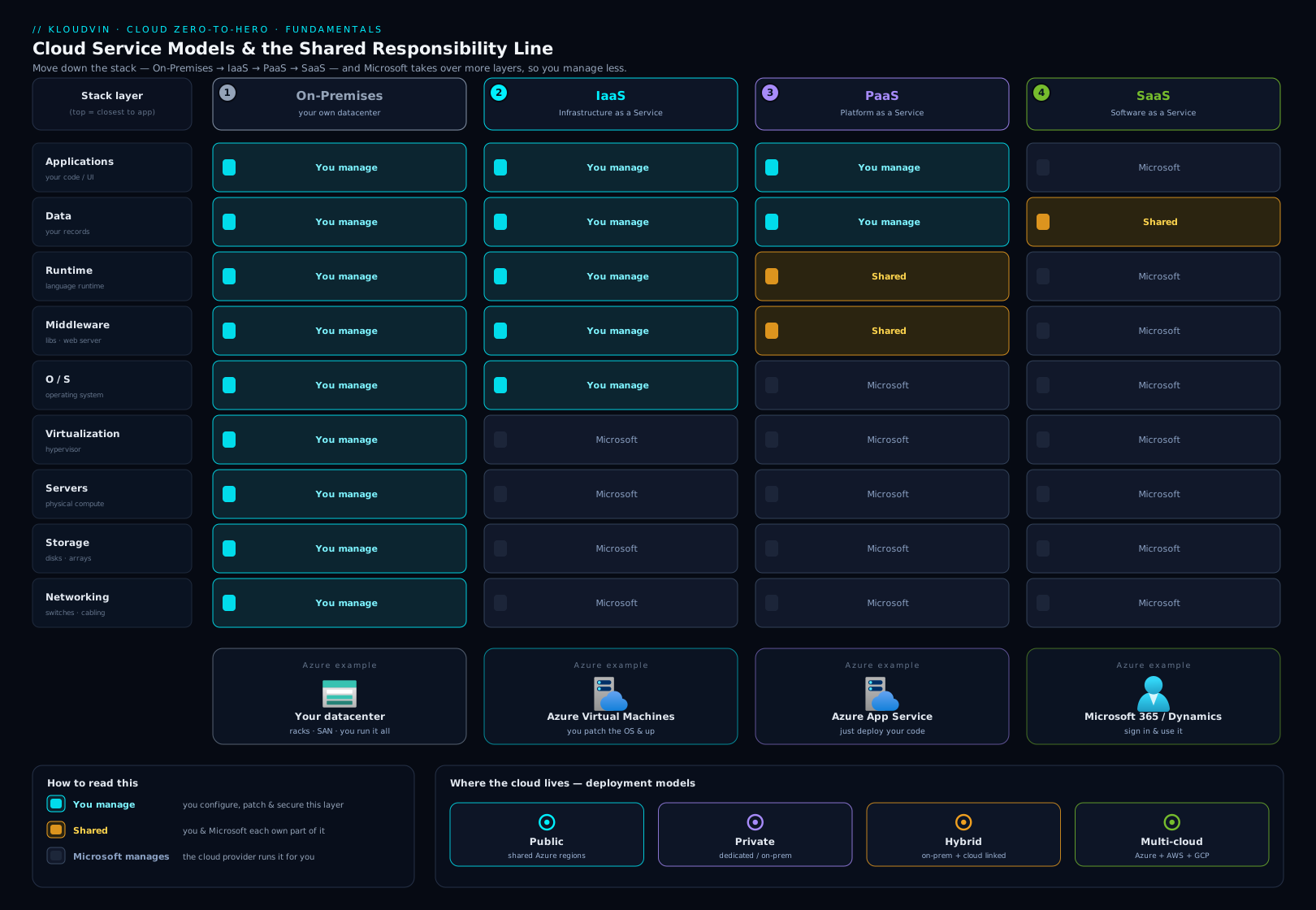
The diagram above brings the two big frameworks together. Read it left to right across on-premises → IaaS → PaaS → SaaS and watch the line between what you manage and what the provider manages climb the stack with each step — while the top band (your data and identity) stays firmly on your side. This one picture is, in effect, the whole lesson.
Going deeper
The sections above give you the map every beginner needs. This one is for when you want the architect’s version of the same ideas — the nuances that separate someone who can recite “IaaS, PaaS, SaaS” from someone who can make the right call in a design review. Nothing here contradicts what you have read; it sharpens it.
Security of the cloud versus security in the cloud
The cleanest way to hold the shared-responsibility model in your head is a two-phrase test. The provider is responsible for the security of the cloud — the physical buildings, the host hardware, the hypervisor, the backbone network. You are responsible for security in the cloud — what you put on top and how you configure it. The service model only decides where on the stack that line sits; it never changes the fact that both halves exist.
What trips up experienced engineers is the assumption that a more managed tier removes their security work entirely. It shrinks it — it never zeroes it. Three subtleties are worth internalising:
- PaaS still runs your code, and your code is still yours. Azure App Service patches the OS and the web-server runtime for you, but an SQL-injection flaw, a leaked secret in your repository, or a vulnerable NuGet/npm dependency is your incident, not Microsoft’s. Managed platform, unmanaged application logic.
- Encryption at rest is on by default, but key custody is a choice. Azure Storage, Azure SQL, and managed disks encrypt data at rest automatically with platform-managed keys. For stricter compliance you can supply customer-managed keys (CMK) held in Azure Key Vault, which shifts key rotation and revocation onto you. “Encrypted by default” and “you control the keys” are two different guarantees — know which one a requirement is actually asking for.
- Durability is not backup. The platform keeps multiple replicas so a failed disk never loses your bytes — that is durability. It will faithfully replicate an accidental
DELETEor a ransomware encryption to every replica. Backup (a point-in-time copy you can restore from) is a separate, deliberate act: on IaaS you configure Azure Backup; on a managed database you set retention and geo-restore; in Microsoft 365 the recycle bin and retention policies are yours to configure. Confusing the two is one of the most expensive mistakes in the book.
The modern answer to “how do I avoid the secret-in-code problem” is managed identity — an Entra ID identity Azure attaches to your resource so it can authenticate to other Azure services (Key Vault, Storage, SQL) with no password or connection string to leak. It is worth meeting the term now because it is the single most useful security primitive the rest of this course leans on.
The service-model ladder is a gradient, not three boxes
IaaS / PaaS / SaaS are teaching buckets. Real Azure services sit on a continuous “how much does Microsoft manage” spectrum, and the interesting services live in the gaps between the buckets. Containers are the classic example:
| Service | Where it sits | Who manages what (short version) |
|---|---|---|
| Virtual Machines / VM Scale Sets | IaaS | You own the guest OS, patching, and the app; Microsoft owns the host and hypervisor. |
| Azure Kubernetes Service (AKS) | Managed-infra (IaaS/PaaS hybrid) | Microsoft runs the Kubernetes control plane for free; you own the node pools (they are VMs you pay for and patch), the workloads, and cluster config. |
| Azure Container Apps / Container Instances | PaaS / serverless | You bring a container image; Microsoft runs the nodes, scaling, and the control plane. Container Apps scales to zero. |
| App Service | PaaS | You bring code or a container; Microsoft runs the OS, runtime, patching, and scale. |
| Azure Functions | Serverless (FaaS) | You bring a function; the platform runs it per-event, scales it, and (on Consumption/Flex Consumption) bills per execution and idles to zero. |
| Azure SQL Database | PaaS | You bring schema and data; Microsoft runs the engine, patching, backups, and HA. |
| Microsoft 365 | SaaS | You bring users, data, and configuration; Microsoft runs everything else. |
The practical lesson: AKS is not “serverless Kubernetes”. Its control plane is managed, but the worker nodes are your VMs — you choose their size, you keep their node image patched (node-image auto-upgrade and maintenance windows help, but the responsibility is yours), and you pay for them whether or not a pod is scheduled. If you want containers with genuinely no node management, Azure Container Apps is the higher-tier choice. Choosing between them is choosing where on the responsibility gradient you want to stand.
The AZ-900 benefits vocabulary, in full
The exam frames the value of cloud as a specific list of benefits, and it will test whether you can attach the right word to the right scenario. Beyond scalability and elasticity (covered above), know these:
- High availability — the service stays up despite component failures, expressed as an SLA percentage. Each extra “nine” (99.9% → 99.99%) shrinks the allowed downtime roughly ten-fold.
- Reliability — the system’s ability to recover from failures and keep functioning; in the Well-Architected Framework this is a whole pillar, and it is what availability zones and region pairs exist to serve.
- Predictability — both performance predictability (autoscale, load balancing keep response times steady under load) and cost predictability (Cost Management, Budgets, the Pricing and TCO calculators let you forecast and cap spend).
- Security — a shared model plus a large built-in toolset (Microsoft Defender for Cloud, Azure Policy, encryption by default).
- Governance — the ability to enforce standards at scale with Azure Policy, management groups, blueprints/landing zones, and consistent tagging.
- Manageability — both of the cloud (autoscale, self-healing, monitoring with Azure Monitor) and in the cloud (portal, CLI, ARM/Bicep, Terraform give you one consistent way to manage everything).
- Global reach — dozens of regions worldwide let you place workloads close to users and meet data-residency rules without building your own data centre on another continent.
If a scenario says “recover automatically from a failed VM,” the word is reliability/high availability; “enforce that no storage account is public,” the word is governance; “keep the checkout fast during a flash sale,” the word is scalability/elasticity with predictable performance. Matching scenario to benefit is exactly what the exam rewards.
The economics, one level deeper
Consumption pricing is not just “pay per hour”. A few realities separate a tidy cloud bill from a nasty one:
- The units are granular and they add up. You are metered per second or hour of compute, per GB-month of storage, per operation (list/read/write), per million requests, and — the one people forget — per GB of egress (data leaving Azure). Ingress is generally free; outbound data transfer is metered, and a chatty cross-region or internet-facing workload can run a surprising data-transfer bill. Architecture that keeps traffic inside a region is a cost decision as much as a latency one.
- Commitment and purchasing levers exist for steady load. Reservations (1- or 3-year) discount a resource you know you will run continuously; Savings Plans for compute give flexible hourly-commitment discounts across VM families; Spot VMs offer very deep discounts for interruptible, fault-tolerant work (Azure can evict them with short notice); Azure Hybrid Benefit reuses existing Windows Server / SQL Server licences with Software Assurance. Pay-as-you-go is the default, not the cheapest for a known baseline.
- Scale-to-zero changes the maths. A serverless component that idles to zero costs nothing between requests, which is why bursty or low-traffic workloads love it. But at high, sustained throughput a reserved, always-on plan is usually cheaper per unit of work — the crossover point is a real calculation, not a slogan.
- The discipline has a name: FinOps. Because every architectural choice is a spending choice, mature teams treat cost as a first-class, continuously-monitored signal — using Azure Cost Management + Budgets, alerts, and the Pricing and TCO calculators — rather than a quarterly surprise. The beginner version of this discipline is the habit this course repeats: delete what you are not using.
Deployment models in the real world
The four-box model (public / private / hybrid / multi-cloud) is the exam answer; production adds texture:
- Sovereign and government clouds are physically and logically isolated instances for regulatory reasons — Azure Government (US) and Microsoft Azure operated by 21Vianet (China) are separate clouds with their own endpoints and, sometimes, a lagging service catalogue. They are still “public cloud” conceptually, but they are not the commercial cloud.
- Azure Arc is what makes hybrid and multi-cloud manageable rather than merely possible: it projects Azure’s control plane — Policy, RBAC, Monitor, even some data services — over servers, Kubernetes clusters, and workloads running on-premises or in AWS/GCP, so one governance model spans everything.
- The edge and the disconnected case is real: Azure Local (formerly Azure Stack HCI) and Azure Stack Edge run Azure-consistent services in your own data centre, on a ship, or at a factory that cannot depend on a constant internet link. This is where “private cloud” stops being theoretical.
- Region and availability-zone nuance. High availability comes from availability zones (independent data centres inside one region); disaster recovery leans on a paired or secondary region. Not every newer Azure region ships with a classic paired region — some rely on multiple availability zones instead — so “always use the region pair” is dated advice; check the specific region’s resiliency options.
When not to use the cloud
A senior engineer is as clear about the limits as the benefits. The public cloud is the wrong first choice when:
- The load is steady, fully utilised, and already paid for. If you own hardware running flat-out 24/7 with years of depreciation left, renting the same capacity as OpEx can cost more. Cloud economics reward variability and idle-ability, which a pegged-at-100% server does not have.
- Data residency or sovereignty is absolute and no sovereign cloud fits. Some regulated or classified workloads simply may not leave a specific building or jurisdiction.
- Latency to physical equipment is the whole point. A factory-floor controller, a trading system colocated at an exchange, or a real-time robotics loop may need microsecond proximity that a regional data centre cannot offer — this is the case edge/hybrid exists for.
- Data gravity and egress dominate. Petabytes that must be read repeatedly and moved out again can make egress and transfer costs outweigh any compute saving.
- A lift-and-shift with no re-architecture is the plan. Rehosting a VM as-is is a legitimate migration step, but if nothing will ever be re-platformed, you often inherit the on-prem architecture and a cloud bill — the worst of both. The savings come from moving up the managed-service ladder later, not from changing the postcode of the VM.
None of this is anti-cloud; it is the honest counter-weight that makes the pro-cloud case credible. “Prefer the highest managed tier that fits” has a sibling rule: prefer the cloud where its strengths — elasticity, global reach, no up-front cost — actually apply.
Hands-on lab: classify the services
This lesson is pure foundations, so the “lab” is a classification exercise — the exact skill an exam (and a real architecture review) tests. No Azure account is needed.
Step 1 — Sort by service model. For each item, decide IaaS, PaaS, or SaaS and say why in one phrase (what do you manage versus the provider?):
- An Azure Virtual Machine running your custom application.
- Azure App Service hosting a web app from your code.
- Microsoft 365 (Outlook and Teams) for your company.
- Azure SQL Database (the fully managed database, not a database you install on a VM).
- Azure Functions running a snippet of code on each HTTP request.
Step 2 — Identify the deployment model. For each scenario, name the deployment model (public / private / hybrid / multi-cloud):
- A start-up runs everything in standard Azure regions.
- A bank keeps its core ledger on dedicated hardware in its own data centre, run cloud-style for one tenant.
- A retailer keeps customer records on-prem but bursts its website into Azure at peak season, the two connected by a private link.
- A media company runs some workloads in Azure and others in AWS, managed together.
Step 3 — Draw the responsibility line. For an Azure VM (IaaS), list three things you secure and three things Microsoft secures. Then do the same for Microsoft 365 (SaaS) and notice how much shorter your list is.
Validation. Check against the Answers under Quick check below — Step 1 maps to IaaS/PaaS/SaaS/PaaS/PaaS, and the reasoning is what matters.
Cost note: This lab costs nothing — there is no resource to create. The next lesson is where you open Azure for real and spin up (then delete) your first resource group.
Common mistakes & troubleshooting
These are the conceptual traps that trip up beginners (and cost marks on the exam) — “troubleshooting” here means fixing the mental model.
| Misconception / mistake | Why it’s wrong | Correct understanding |
|---|---|---|
| “Moving to SaaS means I don’t have to think about security.” | Identity, data, devices, and configuration stay yours in SaaS. | You still own access management, data, and in-app settings — the most-breached layer. |
| Confusing scalability with elasticity. | They are related but distinct. | Scalability is the ability to grow; elasticity is doing it automatically, on demand. |
| Confusing high availability with disaster recovery. | They solve different failures. | HA keeps you running through local failures; DR recovers you after a regional disaster. |
| Thinking vertical and horizontal scaling are the same. | One resizes a single resource; the other adds copies. | Vertical = bigger box (scale up); horizontal = more boxes (scale out). |
| Calling everything in Azure “the cloud” as if it’s one model. | Azure spans IaaS, PaaS, and SaaS simultaneously. | Identify the service model of each specific service to know who manages what. |
| Assuming the cloud is always cheaper than on-prem. | For very steady, fully-utilised load, owned hardware can win. | Compare total cost of ownership; cloud wins most for variable/growing workloads. |
| Believing the provider backs up your data automatically by default. | In IaaS especially, backup is largely your responsibility. | Configure backup/DR deliberately; “shared responsibility” includes data protection. |
| Treating hybrid and multi-cloud as synonyms. | Hybrid mixes public + private; multi-cloud uses multiple public providers. | Hybrid = public and private; multi-cloud = Azure and AWS (etc.). |
Common beginner mistakes
The table above is a quick-reference for the classic slips. This section goes one level deeper on the misconceptions that cost the most — each is a wrong mental model, followed by the model that replaces it.
“It’s PaaS, so I don’t have to secure anything.” PaaS is a huge relief — Microsoft patches the OS and runtime so you never touch them — but it removes operational toil, not your half of security. Your application code still ships its own bugs (an SQL-injection flaw in an App Service app is your breach), your dependencies still carry CVEs, your secrets still leak if you hard-code them, and your access control is still yours to get right. Right model: every managed tier shrinks your surface; none erases it. Always ask “what is still mine here?” — on PaaS the answer is app code, configuration, identity, and data.
“IaaS and PaaS are basically the same — just pick whichever.” They differ on exactly one thing that matters enormously: the responsibility line. On IaaS you patch and harden the guest OS, manage agents, and own the whole box; on PaaS Microsoft does all of that and you own only the app, its configuration, and your data. Picking IaaS when PaaS would fit means volunteering for OS patching, vulnerability management, and 3 a.m. pages you did not need to sign up for. Right model: choose the highest (most managed) tier that still meets your requirement, and drop to IaaS only when you genuinely need low-level control the platform won’t give you.
“Scalability and elasticity are two words for the same thing.” They are a capability and a behaviour, and the difference is money. Scalability is whether a system can grow — a bigger VM (vertical) or more VMs (horizontal). Elasticity is whether it grows and shrinks by itself, quickly, with demand. A VM you can manually resize is scalable but not elastic; it will happily sit over-provisioned and over-billed all weekend because nothing scales it back in. An autoscale rule that adds instances for a spike and removes them afterwards is elastic — and the “removes them afterwards” is where the savings are. Right model: scalability = can it grow; elasticity = does it grow and shrink automatically.
“Serverless means there are no servers, so it’s always the cheapest option.” There are servers — you simply never see, size, or patch them. Consumption billing plus scale-to-zero makes serverless brilliantly cheap for spiky, low-traffic, or idle-heavy workloads: you pay per execution and nothing while it waits. But for high, steady throughput, the per-execution price can exceed a reserved always-on plan, and the economical choice flips. Right model: serverless optimises for bursty and idle, not for maximum throughput — the crossover is a calculation, not a rule of thumb.
“AKS is fully managed, so I don’t patch anything.” Azure Kubernetes Service manages the Kubernetes control plane for free, which feels like “fully managed” — but the worker nodes are your VMs. You choose their size, keep their node image patched (auto-upgrade and maintenance windows assist, but the duty is yours), and pay for them whether pods are running or not. Right model: AKS is managed control plane, self-managed nodes. If you want containers with genuinely no node management, that is Azure Container Apps, a tier higher.
“The cloud backs up my data automatically.” The platform keeps redundant replicas so a failed disk never loses a byte — that is durability, and it will faithfully replicate an accidental delete or a ransomware encryption to every copy. Backup is a separate, restorable, point-in-time copy you must set up: Azure Backup on IaaS, retention and geo-restore on managed databases, retention policies in Microsoft 365 (the recycle bin is not a backup). Right model: durability protects the disk; a backup/retention policy protects you from yourself and attackers — and it only exists if you configured it.
Best practices
- Default to the most managed model that fits. Reach for SaaS, then PaaS, and only drop to IaaS when you genuinely need that low-level control. Less to manage means less to break and less to secure.
- Learn the shared-responsibility line for every service you adopt. Before using a service, ask: what does the provider secure, and what do I? Most incidents come from a gap on the customer side that nobody owned.
- Design for failure from the start. Assume components will fail; use redundancy and availability zones for HA, and plan DR (with explicit RPO/RTO targets) for the regional case.
- Match the pricing model to the workload. Pay-as-you-go for spiky or experimental work; commitment discounts (Reservations/Savings Plans) for steady, predictable baseload.
- Treat cost as a first-class design concern. Because everything is metered, architecture is a cost decision — and delete what you are not using, every time.
- Prefer horizontal scaling for stateless workloads; it has no hard ceiling and survives the loss of any single instance.
Security notes
- Identity is the new perimeter. In the cloud the network edge dissolves; who can sign in and what they can do is the primary control. Enable multi-factor authentication (MFA) on every account before anything else.
- Your data is always your responsibility. Classify it, encrypt it, control access to it, and back it up — the provider secures the infrastructure, never the content.
- Apply least privilege. Grant the narrowest access at the narrowest scope that does the job; over-permissive roles are a leading cause of cloud breaches.
- Configuration is a security surface. A storage container left public or an over-broad sharing setting is a self-inflicted breach — review defaults deliberately. And remember shared responsibility is not shared blame: a misconfiguration on your side is yours to own and fix.
Interview & exam questions
- “What is cloud computing in one sentence?” The on-demand, self-service delivery of metered, elastically scalable computing resources over a network from a shared, multi-tenant pool — paid for by consumption.
- “Explain IaaS, PaaS, and SaaS with an example of each.” IaaS rents raw infrastructure and you manage the OS up (Azure VMs); PaaS provides a managed platform and you manage just the app and data (Azure App Service); SaaS is a finished application you only use and configure (Microsoft 365). The trade-off is control versus operational effort.
- “Under the shared-responsibility model, what are you always responsible for?” Your data, your identities and access, your endpoints/devices, and your configuration — in every service model, including SaaS. The provider always owns the physical layer; the OS/network/app layers shift with the model.
- “How does shared responsibility change from IaaS to SaaS?” As you move IaaS → PaaS → SaaS the provider takes on more (first the OS and patching, then the runtime, then the whole application) and you take on less — but data, identity, and configuration remain yours throughout.
- “Scalability versus elasticity?” Scalability is the ability to add capacity (vertical = a bigger resource; horizontal = more copies); elasticity is scaling automatically and quickly with live demand, including back in. Horizontal scaling is usually preferred — no hard ceiling, and it tolerates single-instance failure.
- “High availability versus disaster recovery?” HA keeps the service running through local failures by removing single points of failure (e.g. across availability zones); DR recovers after a large/regional failure, typically by failing over to another region — measured by RPO and RTO.
- “CapEx versus OpEx, and why does the cloud shift the balance?” CapEx is up-front capital on owned assets (on-prem hardware); OpEx is ongoing operational spend (renting cloud capacity). The cloud turns big up-front CapEx into pay-as-you-go OpEx, removing the up-front barrier and the need to guess capacity years ahead.
- “Define the four deployment models.” Public (shared, provider-run, multi-tenant), private (dedicated to one organisation), hybrid (a deliberate mix of public and private, connected), and multi-cloud (more than one public provider together).
- “What are the five characteristics of cloud computing?” On-demand self-service, broad network access, resource pooling (multi-tenancy), rapid elasticity, and measured service.
- “Where does serverless fit?” It’s an extreme of PaaS (FaaS): you provide only code, the platform runs and scales it automatically — including to zero — and bills per execution. Azure Functions is the canonical example.
Practice challenges
Six single-best-answer questions in the style of AZ-900, escalating from recall to reasoning. Decide your answer before opening the solution — the one-line “why” is where the understanding lives.
1. (Warm-up) Which service model gives you the most control over the operating system?
A. SaaS B. PaaS C. IaaS D. FaaS (serverless)
<details><summary>Show answer</summary>
C — IaaS. IaaS hands you raw virtual machines, so you own and control the guest OS (and therefore its patching and hardening). Moving up to PaaS/SaaS trades that control away for less operational effort. </details>
2. Your company uses Microsoft 365 (Outlook, Teams). Under the shared-responsibility model, which of these remains your responsibility?
A. Patching the underlying mail-server OS B. Physical data-centre security C. Managing user identities and access D. Maintaining the hypervisor
<details><summary>Show answer</summary>
C — managing user identities and access. In SaaS the provider runs the whole stack, but identity/access, endpoint devices, in-app configuration, and your data stay with you. The other three are always the provider’s in a cloud model. </details>
3. A business replaces large up-front server purchases with a monthly, usage-based Azure bill. This change is best described as a shift from…
A. OpEx to CapEx B. CapEx to OpEx C. horizontal to vertical scaling D. high availability to disaster recovery
<details><summary>Show answer</summary>
B — CapEx to OpEx. Owning depreciating hardware is capital expenditure; renting metered capacity you pay for as you go is operational expenditure. That shift removes the up-front barrier and the need to guess capacity years ahead. </details>
4. An autoscale rule adds web instances when CPU crosses a threshold and removes them automatically when load falls — no human involved. Which cloud characteristic is this?
A. Scalability B. Elasticity C. High availability D. Disaster recovery
<details><summary>Show answer</summary>
B — elasticity. Scalability is the capability to add capacity; elasticity is capacity being added and removed automatically and quickly to track live demand. A VM you must resize by hand is scalable but not elastic. </details>
5. Your web tier must survive the loss of a single Azure data-centre building within a region with no downtime. Which approach directly addresses this?
A. Fail over to the paired region (DR) B. Deploy the tier across availability zones C. Vertically scale the VM to a larger size D. Buy a 3-year Reservation
<details><summary>Show answer</summary>
B — deploy across availability zones. Availability zones are physically separate data centres inside one region, so spreading instances across them gives high availability against a building/zone failure. Region-pair failover is for regional disaster recovery; a bigger VM or a Reservation does nothing for resilience. </details>
6. A retailer keeps its system-of-record on dedicated hardware in its own data centre for compliance, while running its public website in Azure, the two linked by ExpressRoute. Which deployment model is this?
A. Public cloud B. Private cloud C. Hybrid cloud D. Multi-cloud
<details><summary>Show answer</summary>
C — hybrid cloud. It is a deliberate combination of private (on-prem, single-tenant) and public (Azure) infrastructure, connected so workloads span both. Multi-cloud would mean two or more public providers (e.g. Azure and AWS); using only Azure regions would be pure public. </details>
Quick check
- List the five essential characteristics of cloud computing.
- Classify each as IaaS, PaaS, or SaaS: (a) Azure Virtual Machine, (b) Azure App Service, © Microsoft 365, (d) Azure SQL Database, (e) Azure Functions.
- Name three things you are responsible for under the shared-responsibility model regardless of the service model.
- What is the difference between high availability and disaster recovery?
- Explain CapEx versus OpEx and say which the cloud’s consumption pricing represents.
Answers
- On-demand self-service, broad network access, resource pooling (multi-tenancy), rapid elasticity, and measured service.
- (a) IaaS — you manage the OS and up; (b) PaaS — managed platform, you bring the app; © SaaS — a finished application; (d) PaaS — a fully managed database service; (e) PaaS (specifically serverless/FaaS) — you supply only code.
- Any three of: your data, your identities and access, your endpoints/devices, and your configuration. (Data and identity are the two most important.)
- High availability keeps a service running through local component failures (e.g. a server or data-centre building) using redundancy within a region; disaster recovery is the ability to recover after a large-scale/regional failure, usually by failing over to another region — measured by RPO and RTO.
- CapEx is up-front capital expenditure on owned assets (buying servers); OpEx is ongoing operational expenditure on consumed services (renting capacity). The cloud’s pay-as-you-go consumption pricing is OpEx.
Exercise
Pick a real digital service you use every day — for example your email, a music-streaming app, online banking, or a photo-backup app. Then:
- Decide which service model (IaaS/PaaS/SaaS) the end user is consuming, and justify it in a sentence.
- Sketch the shared-responsibility split for it: list two things the provider secures and two things you (the user or your organisation) must secure.
- Name one way the provider likely achieves high availability and one way it might handle disaster recovery.
- Decide whether its pricing looks like consumption-based pay-as-you-go, a flat subscription, or something else — and say why that model suits the service.
Writing out these four points for a service you already know turns the abstract frameworks into something concrete — exactly the reasoning a cloud architect applies to every new system.
Certification mapping
This lesson maps almost entirely to the Describe cloud concepts domain of AZ-900: Microsoft Azure Fundamentals (its largest-weighted domain):
- Define cloud computing and its benefits — high availability, scalability, elasticity, agility, disaster recovery.
- Describe the consumption-based model — CapEx vs OpEx and pay-as-you-go pricing.
- Describe cloud service types — IaaS, PaaS, SaaS with use cases, and the shared-responsibility model and how it shifts across them.
- Describe cloud deployment models — public, private, and hybrid (multi-cloud as context).
It is also foundational for AZ-104 and AZ-305, which assume fluency in these models and in the shared-responsibility line as the starting point for every design decision.
Glossary
- Cloud computing — renting metered, elastically scalable computing on demand over a network from a provider’s shared pool.
- On-premises — IT infrastructure you own and operate yourself, typically in your own data centre.
- IaaS / PaaS / SaaS — service models, most to least self-managed: rent infrastructure / a managed platform / a finished application.
- Serverless (FaaS) — an extreme of PaaS: you supply only code; the platform runs and scales it (including to zero) and bills per execution.
- Public / private / hybrid / multi-cloud — deployment models: shared provider-run / single-organisation dedicated / a mix of both / more than one public provider.
- CapEx / OpEx — up-front capital spend on owned assets / ongoing operational spend on consumed services.
- Consumption-based pricing (pay-as-you-go) — billing per unit of actual usage, with no charge for unused capacity.
- Total cost of ownership (TCO) — a solution’s full cost including hardware, power, cooling, space, and staff.
- Scalability / elasticity — the ability to add capacity (vertically or horizontally) / doing so automatically and quickly with demand.
- High availability (HA) / disaster recovery (DR) — staying up through local failures (SLA %) / recovering after a regional failure (RPO/RTO).
- RPO / RTO — Recovery Point Objective (data, in time, you can lose) / Recovery Time Objective (how fast you must be back).
- Shared-responsibility model — the division of security duties between provider and customer, shifting with the service model; data and identity are always the customer’s.
- Multi-tenancy — many customers sharing pooled infrastructure, kept logically isolated.
- Vertical / horizontal scaling — making one resource bigger (scale up/down) / adding more copies of it (scale out/in); horizontal has no hard ceiling and survives a single copy failing.
- Availability zone (AZ) — a physically separate data centre within an Azure region; spreading copies across zones gives high availability against a single building failing.
- Region pair — two Azure regions linked for disaster recovery; some newer regions rely on availability zones instead of a classic pair.
- SLA (Service Level Agreement) — the provider’s committed availability, expressed as a percentage (e.g. 99.9% vs 99.99%); each extra “nine” means far less allowed downtime.
- Reservations / Savings Plans — commitment discounts (1- or 3-year) that trade flexibility for a large price cut on steady, predictable workloads.
- Spot VMs — deeply discounted spare capacity for interruptible, fault-tolerant work; Azure can evict the VM at short notice.
- Azure Hybrid Benefit — reuse of existing Windows Server / SQL Server licences (with Software Assurance) to lower cloud compute cost.
- Egress (data transfer out) — data leaving Azure; inbound is generally free, outbound is metered, so chatty or cross-region traffic can carry a real cost.
- Managed identity — an Entra ID identity Azure attaches to a resource so it can authenticate to other services with no password or connection string to leak.
- Customer-managed key (CMK) — an encryption key you hold in Azure Key Vault instead of the default platform-managed key, putting key rotation and revocation under your control.
- Control plane / data plane — the layer that manages a service (create/scale/configure) versus the layer that does its actual work (e.g. AKS: Microsoft runs the control plane, you run the node data plane).
- Azure Arc — a control plane that projects Azure governance, RBAC, and monitoring over servers, Kubernetes, and workloads running on-premises or in other clouds.
- Sovereign cloud — an isolated Azure instance for regulatory reasons, such as Azure Government (US) or Microsoft Azure operated by 21Vianet (China).
- Lift-and-shift (rehost) — moving a workload to the cloud unchanged; a valid first migration step, but the real savings come from later re-platforming to managed services.
- Durability vs backup — the platform keeps redundant replicas so a disk never loses data (durability); a restorable point-in-time copy you must configure yourself is a backup.
- FinOps — the practice of treating cloud cost as a continuously-monitored, first-class engineering signal rather than a periodic surprise.
Next steps
You now hold the conceptual map of the cloud — the service models, the deployment models, the money story, the resilience vocabulary, and the all-important responsibility line. Next, we leave generic theory behind and meet the platform itself: what Azure actually is, how it organises everything you create, and where your resources physically live.
Related reading to reinforce the foundations:
- Working with Azure: Portal, CLI, PowerShell & Cloud Shell — the four ways to actually drive the platform once you understand the concepts.
- Azure Entra ID Fundamentals: Tenants, Users, Groups & RBAC — identity, the part of shared responsibility that is always yours.