Most of the data that runs the world — bank balances, orders, payroll, inventory, patient records — lives in relational databases. They have been the workhorse of business computing for forty years for one reason: they are extraordinarily good at storing structured facts and answering precise questions about them without losing or corrupting a single row. This lesson teaches relational data from absolute first principles — what a table actually is, how rows relate to one another, and just enough SQL to be dangerous — and then walks the entire Azure relational family so you know exactly which service to reach for and why.
This is a DP-900: Azure Data Fundamentals lesson, the second in the data track. The previous lesson, Core Data Concepts, Roles & Workloads, drew the big map (structured vs unstructured, OLTP vs OLAP, who does what). Here we zoom into the structured, transactional corner of that map and make it concrete on Azure. No prior database experience is assumed; every term is defined the first time it appears.
In a nutshell
If you have ever used a spreadsheet, you already hold the right picture in your head — you just have to add rules. A relational database is a spreadsheet that refuses to let you contradict yourself. Data lives in tables made of rows and columns, and the tables are wired together by keys so that an order can never point at a customer who does not exist, and a customer’s address is stored in exactly one place. Where a spreadsheet will happily let you type “blue” into a price cell, delete a name three other sheets still depend on, or keep five slightly-different copies of the same address, a relational database says no — and that refusal is the entire point. It is why banks, airlines, hospitals, and payroll systems have trusted this fifty-year-old idea with their most important facts.
This lesson builds that idea up from nothing — table, row, column, key, relationship — teaches you just enough SQL to read and write data safely, and then tours the whole Azure relational family so you always know which managed service to reach for. You do not need to have touched a database before; every term is defined the first time it appears.
Level: Beginner · Time: ~27 min
Before you start: basic IT literacy is enough. The previous lesson, DP-900: Core Data Concepts, Roles & Workloads, gives helpful background (structured versus unstructured data, OLTP versus OLAP), but this lesson stands on its own. An Azure subscription is needed only for the optional hands-on lab near the end.
After this you will be able to explain what a table, key, and relationship are in plain English; classify any SQL statement as DDL, DML, DCL, or TCL; tell IaaS from PaaS for databases and reason about who patches what; name every member of the Azure relational family and pick the right one for a scenario; and provision and query a managed Azure SQL database yourself.
Learning objectives
By the end of this lesson you can:
- Explain what a relational database is and define table, row, column, primary key, foreign key, and relationship in plain English.
- Describe normalisation, indexes, and views, and say what problem each one solves.
- Read and write basic SQL, and classify a statement as DDL, DML, DCL, or TCL.
- Tell the difference between running a database as IaaS versus PaaS, and explain the shared-responsibility consequences.
- Name every member of the Azure relational family — Azure SQL Database (single, elastic pool, serverless), SQL Managed Instance, SQL Server on Azure VM, and Azure Database for PostgreSQL and MySQL — and what each is for.
- Choose the right relational service for a given scenario using a when-to-use comparison.
- Provision and connect to a managed Azure relational database from the command line.
Prerequisites & where this fits
You need only basic IT literacy and ideally the previous lesson, DP-900: Core Data Concepts, Roles & Workloads, which introduced structured data, OLTP versus OLAP, and the data professional roles. An Azure account with a subscription is useful for the lab, but the concepts stand alone and every term is defined as it appears. This is Lesson 2 of the Data Fundamentals module in the Azure Zero-to-Hero course; the next lesson covers non-relational data and analytics, the other half of the data world.
What “relational” actually means
A relational database organises data into tables — think of a single, very disciplined spreadsheet. Each table describes one kind of thing: a Customers table, an Orders table, a Products table. The power, and the name, come from the fact that tables relate to one another: an order knows which customer placed it, and which products it contains, by referencing rows in the other tables rather than copying their data.
The model rests on a small, precise vocabulary. Learn these six terms and the rest follows.
| Term | Plain-English meaning | Spreadsheet analogy |
|---|---|---|
| Table (relation) | A collection of rows describing one kind of entity. | A whole worksheet |
| Row (record, tuple) | One instance of that entity — one customer, one order. | A single line |
| Column (field, attribute) | One property all rows share, with a fixed data type. | A column header |
| Schema | The structure — the tables, their columns, and the types — defined before you insert data. | The blank template |
| Primary key (PK) | A column (or set of columns) whose value uniquely identifies each row. No duplicates, never null. | The “ID” column |
| Foreign key (FK) | A column that points to a primary key in another table, creating the relationship. | A “lookup” reference |
The defining trait of the relational model is the rigid schema: every row in a table has exactly the same columns, and every column has a declared data type (integer, decimal, text of a given length, date, boolean, and so on). The database enforces this — try to put the word “blue” into an integer column and it refuses. That strictness is the whole point: it guarantees the data stays clean and consistent, which is precisely what you want for money, inventory, and records.
Keys and relationships
Imagine a Customers table with a primary key CustomerID, and an Orders table. Rather than repeating the customer’s name and address on every order, each order row stores a CustomerID foreign key that references the matching customer. This gives three things at once: no duplicated data, no chance of the copies drifting apart, and a way to join the tables back together when you query.
Relationships come in three shapes:
- One-to-many (the common case): one customer has many orders; each order belongs to exactly one customer. The FK lives on the “many” side (
Orders.CustomerID). - One-to-one: one row matches exactly one row elsewhere — e.g. an employee and a single security badge.
- Many-to-many: an order contains many products and a product appears in many orders. Relational databases model this with a third junction table (e.g.
OrderItems) holding two foreign keys.
A core safety feature is referential integrity: the database refuses to let an Orders row reference a CustomerID that does not exist, and can stop you deleting a customer who still has orders. Broken pointers are simply impossible.
Normalisation — designing tables that don’t lie
Normalisation is the process of organising columns into tables so that each fact is stored exactly once. The motivating problem is redundancy: if a customer’s address sits on every one of their order rows and they move house, you must update every row, and if you miss one the data now contradicts itself (an update anomaly). The fix is to factor repeating information into its own table and reference it by key — exactly the Customers/Orders split above.
You do not need the formal “normal forms” for DP-900, only the intuition: a well-normalised schema avoids duplicated, contradictory data and so is easier to keep correct. The trade-off is that answering a question may require stitching several tables back together with a JOIN, which costs a little query effort — a price relational databases pay gladly in exchange for trustworthy data. (Analytical systems sometimes de-normalise deliberately for read speed; that is the next lesson’s territory.)
Indexes — making queries fast
An index is a separate, sorted structure the database maintains so it can find rows without scanning the whole table, exactly like the index at the back of a book lets you jump to a page instead of reading every one. Without an index, “find the customer with email asha@example.com” forces the engine to read every row (a table scan); with an index on the Email column it jumps almost straight to the answer.
Two ideas worth knowing:
- A clustered index physically orders the table’s rows by the key (a table has at most one). A non-clustered index is a separate lookup structure pointing back to the rows (you can have many).
- Indexes are not free — they consume storage and must be updated on every insert, update, and delete. So you index the columns you frequently search, join, or sort by, not every column.
Views — saved queries that look like tables
A view is a stored SELECT query that you can read from as if it were a table, but it stores no data of its own — it runs its underlying query each time. Views let you (a) hide complexity behind a simple name (a MonthlySales view that already joins three tables), (b) expose only certain columns to certain users (security), and © present a stable shape even as the underlying tables change. Other related objects you may meet are stored procedures (saved, reusable blocks of SQL logic) and triggers (SQL that runs automatically in response to a change).
SQL: the language of relational data
You talk to a relational database in SQL — Structured Query Language. Although every engine adds its own dialect (Microsoft’s is T-SQL, PostgreSQL has PL/pgSQL), the core is a shared ANSI standard, so what you learn here transfers everywhere. SQL statements fall into four families — a favourite exam distinction.
| Family | Full name | What it does | Key statements |
|---|---|---|---|
| DDL | Data Definition Language | Defines and changes the structure (schema). | CREATE, ALTER, DROP, TRUNCATE |
| DML | Data Manipulation Language | Reads and changes the data in tables. | SELECT, INSERT, UPDATE, DELETE |
| DCL | Data Control Language | Manages permissions — who may do what. | GRANT, REVOKE, DENY |
| TCL | Transaction Control Language | Groups changes into all-or-nothing transactions. | BEGIN, COMMIT, ROLLBACK |
A memory hook: DDL shapes the container, DML moves the contents, DCL guards the door, TCL makes a batch of changes succeed or fail together. (Some courses fold SELECT into its own “DQL” — Data Query Language — but DP-900 treats it as DML.)
DDL — defining structure
CREATE TABLE Customers (
    CustomerID   INT          PRIMARY KEY,
    FullName     NVARCHAR(100) NOT NULL,
    Email        NVARCHAR(255) NOT NULL,
    City         NVARCHAR(50),
    CreatedOn    DATE          DEFAULT (GETDATE())
);
This creates the Customers table: CustomerID is the primary key, FullName and Email may not be empty (NOT NULL), and new rows default CreatedOn to today. ALTER TABLE later changes the structure (add a column), DROP TABLE deletes the table and its data outright, and TRUNCATE TABLE empties it quickly while keeping the structure.
DML — the four operations you use daily
SELECT reads data; it is by far the most-used statement:
-- Read specific columns, filtered and sorted
SELECT FullName, City
FROM Customers
WHERE City = 'Bengaluru'
ORDER BY FullName;
INSERT adds rows:
INSERT INTO Customers (CustomerID, FullName, Email, City)
VALUES (1, 'Asha Rao', 'asha@example.com', 'Bengaluru');
UPDATE changes existing rows — always with a WHERE, or you change every row:
UPDATE Customers
SET City = 'Mumbai'
WHERE CustomerID = 1;
DELETE removes rows — again, the WHERE is what saves you:
DELETE FROM Customers
WHERE CustomerID = 1;
The single most valuable habit a beginner can build: never run an UPDATE or DELETE without a WHERE clause unless you genuinely mean “every row”. A missing WHERE is the classic production accident.
Joining tables
Because relationships are everything, the JOIN stitches related tables back together on their keys — this is what makes a normalised design usable:
SELECT  c.FullName, o.OrderDate, o.Total
FROM    Customers c
JOIN    Orders    o ON o.CustomerID = c.CustomerID
WHERE   o.Total > 1000
ORDER BY o.OrderDate DESC;
DCL and TCL — permissions and transactions
GRANT SELECT ON Customers TO analyst_role; -- DCL: allow reads
A transaction (TCL) bundles several changes so they all succeed or all fail — the textbook example is a bank transfer, where the debit and the credit must happen together:
BEGIN TRANSACTION;
    UPDATE Accounts SET Balance = Balance - 500 WHERE AccountID = 1;
    UPDATE Accounts SET Balance = Balance + 500 WHERE AccountID = 2;
COMMIT;   -- both stick; ROLLBACK would undo both
This all-or-nothing behaviour is part of the ACID guarantees (Atomicity, Consistency, Isolation, Durability) that make relational databases trustworthy for transactional workloads — the reason banks use them and spreadsheets don’t.
IaaS versus PaaS for databases
Before touring the Azure services, grasp the one distinction that organises the whole family: how much of the work Microsoft does for you. This is the shared-responsibility model applied to databases.
-
IaaS (Infrastructure as a Service) — you run SQL Server (or any engine) on an Azure Virtual Machine. Azure gives you the VM; you install and patch the OS and the database engine, configure high availability, take backups, and tune everything. Maximum control, maximum effort. You would choose this only when you need OS-level access or a feature the managed options don’t expose.
-
PaaS (Platform as a Service) — you ask Azure for a database, not a server. Microsoft owns the OS, the engine patching, automated backups, high availability, and the underlying hardware; you own your data, your schema, and access control. Far less to manage, so it is the default choice for new work. Azure SQL Database, SQL Managed Instance, and the PostgreSQL/MySQL Flexible Servers are all PaaS.
The table below makes the split concrete.
| Responsibility | SQL Server on a VM (IaaS) | Managed database (PaaS) |
|---|---|---|
| Physical hardware & datacentre | Microsoft | Microsoft |
| Operating system patching | You | Microsoft |
| Database engine patching/upgrades | You | Microsoft |
| High availability & failover | You configure | Built in |
| Backups | You schedule | Automated |
| Scaling | Resize the VM/disks yourself | Change a tier/slider |
| Data, schema, indexes, queries | You | You |
| Access control & firewall rules | You | You |
The senior-architect rule of thumb: start at PaaS and only step down to IaaS when a concrete requirement forces you to. Every blade you don’t have to manage is a blade that can’t page you at 2 a.m.
The Azure relational family
Azure offers a graduated ladder of relational options, from “Microsoft manages almost everything” to “you manage almost everything”, across both the SQL Server engine and the popular open-source engines.
Azure SQL Database (PaaS — the flagship)
Azure SQL Database is a fully managed PaaS database built on the latest SQL Server engine, with the OS and engine entirely hidden. You get automated backups, automatic patching, built-in high availability, and point-in-time restore out of the box. It is the default choice for new cloud applications that need a SQL Server-compatible relational database. It comes in three deployment options:
- Single database — one isolated database with its own dedicated resources. Simple and predictable; ideal for a single application. You can buy capacity in two purchasing models: DTU (Database Transaction Units — a simple blended bundle of compute, memory, and I/O, in Basic/Standard/Premium tiers, easiest for beginners) or vCore (you choose virtual cores and memory directly, more transparent and the modern default).
- Elastic pool — a shared pool of resources spread across many databases that have varying, unpredictable usage. Instead of paying for each database’s peak separately, the databases draw from a common budget — far cheaper for SaaS providers running hundreds of small, mostly-idle tenant databases.
- Serverless — compute that auto-scales with demand and pauses when idle, billing per second of use. Perfect for intermittent or unpredictable workloads (dev/test, a line-of-business app used only in office hours) because you stop paying for compute while it sleeps. (Storage is still billed while paused.)
The trade-off versus the heavier options: Azure SQL Database is a single database abstraction, so a handful of instance-level SQL Server features (cross-database queries, SQL Agent, CLR, Service Broker) are limited or absent. When you need those, you move up to Managed Instance.
Azure SQL Managed Instance (PaaS — near-100% SQL Server compatibility)
SQL Managed Instance is also PaaS, but it presents a near-complete SQL Server instance rather than a lone database — so the instance-level features missing from Azure SQL Database (cross-database queries, SQL Server Agent, CLR, Database Mail, linked servers) are available. It deploys into your virtual network for private connectivity. This makes it the easiest target for lifting an existing on-premises SQL Server into PaaS with minimal code change. The cost is that it is larger and pricier than a single database and takes longer to deploy.
SQL Server on Azure Virtual Machines (IaaS)
This is SQL Server installed on a VM you control — full IaaS. You get 100% feature parity with the on-premises product, OS-level access, and the ability to run versions or configurations the managed services don’t offer. In return you own OS and SQL patching, HA configuration, and backups (the SQL IaaS Agent extension automates some of this, but the responsibility is yours). Choose it when you need OS access, a specific/older SQL Server version, or third-party software co-located on the database server — a true lift-and-shift that preserves everything.
Azure Database for PostgreSQL and MySQL (PaaS — open source)
Azure runs the two most popular open-source relational engines as managed PaaS, for teams whose applications target them rather than SQL Server:
- Azure Database for PostgreSQL — managed PostgreSQL, a feature-rich, standards-compliant engine popular for modern and geospatial workloads (the PostGIS extension).
- Azure Database for MySQL — managed MySQL, the database behind a vast amount of the web, including most WordPress, Drupal, and LAMP-stack applications.
Both are offered as Flexible Server, the current recommended deployment model, which gives you fine-grained control over configuration, zone-redundant high availability, and stop/start to save cost, plus a burstable tier for cheap dev/test. (You may still see the older Single Server model in documentation, but it is retiring; choose Flexible Server for anything new.) MariaDB also previously had an Azure service, but it has been retired in favour of MySQL — worth knowing only so the name doesn’t surprise you. Choose these when your application is written for Postgres or MySQL and you want the managed-service benefits without rewriting it for SQL Server.
The whole family at a glance
| Service | Model | Engine | What it is | Management burden |
|---|---|---|---|---|
| Azure SQL Database | PaaS | SQL Server | A single managed database (single / elastic pool / serverless) | Lowest |
| SQL Managed Instance | PaaS | SQL Server | A near-full managed SQL Server instance in your VNet | Low |
| SQL Server on Azure VM | IaaS | SQL Server | Full SQL Server you install and run on a VM | Highest |
| Azure DB for PostgreSQL | PaaS | PostgreSQL | Managed open-source Postgres (Flexible Server) | Low |
| Azure DB for MySQL | PaaS | MySQL | Managed open-source MySQL (Flexible Server) | Low |
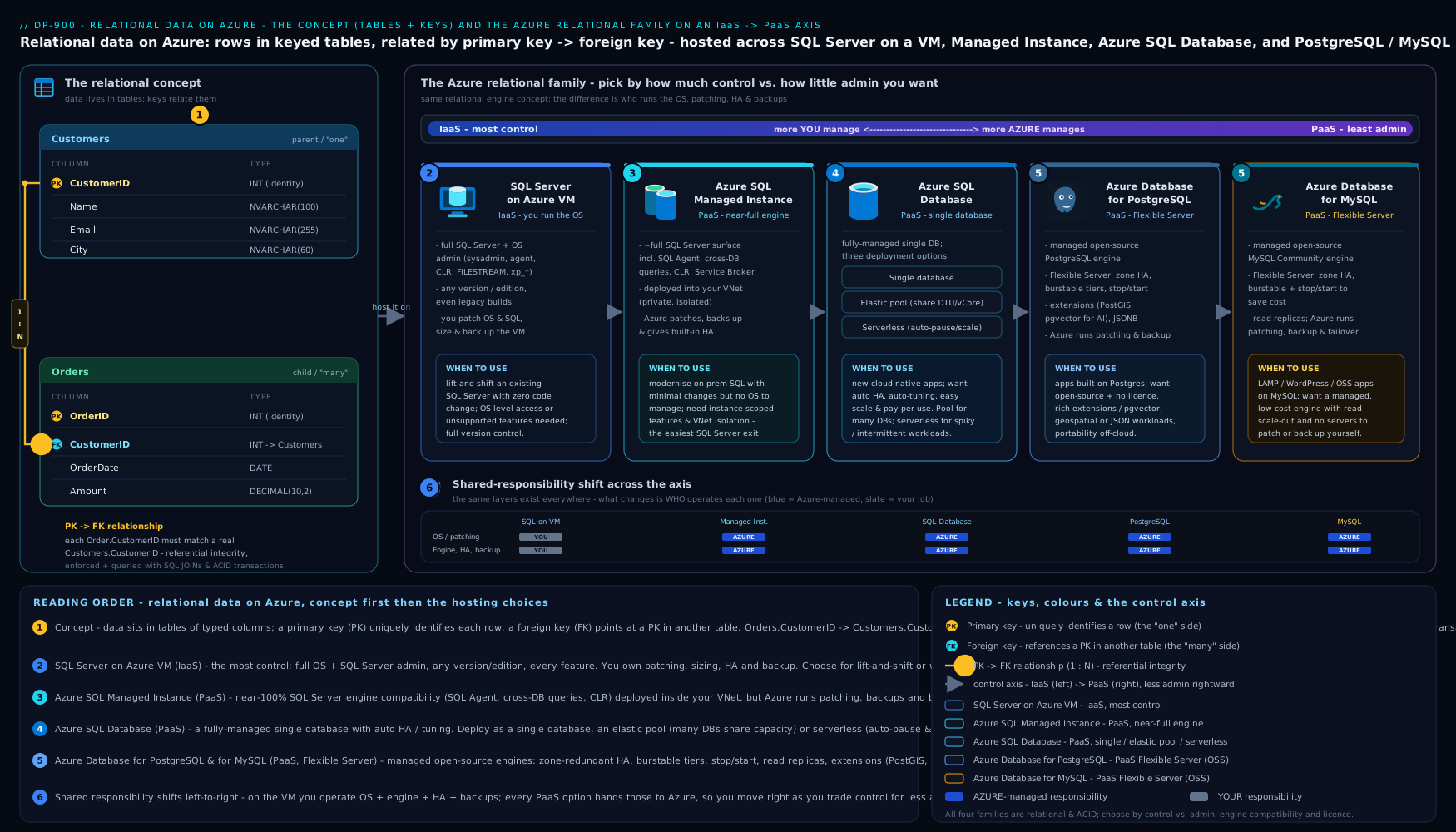
The diagram lays the family on the IaaS-to-PaaS spectrum, shows the three Azure SQL Database deployment options branching off the flagship, and maps each engine to the kind of workload it best serves — read it top to bottom as “how much does Microsoft manage for me?”.
When to use which — the decision
Cut through the options with a single question first — which engine does my application speak? — then choose the deployment style by how much you want to manage and how predictable the load is.
| If you need… | Choose | Why |
|---|---|---|
| A new cloud app on the SQL Server engine, least to manage | Azure SQL Database (single) | Fully managed, modern default for greenfield SQL |
| Many small SaaS-tenant databases with spiky, varied usage | Azure SQL Database (elastic pool) | Shared budget across databases is far cheaper |
| An app used intermittently / dev-test, pay only when active | Azure SQL Database (serverless) | Auto-pause stops compute billing when idle |
| To migrate an on-prem SQL Server to PaaS with minimal change | SQL Managed Instance | Near-full instance compatibility, VNet-native |
| OS access, a specific SQL version, or co-located software | SQL Server on Azure VM | Full control, 100% feature parity (IaaS) |
| A managed home for a PostgreSQL or MySQL app | Azure DB for PostgreSQL / MySQL (Flexible Server) | Managed open-source engine, no rewrite |
Two tie-breakers worth memorising for the exam and for life: single database for one app, elastic pool for many; Managed Instance when “Azure SQL Database” is missing an instance-level feature; and a VM only when you truly need the OS.
Going deeper
The lesson so far gives you everything DP-900 asks for. This section is for the reader who wants the mechanics underneath — the taxonomy the portal actually exposes, how indexes and transactions really behave, and the security and scaling knobs a working engineer is expected to reason about. Nothing here is required to pass the exam; all of it makes you better at the job the exam is a proxy for.
The four independent axes of Azure SQL Database
The core lesson called single database, elastic pool, and serverless the three “deployment options”, which is the friendly simplification the exam uses. The reality the portal shows you is four independent choices, and separating them clears up most of the confusion beginners have when the Create blade throws a dozen dropdowns at them:
| Axis | The choice you make | Options |
|---|---|---|
| Deployment option | Is this one database on its own, or many sharing a budget? | Single database or Elastic pool |
| Purchasing model | How is capacity sold and billed? | DTU (bundled) or vCore (cores + memory chosen separately; the modern default) |
| Service tier | What storage architecture and resilience? | General Purpose, Business Critical, or Hyperscale (vCore only) |
| Compute tier | Fixed capacity, or auto-scaling? | Provisioned (always on) or Serverless (auto-scales, auto-pauses, billed per second) |
Read left to right, a real database is a combination: “a single database on the vCore model, General Purpose tier, Serverless compute” is exactly what the hands-on lab provisions. Serverless is therefore not a fourth sibling of “single” and “elastic pool” — it is a compute choice you layer on top. Keeping the axes separate is what lets you say sentences like “elastic pool + Business Critical” and have them mean something.
Hyperscale — the tier the intro skipped
The three tiers deserve a closer look, because Microsoft’s own guidance has shifted. General Purpose separates compute from remote storage (budget-friendly, ~5–10 ms storage latency). Business Critical co-locates data on local SSD across a four-node Always On cluster for 1–2 ms latency and a free readable replica. Hyperscale is the newest and now, per Microsoft Learn, the recommended default service tier for new and modernising OLTP/HTAP workloads — a cloud-native architecture that decouples compute, log, and page storage:
| Trait | General Purpose | Business Critical | Hyperscale |
|---|---|---|---|
| Max database size | 4 TB | 4 TB | 128 TB |
| Storage model | Remote (Azure storage) | Local SSD (per replica) | Decoupled pages + local SSD cache |
| Read scale-out replicas | None | 1 (free) | Up to 4 (named replicas) |
| HA secondary replicas | 0 | 3 (fixed) | 0–4 (you choose, to control cost) |
| Backups / restore | Snapshot-based | Snapshot-based | Near-instant, storage-snapshot based, size-independent |
| Serverless compute | Yes | No | Yes |
Hyperscale’s headline trick is that backup and restore are almost independent of database size — restoring a 50 TB database takes minutes, not hours, because it snapshots storage rather than copying files. It also scales compute in seconds because new nodes attach to shared page storage instead of hydrating a local copy. If you want the full treatment — Hyperscale internals, elastic pools on Hyperscale, plus Ledger and Always Encrypted — see Azure SQL Database: Hyperscale, Elastic Pools, Ledger & Always Encrypted.
Normalisation past the intuition — the normal forms
The core lesson gave you the intuition (store each fact once). The formal ladder, in one breath each, is worth recognising even though DP-900 will not grill you on it:
- First normal form (1NF): every cell holds a single value — no comma-separated lists, no repeating “Phone1, Phone2, Phone3” columns.
- Second normal form (2NF): every non-key column depends on the whole primary key, not just part of a composite key. (Only relevant when the PK is more than one column.)
- Third normal form (3NF): non-key columns depend on the key and nothing but the key — no column that is really a fact about another column (store a city’s postal code once, in a
Citiestable, not on every customer).
Most transactional schemas aim for 3NF and stop. The opposite move, denormalisation — deliberately duplicating data to avoid joins — belongs to analytics and reporting, where reads dominate and the data is loaded in controlled batches; that is the next lesson’s territory.
How an index actually finds a row
An index is almost always a B-tree: a shallow, sorted tree where each step down eliminates most of the remaining rows, so even a billion-row table is three or four hops from any value. That is why an indexed lookup is milliseconds and a table scan is seconds. Two refinements that separate a beginner from an intermediate:
- A clustered index is the table — the rows are physically stored in its key order (so one per table). A non-clustered index is a separate sorted copy of a few columns with a pointer back to the row; you can have many. A query that needs a column not in the non-clustered index must do a key lookup back to the base table for each row.
- A covering index (via
INCLUDEd columns) stores everything a specific query needs, so the engine answers it from the index alone and never touches the table — the single biggest hand-tuning lever for a hot query. The cost, as ever, is that every index must be updated on everyINSERT,UPDATE, andDELETE, so an over-indexed table has slow writes.
ACID, isolation, and a nuance specific to Azure SQL
ACID’s I — Isolation — is governed by the isolation level, which trades consistency against concurrency. On-premises SQL Server defaults to READ COMMITTED using locks, where readers can block writers. Azure SQL Database enables Read Committed Snapshot Isolation (RCSI) by default, so reads see a consistent row-version snapshot and do not block writers — a genuinely different default that surprises people migrating from on-prem. When a transaction must see a frozen view of the whole database, SNAPSHOT isolation gives it one; when absolute serial correctness is required, SERIALIZABLE is the strictest and slowest. The exam only needs “a transaction is all-or-nothing (Atomicity) and survives a crash (Durability)”; the isolation-level dial is what you reach for in production when you see blocking or unexpected reads.
Provisioning, scaling, and security you are expected to know
Four things every Azure relational database shares, and that DP-900 explicitly lists under managing relational data:
- Authentication — prefer Microsoft Entra ID. Entra ID is the current name for what was Azure Active Directory (Azure AD) — you will still meet the old name in docs and blades. Entra authentication centralises identity, supports MFA and Conditional Access, and lets an app connect with a managed identity so there is no password in a connection string at all. SQL logins (username + password) still exist and back the lab, but Entra is the production default.
- Firewall — deny by default. A logical SQL server blocks all traffic until you add rules. There are server-level IP firewall rules (apply to every database on the server) and database-level rules (scoped to one database), plus virtual-network rules and private endpoints for keeping traffic off the public internet entirely. The broad “Allow Azure services and resources to access this server” toggle is convenient for a lab and a mistake in production.
- Encryption — on by default. Transparent Data Encryption (TDE) encrypts data, logs, and backups at rest and is enabled by default on new Azure SQL databases with a service-managed key (bring your own key via Key Vault if compliance requires it). Connections are encrypted in transit with TLS. Always Encrypted goes further, encrypting specific columns so that even a database administrator never sees the plaintext.
- Scaling — change a tier, not a server. You resize by moving between service objectives online, usually with only a brief connection blip; you add read scale-out replicas to offload reporting; and with serverless you set an auto-pause delay so idle compute stops billing. Two caveats worth memorising: after an auto-pause, the first connection pays a resume latency while capacity spins back up, and storage is billed even while compute is paused.
The open-source engines and the Single Server sunset
For PostgreSQL and MySQL, Flexible Server is the current and recommended model, and it is the only one to choose for new work. It gives you zone-redundant HA (a hot standby you can place in the same or a different availability zone), a cheap burstable compute tier for dev/test, user-controlled stop/start to save cost, and custom maintenance windows.
A currency update the core lesson hints at but predates: the older Single Server model has now fully retired — Azure Database for PostgreSQL Single Server on 28 March 2025 and Azure Database for MySQL Single Server in 2024 — and Azure Database for MariaDB retired on 19 September 2025. So where older material (or the earlier paragraph) says Single Server “is retiring”, read it as already retired: Flexible Server is not merely preferred, it is the only supported choice going forward.
The DP-900 exam framing — and the exam’s status
On the exam, relational content sits in the “Describe how to work with relational data on Azure” domain, one of four skill areas and worth roughly 20–25% of your score. Questions are conceptual and scenario-based, never hands-on T-SQL authoring: expect “which service for this scenario”, “match the SQL statement to its family”, “which deployment option auto-pauses”, and “who patches the OS under IaaS versus PaaS”. Anchor on the decision table and the IaaS-to-PaaS ladder and you have the domain.
Status check (verified August 2026): DP-900 (Microsoft Azure Data Fundamentals) is active, with no retirement announced — it remains the entry point to the Azure data path. For context, the neighbouring data engineering exam DP-203 was retired on 31 March 2025 and its role now maps to DP-700 (Fabric Data Engineer Associate); the DBA path continues under DP-300. Always confirm the live objective-domain weights on the official Microsoft Learn DP-900 page before an exam sitting, as Microsoft revises “skills measured” periodically without changing the exam code.
Hands-on lab: provision and connect to Azure SQL Database
This lab uses Azure Cloud Shell (the browser terminal at https://shell.azure.com — no local install) or any machine with az signed in via az login. You will create a logical SQL server and a small serverless database, open the firewall, run a query, and clean up.
Step 1 — Set variables and create a resource group. Pick a region near you:
LOCATION=centralindia
RG=rg-sql-lab
SERVER=sqlsrv-dp900-$RANDOM        # must be globally unique
ADMIN=sqladmin
PASSWORD='P@ssw0rd-Change-Me-123'  # use a strong, unique value
az group create --name $RG --location $LOCATION --output table
Step 2 — Create the logical SQL server (the management endpoint that databases live under):
az sql server create \
  --name $SERVER \
  --resource-group $RG \
  --location $LOCATION \
  --admin-user $ADMIN \
  --admin-password "$PASSWORD" \
  --output table
Step 3 — Create a small serverless database in the General Purpose tier (cheap; auto-pauses when idle):
az sql db create \
  --resource-group $RG \
  --server $SERVER \
  --name salesdb \
  --edition GeneralPurpose \
  --compute-model Serverless \
  --family Gen5 \
  --capacity 1 \
  --auto-pause-delay 60 \
  --backup-storage-redundancy Local \
  --output table
Step 4 — Open the firewall to your client. By default the server blocks everything; add a rule for your current IP (Cloud Shell shows it, or use whoami/the portal). For a quick lab you may allow Azure services:
MYIP=$(curl -s ifconfig.me)
az sql server firewall-rule create \
  --resource-group $RG --server $SERVER \
  --name allow-my-ip \
  --start-ip-address $MYIP --end-ip-address $MYIP \
  --output table
Step 5 — Connect and run SQL. Use sqlcmd (preinstalled in Cloud Shell) to create a table, insert a row, and read it back:
sqlcmd -S $SERVER.database.windows.net -d salesdb -U $ADMIN -P "$PASSWORD" -Q "
CREATE TABLE Customers (CustomerID INT PRIMARY KEY, FullName NVARCHAR(100), City NVARCHAR(50));
INSERT INTO Customers VALUES (1, 'Asha Rao', 'Bengaluru');
SELECT * FROM Customers;"
Expected output is a one-row result set showing 1 Asha Rao Bengaluru — proof you have a working managed relational database, queried with the same SQL you learned above.
Validation. Confirm the database exists and note its tier:
az sql db show --resource-group $RG --server $SERVER --name salesdb \
  --query "{Name:name, Edition:edition, Compute:currentServiceObjectiveName}" --output table
Cleanup. Delete the whole resource group so nothing keeps billing:
az group delete --name $RG --yes --no-wait
Cost note (INR). A single serverless General Purpose, 1 vCore database auto-pauses after the idle delay, so an idle lab costs only storage — a few rupees over an evening. Even left running, 1 vCore is on the order of ₹12–15 per hour of active compute plus storage; deleting the resource group immediately after the lab keeps the total to small change. Contrast that with a provisioned Business Critical database or a SQL Server VM, which bill continuously whether you use them or not — always clean up labs.
Common mistakes & troubleshooting
| Symptom | Likely cause | Fix |
|---|---|---|
Cannot connect / login timeout |
Server firewall blocks your IP | Add a firewall rule for your client IP (Step 4) |
Login failed for user |
Wrong admin name/password, or the login lacks rights | Re-check credentials; create a contained DB user for app access |
An UPDATE/DELETE changed far too many rows |
Missing WHERE clause |
Always scope DML; wrap risky changes in a transaction you can ROLLBACK |
| Query is slow on a large table | No index on the searched/joined column | Add a non-clustered index on that column |
| Picked Azure SQL Database, then a feature is missing (SQL Agent, cross-DB) | Single-database limitations | Move up to SQL Managed Instance |
| Surprise bill from a “small” database | Provisioned (not serverless) compute billing 24×7 | Use serverless with auto-pause for intermittent workloads; delete when done |
| Can’t choose the SQL Server version you need | Managed services control the engine version | Use SQL Server on a VM for full version control |
Common beginner mistakes
These are misconceptions rather than error messages — the wrong mental model, why it misleads, and the picture to hold instead. (For symptom-to-fix debugging, see the troubleshooting table above.)
-
“A relational database is basically just a big spreadsheet.” A spreadsheet lets you do anything — mixed types in a column, orphaned references, five copies of one address. A relational database enforces a schema, keys, referential integrity, and ACID transactions, and it stays correct with thousands of users writing at once. Right model: a spreadsheet with rules it will never let you break — that enforcement is the product, not a limitation.
-
“Azure SQL Database and SQL Server on a VM are the same thing in the cloud.” They run the same engine, but the responsibility split is opposite. Right model: Azure SQL Database is PaaS — no OS, no patching, no server to log into; SQL Server on a VM is IaaS — a machine you own and maintain. Choose the VM only when a hard requirement (OS access, a specific engine version, co-located software) forces it.
-
“Serverless is always the cheapest option.” Serverless wins for intermittent workloads because it auto-pauses. For a database under steady, predictable load it is usually more expensive than provisioned, and the first query after an auto-pause pays a resume delay. Right model: serverless for spiky/idle workloads, provisioned for steady ones — and remember storage still bills while compute is paused.
-
“More indexes make the whole database faster.” Indexes speed reads but every one must be updated on every insert, update, and delete, and they consume storage. Over-indexing a write-heavy table slows it down. Right model: index the columns you actually search, join, or sort by — and only those.
-
“An elastic pool is how you scale one big database.” An elastic pool shares a budget across many databases with varying, mostly-idle usage (the classic multi-tenant SaaS shape). It does nothing for a single large database. Right model: single database for one app; elastic pool for a herd of small, spiky ones; scale a big single database by moving to a higher tier such as Hyperscale.
-
“I’ll just turn on ‘Allow Azure services’ or open the firewall to be safe.” That toggle exposes your server far more widely than you intend and is a classic production security hole. Right model: deny by default and add only the specific client IPs, VNet rules, or a private endpoint you need — and prefer Microsoft Entra ID authentication over long-lived SQL passwords.
-
“Normalise everything, always.” Full normalisation is right for transactional (OLTP) data, where it prevents contradictory copies. Analytics systems deliberately denormalise for read speed. Right model: normalise to about third normal form for OLTP; denormalise on purpose, in the reporting layer, when reads dominate.
Best practices
- Default to PaaS. Reach for Azure SQL Database (or the PostgreSQL/MySQL Flexible Server) first; only choose a VM when a hard requirement forces IaaS.
- Match the deployment to the load: single database for one app, elastic pool for many spiky databases, serverless for intermittent ones.
- Normalise for transactional data to avoid duplicated, contradictory facts; index the columns you search, join, and sort by — and only those.
- Always scope
UPDATE/DELETEwithWHERE, and use transactions for multi-statement changes that must succeed or fail together. - Right-size, then scale on demand — start small; PaaS lets you change tiers later without rebuilding.
- Use views to hide complexity and limit which columns users see.
Security notes
- Lock the firewall down. A logical SQL server denies all traffic by default; add only the specific client IPs or VNet rules you need — never leave it open to the internet, and avoid the broad “allow Azure services” toggle in production.
- Prefer Microsoft Entra ID authentication over SQL logins where possible, so identities and MFA are centrally managed; keep the SQL admin password strong and out of source control.
- Encryption is on by default: Transparent Data Encryption protects data at rest, and connections are encrypted in transit (TLS). Use private endpoints to keep traffic off the public internet for sensitive systems.
- Grant least privilege with DCL (
GRANT/DENY) and roles — application accounts should never log in as the server admin. - Don’t disable automated backups; PaaS gives you point-in-time restore for free, which is a security and recovery control.
Practice challenges
Six DP-900-style questions, roughly ordered easy to hard. Decide your answer before opening the solution — each explains not just the right choice but why the tempting wrong ones are wrong.
1. (Warm-up) Keys. In an Orders table, the column CustomerID stores the ID of the customer who placed each order and points back to the Customers table. In the Orders table, CustomerID is a:
- A. Primary key
- B. Foreign key
- C. Clustered index
- D. Composite key
<details><summary>Show answer</summary>
B — Foreign key. It references the primary key of another table (Customers.CustomerID), which is the definition of a foreign key. The primary key of Orders would be something like OrderID. A foreign key is what creates the relationship and enforces referential integrity.
</details>
2. Classify the statement. A developer runs GRANT SELECT ON Sales TO reporting_role;. Which SQL family is this?
- A. DDL
- B. DML
- C. DCL
- D. TCL
<details><summary>Show answer</summary>
C — DCL (Data Control Language). GRANT, REVOKE, and DENY manage permissions — who may do what. DDL (CREATE/ALTER/DROP) shapes structure, DML (SELECT/INSERT/UPDATE/DELETE) moves data, and TCL (COMMIT/ROLLBACK) groups changes into transactions.
</details>
3. Choose the deployment. A line-of-business app is used only during office hours and sits completely idle every night and weekend. The team wants to stop paying for compute when nobody is using it. Which Azure SQL Database choice fits best?
- A. Provisioned Business Critical
- B. Elastic pool
- C. Serverless compute (General Purpose)
- D. SQL Server on an Azure VM
<details><summary>Show answer</summary>
C — Serverless compute. Serverless auto-scales with demand and auto-pauses when idle, billing compute per second, so the nightly and weekend idle time costs only storage. An elastic pool (B) shares a budget across many databases — wrong shape for one app. Provisioned (A) bills 24×7 whether used or not. A VM (D) is IaaS you must manage and also bills continuously. </details>
4. Who patches what? Your company runs SQL Server on an Azure Virtual Machine (IaaS). A critical operating-system security patch is released. Whose responsibility is it to apply it?
- A. Microsoft applies it automatically
- B. You (the customer)
- C. No patch is ever needed on Azure
- D. The database engine patches the OS itself
<details><summary>Show answer</summary>
B — You. With IaaS you own the OS and the database engine: OS patching, SQL patching, HA configuration, and backups are all yours. That is precisely the burden PaaS (Azure SQL Database, Managed Instance, Flexible Server) removes — under PaaS, Microsoft patches the OS and engine and you manage only data, schema, and access. </details>
5. Pick the service. You must migrate an on-premises SQL Server to Azure PaaS. The application depends on SQL Server Agent jobs, cross-database queries, and linked servers, and you want to change as little code as possible. Which service?
- A. Azure SQL Database (single database)
- B. Azure SQL Managed Instance
- C. Azure Database for PostgreSQL Flexible Server
- D. Azure SQL Database (elastic pool)
<details><summary>Show answer</summary>
B — Azure SQL Managed Instance. It exposes a near-complete SQL Server instance, so instance-scoped features (SQL Agent, cross-database queries, CLR, linked servers) that a single Azure SQL Database lacks are available — the easiest PaaS landing spot for a lift-and-shift. Options A and D are single-database abstractions missing those features; C is a different engine entirely and would require a rewrite. </details>
6. (Advanced) Currency and scale. A greenfield OLTP application expects unpredictable, possibly very large growth (tens of TB), needs near-instant restores, and wants to add read replicas for reporting later. On the current Azure SQL Database, which service tier is Microsoft’s recommended default for this profile, and which older open-source deployment model should you avoid choosing for a new PostgreSQL sibling database?
- A. General Purpose; avoid Flexible Server
- B. Business Critical; avoid Hyperscale
- C. Hyperscale; avoid Single Server (retired)
- D. Basic (DTU); avoid Elastic pool
<details><summary>Show answer</summary>
C — Hyperscale, and avoid Single Server. Hyperscale is now the recommended/default tier for new and modernising OLTP/HTAP workloads: up to 128 TB, size-independent near-instant backup/restore, and up to four read scale-out replicas. For the PostgreSQL sibling, choose Flexible Server — the older Single Server model has been retired (PostgreSQL on 28 March 2025, MySQL in 2024), so it is never the right choice for new work. </details>
Interview & exam questions
- What is the difference between a primary key and a foreign key? A primary key uniquely identifies each row within its own table (unique, never null); a foreign key in one table references a primary key in another, creating the relationship and enforcing referential integrity.
- What is normalisation and why do it? Organising columns into tables so each fact is stored once, eliminating redundancy and the update anomalies that follow. The trade-off is more joins at query time.
- What does an index do, and why not index every column? It lets the engine find rows without a full table scan. Indexes cost storage and slow writes (they update on every insert/update/delete), so you index only frequently searched/joined/sorted columns.
- Classify these:
CREATE TABLE,SELECT,GRANT,COMMIT. DDL, DML, DCL, TCL respectively. - What is the practical difference between IaaS and PaaS for databases? With IaaS (SQL on a VM) you manage the OS, engine patching, HA, and backups; with PaaS (Azure SQL Database et al.) Microsoft manages all of that and you manage only data, schema, and access.
- When would you choose SQL Managed Instance over Azure SQL Database? When you need instance-level SQL Server features (cross-database queries, SQL Agent, CLR, linked servers) or are lifting an on-prem instance into PaaS with minimal change.
- What are the three deployment options of Azure SQL Database, and when is each used? Single database (one app), elastic pool (many spiky databases sharing a budget), and serverless (intermittent workloads, auto-pause to save compute cost).
- DTU versus vCore purchasing — what’s the difference? DTU bundles compute/memory/I/O into one simple unit across Basic/Standard/Premium; vCore lets you choose cores and memory directly for transparency and is the modern default.
- Which Azure service runs open-source relational engines, and in what model? Azure Database for PostgreSQL and MySQL, recommended as Flexible Server (configurable, zone-redundant HA, stop/start).
- When must you use SQL Server on a VM rather than a managed option? When you need OS-level access, a specific/older SQL Server version, or third-party software co-located on the database server.
- What does ACID guarantee, and why does it matter? Atomicity, Consistency, Isolation, Durability — the transactional guarantees that make a multi-step change (like a bank transfer) all-or-nothing and durable, which is why relational databases run financial systems.
- What is a view and why use one? A stored
SELECTthat behaves like a table but holds no data; it hides query complexity, restricts exposed columns for security, and presents a stable shape over changing tables.
Quick check
- In
Orders.CustomerIDreferencingCustomers.CustomerID, which is the foreign key? - To which SQL family does
DELETEbelong? - Which Azure SQL Database deployment option pauses compute when idle?
- True or false: SQL Server on an Azure VM is a PaaS offering.
- Which managed service gives you near-full SQL Server instance compatibility for a lift-and-shift?
Answers
Orders.CustomerID— the foreign key (it points to the primary key inCustomers).- DML (Data Manipulation Language).
- Serverless.
- False — it is IaaS (you manage the OS and engine).
- Azure SQL Managed Instance.
Exercise
Design a tiny normalised schema for a bookshop: tables for Authors, Books, and Orders, with appropriate primary and foreign keys and a junction table for the many-to-many relationship between orders and books. Then, in your lab database, write the CREATE TABLE statements (DDL), INSERT a couple of rows into each (DML), and finally write a SELECT with a JOIN that lists each order with the book titles it contains. Note which statements are DDL and which are DML. For bonus depth, decide which Azure relational service you would host it on if it were (a) a hobby project, (b) a multi-tenant SaaS with hundreds of shops, and © a migration of an existing on-prem SQL Server bookshop — and justify each in one sentence using the comparison table.
Certification mapping
This lesson maps to the DP-900: Microsoft Azure Data Fundamentals certification, specifically the “Describe how to work with relational data on Azure” domain: relational concepts and structures, common SQL statements, and identifying the relational Azure data services and when to use each. The IaaS-versus-PaaS reasoning also underpins AZ-900 and is foundational for the data-engineering path toward DP-300 (Azure Database Administrator).
Glossary
- Relational database — data stored in tables of rows and columns that relate to one another via keys.
- Primary key (PK) — a column (or columns) that uniquely identifies each row.
- Foreign key (FK) — a column referencing a primary key in another table, forming a relationship.
- Normalisation — organising tables so each fact is stored once, removing redundancy.
- Index — a sorted structure that speeds up finding rows without scanning the whole table.
- View — a stored query that behaves like a read-only table but holds no data.
- SQL — Structured Query Language; the language for relational databases.
- DDL / DML / DCL / TCL — the Definition, Manipulation, Control, and Transaction families of SQL.
- ACID — Atomicity, Consistency, Isolation, Durability: the transactional guarantees of relational engines.
- IaaS / PaaS — Infrastructure / Platform as a Service: how much of the stack the provider manages.
- Azure SQL Database — fully managed PaaS database on the SQL Server engine (single / elastic pool / serverless).
- Elastic pool — a shared resource budget across many Azure SQL databases.
- Serverless (Azure SQL) — auto-scaling compute that pauses when idle and bills per second.
- SQL Managed Instance — PaaS offering a near-complete SQL Server instance in your VNet.
- Flexible Server — the recommended deployment model for Azure Database for PostgreSQL and MySQL.
- Referential integrity — the guarantee that a foreign key can only point at a row that exists, so relationships never break.
- JOIN — a SQL operation that stitches related tables back together on their keys, turning a normalised design into usable results.
- Transaction — a group of statements that all succeed or all fail together (
BEGIN/COMMIT/ROLLBACK); the unit ACID protects. - Isolation level — the dial that trades consistency against concurrency; Azure SQL Database defaults to Read Committed Snapshot (RCSI), where reads don’t block writers.
- Clustered vs non-clustered index — a clustered index physically orders the table’s rows by its key (one per table); a non-clustered index is a separate sorted lookup pointing back to the rows (many allowed).
- Covering index — a non-clustered index that includes every column a query needs, so the query is answered from the index without touching the table.
- Schema — the defined structure (tables, columns, types, keys) that a relational database enforces before any data is inserted.
- Stored procedure / trigger — a saved, reusable block of SQL logic; a trigger is such logic that runs automatically in response to a data change.
- DTU vs vCore — the two purchasing models: DTU bundles compute, memory, and I/O into one blended unit; vCore lets you choose cores and memory directly (the modern default).
- Service tier (General Purpose / Business Critical / Hyperscale) — the vCore storage-and-resilience class; Hyperscale (up to 128 TB, near-instant restore) is the recommended default for new OLTP/HTAP workloads.
- Provisioned vs serverless compute — provisioned is fixed capacity billed continuously; serverless auto-scales, auto-pauses when idle, and bills compute per second.
- Microsoft Entra ID — the current name for Azure Active Directory (Azure AD); the preferred identity provider for authenticating to Azure databases, enabling MFA and managed identities.
- Transparent Data Encryption (TDE) — encryption of data, logs, and backups at rest, enabled by default on new Azure SQL databases.
- Private endpoint — a private IP inside your virtual network that keeps database traffic off the public internet.
Next steps
You now understand relational data end to end and the full Azure relational family. The other half of the data world is non-relational stores and the analytics pipeline that turns raw data into insight. Continue with DP-900: Non-Relational Data & Analytics on Azure, which covers Azure Cosmos DB, Azure Storage, data lakes, and the modern analytics stack (Synapse, Microsoft Fabric, Power BI). Together these two lessons complete the data-services picture the DP-900 exam expects.