In a nutshell
A container image is a sealed box that holds your application and the exact slice of an operating system it needs to run — nothing more. You build that box once, and it runs the same way on your laptop, in a test cluster, and in production. Building it well is the single most foundational skill in DevOps, because almost every pipeline ends by producing an image and shipping it somewhere.
Think of an image like a flat-pack shipping container for software. A shipping container has a fixed, standard shape, so any crane, truck, or ship can move it without caring what’s inside — that standard is why global trade scales. A software image works the same way: because every image has the same standard format (defined by the OCI, the Open Container Initiative), any registry can store it, any cluster can run it, and any scanner can inspect it. You pack the box using a recipe called a Dockerfile, label it with a tag (like 1.4.2), and give it a tamper-proof serial number called a digest (a sha256: hash of its exact contents). Ship the box, and “works on my machine” stops being a sentence anyone says — because the machine is now the box.
The craft is in packing that box fast, small, and safe: reuse work you have already done (the build cache), throw away the tools you only needed while packing (multi-stage builds), do not run as the all-powerful root user, and check the box for known-bad parts before it ships (scanning plus an SBOM, the box’s packing list). Get those right and your pipeline is quick, your images are tiny and hard to attack, and every deployment is traceable back to the exact commit that produced it.
Level: Foundation · Junior · Time: ~50 min · You’ll need: a Linux shell and (for the lab) free Docker Hub + GitHub accounts.
Almost every pipeline you will ever build ends by producing a container image and pushing it somewhere. The image is the unit of delivery in modern DevOps: a single, immutable, content-addressed bundle of your application plus exactly the filesystem it needs to run, that you build once in CI and then run unchanged on a developer laptop, a staging cluster and production. “Works on my machine” stops being a sentence anyone says, because the machine is the artifact. Kubernetes runs images. Cloud Run, ECS, App Service, Container Apps and Nomad run images. Your GitHub Actions runner builds them. If you understand how an image is built, tagged, scanned and shipped, you understand the spine of cloud-native delivery.
This is not a full Docker course — we are not going to dwell on docker run flags, networking modes, volumes for stateful workloads, or Compose for local development, all of which deserve their own treatment. This lesson is laser-focused on the slice a DevOps engineer lives in: building and shipping images in a pipeline. By the end you will be able to read and write a production-grade Dockerfile instruction by instruction; explain exactly how layers and the build cache decide whether your CI build takes ten seconds or ten minutes; cut image size and attack surface with multi-stage builds; reason precisely about tags versus digests and why latest is a trap in CI; log in and push to any of the major registries; scan an image for vulnerabilities and emit an SBOM; harden it to run as a non-root user on a minimal or distroless base; build multi-architecture images with BuildKit/buildx; and wire the whole thing into a real GitHub Actions workflow. Throughout, the lens is the same: what makes an image good to build and ship in CI — fast, small, reproducible, secure and traceable.
Learning objectives
After working through this lesson you will be able to:
- Explain the difference between an image and a container, and how an image relates to its layers, its manifest and its digest.
- Write a correct
Dockerfileusing every instruction (FROM,RUN,COPY/ADD,WORKDIR,ENV/ARG,EXPOSE,CMDvsENTRYPOINT,USER,HEALTHCHECK,VOLUME,LABEL,STOPSIGNAL,SHELL,ONBUILD) and say what each is for and its gotcha. - Order instructions for maximum build-cache reuse, and use a
.dockerignoreto keep the build context small. - Use multi-stage builds to separate build-time tooling from a tiny runtime image.
- Reason about tags vs immutable digests, avoid the
latesttrap, and adopt a sane tagging scheme for CI. - Authenticate to and push/pull from Docker Hub, GHCR, Amazon ECR, Azure ACR and Google Artifact Registry, including non-interactive login in a pipeline.
- Scan an image with Trivy and generate a software bill of materials (SBOM), and fail a build on critical findings.
- Harden images: non-root user, minimal/distroless bases, pinned and small.
- Build multi-architecture images with BuildKit and
docker buildx, using a registry build cache. - Assemble a complete build → scan → push job in GitHub Actions.
Prerequisites
You need very little. Comfort with a Linux shell — cd, ls, environment variables, exit codes — and the general idea that an application has to be built and then run, is enough. No prior Docker experience is assumed; every term is defined as it appears. A free Docker Hub and GitHub account will let you complete the lab end to end, and Docker Desktop (or the Docker Engine on Linux, which ships BuildKit as the default builder from version 23 onward) gives you everything you need locally. This lesson sits in the Foundation tier of the DevOps Zero-to-Hero ladder, immediately after the CI/CD anatomy and GitHub Actions lessons, because the image is what those pipelines produce. It is also the on-ramp to the deeper supply-chain material later in the track. If you have read the Kubernetes course, this is the lesson that explains where the thing K8s schedules actually comes from.
Core concepts: images, containers, layers and digests
Get four words straight and most confusion evaporates.
An image is a read-only template: a packaged filesystem plus metadata (the default command, environment variables, exposed ports, the user to run as). It is built once and never changes. A container is a running (or stopped) instance of an image — the image plus a thin writable layer on top, a process tree and some isolation (namespaces and cgroups on Linux). One image, many containers. The relationship is exactly class to object, or executable on disk to running process. You build images; you run containers.
An image is not a single blob. It is a stack of layers. Each layer is a tarball of filesystem changes (files added, modified or deleted) produced by one build step, and layers are stacked with a union/overlay filesystem so the running container sees them merged into one tree. Layers are content-addressed — identified by the SHA-256 hash of their contents — which means an identical layer is stored and transferred once and shared across every image that uses it. That sharing is why pulling your tenth Node.js image is fast: the base layers are already on disk.
Tying the layers together is the image manifest: a small JSON document that lists the layer digests and points to the image config (the metadata: env, entrypoint, working dir, exposed ports, the user). The SHA-256 hash of that manifest is the image’s digest — written sha256:abc123…. The digest is the image’s true, immutable identity: the same digest is the same bytes, everywhere, forever. A tag (like 1.4.2 or latest) is just a human-friendly, movable label that points at a digest today and can be repointed tomorrow. Hold that distinction; we will return to it when we discuss shipping.
Two more terms you will meet constantly. A registry is the server that stores and serves images (Docker Hub, GHCR, ECR, ACR, Artifact Registry). A repository is a named collection of images inside a registry — for example ghcr.io/acme/api — and within a repository, tags and digests distinguish individual images. A full image reference is therefore [registry/]repository[:tag][@digest], e.g. ghcr.io/acme/api:1.4.2@sha256:abc…. When you omit the registry, Docker assumes Docker Hub; when you omit the tag, it assumes :latest.
Finally, modern registries store a manifest list (a “fat” or multi-arch manifest, also called an OCI image index) when an image supports more than one CPU architecture. A pull of :1.4.2 on an Arm laptop and the same pull on an x86 server resolve, via that index, to the right per-architecture image automatically. We will build one of those in the BuildKit section.
Standards note. “Docker image” is shorthand. The on-disk and on-registry formats are governed by the Open Container Initiative (OCI) — the image spec, runtime spec and distribution spec. Docker, Podman, BuildKit, containerd, Kaniko and every cloud registry speak OCI, which is why an image built by one tool runs under another. Treat “Docker image” and “OCI image” as synonyms in practice.
The Dockerfile: every instruction
A Dockerfile is a text file of instructions that the builder executes top to bottom to assemble an image. Each instruction that changes the filesystem produces a layer. The first non-comment instruction (after any global ARGs) must be FROM. The table below is the complete instruction set you will use to build images for CI — what each does, its key options, and the gotcha that bites people.
| Instruction | What it does | Key forms / options | Gotcha to remember |
|---|---|---|---|
FROM |
Sets the base image and starts a build stage. | FROM image:tag, FROM image@sha256:…, FROM … AS build (names a stage), FROM scratch (empty base). |
Pin the base (tag and ideally digest). scratch has no shell, no libc — only for static binaries. Multiple FROMs = multi-stage. |
RUN |
Executes a command at build time, in a new layer. | Shell form RUN apt-get update (runs via /bin/sh -c); exec form RUN ["executable","arg"] (no shell). BuildKit adds RUN --mount=type=cache,... and --mount=type=secret,.... |
Each RUN is a layer — chain related commands with && and clean up in the same RUN. RUN is build-time only; it never runs when the container starts. |
COPY |
Copies files/dirs from the build context (or another stage) into the image. | COPY src dest, COPY --chown=uid:gid, COPY --chmod=, COPY --from=build /app /app (from a stage or external image). |
Paths are relative to the build context, not your shell’s cwd. Prefer COPY over ADD for plain files. |
ADD |
Like COPY but with two extras: it can fetch a URL and it auto-extracts local tar archives. |
ADD file.tar.gz /opt/ (extracts), ADD https://… /tmp/ (downloads). |
The magic is surprising and rarely wanted. Use COPY unless you specifically need tar auto-extraction. For URLs, prefer curl/wget in a RUN so you control caching and checksums. |
WORKDIR |
Sets the working directory for subsequent RUN/CMD/ENTRYPOINT/COPY and the container’s start dir. |
WORKDIR /app (creates it if absent). |
Always set it instead of RUN cd … — cd in a RUN doesn’t persist to the next instruction. Relative WORKDIR stacks on the previous one. |
ENV |
Sets an environment variable persisted into the image and available at run time. | ENV KEY=value, multiple per line. |
Persists into the final image and shows in docker inspect — never put secrets here. An ENV invalidates the cache for steps that follow. |
ARG |
Defines a build-time variable, optionally with a default; set with --build-arg. |
ARG VERSION=1.0; a bare ARG before FROM parameterises the base image tag. |
Build-time only — not present at run time (unless re-exposed via ENV). Visible in image history, so not for secrets — use BuildKit --mount=type=secret instead. |
EXPOSE |
Documents which port(s) the container listens on. | EXPOSE 8080, EXPOSE 8080/udp. |
Purely informational/metadata — it does not publish the port. You still need -p/--publish (or a K8s Service) to reach it. |
CMD |
Sets the default command/args run when the container starts. | Exec form CMD ["node","server.js"] (preferred); shell form CMD node server.js; as default args to an ENTRYPOINT. |
Only the last CMD wins. It is the default and is overridden by any command you pass to docker run. Use exec form so signals reach your process. |
ENTRYPOINT |
Sets the executable that always runs; the container behaves like that program. | Exec form ENTRYPOINT ["app"] (preferred); shell form. |
Not overridden by docker run args (those become args to it); to override the entrypoint itself you need --entrypoint. ENTRYPOINT + CMD = fixed binary + default args. |
USER |
Sets the UID/GID (or name) for subsequent RUN and at run time. |
USER 10001, USER appuser:appgroup. |
Default is root (UID 0) — a security smell. Create and switch to a non-root user. Use a numeric UID so Kubernetes runAsNonRoot can verify it. |
HEALTHCHECK |
Defines how the runtime tests the container is healthy. | `HEALTHCHECK --interval=30s --timeout=3s --retries=3 --start-period=10s CMD curl -f http://localhost:8080/healthz | |
VOLUME |
Declares a path as an external mount point for persistent/ephemeral data. | VOLUME /data, VOLUME ["/var/lib/db"]. |
Anything written there at build time after the VOLUME line is discarded. Rarely needed in CI-built app images; orchestrators define volumes themselves. |
LABEL |
Attaches metadata key/value pairs to the image. | LABEL org.opencontainers.image.source="https://github.com/acme/api". |
Use the standard OCI annotation keys (org.opencontainers.image.*) — GHCR, for instance, links an image to its repo via image.source. Cheap and worth automating in CI. |
STOPSIGNAL |
Sets the signal sent to PID 1 to stop the container. | STOPSIGNAL SIGTERM (default), STOPSIGNAL SIGQUIT. |
Only matters if your app needs a non-default signal for graceful shutdown; pair with handling signals in your process. |
SHELL |
Changes the shell used by shell-form RUN/CMD/ENTRYPOINT. |
SHELL ["powershell","-Command"] (common on Windows images), SHELL ["/bin/bash","-c"]. |
Affects only shell form, not exec form. Mostly relevant for Windows images or when you need bash-specific features in RUN. |
ONBUILD |
Registers an instruction that runs later, when this image is used as a base. | ONBUILD COPY . /app. |
A “trigger” baked into a base image. Surprising and largely discouraged — avoid in application Dockerfiles; you will mostly only ever encounter it. |
A few cross-cutting rules tie the table together:
- Comments start with
#; lines starting with# syntax=or# escape=at the very top are parser directives (the# syntax=docker/dockerfile:1line opts you into the latest BuildKit frontend features and is worth adding). - Shell form vs exec form is the single most common source of bugs. Exec form (
["a","b"]) is a JSON array, runs your binary directly as PID 1, and lets signals (SIGTERM ondocker stop, on a Kubernetes pod deletion) reach your process for graceful shutdown. Shell form wraps the command in/bin/sh -c, which becomes PID 1 and may swallow signals, leading to 10-second kill delays. Prefer exec form forCMDandENTRYPOINT. CMDvsENTRYPOINT, restated because interviewers ask:ENTRYPOINTis what the container is (the program it runs, hard to override);CMDis the default arguments (easy to override). The idiomatic combo isENTRYPOINT ["myapp"]+CMD ["--help"], sodocker run imgrunsmyapp --helpbutdocker run img --port 9090runsmyapp --port 9090.
Layers and the build cache: ordering for speed
This is the section that decides whether your pipeline is fast. The builder treats each instruction as a cache key. Before executing an instruction, it asks: “have I built this exact instruction on top of this exact parent layer before?” If yes, it reuses the cached layer and moves on; if no, it executes the instruction and busts the cache for every instruction after it. The cache is therefore positional: a change near the top of the Dockerfile invalidates everything below.
The practical consequence is one rule that, once internalised, you will apply forever: order instructions from least- to most-frequently-changing. Put the things that rarely change (base image, OS packages, language runtime) near the top, and the things that change on every commit (your application source) near the bottom.
The canonical example is dependency installation before source copy. Compare the slow way:
COPY . .              # source changes every commit → busts cache here…
RUN npm install       # …so deps are re-downloaded every single build. Slow.
with the fast way:
COPY package*.json ./   # changes only when deps change
RUN npm ci              # cached as long as the lockfile is unchanged
COPY . .                # source changes here, but deps layer above is reused
Now a one-line code change reuses the (expensive) dependency layer and only re-runs the cheap COPY. The same pattern applies everywhere: pip install -r requirements.txt before COPY . .; go mod download before copying Go source; mvn dependency:go-offline before the Java sources; bundle install before the Rails app.
How the cache decides per instruction:
- For
RUN, the cache key is the instruction text itself (the literal command string), not the result of running it. SoRUN apt-get updatewill happily reuse a stale cache from last week — which is exactly why you should combineapt-get update && apt-get install -y …in oneRUN(so changing the package list re-runs the update too) and append&& rm -rf /var/lib/apt/lists/*in the same layer. - For
COPY/ADD, the cache key includes a checksum of the copied files. Change a copied file and that layer (and everything after) rebuilds. ARGandENVparticipate in the cache: changing a build-arg value invalidates from that point down.
Two more layer facts that matter for CI:
-
You cannot shrink an image by deleting files in a later layer. Each layer only adds a diff; a file added in layer 3 and
rm-ed in layer 5 still ships inside layer 3, just hidden. To actually remove it, delete it in the sameRUNthat created it (e.g. clean the apt cache in the install layer), or use a multi-stage build (next section) so the bloat never reaches the final image. With BuildKit you can also useRUN --mount=type=cache,target=/var/cache/...so package caches speed up builds without ever becoming a layer. -
.dockerignorekeeps the build context small. Before the build starts, the entire build context (everything in the directory you pass todocker build) is sent to the builder. A straynode_modules/,.git/, build output or local.envcan mean gigabytes uploaded and a slow, cache-busting build. A.dockerignore(same glob syntax as.gitignore) excludes them. A sensible default:
.git
node_modules
dist
build
*.log
.env
.env.*
**/__pycache__
*.md
Dockerfile
.dockerignore
Excluding files also tightens security — it stops you accidentally COPY . .-ing a local .env or your .git directory (with its history) into the image.
Multi-stage builds: small, secure images
A naive image built from a full SDK base is enormous and dangerous: it ships compilers, package managers, headers, shells and dev tooling that your running app never uses but an attacker happily would. Multi-stage builds fix this by using several FROM stages in one Dockerfile — a fat build stage that has all the tooling, and a slim runtime stage that COPY --froms in only the built artifact. Everything in the build stage that you don’t explicitly copy forward is discarded.
A Go example (the most dramatic, because a Go binary is self-contained):
# syntax=docker/dockerfile:1

# --- build stage: has the full Go toolchain ---
FROM golang:1.23 AS build
WORKDIR /src
COPY go.mod go.sum ./
RUN go mod download
COPY . .
RUN CGO_ENABLED=0 go build -o /out/app ./cmd/server

# --- runtime stage: a near-empty image ---
FROM gcr.io/distroless/static-debian12:nonroot
COPY --from=build /out/app /app
USER nonroot:nonroot
EXPOSE 8080
ENTRYPOINT ["/app"]
The final image contains only the static binary on a distroless base — a few megabytes, no shell, no package manager, running as non-root. The ~800 MB of Go toolchain in the build stage never ships.
The same pattern for an interpreted language (Node.js) separates dev dependencies and the build toolchain from the runtime:
# syntax=docker/dockerfile:1
FROM node:20-slim AS build
WORKDIR /app
COPY package*.json ./
RUN npm ci                      # includes devDependencies for the build
COPY . .
RUN npm run build               # produces ./dist

FROM node:20-slim AS runtime
WORKDIR /app
ENV NODE_ENV=production
COPY package*.json ./
RUN npm ci --omit=dev && npm cache clean --force   # prod deps only
COPY --from=build /app/dist ./dist
USER node                       # the node image ships a non-root 'node' user
EXPOSE 3000
CMD ["node", "dist/server.js"]
Key multi-stage facilities to know:
COPY --from=<stage>pulls files from an earlier named stage. You can alsoCOPY --from=<image>to copy from an external image (e.g.COPY --from=ghcr.io/acme/certs:latest /certs /certs).- Stages build only if needed. With BuildKit, stages not in the dependency graph of your target are skipped.
docker build --target build .lets you stop at an intermediate stage — handy for a test stage you run in CI but never ship. - A common three-stage CI pattern: a
depsstage (cached dependencies), ateststage (--target testruns the suite), and aruntimestage (what you push). Same Dockerfile, different targets per pipeline step.
The payoff is across the board: images go from hundreds of megabytes to single digits, pulls and cold starts get faster, the attack surface shrinks (no shell for an attacker to drop into, fewer packages to carry CVEs), and your scanner has far less to flag.
Tags, digests and the latest trap
A tag is a movable label; a digest (@sha256:…) is the immutable identity. This distinction is the source of the single most common production incident in container delivery, so it gets its own section.
latest is not “the newest version”. It is just the default tag applied when you push without specifying one, and the default Docker pulls when you ask for none. It carries no semantic guarantee. Two failure modes follow, and both bite in CI:
-
Non-determinism. If your deployment references
myapp:latest, the bytes that run depend on when the node last pulled. Two replicas can run different code; a node that restarts can pull a newer (or, after a bad push, broken) image with no deploy and no audit trail. You cannot reliably roll back, because “the previouslatest” no longer exists under that name. -
Cache confusion. Because
latestmoves,docker pull myapp:latestmay return a cached old copy unless the node re-checks, andimagePullPolicy: IfNotPresentin Kubernetes will happily keep running a stalelatestforever.
The fix is a disciplined tagging scheme. Good tags are specific and meaningful; great deployments pin to a digest. A typical CI scheme pushes several tags for one build:
| Tag style | Example | Purpose / when |
|---|---|---|
| Immutable, unique per build | 1.4.2, 1.4.2-rc.1 |
The release. Never reused — once 1.4.2 is pushed it must never be overwritten. This is what release pipelines deploy. |
| Git SHA | sha-9f3c1ab (short) / full SHA |
Ties the image 1:1 to a commit; perfect for traceability and for CI to deploy “exactly this build”. |
| Branch / PR | main, pr-481 |
Moving pointers for ephemeral/preview environments; fine to overwrite. |
| Semver “channel” tags | 1, 1.4 |
Convenience pointers that move forward within a major/minor (1.4 → newest 1.4.x). For consumers who want patches. |
latest |
latest |
Acceptable as a convenience alias for the newest stable release for humans pulling locally — never as the thing production deploys. |
The golden rules: never deploy a moving tag to production, never reuse an immutable tag, and for the strongest guarantee, deploy by digest. A digest reference is reproducible to the byte:
# Resolve a tag to its digest
docker buildx imagetools inspect ghcr.io/acme/api:1.4.2 --format '{{.Manifest.Digest}}'
# Deploy by digest — identical bytes everywhere, forever
kubectl set image deploy/api api=ghcr.io/acme/api@sha256:abc123...
In Kubernetes, pinning the Deployment to …@sha256:… (or to an immutable tag plus imagePullPolicy: IfNotPresent) guarantees every replica runs identical bytes and gives you a clean, auditable rollback target. A common pattern is: CI builds, tags with the semver and the git SHA, pushes, then writes the resulting digest into the deployment manifest (GitOps). The tag is for humans; the digest is for machines.
Make immutable tags actually immutable. Most registries can be configured to reject overwriting an existing tag — “tag immutability” on ECR, on ACR (
az acr repository update --image x:y --write-enabled falseor registry-level immutability policies), on Artifact Registry (immutable tags setting), and via repository rules on Docker Hub/GHCR. Turn it on for release repositories so a rogue pipeline can never silently replace1.4.2.
Registries: where images live and how to push from CI
A registry stores and serves images over the OCI distribution API. You push images to it from CI and your runtime pulls from it. The five you will meet most often:
| Registry | Reference prefix | Auth in CI (recommended) | Notes |
|---|---|---|---|
| Docker Hub | docker.io/<user>/<repo> (the default; prefix optional) |
docker login with a Personal Access Token (PAT), or OIDC via official action |
The default registry. Anonymous pull rate limits apply — authenticate even for pulls in CI to avoid 429 Too Many Requests. |
| GitHub Container Registry (GHCR) | ghcr.io/<owner>/<repo> |
The workflow’s built-in GITHUB_TOKEN (packages: write permission) — no secret to manage |
Tightly integrated with GitHub; free for public images; links to the repo via the image.source label. |
| Amazon ECR | <acct>.dkr.ecr.<region>.amazonaws.com/<repo> |
OIDC → IAM role, then aws ecr get-login-password | docker login (or aws-actions/amazon-ecr-login) |
Per-region, per-repo. Tokens are short-lived (12 h). Built-in image scanning available. |
| Azure Container Registry (ACR) | <name>.azurecr.io/<repo> |
OIDC → az acr login, or a managed identity |
SKUs Basic/Standard/Premium (Premium adds geo-replication, content trust, private link). |
| Google Artifact Registry | <region>-docker.pkg.dev/<project>/<repo>/<image> |
Workload Identity Federation (OIDC) → gcloud auth configure-docker |
Successor to Container Registry (GCR). Per-region repositories; integrates with Cloud Build and Binary Authorization. |
The mechanics are the same everywhere — only the login differs:
# 1. Authenticate (example: GHCR with a token, non-interactive)
echo "$CR_PAT" | docker login ghcr.io -u "$GITHUB_ACTOR" --password-stdin

# 2. Tag the local image with the full target reference
docker tag api:build ghcr.io/acme/api:1.4.2

# 3. Push
docker push ghcr.io/acme/api:1.4.2

# 4. (elsewhere) Pull
docker pull ghcr.io/acme/api:1.4.2
Three CI-specific points that matter:
- Never interactively
docker loginin a pipeline and never echo a password on the command line (it lands in logs and process listings). Always pipe the secret via--password-stdin, and prefer the cloud vendors’ OIDC flows so there is no long-lived registry password stored as a secret at all. (OIDC keyless auth to the clouds is covered in depth in its own lesson.) - Authenticate pulls too, at least for Docker Hub, to dodge anonymous rate limits that will flake your builds.
- Least privilege: scope tokens to push-only on the specific repository; with GHCR set
permissions: { contents: read, packages: write }at the job level so the rest of the token is read-only.
Self-hosted and proxy registries (Harbor, Nexus, JFrog Artifactory) add vulnerability gating, replication and pull-through caching on top of the same API; they are covered in their own lessons. Pull-through caches in particular are a cheap way to both speed up CI and dodge upstream rate limits.
Scanning and SBOMs: shipping images you can trust
An image bundles your dependencies and the entire OS userland of its base, so it inherits every CVE in both. Scanning in CI catches known-vulnerable packages before they ship; an SBOM records exactly what is inside so you can answer “are we affected by the next big CVE?” in minutes instead of days.
Trivy (open-source, from Aqua) is the de-facto scanner for pipelines — fast, no server, and it scans OS packages and language dependencies. The essentials:
# Scan an image; show only fixable High/Critical issues
trivy image --severity HIGH,CRITICAL --ignore-unfixed myapp:1.4.2

# Fail the build (non-zero exit) on any Critical finding — this is the CI gate
trivy image --severity CRITICAL --exit-code 1 --ignore-unfixed myapp:1.4.2

# Emit a machine-readable report for artifacts/aggregation
trivy image --format json -o trivy-report.json myapp:1.4.2
# (Trivy can also emit SARIF for GitHub code-scanning, and CycloneDX/SPDX SBOMs.)
The two flags that make scanning usable in CI are --exit-code 1 (turns the scan into a gate that fails the build) and --ignore-unfixed (don’t fail on vulnerabilities that have no patch yet — otherwise you block releases on things you cannot fix). Use a .trivyignore file to time-box accepted risks by CVE id with a comment and an expiry.
An SBOM (Software Bill of Materials) is a complete inventory of components in the image — every package, its version and licence — in a standard format: SPDX or CycloneDX. You generate and attach it at build time so that when the next Log4Shell-class CVE drops, you grep your SBOMs instead of frantically rebuilding everything to find out what’s affected. Generate one with Trivy or Syft:
trivy image --format cyclonedx -o sbom.cdx.json myapp:1.4.2
syft myapp:1.4.2 -o spdx-json=sbom.spdx.json
Modern BuildKit can produce the SBOM as part of the build and attach it (and a build provenance attestation) to the image:
docker buildx build --sbom=true --provenance=true -t ghcr.io/acme/api:1.4.2 --push .
That attaches an in-toto SBOM and provenance attestation to the pushed image, retrievable later with docker buildx imagetools inspect. Scanning, SBOMs, signing and provenance are the foundation of software supply-chain security (SLSA), which the dedicated supply-chain lessons build on — here, the takeaway is simply: scan as a build gate, and emit an SBOM with every image.
Hardening: non-root and minimal/distroless bases
Two cheap changes remove most of an image’s risk.
Run as non-root. By default a container’s process is root (UID 0) inside the container — and while user namespaces and the default seccomp profile limit the blast radius, a container breakout or a writable host mount is far more dangerous as root. Create a dedicated unprivileged user and switch to it:
RUN addgroup --system --gid 10001 app \
 && adduser  --system --uid 10001 --ingroup app app
USER 10001:10001
Use a numeric UID in USER (not just a name) so Kubernetes can enforce securityContext.runAsNonRoot: true — that check needs a numeric UID it can verify. Pair the image with a runtime policy: runAsNonRoot: true, readOnlyRootFilesystem: true, allowPrivilegeEscalation: false, and drop all Linux capabilities.
Choose a minimal base. Base image choice is the biggest single lever on both size and CVE count:
| Base family | Typical size | Has a shell / package mgr? | When to use |
|---|---|---|---|
Full distro (ubuntu, debian) |
~70–120 MB+ | Yes | Builds, debugging, when you need many system libs. Rarely the runtime image. |
Slim (debian:bookworm-slim, python:3.12-slim) |
~25–80 MB | Yes (minimal) | A pragmatic runtime base — much smaller, still debuggable. |
Alpine (alpine, node:20-alpine) |
~5–15 MB | Yes (busybox + apk) | Very small. Watch for musl libc quirks (DNS, some native modules, glibc-only binaries). |
Distroless (gcr.io/distroless/*) |
~2–25 MB | No shell, no pkg mgr | The hardened runtime for compiled apps (and :nonroot variants). Smallest attack surface; debug via ephemeral containers. |
scratch |
~0 | Nothing at all | Fully static binaries only (e.g. CGO_ENABLED=0 Go, Rust musl). Absolute minimum. |
Distroless images contain only your app and its runtime dependencies — no shell, no apt, no curl — so an attacker who lands code execution has almost nothing to pivot with, and your scanner has almost nothing to flag. The trade-off is debugging: you cannot docker exec … sh into one. The answer is ephemeral debug containers (kubectl debug / docker debug) which attach a temporary toolbox alongside the running container without baking tools into the image. Always pin the base to a specific tag and, ideally, a digest, so a moving upstream tag can’t change your image out from under you, and rebuild regularly to pick up base-image security patches (automated dependency tools like Renovate, covered elsewhere, can raise PRs for base bumps).
BuildKit and buildx: cache, secrets and multi-arch
BuildKit is the modern build engine (the default in Docker Engine 23+ and Desktop). It builds the Dockerfile as a dependency graph, so independent stages build in parallel and unneeded stages are skipped; it has smarter, more granular caching; and it adds capabilities the old builder never had. docker buildx is the CLI front-end that exposes those features, most importantly multi-architecture builds.
The BuildKit features that matter for CI:
- Build mounts.
RUN --mount=type=cache,target=/root/.cachepersists a package/compiler cache across builds without adding it to a layer — e.g. cache~/.npm,~/.cache/go-build,~/.m2. Builds get faster; images stay small. - Build secrets.
RUN --mount=type=secret,id=npmrc cat /run/secrets/npmrcexposes a secret (a private registry token, an SSH key viatype=ssh) to a singleRUNwithout it ever being written to a layer or showing indocker history. This is the correct way to use a credential at build time — neverARG TOKENorCOPY .npmrc. - Cache import/export.
--cache-to/--cache-fromlet CI persist the build cache to a registry (type=registry,ref=…) or to the GitHub Actions cache (type=gha), so a fresh runner with empty local cache still gets fast incremental builds. - Inline attestations.
--sbom=true --provenance=true(above) attach supply-chain metadata at build time.
Multi-arch images let one tag serve both Intel/AMD (linux/amd64) and Arm (linux/arm64) — increasingly required as Arm CI runners, Apple Silicon laptops and Graviton/Ampere instances proliferate. buildx builds all platforms (cross-compiling, or emulating other arches via QEMU) and pushes them under a single multi-arch manifest list:
# One-time: create a builder that supports multiple platforms
docker buildx create --use --name multi

# Build for two architectures and push the combined manifest in one go
docker buildx build \
  --platform linux/amd64,linux/arm64 \
  --tag ghcr.io/acme/api:1.4.2 \
  --cache-to   type=registry,ref=ghcr.io/acme/api:buildcache,mode=max \
  --cache-from type=registry,ref=ghcr.io/acme/api:buildcache \
  --push .
Now docker pull ghcr.io/acme/api:1.4.2 resolves to the right architecture automatically on every machine. Note that multi-arch builds must --push (or use --output) because a local Docker image store holds a single architecture; the manifest list lives in the registry. The deeper reproducibility, remote-cache and supply-chain story is covered in BuildKit, remote cache & reproducible multi-arch builds (buildkit-remote-cache-reproducible-multiarch-supply-chain).
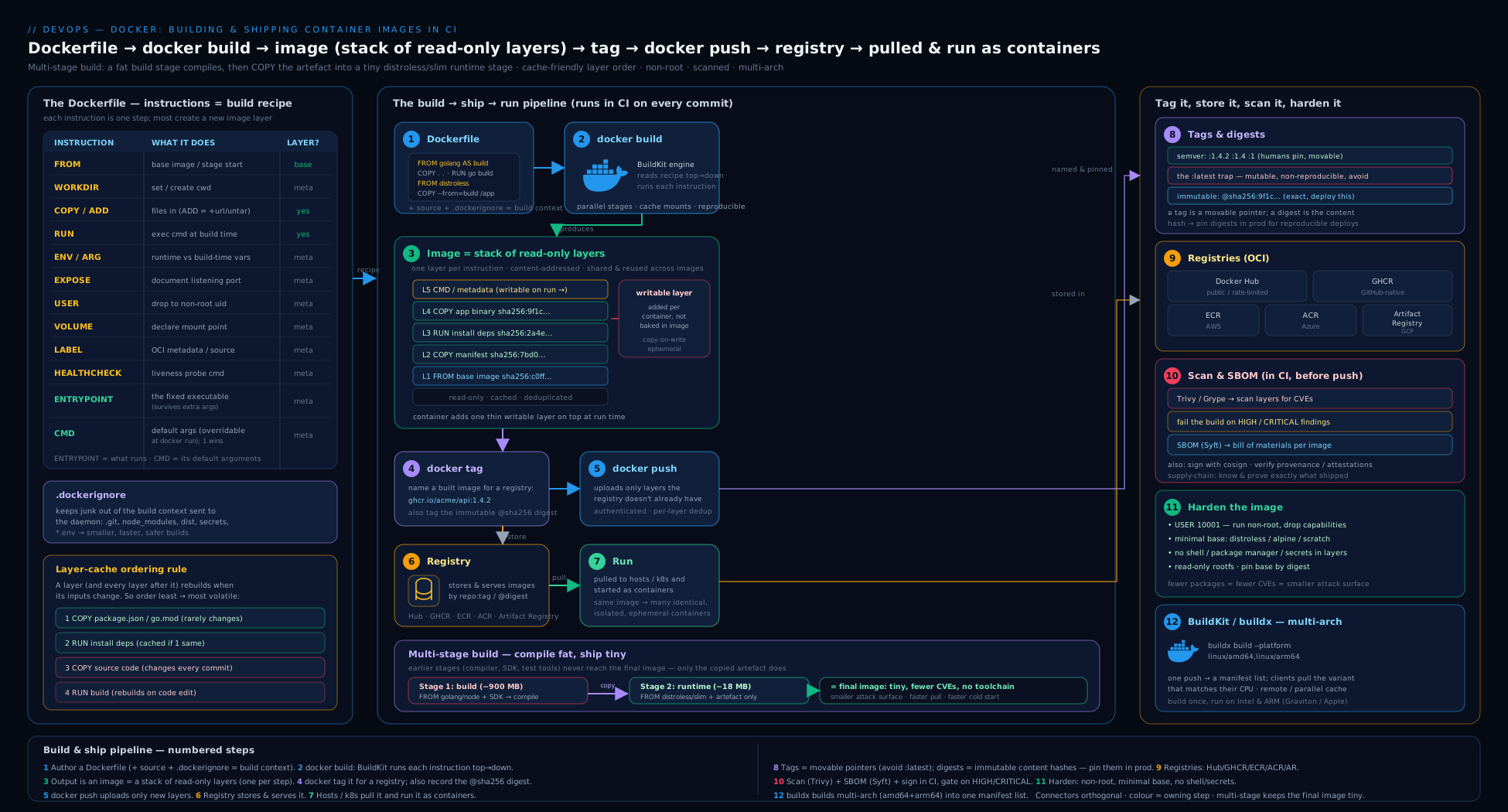
Read the diagram left to right as the spine of this whole lesson: a Dockerfile plus a .dockerignore-trimmed build context feed BuildKit, which reuses cached layers and a multi-stage build to emit one small, non-root runtime image; that image is then scanned and given an SBOM, tagged with a semver and the git SHA, and finally pushed by digest to a registry — the immutable artifact the deployment pulls. Every arrow is a section above.
Going deeper
Everything above gets you a fast, small, secure image. This section is for when you own the build platform itself — the internals, the edge cases, and the supply-chain machinery that senior engineers are expected to reason about.
How the build cache is really keyed (and shared across runners)
The mental model “each instruction is a cache key” is correct but incomplete. BuildKit models the whole build as a content-addressable graph of operations (its LLB intermediate representation). Each node’s cache key is derived from its inputs — the parent’s result digest, the instruction, and for COPY/ADD a Merkle-style checksum of the file bytes — so a cache hit means provably identical inputs, not merely “same text”. Two consequences fall out:
- Local cache is per-daemon. A fresh CI runner starts empty, so incremental speed depends on importing cache from somewhere. That is what
--cache-from/--cache-toare for. The backends you’ll use:
| Backend | --cache-to example |
Where it lives | Best for |
|---|---|---|---|
| inline | type=inline |
Embedded in the pushed image | Simple; only exports the final stage’s cache |
| registry | type=registry,ref=repo/app:buildcache,mode=max |
A separate tag in your registry | Cross-runner CI; mode=max caches every stage, not just the last |
| gha | type=gha,mode=max |
GitHub Actions cache | GitHub-hosted runners |
| local / s3 / azblob | type=local,dest=/path |
Filesystem or object store | Self-hosted runners, custom stores |
mode=maxvsmode=min.min(the default) exports cache only for layers in the final image;maxexports intermediate-stage cache too — essential when yourtest/buildstages are expensive and you want the next run to skip them. The cost is a larger cache blob.
RUN --mount=type=cache is a different mechanism and often confused with layer cache. A cache mount is a persistent scratch directory (e.g. ~/.cache/go-build, ~/.m2, /root/.npm) that lives outside the image and survives across builds; it is never committed to a layer. Control concurrency with sharing=locked|shared|private — locked serialises writers (correct for package managers that are not concurrency-safe), shared (the default) allows parallel access, private gives each concurrent build its own copy.
Reproducibility: why two builds differ, and how to pin them
“Build once, run anywhere” does not automatically mean “build twice, get the same bytes”. Real builds embed timestamps (file mtimes, the image created field) and pull moving inputs (a base tag, apt-get install grabbing whatever is newest). Three levers tighten this:
- Pin every input by digest.
FROM node:20-slim@sha256:…freezes the base; a lockfile (package-lock.json,go.sum,poetry.lock) freezes dependencies. Without both, a rebuild months later can silently differ. - Normalise timestamps with
SOURCE_DATE_EPOCH. BuildKit honours it and rewrites layer/file timestamps:SOURCE_DATE_EPOCH=$(git log -1 --format=%ct) docker buildx build --build-arg SOURCE_DATE_EPOCH .... This is what makes byte-for-byte reproducible images possible. - Accept the residual non-determinism you cannot remove (e.g. an OS package that itself is not reproducible) — pin it by version, and rebuild from the same digests rather than from tags.
The tension you must manage on a team: pinning by digest is reproducible but goes stale, so you also need an automated bump (Renovate or Dependabot raising PRs that update the base digest) to keep absorbing security patches. Reproducibility and patch-freshness pull in opposite directions; a bot is how you get both. See BuildKit, remote cache & reproducible multi-arch builds for the deep treatment.
Manifest lists, attestations and the referrers API
A multi-arch tag is not an image — it is an OCI image index (application/vnd.oci.image.index.v1+json) that maps {os, architecture, variant} to per-platform image manifests. A pull runs a platform matcher against that index and fetches only the matching manifest plus its layers. docker buildx imagetools inspect --raw <ref> shows the raw index JSON.
When you add --sbom=true --provenance=true, buildx attaches attestations as extra manifests in that same index, each linked to the image it describes via a subject field (an in-toto statement: the SBOM in SPDX/CycloneDX, the provenance in SLSA format). Registries that implement the OCI referrers API let tools discover “what attestations point at this digest?” without knowing a tag — which is how a signature (cosign), an SBOM, and a provenance statement all hang off one image by reference rather than being baked into it.
- Provenance answers how and where was this built (source repo, commit, builder, materials) — the basis of SLSA build levels.
- Signing (cosign; keyless via Sigstore’s Fulcio CA plus the Rekor transparency log) answers who vouches for it.
- An admission controller (Sigstore policy-controller, Kyverno, Ratify + Notation, Connaisseur) then enforces at deploy time: reject any image without a valid signature and provenance from your pipeline. That closes the loop from “we built it safely” to “only safely-built images can run”. The full chain of custody is in SLSA, SBOMs, Sigstore & provenance and Sigstore keyless signing & admission.
Building images without a Docker daemon
In a Kubernetes-based CI system you often cannot (and should not) mount the host Docker socket or run --privileged Docker-in-Docker — it is a host-takeover risk. The daemonless options:
| Tool | Model | Notes |
|---|---|---|
| BuildKit (rootless) | buildkitd as an unprivileged pod/container |
The modern default; docker buildx can target a remote/rootless builder via --driver kubernetes or --driver remote |
| Kaniko | Executes the Dockerfile in userspace, no daemon | Popular in GitLab/Tekton; each RUN snapshots the filesystem |
| Buildah | Scriptable, daemonless (Red Hat) | Pairs with Podman; fine-grained control |
For scale, a remote/shared builder (docker buildx create --driver docker-container or a persistent BuildKit cluster) gives a warm cache to every runner, and native arm64 builders avoid slow QEMU emulation — cross-compiling in-language (Go’s GOARCH, --platform with build args) is faster still than emulating.
Layer format, compression and pull speed
Pull time — which dominates cold-start and autoscaling latency — is a function of layer count, size and compression. Two levers most teams miss:
- zstd over gzip. BuildKit can emit zstd-compressed layers (
--output type=image,compression=zstd,compression-level=…), which decompress far faster than gzip; the registry and runtime must support it (most modern ones do). - Lazy pulling (eStargz / SOCI). With a seekable layer format (eStargz plus the stargz-snapshotter, or AWS’s SOCI) the runtime starts the container after fetching only the files it needs, streaming the rest — turning a multi-second pull of a large image into a near-instant start. Worth it for big images on scale-to-zero platforms.
COPY --linkproduces a layer that does not depend on the parent’s exact bytes, so an unrelated change earlier in the Dockerfile no longer invalidates it — better cross-build cache reuse at the registry.
Edge cases that bite in production
- Scan the digest you deploy, not
:latest. A time-of-check/time-of-use gap opens if you scanapp:main, then the tag moves before deploy. Scan by digest and deploy that same digest. - QEMU emulation is slow and occasionally wrong. Emulated
arm64builds can be 5–20× slower and can miss arch-specific bugs; prefer native runners for the release build, and always smoke-test each arch. - Alpine’s musl libc breaks glibc-only binaries and changes DNS/threading behaviour; if a native module or a vendor binary misbehaves, a
-slim(glibc) base is often the fix. - A
HEALTHCHECKruns a process inside the container every interval — across thousands of pods that is real CPU, and Kubernetes ignores it anyway (it uses its own probes). Drop it from K8s-only images. - The build context is uploaded before caching helps — a fat context (no
.dockerignore) slows every build even on a cache hit..dockerignoreis a performance feature, not just hygiene.
Hands-on lab
You will build a small image the right way, run it, inspect its layers and digest, scan it, then build and push a multi-arch image to a registry — all on free tooling. Requirements: Docker Desktop or Docker Engine 23+ (BuildKit on by default), and optionally a free Docker Hub or GitHub account for the push step. Install Trivy for the scan step (brew install trivy, or see the Trivy docs).
1. Create a tiny project. In an empty directory:
mkdir docker-lab && cd docker-lab
cat > server.js <<'EOF'
const http = require('http');
const port = process.env.PORT || 3000;
http.createServer((_, res) => res.end('hello from a container\n'))
    .listen(port, () => console.log(`listening on ${port}`));
EOF
cat > package.json <<'EOF'
{ "name": "docker-lab", "version": "1.0.0", "private": true,
  "scripts": { "start": "node server.js" } }
EOF
2. Add a .dockerignore:
printf '%s\n' .git node_modules npm-debug.log .env Dockerfile .dockerignore > .dockerignore
3. Write a cache-friendly, hardened, multi-stage Dockerfile:
# syntax=docker/dockerfile:1
FROM node:20-slim AS runtime
WORKDIR /app
ENV NODE_ENV=production
# deps first (cached unless package files change)
COPY package*.json ./
RUN npm install --omit=dev && npm cache clean --force
# then source (changes most often)
COPY server.js ./
# run as the non-root user the node image already provides
USER node
EXPOSE 3000
HEALTHCHECK --interval=30s --timeout=3s CMD node -e "require('http').get('http://localhost:3000',r=>process.exit(r.statusCode===200?0:1)).on('error',()=>process.exit(1))"
CMD ["node", "server.js"]
4. Build it, tagging with a version and a (fake) git SHA:
docker build -t docker-lab:1.0.0 -t docker-lab:sha-abc1234 .
Expected: a successful build ending in naming to docker.io/library/docker-lab:1.0.0. Run it again after editing only server.js — note that the npm install layer is reused (CACHED), proving the ordering works.
5. Run and verify:
docker run -d -p 3000:3000 --name lab docker-lab:1.0.0
curl localhost:3000          # → hello from a container
docker ps                    # STATUS should show "(healthy)" after ~30s
6. Inspect layers, size, user and digest:
docker image ls docker-lab            # check the size
docker history docker-lab:1.0.0       # see the layer per instruction
docker inspect docker-lab:1.0.0 --format 'User={{.Config.User}} Cmd={{.Config.Cmd}}'
# → User=node  Cmd=[node server.js]
7. Scan it (the CI gate):
trivy image --severity HIGH,CRITICAL --ignore-unfixed docker-lab:1.0.0
# Try the gate form — exits non-zero if any Critical is found:
trivy image --severity CRITICAL --exit-code 1 --ignore-unfixed docker-lab:1.0.0; echo "exit=$?"
8. (Optional) Build multi-arch and push to a registry. Using GHCR with a Personal Access Token that has write:packages:
echo "$CR_PAT" | docker login ghcr.io -u "$YOUR_GH_USER" --password-stdin
docker buildx create --use --name lab-builder
docker buildx build --platform linux/amd64,linux/arm64 \
  -t ghcr.io/$YOUR_GH_USER/docker-lab:1.0.0 --push .
docker buildx imagetools inspect ghcr.io/$YOUR_GH_USER/docker-lab:1.0.0
# → shows a manifest list with both linux/amd64 and linux/arm64, and the digest
Validation. You have succeeded if: the rebuild after a source-only change shows the npm install layer as CACHED; docker ps shows (healthy); docker inspect shows User=node (not root); Trivy runs and the gate command returns a sensible exit code; and (if you pushed) imagetools inspect shows a two-architecture manifest list with a sha256: digest.
Cleanup.
docker rm -f lab
docker image rm docker-lab:1.0.0 docker-lab:sha-abc1234 2>/dev/null
docker buildx rm lab-builder 2>/dev/null
docker builder prune -f          # reclaim build cache
# Delete the pushed package from the GitHub UI (Packages tab) if you pushed one.
Cost note. Everything here is free: local builds cost nothing, Trivy is open-source, and Docker Hub/GHCR public repositories are free. The only thing to watch in real pipelines is registry storage (old tags and build-cache images accumulate — set lifecycle/retention policies to expire untagged and old images) and data egress on cloud registries (pulling large images cross-region adds up; co-locate the registry with the runtime and use pull-through caches).
Common mistakes & troubleshooting
| Symptom | Likely cause | Fix |
|---|---|---|
| Every CI build re-downloads all dependencies (slow) | COPY . . placed before the dependency install, so any source change busts the deps layer |
Copy lockfiles first, install, then COPY . .; add a registry/GHA build cache with buildx |
| Image is hundreds of MB despite “cleanup” | Files added then deleted in a later layer (still shipped in the earlier one); building runtime on an SDK base | Clean in the same RUN; switch to a multi-stage build with a slim/distroless runtime |
docker stop takes ~10 s; SIGTERM ignored |
Shell-form CMD/ENTRYPOINT, so /bin/sh is PID 1 and swallows the signal |
Use exec form ["app"]; if you need an init, use --init or tini |
| Production ran the wrong/old code; can’t roll back cleanly | Deploying a moving tag (:latest/:main) |
Deploy an immutable tag or pin to @sha256: digest; enable tag immutability on the registry |
denied: requested access to the resource is denied on push |
Not logged in, wrong repo/namespace, or token lacks write/packages scope | docker login with a push-scoped token; check the full reference and permissions: packages: write |
429 Too Many Requests pulling base images in CI |
Anonymous Docker Hub rate limit | Authenticate pulls; mirror via a pull-through cache or vendor it to your own registry |
Build secret/token visible in docker history |
Passed via ARG/ENV or COPY-ed into a layer |
Use BuildKit RUN --mount=type=secret; never bake secrets into the image |
exec format error / image won’t start on the node |
Architecture mismatch (built amd64, ran on arm64 or vice-versa) |
Build multi-arch with buildx --platform; verify the manifest list with imagetools inspect |
Kubernetes rejects pod: container has runAsNonRoot and image will run as root |
USER not set, or set to a name the kubelet can’t resolve to a UID |
Set a numeric USER 10001; align with securityContext.runAsNonRoot |
Common beginner mistakes
These are mental-model errors — the wrong idea that produces the bug — as opposed to the symptom→fix table above. Fix the model and the whole class of bugs disappears.
-
“An image is a whole virtual machine / a copy of my OS.” It is not. An image is your app plus a layered slice of userland files, sharing a read-only base with every other image built on it, and running on the host kernel — no guest OS, no hypervisor. That is why images are megabytes not gigabytes, and why “pick a smaller base” is such a big lever. Right model: a stack of shared, content-addressed filesystem diffs, not a machine.
-
“
latestmeans the newest version.”latestis just the tag applied when you push or pull without naming one. It has zero version semantics and moves whenever someone re-pushes it. Right model: a tag is a sticky note on a box;latestis the sticky note people forget to move. Deploy an immutable tag or a digest. -
“I’ll clean up in a later
RUNto keep the image small.” Layers are additive; a file created in layer 3 and deleted in layer 5 still ships inside layer 3, merely hidden. Right model: to remove something you must never let it land — delete it in the sameRUNthat made it, or keep it out via a multi-stage build. -
“
RUN cd /appsets the directory for the next step.” EachRUNis its own process; thecddies with it. Right model: state that must persist between instructions belongs to the image (WORKDIR,ENV,COPY), not to a shell that exits. -
“
EXPOSE 8080publishes the port.” It is documentation only — metadata in the image config. Right model:EXPOSEis a comment the tooling can read; you still need-p/--publishor a Kubernetes Service to route traffic. -
“
ENV/ARGis a safe place for a token because it’s ‘inside’ the image.” Anyone who can pull the image can read everyENVand every buildARG(docker history,docker inspect,docker savethen untar). Right model: an image is public to whoever can pull it; build-time secrets go throughRUN --mount=type=secret, and runtime secrets are injected at deploy from a secret store. -
“Alpine is always best because it’s the smallest.” Alpine uses musl libc, which can break glibc-only binaries and change DNS/threading behaviour, and its speed win can vanish on native modules. Right model: smallest-that-works. A
-slim(glibc) or distroless base is often the better runtime; measure, don’t assume. -
“Fewer
RUNlines = a faster build.” Collapsing everything into oneRUNcan hurt cache reuse (any change re-runs the whole thing) and slow builds. Right model: size and speed come from ordering (least- to most-changing) and from cache mounts — not from minimising instruction count. -
“The scan passed, so the image is secure.” A scanner finds known CVEs in known packages; it does not catch zero-days, logic bugs, a secret you baked in, or a bad base pulled from an untrusted source. Right model: scanning is one gate among several (non-root, minimal base, signing, provenance, trusted sources) — necessary, not sufficient.
-
“Multi-stage builds are only for compiled languages.” Interpreted apps benefit too: a build stage installs devDependencies and runs the bundler/transpiler, and the runtime stage carries only production deps plus built output. Right model: multi-stage is about not shipping your build tools, whatever the language.
Practice challenges
Six graded drills, easiest first. Try each before opening the solution. They assume the lab project (a tiny Node service) but work with any app.
Challenge 1 (beginner) — Reorder a Dockerfile for cache reuse. This Dockerfile re-installs dependencies on every source change. Fix the ordering so a one-line code edit reuses the dependency layer.
FROM node:20-slim
WORKDIR /app
COPY . .
RUN npm ci --omit=dev
CMD ["node", "server.js"]
<details> <summary>Solution</summary>
FROM node:20-slim
WORKDIR /app
COPY package*.json ./     # deps layer — invalidated only when the lockfile changes
RUN npm ci --omit=dev
COPY . .                  # source last — edits here don't touch the deps layer above
CMD ["node", "server.js"]
Why: the cache is positional — copying the lockfile before the install keeps the expensive npm ci layer valid across every source-only rebuild.
</details>
Challenge 2 (beginner) — Prove EXPOSE doesn’t publish. Run the lab image without -p, show that curl localhost:3000 fails, then make it reachable — without editing the Dockerfile.
<details> <summary>Solution</summary>
docker run -d --name t docker-lab:1.0.0        # EXPOSE 3000 in the image, but no -p
curl -s localhost:3000 || echo "unreachable"   # → unreachable
docker rm -f t
docker run -d -p 3000:3000 --name t docker-lab:1.0.0
curl -s localhost:3000                          # → hello from a container
docker rm -f t
Why: EXPOSE is metadata only; the host port mapping (-p) or a Kubernetes Service is what actually routes traffic.
</details>
Challenge 3 (intermediate) — Single-stage → multi-stage, and measure. Take an image that builds on a full SDK base and convert it to a multi-stage build with a slim/distroless runtime. Record the size before and after.
<details> <summary>Solution</summary>
# syntax=docker/dockerfile:1
FROM golang:1.23 AS build
WORKDIR /src
COPY go.mod go.sum ./
RUN go mod download
COPY . .
RUN CGO_ENABLED=0 go build -o /out/app ./cmd/server

FROM gcr.io/distroless/static-debian12:nonroot
COPY --from=build /out/app /app
USER nonroot:nonroot
ENTRYPOINT ["/app"]
docker build -t app:multi .
docker image ls app          # compare against the single-stage size
Why: only the built binary is copied forward; the ~800 MB Go toolchain in the build stage never reaches the final image, which drops from hundreds of MB to single digits.
</details>
Challenge 4 (intermediate) — Harden with a numeric non-root user and verify. Make the image run as a non-root numeric UID and confirm it with docker inspect. Explain why numeric matters for Kubernetes.
<details> <summary>Solution</summary>
RUN addgroup --system --gid 10001 app \
 && adduser  --system --uid 10001 --ingroup app app
USER 10001:10001
docker inspect app:hardened --format 'User={{.Config.User}}' # → User=10001:10001
Why: Kubernetes runAsNonRoot: true can only verify the container won’t run as root when USER is a numeric UID — a username the kubelet cannot resolve fails the check.
</details>
Challenge 5 (advanced) — Cache mount + build secret. Speed up installs with a BuildKit cache mount, and pass a private-registry token to a RUN without it ever landing in a layer. Prove the token isn’t in docker history.
<details> <summary>Solution</summary>
# syntax=docker/dockerfile:1
FROM node:20-slim
WORKDIR /app
COPY package*.json ./
RUN --mount=type=cache,target=/root/.npm \
    --mount=type=secret,id=npmrc,target=/root/.npmrc \
    npm ci --omit=dev
COPY . .
CMD ["node", "server.js"]
# pass the secret from a file (never as an ARG or ENV)
docker buildx build --secret id=npmrc,src=$HOME/.npmrc -t app:sec .
docker history app:sec | grep -i npmrc || echo "secret not in history"   # → secret not in history
Why: the cache mount persists ~/.npm across builds outside any layer, and type=secret exposes .npmrc only to that one RUN via tmpfs — neither is committed to the image.
</details>
Challenge 6 (advanced) — Multi-arch build with SBOM + provenance, then verify. Build the image for amd64 and arm64, attach an SBOM and provenance, push, and confirm the manifest list and attestations.
<details> <summary>Solution</summary>
docker buildx create --use --name multi 2>/dev/null || docker buildx use multi
docker buildx build \
  --platform linux/amd64,linux/arm64 \
  --sbom=true --provenance=true \
  --cache-to   type=registry,ref=ghcr.io/$YOUR_GH_USER/docker-lab:buildcache,mode=max \
  --cache-from type=registry,ref=ghcr.io/$YOUR_GH_USER/docker-lab:buildcache \
  -t ghcr.io/$YOUR_GH_USER/docker-lab:1.4.2 --push .
# (inside GitHub Actions, swap the registry cache for type=gha,mode=max)

docker buildx imagetools inspect ghcr.io/$YOUR_GH_USER/docker-lab:1.4.2
# → an image index listing linux/amd64 + linux/arm64, plus attestation manifests
Why: multi-arch must --push because a local store holds one arch; the SBOM and provenance ride along as attestation manifests in the same OCI index, discoverable later by digest.
</details>
Best practices
- Pin the base image to a tag and (ideally) a digest; rebuild regularly to absorb base security patches; automate base bumps with a dependency bot.
- Order for the cache: least- to most-frequently-changing; dependencies before source. Add a
.dockerignore. - Multi-stage by default for compiled and built apps; ship the smallest runtime that works (slim/distroless/
scratch). - Run as non-root with a numeric UID; aim for a read-only root filesystem at runtime.
- Use exec form for
CMD/ENTRYPOINTso signals reach your process. - Tag deliberately: an immutable semver tag and the git SHA per build; deploy by digest; reserve
latestfor humans, never for production. - Scan as a build gate (Trivy
--exit-code 1 --ignore-unfixed) and emit an SBOM with every image; sign and add provenance for the supply chain. - Keep build secrets out of layers — BuildKit
--mount=type=secret, neverARG/COPY. - Set registry retention (expire untagged/old images) to control storage cost, and tag immutability on release repos.
- Build multi-arch if anything in your fleet (runners, prod nodes, laptops) is Arm.
Security notes
The container security story for building and shipping images rests on a few load-bearing ideas. Minimise the attack surface: a distroless, non-root image with no shell and few packages gives an attacker who achieves code execution almost nothing to work with and gives the next CVE far fewer places to hide. Keep secrets out of the image entirely — anything in ENV, ARG or a COPY-ed file is readable by anyone who can pull the image (docker history, docker save then untar); use BuildKit build secrets for build-time credentials and inject runtime secrets at deploy time from a secret store (covered in the secrets-management lesson). Authenticate with least privilege and, ideally, no static keys: scope registry tokens to push-only on one repo, and prefer OIDC federation to the cloud registries so there is no long-lived password to leak. Establish provenance and integrity: scan in CI as a gate, attach an SBOM, sign images (cosign/Sigstore) and verify signatures at admission so only images your pipeline built and approved can run — the full SLSA supply-chain treatment is in the dedicated lessons. Finally, trust your sources: pull base images only from official/verified publishers or your own mirror, pin them by digest, and never run an image from an unknown registry without scanning it first.
Interview & exam questions
1. What is the difference between an image and a container? An image is a read-only, layered template (filesystem + metadata); a container is a running or stopped instance of an image — the image plus a thin writable layer and an isolated process. One image, many containers. Image is to container as a class is to an object, or an executable is to a process.
2. Explain CMD vs ENTRYPOINT.
ENTRYPOINT defines the executable the container always runs and is not overridden by docker run arguments (those become its arguments); CMD provides default arguments (or a default command) and is overridden by anything passed to docker run. The idiomatic combination is ENTRYPOINT ["app"] + CMD ["--default-flag"].
3. Why is COPY preferred over ADD?
ADD has two surprising behaviours — it can fetch URLs and it auto-extracts local tar archives — which are rarely what you want and can cause subtle bugs. COPY does exactly one predictable thing: copy files from the build context. Use ADD only when you specifically need tar auto-extraction.
4. How does the build cache work, and how do you order a Dockerfile for it?
Each instruction is a cache key over (instruction text, parent layer, and for COPY a file checksum). If an instruction is unchanged from a prior build it is reused; if it changes, it and everything after rebuild. So order least- to most-frequently-changing: base and OS packages first, dependency install (lockfiles copied first) next, application source last.
5. Why can’t you reduce image size by deleting files in a later RUN?
Because each layer is an additive diff: a file created in an earlier layer still ships in that layer even if a later layer “removes” it (it is merely hidden by the union filesystem). You must delete it in the same RUN that created it, or avoid it reaching the final image via a multi-stage build.
6. What problem do multi-stage builds solve?
They separate the build environment (compilers, SDKs, dev dependencies — large and risky) from the runtime image by using multiple FROM stages and COPY --from to bring forward only the built artifact. Result: dramatically smaller images, faster pulls and a much smaller attack surface, with no separate build scripts.
7. Why is deploying :latest to production dangerous?
latest is just a movable default tag with no version guarantee. Deploying it makes the running bytes depend on when each node last pulled, so replicas can diverge, restarts can silently pick up new/broken code, and you cannot reliably roll back because “the previous latest” no longer exists. Deploy an immutable tag or a digest instead.
8. What is an image digest and when would you use it?
The digest (@sha256:…) is the SHA-256 of the image manifest — the image’s immutable, content-addressed identity. The same digest is guaranteed to be the same bytes everywhere. Use it to deploy reproducibly (pin the Deployment to @sha256:…) and to get a clean, auditable rollback target; tags are for humans, digests for machines.
9. How do you handle a secret that’s only needed at build time (e.g. a private registry token)?
Use BuildKit build secrets: RUN --mount=type=secret,id=tok …, passing --secret id=tok,env=TOK. The secret is available to that one RUN but is never written to a layer or shown in docker history. Do not use ARG/ENV/COPY, all of which persist into the image and are recoverable.
10. What is an SBOM and why generate one in CI? A Software Bill of Materials is a standardised (SPDX or CycloneDX) inventory of every component, version and licence in the image. Generating one per build lets you answer “are we affected by this new CVE?” instantly by querying SBOMs, instead of rebuilding to find out, and it underpins supply-chain provenance/compliance.
11. How do you build an image that runs on both x86 and Arm?
Use BuildKit/buildx with --platform linux/amd64,linux/arm64 and --push. buildx builds each architecture (cross-compiling or via QEMU emulation) and pushes a multi-arch manifest list under one tag, so a pull resolves to the correct architecture automatically. Local builds can only hold one arch, which is why multi-arch must push to a registry.
12. Name three ways to make a container image more secure before shipping it. (Any three) Run as a non-root numeric user; use a minimal/distroless base to shrink the attack surface; scan in CI as a gate and fix/ignore-unfixed; keep secrets out of layers (BuildKit secrets); pin the base by digest and rebuild for patches; sign the image and verify at admission; deploy by digest.
Quick check
- True or false: each
RUNinstruction in a Dockerfile creates a new image layer. - Where should
COPY package.jsongo relative toRUN npm ci, and why? - What is the difference between a tag and a digest?
- Which Dockerfile instruction documents a port but does not publish it?
- Which Trivy flags turn a scan into a build gate that won’t block you on unpatched CVEs?
Answers
- True. Each
RUN(and eachCOPY/ADD) produces a layer; the cache and final size both follow from this. - Before
RUN npm ci. Copying the lockfile first means the (expensive) install layer stays cached as long as dependencies are unchanged, even when the application source changes. - A tag is a human-friendly, movable label that can be repointed; a digest (
@sha256:…) is the immutable, content-addressed identity of exact bytes. Deploy by digest for reproducibility. EXPOSE— it is metadata/documentation only; you still need-p/--publishor a Kubernetes Service to actually reach the port.--exit-code 1(fail the build on findings) together with--ignore-unfixed(don’t fail on vulnerabilities that have no available patch).
Exercise
Take any small application you have (or the lab project) and turn it into a production-grade image:
- Write a multi-stage Dockerfile with a build stage and a slim or distroless runtime stage, ordered so a source-only change reuses the dependency layer. Prove it by rebuilding after a one-line change and confirming the install step shows
CACHED. - Harden it: switch to a non-root numeric
USER, use exec-formCMD/ENTRYPOINT, and pin the base image to a digest. Confirm withdocker inspectthatUseris non-root. - Measure the image size before and after multi-stage/distroless and write down the reduction.
- Scan it with Trivy as a gate (
--exit-code 1 --ignore-unfixed) and generate an SBOM (--format cyclonedx). Note how many High/Critical issues the slim base carries versus a full-distro base. - Tag and (optionally) push to GHCR with both a semver tag and a
sha-<short>tag, then resolve the tag to its digest withimagetools inspect. - Write a short paragraph: which single change cut the most size, which cut the most CVEs, and how you would wire steps 1–5 into a GitHub Actions job using
docker/build-push-actionand theGITHUB_TOKENfor GHCR. (Sketch thepermissions:block and the build/scan/push steps.)
A reference shape for that final CI job:
permissions: { contents: read, packages: write }
jobs:
  build:
    runs-on: ubuntu-latest
    steps:
      - uses: actions/checkout@v4
      - uses: docker/setup-buildx-action@v3
      - uses: docker/login-action@v3
        with: { registry: ghcr.io, username: ${{ github.actor }}, password: ${{ secrets.GITHUB_TOKEN }} }
      - uses: docker/metadata-action@v5            # derives tags (semver + sha) and labels
        id: meta
        with: { images: ghcr.io/${{ github.repository }} }
      - uses: docker/build-push-action@v6
        with:
          context: .
          platforms: linux/amd64,linux/arm64
          push: true
          tags: ${{ steps.meta.outputs.tags }}
          labels: ${{ steps.meta.outputs.labels }}
          cache-from: type=gha
          cache-to: type=gha,mode=max
          sbom: true
          provenance: true
      - uses: aquasecurity/trivy-action@master      # gate after build
        with: { image-ref: 'ghcr.io/${{ github.repository }}:latest', severity: 'CRITICAL', exit-code: '1', ignore-unfixed: 'true' }
Certification mapping
This lesson maps to the container-build fundamentals that recur across DevOps and Kubernetes certifications:
- Microsoft Azure DevOps Engineer Expert (AZ-400): building and pushing container images in pipelines, using ACR, image tagging/versioning and scanning are explicit objectives.
- AWS Certified DevOps Engineer – Professional (DOP-C02): building images in CodeBuild/Actions, pushing to ECR, ECR image scanning and lifecycle policies, and immutable tags appear throughout.
- Certified Kubernetes Application Developer (CKAD): you must be able to write a Dockerfile, build and tag an image, push it to a registry, and reference it (including by digest) in a Pod spec — exactly this lesson’s content.
- Google Cloud Professional DevOps Engineer: building with Cloud Build, pushing to Artifact Registry, and Binary Authorization assume the tag/digest/SBOM/signing model covered here.
- DevOps Institute / DevSecOps Foundation: image scanning, SBOMs and supply-chain hygiene align with the secure-pipeline objectives.
The mental models that examiners probe most — image vs container, the build cache and layer ordering, multi-stage builds, tags vs digests, and scanning/SBOMs as a gate — are all front and centre above.
Glossary
- Image — a read-only, layered template (filesystem + metadata) that a container is instantiated from.
- Container — a running or stopped instance of an image, with a writable top layer and process isolation.
- Layer — a content-addressed filesystem diff produced by one build instruction; layers are stacked and shared.
- Manifest — the JSON document listing an image’s layer digests and config; its hash is the image digest.
- Digest — the immutable
sha256:identity of an image (or layer); the same digest means the same bytes. - Tag — a human-friendly, movable label pointing at a digest (e.g.
1.4.2,latest). - Manifest list / image index — a multi-architecture “fat” manifest mapping platforms to per-arch images.
- Registry — a server that stores and serves images over the OCI distribution API (Docker Hub, GHCR, ECR, ACR, Artifact Registry).
- Repository — a named collection of images within a registry (e.g.
ghcr.io/acme/api). - Dockerfile — the text file of instructions a builder executes to assemble an image.
- Build context — the set of files sent to the builder for a build; trimmed by
.dockerignore. - Build cache — reused layers from prior builds, keyed per instruction; the basis of fast incremental builds.
- Cache mount — a BuildKit
RUN --mount=type=cachescratch directory persisted across builds, kept out of any image layer. - Build secret — a credential exposed to a single
RUNvia--mount=type=secret, never written to a layer ordocker history. - Multi-stage build — a Dockerfile with multiple
FROMstages that copies only artifacts into a slim runtime stage. - BuildKit — the modern, parallel, cache-smart build engine; default in current Docker.
- buildx — the Docker CLI front-end exposing BuildKit features, including multi-arch builds.
- Distroless — a minimal base image with no shell or package manager, only the app’s runtime dependencies.
- musl — the lightweight libc used by Alpine; a source of glibc-compatibility quirks (DNS, native modules).
- OCI — the Open Container Initiative; the vendor-neutral image, runtime and distribution specifications.
- SBOM — Software Bill of Materials; a standardised inventory (SPDX/CycloneDX) of an image’s components.
- Trivy — an open-source scanner for image vulnerabilities, SBOMs, misconfigurations and secrets.
- Attestation — signed, machine-readable metadata (SBOM, provenance) attached to an image and linked to it by digest.
- Provenance attestation — signed metadata describing how and where an image was built (supply-chain integrity).
- SLSA — Supply-chain Levels for Software Artifacts; a framework of build-integrity levels underpinned by provenance.
- Cosign / Sigstore — keyless image signing (short-lived certs from the Fulcio CA) with a public transparency log (Rekor).
- Referrers API — the OCI distribution capability to discover attestations and signatures that reference an image by its digest.
- Reproducible build — a build that yields byte-identical images from the same pinned inputs (helped by
SOURCE_DATE_EPOCH). - Kaniko / Buildah — tools that build OCI images without a Docker daemon, for daemonless/rootless CI.
Next steps
You can now build an image the way a pipeline should: cache-friendly and multi-stage, small and non-root, deliberately tagged and digest-pinned, scanned with an SBOM, multi-arch, and pushed to a registry from CI. The next lesson, Observability Fundamentals for DevOps: Logs, Metrics, Traces, SLIs/SLOs & Alerting (observability-fundamentals-logs-metrics-traces-slo-devops), turns to what happens after the image is running — how you know it is healthy in production. To go deeper on the build engine itself — reproducible builds, registry/remote cache strategies and the full supply-chain chain of custody — see BuildKit, Remote Cache & Reproducible Multi-Arch Builds (buildkit-remote-cache-reproducible-multiarch-supply-chain). For the registry side at scale (replication, vulnerability gating, quotas) see Harbor: Artifact Registry, Replication & Vulnerability Gating (harbor-artifact-registry-replication-vulnerability-gating), and to extend scanning into signing, provenance and policy enforcement, SLSA, SBOMs, Sigstore & Provenance (slsa-supply-chain-sbom-sigstore-provenance) and the DevSecOps pipeline lesson (devsecops-pipeline-sast-dast-sca-policy-gates). The image you just learned to build is the artifact the rest of the DevOps track ships, observes and secures.