In a nutshell
Software needs settings to run — which database to talk to, how chatty its logs should be, and the password that unlocks that database. Configuration is the harmless settings; secrets are the few that would hurt you if a stranger read them. This lesson is about keeping the two apart, and keeping the secrets out of everywhere they should never be — first and foremost, out of your source code.
Think of it like the difference between your home address and your house key. Your address is configuration: you can print it on a letter, read it to a courier, put it on a form — no harm done. Your house key is a secret: you would never staple it to the front door, mail a copy to a stranger, or leave it visible in a photo you post online. The whole discipline is learning which values are addresses (fine to share, fine to check into Git) and which are keys (locked in a safe, handed out briefly, changed the instant one goes missing) — then building habits and tools so a key never ends up taped to the door by accident.
The single most expensive mistake in this whole topic is committing a secret to Git, because Git never forgets: deleting the file later does not remove the secret from history, and a real key pushed to a public repository is found and abused by bots within minutes. So the one reflex to carry away before anything else: the instant a secret is exposed, you change it (rotate) — you do not merely delete it.
Level: Intermediate · Time: ~40 min
Every breach post-mortem you will ever read has the same paragraph buried in it: a credential that should never have been reachable was reachable. A database password in a config file checked into Git. An AWS access key pasted into a CI variable five years ago and never touched since. A .env file emailed between two developers and now sitting in three inboxes. Secrets and configuration management is not a glamorous topic — there is no shiny dashboard, no demo that makes a room gasp — but it is the single discipline that separates teams who get breached from teams who do not. Get it wrong and the most sophisticated firewall, the tightest network policy and the best-paid security team are all bypassed by one leaked string.
This lesson is the secure-by-default foundation. It is deliberately the basics done properly, before the course’s advanced lesson on Vault dynamic secrets takes you further. By the end you will be able to draw the precise line between configuration (which is fine to commit) and secrets (which are never), apply the 12-factor “config in the environment” rule and know exactly where each kind of config should live, recognise and avoid the cardinal sin — secrets in Git — including how leaks happen, how to detect them with scanners like gitleaks and trufflehog, and the one thing you must do first after a leak (rotate, not delete). You will be able to compare the major secret stores — HashiCorp Vault, AWS Secrets Manager and SSM Parameter Store, Azure Key Vault, GCP Secret Manager, and the GitOps-native options SOPS and Sealed Secrets — and pick the right one. You will know the four injection patterns that get a secret into a running workload and their trade-offs, how to mask secrets in CI logs, and finally how rotation, short-lived dynamic credentials and OIDC together let you delete static cloud keys altogether. Throughout, one principle recurs: the only secret that can never leak is the one that does not exist — and the whole modern playbook is about getting as close to that ideal as you can.
A note on the examples below. Because this is teaching material, every credential, key and token you see is a deliberately obvious fake — <REDACTED>, EXAMPLE_KEY, dummy-not-a-real-secret. Never copy a realistic-looking value from a tutorial into anything; treat every example secret as poison.
Learning objectives
After working through this lesson you will be able to:
- State the difference between configuration and secrets with a clear test, and classify any given setting correctly.
- Apply the 12-factor “config in the environment” principle and explain where config belongs (env vars, files, config services, per-environment overlays) and the trade-offs of each.
- Explain why committing secrets to Git is a cardinal sin, how it happens, and why deleting the file does not fix it.
- Detect committed secrets with gitleaks and trufflehog, add pre-commit and CI scanning, and run the correct post-leak procedure — rotate first.
- Compare the major secret stores (Vault, AWS Secrets Manager / SSM, Azure Key Vault, GCP Secret Manager, SOPS, Sealed Secrets) and choose appropriately for a given context.
- Describe the four secret-injection patterns — environment variable, mounted file/volume, sidecar/CSI driver, and build-time vs run-time — and their security trade-offs.
- Implement rotation, prefer short-lived/dynamic credentials, use OIDC to eliminate static cloud keys, and mask secrets in CI logs while applying least privilege throughout.
Prerequisites
You need only a working mental model of how software is built and deployed: that an application reads some settings at start-up, that it runs in different environments (your laptop, staging, production), that code lives in a Git repository, and that a CI/CD pipeline builds and ships it. No prior security specialism is assumed and every term is defined as it appears. This lesson sits in the Fundamentals strand of the DevOps Zero-to-Hero ladder, immediately after Observability Fundamentals (observability-fundamentals-logs-metrics-traces-slo-devops) and before Testing in CI (testing-in-ci-test-pyramid-coverage-quality-gates). It is the conceptual on-ramp to the course’s advanced credential lessons — Dynamic Secrets with Vault (vault-dynamic-secrets-cicd-short-lived-credentials) and OIDC keyless deploys (github-actions-oidc-keyless-deploys-multi-cloud) — which assume you already know everything below. If you have read the GitHub Actions fundamentals lesson you will recognise the secrets-and-variables model that reappears here in its general form.
Core concepts: configuration versus secrets
The whole discipline starts with one distinction, and most mistakes are a failure to make it. Configuration is everything about your application’s behaviour that varies between deployments but is not sensitive — a log level, a feature flag, a page size, the public URL of a downstream API. Secrets are the subset of configuration that grants access or proves identity and would cause harm if disclosed — a database password, an API key, a private signing key, a TLS certificate’s private key, an OAuth client secret.
The clean test is a single question: “If this value leaked to a stranger on the internet, would anything bad happen?” If the answer is “no, it is just a number or a public address”, it is configuration. If the answer is “they could read our data, spend our money, or impersonate us”, it is a secret. A second, sharper test for the grey cases: “Can I print this in a build log without worrying?” Configuration can; a secret cannot, which is exactly why CI systems mask secrets and never mask config.
| Aspect | Configuration | Secret |
|---|---|---|
| Examples | Log level, feature flags, page size, public API URL, region, timeouts | DB password, API key, private key, TLS key, OAuth client secret, token |
| Sensitivity | Non-sensitive — disclosure is harmless | Sensitive — disclosure causes harm (data, money, identity) |
| The leak test | “Could print it in a log” | “Must never appear in a log” |
| Where it may live | Repo (per-env files), env vars, config service | Secret store only — never the repo |
| Versioning in Git | Fine, even encouraged | Forbidden in plaintext (encrypted-at-rest patterns excepted, see SOPS) |
| Rotation | Rarely needed | Routine and after any suspected exposure |
| Access control | Usually open to the team | Least-privilege, audited, time-bound |
| In CI logs | Visible | Masked / redacted |
Two corollaries fall out of this table and they govern everything that follows. First, configuration and secrets are managed by different machinery: config can sit in the repository in per-environment files because it is harmless; secrets must live in a dedicated, access-controlled, audited store and be fetched at deploy or run time. Second, the boundary occasionally blurs — a connection string contains both a harmless host (config) and a password (secret). The correct move is to split it: keep the host in config and the password in the secret store, then compose the connection string at run time. Never let one secret field drag an entire structured blob into the secret store or, worse, an entire secret into the repo.
The 12-factor rule: store config in the environment
The most influential single piece of guidance here is Factor III of the Twelve-Factor App methodology: “Store config in the environment.” The reasoning is precise and worth understanding rather than memorising. The Twelve-Factor authors define config as everything that varies between deploys (staging vs production vs a developer’s laptop) and observe that such config must be strictly separated from code, because code is identical across all deploys while config is what differs. Their litmus test is memorable: could you open-source the codebase this minute without exposing a single credential? If yes, your config is properly externalised; if no, secrets are baked into the code and you have failed Factor III.
Why environment variables specifically, rather than a config file checked into the repo? Three reasons. They are language- and OS-agnostic — every runtime can read an environment variable, so the same mechanism works for a Node service, a Go binary and a shell script. They are unlikely to be committed accidentally, because they live in the process environment, not in a file sitting in your working tree begging to be git add-ed. And they cleanly support the core requirement: the same built artifact runs in every environment, configured only by its surroundings. You build the container image once; staging and production differ only in the environment handed to that identical image.
It is worth stating the nuances and the honest criticisms, because senior engineers know that 12-factor is a guideline, not scripture:
- Environment variables are not encrypted. Anything that can read the process environment (a child process, a crash dump, an
/proc/<pid>/environread, a misconfigured logging library that dumps the environment on start-up) can read them. “Config in the environment” solves separation from code; it does not by itself solve secret protection. The modern refinement is: put non-sensitive config in env vars directly, and for secrets, put a reference in the environment (or fetch from a secret store at start-up) so the plaintext secret is never the literal env-var value baked into a manifest. - They are flat and stringly-typed. Env vars are string key-value pairs with no nesting; deeply structured config (lists, maps) becomes awkward (
DB_0_HOST,DB_1_HOST) and everything is a string you must parse and validate. - They leak into surprising places. Crash reporters, APM agents, and
printenv-style debug endpoints have all exfiltrated secrets that were “safely” in env vars. The 12-factor era predates the cheap availability of dedicated secret stores; today the spirit is “externalise config from code”, and the implementation for secrets has moved on to the stores covered below.
So the rule, updated for 2026, is: store configuration in the environment; store secrets in a secret store and inject a reference. Both honour the deeper principle — config (and secrets) must never be hard-coded into the image — which is the part that truly matters.
Where configuration lives: the options and their trade-offs
There is no single place config belongs; there is a layering of places, each suited to different kinds of values. Understanding the menu lets you put each value where it costs least and risks least.
| Location | What it suits | Pros | Cons / gotchas |
|---|---|---|---|
| Environment variables | Small, flat, per-deploy values; the 12-factor default | Universal, simple, no file to commit, swappable per environment | Flat/stringly-typed; visible to the process tree; not encrypted; awkward for large/structured config |
Config files in the repo (per-env: config.dev.yaml, config.prod.yaml) |
Non-sensitive, structured, version-controlled config | Reviewable, diffable, structured, history; lives with the code | Never put secrets here; risk of editing the wrong env file; needs an overlay/merge strategy |
| Config files not in the repo (mounted at deploy) | Larger or env-specific config you do not want in Git | Keeps env-specific detail out of the repo | Must be provisioned separately; drift risk; where did the canonical copy go? |
| Config service / app-config store (AWS AppConfig, Azure App Configuration, Spring Cloud Config, Consul KV, etcd) | Dynamic config, feature flags, runtime changes without redeploy | Central, audited, can change at runtime, supports flags & gradual rollout | Extra dependency; a runtime call to fetch config; needs its own access control; can hide config from the repo |
| Secret store (Vault, cloud manager, etc.) | Secrets only | Encrypted, access-controlled, audited, rotatable | Never use it as a general config dump; latency and a dependency at fetch time |
| Command-line flags / args | One-off overrides, scripts | Explicit, no file | Appear in process lists (ps) and shell history — never pass secrets as args |
Layered on top of where is how you vary config per environment — the overlay pattern. The standard approach is a base configuration plus per-environment overrides that are merged at deploy time: a base.yaml with everything common, then prod.yaml / staging.yaml containing only the deltas. Kubernetes formalises this with Kustomize (a base/ and per-environment overlays/), and Helm does it with a base values.yaml plus values-prod.yaml. The discipline is the same everywhere: common config lives once; only the differences are per-environment; and secrets are never part of any of these files — they are referenced and injected separately. A frequent and dangerous mistake is to copy the whole config file per environment and edit each copy, which guarantees drift and, eventually, someone pasting a production secret into the file “just for now”.
The cardinal sin: secrets in Git
If you remember one thing from this lesson, remember this section. Committing a secret to a Git repository is the single most common and most damaging mistake in the whole discipline. It deserves the label cardinal sin because of a property of Git that beginners consistently underestimate: Git never forgets.
Why it is so much worse than it looks
When you commit password = dummy-not-a-real-secret and later “fix” it by editing the file and committing again, the secret is still in the repository — it lives in the history, reachable by git log -p, git show <old-commit>, or simply by checking out the earlier commit. Deleting the file in a new commit does nothing; the blob containing the secret is still an object in the .git database and in every clone anyone ever made. The exposure is therefore permanent and distributed:
- History. Every past commit that contained the secret still contains it.
git log -p -- path/to/filewalks straight to it. - Clones and forks. Everyone who cloned or forked the repo has a full copy of that history on their disk, including the secret. You cannot reach into their machines.
- Caches and mirrors. Hosting providers, CI caches, and code-search indexers may retain the blob even after you rewrite history.
- Bots. Automated scrapers continuously scan public (and leaked private) repositories for credential patterns. A real AWS key pushed to a public repo is typically found and abused within minutes — there are documented cases of cryptocurrency miners spinning up on a victim’s account before the developer had finished their coffee. This is not theoretical; it is a thriving criminal economy.
The two classic vectors are worth naming. The first is .env files: a developer creates .env with real credentials for local development, the project’s .gitignore is missing the entry (or the file was force-added with git add -f), and it sails into the repo. The second is hard-coded constants: const API_KEY = "EXAMPLE_KEY" written “temporarily” during a spike and never removed. Config files (application.yml, settings.py, Terraform .tfvars) with inline credentials are the third.
Prevention: stop the secret reaching the commit
Defence is layered, and the cheapest layer is the one closest to the developer:
.gitignorethe obvious files. Always ignore.env,*.pem,*.key,*.p12,credentials,*.tfvars(unless you know they are non-secret), and IDE/secret folders. This is necessary but not sufficient —.gitignoreonly stops untracked files, does nothing for a value pasted into a tracked file, and is bypassed bygit add -f.- Use a
.env.example/.env.templatecommitted to the repo with the keys but no values (DATABASE_PASSWORD=), so newcomers know what to set without any real secret being present. - Pre-commit scanning. Run a secret scanner as a pre-commit hook so a commit containing a credential pattern is blocked before it is ever created. This is the highest-leverage control because it stops the leak at source, on the developer’s own machine.
- Server-side / CI scanning. Because pre-commit hooks can be skipped (
git commit --no-verify), back them with a CI job and, where available, provider-side push protection (GitHub Secret Scanning push protection rejects a push that contains a recognised credential pattern). Defence in depth: local hook and server-side gate.
Detection: gitleaks and trufflehog
Two open-source scanners dominate. gitleaks is a fast, regex/entropy-based scanner that can scan the working tree, the staged diff, or the entire history. trufflehog goes a step further: as well as pattern-matching, it can verify found credentials by attempting a live, read-only API call, so it tells you not just “this looks like an AWS key” but “this AWS key is active right now” — which sharpens triage enormously.
Scan a whole repository’s history with gitleaks:
# Scan all commits in the current repo for secrets in history
gitleaks detect --source . --report-format json --report-path gitleaks-report.json

# Scan only what is staged, for use in a pre-commit hook (fast, blocks the commit)
gitleaks protect --staged --verbose
Scan a repository’s full history with trufflehog and verify which secrets are live:
# Deep scan of git history; --only-verified shows only credentials confirmed active
trufflehog git file://. --only-verified
Wire gitleaks into pre-commit so every commit is checked locally:
# .pre-commit-config.yaml
repos:
  - repo: https://github.com/gitleaks/gitleaks
    rev: v8.18.0          # pin a tag; review before bumping
    hooks:
      - id: gitleaks
pip install pre-commit        # or: brew install pre-commit
pre-commit install            # installs the git hook into .git/hooks
# now every `git commit` runs gitleaks against the staged changes
And as a CI gate in GitHub Actions, so a skipped local hook still gets caught:
# .github/workflows/secret-scan.yml
name: secret-scan
on: [push, pull_request]
permissions:
  contents: read
jobs:
  gitleaks:
    runs-on: ubuntu-latest
    steps:
      - uses: actions/checkout@v4
        with:
          fetch-depth: 0           # full history so the scan sees every commit
      - uses: gitleaks/gitleaks-action@v2
        env:
          GITHUB_TOKEN: ${{ secrets.GITHUB_TOKEN }}
After a leak: the procedure (rotate FIRST)
This is the part people get wrong under pressure, so internalise the order. The instant a secret is exposed it must be treated as compromised — assume an attacker already has it. The reflex to “just delete the commit” is the wrong first move, because rewriting history takes time, may fail to reach every clone, and does nothing about the fact that the secret is already out. The correct sequence:
- Rotate (or revoke) the credential immediately — this is step one, full stop. Generate a new password/key, deploy it, and invalidate the old one at the provider. The moment the old credential is revoked, the leaked copy is worthless and the clock you were racing stops. Everything else is cleanup. Rotation, not deletion, neutralises the threat.
- Investigate exposure / blast radius. Was the repo public? For how long? Check provider access logs and audit trails for any use of the credential during the exposure window. Decide whether this is a near-miss or an active incident.
- Purge from history (cleanup, not the fix). Now, and only now, remove the secret from Git history with
git filter-repo(the modern, recommended tool) or the BFG Repo-Cleaner, then force-push and ask collaborators to re-clone. Understand its limits: forks, cached views and existing clones may still hold the blob — which is exactly why rotation came first. - Prevent recurrence. Add/repair the
.gitignoreentry, install the pre-commit hook and CI scanner if they were missing, and move the secret into a proper secret store so it is never a literal value in a file again. - Document. A short, blameless write-up: what leaked, the exposure window, what was rotated, and the control added so it cannot recur.
# Step 3 (cleanup AFTER rotation): scrub a file from all history
pip install git-filter-repo
git filter-repo --path path/to/leaked-file --invert-paths
git push --force --all     # then have everyone delete their clone and re-clone
The mantra to carry out of here: rotate first, scrub second, prevent third. Anyone who reaches for filter-repo before rotating has misordered the emergency.
Secret stores: the comparison
Once you accept that secrets must not live in the repo or be hard-coded, they have to live somewhere purpose-built. A secret store (or secrets manager) is a service that stores secrets encrypted at rest, enforces fine-grained access control, audits every access, supports versioning and rotation, and hands secrets to authorised workloads at run time. There are five families you will meet; the table below is the one to study.
| Store | Type | Native to | Encryption / model | Rotation | Dynamic secrets | Best for | Cost model & gotcha |
|---|---|---|---|---|---|---|---|
| HashiCorp Vault | Self-hosted / HCP | Cloud-agnostic | KV v2 + many engines; per-secret ACL policies | Yes (engine-driven) | Yes — generates short-lived DB/cloud/PKI creds on demand | Multi-cloud, on-prem, hybrid; teams wanting dynamic secrets and one tool everywhere | You operate it (unless HCP); steepest learning curve; seal/unseal & HA to run |
| AWS Secrets Manager | Managed | AWS | KMS-encrypted; IAM policies | Built-in with Lambda rotation (esp. RDS) | Limited (rotation, not Vault-style dynamic) | AWS-centric apps wanting managed rotation | Priced per secret per month + per 10k API calls; cost adds up with many secrets |
| AWS SSM Parameter Store | Managed | AWS | Standard (free) or SecureString (KMS) tiers | Manual / via automation | No | AWS apps; cheap config + light secrets | Standard tier is free; great for config, lighter secret features than Secrets Manager |
| Azure Key Vault | Managed | Azure | HSM-backed option; RBAC or access policies | Yes (with Event Grid / rotation policies) | No (cloud-native, not dynamic engines) | Azure apps, certificates and keys as well as secrets | Priced per operation; Standard vs Premium (HSM); soft-delete/purge-protection to understand |
| GCP Secret Manager | Managed | Google Cloud | Google-managed or CMEK; IAM | Rotation notifications; you rotate | No | GCP apps; simple, versioned secrets with IAM | Priced per secret version + access ops; regional vs automatic replication choice |
| SOPS (Mozilla) | File-encryption tool | Cloud-agnostic (uses KMS/age/PGP) | Encrypts values in YAML/JSON/env files; keys via KMS/age | Manual (re-encrypt) | No | GitOps — keep encrypted secrets in Git safely | Not a server; you manage keys; whole-history of encrypted blobs is in Git (rotate keys carefully) |
| Sealed Secrets (Bitnami) | Kubernetes controller | Kubernetes | Asymmetric: encrypt with cluster’s public key, only the controller can decrypt | Re-seal on key rotation | No | GitOps on Kubernetes — commit a SealedSecret CRD safely |
Cluster-scoped; losing the controller’s private key loses decryptability; K8s-only |
A few decision rules cut through the table:
- Multi-cloud or hybrid, and you want dynamic short-lived credentials? → Vault. It is the only option here that mints a brand-new, automatically-expiring credential per consumer, which is the gold standard the advanced lesson explores.
- All-in on one cloud and want the least to operate? → that cloud’s native manager (Secrets Manager / Key Vault / Secret Manager). Zero servers to run, IAM you already use, and managed rotation for common cases (AWS Secrets Manager’s built-in RDS rotation is the standout).
- Mostly config and a few light secrets on AWS, watching cost? → SSM Parameter Store (the Standard tier is free), reaching for Secrets Manager only where you need its managed rotation.
- You are doing GitOps and want secrets to live in the Git repo declaratively? → SOPS (encrypt the values, store the file in Git, decrypt at deploy) or, on Kubernetes specifically, Sealed Secrets (commit a
SealedSecretthat only the in-cluster controller can decrypt). These exist precisely because GitOps wants everything in Git, and these let you do that without committing plaintext — the encrypted blob is safe to commit, the plaintext never is.
The unifying point: the store is not where you achieve security; the store is where you achieve control — encryption at rest, who-can-read policies, an audit log, versioning and rotation. Choosing one is choosing how you will control secrets, not whether you will have them.
Injecting secrets: the four patterns
Storing a secret safely is half the job; getting it into a running workload without re-exposing it is the other half. There are four patterns, and they trade convenience against blast radius.
| Pattern | How it works | Pros | Cons / risk | When to use |
|---|---|---|---|---|
| Environment variable | Secret is set as an env var in the process (often from a store at deploy) | Simplest; every language reads it; 12-factor-friendly | Visible to the whole process tree, crash dumps, /proc/<pid>/environ, careless logging; static for the process lifetime |
Simple apps; secrets fetched from a store into the env, not hard-coded in a manifest |
| Mounted file / volume | Secret written to a file the app reads (e.g. a Kubernetes Secret mounted as a volume; tmpfs/in-memory) |
Not in the environment; can be tmpfs (RAM-only); can update without restart; file permissions limit reach |
App must read a file (small code change); file perms must be tight; a readable mount is still readable | Kubernetes; certificates/keys; secrets that should rotate without a redeploy |
| Sidecar / CSI driver | A helper container or the Secrets Store CSI Driver fetches from the store and mounts it; e.g. Vault Agent sidecar | Centralised fetch & refresh; app stays store-agnostic; supports rotation & short-lived creds | More moving parts; sidecar lifecycle to manage; another component to secure | Kubernetes at scale; Vault/cloud-store integration; auto-rotating secrets |
| Build-time vs run-time | Build-time: secret baked during image build (anti-pattern — it is now in the image layers forever). Run-time: secret supplied only when the container runs | Run-time keeps the image clean and shareable | Build-time is a trap: anyone who pulls the image can extract the layer; the image becomes a secret you must guard | Always prefer run-time. Use Docker BuildKit --mount=type=secret if a secret is genuinely needed during build, so it is not persisted in a layer |
Two rules govern the choice. First, prefer file/volume or CSI over a raw env var for anything truly sensitive, because env vars have the widest accidental-exposure surface (logs, crash reporters, child processes). Second, never bake a secret into an image at build time. ENV API_KEY=EXAMPLE_KEY or a COPY secret.json in a Dockerfile writes the secret into an image layer that travels with every pull of that image — docker history and a layer extraction will surface it, and no later RUN rm removes it from earlier layers. If a credential is genuinely required during the build (say, to pull a private dependency), use BuildKit’s secret mount so it is present only for that step and never persisted:
# syntax=docker/dockerfile:1
FROM alpine
# Secret is available only for THIS RUN; it is never written to a layer
RUN --mount=type=secret,id=npmrc \
    cp /run/secrets/npmrc /root/.npmrc && \
    npm ci && \
    rm /root/.npmrc
# Supply the secret at build time without it landing in the image
docker build --secret id=npmrc,src=$HOME/.npmrc -t myapp .
For run-time injection on Kubernetes, the modern, store-backed approach mounts secrets via the Secrets Store CSI Driver so the cluster never even holds a static Kubernetes Secret object — the driver fetches from Vault / the cloud manager and mounts the value as a file, refreshing it on rotation.
Rotation, dynamic credentials and OIDC: killing static keys
Everything above still leaves one structural weakness: a long-lived static secret that sits in a store for years is a single value whose exposure compromises everything it can reach, for as long as it remains valid. The endgame of secrets management is to shrink that window — ideally to zero. Three techniques, in increasing order of power, do this.
Rotation is the baseline: change secrets on a regular schedule and always after any suspected exposure. Rotation matters because it bounds the value of a leak — a credential that rotates every 30 days is worthless to an attacker 30 days after they stole it, even if you never noticed the theft. The hard part of rotation has always been zero-downtime changeover, and the standard solution is two active versions during the overlap: provision the new credential, deploy it everywhere, confirm everything is using it, then revoke the old one. Cloud managers automate this for common cases — AWS Secrets Manager’s built-in rotation drives a Lambda through exactly this create-new / test / promote / retire-old dance for RDS and similar — and the practice generalises: never revoke the old secret until the new one is confirmed in use.
Short-lived / dynamic credentials are rotation taken to its logical extreme: instead of a long-lived secret you rotate periodically, the consumer is issued a brand-new credential, scoped to it, that expires in minutes. The credential does not exist until it is requested and self-destructs when its short lease ends, so there is almost nothing to leak and a stolen credential is useless within minutes. This is precisely what HashiCorp Vault dynamic secrets engines do — generate a fresh database user, cloud credential or signed certificate per request — and it is the subject of the course’s advanced lesson (vault-dynamic-secrets-cicd-short-lived-credentials). The mental shift is profound: you stop storing credentials and start minting them on demand.
OIDC (OpenID Connect) federation applies the same idea to the worst class of static secret of all: the long-lived cloud access key stored in CI. The classic anti-pattern is an AWS_ACCESS_KEY_ID / AWS_SECRET_ACCESS_KEY (or a service-account JSON) pasted into your CI provider’s secrets and never rotated — a permanent key to your cloud sitting in a CI system. OIDC eliminates the stored key entirely. Modern CI runners (GitHub Actions, GitLab) can mint a signed identity token describing this exact job (its repo, branch, workflow); the cloud provider is configured to trust that issuer and exchange the token for short-lived credentials. No static key is stored anywhere — the runner proves who it is with a token it generates fresh each run, and receives credentials that expire when the job ends. This is “keyless” cloud auth, and it is the single highest-impact change most teams can make to their pipeline security. Here is the shape of it in GitHub Actions for AWS (note id-token: write — the permission that lets the job request an OIDC token):
# .github/workflows/deploy.yml — keyless deploy to AWS, NO stored cloud keys
name: deploy
on: { push: { branches: [main] } }
permissions:
  id-token: write        # allow the job to request a short-lived OIDC token
  contents: read
jobs:
  deploy:
    runs-on: ubuntu-latest
    steps:
      - uses: aws-actions/configure-aws-credentials@v4
        with:
          # AWS trusts GitHub's OIDC issuer and assumes this role; no key stored
          role-to-assume: arn:aws:iam::123456789012:role/EXAMPLE-deploy-role
          aws-region: eu-west-1
      - run: aws sts get-caller-identity   # now authenticated with temp creds
The full multi-cloud treatment — trust policies, subject claims, branch/environment scoping — is the course’s dedicated lesson (github-actions-oidc-keyless-deploys-multi-cloud). The takeaway here is the principle: OIDC replaces a stored static key with a per-run, short-lived, identity-derived credential, which is the cleanest possible answer to “where do we keep the cloud key?” — you do not.
Masking secrets in CI logs
A secret you handled perfectly can still leak the moment a build step echos it or a tool prints it on error. CI systems therefore mask registered secrets — replacing them with *** wherever they would appear in log output. In GitHub Actions, anything in secrets.* is masked automatically, and you can mask a computed value with the add-mask workflow command:
- name: Use a derived secret safely
  run: |
    TOKEN=$(./make-token.sh)
    echo "::add-mask::$TOKEN"      # mask it BEFORE it can appear in any log
    ./deploy --token "$TOKEN"
Masking is a safety net, not a control — it relies on the literal string appearing, so a base64-encoded, URL-encoded or partially-printed secret can slip past it. The real defence is to never print secrets at all: avoid set -x/debug modes when secrets are in scope, do not echo them, pass them via env or stdin rather than as command-line arguments (which appear in process lists), and disable verbose modes of tools that dump configuration. Treat masking as the last line, not the plan.
Least privilege, throughout
Underpinning every technique above is the principle of least privilege: every secret should grant the minimum access needed, to the fewest identities, for the shortest time. A CI deploy credential scoped to one bucket beats an admin key; a per-environment secret beats one shared secret; a 15-minute dynamic credential beats a permanent one. Pair this with auditing — a secret store’s access log tells you who read what and when, which is both a detective control and what you reach for after an incident to scope the blast radius.
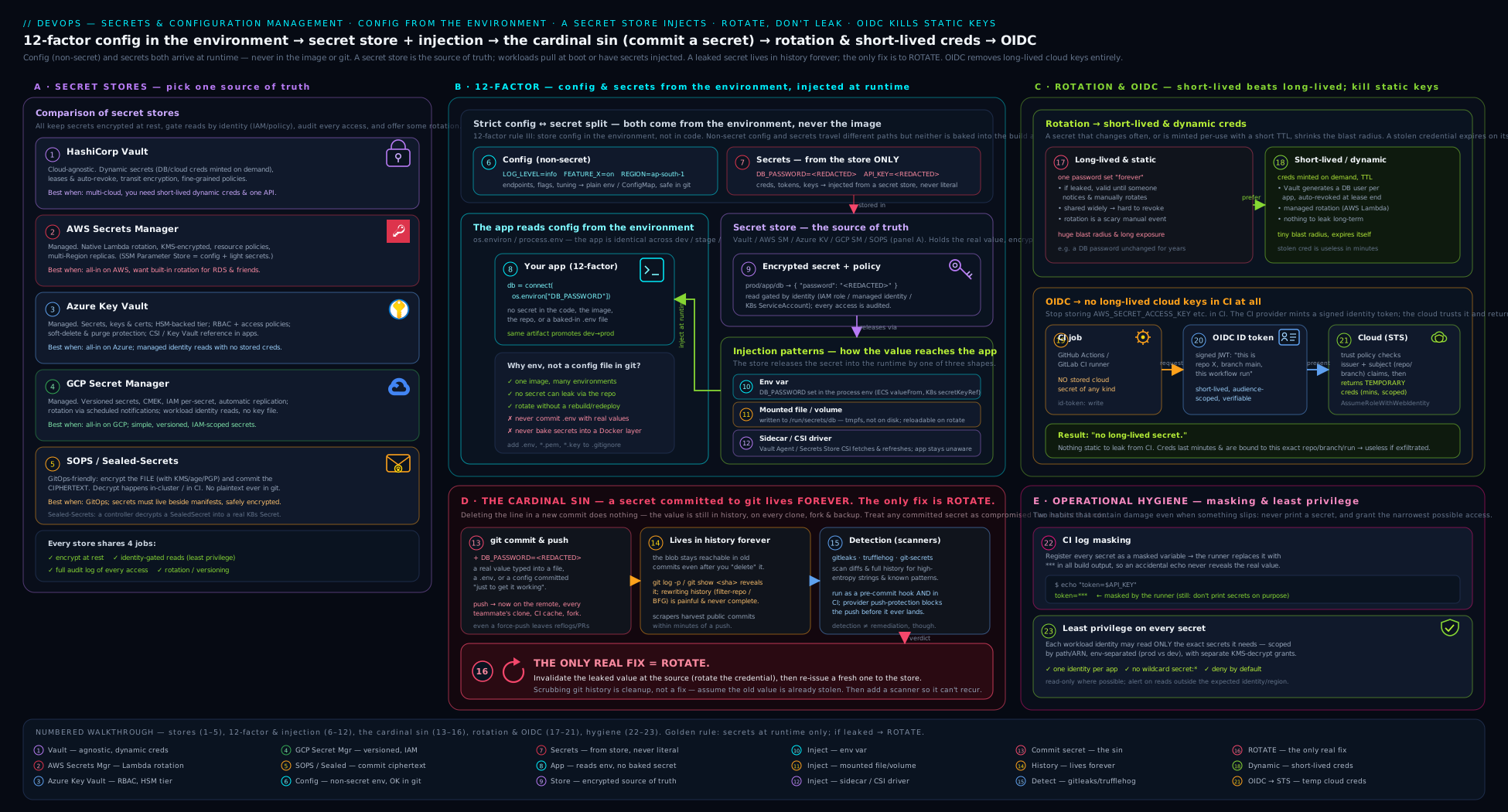
The diagram traces a secret’s whole lifecycle — from the config/secret split, through the secret store and the four injection paths into a workload, to rotation and OIDC keyless auth — with the secrets-in-Git “cardinal sin” flagged as the path you must never take.
Going deeper
Everything above is the durable foundation. Five topics separate someone who merely uses a secret store from someone who can reason about one under pressure.
A Kubernetes Secret is not encrypted — it is base64-encoded
The most consequential misunderstanding in cloud-native secrets is the belief that a Kubernetes Secret object protects anything by itself. It does not. The data fields are base64-encoded, which is an encoding, not encryption — trivially reversible by anyone who can read the object:
apiVersion: v1
kind: Secret
metadata:
  name: app-db-credentials
type: Opaque
data:
  # base64 is NOT encryption — anyone who can read this object can decode it
  password: ZHVtbXktbm90LWEtcmVhbC1zZWNyZXQ=
# Anyone with read access decodes it in one line — no key required:
kubectl get secret app-db-credentials -o jsonpath='{.data.password}' | base64 -d
# -> dummy-not-a-real-secret
Two facts follow. First, by default these objects sit in etcd, the cluster’s datastore, and are only encrypted at rest if the API server is configured with an EncryptionConfiguration (ideally a KMS provider) — plenty of clusters run without it, so anyone with etcd or backup access reads every secret in plaintext. Second, because a Secret is just another API object, RBAC is the real control: granting get/list on secrets is effectively “read all of these credentials”, so scope it tightly and never hand it out cluster-wide. The practical upshot: treat a raw Kubernetes Secret as base64 config with RBAC on top, not as a vault, and back it with encryption-at-rest plus one of the patterns below.
External Secrets Operator vs CSI driver vs Sealed Secrets / SOPS
There are three distinct ways to get a real store’s value into Kubernetes, and beginners routinely conflate them:
- External Secrets Operator (ESO) — a controller that watches an
ExternalSecretcustom resource, fetches the value from an external store (Vault, AWS/Azure/GCP managers) on a refresh interval, and materialises a native KubernetesSecretfrom it. The external store stays the source of truth; theSecretis a synced copy ESO keeps current (including after a rotation).
apiVersion: external-secrets.io/v1
kind: ExternalSecret
metadata:
  name: app-db-credentials
spec:
  refreshInterval: 1h              # re-fetch hourly; picks up rotations
  secretStoreRef:
    name: vault-backend            # a SecretStore/ClusterSecretStore you defined
    kind: SecretStore
  target:
    name: app-db-credentials       # the native K8s Secret ESO creates & maintains
  data:
    - secretKey: password          # key inside the resulting Secret
      remoteRef:
        key: secret/data/app/db    # path in the external store
        property: password
- Secrets Store CSI Driver — mounts the value directly from the store as a file in the pod, so ideally no Kubernetes
Secretobject exists at all (it can optionally sync one too). Lowest standing exposure; the trade-off is that consumption is file-based and tied to a mounted volume. - Sealed Secrets / SOPS — the GitOps answer: the encrypted material lives in Git and is decrypted in-cluster (Sealed Secrets’ controller) or at deploy time (SOPS). No external store is queried at run time; the ciphertext is safe to commit.
The decision hinges on where the source of truth should live: want the external store to remain canonical and rotations to flow through automatically → ESO (sync) or CSI (mount); want a self-contained GitOps repo with no run-time store dependency → SOPS / Sealed Secrets. They are less competitors than answers to different questions.
Secret zero: the bootstrapping problem
Every secret-store design eventually hits the same question: to read a secret from the store you need a credential — so what protects that credential? Follow it far enough and it is turtles all the way down. The modern answer is to make the first identity one the platform vouches for and that cannot be copied out: an AWS IAM role via pod identity (IRSA), a GCP Workload Identity, an Azure Managed Identity, or a Kubernetes projected ServiceAccount token. The workload proves what it is to the platform, the store trusts the platform’s assertion, and no long-lived “secret zero” is stored anywhere. This is exactly how ESO, the CSI driver, and Vault’s Kubernetes auth authenticate — the pod presents its ServiceAccount token, Vault verifies it with the cluster, and only then issues secrets (the course’s Dynamic Secrets with Vault lesson builds directly on this). The bootstrapping credential is an identity, not a string you have to hide.
Envelope encryption: what “encrypted at rest” actually means
When a store says it encrypts secrets at rest, it almost always means envelope encryption, and the shape is worth knowing. The secret is encrypted with a data encryption key (DEK); the DEK is itself encrypted by a key encryption key (KEK) that lives in a KMS or HSM and never leaves it; only the ciphertext and the wrapped DEK are stored. To read the secret, the store asks the KMS to unwrap the DEK, uses it, and discards it. This is why rotating the KEK is cheap (you re-wrap DEKs, not re-encrypt terabytes) and why compromising the storage layer alone is not enough — the attacker still lacks the KEK the KMS guards. Every cloud manager, and Vault’s barrier/transit engines, work this way.
Config drift: when running config diverges from declared
A subtler production failure than any leak is config drift, where the configuration actually running no longer matches what your repo or store says it should be. Someone hot-edits a ConfigMap to mitigate an incident, a value is changed in a cloud console “just for now”, or a secret is rotated in the store while a stale copy lingers in a running pod’s environment. Drift is dangerous because your source of truth now lies to you: the next deploy either silently reverts the fix or fails in a way no one can reproduce. The antidote is continuous reconciliation — a GitOps controller (Argo CD, Flux) that compares desired state in Git against the cluster and flags or auto-heals the difference — plus injecting secrets by file or CSI mount so a rotation propagates instead of freezing into a process’s environment. If you can do only one thing, make configuration declarative and reconciled so drift becomes visible rather than silent.
Common beginner mistakes
These are misconceptions rather than symptoms — the wrong mental model that produces the bug in the first place (the symptom → cause → fix table comes later).
- “I deleted the file, so the secret is gone.” Deleting a file in a new commit removes it from the current tree, not from history — the old blob is still reachable with
git log -p/git show, and sits in every clone. The right model: a commit is permanent; the only thing that neutralises an exposed secret is rotating it, and history-scrubbing is cleanup that never reaches other people’s clones. - “It’s in an environment variable, so it’s secure.” Env vars separate config from code, but they are not encryption — they are visible to the whole process tree, child processes, crash dumps, and
/proc/<pid>/environ, and one careless library that logs its environment will spill them. The right model: env var = separated from code, not protected; for real secrets, inject a reference or a mounted file. - “It’s in a Kubernetes
Secret, so it’s encrypted.” A KubernetesSecret’sdatais base64 — an encoding, reversible by anyone with read access — and it may sit unencrypted in etcd. The right model: the security of a KubernetesSecretcomes from RBAC and etcd encryption-at-rest, not from the object itself. - “Masking in CI protects my secrets.” Masking only replaces the literal string it was told about; a base64/URL-encoded or partially-printed secret sails straight through. The right model: masking is a last-resort safety net; the plan is to never print the secret at all.
- “A private repo is safe enough to hold a secret.” Private today can become public tomorrow — a misconfigured setting, a fork, an acquisition, a contractor’s laptop — and the secret is still in plaintext history the moment it does. The right model: repo visibility is not an access control for secrets; secrets belong in a store regardless of the repo’s setting.
- “We rotate every 90 days, so we’re covered.” A fixed calendar rotation bounds ongoing risk but does nothing for an active leak found on day 3 — and long intervals leave a stolen key useful for weeks. The right model: rotation is scheduled and event-driven (rotate immediately on any exposure), and shorter-lived always beats longer-lived — which is why dynamic and OIDC credentials are the endgame.
Hands-on lab
This lab uses only a local Git repository and free, open-source tools — gitleaks and pre-commit — so it costs nothing and touches no cloud account. You will deliberately create a (fake) leak, detect it, set up prevention, and practise the rotate-first instinct. Every “secret” is an obvious placeholder; never use a real one.
Setup
# 1. Install gitleaks and pre-commit (macOS shown; use your package manager)
brew install gitleaks pre-commit       # or: see each tool's install docs

# 2. Create a throwaway repo for the lab
mkdir secrets-lab && cd secrets-lab
git init
Step 1 — Commit a fake secret (the mistake)
# Create a config file with a CLEARLY FAKE secret (never a real one!)
printf 'db:\n  host: db.internal\n  password: dummy-not-a-real-secret\n' > config.yaml
git add config.yaml
git commit -m "Add app config"        # the secret is now in history
Step 2 — Detect it with gitleaks
gitleaks detect --source . --verbose
Expected output: gitleaks reports a finding, naming config.yaml, the rule it matched, the commit, and the line — proof the secret is now in your history, not just your working tree.
Step 3 — “Fix” it the wrong way, and see it persist
# Edit the file to remove the secret and commit
printf 'db:\n  host: db.internal\n  password: ${DB_PASSWORD}\n' > config.yaml
git commit -am "Remove hard-coded password"

# The secret looks gone... but history still has it:
git log -p -- config.yaml | grep -i "dummy-not-a-real-secret" && \
  echo ">>> The secret is STILL in history. Deleting did not fix it."
This is the lesson in your own hands: the working tree is clean, yet the secret is one git show away. In a real incident this is the moment you would have already rotated the credential.
Step 4 — Prevent recurrence (pre-commit + .gitignore)
# Ignore the usual offenders
printf '.env\n*.pem\n*.key\n' > .gitignore

# Add a pre-commit config that runs gitleaks on every commit
cat > .pre-commit-config.yaml <<'YAML'
repos:
  - repo: https://github.com/gitleaks/gitleaks
    rev: v8.18.0
    hooks:
      - id: gitleaks
YAML

pre-commit install        # installs the local git hook
Step 5 — Confirm the gate blocks a new leak
# Try to commit a brand-new fake secret; the hook should BLOCK it
printf 'api_key: EXAMPLE_KEY_do_not_use\n' >> config.yaml
git add config.yaml
git commit -m "try to add api key"     # expect: gitleaks FAILS the commit
Expected output: the commit is rejected; gitleaks prints the finding and the hook exits non-zero, so the secret never enters even your local history. Prevention working as designed.
Step 6 — Clean up the history (the AFTER-rotation step)
# In a real incident you would have ROTATED in Step 1. This is cleanup only.
pip install git-filter-repo
git checkout config.yaml               # discard the staged fake key first
git filter-repo --path config.yaml --invert-paths --force
git log --oneline                      # config.yaml history is gone
Validation
gitleaks detect --source . --verboseafter Step 6 reports no findings in the rewritten history.git commitof any file containing a credential pattern is blocked by the pre-commit hook (Step 5).- You can articulate why Step 3 proves deletion is not a fix, and why rotation would have been the real first response.
Cleanup
cd ..
rm -rf secrets-lab          # delete the throwaway repo entirely
pre-commit uninstall 2>/dev/null || true
Cost note
Zero. Everything here is local and open-source — no cloud resources, no managed secret store, nothing billable. The only “cost” is the five minutes it takes to internalise that Git never forgets.
Practice challenges
Six graded exercises, from a two-minute classification to a full injection redesign. Try each before opening its solution. Every secret here is an obvious placeholder — never use a real one.
Challenge 1 (Beginner) — Classify five values
For each value, say config or secret using the leak test: (a) LOG_LEVEL=debug, (b) STRIPE_SECRET_KEY=sk_live_EXAMPLE, © PAGE_SIZE=50, (d) a TLS private key in PEM form, (e) PUBLIC_API_URL=https://api.example.com.
<details> <summary>Solution</summary>
Config: (a), ©, (e) — harmless if printed. Secret: (b), (d) — they grant access or prove identity. Why: the test is “would a leak cause harm?” — anything that spends money, reads data, or impersonates you is a secret; everything else is config. </details>
Challenge 2 (Beginner) — Show .gitignore protects only untracked files
Create a repo, ignore .env, and confirm it is untracked. Then show that adding a secret to an already-tracked file is not stopped by .gitignore.
<details> <summary>Solution</summary>
git init demo && cd demo
printf '.env\n' > .gitignore
printf 'TOKEN=EXAMPLE_do_not_use\n' > .env
git status --porcelain          # .env does NOT appear -> ignored
echo 'api_key: EXAMPLE_KEY' >> app.yaml && git add app.yaml   # tracked file: sails in
Why: .gitignore only stops untracked files; a secret pasted into a file Git already tracks slips past it entirely — which is exactly why you also need a scanner.
</details>
Challenge 3 (Intermediate) — Block a commit with a pre-commit scanner
Wire gitleaks into pre-commit and prove that a commit containing a fake credential is rejected on your own machine.
<details> <summary>Solution</summary>
# .pre-commit-config.yaml
repos:
  - repo: https://github.com/gitleaks/gitleaks
    rev: v8.18.0
    hooks:
      - id: gitleaks
pre-commit install
printf 'aws_secret_access_key = AKIAEXAMPLE00000000\n' > creds.ini
git add creds.ini && git commit -m test   # expect: gitleaks FAILS, commit blocked
Why: the pre-commit hook is the cheapest, earliest gate — it stops the leak on the developer’s machine before a commit object even exists. </details>
Challenge 4 (Intermediate) — Recover a Kubernetes Secret with no key
Given the manifest fragment below, recover the password without any decryption key, then state what actually protects it in a cluster.
data:
  password: ZHVtbXktbm90LWEtcmVhbC1zZWNyZXQ=
<details> <summary>Solution</summary>
echo 'ZHVtbXktbm90LWEtcmVhbC1zZWNyZXQ=' | base64 -d # -> dummy-not-a-real-secret
Why: data is base64 (encoding, not encryption); the real controls are RBAC on the Secret and etcd encryption-at-rest, not the object itself.
</details>
Challenge 5 (Advanced) — Order the post-leak runbook
A live sk_live_... key was pushed to a public repo 20 minutes ago. Put these steps in the correct order and justify step one: git filter-repo; add a pre-commit hook; rotate the key; write a blameless note; check provider access logs.
<details> <summary>Solution</summary>
- Rotate / revoke the key → 2. check provider access logs (blast radius) → 3.
git filter-repo(scrub) → 4. add the pre-commit hook (prevent) → 5. blameless note (document). Why: rotation is first because it makes the leaked copy worthless immediately; scrubbing history is slow and never reaches existing clones, so doing it first only wastes the minutes bots are already spending. </details>
Challenge 6 (Advanced) — Redesign an injection path to survive rotation
An app reads DB_PASSWORD from an env var set once at pod start. Ops now rotates the DB password hourly, but pods keep the old value until they restart. Redesign the injection so a rotation propagates without a redeploy, and name the trade-off.
<details> <summary>Solution</summary>
Deliver the secret as a mounted file (via the Secrets Store CSI Driver, or the External Secrets Operator syncing on a refresh interval) and have the app re-read the file, instead of reading a fixed env var at start-up. Why: an env var is frozen for the process lifetime, so it pins the old value; a mounted file (or CSI/ESO sync) updates in place — the trade-off is a small code change to re-read the file and watch for updates. </details>
Common mistakes & troubleshooting
| Symptom | Cause | Fix |
|---|---|---|
| Secret in repo “removed” but security still flags it | Deleted in a new commit; it remains in history and in every clone | Rotate the credential first, then scrub with git filter-repo/BFG; understand clones/forks may still hold it |
.env keeps getting committed |
Missing .gitignore entry, or added with git add -f |
Add .env to .gitignore; commit a value-less .env.example; add a pre-commit secret scanner |
| Secret printed in CI logs despite “masking” | Value was transformed (base64/url-encoded) or only partly printed, so the literal never matched | Don’t print secrets at all; disable set -x/debug; ::add-mask:: computed values before use |
| Pre-commit hook skipped, secret still pushed | Developer used git commit --no-verify |
Back the local hook with a CI scan and provider push protection — defence in depth |
| Secret extractable from a Docker image | Baked in at build time (ENV/COPY), persisted in a layer |
Inject at run time; if needed during build, use BuildKit --mount=type=secret (not persisted) |
| Static cloud key in CI keeps triggering rotation alerts | Long-lived AWS_*/service-account key stored in CI secrets |
Switch to OIDC keyless auth so no static key is stored at all |
| App can’t read the rotated secret without a restart | Secret injected as an env var (fixed for process lifetime) | Inject as a mounted file or via the CSI driver, which can refresh without a redeploy |
| Connection string (host + password) all dumped into the secret store | Whole structured value treated as one secret | Split: host/port in config, password in the store; compose the string at run time |
| Wrong environment’s config applied | Per-env files copied and hand-edited, causing drift | Use base + overlay (Kustomize/Helm values) so only deltas are per-environment |
Best practices
- Classify first. For every value, ask “would a leak cause harm?” Configuration goes in env/files/config services; secrets go in a secret store — never the reverse, never both.
- Externalise config from code (12-factor). The same built artifact runs everywhere; only its environment differs. You should be able to open-source the code without exposing a single credential.
- Never commit secrets — and scan to enforce it.
.gitignorethe obvious files, run a pre-commit scanner locally, and back it with a CI scan plus provider push protection. - Prefer short-lived over long-lived. Dynamic/short-lived credentials beat rotation, and rotation beats a static secret. Aim to shrink every credential’s lifetime toward zero.
- Use OIDC to delete static cloud keys. If your CI stores an
AWS_*key or a service-account JSON, replace it with keyless OIDC federation. - Inject at run time, not build time. Keep secrets out of image layers; mount files or use a CSI driver so secrets can rotate without a redeploy.
- Apply least privilege and audit. Scope every secret to the minimum identity, access and duration; keep the store’s audit log and use it to scope incidents.
- Practise the post-leak drill. Everyone who can commit should know the order cold: rotate, scrub, prevent, document. Rehearse it before you need it.
Security notes
- Rotate first, always. The single most important security reflex in this lesson: the instant a secret is exposed, revoke and replace it, because deletion and history-scrubbing are slow, leaky, and do nothing about the copy the attacker may already hold.
- Treat every committed secret as compromised. Public-repo credentials are found by bots in minutes; do not gamble that “no one saw it”. Assume disclosure and rotate.
- Masking is a safety net, not a control. It depends on the literal string appearing; design so secrets are never printed, rather than relying on redaction.
- Build-time secrets are forever. A secret baked into an image layer ships to everyone who pulls the image and cannot be removed by a later layer. Always inject at run time.
- The secret store is a high-value target. It now holds the keys to everything; protect it with least-privilege access policies, MFA on admin paths, network restrictions, and a monitored audit log.
- Env vars are not encryption. Putting a secret in an env var separates it from code but does not protect it from the process tree, crash dumps or careless logging; for sensitive values inject a reference and prefer file/CSI delivery.
- Least privilege bounds the blast radius. A leaked credential scoped to one resource for fifteen minutes is an incident report; an admin key with no expiry is a catastrophe.
Interview & exam questions
1. What is the difference between configuration and a secret, and how do you decide? Configuration is any value that varies between deployments but is not sensitive (log level, feature flag, public URL). A secret is the subset that grants access or proves identity and would cause harm if disclosed (password, API key, private key). The test: “if this leaked, would anything bad happen?” — and the practical corollary, “could I safely print it in a log?” Config can; a secret cannot.
2. State the 12-factor rule for config and the reasoning behind it. Factor III: store config in the environment, strictly separated from code, because code is identical across deploys while config is what differs. The litmus test is whether you could open-source the codebase right now without exposing a credential. Env vars are chosen because they are language/OS-agnostic, unlikely to be committed accidentally, and let one built artifact run in every environment.
3. Why is committing a secret to Git so serious, and does deleting the file fix it?
Because Git never forgets: the secret stays in history (git log -p, git show), in every clone and fork, and in caches/mirrors. Deleting the file in a new commit does not remove it from history — it is still reachable, and existing clones still hold it. You must rotate the credential and rewrite history, and even then forks/clones may retain the blob.
4. A real AWS key was just pushed to a public repo. What is your first action?
Rotate/revoke the key immediately. Invalidating the credential at the provider makes the leaked copy worthless and stops the clock; everything else — investigating exposure, scrubbing history with git filter-repo, adding prevention — is cleanup that comes after. Reaching for history-rewriting before rotating is the classic misordering.
5. Name two tools that detect secrets in a repo and the key difference between them. gitleaks (fast regex/entropy scanning of working tree, staged diff, or full history) and trufflehog (also scans, but can verify a found credential by attempting a live call, so it tells you which secrets are actually active). gitleaks is the common pre-commit/CI gate; trufflehog’s verification sharpens triage.
6. Compare HashiCorp Vault with a cloud-native secrets manager. When would you choose each? Vault is cloud-agnostic, self-hosted (or HCP), and uniquely offers dynamic secrets — short-lived credentials minted on demand — making it ideal for multi-cloud/hybrid estates that want one tool and the strongest credential model. A cloud-native manager (AWS Secrets Manager, Azure Key Vault, GCP Secret Manager) is fully managed with IAM you already use and built-in rotation for common cases; choose it when you are all-in on one cloud and want the least to operate.
7. What problem do SOPS and Sealed Secrets solve that a normal secret store does not?
They make GitOps safe. GitOps wants everything declared in Git, but plaintext secrets must never be committed. SOPS encrypts the values in a YAML/JSON file (keys held in KMS/age) so the encrypted file can live in Git; Sealed Secrets (Kubernetes) lets you commit a SealedSecret CRD that only the in-cluster controller can decrypt. Both let you keep secrets in the repo encrypted, which a server-based store does not address.
8. Describe the four secret-injection patterns and which is the anti-pattern. Environment variable (simplest, widest exposure surface), mounted file/volume (out of the environment, can refresh without restart), sidecar/CSI driver (centralised fetch and rotation, e.g. Vault Agent or the Secrets Store CSI Driver), and build-time vs run-time. Build-time injection is the anti-pattern — a secret baked into an image layer ships with every pull and cannot be removed later. Always inject at run time.
9. Explain how OIDC removes the need for static cloud keys in CI. The CI runner mints a signed identity token describing the job (repo, branch, workflow). The cloud provider is configured to trust that issuer and exchanges the token for short-lived credentials. No static access key is stored anywhere; the runner proves its identity each run and receives credentials that expire when the job ends — “keyless” auth.
10. What is the difference between rotation and dynamic secrets? Rotation changes a long-lived secret on a schedule (and after exposure), bounding a leak’s value; the secret still exists between rotations. Dynamic secrets issue a brand-new, consumer-scoped credential that expires in minutes and did not exist until requested — rotation taken to the extreme, so there is almost nothing to leak. Dynamic > rotation > static.
11. Why is masking secrets in CI logs not a complete defence?
Masking replaces the literal secret string with ***, so a value that is transformed (base64/URL-encoded) or only partially printed can slip past it. It is a safety net, not a control; the real defence is to never print secrets — avoid debug/set -x modes, don’t echo them, and pass them via env/stdin rather than command-line arguments.
12. How would you handle a connection string that contains both a host and a password? Split it. The host/port is configuration and can live in a per-environment config file or env var; the password is a secret and lives in the secret store. Compose the full connection string at run time. Never let the password drag the whole string into the repo, nor the host bloat the secret store.
Quick check
- True or false: a feature flag and a database password should be stored with the same machinery.
- In one sentence, what does 12-factor’s “config in the environment” achieve, and what does it not achieve?
- You committed a secret, then deleted the file in the next commit. Is the secret gone?
- After a credential leaks, what is the very first thing you do?
- Which secret-injection approach is an anti-pattern, and why?
Answers
- False. A feature flag is non-sensitive configuration (env/file/config service); a database password is a secret (secret store only). Different sensitivity, different machinery.
- It separates config from code so one artifact runs everywhere; it does not by itself encrypt or protect secrets (env vars are still visible to the process tree and logs).
- No. The secret remains in Git history (and in every clone/fork). Deleting the file does not remove it; you must rotate and rewrite history.
- Rotate / revoke the credential immediately — making the leaked copy worthless. History-scrubbing and prevention come afterwards.
- Build-time injection (baking a secret into an image layer): it persists in the image, ships to everyone who pulls it, and cannot be removed by a later layer. Inject at run time instead.
Exercise
Audit one real repository and one real pipeline you have access to — your own side project is perfect — and produce a one-page secrets posture report:
- Classify. List every configuration value the app reads at start-up and label each config or secret using the leak test. Note any value you are unsure about and why.
- Scan history. Run
gitleaks detect --source . --verbose(and, if you can,trufflehog git file://. --only-verified) against the repo’s full history. Record every finding — including false positives — and, for any real secret found, write down that the correct first action is to rotate it. - Check the pipeline. Find where the pipeline gets its credentials. Is there a static cloud key in CI secrets? If so, write the concrete plan to replace it with OIDC. Are secrets masked? Could any step print one?
- Pick a store. Based on your cloud (or multi-cloud) situation, choose which secret store you would standardise on and justify it in two sentences using the comparison table’s decision rules.
- Close the loop. Specify the prevention you would add: the exact
.gitignoreentries, the pre-commit scanner config, and the CI secret-scan job. Then write the four-step post-leak runbook (rotate, scrub, prevent, document) and pin it where your team will find it under pressure.
This is precisely the review a senior engineer runs when joining a team or hardening a service — and the report you produce is a portfolio artefact in its own right.
Certification mapping
This lesson maps to the foundational secrets-and-configuration knowledge that recurs across DevOps and security certifications:
- Microsoft Azure DevOps Engineer Expert (AZ-400): covers managing secrets, tokens and certificates, integrating Azure Key Vault into pipelines, and secure handling of secrets in CI/CD — the principles here are the conceptual base, and the OIDC and Key Vault material maps directly.
- AWS Certified DevOps Engineer – Professional (DOP-C02): expects fluency in Secrets Manager vs SSM Parameter Store, KMS-backed encryption, rotation, and using IAM roles / OIDC instead of static keys — all covered above.
- GitHub Actions certification: tests encrypted secrets, the
secretscontext, masking, and OIDC for keyless cloud auth — the GitHub examples here are direct preparation. - DevSecOps Foundation (PeopleCert / DevOps Institute) and the (ISC)² CSSLP / CompTIA Security+ secure-coding domains: the config-vs-secrets distinction, no-secrets-in-source-control, least privilege and rotation are core, frequently-examined topics.
The vocabulary here — config vs secrets, 12-factor, the secrets-in-Git failure mode, secret stores, injection patterns, rotation, dynamic secrets and OIDC — appears in the security and pipeline sections of essentially every DevOps exam.
Glossary
- Configuration — any value that varies between deployments but is not sensitive (log level, feature flag, public URL).
- Secret — configuration that grants access or proves identity and would cause harm if disclosed (password, API key, private key, token).
- 12-Factor App — a methodology for building software-as-a-service; Factor III mandates storing config in the environment, separated from code.
- Environment variable — a string key-value pair in a process’s environment; the 12-factor default for config.
- Overlay (base + overrides) — a config pattern where a common base is merged with per-environment deltas (e.g. Kustomize, Helm values).
- Secret store / secrets manager — a service that stores secrets encrypted, access-controlled, audited, versioned and rotatable (Vault, AWS Secrets Manager, Azure Key Vault, GCP Secret Manager).
- HashiCorp Vault — a cloud-agnostic secrets platform notable for dynamic secrets (short-lived credentials minted on demand).
- SOPS — a tool that encrypts the values in config files so they can be safely stored in Git (GitOps).
- Sealed Secrets — a Kubernetes controller that lets you commit an encrypted
SealedSecretonly the cluster can decrypt (GitOps on K8s). - gitleaks — a fast open-source scanner that detects secrets in a repo’s working tree, staged diff, or full history.
- trufflehog — a secret scanner that can additionally verify whether a found credential is currently active.
- pre-commit hook — a Git hook that runs checks (e.g. a secret scan) before a commit is created, blocking bad commits locally.
- Push protection — a provider-side gate (e.g. GitHub) that rejects a push containing a recognised credential pattern.
git filter-repo/ BFG — tools that rewrite Git history to purge a file or secret (used after rotating the leaked credential).- Rotation — changing a secret on a schedule or after exposure, bounding the value of any leak.
- Dynamic / short-lived secret — a credential minted per consumer that expires in minutes and did not exist until requested.
- OIDC (OpenID Connect) federation — a CI runner mints a signed identity token the cloud trusts and exchanges for short-lived credentials, removing static keys (“keyless”).
- Masking — replacing a secret’s literal string with
***in CI log output; a safety net, not a control. - Injection pattern — how a secret reaches a workload: env var, mounted file/volume, sidecar/CSI driver, or (anti-pattern) build-time.
- Secrets Store CSI Driver — a Kubernetes driver that fetches secrets from an external store and mounts them as files, supporting rotation.
- Least privilege — granting the minimum access, to the fewest identities, for the shortest time.
- Kubernetes
Secret— a namespaced API object whosedatais base64-encoded (not encrypted); its real protection is RBAC plus etcd encryption-at-rest. - External Secrets Operator (ESO) — a Kubernetes controller that fetches values from an external store on a refresh interval and syncs them into native
Secretobjects (the store stays the source of truth). - Envelope encryption (DEK/KEK) — encrypting a secret with a data key (DEK) that is itself encrypted by a key-encryption key (KEK) held in a KMS/HSM; how “encrypted at rest” is actually implemented.
- Secret zero (bootstrapping) — the problem that reading a store needs a credential too; solved with a non-exportable platform identity (IAM role, Workload Identity, ServiceAccount token) the store trusts.
- Config drift — when the configuration actually running diverges from what the repo/store declares; countered by GitOps reconciliation and file/CSI-mounted secrets.
Next steps
You now have the secure-by-default foundation: the line between configuration and secrets, the 12-factor rule and where config belongs, the cardinal sin of secrets in Git and the rotate-first response, the secret-store landscape, the four injection patterns, and how rotation, dynamic credentials and OIDC shrink every credential’s lifetime toward zero. The next lesson, Testing in CI: the Test Pyramid, Coverage, Quality Gates & Shift-Left (testing-in-ci-test-pyramid-coverage-quality-gates), turns to the other spine of a trustworthy pipeline — proving your changes are correct before they ship. When you are ready to go deeper on the credential side, the course’s advanced lessons pick up exactly where this one stops: Dynamic Secrets in CI/CD with HashiCorp Vault (vault-dynamic-secrets-cicd-short-lived-credentials) makes “the only safe secret is one that does not exist” real with self-expiring credentials, and OIDC Keyless Deploys to Multiple Clouds (github-actions-oidc-keyless-deploys-multi-cloud) deletes static cloud keys from your pipelines for good. Together they take the principles you have just learned and turn them into a pipeline with almost nothing left to leak.