GitLab CI/CD is the most fully integrated CI/CD system in the industry — not a bolt-on, but a first-class part of the same platform that holds your repository, issues, merge requests, container registry and Kubernetes integration. You do not stand up a separate server, wire up webhooks, or install a plugin marketplace: you commit a single file named .gitlab-ci.yml to the root of your project, push, and GitLab parses it, schedules the work onto a runner, and shows you a pipeline graph attached to the commit and the merge request. That tight integration is GitLab’s great strength and also the reason it is so often used at a fraction of its power — people inherit a .gitlab-ci.yml that “works”, and the underlying model (what a stage is versus a job, why rules quietly beats only/except, how needs turns a slow staircase into a fast graph, where a CI_* variable comes from, why a cache “never restores”) stays a mystery until a pipeline breaks at the worst possible moment.
This lesson removes that mystery. We walk .gitlab-ci.yml from top to bottom and explain every load-bearing keyword: the global structure and its top-level keys; stages and jobs with their full script lifecycle (before_script/script/after_script), image, and tags; the different pipeline types GitLab can run (branch, merge-request, tag, scheduled, parent-child, multi-project); rules (if/changes/exists, when, allow_failure) and why they replaced the legacy only/except; the needs DAG including cross-project needs:project; artifacts (paths, expire_in, and reports such as JUnit) versus cache (key, paths, policy); the four flavours of include (local, template, remote, component) plus extends, YAML anchors and !reference; variables (the predefined CI_* set, scopes, masked/protected, and file variables); environments with manual gates; and the GitLab Runner executor model (shared versus specific runners; the docker, kubernetes and shell executors). This is the foundational companion to the advanced hands-on guide building a GitLab CI DAG with distributed cache and review apps — that guide applies the DAG, S3 cache and dynamic review environments with Vault, Wiz and Argo CD wired in; here we build the ground floor it stands on. It is also the GitLab-specific counterpart to the vendor-neutral anatomy of CI/CD.
In a nutshell
Think of .gitlab-ci.yml as a recipe card you keep in the kitchen with the ingredients (your repository). When an order comes in — someone pushes a commit, opens a merge request, or the clock hits a scheduled time — the head chef (GitLab) reads the recipe, splits the work into courses that must happen in order (stages: you don’t plate the main until every appetiser is done), and hands each individual dish (job) to whichever cook is free (runner). Every cook works at a freshly wiped station: a job starts from a clean checkout of your code and nothing else, so anything one dish needs from another has to be carried over on a tray — that tray is an artifact. Ingredients you’ll want again next service (downloaded dependencies) go in the stocked pantry — the cache — which is a nice-to-have: if it’s empty, you just restock and carry on.
That one mental model explains almost every “why did it do that?” in GitLab CI. Jobs in the same stage cook in parallel; the next stage waits for the whole previous stage — unless you use needs to let the dessert chef start the instant the one dish they depend on is ready, turning a slow staircase into a fast graph. rules decide whether a dish is even on tonight’s menu (this branch, this MR, these changed files). include, extends and !reference are how you avoid rewriting the same recipe steps on every card. And variables are the labelled jars on the shelf — some public, some sealed and marked secret (masked/protected).
This lesson is the complete, beginner-friendly tour of that kitchen, from the shape of the file down to the runner that actually does the cooking. A total newcomer can follow it start to finish; an experienced engineer will still pick up the DAG, cache-policy, !reference, component and executor details that separate a pipeline that merely “works” from one that is fast, cheap and safe.
Level: Intermediate · Time: ~58 min · You’ll need: a free GitLab.com account and a browser (the glab CLI is optional). After this you can: lay out a .gitlab-ci.yml from scratch; pick the right pipeline type and stop duplicate pipelines; turn a stage staircase into a needs DAG; and wield artifacts, cache, dotenv, rules, include/extends/!reference, variables, environments and runners with intent — not by cargo-cult.
Learning objectives
By the end of this lesson you will be able to:
- Lay out a
.gitlab-ci.ymlcorrectly and explain the relationship between stages, jobs and the pipeline. - Write a job end to end —
script,before_script,after_script,image,tags,variables,when,allow_failure,timeout,retry— and know what each controls. - Identify which pipeline type is running (branch, merge-request, tag, scheduled, parent-child, multi-project) and trigger each deliberately.
- Replace fragile
only/exceptwithrules(if,changes,exists,when,allow_failure) and avoid the duplicate-pipeline trap. - Turn a stage-ordered staircase into a
needsDAG, and pull artifacts across projects withneeds:project. - Use artifacts (paths,
expire_in,reportsincluding JUnit) and cache (key,paths,policy) correctly, and explain exactly how they differ. - Keep pipelines DRY with
include(local/template/remote/component),extends, YAML anchors and!reference. - Manage variables at every scope (predefined
CI_*, project/group/instance, masked, protected, file), and gate deploys behind environments with manual approval. - Choose and configure the right runner (shared vs specific;
docker/kubernetes/shellexecutors).
Prerequisites & where this fits
You should be comfortable with Git basics (commit, branch, merge request — covered in Git in depth), the vendor-neutral anatomy of CI/CD (pipeline → stage → job → step, triggers, agents, artifacts vs cache), and YAML and its gotchas — because .gitlab-ci.yml is YAML, anchors and the Norway/octal foot-guns absolutely apply, and GitLab’s extends/!reference build directly on YAML’s merge semantics. This lesson sits in the CI/CD module of the DevOps Zero-to-Hero course as the concrete, tool-specific deep dive that follows the abstract anatomy lesson, mirroring the GitHub Actions fundamentals lesson for the GitLab world. To do the lab you need only a free GitLab.com account and a browser; the glab CLI helps but is optional.
Core concepts: pipeline, stages, jobs, runner
GitLab CI has a small, clean object model. Get these four right and almost every confusion dissolves.
| Concept | What it is | Where it lives | Isolation |
|---|---|---|---|
| Pipeline | One execution of your .gitlab-ci.yml, attached to a commit/MR/tag/schedule |
The whole file | One trigger event → (usually) one pipeline |
| Stage | A named, ordered phase that groups jobs (build, test, deploy) |
The stages: list |
All jobs in a stage run in parallel; the next stage waits for the previous one to finish |
| Job | The unit of work — a set of commands run on one runner | A top-level key whose value has a script: |
Each job runs in a fresh, isolated environment (a clean container/VM) |
| Runner | The agent that actually executes a job | Registered to the project, group or instance | Picks up jobs whose tags it matches |
Two facts trip up beginners most. First, jobs in the same stage run concurrently, and a stage does not start until every job in the previous stage has completed — that strict, sequential, stage-by-stage execution is the default, and it is exactly what needs: later lets you escape. Second, every job starts from a clean slate: a fresh container or shell with your repository checked out and nothing else. Anything one job produces that a later job needs must be passed explicitly — as an artifact (files), a cache (reused dependencies), or a dotenv variable (small values). Jobs never share a live filesystem.
A pipeline is born when a trigger fires — a push, a merge request, a tag, a schedule, an API call, or another pipeline. GitLab reads .gitlab-ci.yml, decides which jobs are eligible (via rules/only/except), arranges them into stages (and a DAG if you used needs), and dispatches each eligible job to a matching runner.
A project has exactly one
.gitlab-ci.ymlat its root (the path is configurable in Settings → CI/CD → General pipelines, but the default is the root). Unlike GitHub Actions, where many workflow files coexist, GitLab composes everything into one pipeline definition — you split it up withinclude, not with multiple top-level files.
The .gitlab-ci.yml file, top to bottom
The file is a YAML map. Most top-level keys are jobs (any key that is not a reserved keyword and has a script: is a job); the rest are a small set of reserved global keywords. Here is the skeleton with the common ones:
stages:                       # the ordered phases (optional; a default exists)
  - build
  - test
  - deploy

default:                      # defaults inherited by every job
  image: alpine:3.20
  tags: [docker]
  retry: 1

variables:                    # pipeline-wide variables (key/value)
  APP_ENV: ci

workflow:                     # rules that decide if the WHOLE pipeline runs
  rules:
    - if: '$CI_PIPELINE_SOURCE == "merge_request_event"'
    - if: '$CI_COMMIT_BRANCH == "main"'

include:                      # pull in other YAML (local/template/remote/component)
  - local: '/ci/test.yml'

build-app:                    # a JOB (has a script)
  stage: build
  script:
    - make build
| Top-level keyword | Purpose | Notes |
|---|---|---|
stages |
Define the ordered phases | Optional; default is .pre, build, test, deploy, .post |
default |
Set keys inherited by every job (image, tags, before_script, after_script, retry, timeout, cache, services, interruptible, artifacts, id_tokens, hooks) |
A job can override any of them |
variables |
Define pipeline-level variables | Merged with project/group/instance variables |
workflow |
rules (and name/auto_cancel) deciding whether the pipeline as a whole is created, and of which type |
The single most important key for stopping duplicate pipelines |
include |
Compose the config from other files | Local, project template, remote URL, GitLab template, or CI/CD component |
stages jobs |
Any other top-level key with a script: (or trigger:/run:) |
These are the actual work |
image / services / cache / before_script / after_script (top-level) |
Deprecated as globals — use default: instead |
Setting them at top level still works but default: is the modern, explicit form |
There are a few special, hidden keys worth knowing immediately:
- A job whose name starts with a dot (e.g.
.template) is hidden — GitLab does not run it. Hidden jobs are how you define reusable fragments toextendor!reference. .preand.postare always-present implicit stages: jobs assignedstage: .prerun before everything, andstage: .postafter everything, regardless of where you list them. Useful for setup/notification jobs.
File placement matters: the default path is .gitlab-ci.yml at the repository root. You can point a project at a different path or even an external file (Settings → CI/CD → “CI/CD configuration file”), which is how an organisation enforces a shared pipeline across many repos.
Stages and the order of execution
stages: declares the phases and their order. Every job belongs to exactly one stage (default test if you omit stage:). The rules of execution are simple and strict:
- Jobs in the same stage run in parallel (limited by available runners and concurrency settings).
- A stage starts only when all jobs in the previous stage have succeeded.
- If any job in a stage fails (and is not
allow_failure: true), the pipeline stops — later stages do not run.
stages: [build, test, deploy]

compile:   { stage: build,  script: ["make"] }
unit:      { stage: test,   script: ["make test"] }
lint:      { stage: test,   script: ["make lint"] }     # runs parallel to unit
release:   { stage: deploy, script: ["make deploy"] }   # waits for BOTH test jobs
Here unit and lint run together; release waits for the whole test stage. If you omit stages: entirely, GitLab uses the default ordering .pre → build → test → deploy → .post, and any job without a stage: lands in test.
This stage-by-stage model is easy to reason about but can be slow: lint blocking release is fine, but release also waiting on an unrelated slow test it does not depend on is wasted wall-clock time. That is precisely the problem needs: solves (see the DAG section).
Jobs: the full keyword set
A job is any top-level key (not reserved) whose value contains a script: (or a trigger:/run:). The job’s keywords control what runs, where, when, and how failures are handled. Here is a job using most of them:
integration-test:
  stage: test
  image: golang:1.23                 # container the script runs in
  tags: [docker, linux]              # route to runners with these tags
  needs: ["compile"]                 # DAG dependency (see needs section)
  variables:
    DB_HOST: postgres                # job-scoped variables
  services:                          # sidecar containers (e.g. a DB)
    - name: postgres:16
      alias: postgres
  before_script:                     # runs before script (setup)
    - go mod download
  script:                            # the main commands (REQUIRED)
    - go test ./... -coverprofile=cover.out
  after_script:                      # always runs, even on failure/cancel
    - echo "done"
  rules:                             # whether/when this job runs
    - if: '$CI_PIPELINE_SOURCE == "merge_request_event"'
  artifacts:
    paths: [cover.out]
    reports:
      junit: report.xml
  cache:
    key:
      files: [go.sum]
    paths: [.go/pkg/mod/]
  timeout: 30m
  retry:
    max: 2
    when: runner_system_failure
  allow_failure: false
  interruptible: true
The script lifecycle: before_script, script, after_script
Every job runs up to three command blocks, in this order:
| Block | When it runs | Failure behaviour | Typical use |
|---|---|---|---|
before_script |
First, in the same shell as script |
If it fails, the job fails and script is skipped |
Setup: install deps, log in to a registry |
script |
After before_script (required — a job must have a script, trigger, or run) |
A non-zero exit code fails the job | The actual work |
after_script |
Always, even if the job failed, was cancelled, or timed out | Runs in a separate shell (does not inherit before_script/script shell state or set options); its own failure does not change the job result |
Cleanup, diagnostics, uploading logs |
Two gotchas burn people. First, after_script runs in a fresh shell — variables you exported in script are gone, and a non-zero exit there is ignored, so it is for cleanup, not assertions. Second, the whole script is run as a sequence where, by default, each line’s exit code is checked; a failing command aborts the job (GitLab runs the script with the shell’s error-exit behaviour for the listed commands). If you need multi-command resilience, write a real script file and call set -euo pipefail yourself (see shell scripting for DevOps).
Core job keywords
| Keyword | What it does | Notes / default |
|---|---|---|
stage |
Which stage the job belongs to | Default test |
script |
The commands to run | Required (unless trigger/run) |
before_script / after_script |
Setup / teardown blocks | Can be set in default: and overridden per job |
image |
Docker image the script runs in (docker/k8s executors) | Inherited from default: if set |
services |
Sidecar containers linked to the job (DBs, brokers) | Reachable by alias |
tags |
Route the job to runners carrying all these tags | No tags → only untagged runners (unless “run untagged” is allowed) |
variables |
Job-scoped variables | Override pipeline/group/instance vars |
rules |
Whether and how (when, allow_failure) the job is added to the pipeline |
Modern replacement for only/except |
needs |
Run as soon as the listed jobs finish (DAG), not by stage order | Up to 50 needs per job by default |
dependencies |
Restrict which jobs’ artifacts are downloaded | Empty list = download none |
artifacts |
Files/reports to save and pass forward | See artifacts section |
cache |
Dependency directories to reuse across runs | See cache section |
environment |
Tie the job to a deployment environment | Enables gates, review apps, rollback |
when |
on_success (default), on_failure, always, manual, delayed, never |
Often set via rules: instead |
allow_failure |
If true, a failed job does not fail the pipeline |
Manual jobs are allow_failure: true by default |
timeout |
Per-job time limit (e.g. 1h, 30m) |
Capped by project/runner timeout |
retry |
Auto-retry on failure | max 0–2; when filters the failure type |
interruptible |
Allow auto-cancel of redundant pipelines | Pair with workflow:auto_cancel |
parallel |
Run N copies, or a matrix: of variable combinations |
parallel: 5 or parallel: matrix: [...] |
resource_group |
Serialise jobs sharing a name (e.g. one deploy at a time) | Concurrency control |
coverage |
Regex to scrape a coverage % from the log | Surfaces coverage in the MR |
id_tokens |
Mint OIDC JWTs for keyless auth to Vault/cloud | The modern successor to CI_JOB_JWT |
secrets |
Pull secrets from Vault/Azure Key Vault/GCP SM | Native secret integration |
trigger |
Make this a trigger job (child or multi-project pipeline) | No script allowed |
when, retry, and allow_failure in detail
when controls when a job runs relative to the pipeline’s success:
when value |
Meaning |
|---|---|
on_success |
Default — run only if all jobs in earlier stages succeeded |
on_failure |
Run only if at least one earlier-stage job failed (cleanup/notify) |
always |
Run regardless of earlier results |
manual |
Do not run automatically; show a ▶ play button a human clicks |
delayed |
Run after a start_in: delay (e.g. start_in: 30 minutes) — timed deploys |
never |
Never run (used inside rules: to exclude) |
retry automatically re-runs a failed job, which is invaluable for flaky infrastructure. You can scope it to kinds of failure so you do not paper over real bugs:
retry:
  max: 2                          # 0, 1, or 2 retries
  when:                           # only retry these failure classes
    - runner_system_failure
    - stuck_or_timeout_failure
    - api_failure
Failure classes include script_failure, runner_system_failure, stuck_or_timeout_failure, api_failure, job_execution_timeout, archived_failure, unmet_prerequisites, scheduler_failure, data_integrity_failure, and the catch-all always/unknown_failure. Retrying script_failure is usually a smell — fix the test, do not retry it.
allow_failure: true lets a job fail without failing the pipeline (it shows an orange ⚠ instead of a red ✗). Manual jobs are allow_failure: true by default unless they are part of rules — a blocking manual job (allow_failure: false) pauses the pipeline until someone clicks it.
Pipeline types: every way a pipeline runs
GitLab does not have one kind of pipeline. The type is determined by what triggered it and what rules/workflow allow, and it changes which predefined variables exist and which jobs are eligible. Knowing the type you are in is half of debugging GitLab CI.
| Pipeline type | Triggered by | Key predefined variable | Notes / gotcha |
|---|---|---|---|
| Branch pipeline | A push to a branch | CI_COMMIT_BRANCH set; CI_PIPELINE_SOURCE == "push" |
The default. No MR context. |
| Tag pipeline | Pushing/creating a Git tag | CI_COMMIT_TAG set |
Use for releases; branch is not set |
| Merge request pipeline | An MR event, if a job has rules matching merge_request_event |
CI_PIPELINE_SOURCE == "merge_request_event"; CI_MERGE_REQUEST_* set |
Required for MR-only features (e.g. review apps, MR widgets) |
| Merged results pipeline | An MR pipeline run against the simulated merge of source+target | As MR pipeline, plus runs on the merge result | Catches “passes alone, breaks merged” |
| Merge train | Serialised merged-results pipelines queued for merge | — | Premium/Ultimate; prevents broken main from racing merges |
| Scheduled pipeline | A schedule (CI/CD → Schedules) | CI_PIPELINE_SOURCE == "schedule" |
Nightly builds, cleanup; can inject schedule-only variables |
| Parent–child pipeline | A trigger: job pointing at a child config in the same project |
CI_PIPELINE_SOURCE == "parent_pipeline" (child) |
Split a huge config; dynamic child YAML |
| Multi-project pipeline | A trigger: project: job pointing at another project |
CI_PIPELINE_SOURCE == "pipeline" (downstream) |
Cross-repo orchestration |
| API / trigger-token pipeline | POST /trigger/pipeline or pipeline API |
CI_PIPELINE_SOURCE == "trigger" or "api" |
External systems kicking pipelines |
| Web pipeline | “Run pipeline” button in the UI | CI_PIPELINE_SOURCE == "web" |
Manual, with optional variables |
The duplicate-pipeline trap (and workflow:rules)
The single most common GitLab CI confusion: when you have rules that match both push and merge_request_event, opening an MR creates two pipelines — a branch pipeline and an MR pipeline — for the same commit. The cure is a top-level workflow: block that admits one pipeline type and rejects the redundant one. The canonical recipe runs MR pipelines for branches with an open MR, and branch pipelines otherwise:
workflow:
  rules:
    # Don't run a branch pipeline if an MR is open for that branch:
    - if: '$CI_COMMIT_BRANCH && $CI_OPEN_MERGE_REQUESTS && $CI_PIPELINE_SOURCE == "push"'
      when: never
    # Run for merge requests:
    - if: '$CI_PIPELINE_SOURCE == "merge_request_event"'
    # Run for the default branch and tags:
    - if: '$CI_COMMIT_BRANCH == $CI_DEFAULT_BRANCH'
    - if: '$CI_COMMIT_TAG'
GitLab ships this as the Workflows/MergeRequest-Pipelines template you can include. workflow: also accepts name: (to label pipelines) and auto_cancel: (to cancel redundant/superseded pipelines automatically).
Parent–child and multi-project pipelines with trigger
A trigger job has no script; it has a trigger: key. Pointing it at a file in the same project creates a child pipeline; pointing it at another project creates a multi-project pipeline.
# Child pipeline: run a separate config in THIS project
tests:
  stage: test
  trigger:
    include: ci/tests.gitlab-ci.yml
    strategy: depend            # parent job mirrors the child's status

# Dynamic child pipeline: generate the YAML in a job, then trigger it
generate:
  stage: build
  script: ./generate-pipeline.sh > generated.yml
  artifacts:
    paths: [generated.yml]
run-generated:
  stage: test
  trigger:
    include:
      - artifact: generated.yml   # use a generated file as the child config
        job: generate
    strategy: depend

# Multi-project: trigger a pipeline in a DIFFERENT project
deploy-downstream:
  stage: deploy
  trigger:
    project: my-group/deployer
    branch: main
    strategy: depend            # wait for and inherit the downstream result
strategy: depend is the important option: without it the trigger job goes green the instant it starts the child/downstream; with it the parent job’s status mirrors the triggered pipeline, so a child failure fails the parent. Dynamic child pipelines (generating the YAML from a job and triggering the artifact) are GitLab’s idiom for monorepos — generate exactly the jobs the changed paths need.
rules: the modern way to decide when a job runs
rules is the current, recommended mechanism for controlling whether (and how) a job is added to a pipeline. It is an ordered list: GitLab evaluates each rule top to bottom and uses the first match to decide the job’s fate; if none match, the job is not added to the pipeline. Each rule combines optional conditions (if, changes, exists) with optional attributes (when, allow_failure, variables).
deploy-prod:
  stage: deploy
  script: ./deploy.sh
  rules:
    # 1) Skip entirely outside the default branch
    - if: '$CI_COMMIT_BRANCH != $CI_DEFAULT_BRANCH'
      when: never
    # 2) On default branch, only if app code changed — and require a human click
    - if: '$CI_COMMIT_BRANCH == $CI_DEFAULT_BRANCH'
      changes:
        - "src/**/*"
        - Dockerfile
      when: manual
      allow_failure: false
    # 3) Otherwise (default-branch but no app change): run automatically
    - when: on_success
| Rule clause | What it tests / sets |
|---|---|
if |
A CI variable expression (e.g. $CI_PIPELINE_SOURCE == "merge_request_event", $CI_COMMIT_TAG =~ /^v/) |
changes |
Whether listed files/globs changed (compared to the appropriate base) |
exists |
Whether listed files exist in the repository |
when |
What to do on match: on_success (default), manual, delayed, always, never |
allow_failure |
Whether a failure of this job (under this rule) is tolerated |
variables |
Variables to set when this rule matches (rule-scoped variables) |
The if expression language supports ==, !=, =~/!~ (regex match against /.../), &&, ||, and parentheses, comparing variables and string literals. A bare variable like if: '$DEPLOY' is true when the variable is defined and non-empty.
Two subtleties to internalise:
changesis dangerous on branch pipelines. On the first pipeline for a new branch (or in scheduled/tag pipelines) there is no clear “previous commit” to diff against, sochangesmay evaluate true unexpectedly and run jobs you meant to skip. In merge-request pipelineschangescompares against the target branch, which is well-defined and safe. Preferrules:changesinside MR pipelines, and add acompare_to:where supported.rulesandonly/exceptare mutually exclusive in one job. You cannot mix them; pickrules.
rules versus the legacy only/except
Before rules, you controlled inclusion with only/except (by ref, branch, variable, changes, etc.). It still works but is effectively legacy — it is less expressive, cannot set per-condition when/variables, and interacts badly with MR pipelines.
| Capability | rules (modern) |
only/except (legacy) |
|---|---|---|
| Match by branch/tag/ref | if: '$CI_COMMIT_BRANCH == ...' |
only: [main], except: [tags] |
| Match by variable expression | if: '$VAR =~ /x/ && $Y == "z"' |
only:variables: [...] (limited) |
| Match by changed files | changes: |
only:changes: |
| Match by file existence | exists: |
✗ (no equivalent) |
Set when per condition |
✓ (when: manual on a specific rule) |
✗ (one when for the job) |
| Set variables per condition | ✓ (variables: per rule) |
✗ |
| First-match, ordered evaluation | ✓ | ✗ (combine-by-implicit-AND/OR) |
| MR-pipeline friendly | ✓ | clumsy / surprising |
| GitLab’s recommendation | Use this | Avoid in new pipelines |
Translation example — the same intent, both ways:
# Legacy
only:
  refs: [main]
  changes: ["src/**/*"]

# Modern (preferred)
rules:
  - if: '$CI_COMMIT_BRANCH == "main"'
    changes: ["src/**/*"]
needs: the DAG that breaks the staircase
By default jobs are gated by stage order. needs overrides that: a job starts the instant the specific jobs it lists have completed, regardless of stage. This turns a sequential staircase into a directed acyclic graph (DAG), and total wall-clock time collapses to the longest path through the graph rather than the sum of all stages.
stages: [build, test, deploy]

build-api:   { stage: build, script: ["make api"] }
build-web:   { stage: build, script: ["make web"] }

test-api:
  stage: test
  needs: ["build-api"]        # NOT blocked by build-web
  script: ["make test-api"]

test-web:
  stage: test
  needs: ["build-web"]
  script: ["make test-web"]

deploy:
  stage: deploy
  needs: ["test-api", "test-web"]   # fan-in
  script: ["make deploy"]
Key behaviours and options:
- Empty
needs: []means “wait for nothing” — the job launches in the very first scheduling wave, even if it is in a later stage. This is how you run a source-onlylintimmediately. needscan reference up to 50 jobs per job (configurable on self-managed).- A
needsjob by default downloads the artifacts of the jobs it needs (you can disable withneeds: [{ job: build-api, artifacts: false }]). needscan only point at jobs in the same or earlier stages (a forward reference is a config error). Within those bounds the DAG is free-form.needs:optional: truelets you depend on a job that might not exist in this pipeline (e.g. excluded byrules) without erroring.
Cross-project artifacts with needs:project
needs can also pull artifacts from another project’s pipeline — handy when a downstream repo consumes a build from an upstream one without re-triggering it:
deploy:
  stage: deploy
  needs:
    - project: my-group/builder        # the upstream project
      job: package                      # the job whose artifacts you want
      ref: main                         # which ref's latest pipeline
      artifacts: true                   # download its artifacts
  script:
    - ls dist/                          # artifacts from builder's package job
This fetches the latest artifacts of package from builder’s main pipeline at job start — a one-directional artifact pull, distinct from a multi-project trigger (which runs the other project’s pipeline). Use needs:project to consume, trigger:project to orchestrate.
Artifacts versus cache
These two are the most-confused pair in GitLab CI, and interviewers love the distinction. Artifacts are deliberate outputs you pass forward to later jobs (or download from the UI); cache is a best-effort speed-up of dependency installs reused across pipelines. Get them backwards and your pipeline is either slow or wrong.
Artifacts
Artifacts are files a job declares to save when it finishes; later jobs in the same pipeline (respecting stage/needs order and dependencies) automatically download them.
build:
  stage: build
  script: ["make build"]      # produces ./dist and a test report
  artifacts:
    name: "dist-$CI_COMMIT_SHORT_SHA"   # archive name
    paths:
      - dist/
      - "*.log"
    exclude:
      - "dist/**/*.map"        # don't ship sourcemaps
    expire_in: 1 week          # auto-delete after this (default keeps per project settings)
    when: on_success           # on_success | on_failure | always
    expose_as: "Build output"  # link in the MR UI
    reports:
      junit: report.xml        # parsed into the MR test widget
      coverage_report:
        coverage_format: cobertura
        path: coverage.xml
    untracked: false           # also include git-untracked files?
| Artifact keyword | What it does | Default / notes |
|---|---|---|
paths |
Files/dirs/globs to save | Relative to the project dir |
exclude |
Globs to omit from paths |
Great for sourcemaps, caches |
name |
Archive filename | Often keyed on $CI_COMMIT_REF_SLUG/SHA |
expire_in |
Retention (e.g. 30 days, never) |
Frees storage; latest pipeline’s artifacts can be kept |
when |
Save on on_success/on_failure/always |
always is invaluable for capturing failure logs |
expose_as |
Show a download link on the MR | UI convenience |
untracked |
Include git-untracked files too | Default false |
reports |
Typed reports GitLab parses and surfaces | See the table below |
access |
Who can download (all/developer/none) |
Restrict sensitive artifacts |
The reports family is special: these are not just stored, they are parsed and shown in the merge request and pipeline UI.
| Report type | Surfaces as | Notes |
|---|---|---|
junit |
Test results widget (pass/fail/new failures) | The universal one — most test runners emit JUnit XML |
coverage_report (cobertura) |
Line-coverage annotations in the MR diff | Pair with the coverage: regex for the % badge |
dotenv |
Variables passed to later jobs | A .env file whose vars become available downstream (small values, not files) |
sast / dependency_scanning / container_scanning / dast / secret_detection |
Security dashboards & MR security widget | Produced by GitLab’s scanning templates |
codequality |
Code Quality MR widget | Diff of new code-smells |
terraform |
Terraform plan summary in the MR | Plan diff before apply |
load_performance / browser_performance |
Performance widgets | k6 / sitespeed outputs |
The dotenv report is the GitLab way to pass values (not files) between jobs — the equivalent of GitHub Actions’ job outputs:
setup:
  stage: build
  script:
    - echo "IMAGE_TAG=sha-$CI_COMMIT_SHORT_SHA" >> build.env
  artifacts:
    reports:
      dotenv: build.env
use:
  stage: deploy
  needs: ["setup"]
  script:
    - echo "Deploying $IMAGE_TAG"     # variable came from the dotenv report
The dependencies keyword controls which artifacts a job downloads (independent of needs). dependencies: [] downloads nothing (a useful speed-up for jobs that need no upstream files); listing specific jobs limits the download to those.
Cache
A cache stores directories (typically dependency folders) and restores them on later runs to skip re-downloading. A cache miss must never break the build — it is an optimisation, not a dependency.
test:
  script: ["npm ci", "npm test"]
  cache:
    key:
      files:
        - package-lock.json    # cache key derived from the lockfile hash
    paths:
      - .npm/
      - node_modules/
    policy: pull-push          # pull-push | pull | push
    when: on_success           # on_success | on_failure | always
    untracked: false
| Cache keyword | What it does | Notes |
|---|---|---|
key |
The cache identity | A string, files: (hash of listed files), or prefix + files |
paths |
Directories/files to cache | The dependency dirs |
policy |
pull-push (default), pull (read-only), push (write-only) |
Set pull on jobs that only consume the cache |
when |
Save the cache on on_success/on_failure/always |
|
untracked |
Also cache git-untracked files | |
unprotect |
Share a cache between protected and unprotected refs | Off by default (a security boundary) |
fallback_keys |
Keys to try if the primary key misses | Get a recent cache instead of none |
Keying is the whole game. key:files: hashes the lockfile so the cache busts exactly when dependencies change and is reused when they do not. policy prevents the classic race where two parallel jobs both write the same cache and corrupt it — make one job the canonical installer (pull-push) and all consumers pull. Caches can be node-local (default, per runner) or distributed (object storage, shared across the fleet) — the distributed setup is exactly what the advanced GitLab CI guide builds with S3.
The distinction, side by side
| Artifact | Cache | |
|---|---|---|
| Purpose | Pass outputs to later jobs / download them | Speed up future runs (dependencies) |
| Failure semantics | A missing required artifact is a real failure | A miss is harmless — install fills the gap |
| Keyed by | A name you choose; tied to this pipeline |
A computed key (lockfile hash); reused across pipelines |
| Lifetime | expire_in (then deleted) |
Best-effort; evicted/overwritten over time |
| Direction | Forward, within the pipeline (and needs:project) |
Across pipelines and runners |
| Use for | dist/, JUnit/coverage reports, deploy bundles |
node_modules/, ~/.m2, .go/pkg/mod/ |
The one-liner: artifact is “I produced this and the next job needs it”; cache is “I might need this again to go faster.”
include, extends, anchors and !reference: keeping config DRY
Large pipelines are unmaintainable if every job repeats itself. GitLab gives you four composition mechanisms, from “pull in whole files” to “reuse one keyword.”
include: compose from other files
include merges other YAML into your .gitlab-ci.yml before the pipeline is evaluated. There are four sources:
include:
  # 1) LOCAL — a file in THIS repository
  - local: '/ci/test.gitlab-ci.yml'
    rules:
      - if: '$CI_PIPELINE_SOURCE == "merge_request_event"'   # conditional include

  # 2) PROJECT — a file from ANOTHER GitLab project (org-wide standards)
  - project: 'platform/ci-templates'
    ref: v3.2.0                     # pin to a tag/branch/SHA — important!
    file:
      - '/jobs/build.yml'
      - '/jobs/scan.yml'            # include several files from one project

  # 3) REMOTE — a public HTTPS URL
  - remote: 'https://example.com/ci/security.yml'

  # 4) TEMPLATE — a GitLab-maintained template shipped with the product
  - template: 'Jobs/SAST.gitlab-ci.yml'

  # 5) COMPONENT — a versioned CI/CD Component from the catalog
  - component: 'gitlab.com/my-group/templates/build@1.0.0'
    inputs:                          # components take typed inputs
      stage: build
      image: golang:1.23
include type |
Source | When to use | Gotcha |
|---|---|---|---|
local |
A path in the same repo | Split a big config across files | Path is from the repo root, starts with / |
project |
A file in another project | Org-wide shared jobs/standards | Always pin ref: — an unpinned include tracks the default branch and can change under you |
remote |
A public URL | Vendor-provided snippets | The host must be reachable from GitLab; no auth |
template |
GitLab’s built-in templates | SAST, dependency scanning, etc. | Versioned with your GitLab |
component |
The CI/CD Catalog (versioned, typed inputs) |
The modern, reusable, parameterised building block | Replaces ad-hoc remote includes; pin the @version |
CI/CD Components are the 2026 best practice for reusable pipeline logic: a component is a versioned, published unit in the catalog that declares typed inputs (with defaults, types, and validation), so consumers configure it cleanly rather than copy-pasting YAML. They supersede the older “include a remote template and override variables” pattern.
extends: inherit from a (usually hidden) job
extends makes a job inherit the keywords of one or more other jobs — typically hidden template jobs (names starting with a dot). It performs a deep merge (maps are merged key-by-key; later wins on conflicts), which is cleaner and more predictable than YAML anchors.
.test-base:                    # hidden template (the leading dot)
  image: node:20
  stage: test
  cache:
    key: { files: [package-lock.json] }
    paths: [node_modules/]
  before_script:
    - npm ci

unit:
  extends: .test-base          # inherits image, stage, cache, before_script
  script: ["npm run test:unit"]

e2e:
  extends: .test-base
  variables: { HEADLESS: "true" }
  script: ["npm run test:e2e"]
extends can chain (a template extending a template) up to 11 levels and accepts a list to merge multiple templates. Because it deep-merges, overriding a single nested key is easy — define it again in the child.
YAML anchors and !reference
YAML’s own anchors (&name) and aliases (*name) let you reuse a whole block. They are pure YAML (resolved before GitLab sees the file), so they work but cannot reach across included files and replace whole blocks rather than merging deeply:
.cache_def: &global_cache
  key: { files: [go.sum] }
  paths: [.go/pkg/mod/]

build:
  cache: *global_cache         # alias copies the whole block
  script: ["make"]
GitLab’s own !reference tag is the more powerful option: it pulls a value (even a single keyword, even a nested list) from another job — including jobs from included files — and can be composed inside a list, which anchors cannot do. This is how you reuse, say, a shared before_script and add to it:
.setup:
  before_script:
    - echo "shared setup"
    - login-to-registry

deploy:
  before_script:
    - !reference [.setup, before_script]   # splice in the shared steps
    - echo "deploy-specific setup"          # then add your own
  script: ["./deploy.sh"]
| Mechanism | Scope | Merge style | Best for |
|---|---|---|---|
include |
Across files/projects/catalog | Brings content in | Sharing whole files / components org-wide |
extends |
Within the merged config | Deep merge of job keywords | Reusing a job shape (the default choice) |
YAML anchors (&/*) |
One file only | Whole-block copy | Quick local reuse; pre-GitLab YAML |
!reference |
Across the merged config | Splice a specific value, composable in lists | Reusing one keyword or extending a list (e.g. before_script) |
Variables: predefined, custom, masked, protected, file
Variables are how configuration and secrets flow into jobs. They come from many places and resolve by precedence (most-specific wins).
Predefined CI_* variables
GitLab injects a large set of read-only variables into every job. You will use these constantly:
| Variable | Holds |
|---|---|
CI_PIPELINE_SOURCE |
What triggered the pipeline (push, merge_request_event, schedule, web, api, trigger, parent_pipeline, pipeline) |
CI_COMMIT_BRANCH |
Branch name (empty on tag/MR pipelines) |
CI_COMMIT_TAG |
Tag name (set only on tag pipelines) |
CI_COMMIT_SHA / CI_COMMIT_SHORT_SHA |
Full / 8-char commit SHA |
CI_COMMIT_REF_NAME / CI_COMMIT_REF_SLUG |
Ref name / URL-safe slug (great for env names, image tags) |
CI_DEFAULT_BRANCH |
The repo’s default branch (main) |
CI_PROJECT_PATH / CI_PROJECT_DIR |
group/project / checkout path on the runner |
CI_REGISTRY / CI_REGISTRY_IMAGE |
Built-in container registry host / this project’s image path |
CI_REGISTRY_USER / CI_REGISTRY_PASSWORD |
Ephemeral creds for the built-in registry (job-scoped) |
CI_JOB_TOKEN |
A short-lived token authenticating the job to the API/registry/other projects |
CI_PIPELINE_ID / CI_JOB_ID |
Numeric IDs |
CI_MERGE_REQUEST_IID / CI_MERGE_REQUEST_TARGET_BRANCH_NAME |
MR number / target branch (MR pipelines only) |
CI_OPEN_MERGE_REQUESTS |
Comma-list of MRs for the branch (used in workflow: to dedupe) |
CI_ENVIRONMENT_NAME / CI_ENVIRONMENT_URL |
The job’s environment (when set) |
GITLAB_USER_LOGIN / GITLAB_USER_EMAIL |
Who triggered it |
Custom variables and where they live
You set your own variables at several scopes; the resolution order (highest precedence first) is roughly:
| Scope | Set where | Precedence | Notes |
|---|---|---|---|
| Trigger / API / manual | “Run pipeline” form, trigger payload | Highest | Per-run overrides |
Job variables: |
In the job | High | Overrides pipeline-level |
rules:variables |
Inside a matched rule | High | Set only when that rule matches |
Pipeline variables: |
Top-level in .gitlab-ci.yml |
Medium | The file’s own defaults |
| Project CI/CD variables | Settings → CI/CD → Variables | Medium-low | Secrets and per-project config |
| Group / instance variables | Group/Admin settings | Low | Shared across many projects |
Predefined CI_* |
GitLab | (read-only) | Cannot be overridden |
UI-defined variables (project/group/instance) carry three crucial flags:
| Flag | Effect | Gotcha |
|---|---|---|
| Masked | The value is replaced with *** in job logs |
Only works if the value meets masking rules (length, character set); base64/derived forms can leak |
| Protected | The variable is only exposed to jobs running on protected branches/tags | The standard way to keep prod secrets off feature-branch and fork pipelines |
| Expanded vs raw | Whether $OTHER_VAR references inside the value are expanded |
Turn off expansion for values containing literal $ |
| Environment scope | Limit a variable to a specific environment: (Premium) |
e.g. a different API_URL per env |
File-type variables are the other essential kind. A variable of type File is written to a temp file on the runner, and the variable holds the path to that file — exactly what tools like kubectl --kubeconfig, gcloud auth activate-service-account --key-file, or a CA bundle expect. Set the type to “File” in the UI (or KUBECONFIG: { value: ..., file: true } semantics), then use it as a path:
deploy:
  script:
    - kubectl --kubeconfig "$KUBECONFIG_FILE" get pods   # value IS a file path
For the disciplined treatment of secret stores, rotation, and the “secrets in Git” cardinal sin, see secrets & configuration management. The modern keyless pattern — a job presenting an id_tokens: OIDC JWT to Vault or a cloud, instead of storing static keys — is shown end to end in the advanced GitLab CI guide.
Environments and manual gates
An environment represents a deployment target (staging, production, or a per-MR review app). Attaching environment: to a job records each deployment, enables one-click rollback to a previous deployment, powers review apps, and is where protected-environment approvals are enforced.
deploy-staging:
  stage: deploy
  script: ["./deploy.sh staging"]
  environment:
    name: staging
    url: https://staging.example.com

deploy-prod:
  stage: deploy
  script: ["./deploy.sh prod"]
  when: manual                 # a human must click ▶ to release
  environment:
    name: production
    url: https://example.com
    deployment_tier: production

# A dynamic review app per merge request, with auto-teardown
deploy-review:
  stage: deploy
  rules:
    - if: '$CI_PIPELINE_SOURCE == "merge_request_event"'
  environment:
    name: review/$CI_COMMIT_REF_SLUG       # one env per branch
    url: https://$CI_COMMIT_REF_SLUG.review.example.com
    on_stop: stop-review                    # the teardown job
    auto_stop_in: 2 days                    # auto-tear-down idle envs
  script: ["./deploy-review.sh"]

stop-review:
  stage: deploy
  rules:
    - if: '$CI_PIPELINE_SOURCE == "merge_request_event"'
      when: manual
  environment:
    name: review/$CI_COMMIT_REF_SLUG
    action: stop                            # marks this as the teardown job
  script: ["./teardown-review.sh"]
environment keyword |
Purpose |
|---|---|
name |
The environment’s name (dynamic via variables for review apps) |
url |
The live URL (shown as a clickable link on the deployment/MR) |
on_stop |
The job that tears this environment down |
action |
start (default), stop, prepare, verify, access |
auto_stop_in |
Auto-run the stop job after this idle period |
deployment_tier |
production/staging/testing/… (for DORA metrics & filtering) |
The two gate mechanisms are when: manual (a play button that pauses the pipeline until clicked — set allow_failure: false to make it blocking) and, on Premium/Ultimate, protected environments with required approvers, configured in Settings → CI/CD → Protected environments, so that only authorised users can run deploy jobs to (say) production. The advanced lesson builds the full review-app lifecycle with Kubernetes, Helm and Argo CD on top of these primitives.
GitLab Runner: the executor model
A GitLab Runner is the agent that executes jobs. It is a separate program (written in Go) that you install and register to a project, group, or the whole instance; it polls GitLab for jobs whose tags it matches, runs them, and streams logs back. Understanding runners is essential because “why is my job stuck pending?” is almost always a runner/tags mismatch.
Shared vs specific runners
| Runner scope | Registered to | Visible to | Use |
|---|---|---|---|
| Instance (shared) | The whole GitLab instance | Every project (if enabled) | GitLab.com’s hosted runners; a common pool on self-managed |
| Group | A group | All projects in the group | A team’s shared fleet |
| Project (specific) | One project | Just that project | Special hardware, isolated secrets, compliance |
On GitLab.com, shared “hosted runners” exist for Linux (various sizes), Windows, and macOS, billed in CI/CD minutes (compute credits) with a free monthly allowance — Linux is the cheapest multiplier, macOS the most expensive, exactly as on other hosted CI. On self-managed, you run your own runners and pay only for the underlying compute.
Tags: how jobs find runners
tags route a job to runners. A runner advertises a set of tags; a job with tags: [docker, linux] will only run on a runner that carries both tags. The classic stuck-pipeline cause: a job’s tags match no online runner (or a job has no tags and every runner is set to “run tagged jobs only”). GitLab.com’s hosted runners use tags like saas-linux-small-amd64.
Executors: how the runner runs the job
The executor is the runner’s strategy for providing the job’s environment. You choose it at registration; it determines whether image:/services: are even meaningful.
| Executor | Runs the job in | image: honoured? |
When to use | Trade-off |
|---|---|---|---|---|
| docker | A fresh Docker container per job (from image:) |
Yes | The default for most teams — clean, reproducible, isolated | Needs Docker on the runner host |
| kubernetes | A throwaway pod per job in a cluster | Yes | Elastic, autoscaling CI; cloud-native shops | Cluster ops; pod scheduling latency |
| shell | Directly on the runner host’s shell | No (image: ignored) |
Quick setups, host tools | No isolation — jobs share the host; security risk |
| docker-autoscaler (and the older docker+machine) | Containers on on-demand VMs it provisions | Yes | Autoscaling on cloud VMs/spot | Provisioning complexity |
| ssh | A remote host over SSH | No | Legacy/edge cases | Discouraged; weak isolation |
| virtualbox / parallels | Full VMs | No (uses VM image) | macOS/Windows VM builds | Heavy |
| instance | Autoscaled cloud instances (newer fleeting-based) | Depends | Modern autoscaling | Newer; setup |
The two you will meet most are docker (one clean container per job — image: and services: work) and kubernetes (one pod per job — the basis for autoscaling CI and the advanced guide’s review-app runners). The shell executor is the one to avoid for anything multi-tenant: jobs run straight on the host with no isolation, so an untrusted pipeline can read the host and other jobs’ leftovers. For autoscaling ephemeral runners in depth, see self-hosted runners that autoscale.
Diagram: the anatomy of a GitLab pipeline
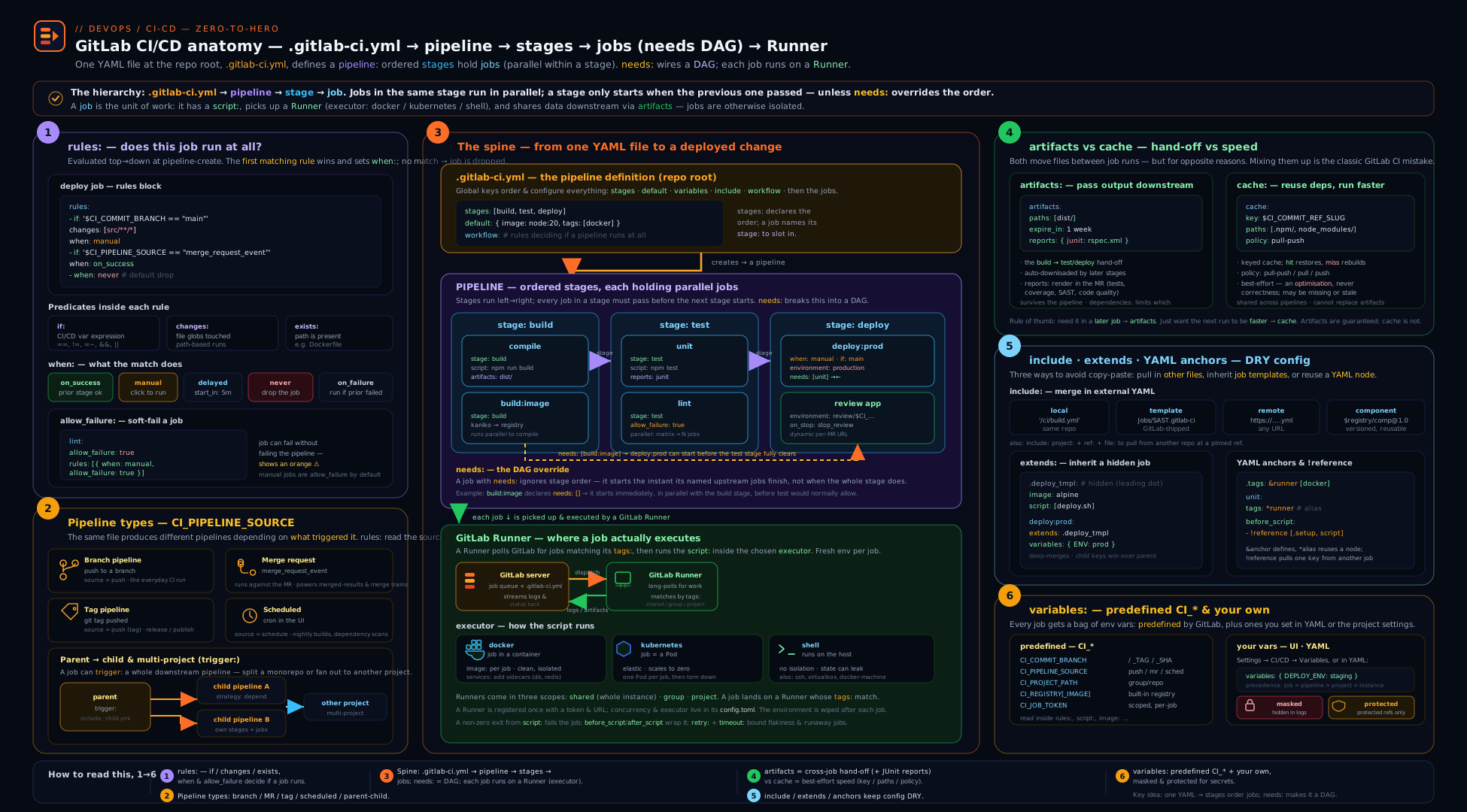
The diagram traces a pipeline end to end: a trigger (push, merge request, tag, schedule, API, or another pipeline) is filtered by workflow:rules into a pipeline of one type; the pipeline is arranged into stages (sequential) and jobs (parallel within a stage, or a free DAG once needs: is used); each job is dispatched to a runner whose tags match and runs inside that runner’s executor (a docker container, a Kubernetes pod, or the shell); and data crosses the job boundaries the only ways it can — artifacts and dotenv forward within the pipeline (and needs:project across projects), cache across pipelines, while include/extends/!reference compose the configuration before any of it runs. Keep this picture in mind whenever a job “can’t find” something a previous job made, or sits stuck in pending.
Going deeper
The fundamentals above get you a working, fast, safe pipeline. This section is for the reader who wants to know why GitLab behaves the way it does — the internals that turn “it works” into “I know exactly what it will do.”
How a runner actually executes one job
A job is not just “run my script.” The runner walks a fixed sequence of phases for every job, and the log’s collapsible sections map onto them one-to-one. Knowing the order explains most “where did my file / variable / cache go?” puzzles:
- prepare — the executor builds the environment (pulls the
image, startsservices). - get_sources —
gitclone/fetch of your repo at the job’s commit (tune withGIT_STRATEGY,GIT_DEPTH). - restore_cache — download and unpack the
cachefor the matchingkey(a miss is silent). - download_artifacts — pull artifacts from upstream jobs (per
needs/dependencies). - step_script — run
before_scriptthenscript, in one shell. - after_script — run in a separate shell, always (even on failure/cancel/timeout).
- archive_cache — pack and upload the
cache(only ifpolicywrites andwhenmatches). - upload_artifacts — upload artifacts (
on_successvson_failuredecides which run keeps them).
Two consequences fall straight out of this ordering. First, cache is archived and artifacts uploaded after after_script — so a value you compute must be written to disk during script (into a dotenv/artifact path), not merely exported. Second, a job cancelled mid-script still runs after_script and still uploads when: always/on_failure artifacts — which is exactly why artifacts:when: always reliably captures failure logs.
The order GitLab assembles and evaluates your config
.gitlab-ci.yml is resolved in a definite order, and bugs love the seams between the steps:
includemerges every referenced file/template/component into one document.extends, YAML anchors and!referenceare resolved into concrete job maps.- Component
$[[ inputs.x ]]interpolation happens here, at include time — before any pipeline exists. workflow:rulesdecide whether a pipeline is created at all, and of which type.- Each job’s
rulesdecide inclusion and itswhen/variables;needsthen wires the DAG. - Runtime variable expansion (
$VAR,${VAR}) happens last — on the runner, inside the job.
The load-bearing distinction is step 3 versus step 6: $[[ inputs.foo ]] is interpolated when the config is composed (so it can shape job names and keys), whereas $FOO is expanded when the job runs (so it can hold per-run and secret values). Expecting a $CI_* runtime value to be available while GitLab is still merging YAML is a classic source of “the variable is empty” confusion.
interruptible and auto-cancel: the real money-saver
On a busy branch you push three times in a minute; without help, GitLab runs three full pipelines. interruptible plus workflow:auto_cancel collapses that to one:
workflow:
  auto_cancel:
    on_new_commit: interruptible   # cancel superseded pipelines' still-cancellable jobs
    on_job_failure: all            # once any job fails, cancel the rest of the pipeline

build:
  interruptible: true              # safe to kill — a newer commit makes it moot
  script: ["make build"]

deploy:
  interruptible: false             # once a real deploy starts, never auto-cancel it
  script: ["./deploy.sh"]
The subtlety: a pipeline stays auto-cancellable only until the first non-interruptible job starts. Mark tests and builds interruptible: true, but leave deploys and anything with side effects false, so a superseding commit cancels wasted test work yet never yanks a deploy out from under you. This is the single biggest lever on CI/CD-minute spend for teams that push often.
Authoring a CI/CD Component (not just consuming one)
The fundamentals showed how to consume a component. Authoring one is how a platform team ships reusable, versioned, typed pipeline logic to the whole org. A component is a template file in a project, with a spec:inputs: header (declaring typed inputs, defaults and validation) and a body that interpolates them with $[[ inputs.x ]]:
# templates/build/template.yml  (in project my-group/ci-components)
spec:
  inputs:
    stage:
      default: build
    image:
      default: alpine:3.20
    run-tests:
      type: boolean          # string (default) | number | boolean | array
      default: false
---
"build-$[[ inputs.stage ]]":
  stage: "$[[ inputs.stage ]]"
  image: "$[[ inputs.image ]]"
  script:
    - echo "building on $[[ inputs.image ]]"
    - '[ "$[[ inputs.run-tests ]]" = "true" ] && make test || true'
Consumers include it by its catalog path and pass inputs — validated against the spec, so a typo or wrong type fails fast instead of producing a broken pipeline:
include:
  - component: $CI_SERVER_FQDN/my-group/ci-components/build@1.2.0
    inputs:
      stage: build
      image: golang:1.23
      run-tests: true
Publish it by creating a release in the component project; it then appears in the CI/CD Catalog at the pinned @version. Typed inputs, semantic-version pinning and a discoverable catalog are why components have replaced the old “include a remote template and hope the variables line up” pattern — pin the @version exactly as you would pin a library dependency.
Hands-on lab
You will build a small but complete GitLab pipeline on a free GitLab.com project: multiple stages, a needs DAG, a cache, an artifact with a JUnit report handed between jobs, a dotenv variable passed downstream, rules-based MR/branch gating, a manual deploy gate, and an environment. Everything here runs on GitLab.com’s free shared runners.
Step 1 — Create a project
In the browser, create a new blank project gitlab-ci-lab (private is fine; free runners apply). You will edit files via the Web IDE or push from a local clone.
Step 2 — Add a tiny app and a test that emits JUnit
Add app.sh:
#!/usr/bin/env sh
echo "built ok"
Add make-report.sh (fakes a passing JUnit report so the MR widget lights up):
#!/usr/bin/env sh
cat > report.xml <<'XML'
<testsuite name="unit" tests="1" failures="0">
  <testcase classname="app" name="it_builds"/>
</testsuite>
XML
echo "report written"
Step 3 — Add .gitlab-ci.yml
stages: [build, test, deploy]

default:
  image: alpine:3.20

# Run MR pipelines for MRs, branch pipelines for main/tags, and never both.
workflow:
  rules:
    - if: '$CI_COMMIT_BRANCH && $CI_OPEN_MERGE_REQUESTS && $CI_PIPELINE_SOURCE == "push"'
      when: never
    - if: '$CI_PIPELINE_SOURCE == "merge_request_event"'
    - if: '$CI_COMMIT_BRANCH == $CI_DEFAULT_BRANCH'
    - if: '$CI_COMMIT_TAG'

build:
  stage: build
  script:
    - sh app.sh
    - mkdir -p dist && echo "artifact-$CI_COMMIT_SHORT_SHA" > dist/out.txt
    - echo "IMAGE_TAG=sha-$CI_COMMIT_SHORT_SHA" >> build.env
  artifacts:
    paths: [dist/]
    expire_in: 1 hour
    reports:
      dotenv: build.env          # passes IMAGE_TAG to later jobs

test:
  stage: test
  needs: ["build"]               # DAG: starts as soon as build finishes
  script:
    - sh make-report.sh
  artifacts:
    when: always                 # keep the report even if the job fails
    reports:
      junit: report.xml          # shows in the MR test widget

lint:
  stage: test
  needs: []                      # source-only: runs in the FIRST wave
  script:
    - echo "linting..." && test -f app.sh

deploy:
  stage: deploy
  needs: ["test"]
  rules:
    - if: '$CI_COMMIT_BRANCH == $CI_DEFAULT_BRANCH'
      when: manual               # human gate on main only
      allow_failure: false
  environment:
    name: production
    url: https://example.com
  script:
    - echo "Deploying $IMAGE_TAG"     # came from build's dotenv report
    - cat dist/out.txt                # came from build's artifact
Step 4 — Trigger and observe
Commit to main. Open Build → Pipelines and watch:
Expected behaviour:
lint(withneeds: []) andbuildstart in the first wave in parallel —lintdoes not wait for thebuildstage.teststarts the instantbuildfinishes (DAG), produces the JUnit report.deployis blocked with a manual ▶ button (becauserulessetwhen: manualonmain). Click it.- After deploy runs, its log prints
Deploying sha-<shortsha>(proving thedotenvvariable crossed jobs) and the artifact’sout.txtcontents (proving the artifact downloaded). - Open Deploy → Environments: a
productionenvironment appears with the deployment recorded.
Step 5 — Exercise the rules and pipeline types
- Create a branch, change
app.sh, and open a merge request. Observe an MR pipeline (CI_PIPELINE_SOURCE == merge_request_event) — and confirm you do not also get a duplicate branch pipeline (thanks toworkflow:). Thedeployjob does not appear (its rule requiresmain). - In the MR, open the test report widget — your JUnit
report.xmlis parsed and shows 1 passing test. - Push a second commit to the MR branch and watch the older pipeline auto-cancel if interruptible/auto-cancel is on.
Step 6 — Validation
# With the glab CLI (optional)
glab ci status
glab ci view                       # shows the DAG / needs graph
glab ci list --per-page 5
A successful lab: a pipeline where lint+build ran concurrently in wave one, test produced a JUnit report visible in the MR, deploy paused on a manual gate and then printed the dotenv IMAGE_TAG and the artifact contents, and a production environment was recorded.
Cleanup
CI/CD minutes and storage on GitLab.com’s free tier are limited but you have used only seconds. To tidy up: artifacts expire via expire_in: 1 hour; you can also delete old pipelines (Build → Pipelines → … → Delete). When finished, delete the project (Settings → General → Advanced → Delete project). Caches and environments are removed with the project.
Cost note
GitLab.com’s free tier includes a monthly CI/CD minutes allowance on shared runners (with multipliers — Linux cheapest, macOS most expensive) and a storage quota for artifacts/registry. The biggest hidden costs are long expire_in artifacts filling storage and fanning a parallel: matrix across many jobs. On self-managed GitLab you pay only for your own runner compute; right-size runner CPU/memory and prefer the kubernetes/autoscaler executors so idle capacity costs nothing.
Practice challenges
Work these in a scratch .gitlab-ci.yml (validate with Build → Pipeline editor → Validate, or glab ci lint, before pushing). They escalate from a first pipeline to production-grade reuse. Try each before opening the solution.
Challenge 1 — Your first two-stage pipeline (beginner)
Write a pipeline with a build stage and a test stage, one job each, and confirm test waits for build.
<details> <summary>Solution</summary>
stages: [build, test]

compile:
  stage: build
  script: ["echo building && make || true"]

unit:
  stage: test
  script: ["echo testing"]
Why: stages run in declared order and every job runs only after the previous stage fully succeeds, so unit starts only once compile is green.
</details>
Challenge 2 — Run lint immediately (beginner)
Add a lint job that must start in the first scheduling wave, without waiting for the build stage, even though it lives in a later stage.
<details> <summary>Solution</summary>
lint:
  stage: test
  needs: []            # depend on nothing → launches in wave one
  script: ["echo linting"]
Why: an empty needs: [] detaches the job from stage ordering, so a source-only check runs at once instead of blocking behind build.
</details>
Challenge 3 — Gate deploy to main, with a human click (intermediate)
Make a deploy job that never runs off the default branch and, on the default branch, requires a manual click that blocks the pipeline until someone approves.
<details> <summary>Solution</summary>
deploy:
  stage: deploy
  script: ["./deploy.sh"]
  rules:
    - if: '$CI_COMMIT_BRANCH != $CI_DEFAULT_BRANCH'
      when: never
    - if: '$CI_COMMIT_BRANCH == $CI_DEFAULT_BRANCH'
      when: manual
      allow_failure: false
Why: rules are first-match; the never rule excludes every other branch, and allow_failure: false on the manual rule makes the play button a blocking gate rather than an optional one.
</details>
Challenge 4 — Kill the duplicate MR pipeline (intermediate)
You open a merge request and get two pipelines for the same commit. Add config so an open MR gets one MR pipeline, main/tags get a branch pipeline, and you never get both.
<details> <summary>Solution</summary>
workflow:
  rules:
    - if: '$CI_COMMIT_BRANCH && $CI_OPEN_MERGE_REQUESTS && $CI_PIPELINE_SOURCE == "push"'
      when: never
    - if: '$CI_PIPELINE_SOURCE == "merge_request_event"'
    - if: '$CI_COMMIT_BRANCH == $CI_DEFAULT_BRANCH'
    - if: '$CI_COMMIT_TAG'
Why: the first workflow rule vetoes the redundant branch pipeline whenever a push lands on a branch that already has an open MR, leaving only the MR pipeline. (GitLab ships this as Workflows/MergeRequest-Pipelines.)
</details>
Challenge 5 — A cache that’s fast and safe under parallelism (advanced)
Cache node_modules/ keyed on the lockfile. One install job populates it; a parallel test job must read it without being able to corrupt it, and a cold cache must never break the build.
<details> <summary>Solution</summary>
install:
  stage: build
  script: ["npm ci"]
  cache:
    key:
      files: [package-lock.json]   # busts only when deps change
    paths: [node_modules/]
    policy: pull-push              # the ONE writer
    fallback_keys: [npm-default]   # use a recent cache on a key miss

test:
  stage: test
  needs: ["install"]
  script: ["npm test"]
  cache:
    key:
      files: [package-lock.json]
    paths: [node_modules/]
    policy: pull                   # read-only consumer — can't corrupt the cache
Why: keying on the lockfile hash makes the cache self-invalidating; making only the installer pull-push and every consumer pull avoids the classic two-writers-corrupt-the-cache race, and fallback_keys keeps a miss harmless.
</details>
Challenge 6 — DRY three jobs, then extend one shared block (advanced)
Three jobs share image: node:20 and a before_script of npm ci. Factor that into a hidden template with extends; then have just the test job add one extra before_script step on top of the shared one, without copy-pasting npm ci.
<details> <summary>Solution</summary>
.base:
  image: node:20
  before_script:
    - npm ci

build:
  extends: .base
  script: ["npm run build"]

test:
  extends: .base
  before_script:
    - !reference [.base, before_script]   # splice the shared steps back in…
    - echo "extra test setup"             # …then add this job's own
  script: ["npm test"]
Why: extends deep-merges the hidden .base job, but redefining before_script in test would replace it — !reference splices the shared list back in so you extend rather than overwrite it.
</details>
Common beginner mistakes
These are conceptual traps — the wrong mental model — as opposed to the symptom→fix lookup in the troubleshooting table below.
- “The stage is where the work happens.” A stage does no work; it is only an ordering bucket. The job is the unit that runs commands on a runner. Right model: jobs do the work, stages just sequence groups of them.
- “Jobs in a pipeline share a working directory.” They do not. Every job gets a fresh, isolated checkout on (possibly) a different runner. If job B needs a file job A made, A must publish it as an artifact — otherwise B starts with only your repo.
- “
export FOO=barin one job is visible in the next.” No — that shell dies with the job. To pass a value downstream, write it to adotenvreport (artifacts:reports:dotenv); to pass files, use artifacts. - “
only/exceptandrulesare just two styles of the same thing.” They cannot be mixed in one job, andonly/exceptis legacy: noexists, no per-conditionwhen/variables, and awkward with MR pipelines. Reach forrulesin anything new. - “Artifacts and cache are interchangeable.” Opposite guarantees. An artifact is a promised output — a missing one is a real failure. A cache is a best-effort speed-up — a miss just means a slower install. Cache dependencies; artifact outputs.
- “A manual job pauses the pipeline until I click it.” Not by default — manual jobs are
allow_failure: true, so the pipeline sails past them. Setallow_failure: falseto make the gate actually blocking. - “
rules:changesreliably detects what changed.” Only in MR pipelines, where the base is the target branch. On the first pipeline of a new branch (and on scheduled/tag pipelines) there is no reliable base, sochangescan quietly evaluate true and run jobs you meant to skip. - “Masking a variable makes it safe to print.” Masking only redacts values that meet GitLab’s masking rules, and only where they appear verbatim. A base64/JSON-wrapped or otherwise derived form leaks straight through. Never
echoa secret or runset -xnear one.
Common mistakes & troubleshooting
| Symptom | Likely cause | Fix |
|---|---|---|
| Two pipelines run for every MR commit | rules/only match both push and merge_request_event |
Add a top-level workflow: block that rejects the branch pipeline when an MR is open |
Job stuck in pending forever |
No online runner matches the job’s tags (or job is untagged and runners only take tagged jobs) |
Fix tags: to match an available runner; check Settings → CI/CD → Runners |
rules:changes runs jobs it shouldn’t on a new branch |
changes has no reliable base on the first branch/scheduled/tag pipeline → evaluates true |
Use rules:changes in MR pipelines (well-defined base); add compare_to where available |
| A later job can’t find a file an earlier job made | It was never declared as an artifact (jobs don’t share a filesystem) |
Add artifacts:paths:; ensure stage/needs order and dependencies allow the download |
Variable set in script is missing in the next job/after_script |
Job environments are isolated; after_script uses a fresh shell |
Pass values via artifacts:reports:dotenv, not shell export |
| Cache “never restores” | Key mismatch — key:files: points at a path missing on that branch, so a different/default key is used |
Check the exact key printed in the job log; key on the lockfile that exists |
| Two parallel jobs corrupt the cache | Both run policy: pull-push on the same key |
Make one job the installer (pull-push), all consumers pull |
include: project: pipeline changes unexpectedly |
The include is unpinned, tracking the other project’s default branch | Pin ref: to a tag or SHA |
needs config error |
A needs points at a job in a later stage (forward reference) |
Reorder stages so a needed job is in the same or an earlier stage |
| Manual deploy job goes green without doing anything / doesn’t block | allow_failure defaults to true for manual jobs |
Set allow_failure: false to make the manual gate blocking |
| MR test/security widget is empty | Reports emitted as plain paths artifacts, not under artifacts:reports: |
Use the typed reports: keys (junit, coverage_report, sast, …) |
Best practices
- Always add a
workflow:block (or includeWorkflows/MergeRequest-Pipelines) to choose one pipeline type per event and kill duplicate pipelines. - Use
rules, neveronly/exceptin new pipelines — it is more expressive and MR-friendly. Order rules carefully (first match wins) and putwhen: neverexclusions first. - Turn the staircase into a DAG with
needswhere jobs are independent; useneeds: []to launch source-only jobs (lint, scan) immediately. Wall-clock time should track the longest path, not the sum of stages. - Cache dependencies; artifact outputs. Key the cache on the lockfile (
key:files:), make exactly one jobpull-push, and set consumers topull. - Keep config DRY with
extendsand CI/CD Components, reserving anchors for tiny local reuse and!referencefor splicing a single keyword (e.g. extending a sharedbefore_script). - Pin every
include: project:/component:to a tag or SHA so a shared template can’t change your pipeline without a deliberate bump. - Put long shell logic in a checked-in script (
./ci/deploy.shwithset -euo pipefail) rather than a giantscript:block — testable, lintable, and free of YAML-escaping pain. - Set
interruptible: trueon safe jobs andworkflow:auto_cancelto stop paying for superseded pipelines. - Use
artifacts:when: alwayson test jobs so you still capture reports and logs when they fail. - Validate
.gitlab-ci.ymlbefore pushing with the CI Lint tool (Build → Pipeline editor → Validate, orglab ci lint).
Security notes
- Protect production secrets with the
protectedflag. A protected variable is only exposed to jobs on protected branches/tags, keeping prod credentials off feature-branch and fork pipelines. - Never store static cloud/registry keys in CI/CD variables when you can avoid it. Use
id_tokens:(OIDC) to exchange a short-lived JWT for credentials from Vault or the cloud — no standing secret to leak, every issuance audited. (Deep dive: the advanced GitLab CI guide.) - Mind masking limits.
maskedonly redacts values that meet GitLab’s masking rules and only when they appear verbatim — base64/derived forms can leak. Neverechoa secret or runset -xnear one. - Avoid the
shellexecutor for untrusted or multi-tenant pipelines. Jobs run directly on the host with no isolation; preferdocker/kuberneteswith ephemeral environments. - Scope the
CI_JOB_TOKEN. It can authenticate to other projects’ APIs and registries; in Settings → CI/CD → Token Access, restrict which projects may use this project’s job token (the allowlist), and use it instead of personal access tokens for cross-project pulls. - Pin includes and components to immutable refs so a compromised upstream template can’t inject jobs into your pipeline.
- Don’t expose secrets to fork MR pipelines. External-contributor pipelines should not receive protected variables; review the project’s “run pipelines for fork merge requests” setting and keep deploy jobs gated on protected refs/environments.
Interview & exam questions
1. What is the difference between a stage and a job, and how do jobs in the same stage run?
A stage is an ordered phase; a job is the unit of work. Jobs in the same stage run in parallel, and the next stage starts only when all jobs in the previous stage have succeeded. A job is any top-level key with a script:.
2. Why might opening a merge request create two pipelines, and how do you stop it?
If your rules match both push and merge_request_event, GitLab creates a branch pipeline and an MR pipeline for the same commit. Fix it with a top-level workflow: block that rejects the branch pipeline when an open MR exists (the MergeRequest-Pipelines recipe).
3. What does needs do, and what does needs: [] mean?
needs makes a job start as soon as the listed jobs finish — forming a DAG — instead of waiting for its whole stage. needs: [] means “depend on nothing,” so the job launches in the first scheduling wave even if it’s in a later stage. needs can only point at same- or earlier-stage jobs.
4. Explain rules versus only/except.
rules is the modern, ordered, first-match mechanism combining if/changes/exists with per-condition when/allow_failure/variables; only/except is the legacy, less expressive predecessor with no exists, no per-condition when, and awkward MR-pipeline behaviour. You cannot mix them in one job; use rules.
5. Artifact versus cache — when do you use each?
An artifact is a deliberate output passed forward to later jobs (or downloaded) — a missing required artifact is a real failure. A cache speeds up future pipelines by reusing dependency directories — a miss is harmless. Key the cache on the lockfile; name and expire_in the artifact.
6. How do you pass a value (not a file) from one job to another?
Write it to a .env file and declare it as a dotenv report (artifacts:reports:dotenv); a downstream job (with needs) then sees it as a variable. Shell export does not survive because jobs run in isolated environments.
7. What are the four include types, and which one should you pin?
local (same repo), project (another GitLab project), remote (a URL), template (GitLab built-ins) — plus component (the versioned CI/CD Catalog). Always pin project: includes and component: references to a tag/SHA so they can’t change under you.
8. Compare extends, YAML anchors, and !reference.
extends deep-merges another (usually hidden) job’s keywords and works across included files — the default reuse tool. YAML anchors copy a whole block but only within one file. !reference splices a specific value (even one keyword), works across the merged config, and can be composed inside a list (e.g. extend a shared before_script).
9. What’s the difference between masked and protected variables?
masked redacts the value in job logs (subject to masking rules). protected restricts the variable to jobs on protected branches/tags — the mechanism that keeps production secrets away from feature-branch and fork pipelines. They are independent flags often used together.
10. What is a GitLab Runner executor, and what do docker, kubernetes, and shell give you?
The executor is how the runner provides the job’s environment. docker runs each job in a fresh container (so image:/services: work) — the common default; kubernetes runs each job in a throwaway pod (elastic, autoscaling CI); shell runs directly on the host with no isolation (avoid for untrusted/multi-tenant work).
11. Why is a job stuck in pending, most commonly?
Its tags match no online runner (or it’s untagged and the runners only accept tagged jobs). Align the job’s tags with an available runner, or enable “run untagged jobs” on a runner.
12. What’s the risk of rules:changes on a branch pipeline?
On the first pipeline for a new branch (and on scheduled/tag pipelines) there’s no reliable base commit to diff, so changes can evaluate true and run jobs you meant to skip. Use rules:changes in MR pipelines, where the comparison is against the target branch.
13. How do you run only one deploy at a time and require a human to release to production?
Use resource_group to serialise concurrent deploy jobs, and when: manual with allow_failure: false (plus a protected environment) so production deploys pause for an authorised click.
Quick check
- Where does the pipeline definition live, and how many such files does a project have?
- What does
needs: []cause a job to do? - Which keyword stops a merge request from creating two pipelines?
- Under
artifacts:, which sub-key surfaces test results in the MR widget? - Which executor runs each job in its own throwaway pod?
Answers
- In a single
.gitlab-ci.ymlat the repository root (path configurable); a project composes one pipeline definition, splitting it up withincluderather than multiple files. - It launches in the first scheduling wave immediately, depending on no other job, regardless of its stage.
- A top-level
workflow:block (itsrules), e.g. theMergeRequest-Pipelinesrecipe. artifacts:reports:junit(a JUnit XML report).- The
kubernetesexecutor.
Exercise
Extend the lab pipeline into a small release pipeline:
- Add a
packagestage with a job that builds and pushes a container image to the built-in registry ($CI_REGISTRY_IMAGE:$CI_COMMIT_SHORT_SHA) using$CI_REGISTRY_USER/$CI_REGISTRY_PASSWORD(or Kaniko) — and have it run only onmainand tags viarules. - Add a tag pipeline path: a
releasejob that runs only when$CI_COMMIT_TAGis set, creating a GitLab release. - Add a cache keyed on a lockfile with
policy: pull-pushon the install job andpolicy: pullon the test job; prove the second pipeline restores it (check the job log). - Move the shared
before_scriptinto a hidden.basejob and havebuild/testuseextends: .base; then add one extra step totest’sbefore_scriptwith!reference [.base, before_script]. - Add a
deploy-reviewenvironment (name: review/$CI_COMMIT_REF_SLUG) withon_stopandauto_stop_in, gated onmerge_request_event, mirroring the review-app pattern.
Success criteria: an MR pipeline (no duplicate branch pipeline) that lints+builds in wave one, restores the cache on the second run, surfaces the JUnit report; a main pipeline that pushes an image and offers a manual production deploy; and a v1.0.0 tag that produces a release. (The full production-grade version — distributed S3 cache, dynamic review apps with Kubernetes/Argo CD, and Vault-issued credentials — is the advanced GitLab CI guide.)
Certification mapping
- GitLab certifications (GitLab CI/CD Associate / Specialist) — this lesson covers the core directly:
.gitlab-ci.ymlstructure, stages/jobs and the script lifecycle, pipeline types,rulesvsonly/except, theneedsDAG andneeds:project, artifacts (incl.reports) vs cache,include/extends/!reference/components, variables (predefined, scopes, masked/protected/file), environments and manual gates, and the runner/executor model. - Microsoft AZ-400 (DevOps Engineer Expert) — the “design and implement build/release pipelines, manage dependencies, and secure pipelines” objectives map onto GitLab pipelines, artifact/cache management, environments/approvals, and secret handling; pair with the Azure Pipelines fundamentals lesson for the Azure DevOps equivalent.
- AWS DOP-C02 / GCP Professional DevOps Engineer — the CI concepts (pipelines, gates, artifacts, DAG parallelism, OIDC federation) transfer; the vendor-neutral model is in CI/CD anatomy.
Glossary
- Pipeline — one execution of
.gitlab-ci.yml, attached to a commit, MR, tag, or schedule. - Stage — an ordered phase grouping jobs; stages run sequentially, jobs within a stage in parallel.
- Job — the unit of work: a top-level key with a
script:, run in an isolated environment on a runner. - Runner — the agent that executes jobs; shared (instance), group, or project-specific.
- Executor — the runner’s strategy for the job environment (
docker,kubernetes,shell, autoscaler, …). rules— the modern, ordered, first-match mechanism deciding whether/how a job runs (if/changes/exists+when/allow_failure/variables).needs— declares a job’s DAG dependencies so it starts before its stage;needs: []= run immediately;needs:project= pull another project’s artifacts.- Artifact — files/reports a job saves and passes forward (or you download); typed
reports(JUnit, coverage, SAST…) feed GitLab widgets. - Cache — dependency directories reused across pipelines to speed up installs; keyed (often on the lockfile) with a
policy. include— composes config from local/project/remote/template files or versioned CI/CD components.extends— deep-merges another (usually hidden) job’s keywords; the primary reuse tool.!reference— splices a specific value/keyword from elsewhere in the merged config, composable in lists.dotenvreport — passes variable values (not files) to downstream jobs.- Environment — a deployment target (staging/production/review) enabling rollback, review apps, and protected-environment approvals.
- Predefined variable (
CI_*) — read-only context GitLab injects (CI_PIPELINE_SOURCE,CI_COMMIT_REF_SLUG,CI_REGISTRY_IMAGE, …). - Masked / Protected variable — masked redacts the value in logs; protected restricts it to protected branches/tags.
.gitlab-ci.yml— the single pipeline-definition file at the repository root that GitLab reads on every trigger; split it withinclude, not multiple files.workflow:rules— top-level rules deciding whether a whole pipeline is created and of which type; the cure for duplicate pipelines.- DAG (directed acyclic graph) — the dependency graph
needsbuilds, so wall-clock time tracks the longest path rather than the sum of all stages. - Script lifecycle — a job’s
before_script→script→after_script;after_scriptalways runs, in a separate shell that doesn’t inheritscriptstate. tags— labels routing a job to a runner that advertises all of them; a tag mismatch is the usual “stuck in pending” cause.services— sidecar containers (a database, a broker) linked to a job and reachable byalias.interruptible— marks a job safe to auto-cancel when a newer commit supersedes the pipeline; pairs withworkflow:auto_cancel.dependencies— restricts which upstream artifacts a job downloads ([]= none), independent ofneeds.resource_group— serialises jobs that share a name so only one runs at a time (e.g. one production deploy).- File variable — a variable whose value GitLab writes to a temp file, exposing the path — what
--kubeconfig/--key-filetools expect. id_tokens— job-minted OIDC JWTs for keyless auth to Vault/cloud, the modern replacement for stored static keys.- CI/CD Component — a versioned, typed (
spec:inputs:) reusable pipeline unit published to the CI/CD Catalog; the modern reuse primitive. CI_JOB_TOKEN— a short-lived token authenticating a job to the API/registry/other projects; scope it via the token access allowlist.- Trigger job — a scriptless job with a
trigger:key that starts a child (same project) or multi-project (another project) pipeline. - Review app — a dynamic, per-MR
environment(e.g.review/$CI_COMMIT_REF_SLUG) withon_stop/auto_stop_inteardown.
Next steps
You now know the foundational GitLab CI/CD model end to end. From here:
- Apply it at production scale with the advanced guide: a GitLab CI DAG with distributed cache and review apps (S3 cache, dynamic Kubernetes review environments, Vault-issued credentials, Wiz and Argo CD).
- Learn the next platform: Azure Pipelines fundamentals — stages, jobs, steps, tasks, templates and triggers.
- Step back to the vendor-neutral model in CI/CD anatomy, and compare with the GitHub Actions fundamentals lesson.
- Master the YAML underneath it all — anchors, merge keys and templating — in YAML for DevOps pipelines.