In a nutshell
Every piece of software you ship is assembled from parts — a container image here, a Java library there, a Python package, maybe an operating-system update — and every one of those parts has to be stored somewhere your build machines and servers trust. Artifact Registry is that somewhere: one managed, private warehouse on Google Cloud for all of it.
Picture a guarded company warehouse with numbered shelves. You (and your build robots) drop finished boxes on your own shelves; a guard at the door checks everyone’s ID before they take anything in or out — that is Google IAM, and there are no shared warehouse passwords. An inspector opens incoming boxes to check for known defects — that is vulnerability scanning. A janitor quietly clears out expired stock so the aisles do not overflow — that is a cleanup policy. And the warehouse can keep cached copies of parts you buy from public suppliers — Docker Hub, PyPI, Maven Central — so your assembly line keeps running even when a supplier is slow or shut for the day. That last one is a remote repository.
That is the whole idea. The rest of this lesson is the detail: the kinds of shelves (repository modes), the kinds of boxes (formats), how the guard decides who gets in (authentication and IAM), what the inspector reports (Artifact Analysis), how the janitor is told what to keep (cleanup policies), and how your Kubernetes and Cloud Run servers collect exactly what they need to run. If you can build a container, this is where it should live.
Level: Intermediate · Time: ~47 min · You’ll need: a GCP project, basic IAM, and comfort with docker build/push.
Google Artifact Registry is Google Cloud’s single, managed home for everything your software is built from and shipped as: container images, language packages (Maven, npm, Python, Go), OS packages (apt, yum), Helm charts, and arbitrary files. It is the successor to Container Registry (the old gcr.io/*.gcr.io service, which is now shut down for new projects and deprecated everywhere), and it is far more than “Container Registry with more formats”. Artifact Registry sits at the centre of your software supply chain: it stores artifacts, it authenticates and authorises every push and pull through Google IAM, it scans container images for vulnerabilities via Artifact Analysis, it cleans up old artifacts automatically with policies, it can proxy and cache public upstreams (Docker Hub, PyPI, Maven Central) so your builds do not depend on rate-limited public mirrors, and it produces the metadata that Binary Authorization uses to block unattested or vulnerable images from running on GKE and Cloud Run.
This lesson is the exhaustive version. By the end you will know every repository mode and every supported format, the exact naming and regional model, every way to authenticate (the gcloud credential helper, service-account keys you should avoid, and the keyless Workload Identity Federation path your CI should use), the three IAM roles that matter and who needs which, how vulnerability scanning works (automatic on-push versus on-demand, what it covers, where results appear), how to write cleanup policies (delete and keep rules, the all-important dry-run), how immutable tags and customer-managed encryption (CMEK) harden a repository, how Artifact Registry feeds Binary Authorization, and exactly how to migrate off gcr.io and pull from GKE and Cloud Run. Every option gets the same treatment — what it is · the choices · the default · when to pick which · the trade-off · the limit · the cost impact · the gotcha — and every operation comes with a real gcloud command. Everything below reflects the current (2026) Artifact Registry surface.
Learning objectives
By the end of this lesson you can:
- Explain the three repository modes — standard, remote (pull-through cache), and virtual (aggregate) — and design a layout that uses all three correctly.
- Choose the right format (Docker/OCI, Maven, npm, Python, Go, apt, yum, Helm, generic, KFP) for each artifact and name a repository within Google’s regional model.
- Authenticate to Artifact Registry every way that matters: the
gcloudcredential helper for Docker, per-language tooling, and — for CI — Workload Identity Federation with no downloaded keys. - Apply least-privilege IAM with the reader / writer / admin roles at project or repository scope.
- Turn on and read vulnerability scanning (Artifact Analysis) — automatic on-push and on-demand — and understand what it does and does not cover.
- Author cleanup policies with delete and keep rules, validate them with dry-run, and protect releases with keep tagged and immutable tags.
- Encrypt a repository with CMEK, wire it into Binary Authorization, migrate off
gcr.io, and pull from GKE and Cloud Run.
Prerequisites & where this fits
You should be comfortable with the GCP resource hierarchy (organisation → folders → projects) and IAM (roles, members, service accounts), and with the basics of building and running a container — docker build, docker push, an image reference like repo/name:tag, and the idea of a tag versus a digest. If those are fuzzy, skim the IAM and Compute fundamentals first. In the Zero-to-Hero programme this is the Containers lesson that turns “I can build an image” into “I can store, secure, scan, and clean up everything my pipeline produces.” It follows the Google Kubernetes Engine deep dive (GKE pulls its images from here) and precedes the Cloud Build & Cloud Deploy deep dive (which pushes images here and deploys them onward). Think of Artifact Registry as the noun — the thing your build produces and your runtime consumes — between those two verbs.
Core concepts
A repository is the unit you create, secure, and bill against. Every repository has exactly one format (Docker, Maven, npm, …) and exactly one mode (standard, remote, or virtual) chosen at creation and fixed for the repository’s life — you cannot convert a Docker repository to Maven, or a standard repository to remote; you create a new one. A repository lives in a location: a specific region (us-central1, europe-west1, asia-south1, …) or a multi-region (us, europe, asia). Location is also immutable after creation.
An artifact is one stored thing: a container image (addressed by a mutable tag like :v1.2.0 and an immutable digest like @sha256:…), a Maven JAR, an npm tarball, a Python wheel, an apt .deb, and so on. For container images, the digest is the cryptographic identity (the hash of the manifest); a tag is just a human-friendly pointer that can be moved. Production should pin by digest, not tag.
A package groups versions of the same artifact (e.g. all versions of the frontend image, or all versions of the com.acme:billing Maven artifact); a version is one specific build. Cleanup policies and listing operate on packages, versions, and tags.
Artifact Analysis (formerly “Container Analysis”) is the service that scans stored images and produces occurrences — notes about discovered vulnerabilities (CVEs) and other metadata — that you and Binary Authorization can query. Binary Authorization is the deploy-time gate that requires images to carry attestations (signed claims like “this image passed scanning” or “this image was built by our pipeline”) before GKE or Cloud Run will run them.
Keep these five nouns in mind — repository, artifact (tag vs digest), package/version, scan occurrence, attestation — because every section below is one of these or the wiring between two of them.
Repository modes: standard, remote, and virtual
The single most important design decision is the mode. Artifact Registry has three, and a mature setup uses all three together.
| Mode | What it is | What you do with it | Can you push to it? | Typical name |
|---|---|---|---|---|
| Standard | A normal repository you own and write to | Store your built artifacts | Yes (push/upload) | my-images, app-maven |
| Remote | A pull-through cache of an external upstream (Docker Hub, PyPI, Maven Central, npm, a custom URL) | Proxy + cache public/3rd-party deps so builds do not hit the public registry directly | No — read-only; it fetches and caches on first pull | docker-hub-remote, pypi-remote |
| Virtual | A read-only aggregate that fronts several upstream repositories (standard and/or remote) behind one endpoint, with a priority order | Give clients one URL that resolves first to your private artifacts, then falls back to a cached public mirror | No — clients only pull | docker-virtual, python-virtual |
Standard is the obvious one: you docker push (or mvn deploy, npm publish, twine upload, …) into it. Default to standard for anything you build.
Remote repositories solve a real production pain: public registries are rate-limited and occasionally down. Docker Hub throttles anonymous pulls; PyPI and npm have had outages; Maven Central can be slow from some regions. A remote repository is configured with an upstream (a well-known one — Docker Hub, GCR’s mirror, PyPI, npm, Maven Central, Debian/Ubuntu, CentOS — or a custom upstream URL). The first time anyone pulls python:3.12 through it, Artifact Registry fetches it from the upstream and caches it; subsequent pulls are served from your region at registry speed and do not count against the upstream’s limits. You can attach upstream credentials (stored in Secret Manager) when the upstream is private or you want authenticated, higher-limit access to Docker Hub. Remote repositories are read-only to you — you never push; you only consume. Cost note: you pay storage for cached copies and (as always) egress if pulled cross-region.
Virtual repositories give you one endpoint that aggregates several others. A classic Docker layout: a virtual repo docker whose upstreams are, in priority order, (1) your standard prod-images and (2) your remote docker-hub-remote. Clients point only at the virtual repo. A request for myapp:v3 resolves from your private standard repo; a request for nginx:latest falls through to the cached Docker Hub mirror. This means developers configure one registry URL, you can reorganise the backing repos without touching clients, and you can enforce “internal first, public second” resolution. Virtual repos are read-only (you push to the underlying standard repo, not the virtual one), and all upstreams of a virtual repo must share the same format (you cannot mix Docker and Maven).
The decision in one line: standard for what you build, remote to cache what you depend on, virtual to present both to clients behind a single, reorderable URL.
Formats: every artifact type
A repository’s format is fixed at creation. Artifact Registry supports far more than containers — it aims to be the one registry for your whole build.
| Format | Stores | Client tooling | Notes |
|---|---|---|---|
| Docker | Container images (Docker/OCI image manifests) | docker, crane, skopeo, GKE, Cloud Run |
The flagship format; OCI-compliant. |
| Maven | Java/JVM artifacts (JAR, WAR, POM) | mvn, Gradle |
Repo URL goes in settings.xml/build.gradle; supports snapshot vs release. |
| npm | Node.js packages (tarballs) | npm, yarn, pnpm |
Scoped registry config in .npmrc. |
| Python | Python distributions (wheels, sdists) | pip, twine, uv |
Upload with twine, install with pip via the repo’s index URL. |
| Go | Go modules | go (GOPROXY) |
Set GOPROXY to the repo; serves the module proxy protocol. |
| apt | Debian/Ubuntu packages (.deb) |
apt |
Add the repo to sources.list; OS package distribution. |
| yum | RHEL/CentOS/Fedora packages (.rpm) |
yum/dnf |
Add a .repo file; OS package distribution. |
| Helm (OCI) | Helm charts as OCI artifacts | helm (OCI) |
Charts pushed as OCI artifacts into a Docker-format repo, or a dedicated Helm flow. |
| KubeFlow Pipelines (KFP) | ML pipeline templates | kfp |
For Vertex AI Pipelines artifact storage. |
| Generic | Arbitrary files (any binary/blob) | gcloud artifacts generic |
Versioned storage for things with no native package format — installers, datasets, configs. |
Two practical notes. First, OCI is the lingua franca: Docker images, Helm charts, and increasingly other artifacts are stored as OCI manifests, so crane/skopeo/oras work against Docker-format repos. Second, the generic format is the escape hatch — when you have a file that is not a recognised package (a firmware blob, a model checkpoint, a signed installer), put it in a generic repository with gcloud artifacts generic upload and you get versioning, IAM, and cleanup policies for free.
Naming, locations, and the repository path
Every Artifact Registry path has the same shape:
LOCATION-docker.pkg.dev/PROJECT_ID/REPOSITORY/IMAGE:TAG
For example: us-central1-docker.pkg.dev/acme-prod/app-images/frontend:v2.1.0. The components:
- LOCATION — the region (
us-central1) or multi-region (us) the repo lives in. Immutable; choose the region where your builders and runtimes live to minimise latency and egress. -docker.pkg.dev— the format-specific hostname. Docker usesLOCATION-docker.pkg.dev. Other formats have their own endpoints (e.g.LOCATION-maven.pkg.dev,LOCATION-npm.pkg.dev,LOCATION-python.pkg.dev,LOCATION-apt.pkg.dev,LOCATION-yum.pkg.dev,LOCATION-go.pkg.dev). All sit under the unifiedpkg.devdomain — that is the tell that you are on Artifact Registry and not legacygcr.io.- PROJECT_ID — the project that owns the repo (and pays for it).
- REPOSITORY — the repository name you chose. Lowercase letters, digits, hyphens, 1–63 chars.
- IMAGE / package path — the artifact name; for Docker this may include slashes (
team-a/frontend). - :TAG or @sha256:DIGEST — the mutable tag or the immutable digest.
Region vs multi-region (the trade-off): a regional repo keeps data in one region (lowest latency for co-located builders/clusters, cheapest egress when everything is in-region, and it satisfies data-residency rules). A multi-region repo (us/europe/asia) replicates across the geography for higher availability and good performance across that continent, at slightly higher storage cost. Gotcha: you cannot move a repo between locations later — to “move”, create a new repo in the new location and re-push or copy the artifacts.
Creating a repository: every setting
You create repositories in the Artifact Registry console (or with gcloud). The create form/flags are short but every one matters.
| Setting | Choices | Default | When / trade-off / gotcha |
|---|---|---|---|
| Name | lowercase, digits, hyphens (1–63) | — | Immutable. Encode format/mode for humans (docker-prod, pypi-remote). |
| Format | Docker, Maven, npm, Python, Go, apt, yum, Helm, KFP, Generic | — | Immutable. Wrong format = new repo. |
| Mode | Standard, Remote, Virtual | Standard | Immutable. See the modes table. |
| Location type | Region or Multi-region | — | Immutable. Co-locate with builders/runtime. |
| Region / Multi-region | any AR region or us/europe/asia |
— | Data residency + latency + egress live here. |
| Description | free text | empty | Mutable; document ownership/purpose. |
| Labels | key/value pairs | none | Mutable; drive cost reporting and automation (team, env, app). |
| Encryption | Google-managed (default) or CMEK | Google-managed | Set at creation; cannot change later. CMEK ties the repo to a Cloud KMS key (residency/BYOK control). |
| Immutable tags | Enabled / Disabled | Disabled | Mutable. When on, a tag once assigned cannot be moved or overwritten — only deleted with its version. Prevents :latest and release-tag drift. |
| Cleanup policies | none, or one+ delete/keep rules; dry-run toggle | none | Mutable. Auto-delete old/untagged versions; always dry-run first. |
| Remote: upstream (remote mode) | Docker Hub, PyPI, npm, Maven Central, Debian, Ubuntu, CentOS, … or custom URL | — | The source this repo proxies and caches. |
| Remote: upstream credentials (remote mode) | none, or username + Secret Manager secret | none | For private upstreams or authenticated Docker Hub (higher rate limits). |
| Virtual: upstream repositories + priority (virtual mode) | ordered list of standard/remote repos (same format) | — | Resolution order: highest priority first; put private before public. |
The gcloud form for a standard Docker repo:
gcloud artifacts repositories create app-images \
  --repository-format=docker \
  --location=us-central1 \
  --description="Production app images" \
  --labels=team=platform,env=prod \
  --immutable-tags
A remote repo caching Docker Hub:
gcloud artifacts repositories create docker-hub-remote \
  --repository-format=docker \
  --location=us-central1 \
  --mode=remote-repository \
  --remote-repo-config-desc="Docker Hub pull-through cache" \
  --remote-docker-repo=docker-hub
A virtual repo fronting your standard repo (priority 100) and the remote cache (priority 50):
gcloud artifacts repositories create docker \
  --repository-format=docker \
  --location=us-central1 \
  --mode=virtual-repository \
  --upstream-policy-file=upstreams.json
where upstreams.json lists each upstream repository path and its integer priority. Clients then use only us-central1-docker.pkg.dev/PROJECT/docker/....
A CMEK-encrypted repo (note: CMEK must be set at creation):
gcloud artifacts repositories create secure-images \
  --repository-format=docker --location=us-central1 \
  --kms-key=projects/PROJECT/locations/us-central1/keyRings/RING/cryptoKeys/KEY
The KMS key must be in the same location as the repo, and Artifact Registry’s service agent must hold roles/cloudkms.cryptoKeyEncrypterDecrypter on it.
After creation: what you can (and can’t) change
| Operation | Possible after creation? | How |
|---|---|---|
| Change name / format / mode / location | No | Create a new repo; copy/re-push artifacts. |
| Toggle CMEK | No (set only at create) | Create a new CMEK repo and migrate. |
| Edit description / labels | Yes | gcloud artifacts repositories update |
| Toggle immutable tags | Yes | --immutable-tags / --no-immutable-tags (enabling does not retro-lock existing tags) |
| Add/edit/remove cleanup policies | Yes | --cleanup-policy-file / --cleanup-policy-dry-run |
| Change IAM bindings | Yes | gcloud artifacts repositories add-iam-policy-binding |
| Edit virtual upstreams/priority | Yes | update --upstream-policy-file |
| Edit remote upstream credentials | Yes | update the secret reference |
| Delete the repo (and all artifacts) | Yes | gcloud artifacts repositories delete — irreversible |
The three immutables to internalise for exams and design reviews are format, mode, and location — plus CMEK, which is set at creation and cannot be added or removed later.
Authentication: every path
You must authenticate before you can push or pull. Pick the method by who is acting.
1. A human at a workstation (gcloud credential helper). This is the everyday path. You configure Docker to use gcloud as a credential helper for each Artifact Registry host you use:
gcloud auth login
gcloud auth configure-docker us-central1-docker.pkg.dev
This writes a credHelpers entry into ~/.docker/config.json so docker push/docker pull transparently use your gcloud credentials. Run it once per host (each location has its own hostname). Now docker push us-central1-docker.pkg.dev/PROJECT/app-images/frontend:v1 just works.
2. A workstation, one-off, without editing Docker config (access token). Useful in scripts or constrained environments:
gcloud auth print-access-token \
  | docker login -u oauth2accesstoken --password-stdin us-central1-docker.pkg.dev
The username is the literal oauth2accesstoken; the password is a short-lived OAuth token. There is also a _json_key_base64/_json_key username for key-file auth, which you should avoid (see below).
3. A GCP-hosted workload (the service account, automatically). Code running on a GCE VM, GKE pod, Cloud Run service, or Cloud Build step uses the attached service account’s identity via the metadata server — no keys, no config. For GKE specifically, use Workload Identity so pods get a Google identity; for Cloud Run, the runtime service account is used. As long as that SA has roles/artifactregistry.reader (to pull) or writer (to push), it just works. This is the preferred path for anything inside GCP.
4. CI/CD outside GCP (Workload Identity Federation — the keyless way). GitHub Actions, GitLab CI, Jenkins, etc. should not download a service-account JSON key. Instead, configure Workload Identity Federation: the external CI presents its own OIDC token, which Google exchanges for a short-lived token that impersonates a service account with the right Artifact Registry role. The result is a credential helper or docker login step backed by a federated token — and zero long-lived secrets. (This is covered end to end in the Workload Identity Federation for keyless CI/CD lesson; use it.)
5. Per-language tooling (the same auth, different client). Each non-Docker format has its own login helper, all built on the same gcloud credentials:
# Python (pip/twine): writes index URLs with auth
gcloud artifacts print-settings python --repository=pypi --location=us-central1
# npm: prints .npmrc config
gcloud artifacts print-settings npm --repository=npm-repo --location=us-central1
# Maven: prints settings.xml / pom.xml snippets
gcloud artifacts print-settings mvn --repository=mvn-repo --location=us-central1
# Go: configure GOPROXY + the credential helper
gcloud artifacts print-settings go --repository=go-repo --location=us-central1
These print-settings commands generate the exact config block (with the right URL and the artifact-registry auth helper) to paste into .npmrc, settings.xml, pip.conf, etc.
Why avoid service-account keys: a downloaded JSON key is a long-lived credential that leaks (into git, into CI logs, onto laptops) and is the #1 cause of GCP supply-chain incidents. Every scenario above has a keyless alternative — credential helper for humans, attached SA inside GCP, Workload Identity Federation for outside CI. Use them.
IAM: who can read, write, and administer
Artifact Registry has a small, clean set of predefined roles. Grant them at project level for blanket access, or — better — at repository level for least privilege.
| Role | ID | Grants | Give to |
|---|---|---|---|
| Reader | roles/artifactregistry.reader |
List + pull/download artifacts | Runtimes (GKE/Cloud Run SAs), developers who only consume |
| Writer | roles/artifactregistry.writer |
Reader + push/upload artifacts | CI/CD build service accounts that publish |
| Repository Administrator | roles/artifactregistry.repoAdmin |
Writer + delete artifacts/versions/tags | Pipelines that prune; release managers |
| Administrator | roles/artifactregistry.admin |
Full control incl. create/delete repositories and set IAM | Platform/infra admins only |
Two more you will meet: roles/artifactregistry.serviceAgent (the Google-managed service agent identity — do not assign it manually) and the legacy Container Registry roles map onto these (a gcr.io reader becomes an AR reader on the backing repo).
Grant at repository scope for least privilege — e.g. let the build SA push only to app-images, and let the prod GKE SA pull only from app-images:
# CI SA can push to one repo only
gcloud artifacts repositories add-iam-policy-binding app-images \
  --location=us-central1 \
  --member="serviceAccount:ci@PROJECT.iam.gserviceaccount.com" \
  --role="roles/artifactregistry.writer"

# Runtime SA can pull from that repo only
gcloud artifacts repositories add-iam-policy-binding app-images \
  --location=us-central1 \
  --member="serviceAccount:gke-runtime@PROJECT.iam.gserviceaccount.com" \
  --role="roles/artifactregistry.reader"
Gotcha: when you migrate from Container Registry, remember that gcr.io stored images in a Cloud Storage bucket, so old IAM was storage IAM. Artifact Registry uses its own IAM — re-grant artifactregistry.reader/writer to the right principals, do not rely on the old storage.objectViewer bindings.
Vulnerability scanning with Artifact Analysis
Artifact Analysis scans container images stored in Artifact Registry for known vulnerabilities (CVEs) in OS packages and, for supported ecosystems, in language packages (Go, Java/Maven, Python, npm). There are two modes — and they cost differently.
| Mode | Trigger | What it scans | Where results go | Cost model |
|---|---|---|---|---|
| Automatic / on-push | Every image pushed to a repo (when the API is enabled) | First scan on push; continuous re-scan as new CVEs are published, for a retention window | Console (repo → image → vulnerabilities), gcloud artifacts docker images list --show-occurrences, the Container Analysis API |
Per image scanned (one-time per push) |
| On-demand | You explicitly run a scan (gcloud artifacts docker images scan) — including locally, pre-push |
The image you point at | Returned to the CLI / API; can gate a build before push | Per scan invocation |
Turn it on by enabling the API:
gcloud services enable containerscanning.googleapis.com   # automatic on-push scanning
gcloud services enable containeranalysis.googleapis.com    # the metadata/occurrences API
Once containerscanning is enabled, every push triggers a scan automatically. Continuous analysis then re-evaluates already-scanned images against newly published CVEs for the retention period — so an image that was “clean” last week can light up today without being re-pushed. On-demand scanning shines in CI: scan the image you just built before pushing or promoting it, and fail the build if it exceeds your severity threshold:
# Scan a local image as part of CI, fail on Critical
gcloud artifacts docker images scan IMAGE_URL --format='value(response.scan)'
gcloud artifacts docker images list-vulnerabilities SCAN_ID
Reading results: in the console, each image shows a vulnerability count by severity (Critical/High/Medium/Low); drilling in lists each CVE, the affected package, the fixed version (if any), and CVSS score. Programmatically, query occurrences via the Container Analysis API.
What scanning does not do: it finds known CVEs in packages it recognises — it is not a malware scanner, not a secrets scanner, and not a guarantee of zero risk. It also does not, by itself, block anything — blocking is Binary Authorization’s job (next-but-one section). Pair scanning (detection) with Binary Authorization (enforcement) for an actual gate.
Cleanup policies: delete, keep, and dry-run
Registries grow without bound — every CI run pushes a new image, and old/untagged versions pile up, costing storage and slowing listings. Cleanup policies automatically delete artifacts on a schedule based on rules you define, per repository. There are two rule types, and they compose.
- Delete (conditional delete) — “delete versions that match these conditions.” Conditions include
tagState(tagged,untagged, orany),tagPrefixes(only versions whose tag starts withdev-),olderThan(age, e.g.30d), andnewerThan. Example: delete untagged versions older than 30 days. - Keep (retention) — overrides delete to protect versions. Two flavours:
keep-tagged-releases(keep any version with a tag matching given prefixes — e.g. keep everything taggedv*orprod-*forever) andkeep-most-recent-versions(keep the N newest versions of each package regardless of age). Keep rules always win over delete rules, so a release taggedv2.0.0survives even if it is “old.”
The combination you almost always want: delete untagged versions older than N days + keep the most recent K versions + keep tagged releases (v*/release-*). That reclaims churn while never deleting a shipped release.
The single most important habit: dry-run first. A cleanup policy in dry-run mode logs what it would delete (to Cloud Logging) without deleting anything. Run it for a few days, read the logs, confirm it is not about to delete something load-bearing, then switch to enforcing.
# Apply policies from a JSON file in DRY-RUN mode first
gcloud artifacts repositories set-cleanup-policies app-images \
  --location=us-central1 \
  --policy=cleanup-policies.json \
  --dry-run

# After verifying the logged "would delete" set, enforce:
gcloud artifacts repositories set-cleanup-policies app-images \
  --location=us-central1 \
  --policy=cleanup-policies.json \
  --no-dry-run
A representative cleanup-policies.json:
[
  {
    "name": "keep-releases",
    "action": {"type": "Keep"},
    "condition": {"tagState": "TAGGED", "tagPrefixes": ["v", "release-"]}
  },
  {
    "name": "keep-recent",
    "action": {"type": "Keep"},
    "mostRecentVersions": {"keepCount": 10}
  },
  {
    "name": "delete-old-untagged",
    "action": {"type": "Delete"},
    "condition": {"tagState": "UNTAGGED", "olderThan": "30d"}
  }
]
Gotchas: policies run asynchronously on Google’s schedule (not instantly); deletions are permanent (no recycle bin); and a too-broad delete with no keep rule can wipe images that are still referenced by running pods — which is exactly why dry-run + keep-tagged is non-negotiable.
Immutable tags
Enabling immutable tags on a repository means that once a tag (say v1.2.0, or even latest) is assigned to a version, it cannot be reassigned or overwritten — to change what a tag points to you must delete the version that holds it. This kills a whole class of supply-chain and reproducibility bugs: nobody can quietly re-push v1.2.0 with different bits, and :latest cannot drift under you. The trade-off is workflow friction: pipelines that habitually overwrite a floating tag must change to push a new tag/version instead. Combine immutable tags with digest pinning in your deployments (@sha256:…) for the strongest reproducibility guarantee — the digest is always immutable regardless of this setting; immutable tags just extend that guarantee to the friendly names.
Customer-managed encryption (CMEK)
By default Artifact Registry encrypts all data at rest with Google-managed keys — nothing to configure, no extra cost. If your compliance regime requires you to own and control the key (BYOK, key-residency, the ability to revoke access by disabling the key), enable CMEK: at creation time only, bind the repository to a Cloud KMS key in the same location. Artifact Registry’s service agent needs roles/cloudkms.cryptoKeyEncrypterDecrypter on that key. The trade-offs: CMEK cannot be added to or removed from an existing repo (plan it up front), disabling/destroying the key makes the repo’s contents inaccessible (powerful but dangerous — it is the kill-switch), and you pay Cloud KMS key and operation costs on top of storage. Use CMEK when a control or auditor requires customer-held keys; otherwise Google-managed encryption is simpler and equally encrypted.
Binary Authorization: from scanning to enforcement
Scanning finds problems; Binary Authorization prevents bad images from running. It is a deploy-time policy on GKE and Cloud Run that requires every image to satisfy your rules before it is admitted. The building blocks:
- Attestations — signed statements about an image digest (“this digest was scanned and passed”, “this digest was built by our trusted Cloud Build pipeline”). An attestor holds a public key and verifies signatures; an attestation is created (signed) by a trusted step in your pipeline.
- Policy — at the project (or cluster) level: a default rule plus per-cluster/namespace rules. Options include Allow all, Disallow all, or Require attestations from named attestors. You can also require images to come from specific repositories (allow-list by Artifact Registry path) and exempt specific images.
- Enforcement modes — enforced (block non-conforming deploys) or dry-run / audit (allow but log violations) so you can roll it out safely.
The end-to-end supply chain: Cloud Build builds an image → pushes to Artifact Registry → Artifact Analysis scans it → a pipeline step attests the digest if it passes → Binary Authorization checks the attestation at deploy and only then lets GKE/Cloud Run run it. Artifact Registry is the store that holds both the image and (via Artifact Analysis) the metadata this gate relies on. (Binary Authorization has its own deep treatment; here, know that AR + Artifact Analysis are its data source and that requiring images to live in your AR repo is the simplest first policy.)
Migrating from Container Registry (gcr.io) to Artifact Registry
Container Registry (gcr.io, us.gcr.io, eu.gcr.io, asia.gcr.io) is deprecated and shut down for new projects; you must use Artifact Registry. The good news: Google provides an automatic migration / redirect path so you rarely have to rewrite image references by hand.
The two routes:
- Automatic transition (recommended). Google can redirect
gcr.iotraffic to Artifact Registry: it provisions Artifact Registry repos namedgcr.io,us.gcr.io, etc. in your project, copies existing images, and transparently serves oldgcr.io/PROJECT/...references from Artifact Registry. Your existing manifests, Helm charts, and pipeline configs that saygcr.io/...keep working because the hostname now resolves to AR behind the scenes. Enable it from the console’s Container Registry “transition” prompt or viagcloud. - Manual copy + re-reference. Use
gcrane/crane cporgcloud artifacts docker images copyto copy images fromgcr.iointo a new*-docker.pkg.devrepo, then update all references to the new path. More work, but it lets you reorganise (new repo names, regions, CMEK, cleanup policies) during the move.
# Copy a single image (and its tags) from GCR to Artifact Registry
gcloud artifacts docker images copy \
  gcr.io/PROJECT/myapp:latest \
  us-central1-docker.pkg.dev/PROJECT/app-images/myapp:latest
Migration checklist that trips people up: (a) re-grant IAM — GCR used Cloud Storage IAM; AR uses artifactregistry.* roles, so re-bind readers/writers; (b) update CI auth — point gcloud auth configure-docker at the AR host (us-central1-docker.pkg.dev), not gcr.io; © re-enable scanning — turn on containerscanning/containeranalysis for the new repos; (d) set cleanup policies — GCR had none, so add them now; (e) check Terraform/Bicep/manifests for hard-coded gcr.io hostnames if you take the manual route. The automatic redirect spares you (b)/(e) for legacy references, but you still want (a), ©, (d) for a clean modern setup.
Pulling from GKE and Cloud Run
The whole point of storing images is running them. Both runtimes pull from Artifact Registry over IAM with no registry passwords.
GKE. A GKE node (or, better, a pod via Workload Identity) pulls using a Google service account that has roles/artifactregistry.reader on the repo (or project). If the cluster’s node service account or the workload-identity-bound SA has reader, you simply reference the full image path in your manifest — no imagePullSecret needed:
spec:
  containers:
  - name: app
    image: us-central1-docker.pkg.dev/acme-prod/app-images/frontend@sha256:abc123...
Best practice: pin by digest (as above) so the pod always runs the exact bits you scanned and attested. If the cluster and repo are in the same region, pulls are fast and egress-free.
Cloud Run. The service’s runtime service account needs roles/artifactregistry.reader on the repo; then deploy with the full AR image path:
gcloud run deploy frontend \
  --image=us-central1-docker.pkg.dev/acme-prod/app-images/frontend:v2 \
  --region=us-central1 \
  --service-account=run-frontend@PROJECT.iam.gserviceaccount.com
Common failure for both: a pull error like denied or ImagePullBackOff almost always means the runtime/node service account lacks artifactregistry.reader on that repo, or the image path/region is wrong — not a Docker login problem.
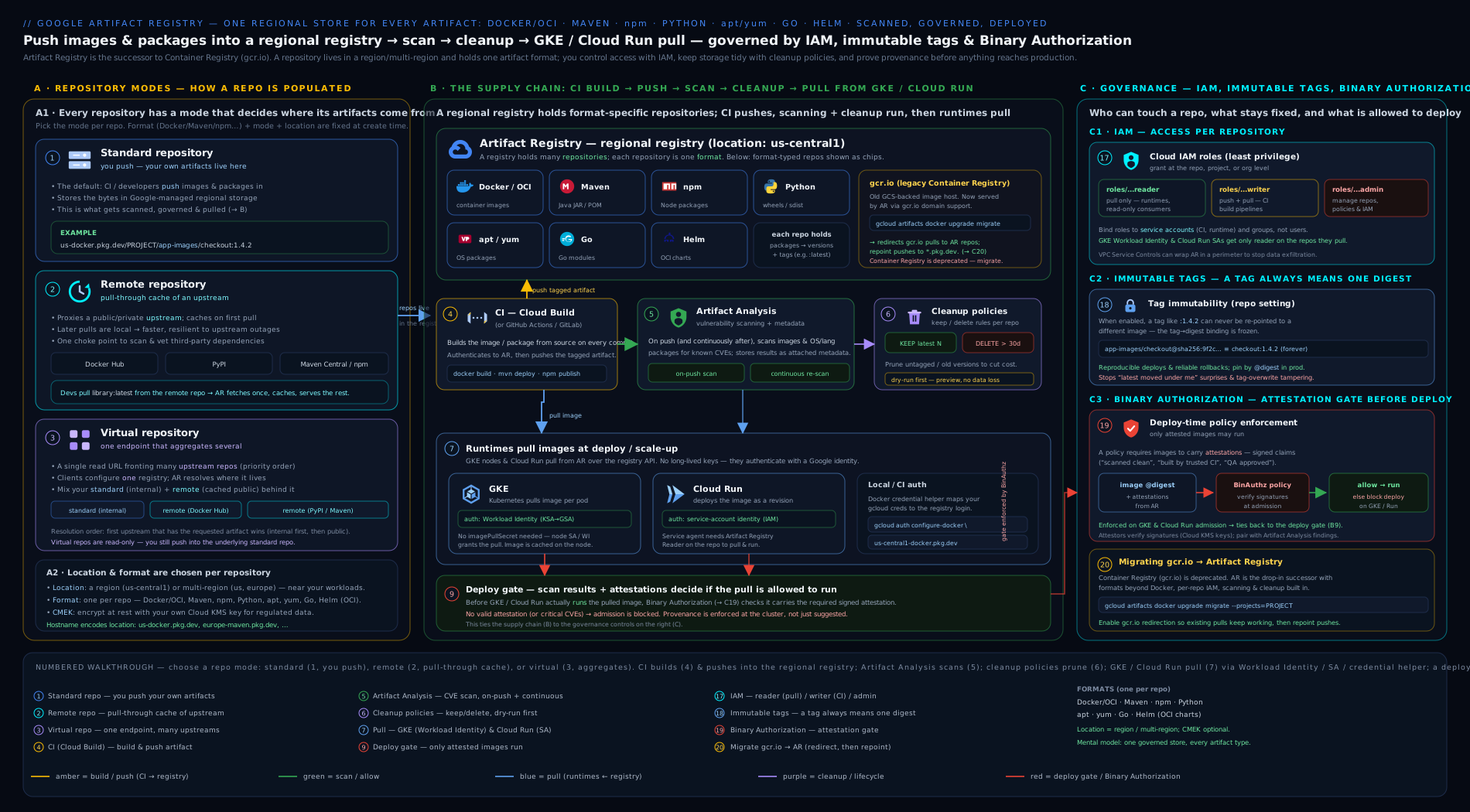
The diagram traces one image’s journey through the registry: a build pushes it (writer IAM) into a standard repo, while a remote repo caches a public base image and a virtual repo presents both to clients behind one URL; Artifact Analysis scans on push; a cleanup policy prunes old untagged versions while keep-tagged protects releases; and finally GKE and Cloud Run pull by digest with reader IAM, optionally gated by Binary Authorization.
Going deeper
Everything above is enough to design and run a registry. This section is for when you need to reason about what Artifact Registry actually does underneath — the parts that turn a working setup into a robust, cost-controlled, audit-ready one.
What a “push” really is: content-addressable storage
A container image is not a single file. It is a manifest (a small JSON document) that lists layer blobs by their SHA-256 digest, plus a config blob. When you docker push, the client uploads each layer blob the registry does not already have, then uploads the manifest, then (optionally) points a tag at that manifest’s digest. Two consequences fall out of this design:
- Storage is deduplicated by digest. If ten images share the same
python:3.12base layers, those layers are stored once. That is why pushing the eleventh image that reuses them is nearly free and near-instant. - A tag is just a label on a digest. Deleting a tag removes the label, not the bits. The manifest and its blobs live on as an untagged version until a cleanup policy or an explicit version-delete removes them. This is the single most common storage-cost surprise: “I deleted the tag, why is my repo still full?” — because tags are pointers, and cleanup policies delete versions, not tags.
The digest (@sha256:…) is the hash of the manifest, so it is a cryptographic identity: the same digest is, byte-for-byte, the same image, forever. That is why production deploys pin by digest — and why immutable tags are a convenience layered on top of a guarantee the digest already gives you.
Multi-architecture images and manifest lists
A single tag can point to a manifest list (an OCI image index) instead of one manifest. The index maps platforms — linux/amd64, linux/arm64 — to a per-architecture manifest, so docker pull myapp:v2 on an Arm node and on an x86 node fetch different bits under the same tag. You build these with Buildx:
docker buildx build --platform linux/amd64,linux/arm64 \
  -t us-central1-docker.pkg.dev/PROJECT/app-images/myapp:v2 --push .
Artifact Registry stores the index and every child manifest. Inspect what a tag really contains with:
docker buildx imagetools inspect us-central1-docker.pkg.dev/PROJECT/app-images/myapp:v2
# or, without Docker: crane manifest <IMAGE>
This matters for two later topics: scanning runs per child manifest (each architecture is scanned separately), and cleanup policies treat the child manifests as versions — a naïve keep-most-recent-versions: 1 on a multi-arch repo can behave surprisingly, so protect releases by tag (keep-tagged-releases), not by a bare recent-count.
The metadata model: notes, occurrences, and continuous analysis
Artifact Analysis does not bolt scan results onto the image. It writes them into a separate metadata store built on the open-source Grafeas model, with two object types:
- A note is a provider’s description of a class of issue — one note per CVE, published by the vulnerability data provider.
- An occurrence is an instance of a note on a specific artifact — “CVE-2025-XXXX occurs in
frontend@sha256:…, in packagelibfooversion 1.2, fixed in 1.3.”
On-push scanning creates occurrences once. Continuous analysis then re-evaluates images that have been pushed or pulled recently (a rolling window, currently around 30 days of activity) against newly published notes — so an image scanned clean on Monday can grow a new occurrence on Friday with no new push. You read occurrences in the console, via gcloud artifacts docker images list --show-occurrences, or straight from the Container Analysis API — the API path is what CI and dashboards should use, because it is queryable and stable.
Scanning covers OS packages (Debian, Ubuntu, RHEL, Alpine, …) and, where enabled, language packages (Go, Java/Maven, Python, npm). It does not find zero-days, malware, secrets baked into layers, or logic bugs — it matches installed package versions against known-CVE data. Treat it as one control among several, not the whole story.
Provenance, SBOMs, and the road to Binary Authorization
Detection is half of supply-chain security; provenance is the other half — being able to prove how an artifact was built. Two pieces of that story live near the registry:
- An SBOM (Software Bill of Materials) enumerates every component in an image. You can generate and store one with
gcloud artifacts sbom export --uri=IMAGE, and downstream tools can scan the SBOM itself. - SLSA build provenance is a signed statement, emitted by Cloud Build, recording the source commit, builder, and steps that produced a digest. Combined with an attestation (“this digest passed scanning”), it is exactly what Binary Authorization checks at deploy time. The chain is: build → push → scan (occurrences) → attest (provenance + policy) → admit. Artifact Registry is the store that anchors all of it to a single immutable digest.
Cleanup policy semantics you must know
Cleanup policies are more subtle than the JSON suggests:
- Keep beats Delete, always. Evaluation is not top-to-bottom; every keep rule is applied as a protection over the whole delete set. A version protected by any keep rule survives.
- Up to 10 policies per repository. Compose them; do not try to cram everything into one rule.
- They run asynchronously on Google’s schedule (not the instant you apply them), and deletion is permanent — there is no recycle bin.
UNTAGGEDmeans “no tag currently points here.” When you move a floating tag (saylatest) to a new build, the previous digest becomes untagged and is now eligible for an untagged-delete rule — usually what you want, but be deliberate about it.- Dry-run logs to Cloud Logging, not to the terminal. Query it (filter on
resource.type="artifactregistry.googleapis.com/Repository"and the cleanup-policy log entries) and read the “would delete” set before you switch to--no-dry-run.
Private connectivity, VPC Service Controls, and egress
At scale the network path matters as much as IAM. Two levers:
- Private Google Access / the restricted VIP. GKE nodes and VMs without external IPs can still reach
*.pkg.devby routing Google APIs over the restricted VIP (restricted.googleapis.com,199.36.153.4/30) with a matching private DNS zone. Pulls then never traverse the public internet. - VPC Service Controls. Artifact Registry is a VPC-SC-supported service, so you can place it inside a service perimeter to stop a leaked credential from exfiltrating images to a project outside the perimeter. This is the registry side of the same control covered in the VPC Service Controls deep dive; pair it with private connectivity so the only way in or out is your perimeter.
On cost, the two dials that actually move the bill are storage (tamed by cleanup policies and layer dedup) and cross-region egress (tamed by co-locating repos with their consumers and using remote/virtual caches so you fetch each public base image into a region once, not on every build). Scanning is billed per image scanned; a repo with tight cleanup and in-region pulls is cheap almost regardless of how busy it is.
Hands-on lab
This lab creates a Docker repository, authenticates, pushes a tiny image, scans it, applies a cleanup policy in dry-run, and pulls it — all within the GCP Free Tier / $300 credit. Artifact Registry’s free tier includes a small monthly storage allowance; this lab stores a few megabytes and costs effectively nothing if you clean up.
0. Set variables and enable APIs.
export PROJECT_ID=$(gcloud config get-value project)
export REGION=us-central1
export REPO=lab-images
gcloud services enable \
  artifactregistry.googleapis.com \
  containerscanning.googleapis.com \
  containeranalysis.googleapis.com
1. Create a standard Docker repository with immutable tags.
gcloud artifacts repositories create $REPO \
  --repository-format=docker \
  --location=$REGION \
  --description="Lab repo" \
  --immutable-tags
Expected: Created repository [lab-images]. Verify:
gcloud artifacts repositories describe $REPO --location=$REGION
2. Authenticate Docker to the Artifact Registry host.
gcloud auth configure-docker ${REGION}-docker.pkg.dev
Expected: a message that it added a credHelpers entry to ~/.docker/config.json.
3. Build and push a tiny image. (Run from Cloud Shell, which has Docker.)
cat > Dockerfile <<'EOF'
FROM gcr.io/distroless/static-debian12
COPY hello.txt /hello.txt
EOF
echo "hello artifact registry" > hello.txt

IMAGE=${REGION}-docker.pkg.dev/${PROJECT_ID}/${REPO}/hello
docker build -t ${IMAGE}:v1 .
docker push ${IMAGE}:v1
Expected: the push reports a sha256: digest. Validate it landed:
gcloud artifacts docker images list ${REGION}-docker.pkg.dev/${PROJECT_ID}/${REPO}
You should see hello with tag v1 and a digest.
4. Confirm scanning ran. Because containerscanning is enabled, the push triggered a scan:
gcloud artifacts docker images describe ${IMAGE}:v1 --show-package-vulnerability
Expected: a vulnerability summary (a distroless base is usually clean or near-clean — that is the point of distroless).
5. Prove immutable tags work. Try to overwrite v1 with different content:
echo "changed" > hello.txt
docker build -t ${IMAGE}:v1 .
docker push ${IMAGE}:v1   # EXPECT THIS TO FAIL
Expected: the push is rejected because the tag is immutable. Push as v2 instead:
docker push ${IMAGE}:v2
6. Apply a cleanup policy in dry-run.
cat > cleanup.json <<'EOF'
[
  {"name":"keep-recent","action":{"type":"Keep"},"mostRecentVersions":{"keepCount":1}},
  {"name":"delete-untagged-old","action":{"type":"Delete"},
   "condition":{"tagState":"UNTAGGED","olderThan":"1d"}}
]
EOF

gcloud artifacts repositories set-cleanup-policies $REPO \
  --location=$REGION --policy=cleanup.json --dry-run
Expected: the policy is set in dry-run; it will log what it would delete without deleting. Verify:
gcloud artifacts repositories describe $REPO --location=$REGION \
  --format='value(cleanupPolicyDryRun)'
Expected: True.
7. Pull the image back (simulating a runtime):
docker pull ${IMAGE}:v2
Expected: a successful pull from your region.
Cleanup (delete everything so there is no ongoing cost):
gcloud artifacts repositories delete $REPO --location=$REGION --quiet
Expected: Deleted repository [lab-images]. This removes all images, tags, scans, and policies for the repo.
Cost note: Artifact Registry bills for storage (per GB-month, with a small free allowance), data transfer (egress out of region/to the internet — in-region pulls are free), and vulnerability scanning (per image scanned). This lab stores a few MB and runs one or two scans, comfortably within Free Tier; deleting the repo at the end returns storage to zero. The two levers that move a real bill are storage (controlled by cleanup policies) and cross-region egress (controlled by co-locating repos with runtimes and using remote/virtual caches to avoid repeatedly pulling public images across regions).
Practice challenges
Work these in order; each builds on the previous. Use your own PROJECT_ID and a scratch region, and try each before opening the solution.
1 (Beginner) — Create and authenticate. Create a standard Docker repository web-images in us-central1 with labels team=web,env=dev, then configure Docker so a docker push to it will authenticate.
<details><summary>Solution</summary>
gcloud artifacts repositories create web-images \
  --repository-format=docker --location=us-central1 \
  --labels=team=web,env=dev --description="Web team images"
gcloud auth configure-docker us-central1-docker.pkg.dev
Why: the repo fixes format + location at creation; configure-docker adds a credHelpers entry so Docker borrows your gcloud identity — no registry password.
</details>
2 (Beginner) — Repository-scoped writer. Grant a CI service account ci@PROJECT.iam.gserviceaccount.com permission to push to web-images only, not project-wide.
<details><summary>Solution</summary>
gcloud artifacts repositories add-iam-policy-binding web-images \
  --location=us-central1 \
  --member="serviceAccount:ci@PROJECT.iam.gserviceaccount.com" \
  --role="roles/artifactregistry.writer"
Why: binding at the repository (not project) scope is least privilege — the CI SA can publish here and nowhere else. </details>
3 (Intermediate) — Cache and aggregate. Create a remote repo docker-hub that caches Docker Hub, then a virtual repo docker that resolves web-images first (priority 100) and falls back to docker-hub (priority 50). What single URL do clients use?
<details><summary>Solution</summary>
gcloud artifacts repositories create docker-hub \
  --repository-format=docker --location=us-central1 \
  --mode=remote-repository --remote-docker-repo=docker-hub \
  --remote-repo-config-desc="Docker Hub cache"

cat > upstreams.json <<'EOF'
[
  {"id":"internal","repository":"projects/PROJECT/locations/us-central1/repositories/web-images","priority":100},
  {"id":"dockerhub","repository":"projects/PROJECT/locations/us-central1/repositories/docker-hub","priority":50}
]
EOF

gcloud artifacts repositories create docker \
  --repository-format=docker --location=us-central1 \
  --mode=virtual-repository --upstream-policy-file=upstreams.json
Clients use only us-central1-docker.pkg.dev/PROJECT/docker/…. Why: one stable URL resolves internal-first, public-second, and you can reorder the backing repos without touching any client.
</details>
4 (Intermediate) — Safe cleanup. Apply a cleanup policy to web-images that keeps the 10 newest versions, keeps anything tagged v* or release-* forever, and deletes untagged versions older than 30 days — in dry-run. Then confirm dry-run is on.
<details><summary>Solution</summary>
cat > cleanup.json <<'EOF'
[
  {"name":"keep-releases","action":{"type":"Keep"},
   "condition":{"tagState":"TAGGED","tagPrefixes":["v","release-"]}},
  {"name":"keep-recent","action":{"type":"Keep"},
   "mostRecentVersions":{"keepCount":10}},
  {"name":"delete-untagged","action":{"type":"Delete"},
   "condition":{"tagState":"UNTAGGED","olderThan":"30d"}}
]
EOF
gcloud artifacts repositories set-cleanup-policies web-images \
  --location=us-central1 --policy=cleanup.json --dry-run
gcloud artifacts repositories describe web-images --location=us-central1 \
  --format='value(cleanupPolicyDryRun)'   # expect: True
Why: keep rules always beat the delete rule, so a shipped v2.0.0 survives even when “old”; dry-run logs the would-delete set to Cloud Logging so you verify before enforcing.
</details>
5 (Advanced) — Scan and read findings. Enable on-push scanning, push any image to web-images, and show its vulnerabilities. Then explain what would re-flag that image a week later without a new push.
<details><summary>Solution</summary>
gcloud services enable containerscanning.googleapis.com containeranalysis.googleapis.com
# build & push an image to web-images, then:
gcloud artifacts docker images describe \
  us-central1-docker.pkg.dev/PROJECT/web-images/IMAGE:TAG \
  --show-package-vulnerability
Why: with containerscanning on, the push triggers a scan that writes occurrences; continuous analysis re-evaluates recently active images against newly published CVE notes, so fresh vulnerabilities surface with no re-push.
</details>
6 (Advanced) — Multi-arch, verified. Build and push a multi-architecture image (linux/amd64 + linux/arm64) to web-images under one tag, then prove the tag is a manifest list with both platforms.
<details><summary>Solution</summary>
docker buildx create --use   # once, to get a buildx builder
docker buildx build --platform linux/amd64,linux/arm64 \
  -t us-central1-docker.pkg.dev/PROJECT/web-images/multi:v1 --push .
docker buildx imagetools inspect \
  us-central1-docker.pkg.dev/PROJECT/web-images/multi:v1
Why: one tag points to an OCI image index that maps each platform to its own manifest; imagetools inspect lists both, confirming a single reference serves Arm and x86 nodes.
</details>
Common mistakes & troubleshooting
| Symptom | Likely cause | Fix |
|---|---|---|
denied: Permission ... artifactregistry.repositories.uploadArtifacts on push |
Pushing principal lacks writer on the repo | Grant roles/artifactregistry.writer to the build SA (repo scope) |
ImagePullBackOff / denied on GKE/Cloud Run pull |
Runtime/node SA lacks reader | Grant roles/artifactregistry.reader to the runtime SA on the repo |
docker push to gcr.io “works” but nothing appears in AR console |
You are still on legacy Container Registry, not AR | Push to a *-docker.pkg.dev path; configure auth for the AR host |
unauthorized / no basic auth credentials |
Docker not configured for the AR host (each region differs) | gcloud auth configure-docker REGION-docker.pkg.dev |
Cannot overwrite a tag (v1 push rejected) |
Immutable tags enabled | Push a new tag/version, or delete the version first (by design) |
| Cleanup policy deleted images still in use | Delete rule too broad, no keep rule, never dry-ran | Add keep-tagged/keep-most-recent; always --dry-run first and read the logs |
| “Cannot change format/location/CMEK” | Those are immutable post-creation | Create a new repo with the right settings and migrate |
| Builds randomly fail pulling public base images | Hitting Docker Hub / PyPI rate limits or outages directly | Use a remote (cache) repo + a virtual repo so builds pull through AR |
| Vulnerabilities not showing | containerscanning API not enabled, or image pushed before enabling |
Enable the API; re-push or run an on-demand scan |
Common beginner mistakes
These are misconceptions, not error messages — the wrong mental model that sends a beginner down the wrong path. (For symptom→fix errors, see the troubleshooting table above.)
-
“Artifact Registry is just Container Registry renamed — I’ll keep pushing to
gcr.io.” Wrong model. It is a different service with its own hostname (*.pkg.dev), its own IAM (artifactregistry.*, not Cloud Storage roles), its own scanning, and support for many formats.gcr.iois deprecated and shut off for new projects. Right model: treat AR as the successor and migrate;gcr.ioreferences may still resolve only because Google now redirects them to AR behind the scenes. -
“I deleted the tag, so the storage is freed.” Wrong model. A tag is a pointer; deleting it leaves the version (manifest + layer blobs) in place as untagged, still billed. Right model: storage is reclaimed only when the version is deleted — by a cleanup policy (which targets versions) or an explicit version delete.
-
“A remote repo is where I push my mirrored images.” Wrong model. A remote repo is read-only — you never push to it. Right model: it is a pull-through cache; the first pull of
python:3.12through it fetches from the upstream and caches it, and you consume from there afterwards. You push your own images to a standard repo. -
“I’ll download a service-account JSON key so my CI can log in.” Wrong model, and a security anti-pattern. Right model: CI outside GCP uses Workload Identity Federation (exchange an OIDC token for a short-lived Google token); workloads inside GCP use their attached service account automatically. A downloaded key is a long-lived secret that leaks into git and logs — the top GCP supply-chain incident.
-
“Scanning will stop the vulnerable image from deploying.” Wrong model. Scanning only detects and reports; it blocks nothing. Right model: enforcement is Binary Authorization, which requires an attestation (or an approved source repo) before GKE/Cloud Run will admit the image. Detection and enforcement are two different controls — you need both.
-
“Multi-region (
us) is strictly better than a region, so I’ll use it everywhere.” Wrong model. Multi-region costs more to store and does not make a regional GKE cluster’s pulls free — cross-geo egress can still apply. Right model: co-locate a regional repo with the builders and cluster that use it; reach for multi-region only when you genuinely need cross-region read availability. -
“Turning on immutable tags makes my images immutable.” Wrong model. Immutable tags only stop a tag from being reassigned; they do not, by themselves, guarantee a deployment runs the exact bits you scanned. Right model: the digest is the real immutable identity — pin deployments to
@sha256:…; immutable tags are a helpful guardrail on top, and enabling them does not retro-lock tags that already exist. -
“I applied the cleanup policy, so the old versions are gone now.” Wrong model. Policies run asynchronously on Google’s schedule, and in dry-run they delete nothing at all — they only log what they would do. Right model: apply in dry-run, read the would-delete set in Cloud Logging, then switch to
--no-dry-runand let the next scheduled run act.
Best practices
- One repo per format+purpose, co-located with its consumers. Separate
prodanddevrepos; put each in the region of the builders/cluster that use it. Use labels (team,env,app) for cost reporting. - Use all three modes deliberately: standard for your builds, remote to cache Docker Hub/PyPI/Maven (insulate builds from public rate limits and outages), virtual to give clients one stable URL with “internal first, public second” resolution.
- Least-privilege IAM at repository scope: build SA = writer on its repo only; runtime SA = reader on its repo only; humans = reader unless they publish. Reserve
adminfor platform owners. - Keyless auth everywhere: credential helper for humans, attached SA inside GCP, Workload Identity Federation for external CI. Never download SA JSON keys.
- Turn on scanning and act on it: enable on-push scanning for visibility; add an on-demand scan gate in CI that fails the build on Critical/High; pair with Binary Authorization to actually block bad images at deploy.
- Write cleanup policies day one, dry-run first: delete untagged + old, keep most-recent N, keep tagged releases (
v*); verify in logs before enforcing. - Enable immutable tags and pin by digest in deployments for reproducibility and tamper resistance.
- Migrate off
gcr.iousing the automatic redirect; then re-grant AR IAM, re-enable scanning, and add cleanup policies the old service never had.
Security notes
- Authentication is IAM, not passwords. There are no static registry credentials to leak — pushes/pulls are authorised by Google IAM. The risk you must eliminate is downloaded service-account keys; remove them in favour of credential helpers, attached SAs, and Workload Identity Federation.
- Scanning is detection; Binary Authorization is enforcement. Scanning surfaces CVEs but blocks nothing on its own. Require attestations (scan passed, built by trusted pipeline) via Binary Authorization so vulnerable or unprovenanced images cannot run on GKE/Cloud Run.
- Immutable tags + digest pinning prevent tag-overwrite attacks and “it ran different bits than we scanned” drift.
- CMEK when you must hold the key (BYOK/residency/kill-switch); otherwise Google-managed encryption already encrypts everything at rest — set CMEK at creation if needed.
- Remote repositories reduce supply-chain exposure by caching vetted upstream artifacts in your perimeter (and can authenticate to private upstreams via Secret Manager) instead of every build reaching out to the public internet.
- Keep humans out of write paths. Only CI service accounts should push; production deletes should run through a pipeline (
repoAdminon a service account), not interactiveadminusers.
Interview & exam questions
- What are the three repository modes, and when do you use each? Standard — you push your own artifacts. Remote — a pull-through cache/proxy of a public or private upstream (Docker Hub, PyPI, Maven Central), read-only, fetched-and-cached on first pull. Virtual — a read-only aggregate that fronts several standard/remote repos behind one URL with a priority order. Mature setup: standard for your builds, remote to cache deps, virtual to present both to clients.
- Why does a remote repository improve build reliability? It caches upstream artifacts inside your project/region, so builds are not subject to Docker Hub/PyPI rate limits or outages, and pulls are served at registry speed from your region after the first fetch.
- What is immutable about a repository after creation? Format, mode, and location — plus CMEK (set only at creation). To change any of them you create a new repo and migrate.
- Tag vs digest — which do you deploy by and why? Deploy by digest (
@sha256:…), which is the cryptographic identity of the exact bits and never changes. Tags are mutable pointers and can drift (unless immutable tags are on). Digest pinning guarantees you run what you scanned/attested. - What are the IAM roles and who gets which?
reader(pull) → runtimes/consumers;writer(push) → CI build SAs;repoAdmin(writer + delete) → pruning pipelines/release managers;admin(manage repos + IAM) → platform admins. Prefer repository-scoped grants for least privilege. - How do automatic and on-demand scanning differ? Automatic/on-push: every pushed image is scanned (when
containerscanningis enabled) and continuously re-scanned against new CVEs; billed per image. On-demand: you explicitly scan an image (even locally pre-push) and can fail the build on findings; billed per scan. - Does scanning block bad images from running? No — scanning only detects. Binary Authorization enforces, by requiring attestations (or specific source repos) at deploy time on GKE/Cloud Run. Pair the two for a real gate.
- How do you stop a registry from growing forever without deleting releases? A cleanup policy with a delete rule (untagged +
olderThan) plus keep rules —keep-most-recent-versionsandkeep-tagged-releases(v*). Keep rules always win. Dry-run first and read the logs. - How does a GKE pod or Cloud Run service pull an image — do you need an imagePullSecret? No secret. The node/runtime service account (ideally via Workload Identity on GKE) needs
roles/artifactregistry.reader; then reference the full*-docker.pkg.devpath.ImagePullBackOff/deniedalmost always means missing reader IAM. - You are migrating off
gcr.io. What are the two routes and the gotchas? Automatic redirect — Google serves oldgcr.io/...references from AR; or manual copy withgcloud artifacts docker images copy/gcrane. Gotchas: GCR used Cloud Storage IAM, so re-grantartifactregistry.*roles; repointgcloud auth configure-dockerat the AR host; re-enable scanning; add cleanup policies; fix hard-codedgcr.iohosts if migrating manually. - Why avoid service-account JSON keys for registry auth, and what replaces them? Long-lived keys leak (git, CI logs, laptops) and are a top supply-chain risk. Replace with the gcloud credential helper (humans), the attached SA (workloads in GCP), and Workload Identity Federation (external CI) — all keyless.
- When would you choose CMEK, and what is the catch? When compliance requires customer-held keys (BYOK/residency) or a key kill-switch. Catches: it must be set at creation (cannot add/remove later), the KMS key must be in the same location, disabling/destroying the key makes contents inaccessible, and you pay KMS costs.
Quick check
- Which repository mode is a read-only pull-through cache of Docker Hub or PyPI?
- Name the three settings that are immutable after you create a repository (besides CMEK).
- Which IAM role does a CI pipeline that pushes images need, and which does a GKE runtime need?
- What does on-push scanning do that you must enable an API for, and what re-scans old images for new CVEs?
- In a cleanup policy, which rule type protects released images, and what must you always do before enforcing?
Answers
- Remote (a remote-mode repository), which proxies and caches an upstream on first pull.
- Format, mode, and location (region/multi-region). (CMEK is the fourth, set only at creation.)
- CI push needs
roles/artifactregistry.writer; the GKE runtime SA needsroles/artifactregistry.reader— both ideally at repository scope. - Enable
containerscanning.googleapis.comfor automatic on-push scanning; continuous analysis re-scans already-stored images as new CVEs are published. - A Keep rule (
keep-tagged-releasesand/orkeep-most-recent-versions) protects releases; always run the policy in dry-run and check the logged “would delete” set first.
Exercise
Stand up a small but production-shaped registry layout with gcloud. (a) Create three Docker repos in one region: a standard app-images with immutable tags, a remote docker-hub caching Docker Hub, and a virtual docker whose upstreams are app-images (priority 100) then docker-hub (priority 50). (b) Grant a dedicated CI service account writer on app-images only, and a dedicated runtime service account reader on app-images only — both at repository scope. © Enable containerscanning + containeranalysis, build a tiny image, push it to app-images, and confirm a vulnerability scan ran. (d) Set a cleanup policy on app-images in dry-run: keep the 5 most-recent versions, keep anything tagged v*, delete untagged versions older than 14 days; describe the repo to confirm dry-run is on. (e) Pull nginx:latest through the virtual repo URL and confirm it was served via the remote cache. (f) Delete all three repos and the two service accounts. In two sentences, explain why clients pointed at the virtual repo and why CI got writer on only one repo rather than project-wide admin.
Certification mapping
- Associate Cloud Engineer (ACE): “Managing Google Cloud resources” and deploying workloads — creating Artifact Registry repositories, authenticating Docker, pushing/pulling images, and granting reader/writer IAM map directly to exam tasks; expect questions on pulling into GKE/Cloud Run without imagePullSecrets and on the
gcr.io→ Artifact Registry migration. - Professional Cloud Architect (PCA): designing a secure, cost-aware artifact strategy — repository layout (standard/remote/virtual), least-privilege IAM, CMEK vs Google-managed encryption, cleanup-policy-driven cost control, and the scanning + Binary Authorization supply-chain gate are recurring design-scenario themes.
- Professional Cloud DevOps Engineer (PCDE): the heaviest overlap — Artifact Registry as the hub of the CI/CD supply chain (build → push → scan → attest → deploy), cleanup policies, immutable tags, vulnerability scanning (on-push vs on-demand), and keyless auth via Workload Identity Federation are core to the SDLC and security objectives.
Glossary
- Repository — the unit you create/secure/bill; one fixed format and one fixed mode, in one location.
- Standard repository — a repo you push your own artifacts into.
- Remote repository — a read-only pull-through cache of an upstream (Docker Hub, PyPI, Maven Central, npm, custom URL).
- Virtual repository — a read-only aggregate fronting several standard/remote repos behind one URL with a priority order.
- Format — the artifact type a repo holds (Docker, Maven, npm, Python, Go, apt, yum, Helm, KFP, generic); immutable.
- Tag — a mutable, human-friendly pointer to a version (e.g.
:v1); digest is the immutable@sha256:…identity. - Digest — the SHA-256 hash of an image manifest (
@sha256:…); the artifact’s permanent, byte-for-byte identity. Deploy by this. - Manifest / image index — a manifest lists an image’s layers by digest; an image index (manifest list) maps platforms (amd64/arm64) to per-arch manifests behind one tag.
- Layer / blob — the content-addressable chunks an image is built from; stored once and deduplicated across images by digest.
- Package / version — a package groups versions of one artifact; a version is one specific build.
- Artifact Analysis — the service that scans images for CVEs and stores occurrences (metadata); on-push and on-demand.
- Occurrence / note — Artifact Analysis metadata (the Grafeas model): a note describes a CVE (a class of issue); an occurrence is that CVE found on a specific artifact.
- Continuous analysis — the ongoing re-scan of recently active images against newly published CVEs, with no new push required.
- Cleanup policy — per-repo rules (delete + keep) that auto-prune artifacts; supports dry-run.
- Immutable tags — repo setting that forbids reassigning a tag once set (prevents tag drift/overwrite).
- CMEK — customer-managed encryption with a Cloud KMS key; set at creation only.
- Attestation / attestor — a signed claim about an image digest (e.g. “passed scanning”); an attestor holds the public key Binary Authorization uses to verify it.
- SBOM — Software Bill of Materials: a machine-readable inventory of every component in an artifact.
- SLSA provenance — a signed record of how a digest was built (source, builder, steps); consumed by Binary Authorization.
- Binary Authorization — deploy-time gate that requires attestations before GKE/Cloud Run runs an image.
- Workload Identity Federation — keyless auth where external CI exchanges an OIDC token for a short-lived Google token.
- Service agent — a Google-managed identity (
service-…@gcp-sa-artifactregistry.iam.gserviceaccount.com) AR uses to act on your behalf, e.g. to use a CMEK key. - VPC Service Controls — a service perimeter that stops artifacts being exfiltrated from AR to projects outside the boundary.
- gcr.io / Container Registry — the deprecated predecessor; migrate to
*-docker.pkg.dev(Artifact Registry).
Next steps
You can now design and operate Artifact Registry end to end — repository modes, every format, the regional model, all the auth paths, least-privilege IAM, vulnerability scanning, cleanup policies, immutable tags, CMEK, Binary Authorization, the gcr.io migration, and pulls into GKE and Cloud Run. The natural next move is the producer that fills this registry and the deployer that consumes it: read the Google Cloud Build & Cloud Deploy deep dive to wire up build → push → scan → attest → deploy with delivery pipelines, approvals, and canary rollouts. For the keyless CI that should authenticate to this registry, study Workload Identity Federation for keyless CI/CD. And to run what you store, the Google Kubernetes Engine deep dive shows the cluster side — pods pulling these images by digest under Workload Identity, optionally gated by Binary Authorization.