In a nutshell
Think of shipping software the way a factory ships a product. Cloud Build is the factory line: it takes your raw source code, runs it through a sequence of stations — compile, test, package — and stamps out one finished, boxed, labelled product (a container image), then puts it on a shelf in the warehouse (Artifact Registry). Cloud Deploy is the logistics company: it takes that one boxed product off the shelf and moves it through a chain of depots — your dev environment, then staging, then production — asking for a signature (an approval) at the important handoffs, and able to recall the whole shipment instantly if something is wrong. Crucially, Cloud Deploy never re-manufactures the product: the exact same box that passed inspection in dev is the one that lands in production. That “build once, ship the same box everywhere” rule is what makes “it worked in staging but broke in prod” mostly disappear.
Both services are fully managed and serverless — there is no Jenkins server to patch, no build agent to babysit. You write a couple of small YAML files (cloudbuild.yaml says how to build; clouddeploy.yaml says which environments to ship through) and Google runs the machinery. They are designed to snap together: a git push wakes up Cloud Build, which builds and tests and pushes the image, and the last build step hands off to Cloud Deploy to roll it out — a complete path from a code commit to a gated, canary-released production deploy without ever leaving Google Cloud.
If you are brand new, hold onto three words: build (make the artefact), deploy (ship the artefact), and promote (move the artefact one step further down the chain). Almost everything else in this lesson hangs off those three.
Level: Intermediate · Time: ~55 min · You’ll need: a little Git, the idea of a container image and a Dockerfile, and comfort running gcloud from Cloud Shell — every other term is defined as it appears.
Cloud Build and Cloud Deploy are Google Cloud’s two native, fully managed CI/CD services, and together they form a clean division of labour: Cloud Build is your CI engine — it runs your build, test, and packaging steps in containers and pushes the resulting artefacts to a registry — and Cloud Deploy is your CD engine — it takes a built artefact and progresses it through an ordered sequence of environments (dev → staging → prod) with promotion, approvals, canary rollouts, and one-command rollback. Neither requires you to run a server, patch a Jenkins box, or babysit a runner fleet; Google operates the execution infrastructure, you supply the configuration. The two are designed to chain: a Cloud Build trigger fires on a git push, builds and tests your code, pushes an image to Artifact Registry, and then hands off to a Cloud Deploy delivery pipeline that rolls that exact image out to GKE or Cloud Run, gated by approvals and verified by Binary Authorization.
This lesson is deliberately exhaustive across both products. For Cloud Build we cover the build config end to end — the cloudbuild.yaml/cloudbuild.json schema, steps and builders (cloud builders, community builders, custom builders), the shared /workspace volume and how data flows between steps, substitutions (built-in, user-defined, and the substitution options that change parsing), artifacts (images, generic artefacts to GCS, Maven/npm/Python packages, Go modules), machine types and disk sizing, timeouts (build-level and per-step), parallel and sequential execution with waitFor and id, logging options, triggers (push to branch, pull request, tag, manual, webhook, Pub/Sub, and the GitHub/GitLab/Bitbucket connections behind them), the build service account and the IAM that governs it, default pools vs private pools (with VPC peering and static egress), secrets via Secret Manager and the legacy KMS path, and caching strategies (Kaniko cache, cached Docker images, --cache-from, and Cloud Storage caches). For Cloud Deploy we cover the delivery pipeline → targets model, Skaffold as the render/deploy engine, releases and rollouts, promotion and approval gates, deployment strategies (standard, canary with verify/predeploy/postdeploy hooks, and per-phase percentages), rollback, multi-target and parallel deployment, target types (GKE, GKE Autopilot, Cloud Run, Anthos/Connect gateway, and multi-target), and automation rules. We close on the build → Artifact Registry → deploy chain and Binary Authorization. Every option gets the same treatment — what it is · the choices · the default · when to pick which · the trade-off · the limit · the cost impact · the gotcha — and every operation comes with a real gcloud command. Everything reflects the current 2026 surface (gcloud builds, gcloud deploy, Skaffold v4 schema, second-generation repository connections).
Learning objectives
By the end of this lesson you can:
- Write a complete
cloudbuild.yamlfrom scratch — steps, builders, the/workspacevolume, substitutions, artifacts, machine type, timeouts, and parallel execution withwaitFor. - Create and choose between every trigger type — push, pull request, tag, manual, webhook, and Pub/Sub — and connect a GitHub/GitLab/Bitbucket repository the modern (2nd-gen) way.
- Configure the build service account and grant least-privilege IAM, and decide between the default pool and a private pool with VPC peering and static egress.
- Inject secrets from Secret Manager into a build and apply the right caching strategy (Kaniko,
--cache-from, GCS) to speed builds. - Model a Cloud Deploy delivery pipeline with ordered targets, create a release, promote it, gate it with approvals, and run a canary rollout with verify/postdeploy hooks.
- Roll back a bad release in one command, and reason about Skaffold render vs deploy, multi-target, and automation rules.
- Wire the full build → Artifact Registry → Cloud Deploy chain and enforce Binary Authorization so only attested images deploy.
Prerequisites & where this fits
You should already understand Google Cloud’s resource hierarchy — organisation → folder → project → resource — what a region is, how to run gcloud from Cloud Shell or a local SDK install (covered in the Fundamentals module), the basics of a container image and a Dockerfile, and a little Git. It helps to have read the Artifact Registry deep dive — that is where Cloud Build pushes images and where Cloud Deploy pulls them — and to know roughly what GKE and Cloud Run are, since those are the deploy targets; but every term is defined here. This is the CI/CD lesson of the DevOps module in the GCP Zero-to-Hero course. It sits downstream of source control and the registry and upstream of your running workloads: once you can drive Cloud Build and Cloud Deploy fluently you can take code from a git push all the way to a gated, canary-released production rollout without leaving Google Cloud. For the keyless way to authenticate external CI (e.g. GitHub Actions) to GCP — the alternative to running CI inside Cloud Build — pair this with Workload Identity Federation for keyless CI/CD.
Core concepts
Before the options, fix the mental models. They explain why every setting is shaped the way it is.
Cloud Build runs steps as containers on an ephemeral worker. A build is an ordered (or partially parallel) list of steps. Each step is just a container image plus a command to run inside it. Google spins up a fresh, throwaway VM (the worker), checks out your source into a directory, and runs each step’s container with that directory mounted. There is no persistent build agent; every build starts clean. This is why a build is reproducible and why anything you want to keep (artefacts, caches) must be pushed somewhere durable before the worker is destroyed.
/workspace is the shared volume that carries state between steps. The worker mounts a single directory, /workspace, into every step at the same path, and it is the step’s working directory by default. Your source is checked out there. Whatever step 1 writes to /workspace (a compiled binary, a generated file, downloaded dependencies) is visible to step 2. Anything written outside /workspace (e.g. into a step’s own container filesystem) is lost when that step’s container exits. This single fact — only /workspace persists across steps — drives most “why did my file disappear?” debugging.
A builder is just an image; you are not limited to Google’s. A builder is the image a step runs. Three flavours: cloud builders (Google-maintained images like gcr.io/cloud-builders/docker, gcr.io/cloud-builders/gcloud, gcr.io/cloud-builders/git), community/public images (any image on Docker Hub, Artifact Registry, etc. — node, python, golang, maven, gradle), and custom builders (an image you build yourself for your toolchain). The modern recommendation is to use official public images (node:20, python:3.12) directly rather than the older gcr.io/cloud-builders/* mirrors, except for docker, gcloud, gke-deploy, and similar Google-specific tooling.
Substitutions are build-time variables. A cloudbuild.yaml can reference variables with $VAR or ${VAR}. Built-in substitutions ($PROJECT_ID, $BUILD_ID, $COMMIT_SHA, $SHORT_SHA, $BRANCH_NAME, $TAG_NAME, $LOCATION, …) are filled by Cloud Build. User-defined substitutions (which must start with _, e.g. $_REGION) are values you supply on the trigger or the command line. This is how one config file serves many environments — the file is static, the substitutions vary.
Cloud Deploy progresses one artefact through ordered targets; it does not build. Cloud Deploy’s unit of work is a release — an immutable snapshot of what to deploy (your rendered manifests plus the image references). You create a release once; you then promote it through a delivery pipeline, which is an ordered list of targets (each target = one environment, e.g. a specific GKE cluster or Cloud Run service+region). Promoting creates a rollout to the next target. Cloud Deploy never builds your image — it consumes an image that Cloud Build (or anything else) already produced. Build once, deploy the same artefact everywhere is the entire philosophy, and it is why “it worked in staging but broke in prod” largely disappears: staging and prod deploy the byte-identical artefact.
Skaffold is the rendering and deploying engine inside Cloud Deploy. Cloud Deploy does not invent its own manifest format; it drives Skaffold (Google’s open-source build/render/deploy tool). At release time Cloud Deploy runs skaffold render to turn your templates into concrete, per-target manifests (substituting the image, the namespace, etc.) and stores them; at rollout time it runs skaffold apply/deploy to push those exact rendered manifests to the target. Knowing “Cloud Deploy = managed Skaffold + a promotion state machine + approvals” demystifies the whole product.
Identity is a recurring theme in both. A Cloud Build build runs as a service account (historically the legacy Cloud Build SA PROJECT_NUMBER@cloudbuild.gserviceaccount.com; today you should specify a user-managed service account). Cloud Deploy uses its own service account for orchestration and an execution service account per target for the actual deploy. Getting these identities and their IAM right is the single most common source of CI/CD failures. Key terms throughout: step, builder, /workspace, substitution, artifact, trigger, pool (Cloud Build); delivery pipeline, target, release, rollout, promotion, phase, strategy (Cloud Deploy).
Part 1 — Cloud Build (CI)
The build config: cloudbuild.yaml top-level fields
A build is defined by a build config, written as YAML (cloudbuild.yaml) or JSON (cloudbuild.json). Here is the full top-level shape; every field is explained below.
steps:                       # required: the ordered list of build steps
  - name: 'gcr.io/cloud-builders/docker'
    args: ['build', '-t', 'us-central1-docker.pkg.dev/$PROJECT_ID/repo/app:$SHORT_SHA', '.']
substitutions:               # user-defined variables (must start with _)
  _REGION: us-central1
images:                      # images to push to a registry on success
  - 'us-central1-docker.pkg.dev/$PROJECT_ID/repo/app:$SHORT_SHA'
artifacts:                   # non-image artefacts to upload (GCS, Maven, npm, Python, Go)
  objects:
    location: 'gs://$PROJECT_ID-artifacts/'
    paths: ['bin/*']
options:                     # build-wide options (machine type, logging, pool, env, ...)
  machineType: 'E2_HIGHCPU_8'
  logging: CLOUD_LOGGING_ONLY
  dynamicSubstitutions: true
timeout: '1200s'             # whole-build timeout (default 10 min = 600s; max 24h)
tags: ['ci', 'backend']      # build tags for filtering
serviceAccount: 'projects/$PROJECT_ID/serviceAccounts/builder@$PROJECT_ID.iam.gserviceaccount.com'
availableSecrets:            # Secret Manager secrets exposed to steps
  secretManager:
    - versionName: projects/$PROJECT_ID/secrets/MY_SECRET/versions/latest
      env: 'MY_SECRET'
| Top-level field | What it is | Default | Notes / gotcha |
|---|---|---|---|
steps |
Ordered list of build steps (the only required field) | — | Each needs a name (the builder image); execution is sequential unless waitFor is used |
substitutions |
User-defined variables, keys must start with _ |
none | Override at trigger/CLI; built-in subs ($PROJECT_ID etc.) need no declaration |
images |
Container images to push to a registry after all steps succeed | none | Lets Cloud Build push (and record provenance) so you don’t need a docker push step |
artifacts |
Non-image outputs: GCS objects, Maven/npm/Python packages, Go modules | none | Uploaded on success; npmPackages, pythonPackages, mavenArtifacts, goModules, objects |
options |
Build-wide settings: machineType, diskSizeGb, logging, pool, env, secretEnv, substitutionOption, dynamicSubstitutions, automapSubstitutions, requestedVerifyOption, defaultLogsBucketBehavior |
platform defaults | See machine-type, logging, and substitution tables below |
timeout |
Whole-build timeout | 600s (10 min) | Max 24h; format like 1200s. Build is failed/cancelled when exceeded |
tags |
Free-text labels for filtering builds | none | Use for gcloud builds list --filter |
serviceAccount |
The user-managed SA the build runs as | legacy Cloud Build SA (being phased out) | Strongly recommended to set explicitly; see IAM section |
availableSecrets |
Secret Manager secrets bound to env vars/files | none | Modern secret path (replaces the KMS secretEnv path) |
logsBucket |
A GCS bucket for build logs | Google-managed bucket | Set for retention/region control; SA needs write access |
queueTtl |
How long a build may sit queued before failing | 3600s | Builds queue when you hit concurrency limits |
Steps and builders: every field
A step is the atom of a build. The fields you can set on each step:
| Step field | What it is | Example / note |
|---|---|---|
name |
The builder image to run (required) | 'gcr.io/cloud-builders/docker', 'node:20', 'golang:1.22', a custom image |
args |
Arguments passed to the image’s entrypoint | ['build', '-t', 'img', '.'] |
entrypoint |
Override the image’s entrypoint | entrypoint: 'bash' then args: ['-c', 'npm ci && npm test'] |
env |
Environment variables for this step (KEY=VALUE) |
['NODE_ENV=production'] |
secretEnv |
Names of secret env vars (from availableSecrets) to expose |
['MY_SECRET'] |
dir |
Working directory relative to /workspace |
dir: 'backend' runs the step in /workspace/backend |
id |
A name for the step, referenced by waitFor |
id: 'build' |
waitFor |
Step ids this step waits on (controls ordering/parallelism) | waitFor: ['-'] = start immediately; ['build'] = wait for build |
timeout |
Per-step timeout | timeout: '300s' — independent of build timeout |
volumes |
Named volumes mounted across steps (beyond /workspace) |
persist e.g. a Go module cache between steps in one build |
allowFailure |
Continue the build even if this step’s exit code is non-zero | allowFailure: true |
allowExitCodes |
Treat specific non-zero exit codes as success | allowExitCodes: [1] |
script |
Inline shell script (alternative to entrypoint+args) |
script: | then shell lines; auto-uses bash |
automapSubstitutions |
Auto-expose substitutions as env vars in this step | true/false |
Builder choices:
| Builder type | Examples | When to use | Gotcha |
|---|---|---|---|
| Cloud builders (Google) | gcr.io/cloud-builders/docker, /gcloud, /git, /gsutil, /kubectl, /gke-deploy |
Docker, gcloud, Git, and GCP-specific tooling | Some are pinned to older tool versions; for languages prefer official images |
| Official public images | node:20, python:3.12, golang:1.22, maven:3.9-eclipse-temurin-21, gradle:8 |
Language builds and tests | Pulled each build unless cached; pin a tag, avoid latest |
| Community builders | Images in the GoogleCloudPlatform/cloud-builders-community repo |
Tools without an official image (e.g. helm, packer, terraform) |
You build/host them yourself once into your own registry |
| Custom builders | An image you build with your exact toolchain | Heavy/proprietary toolchains, to cut per-build install time | You maintain and version it; keep it small |
The classic Docker build-and-push pattern:
steps:
  - name: 'gcr.io/cloud-builders/docker'
    args: ['build', '-t', '${_IMG}:$SHORT_SHA', '-t', '${_IMG}:latest', '.']
  - name: 'gcr.io/cloud-builders/docker'
    args: ['push', '--all-tags', '${_IMG}']
substitutions:
  _IMG: 'us-central1-docker.pkg.dev/$PROJECT_ID/repo/app'
The /workspace volume and data flow
Every step shares /workspace. Concretely:
- Cloud Build checks your source out into
/workspace(when a build is started from a repo/trigger) or you start from an empty/workspace(manual builds with--no-source). - Each step’s working directory is
/workspace(override the subdirectory withdir:). - Files written under
/workspacesurvive into later steps; files written elsewhere in a step’s container do not. - To persist other paths between steps within a single build, declare a named volume on the steps that need it (the volume lives only for that build).
A worked example — Go build cache shared between two steps via a named volume, with the compiled binary handed forward in /workspace:
steps:
  - name: 'golang:1.22'
    id: deps
    entrypoint: 'bash'
    args: ['-c', 'go mod download']
    volumes: [{name: 'gocache', path: '/go/pkg/mod'}]
  - name: 'golang:1.22'
    id: build
    entrypoint: 'bash'
    args: ['-c', 'CGO_ENABLED=0 go build -o /workspace/bin/app ./...']
    volumes: [{name: 'gocache', path: '/go/pkg/mod'}]
Here /go/pkg/mod (outside /workspace) only persists because of the named gocache volume; /workspace/bin/app persists automatically.
Substitutions: built-in, user-defined, and the options
Built-in substitutions (filled by Cloud Build — a selection of the important ones):
| Substitution | Meaning | Available when |
|---|---|---|
$PROJECT_ID / $PROJECT_NUMBER |
The build’s project id / number | always |
$BUILD_ID |
Unique id of this build | always |
$LOCATION / $_REGION† |
Region of the build (regional builds) | always ($LOCATION) |
$COMMIT_SHA / $SHORT_SHA |
Full / 7-char commit hash | repo-triggered builds |
$BRANCH_NAME |
Branch that triggered the build | branch/push triggers |
$TAG_NAME |
Git tag that triggered the build | tag triggers |
$REPO_NAME / $REPO_FULL_NAME |
Repository name | repo-triggered builds |
$REVISION_ID |
Commit id (alias of $COMMIT_SHA) |
repo-triggered builds |
$TRIGGER_NAME / $TRIGGER_BUILD_CONFIG_PATH |
Trigger metadata | trigger-started builds |
$_PR_NUMBER / $_HEAD_BRANCH / $_BASE_BRANCH |
Pull-request metadata | pull-request triggers |
†$_REGION is not built-in — it is a common user-defined convention; the built-in for region is $LOCATION.
User-defined substitutions must start with _ (e.g. _REGION, _IMG, _ENV). Declare a default in substitutions: and override per trigger or with --substitutions _REGION=europe-west1 on the CLI.
Substitution options (under options:) change parsing behaviour:
| Option | What it does | Default | When to set |
|---|---|---|---|
substitutionOption: ALLOW_LOOSE |
Don’t fail the build on missing/unused substitutions | MUST_MATCH (strict) |
Temporary/looser configs; prefer strict in production |
dynamicSubstitutions: true |
Enable bash-style parameter expansion in values (e.g. ${_A:-default}, nesting) |
false (auto-true for trigger-based builds) |
When you need defaults/derived values inside the YAML |
automapSubstitutions: true |
Expose all substitutions to every step as env vars automatically | false |
Avoids repeating env: per step; can leak unexpected vars |
Escape a literal dollar sign with $$.
Artifacts: images and everything else
Two ways to publish outputs:
images:— list container images; Cloud Build pushes them after a successful build and records build provenance. Cleaner than a manualdocker pushstep.artifacts:— for non-image outputs. Sub-blocks:
artifacts sub-block |
Publishes to | Example use |
|---|---|---|
objects |
A Cloud Storage bucket (location + paths) |
Compiled binaries, zips, reports |
mavenArtifacts |
An Artifact Registry Maven repo | Java libraries (.jar/.pom) |
npmPackages |
An Artifact Registry npm repo | Node packages |
pythonPackages |
An Artifact Registry Python repo | Python wheels/sdists |
goModules |
An Artifact Registry Go repo | Go modules |
artifacts:
  objects:
    location: 'gs://$PROJECT_ID-build-artifacts/$BUILD_ID/'
    paths: ['bin/app', 'reports/*.xml']
  pythonPackages:
    - repository: 'https://us-central1-python.pkg.dev/$PROJECT_ID/py-repo'
      paths: ['dist/*.whl']
The build service account needs write access to each destination (e.g. roles/storage.objectAdmin on the bucket, roles/artifactregistry.writer on the repo).
Machine types, disk, timeouts, and parallelism
Machine types (set under options.machineType) control build speed and cost:
machineType |
vCPU / RAM (approx) | When to use | Cost note |
|---|---|---|---|
| (unset) default | 1 vCPU / ~4 GB (e2-medium class) | Light builds; covered by free tier | Cheapest; the free 2,500 build-min/month are at this size |
E2_HIGHCPU_8 |
8 vCPU | Faster compiles, parallel test suites | Billed at a higher per-minute rate |
E2_HIGHCPU_32 |
32 vCPU | Large monorepos, heavy parallelism | Highest E2 rate |
E2_MEDIUM |
1 vCPU | Explicit small default | — |
N1_HIGHCPU_8 / N1_HIGHCPU_32 |
8 / 32 vCPU | Legacy N1 family equivalents | Slightly different pricing than E2 |
Notes: bigger machines finish faster but cost more per minute — the trade is usually worth it for compile-bound builds; non-default machine types are not covered by the free tier. Private pools can additionally use larger/custom machine types.
Disk: options.diskSizeGb sets the worker disk (default 100 GB; increase for large checkouts, big images, or lots of layers — max into the hundreds of GB depending on pool).
Timeouts: the build-wide timeout defaults to 600s (10 min) and maxes at 24h; each step can also set its own timeout. A build that exceeds its timeout is terminated and marked failed. Set generous build timeouts for long integration tests but keep per-step timeouts tight to fail fast.
Parallel and sequential execution with id + waitFor:
- By default steps run sequentially in file order.
- Give steps an
id, then usewaitForto express the dependency graph. waitFor: ['-']means start immediately (no waiting) — use it to launch independent steps in parallel.waitFor: ['stepA', 'stepB']means wait until both stepA and stepB finish.
steps:
  - name: 'node:20'
    id: lint
    entrypoint: bash
    args: ['-c', 'npm ci && npm run lint']
    waitFor: ['-']            # parallel
  - name: 'node:20'
    id: test
    entrypoint: bash
    args: ['-c', 'npm ci && npm test']
    waitFor: ['-']            # parallel with lint
  - name: 'gcr.io/cloud-builders/docker'
    id: image
    args: ['build', '-t', '${_IMG}:$SHORT_SHA', '.']
    waitFor: ['lint', 'test'] # only after both pass
Triggers: every type and the repo connection behind them
A trigger starts a build automatically in response to an event. You attach it to a connected repository (or a webhook/Pub/Sub source) and point it at a build config (cloudbuild.yaml) or an inline build.
| Trigger type | Fires on | Key config | When to use |
|---|---|---|---|
| Push to branch | Commits pushed to branches matching a regex | --branch-pattern (e.g. ^main$) |
CI on main / release branches |
| Push to tag | A Git tag matching a regex is pushed | --tag-pattern (e.g. ^v.*) |
Release builds on version tags |
| Pull request | PR opened/updated against matching base branch | --pull-request-pattern, comment-control |
Pre-merge checks; exposes $_PR_NUMBER |
| Manual | You run it on demand | gcloud builds triggers run |
Ad-hoc/parameterised builds |
| Webhook | An inbound HTTP POST (any system) | --webhook-config, a secret |
Trigger from tools without a native integration |
| Pub/Sub | A message on a Pub/Sub topic | --pubsub-topic |
Event-driven builds (e.g. on new Artifact Registry image, on schedule via Scheduler→Pub/Sub) |
| Manual (Cloud Scheduler) | Cron via Scheduler → trigger | Scheduler job hitting the trigger | Nightly/periodic builds |
Repository connections (2nd gen — the modern way): Cloud Build connects to GitHub, GitHub Enterprise, GitLab (and self-managed GitLab), and Bitbucket through the Developer Connect / 2nd-gen repository integration, which uses a Secret Manager-stored token and supports many repos per connection. The older 1st-gen GitHub App connection and Cloud Source Repositories still work but 2nd-gen is recommended for new setups. For pull-request triggers you also choose comment control — whether external contributors’ PRs auto-build or require an /gcbrun owner comment first (a security control against malicious PRs).
Create a push trigger (2nd-gen connection assumed):
gcloud builds triggers create github \
  --name=app-ci-main \
  --region=us-central1 \
  --repository=projects/PROJECT/locations/us-central1/connections/CONN/repositories/REPO \
  --branch-pattern='^main$' \
  --build-config=cloudbuild.yaml \
  --substitutions=_REGION=us-central1
Run a build by hand (no trigger needed):
gcloud builds submit --region=us-central1 \
  --config=cloudbuild.yaml \
  --substitutions=_IMG=us-central1-docker.pkg.dev/$PROJECT/repo/app .
The build service account and IAM
This is the highest-yield section for avoiding failures.
Which identity runs the build? Historically every build ran as the legacy Cloud Build service account PROJECT_NUMBER@cloudbuild.gserviceaccount.com, which had broad default roles. Google is phasing this out; new projects should set a user-managed service account on the build (the serviceAccount field, or --service-account on a trigger/submit) and grant it only what it needs. Regional builds and private pools generally require a user-managed SA.
Roles to use Cloud Build / start builds:
| Role | Grants | Give to |
|---|---|---|
roles/cloudbuild.builds.editor |
Create/cancel builds, manage triggers | Engineers/CI |
roles/cloudbuild.builds.viewer |
Read builds and logs | Auditors/read-only |
roles/cloudbuild.builds.approver |
Approve builds awaiting approval | Release approvers |
roles/cloudbuild.connectionAdmin |
Manage repo connections | Platform admins |
Roles the build’s service account typically needs (least-privilege, per use):
| Role | Why |
|---|---|
roles/artifactregistry.writer |
Push images/packages to Artifact Registry |
roles/logging.logWriter |
Write build logs (required when using a user-managed SA + CLOUD_LOGGING_ONLY) |
roles/storage.objectAdmin |
Write artefacts / logs to a GCS bucket |
roles/secretmanager.secretAccessor |
Read secrets exposed to the build |
roles/clouddeploy.releaser |
Create a Cloud Deploy release as the last build step |
roles/container.developer |
Deploy to GKE directly from a build (if not using Cloud Deploy) |
roles/run.developer + roles/iam.serviceAccountUser |
Deploy to Cloud Run directly from a build |
The classic “permission denied” gotcha: when you switch to a user-managed SA, you must explicitly grant roles/logging.logWriter (or set options.logging), or the build fails immediately on log setup. And to act as the build SA, the principal/service creating the build needs roles/iam.serviceAccountUser on it.
Pools: default pool vs private pool
A pool is the worker infrastructure your steps run on.
| Aspect | Default pool | Private pool |
|---|---|---|
| What it is | Google-managed shared workers on the public internet | Dedicated, isolated workers in a Google-managed VPC you peer to |
| Network reach | Public internet only (no VPC access) | Reaches your VPC via VPC peering → private resources (private GKE, internal DBs, private Artifact Registry) |
| Egress IP | Dynamic/shared | Can be made static (NAT) for allowlisting; or no public egress at all |
| Machine types | Standard set | Standard plus larger/custom machine types and bigger disks |
| Concurrency / quotas | Shared limits | Higher, configurable concurrency |
| Setup | None | Create a worker-pool (region, machine type, network peering) |
| Cost | Build-minute pricing incl. free tier | Build-minute pricing at private-pool rates (no free tier); pay for the isolation |
| When to use | Public builds, simplest case | Builds that must reach private resources, need static egress, VPC-SC perimeters, or bigger machines |
Create a private pool peered to a VPC and use it:
gcloud builds worker-pools create my-pool \
  --region=us-central1 \
  --peered-network=projects/PROJECT/global/networks/my-vpc \
  --worker-machine-type=e2-standard-4 --worker-disk-size=100 \
  --no-public-egress           # workers have no public IP (private egress only)

# reference it in options:
#   options:
#     pool:
#       name: projects/PROJECT/locations/us-central1/workerPools/my-pool
Gotcha: a private pool that needs to pull public base images while having --no-public-egress requires Cloud NAT or a private mirror in your VPC; otherwise docker pull node:20 fails.
Secrets and caching
Secrets — the modern Secret Manager path (availableSecrets + secretEnv):
availableSecrets:
  secretManager:
    - versionName: projects/$PROJECT_ID/secrets/NPM_TOKEN/versions/latest
      env: 'NPM_TOKEN'
steps:
  - name: 'node:20'
    entrypoint: bash
    args: ['-c', 'echo "//registry.npmjs.org/:_authToken=$$NPM_TOKEN" > ~/.npmrc && npm ci']
    secretEnv: ['NPM_TOKEN']
Note $$NPM_TOKEN (double dollar) so the shell — not the substitution engine — expands it, and the build SA needs roles/secretmanager.secretAccessor on the secret. The legacy KMS path (secrets: with a KMS-encrypted kmsKeyName and ciphertext) still works but Secret Manager is preferred.
| Secret method | How | Status |
|---|---|---|
Secret Manager (availableSecrets) |
Reference a secret version, bind to secretEnv/file |
Recommended |
KMS-encrypted (secrets:) |
Encrypt with Cloud KMS, store ciphertext, decrypt at build | Legacy |
| Plain env / baked into image | Hard-coded | Never — leaks into logs/layers |
Caching strategies (Cloud Build has no persistent cache between builds by default, so you arrange your own):
| Strategy | How it works | Best for | Gotcha |
|---|---|---|---|
--cache-from |
Pull the previous image and let Docker reuse layers | Docker builds with stable lower layers | Must docker pull the cache image first; depends on layer ordering |
| Kaniko cache | Build with gcr.io/kaniko-project/executor, caching layers in Artifact Registry |
Daemonless builds, fine-grained layer cache | Different flags than docker build; cache repo must exist |
| Cloud Storage cache | Tar your deps cache to GCS at end of build, restore at start | Language deps (node_modules, ~/.m2, Go mod) |
You script save/restore; watch staleness |
Buildpacks/pack |
Buildpack layer caching | Source-only builds (gcloud run deploy --source) |
Less control than a Dockerfile |
Kaniko + --cache-ttl |
TTL on cached layers | Long-lived caches | Stale-cache bugs if TTL too long |
Kaniko example:
steps:
  - name: 'gcr.io/kaniko-project/executor:latest'
    args:
      - '--destination=${_IMG}:$SHORT_SHA'
      - '--cache=true'
      - '--cache-ttl=168h'
Part 2 — Cloud Deploy (CD)
The delivery pipeline and targets
Cloud Deploy is configured declaratively in a clouddeploy.yaml containing a DeliveryPipeline and one or more Target resources. The pipeline lists targets in order; that order is the promotion path.
apiVersion: deploy.cloud.google.com/v1
kind: DeliveryPipeline
metadata:
  name: app-pipeline
serialPipeline:
  stages:
    - targetId: dev
    - targetId: staging
    - targetId: prod
      strategy:
        standard:
          verify: true
---
apiVersion: deploy.cloud.google.com/v1
kind: Target
metadata:
  name: dev
gke:
  cluster: projects/PROJECT/locations/us-central1/clusters/dev-cluster
---
apiVersion: deploy.cloud.google.com/v1
kind: Target
metadata:
  name: prod
requireApproval: true
gke:
  cluster: projects/PROJECT/locations/us-central1/clusters/prod-cluster
Apply this with gcloud deploy apply --file=clouddeploy.yaml --region=us-central1.
DeliveryPipeline fields:
| Field | What it is | Note |
|---|---|---|
serialPipeline.stages |
Ordered list of targetIds (the promotion path) |
The spine of CD; promotion always moves to the next stage |
stages[].strategy |
Per-stage rollout strategy (standard or canary) | Default is standard (all-at-once) |
stages[].profiles |
Skaffold profiles to activate for that stage | How per-env differences are rendered |
stages[].deployParameters |
Key/values passed to rendering for that stage | Per-target manifest values |
Target types and fields:
| Target kind | Deploys to | Key fields |
|---|---|---|
gke |
A GKE Standard/Autopilot cluster | cluster (full path); optional internalIp, proxyUrl |
run |
Cloud Run | location (projects/.../locations/REGION) |
anthosCluster |
Anthos/registered cluster | membership (Connect gateway) |
multiTarget |
Fan-out to several child targets at once | targetIds: [a, b] (parallel deploy) |
customTarget |
A custom target type (your own deployer) | customTargetType reference |
Common Target fields (any kind):
| Field | What it is | Default | When |
|---|---|---|---|
requireApproval |
Rollouts to this target wait for manual approval | false |
Gate prod (and often staging) |
executionConfigs |
Per-target render/deploy execution settings (SA, worker pool, timeouts, artifact storage) | Cloud Deploy defaults | Pin the execution service account, use a private pool, set timeouts |
deployParameters |
Target-scoped rendering parameters | none | Per-environment values (replicas, hostnames) |
labels / annotations |
Metadata | none | Org tagging |
Skaffold: render vs deploy
Cloud Deploy drives Skaffold. You provide a skaffold.yaml describing how to render and deploy your manifests; Cloud Deploy supplies the image(s) and the per-target context.
apiVersion: skaffold/v4beta11
kind: Config
manifests:
  rawYaml:
    - k8s/deployment.yaml
    - k8s/service.yaml
deploy:
  kubectl: {}
profiles:
  - name: prod
    manifests:
      rawYaml: [k8s/deployment.yaml, k8s/prod-overlay.yaml]
Two phases:
- Render (at
create releasetime): Cloud Deploy runsskaffold renderonce per target, substituting the released image and anydeployParameters/profiles, and stores the fully rendered manifests as the immutable release artefacts. What gets deployed is decided here, not at rollout time. - Deploy (at rollout time): Cloud Deploy runs
skaffold apply/deploy against the target to apply those exact rendered manifests.
Renderers/deployers Skaffold supports inside Cloud Deploy: raw YAML + kubectl, Helm, Kustomize, and for Cloud Run a Cloud Run manifest (service.yaml). This is why the same pipeline can target both GKE (kubectl/Helm/Kustomize) and Cloud Run.
Releases, rollouts, and promotion
The lifecycle in three nouns:
- Release — created with
gcloud deploy releases create. It renders for all targets and represents one immutable thing to ship (image + rendered manifests). Created once; never edited. - Rollout — the act of deploying a release to one specific target. Promoting a release to the next stage creates the next rollout.
- Promotion — moving a release from its current target to the next target in
serialPipeline.stages. This is the core CD action.
# Create a release (renders to every target; deploys to the FIRST stage)
gcloud deploy releases create rel-$SHORT_SHA \
  --delivery-pipeline=app-pipeline --region=us-central1 \
  --images=app=us-central1-docker.pkg.dev/$PROJECT/repo/app:$SHORT_SHA

# Promote it from dev -> staging -> prod (one hop per command)
gcloud deploy releases promote --release=rel-$SHORT_SHA \
  --delivery-pipeline=app-pipeline --region=us-central1

# Approve a rollout that is waiting on a requireApproval target
gcloud deploy rollouts approve ROLLOUT_NAME \
  --release=rel-$SHORT_SHA --delivery-pipeline=app-pipeline \
  --to-target=prod --region=us-central1
The --images=NAME=IMAGE flag maps the placeholder image name in your Skaffold/manifests to the concrete, immutable image (pin to a digest in production). You can pass --to-target to create a release that targets a specific stage, and --disable-initial-rollout to render without deploying yet.
Approvals
Set requireApproval: true on a target and every rollout to it pauses in a Pending Approval state until someone with roles/clouddeploy.approver runs gcloud deploy rollouts approve (or clicks Approve in the console). You can reject instead. This is the human gate before production. Approvals integrate with notifications: Cloud Deploy publishes events to Pub/Sub (rollout/approval/release notifications), so you can route an approval request to Slack/email and even drive automated approvals via automation rules (below).
Deployment strategies: standard, canary, and the hooks
The strategy on a stage controls how the rollout reaches 100% on that target.
| Strategy | Behaviour | When |
|---|---|---|
standard |
Deploy to 100% in one phase (optionally with verify/predeploy/postdeploy) |
dev/staging, or low-risk prod |
canary |
Roll out in phases by percentage (e.g. 25% → 50% → 100%), pausing between phases for verification/approval | Risk-managed prod releases |
A canary with custom percentages and hooks:
serialPipeline:
  stages:
    - targetId: prod
      strategy:
        canary:
          runtimeConfig:
            kubernetes:
              serviceNetworking:
                service: app-svc
                deployment: app
          canaryDeployment:
            percentages: [25, 50]      # then implicit 100
            verify: true               # run skaffold `verify` after each phase
            predeploy:
              actions: ['warmup']      # custom pre-deploy action
            postdeploy:
              actions: ['notify']      # custom post-deploy action
| Canary field | What it does |
|---|---|
canaryDeployment.percentages |
The traffic percentages per phase (final 100 is implicit) |
customCanaryDeployment.phaseConfigs |
Fully custom phases (different percentages, profiles, verify per phase) |
verify: true |
Run the Skaffold verify profile (smoke tests) after a phase before proceeding |
predeploy.actions / postdeploy.actions |
Named Skaffold custom actions run before/after the deploy of a phase |
runtimeConfig.kubernetes (gatewayServiceMesh / serviceNetworking) |
How canary traffic is split on GKE (Gateway API mesh vs Service-based) |
runtimeConfig.cloudRun (automaticTrafficControl, canaryRevisionTags) |
How canary traffic is split on Cloud Run (revision traffic %) |
For Cloud Run targets, canary uses revision traffic splitting; for GKE, it uses either a Service-based split or the Gateway API service mesh, depending on runtimeConfig.
Rollback, multi-target, and automation
Rollback — one command redeploys a previous, already-rendered release to a target (no rebuild, because the old release’s rendered manifests are stored):
gcloud deploy targets rollback prod \
  --delivery-pipeline=app-pipeline --region=us-central1
# (optionally --release=PREVIOUS_RELEASE --rollout-id=...)
Multi-target deploys to several child targets in parallel from one pipeline stage (e.g. deploy to three regional clusters at once) by pointing a stage at a multiTarget whose targetIds list the children. Useful for fan-out to many clusters/regions.
Automation rules (Automation resource) let Cloud Deploy act without a human: auto-promote a release to the next stage after a wait or on success, auto-advance canary phases, auto-repair a failed/stalled rollout (retry/rollback), and timed promotions. This is how you build a hands-off pipeline while keeping requireApproval on the final gate.
apiVersion: deploy.cloud.google.com/v1
kind: Automation
metadata:
  name: app-pipeline/auto-promote
selector:
  targets: [{ id: dev }]
rules:
  - promoteReleaseRule:
      id: promote-to-staging
      wait: 10m          # bake in dev for 10 min, then auto-promote
The build → Artifact Registry → deploy chain
The end-to-end native pipeline ties Part 1 and Part 2 together:
git pushto the connected repo fires a Cloud Build trigger.- Cloud Build builds, tests, and pushes the image to Artifact Registry (
images:ordocker push), pinned by$SHORT_SHA/digest. - A final Cloud Build step creates a Cloud Deploy release (
gcloud deploy releases create … --images=app=…@sha256:…), with the build SA holdingroles/clouddeploy.releaser. - Cloud Deploy renders per target and deploys to dev, then waits for promotion/approval up the chain to staging and prod, optionally as a canary.
- Each deploy can be gated by Binary Authorization so only attested images run.
The “release from a build” final step:
  - name: 'gcr.io/google.com/cloudsdktool/cloud-sdk'
    entrypoint: gcloud
    args:
      - deploy
      - releases
      - create
      - rel-$SHORT_SHA
      - '--delivery-pipeline=app-pipeline'
      - '--region=us-central1'
      - '--images=app=us-central1-docker.pkg.dev/$PROJECT_ID/repo/app:$SHORT_SHA'
Binary Authorization
Binary Authorization is a deploy-time admission control: it lets you require that any image deployed to GKE or Cloud Run carries cryptographic attestations (signatures) proving it came from your trusted pipeline (e.g. was built by Cloud Build and passed your vulnerability gate). You define a policy (default rule + per-cluster/per-target rules) listing the attestors whose signatures are required; an image with no valid attestation is blocked (or logged, in dry-run). Cloud Build can produce build provenance and attestations automatically (SLSA build level), and Cloud Deploy honours the target’s Binary Authorization policy at rollout. The result: a supply-chain guarantee that only images built and signed by your pipeline reach production — a frequent PCDE/PCSE exam topic. Pair this with immutable tags and digest pinning in Artifact Registry for end-to-end integrity.
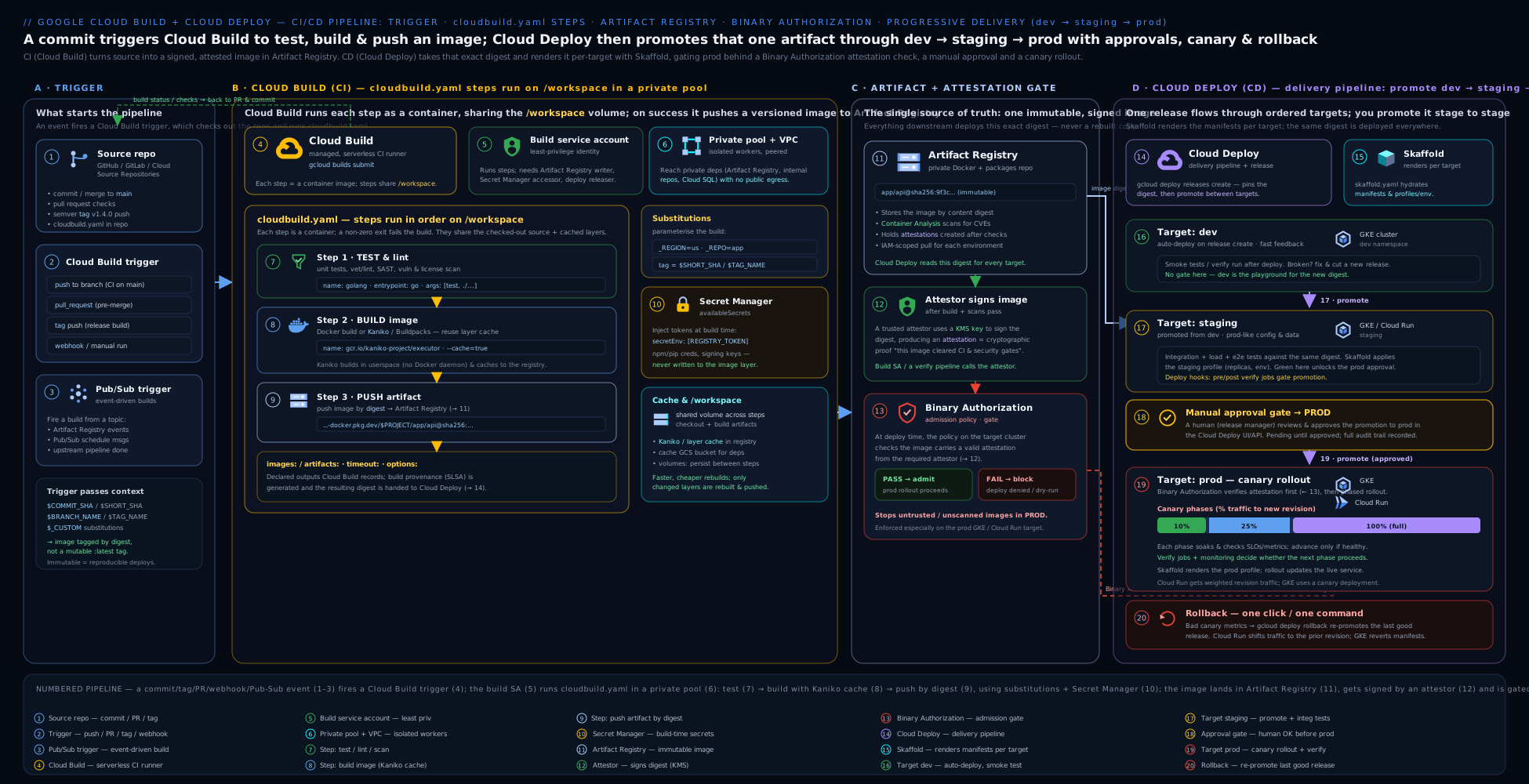
Read it left to right as the CI→CD seam: a Git event fires a Cloud Build trigger; the build runs its steps on a pool and pushes the image to Artifact Registry; then Cloud Deploy takes that one release and promotes it through dev → staging → prod, with approvals, canary phases, and a Binary Authorization check gating each rollout.
Hands-on lab
We will build a container with Cloud Build, push it to Artifact Registry, then model a tiny Cloud Deploy pipeline (single Cloud Run target) and run a release. The Cloud Build free tier (2,500 build-minutes/month on the default machine) plus the $300 free-trial credit covers this comfortably; Cloud Deploy has no per-pipeline charge (you pay for the underlying GKE/Cloud Run and any build minutes).
1. Set project/region and enable the APIs.
gcloud config set project YOUR_PROJECT_ID
REGION=us-central1
gcloud services enable cloudbuild.googleapis.com artifactregistry.googleapis.com \
  clouddeploy.googleapis.com run.googleapis.com
2. Create an Artifact Registry Docker repo (the build’s push target):
gcloud artifacts repositories create demo-repo \
  --repository-format=docker --location=$REGION
3. Write a minimal app + cloudbuild.yaml. Create a Dockerfile:
cat > Dockerfile <<'EOF'
FROM nginx:1.27-alpine
RUN echo "hello from cloud build + cloud deploy" > /usr/share/nginx/html/index.html
EOF
And a cloudbuild.yaml:
cat > cloudbuild.yaml <<'EOF'
steps:
  - name: 'gcr.io/cloud-builders/docker'
    args: ['build', '-t', '${_IMG}:latest', '.']
images: ['${_IMG}:latest']
substitutions:
  _IMG: 'us-central1-docker.pkg.dev/${PROJECT_ID}/demo-repo/web'
options:
  logging: CLOUD_LOGGING_ONLY
EOF
4. Run the build (manual submit):
gcloud builds submit --region=$REGION --config=cloudbuild.yaml .
Expected output: step logs ending with PUSH of the image and a SUCCESS status. Confirm the image landed:
gcloud artifacts docker images list us-central1-docker.pkg.dev/$(gcloud config get-value project)/demo-repo/web
5. Model a Cloud Deploy pipeline with one Cloud Run target. Skaffold config:
cat > skaffold.yaml <<'EOF'
apiVersion: skaffold/v4beta11
kind: Config
manifests:
  rawYaml: [service.yaml]
deploy:
  cloudrun: {}
EOF
cat > service.yaml <<'EOF'
apiVersion: serving.knative.dev/v1
kind: Service
metadata:
  name: deploy-demo
spec:
  template:
    spec:
      containers:
        - image: web        # placeholder, replaced by --images
EOF
cat > clouddeploy.yaml <<EOF
apiVersion: deploy.cloud.google.com/v1
kind: DeliveryPipeline
metadata: {name: demo-pipeline}
serialPipeline:
  stages: [{targetId: prod}]
---
apiVersion: deploy.cloud.google.com/v1
kind: Target
metadata: {name: prod}
run:
  location: projects/$(gcloud config get-value project)/locations/$REGION
EOF
gcloud deploy apply --file=clouddeploy.yaml --region=$REGION
6. Create a release (renders + deploys to the prod Cloud Run target):
IMG=us-central1-docker.pkg.dev/$(gcloud config get-value project)/demo-repo/web:latest
gcloud deploy releases create rel-001 \
  --delivery-pipeline=demo-pipeline --region=$REGION \
  --images=web=$IMG
7. Validate. Watch the rollout succeed, then hit the Cloud Run URL:
gcloud deploy rollouts list --release=rel-001 \
  --delivery-pipeline=demo-pipeline --region=$REGION \
  --format="value(name, state)"
URL=$(gcloud run services describe deploy-demo --region=$REGION --format='value(status.url)')
curl -s "$URL"     # expect: hello from cloud build + cloud deploy
8. Cleanup (delete everything to stop charges):
gcloud run services delete deploy-demo --region=$REGION --quiet
gcloud deploy delivery-pipelines delete demo-pipeline --region=$REGION --force --quiet
gcloud artifacts repositories delete demo-repo --location=$REGION --quiet
Cost note. Cloud Build’s free tier covers 2,500 build-minutes/month on the default machine type — this lab uses a handful. Larger machineTypes and private pools are billed per build-minute and are not free. Cloud Deploy itself has no resource charge; you pay only for the targets (this Cloud Run service scales to zero and is effectively free idle) and any build minutes the release rendering uses. Artifact Registry charges for stored image GB (negligible here). Deleting the resources above returns you to zero.
Going deeper
The core sections above are enough to ship. This section is for when you operate these pipelines at scale, debug the weird failures, and answer the “how does it actually work?” questions.
The build worker: regions, concurrency, and queueing
Every build runs on an ephemeral worker VM that Cloud Build creates, uses once, and destroys. A few operational facts follow from that:
- Regional vs global builds. Historically builds ran in a single global backend; today you should pass
--region(e.g.us-central1) so the worker, logs, and the build resource live in one region — required for data-residency and for private pools, and the default for 2nd-gen triggers. A build submitted without a region falls back to the legacygloballocation. - Concurrency is quota-bound. The default pool runs a limited number of concurrent builds per project (a regional quota you can raise via a quota request); beyond that, builds queue.
queueTtl(default3600s) caps how long a build waits in the queue before it is failed — raise it for bursty CI, or you will see builds expire under load. Private pools have their own, independently configurable concurrency. - Billing granularity. Build time is billed per-minute (rounded up) at the machine-type rate. The free 2,500 build-minutes/month apply only to the default
e2-medium-class machine on the default pool; the moment you set a biggermachineTypeor use a private pool, none of that build’s minutes are free.
The service-account change every new project hits
The single most confusing recent change: new projects no longer get the broadly-privileged legacy Cloud Build SA behaviour by default. For projects created after Google’s 2024 rollout, builds default to the Compute Engine default service account (PROJECT_NUMBER-compute@developer.gserviceaccount.com) rather than the old ...@cloudbuild.gserviceaccount.com with its wide roles — and org-policy hardening often strips the Compute Engine default SA’s roles too. The practical upshot is the same advice, now mandatory: specify your own user-managed serviceAccount on the build/trigger and grant it exactly the roles it needs (artifactregistry.writer, logging.logWriter, plus any deploy/secret roles). If you inherited a tutorial that “just works” because of the old default SA, expect it to fail on a fresh project until you set identity and IAM explicitly.
Build provenance and SLSA — what Binary Authorization actually checks
When Cloud Build pushes an image listed under images:, it can generate SLSA build provenance: a signed, machine-readable record of what source, at what commit, built this exact digest, with what builder. You can inspect it:
gcloud artifacts docker images describe \
  us-central1-docker.pkg.dev/$PROJECT/repo/app@sha256:DIGEST \
  --show-provenance
Binary Authorization’s check-image flow at deploy time verifies attestations/provenance against your policy: builds on a private pool with the right configuration can reach SLSA Build Level 3 (non-falsifiable provenance, isolated build), whereas default-pool builds top out lower. This is why supply-chain-serious shops run production builds on private pools — the isolation is part of the guarantee, not just a networking feature.
Where rendered manifests live, and why a release is truly immutable
At releases create time Cloud Deploy runs skaffold render once per target and writes the concrete, fully-substituted manifests to a Cloud Storage artifact bucket for the pipeline (Google-managed by default, or the artifactStorage you pin in executionConfigs). Two consequences engineers trip over:
--imagesis resolved to digests at render time. Even if you pass a tag, Cloud Deploy records the underlyingsha256:digest, so promotion up the chain redeploys the byte-identical image regardless of who re-pushed the tag later. Pass a digest yourself in production to make this explicit.- Editing anything after release has no effect on that release. Change the
skaffold.yaml, the pipeline YAML, or the manifests, and the existing release still deploys its stored, rendered artefacts. New behaviour requires a new release. This is the feature, not a bug — it is what makes a rollback deterministic.
Cloud Deploy’s hidden execution jobs
Cloud Deploy does not run skaffold on some magic internal runner — each render, deploy, verify, predeploy, and postdeploy operation executes as a Cloud Build job (on the default pool, or a private pool you nominate), as an execution service account. You control all of that per target with executionConfigs:
apiVersion: deploy.cloud.google.com/v1
kind: Target
metadata:
  name: prod
requireApproval: true
gke:
  cluster: projects/PROJECT/locations/us-central1/clusters/prod-cluster
executionConfigs:
  - usages: [RENDER, DEPLOY, VERIFY, PREDEPLOY, POSTDEPLOY]
    serviceAccount: deploy-exec@PROJECT.iam.gserviceaccount.com
    workerPool: projects/PROJECT/locations/us-central1/workerPools/deploy-pool
    artifactStorage: gs://PROJECT-clouddeploy-artifacts
    executionTimeout: 3600s
executionConfigs field |
What it controls | Why you set it |
|---|---|---|
usages |
Which phases this config applies to (RENDER, DEPLOY, VERIFY, PREDEPLOY, POSTDEPLOY) |
Split render (needs registry read) from deploy (needs cluster write) with different SAs |
serviceAccount |
The execution SA for those phases | Least-privilege per environment; keep prod’s deploy SA off dev |
workerPool |
A Cloud Build private pool to run the job on | Reach a private GKE control plane / internal endpoints; VPC-SC |
artifactStorage |
GCS bucket for rendered manifests | Data residency, retention, CMEK |
executionTimeout |
Max time for the phase job | Fail slow deploys fast |
The classic failure here: deploying to a private GKE cluster from the default pool times out because the default pool cannot reach the private control plane — you must give the DEPLOY usage a workerPool peered to the cluster’s VPC.
Canary mechanics, per platform
verify: true runs your Skaffold verify profile as its own execution job after a phase, and the rollout only advances if it passes. How the traffic actually splits differs by target:
| Target | Split mechanism (runtimeConfig) |
Notes |
|---|---|---|
| GKE, Service-based | kubernetes.serviceNetworking (one Service, canary + stable Deployments) |
Simplest; split is by pod count, so percentages are approximate at low replica counts |
| GKE, mesh | kubernetes.gatewayServiceMesh (Gateway API / Istio) |
Precise, weight-based splitting; needs the mesh installed |
| Cloud Run | cloudRun.automaticTrafficControl (+ optional canaryRevisionTags/priorRevisionTags) |
Split is by revision traffic % — exact, no extra infra |
At low replica counts a GKE serviceNetworking “25%” may round to whole pods (e.g. 1 of 3 ≈ 33%); the mesh option is what you use when the percentage must be exact.
Automation: advance, promote, repair, and timed
Beyond the promoteReleaseRule shown earlier, the Automation resource supports rules that make canary and recovery hands-off:
apiVersion: deploy.cloud.google.com/v1
kind: Automation
metadata:
  name: app-pipeline/auto-advance-canary
serviceAccount: automation-sa@PROJECT.iam.gserviceaccount.com
selector:
  targets:
    - id: prod
rules:
  - advanceRolloutRule:
      id: advance-after-bake
      wait: 5m
  - promoteReleaseRule:
      id: promote-dev-to-staging
      wait: 10m
advanceRolloutRuleauto-advances a canary to its next phase after await(bake time) instead of a human clicking “advance”.promoteReleaseRuleauto-promotes to the next target after success/wait.repairRolloutRuleauto-recovers a failed rollout — retry the failed job with backoff, then rollback to the last good release if retries are exhausted.timedPromoteReleaseRulepromotes on a schedule (e.g. “into prod only during business hours”).
Automations run as their own serviceAccount, honour a target selector, and can be paused (suspended: true). Keep requireApproval on the final target and let automation handle everything below it — hands-off where it is safe, human-gated where it is not.
Private pools, VPC-SC, and egress
A private pool lives in a Google-managed VPC that you peer to your own. Inside a VPC Service Controls perimeter, this lets build workers reach private resources (private GKE, internal load balancers, private Artifact Registry) while being unable to exfiltrate to the public internet. The trade-off is base-image pulls: with --no-public-egress the worker cannot docker pull node:20 from Docker Hub, so you either add Cloud NAT for controlled egress or mirror base images into your own Artifact Registry and pull from there. Enable Private Google Access on the peered subnet so the worker can still reach Google APIs.
Version and API caveats (2026 surface)
| Thing | Current | Note / caveat |
|---|---|---|
| Skaffold schema | skaffold/v4beta11 |
Cloud Deploy pins supported schema versions; bump deliberately, not blindly |
| Cloud Deploy API group | deploy.cloud.google.com/v1 |
GA; Automation and customTarget are GA on this group |
| Repo connections | 2nd-gen (Developer Connect) | 1st-gen GitHub App + Cloud Source Repositories still work but are legacy |
| Build identity | User-managed SA (or CE default on new projects) | Legacy ...@cloudbuild.gserviceaccount.com broad-role default is being retired |
| Image references | *-docker.pkg.dev (Artifact Registry) |
gcr.io Container Registry is deprecated; new work uses Artifact Registry |
| Canary on Cloud Run | runtimeConfig.cloudRun |
Revision-traffic split; GKE uses runtimeConfig.kubernetes |
Common beginner mistakes
These are conceptual traps — misunderstandings about how the two services think, distinct from the symptom→fix table below.
-
“Cloud Build deploys my app, or Cloud Deploy builds my image.” They do exactly one job each. Cloud Build builds (source → tested artefact in Artifact Registry); Cloud Deploy ships (that artefact → environments). The seam between them is the image in the registry. If you find yourself doing
kubectl applyinside a Cloud Build step for production, you have skipped Cloud Deploy and lost promotion, approvals, and one-command rollback. -
“I’ll rebuild the image for each environment.” No — build once, deploy the same digest everywhere. Rebuilding for staging and again for prod produces different bytes (different base-image pulls, timestamps, dependency resolutions) and destroys the guarantee that what you tested is what you shipped. A release pins one immutable image and promotes it.
-
“Every step shares a filesystem, so my file will still be there.” Only
/workspacepersists between steps. A file written to/tmpor the step container’s own filesystem vanishes when that step’s container exits. If step 2 “can’t find” what step 1 made, it was written outside/workspace. -
“Deploying
:latestis fine.” A tag is a mutable pointer; someone can re-push:latesttomorrow. Deploy by that tag and your rollback is non-deterministic and your provenance is meaningless. Pin thesha256:digest (or an immutable, SHA-based tag) for anything past dev. -
“The build runs as me, so my permissions apply.” The build runs as a service account, not your user. Your
Ownerrole does nothing for the build; the build SA needs its ownartifactregistry.writer,logging.logWriter, etc. “It works when I run it locally but the build gets permission-denied” is almost always this. -
“Promoting a release re-renders it with my latest YAML.” Rendering happens once, at
releases create. Promotion just deploys the already-stored manifests to the next target. Editskaffold.yamlor the pipeline afterwards and the existing release is unaffected — you need a new release to pick up changes. -
“
requireApprovalblocks the build.” It gates the rollout to that target, not the build and not the whole pipeline. Lower targets keep flowing; only the approval-gated target pauses in Pending Approval until someone withclouddeploy.approverapproves. -
“Cloud Deploy has its own manifest language I need to learn.” It doesn’t — it drives Skaffold, which drives
kubectl/Helm/Kustomize (GKE) or a Cloud Runservice.yaml. Learn Skaffold’s smallskaffold.yamland you know how Cloud Deploy renders and applies.
Common mistakes & troubleshooting
| Symptom | Likely cause | Fix |
|---|---|---|
| Build fails instantly with a logging/permission error | User-managed build SA lacks roles/logging.logWriter |
Grant logging.logWriter, or set options.logging: CLOUD_LOGGING_ONLY/GCS_ONLY |
denied: Permission "artifactregistry.repositories.uploadArtifacts" on push |
Build SA missing roles/artifactregistry.writer on the repo |
Grant artifactregistry.writer to the build SA on that repo/project |
| A file written in one step is gone in the next | It was written outside /workspace |
Write to /workspace, or declare a named volumes: entry on both steps |
$MY_VAR came out empty / build failed on “unused substitution” |
Strict substitution matching (MUST_MATCH) |
Declare the sub, fix the name, or set substitutionOption: ALLOW_LOOSE |
| Secret value appears blank in the step | Used $MY_SECRET (single $) so the sub engine ate it |
Use $$MY_SECRET (double $) and list it in secretEnv |
Private-pool build can’t docker pull a public base image |
--no-public-egress with no NAT/mirror |
Add Cloud NAT or a private mirror in the peered VPC |
| Cloud Deploy release “create” denied from a build | Build SA lacks roles/clouddeploy.releaser (and SA-user on the deploy execution SA) |
Grant clouddeploy.releaser; ensure execution SA permissions |
| Rollout stuck “Pending Approval” forever | Target has requireApproval: true |
gcloud deploy rollouts approve … (needs roles/clouddeploy.approver) |
| Rollout fails: image blocked | Binary Authorization policy requires an attestation the image lacks | Attest the image in the pipeline, or fix the policy/attestor |
| Canary never advances past phase 1 | verify: true step failing, or no traffic-split runtimeConfig |
Fix the verify profile; configure serviceNetworking/Gateway for GKE or cloudRun traffic |
Best practices
- Use a dedicated, least-privilege user-managed service account for builds — do not rely on the legacy Cloud Build SA’s broad defaults; grant only
artifactregistry.writer,logging.logWriter, and what each build truly needs. - Pin everything immutable: tag images by
$SHORT_SHA/digest (never deploy:latestto prod), pin builder image tags, and deploy by digest through Cloud Deploy. - Build once, deploy the same artefact everywhere — let Cloud Deploy promote one release through dev→staging→prod rather than rebuilding per environment.
- Parallelise independent steps with
id+waitFor: ['-']and keep per-steptimeouts tight to fail fast; size themachineTypeto the workload. - Cache deliberately (Kaniko or
--cache-fromfor Docker, GCS for language deps) — Cloud Build has no implicit cross-build cache. - Gate production with
requireApprovalon the prod target and a canary strategy withverify; keep dev/staging fast (standard) and consider automation rules for auto-promotion of lower stages. - Keep secrets in Secret Manager (
availableSecrets), never in plain env or baked layers, and grantsecretAccessornarrowly. - Use a private pool when builds must reach private resources or need static, allowlistable egress — and add Cloud NAT for public base-image pulls.
- Enforce supply-chain integrity with Binary Authorization + build provenance/attestations so only pipeline-built images deploy.
- Notify via Pub/Sub for build and rollout/approval events so humans (or automation) react quickly.
Security notes
- Least-privilege build identity. Set an explicit user-managed
serviceAccountand grant only the roles each build uses; the principal starting builds needsiam.serviceAccountUseron that SA. Avoid the broad legacy SA. - Control pull-request builds. For public/forked repos, require an owner
/gcbruncomment (comment control) before external PRs build — otherwise a malicious PR can run arbitrary code in your project. - Secrets via Secret Manager, referenced by version, exposed only to the steps that need them (
secretEnv), and never echoed to logs. - Isolate sensitive builds in a private pool inside a VPC Service Controls perimeter with private (or NAT-only) egress, so build workers can’t exfiltrate to the internet.
- Separate the build SA from the deploy execution SA. Cloud Deploy’s per-target
executionConfigsSA should hold only deploy permissions on that environment; don’t reuse one god-SA across CI and CD. - Enforce Binary Authorization so only attested, pipeline-built images deploy to GKE/Cloud Run; pin to digests and use immutable tags in Artifact Registry.
- Audit everything. Cloud Build and Cloud Deploy actions are in Cloud Audit Logs; build provenance gives you a verifiable record of what was built from what source.
Practice challenges
Work these in order — each builds on the last. Try before opening the solution.
1. (Beginner) Build and push without a manual docker push. Write a cloudbuild.yaml that builds an image and lets Cloud Build push it, tagged by commit, to us-central1-docker.pkg.dev/$PROJECT_ID/demo-repo/web.
<details> <summary>Solution</summary>
steps:
  - name: 'gcr.io/cloud-builders/docker'
    args: ['build', '-t', '${_IMG}:$SHORT_SHA', '.']
images:
  - '${_IMG}:$SHORT_SHA'
substitutions:
  _IMG: 'us-central1-docker.pkg.dev/$PROJECT_ID/demo-repo/web'
options:
  logging: CLOUD_LOGGING_ONLY
Why: listing the image under images: makes Cloud Build push it (and record provenance) after all steps succeed — cleaner than a separate docker push step, and $SHORT_SHA pins it to the commit.
</details>
2. (Beginner) Submit it and confirm the push. Run the build by hand against us-central1, then list the pushed image.
<details> <summary>Solution</summary>
gcloud builds submit --region=us-central1 --config=cloudbuild.yaml .
gcloud artifacts docker images list \
  us-central1-docker.pkg.dev/$(gcloud config get-value project)/demo-repo/web
Why: builds submit runs the config on a Cloud Build worker with your current directory as the source; the second command proves the artefact actually landed in the registry.
</details>
3. (Intermediate) Parallelise, then gate. Add a lint and a test step that run in parallel, and make the Docker build wait for both.
<details> <summary>Solution</summary>
steps:
  - name: 'node:20'
    id: lint
    entrypoint: bash
    args: ['-c', 'npm ci && npm run lint']
    waitFor: ['-']
  - name: 'node:20'
    id: test
    entrypoint: bash
    args: ['-c', 'npm ci && npm test']
    waitFor: ['-']
  - name: 'gcr.io/cloud-builders/docker'
    id: image
    args: ['build', '-t', '${_IMG}:$SHORT_SHA', '.']
    waitFor: ['lint', 'test']
Why: waitFor: ['-'] starts both checks immediately (parallel); the build’s waitFor: ['lint','test'] blocks it until both pass, so you never build a failing commit.
</details>
4. (Intermediate) Inject a secret the safe way. Give the test step an NPM_TOKEN from Secret Manager, referenced without leaking it into logs.
<details> <summary>Solution</summary>
availableSecrets:
  secretManager:
    - versionName: projects/$PROJECT_ID/secrets/NPM_TOKEN/versions/latest
      env: 'NPM_TOKEN'
steps:
  - name: 'node:20'
    id: test
    entrypoint: bash
    args: ['-c', 'echo "//registry.npmjs.org/:_authToken=$$NPM_TOKEN" > ~/.npmrc && npm ci && npm test']
    secretEnv: ['NPM_TOKEN']
Grant the build SA access once: gcloud secrets add-iam-policy-binding NPM_TOKEN --member=serviceAccount:BUILD_SA --role=roles/secretmanager.secretAccessor.
Why: the secret is bound to an env var via availableSecrets+secretEnv, and $$NPM_TOKEN (double dollar) is expanded by the shell, not the substitution engine — so the value never appears in the build config or logs.
</details>
5. (Advanced) Model a gated canary pipeline. Write a DeliveryPipeline dev → staging → prod where prod requires approval and rolls out canary [25, 50] with verify. Then create a release pinned to a digest.
<details> <summary>Solution</summary>
apiVersion: deploy.cloud.google.com/v1
kind: DeliveryPipeline
metadata:
  name: app-pipeline
serialPipeline:
  stages:
    - targetId: dev
    - targetId: staging
    - targetId: prod
      strategy:
        canary:
          runtimeConfig:
            kubernetes:
              serviceNetworking:
                service: app-svc
                deployment: app
          canaryDeployment:
            percentages: [25, 50]
            verify: true
gcloud deploy releases create rel-$SHORT_SHA \
  --delivery-pipeline=app-pipeline --region=us-central1 \
  --images=app=us-central1-docker.pkg.dev/$PROJECT/repo/app@sha256:DIGEST
(Set requireApproval: true on the prod Target.) Why: prod now rolls out to 25% → 50% → 100%, running verify smoke tests between phases and pausing for a human before the target — risk-managed prod, fast dev — and the digest guarantees the exact tested bytes ship.
</details>
6. (Advanced) Release from the build, then roll back. Add a final build step that creates the release (build SA holding roles/clouddeploy.releaser); then, after a bad deploy, roll prod back to the previous release with no rebuild.
<details> <summary>Solution</summary>
  - name: 'gcr.io/google.com/cloudsdktool/cloud-sdk'
    entrypoint: gcloud
    args:
      - deploy
      - releases
      - create
      - 'rel-$SHORT_SHA'
      - '--delivery-pipeline=app-pipeline'
      - '--region=us-central1'
      - '--images=app=us-central1-docker.pkg.dev/$PROJECT_ID/repo/app@$_DIGEST'
# grant once:
gcloud projects add-iam-policy-binding $PROJECT \
  --member=serviceAccount:BUILD_SA --role=roles/clouddeploy.releaser
# roll back prod to the prior, already-rendered release:
gcloud deploy targets rollback prod \
  --delivery-pipeline=app-pipeline --region=us-central1
Why: the build hands off to Cloud Deploy in one step (needs clouddeploy.releaser), and rollback redeploys the previous release’s stored manifests — instant and deterministic because nothing is rebuilt.
</details>
Interview & exam questions
- What is the difference between Cloud Build and Cloud Deploy? Cloud Build is CI — it runs build/test/package steps in containers and pushes artefacts to a registry. Cloud Deploy is CD — it takes a built artefact and progresses it through ordered environments with promotion, approvals, canary, and rollback. Build produces the artefact; Deploy ships it. Cloud Deploy never builds.
- What is
/workspaceand why does it matter? It is the single directory mounted into every build step at the same path; it is where source is checked out and the only thing that persists between steps. Anything written outside/workspace(in a step’s own container) is lost when that step ends — the cause of most “my file vanished” bugs. - Built-in vs user-defined substitutions? Built-in subs (
$PROJECT_ID,$BUILD_ID,$COMMIT_SHA,$SHORT_SHA,$BRANCH_NAME,$TAG_NAME, …) are filled by Cloud Build. User-defined subs must start with_(e.g.$_REGION) and are supplied on the trigger or CLI. One static config serves many environments via subs. - How do you run build steps in parallel? Give steps an
idand setwaitFor: ['-']to start them immediately (in parallel); usewaitFor: ['stepA','stepB']to make a step wait for specific others. Default (nowaitFor) is sequential file order. - Default pool vs private pool — when each? The default pool runs on Google-managed public workers (simplest, free-tier eligible) but cannot reach your VPC. A private pool runs isolated workers peered to your VPC — use it when builds must reach private resources (private GKE, internal DBs), need static egress for allowlisting, sit in a VPC-SC perimeter, or need bigger machines. Private-pool minutes aren’t free.
- How do you give a build a secret safely? Declare it under
availableSecrets.secretManager(a Secret Manager version), expose it to a step viasecretEnv, reference it as$$SECRET(double dollar) in shell, and grant the build SAroles/secretmanager.secretAccessor. Never bake secrets into env/layers. - What is the legacy Cloud Build service account issue? Builds historically ran as
PROJECT_NUMBER@cloudbuild.gserviceaccount.comwith broad default roles; Google is phasing it out. New builds should set a user-managed SA with least privilege — and you must then explicitly grantlogging.logWriteror builds fail on log setup. - Explain release, rollout, and promotion in Cloud Deploy. A release is the immutable thing to ship (image + rendered manifests), created once. A rollout is deploying that release to one target. Promotion moves the release to the next target in the pipeline’s ordered stages, creating the next rollout. Render once, promote the same artefact up the chain.
- What role does Skaffold play in Cloud Deploy? Cloud Deploy drives Skaffold: at release time it runs
skaffold render(per target, substituting the image/profiles/parameters) and stores the rendered manifests; at rollout time it runsskaffold applyto deploy those exact manifests. Supports raw YAML+kubectl, Helm, Kustomize, and Cloud Run manifests. - How does a canary rollout work, and how does traffic split per platform? A canary strategy rolls out in phases by percentage (e.g. 25→50→100), pausing for
verify/approval between phases. On GKE traffic is split via aServiceor the Gateway API mesh (runtimeConfig.kubernetes); on Cloud Run via revision traffic percentages (runtimeConfig.cloudRun). - How do you roll back a bad deploy?
gcloud deploy targets rollback TARGET …redeploys a previous, already-rendered release to that target — no rebuild, because the prior release’s manifests are stored. Instant and deterministic. - How does Binary Authorization fit the CI/CD chain? It is deploy-time admission control: a policy requires images to carry valid attestations from trusted attestors (e.g. proof they were built by Cloud Build and passed scanning). Unattested images are blocked at GKE/Cloud Run rollout, guaranteeing only pipeline-built, signed images reach production.
Quick check
- Which directory is shared across all Cloud Build steps and persists between them?
- What must every user-defined substitution name start with?
- Which
waitForvalue makes a step start immediately so it runs in parallel? - In Cloud Deploy, what action moves a release from its current target to the next target?
- Which Cloud Deploy strategy rolls a release out in percentage phases with pauses for verification?
Answers
/workspace— mounted into every step at the same path; anything written there (and only there) survives into later steps.- An underscore
_(e.g._REGION,_IMG); built-in subs like$PROJECT_IDneed no declaration. waitFor: ['-']— “wait for nothing”, so the step starts immediately, in parallel with other['-']steps.- Promotion (
gcloud deploy releases promote) — it creates a rollout to the next stage inserialPipeline.stages. - The canary strategy (
strategy.canarywithcanaryDeployment.percentages), pausing between phases forverify/approval.
Exercise
Build the full native chain end to end. Using gcloud: (a) create an Artifact Registry Docker repo and a dedicated user-managed service account for builds, granting it only roles/artifactregistry.writer, roles/logging.logWriter, and roles/clouddeploy.releaser; (b) write a cloudbuild.yaml that runs a parallel lint and test step (waitFor: ['-']), then a Docker build/push step (waitFor both), pulls one value from Secret Manager via availableSecrets, and as a final step creates a Cloud Deploy release; © create a delivery pipeline with three targets dev → staging → prod, where prod has requireApproval: true and a canary [25, 50] strategy with verify: true; (d) wire a push trigger on ^main$ to that build config using a 2nd-gen repo connection and a user-managed SA; (e) push a commit, watch the build run and the release deploy to dev, promote to staging, then approve the prod rollout; (f) roll back prod to the prior release; then (g) delete the pipeline, repo, trigger, and service account. In a sentence each, explain why you used a dedicated build SA rather than the legacy one, and why prod uses canary + approval while dev does not.
Certification mapping
- Professional Cloud DevOps Engineer (PCDE): this is core territory — “Building and implementing CI/CD pipelines” maps directly to Cloud Build (steps, triggers, substitutions, pools, the build SA/IAM) and Cloud Deploy (delivery pipelines, targets, releases, promotion, approvals, canary, rollback). Expect scenario questions on safe rollout strategy, build-once-deploy-everywhere, secret handling, and supply-chain security (Binary Authorization, provenance).
- Associate Cloud Engineer (ACE): “Deploying and implementing” objectives include using Cloud Build to build and push images and basic automated deploys; expect questions on triggers,
cloudbuild.yaml, substitutions, and pushing to Artifact Registry. - Professional Cloud Security Engineer (PCSE) / Professional Cloud Architect (PCA): the supply-chain angle (Binary Authorization, build provenance, private pools in VPC-SC, least-privilege build/deploy identities) and the overall CI/CD architecture appear as design and security scenarios.
- All exams probe the CI-vs-CD split, substitutions,
/workspace, release/rollout/promotion, and canary/approval/rollback distinctions covered above.
Glossary
- Step — one build action: a container image (the builder) plus a command run inside it.
- Builder — the image a step runs (Google cloud builder, official public image, or custom).
/workspace— the shared volume mounted into every step; the only path that persists between steps.- Substitution — a build-time variable; built-in (
$PROJECT_ID,$SHORT_SHA, …) or user-defined (must start with_). - Trigger — config that auto-starts a build on an event (push, PR, tag, manual, webhook, Pub/Sub).
- Pool — the worker infrastructure a build runs on: default (public, managed) or private (VPC-peered, isolated).
- Build service account — the identity a build runs as; prefer a least-privilege user-managed SA over the legacy one.
- Artifact — a build output: a container image (
images:) or a package/file (artifacts:to GCS/Maven/npm/Python/Go). - Delivery pipeline — the ordered list of targets that defines the promotion path (dev→staging→prod).
- Target — one deployment environment (a GKE cluster, a Cloud Run location, a multi-target fan-out).
- Release — an immutable snapshot of what to deploy (image + rendered manifests); created once, promoted many times.
- Rollout — the deployment of a release to a single target.
- Promotion — moving a release to the next target in the pipeline.
- Skaffold — the open-source engine Cloud Deploy uses to render (templates → manifests) and deploy (apply) per target.
- Strategy — how a rollout reaches 100% on a target: standard (all at once) or canary (phased percentages).
- Approval — a manual gate (
requireApproval: true) that pauses a rollout until someone approves. - Automation — rules that let Cloud Deploy auto-promote, auto-advance, or auto-repair without a human.
- Binary Authorization — deploy-time admission control requiring images to carry trusted attestations, blocking unattested images.
- Worker / worker pool — the ephemeral VM (and the pool of them) a build runs on: default pool (shared, public) or private pool (VPC-peered, isolated).
- Developer Connect (2nd-gen connection) — the modern way Cloud Build links to GitHub/GitLab/Bitbucket, storing the token in Secret Manager and serving many repos per connection.
- Comment control (
/gcbrun) — a pull-request safety gate requiring an owner comment before an external contributor’s PR builds, so forked PRs can’t run arbitrary code unreviewed. - Provenance / SLSA — a signed record of what source and builder produced an image digest; higher SLSA build levels (private-pool builds) give stronger, non-falsifiable guarantees.
- Attestor — an authority whose signature Binary Authorization requires on an image before it may deploy.
- Digest pinning — referencing an image by its immutable
sha256:digest rather than a mutable tag, so deploys and rollbacks are reproducible. - Execution service account — the identity Cloud Deploy uses to run a target’s render/deploy/verify jobs (set per target in
executionConfigs), distinct from the build SA. deployParameters— key/value inputs passed into rendering to produce per-target manifest differences (replicas, hostnames) from one Skaffold config.- Verify — an optional Skaffold
verifyprofile Cloud Deploy runs as its own job after a phase to smoke-test before advancing. - Phase — one step of a canary rollout (e.g. the 25% phase), each able to run verify/predeploy/postdeploy hooks.
- Kaniko — a daemonless image builder (
gcr.io/kaniko-project/executor) that builds and caches layers in Artifact Registry without a Docker daemon. - queueTtl / concurrency — how long a build may wait queued before failing, and the quota-bound number of builds that run at once per project.
Next steps
You can now drive both halves of GCP-native CI/CD — Cloud Build’s config, triggers, substitutions, pools, identity, secrets, and caching, and Cloud Deploy’s pipelines, targets, releases, promotion, approvals, canary, and rollback, all chained through Artifact Registry and gated by Binary Authorization. Make sure the registry side is solid by reading the Artifact Registry deep dive — repositories, formats, scanning, and cleanup policies are the supply-chain foundation this pipeline pushes to. Then, for the keyless way to let external CI (GitHub Actions, GitLab CI) authenticate to GCP without service-account keys — the alternative to building inside Cloud Build — read Workload Identity Federation for keyless CI/CD. After that, continue into the money side of running all this with the Google Cloud Billing & Cost Management deep dive.