In a nutshell
Google Cloud already encrypts everything you store, automatically and for free — but Google holds the keys. This lesson is about taking hold of those keys yourself with Cloud KMS, and about giving your application’s passwords and API keys a proper home with Secret Manager. Two products, one goal: you decide who can turn plaintext into ciphertext and back, and you can revoke that ability in seconds.
Picture a bank vault. Default encryption is the bank locking every safe-deposit box for you — reassuring against a burglar, useless if you need to prove that only you can open your box, or to lock it beyond even the bank’s reach. Cloud KMS lets you bring your own master key: the bank still runs the vault (guards, power, fire suppression, always-open doors), but the master key is yours to rotate — or to destroy, sealing every box it protects forever. That is CMEK (Customer-Managed Encryption Keys). You would never use that one precious master key to lock millions of boxes directly, though — too slow, too exposed. So each box gets a cheap padlock of its own (a DEK, data encryption key) and your master key (the KEK, key encryption key) only locks the small cabinet that holds all the padlock keys. Kill the master key and every padlock key is lost at once. That trick is envelope encryption, and it is how one tiny key can make a petabyte unreadable at a stroke.
Secret Manager is the other half. Your code needs real secrets at runtime — a database password, a third-party API token, a TLS private key. Those do not belong in an environment variable, a .env file, or a config.json in git. Secret Manager is the guarded cabinet where they live instead: each secret named, versioned, handed out only to the identities you allow, encrypted at rest (optionally with your KMS key), and logged every time it is read. KMS guards keys; Secret Manager guards the credentials your apps use — and underneath, Secret Manager leans on KMS to encrypt itself. The rule of thumb: use KMS when you need to control an encryption key; use Secret Manager when you need to store and hand out a credential.
Level: Beginner-friendly, building to Intermediate · Time: ~40 min read · You need: a GCP project and a working feel for IAM (principals, roles, bindings). Every key and every secret in this lesson is a placeholder — swap in your own names.
Every byte you store in Google Cloud is already encrypted at rest. You did nothing to make that happen — Compute Engine disks, Cloud Storage objects, BigQuery tables and Cloud SQL volumes are all encrypted with keys Google generates, rotates and guards for you, and you never see them. So a fair first question is: if encryption is automatic and free, why does Google ship two whole products — Cloud KMS and Secret Manager — and why does every serious security review ask whether you use them?
The answer is control. “Encrypted by default” protects you against someone walking out of a data centre with a disk. It does not answer the questions auditors, regulators and your own incident-response team actually ask: Who can revoke access to the plaintext, and how quickly? Where does the key material physically live? Can you prove a key was destroyed? Where do your application’s passwords, API keys and certificates live, who can read them, and how often do they change? Default encryption gives Google the lever; Cloud KMS hands the lever to you. And the credentials your code needs at runtime — the database password, the third-party API token — do not belong in environment variables or a config.json in your repo; they belong in Secret Manager, versioned, access-controlled and rotatable.
This lesson is the exhaustive, beginner-accessible map of both services. By the end you will understand the full Cloud KMS hierarchy (key rings, keys, versions), every key purpose (symmetric, asymmetric sign, asymmetric decrypt, MAC), rotation, how Customer-Managed Encryption Keys (CMEK) wire into GCP services, the envelope encryption mechanics underneath all of it, the protection levels (SOFTWARE, HSM, EXTERNAL, EXTERNAL_VPC), IAM on keys, Cloud HSM and Autokey; and on the Secret Manager side, secrets and versions, access, rotation, the replication models, IAM and CMEK. It maps to the Associate Cloud Engineer (ACE) and Professional Cloud Security Engineer (PCSE) exams and gives a working architect everything needed to operate both services in production.
Learning objectives
By the end of this lesson you can:
- Explain Google’s default encryption at rest and the difference between Google-managed keys, CMEK and CSEK, and articulate why you would move from one to the next.
- Lay out the full Cloud KMS hierarchy — key ring → key → key version — and choose locations, purposes and algorithms deliberately.
- Configure key rotation and reason correctly about why old versions stay enabled, and the version lifecycle (
ENABLED → DISABLED → DESTROY_SCHEDULED → DESTROYED). - Describe envelope encryption with DEKs and KEKs and explain how it makes encrypting petabytes both fast and revocable.
- Wire CMEK into Cloud Storage, BigQuery, Cloud SQL, Compute Engine disks and Pub/Sub, including the service agent grant that everyone forgets.
- Choose a protection level (SOFTWARE / HSM / EXTERNAL / EXTERNAL_VPC) and explain Cloud HSM and External Key Manager, plus Autokey for automated CMEK provisioning.
- Apply least-privilege IAM to keys and secrets, and design separation of duties so no single admin can both use and destroy a key.
- Operate Secret Manager end to end — secrets, immutable versions, the
latestalias, access, rotation schedules, automatic vs user-managed replication, IAM and CMEK on secrets.
Prerequisites & where this fits
You need a Google Cloud project with billing enabled (the $300 free trial is plenty for the lab), the gcloud CLI installed and authenticated, and a working grasp of IAM — principals, roles and policy bindings — because access to every key and every secret is governed by IAM. If IAM is hazy, read Google Cloud IAM Fundamentals: Roles, Service Accounts & the Allow Policy first. This is the Security lesson of the Google Cloud Zero-to-Hero course, sitting in the Intermediate tier after Pub/Sub and before the Operations Suite. Two companion lessons go deeper than this one: Cloud KMS in Depth: CMEK, Envelope Encryption, Cloud HSM and External Key Manager and Secret Manager Rotation Pipelines with Cloud Functions, IAM and CMEK — this lesson is the complete on-ramp to both.
Core concept: default encryption and the three key-management models
Start with the baseline, because it is the thing you are choosing to change. All customer data at rest in Google Cloud is encrypted by default, with no action and no extra cost. Under the hood Google uses envelope encryption (we will pull this apart in full below): your data is encrypted with a data encryption key (DEK), and that DEK is itself encrypted by a key encryption key (KEK) held in Google’s internal KMS. Encryption uses AES-256 (or AES-128 for some legacy data) in GCM or CBC/CTR mode depending on the service. You inherit strong cryptography for free.
What you are deciding when you reach for Cloud KMS is who controls the top key in that chain. There are three models, and naming them precisely is the foundation of every conversation that follows:
| Model | Who generates & holds the key | Who can revoke access to plaintext | When to choose | GCP term |
|---|---|---|---|---|
| Google-managed (default) | Google, entirely | Only Google (you have no lever) | Default; fine for most data with no specific compliance requirement | Google default encryption |
| Customer-Managed Encryption Keys (CMEK) | You, in Cloud KMS | You — disable/destroy the key and the data becomes unreadable | Compliance, key control, the ability to revoke, audit trail, separation of duties | CMEK |
| Customer-Supplied Encryption Keys (CSEK) | You, outside GCP — you pass the raw key on each request | You, but you also bear the full operational burden | Rare; only when you cannot let key material persist in Google at all (limited to a few services such as Cloud Storage and Compute Engine) | CSEK |
The practical progression is almost always default → CMEK. CMEK is the sweet spot: Google still does the heavy lifting (high availability, durability of the key, the actual crypto operations), but you own the key object, decide its rotation, control who may use it through IAM, get an audit log of every use, and — the headline capability — can make a petabyte of data instantly unreadable by disabling a single key version. CSEK is a niche tool with serious downsides (lose the key and your data is gone forever; Google cannot help) and most architectures never need it. This lesson is overwhelmingly about CMEK via Cloud KMS.
Core concept: the Cloud KMS hierarchy
Cloud KMS organises keys into a strict four-level hierarchy. Getting this vocabulary exact saves you from IAM, location and rotation mistakes later:
| Level | Resource type | What it is | Key properties |
|---|---|---|---|
| Project | — | The billing and IAM root | Keys live under a project; you can centralise keys in a dedicated security project |
| Key ring | KeyRing |
A location-bound logical grouping of keys and an IAM boundary | Immutable location; cannot be deleted or renamed; free to create |
| Key | CryptoKey |
A named key with a purpose and rotation policy | The thing you grant IAM on and reference from services; cannot change purpose after creation |
| Key version | CryptoKeyVersion |
The actual cryptographic material | Created by rotation; has a lifecycle and state; the unit you disable/destroy |
A few consequences matter enormously in practice:
- A key ring’s location is permanent and the key ring cannot be deleted. This surprises everyone. You will accumulate empty key rings forever — that is normal and they cost nothing. Choose the location to match the data you will protect: a CMEK key must live in a location compatible with the resource it encrypts. A regional resource (a Cloud SQL instance in
europe-west2) needs a key ineurope-west2; a multi-region Cloud Storage bucket inEUneeds a key in theeumulti-region; the specialgloballocation exists for application-level use that is not tied to a region. - A key’s purpose and protection level are fixed at creation. You cannot turn a symmetric key into an asymmetric one, nor move a SOFTWARE key to HSM. Plan it once.
- Keys are never deleted; versions are. You disable or schedule destruction of versions. The key object persists.
Locations: regional, multi-regional and global
KMS keys exist in a location, which determines where the cryptographic operations happen and where the key material is stored. The three flavours mirror the rest of GCP:
| Location type | Example | Use it for | Latency / availability note |
|---|---|---|---|
| Regional | us-central1, europe-west2, asia-south1 |
CMEK for regional resources; data-residency requirements | Lowest latency to same-region resources; survives zone failure within the region |
| Multi-regional | us, eu, asia |
CMEK for multi-region buckets/datasets; higher availability | Spread across a continent; matches multi-region storage |
| Global | global |
Application-level encryption not tied to a region | Convenient, but not ideal for data-residency-constrained workloads |
The cardinal rule: the key’s location must be compatible with the resource it protects. GCP will reject a CMEK assignment where the key location and the resource location do not match, and this is the single most common first-time CMEK error.
Core concept: keys, purposes and algorithms
A CryptoKey has a purpose chosen at creation, and the purpose constrains which algorithms and operations are available. There are four purposes:
Purpose (--purpose) |
Operations | Typical use | CMEK eligible? |
|---|---|---|---|
encryption (symmetric, ENCRYPT_DECRYPT) |
Encrypt / decrypt with the same key | CMEK, envelope encryption, app-level secret wrapping | Yes — this is the CMEK purpose |
asymmetric-encryption (ASYMMETRIC_DECRYPT) |
Others encrypt with the public key; you decrypt with the private | Receiving data encrypted to your public key | No |
asymmetric-signing (ASYMMETRIC_SIGN) |
Sign with the private key; anyone verifies with the public | Code signing, document signing, JWT signing | No |
mac (MAC) |
Produce/verify a message authentication code (HMAC) | Integrity/authenticity tokens, signed cookies | No |
Symmetric (encryption) is the workhorse — it is the only purpose that CMEK uses, and it is what you reach for unless you specifically need public-key cryptography. For symmetric keys the algorithm is the Google-managed GOOGLE_SYMMETRIC_ENCRYPTION (AES-256-GCM); you do not choose it. For asymmetric and MAC keys you do choose the algorithm and curve/size:
| Purpose | Representative algorithm choices |
|---|---|
| Asymmetric signing | RSA_SIGN_PSS_2048/3072/4096_SHA256, RSA_SIGN_PKCS1_*, EC_SIGN_P256_SHA256, EC_SIGN_P384_SHA384, EC_SIGN_SECP256K1_SHA256 (HSM only) |
| Asymmetric encryption | RSA_DECRYPT_OAEP_2048/3072/4096_SHA256 (and SHA512 variants) |
| MAC | HMAC_SHA256 (also SHA1/224/384/512) |
A subtle but exam-worthy point: asymmetric keys do not auto-rotate. Because the public half is distributed to verifiers/encryptors, Google cannot silently swap the version — you manage versions explicitly. Only symmetric keys support automatic rotation.
Core concept: key versions, rotation and the version lifecycle
The CryptoKeyVersion is where the real cryptographic material lives, and it has a strict lifecycle:
ENABLED  ->  DISABLED  ->  DESTROY_SCHEDULED  ->  DESTROYED
   ^___________|              (24h+ wait)
ENABLED— usable for encrypt and decrypt.DISABLED— rejects all operations, but can be re-enabled. This is your emergency “make the data unreadable” switch — disabling the version that protects a dataset locks it instantly, and re-enabling restores access. Reversible, fast, and the reason CMEK is so powerful.DESTROY_SCHEDULED— you have requested destruction; KMS waits a mandatory period (default 24 hours, configurable per key from 1 to 120 days via--destroy-scheduled-duration) before the material is gone. During the wait you can restore the version.DESTROYED— the material is permanently deleted. Any data still encrypted with this version is unrecoverable. Google cannot help. This is irreversible.
The destruction delay is a deliberate safety net against fat-fingered or malicious destruction — it gives you a window to notice and restore.
Rotation
For symmetric keys you set a rotation period. On each rotation KMS generates a new version and makes it the primary — the version used for all new encryptions. Crucially, old versions stay ENABLED so that anything encrypted previously can still be decrypted. You are not re-encrypting existing data on rotation; you are changing the key used going forward.
PROJECT=sec-kms-lab
LOCATION=us-central1

# Create a key ring (location is permanent)
gcloud kms keyrings create app-keyring \
  --project="$PROJECT" --location="$LOCATION"

# Symmetric CMEK key with 90-day automatic rotation
gcloud kms keys create app-cmek \
  --project="$PROJECT" --location="$LOCATION" \
  --keyring=app-keyring \
  --purpose=encryption \
  --protection-level=software \
  --rotation-period=90d \
  --next-rotation-time="$(date -u -d '+90 days' +%Y-%m-%dT%H:%M:%SZ 2>/dev/null \
      || date -u -v+90d +%Y-%m-%dT%H:%M:%SZ)"
Rotation guidance worth committing to memory:
- Recommended default: 90 days for symmetric keys. It balances cryptographic hygiene against the operational overhead of managing many versions. Some compliance regimes mandate 30 or 365 days.
- Rotation does not re-encrypt existing data. To force new data under a new key you simply rotate; to re-encrypt old data (e.g. to retire a compromised version), you must rewrite the data through the service (rewrite the object, recreate the resource) so it picks up the new primary.
- Manual rotation is possible at any time with
gcloud kms keys versions create ... --primary. - Asymmetric and external keys must be rotated manually.
Core concept: envelope encryption (DEKs and KEKs)
This is the single most important mental model in the whole topic, and it underpins both default encryption and CMEK. You almost never use a KMS key to encrypt your data directly. Why? Because KMS has request-size limits (you cannot stream a 5 GB file through it), every call costs latency, and you do not want your key material leaving its boundary on every byte. Instead you use envelope encryption:
- Generate a data encryption key (DEK) locally — a fresh AES-256 key.
- Encrypt your data with the DEK (fast, local, any size).
- Send the DEK to KMS and ask the key encryption key (KEK) — your CMEK key — to encrypt it. KMS returns the wrapped (encrypted) DEK.
- Store the wrapped DEK alongside the ciphertext, and throw away the plaintext DEK.
To read the data: send the wrapped DEK to KMS, the KEK unwraps it, you decrypt locally with the DEK, then discard it. The genius of this design:
- Performance — bulk encryption is local AES; KMS only ever sees the tiny DEK.
- Revocability — disable or destroy the KEK and every wrapped DEK becomes un-unwrappable, so all the data is instantly unreadable. One small key controls a petabyte.
- Rotation cheapness — rotate the KEK and you only need to re-wrap DEKs (small), not re-encrypt data (huge).
   plaintext data ──(AES with DEK)──► ciphertext
        DEK ──(wrap with KEK in KMS)──► wrapped DEK
   stored together: [ ciphertext | wrapped DEK ]
This is exactly what GCP services do internally when you attach a CMEK: they generate per-resource DEKs and wrap them with your KMS key (the KEK). KMS even offers generateRandomBytes and an EncryptedKey flow to help you implement this pattern yourself in application code.
Try it: encrypting a blob directly with KMS (and hitting the wall)
You can ask KMS to encrypt data directly, and doing it once makes the need for envelope encryption obvious. With the app-cmek key from above:
echo -n "a short secret string" > plain.txt

# Encrypt directly with the KMS key (the KEK acts on the bytes)
gcloud kms encrypt \
  --project="$PROJECT" --location="$LOCATION" \
  --keyring=app-keyring --key=app-cmek \
  --plaintext-file=plain.txt \
  --ciphertext-file=cipher.bin

# Decrypt it back
gcloud kms decrypt \
  --project="$PROJECT" --location="$LOCATION" \
  --keyring=app-keyring --key=app-cmek \
  --ciphertext-file=cipher.bin \
  --plaintext-file=roundtrip.txt
This works for small payloads, but try it on anything over 64 KiB (65,536 bytes) for a software key — and only 8 KiB for an HSM key — and KMS rejects it outright: the encrypt API has a hard plaintext-size limit. That single limit is the whole reason envelope encryption exists: real data is gigabytes, KMS only handles kilobytes, so you encrypt the data with a local DEK and hand KMS only the tiny DEK to wrap. When a GCP service uses your CMEK, it runs exactly this dance for you; when you need it in your own code, generateRandomBytes (or a client-side DEK) plus encrypt/decrypt on the DEK is the pattern.
Core concept: protection levels — SOFTWARE, HSM, EXTERNAL, EXTERNAL_VPC
The protection level decides where the key material physically lives and the security boundary it sits behind. It is fixed at key creation. There are four:
| Protection level | Where key material lives | FIPS / boundary | Cost | When to use |
|---|---|---|---|---|
SOFTWARE |
Google’s software KMS | FIPS 140-2 Level 1 | Cheapest | Default; the vast majority of CMEK needs |
HSM (Cloud HSM) |
Google-operated hardware security modules | FIPS 140-2 Level 3 | Higher per-key + per-operation | Compliance mandating HSM-backed keys; high-assurance workloads |
EXTERNAL (EKM) |
A third-party key manager outside Google, reached over the internet | Depends on the external provider | Provider-dependent | Hold-your-own-key; key material must never reside in Google |
EXTERNAL_VPC (EKM via VPC) |
A third-party key manager reached privately over VPC (no public internet) | Provider-dependent | Provider-dependent | EKM with private connectivity for lower latency / no internet exposure |
Key facts an interviewer probes:
- Cloud HSM is fully managed — you do not rack hardware. It gives you FIPS 140-2 Level 3 assurance and, importantly, an attestation statement you can verify, proving the key was generated and lives in genuine HSM hardware. The API is identical to software KMS; only
--protection-level=hsmdiffers. - External Key Manager (EKM) lets the key material live outside Google entirely in a supported partner (Fortanix, Thales, Virtru, Equinix and others). Google calls out to the external manager to wrap/unwrap; if you cut off the external manager, Google loses access too — the ultimate “hold your own key” control.
EXTERNALconnects over the public internet via a key URI;EXTERNAL_VPCconnects privately through a VPC for latency and to avoid internet exposure. - The vast majority of real CMEK deployments use SOFTWARE — reach for HSM/EKM only when a specific compliance requirement forces it, because they cost more and (for EKM) add an external dependency on your data’s availability.
Core concept: CMEK on GCP services — wiring the key in
CMEK is the headline use of Cloud KMS: you tell a GCP service to use your KMS key instead of Google’s default key. The pattern is the same across services and has one step everyone forgets — granting the service’s service agent permission to use your key.
Every GCP service that supports CMEK runs as a Google-managed service agent (a special service account like service-PROJECT_NUMBER@gcp-sa-storage.iam.gserviceaccount.com for Cloud Storage). That service agent must hold the roles/cloudkms.cryptoKeyEncrypterDecrypter role on your key, or the service literally cannot wrap/unwrap the DEKs and the CMEK assignment fails.
Here is the canonical Cloud Storage example end to end:
PROJECT=sec-kms-lab
PROJECT_NUMBER=$(gcloud projects describe "$PROJECT" --format='value(projectNumber)')
LOCATION=us-central1
KEY=projects/$PROJECT/locations/$LOCATION/keyRings/app-keyring/cryptoKeys/app-cmek

# 1. Grant the Cloud Storage service agent use of the key
gcloud kms keys add-iam-policy-binding app-cmek \
  --project="$PROJECT" --location="$LOCATION" --keyring=app-keyring \
  --member="serviceAccount:service-${PROJECT_NUMBER}@gs-project-accounts.iam.gserviceaccount.com" \
  --role="roles/cloudkms.cryptoKeyEncrypterDecrypter"

# 2. Create a bucket that uses the CMEK as its default encryption key
gcloud storage buckets create gs://${PROJECT}-cmek-bucket \
  --location="$LOCATION" \
  --default-encryption-key="$KEY"
CMEK support and the gotchas, service by service:
| Service | How CMEK attaches | Notes / gotchas |
|---|---|---|
| Cloud Storage | Bucket default encryption key, or per-object | Service agent needs the role; key location must match bucket location |
| BigQuery | Default key on the dataset (or per-table/query) | Disabling the key makes the table return errors until re-enabled — instant revocation |
| Compute Engine / Persistent Disk | --kms-key on disk creation; also for images, snapshots |
Boot and data disks separately; key must match disk region |
| Cloud SQL / AlloyDB | CMEK chosen at instance creation — cannot be added later | Service agent grant required; replicas inherit the primary’s CMEK constraint |
| Pub/Sub | CMEK on the topic | Encrypts message payloads at rest |
| GKE | Application-layer secrets encryption (etcd) + CMEK on node boot disks | Two distinct things — etcd Secret encryption is separate from disk CMEK |
| Cloud Run / Cloud Functions | CMEK on the service/function | Encrypts the deployed container/source at rest |
The two universal rules: location compatibility (key and resource in compatible locations) and the service-agent grant. If a CMEK operation fails, check those two first.
Core concept: IAM on keys and separation of duties
Access to KMS is pure IAM, and the predefined roles are deliberately fine-grained so you can separate managing a key from using it — the heart of good key hygiene:
| Role | Grants | Give it to |
|---|---|---|
roles/cloudkms.admin |
Full management: create/rotate/destroy keys, set IAM (but not use keys to encrypt/decrypt) | Security/key administrators |
roles/cloudkms.cryptoKeyEncrypterDecrypter |
Use a key to encrypt and decrypt (no management) | Applications, service agents of CMEK services |
roles/cloudkms.cryptoKeyEncrypter |
Encrypt only | Write-only / ingest workloads |
roles/cloudkms.cryptoKeyDecrypter |
Decrypt only | Read-only consumers |
roles/cloudkms.signerVerifier / signer / verifier |
Asymmetric sign and/or verify | Signing workloads |
roles/cloudkms.publicKeyViewer |
Read the public key of an asymmetric key | Verifiers/encryptors |
roles/cloudkms.viewer |
Read metadata (no crypto, no management) | Auditors, dashboards |
The separation-of-duties design that interviewers love: grant the admin role to your key administrators (who can rotate and destroy but cannot read plaintext) and the encrypter/decrypter role to the applications and service agents (who can use the key but cannot destroy it). No single principal should hold both — so a compromised application cannot destroy keys, and a compromised admin cannot exfiltrate plaintext. Grant roles at the key level (most specific) rather than project-wide whenever possible, and remember that every KMS operation is written to Cloud Audit Logs, giving you a complete trail of who used which key version when.
Core concept: Autokey
Manually creating a key ring, a key, setting rotation and wiring the service-agent grant for every resource gets tedious and error-prone at scale. Cloud KMS Autokey automates it. With Autokey configured at the folder level, when a developer creates a CMEK-enabled resource (a bucket, a disk, a Cloud SQL instance), KMS automatically provisions a dedicated key with sensible defaults — correct location, rotation policy and the service-agent IAM binding — on demand. The benefits:
- Per-resource keys by default without manual toil — better blast-radius isolation than one shared key.
- Consistent, policy-compliant key configuration (rotation, location) enforced centrally.
- A clean separation between the security team (who set up Autokey and the key-management folder) and developers (who just request CMEK resources).
Autokey is the “paved road” for CMEK at organisation scale; without it, teams either skip CMEK (too much friction) or share one key too widely. It is administered by a key administrator and consumed via a --kms-key=autokey style request in supporting services.
From KMS to secrets: why Secret Manager exists
KMS protects keys. But your application also needs secrets — database passwords, third-party API keys, OAuth client secrets, TLS private keys, service-account credentials. These do not belong in environment variables baked into an image, in a .env committed to git, or in a config file on disk. They belong in Secret Manager: a fully managed, global service that stores secret payloads, versions them, controls access with IAM, encrypts them at rest (with Google keys or your CMEK), and can rotate them on a schedule.
The relationship to KMS is direct: Secret Manager uses envelope encryption with KMS underneath to protect every secret at rest, and you can bring your own CMEK key to control that encryption — the two services compose.
Core concept: the Secret Manager object model
Get the model exact before you automate against it:
| Object | What it is | Key properties |
|---|---|---|
| Secret | A logical container with a name, replication policy, optional rotation schedule and IAM | Holds no payload itself; it is the unit you grant access to |
| Secret version | Holds the actual bytes (the payload) | Immutable once created; numbered monotonically (1, 2, 3…) |
| Version state | ENABLED, DISABLED, DESTROYED |
Disabled rejects access but can be re-enabled; destroyed deletes the payload permanently |
latest alias |
Always resolves to the highest-numbered ENABLED version |
The only built-in alias — no named/staged labels |
PROJECT=sec-kms-lab

# Create the container (no payload yet), automatic replication
gcloud secrets create db-app-password \
  --replication-policy="automatic" \
  --project="$PROJECT"

# Add a version — versions are immutable; "add" always makes a new number
echo -n "initial-bootstrap-pw" | \
  gcloud secrets versions add db-app-password --data-file=- \
  --project="$PROJECT"

# Access the payload: pin to a number, or use the moving 'latest'
gcloud secrets versions access latest --secret=db-app-password --project="$PROJECT"
gcloud secrets versions access 1       --secret=db-app-password --project="$PROJECT"
The immutability of versions plus the latest alias is what makes zero-downtime rotation possible. Because latest follows the newest enabled version, a rotator that adds version N+1 instantly shifts latest while version N stays enabled and valid — consumers pinned to latest pick up the new value on their next read; in-flight consumers keep working. You only break something by disabling or destroying the old version too early. The discipline: add new, cut over consumers, then disable old (never destroy immediately).
Core concept: accessing secrets from workloads
A secret is useless if your code cannot read it cleanly. The access surface:
- Direct API / client libraries — call
AccessSecretVersionfrom Python, Go, Java, Node, etc. The library uses Application Default Credentials, so on GCP the workload’s own service account authenticates with no embedded key. - gcloud / CLI —
gcloud secrets versions accessfor humans and scripts. - Cloud Run & Cloud Functions — mount a secret as an environment variable or as a file in a volume, pinned to
latestor a fixed version. The platform fetches it at deploy/start; you never write retrieval code. - GKE — via the Secret Manager CSI driver (mounts secrets as files) or Workload Identity + the client library. Prefer this over native Kubernetes Secrets, which are only base64-encoded, not encrypted, by default.
- Compute Engine — the client library with the VM’s service account, or fetch at startup.
The golden rule across all of these: the workload’s identity (its service account) must hold roles/secretmanager.secretAccessor on the specific secret. Grant it at the secret level, not the project, so each workload reads only the secrets it needs.
Core concept: Secret Manager IAM
Like KMS, access is IAM and the roles separate managing from reading:
| Role | Grants | Give it to |
|---|---|---|
roles/secretmanager.admin |
Full control: create/delete secrets, manage versions, set IAM | Secret administrators |
roles/secretmanager.secretVersionManager |
Add/disable/destroy versions and manage the secret (but not its IAM) | Rotation pipelines, CI/CD |
roles/secretmanager.secretAccessor |
Read the payload of versions only | Applications / workloads |
roles/secretmanager.secretVersionAdder |
Add new versions only | Write-only ingest |
roles/secretmanager.viewer |
Read metadata, not the payload | Auditors, dashboards |
The least-privilege pattern mirrors KMS exactly: applications get secretAccessor on the precise secrets they consume; rotation logic gets secretVersionManager; humans who administer the catalogue get admin. No application should ever hold admin. And as with KMS, every access is audit-logged (enable data-access audit logs to capture reads) so you can prove who read which secret version.
Core concept: Secret Manager replication
When you create a secret you choose how its payload is replicated, and this is a permanent decision per secret:
| Replication policy | Where the payload lives | Choose when | Trade-off |
|---|---|---|---|
Automatic (automatic) |
Google replicates across multiple regions automatically | Default; you have no data-residency constraint and want maximum availability with zero config | Simplest; you don’t control which regions |
User-managed (user-managed) |
You list the specific regions the payload may live in | Data-residency / compliance — payload must stay in named regions (e.g. only europe-west2, europe-west1) |
You manage region choice; slightly more setup |
# User-managed replication pinned to two European regions for residency
gcloud secrets create eu-only-secret \
  --replication-policy="user-managed" \
  --locations="europe-west1,europe-west2" \
  --project="$PROJECT"
A critical CMEK interaction: if you want CMEK on a secret, the key(s) must match the replication policy. An automatically-replicated secret needs a CMEK key per replica location (or you use user-managed replication so you can pair each region with a key in that region). This is why data-residency CMEK secrets almost always use user-managed replication.
Core concept: Secret Manager rotation and CMEK
Rotation in Secret Manager is notification-driven, not magic. You attach a rotation schedule (a period and/or a next-rotation time) and a Pub/Sub topic; when the secret is due, Secret Manager publishes a message to the topic. You supply the logic — typically a Cloud Function or Cloud Run job — that mints a fresh credential, calls add-version, and (after consumers cut over) disables the old version. Secret Manager does not generate the new secret value itself; it orchestrates the timing and notification.
# A secret that emits a Pub/Sub notification every 30 days for a rotator to act on
gcloud secrets create db-app-password-rotating \
  --replication-policy="automatic" \
  --topics="projects/${PROJECT}/topics/secret-rotation" \
  --rotation-period="2592000s" \
  --next-rotation-time="$(date -u -d '+30 days' +%Y-%m-%dT%H:%M:%SZ 2>/dev/null \
      || date -u -v+30d +%Y-%m-%dT%H:%M:%SZ)" \
  --project="$PROJECT"
For CMEK on secrets, you supply a KMS key so that your key wraps the secret’s DEK at rest (Secret Manager uses envelope encryption underneath). The Secret Manager service agent needs cryptoKeyEncrypterDecrypter on the key (the same service-agent pattern as every other CMEK service), and the key location must be compatible with the secret’s replication. The full rotation pipeline — Pub/Sub, a Cloud Functions rotator, CMEK and least-privilege IAM — is built end to end in the companion lesson; here you should retain the shape: schedule + Pub/Sub notification → your rotator adds a version → consumers on latest cut over → disable the old version, all optionally wrapped in your own CMEK.
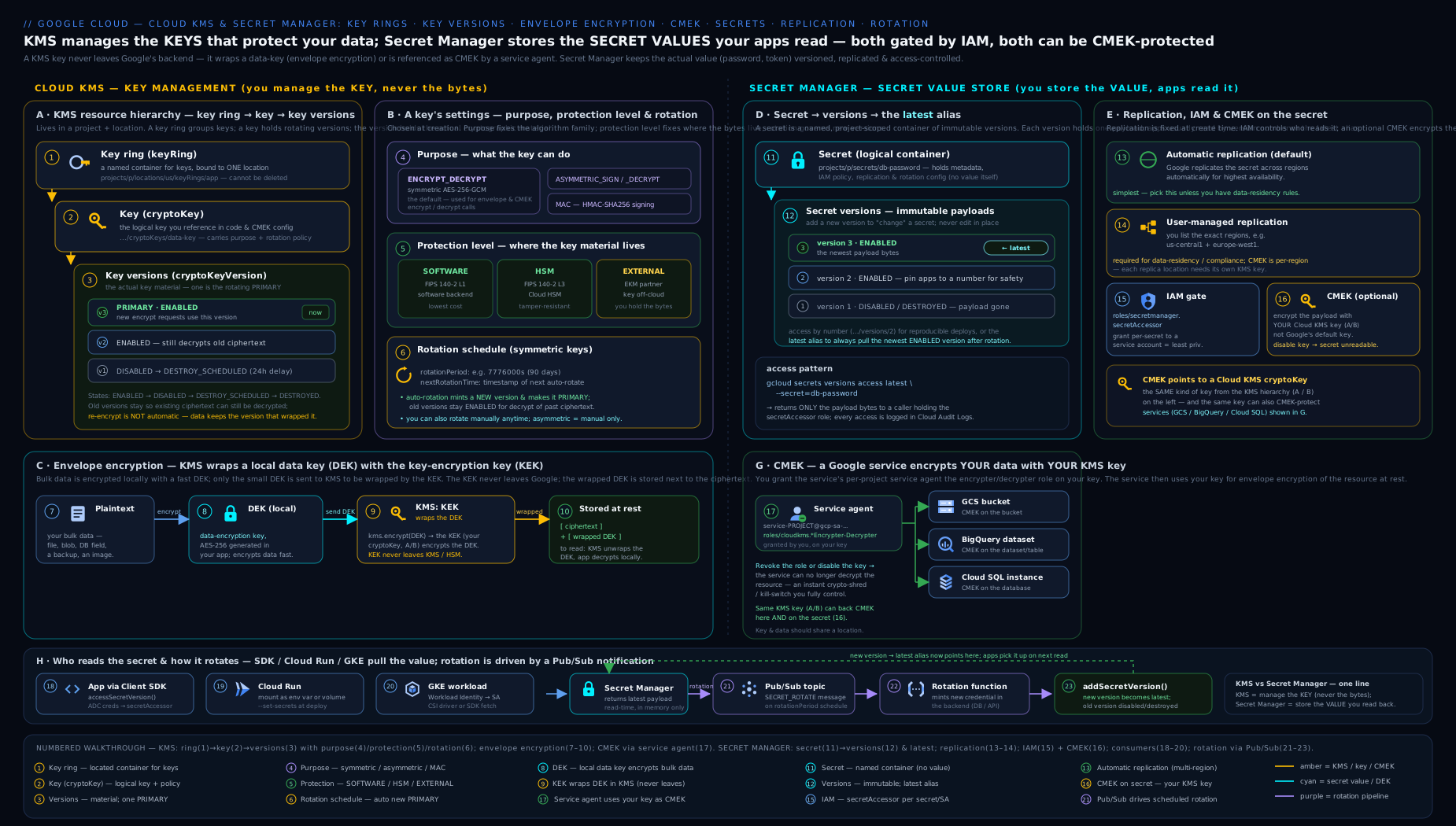
Read the diagram left-to-right as two composing halves: on the left, the Cloud KMS hierarchy (key ring → key → versions) feeds CMEK into GCP services through envelope encryption — one KEK wrapping many per-resource DEKs; on the right, Secret Manager’s secret → versions model with the latest alias, IAM-gated access from workloads, and a rotation loop driven by Pub/Sub — and notice KMS sitting underneath Secret Manager, encrypting every secret at rest. One picture, both services, and the dependency between them.
Hands-on lab: a CMEK-encrypted bucket and a versioned secret
This lab creates a KMS key, encrypts a Cloud Storage bucket with it (CMEK end to end including the service-agent grant), demonstrates instant revocation by disabling the key version, and creates a versioned secret with least-privilege access. It runs comfortably within the $300 free trial; KMS keys cost about $0.06 per active key version per month plus a tiny per-operation fee, and the bucket/secret usage here is negligible.
Step 1 — Set up variables and enable APIs
export PROJECT=$(gcloud config get-value project)
export PROJECT_NUMBER=$(gcloud projects describe "$PROJECT" --format='value(projectNumber)')
export LOCATION=us-central1

gcloud services enable cloudkms.googleapis.com secretmanager.googleapis.com \
  storage.googleapis.com --project="$PROJECT"
Step 2 — Create a key ring and a rotating CMEK key
gcloud kms keyrings create lab-keyring \
  --project="$PROJECT" --location="$LOCATION"

gcloud kms keys create lab-cmek \
  --project="$PROJECT" --location="$LOCATION" --keyring=lab-keyring \
  --purpose=encryption --protection-level=software \
  --rotation-period=90d \
  --next-rotation-time="$(date -u -d '+90 days' +%Y-%m-%dT%H:%M:%SZ 2>/dev/null \
      || date -u -v+90d +%Y-%m-%dT%H:%M:%SZ)"
Step 3 — Grant the Cloud Storage service agent use of the key, then create a CMEK bucket
SA="service-${PROJECT_NUMBER}@gs-project-accounts.iam.gserviceaccount.com"

gcloud kms keys add-iam-policy-binding lab-cmek \
  --project="$PROJECT" --location="$LOCATION" --keyring=lab-keyring \
  --member="serviceAccount:${SA}" \
  --role="roles/cloudkms.cryptoKeyEncrypterDecrypter"

KEY="projects/$PROJECT/locations/$LOCATION/keyRings/lab-keyring/cryptoKeys/lab-cmek"
gcloud storage buckets create "gs://${PROJECT}-lab-cmek" \
  --location="$LOCATION" --default-encryption-key="$KEY"

echo "hello cmek" > /tmp/lab.txt
gcloud storage cp /tmp/lab.txt "gs://${PROJECT}-lab-cmek/"
Step 4 — Prove revocation: disable the key version, watch access fail, then restore
# Disable the only (primary) version — this locks the data
gcloud kms keys versions disable 1 \
  --project="$PROJECT" --location="$LOCATION" \
  --keyring=lab-keyring --key=lab-cmek

# Reading the object now FAILS — the DEK can no longer be unwrapped
gcloud storage cat "gs://${PROJECT}-lab-cmek/lab.txt" || echo ">> Access denied: key disabled"

# Re-enable and access is restored
gcloud kms keys versions enable 1 \
  --project="$PROJECT" --location="$LOCATION" \
  --keyring=lab-keyring --key=lab-cmek
gcloud storage cat "gs://${PROJECT}-lab-cmek/lab.txt"   # -> hello cmek
Step 5 — Create a versioned secret with least-privilege access
gcloud secrets create lab-secret --replication-policy="automatic" --project="$PROJECT"
echo -n "s3cr3t-v1" | gcloud secrets versions add lab-secret --data-file=- --project="$PROJECT"
echo -n "s3cr3t-v2" | gcloud secrets versions add lab-secret --data-file=- --project="$PROJECT"

# 'latest' follows the newest enabled version
gcloud secrets versions access latest --secret=lab-secret --project="$PROJECT"   # -> s3cr3t-v2

# Grant a workload SA accessor on THIS secret only (replace with a real SA to test)
gcloud secrets add-iam-policy-binding lab-secret \
  --member="serviceAccount:${PROJECT_NUMBER}-compute@developer.gserviceaccount.com" \
  --role="roles/secretmanager.secretAccessor" --project="$PROJECT"
Validation
# Confirm the bucket's default key is your CMEK
gcloud storage buckets describe "gs://${PROJECT}-lab-cmek" \
  --format='value(default_kms_key)'

# Confirm key version state and rotation
gcloud kms keys describe lab-cmek --location="$LOCATION" --keyring=lab-keyring \
  --format='value(rotationPeriod,nextRotationTime)'

# List secret versions and states
gcloud secrets versions list lab-secret --project="$PROJECT"
You should see the CMEK resource name on the bucket, a 90-day rotation period on the key, and two ENABLED secret versions.
Cleanup
gcloud storage rm -r "gs://${PROJECT}-lab-cmek"
gcloud secrets delete lab-secret --project="$PROJECT" --quiet
gcloud kms keys versions destroy 1 \
  --project="$PROJECT" --location="$LOCATION" --keyring=lab-keyring --key=lab-cmek --quiet
# NOTE: key rings and keys CANNOT be deleted. Destroying the version stops billing for it.
Cost note
A key version costs roughly $0.06/month while active, plus ~$0.03 per 10,000 crypto operations; HSM and EKM keys cost more per version and per operation. Secret Manager bills about $0.06 per active secret version per month and $0.03 per 10,000 access operations, with a free allowance. Destroying the key version and deleting the secret stops those charges; the empty key ring and key remain forever at no cost.
Going deeper
The core above is enough to pass the exam and ship CMEK. This section is for the architect operating both services at organisation scale — the guardrails, the residency controls, the throughput traps and the things that break in production.
Enforcing CMEK organisation-wide with Organization Policy
Wiring CMEK by hand on every bucket and instance does not scale, and nothing stops a developer from skipping it. Two Organization Policy constraints turn CMEK from a suggestion into a guardrail:
| Constraint | Type | What it enforces |
|---|---|---|
constraints/gcp.restrictNonCmekServices |
List | Names the services (e.g. storage.googleapis.com, bigquery.googleapis.com) that must use CMEK — resource creation without a customer key is denied |
constraints/gcp.restrictCmekCryptoKeyProjects |
List | Restricts which projects’ KMS keys are acceptable for CMEK, so teams can only use keys from your blessed, centrally-managed key project |
# Require CMEK for Cloud Storage and BigQuery across the org
gcloud org-policies set-policy - <<'EOF'
name: organizations/ORG_ID/policies/gcp.restrictNonCmekServices
spec:
  rules:
  - values:
      deniedValues:
      - storage.googleapis.com
      - bigquery.googleapis.com
EOF
Listing a service under the denied values of restrictNonCmekServices is how you say “no non-CMEK resources here.” Pair it with restrictCmekCryptoKeyProjects (whose allowed values are your key project(s)) and you have closed both loopholes: developers must use CMEK, and only from keys the security team owns.
Bring-your-own-key: Cloud KMS import jobs
When policy says the key material must be generated outside Google and then brought in — a genuine BYOK requirement, distinct from both CSEK and EKM — Cloud KMS supports key import. You create an import job, which hands you a public wrapping key; you wrap your raw key material with it locally, upload the wrapped blob, and KMS installs it as a new key version. The plaintext key never crosses the wire.
# 1. Create an import job (RSA-OAEP wrapping) targeting a software or HSM key
gcloud kms import-jobs create my-import-job \
  --project="$PROJECT" --location="$LOCATION" --keyring=app-keyring \
  --import-method=rsa-oaep-3072-sha256-aes-256 \
  --protection-level=software

# 2. Import your wrapped key material as a new version of an existing key
gcloud kms keys versions import \
  --project="$PROJECT" --location="$LOCATION" --keyring=app-keyring \
  --key=app-cmek --import-job=my-import-job \
  --algorithm=google-symmetric-encryption \
  --wrapped-key-file=./wrapped-key.bin
Import is the middle path between “let Google generate it” (normal CMEK) and “keep it entirely outside Google” (EKM): the material lives in Google KMS afterwards, but you attest to its origin. Imported versions never auto-rotate — you import each new version yourself.
How Autokey actually works (KeyHandle and the key project)
The core section introduced Autokey; here is the machinery. A key administrator enables Autokey on a folder and points it at a dedicated key project. When a developer creates a CMEK resource and requests an Autokey key, the service creates a lightweight KeyHandle resource in the developer’s project — a pointer — while the actual CryptoKey (already with the right location, a rotation policy, and the service-agent binding applied) is provisioned in the central key project. Developers never touch the key project; they just reference the handle. The result is per-resource keys, centrally governed, with zero manual IAM — the “paved road” the core section promised, delivered through the KeyHandle indirection.
Data residency: regional endpoints, regional secrets and Key Access Justifications
Three advanced controls matter when a regulator dictates where cryptographic operations may happen:
- Regional KMS endpoints. Beyond choosing a regional key location, you can call KMS through a regional endpoint (
cloudkms.<location>.rep.googleapis.com) so the request is guaranteed to be processed in that region — a backbone of data-residency and Assured Workloads deployments. - Regional Secret Manager. The Secret Manager described above is the global service (with automatic/user-managed replication). Secret Manager also offers regional secrets with their own regional endpoints (
secretmanager.<location>.rep.googleapis.com) when a secret’s bytes must be pinned to and served from a single region with no global control plane involved. - Key Access Justifications (KAJ). With EKM, KAJ attaches a reason code to every key-access request (for example, “customer-initiated access” versus “Google-initiated maintenance”). Your external key manager can then approve or deny each unwrap based on the justification, giving you a cryptographically-enforced veto over when your data can be decrypted — the strongest control on this whole spectrum.
Quotas, throughput and caching
Two limits bite real workloads:
- KMS crypto-operation quotas. Software symmetric encrypt/decrypt enjoys generous per-minute quotas, but asymmetric, HSM and especially EKM operations are far more limited. A high-throughput service that calls KMS on every request can hit
RESOURCE_EXHAUSTED; the fix is envelope encryption (wrap a DEK once, reuse it) plus caching unwrapped DEKs in memory for a bounded lifetime — not a quota-increase ticket. - Secret Manager payload and access limits. A secret version’s payload is capped at 64 KiB, and access operations are quota’d per project. Fetching the same secret on every request is the classic anti-pattern — cache the value in memory and refresh on a schedule (or when you rotate). This both stays inside quota and cuts latency, and it is exactly why Cloud Run and Cloud Functions mount a secret once at start rather than reading it per invocation.
Advanced Secret Manager: aliases, delayed destruction, TTLs and labels
Beyond the built-in latest, four features round out production Secret Manager:
- Version aliases. Attach your own string aliases (for example
current,previous) to specific version numbers and reference them likeversions/current, decoupling consumers from raw numbers during staged rollouts. - Delayed version destruction. Set
--version-destroy-ttlon a secret and destroying a version schedules it after the TTL — mirroring KMS’s destroy delay — instead of deleting the payload immediately. A safety net you should turn on. - Secret expiration (TTL).
--expire-timeor--ttlmakes a whole secret self-delete at a chosen time, handy for short-lived bootstrap credentials. - Labels. Tag secrets (
--labels=team=payments,env=prod) for cost attribution, discovery and policy.
Provisioning it as code (Terraform)
In production you never click or type these by hand; you declare them. A rotating CMEK key plus the service-agent binding is a few lines of Terraform:
resource "google_kms_key_ring" "app" {
  name     = "app-keyring"
  location = "us-central1"
}

resource "google_kms_crypto_key" "app_cmek" {
  name            = "app-cmek"
  key_ring        = google_kms_key_ring.app.id
  purpose         = "ENCRYPT_DECRYPT"
  rotation_period = "7776000s" # 90 days

  lifecycle {
    prevent_destroy = true # keys can't truly be deleted anyway; this keeps state honest
  }
}

# Let the Cloud Storage service agent use the key (the grant everyone forgets)
resource "google_kms_crypto_key_iam_member" "gcs" {
  crypto_key_id = google_kms_crypto_key.app_cmek.id
  role          = "roles/cloudkms.cryptoKeyEncrypterDecrypter"
  member        = "serviceAccount:service-${var.project_number}@gs-project-accounts.iam.gserviceaccount.com"
}
prevent_destroy is doubly apt here: because KMS keys can never truly be deleted, a Terraform destroy only removes the resource from state and schedules version destruction — the guard stops that from happening by accident.
Audit logging: the data-access logs you must turn on
Every KMS crypto operation and every Secret Manager access can be logged — but Data Access audit logs are off by default (only Admin Activity logs are always on). To get the “who decrypted what, when” and “who read which secret version” trail that the whole compliance story depends on, you must explicitly enable Data Access logs for cloudkms.googleapis.com and secretmanager.googleapis.com (via the project or org IAM audit config), then alert on the dangerous events — DestroyCryptoKeyVersion, secret deletions, and unusual access spikes. A control you cannot prove was in force is, to an auditor, a control you did not have.
Common beginner mistakes
These are the conceptual traps — the wrong mental model, not just an error message (those are in the troubleshooting table below).
- “Turning on CMEK encrypts my data — without it, it’s in the clear.” No. Your data is already AES-256 encrypted at rest, with or without CMEK. CMEK does not add encryption; it changes whose key sits at the top of the chain and hands you the revoke/rotate/audit levers. The right model: default vs CMEK is about control, not encrypted vs plaintext.
- “Rotating the key re-encrypts everything under the new key.” No. Rotation only sets a new primary for future writes; existing data keeps decrypting under its old (still-enabled) version. To move old data onto the new key you must rewrite it. The right model: rotation is forward-looking, and old versions are kept on purpose so nothing breaks.
- “I’ll delete the key ring when I’m done.” You can’t. Key rings and keys are permanent and non-deletable; you only disable or destroy versions. Empty rings are free and harmless. The right model: plan the name/location once, and stop trying to clean them up.
- “Destroying a key version is like deleting a file — roughly reversible.” It is the most irreversible action in the whole product. After the scheduled delay, any data still encrypted under that version is gone forever and Google cannot help. The right model: disable to revoke (reversible); destroy only when you truly mean “unrecoverable”.
- “CMEK failed, so the key or the service is broken.” Almost always it is one of two boring causes: the service’s service agent lacks
cryptoKeyEncrypterDecrypteron the key, or the key location doesn’t match the resource. Check those two before anything else. The right model: CMEK is IAM + location, not magic. - “Secret Manager is just a database for strings.” It is an access-controlled, versioned, audited, encrypted credential store — the value is in the IAM, the immutable versions and the audit trail, not the storage. Treating it as a plain key-value store (granting broad access, pinning nothing, reading it on every request) throws away everything it is for.
- “A secret version is editable.” Versions are immutable. “Updating” a secret means adding a new version;
latestthen points at it. The right model: secrets are append-only logs, and rotation is add new → cut over → disable old, never edit in place. - “Kubernetes Secrets are encrypted, so I don’t need Secret Manager.” Native K8s Secrets are only base64-encoded (not encrypted) in etcd by default. Env vars and
.envfiles leak through images, logs and git. The right model: keep credentials in Secret Manager (or GKE’s Secret Manager CSI driver / Workload Identity) and out of your manifests and repo.
Common mistakes & troubleshooting
| Symptom | Likely cause | Fix |
|---|---|---|
PERMISSION_DENIED when a service tries to use your CMEK |
The service’s service agent lacks cryptoKeyEncrypterDecrypter on the key |
Grant the role to the correct service-...@gcp-sa-<service>.iam.gserviceaccount.com agent |
| “Key location is not compatible” creating a CMEK resource | Key and resource in different/incompatible locations | Create the key in the resource’s region (or matching multi-region) |
| Cannot add CMEK to an existing Cloud SQL instance | CMEK is set only at instance creation for Cloud SQL | Create a new instance with CMEK and migrate data |
| Reads suddenly fail across a dataset/bucket | A key version was disabled or destroyed | Re-enable the version (if disabled); destroyed = data unrecoverable |
| Rotating the key did not protect old data | Rotation only changes the key for new writes | Rewrite/recreate the data so it re-encrypts under the new primary |
| App can’t read a secret despite IAM | Granted at project, or the wrong SA, or missing the secretAccessor role | Grant secretAccessor to the workload’s SA on the specific secret |
| CMEK secret creation fails | CMEK key doesn’t match the secret’s replication regions | Use user-managed replication with a key per region, or fix the key location |
| Tried to delete a key ring/key | Key rings and keys are immutable / non-deletable | Disable/destroy versions instead; the empty ring is harmless and free |
Best practices
- Default to CMEK with SOFTWARE protection for data that has any compliance or control requirement; reserve HSM/EKM for explicit mandates.
- One purpose, planned once — purpose and protection level are immutable; design them before creating the key.
- Rotate symmetric keys (90 days is the sweet spot) and let old versions stay enabled so existing data still decrypts.
- Separate duties: key/secret admins manage; applications and service agents use. Never grant both to one principal.
- Grant at the most specific level — bind IAM on the individual key or secret, never project-wide, so blast radius is minimal.
- Per-resource keys where it matters (Autokey makes this the easy default) so disabling one key affects one resource, not your whole estate.
- Pin consumers to
latestfor zero-downtime secret rotation, and add → cut over → disable, never destroy immediately. - Use user-managed replication for any secret with data-residency constraints, and pair it with region-matched CMEK keys.
- Enable data-access audit logs for KMS and Secret Manager so every key use and secret read is provable.
Security notes
The whole value proposition of these services is control under attack, so treat the controls themselves as the crown jewels. Lock down cloudkms.admin and secretmanager.admin to a tiny set of break-glass identities — anyone with admin on a key can schedule its destruction, and anyone with admin on a secret can read or delete it. Rely on the destroy-scheduled delay (raise it from the 24-hour default if your change-control cadence is slower) as a safety net, and alert on DestroyCryptoKeyVersion and on secret deletions in audit logs. Never store raw key material or secret payloads in code, images, build logs or environment files committed to source control — that single habit defeats everything KMS and Secret Manager give you. Prefer keyless access (Application Default Credentials, Workload Identity) over service-account keys, because a key file in a repo is itself the worst secret leak. For the highest assurance, use Cloud HSM for FIPS 140-2 Level 3 plus verifiable attestation, or EKM when policy demands the key material never reside in Google at all — but understand that EKM makes your data’s availability depend on the external manager.
Practice challenges
Work these in your free-trial project (they reuse the lab’s $PROJECT, $LOCATION, lab-keyring and lab-cmek). Each has a hidden solution — try it first, then check. All names are placeholders.
1. (Beginner) Create a symmetric CMEK key with 30-day rotation and confirm the period.
<details><summary>Show solution</summary>
gcloud kms keys create thirty-day-key \
  --location="$LOCATION" --keyring=lab-keyring \
  --purpose=encryption --rotation-period=30d \
  --next-rotation-time="$(date -u -d '+30 days' +%Y-%m-%dT%H:%M:%SZ 2>/dev/null || date -u -v+30d +%Y-%m-%dT%H:%M:%SZ)"

gcloud kms keys describe thirty-day-key \
  --location="$LOCATION" --keyring=lab-keyring \
  --format='value(rotationPeriod)'   # -> 2592000s
Why: 30 days = 2,592,000s; --purpose=encryption is the only CMEK-eligible (symmetric) purpose, and only symmetric keys auto-rotate.
</details>
2. (Beginner) Prove the direct-encrypt size wall.
<details><summary>Show solution</summary>
# A 100 KiB file — bigger than the software-key encrypt limit
head -c 102400 /dev/urandom > big.bin
gcloud kms encrypt --location="$LOCATION" --keyring=lab-keyring --key=lab-cmek \
  --plaintext-file=big.bin --ciphertext-file=big.enc
# -> error: request payload / plaintext too large
Why: the encrypt API caps plaintext at 64 KiB (8 KiB for HSM keys) — the exact reason real workloads use envelope encryption instead of encrypting data directly.
</details>
3. (Intermediate) Give a workload read-only access to one secret, and nothing more.
<details><summary>Show solution</summary>
gcloud secrets add-iam-policy-binding lab-secret \
  --member="serviceAccount:APP_SA@${PROJECT}.iam.gserviceaccount.com" \
  --role="roles/secretmanager.secretAccessor" --project="$PROJECT"
Why: secretAccessor reads payloads only — it cannot add/disable/destroy versions or change IAM. Granting it on the secret (not the project) is least privilege for an app.
</details>
4. (Intermediate) Enforce separation of duties on a key.
<details><summary>Show solution</summary>
# Key-admin can rotate/destroy but NOT decrypt:
gcloud kms keys add-iam-policy-binding lab-cmek \
  --location="$LOCATION" --keyring=lab-keyring \
  --member="serviceAccount:KEYADMIN_SA@${PROJECT}.iam.gserviceaccount.com" \
  --role="roles/cloudkms.admin"

# App can decrypt but NOT manage:
gcloud kms keys add-iam-policy-binding lab-cmek \
  --location="$LOCATION" --keyring=lab-keyring \
  --member="serviceAccount:APP_SA@${PROJECT}.iam.gserviceaccount.com" \
  --role="roles/cloudkms.cryptoKeyEncrypterDecrypter"
Why: splitting admin from cryptoKeyEncrypterDecrypter means no single identity can both read plaintext and destroy the key — a compromised app can’t wipe keys, a compromised admin can’t exfiltrate data.
</details>
5. (Advanced) Build a data-residency secret: EU-only replication wrapped in an EU CMEK key.
<details><summary>Show solution</summary>
# 1. A key in europe-west1
gcloud kms keyrings create eu-ring --location=europe-west1
gcloud kms keys create eu-secret-key --location=europe-west1 --keyring=eu-ring --purpose=encryption

# 2. Let the Secret Manager service agent use it
PN=$(gcloud projects describe "$PROJECT" --format='value(projectNumber)')
gcloud kms keys add-iam-policy-binding eu-secret-key \
  --location=europe-west1 --keyring=eu-ring \
  --member="serviceAccount:service-${PN}@gcp-sa-secretmanager.iam.gserviceaccount.com" \
  --role="roles/cloudkms.cryptoKeyEncrypterDecrypter"

# 3. User-managed replication pinned to EU, each replica paired with the EU key
cat > eu-policy.json <<EOF
{
  "userManaged": {
    "replicas": [
      { "location": "europe-west1",
        "customerManagedEncryption": {
          "kmsKeyName": "projects/${PROJECT}/locations/europe-west1/keyRings/eu-ring/cryptoKeys/eu-secret-key"
        } }
    ]
  }
}
EOF
gcloud secrets create eu-resident-secret --replication-policy-file=eu-policy.json --project="$PROJECT"
Why: CMEK keys must live in the secret’s replica regions, so residency secrets use user-managed replication with a region-matched key — automatic replication can’t guarantee where the bytes (or the key) sit. </details>
6. (Advanced) Turn CMEK into an enforced guardrail with Organization Policy.
<details><summary>Show solution</summary>
gcloud org-policies set-policy - <<'EOF'
name: folders/FOLDER_ID/policies/gcp.restrictNonCmekServices
spec:
  rules:
  - values:
      deniedValues:
      - storage.googleapis.com
EOF
Why: listing a service under restrictNonCmekServices denies creating non-CMEK resources there — CMEK stops being a best-practice you hope people follow and becomes a rule the platform enforces (no bucket without a customer key).
</details>
Interview & exam questions
- What does “encrypted at rest by default” not give you, and how does CMEK fix it? Default encryption protects against physical media theft but leaves Google holding the only key — you cannot revoke access to plaintext. CMEK gives you the key, so you can disable/destroy it and make the data unreadable on demand, with an audit trail and your own rotation.
- Walk through envelope encryption. A local DEK encrypts the data (fast, any size); the DEK is wrapped by a KEK in KMS; the wrapped DEK is stored with the ciphertext; the plaintext DEK is discarded. To read, KMS unwraps the DEK and you decrypt locally. It gives performance, cheap rotation (re-wrap small DEKs, not re-encrypt data) and revocation (kill the KEK, all DEKs die).
- Difference between disabling and destroying a key version? Disabling is reversible — it instantly blocks use (your emergency revocation switch) and can be re-enabled. Destroying schedules permanent deletion after a mandatory delay (default 24h, up to 120 days); once destroyed, any data still encrypted with it is unrecoverable.
- Does rotating a key re-encrypt existing data? No. Rotation creates a new primary version used for new encryptions; old versions stay enabled to decrypt existing data. To re-encrypt old data you must rewrite/recreate it so it picks up the new primary.
- Name the four protection levels and the headline difference. SOFTWARE (FIPS 140-2 L1, Google software), HSM (FIPS 140-2 L3 hardware with attestation), EXTERNAL (key material in a third-party manager over the internet), EXTERNAL_VPC (the same but over private VPC). They differ in where the material lives and the assurance/cost.
- What is the one step people forget when enabling CMEK on a service? Granting the service’s service agent the
cryptoKeyEncrypterDecrypterrole on the key — without it the service cannot wrap/unwrap DEKs and CMEK fails. - Which KMS roles enforce separation of duties?
cloudkms.admincan manage (rotate/destroy) but not use a key;cloudkms.cryptoKeyEncrypterDecryptercan use but not manage. Splitting them means no single principal can both read plaintext and destroy the key. - What does the
latestalias do in Secret Manager and why does it enable zero-downtime rotation? It resolves to the highest-numbered enabled version. Adding version N+1 instantly shiftslatestwhile N stays valid, so consumers cut over on their next read with no outage — provided you don’t disable N too early. - Automatic vs user-managed replication for a secret — when each? Automatic = Google picks regions, simplest, max availability. User-managed = you list specific regions, required for data-residency; also necessary to pair region-matched CMEK keys.
- Does Secret Manager generate new secret values on rotation? No — it publishes a Pub/Sub notification on a schedule; you provide the rotator (e.g. a Cloud Function) that mints the new value and adds a version. Secret Manager orchestrates timing, not generation.
- What is Cloud KMS Autokey for? It auto-provisions a per-resource CMEK key (correct location, rotation, service-agent IAM) when a developer creates a CMEK resource, removing manual toil and enforcing consistent, policy-compliant keys at folder scale via a
KeyHandlepointer to a central key project. - Why store secrets in Secret Manager rather than Kubernetes Secrets or env vars? K8s Secrets are only base64-encoded by default (not encrypted); env vars/config files leak via images and source control. Secret Manager gives encryption at rest (optionally CMEK), versioning, IAM-gated access and audit logs.
- How do you force CMEK across an entire organisation? The
gcp.restrictNonCmekServicesorg-policy constraint denies creating non-CMEK resources for listed services, andgcp.restrictCmekCryptoKeyProjectslimits which projects’ keys are acceptable — together they make CMEK mandatory and centrally sourced.
Quick check
- True/False: A Cloud KMS key ring can be deleted once it has no keys.
- Which key purpose does CMEK use, and is it symmetric or asymmetric?
- You disable the single key version protecting a BigQuery dataset. What happens to queries, and is it reversible?
- Your CMEK assignment to a bucket fails with a permission error. What is the most likely missing grant?
- A secret needs its payload to stay only in
europe-west2. Which replication policy do you choose?
Answers
- False. Key rings (and keys) cannot be deleted or renamed; their location is permanent. Empty ones are harmless and free.
- The
encryptionpurpose — symmetric (ENCRYPT_DECRYPT, AES-256-GCM). It is the only purpose CMEK uses. - Queries fail (the data is unreadable because the DEK can no longer be unwrapped). It is reversible — re-enable the version and access is restored.
- The Cloud Storage service agent is missing
roles/cloudkms.cryptoKeyEncrypterDecrypteron the key. - User-managed replication, with
--locations=europe-west2(and a region-matched CMEK key if encrypting with your own key).
Exercise
In your free-trial project, build a small “secure config” setup that an interviewer could probe:
- Create a key ring and a symmetric CMEK key in your region with 30-day rotation, and verify the rotation period.
- Create a Pub/Sub-notified, rotating secret (
--topics,--rotation-period,--next-rotation-time) holding a fake API key, add two versions, and confirmlatestreturns the second. - Wrap the secret in your CMEK key (grant the Secret Manager service agent
cryptoKeyEncrypterDecrypterfirst) and confirm creation succeeds — then disable the key version and observe that accessing the secret now fails. - Apply separation of duties: grant a “rotator” SA
secretVersionManagerand an “app” SAsecretAccessoron the secret, and grant a “key-admin” SAcloudkms.admin(but not encrypterDecrypter) on the key. Confirm the app SA can read but cannot destroy, and the key-admin can rotate but cannot read plaintext. - Clean up: delete the secret, destroy the key version, and note that the key ring remains.
Write down, in one paragraph each, why disabling the key broke secret access (envelope encryption) and why the latest alias made adding a version a zero-downtime change.
Certification mapping
- Associate Cloud Engineer (ACE): Configuring access and security and Setting up a cloud solution environment — creating Cloud KMS keys and key rings with
gcloud, enabling CMEK on services (and the service-agent grant), and managing Secret Manager secrets, versions and IAM. Expect hands-on-style questions that mirror this lab. - Professional Cloud Security Engineer (PCSE): the deep end — default vs CMEK vs CSEK, the KMS hierarchy and protection levels (SOFTWARE/HSM/EXTERNAL/EXTERNAL_VPC), envelope encryption with DEKs/KEKs, rotation and the version lifecycle, separation-of-duties IAM on keys, Cloud HSM, EKM, Autokey, org-policy CMEK enforcement, key import, plus Secret Manager replication, rotation pipelines and CMEK. This lesson is the on-ramp; the Cloud KMS in Depth and Secret Manager Rotation Pipelines companions complete it.
- Cloud Digital Leader (CDL): the conceptual layer only — what encryption at rest is, why customers want control of their keys (CMEK), and that secrets belong in a managed secret store.
Glossary
- Default encryption at rest — Google’s automatic AES-256 encryption of all customer data, using Google-managed keys, at no cost.
- CMEK (Customer-Managed Encryption Keys) — using your Cloud KMS key for a service’s encryption, giving you control, rotation, revocation and audit.
- CSEK (Customer-Supplied Encryption Keys) — supplying raw key material on each request; key never persists in Google; rare and high-burden.
- Key ring (
KeyRing) — a location-bound, non-deletable grouping of keys and an IAM boundary. - Key (
CryptoKey) — a named key with a fixed purpose and rotation policy; the IAM and reference target. - Key version (
CryptoKeyVersion) — the actual cryptographic material; the unit you enable/disable/destroy. - Primary version — the key version KMS uses for new encryptions; only symmetric keys have one (you name the version explicitly for asymmetric keys).
- Purpose — what a key does:
encryption(symmetric/CMEK),asymmetric-signing,asymmetric-encryption, ormac. - Protection level — where key material lives:
SOFTWARE,HSM,EXTERNAL,EXTERNAL_VPC. - Envelope encryption — encrypting data with a DEK, then wrapping the DEK with a KEK in KMS.
- DEK / KEK — data encryption key (encrypts data, local) / key encryption key (wraps the DEK, in KMS).
- Cloud HSM — managed FIPS 140-2 Level 3 hardware-backed keys with verifiable attestation.
- EKM (External Key Manager) — keys held by a third-party manager outside Google, reached over internet (
EXTERNAL) or VPC (EXTERNAL_VPC). - Key Access Justifications (KAJ) — reason codes attached to EKM key accesses so the external manager can approve or deny each decrypt.
- Import job — a Cloud KMS resource that lets you import externally-generated key material (BYOK) by wrapping it with a public key so the plaintext never transits.
- Autokey — automatic per-resource CMEK key provisioning (location, rotation, service-agent IAM) at folder scope.
- KeyHandle — the lightweight per-resource pointer Autokey creates in a developer’s project, backed by a real key in the central key project.
- Organization Policy (CMEK constraints) —
restrictNonCmekServices(require CMEK for named services) andrestrictCmekCryptoKeyProjects(restrict which projects’ keys are allowed). - Regional endpoint — a location-scoped API endpoint (
cloudkms.<loc>.rep.googleapis.com,secretmanager.<loc>.rep.googleapis.com) that guarantees in-region processing for data residency. - Service agent — a Google-managed service account a GCP service uses; must hold
cryptoKeyEncrypterDecrypterfor CMEK. - Secret — a Secret Manager container (name, replication, IAM, optional rotation) holding no payload itself.
- Secret version — an immutable, numbered payload; state
ENABLED/DISABLED/DESTROYED. - Regional secret — a Secret Manager secret pinned to and served from a single region via regional endpoints, distinct from the global replicated service.
latestalias — resolves to the highest-numbered enabled secret version; enables zero-downtime rotation.- Version alias — a user-defined string mapped to a specific secret version number (beyond the built-in
latest). - Replication policy —
automatic(Google-chosen regions) oruser-managed(regions you list, for residency). - Data Access audit logs — logs of crypto/secret-read operations; off by default and must be explicitly enabled to prove who used a key or read a secret.
Next steps
You can now reason about the full encryption story on Google Cloud — default vs CMEK vs CSEK — build and rotate Cloud KMS keys, wire CMEK into services with the service-agent grant, explain envelope encryption and the protection levels, and operate Secret Manager with versioned, IAM-gated, optionally CMEK-encrypted secrets. To go deeper on the key side, follow Cloud KMS in Depth: CMEK, Envelope Encryption, Cloud HSM and External Key Manager, and for production rotation automation read Secret Manager Rotation Pipelines with Cloud Functions, IAM and CMEK. Next in the course, make all of this observable in Google Cloud Operations Suite, In Depth: Cloud Monitoring, Logging, Trace & Error Reporting, where audit logs for key use and secret access become the evidence behind your alerts.