In a nutshell
Imagine a secure office building. The old way to protect it is one guarded front door: badge in once and you can wander every floor, ride every lift, and rattle every door handle inside. That is the firewall-and-VPN model — the network is the trust, so a single stolen badge (a leaked VPN credential, a compromised laptop) hands an attacker the whole building.
Identity-Aware Proxy (IAP) is the opposite. There is no trusted lobby. Every door — every app, every server — has its own badge reader that checks who you are and whether you specifically are allowed through this door, right now, from this device — on every entry, not just the first. Google runs those readers for you, in front of your applications and virtual machines. That is Google’s BeyondCorp / zero-trust idea turned into a product.
Two practical superpowers fall out of this. First, you can publish an internal web app straight to the internet with no VPN — IAP shows a Google sign-in page and only lets in the people you named. Second, you can SSH or RDP into servers that have no public IP at all, with no bastion host, because IAP opens an identity-checked tunnel to them from inside Google’s network. In both cases Google verifies identity (and optionally device and location) on every request and writes an audit log entry — a per-person, per-request trail a VPN never gave you.
Level: Intermediate · Time: ~45 min · You will be able to: front any web app or API with zero-trust login, SSH a no-public-IP VM through IAP, validate the signed JWT so nobody slips past the proxy, and layer device/IP/region conditions on top of identity.
For thirty years the standard way to protect an internal application was a perimeter: put it behind a firewall, hand the right people a VPN, and assume that anyone who reached the application over the trusted network was allowed to be there. That assumption is now the single largest cause of lateral movement in breaches. A stolen VPN credential, a compromised laptop already inside the network, or a flat internal subnet means one foothold becomes the whole estate. Google hit this wall internally a decade ago, abandoned the VPN-and-perimeter model for its own employees, and published the result as BeyondCorp: trust nothing because of where it sits on the network; verify who the caller is and what context they are in, on every single request, at a proxy that sits in front of the resource. Identity-Aware Proxy (IAP) is the managed Google Cloud product that implements BeyondCorp for your own applications and virtual machines.
This is the exhaustive lesson. IAP wears two quite different hats and we cover both to the last option. IAP for HTTPS sits in front of a Google Cloud HTTP(S) Load Balancer and gates web applications and HTTP APIs running on App Engine, Cloud Run, GKE, Compute Engine, or any internet-facing backend — it runs the OAuth dance, checks IAM, and forwards a cryptographically signed identity header your application can trust. IAP for TCP forwarding wraps arbitrary TCP — most importantly SSH and RDP — so you can administer VMs that have no external IP at all, replacing the bastion host entirely. We go concept by concept and knob by knob: the proxy model and how it differs from a VPN or a bastion, every IAM role and binding, the OAuth consent screen, the exact signed JWT your code must validate (and how), the firewall source range 35.235.240.0/20 that trips everyone up, Context-Aware Access through Access Context Manager device and IP and region levels, programmatic access for service accounts, headers and logging — until you can whiteboard a zero-trust access path from memory and answer every follow-up the Professional Cloud Security Engineer or Associate Cloud Engineer exam will throw at you.
Learning objectives
- Explain the BeyondCorp / zero-trust model and articulate precisely why “verify identity and context at the proxy” beats “trust the network” — and how IAP differs from a VPN and a bastion host.
- Stand up IAP for HTTPS end to end: an external or internal Application Load Balancer in front of App Engine, Cloud Run, GKE, or Compute backends, the OAuth consent screen, enabling IAP, and granting
roles/iap.httpsResourceAccessor. - Use IAP for TCP forwarding to SSH and RDP into VMs that have no external IP, via
gcloud compute ssh --tunnel-through-iapandgcloud compute start-iap-tunnel, and open the firewall to the IAP range35.235.240.0/20only. - Validate the signed JWT that IAP injects (
x-goog-iap-jwt-assertion) inside your application so a leaked load-balancer URL cannot bypass the proxy. - Layer Context-Aware Access with Access Context Manager access levels — device policy, IP/CIDR, geographic region, certificate — to require a managed, encrypted, corporate-network device on top of identity.
- Configure programmatic / service-account access to IAP-protected resources, read IAP’s audit and access logs, and apply least-privilege and the relevant security best practices.
Prerequisites & where this fits
You need a Google Cloud project with billing enabled, the gcloud CLI from the earlier Fundamentals lessons, and a working mental model of IAM (members, roles, bindings, inheritance) and VPC (subnets, firewall rules) — IAP is built on top of both. This is the Security deep-dive on application and instance access in the GCP Zero-to-Hero course. It sits next to two lessons it complements rather than repeats: VPC firewall, routes and Cloud NAT (IAP’s TCP tunnel needs exactly one firewall rule, which we cover here, and removes the need for the 0.0.0.0/0 SSH rule that lesson warns against), and VPC Service Controls (which guards the Google API control plane, where IAP guards your applications and VMs — different layers that compose). If “OAuth”, “JWT”, and “load balancer backend service” are brand new, skim those primers first; this lesson defines the IAP-specific parts but assumes you know what an HTTP request and an IP range are.
Core concepts: the zero-trust proxy model
Strip IAP to its essence and it is a policy enforcement point that authenticates and authorizes every request before the resource ever sees it. Three ideas carry the whole design.
Identity, not network location, is the control. In the perimeter model, being on the corporate LAN or VPN is the authorization. In IAP, the network grants nothing. Every request must carry — or be made to carry — a Google identity (a Google Account, a Cloud Identity / Workspace user, a service account, or a federated external identity), and IAP checks that identity against an IAM policy attached to the specific resource. There is no “internal, therefore trusted.” This is what “zero trust” means concretely.
The proxy sits in the data path and is unavoidable — if you wire it correctly. For HTTPS, IAP is a capability of the Google HTTP(S) Load Balancer: enable it on a backend service and every request to that backend is intercepted at Google’s edge, authenticated, and only then forwarded. For TCP, the IAP tunnel is the only path in because the VM has no external IP, so there is simply no other route from the internet. The recurring failure mode — covered in detail later — is leaving a second path open (a public IP on the VM, or an application that trusts its raw URL), which lets a caller go around the proxy. Zero trust only holds if the proxy is the sole door.
Context can be required on top of identity. A correct identity is necessary but you can demand more: that the request comes from a Google-managed, encrypted, screen-locked device, from a corporate IP range, from an allowed country, or presenting a client certificate. These conditions are access levels defined in Access Context Manager and bound to the resource through Context-Aware Access. Identity says who; context says under what conditions — and IAP AND-s them.
A few key terms before we build:
- BeyondCorp — Google’s zero-trust security model; IAP and Context-Aware Access are its Google Cloud implementation. BeyondCorp Enterprise is the licensed tier that unlocks the richer device and threat signals.
- OAuth client / brand — IAP authenticates browser users via OAuth 2.0. The brand is the OAuth consent screen (the “Sign in to App” page); the OAuth client is the credential IAP uses. Both are created once per project.
- Signed header (JWT assertion) — after authenticating a request, IAP injects HTTP headers, including a signed JWT (
x-goog-iap-jwt-assertion) that your backend should cryptographically verify to be sure the request truly came through IAP. - Access level — a named, reusable condition (device/IP/region/cert) from Access Context Manager that you require in addition to IAM identity.
IAP for HTTPS vs IAP for TCP at a glance
The two modes share the identity-at-the-proxy philosophy but differ in almost every mechanic. Keep them straight:
| Dimension | IAP for HTTPS | IAP for TCP forwarding |
|---|---|---|
| Protects | Web apps & HTTP(S) APIs | Arbitrary TCP — SSH (22), RDP (3389), DB ports, etc. |
| Sits on | An external or internal Application Load Balancer backend service (and App Engine directly) | A tunnel from the client to a specific VM:port; no load balancer |
| Backends | App Engine, Cloud Run, GKE, Compute Engine MIGs/NEGs, hybrid (internet/serverless NEG) | Compute Engine VM instances |
| How users reach it | Browser → load-balancer URL; OAuth login page | gcloud compute ssh --tunnel-through-iap / start-iap-tunnel / IAP Desktop |
| IAM role | roles/iap.httpsResourceAccessor |
roles/iap.tunnelResourceAccessor |
| Identity in request | Signed JWT header + X-Goog-Authenticated-User-* |
The tunnelled protocol’s own auth (SSH keys / OS Login / RDP creds) |
| Firewall need | None special (traffic comes via the LB) | Allow ingress TCP from 35.235.240.0/20 to the target port |
| Replaces | Public app exposure / app-level login / a web VPN | The bastion host and public SSH/RDP |
| External IP on resource | LB has the public IP; backends can be private | VM needs no external IP |
We now take each mode to exhaustion.
IAP for HTTPS: protecting web apps and APIs
The request path
A browser hits the load balancer’s URL. IAP intercepts at Google’s edge before the request reaches your backend. If there is no valid session, IAP redirects the browser through Google’s OAuth sign-in; the user authenticates as a Google/Cloud Identity account. IAP then checks whether that identity holds roles/iap.httpsResourceAccessor on the resource and whether the request satisfies any bound access levels. Only if both pass does IAP forward the request to the backend — now carrying the signed identity headers. Every subsequent request re-checks the (cached, short-lived) authorization. Your backend never sees an unauthenticated request if it trusts only IAP-verified traffic.
What you can put behind IAP-for-HTTPS
| Backend | How it attaches | Notes |
|---|---|---|
| App Engine (standard & flexible) | IAP toggled directly on the App Engine app; no separate LB to build | The simplest path; App Engine has IAP built in. |
| Cloud Run | Via a serverless NEG behind an external/internal Application LB, IAP on that backend service | Set Cloud Run ingress to “Internal and Cloud Load Balancing” so it can’t be hit directly; the Cloud Run deep-dive covers ingress. |
| GKE | An Ingress (or Gateway) that provisions a Google LB; enable IAP via a BackendConfig referencing the OAuth client secret | The BackendConfig CRD wires IAP to the Service. |
| Compute Engine | A backend service with an instance-group or NEG backend behind an Application LB | Classic VM web app behind the global/regional external ALB. |
| Hybrid / on-prem | An internet NEG (or hybrid connectivity NEG) behind the LB | IAP can front workloads outside Google Cloud reached via the LB. |
IAP works with the Global external Application LB, the Regional external Application LB, the Classic ALB, and the internal Application LB (for internal-only apps reached over private connectivity or from on-prem). It does not apply to the network load balancers (L4 passthrough/proxy) — IAP-for-HTTPS is an L7/HTTP capability. See the Load Balancing deep-dive for which LB to pick.
Prerequisite 1 — the OAuth consent screen (brand)
IAP signs users in with OAuth, so the project needs an OAuth consent screen (a “brand”). For corporate apps make it Internal (only your Workspace/Cloud Identity org can use it) rather than External. You set the application name and a support email; that name appears on the Google sign-in page.
PROJECT_ID=$(gcloud config get-value project)

# Create the OAuth brand (Internal == only users in your Cloud Identity org).
# The support email must be your own user or a group you own.
gcloud iap oauth-brands create \
  --application_title="Internal Admin Portal" \
  --support_email="you@example.com"

# List it back to get the brand resource name.
gcloud iap oauth-brands list
For App Engine, Cloud Run, and GKE backends IAP can manage the OAuth client for you automatically once a brand exists; for some setups (notably GKE BackendConfig) you create an OAuth client explicitly and hand its client-ID/secret to the backend.
# Explicit OAuth client (needed e.g. for GKE BackendConfig).
gcloud iap oauth-clients create BRAND_NAME \
  --display_name="iap-client"
# Returns a client_id and client_secret you reference from the backend config.
Prerequisite 2 — the backend (an LB-fronted app)
You need a backend service fronted by an Application Load Balancer (or an App Engine app, which has the LB built in). The Compute Engine and Load Balancing lessons cover building the LB itself; the lab below stands up the minimal version.
Enabling IAP and granting access — every option
Enable IAP on the resource, then grant the accessor role. Enabling IAP and granting access are two separate steps — flipping IAP on without a binding locks everyone out (a deliberate fail-closed default).
# Enable IAP on a Compute/GKE backend service.
gcloud compute backend-services update my-backend-service \
  --global \
  --iap=enabled

# Or on App Engine:
gcloud iap web enable --resource-type=app-engine

# Grant a user the HTTPS accessor role at the resource level.
gcloud iap web add-iam-policy-binding \
  --resource-type=backend-services \
  --service=my-backend-service \
  --member="user:alice@example.com" \
  --role="roles/iap.httpsResourceAccessor"

# Grant a whole Google group (the right pattern at scale):
gcloud iap web add-iam-policy-binding \
  --resource-type=backend-services \
  --service=my-backend-service \
  --member="group:app-users@example.com" \
  --role="roles/iap.httpsResourceAccessor"
The full set of HTTPS-side roles and member types:
| Role / member option | What it grants / means | When to use |
|---|---|---|
roles/iap.httpsResourceAccessor |
Permission iap.webServiceVersions.accessViaIAP — the right to reach an IAP-protected HTTPS resource |
The everyday “let this person/group use the app” grant. Prefer groups. |
roles/iap.admin |
Manage IAP settings and IAM policies for IAP resources | Platform/security admins who configure IAP. |
roles/iap.settingsAdmin |
Edit IAP settings (consent screen, access settings) without managing IAM | Narrower admin for settings only. |
Member user: / group: |
A specific user or Google group | Default; groups scale. |
Member serviceAccount: |
A service account (machine caller) | Programmatic access (see that section). |
Member domain: |
An entire Workspace/Cloud Identity domain | Broad “anyone in the company” access. |
Member allAuthenticatedUsers |
Any signed-in Google account, anywhere | Rarely — only for apps meant to be open to all Google users; not “your company”. |
Member allUsers |
Everyone, no sign-in | Effectively disables IAP; almost never. |
| IAM Condition on the binding | CEL expression — e.g. time-bound or path-scoped access | Temporary access; restrict by request.path/host. |
| Resource scope | Whole app, a backend service, or a specific path/version | Grant at the narrowest scope that works. |
You can scope a binding to a specific path of the app via an IAM condition on request.path, so /admin requires a tighter group than /. Bindings can also be time-bound with an request.time condition for just-in-time access.
The signed JWT header — and why your app must verify it
This is the most-missed, most-tested point. When IAP forwards a request it adds headers:
x-goog-iap-jwt-assertion— a signed JWT (ES256) asserting the authenticated identity, audience, and issuer. This is the one to trust.X-Goog-Authenticated-User-EmailandX-Goog-Authenticated-User-Id— convenience headers carrying the email and a stable user ID, prefixed withaccounts.google.com:.
The convenience headers are easy to read but must not be trusted alone: if a request reaches your backend without going through IAP (because someone left a public IP on the VM, or hits a Cloud Run service whose ingress allows direct traffic), an attacker can simply spoof those headers. The defence is to validate the signed JWT on every request inside your application:
- Read
x-goog-iap-jwt-assertion. - Verify the signature against Google’s IAP public keys (
https://www.gstatic.com/iap/verify/public_key), confirmalg=ES256. - Check the
aud(audience) claim equals your resource’s exact expected value:- Compute/GKE backend service:
/projects/PROJECT_NUMBER/global/backendServices/BACKEND_SERVICE_ID - App Engine:
/projects/PROJECT_NUMBER/apps/PROJECT_ID
- Compute/GKE backend service:
- Check
issishttps://cloud.google.com/iap, and thatexp/iatare valid. - Use the
email/subclaims as the authenticated identity.
Validating aud is what makes spoofing impossible — only Google can mint a JWT with the correct audience and signature for your backend. Google’s auth libraries (Python google.auth, Go, Java, Node) provide a one-call verifier. Treat “validate the IAP JWT, pin the audience” as the rule, not optional hardening.
Programmatic access from outside a browser
Service accounts, CI jobs, and curl can call an IAP-protected HTTPS app without a browser by presenting an OIDC ID token whose audience is the app’s OAuth client ID:
# A service account calling an IAP-protected app:
# mint an ID token with the app's OAuth client ID as the audience.
TOKEN=$(gcloud auth print-identity-token \
  --audiences="OAUTH_CLIENT_ID.apps.googleusercontent.com")

curl -H "Authorization: Bearer ${TOKEN}" https://app.example.com/api
The calling identity must hold roles/iap.httpsResourceAccessor. From inside Google Cloud, a workload uses its attached service account; for keyless external callers (GitHub Actions, etc.) combine this with Workload Identity Federation so no service-account key ever exists.
IAP for TCP forwarding: SSH/RDP to VMs with no public IP
The model — and why it kills the bastion
Traditionally, to administer private VMs you stand up a bastion host: a hardened VM with a public IP and SSH open to the world (or to your office IP), which you hop through to reach everything else. The bastion is a permanent, internet-exposed attack surface that you must patch, monitor, and rotate keys on. IAP for TCP forwarding deletes it. Your VMs have no external IP. The client opens an encrypted tunnel to iap.googleapis.com, presents a Google identity, IAP checks roles/iap.tunnelResourceAccessor, and — if allowed — forwards the TCP stream to VM:port from inside Google’s network. The only ingress your VM ever accepts is from Google’s IAP range, not the internet. No public IP, no bastion, full audit trail, identity-gated.
The one firewall rule everyone forgets — 35.235.240.0/20
Because the tunnelled connection arrives at the VM from inside Google’s network, sourced from the IAP forwarding range, your VPC firewall must allow ingress from 35.235.240.0/20 to the destination port. This single CIDR is where most “I set up IAP SSH and it just times out” tickets end. Allow only this range — never 0.0.0.0/0.
# Allow IAP TCP forwarding to reach SSH and RDP on tagged VMs.
gcloud compute firewall-rules create allow-iap-ingress \
  --network=default \
  --direction=INGRESS \
  --action=ALLOW \
  --rules=tcp:22,tcp:3389 \
  --source-ranges=35.235.240.0/20 \
  --target-tags=iap-ssh
35.235.240.0/20 is a Google-owned, documented constant for IAP TCP forwarding. Scope the rule with target tags or a target service account so it applies only to the VMs you mean to administer this way — and the VPC deep-dive explains why that source range, not the bastion’s 0.0.0.0/0 SSH rule, is the secure pattern.
Connecting — every method
# 1) SSH through IAP — the everyday command. The flag does the tunnelling.
gcloud compute ssh my-private-vm \
  --zone=us-central1-a \
  --tunnel-through-iap

# 2) A raw local tunnel to any TCP port (RDP, a database, an admin UI).
#    Forwards localhost:LOCAL_PORT -> VM:REMOTE_PORT through IAP.
gcloud compute start-iap-tunnel my-private-vm 3389 \
  --local-host-port=localhost:3389 \
  --zone=us-central1-a
#    Then point your RDP client / psql at localhost:3389.

# 3) SCP a file over the same tunnel.
gcloud compute scp ./file my-private-vm:~/ \
  --zone=us-central1-a \
  --tunnel-through-iap
Other entry points to the same tunnel:
- SSH-in-browser from the Cloud Console uses IAP automatically for VMs without an external IP.
- IAP Desktop — a free Windows client that manages IAP RDP/SSH tunnels with a GUI (popular for fleets of Windows VMs).
- The
start-iap-tunnelprimitive underlies everything; anything that speaks TCP tolocalhost:PORTcan ride it.
The IAM role and grant for TCP
# Project-wide: this user may open IAP tunnels to any VM in the project.
gcloud projects add-iam-policy-binding "$PROJECT_ID" \
  --member="user:alice@example.com" \
  --role="roles/iap.tunnelResourceAccessor"

# Scoped to ONE instance (least privilege) via a resource condition:
gcloud projects add-iam-policy-binding "$PROJECT_ID" \
  --member="user:alice@example.com" \
  --role="roles/iap.tunnelResourceAccessor" \
  --condition='expression=resource.name == "projects/PROJECT/zones/us-central1-a/instances/my-private-vm",title=only-one-vm'
| TCP-side role | Permission | Grant scope options |
|---|---|---|
roles/iap.tunnelResourceAccessor |
iap.tunnelInstances.accessViaIAP — open a tunnel to a VM |
Project, folder, org, or a single instance/zone via IAM Condition |
roles/iap.admin |
Manage IAP TCP settings & IAM | Admins |
Two layers still apply after IAP lets the tunnel through: the firewall rule above, and the VM’s own login — SSH key pairs or, far better, OS Login (which maps Linux logins to IAM identities and supports 2FA). IAP authorizes the tunnel; OS Login/SSH authorizes the session. Pair them.
TCP forwarding capabilities and limits
- Forwards any TCP port (SSH 22, RDP 3389, Postgres 5432, internal HTTP, etc.) — not UDP.
- Target is a Compute Engine VM (by name/zone) or an instance behind an internal LB in some configs.
- The VM should have no external IP for the model to hold (it still works if one exists, but then you have a second door — defeating the point).
- Throughput per tunnel is bounded (suitable for admin/SSH/RDP and moderate transfers, not bulk data pipelines).
Context-Aware Access: requiring device and context, not just identity
Identity alone may be too weak for sensitive apps — a correct password from an unmanaged personal laptop in an unexpected country is exactly the breach you want to stop. Context-Aware Access layers access levels (from Access Context Manager, ACM) on top of IAM so a request must also satisfy contextual conditions.
An access level is a named, reusable condition you attach to IAP. Two flavours:
- Basic access level — AND/OR groups of conditions over these attributes:
| Attribute | Examples | Needs |
|---|---|---|
| IP subnet | Request must come from 203.0.113.0/24 (corporate egress) |
— |
| Geographic region | Allow only IN, US; block others |
— |
| Required access levels | Compose other levels | — |
| Device policy | Screen lock on, disk encrypted, OS min version, company-owned, approved | Endpoint Verification; richer signals need BeyondCorp Enterprise |
| Client certificate | Present a valid certificate (mTLS) | Certificate-based access |
| Identity / principal | Restrict to certain users | — |
- Custom access level — a CEL expression (Common Expression Language) for conditions the basic builder can’t express, e.g. combining device, time, and request attributes.
Create a level and bind it to the resource:
# Create an access level: only company-owned, encrypted devices from India.
gcloud access-context-manager levels create trusted_device \
  --policy=POLICY_ID \
  --title="trusted-device-india" \
  --basic-level-spec=trusted-device.yaml

# Bind the access level to an IAP-protected HTTPS resource.
gcloud iap web set-iam-policy ... # via the access-settings / Console binding
When bound, a user who has roles/iap.httpsResourceAccessor (or tunnelResourceAccessor) is still denied unless the request satisfies the access level — identity AND context. This is how you implement “admins can reach the console, but only from a managed device on the corporate network.” Endpoint Verification (a free Chrome extension / agent) feeds the device signals; the deeper device-trust, threat, and data-protection signals require a BeyondCorp Enterprise licence.
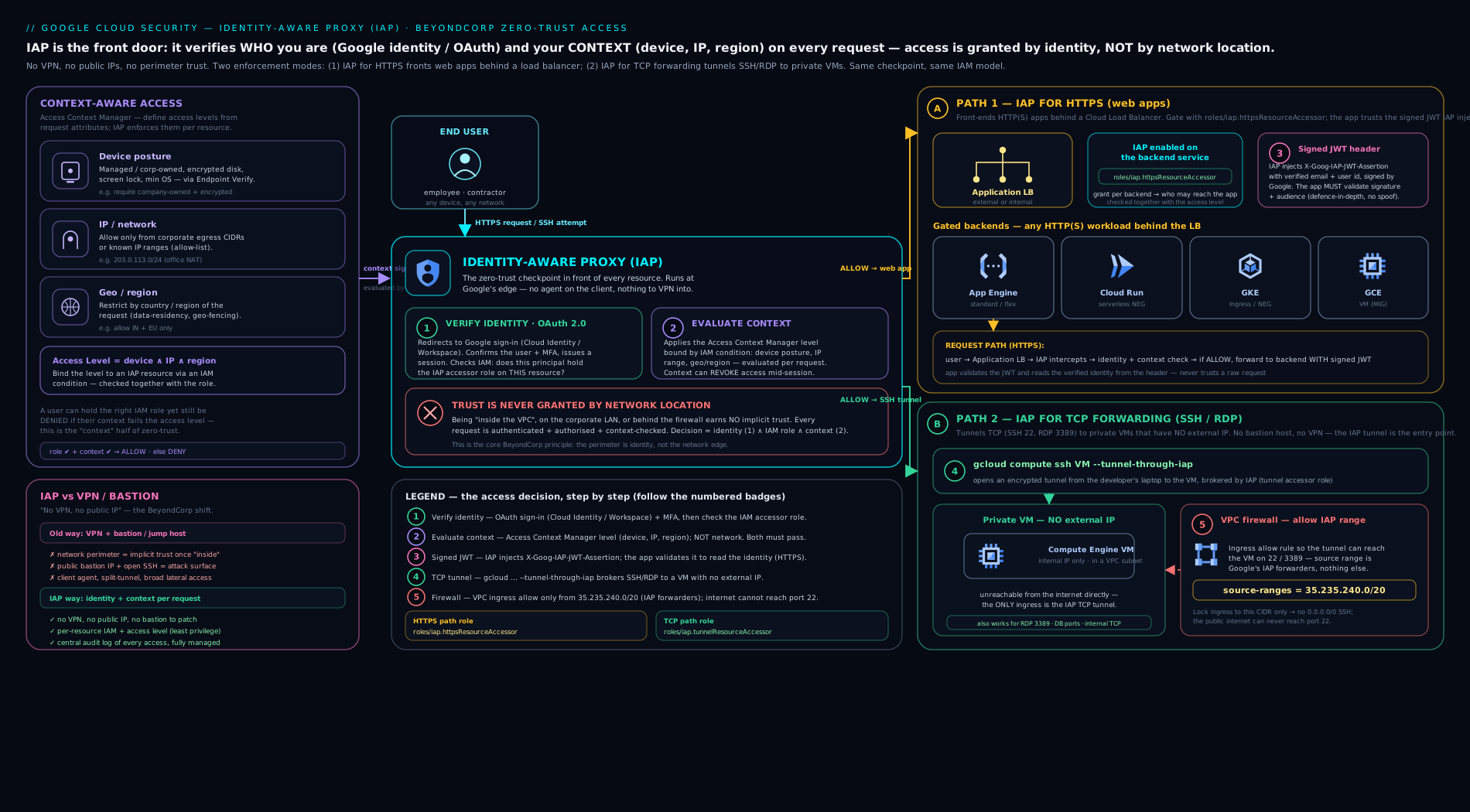
The diagram shows both IAP planes at once. Top plane (HTTPS): a browser and a service account reach a global Application Load Balancer where IAP authenticates the caller, checks roles/iap.httpsResourceAccessor plus any bound access level, and only then forwards the request — carrying the signed x-goog-iap-jwt-assertion JWT — to the App Engine / Cloud Run / GKE / Compute backend. Bottom plane (TCP): an admin runs --tunnel-through-iap, and IAP relays an SSH/RDP stream through iap.googleapis.com into a VM that has no public IP, gated by roles/iap.tunnelResourceAccessor and the single firewall rule that allows 35.235.240.0/20.
Hands-on lab
We build the TCP-forwarding path end to end (no LB or domain required, so it runs entirely on the Free Tier / $300 credit), then sketch the HTTPS path. Goal: SSH into a VM that has no external IP, purely through IAP, and prove the firewall range is what makes it work.
1. Set variables and enable the API.
PROJECT_ID=$(gcloud config get-value project)
ZONE=us-central1-a
gcloud services enable iap.googleapis.com compute.googleapis.com
2. Create a VM with NO external IP. The --no-address flag is the whole point.
gcloud compute instances create iap-lab-vm \
  --zone="$ZONE" \
  --machine-type=e2-micro \
  --image-family=debian-12 --image-project=debian-cloud \
  --no-address \
  --tags=iap-ssh
3. Add the IAP firewall rule. Allow SSH only from the IAP range, only to the tagged VM.
gcloud compute firewall-rules create allow-iap-ssh \
  --network=default --direction=INGRESS --action=ALLOW \
  --rules=tcp:22 \
  --source-ranges=35.235.240.0/20 \
  --target-tags=iap-ssh
4. Grant yourself the tunnel role.
ME=$(gcloud config get-value account)
gcloud projects add-iam-policy-binding "$PROJECT_ID" \
  --member="user:${ME}" \
  --role="roles/iap.tunnelResourceAccessor"
5. SSH through IAP.
gcloud compute ssh iap-lab-vm --zone="$ZONE" --tunnel-through-iap
Expected output: after a “Testing if tunnel connection works…” line, you land in a shell on iap-lab-vm — on a VM with no public IP, reached only via IAP.
6. Validation — prove the firewall is load-bearing. Exit, delete the rule, and retry:
exit
gcloud compute firewall-rules delete allow-iap-ssh -q
gcloud compute ssh iap-lab-vm --zone="$ZONE" --tunnel-through-iap
# Expect a timeout / "connection refused" — IAP authorized you, but the
# VPC firewall now drops the 35.235.240.0/20 traffic. Re-create the rule to fix.
gcloud compute firewall-rules create allow-iap-ssh \
  --network=default --direction=INGRESS --action=ALLOW \
  --rules=tcp:22 --source-ranges=35.235.240.0/20 --target-tags=iap-ssh
That failure is the lesson: IAM said yes, the firewall said no. Both gates must open.
7. (HTTPS sketch — optional, costs a few rupees while up.) Create an OAuth brand (gcloud iap oauth-brands create …), deploy a tiny App Engine app (gcloud app deploy), enable IAP (gcloud iap web enable --resource-type=app-engine), then gcloud iap web add-iam-policy-binding … --role=roles/iap.httpsResourceAccessor. Visit the app URL: you are redirected to Google sign-in, and only listed users get in.
Cleanup.
gcloud compute instances delete iap-lab-vm --zone="$ZONE" -q
gcloud compute firewall-rules delete allow-iap-ssh -q
# If you did step 7:
# gcloud app services delete default -q   # (App Engine can't be fully deleted; disable instead)
Cost note. An e2-micro is within the Free Tier allowance in eligible US regions; even outside it, a few hours costs a handful of rupees, and the VM has no external IP, so there is no public-IP charge. IAP itself is free — you pay only for the underlying resources (VM, and for the HTTPS path the load balancer / App Engine). Delete the VM and firewall rule to drop the bill to zero. BeyondCorp Enterprise (advanced device/threat signals) is a separately licensed add-on.
Common mistakes & troubleshooting
| Symptom | Likely cause | Fix |
|---|---|---|
--tunnel-through-iap SSH times out |
No firewall rule allowing 35.235.240.0/20 to port 22 |
Add ingress allow from 35.235.240.0/20 to the target port, scoped by tag/SA |
| Tunnel returns 403 / permission denied | Caller lacks roles/iap.tunnelResourceAccessor |
Grant the tunnel role (ideally scoped to the instance) |
| Enabled IAP and now everyone is locked out of the app | IAP is fail-closed; no httpsResourceAccessor bindings exist |
Add roles/iap.httpsResourceAccessor for the right users/groups |
| App still reachable bypassing IAP | A backend has a public IP, or Cloud Run ingress allows direct traffic | Remove public IPs; set Cloud Run ingress to “Internal and Cloud Load Balancing”; validate the JWT |
| User authenticates but is denied anyway | A bound access level isn’t satisfied (device/IP/region) | Check Context-Aware Access; verify Endpoint Verification / source IP |
| “OAuth consent screen not configured” when enabling IAP | No brand exists for the project | Create the brand (gcloud iap oauth-brands create) first |
Backend trusts X-Goog-Authenticated-User-Email and gets spoofed |
Convenience headers are not cryptographically verified | Validate x-goog-iap-jwt-assertion and pin the aud claim |
| GKE Ingress IAP not enforced | BackendConfig not referenced by the Service, or OAuth secret missing |
Wire BackendConfig (with iap.enabled + secret) onto the Service |
Service account curl gets 401 |
Wrong token audience | Mint an ID token with the app’s OAuth client ID as --audiences |
Common beginner mistakes
These are misconceptions — wrong mental models — as opposed to the symptom→fix table above. Fix the model and whole classes of error disappear.
-
“IAP is just Google’s VPN.” It is not a VPN and it does not put you “on the network.” IAP-for-HTTPS is an L7 identity gate at the load balancer; IAP-for-TCP is a per-VM, per-port encrypted tunnel. You never receive a network route into the VPC — which is exactly why lateral movement stops. Corollary: IAP does not replace firewall rules. The TCP tunnel still needs the
35.235.240.0/20ingress-allow rule; IAP authorizes the tunnel, the firewall authorizes the packet. -
“Turning IAP on secures the app.” Enabling IAP and granting access are two separate steps, and even both together are not enough if a side door exists. If the VM keeps a public IP, or the Cloud Run service accepts direct (non-load-balancer) traffic, a caller can walk straight past IAP. Security = enable IAP and grant the role and make the proxy the only path in.
-
“The
X-Goog-Authenticated-User-Emailheader tells me who the user is.” Those plaintext headers are trivially spoofable by anything that can reach your backend without going through IAP. They are a convenience, never an authentication. Trust only the signedx-goog-iap-jwt-assertionJWT, and pin itsaud. -
“
allAuthenticatedUsersmeans everyone in my company.” It means any Google account on the planet — a personal Gmail included. “Everyone in my org” is agroup:ordomain:member. Reaching forallAuthenticatedUsers(or worse,allUsers) is how internal apps quietly become public. -
“Granting the role at the project keeps things simple.” A project-level
roles/iap.tunnelResourceAccessorlets that person SSH every VM in the project; a project-levelhttpsResourceAccessoropens every IAP app. Scope to the specific backend service, or a single instance via an IAM Condition. Least privilege is the whole point of moving off the VPN. -
“IAP costs money / I need a BeyondCorp Enterprise licence to use it.” Base IAP is free, and so are basic Access Context Manager access levels (IP, region, basic device policy). You pay only for the underlying VM / load balancer / App Engine. BeyondCorp Enterprise is a paid add-on only for advanced device-trust, threat, and data-protection signals.
-
“IAP-for-TCP is slow and my data crosses the public internet.” The tunnel is TLS to Google’s edge and the VM has no public IP, so nothing is exposed — but per-tunnel throughput is bounded. It is built for admin SSH/RDP and modest transfers, not bulk data pipelines; size your expectations accordingly.
Best practices
- Grant to Google groups, not individuals. Manage app/VM access by adding people to
app-users@orvm-admins@; the IAM binding never changes. Onboarding/offboarding becomes a group membership edit. - Scope every binding to the narrowest resource. Bind
httpsResourceAccessorto a specific backend service (or path via condition), andtunnelResourceAccessorto a single instance via an IAM Condition — not the whole project, unless you mean it. - Always validate the signed JWT in the app, pinning the
aud. Never trust the plaintext user headers alone. This survives misconfigurations that open a side door. - Give VMs no external IP and rely solely on IAP TCP for admin access. Delete bastion hosts; delete
0.0.0.0/0SSH/RDP firewall rules. Allow only35.235.240.0/20, scoped by tag/SA. - Layer Context-Aware Access for sensitive resources: require a managed, encrypted device and/or corporate IP/region on top of identity.
- Pair TCP tunnels with OS Login so VM logins map to IAM identities (and 2FA) — IAP gates the tunnel, OS Login gates the session.
- Use Workload Identity Federation for external automated callers so no service-account key exists.
- Turn on and review IAP audit/access logs (below) and alert on denied accesses and unusual geographies.
Security notes
IAP is a control-plane gate, and its security rests on it being unavoidable. The two ways callers bypass IAP are (1) a second network path to the resource — a leftover public IP, a permissive firewall, or a Cloud Run/GKE service that accepts direct (non-LB) traffic — and (2) an application that trusts unverified input, i.e. believes the X-Goog-Authenticated-User-* headers without verifying the JWT. Close both: backends private and reachable only via the IAP-protected LB (or only via the IAP tunnel), and JWT validation with a pinned audience on every request.
IAP is identity-and-context, not a network firewall and not data-exfiltration control. It composes with — does not replace — VPC firewall rules (which still gate the 35.235.240.0/20 ingress) and VPC Service Controls (which draw a perimeter around Google managed APIs). A complete posture uses all three: IAP for who/what-context reaches my app/VM, firewall for L3/L4 reachability, VPC-SC for can data leave over the Google API surface. IAP enables true zero trust only when you also remove the implicit network trust it is meant to replace — so audit for stray public IPs and broad firewall rules continuously. Every IAP authorization and tunnel is recorded in Cloud Audit Logs / Data Access logs, giving you a per-request, per-identity trail that a VPN/bastion never provided — enable it and feed it to your SIEM.
Going deeper
Everything above gets IAP working. This section is the mechanism underneath — the parts that separate “it works” from “I can defend it in a design review or an incident.”
Verifying the JWT for real — the code, the audience, the key rotation
The single most important hardening step is validating x-goog-iap-jwt-assertion in the backend. Google’s auth libraries make it one call; the subtlety is the audience and the key handling. In Python:
from google.auth.transport import requests as g_requests
from google.oauth2 import id_token

# expected_audience is the EXACT resource string IAP signs for (see table below).
def validate_iap_jwt(iap_jwt: str, expected_audience: str):
    decoded = id_token.verify_token(
        iap_jwt,
        g_requests.Request(),
        audience=expected_audience,
        certs_url="https://www.gstatic.com/iap/verify/public_key",
    )
    # verify_token already checked signature (ES256), iss, aud, and exp/iat.
    return decoded["sub"], decoded["email"]   # stable user id + email
verify_token fetches Google’s IAP signing keys, selects the right one by the JWT’s kid, confirms the algorithm is ES256 (rejecting alg=none and RS256-confusion attacks), and checks iss == https://cloud.google.com/iap, exp, and — critically — that aud equals what you pass. IAP rotates its signing keys, which is why you must fetch from the live endpoint (…/public_key, or the JWK form …/public_key-jwk) and cache by kid, never hard-code a key.
The expected_audience is not your URL — it is a fixed resource string:
| Backend | aud value |
|---|---|
| Compute / GKE backend service | /projects/PROJECT_NUMBER/global/backendServices/BACKEND_SERVICE_ID |
| App Engine | /projects/PROJECT_NUMBER/apps/PROJECT_ID |
Compute the pieces from gcloud — the numeric project number and the numeric backend-service id (not its name):
gcloud projects describe "$PROJECT_ID" --format='value(projectNumber)'
gcloud compute backend-services describe my-backend-service \
  --global --format='value(id)'
Pinning aud is what makes a stolen JWT useless against any other resource: only Google can mint a token with your backend’s audience and a valid ES256 signature, and a token minted for app A fails the audience check at app B.
Two audiences — the classic 401 mix-up
There are two different audiences in IAP, and swapping them produces 401s that look identical:
- The JWT IAP injects into the backend (
x-goog-iap-jwt-assertion) hasaud =the backend-service / App Engine resource string above. Your application validates that. - The OIDC ID token a programmatic caller sends (
Authorization: Bearer …) must haveaud =the OAuth client ID (…apps.googleusercontent.com). IAP validates that at the edge.
So a service account calling the API mints gcloud auth print-identity-token --audiences=OAUTH_CLIENT_ID.apps.googleusercontent.com, while the app receiving the request validates against the backend-service audience. Different strings, opposite directions — keep them straight and most IAP auth mysteries evaporate.
Session lifetime, re-authentication, and WebSockets
IAP-for-HTTPS re-authorizes at the edge on every request, but browser users hold a session so they are not bounced to Google on each click. Under BeyondCorp Enterprise you can shorten that session and force periodic re-authentication through IAP Access settings (gcloud iap settings set with a settings file, or the Console) — useful for a high-sensitivity console. Programmatic ID tokens expire in ~1 hour; long-running jobs must refresh, not cache a token forever. IAP supports WebSockets and streaming, but authorization is evaluated at the connection-upgrade — a long-lived socket is not re-checked mid-stream, so pair it with sensible session limits.
Access levels are org-scoped, and AND-ed after IAM
Access levels live in an Access Policy, normally one per organization, under Access Context Manager — they are not per-project objects. You define a level once (say trusted_device) and reference it from many IAP resources. Enforcement order matters: IAP first checks the IAM allow (does this identity hold httpsResourceAccessor / tunnelResourceAccessor?), then ANDs every bound access level. A user with the role but the wrong device or region is denied — identity and context are conjunctive, never “either/or.” Basic levels cover IP subnet, region (ISO-3166-1 alpha-2 like IN / US), and device posture; custom levels are CEL over device, origin, request, and other levels. Device signals come from Endpoint Verification (free, basic) or the richer BeyondCorp Enterprise signal set (managed / encrypted / OS-version / approved-device, plus threat and data-protection signals).
Inside the TCP tunnel, and turning on the audit trail
gcloud compute ssh --tunnel-through-iap and start-iap-tunnel both open an authenticated WebSocket to Google’s tunnel endpoint (iap.googleapis.com / tunnel.cloudproxy.app); IAP checks the tunnel role, then relays raw TCP to VM:port from inside Google’s network. Because it is a single relayed connection, throughput per tunnel is capped — fine for SSH/RDP and config pushes, wrong for terabyte copies. start-iap-tunnel simply binds a local port, so anything that speaks TCP to localhost:PORT (psql, an RDP client, a browser) rides the same tunnel.
The audit value is real but not automatic for everything: IAP Admin Activity logs are always on, but Data Access logs (the per-request “who reached what”) for IAP must be explicitly enabled — set DATA_READ / DATA_WRITE for the IAP service (iap.googleapis.com) in your IAM audit config, then route the logs to a sink and your SIEM. Alert on denied accesses and unusual geographies; a spike of denials is often the first sign of a stolen credential meeting a device/region access level and losing.
Practice challenges
Six graded exercises, beginner → advanced. Try each before opening the solution. Use placeholders (PROJECT_ID, you@example.com) — nothing here needs a live project to reason about.
1. (Beginner) Let a colleague into an existing IAP-protected App Engine app. Which role, which command?
<details> <summary>Solution</summary>
gcloud iap web add-iam-policy-binding \
  --resource-type=app-engine \
  --member="user:bob@example.com" \
  --role="roles/iap.httpsResourceAccessor"
Why: httpsResourceAccessor is the “use this web app” grant, and App Engine has IAP built in (no LB step). Prefer a group: member in real life.
</details>
2. (Beginner) Write the one firewall rule that lets IAP SSH reach VMs tagged iap-ssh.
<details> <summary>Solution</summary>
gcloud compute firewall-rules create allow-iap-ssh \
  --network=default --direction=INGRESS --action=ALLOW \
  --rules=tcp:22 \
  --source-ranges=35.235.240.0/20 \
  --target-tags=iap-ssh
Why: the tunnelled connection reaches the VM from Google’s IAP range, not from your IP — allow exactly 35.235.240.0/20, never 0.0.0.0/0.
</details>
3. (Intermediate) Grant tunnel access to exactly ONE instance, not the whole project.
<details> <summary>Solution</summary>
gcloud projects add-iam-policy-binding "$PROJECT_ID" \
  --member="user:sre@example.com" \
  --role="roles/iap.tunnelResourceAccessor" \
  --condition='expression=resource.name=="projects/PROJECT_ID/zones/us-central1-a/instances/db-01",title=only-db-01'
Why: an IAM Condition on resource.name scopes the tunnel to a single VM — a project-wide binding would let them SSH every instance.
</details>
4. (Intermediate) A CI service account must call an IAP-protected API with no browser. What token, what audience?
<details> <summary>Solution</summary>
TOKEN=$(gcloud auth print-identity-token \
  --audiences="OAUTH_CLIENT_ID.apps.googleusercontent.com")
curl -H "Authorization: Bearer ${TOKEN}" https://app.example.com/api
The SA must also hold roles/iap.httpsResourceAccessor. Why: IAP authenticates programmatic callers by an OIDC ID token whose aud is the app’s OAuth client ID — not the URL, and not the backend-service string.
</details>
5. (Advanced) Compute the exact aud your backend must pin for a global backend service, and the commands to get each part.
<details> <summary>Solution</summary>
Target string: /projects/PROJECT_NUMBER/global/backendServices/BACKEND_SERVICE_ID.
gcloud projects describe "$PROJECT_ID" --format='value(projectNumber)'
gcloud compute backend-services describe my-backend-service \
  --global --format='value(id)'   # numeric id, NOT the name
Why: pinning aud to this backend is what stops a JWT minted for another IAP resource from being replayed against yours — the audience is the resource, and only Google can sign it.
</details>
6. (Advanced) On top of identity, require a company-owned, encrypted device located in India for the admin console.
<details> <summary>Solution</summary>
Create a basic access level in Access Context Manager, then bind it to the IAP resource (IAP → Access settings; the Console stores it as the Context-Aware Access condition). trusted-device.yaml:
- devicePolicy:
    requireCorpOwned: true
    requireScreenlock: true
    allowedEncryptionStatuses:
      - ENCRYPTED
  regions:
    - IN
gcloud access-context-manager levels create trusted_device \
  --policy=POLICY_ID \
  --title="trusted-device-india" \
  --basic-level-spec=trusted-device.yaml \
  --combine-function=AND
Device signals come from Endpoint Verification. Why: identity (httpsResourceAccessor) says who; the access level says under what conditions — IAP ANDs them, so a valid user on an unmanaged laptop, or outside India, is denied.
</details>
Interview & exam questions
-
What problem does IAP solve, and how is it different from a VPN? A VPN authenticates you onto the network once and then trusts the network; anyone (or anything compromised) on that network can move laterally. IAP trusts nothing by network location — it verifies identity and context at the proxy on every request to the specific resource. No tunnel onto a flat network, per-resource IAM, full audit, and it works for browser apps and SSH/RDP alike.
-
A teammate enabled IAP on the app and now nobody can log in. Why? IAP is fail-closed: enabling it without any
roles/iap.httpsResourceAccessorbinding denies everyone. You must separately grant the accessor role to the intended users/groups. (Enable and authorize are two steps.) -
You set up
gcloud compute ssh --tunnel-through-iapand it times out. First thing to check? The VPC firewall: there must be an ingress-allow rule for source range35.235.240.0/20to TCP 22 on the target VM. The tunnelled traffic arrives from that Google range, not from your IP. (Then check the user hasroles/iap.tunnelResourceAccessor.) -
Why must the application validate the IAP JWT instead of reading
X-Goog-Authenticated-User-Email? Those plaintext headers can be spoofed if a request reaches the backend without passing through IAP (stray public IP, direct Cloud Run hit). The signedx-goog-iap-jwt-assertioncan only be minted by Google for your resource; validating its signature and pinning theaudclaim makes bypass impossible. -
Which IAM roles gate IAP, and how do they differ?
roles/iap.httpsResourceAccessorallows reaching an IAP-protected HTTPS resource;roles/iap.tunnelResourceAccessorallows opening an IAP TCP tunnel (SSH/RDP) to a VM.roles/iap.adminmanages IAP configuration. They are separate — HTTPS access does not grant tunnel access. -
How does IAP let you remove bastion hosts? VMs get no external IP; admins open an encrypted IAP tunnel to
iap.googleapis.com, identity-checked viatunnelResourceAccessor, which forwards SSH/RDP from inside Google’s network. The only allowed ingress is35.235.240.0/20. No internet-exposed bastion to patch, monitor, or get breached. -
What is Context-Aware Access and when do you use it? Binding Access Context Manager access levels (device posture, IP/CIDR, geographic region, client certificate) to IAP so a request must satisfy identity AND context. Use it to require, say, a company-owned, encrypted device on the corporate network for an admin console — a correct password alone won’t get in.
-
How does a service account or CI job call an IAP-protected HTTPS app? Present an OIDC ID token whose audience is the app’s OAuth client ID (
gcloud auth print-identity-token --audiences=CLIENT_ID...), in theAuthorization: Bearerheader; the caller’s identity must holdhttpsResourceAccessor. For external automation, combine with Workload Identity Federation so there’s no key. -
Can IAP protect Cloud Run, GKE, and on-prem workloads? Yes — Cloud Run via a serverless NEG behind an Application LB (set ingress to internal+LB), GKE via a
BackendConfigon the Ingress/Gateway, and on-prem/hybrid via an internet/hybrid NEG behind the LB. App Engine has IAP built in directly. -
IAP vs VPC Service Controls — what’s the difference? IAP gates access to your applications and VMs (the app data path). VPC-SC draws a perimeter around Google managed APIs (Storage, BigQuery, etc.) to stop data exfiltration over the control plane. Different layers; you typically use both.
-
What is the OAuth “brand” and why does IAP need it? The brand is the OAuth consent screen (“Sign in to App”) shown to browser users; IAP authenticates via OAuth, so a brand (Internal for corporate apps) must exist before you can enable HTTPS IAP. Some backends also need an explicit OAuth client (client-id/secret), notably GKE
BackendConfig. -
Does IAP cost anything, and what’s BeyondCorp Enterprise? IAP itself is free; you pay only for the underlying resources (VM, LB, App Engine). BeyondCorp Enterprise is the licensed tier adding advanced device-trust, threat, and data-protection signals (richer Context-Aware Access) on top of the free IAP/ACM building blocks.
Quick check
- Which firewall source range must you allow for IAP TCP forwarding to SSH/RDP a VM?
- You enabled IAP on a web app and everyone is locked out. What did you forget?
- Which header should your backend cryptographically validate, and which claim must you pin?
- Which IAM role lets a user open an IAP SSH tunnel to a VM?
- Name two contextual conditions an Access Context Manager access level can enforce.
Answers
35.235.240.0/20— ingress allow to the target TCP port, scoped by tag/service account (never0.0.0.0/0).- To grant
roles/iap.httpsResourceAccessorto the intended users/groups — IAP is fail-closed, so enabling it without bindings denies everyone. - Validate
x-goog-iap-jwt-assertion(the signed JWT) and pin theaud(audience) claim to your exact backend; don’t trust the plaintextX-Goog-Authenticated-User-*headers alone. roles/iap.tunnelResourceAccessor(ideally scoped to a single instance via an IAM Condition).- Any two of: device policy (managed/encrypted/screen-locked), IP subnet/CIDR, geographic region, client certificate (and required-access-level composition).
Exercise
Design and document (no need to fully deploy) zero-trust access for a fictional company’s two assets: an internal admin web console (Cloud Run) and a fleet of Linux app servers (Compute Engine, no public IP). For the console: choose external vs internal ALB, set the Cloud Run ingress, list the exact IAP role and the group you’d bind it to, and write the JWT-validation steps (which header, which aud value, which issuer) your app must perform. For the app servers: write the firewall rule (source range, ports, target scoping), the IAP tunnel role bound to one instance via an IAM Condition, and the gcloud command an SRE runs to SSH in. Finally, add one Context-Aware Access level (“company-owned, encrypted device, from India only”) and explain, in two sentences, how identity and context are AND-ed. Bonus: explain how a GitHub Actions job (no key) would call the admin console’s API.
Certification mapping
- Professional Cloud Security Engineer (PCSE): IAP is core — zero-trust/BeyondCorp access, the two IAP roles, IAP-for-TCP replacing bastions, the
35.235.240.0/20firewall pattern, signed-JWT validation, and Context-Aware Access with Access Context Manager are all directly examinable. Expect scenario questions on “secure SSH to private VMs” and “front an internal app without a VPN.” - Associate Cloud Engineer (ACE): know that IAP provides identity-based access to apps/VMs, how to enable it and grant
httpsResourceAccessor/tunnelResourceAccessor, and how to SSH a no-external-IP VM with--tunnel-through-iapplus the required firewall range. - Professional Cloud Architect (PCA): recognise IAP as the zero-trust building block in a landing-zone/secure-access design, and how it composes with VPC firewall and VPC Service Controls.
Glossary
- IAP (Identity-Aware Proxy) — Google Cloud’s managed proxy that authenticates and authorizes every request to apps/VMs by identity and context, implementing BeyondCorp.
- BeyondCorp — Google’s zero-trust model: trust based on identity and context, not network location. BeyondCorp Enterprise is the licensed tier with advanced signals.
roles/iap.httpsResourceAccessor— IAM role granting access to an IAP-protected HTTPS (web/API) resource.roles/iap.tunnelResourceAccessor— IAM role granting the ability to open an IAP TCP tunnel (SSH/RDP) to a VM.35.235.240.0/20— the Google-owned source range for IAP TCP forwarding; VPC firewall must allow ingress from it.x-goog-iap-jwt-assertion— the signed (ES256) JWT IAP injects asserting the authenticated identity; the backend should validate it and pinaud.aud(audience) claim — the resource a JWT is intended for; for the IAP-injected JWT it is the backend-service or App Engine resource string, and pinning it stops cross-resource replay.- OIDC ID token — the token a programmatic caller sends to reach an IAP app; its
audmust be the app’s OAuth client ID, not the resource string. - OAuth brand / consent screen — the “Sign in to App” page; required before enabling IAP-for-HTTPS.
- OAuth client ID — the credential IAP uses for the OAuth flow; also the audience a service-account ID token must carry to call the app.
- ES256 / public-key endpoint — IAP signs its JWT with the ES256 algorithm; verify against Google’s rotating keys at
https://www.gstatic.com/iap/verify/public_key(PEM) or…/public_key-jwk(JWK). - Access level (Access Context Manager) — a named, reusable condition (device/IP/region/certificate) bound to IAP for Context-Aware Access.
- Access Context Manager (ACM) / Access Policy — the org-level service (and its policy container) where access levels are defined once and referenced by many IAP resources.
- Context-Aware Access — the feature that AND-s an access level onto the IAM identity check, so a request must satisfy both who and under what conditions.
- Endpoint Verification — the agent/extension that supplies device-posture signals to access levels.
- Serverless NEG — the network endpoint group that puts Cloud Run (or Functions/App Engine) behind an Application LB so IAP can front it.
- BackendConfig — the GKE CRD that enables IAP on an Ingress/Gateway backend, referencing the OAuth client secret.
- Bastion host — the traditional internet-exposed jump VM for SSH into a private network; IAP-for-TCP replaces it.
- Fail-closed — the default that denies all access when IAP is enabled but no accessor binding exists.
- Data Access logs — the audit-log category (must be explicitly enabled for IAP) that records the per-request, per-identity access trail.
- OS Login — maps Linux VM logins to IAM identities (with optional 2FA); pairs with IAP TCP tunnels.
Next steps
- GCP troubleshooting methodology: IAM, VPC, Compute & GKE — apply a structured method to the exact “IAM said yes, firewall said no” class of failure IAP can produce.
- VPC Service Controls: perimeters & exfiltration prevention — the complementary control-plane perimeter around Google managed APIs.
- Google Cloud VPC, In Depth: subnets, routes, firewall & NAT — the firewall and Cloud NAT layer that IAP’s TCP tunnel sits on top of.