In a nutshell
Level: Advanced — but written so a newcomer can follow it end to end. · Time: ~1 hour · Prereqs: basic kubectl and the idea of a pod.
Imagine putting a tiny, identical traffic-and-security booth next to every one of your application containers. Every request in or out of the container passes through its booth first. The booth encrypts the connection, checks a badge to decide whether the caller is even allowed in, and can steer the request to a different version of the service — all without your application code knowing any of it happened. That booth is a sidecar proxy (Envoy), and a fleet of them wired to a shared brain is a service mesh. Istio is the most widely used one.
Running Istio yourself means owning the brain — the istiod control plane — including its upgrades, its patches, and the 2 a.m. page when an upgrade goes wrong. The AKS managed Istio add-on (Microsoft brands it Azure Service Mesh) is the managed-service version of exactly that: the same relationship as running your own database server versus using Azure SQL Database. Microsoft runs and patches the engine room; you keep writing the rules — who may talk to whom, what gets encrypted, what may call the internet. You get mTLS (automatic two-way encryption), traffic control (canary splits, retries, timeouts), and ingress/egress gateways (managed front doors and back doors) without ever becoming an Istio operator.
Here is the one idea a beginner must hold onto: “managed” does not mean “secure by default.” Fresh out of the box the mesh encrypts only optionally (PERMISSIVE) and lets any pod call any host on the internet (ALLOW_ANY). Everything after this section is you turning those friendly, permissive defaults into a locked-down, zero-trust posture — and doing it in the add-on’s own dialect. That dialect is the second big idea: the add-on’s namespaces, labels, and config-object names are deliberately different from every generic Istio blog post (aks-istio-system, not istio-system; istio.io/rev, not istio-injection=enabled). Copy an upstream tutorial verbatim and it fails silently — no error, just no encryption. Learn the dialect once, here, and the rest is straightforward.
The AKS managed Istio add-on — Microsoft brands it Azure Service Mesh, and you address it everywhere as a revision string like asm-1-27 — takes the part of Istio that most teams get catastrophically wrong (control-plane lifecycle, version upgrades, CRD hygiene) and makes it Microsoft’s problem. The istiod control plane is installed, patched and health-monitored for you; the canary upgrade machinery is wired up; the gateway deployments are lifecycled. What the add-on does not do is make your security posture, routing, or egress correct by default. It ships with permissive mTLS and ALLOW_ANY egress out of the box. Every property that makes a mesh worth the Envoy memory tax — strict identity, least-privilege authorization, a fixed ingress edge, an auditable egress allowlist — is something you still configure deliberately, and the managed variant diverges from upstream Istio in a dozen specifics that silently break copy-pasted blog tutorials.
This is the production playbook for that gap. You will walk the full path a platform team takes: enable the add-on against a pinned revision, label namespaces with the revision label the add-on actually honours (not the one every tutorial shows), enforce STRICT PeerAuthentication scoped by AuthorizationPolicy with SPIFFE identities, stand up managed internal and external ingress gateways, lock egress down to a REGISTRY_ONLY + ServiceEntry allowlist, run a canary revision upgrade end to end with revision tags, and wire Envoy telemetry into Managed Prometheus. Because the add-on’s constraints are exactly where teams lose afternoons — the root namespace is aks-istio-system not istio-system; istio-injection=enabled is a no-op; the shared ConfigMap name is revision-suffixed; the egress gateway is unsupported on Pod Subnet clusters — the rules, settings, limits and failure modes here are all laid out as scannable tables. Read the prose once; keep the tables open during the incident.
By the end you will stop guessing why a pod came up 1/1 instead of 2/2, why flipping STRICT produced a wall of 503 UC, why your first AuthorizationPolicy black-holed traffic, why a VirtualService you applied changed nothing, and why an external call returns 502 from inside the sidecar. Each of those has one confirming command and one fix, and knowing which in ninety seconds is the difference between a clean rollout and a Sev-2 bridge.
What problem this solves
A service mesh exists to move three cross-cutting concerns — encryption in transit, workload identity/authorization, and traffic control — out of every application and into a uniform data plane of sidecar proxies. Without it, each team re-implements mTLS in their own language, authorization is a tangle of network policies and IP allowlists that break on every reschedule, and outbound traffic from a compromised pod can reach any host on the internet with nothing to stop or even log it. The managed add-on additionally solves the operational half: self-managing Istio means owning istiod upgrades, CRD migrations, and the blast radius of getting either wrong — work that has sunk more than one platform team.
What breaks without this knowledge is subtler than “the mesh is down,” because the add-on fails silently and asymmetrically. Label a namespace the way every upstream doc shows (istio-injection=enabled) and you get no sidecar and no error — the workload runs unencrypted, outside every policy you wrote, and looks healthy. Put a mesh-wide PeerAuthentication in istio-system (the upstream root namespace) and it is simply ignored, because the add-on’s root is aks-istio-system. Flip a namespace to STRICT before every caller is inside the mesh and you take an outage. Add your first ALLOW authorization policy and you default-deny everything you forgot to enumerate. Set REGISTRY_ONLY to lock egress and every undeclared external dependency starts returning 502 from the sidecar. None of these throw at apply time; they bite at request time, in production.
Who hits this: any platform or SRE team standing a mesh on AKS for PCI/zero-trust segmentation, anyone migrating from self-managed Istio or OSM, and anyone who copied a generic Istio tutorial and cannot work out why injection, mesh policy, or egress “doesn’t work.” It bites hardest on teams running Azure CNI Pod Subnet (the managed egress gateway is unsupported there) and on multi-team clusters where one namespace’s STRICT flip or authz policy ripples into another team’s calls. The fix is almost never “reinstall the mesh” — it is “use the add-on’s namespace, label, ConfigMap name and revision, not upstream Istio’s.”
To frame the whole field before the deep dive, here is every failure class this article covers, the question it forces, and the single command that localises it:
| Failure class | What you observe | First question to ask | First command to run | Most common single cause |
|---|---|---|---|---|
| No sidecar injected | Pod is 1/1, traffic unencrypted, policies ignored |
Did the namespace get the add-on’s label? | kubectl get pods -n <ns> (expect 2/2) |
istio-injection=enabled used instead of istio.io/rev |
STRICT breaks traffic (503 UC) |
Upstream-connect-failure after enabling STRICT | Is every caller in the mesh, and is the client TLS mode right? | istioctl authn tls-check <pod>.<ns> |
A client still un-injected, or a DestinationRule forcing DISABLE |
Authz black-holes traffic (403) |
RBAC: access denied after first policy |
Did the ALLOW policy enumerate every legit caller? |
Envoy access log (rbac_access_denied) |
First ALLOW policy is default-deny for the workload |
| Config not applied (STALE) | “I applied the VirtualService, nothing changed” |
Is the proxy actually synced to the latest push? | istioctl proxy-status --istioNamespace aks-istio-system |
Policy in wrong namespace, or proxy STALE |
Egress blocked (502/000) |
External call fails from inside the pod | Is there a ServiceEntry for the host under REGISTRY_ONLY? |
kubectl exec ... -c istio-proxy -- curl ... |
No ServiceEntry, or shared ConfigMap name wrong for the revision |
| Upgrade did nothing | New revision running but workloads unchanged | Did you restart workloads after repointing the tag? | istioctl proxy-status (mixed revisions) |
Relabel/repoint without kubectl rollout restart |
Learning objectives
By the end of this article you can:
- Explain the revision model of the managed add-on (
asm-X-Y) and why almost every object —istiod, the shared ConfigMap, the injection label, the gateway pods — is keyed by the revision string. - Enable the add-on against a pinned revision, validate region/version compatibility, and onboard namespaces with the correct injection label (
istio.io/rev, neveristio-injection=enabled). - Migrate mTLS safely from PERMISSIVE to STRICT without an outage, and add default-deny
AuthorizationPolicyusing SPIFFEprincipalsrather than fragile IP rules. - Provision and customise managed internal/external ingress gateways (subnet pinning, source-range restriction,
externalTrafficPolicy: Local) and bind aGateway+VirtualServiceto them. - Drive routing with
VirtualService/DestinationRulesubset traffic-splitting, and reason about the client-side (ISTIO_MUTUAL) versus server-side (PeerAuthentication) TLS contract. - Lock down egress with
REGISTRY_ONLYin the shared ConfigMap plusServiceEntryallowlisting, and know exactly when the managed egress gateway is and is not available. - Run a canary revision upgrade end to end with revision tags — start, shift, verify, then
completeorrollback— and distinguish minor upgrades from auto-rolled patch upgrades. - Wire Envoy’s golden-signal metrics and access logs into Managed Prometheus and Container Insights, and read the highest-signal verification commands (
istioctl proxy-status,authn tls-check).
Prerequisites & where this fits
You should be comfortable with core Kubernetes objects (Deployment, Service, Namespace, labels/annotations) and with kubectl. You should understand what a sidecar is and the rough idea of a service mesh: a per-pod Envoy proxy that intercepts all inbound/outbound traffic so the platform — not the app — can do mTLS, routing and policy. Familiarity with mTLS (mutual TLS: both sides present certificates) and with Azure networking concepts (Standard Load Balancer, subnets/CIDRs, UDR, Azure Firewall) will let you move fast. You need an AKS cluster you can modify and Azure CLI 2.57.0+ (2.80.0+ if you want egress gateways).
This sits in the AKS networking & platform track. Conceptually it is downstream of Understanding Managed Kubernetes: AKS vs EKS vs GKE Compared and the broader Production AKS: Networking & Observability. It is the managed counterpart to the upstream-Istio deep dives — Istio Ambient Mesh: mTLS & Traffic Management and Istio Ambient: Waypoint Proxies & L7 Authorization — and a sibling to other mesh choices like Linkerd: mTLS, Retries & Multi-Cluster Failover. For the ingress/egress edges it pairs with Application Gateway for Containers: Gateway API & Traffic Splitting and Deterministic Egress with Azure NAT Gateway. Telemetry lands where Azure Monitor: Managed Prometheus & Managed Grafana for AKS picks it up.
A quick map of who owns which layer during a mesh incident, so you page the right person:
| Layer | What lives here | Who usually owns it | Failure classes it can cause |
|---|---|---|---|
| Client / DNS | TLS to the edge, name resolution | Frontend / SRE | North-south 503 only if the gateway IP/host is wrong |
| Managed ingress gateway | Public/internal LB, Gateway/VirtualService |
Platform / network | 503 (no route/host match), source-range blocks |
| Envoy sidecar (data plane) | mTLS, authz, routing per pod | Platform + app | 503 UC (STRICT mismatch), 403 (authz), 502 (egress) |
istiod (control plane) |
xDS config push, cert issuance | Microsoft (managed) | STALE config, cert issues — rare, but root-namespace errors here |
Shared ConfigMap / MeshConfig |
Mesh-wide config (egress mode, access logs) | Platform | Egress mode, telemetry; wrong revision suffix = ignored |
| Egress (gateway / firewall) | Outbound allowlist, fixed source IP | Platform + network | 502 under REGISTRY_ONLY with no ServiceEntry |
Core concepts
Six mental models make every later diagnosis obvious.
The add-on is revision-scoped — there is no “Istio version” on the cluster. There is a revision like asm-1-27, and almost every object you touch is suffixed or keyed by that string: the istiod-asm-1-27 deployment, the istio-asm-1-27 reconciled ConfigMap, the istio-shared-configmap-asm-1-27 you actually edit, the istio.io/rev=asm-1-27 namespace label, the per-revision gateway pods. This is what makes the canary upgrade model work (two control planes side by side) and it is precisely why generic Istio docs — which assume a single un-suffixed istiod in istio-system — lead you astray.
The root namespace is aks-istio-system, not istio-system. Mesh-wide policy objects (a selector-less PeerAuthentication, the shared MeshConfig ConfigMap) live in the add-on’s root namespace. A PeerAuthentication you drop in istio-system is read by nothing. This single fact invalidates a large fraction of blog-post copy-paste, and it is the number-one reason a “mesh-wide STRICT” change appears to do nothing.
Injection requires an explicit revision label, applied at admission. istio-injection=enabled — the label every upstream tutorial uses — is silently ignored by the add-on. You must label the namespace istio.io/rev=asm-X-Y (or a revision tag, see below). Even then, labelling changes nothing about running pods: injection happens at pod admission, so you must kubectl rollout restart existing workloads to get a sidecar. A correctly-labelled namespace whose pods you never restarted still shows 1/1.
STRICT is a server-side contract; ISTIO_MUTUAL is the client-side one. PeerAuthentication governs what a workload’s sidecar accepts (PERMISSIVE = plaintext or mTLS; STRICT = mTLS only). A DestinationRule’s trafficPolicy.tls.mode governs what the client sidecar originates. The classic 503 UC (upstream-connect-failure) after flipping STRICT is a mismatch: a server now demanding mTLS while some client is either un-injected (sends plaintext) or has a DestinationRule pinning it to DISABLE. Migrate clients in before you flip the server.
Authorization is default-allow until your first ALLOW policy, then default-deny for that workload. With no AuthorizationPolicy, mTLS proves identity but every authenticated workload can still call every other one. The moment you attach an AuthorizationPolicy with action ALLOW and at least one rule to a workload, anything not explicitly matched is rejected (403, rbac_access_denied in the Envoy log). Your first policy can therefore black-hole traffic you forgot to enumerate. Prefer source principals (SPIFFE identities like cluster.local/ns/checkout/sa/checkout-api) over IP rules — identities are stable across reschedules; IPs are not.
Egress is ALLOW_ANY until you make it REGISTRY_ONLY, set in the shared ConfigMap. By default a compromised pod can reach any internet host and your mesh provides zero egress control or logging. Flipping outboundTrafficPolicy.mode to REGISTRY_ONLY makes Envoy block anything not in the service registry — after which every external dependency must be declared as a ServiceEntry. You set this via the revision-suffixed shared ConfigMap (istio-shared-configmap-asm-X-Y), which the control plane merges over its reconciled default; you never edit the default istio-asm-X-Y ConfigMap directly.
The vocabulary in one table
Before the deep sections, pin down every moving part. The glossary at the end repeats these for lookup; this table is the mental model side by side:
| Concept | One-line definition | Where it lives | Why it matters |
|---|---|---|---|
Revision (asm-X-Y) |
The installed Istio version identity | Suffix on most objects | Keys injection, ConfigMap, gateways, upgrades |
| Root namespace | Where mesh-wide policy/config lives | aks-istio-system |
Mesh-wide STRICT / MeshConfig go here, not istio-system |
| Injection label | What onboards a namespace | istio.io/rev=asm-X-Y (or tag) |
istio-injection=enabled is ignored → no sidecar |
| Sidecar (Envoy) | Per-pod proxy doing mTLS/routing/authz | Each mesh pod (2/2) |
If absent, pod is outside the mesh entirely |
PeerAuthentication |
Server-side mTLS accept mode | Root ns (mesh) or app ns | PERMISSIVE → STRICT migration; mis-namespace = ignored |
AuthorizationPolicy |
L7 allow/deny by identity/path | App namespace | First ALLOW = default-deny for the workload |
DestinationRule |
Client-side TLS/subset/LB policy | App namespace | ISTIO_MUTUAL originates mTLS; subsets enable splits |
VirtualService |
Routing rules (host → destination) | App namespace | Weighted splits, header routing, gateway binding |
Gateway |
Ingress/egress L7 listener config | App namespace | Binds to a managed gateway by service label |
ServiceEntry |
Declares an external host to the registry | App namespace | Required for any egress under REGISTRY_ONLY |
| Shared ConfigMap | Your mesh config overlay | istio-shared-configmap-asm-X-Y |
Egress mode, access logs; name must match revision |
| Revision tag | Stable alias for a revision | Cluster-scoped | Repoint once to move many namespaces at upgrade |
1. The managed add-on vs self-managed Istio: the revision model
The single most important mental model is that the add-on is revision-scoped, and the second is that it is a constrained Istio: you cannot set arbitrary MeshConfig, you cannot use upstream’s namespaces, and some upstream features (egress gateway) are gated by your cluster’s network plugin. Internalise the differences below before you touch anything, because each row is an afternoon someone has already lost.
| Aspect | Self-managed (upstream) Istio | AKS managed add-on | Why it matters |
|---|---|---|---|
| Control-plane lifecycle | You install/upgrade istiod |
Microsoft installs/patches it | Patch upgrades auto-roll in your maintenance window |
| Root namespace | istio-system |
aks-istio-system |
Mesh-wide policy in the wrong ns is ignored |
| Ingress namespace | wherever you install gateways | aks-istio-ingress (managed) |
Gateway pods/services are created and lifecycled for you |
| Egress namespace | wherever you install | aks-istio-egress (managed) |
Egress gateway gated by Static Egress Gateway support |
| Injection label | istio-injection=enabled works |
Only istio.io/rev=asm-X-Y |
Upstream label is a silent no-op |
MeshConfig |
Fully editable | Partitioned allowed/supported/blocked | configSources etc. blocked; edit the shared ConfigMap |
| Shared config object | the istio ConfigMap |
istio-shared-configmap-asm-X-Y (merged over default) |
Must match the running revision name |
istioctl target |
istio-system by default |
--istioNamespace aks-istio-system every call |
Otherwise it talks to a control plane that isn’t there |
| Version identity | a chart/Helm version | a revision string asm-X-Y |
Everything is keyed by it |
| Supported versions | your choice | at least two revisions; n-2 supported ~6 weeks after newest n |
Outside that window = “allowed but unsupported” |
Why almost everything is revision-suffixed
The canary upgrade model demands that two control planes coexist, so every control-plane-scoped object carries the revision to avoid collisions. Knowing which name carries the suffix (and which is the one you edit) removes most of the confusion:
| Object | Name pattern | Namespace | You edit it? |
|---|---|---|---|
| Control plane deployment | istiod-asm-1-27 |
aks-istio-system |
No (managed) |
| Reconciled default config | istio-asm-1-27 (ConfigMap) |
aks-istio-system |
No — never edit directly |
| Shared overlay config | istio-shared-configmap-asm-1-27 |
aks-istio-system |
Yes — your MeshConfig overlay |
| External ingress gateway | aks-istio-ingressgateway-external (svc) + per-rev pods |
aks-istio-ingress |
Annotations only |
| Internal ingress gateway | aks-istio-ingressgateway-internal (svc) + per-rev pods |
aks-istio-ingress |
Annotations only |
| Egress gateway | named on enable, per-rev pods | aks-istio-egress |
Annotations only |
| Namespace injection label | istio.io/rev=asm-1-27 (or a tag) |
each app namespace | Yes |
Check what is actually available in your region before you do anything else — compatibility is a function of both the AKS version and the region:
az aks mesh get-revisions --location eastus2 -o table
The CLI versions and prerequisites that gate each capability:
| Requirement | Minimum | Gates | Notes |
|---|---|---|---|
| Azure CLI (mesh enable) | 2.57.0 | az aks mesh enable |
aks-preview not required for GA features |
| Azure CLI (egress gateway) | 2.80.0 | az aks mesh enable-egress-gateway |
Newer surface than ingress |
| Kubernetes version | >= 1.23 | Enabling the add-on at all | Match to a supported asm-X-Y |
| OSM add-on | must be removed | Coexistence | Istio and OSM cannot both be enabled |
| Network plugin (egress GW) | not Pod Subnet | Static Egress Gateway → egress GW | On Pod Subnet, use REGISTRY_ONLY + Firewall |
istioctl |
matches/near revision | tag, proxy-status, authn |
Always --istioNamespace aks-istio-system |
| Managed Prometheus | enabled on cluster | Metric scraping | Edit ama-metrics-settings-configmap to opt in |
The add-on’s structural limits and supportability rules — the numbers that shape your upgrade calendar and topology:
| Limit / rule | Value | Why it matters | Consequence if ignored |
|---|---|---|---|
| Supported revisions at once | at least two | Enables canary upgrades | — |
n-2 support window |
~6 weeks after newest n rolls out |
Time to finish an upgrade | Falls to “allowed but unsupported” |
| Upgrade jump | n+1 or n+2 |
Skip a version if needed | Larger jump = more validation |
| Root namespace | aks-istio-system (fixed) |
Mesh-wide policy location | Policy elsewhere is ignored |
MeshConfig fields |
allowed / supported / blocked | Some fields (e.g. configSources) blocked |
Apply fails or is dropped |
| Egress gateway on Pod Subnet | unsupported | Topology decision | enable-egress-gateway fails |
| Patch rollout | automatic, in maintenance window | Control plane only | Sidecars stay old until restart |
2. Enabling the add-on and the namespace labeling strategy
Enable on an existing cluster. If you omit --revision, AKS picks a current default — fine for a lab, but in production you pin the revision so it does not drift between environments or across a Terraform apply:
export RESOURCE_GROUP=rg-platform
export CLUSTER=aks-prod-eastus2
export REV=asm-1-27

az aks mesh enable \
  --resource-group $RESOURCE_GROUP \
  --name $CLUSTER \
  --revision $REV
Two hard prerequisites repeated because they fail the enable outright: Azure CLI 2.57.0+ (2.80.0+ for egress gateways), and the Open Service Mesh add-on must be removed first — the two cannot coexist. The add-on also requires Kubernetes >= 1.23.
Confirm the mesh mode and the control-plane pods, then pull the live revision so the rest of your scripts are not hard-coded:
az aks show -g $RESOURCE_GROUP -n $CLUSTER --query 'serviceMeshProfile.mode' -o tsv
# -> Istio

az aks get-credentials -g $RESOURCE_GROUP -n $CLUSTER
kubectl get pods -n aks-istio-system
# -> istiod-asm-1-27-... Running

ASM_REV=$(az aks show -g $RESOURCE_GROUP -n $CLUSTER \
  --query 'serviceMeshProfile.istio.revisions[0]' -o tsv)
The az aks mesh enable flags you will actually reach for:
| Flag | What it sets | Default | When to set it |
|---|---|---|---|
--revision |
Pin the asm-X-Y to install |
latest default | Always in non-lab; prevents env drift |
--resource-group / --name |
Target cluster | — | Required |
--enable-ingress-gateway (or the enable-ingress-gateway subcommand) |
Provision a gateway | off | When you need north-south entry |
--ingress-gateway-type |
external / internal |
— | One invocation per type |
(egress subcommand) --istio-egressgateway-name |
Name the egress gateway | — | Only when Static Egress GW is supported |
The namespace labeling strategy
Do not label everything. Onboard namespaces deliberately — injection rewrites the pod spec and forces a restart, and a mesh that watches every namespace wastes istiod and Envoy memory. The label must match the running revision exactly:
# Correct for the add-on:
kubectl label namespace payments istio.io/rev=$ASM_REV --overwrite

# WRONG — silently skipped by the add-on, no sidecar injected:
# kubectl label namespace payments istio-injection=enabled
Labelling alone does nothing to running pods. Injection happens at admission, so restart existing workloads to get a sidecar:
kubectl rollout restart deployment -n payments
kubectl get pods -n payments
# Each pod should now show 2/2 READY (app container + istio-proxy)
The label-and-restart contract is where most “no sidecar” tickets come from. The full truth table of what each combination produces:
| Namespace label | Workload restarted? | Result | Pod READY |
|---|---|---|---|
istio.io/rev=asm-1-27 (matches running rev) |
Yes | Sidecar injected, in mesh | 2/2 |
istio.io/rev=asm-1-27 (matches) |
No | Old pods still un-injected | 1/1 |
istio.io/rev=prod (tag → current rev) |
Yes | Sidecar injected via tag | 2/2 |
istio-injection=enabled |
Yes | Ignored by add-on — no sidecar | 1/1 |
istio.io/rev=asm-1-26 (stale, not running) |
Yes | No matching control plane → no sidecar | 1/1 |
| No label | — | Outside the mesh | 1/1 |
Pod has sidecar.istio.io/inject: "false" |
Yes | Explicitly opted out | 1/1 |
A practical governance tactic at scale: pair the revision label with discoverySelectors in MeshConfig so istiod only watches mesh-labelled namespaces. On a large cluster this materially reduces istiod and Envoy memory by pruning irrelevant config from every proxy’s push. The injection control surfaces, ranked from broad to surgical:
| Control | Scope | Effect | Use when |
|---|---|---|---|
istio.io/rev=<rev> on namespace |
Namespace | Inject all pods in ns | Standard onboarding |
istio.io/rev=<tag> on namespace |
Namespace | Inject via stable alias | You want upgrade indirection |
sidecar.istio.io/inject: "true" on pod |
Pod | Force inject one pod | Opt a pod in within an un-labelled ns |
sidecar.istio.io/inject: "false" on pod |
Pod | Skip one pod | Exclude a job/batch pod in a mesh ns |
discoverySelectors in MeshConfig |
Mesh | istiod only watches matching ns |
Large clusters; cut proxy memory |
3. Enforcing STRICT PeerAuthentication and scoping with AuthorizationPolicy
Out of the box the mesh runs PERMISSIVE mTLS: sidecars accept both plaintext and mTLS. That is the right default during onboarding (un-injected clients keep working) and the wrong default for production. The migration sequence is everything — you turn on STRICT only after every client of a service is inside the mesh, or you cause an outage.
The three mTLS modes and exactly what each does on the server side:
PeerAuthentication mode |
Server accepts | Use during | Risk if set too early |
|---|---|---|---|
PERMISSIVE (default) |
Plaintext and mTLS | Onboarding / migration | None — but no enforcement either |
STRICT |
mTLS only | Steady-state production | 503 UC from any un-injected/plaintext client |
DISABLE |
Plaintext only | Debug / explicit opt-out | Drops encryption; rarely correct |
Mesh-wide STRICT goes in the root namespace (aks-istio-system), with no selector:
apiVersion: security.istio.io/v1
kind: PeerAuthentication
metadata:
  name: default
  namespace: aks-istio-system   # add-on root namespace, NOT istio-system
spec:
  mtls:
    mode: STRICT
A safer rollout is per-namespace STRICT, so you flip services one blast radius at a time. Pair it with an AuthorizationPolicy to move from “encrypted” to “encrypted and authorized” — mTLS proves identity, but without an authorization policy every authenticated workload can still call every other one:
apiVersion: security.istio.io/v1
kind: PeerAuthentication
metadata:
  name: default
  namespace: payments
spec:
  mtls:
    mode: STRICT
---
apiVersion: security.istio.io/v1
kind: AuthorizationPolicy
metadata:
  name: payments-allow-checkout
  namespace: payments
spec:
  action: ALLOW
  rules:
  - from:
    - source:
        # SPIFFE identity, not IP — survives pod reschedules
        principals: ["cluster.local/ns/checkout/sa/checkout-api"]
    to:
    - operation:
        methods: ["POST"]
        paths: ["/v1/charges"]
The scoping precedence — where you put a PeerAuthentication decides its blast radius:
| Placement | metadata.namespace |
spec.selector |
Applies to |
|---|---|---|---|
| Mesh-wide | aks-istio-system |
none | Every workload in the mesh |
| Namespace-wide | app namespace | none | Every workload in that namespace |
| Workload-specific | app namespace | matchLabels |
Only matching pods |
| Port-specific | app namespace | matchLabels + portLevelMtls |
A single port on matching pods |
A subtle, important rule: an AuthorizationPolicy with an ALLOW action and at least one rule is default-deny for that workload — anything not explicitly matched is rejected. Adding your first ALLOW policy to a namespace can therefore black-hole traffic you forgot to enumerate. The action semantics, in full, because mixing them up is a common self-inflicted outage:
action |
With matching rule | With no policy attached | Evaluation order |
|---|---|---|---|
| (none attached) | — | Allow all (mTLS still required if STRICT) | n/a |
ALLOW |
Allow matched; deny everything else | — | After DENY and CUSTOM |
DENY |
Deny matched | — | Evaluated first — overrides ALLOW |
CUSTOM |
Delegate to ext authz (e.g. OPA) | — | Evaluated before ALLOW/DENY |
AUDIT |
Log match, do not enforce | — | Logging only |
Prefer source principals and namespaces over IP-based rules; identities are stable across reschedules and are exactly what mTLS gives you. The match fields you have to work with, and their stability:
| Rule field | Matches on | Stable across reschedule? | Recommended? |
|---|---|---|---|
from.source.principals |
SPIFFE identity (SA) | Yes | Yes — first choice |
from.source.namespaces |
Caller namespace | Yes | Yes (coarse-grained) |
from.source.ipBlocks |
Source IP/CIDR | No (pods reschedule) | Avoid inside the mesh |
to.operation.methods |
HTTP method | Yes | Yes |
to.operation.paths |
HTTP path | Yes | Yes |
when.key (conditions) |
request attributes (JWT claims, headers) | Yes | Yes for L7 authz |
4. Provisioning managed ingress gateways
The add-on provisions and lifecycles the gateways for you. Enable an external (internet-facing) and an internal (VNet-only) gateway:
az aks mesh enable-ingress-gateway \
  --resource-group $RESOURCE_GROUP --name $CLUSTER \
  --ingress-gateway-type external

az aks mesh enable-ingress-gateway \
  --resource-group $RESOURCE_GROUP --name $CLUSTER \
  --ingress-gateway-type internal
This creates two LoadBalancer services in aks-istio-ingress: aks-istio-ingressgateway-external (public IP) and aks-istio-ingressgateway-internal (an internal Standard LB IP, reachable only from the VNet). The label you bind your Gateway to is on those services, e.g. istio: aks-istio-ingressgateway-internal.
kubectl get svc -n aks-istio-ingress
The two managed gateway types side by side:
| Property | External gateway | Internal gateway |
|---|---|---|
| Service name | aks-istio-ingressgateway-external |
aks-istio-ingressgateway-internal |
| Azure resource | Standard LB with public IP | Standard internal LB |
| Reachable from | Internet | VNet (and peered/VPN/ER) only |
| Selector label | istio: aks-istio-ingressgateway-external |
istio: aks-istio-ingressgateway-internal |
| Typical use | Public APIs, web | Internal services, private apps |
| Pair with | WAF / Front Door upstream | Application Gateway / private clients |
Customize the underlying Azure LB via annotations on the service. Two that almost every enterprise needs — pin the internal gateway to a dedicated subnet, and restrict the external gateway’s source ranges:
# Internal gateway -> specific subnet (must be in the mesh's VNet)
kubectl annotate svc aks-istio-ingressgateway-internal -n aks-istio-ingress \
  service.beta.kubernetes.io/azure-load-balancer-internal-subnet=snet-ingress --overwrite

# External gateway -> allow only known source CIDRs (e.g. your WAF / Front Door egress)
kubectl annotate svc aks-istio-ingressgateway-external -n aks-istio-ingress \
  service.beta.kubernetes.io/azure-allowed-ip-ranges="203.0.113.0/24,198.51.100.0/24" --overwrite
The Azure LB annotations you will use most on these gateway services, and what each buys:
| Annotation | Effect | Default | Gateway it fits |
|---|---|---|---|
azure-load-balancer-internal: "true" |
Make the LB internal | n/a (internal svc already is) | Internal |
azure-load-balancer-internal-subnet |
Pin internal LB to a subnet | LB picks a subnet | Internal |
azure-allowed-ip-ranges |
Restrict source CIDRs | open (external) | External |
azure-load-balancer-resource-group |
Place the public IP’s RG | node RG | External |
azure-pip-name |
Use a named static public IP | dynamic IP | External |
azure-load-balancer-health-probe-request-path |
Custom LB probe path | TCP probe | Either |
Bind a Gateway + VirtualService to the internal gateway. Note the selector points at the service label, and the Gateway object lives in the application namespace, not in aks-istio-ingress:
apiVersion: networking.istio.io/v1
kind: Gateway
metadata:
  name: storefront-internal
  namespace: payments
spec:
  selector:
    istio: aks-istio-ingressgateway-internal
  servers:
  - port:
      number: 80
      name: http
      protocol: HTTP
    hosts:
    - "shop.internal.contoso.com"
---
apiVersion: networking.istio.io/v1
kind: VirtualService
metadata:
  name: storefront
  namespace: payments
spec:
  hosts:
  - "shop.internal.contoso.com"
  gateways:
  - storefront-internal
  http:
  - route:
    - destination:
        host: productpage
        port:
          number: 9080
If you need the real client IP at the gateway (for WAF logging or rate limiting), set externalTrafficPolicy: Local on the external service. It preserves source IP and removes a hop, at the cost of less even traffic spreading across nodes:
kubectl patch svc aks-istio-ingressgateway-external -n aks-istio-ingress \
  --type merge -p '{"spec":{"externalTrafficPolicy":"Local"}}'
The externalTrafficPolicy trade-off, which trips up source-IP-dependent setups:
externalTrafficPolicy |
Source IP preserved? | Extra hop? | Load spread | Use when |
|---|---|---|---|---|
Cluster (default) |
No (SNAT’d) | Yes (node→node) | Even across nodes | You do not need client IP |
Local |
Yes | No | Uneven (only nodes with pods) | WAF/rate-limit needs real client IP |
5. Routing: VirtualService, DestinationRule, and subset traffic splitting
Canary application releases (distinct from mesh-revision upgrades) are driven by a DestinationRule that declares subsets and a VirtualService that weights them. Define the subsets against pod labels, then split:
apiVersion: networking.istio.io/v1
kind: DestinationRule
metadata:
  name: reviews
  namespace: payments
spec:
  host: reviews
  subsets:
  - name: v1
    labels:
      version: v1
  - name: v2
    labels:
      version: v2
  trafficPolicy:
    tls:
      mode: ISTIO_MUTUAL   # use mesh-issued mTLS to the upstream
---
apiVersion: networking.istio.io/v1
kind: VirtualService
metadata:
  name: reviews
  namespace: payments
spec:
  hosts:
  - reviews
  http:
  - route:
    - destination:
        host: reviews
        subset: v1
      weight: 90
    - destination:
        host: reviews
        subset: v2
      weight: 10
The division of labour between the two routing objects, which people constantly conflate:
| Object | Governs | Key fields | Without it… |
|---|---|---|---|
VirtualService |
Where traffic goes | hosts, http.route.weight, match, gateways |
Default round-robin to all endpoints |
DestinationRule |
How it gets there | subsets, trafficPolicy.tls, loadBalancer, outlier detection |
Subsets undefined → VirtualService subset refs fail |
The DestinationRule client-side TLS modes — the counterpart to server-side PeerAuthentication:
trafficPolicy.tls.mode |
Client sidecar sends | Pair with server STRICT? | Typical use |
|---|---|---|---|
ISTIO_MUTUAL |
Mesh-issued mTLS | Yes | In-mesh service-to-service |
SIMPLE |
One-way TLS (you supply certs) | n/a | TLS origination to an external TLS endpoint |
MUTUAL |
mTLS with your own certs | n/a | External mTLS to a partner |
DISABLE |
Plaintext | No — causes 503 UC under STRICT |
Debug only; remove before STRICT |
Setting trafficPolicy.tls.mode: ISTIO_MUTUAL is what tells the client sidecar to originate mTLS. STRICT PeerAuthentication governs the server side (what it accepts); the DestinationRule governs the client side (what it sends). When you flip a namespace to STRICT, make sure no DestinationRule is overriding the client side back to DISABLE for that host — a mismatch here is the classic 503 UC / upstream-connect-failure you will spend an afternoon chasing. The routing capabilities a VirtualService unlocks beyond a flat weight split:
| Capability | Field | Example use |
|---|---|---|
| Weighted split | route[].weight |
90/10 canary |
| Header/path match | http[].match |
Route x-canary: true to v2 |
| Fault injection | http[].fault |
Test 5xx/latency handling |
| Timeout | http[].timeout |
Cap slow upstreams |
| Retries | http[].retries |
Retry on 5xx/reset |
| Mirroring | http[].mirror |
Shadow traffic to v2, ignore response |
| Redirect/rewrite | http[].redirect / rewrite |
Path/host rewrites |
| CORS policy | http[].corsPolicy |
Browser cross-origin rules at the mesh |
| Header manipulation | http[].headers |
Add/remove request/response headers |
| Direct response | http[].directResponse |
Return a fixed body without an upstream |
And the DestinationRule trafficPolicy knobs beyond TLS mode — the resilience controls people forget the mesh gives them for free:
trafficPolicy knob |
Field | What it does | Typical setting |
|---|---|---|---|
| Load balancing | loadBalancer.simple |
ROUND_ROBIN / LEAST_REQUEST / RANDOM |
LEAST_REQUEST for uneven latencies |
| Connection pool (TCP) | connectionPool.tcp |
Max connections, connect timeout | Cap to protect upstreams |
| Connection pool (HTTP) | connectionPool.http |
Max requests/conn, pending | Tune for chatty clients |
| Outlier detection | outlierDetection |
Eject failing endpoints | consecutive5xxErrors: 5 |
| Locality LB | localityLbSetting |
Prefer same-zone endpoints | Cut cross-zone egress cost |
6. Locking down egress with ServiceEntry and REGISTRY_ONLY
By default outboundTrafficPolicy.mode is ALLOW_ANY: a compromised pod can call any host on the internet, and your mesh provides zero egress control. Flip it to REGISTRY_ONLY so Envoy blocks anything not explicitly in the service registry. You set this via the shared ConfigMap, whose name is revision-specific and which the control plane merges over its reconciled default (you never edit the default istio-asm-X-Y ConfigMap directly):
apiVersion: v1
kind: ConfigMap
metadata:
  name: istio-shared-configmap-asm-1-27   # must match your revision
  namespace: aks-istio-system
data:
  mesh: |-
    accessLogFile: /dev/stdout
    outboundTrafficPolicy:
      mode: REGISTRY_ONLY
The two egress modes and their security posture:
outboundTrafficPolicy.mode |
Behaviour | Posture | Cost of running it |
|---|---|---|---|
ALLOW_ANY (default) |
Any external host reachable | Insecure — no control, no log | Zero config; zero protection |
REGISTRY_ONLY |
Only ServiceEntry-declared hosts |
Auditable allowlist in Git | Every dependency needs a ServiceEntry |
With that applied, every external dependency must be declared as a ServiceEntry. This turns egress into an auditable allowlist living in Git:
apiVersion: networking.istio.io/v1
kind: ServiceEntry
metadata:
  name: contoso-payments-api
  namespace: payments
spec:
  hosts:
  - api.payments-partner.com
  ports:
  - number: 443
    name: tls
    protocol: TLS
  resolution: DNS
  location: MESH_EXTERNAL
The ServiceEntry fields that decide how the host is resolved and treated:
| Field | Values | Meaning | Gotcha |
|---|---|---|---|
hosts |
FQDN(s) | The external name(s) to allow | Wildcards (*.partner.com) supported but broad |
location |
MESH_EXTERNAL / MESH_INTERNAL |
Outside vs inside the mesh | External = no mTLS expected by default |
resolution |
DNS / STATIC / NONE |
How Envoy resolves endpoints | NONE for passthrough by SNI |
ports.protocol |
TLS / HTTPS / HTTP / TCP / GRPC |
L7 treatment | TLS passthrough preserves end-to-end encryption |
endpoints |
IPs/hosts | Static endpoints when resolution: STATIC |
Needed when no DNS |
exportTo |
namespaces / . / * |
Visibility scope | . keeps it namespace-local |
For defense-in-depth — a predictable source IP that a partner or Azure Firewall can allowlist — route that traffic through a managed Istio egress gateway, which builds on the AKS Static Egress Gateway feature. Provision it against a StaticGatewayConfiguration that owns a fixed egress IP prefix:
az aks mesh enable-egress-gateway \
  --resource-group $RESOURCE_GROUP --name $CLUSTER \
  --istio-egressgateway-name egress-partners \
  --istio-egressgateway-namespace aks-istio-egress \
  --gateway-configuration-name sgc-partners
Caveat worth knowing before you design around it: the Istio egress gateway requires Static Egress Gateway, which is not supported on Azure CNI Pod Subnet clusters — so the egress gateway isn’t either. On those clusters, enforce egress with
REGISTRY_ONLY+ServiceEntry+ Azure Firewall instead, and skip the gateway.
The three egress-enforcement strategies, and when each is the right tool:
| Strategy | Gives you | Fixed source IP? | Works on Pod Subnet? | Best for |
|---|---|---|---|---|
REGISTRY_ONLY + ServiceEntry |
L7 allowlist in Git, identity-aware | No | Yes | Baseline egress control |
| + Managed egress gateway | Above + a static IP prefix | Yes (Static Egress GW) | No | Partner allowlist-by-IP, non-Pod-Subnet |
| + Azure Firewall (UDR) | Above + packet capture, central policy | Yes (firewall public IP) | Yes | PCI/audit on Pod Subnet clusters |
7. Canary revision upgrades: tag, shift, roll back
This is where the managed add-on earns its keep. A minor revision upgrade runs the new istiod alongside the old one; you migrate workloads at your own pace and can roll back at any point before completing. You can move n+1 or skip to n+2, provided both are supported and AKS-compatible.
Minor versus patch upgrades behave completely differently — confusing them leaves your data plane stale:
| Upgrade type | Example | Who triggers it | Data-plane effect | Rollback |
|---|---|---|---|---|
| Minor (revision) | asm-1-27 → asm-1-28 |
You (az aks mesh upgrade start) |
New istiod alongside; you migrate per-ns |
complete or rollback while canary |
| Patch | 1.27.2 → 1.27.3 | AKS, in your maintenance window | Control plane only; sidecars unchanged until you restart | n/a (auto) |
First, see your valid targets (if a newer revision is missing here, your AKS version is too old and must be upgraded first):
az aks mesh get-upgrades --resource-group $RESOURCE_GROUP --name $CLUSTER
If you set any custom MeshConfig, copy your shared ConfigMap to the new revision’s name first (e.g. istio-shared-configmap-asm-1-28) — it has to exist the moment the new control plane comes up. Then start the canary:
az aks mesh upgrade start \
  --resource-group $RESOURCE_GROUP --name $CLUSTER \
  --revision asm-1-28
Now both control planes are running. Rather than relabel every namespace (tedious and error-prone), use revision tags as a stable indirection. Point a tag at the old revision, label namespaces with the tag, and later you just repoint the tag:
# istioctl must target the add-on namespace
istioctl tag set prod --revision asm-1-27 --istioNamespace aks-istio-system
kubectl label namespace payments istio.io/rev=prod --overwrite

# When ready to shift, repoint the tag — all 'prod'-tagged namespaces move at once
istioctl tag set prod --revision asm-1-28 --istioNamespace aks-istio-system --overwrite

# Relabeling/repointing does nothing until you restart workloads:
kubectl rollout restart deployment -n payments
Verify both control planes — and, if ingress is enabled, the per-revision gateway pods sitting behind one shared, immutable service IP:
kubectl get pods -n aks-istio-system   # istiod-asm-1-27-* AND istiod-asm-1-28-*
kubectl get pods -n aks-istio-ingress  # gateway pods for both revisions; same LB IP
Check your dashboards, then commit or revert. Completing removes the old control plane; rollback (after repointing the tag and restarting workloads back) removes the canary:
# Healthy -> finalize
az aks mesh upgrade complete --resource-group $RESOURCE_GROUP --name $CLUSTER

# Regression -> repoint tag to old rev, restart workloads, then:
az aks mesh upgrade rollback --resource-group $RESOURCE_GROUP --name $CLUSTER
The full canary upgrade runbook as an ordered table — the sequence is the lesson:
| # | Step | Command / action | Gate before proceeding |
|---|---|---|---|
| 1 | Check targets | az aks mesh get-upgrades |
A valid n+1/n+2 exists (else upgrade AKS) |
| 2 | Copy shared ConfigMap | create istio-shared-configmap-asm-1-28 |
Exists before start |
| 3 | Start canary | az aks mesh upgrade start --revision asm-1-28 |
Both istiod-* pods Running |
| 4 | Repoint tag | istioctl tag set prod --revision asm-1-28 --overwrite |
Tag now → new rev |
| 5 | Restart workloads (canary subset) | kubectl rollout restart deployment -n <ns> |
Pods 2/2, proxy on new rev |
| 6 | Verify | istioctl proxy-status; dashboards |
All SYNCED, golden signals healthy |
| 7a | Commit | az aks mesh upgrade complete |
Old control plane removed |
| 7b | Roll back | repoint tag to old rev, restart, az aks mesh upgrade rollback |
Canary removed |
Patch versions (e.g. 1.27.2 → 1.27.3) are different: AKS rolls them out automatically for istiod and gateways inside your planned maintenance window. Your sidecars do not update until you restart the workloads — patching the control plane alone leaves data-plane proxies on the old build.
8. Telemetry: metrics, access logs, and Managed Prometheus
Istio exposes rich Envoy metrics on each pod’s merged telemetry endpoint, port 15020 (/stats/prometheus). Azure Managed Prometheus does not scrape pod-annotation targets by default — you opt in by editing the ama-metrics-settings-configmap to enable pod-annotation-based scraping, then annotating mesh pods:
apiVersion: v1
kind: ConfigMap
metadata:
  name: ama-metrics-settings-configmap
  namespace: kube-system
data:
  pod-annotation-based-scraping: |-
    podannotationnamespaceregex = "payments|checkout|aks-istio-ingress"
Annotate the mesh workloads so the agent knows where to scrape. Envoy merges its own and the app’s metrics onto 15020, so a single scrape target covers both:
# pod template annotations on your Deployments
metadata:
  annotations:
    prometheus.io/scrape: "true"
    prometheus.io/port: "15020"
    prometheus.io/path: "/stats/prometheus"
The Istio/Envoy ports you must know — half of mesh debugging is knowing which port does what:
| Port | Purpose | Direction | Notes |
|---|---|---|---|
| 15006 | Inbound capture (to app via Envoy) | Inbound | Where STRICT mTLS is enforced |
| 15001 | Outbound capture (from app) | Outbound | Egress decisions happen here |
| 15021 | Health / readiness (/healthz/ready) |
Inbound | Kubelet probes the sidecar here |
| 15020 | Merged telemetry (/stats/prometheus) |
Scrape | App + Envoy metrics in one target |
| 15012 | xDS to istiod (mTLS) |
To control plane | Config push channel |
| 15000 | Envoy admin (config_dump, /clusters) |
Local | istioctl pc reads this |
For access logs, the accessLogFile: /dev/stdout line in the shared ConfigMap (from section 6) emits structured per-request logs to the istio-proxy container, where Container Insights picks them up. Be deliberate: mesh-wide access logging measurably increases Envoy CPU and log volume. Scope it with the Telemetry API to the namespaces that need it rather than blasting it across the fleet. The golden-signal Istio series you actually alert on:
| Metric series | What it measures | Read it for | Key labels |
|---|---|---|---|
istio_requests_total |
Request count by response code | Success rate, error spikes | response_code, source_workload, destination_service |
istio_request_duration_milliseconds |
Latency histogram | p50/p95/p99 | destination_service, le |
istio_request_bytes / istio_response_bytes |
Payload sizes | Throughput, anomalies | direction, workload |
istio_tcp_connections_opened_total |
TCP connections | Non-HTTP traffic health | source/destination |
envoy_cluster_upstream_cx_connect_fail |
Upstream connect failures | 503 UC root cause |
cluster_name |
pilot_proxy_convergence_time |
Time for a push to converge | Control-plane health | quantile |
Once metrics land in your Managed Prometheus workspace, a request-success-rate query in KQL against the Azure Monitor workspace:
Metrics
| where Name == "istio_requests_total"
| extend code = tostring(parse_json(Tags)["response_code"])
| summarize total = sum(Val), errors = sumif(Val, toint(code) >= 500) by bin(TimeGenerated, 5m)
| extend success_rate = todouble(total - errors) / total
| project TimeGenerated, success_rate
The verification command set you run after each major step — these catch the failure modes that produce confusing 503s and silent plaintext:
| # | Command | Confirms | Bad result looks like |
|---|---|---|---|
| 1 | kubectl get pods -n payments |
Sidecars injected | Any 1/1 in a mesh namespace |
| 2 | istioctl authn tls-check <pod>.payments --istioNamespace aks-istio-system |
mTLS is genuinely STRICT | A plaintext listener still present |
| 3 | istioctl proxy-status --istioNamespace aks-istio-system |
Config pushed everywhere | Any STALE for a config type |
| 4 | kubectl exec ... -c istio-proxy -- curl https://example.com |
Egress locked under REGISTRY_ONLY |
200 (should be 502/000) |
| 5 | kubectl get svc aks-istio-ingressgateway-external -n aks-istio-ingress -o jsonpath='{.status.loadBalancer.ingress[0].ip}' |
Ingress LB has an IP | Empty / <pending> |
istioctl proxy-status is the highest-signal command in the set: if a proxy shows STALE for any config type, that workload is running stale routing or policy, which is the usual root cause of “I applied the VirtualService but nothing changed.”
Architecture at a glance
Read the diagram left to right as a single request’s journey, with the control and egress paths branching off it. A client opens HTTPS to the managed ingress layer in aks-istio-ingress — either the external gateway (Standard LB, public IP) or the internal gateway (internal Standard LB pinned to snet-ingress, reachable only from the VNet). The gateway matches a Gateway/VirtualService and routes into the mesh data plane: your application pod runs 2/2 (app container + Envoy sidecar), inbound traffic is captured on port 15006 where STRICT PeerAuthentication demands mTLS, and an AuthorizationPolicy evaluates the caller’s SPIFFE identity before the request reaches your code. Off to the side, the control plane in aks-istio-system — the revision-suffixed istiod-asm-1-27 plus the istio-shared-configmap you overlay — pushes xDS config to every sidecar over port 15012. When the app calls out, the egress path enforces REGISTRY_ONLY: traffic is allowed only if a ServiceEntry declares the host, and optionally leaves through a managed egress gateway with a static IP prefix (or Azure Firewall on Pod Subnet clusters).
The five numbered badges mark exactly where the managed add-on’s specifics bite. (1) at the app pod is the no-sidecar trap (istio-injection=enabled ignored, or stale revision) — confirm with kubectl get pods showing 1/1. (2) at STRICT mTLS is the migration outage (503 UC when a client is still plaintext or a DestinationRule forces DISABLE). (3) at the AuthorizationPolicy is the default-deny black-hole (403/rbac_access_denied for an un-enumerated caller). (4) at the control plane is the wrong-namespace / STALE config problem (policy in istio-system not aks-istio-system). (5) at egress is the blocked external call (502 with no ServiceEntry, or a shared ConfigMap whose name doesn’t match the revision). The legend narrates each as symptom · confirm · fix — the whole diagnostic method on one canvas.
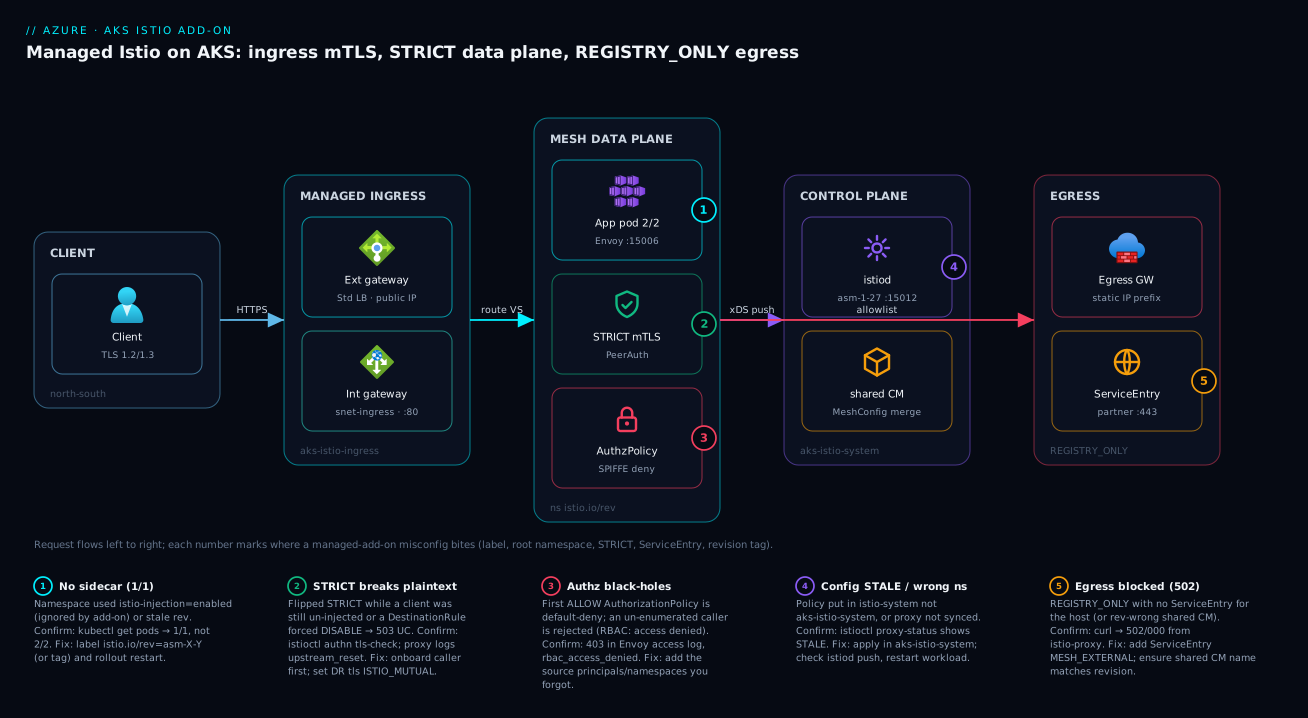
Real-world scenario
Vantage Pay runs its card-processing platform on a regional AKS cluster in Central India, built on Azure CNI Pod Subnet for routable pod IPs (their fraud-scoring service peers directly with an on-prem system over ExpressRoute and needed real pod addresses). The platform team is five engineers; the cluster carries roughly 90 microservices across payments, checkout, ledger and fraud namespaces, and the monthly AKS + mesh spend is about ₹2.1 lakh. Their PCI assessor handed them two non-negotiable requirements from the mesh: strict mTLS between every in-scope service, and a single, fixed source IP for outbound calls to a card-processor partner who allowlists callers by IP.
The team reached for the obvious design — a managed Istio egress gateway over Static Egress Gateway for the predictable IP — and it failed at az aks mesh enable-egress-gateway with an unsupported-configuration error. Static Egress Gateway is not supported on Pod Subnet clusters, so the Istio egress gateway isn’t available there either. The first instinct on the bridge was to re-platform the cluster off Pod Subnet onto Azure CNI Overlay, but that meant re-IP-ing every service and re-validating the ExpressRoute peering — a multi-quarter migration the fraud team would not sign off on.
The breakthrough was realising the two requirements were separable across layers that were available. The mTLS requirement is pure mesh: a mesh-wide STRICT PeerAuthentication in aks-istio-system (rolled out per-namespace first, after confirming every caller was injected and showing 2/2) satisfied the encryption mandate. They added default-deny AuthorizationPolicy objects keyed on SPIFFE principals so “encrypted” became “encrypted and authorized” — the assessor specifically wanted to see that the ledger service could only be written by checkout and payments, not by anything that happened to be in the mesh.
For the fixed egress IP, they pushed the requirement down a layer. They set REGISTRY_ONLY in the shared ConfigMap (istio-shared-configmap-asm-1-27), declared the partner host as a ServiceEntry, and forced that traffic out through Azure Firewall with a fixed public IP via UDR. Istio enforced the L7 allowlist and identity; the firewall provided the stable source IP and the packet capture the auditors wanted. The rollout had one scary moment: the night they flipped payments to STRICT, a batch reconciliation CronJob — which nobody had injected because it lived in a sub-namespace and used istio-injection=enabled — started failing with 503 UC against the ledger API. Ten minutes of istioctl authn tls-check and kubectl get pods (the job pod was 1/1) found it; the fix was relabelling with istio.io/rev and adding sidecar.istio.io/inject: "true" to the job template.
The lesson the team wrote into their platform runbook: validate add-on feature support against your cluster’s network plugin before designing around it, and separate the mesh’s job (identity + encryption) from the network’s job (fixed source IP). Pushing the fixed-IP requirement to Azure Firewall was both compliant and far cheaper than re-platforming, and it shipped in three weeks instead of three quarters.
The incident-and-rollout timeline, because the order of moves is the lesson:
| Phase | Action | Result | What it should have been |
|---|---|---|---|
| Design | Plan managed egress gateway for fixed IP | Fails — unsupported on Pod Subnet | Check plugin support first |
| Reaction | Propose re-platform off Pod Subnet | Multi-quarter; fraud team blocks | Separate the two requirements |
| mTLS | Per-namespace STRICT + SPIFFE authz | Encryption + authz satisfied | Correct approach |
| Egress | REGISTRY_ONLY + ServiceEntry + Azure Firewall UDR |
Fixed IP + packet capture, compliant | The actual fix |
| Cutover | Flip payments to STRICT |
CronJob 503 UC (un-injected 1/1 pod) |
Audit injection before flipping STRICT |
| Resolve | Relabel istio.io/rev + inject: "true" on job |
Traffic restored in ~10 min | Pre-flight every caller |
Advantages and disadvantages
The managed add-on trades control for operational relief, and it constrains you in exchange for taking the riskiest lifecycle work off your plate. Weigh it honestly:
| Advantages (why the managed add-on helps) | Disadvantages (why it constrains you) |
|---|---|
Microsoft owns istiod lifecycle, patching and CRD hygiene — the work that sinks self-managed mesh teams |
You cannot set arbitrary MeshConfig; configSources and other fields are blocked |
| Canary revision upgrades (two control planes side by side) are wired up and supported | Only two revisions supported at a time; n-2 drops out ~6 weeks after newest n |
| Ingress/egress gateways are provisioned and lifecycled, including per-revision pods behind one stable IP | Egress gateway needs Static Egress Gateway — unsupported on Pod Subnet clusters |
Patch versions auto-roll in your maintenance window — no manual istiod patching |
The add-on’s namespaces/labels diverge from upstream, breaking generic tutorials |
| Telemetry integrates with Managed Prometheus / Container Insights out of the box | You still configure all of security/routing/egress — none of it is safe by default |
| SPIFFE identity, STRICT mTLS and L7 authz are full upstream Istio capabilities | The data plane still costs ~50–150 MB and measurable CPU per sidecar |
| Revision tags make fleet-wide upgrades a single repoint | Relabel/repoint does nothing until you restart workloads — a constant footgun |
The model is right for teams who want a production mesh on AKS without owning Istio’s control-plane lifecycle, and who can live within the add-on’s guardrails. It bites hardest on teams on Pod Subnet who need the egress gateway, teams that need deep MeshConfig customisation the add-on blocks, and anyone who treats the add-on like upstream Istio and copies the wrong namespace/label/ConfigMap. If you need full control of every mesh knob, self-managed Istio (or Istio ambient mode) is the alternative — at the cost of owning every upgrade.
Hands-on lab
Stand up the add-on on a small cluster, onboard a namespace, prove the sidecar is injected, enforce STRICT, and prove egress is locked — then tear it down. Costs are modest (a 2-node Standard_B2s cluster for an hour); delete at the end. Run in Cloud Shell (Bash).
Step 1 — Variables and a small cluster.
RG=rg-mesh-lab
LOC=eastus2
CLUSTER=aks-mesh-lab
az group create -n $RG -l $LOC -o table
az aks create -g $RG -n $CLUSTER --node-count 2 --node-vm-size Standard_B2s \
  --network-plugin azure --generate-ssh-keys -o table
az aks get-credentials -g $RG -n $CLUSTER
Step 2 — Check available revisions, then enable the add-on pinned.
az aks mesh get-revisions --location $LOC -o table
REV=asm-1-27   # use a value the previous command listed
az aks mesh enable -g $RG -n $CLUSTER --revision $REV -o table
kubectl get pods -n aks-istio-system   # expect istiod-asm-1-27-* Running
Expected: an istiod-asm-1-27-... pod in aks-istio-system showing Running.
Step 3 — Onboard a namespace the RIGHT way and deploy a sample.
ASM_REV=$(az aks show -g $RG -n $CLUSTER --query 'serviceMeshProfile.istio.revisions[0]' -o tsv)
kubectl create namespace demo
kubectl label namespace demo istio.io/rev=$ASM_REV --overwrite
kubectl apply -n demo -f https://raw.githubusercontent.com/istio/istio/release-1.27/samples/httpbin/httpbin.yaml
kubectl rollout restart deployment -n demo
kubectl get pods -n demo   # expect 2/2 once restarted
Expected: the httpbin pod becomes 2/2 (app + istio-proxy). If it is 1/1, you forgot the restart or used the wrong label.
Step 4 — Prove egress is open (ALLOW_ANY) before you lock it.
kubectl exec -n demo deploy/httpbin -c istio-proxy -- \
  curl -sS -o /dev/null -w '%{http_code}\n' https://example.com   # expect 200 (ALLOW_ANY)
Step 5 — Lock egress with REGISTRY_ONLY via the shared ConfigMap.
kubectl apply -f - <<EOF
apiVersion: v1
kind: ConfigMap
metadata:
  name: istio-shared-configmap-$ASM_REV
  namespace: aks-istio-system
data:
  mesh: |-
    accessLogFile: /dev/stdout
    outboundTrafficPolicy:
      mode: REGISTRY_ONLY
EOF
kubectl rollout restart deployment -n demo   # push the new mesh config to the sidecar
sleep 20
kubectl exec -n demo deploy/httpbin -c istio-proxy -- \
  curl -sS -o /dev/null -w '%{http_code}\n' https://example.com   # now expect 502
Expected: the same curl now returns 502 — egress is blocked because no ServiceEntry declares example.com.
Step 6 — Allow exactly one host with a ServiceEntry.
kubectl apply -n demo -f - <<EOF
apiVersion: networking.istio.io/v1
kind: ServiceEntry
metadata:
  name: allow-example
  namespace: demo
spec:
  hosts: ["example.com"]
  ports: [{number: 443, name: tls, protocol: TLS}]
  resolution: DNS
  location: MESH_EXTERNAL
EOF
sleep 10
kubectl exec -n demo deploy/httpbin -c istio-proxy -- \
  curl -sS -o /dev/null -w '%{http_code}\n' https://example.com   # back to 200, but ONLY this host
Step 7 — Verify mesh health, then enforce STRICT.
istioctl proxy-status --istioNamespace aks-istio-system   # all SYNCED, no STALE
kubectl apply -f - <<EOF
apiVersion: security.istio.io/v1
kind: PeerAuthentication
metadata: {name: default, namespace: demo}
spec: {mtls: {mode: STRICT}}
EOF
Step 8 — Teardown.
az aks mesh disable -g $RG -n $CLUSTER --yes
az group delete -n $RG --yes --no-wait
What each lab step proves, at a glance:
| Step | Proves | If it fails… |
|---|---|---|
| 2 | Add-on installs pinned to a revision | Region/version mismatch — re-check get-revisions |
| 3 | Correct label + restart → sidecar | 1/1 means wrong label or no restart |
| 4 | Default egress is wide open | (it always is — that’s the point) |
| 5 | REGISTRY_ONLY blocks undeclared egress |
200 means ConfigMap name ≠ revision, or no restart |
| 6 | ServiceEntry re-allows one host |
Still 502 → wait for push / check host match |
| 7 | Proxies synced; STRICT applied | STALE → config not converged |
Common mistakes & troubleshooting
This is the differentiator. The managed add-on’s failures are silent at apply time and loud at request time. Scan the playbook table, then read the detail for whichever row matches your symptom.
| # | Symptom | Root cause | Confirm (exact command) | Fix |
|---|---|---|---|---|
| 1 | Pod is 1/1, traffic unencrypted |
istio-injection=enabled used (ignored by add-on) |
kubectl get ns <ns> --show-labels |
Relabel istio.io/rev=asm-X-Y; rollout restart |
| 2 | Pod still 1/1 after correct label |
Workload never restarted (injection is at admission) | kubectl get pods -n <ns> |
kubectl rollout restart deployment -n <ns> |
| 3 | Mesh-wide STRICT “does nothing” | PeerAuthentication placed in istio-system |
kubectl get peerauthentication -A |
Move it to aks-istio-system |
| 4 | 503 UC after enabling STRICT |
A caller is un-injected (sends plaintext) | istioctl authn tls-check <pod>.<ns> |
Onboard the caller, or stage PERMISSIVE first |
| 5 | 503 UC from one client only |
DestinationRule pins client to DISABLE |
kubectl get destinationrule -A -o yaml | grep -A2 tls |
Set mode: ISTIO_MUTUAL |
| 6 | 403 RBAC: access denied |
First ALLOW policy is default-deny |
Envoy access log: rbac_access_denied |
Add the missing source principals/namespaces |
| 7 | “Applied VS, nothing changed” | Proxy config is STALE |
istioctl proxy-status --istioNamespace aks-istio-system |
Wait for push; rollout restart if stuck |
| 8 | External call returns 502/000 |
REGISTRY_ONLY with no ServiceEntry |
kubectl exec ... -c istio-proxy -- curl <host> |
Add a ServiceEntry for the host |
| 9 | Egress change ignored | Shared ConfigMap name ≠ revision | kubectl get cm -n aks-istio-system |
Rename to istio-shared-configmap-asm-X-Y |
| 10 | istioctl “no running Istio pods” |
Missing --istioNamespace aks-istio-system |
istioctl version --istioNamespace aks-istio-system |
Always pass the add-on namespace |
| 11 | Upgrade ran, workloads unchanged | Repointed tag but didn’t restart | istioctl proxy-status (mixed revs) |
kubectl rollout restart per namespace |
| 12 | Egress gateway enable fails | Static Egress GW unsupported on Pod Subnet | az aks show --query networkProfile |
Use REGISTRY_ONLY + Azure Firewall instead |
| 13 | Gateway has no external IP | Source-range/subnet annotation wrong, or quota | kubectl get svc -n aks-istio-ingress |
Fix annotation; check public-IP quota |
| 14 | Sidecar OOMKilled | Watching the whole cluster’s config | kubectl describe pod (OOMKilled) |
Add discoverySelectors; raise proxy memory |
No sidecar injected (rows 1–2)
The two most common tickets. The add-on only honours istio.io/rev; istio-injection=enabled is a silent no-op. And even the right label does nothing to running pods, because injection is a mutating admission webhook that fires at pod creation.
Confirm:
kubectl get ns payments --show-labels   # look for istio.io/rev=asm-X-Y (NOT istio-injection)
kubectl get pods -n payments            # 1/1 = no sidecar; 2/2 = injected
Fix: relabel and restart:
kubectl label namespace payments istio.io/rev=$ASM_REV --overwrite
kubectl rollout restart deployment -n payments
STRICT breaks traffic with 503 UC (rows 3–5)
503 UC (upstream-connect-failure) after flipping STRICT means a server now demands mTLS while a client isn’t sending it. Three distinct causes, each with a different fix:
# Is the mesh-wide policy even in the right namespace?
kubectl get peerauthentication -A

# Is mTLS genuinely STRICT and is the client speaking it?
istioctl authn tls-check "$(kubectl get pod -n payments -l app=productpage \
  -o jsonpath='{.items[0].metadata.name}')".payments \
  --istioNamespace aks-istio-system

# Is a DestinationRule forcing the client side to DISABLE?
kubectl get destinationrule -A -o yaml | grep -B3 -A2 'mode:'
The 503 UC decision table:
If tls-check shows… |
And… | It’s probably… | Do this |
|---|---|---|---|
Server STRICT, client 1/1 |
caller has no sidecar | Un-injected client | Onboard the caller; or stage PERMISSIVE |
Server STRICT, client 2/2 |
a DestinationRule exists |
Client pinned to DISABLE |
Set DR tls.mode: ISTIO_MUTUAL |
Policy not listed in aks-istio-system |
mesh-wide intended | Wrong root namespace | Move policy to aks-istio-system |
Both 2/2, no DR override |
still failing | Stale config | istioctl proxy-status; restart |
Authz black-holes traffic (403, row 6)
Your first ALLOW AuthorizationPolicy makes the workload default-deny. Anything not enumerated gets 403.
Confirm in the Envoy access log:
kubectl logs -n payments deploy/productpage -c istio-proxy | grep rbac_access_denied
Fix: enumerate every legitimate caller in the policy’s from.source.principals. During triage you can flip the policy to action: AUDIT to log-without-enforce while you discover callers, then switch back to ALLOW.
Config not applied / STALE (rows 7, 11)
istioctl proxy-status is the truth oracle. A STALE row means the proxy has not received the latest config push — usually because the object is in the wrong namespace, or the proxy needs a nudge.
istioctl proxy-status --istioNamespace aks-istio-system
# SYNCED everywhere = good; STALE for CDS/LDS/RDS/EDS = that proxy is behind
Egress blocked / ignored (rows 8–9)
Under REGISTRY_ONLY, an undeclared host returns 502 from the sidecar. If your egress change is ignored entirely, the shared ConfigMap name doesn’t match the running revision.
# The ConfigMap name MUST be istio-shared-configmap-<running-rev>
kubectl get cm -n aks-istio-system | grep shared

# Prove the block (should be 502/000), then add a ServiceEntry and re-test (200)
kubectl exec -n payments deploy/productpage -c istio-proxy -- \
  curl -sS -o /dev/null -w '%{http_code}\n' https://api.payments-partner.com
istioctl talks to nothing (row 10)
Every istioctl invocation needs --istioNamespace aks-istio-system, or it looks for a control plane in istio-system and reports no running pods. Set an alias if you run it often: alias istioctl='istioctl --istioNamespace aks-istio-system'.
Reading Envoy response flags (the real root-cause signal)
When a request fails, the Envoy access log carries a short response flag that names the failure class far more precisely than the HTTP code. These are the flags you will actually see on this add-on, and what each means:
| Response flag | Meaning | Common mesh cause | Where to look next |
|---|---|---|---|
UC |
Upstream connection termination | STRICT vs plaintext/DISABLE mismatch |
istioctl authn tls-check; the DestinationRule |
UF |
Upstream connection failure | Upstream pod down / no endpoints | kubectl get endpoints; pod health |
UH |
No healthy upstream | All endpoints unhealthy / outlier-ejected | Outlier detection in DestinationRule |
URX |
Upstream retry limit exceeded | Retries exhausted on a flapping upstream | VirtualService retries; upstream stability |
NR |
No route configured | VirtualService/Gateway host mismatch |
Host/gateways fields; proxy-status |
RBAC / rbac_access_denied |
Authorization denied | AuthorizationPolicy default-deny |
The policy’s from.source rules |
DC |
Downstream connection termination | Client gave up (often a timeout above) | Client/gateway timeout settings |
- (none) |
No special flag | Request handled (may still be app 5xx) |
App logs / Failures |
Pull the flag straight from the sidecar:
kubectl logs -n payments deploy/productpage -c istio-proxy --tail=50 \
  | grep -oE '"[A-Z,]+"' | sort | uniq -c   # tally the response flags
Common beginner mistakes
The troubleshooting table above is symptom-first — you land there after something breaks. This section is the opposite: the misconceptions that cause those breakages, so you can head them off. Each is a belief carried over from generic Istio tutorials or from “it’s managed, so it’s handled” thinking.
| Misconception | Why it’s wrong | The right mental model |
|---|---|---|
| “It’s the managed add-on, so the mesh is secure by default.” | It ships PERMISSIVE mTLS and ALLOW_ANY egress — encryption is optional and pods can call the whole internet. |
Managed = lifecycle (Microsoft runs istiod), not policy. Security is still 100% your configuration. |
“I’ll label the namespace istio-injection=enabled like the docs show.” |
The add-on only honours istio.io/rev; the upstream label is a silent no-op — no sidecar, no error. |
Onboarding is revision-keyed. Label with istio.io/rev=asm-X-Y (or a tag) matching the running revision. |
| “I labelled the namespace, so my pods are now in the mesh.” | Injection is a mutating webhook that fires at pod creation; existing pods keep running un-injected. | Label then kubectl rollout restart. A meshed pod is 2/2; a 1/1 pod is outside the mesh. |
| “STRICT mTLS means my services are secure.” | mTLS proves who is calling, not whether they’re allowed. Without authz, any meshed pod can still call any other. | Encryption and authorization are two jobs. Pair STRICT PeerAuthentication with a default-deny AuthorizationPolicy. |
“Mesh-wide policy goes in istio-system, like every example.” |
The add-on’s root namespace is aks-istio-system; a policy in istio-system is read by nothing. |
There is no istio-system here. Mesh-wide PeerAuthentication/MeshConfig live in aks-istio-system. |
“My first AuthorizationPolicy just allows the one caller I named.” |
An ALLOW policy with any rule is default-deny for that workload — everything unlisted is now 403. |
Adding authz flips the workload to allow-list mode. Enumerate every legitimate caller before you apply. |
“istioctl is broken — it says there are no Istio pods.” |
istioctl defaults to istio-system; it’s looking in the wrong place, not failing. |
Pass --istioNamespace aks-istio-system on every call (or alias it). |
“The mesh replaces my NetworkPolicy.” |
A pod can opt out of injection and bypass its sidecar entirely, sidestepping every mesh rule. | The mesh is an L7 policy layer; keep an L3/4 default-deny NetworkPolicy as the floor beneath it. |
The thread running through all eight: the add-on is Istio with a different dialect and safe-but-open defaults. Almost every beginner outage is either speaking upstream Istio’s dialect to an add-on that doesn’t understand it, or assuming “managed” did a security job it never promised to do. When something behaves oddly, ask first: am I using the add-on’s namespace, label, and ConfigMap name — or upstream’s? Batch jobs and CronJobs are a classic blind spot here — they often live in a sub-namespace or ship with no injection annotation, so they run un-injected and fail the moment a dependency goes STRICT (see Kubernetes Jobs, CronJobs & DaemonSets).
Best practices
- Pin the revision in IaC. Always pass
--revision asm-X-Y; never let environments drift to whatever default AKS picks at apply time. - Onboard namespaces deliberately, label with
istio.io/rev(or a tag), neveristio-injection=enabled. Restart workloads immediately and verify2/2. - Stage mTLS: PERMISSIVE → confirm every caller injected → STRICT. Roll STRICT per-namespace, not mesh-wide on day one, so the blast radius is one team at a time.
- Make
AuthorizationPolicydefault-deny with SPIFFEprincipals, and enumerate every caller before you apply. Useaction: AUDITto discover callers safely first. - Set
REGISTRY_ONLYand keep everyServiceEntryin Git. Egress becomes a reviewed, auditable allowlist instead of an open door. - Use revision tags as upgrade indirection. Label namespaces with a tag (
prod), repoint the tag at upgrade, and remember the restart. - Copy the shared ConfigMap to the new revision name before
az aks mesh upgrade start. It must exist the moment the new control plane comes up. - Validate add-on feature support against your network plugin before designing around it. The egress gateway is unsupported on Pod Subnet — plan for Azure Firewall there.
- Restrict the external gateway’s source ranges and pin the internal gateway’s subnet via service annotations; never expose a raw public gateway.
- Use
discoverySelectorson large clusters soistiodand every Envoy only carry config for mesh namespaces — real memory savings. - Scope access logging and telemetry with the Telemetry API, not mesh-wide, to keep Envoy CPU and log volume in check.
- Run
istioctl proxy-statusafter every config change. Treat anySTALEas “this change has not taken effect yet.”
Security notes
The mesh’s whole reason to exist is security in transit and least-privilege between services; configure it like you mean it.
| Control | Setting / mechanism | Why | Verify |
|---|---|---|---|
| Encryption in transit | STRICT PeerAuthentication in aks-istio-system |
mTLS on every hop; no plaintext | istioctl authn tls-check <pod> |
| Least-privilege L7 | Default-deny AuthorizationPolicy with principals |
Identity-scoped, not IP-scoped | Envoy log shows enforced denies |
| Egress control | REGISTRY_ONLY + ServiceEntry (+ Firewall) |
Stop data exfil; audit every external call | curl from sidecar → 502 if undeclared |
| Ingress exposure | Source-range annotation on external gateway | Limit who can reach the public edge | kubectl get svc annotation present |
| Identity | SPIFFE IDs (cluster.local/ns/<ns>/sa/<sa>) |
Stable across reschedules; per-workload SA | Distinct ServiceAccount per workload |
| Secret/cert lifecycle | istiod-issued workload certs (managed) |
Short-lived, auto-rotated | Managed by the add-on |
| Defense in depth | Mesh authz plus NetworkPolicy |
L3/4 floor under the L7 mesh | Pair with Cilium/Azure NPM |
| Control-plane isolation | aks-istio-system is platform-managed |
Tenants can’t tamper with istiod |
RBAC on the namespace |
Two non-obvious points. First, mTLS proves who a caller is but not whether they are allowed — STRICT without AuthorizationPolicy still lets any meshed workload call any other, so always pair them. Second, the mesh is not a substitute for Kubernetes NetworkPolicy: a sidecar can be bypassed by a pod that opts out of injection, so keep an L3/4 default-deny NetworkPolicy (see Kubernetes Network Policies: Cilium L7 & Default-Deny) under the mesh as a floor. For workload identity at the app layer, dedicate a ServiceAccount per workload so SPIFFE IDs are meaningful (background in Kubernetes RBAC: Least-Privilege Design).
Cost & sizing
The add-on itself has no separate license fee — you pay for the compute the data and control planes consume, plus the Azure resources the gateways create, plus telemetry ingestion. The drivers:
| Cost driver | What it is | Rough magnitude | How to control |
|---|---|---|---|
| Sidecar CPU/memory | Envoy per meshed pod | ~0.05–0.15 vCPU, ~50–150 MB each | Right-size requests; discoverySelectors; don’t mesh everything |
istiod footprint |
Control plane pods | Scales with config/proxy count | Fewer watched namespaces; tags over many revisions |
| Ingress gateway | Standard LB + public IP | LB hourly + per-rule + public IP | Share gateways across services; internal where possible |
| Egress gateway | Static Egress GW + IP prefix | Gateway + reserved IP prefix | Only where a fixed IP is mandated |
| Azure Firewall (alt) | Firewall + public IP + per-GB | Firewall hourly + data processed | One central firewall for the whole VNet |
| Managed Prometheus | Metric ingestion/storage | Per metric sample ingested | Scope scraping; drop high-cardinality series |
| Container Insights logs | Access-log ingestion | Per GB ingested | Scope access logs via Telemetry API |
Sizing guidance as a table — the lever to pull at each cluster size:
| Cluster size | Meshed pods | Primary cost lever | Watch out for |
|---|---|---|---|
| Small (< 50 pods) | Tens | Sidecar overhead is the bulk | Don’t mesh batch/system namespaces |
| Medium (50–300) | Hundreds | discoverySelectors; shared gateways |
istiod memory creep; STALE pushes |
| Large (300–1000+) | Thousands | Prune config aggressively; scope telemetry | Push convergence time; log ingestion bill |
Rough INR/USD anchors (Central India, indicative): a Standard LB for one gateway runs on the order of ₹1,500–2,500 / month (~$18–30) plus a public IP; sidecar overhead at, say, 200 meshed pods at 0.1 vCPU / 100 MB each is roughly 20 vCPU / 20 GB of cluster capacity you must provision — often a node or two. Telemetry is the sleeper cost: mesh-wide access logging on a busy cluster can dwarf the compute, which is why scoping it via the Telemetry API matters. The add-on has no free tier of its own, but a 2-node Standard_B2s lab cluster for an hour is well under ₹100. There is no charge for the canary upgrade machinery — only the brief period of running two control planes’ worth of istiod pods.
Practice challenges
Work these in order — each builds on the last, escalating from “confirm you understand onboarding” to “run a full canary upgrade.” There is no cluster grading you here, so every solution gives the exact command or manifest plus a one-line why. If you do have a lab cluster (see the Hands-on lab), run them for real; the commands are copy-paste ready. Variables ($RG, $CLUSTER) are the ones from that lab.
Challenge 1 (Beginner) — Find your revision. The add-on is enabled on your cluster. Without guessing, print the exact revision string a namespace label must match, then state the label you’d apply to a namespace called orders.
<details> <summary>Show solution</summary>
az aks show -g $RG -n $CLUSTER \
  --query 'serviceMeshProfile.istio.revisions' -o tsv   # e.g. asm-1-27
kubectl label namespace orders istio.io/rev=asm-1-27 --overwrite
Why: the injection label must match the running revision exactly; reading it from the cluster — not from a tutorial — is the only reliable source. </details>
Challenge 2 (Beginner) — Rescue a 1/1 pod. You labelled orders correctly an hour ago, but kubectl get pods -n orders still shows every pod 1/1. Get them meshed. Separately, force-inject a single batch pod that lives in an un-labelled namespace.
<details> <summary>Show solution</summary>
kubectl rollout restart deployment -n orders # injection happens at pod creation
For the one-off batch pod, add a pod-template annotation instead of labelling its whole namespace:
spec:
  template:
    metadata:
      annotations:
        sidecar.istio.io/inject: "true"
Why: the namespace label only affects pods created after it, so existing pods need a restart; sidecar.istio.io/inject: "true" opts in one workload without meshing its entire namespace.
</details>
Challenge 3 (Intermediate) — Namespace-scoped STRICT. Enforce mTLS-only on the orders namespace (not mesh-wide), and give the single command that proves the server is genuinely STRICT for a specific pod.
<details> <summary>Show solution</summary>
apiVersion: security.istio.io/v1
kind: PeerAuthentication
metadata:
  name: default
  namespace: orders
spec:
  mtls:
    mode: STRICT
istioctl authn tls-check <pod>.orders --istioNamespace aks-istio-system
Why: a selector-less PeerAuthentication in the app namespace scopes STRICT to that namespace only, keeping the blast radius to one team; tls-check confirms no plaintext listener remains.
</details>
Challenge 4 (Intermediate) — Egress allow-list of one. The mesh is REGISTRY_ONLY. Allow the checkout namespace to reach exactly api.stripe.com over TLS/443 and nothing else, keeping the rule visible only inside checkout.
<details> <summary>Show solution</summary>
apiVersion: networking.istio.io/v1
kind: ServiceEntry
metadata:
  name: allow-stripe
  namespace: checkout
spec:
  hosts:
  - api.stripe.com
  ports:
  - number: 443
    name: tls
    protocol: TLS
  resolution: DNS
  location: MESH_EXTERNAL
  exportTo:
  - "."
Why: under REGISTRY_ONLY only ServiceEntry-declared hosts are reachable; location: MESH_EXTERNAL marks it as outside the mesh, and exportTo: ["."] keeps the entry namespace-local instead of leaking it mesh-wide.
</details>
Challenge 5 (Advanced) — Identity-scoped authorization. The ledger service (label app: ledger, ServiceAccount ledger) must accept POST /v1/entries from only the checkout and payments services, by identity — not IP. Everything else is denied.
<details> <summary>Show solution</summary>
apiVersion: security.istio.io/v1
kind: AuthorizationPolicy
metadata:
  name: ledger-allow-writers
  namespace: ledger
spec:
  selector:
    matchLabels:
      app: ledger
  action: ALLOW
  rules:
  - from:
    - source:
        principals:
        - cluster.local/ns/checkout/sa/checkout
        - cluster.local/ns/payments/sa/payments
    to:
    - operation:
        methods: ["POST"]
        paths: ["/v1/entries"]
Why: an ALLOW policy is default-deny for the selected workload, so listing the two SPIFFE principals both permits them and rejects everyone else; identities survive pod reschedules where IPs would not.
</details>
Challenge 6 (Advanced) — Canary upgrade with a tag. You are on asm-1-27 and want to move to asm-1-28 so that all prod-tagged namespaces shift with a single repoint, and you can roll back cleanly. List the ordered steps.
<details> <summary>Show solution</summary>
# 1. Confirm a valid target exists, then create the MeshConfig overlay under the NEW revision name
az aks mesh get-upgrades -g $RG -n $CLUSTER
kubectl apply -f - <<'EOF'
apiVersion: v1
kind: ConfigMap
metadata:
  name: istio-shared-configmap-asm-1-28   # new revision name; carry over your existing mesh: block
  namespace: aks-istio-system
data:
  mesh: |-
    accessLogFile: /dev/stdout
    outboundTrafficPolicy:
      mode: REGISTRY_ONLY
EOF

# 2. Start the canary — new istiod runs alongside the old
az aks mesh upgrade start -g $RG -n $CLUSTER --revision asm-1-28

# 3. Repoint the tag, then restart one canary namespace to migrate it
istioctl tag set prod --revision asm-1-28 --istioNamespace aks-istio-system --overwrite
kubectl rollout restart deployment -n payments

# 4. Verify, then commit — or roll back
istioctl proxy-status --istioNamespace aks-istio-system   # all SYNCED, on the new rev
az aks mesh upgrade complete -g $RG -n $CLUSTER           # if healthy
# regression path: repoint tag to asm-1-27, rollout restart, then:
# az aks mesh upgrade rollback -g $RG -n $CLUSTER
Why: the tag is the indirection layer — namespaces are labelled istio.io/rev=prod, so repointing prod moves all of them at once; nothing actually changes until you rollout restart, and complete/rollback only ever act while both control planes are still running.
</details>
Interview & exam questions
1. Why is istio-injection=enabled a no-op on the AKS managed add-on, and what do you use instead?
The add-on is revision-scoped and only honours istio.io/rev=asm-X-Y (or a revision tag) for injection. istio-injection=enabled is silently ignored, producing a 1/1 pod with no sidecar and no error. You label the namespace with the running revision (or a tag) and then kubectl rollout restart the workloads.
2. Where do mesh-wide policies live on the add-on, and why does this matter?
In aks-istio-system, the add-on’s root namespace — not istio-system as in upstream Istio. A selector-less PeerAuthentication or the shared MeshConfig placed in istio-system is read by nothing, which is the most common reason a “mesh-wide STRICT” change appears to do nothing.
3. Explain the difference between PeerAuthentication STRICT and a DestinationRule’s ISTIO_MUTUAL.
PeerAuthentication is server-side: it controls what a workload’s sidecar accepts (STRICT = mTLS only). DestinationRule tls.mode: ISTIO_MUTUAL is client-side: it controls what the client sidecar originates. A 503 UC after enabling STRICT is usually a mismatch — a client still sending plaintext or pinned to DISABLE.
4. Why can adding your first AuthorizationPolicy cause an outage?
An AuthorizationPolicy with action: ALLOW and at least one rule makes the targeted workload default-deny — anything not explicitly matched is rejected with 403. If you don’t enumerate every legitimate caller, you black-hole traffic you forgot about.
5. How do you safely migrate mTLS from PERMISSIVE to STRICT?
Start PERMISSIVE (default), confirm every client of a service is injected and showing 2/2, then enforce STRICT — ideally per-namespace so the blast radius is one team at a time. Verify with istioctl authn tls-check and watch for 503 UC from any straggler.
6. What does REGISTRY_ONLY do, where do you set it, and what must you add afterward?
It makes Envoy block any outbound host not in the service registry. You set it in the shared ConfigMap (istio-shared-configmap-asm-X-Y), which the control plane merges over its reconciled default. After that, every external dependency must be declared as a ServiceEntry, or it returns 502 from the sidecar.
7. Walk through a canary revision upgrade.
Check az aks mesh get-upgrades; copy the shared ConfigMap to the new revision name; az aks mesh upgrade start --revision asm-1-28 (runs new istiod alongside the old); repoint a revision tag to the new revision; kubectl rollout restart the namespaces you’re migrating; verify with istioctl proxy-status and dashboards; then complete (removes old) or rollback (removes canary).
8. How do minor upgrades differ from patch upgrades?
Minor (revision) upgrades you initiate; they run two control planes and you migrate workloads at your pace. Patch upgrades (e.g. 1.27.2 → 1.27.3) AKS rolls automatically in your maintenance window for istiod and gateways — but your sidecars don’t update until you restart the workloads.
9. Why can’t you always use the managed Istio egress gateway, and what’s the alternative?
It requires the AKS Static Egress Gateway feature, which is unsupported on Azure CNI Pod Subnet clusters — so the egress gateway isn’t available there. The alternative is REGISTRY_ONLY + ServiceEntry for the L7 allowlist plus Azure Firewall (fixed public IP via UDR) for a deterministic source IP.
10. What’s the single highest-signal command for “I applied a VirtualService and nothing changed,” and why?
istioctl proxy-status --istioNamespace aks-istio-system. A STALE row means that proxy hasn’t received the latest config push — the usual root cause. SYNCED everywhere means the config is live and the problem is elsewhere (e.g. wrong host/match).
11. Why prefer SPIFFE principals over ipBlocks in authorization rules?
SPIFFE identities (cluster.local/ns/<ns>/sa/<sa>) are tied to the workload’s ServiceAccount and are stable across pod reschedules and IP changes; mTLS provides exactly this identity. IP-based rules break the moment a pod is rescheduled to a new address.
12. Which certs map to which exams? This material maps to AZ-305 (designing secure Azure solutions / AKS networking), the CKS (cluster security, mesh, network policy, supply chain), and Istio-specific knowledge for vendor mesh assessments. The mTLS/authz/egress patterns also appear in zero-trust architecture questions.
Quick check
- A pod in a labelled namespace shows
1/1. Name the two most likely causes. - You set mesh-wide STRICT but nothing is enforced. Where did you probably put the
PeerAuthentication, and where should it go? - After enabling STRICT you get
503 UCfrom one specific client that is2/2. What’s the likely culprit? - Under
REGISTRY_ONLY, an external API call returns502from the sidecar. What’s missing? - You repointed the revision tag during an upgrade but workloads still run the old proxy. What step did you skip?
Answers
- Either the namespace was labelled
istio-injection=enabled(ignored by the add-on — useistio.io/rev=asm-X-Y), or the workloads were never restarted after labelling (injection happens at admission, sokubectl rollout restart). - You likely put it in
istio-system; the add-on’s root namespace isaks-istio-system. Move it there. - A
DestinationRulefor that host is pinning the client side totls.mode: DISABLE(orSIMPLE) while the server now demands mTLS. Set it toISTIO_MUTUAL. - A
ServiceEntrydeclaring that host. UnderREGISTRY_ONLY, undeclared hosts are blocked; add aServiceEntry(MESH_EXTERNAL, port 443). - The
kubectl rollout restartof the workloads. Repointing the tag/relabelling changes nothing until pods are recreated and re-injected on the new revision.
Glossary
- Revision (
asm-X-Y) — the installed Istio version identity on the add-on; suffixesistiod, the shared ConfigMap, gateway pods, and the injection label. aks-istio-system— the add-on’s root namespace where mesh-wide policy and the sharedMeshConfiglive (upstream usesistio-system).aks-istio-ingress/aks-istio-egress— managed namespaces holding the ingress and egress gateway services/pods.- Injection label —
istio.io/rev=asm-X-Y(or a tag); the only label the add-on honours to inject sidecars.istio-injection=enabledis ignored. - Sidecar (Envoy) — the per-pod proxy that does mTLS, routing and authorization; a meshed pod runs
2/2. PeerAuthentication— server-side policy setting the mTLS accept mode (PERMISSIVE / STRICT / DISABLE).AuthorizationPolicy— L7 allow/deny policy by identity, namespace, method, path; a firstALLOWrule makes the workload default-deny.DestinationRule— client-side policy: subsets, load balancing, and TLS origination mode (ISTIO_MUTUALetc.).VirtualService— routing rules mapping hosts to destinations, including weighted splits and gateway bindings.Gateway— L7 listener config bound to a managed gateway by service label; lives in the app namespace.ServiceEntry— declares an external host to the service registry; required for egress underREGISTRY_ONLY.REGISTRY_ONLY/ALLOW_ANY— the twooutboundTrafficPolicymodes: blocklist-by-default vs allow-all egress.- Shared ConfigMap —
istio-shared-configmap-asm-X-Y, yourMeshConfigoverlay that the control plane merges over its reconciled default. - Revision tag — a stable alias (e.g.
prod) for a revision; repoint it once to move many namespaces during an upgrade. - SPIFFE identity — the workload identity (
cluster.local/ns/<ns>/sa/<sa>) mTLS establishes; the right thing to authorize on. 503 UC— Envoy’s upstream-connect-failure; classically a STRICT/DISABLEmTLS mismatch between client and server.- Static Egress Gateway — the AKS feature the managed egress gateway builds on; unsupported on Azure CNI Pod Subnet.
- Service mesh — a fleet of per-pod proxies plus a control plane that together handle encryption, identity/authorization and routing for your apps, so the app code doesn’t. Istio is one implementation.
- Control plane vs data plane — the control plane (
istiod) computes and pushes configuration; the data plane (the Envoy sidecars) is what actually carries and polices your traffic. Microsoft manages the former; you shape the latter with policy. - mTLS (mutual TLS) — TLS where both ends present a certificate, so each side cryptographically proves its identity to the other. The mesh issues and rotates these certs for you.
- Envoy — the high-performance proxy Istio runs as the sidecar; every mesh feature (mTLS, routing, authz, metrics) is Envoy doing the work at ports like 15006/15001.
- xDS — the family of APIs (
CDS/LDS/RDS/EDS)istioduses to push live config to every Envoy over port 15012; aSTALEproxy is one that hasn’t caught up to the latest xDS push. - PERMISSIVE — the default
PeerAuthenticationmode where a sidecar accepts both plaintext and mTLS; safe for onboarding, but no enforcement until you move to STRICT. - North-south vs east-west traffic — north-south is traffic entering/leaving the cluster (through the ingress/egress gateways); east-west is service-to-service traffic inside the mesh (where
PeerAuthentication/AuthorizationPolicyapply).
Next steps
- Compare the managed add-on with the sidecar-free model in Istio Ambient Mesh: mTLS & Traffic Management and the L7 layer in Istio Ambient: Waypoint Proxies & L7 Authorization.
- Weigh a different mesh against Istio with Linkerd: mTLS, Retries & Multi-Cluster Failover.
- Put a deterministic edge in front of the mesh with Application Gateway for Containers: Gateway API & Traffic Splitting and lock outbound with Deterministic Egress with Azure NAT Gateway.
- Add an L3/4 floor under the mesh with Kubernetes Network Policies: Cilium L7 & Default-Deny.
- Send the mesh’s golden signals somewhere useful with Azure Monitor: Managed Prometheus & Managed Grafana for AKS.