The Secrets Store CSI Driver lets a pod mount Azure Key Vault secrets, keys, and certificates as files on a tmpfs volume, with no secret material written to etcd by default. On AKS it ships as a first-party add-on (azure-keyvault-secrets-provider): a managed DaemonSet, an Azure provider plugin, and platform-owned lifecycle rather than a Helm chart you babysit. You annotate a service account, write a SecretProviderClass, mount a CSI volume, and Key Vault material appears at /mnt/secrets-store inside the container — passwordless, auditable, and rotatable.
The interesting engineering is not the mount; it is the identity backing the mount and the rotation semantics once secrets change underneath running pods. Three facts trip up almost everyone the first time. The driver only fetches secrets when a pod mounts a volume — no pod, no Secret. The synced Kubernetes Secret is created on first mount and garbage-collected when the last consuming pod dies. And rotation reaches a file or a mounted Secret volume on the next poll, but an environment variable injected at container start never changes, so an app reading config from env keeps the old value forever unless you force a restart. Miss any of these and you ship an incident.
This walkthrough wires the add-on to Microsoft Entra Workload ID (federated, no client secrets), authors a SecretProviderClass, syncs the mounted objects into a native Kubernetes Secret for env-var consumption, terminates TLS at ingress from a Key Vault certificate, and turns on auto-rotation — with a clear-eyed view of what actually propagates and what does not. By the end you will read the symptom (ContainerCreating forever, AADSTS70021, an empty synced Secret, a rotated value that never reaches the app) and name the exact cause and fix in under a minute. Throughout, I prefer workload identity over the add-on’s auto-created managed identity: the add-on identity is a node-scoped, cluster-wide credential, while workload identity scopes access to a single service account — what you want for least privilege and clean auditing. The mechanics here build directly on Azure Key Vault with Workload Identity for secretless secrets and the broader Kubernetes ConfigMaps and Secrets deep dive.
In a nutshell
Level: Intermediate · Time: ~58 min
Picture Azure Key Vault as a bank’s safe-deposit vault holding your app’s valuables — database passwords, API keys, TLS certificates. The old, unsafe habit is to photocopy those valuables and staple them into your app’s blueprints (YAML manifests checked into git) or leave them in a shared drawer (a plain Kubernetes Secret sitting in the cluster’s database). Anyone who can read the blueprints or open the drawer gets everything, and there is no record of who took what.
The Secrets Store CSI Driver replaces that with a trusted concierge. When your pod starts, it does not carry a copy of the vault key. Instead the driver shows the pod’s short-lived ID badge (a projected identity token) to the vault; the vault checks a pre-agreed guest list (a federated credential that names one exact service account); and it hands back only the items that pod is cleared to take, placing them on a small in-memory shelf inside the container at /mnt/secrets-store. No password is ever stored in your manifests, in git, or — by default — in the cluster’s database. Optionally, the driver also copies those files into a native Kubernetes Secret so your app can read them as environment variables.
When you change a valuable in the vault, the concierge quietly swaps it on the shelf on its next round — that is rotation. The one twist to memorize from day one: a value read as a file (or a mounted-Secret volume) is swapped live, but a value read as an environment variable is a photo taken the instant the container started and never updates until the pod restarts.
If you keep only three sentences: secrets live in Key Vault, not your YAML; the pod proves who it is with a federated token and gets only its own secrets; and rotation reaches files automatically but env vars only after a restart. Everything below is the detail behind those three sentences.
What problem this solves
The naïve way to get a database password into a pod is a Kubernetes Secret you kubectl create from a literal, or worse, a value baked into a Helm values.yaml checked into git. Both put plaintext (base64 is not encryption) in etcd and in your version control, readable by anyone with get secret RBAC or repo access. There is no rotation story, no audit trail of which workload read which secret when, and no separation between the team that owns the secret and the team that runs the cluster. When an auditor asks “prove that pod A cannot read pod B’s database credential,” you have no answer.
The Secrets Store CSI Driver moves the source of truth to Key Vault and the identity to Entra. The secret lives in a vault with its own RBAC, versioning, soft-delete, purge protection, and diagnostic logs that record every SecretGet with the calling identity. The pod authenticates with a federated token — no client secret is ever issued or stored. Mounted material lands on tmpfs (memory-backed), never on disk, never in etcd unless you explicitly opt into the K8s sync. Rotation happens in the vault and the driver pulls the new version on a poll. The blast radius of a compromised pod shrinks from “the entire secret store” to “exactly the secrets that one service account was granted.”
Who hits the pain this solves: any team running multi-tenant AKS where squads share a cluster but must not share secrets; anyone failing a PCI/SOC2/ISO audit on secret attribution; teams whose “rotation” today means a manual kubectl edit secret and a prayer; and anyone who has shipped a credential to a public registry or git history. The cost of getting it wrong is concrete — a single shared identity means one popped pod reads everything, and your audit log attributes nothing.
To frame the field before the deep dive, here is every failure class this article covers, where it bites on the path, and the one place to look first:
| Symptom class | What you actually see | First question to ask | First place to look | Most common single cause |
|---|---|---|---|---|
Pod stuck ContainerCreating |
Pod never reaches Running |
Did the volume mount fail? | kubectl describe pod events |
Federation subject mismatch or missing RBAC |
AADSTS70021 |
Event: “No matching federated identity record found” | Does the FIC subject match the SA? | az identity federated-credential list |
--subject typo vs system:serviceaccount:<ns>:<sa> |
403 Forbidden from Key Vault |
Event: “does not have secrets get permission” | Is the RBAC role correct for the object type? | az role assignment list --scope <kv> |
Wrong role (Secrets vs Certificate User) |
| Empty synced Secret | kubectl get secret exists but data: {} |
Does objectName match the filename? |
Compare SPC objectName to mount ls |
Wired to KV name, not the mounted alias |
| Rotated value never reaches app | New vault value, old app behaviour | How does the app read the secret? | Consumption pattern (file vs env) | Env var snapshot at container start |
| Synced Secret vanished | Ingress 503, TLS gone | Did the last consumer pod die? | kubectl get pods referencing the SPC |
GC when last mounting pod deleted |
Learning objectives
By the end of this article you can:
- Enable the
azure-keyvault-secrets-provideradd-on and choose deliberately between the auto-created managed identity and Workload ID, knowing the security trade-off of each. - Federate a user-assigned managed identity to a Kubernetes service account with a correct
--subject, and explain why a typo there surfaces asAADSTS70021at pod start, not at apply time. - Assign the correct Key Vault RBAC role for each object type (
secret,key,cert) and explain whykeyandcertboth need Certificate User. - Author a
SecretProviderClasswhose nestedobjectsblock,objectAlias, andsecretObjectsmapping are all internally consistent — and debug the empty-synced-Secret trap. - Enable auto-rotation, tune the poll interval, and predict precisely which consumption patterns (file, mounted Secret volume, env var) pick up a rotation and which need a pod restart.
- Terminate TLS at an ingress controller from a Key Vault certificate that rotates, and keep the synced
kubernetes.io/tlsSecret alive against garbage collection. - Drive the verification and observability surface: mount listing, synced-Secret inspection, add-on config readout, and the driver’s Prometheus rotation/sync metrics.
- Run the symptom→cause→confirm→fix playbook for every common failure mode without guessing.
Prerequisites & where this fits
You should be comfortable with AKS fundamentals — a cluster, kubectl, namespaces, and the difference between a Deployment and a Pod. You should understand what a Kubernetes Secret is and that base64 is encoding, not encryption (the ConfigMaps and Secrets deep dive covers this). You should know what a managed identity is at a basic level — see Entra managed identities deep dive — and have a Key Vault you can grant RBAC on. Familiarity with Kubernetes RBAC and service accounts makes the federation step click.
This sits in the Security / platform layer of an AKS deep-dive track. Upstream of it: Azure Key Vault secrets, keys, and certificates (what is in the vault) and Key Vault with Workload Identity (the auth pattern). Adjacent: Azure Key Vault secret rotation with managed identity (the vault-side rotation event this article consumes) and Kubernetes ingress controllers, TLS and routing (where the TLS cert pattern lands). When mounts fail in ways the add-on cannot explain, the general Kubernetes troubleshooting methodology is your fallback.
A quick map of who owns what during an incident, so you call the right person fast:
| Layer | What lives here | Who usually owns it | Failure classes it can cause |
|---|---|---|---|
| Key Vault (data plane) | Secrets, keys, certs, RBAC, firewall | Security / platform | 403, object-not-found, firewall block |
| Entra (identity) | UAMI, federated credential, tenant | Identity team | AADSTS70021, AADSTS700016 |
| AKS control plane | OIDC issuer, workload-identity webhook | Platform / SRE | Token not projected, webhook off |
| CSI driver + provider | DaemonSet in kube-system, the mount |
Platform (add-on) | Mount hang, provider crash, rotation lag |
SecretProviderClass (CRD) |
Namespaced config, objects, sync map | App team | Empty Secret, wrong alias, parse error |
| Pod / Deployment | SA name, label, volume, env wiring | App / dev team | Missing label, wrong SA, env staleness |
Core concepts
Five mental models make every later diagnosis obvious.
The mount is pull-based and identity-gated. The driver does nothing until a pod mounts a CSI volume that references a SecretProviderClass. At mount time the Azure provider exchanges the pod’s projected service-account token for an Entra token (via the federated credential), calls the Key Vault data plane, and writes the returned objects to a tmpfs volume. No pod means no fetch; a bad identity means the mount fails and the pod never starts. This is the single most important behavioural fact: the secret’s availability is coupled to a running pod and a working identity.
Workload Identity is federation, not a stored secret. A user-assigned managed identity (UAMI) is bound to a Kubernetes service account by a federated identity credential (FIC) whose subject is system:serviceaccount:<namespace>:<name> and whose issuer is the cluster’s OIDC issuer URL. When a labelled pod runs, the webhook projects a short-lived OIDC token; Entra trusts it because the FIC says “this issuer + this subject = this identity.” No client secret exists anywhere. The audience is the fixed string api://AzureADTokenExchange.
The Key Vault object model is not the intuitive crypto/secret split. A Key Vault certificate is internally backed by both a key and a secret. The provider retrieves key and cert object types through the certificate path, so both require Key Vault Certificate User — not “Key”, which is for crypto operations the provider never performs. Mounting a full PEM chain (cert + private key) uses objectType: secret against the certificate, which needs Key Vault Secrets User. Getting this wrong yields a 403 at mount, not at apply.
The synced Kubernetes Secret has a driver-owned lifecycle. The secretObjects block mirrors mounted files into a real Secret, but that Secret is created on first mount (not on SPC apply) and garbage-collected when the last consuming pod is deleted. Anything that reads the Secret before the first pod (a Helm pre-install hook, an unrelated Deployment) gets not-found; anything that depends on it persisting after the pods are gone (an ingress controller) breaks when it vanishes. The driver owns it; do not treat it as an independent object.
Rotation lag is real and consumption-dependent. With rotation on, the driver polls every interval (default 2 minutes) and, on a detected change, updates both the mounted file and the synced Secret. A file consumer sees the new value on next read; a Secret-as-volume consumer sees it in place; a Secret-as-env-var consumer sees nothing because env is a point-in-time snapshot at container start. Worst-case lag is roughly one poll interval plus the kubelet’s atomic-write sync — design for “live within a poll interval,” never sub-second.
The vocabulary in one table
Before the deep sections, pin down every moving part. The glossary repeats these for lookup; this is the mental model side by side:
| Concept | One-line definition | Where it lives | Why it matters here |
|---|---|---|---|
| Add-on | azure-keyvault-secrets-provider |
AKS managed | Installs driver + Azure provider |
| CSI driver | Generic Secrets Store CSI DaemonSet | kube-system |
Mounts the volume, runs rotation poll |
| Azure provider | Plugin that talks to Key Vault | kube-system |
Auth + fetch from the vault |
SecretProviderClass |
Namespaced CRD describing what to fetch | Per namespace | The config you author |
| UAMI | User-assigned managed identity | Resource group | The identity that reads the vault |
| Federated credential (FIC) | Trust binding SA ↔ UAMI | On the UAMI | No client secret; subject must match |
| OIDC issuer | Cluster token issuer URL | AKS control plane | The issuer in the FIC |
| Workload-identity webhook | Injects token + AZURE_* env |
AKS (add-on) | Triggered by the pod label |
secretObjects |
Block that syncs mount → K8s Secret | In the SPC | Optional; needed for env vars |
objectAlias |
Renames the mounted file | In the SPC objects |
Sync keys off this filename |
| Poll interval | How often rotation checks the vault | Add-on config | Default 2m; trade freshness vs API load |
| tmpfs | In-memory mount backing | Node | Why secrets never hit disk/etcd |
Common beginner mistakes
These are misconceptions, not error messages — the wrong mental model that produces the error later. Fix the model and the error never happens. (The symptom→cause→fix playbook below is the companion for when one already has.)
- “Applying the
SecretProviderClasscreates the secret.” It does not. The SPC is only a description of what to fetch; nothing is fetched and no syncedSecretappears until a pod actually mounts a volume that references it. The right model: the driver is pull-based and mount-triggered — no pod, no secret. If you are staring atkubectl get secretwaiting for something to appear afterkubectl apply -f spc.yaml, you will wait forever. - “The synced Secret is base64, so it’s encrypted.” Base64 is encoding, not encryption — anyone with
get secretRBAC decodes it in one command. The security win is not the base64; it is that the value never sits in git and (for file-only mounts) never sits in etcd at all. Treat a syncedSecretas plaintext-at-rest and gate it with RBAC. - “I’ll pin
objectVersionto be safe.” Pinning a version freezes the secret and silently defeats rotation — the driver keeps serving the old version forever. The right model: leaveobjectVersion: ""(latest) unless you have a specific compliance reason to freeze. Empty is the safe default here, not the risky one. - “Env vars are the simplest way to read the secret, so I’ll use those.” Simplest to write, but an env var is a snapshot taken once at container start — rotation never reaches it. Beginners lose hours here: the vault, the file, and the synced Secret all show the new value while the app keeps using the old one. Read from the file or a mounted-Secret volume for live updates; reserve env vars for values that never rotate, or front them with Reloader.
- “The federated
--subjectis roughly right, close enough.” It is matched exactly and case-sensitively assystem:serviceaccount:<namespace>:<serviceaccount>. A_where you needed a-, a capitalized namespace, or a missingsystem:prefix all produce the identicalAADSTS70021— and only when a pod starts, never atapplytime. The subject is an exact contract, not a label. - “
objectType: certgives me the certificate for TLS.” It gives you the certificate without the private key, so an ingress TLS Secret built from it has notls.keyand the handshake fails. Key Vault’s object model is non-intuitive: to get the full chain plus the private key you mountobjectType: secretagainst the certificate. Remember it as “certificate the file vs certificate the object.”
Enable the add-on and choose your identity model
The add-on installs the Secrets Store CSI Driver plus the Azure provider. On an existing cluster:
export RESOURCE_GROUP=rg-platform
export CLUSTER_NAME=aks-platform

az aks enable-addons \
  --addons azure-keyvault-secrets-provider \
  --name $CLUSTER_NAME \
  --resource-group $RESOURCE_GROUP
Enabling the add-on always creates a user-assigned managed identity named azurekeyvaultsecretsprovider-<cluster> in the node resource group (MC_...) and assigns it to the node VMSS. You cannot prevent its creation, but you do not have to use it. There are exactly two ways to authenticate to Key Vault, and the choice is a security decision, not a convenience one:
| Model | Credential scope | Audit granularity | Best for | Blast radius if pod compromised |
|---|---|---|---|---|
| Add-on managed identity | Node-level, shared by every pod | One identity for all reads — unattributable | Quick demos, single-tenant clusters | Every secret the identity can read |
| Workload ID (recommended) | Per Kubernetes service account | Per-SA attribution in vault logs | Multi-team clusters, least privilege, PCI/SOC2 | Only that SA’s granted secrets |
Workload ID requires the OIDC issuer and the workload-identity webhook. If you create the cluster fresh, include both flags:
az aks create \
  --name $CLUSTER_NAME \
  --resource-group $RESOURCE_GROUP \
  --enable-addons azure-keyvault-secrets-provider \
  --enable-oidc-issuer \
  --enable-workload-identity \
  --generate-ssh-keys
On an existing cluster, enable them in place — idempotent, a control-plane reconcile, pods keep running:
az aks update \
  --name $CLUSTER_NAME \
  --resource-group $RESOURCE_GROUP \
  --enable-oidc-issuer \
  --enable-workload-identity
The same in Bicep, for the cluster resource:
resource aks 'Microsoft.ContainerService/managedClusters@2024-09-01' = {
  name: clusterName
  location: location
  identity: { type: 'SystemAssigned' }
  properties: {
    oidcIssuerProfile: { enabled: true }
    securityProfile: {
      workloadIdentity: { enabled: true }
    }
    addonProfiles: {
      azureKeyvaultSecretsProvider: {
        enabled: true
        config: {
          enableSecretRotation: 'true'
          rotationPollInterval: '2m'
        }
      }
    }
  }
}
Every flag in this group, what it does, and the cost of getting it wrong:
| Flag / setting | What it enables | Default | Required for Workload ID? | If omitted |
|---|---|---|---|---|
--enable-addons azure-keyvault-secrets-provider |
Driver + Azure provider DaemonSets | off | Yes | No mount capability at all |
--enable-oidc-issuer |
Cluster OIDC issuer URL | off | Yes | No issuer to put in the FIC |
--enable-workload-identity |
Mutating webhook for token projection | off | Yes | Token never projected; auth fails |
enableSecretRotation (config) |
Rotation poll loop | false |
No | Secrets fetched once, never refreshed |
rotationPollInterval (config) |
Poll cadence | 2m |
No | n/a (only with rotation on) |
Confirm the add-on landed and grab the auto-created identity details (useful for inventory even if you do not use it):
az aks show \
  --name $CLUSTER_NAME \
  --resource-group $RESOURCE_GROUP \
  --query addonProfiles.azureKeyvaultSecretsProvider
{
  "config": { "enableSecretRotation": "false", "rotationPollInterval": "2m" },
  "enabled": true,
  "identity": {
    "clientId": "00001111-aaaa-2222-bbbb-3333cccc4444",
    "objectId": "aaaaaaaa-0000-1111-2222-bbbbbbbbbbbb",
    "resourceId": ".../userAssignedIdentities/azurekeyvaultsecretsprovider-aksplatform"
  }
}
The driver and provider run as DaemonSets in kube-system:
kubectl get pods -n kube-system \
  -l 'app in (secrets-store-csi-driver,secrets-store-provider-azure)' -o wide
You should see aks-secrets-store-csi-driver-* (3/3 containers) and aks-secrets-store-provider-azure-* (1/1), one of each per node. What each managed component is and how to sanity-check it:
| Component | Kind | Namespace | Healthy signal | If unhealthy |
|---|---|---|---|---|
aks-secrets-store-csi-driver |
DaemonSet | kube-system |
3/3 per node, Running |
Mounts hang cluster-wide |
aks-secrets-store-provider-azure |
DaemonSet | kube-system |
1/1 per node, Running |
Azure auth/fetch fails |
secretproviderclasses.secrets-store.csi.x-k8s.io |
CRD | cluster | kubectl get crd lists it |
SPC apply errors |
secretproviderclasspodstatuses |
CRD | cluster | per-pod fetch status object | No status → fetch never ran |
| Add-on UAMI | Identity | MC_* RG |
exists, VMSS-assigned | Add-on identity auth fails |
Federate a managed identity to a service account
The heart of the passwordless model: create a user-assigned identity, grant it data-plane RBAC on the vault, then bind it to a service account via a federated credential. No client secret is ever issued.
export UAMI=id-app-secrets
export KEYVAULT_NAME=kv-platform-prod
export SA_NAME=app-sa
export SA_NAMESPACE=payments

# 1. Create the workload identity
az identity create --name $UAMI --resource-group $RESOURCE_GROUP

export USER_ASSIGNED_CLIENT_ID=$(az identity show \
  --resource-group $RESOURCE_GROUP --name $UAMI --query clientId -o tsv)
export IDENTITY_TENANT=$(az aks show \
  --name $CLUSTER_NAME --resource-group $RESOURCE_GROUP \
  --query identity.tenantId -o tsv)
The RBAC role depends on the object type, not the crypto/secret intuition
With an RBAC-enabled vault, the role you assign depends on what you mount — and this trips people up constantly because it does not follow the obvious split:
Object type in SecretProviderClass |
Required built-in role | What you get back | Why this role |
|---|---|---|---|
secret |
Key Vault Secrets User | The secret value (or full PEM chain if against a cert) | Secret data-plane read |
key |
Key Vault Certificate User | The public key (PEM) | Retrieved via the cert path |
cert |
Key Vault Certificate User | The certificate only (PEM, no chain) | Retrieved via the cert path |
Per the AKS docs, both key and cert object types require Key Vault Certificate User — the provider retrieves them through the certificate path, not a crypto operation. Because a Key Vault certificate is internally backed by both a key and a secret, mounting a full cert chain via objectType: secret against a certificate needs Key Vault Secrets User. Assign only what you mount:
export KEYVAULT_SCOPE=$(az keyvault show --name $KEYVAULT_NAME --query id -o tsv)

az role assignment create \
  --role "Key Vault Secrets User" \
  --assignee $USER_ASSIGNED_CLIENT_ID \
  --scope $KEYVAULT_SCOPE
A reference of the relevant Key Vault data-plane roles, so you grant the minimum and never reach for an admin role:
| Role | Data-plane permissions | Use for | Do NOT use when |
|---|---|---|---|
| Key Vault Secrets User | get/list secrets | objectType: secret, full PEM chains |
You only need cert public parts |
| Key Vault Certificate User | get/list certificates | objectType: key, objectType: cert |
You mount the private key chain |
| Key Vault Crypto User | wrap/unwrap, sign/verify | Crypto ops (not this provider) | Mounting via CSI — never needed |
| Key Vault Secrets Officer | full secret CRUD | Pipelines that write secrets | A read-only mount identity |
| Key Vault Administrator | full data-plane admin | Break-glass / setup | Any workload identity (over-privileged) |
RBAC vs the legacy access-policy model — know which your vault uses, because the wrong one silently grants nothing:
| Authorization mode | How access is granted | How to grant the mount identity | Detect with |
|---|---|---|---|
| Azure RBAC (recommended) | az role assignment create at vault/secret scope |
The role table above | enableRbacAuthorization: true on the vault |
| Vault access policy (legacy) | az keyvault set-policy --secret-permissions get |
Per-identity policy, get/list | enableRbacAuthorization: false |
| Mixed (migration) | Both can be present | Match whichever the vault enforces | Vault property + a test mount |
Bind the federated credential
Get the cluster’s OIDC issuer URL, create the service account annotated with the identity’s client ID, then bind the federated credential to the system:serviceaccount:<ns>:<name> subject:
export AKS_OIDC_ISSUER=$(az aks show \
  --resource-group $RESOURCE_GROUP --name $CLUSTER_NAME \
  --query oidcIssuerProfile.issuerUrl -o tsv)

cat <<EOF | kubectl apply -f -
apiVersion: v1
kind: ServiceAccount
metadata:
  name: ${SA_NAME}
  namespace: ${SA_NAMESPACE}
  annotations:
    azure.workload.identity/client-id: ${USER_ASSIGNED_CLIENT_ID}
EOF

az identity federated-credential create \
  --name fic-app-secrets \
  --identity-name $UAMI \
  --resource-group $RESOURCE_GROUP \
  --issuer ${AKS_OIDC_ISSUER} \
  --subject system:serviceaccount:${SA_NAMESPACE}:${SA_NAME} \
  --audience api://AzureADTokenExchange
The --subject must match the namespace and service account name exactly. A typo here produces the single most common failure mode — AADSTS70021: No matching federated identity record found — at pod startup, not at apply time. Every field in the FIC, what it must equal, and the error if it is wrong:
| FIC field | Must equal | Source of truth | Error if wrong |
|---|---|---|---|
issuer |
Cluster OIDC issuer URL | az aks show ... oidcIssuerProfile.issuerUrl |
AADSTS70021 (no match) |
subject |
system:serviceaccount:<ns>:<sa> |
The pod’s namespace + SA name | AADSTS70021 (no match) |
audience |
api://AzureADTokenExchange |
Fixed constant | AADSTS700016 / invalid audience |
(SA annotation) client-id |
UAMI clientId |
az identity show ... clientId |
Token requested for wrong identity |
(Pod) label use: "true" |
Literal string | Required for webhook | Token never projected at all |
Common subject-mismatch shapes — eyeball this when AADSTS70021 appears:
| What you wrote | Why it fails | Correct form |
|---|---|---|
system:serviceaccount:payments |
Missing the SA name segment | system:serviceaccount:payments:app-sa |
system:serviceaccount:Payments:app-sa |
Namespace is case-sensitive | system:serviceaccount:payments:app-sa |
system:serviceaccount:payments:app_sa |
SA name typo (_ vs -) |
system:serviceaccount:payments:app-sa |
serviceaccount:payments:app-sa |
Missing system: prefix |
system:serviceaccount:payments:app-sa |
Right subject, pod in default ns |
Pod ran in a different namespace | Run pod in payments, or add a 2nd FIC |
Author the SecretProviderClass
The SecretProviderClass (SPC) is a namespaced CRD that tells the Azure provider which vault to hit, how to authenticate, and which objects to fetch. For workload identity, the two load-bearing settings are usePodIdentity: "false" and clientID set to the workload identity’s client ID — that combination signals the provider to use the projected service-account token.
apiVersion: secrets-store.csi.x-k8s.io/v1
kind: SecretProviderClass
metadata:
  name: app-kv
  namespace: payments
spec:
  provider: azure
  parameters:
    usePodIdentity: "false"
    clientID: "00001111-aaaa-2222-bbbb-3333cccc4444"  # workload identity clientId
    keyvaultName: "kv-platform-prod"
    cloudName: ""                                      # defaults to AzurePublicCloud
    tenantId: "ffffffff-1111-2222-3333-444444444444"
    objects: |
      array:
        - |
          objectName: db-connection-string
          objectType: secret
          objectVersion: ""        # empty = latest
        - |
          objectName: signing-key
          objectType: key
          objectVersion: ""
        - |
          objectName: tls-app
          objectType: secret       # full PEM chain + private key
          objectAlias: tls-app.pem
Every parameter, end to end
The full parameters surface for the Azure provider — what each does, its default, and the gotcha:
| Parameter | Purpose | Default | When to change | Gotcha |
|---|---|---|---|---|
usePodIdentity |
Selects pod-identity (deprecated) path | "false" |
Never for Workload ID | Must be the string "false", not bool |
useVMManagedIdentity |
Use node/add-on MI instead of WI | "false" |
Add-on-identity model only | Mutually exclusive with clientID WI |
clientID |
Workload identity client ID | — | Always for Workload ID | Must match the SA annotation |
keyvaultName |
Vault short name (not URL) | — | Per vault | Name only, e.g. kv-platform-prod |
cloudName |
Azure cloud | "" → Public |
Gov / China clouds | Leave empty for commercial Azure |
tenantId |
Entra tenant GUID | — | Always | Cross-tenant needs the resource tenant |
objects |
Nested YAML of objects to fetch | — | Always | A YAML string; | and - | required |
The nested objects document is the part that breaks most first attempts. Each item’s fields:
objects item field |
Purpose | Values | Empty / default behaviour |
|---|---|---|---|
objectName |
Key Vault object name | the vault object’s name | required |
objectType |
Which object model path | secret | key | cert |
required |
objectVersion |
Pin a specific version | a version GUID or "" |
"" = latest (do this for rotation) |
objectAlias |
Rename the mounted file | any filename | defaults to objectName |
objectEncoding |
Decode base64 secrets | utf-8 | base64 | hex |
utf-8; use base64 for binary |
objectFormat |
PEM vs PFX for certs | pem | pfx |
pem |
A few things worth internalizing:
objectsis a YAML string containing another YAML document. The|block scalar and the- |per-item delimiters are required; the provider parses this nested document itself. Drop a- |and you get a parse error or a silently-skipped object.objectVersion: ""resolves to the latest version. Leave it empty unless you must freeze a version — pinning defeats rotation.objectAliascontrols the filename on the mount. Without it, the file is named afterobjectName. This matters in the sync step, because sync keys off the mounted filename.
For certificates, recall the Key Vault object model — the three object types return materially different things:
objectType |
Returns | PEM contents | Typical consumer |
|---|---|---|---|
key |
Public key only | public key block | JWT signature verification |
cert |
Certificate only | certificate block, no chain, no key | Client-cert pinning, display |
secret (vs a cert) |
Private key + full cert chain | key block + cert chain | Ingress TLS termination |
Ingress controllers want the last one. The version-pinning decision, spelled out:
objectVersion value |
Behaviour | Rotation picks up? | Use when |
|---|---|---|---|
"" (empty) |
Always latest enabled version | Yes | Default — you want rotation |
| explicit version GUID | Frozen to that version | No | Compliance freeze, repro of an incident |
| disabled latest version | Mount fails until re-enabled | n/a | Never intentionally |
Mount as a volume and the startup coupling
The driver only fetches secrets when a pod mounts a CSI volume referencing the SPC — no pod, no secret, by design. The sharp consequence: the volume must mount successfully for the pod to start. If the identity is misconfigured or the object does not exist, the pod stays in ContainerCreating and you read the reason from events.
apiVersion: v1
kind: Pod
metadata:
  name: payments-api
  namespace: payments
  labels:
    azure.workload.identity/use: "true"   # required: opt the pod into the webhook
spec:
  serviceAccountName: app-sa              # must match the federated subject
  containers:
    - name: api
      image: ghcr.io/acme/payments-api:1.8.2
      volumeMounts:
        - name: kv
          mountPath: /mnt/secrets-store
          readOnly: true
  volumes:
    - name: kv
      csi:
        driver: secrets-store.csi.k8s.io
        readOnly: true
        volumeAttributes:
          secretProviderClass: "app-kv"
Two non-negotiables here: the pod label azure.workload.identity/use: "true" (this makes the webhook inject the projected token and the AZURE_* env vars) and serviceAccountName matching the federated subject. Miss the label and the token is never projected; the provider fails with an auth error. The required volume/pod fields and what each one is for:
| Field | Required value | Purpose | If wrong/missing |
|---|---|---|---|
labels.azure.workload.identity/use |
"true" |
Opts pod into the webhook | No token projected → auth error |
serviceAccountName |
the federated SA | Identity the FIC trusts | AADSTS70021 at mount |
volumes[].csi.driver |
secrets-store.csi.k8s.io |
Selects the CSI driver | Volume not recognized |
volumeAttributes.secretProviderClass |
the SPC name | Which SPC to use | SPC not found, mount fails |
volumeMounts[].readOnly |
true |
Secrets are read-only | Write attempts fail |
volumeMounts[].mountPath |
e.g. /mnt/secrets-store |
Where files appear | App looks in the wrong place |
The secrets land as files:
kubectl exec -n payments payments-api -- ls /mnt/secrets-store/
# db-connection-string  signing-key  tls-app.pem
If the pod is stuck, the events tell you exactly which gate failed — and these strings map one-to-one to a cause:
Event substring (kubectl describe pod) |
Root cause | Fix |
|---|---|---|
failed to get key vault token / no matching federated identity |
FIC subject/issuer mismatch | Fix --subject, re-create the FIC |
does not have secrets get permission |
Missing/incorrect Key Vault RBAC | Assign the right role at vault scope |
Secret not found / SecretNotFound |
objectName not in the vault |
Correct the name or create the object |
MountVolume.SetUp failed (provider) |
Provider DaemonSet unhealthy | Check aks-secrets-store-provider-azure |
client-id ... not found |
SA annotation client-id wrong | Match annotation to UAMI clientId |
Pod Running but no token env |
Missing the use: "true" label |
Add the label, recreate the pod |
Sync mounted objects into a native Kubernetes Secret
Files on a volume suit apps that read from disk, but most apps want env vars, and env vars come from a Kubernetes Secret. The driver mirrors mounted content into a real Secret via the secretObjects block. Add it to the same SPC:
apiVersion: secrets-store.csi.x-k8s.io/v1
kind: SecretProviderClass
metadata:
  name: app-kv
  namespace: payments
spec:
  provider: azure
  secretObjects:
    - secretName: app-db
      type: Opaque
      data:
        - objectName: db-connection-string   # must match the mounted FILENAME
          key: DB_CONNECTION_STRING           # key inside the K8s Secret
  parameters:
    # ... unchanged from the SPC above ...
The secretObjects schema, field by field:
secretObjects field |
Purpose | Values | Gotcha |
|---|---|---|---|
secretName |
Name of the K8s Secret created | any DNS-1123 name | Must be unique per namespace |
type |
Kubernetes Secret type | Opaque | kubernetes.io/tls | kubernetes.io/dockerconfigjson |
TLS type needs both tls.crt+tls.key |
data[].objectName |
The mounted filename | alias if set, else objectName |
NOT the Key Vault name — the #1 trap |
data[].key |
Key inside the K8s Secret | any key name | This is what secretKeyRef references |
labels / annotations |
Metadata on the Secret | maps | Useful for Reloader auto-discovery |
The critical rule: objectName under secretObjects.data must match the mounted filename, which is objectAlias if you set one, otherwise objectName. People wire this to the Key Vault object name and get an empty Secret. The exact mapping chain, so you can trace it end to end:
| Stage | Value in the example | Determined by |
|---|---|---|
| Key Vault object | tls-app |
The vault |
objects item objectName |
tls-app |
Your SPC |
objects item objectAlias |
tls-app.pem |
Your SPC (renames the file) |
| Mounted filename | tls-app.pem |
The alias (or objectName if no alias) |
secretObjects.data.objectName |
tls-app.pem |
Must equal the mounted filename |
secretObjects.data.key |
tls.crt |
The K8s Secret key your app reads |
Now consume it as an env var:
      env:
        - name: DB_CONNECTION_STRING
          valueFrom:
            secretKeyRef:
              name: app-db
              key: DB_CONNECTION_STRING
Two lifecycle facts that are easy to miss and cause incidents:
- The synced
Secretonly exists after at least one pod mounts the volume. It is created on first mount, not on SPC apply. Anything that reads the Secret before that first pod (a Helm pre-install hook, another Deployment) gets a not-found. - The synced
Secretis garbage-collected when the last consuming pod is deleted. The driver owns its lifecycle. Do not point unrelated workloads at it expecting it to persist independently.
The supported synced-Secret types and when to reach for each:
Synced Secret type |
Required keys | Produced from | Consumer |
|---|---|---|---|
Opaque |
any | one secret per key | env vars, generic file config |
kubernetes.io/tls |
tls.crt, tls.key |
objectType: secret against a cert |
Ingress TLS |
kubernetes.io/dockerconfigjson |
.dockerconfigjson |
a secret holding registry JSON | imagePullSecrets |
kubernetes.io/basic-auth |
username, password |
two secrets | basic-auth middleware |
Enable auto-rotation, tune the poll interval, and understand propagation
Rotation is off by default. It is an add-on-level setting, not an SPC field. Enable it and optionally widen the poll interval:
az aks addon update \
  --resource-group $RESOURCE_GROUP \
  --name $CLUSTER_NAME \
  --addon azure-keyvault-secrets-provider \
  --enable-secret-rotation \
  --rotation-poll-interval 5m
The default poll interval is 2 minutes. The driver polls every interval, and on a detected change updates both the mounted file content and the synced Kubernetes Secret. Now the part nobody reads carefully — what actually reaches the application:
| Consumption pattern | Picks up rotation automatically? | What you must do | Lag |
|---|---|---|---|
| App reads the mounted file | Yes, on next poll | App must re-read the file (watch or re-open per request) | ≤ 1 poll + sync |
| App reads the synced Secret as a volume | Yes, on next poll | Mounted Secret volume contents update in place | ≤ 1 poll + kubelet sync |
| App reads the synced Secret as an env var | No | Restart the pod (env is a start-time snapshot) | until restart |
App reads via subPath mount |
No | Remove subPath; mount the whole volume |
never (kubelet limitation) |
That env-var row is the trap. Environment variables are a point-in-time snapshot taken at container start. Rotating the secret updates the Kubernetes Secret, but a running container’s env block never changes. To close the loop, run something like Reloader, which watches synced Secrets and triggers a rolling restart:
metadata:
  annotations:
    reloader.stakater.com/auto: "true"
There is also a known Kubernetes limitation orthogonal to all of this: a Secret or ConfigMap mounted via subPath does not receive updates — that is a kubelet behavior, not a driver bug. Mount the whole volume, not a subPath, if you want in-place updates.
The poll-interval trade-off — faster polling is fresher but hits the Key Vault data plane more often:
| Poll interval | Freshness (worst-case lag) | Key Vault API pressure | Use for |
|---|---|---|---|
30s (minimum practical) |
~30s + sync | Highest — watch throttling at scale | Tight rotation SLAs, few pods |
2m (default) |
~2m + sync | Moderate | Most workloads |
5m |
~5m + sync | Low | Large fleets, relaxed SLAs |
30m+ |
~30m + sync | Minimal | Rarely-rotated secrets, cost-sensitive |
Key Vault throttling is real — the data plane has request limits, and a large fleet polling aggressively can hit them:
| Pressure source | Symptom | Confirm | Mitigation |
|---|---|---|---|
| Too-short poll × many pods | 429 Too Many Requests in provider logs |
Provider DaemonSet logs; KV metrics | Widen poll interval; fewer objects per SPC |
| Many distinct vaults polled | Aggregate request rate high | KV ServiceApiHit metric |
Consolidate or stagger |
Large objects arrays |
Each poll fetches all objects | Count objects per SPC | Split SPCs; pin rarely-changing objects |
Set realistic expectations on lag. Worst-case time from a Key Vault write to a file update is roughly one poll interval plus the kubelet’s atomic-write sync (usually under a minute). With env vars and Reloader, add the rollout time. Do not assume sub-second rotation; design for “new value is live within a poll interval, connections re-established on next use.”
TLS certificate consumption for ingress
A common goal is terminating TLS at an ingress controller with a cert that lives in Key Vault and rotates automatically. The pattern: mount objectType: secret against the certificate name (yielding the full PEM chain plus private key), sync it into a kubernetes.io/tls Secret, and point the Ingress at that Secret. This is the ingress-side complement to Kubernetes ingress controllers, TLS and routing.
apiVersion: secrets-store.csi.x-k8s.io/v1
kind: SecretProviderClass
metadata:
  name: app-tls
  namespace: ingress
spec:
  provider: azure
  secretObjects:
    - secretName: app-tls
      type: kubernetes.io/tls
      data:
        - objectName: tls-app.pem      # the mounted filename (objectAlias below)
          key: tls.crt
        - objectName: tls-app.pem
          key: tls.key
  parameters:
    usePodIdentity: "false"
    clientID: "00001111-aaaa-2222-bbbb-3333cccc4444"
    keyvaultName: "kv-platform-prod"
    tenantId: "ffffffff-1111-2222-3333-444444444444"
    objects: |
      array:
        - |
          objectName: app-cert
          objectType: secret           # full chain + key
          objectAlias: tls-app.pem
A kubernetes.io/tls Secret requires both tls.crt and tls.key. The provider splits the PEM bundle when you map both keys to the same mounted object, because objectType: secret against a certificate returns the concatenated private key and cert chain. The cert-to-TLS-Secret decisions you must get right:
| Decision | Right choice | Wrong choice does | Why |
|---|---|---|---|
| Object type for the cert | secret |
cert returns no key → no tls.key |
TLS needs the private key |
objectFormat |
pem |
pfx won’t split into crt/key cleanly |
Ingress expects PEM |
| Both keys → same mounted file | tls.crt + tls.key from tls-app.pem |
mapping different files | Provider splits one bundle |
| Keep a pod mounting the SPC alive | a keeper/pause pod | letting all consumers die | GC removes the synced TLS Secret |
| Rotation on | --enable-secret-rotation |
off → cert never refreshes | Auto-renewed certs must propagate |
Keep a pod mounting the SPC alive so the synced TLS Secret is never garbage-collected out from under the ingress controller — this is why teams run a tiny pause-style keeper pod alongside the controller. The garbage-collection trap, made explicit:
| Scenario | Synced TLS Secret state | Ingress result |
|---|---|---|
| ≥1 pod mounts the SPC | Secret present, fresh | TLS serves normally |
| All mounting pods deleted/evicted | Secret garbage-collected | Ingress 503 / cert disappears |
| Keeper pod holds the mount | Secret persists independently of app | TLS stable across app rollouts |
| Cert rotates, keeper alive | Secret updated in place on next poll | Ingress picks up new cert |
Architecture at a glance
Read the diagram left to right as the token-and-secret path the way the provider walks it at mount time. On the far left, a labelled application pod in the payments namespace runs under the app-sa service account. Because the pod carries azure.workload.identity/use: "true", the AKS workload-identity webhook projects a short-lived OIDC token into the pod and injects the AZURE_* environment variables. The pod mounts a CSI volume that points at the app-kv SecretProviderClass. That mount is the trigger for everything downstream — with no pod and no mount, nothing here fires.
In the middle zone live the managed add-on components in kube-system: the Secrets Store CSI driver DaemonSet and the Azure provider DaemonSet. When the volume mounts, the provider takes the pod’s projected token and performs the federated exchange against Entra — the federated identity credential on the user-assigned managed identity says “this OIDC issuer plus system:serviceaccount:payments:app-sa equals this identity,” so Entra returns an access token with no client secret ever involved. The provider then calls the Key Vault data plane over HTTPS 443, authorized by the identity’s RBAC role (Key Vault Secrets User for a secret, Certificate User for a key/cert). The returned objects are written to a tmpfs mount at /mnt/secrets-store, and — if secretObjects is set — mirrored into a native Kubernetes Secret for env-var consumption. With rotation enabled, the driver re-polls the vault every interval (default 2m) and rewrites the file and synced Secret on change. The numbered badges mark the exact hops where this path breaks, and the legend narrates each as symptom · confirm · fix.
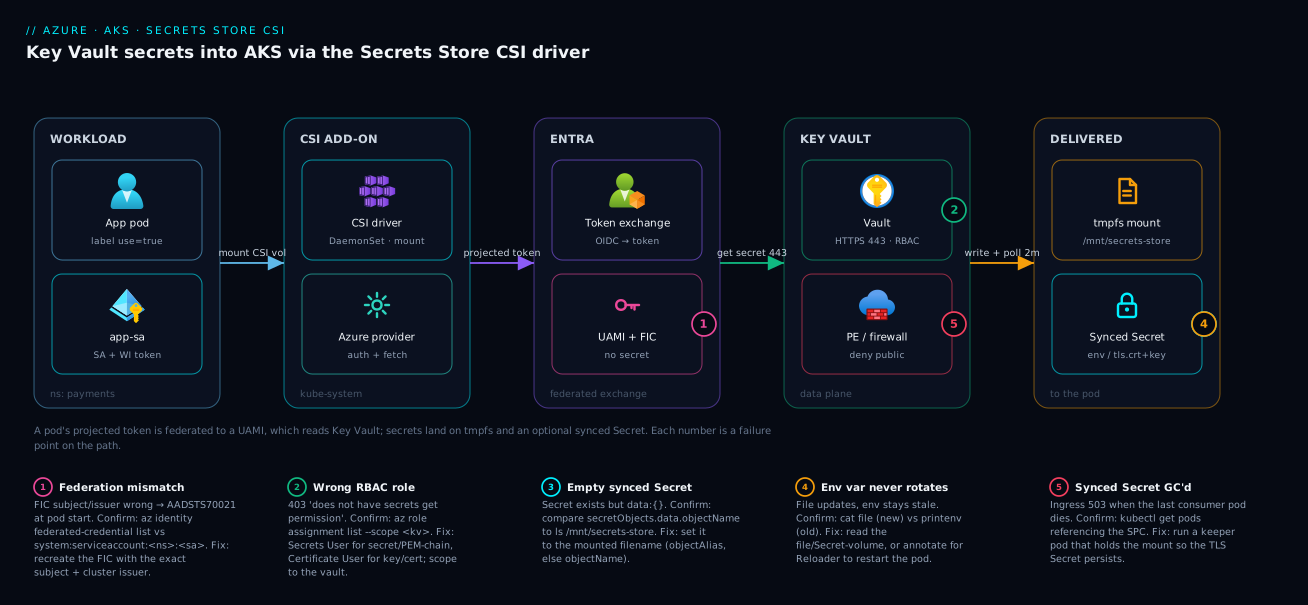
The five badges map to the five things that actually go wrong in production: a federation subject mismatch (AADSTS70021) at the Entra exchange, a wrong RBAC role (403) at the vault, an objectName-vs-filename mismatch that yields an empty synced Secret, an env-var consumer that never sees a rotation, and a garbage-collected synced TLS Secret when the last consuming pod dies. Hold this picture and every later failure mode has a home.
Real-world scenario
A payments platform team ran a 40-node AKS cluster shared by eight product squads. They had standardized early on the add-on’s auto-created managed identity, granting it Key Vault Secrets User on a single shared vault. It worked — and it became a finding in their PCI assessment. Because the credential was node-scoped, every pod on every node could read every secret in the vault. The blast radius of one compromised pod was the entire secret store, and the audit log could not attribute a secret get to a workload, since all reads came from one identity.
The constraint: they could not split into per-team clusters (cost and operational load), nor take a maintenance window long enough to re-platform. They needed per-squad isolation on the existing cluster, with auditable, attributable Key Vault access, and zero downtime.
The fix was a migration to workload identity, one squad at a time. They enabled the OIDC issuer and workload-identity webhook in place (az aks update --enable-oidc-issuer --enable-workload-identity — a control-plane reconcile; pods kept running). Each squad got its own user-assigned identity, its own vault, and a federated credential bound to that squad’s service account:
# Per squad: scope the identity to exactly its service account + its vault
az identity create --name id-squad-payments --resource-group rg-platform
CID=$(az identity show -g rg-platform -n id-squad-payments --query clientId -o tsv)

az role assignment create --role "Key Vault Secrets User" \
  --assignee "$CID" \
  --scope "$(az keyvault show -n kv-squad-payments --query id -o tsv)"

az identity federated-credential create \
  --name fic-payments --identity-name id-squad-payments --resource-group rg-platform \
  --issuer "$AKS_OIDC_ISSUER" \
  --subject system:serviceaccount:payments:payments-sa \
  --audience api://AzureADTokenExchange
The migration was reversible per workload: they kept the add-on identity’s role assignment until each squad’s pods rolled over to the new SPC (usePodIdentity: "false", clientID set to the squad’s identity) and verified mounts, then revoked the shared assignment last. Because rotation was already on, no app-side change was needed on the data path — only the identity backing the mount changed.
What the migration cost and bought, squad by squad:
| Phase | Action | Downtime | Risk | Rollback |
|---|---|---|---|---|
| 0 | Enable OIDC + WI webhook | None | Control-plane reconcile only | Disable flags |
| 1 | Per-squad UAMI + vault + FIC | None | New resources, no traffic yet | Delete the resources |
| 2 | Roll one squad’s pods to new SPC | Rolling, none | Mount could fail → caught in canary | Roll back the Deployment |
| 3 | Verify per-squad vault logs attribute reads | None | Observation only | n/a |
| 4 | Revoke shared add-on identity role last | None | Only after all squads migrated | Re-add the role assignment |
The finding closed: Key Vault diagnostic logs now attributed every SecretGet to a named per-squad identity, and a compromised pod could reach exactly one squad’s secrets. The before/after in numbers:
| Property | Before (shared add-on identity) | After (per-squad Workload ID) |
|---|---|---|
| Identities reading the vault | 1 (node-scoped) | 8 (one per squad) |
| Blast radius of one popped pod | All secrets, all squads | That squad’s secrets only |
| Audit attribution | Unattributable | Per-squad in KV logs |
| Client secrets stored | 0 (already MI) | 0 (federated) |
| Downtime to migrate | n/a | Zero |
Advantages and disadvantages
The honest two-column trade-off:
| Advantages | Disadvantages |
|---|---|
| Secrets never in git or (by default) etcd | Mount coupled to a running pod — no pod, no secret |
| Passwordless: federated, no client secret | Steeper setup than kubectl create secret |
| Per-SA identity → least privilege + audit | Subject-mismatch errors surface only at pod start |
| tmpfs mount: memory-backed, not on disk | Env-var consumers need Reloader to see rotation |
| Auto-rotation pulls new versions on a poll | Rotation lag = poll interval + sync (not instant) |
| First-party AKS add-on, platform-maintained | Synced Secret GC’d when last consumer dies |
| Works for secrets, keys, and TLS certs | RBAC role per object type is non-intuitive |
| Centralized rotation/versioning in Key Vault | Aggressive polling can throttle the vault data plane |
When each side matters: choose the CSI driver whenever you need auditable, attributable, rotatable secret access on a shared cluster — the disadvantages are operational learning curves, not architectural dead-ends. Prefer plain Kubernetes Secrets only for throwaway dev clusters where audit and rotation are non-goals. For env-var-heavy apps where you cannot adopt Reloader, lean on file or mounted-Secret-volume consumption so rotation reaches the app without a restart. Where to use which model:
| Situation | Use | Why |
|---|---|---|
| Multi-squad shared cluster, audit required | Workload ID + CSI | Per-SA attribution and least privilege |
| Single-tenant demo cluster | Add-on identity + CSI (or plain Secret) | Speed over isolation |
| App reads config from files | CSI mounted file | Rotation reaches it on next read |
| App reads config from env vars | CSI sync + Reloader | Restart on rotation |
| Ingress TLS from a rotating cert | CSI sync to kubernetes.io/tls + keeper pod |
Cert propagates, Secret survives GC |
| Crypto operations (sign/verify) | Key Vault SDK directly, not CSI | Provider doesn’t do crypto ops |
Hands-on lab
A copy-pasteable walk-through. It assumes an existing AKS cluster and a Key Vault you can grant RBAC on. Costs are negligible (a UAMI is free; a vault secret is fractions of a paisa per 10k operations).
# 0. Variables
export RESOURCE_GROUP=rg-lab
export CLUSTER_NAME=aks-lab
export KEYVAULT_NAME=kv-lab-$RANDOM
export UAMI=id-lab-secrets
export SA_NAME=demo-sa
export SA_NAMESPACE=demo

# 1. Enable the add-on + Workload ID prerequisites (idempotent)
az aks update -g $RESOURCE_GROUP -n $CLUSTER_NAME \
  --enable-oidc-issuer --enable-workload-identity
az aks enable-addons -g $RESOURCE_GROUP -n $CLUSTER_NAME \
  --addons azure-keyvault-secrets-provider
az aks get-credentials -g $RESOURCE_GROUP -n $CLUSTER_NAME --overwrite-existing

# 2. Create the vault (RBAC mode) and a test secret
az keyvault create -g $RESOURCE_GROUP -n $KEYVAULT_NAME --enable-rbac-authorization true
az role assignment create --role "Key Vault Secrets Officer" \
  --assignee "$(az ad signed-in-user show --query id -o tsv)" \
  --scope "$(az keyvault show -n $KEYVAULT_NAME --query id -o tsv)"
az keyvault secret set --vault-name $KEYVAULT_NAME --name db-connection-string \
  --value "Server=db;Pwd=initial"

# 3. Create the workload identity and grant it READ on the vault
az identity create -g $RESOURCE_GROUP -n $UAMI
export CID=$(az identity show -g $RESOURCE_GROUP -n $UAMI --query clientId -o tsv)
export TID=$(az aks show -g $RESOURCE_GROUP -n $CLUSTER_NAME --query identity.tenantId -o tsv)
az role assignment create --role "Key Vault Secrets User" --assignee "$CID" \
  --scope "$(az keyvault show -n $KEYVAULT_NAME --query id -o tsv)"

# 4. Service account + federated credential
export ISSUER=$(az aks show -g $RESOURCE_GROUP -n $CLUSTER_NAME \
  --query oidcIssuerProfile.issuerUrl -o tsv)
kubectl create namespace $SA_NAMESPACE
kubectl create serviceaccount $SA_NAME -n $SA_NAMESPACE
kubectl annotate serviceaccount $SA_NAME -n $SA_NAMESPACE \
  azure.workload.identity/client-id=$CID
az identity federated-credential create --name fic-lab --identity-name $UAMI \
  -g $RESOURCE_GROUP --issuer "$ISSUER" \
  --subject system:serviceaccount:$SA_NAMESPACE:$SA_NAME \
  --audience api://AzureADTokenExchange
# 5. SecretProviderClass (note clientID, tenantId, and the sync block)
cat <<EOF | kubectl apply -f -
apiVersion: secrets-store.csi.x-k8s.io/v1
kind: SecretProviderClass
metadata:
  name: lab-kv
  namespace: $SA_NAMESPACE
spec:
  provider: azure
  secretObjects:
    - secretName: lab-db
      type: Opaque
      data:
        - objectName: db-connection-string
          key: DB_CONNECTION_STRING
  parameters:
    usePodIdentity: "false"
    clientID: "$CID"
    keyvaultName: "$KEYVAULT_NAME"
    tenantId: "$TID"
    objects: |
      array:
        - |
          objectName: db-connection-string
          objectType: secret
          objectVersion: ""
EOF

# 6. A pod that mounts the volume AND reads the synced Secret as env
cat <<EOF | kubectl apply -f -
apiVersion: v1
kind: Pod
metadata:
  name: demo
  namespace: $SA_NAMESPACE
  labels:
    azure.workload.identity/use: "true"
spec:
  serviceAccountName: $SA_NAME
  containers:
    - name: app
      image: mcr.microsoft.com/azure-cli:latest
      command: ["sleep","3600"]
      env:
        - name: DB_CONNECTION_STRING
          valueFrom:
            secretKeyRef: { name: lab-db, key: DB_CONNECTION_STRING }
      volumeMounts:
        - name: kv
          mountPath: /mnt/secrets-store
          readOnly: true
  volumes:
    - name: kv
      csi:
        driver: secrets-store.csi.k8s.io
        readOnly: true
        volumeAttributes:
          secretProviderClass: "lab-kv"
EOF
# 7. Verify the mount, the synced Secret, and env injection
kubectl wait --for=condition=Ready pod/demo -n $SA_NAMESPACE --timeout=120s
kubectl exec -n $SA_NAMESPACE demo -- ls /mnt/secrets-store/
kubectl exec -n $SA_NAMESPACE demo -- cat /mnt/secrets-store/db-connection-string; echo
kubectl get secret lab-db -n $SA_NAMESPACE -o jsonpath='{.data.DB_CONNECTION_STRING}' | base64 -d; echo
kubectl exec -n $SA_NAMESPACE demo -- printenv DB_CONNECTION_STRING

# 8. Prove rotation reaches the FILE but NOT the env var
az aks addon update -g $RESOURCE_GROUP -n $CLUSTER_NAME \
  --addon azure-keyvault-secrets-provider --enable-secret-rotation
az keyvault secret set --vault-name $KEYVAULT_NAME --name db-connection-string \
  --value "Server=db;Pwd=ROTATED-$(date +%s)"
sleep 150   # ~ one default poll interval + sync slack
kubectl exec -n $SA_NAMESPACE demo -- cat /mnt/secrets-store/db-connection-string; echo  # NEW value
kubectl exec -n $SA_NAMESPACE demo -- printenv DB_CONNECTION_STRING                       # OLD value (snapshot)

# 9. Teardown
kubectl delete namespace $SA_NAMESPACE
az identity federated-credential delete --name fic-lab --identity-name $UAMI -g $RESOURCE_GROUP --yes
az identity delete -g $RESOURCE_GROUP -n $UAMI
az keyvault delete -n $KEYVAULT_NAME -g $RESOURCE_GROUP
az keyvault purge -n $KEYVAULT_NAME   # if purge protection / soft-delete retains it
Expected outputs at each verify step:
| Step | Command | Expected result |
|---|---|---|
| 7 | ls /mnt/secrets-store/ |
db-connection-string |
| 7 | cat .../db-connection-string |
Server=db;Pwd=initial |
| 7 | get secret lab-db ... base64 -d |
Server=db;Pwd=initial |
| 7 | printenv DB_CONNECTION_STRING |
Server=db;Pwd=initial |
| 8 | cat .../db-connection-string (post-rotate) |
Server=db;Pwd=ROTATED-... (NEW) |
| 8 | printenv DB_CONNECTION_STRING (post-rotate) |
Server=db;Pwd=initial (OLD — the lesson) |
Step 8 is the whole point of the lab: the file updates, the env var does not. To make env update too, annotate the Deployment for Reloader and let it restart the pod.
Practice challenges
Work these in order — they escalate from “confirm it installed” to “design a rotating-TLS ingress.” Each assumes the hands-on lab variables (or your own cluster). Try each before expanding its solution.
1. (Beginner) Confirm the add-on and find its moving parts. Enable the add-on on a cluster, then prove the two managed DaemonSets are running and locate the auto-created identity.
<details> <summary>Solution</summary>
az aks enable-addons --addons azure-keyvault-secrets-provider -g $RESOURCE_GROUP -n $CLUSTER_NAME
kubectl get pods -n kube-system \
  -l 'app in (secrets-store-csi-driver,secrets-store-provider-azure)' -o wide
az aks show -g $RESOURCE_GROUP -n $CLUSTER_NAME \
  --query addonProfiles.azureKeyvaultSecretsProvider.identity
Expect one aks-secrets-store-csi-driver-* (3/3) and one aks-secrets-store-provider-azure-* (1/1) per node. Why: the driver mounts, the provider talks to Key Vault; both are DaemonSets, so one of each rides every node.
</details>
2. (Beginner) Read a mounted secret and explain the coupling. With a pod mounting an SPC, list the files under the mount and print one. Then answer: why does deleting the last pod remove the synced Secret too?
<details> <summary>Solution</summary>
kubectl exec -n $SA_NAMESPACE demo -- ls /mnt/secrets-store/
kubectl exec -n $SA_NAMESPACE demo -- cat /mnt/secrets-store/db-connection-string; echo
Why: the mount is the only trigger for a fetch. The synced Secret is created on first mount and garbage-collected when the last mounting pod dies — no consumer, no Secret.
</details>
3. (Intermediate) Sync a mounted file into an env-var-ready Secret. A vault secret api-key is mounted with objectAlias: api-key.txt. Write the secretObjects block that syncs it into a Secret whose key is API_KEY, plus the env snippet that reads it.
<details> <summary>Solution</summary>
secretObjects:
  - secretName: app-api
    type: Opaque
    data:
      - objectName: api-key.txt      # the MOUNTED FILENAME (the alias), not "api-key"
        key: API_KEY
env:
  - name: API_KEY
    valueFrom:
      secretKeyRef:
        name: app-api
        key: API_KEY
Why: secretObjects.data.objectName keys off the mounted filename; because you aliased to api-key.txt, wiring it to api-key yields an empty Secret — the number-one sync trap.
</details>
4. (Intermediate) Make rotation reach a running app without a restart. Pick a consumption pattern so a rotated secret is live without restarting the pod. Which do you choose, which do you avoid, and what is the worst-case lag?
<details> <summary>Solution</summary>
Read the mounted file (or a mounted-Secret volume); avoid the env var. File and Secret-volume contents update in place on the next poll; an env var is a start-time snapshot and never changes. Worst-case lag ≈ one poll interval (default 2m) + the kubelet’s atomic-write sync. Why: env is injected once at container start, so only the file/volume paths are ever re-read. </details>
5. (Advanced) Diagnose a stuck pod. A pod sits in ContainerCreating; kubectl describe pod shows AADSTS70021: No matching federated identity record found. Give the single confirming command and the exact fix.
<details> <summary>Solution</summary>
az identity federated-credential list --identity-name $UAMI -g $RESOURCE_GROUP -o table
Compare its subject byte-for-byte to the pod’s namespace + serviceAccountName: it must equal system:serviceaccount:<ns>:<sa>, and issuer must be the cluster OIDC issuer. Recreate the FIC with the correct subject/issuer. Why: the FIC is only exercised at token exchange (pod start), so a subject typo never surfaces at apply time.
</details>
6. (Advanced) Design a rotating-TLS ingress that survives rollouts. Terminate ingress TLS from a Key Vault certificate that auto-renews, and keep it working across app deployments. Name the object type, the synced Secret type, and the safeguard against garbage collection.
<details> <summary>Solution</summary>
Mount the cert with objectType: secret (full chain + private key), sync into a type: kubernetes.io/tls Secret mapping both tls.crt and tls.key from the one mounted PEM file, enable rotation (--enable-secret-rotation), and run a tiny keeper/pause pod that holds the mount so the synced Secret is never GC’d when app pods roll. Why: cert has no key (handshake fails), and the synced Secret vanishes if no pod mounts the SPC — the keeper pod decouples the Secret’s lifecycle from any single app rollout.
</details>
Common mistakes & troubleshooting
The differentiator. Every failure mode here is one we have actually hit. Read the playbook table top to bottom mid-incident; the prose under it explains the gnarly ones.
| # | Symptom | Root cause | Confirm (exact command/path) | Fix |
|---|---|---|---|---|
| 1 | Pod stuck ContainerCreating |
Volume mount failing for some reason | kubectl describe pod <p> -n <ns> → Events |
Read the event string; jump to the matching row below |
| 2 | Event: No matching federated identity record found / AADSTS70021 |
FIC --subject or issuer mismatch |
az identity federated-credential list --identity-name <uami> -g <rg> |
Recreate FIC with exact system:serviceaccount:<ns>:<sa> and the cluster issuer |
| 3 | Event: does not have secrets get permission (403) |
Wrong/missing Key Vault RBAC | az role assignment list --assignee <cid> --scope <kv-id> |
Assign correct role (Secrets vs Certificate User) at vault scope |
| 4 | Event: Secret not found |
objectName not in the vault (typo/wrong vault) |
az keyvault secret show --vault-name <kv> --name <obj> |
Fix the name or create the object |
| 5 | Synced Secret exists but data: {} (empty) |
secretObjects.data.objectName ≠ mounted filename |
Compare SPC value to kubectl exec ... ls /mnt/secrets-store |
Set it to the alias (or objectName if no alias) |
| 6 | Synced Secret never appears | No pod has mounted the SPC yet | kubectl get secretproviderclasspodstatus -n <ns> |
Deploy a pod that mounts the volume |
| 7 | Synced Secret vanished; ingress 503 | GC’d — last consuming pod deleted | kubectl get pods -n <ns> referencing the SPC |
Run a keeper pod that holds the mount |
| 8 | Rotated value never reaches app | App reads env var (start-time snapshot) | printenv shows old; file shows new |
Use file/Secret-volume consumption, or Reloader to restart |
| 9 | Rotation never updates a mounted file | Rotation disabled, or subPath mount |
az aks show ... config; check subPath in the volume |
Enable rotation; remove subPath |
| 10 | Auth fails despite correct FIC | Pod missing azure.workload.identity/use: "true" |
kubectl get pod <p> -o yaml | grep workload.identity |
Add the label; recreate the pod |
| 11 | clientID ... not found |
SA annotation client-id wrong | kubectl get sa <sa> -n <ns> -o yaml vs az identity show |
Match annotation to the UAMI clientId |
| 12 | 429 Too Many Requests from Key Vault |
Poll interval too short for fleet size | Provider DaemonSet logs; KV ServiceApiHit |
Widen --rotation-poll-interval; split SPCs |
| 13 | TLS Secret empty / ingress handshake fails | objectType: cert (no key) instead of secret |
Inspect SPC objects and synced Secret keys |
Use objectType: secret for full chain + key |
| 14 | SPC apply errors / object silently skipped | Malformed nested objects YAML (- |) |
kubectl get spc <name> -o yaml; re-validate indentation |
Fix the block scalar; one - | per item |
| 15 | Cross-tenant vault AADSTS error |
tenantId is the cluster tenant, not the vault’s |
az keyvault show ... --query properties.tenantId |
Set tenantId to the vault’s resource tenant |
The three that burn the most hours
Subject mismatch (#2). The FIC error appears at pod start, never at apply — because the binding is only exercised when a token is actually exchanged. The subject is case-sensitive and has a fixed shape: system:serviceaccount:<namespace>:<serviceaccount>. Re-read the subject-mismatch table shapes — a _ for a -, a wrong namespace, or a missing system: prefix all produce the identical AADSTS70021. Confirm with az identity federated-credential list and compare byte-for-byte to your pod’s serviceAccountName and namespace.
Empty synced Secret (#5). You apply the SPC, the pod runs, the file is on the mount — but kubectl get secret app-db -o jsonpath='{.data}' returns {}. The cause is almost always that secretObjects.data.objectName was set to the Key Vault object name when it must be the mounted filename. If you set objectAlias: tls-app.pem, the file is tls-app.pem and the sync must reference tls-app.pem, not tls-app. Trace the mapping chain: vault name → objectName → objectAlias → mounted filename → secretObjects.data.objectName.
Env-var staleness (#8). Everything looks healthy — the vault has the new value, the file has the new value, the synced Secret has the new value — yet the app behaves on the old credential. Environment variables are injected once at container start and never change. Confirm by comparing cat /mnt/secrets-store/<file> (new) to printenv <VAR> (old). The fix is structural: read from the file or a mounted Secret volume, or annotate the workload for Reloader so a rotation triggers a rolling restart.
Best practices
- Prefer Workload ID over the add-on identity on any shared cluster. Per-SA identities give you least privilege and per-workload audit attribution; the node-scoped add-on identity gives you neither.
- Grant the minimum RBAC role for the object type —
Secrets Userfor secrets/PEM chains,Certificate Userfor keys/certs. Never reach for Administrator on a mount identity. - Scope role assignments to the vault (or the individual secret), not the subscription. Tighten to per-secret scope where the platform supports it.
- Leave
objectVersion: ""so rotation pulls the latest; pin a version only for a deliberate compliance freeze. - Consume secrets as files or mounted-Secret volumes when you can, so rotation reaches the app without a restart. Reserve env vars for values that genuinely never rotate, or front them with Reloader.
- Never mount via
subPathif you want updates — kubelet will not refresh asubPath-mounted Secret/ConfigMap. - Run a keeper pod for any synced Secret an ingress controller or other long-lived consumer depends on, so the driver’s GC never pulls it out from under them.
- Set the poll interval deliberately — match it to your rotation SLA and fleet size, and watch Key Vault throttling at the tight end.
- Keep
objectsarrays small per SPC — split by concern so a single poll does not fetch a huge object set, and so one bad object does not block a whole mount. - Treat a failed mount as a pod-start failure in your readiness design — alert on
ContainerCreatingthat does not clear within a minute. - Enable Key Vault diagnostic logs and verify per-identity attribution after any identity migration.
- Version-control the SPC and IaC together with the identity and role assignment, so the whole chain deploys and reviews as one unit (see Terraform module for Azure Key Vault).
Security notes
The CSI driver’s security value is that secret material never touches git, never (by default) touches etcd, and lands only on a memory-backed tmpfs mount — but you still have to wire identity and network correctly. The controls that matter, with the setting that enforces each:
| Control | Why it matters | How to enforce | Verify |
|---|---|---|---|
| Per-SA Workload ID | Least privilege, audit attribution | UAMI + FIC per service account | Vault logs show per-SA SecretGet |
| Minimal RBAC role | Limits what a popped pod can read | Secrets/Certificate User at vault scope |
az role assignment list --scope <kv> |
| No K8s sync unless needed | Keeps secrets out of etcd | Omit secretObjects for file-only apps |
kubectl get secret shows none synced |
| tmpfs mount | Secrets never written to node disk | Default behaviour of the driver | Mount is memory-backed |
| Vault firewall / Private Endpoint | Vault not reachable from the internet | KV network rules + PE to the cluster subnet | az keyvault show ... networkAcls |
| Soft-delete + purge protection | Recover a deleted/rotated secret | Vault properties | az keyvault show ... enableSoftDelete |
| Pod label gating | Only intended pods get a token | azure.workload.identity/use: "true" |
Absent label → no token projected |
| Read-only mount | Pod cannot tamper with secrets | readOnly: true on the volume |
Write attempts fail |
Network isolation deserves emphasis: put the vault behind a Private Endpoint into the cluster’s subnet and set networkAcls to deny public traffic, so even a leaked identity cannot reach the vault from outside your network. Combine with Entra managed identities and federated credentials hardening — short-lived federated tokens with no stored secret are the baseline, and Conditional Access on the workload identity raises the bar further. The least-privilege ladder, from worst to best:
| Posture | Identity | Scope | Verdict |
|---|---|---|---|
| Worst | Add-on identity, shared | Whole vault | Unattributable, max blast radius |
| Better | Per-SA UAMI | Whole vault | Attributable, still broad |
| Good | Per-SA UAMI | Per-secret scope | Least privilege per workload |
| Best | Per-SA UAMI + PE-only vault + CA | Per-secret scope | Network + identity + policy defence-in-depth |
Cost & sizing
The CSI driver itself is free — it is a first-party add-on with no licence cost. What you pay for is Key Vault operations and a trivial amount of node resource for the DaemonSets. The cost drivers and rough figures (INR at ~₹84/USD, indicative):
| Cost driver | Unit | Rough cost | Notes |
|---|---|---|---|
| Secrets Store CSI add-on | per cluster | ₹0 (free) | First-party AKS add-on |
| Key Vault operations | per 10,000 transactions | ~₹2.5 (~$0.03) | Each poll fetches each object = transactions |
| Key Vault (Standard tier) | per vault | no base fee; pay per op | Premium adds HSM-backed keys |
| Key Vault (Premium HSM) | per HSM key/month | ~₹85 (~$1) + ops | Only if you need HSM-backed keys |
| UAMI | per identity | ₹0 (free) | No charge for managed identities |
| DaemonSet CPU/memory | per node | negligible | Tiny footprint per node |
| NAT/Private Endpoint (optional) | per endpoint/hour | ~₹0.8/hr (~$0.01) | If you isolate the vault network |
The variable that actually moves the bill is poll frequency × object count × pod count, because each poll fetches each object as a billable transaction. A worked example:
| Scenario | Pods | Objects/SPC | Poll interval | Transactions/day | Rough cost/day |
|---|---|---|---|---|---|
| Small app | 3 | 2 | 2m | ~12,960 | ~₹3 |
| Medium fleet | 50 | 3 | 2m | ~324,000 | ~₹81 |
| Large fleet, tight poll | 200 | 4 | 30s | ~6.9M | ~₹1,725 |
| Large fleet, relaxed poll | 200 | 4 | 5m | ~691,200 | ~₹173 |
The right-sizing levers, in order of impact: widen the poll interval to your real rotation SLA (a 5m interval is 2.5× cheaper than 2m and usually fine), pin rarely-changing objects to a version so they are not re-fetched every poll, and split SPCs so unrelated objects do not all poll on the same cadence. The Standard tier has no base fee; reach for Premium only when you genuinely need HSM-backed keys. There is no free-tier limit to worry about here — the per-transaction cost is small, and the failure mode at the high end is throttling (429), not a surprise invoice.
Going deeper: the observability surface and rotation internals
The learning objectives promise the driver’s Prometheus metrics — here is that surface, plus the one CRD that tells you whether a fetch even ran. This is the layer you reach for when a mount “works” but you need to prove rotation is happening, or find out why it is not.
The per-pod fetch status. Every mount produces a SecretProviderClassPodStatus object — the ground truth for “did the provider actually fetch, and what?” If it is missing, the fetch never ran (usually the pod never mounted, or the webhook never fired):
kubectl get secretproviderclasspodstatus -n payments
kubectl get secretproviderclasspodstatus -n payments \
  -o jsonpath='{.items[0].status.objects}'; echo
# representative
NAME                           AGE
payments-api-payments-app-kv   4m
# objects: [{"id":"secret/db-connection-string","version":"...b1"}]
Driver metrics. The Secrets Store CSI driver exposes a Prometheus /metrics endpoint (default port 8095) covering mounts, syncs, and — the ones this article cares about — rotation reconciles. Port-forward a driver pod and scrape it:
POD=$(kubectl get pod -n kube-system -l app=secrets-store-csi-driver \
  -o jsonpath='{.items[0].metadata.name}')
kubectl port-forward -n kube-system "$POD" 8095:8095 &
curl -s localhost:8095/metrics | grep -E 'rotation_reconcile|sync_k8s_secret|node_publish'
# representative output
total_node_publish{...} 128
total_node_publish_error{...} 2
total_sync_k8s_secret{...} 41
total_rotation_reconcile{...} 350
total_rotation_reconcile_error{...} 0
The metrics that answer real questions:
| Metric | Type | Answers |
|---|---|---|
total_node_publish / _error |
counter | Are mounts succeeding, and how often do they fail? |
total_sync_k8s_secret |
counter | Is the secretObjects sync actually running? |
total_rotation_reconcile / _error |
counter | Is the rotation poll firing, and is it erroring? |
rotation_reconcile_duration_sec |
histogram | How long a reconcile takes (throttling shows up here) |
sync_k8s_secret_duration_sec |
histogram | Sync latency into the K8s Secret |
A climbing total_rotation_reconcile_error, or a rotation_reconcile_duration_sec that balloons, is your early warning for Key Vault throttling (429) before it becomes a stale-secret incident — pair it with the vault’s own ServiceApiHit metric. The Azure provider process exposes its own metrics too (notably a keyvault_request histogram of vault-call latency) on a separate endpoint; scrape it the same way against a secrets-store-provider-azure pod. In production, collect these with the same stack you use for the rest of the platform (see Kubernetes monitoring with Prometheus and Grafana) and alert on the two error counters plus the mount-error rate.
Interview & exam questions
Q1. Why does the add-on always create a managed identity even when you intend to use Workload ID?
The add-on provisions a user-assigned managed identity in the node resource group and assigns it to the VMSS as part of installation; you cannot suppress it. You simply do not use it — your SPC points at a different workload identity via clientID and usePodIdentity: "false". Maps to AZ-500/CKS identity topics.
Q2. A pod is stuck in ContainerCreating with AADSTS70021. What is wrong and how do you confirm?
The federated credential’s subject (or issuer) does not match the pod’s system:serviceaccount:<ns>:<sa> and the cluster OIDC issuer. Confirm with az identity federated-credential list and compare to the pod’s namespace and serviceAccountName. The error appears at pod start, not at apply.
Q3. You mount an objectType: secret against a Key Vault certificate. What do you get, and what RBAC role is required?
You get the full PEM chain plus the private key (the cert’s secret backing), which requires Key Vault Secrets User. By contrast, key/cert object types go through the certificate path and need Key Vault Certificate User.
Q4. The synced Kubernetes Secret exists but is empty. Most likely cause?
secretObjects.data.objectName was set to the Key Vault object name instead of the mounted filename. If an objectAlias is set, the filename is the alias and the sync must reference it. Fix the mapping.
Q5. You rotate a secret in Key Vault. The mounted file updates but the app keeps using the old value. Why? The app reads the secret as an environment variable, which is a snapshot taken at container start and never changes. Switch to file or mounted-Secret-volume consumption, or use Reloader to restart the pod on Secret change.
Q6. Why does a subPath-mounted Secret not pick up rotation?
It is a kubelet limitation: subPath volume mounts do not receive in-place updates. Mount the whole volume instead of a subPath.
Q7. What happens to the synced Secret when the last pod consuming it is deleted, and why does it matter for ingress?
The driver garbage-collects it. An ingress controller depending on a synced kubernetes.io/tls Secret will lose its cert and start failing. Run a keeper pod that holds the mount so the Secret persists.
Q8. Where do secrets land on the node, and what is the significance for etcd?
On a tmpfs (memory-backed) mount, not on disk. Unless you opt into the K8s sync via secretObjects, nothing is written to etcd — which is the security win over plain Kubernetes Secrets.
Q9. How do you make an env-var-consuming app pick up rotation automatically?
You cannot change a running container’s env. Annotate the workload with reloader.stakater.com/auto: "true" (running Reloader) so a change to the synced Secret triggers a rolling restart that re-injects the new value.
Q10. Your fleet started getting 429 from Key Vault after enabling rotation. What changed and how do you fix it?
Each poll fetches each object as a transaction; a short poll interval across many pods/objects exceeds the data-plane request limit. Widen --rotation-poll-interval, split SPCs, and pin rarely-changing objects to reduce per-poll fetches.
Q11. Which two SPC parameters signal Workload ID specifically, and what value must each take?
usePodIdentity: "false" and clientID set to the workload identity’s clientId (a string). That combination tells the provider to use the projected service-account token.
Q12. Why is the CSI mount fundamentally pull-based, and what is the operational consequence? The provider only fetches at mount time (and on rotation polls). The consequence: a secret’s availability is coupled to a running pod and a working identity — no pod means no Secret, and a bad identity means the pod never starts.
Quick check
- You want rotation to reach your app without a restart. Which consumption pattern do you choose, and which one do you avoid?
- Your federated credential
--subjectreadssystem:serviceaccount:payments. What error will you see and when? - You mount
objectType: certand your ingress TLS handshake fails. What did you do wrong? - The synced Secret is empty though the file is present on the mount. What single field is misconfigured?
- An ingress controller’s TLS Secret disappeared after a deploy. What lifecycle behaviour caused it and what is the fix?
Answers
- Read from the mounted file or a mounted-Secret volume (both update in place on the next poll); avoid env vars, which are a start-time snapshot and never change in a running container.
AADSTS70021: No matching federated identity record found, at pod start (not ataz/applytime) — the subject is missing the SA-name segment; it must besystem:serviceaccount:payments:<sa>.- You used
objectType: cert, which returns the certificate only with no private key, so there is notls.key. UseobjectType: secretagainst the cert to get the full PEM chain plus key. secretObjects.data.objectName— it must equal the mounted filename (theobjectAliasif set, otherwiseobjectName), not the Key Vault object name.- The synced Secret is garbage-collected when the last consuming pod is deleted. During the deploy all consuming pods rolled out and the Secret vanished. Run a keeper pod that holds the SPC mount so the Secret persists across rollouts.
Glossary
- Secrets Store CSI Driver — A Kubernetes CSI driver that mounts external secret stores (here, Key Vault) as files on a volume.
- Azure provider — The plugin (
secrets-store-provider-azure) that authenticates to and fetches from Key Vault on the driver’s behalf. SecretProviderClass(SPC) — A namespaced CRD describing which vault, identity, and objects to fetch, plus an optional sync block.- Workload Identity (Entra Workload ID) — Federated identity binding a Kubernetes service account to a managed identity with no stored client secret.
- User-assigned managed identity (UAMI) — A standalone Azure identity you create, grant RBAC, and federate to a service account.
- Federated identity credential (FIC) — The trust object on a UAMI specifying the OIDC
issuer,subject, andaudiencethat may assume it. - OIDC issuer — The cluster’s token-issuing endpoint URL; the
issuervalue in the FIC. - Workload-identity webhook — The mutating admission webhook that projects the OIDC token and
AZURE_*env into labelled pods. secretObjects— The SPC block that mirrors mounted objects into a native KubernetesSecret.objectAlias— The SPC field that renames the mounted file; the sync and any file consumer key off this name.- Poll interval — How often the driver checks the vault for changes when rotation is enabled (default 2 minutes).
- tmpfs — A memory-backed filesystem; where mounted secret material lives, so it never hits node disk or etcd.
- Reloader — A controller that watches Secrets/ConfigMaps and triggers a rolling restart on change, used to refresh env-var consumers.
subPath— A volume-mount option that pins a single file/sub-directory; notably does not receive in-place updates.- Garbage collection (driver) — The driver’s removal of a synced Secret once the last consuming pod is deleted.
- CSI (Container Storage Interface) — The standard Kubernetes plugin interface for storage volumes, extended here to mount secret material; the “CSI” in the driver’s name.
- DaemonSet — A workload that runs exactly one pod on every node; both the driver and the Azure provider ship this way so any pod on any node can mount.
- CRD (Custom Resource Definition) — A mechanism that teaches Kubernetes a new object kind;
SecretProviderClassis a CRD the add-on installs. - Service account (Kubernetes) — The in-cluster identity a pod runs as; here it is federated to an Azure managed identity so the pod can reach Key Vault.
- RBAC (role-based access control) — A permission model granting an identity specific actions on specific resources; used both in Kubernetes and on the Key Vault data plane.
- etcd — The cluster’s backing database, where Kubernetes objects (including
Secrets) are stored; a file-only CSI mount keeps secret material out of it. - base64 — A reversible text encoding (not encryption) used for
Secretvalues; decodable by anyone who can read the Secret.
Next steps
- Azure Key Vault with Workload Identity for secretless secrets — the auth pattern this article builds on, in depth.
- Azure Key Vault secret rotation with managed identity — the vault-side rotation events the driver consumes.
- Kubernetes ingress controllers, TLS and routing deep dive — where the Key Vault TLS-cert pattern lands in production.
- Entra managed identities deep dive: user-assigned, FIC, RBAC — hardening the identity that backs every mount.
- Kubernetes troubleshooting methodology: pods, nodes, networking, storage, RBAC — the fallback when a mount fails in ways the add-on cannot explain.