In a nutshell
Imagine you run a coffee shop with one barista. Orders pile up because each drink is made start-to-finish before the next begins — even though three espresso machines sit idle. Concurrency is hiring three more baristas so four drinks are made at once. But now they share one milk fridge, one till, one order screen — and if two baristas grab the last carton of milk at the same instant, something breaks. That is the whole subject of this lesson: run many things at once to finish sooner, without two of them corrupting the one thing they share.
A shell script that runs commands one after another uses a single CPU core while the other 7 (or 63) sit idle. When you have 1,000 files to compress, 50 endpoints to poll, or 100 services to deploy, serial execution can turn seconds of real work into hours of waiting. The fix is to fan the work out across cores — but capped at N at a time (a “pool”), not all at once, or you fork-bomb the machine.
The two dangers, and their fixes, are the entire story:
- Too many at once → bound concurrency with a pool:
xargs -P N,parallel -j N, a background-job pool that drains withwait -n, or a FIFO used as a counting semaphore. - Sharing one resource (a file, a counter, a lock) → serialize the touchy part with
flockor an atomic operation, so only one worker is inside it at a time.
Get those two right and everything else is detail.
Level: Advanced · Time: ~40 min · You’ll need: comfort with background jobs & wait (Process Management), pipes & pipefail (Pipes & Pipelines), file descriptors & redirection (I/O Redirection), and the set -Eeuo pipefail habit (Defensive Scripting).
After this lesson you’ll be able to:
- Turn a serial loop over a list into a bounded-parallel one with
xargs -P(and know when to reach for GNUparallelinstead). - Build a job pool from background jobs +
wait -n, and a counting semaphore from a FIFO, when you need finer control thanxargsgives. - Use
flockfor single-instance scripts and to serialize writes to a shared file — blocking, non-blocking (-n), and with a timeout (-w). - Spot and fix the classic race conditions: TOCTOU, interleaved writes, lost counter updates, and stale lock files.
- Know exactly which constructs are Linux/GNU-only (
parallel,flock,nproc,wait -n,readarray) and how to degrade gracefully on macOS/BSD.
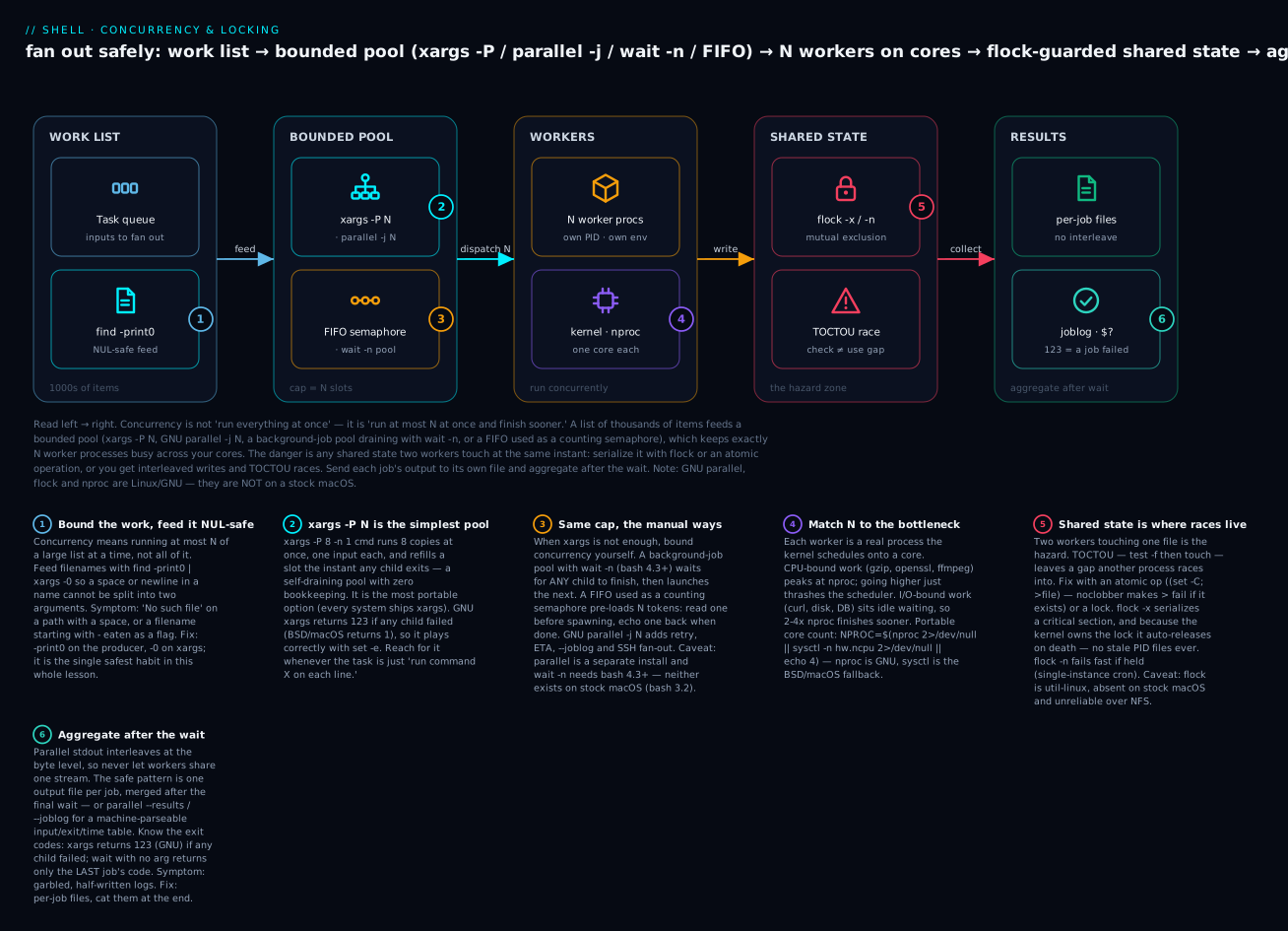
Read it left to right: a big work list feeds a bounded pool (xargs -P, parallel -j, a wait -n job pool, or a FIFO semaphore) that keeps exactly N worker processes busy across your cores; the moment two workers touch shared state you serialize it with flock or an atomic op, then aggregate each job’s own output file after the wait.
Most shell scripts run sequentially: one command, then the next. That’s fine until you’re processing 1,000 files, hitting 50 endpoints, or fanning out across 30 nodes. Suddenly serial execution means waiting hours when the CPU is at 8% utilisation.
Real concurrency in shell isn’t hard, but it has sharp edges:
- Backgrounding (
&) withwait— the bare-metal primitive. xargs -P N— the simplest job pool; one command per input line, N concurrent.- GNU
parallel— declarative parallelism with progress, retry, and structured output. - FIFOs (
mkfifo) — named pipes for IPC between long-running processes. flock— kernel-level mutual exclusion to serialise access to shared resources.
We covered the basics of &/wait in L9. This lesson goes deep, builds patterns you’ll actually use in production, and covers the race conditions to avoid.
By the end you’ll be able to run 100 deploys in parallel safely, monitor them, recover from partial failures, and never accidentally clobber a shared file.
1. Backgrounding refresher: & and wait
cmd &              # start cmd, return immediately, $! is its PID
wait               # wait for ALL background jobs
wait $PID          # wait for one specific PID
wait -n            # wait for ANY background job to finish (bash 4.3+)
#!/usr/bin/env bash
# Run three jobs in parallel, wait for all
do_thing 1 &
do_thing 2 &
do_thing 3 &
wait
echo "all done"
The exit code of wait is the exit code of the last job (with no PID arg) or of that job (with PID). To capture per-job:
do_thing 1 & PID1=$!
do_thing 2 & PID2=$!
do_thing 3 & PID3=$!

wait $PID1; RC1=$?
wait $PID2; RC2=$?
wait $PID3; RC3=$?

echo "results: $RC1 $RC2 $RC3"
This works for a known small number of jobs. For arbitrary counts, you need a job pool.
Job pool: bounded parallelism with wait -n
#!/usr/bin/env bash
set -Eeuo pipefail

MAX_JOBS=${MAX_JOBS:-4}
JOBS=()

for input in input1 input2 input3 input4 input5 input6 input7 input8 input9 input10; do
  # If we've reached the cap, wait for any one to finish first
  while (( ${#JOBS[@]} >= MAX_JOBS )); do
    wait -n     # wait for ANY background to finish
    # Rebuild JOBS — only PIDs still alive
    NEW=()
    for pid in "${JOBS[@]}"; do
      kill -0 "$pid" 2>/dev/null && NEW+=("$pid")
    done
    JOBS=("${NEW[@]}")
  done

  do_thing "$input" &
  JOBS+=($!)
done

wait    # wait for the last batch
This caps concurrency at MAX_JOBS. For most use cases, xargs -P does this more cleanly.
wait -n exit code (bash 4.3+)
After wait -n returns, $? is the exit code of the job that finished. To loop until all are done while monitoring:
JOBS=()
for input in "${INPUTS[@]}"; do
  worker "$input" &
  JOBS+=($!)
done

FAILURES=0
while (( ${#JOBS[@]} > 0 )); do
  wait -n
  rc=$?
  (( rc != 0 )) && ((FAILURES++))
  # Note: bash doesn't tell us WHICH job — we'd need to track manually.
done
echo "$FAILURES failures"
If you need per-job exit codes, track PIDs and wait $PID individually. For “all-or-nothing” semantics, wait (no args) at the end and check the global exit.
2. xargs -P N — the simplest job pool
The cleanest way to run a bounded-parallel set of commands over a list:
# Run gzip on every .log file, 8 in parallel
find /var/log -name '*.log' -print0 | xargs -0 -P 8 -n 1 gzip
Flags:
-P N— run N processes concurrently.-n 1— pass 1 argument per command (so each gzip handles one file).-0— input is NUL-separated (paired withfind -print0).-I {}— substitute{}in the command line (lets you put the arg somewhere other than the end).
# Custom command shape — pass each filename as $1 to a function call
printf '%s\n' "${FILES[@]}" | xargs -I {} -P 4 -n 1 bash -c 'process "$@"' _ {}
The trick bash -c '...' _ {} is: bash -c runs the script, the _ is $0, and {} becomes $1. Then process "$@" calls your function with the filename.
Number of cores
# Use all available cores
NPROC=$(nproc 2>/dev/null || sysctl -n hw.ncpu 2>/dev/null || echo 4)

# Then:
xargs -P "$NPROC" -n 1 ...
For I/O-bound work (network calls, disk I/O), you can usefully set this to 2-4x cores. For CPU-bound (compression, encryption), stay at nproc.
Capturing output safely
When parallel commands write to stdout, lines can interleave. Best practice: have each one write to its own file, merge at the end.
mkdir -p /tmp/joblogs
find . -name '*.log' -print0 | xargs -0 -P 8 -n 1 -I {} \
  bash -c 'gzip --keep "{}" 2>"/tmp/joblogs/$(basename "{}").err"'
cat /tmp/joblogs/*.err          # merge afterwards
Or use xargs --process-slot-var:
xargs -P 4 -n 1 -I {} --process-slot-var=SLOT \
  bash -c 'echo "slot=$SLOT processing {}"' \
  < input.txt
SLOT becomes 0…3, letting each worker write to its own log file or use its own port etc. This is GNU-only but useful.
xargs -P exit code semantics
xargs exits with:
- 0 if everything succeeded
- 123 if any command exited 1-125
- 124 if any died on signal
- 125 if xargs itself failed
- 126 if a command couldn’t be executed
So xargs -P correctly fails if any subprocess fails. Good for use with set -e. (Those codes are GNU xargs; BSD/macOS xargs collapses any child failure to plain 1, so test [ $? -ne 0 ] rather than hard-coding 123 if the script must run on both.)
3. GNU parallel — declarative parallelism
xargs -P is fine for “run this command on every input.” parallel is for everything more elaborate: progress bars, retries, ETA, structured output, multi-input combinations.
brew install parallel        # macOS
sudo apt install parallel    # Debian/Ubuntu
Portability flag: GNU
parallelis a separate package, not part of coreutils — it is not present on a stock macOS or a minimal Linux image. Everything in this section is the Linux/GNU form; if you can’t guaranteeparallelis installed, fall back to the portablexargs -Pfrom §2, or gate the fast path behindcommand -v parallel.
Basic equivalent to xargs -P
# All three are equivalent
ls *.log | xargs -P 8 -n 1 gzip
ls *.log | parallel -j 8 gzip
parallel -j 8 gzip ::: *.log
::: is parallel’s syntax for inline argument lists. -j N is the parallelism degree.
Templated commands
parallel -j 4 'curl -sL https://api.example.com/{} -o {}.json' ::: alice bob carol dave
The {} is each input. parallel also supports:
{1},{2}, … — positional from multiple input lists{.}— input with extension stripped{/}— basename only{//}— dirname only{#}— job number
# Compress, naming output by job number
parallel -j 4 'gzip -c {} > {.}.{#}.gz' ::: file*.log
Multiple input lists
parallel -j 8 'echo {1} {2}' ::: a b c ::: 1 2 3
# a 1
# a 2
# a 3
# b 1
# ...
Cartesian product of inputs by default. Use --xapply (or :::+) for paired:
parallel -j 8 --xapply 'echo {1} {2}' ::: a b c ::: 1 2 3
# a 1
# b 2
# c 3
Progress bar and ETA
parallel --bar 'process {}' ::: input1 input2 input3 ...
parallel --eta 'process {}' ::: input1 input2 input3 ...
Both show live progress. Useful for long-running batches.
Retry on failure
parallel --retries 3 'curl https://api.example.com/{}' ::: $(seq 1 1000)
Each command retries up to 3 times if it fails. Combined with --joblog:
parallel --joblog jobs.log --retries 3 'curl ...' ::: ...
You get a log of every job: input, exit code, time, retries.
Result aggregation with --results
parallel --results /tmp/jobout 'curl https://api.example.com/{}' ::: 1 2 3
Each job’s stdout/stderr go to /tmp/jobout/1/..., organized by argument. No interleaving.
Limit memory and CPU
parallel --memfree 1G 'big_cmd {}' ::: ...      # only run new jobs while >1G free
parallel --load 80% 'big_cmd {}' ::: ...        # only while CPU load <80%
Distribute across machines
parallel can SSH to remote machines and run jobs there:
parallel -S host1,host2,host3 -j 4 'process {}' ::: ...
-j 4 is per-host concurrency. This is genuinely impressive for distributed work without any framework — but you need passwordless SSH set up.
parallel vs xargs -P summary
Use xargs -P when:
- The task is “run command X on each line of input.”
- You don’t need progress, retry, or per-job logs.
- You want maximum portability (xargs is on every system).
Use parallel when:
- You need progress, retry, joblog, ETA.
- You have multiple input lists to combine.
- You’re doing distributed work via SSH.
- Output needs to be aggregated cleanly.
Both have their place.
4. FIFOs — named pipes for IPC
A FIFO is a “named pipe” — a filesystem entry that acts as a pipe. Two unrelated processes can communicate through it.
Basics
mkfifo /tmp/myfifo

# Process A: writes
echo "hello from A" > /tmp/myfifo &

# Process B: reads
cat /tmp/myfifo
# hello from A
The write blocks until something opens the FIFO for reading; the read blocks until something writes. This is synchronous IPC.
Use case: background producer + consumer
#!/usr/bin/env bash
set -Eeuo pipefail

FIFO=$(mktemp -u /tmp/myfifo.XXXXXX)
mkfifo "$FIFO"
trap 'rm -f "$FIFO"' EXIT

# Producer in background
(
  for i in {1..10}; do
    sleep 0.1
    echo "msg $i"
  done > "$FIFO"
) &

# Consumer in foreground
while IFS= read -r line; do
  echo "got: $line"
done < "$FIFO"

wait
This pattern lets you set up a producer/consumer pipeline where the producer’s output is processed line-by-line by the consumer in the same shell context. With anonymous pipes (|), the right side runs in a subshell and can’t easily update parent variables.
A worker pool with FIFOs
#!/usr/bin/env bash
set -Eeuo pipefail

NUM_WORKERS=${NUM_WORKERS:-4}
FIFO=$(mktemp -u /tmp/workers.XXXXXX)
mkfifo "$FIFO"
trap 'rm -f "$FIFO"' EXIT

# Open the FIFO twice (read+write) so it doesn't close
exec 3<>"$FIFO"

# Pre-fill with NUM_WORKERS tokens
for ((i=0; i<NUM_WORKERS; i++)); do
  echo >&3
done

worker() {
  local item=$1
  process "$item"          # the actual work
  echo >&3                 # return token after we're done
}

for item in "${ITEMS[@]}"; do
  read -u 3                 # consume a token (blocks if none)
  worker "$item" &
done
wait
exec 3>&-                   # close FD 3
This is a classic “semaphore via FIFO” pattern. The FIFO acts as a counting semaphore: tokens limit concurrency to NUM_WORKERS.
xargs -P does this internally and more cleanly. The FIFO version is useful when you need finer control (e.g., variable-cost jobs, weighted slots).
5. flock — cross-process mutual exclusion
When multiple invocations of a script (cron jobs, signal handlers, manual runs) might collide, you need a lock. We saw flock briefly in L10. Here’s the full pattern.
Portability flag:
flockis part of util-linux — present on essentially every Linux box, but absent on a stock macOS (brew install flockadds it) and unreliable over NFS. The patterns below are the Linux form; for cross-host or NFS locking use the atomicmkdir/lntechniques from Going deeper instead.
Single-instance script
#!/usr/bin/env bash
set -Eeuo pipefail

LOCKFILE=/var/run/myscript.lock

# Acquire exclusive lock on FD 200; fail if already locked
exec 200>"$LOCKFILE"
flock -n 200 || { echo "another instance is running" >&2; exit 1; }

# ... rest of script ...
flock -n is non-blocking — it fails immediately if the lock is held. flock (no -n) blocks until acquired.
The lock auto-releases when the process exits (even on SIGKILL), because the kernel releases all FDs. No explicit unlock needed.
Locking a region of work
{
  flock 200
  critical_section
} 200>"$LOCKFILE"
The block in { ... } 200>FILE opens FD 200 and runs flock 200 to acquire. When the block exits, FD 200 is closed and the lock released. Useful when only part of a script is sensitive.
Self-locking script (one-liner)
#!/usr/bin/env bash
set -Eeuo pipefail
exec 200>"/var/run/${0##*/}.lock"
flock -n 200 || exit 0       # silently exit if locked

# ... rest ...
Combined with cron, this gives you “run every minute, but skip if previous run is still going” semantics.
flock shared vs exclusive
flock -s 200    # shared (multiple readers OK)
flock -x 200    # exclusive (default; only one)
For database-style “many readers, one writer” patterns. Most scripts just want exclusive.
Timeout on flock acquisition
flock -w 30 200 || die "could not acquire lock after 30s"
Useful when “wait but don’t wait forever” is the right behaviour.
6. Race conditions to avoid
TOCTOU — Time-Of-Check, Time-Of-Use
The classic shell race:
if [[ ! -f "$FILE" ]]; then
  touch "$FILE"
fi
Between the [[ -f ]] test and the touch, another process can create the file. Then both processes proceed, possibly clobbering. The fix is to use atomic operations:
# Atomic create-if-not-exists
( set -C; echo "$$" > "$FILE" ) 2>/dev/null && IS_CREATOR=1 || IS_CREATOR=0
set -C (noclobber) makes > fail if the file exists. The whole thing is atomic at the kernel level: the file either exists or is created by this process. No race.
Or use flock — acquire the lock before checking, so no one else can race.
Concurrent writes to the same file
# Three jobs in parallel all writing to log.txt — lines interleave at byte level
job1 >> log.txt &
job2 >> log.txt &
job3 >> log.txt &
For small writes (under PIPE_BUF, typically 4KB), append (>>) is atomic on Linux. For larger writes, lines can split. Prefer:
# Each job writes to its own file
job1 > log.1 &
job2 > log.2 &
job3 > log.3 &
wait
cat log.1 log.2 log.3 > log.txt
Or use flock to serialise:
log() { ( flock 200; printf '%s\n' "$*" >> log.txt ) 200>log.lock; }
Stale lock files (the cleanup problem)
If a process crashes without cleanup, its lock file may remain:
LOCKFILE=/var/run/myscript.lock
[[ -f "$LOCKFILE" ]] && exit 1     # WRONG — stale lock blocks forever
The right answer is flock: kernel-managed locks auto-release on process death. No PID files, no staleness, no manual cleanup.
exec 200>"$LOCKFILE"
flock -n 200 || exit 1
# lock is held by THIS process; releases when this process exits, no matter how
This is why every modern shell script that needs single-instance uses flock, not “PID file checks.”
Subshell variable scoping
COUNT=0
{ for i in {1..100}; do ((COUNT++)); done; } &
wait
echo "$COUNT"          # still 0 — subshell ran in its own COUNT
We covered this in L4. Subshells don’t propagate variables back. For accumulation across parallel work, use a file:
echo 0 > /tmp/count
for i in {1..100}; do
  ( count=$(< /tmp/count); echo $((count + 1)) > /tmp/count ) &      # WRONG — race!
done
wait
Even this has a TOCTOU race. Use flock to serialise the read-modify-write:
LOCK=/tmp/count.lock
COUNTFILE=/tmp/count
echo 0 > "$COUNTFILE"

increment() {
  ( flock 200; echo $(( $(< "$COUNTFILE") + 1 )) > "$COUNTFILE" ) 200>"$LOCK"
}

for i in {1..100}; do
  increment &
done
wait
echo "count: $(< $COUNTFILE)"
Or accept the limitation and accumulate after-the-fact:
{ for i in {1..100}; do echo "$i"; done > items; }
parallel -j 4 do_thing :::: items > results
total=$(wc -l < results)
For most scripts, “do work in parallel, write results to per-job files, aggregate after” is the simplest and safest pattern.
7. A complete parallel deploy script
Tying everything together — deploy 50 services in parallel, with bounded concurrency, retry, locking, and structured logging:
#!/usr/bin/env bash
# parallel-deploy.sh — deploy a list of services in parallel
set -Eeuo pipefail

source "$(dirname "${BASH_SOURCE[0]}")/lib/log.sh"

LOCKFILE=/var/run/parallel-deploy.lock
exec 200>"$LOCKFILE"
flock -n 200 || { error "another deploy is running"; exit 1; }

[[ $# -ge 1 ]] || { error "usage: $0 <services-file> [tag]"; exit 2; }
SVC_FILE=$1
TAG="${2:-latest}"
JOBS="${JOBS:-8}"

[[ -r "$SVC_FILE" ]] || { error "cannot read $SVC_FILE"; exit 1; }

readarray -t SERVICES < "$SVC_FILE"
info "deploying ${#SERVICES[@]} services with concurrency=$JOBS, tag=$TAG"

mkdir -p /tmp/deploy-results
RESULTS_DIR=$(mktemp -d /tmp/deploy.XXXXXX)
trap 'rm -rf "$RESULTS_DIR"' EXIT

deploy_one() {
  local svc=$1
  local logfile="$RESULTS_DIR/$svc.log"

  # 3 retries with exponential backoff
  local attempt
  for attempt in 1 2 3; do
    info "deploy $svc (attempt $attempt)"
    if kubectl set image "deployment/$svc" "$svc=ghcr.io/myorg/$svc:$TAG" \
       && kubectl rollout status "deployment/$svc" --timeout=2m \
       > "$logfile" 2>&1; then
      info "deploy $svc OK"
      return 0
    fi
    warn "deploy $svc attempt $attempt failed; sleeping $((attempt * 5))s"
    sleep $((attempt * 5))
  done

  error "deploy $svc FAILED after 3 attempts"
  return 1
}

export -f deploy_one
export TAG RESULTS_DIR

printf '%s\n' "${SERVICES[@]}" | parallel -j "$JOBS" --joblog "$RESULTS_DIR/joblog" \
  --halt soon,fail=10% deploy_one {}
RC=$?

# Summarise results
SUCCESS=$(awk -F'\t' 'NR>1 && $7==0 { c++ } END { print c+0 }' "$RESULTS_DIR/joblog")
FAILED=$(awk -F'\t' 'NR>1 && $7!=0 { c++ } END { print c+0 }' "$RESULTS_DIR/joblog")

info "deploy summary" total=${#SERVICES[@]} success=$SUCCESS failed=$FAILED

[[ $RC -eq 0 ]] || error "some deploys failed; see $RESULTS_DIR for details"
exit $RC
Notes:
flockensures only one deploy can run at a time across the whole machine.parallel -j $JOBScaps concurrency.--halt soon,fail=10%aborts the whole batch if 10%+ of jobs fail (don’t keep deploying after a clear pattern of failure).- Each job’s stdout/stderr goes to its own file under
RESULTS_DIR. - The joblog (
--joblog) gives us machine-parseable results we summarise viaawk. export -f deploy_oneis needed forparallelto find the function in the child shells.lib/log.shfrom L15 providesinfo/warn/error.
This is what shipping shell scripts looks like at scale.
8. Common pitfalls
wait returning 127
If you call wait $PID for a PID that has already been reaped, wait returns 127. Avoid by always wait’ing exactly once per spawned PID.
xargs -P and signals
If you Ctrl-C xargs -P, it kills itself but its children may keep running. To propagate:
trap 'kill $(jobs -p) 2>/dev/null' INT TERM
Or use xargs --process-slot-var and arrange for children to exit on signal.
parallel lecture on first run
The first time you run parallel, it asks you to “cite” via parallel --citation. To skip in scripts:
parallel --will-cite ...
Or run parallel --citation manually once to suppress the prompt forever.
Background jobs killed when parent exits
By default, when a script exits, its background jobs receive SIGHUP (well, terminal-related ones do). Use nohup or disown for jobs you want to outlive the script:
nohup long_thing &           # ignores SIGHUP, redirects stdout/err
disown $!                    # remove from shell's job table
& inside a function vs at script top level
my_func() {
  cmd &           # PID is in $! INSIDE the function only
}
my_func
echo "$!"         # NOT the PID of cmd; it's the PID of the LAST background launched at this scope
If you want a function to launch and return the PID, capture inside:
my_func() {
  cmd &
  echo $!
}
PID=$(my_func)
wait "$PID"
FIFO blocking forever
A FIFO write blocks until a reader opens it. If your reader exited or never started, the writer hangs. Fix: ensure both ends are open, or use exec 3<>FIFO to keep an FD open in the script itself so neither end “closes.”
flock on NFS
flock doesn’t work reliably across NFS — different kernels handle remote locks differently. For NFS, use lockfile-create (procmail) or rely on atomic ln (hard links are atomic on most filesystems).
Going deeper
You have the working patterns. Now the internals, the edge cases, and the portability fault-lines that separate a script that works on your laptop from one that works everywhere.
The portability matrix — what breaks off Linux
This lesson targets Linux + bash 4+/5 + GNU coreutils. On a stock macOS build host (bash 3.2, BSD userland) several constructs simply aren’t there — and this file was verified on exactly such a host, so these gaps are real, not theoretical. Know the fault lines before your CI or a colleague’s laptop finds them for you:
| Construct | Provided by | On stock macOS? | Portable alternative |
|---|---|---|---|
wait -n |
bash 4.3+ | No (bash 3.2) | Homebrew bash; or a FIFO-token pool |
readarray / mapfile |
bash 4+ | No | while IFS= read -r l; do a+=("$l"); done < f |
associative arrays (declare -A) |
bash 4+ | No | indexed arrays + a lookup function |
flock |
util-linux | No | brew install flock; atomic mkdir/ln; set -C |
GNU parallel |
separate package | No (installable) | xargs -P (portable); brew install parallel |
nproc |
GNU coreutils | No | sysctl -n hw.ncpu |
xargs failure code |
GNU = 123 | BSD = 1 | test [ $rc -ne 0 ], don’t hard-code 123 |
xargs --process-slot-var |
GNU only | No | derive a slot from $$ / a token |
append atomicity (PIPE_BUF) |
4096 on Linux | 512 on macOS | keep shared appends tiny, or flock |
The rule: teach and target the Linux/GNU form, but never pretend a GNU-only flag ran on BSD. When a script must run on both, detect and degrade — gate the fast path behind if command -v parallel, and shim missing tools (command -v nproc >/dev/null || nproc() { sysctl -n hw.ncpu; }).
How xargs -P actually schedules
xargs -P N is not a fixed batch of N. It’s a sliding window: it starts N children, and every time one exits it immediately starts the next input — so the pool stays full until the input is exhausted. That’s why a few slow items don’t stall the fast ones, unlike a naive “batch of N, wait, next batch,” where each batch is throttled by its slowest member.
Two subtleties:
-ncontrols batching, not just parallelism.-n 1= one argument per command (max isolation, max exec overhead). A larger-namortizes process startup but couples items — if one arg in the batch makescmdfail, the whole invocation fails. For “one file, one gzip,” use-n 1.xargswith no command runsecho, and-Pwithout-n/-Lmay hand all args to one process, silently defeating parallelism. Always pair-Pwith-n(or-L).
wait -n vs wait $PID — which job finished?
wait -n returns when any child exits and sets $? to that child’s code — but bash ≤ 5.0 does not tell you which PID it was. Two ways to recover per-job identity:
# bash 5.1+ : wait -p captures the reaped PID into a variable
wait -n -p finished_pid; rc=$?
echo "pid $finished_pid exited $rc"
# portable (bash 4.3+): map PID -> label, poll after each wait -n
declare -A LABEL           # bash 4+ ; on 3.2 use a temp file
worker foo & LABEL[$!]=foo
worker bar & LABEL[$!]=bar
while (( ${#LABEL[@]} )); do
  wait -n
  for pid in "${!LABEL[@]}"; do
    kill -0 "$pid" 2>/dev/null || { echo "${LABEL[$pid]} done"; unset 'LABEL[$pid]'; }
  done
done
wait -p (bash 5.1+) is by far the cleanest; the polling version is the fallback for bash 4.3–5.0.
Why the FIFO semaphore needs exec 3<>fifo
A plain mkfifo pipe blocks the opener until the other end opens too — open-for-read blocks until someone opens for write, and vice versa. If your script opened the FIFO only for writing to push tokens, it would hang waiting for a reader. exec 3<>"$FIFO" opens both ends at once on one FD, so the pipe is permanently “connected” and reads/writes never block on the peer — they only block on data (no token available). That is precisely counting-semaphore behavior: read -u 3 blocks until a token exists, echo >&3 deposits one. The FD lives in the parent, so every backgrounded child inherits it and can return its token.
Edge case: the FIFO kernel buffer is finite (~64 KB). Tokens are one byte (a newline), so you can hold tens of thousands — plenty for any concurrency cap. Never push large payloads through a semaphore FIFO; use it only for counting.
flock internals — advisory, FD-scoped, inherited
flock places an advisory lock (via flock(2)) on the open file description, not the path. The consequences trip people up:
- Advisory means it only excludes other
flockusers. A process that just opens and writes the file ignores the lock entirely. Everyone touching the resource must cooperate through the same lock. - Auto-release on death is the killer feature: the kernel drops the lock when the last FD referencing that open file description closes — including on
SIGKILL, crash, or OOM. No PID files, no staleness, ever. - Inherited across fork: children share the parent’s locked FD, so the lock is held until all of them close it. Usually what you want (“hold for the duration of this subtree”); occasionally a surprise when a long-lived child keeps it open.
flock -u 200releases early without closing the FD, for a short critical section inside a long-lived process.- NFS: modern Linux maps
flockonto POSIX (fcntl) locks over NFSv4, but behavior varies by client/version. For cross-host locking prefer atomicmkdir, atomicln, or a real coordination service — notflockover NFS.
Atomicity primitives you can rely on
When you can’t or don’t want a lock, lean on operations the kernel makes atomic:
(set -C; >file)—O_EXCLcreate; exactly one racer wins. (Verified here: among five simultaneous racers, exactly one succeeded.)mkdir /path/lock— fails if the directory exists; atomic on every POSIX FS, works over NFS. A classic lock withoutflock.ln src lock(hard link) — atomic; historically the NFS-safe lock.mv -T/rename(2)on the same filesystem — atomic replace: the backbone of “write totmp, then rename over the real file” so readers never see a half-written file.- append
>>underPIPE_BUF— writes smaller thanPIPE_BUF(4096 on Linux, 512 on macOS) to anO_APPENDfile won’t interleave. Above that, they can tear. That is why “each job appends one short line” is safe on Linux but “each job appends a 1 MB blob” is not.
Performance: forks aren’t free
Parallelism has overhead. Each xargs -n 1 item is a fork+exec (~0.5–2 ms). For a million trivial items that is minutes of pure process churn — batch with a larger -n, or push the loop inside one awk/parallel invocation. Rules of thumb:
- CPU-bound (compress, hash, encode):
-P nproc. More just context-switches. - I/O-bound (network, disk):
-Pat 2–4× cores; they’re mostly waiting. - Tiny tasks: fork cost dominates — raise
-n, or don’t parallelize at all. - Memory-bound:
parallel --memfree 1Gthrottles by free RAM so you don’t OOM.
Measure, don’t guess: time the serial version, then a few -P values. Speedup is capped by Amdahl’s law and by your real bottleneck — a 4-core box saturating one NIC won’t go faster at -P 64.
Security notes
- Predictable temp paths race.
FIFO=/tmp/myfifolets an attacker pre-create or symlink it. Usemktemp -ufor the name and create under a private dir; the deploy script’smktemp -dis the right pattern. - Lock files in world-writable
/tmpinvite symlink attacks. Prefer/run(or/var/run, root-owned) or amktemp -dyou own. - Exported functions in
parallelrun in child shells with your environment; don’texport -fanything that trusts unsanitized input, and quote every{}expansion — an unquoted{}is a command-injection vector if inputs contain shell metacharacters.
Common beginner mistakes
These are mental-model errors — the belief that’s wrong, and the model that replaces it — distinct from the symptom→fix mechanics in §8.
“Backgrounding with & makes it parallel, so more & = faster.” No. & just detaches; 500 & in a loop forks 500 processes at once and thrashes (or OOMs) the box. Parallel ≠ unbounded. Right model: bounded concurrency — a pool of N (xargs -P N, wait -n, a FIFO of N tokens) where N ≈ your bottleneck’s capacity.
“I ran them in parallel then wait, so $? tells me if any failed.” wait with no argument returns only the last job’s exit code; earlier failures vanish. Right model: either wait $PID each PID individually and OR the codes, or let xargs/parallel track it (GNU xargs → 123 on any failure; parallel --joblog).
“My parallel jobs all >> log.txt, and the log looks fine.” It’s fine until a line exceeds PIPE_BUF (4 KB Linux, 512 B macOS) or the FS doesn’t honor O_APPEND atomicity — then lines tear and interleave, silently. Right model: one output file per job, aggregate after wait. Share a stream only through a flock’d writer.
“I check [[ -f $LOCK ]] before creating it, so two can’t run at once.” That’s a TOCTOU race — two processes both see “absent” in the gap before either creates it. And if a crashed run left the file behind, you’re blocked forever. Right model: flock (kernel lock, auto-releases on death) or an atomic (set -C; >"$LOCK") — never a check-then-act on a plain file.
“A subshell incremented COUNT, so after wait COUNT is updated.” A backgrounded ( … ) and the right side of a pipe run in subshells; variables set there never reach the parent. Right model: accumulate to a file (serialized with flock if concurrent), or count results after the fact (wc -l < results).
“flock/parallel/nproc/wait -n work everywhere — they work on my Linux box.” All four are Linux/GNU (or bash 4.3+) and absent on a stock macOS. Right model: know your target, and either require it (command -v flock || die) or provide a portable fallback (sysctl -n hw.ncpu, a FIFO pool, xargs -P).
“kill $(jobs -p) in a trap cleans up my parallel children.” jobs -p lists only jobs of the current shell; xargs -P and parallel children aren’t in your job table, and Ctrl-C at the terminal may only reach the group leader. Right model: run workers in a process group and kill -- -$$ on trap ... INT TERM, or rely on parallel --halt and its own signal handling.
Practice challenges
Six exercises, escalating beginner → advanced. Try each before opening the solution. Everything runs on Linux + bash 4+; GNU-only steps are flagged.
Challenge 1 (beginner) — Parallelize a serial loop
You have for f in *.log; do gzip "$f"; done. Rewrite it to compress 4 files at a time, NUL-safe, using only find + xargs.
<details> <summary>Solution</summary>
find . -maxdepth 1 -name '*.log' -print0 | xargs -0 -P 4 -n 1 gzip
Why: -print0/-0 survive spaces and newlines in names; -P 4 caps concurrency at 4; -n 1 hands one file to each gzip.
</details>
Challenge 2 (beginner) — Portable core count
Write one line that sets NPROC to the CPU count on both a GNU Linux box and a stock macOS, defaulting to 4 if neither tool exists.
<details> <summary>Solution</summary>
NPROC=$(nproc 2>/dev/null || sysctl -n hw.ncpu 2>/dev/null || echo 4)
Why: nproc is GNU coreutils (Linux); sysctl -n hw.ncpu is the BSD/macOS fallback; echo 4 is the last-ditch default. Then xargs -P "$NPROC".
</details>
Challenge 3 (intermediate) — Single-instance cron job
A script runs from cron every minute, but a slow run sometimes overlaps the next. Make it skip silently if a previous instance is still running — with flock, no PID files.
<details> <summary>Solution</summary>
#!/usr/bin/env bash
set -Eeuo pipefail
exec 200>"/var/run/${0##*/}.lock"
flock -n 200 || exit 0        # already running → quietly skip
# ... real work ...
Why: flock -n is non-blocking, and the kernel lock auto-releases on exit/crash, so an overlapping run just exits 0. (flock is Linux/util-linux; on macOS brew install flock or use mkdir locking.)
</details>
Challenge 4 (intermediate) — Bounded pool, per-job logs, no interleaving
Fetch 20 URLs (https://example.com/1 … /20) at most 5 at a time, each response saved to out/<n>.json, with no interleaved output. Do it two ways: xargs -P and GNU parallel.
<details> <summary>Solution</summary>
mkdir -p out
# Way A — portable xargs
seq 1 20 | xargs -P 5 -n 1 -I{} \
  curl -sS "https://example.com/{}" -o "out/{}.json"

# Way B — GNU parallel (adds --joblog for free)
parallel -j 5 --joblog out/joblog \
  'curl -sS https://example.com/{} -o out/{}.json' ::: $(seq 1 20)
Why: each job writes its own file (out/{}.json), so nothing interleaves; -P 5 / -j 5 bound concurrency. parallel --joblog additionally records input, exit code and time per job for auditing.
</details>
Challenge 5 (advanced) — FIFO counting semaphore
Without xargs -P or parallel, process an array ITEMS at most 3 concurrently, using a FIFO as a counting semaphore. Explain why exec 3<>fifo is required.
<details> <summary>Solution</summary>
#!/usr/bin/env bash
set -Eeuo pipefail
FIFO=$(mktemp -u); mkfifo "$FIFO"; exec 3<>"$FIFO"
trap 'rm -f "$FIFO"' EXIT
for i in 1 2 3; do printf '\n' >&3; done       # 3 tokens = cap of 3

for item in "${ITEMS[@]}"; do
  read -u 3                                      # take a token (blocks if none free)
  { process "$item"; printf '\n' >&3; } &       # return token when done
done
wait
exec 3>&-
Why: exec 3<>"$FIFO" opens read+write on one FD so the pipe is always connected and never blocks on a missing peer — it blocks only when no token is available, which is exactly a counting semaphore. (Verified on bash 3.2: 5 items through 2 tokens ran strictly 2-at-a-time.)
</details>
Challenge 6 (advanced) — Race-free shared counter
100 parallel workers each increment a shared total. Show the broken naive version, explain the race, then fix it so the final count is exactly 100.
<details> <summary>Solution</summary>
# BROKEN — read-modify-write is not atomic; increments are lost
echo 0 > /tmp/c
for i in $(seq 1 100); do
  ( n=$(< /tmp/c); echo $((n+1)) > /tmp/c ) &    # TOCTOU: two readers see the same n
done; wait
cat /tmp/c        # < 100, non-deterministic

# FIXED — serialize the read-modify-write with flock
LOCK=/tmp/c.lock; echo 0 > /tmp/c
inc() { ( flock 200; echo $(( $(< /tmp/c) + 1 )) > /tmp/c ) 200>"$LOCK"; }
for i in $(seq 1 100); do inc & done; wait
cat /tmp/c        # exactly 100
Why: the broken version has a TOCTOU race — two workers read the same value and one increment is lost. flock 200 serializes the critical section so the read-modify-write is atomic across processes. (Lock-free alternative: append one line per worker and wc -l after wait.)
</details>
9. Twelve idioms for daily use
# 1. Run three commands in parallel, wait for all
cmd1 & cmd2 & cmd3 & wait

# 2. xargs job pool over a list
find . -name '*.log' -print0 | xargs -0 -P 8 -n 1 gzip

# 3. Number of cores cross-platform
NPROC=$(nproc 2>/dev/null || sysctl -n hw.ncpu 2>/dev/null || echo 4)

# 4. parallel basic
parallel -j 8 'curl -s https://api.example.com/{}' ::: 1 2 3 4 5

# 5. parallel with retry + joblog
parallel --joblog jobs.log --retries 3 'cmd {}' ::: ...

# 6. parallel with progress
parallel --bar 'cmd {}' ::: input*

# 7. Single-instance via flock (non-blocking)
exec 200>/var/run/myscript.lock; flock -n 200 || exit 0

# 8. Atomic create-if-not-exists (no race)
( set -C; echo "$$" > "$LOCK" ) 2>/dev/null

# 9. FIFO-based semaphore worker pool
mkfifo "$FIFO"; exec 3<>"$FIFO"
for i in $(seq 1 4); do echo >&3; done
for item in "${ITEMS[@]}"; do
  read -u 3
  ( do_work "$item"; echo >&3 ) &
done
wait

# 10. Per-job result files (no interleaving)
job() { local id=$1; do_work > "results/$id.out"; }
for id in 1 2 3; do job $id & done; wait

# 11. wait -n for any-finishes (bash 4.3+)
while (( ${#JOBS[@]} > 0 )); do wait -n; done

# 12. Disown a long-running job from the shell
nohup long_job & disown $!
10. What you must internalise before lesson 17
- What’s
wait -nfor? (Wait for ANY background job to finish — bash 4.3+.) - What’s
xargs -P 4 -n 1? (Run 4 in parallel, 1 input arg per command.) - What’s the
-0flag’s purpose? (NUL-separated input — paired withfind -print0for filename safety.) - What does
parallel --jobloggive you? (A tab-separated file with input, exit code, time, retries — machine-parseable results.) - What does
parallel --halt soon,fail=10%do? (Stop launching new jobs as soon as 10% of jobs have failed.) - What’s a FIFO and how do you create one? (
mkfifo /tmp/fifo— a filesystem-named pipe.) - What’s
flock -n? (Non-blocking lock acquisition — fails immediately if already held.) - Why use
flockinstead of[[ -f $LOCKFILE ]]? (flockuses kernel-managed locks that auto-release on process death; no staleness.) - What’s a TOCTOU race? (Time-Of-Check, Time-Of-Use — the gap between checking a condition and acting on it allows another process to change state in between.)
- What’s the safest pattern for accumulating results from parallel jobs? (Each job writes to its own file; aggregate after
wait.)
Glossary
- Concurrency — running multiple tasks in overlapping time windows. On multiple cores this becomes true parallelism; on one core the kernel time-slices between them. Here “concurrency” means “several worker processes alive at once.”
- Bounded concurrency / pool — running at most N tasks at a time (not all at once). N is a cap you choose to match cores or an external limit (API rate, DB connections).
- Background job (
&) — a command detached from the foreground so the shell continues immediately; its PID lands in$!. wait— block until background jobs finish.wait= all;wait $PID= one;wait -n= the next one to finish (bash 4.3+);wait -p varcaptures its PID (bash 5.1+).xargs -P N— run N invocations of a command in parallel over stdin items; a self-draining pool. Pair with-n 1(one item each) and-0/-print0(NUL-safe).- GNU
parallel— a richer parallel runner:-j N, retries,--eta/--bar,--joblog,--results, SSH fan-out. Separate install; Linux-oriented. - FIFO / named pipe (
mkfifo) — a filesystem object that behaves like a pipe; two unrelated processes read/write it to communicate. Used here as a counting semaphore. - Counting semaphore — a concurrency limiter holding N tokens; a worker must take a token to start and returns it when done, so at most N run.
flock— advisory, kernel-managed file lock for mutual exclusion across processes.-xexclusive,-sshared,-nnon-blocking,-w Ntimeout,-uunlock. Auto-releases on process death.- Mutual exclusion (mutex) — a guarantee that only one process is inside a critical section at a time.
- Critical section — the part of a program that touches a shared resource and must not run concurrently with itself.
- Race condition — a bug whose outcome depends on the timing/interleaving of concurrent processes.
- TOCTOU (Time-Of-Check to Time-Of-Use) — a race where state changes between the moment you check it (
[[ -f x ]]) and the moment you act on it (touch x). - Atomic operation — one the kernel guarantees happens all-or-nothing with no observable in-between, so it can’t be raced:
O_EXCLcreate (set -C),mkdir, hardln,rename. PIPE_BUF— the maximum write size the kernel guarantees is atomic on a pipe /O_APPENDfile (4096 on Linux, 512 on macOS). Appends under it don’t interleave; above it, they can tear.nproc— GNU coreutils command printing the CPU count; the BSD/macOS equivalent issysctl -n hw.ncpu.nohup/disown— keep a background job alive after the shell exits:nohupignores SIGHUP and redirects I/O;disownremoves the job from the shell’s job table.- CPU-bound vs I/O-bound — whether a task is limited by the processor (compress, hash) or by waiting on network/disk. Sets the right
-P: ≈nprocfor CPU-bound, 2–4× for I/O-bound. --joblog— GNUparallel’s tab-separated record of every job (input, exit code, runtime, retries) — machine-parseable results without interleaving.
What’s next
Lesson 17: Network Operations — curl/wget Mastery, /dev/tcp Sockets, Retry-with-Backoff & Idempotent HTTP. Almost every modern script makes HTTP calls — to APIs, to artifact registries, to webhooks. We’ll cover curl (every flag worth knowing), wget (when and why), bash’s built-in /dev/tcp socket support (no curl needed!), retry-with-exponential-backoff patterns, idempotency keys for safe API calls, and the canonical “wait for service to be up” pattern. After L17, your scripts will hit the network reliably.
See you there.