In a nutshell
Logging is your script talking out loud while it works — and log levels are the volume knob for how much it says. DEBUG is muttering every thought; FATAL is shouting “the building is on fire” on its way out the door. The reusable log() function you’ll build in this lesson is a switchboard: it takes each message, checks whether it’s loud enough to matter right now, stamps the time, and routes it to whoever is listening — your terminal, a file on disk, the system journal — in whatever format that listener understands.
Four ideas carry the whole lesson, and they map exactly onto the diagram below:
- A dial, not an on/off switch. Every message carries a severity (
DEBUG<INFO<WARN<ERROR<FATAL). A singleLOG_LEVELthreshold decides what actually prints: atINFO, you seeINFOand above andDEBUGis silently dropped. In development you turn the dial toDEBUGand hear everything; in production you turn it down toWARN— then flip it back up for one run when something breaks, with no code change. - Say it to stderr, not stdout. stdout is the script’s product — the data a pipe or
result=$(myscript)is trying to capture. Logs are commentary about the work, so they go to stderr (fd 2). Mix them up andmyscript | jqchokes on[INFO] starting…where it expected JSON. - One function, many listeners. Every helper (
debug,info,warn,error,fatal) funnels through one core function that fans the same line out to every destination you’ve switched on: stderr always, an optional file, and — on Linux — the journal vialoggerorsystemd-cat. - Plain for people, structured for machines. A human reads
[INFO] starting deploy. A log aggregator (Loki, Splunk, Elastic) wants fields:level=info msg="starting deploy" tag=v1.2.3. Same event, two renderings — you pick the format at runtime with an env var.
If you take one habit from this lesson, take this: route levelled, structured logs to stderr through one reusable function, and never let a secret reach a log destination. Everything below is the “why” and the production-grade “how” behind those habits.
Level: Advanced · Time: ~30–35 min
Prerequisites
- You can write a shell function and redirect its output to stderr with
>&2, and you know that stdout carries data while stderr carries diagnostics. If file descriptors are fuzzy, read the I/O redirection lesson first — logging is built entirely on fd 2. - You start real scripts with
set -euo pipefail. If not, the defensive-scripting lesson covers why. - Helpful but not required: the date/time lesson on ISO-8601 and UTC, since every log line gets a timestamp.
After this lesson you can
- Build a reusable
log()with five levels and a runtime threshold you flip with one env var. - Route the same event to stderr, a file, and journald/syslog with a correct severity/priority mapping.
- Emit logfmt (
key=value) or JSON that Loki/Splunk/Elastic parse straight into queryable fields. - Retrieve logs with
journalctlby tag, priority, and time window, and rotate files withlogrotate. - Recognise which pieces are Linux/systemd-only and write scripts that degrade gracefully on macOS, Alpine, or a scratch container.
- Sanitise tokens and passwords so a secret never lands in a log — the single highest-impact log-hygiene habit.
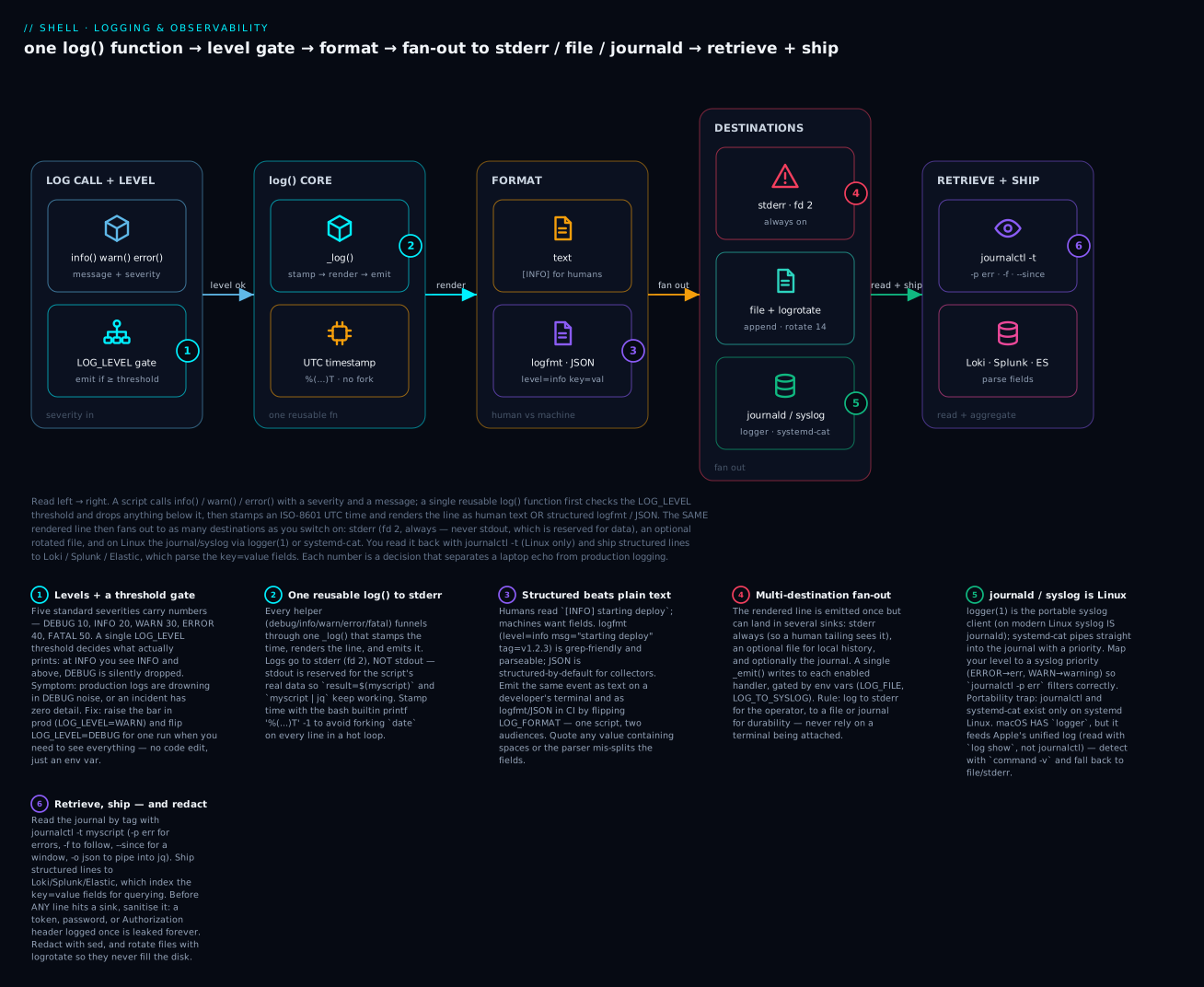
Read the diagram left → right: a severity comes in and is filtered by the LOG_LEVEL gate, one _log() function timestamps and renders it, and the same line then fans out to stderr, a rotated file, and (on Linux) the journal — from which you retrieve with journalctl and ship structured fields to an aggregator. The six badges walk you from the level threshold through the multi-destination fan-out to the Linux-only journald caveat and the redaction rule.
In Wave 1 we used printf '...' >&2 for messages and called it logging. That works for scripts that run in a terminal where you see the output. It does not work for scripts that:
- Run unattended on a server, where nobody is watching stderr.
- Get scheduled by cron or systemd, where stderr ends up in mail or
journald. - Need to be tailed live by an SRE during an incident, with grep’able structure.
- Need to feed into log aggregation (Loki, Splunk, Elastic, Datadog) that wants structured input.
- Need to be filtered by level (suppress DEBUG in production, surface ERROR everywhere).
Real logging answers all of those. This lesson covers:
- Levels — DEBUG / INFO / WARN / ERROR / FATAL, with a threshold the user can change at runtime.
- Destinations — stderr (always), file (optional), journald/syslog (often).
- Format — human (
[INFO] starting deploy) vs structured (level=info msg="starting deploy" tag=v1.2.3) vs JSON. - Rotation — files don’t grow unbounded;
logrotateconfig templates. - Integration —
logger(the syslog client),systemd-cat,journalctlfor retrieval. - The canonical
lib/log.sh— drop into any project, get all of the above for free.
By the end you’ll have a 100-line library that gives shell scripts logging features competitive with Python’s logging module.
1. The minimum-viable logger (recap from L13)
The simplest useful logger:
SCRIPT="${0##*/}"
info() { printf '[%s] INFO:  %s\n' "$SCRIPT" "$*" >&2; }
warn() { printf '[%s] WARN:  %s\n' "$SCRIPT" "$*" >&2; }
err()  { printf '[%s] ERROR: %s\n' "$SCRIPT" "$*" >&2; }
die()  { err "$@"; exit 1; }
Good for hour-old scripts. Production needs more.
2. Log levels with a threshold
Standard levels (from Python, syslog, most languages):
| Level | Numeric | Use |
|---|---|---|
| DEBUG | 10 | Verbose, “what is happening” detail |
| INFO | 20 | Normal status messages |
| WARN | 30 | Something unexpected, but recoverable |
| ERROR | 40 | Failure, but script may continue |
| FATAL | 50 | Failure that exits the script |
The script defines a threshold (LOG_LEVEL), and only messages at that level or higher actually print. Below threshold, they are silently discarded.
# default to INFO
LOG_LEVEL="${LOG_LEVEL:-INFO}"

declare -A _LEVELS=(
  [DEBUG]=10
  [INFO]=20
  [WARN]=30
  [ERROR]=40
  [FATAL]=50
)

_log() {
  local lvl=$1; shift
  local lvl_n=${_LEVELS[$lvl]:-20}
  local thr_n=${_LEVELS[$LOG_LEVEL]:-20}
  (( lvl_n >= thr_n )) || return 0
  printf '[%s] %-5s: %s\n' "$SCRIPT" "$lvl" "$*" >&2
}

debug() { _log DEBUG "$@"; }
info()  { _log INFO  "$@"; }
warn()  { _log WARN  "$@"; }
error() { _log ERROR "$@"; }
fatal() { _log FATAL "$@"; exit 1; }
Usage:
debug "starting parse phase"     # only shown if LOG_LEVEL=DEBUG
info  "parsed 100 records"
warn  "skipping malformed line 42"
error "failed to upload to s3"
fatal "out of disk; aborting"

# Run with DEBUG visibility:
LOG_LEVEL=DEBUG ./script
This pattern alone gets you 80% of “real logging.” The rest is destinations, format, rotation.
Why associative array for levels?
_LEVELS[$lvl] is O(1) lookup. We could also use a case statement:
case "$lvl" in
  DEBUG) lvl_n=10 ;;
  INFO)  lvl_n=20 ;;
  WARN)  lvl_n=30 ;;
  ERROR) lvl_n=40 ;;
  FATAL) lvl_n=50 ;;
esac
Either works. Associative-array is cleaner but requires bash 4+. For scripts that must run on macOS stock bash 3.2, use the case form.
Numeric level threshold
If your CI sets LOG_LEVEL=2 instead of LOG_LEVEL=INFO, support both:
_log() {
  local lvl=$1; shift
  local lvl_n=${_LEVELS[$lvl]:-20}
  local thr_n
  if [[ "$LOG_LEVEL" =~ ^[0-9]+$ ]]; then
    thr_n="$LOG_LEVEL"
  else
    thr_n=${_LEVELS[$LOG_LEVEL]:-20}
  fi
  (( lvl_n >= thr_n )) || return 0
  printf '[%s] %-5s: %s\n' "$SCRIPT" "$lvl" "$*" >&2
}
3. Timestamp every line
Almost always you want timestamps. ISO 8601 is the standard:
ts() { date '+%Y-%m-%dT%H:%M:%S%z'; }

_log() {
  local lvl=$1; shift
  ...
  printf '%s [%s] %-5s: %s\n' "$(ts)" "$SCRIPT" "$lvl" "$*" >&2
}
Output:
2026-06-22T14:35:12+0000 [deploy.sh] INFO : starting deploy
2026-06-22T14:35:13+0000 [deploy.sh] WARN : skipping malformed entry
Use UTC timestamps in production (date -u):
ts() { date -u '+%Y-%m-%dT%H:%M:%SZ'; }
UTC avoids the daylight-saving-time mess and matches what every log aggregator wants. The trailing Z literally means UTC.
Microsecond precision
For high-frequency logging:
ts() { date -u '+%Y-%m-%dT%H:%M:%S.%6NZ'; }
%6N is microseconds (BSD date uses %N for nanoseconds; truncate to 6 digits for microseconds). On macOS stock date, this might not work — install coreutils (brew install coreutils) and use gdate.
4. Multiple destinations: stderr + file + journald
Real scripts log to multiple places. The clean way: a single _emit function that writes to all configured handlers.
LOG_FILE="${LOG_FILE:-}"             # optional path
LOG_TO_SYSLOG="${LOG_TO_SYSLOG:-0}"  # 1 to also log to journald/syslog
LOG_TO_STDERR="${LOG_TO_STDERR:-1}"  # 1 to log to stderr (default on)

_emit() {
  local line=$1
  [[ "$LOG_TO_STDERR" == 1 ]] && printf '%s\n' "$line" >&2
  [[ -n "$LOG_FILE" ]] && printf '%s\n' "$line" >> "$LOG_FILE"
  if [[ "$LOG_TO_SYSLOG" == 1 ]]; then
    logger -t "$SCRIPT" -- "$line"      # POSIX syslog client
  fi
}

_log() {
  local lvl=$1; shift
  local lvl_n=${_LEVELS[$lvl]:-20}
  local thr_n=${_LEVELS[$LOG_LEVEL]:-20}
  (( lvl_n >= thr_n )) || return 0
  _emit "$(printf '%s [%s] %-5s: %s' "$(ts)" "$SCRIPT" "$lvl" "$*")"
}
Now:
# Just stderr (default)
./script

# Also to file
LOG_FILE=/var/log/myscript.log ./script

# Also to syslog
LOG_TO_SYSLOG=1 ./script

# Quiet stderr, only file
LOG_TO_STDERR=0 LOG_FILE=/var/log/x.log ./script
logger is the POSIX syslog client, present on every Linux system and macOS. By default it sends to local syslog (which on modern Linux is journald). View with:
journalctl -t myscript        # filter by tag (-t)
sudo tail -f /var/log/syslog  # raw
Portability note.
loggerexists on macOS too, but there is nojournaldthere — the line goes into Apple’s unified logging system, which you read withlog show --predicate 'process == "logger"' --last 5mor Console.app, notjournalctl.journalctl,systemd-cat, andsystemctlare systemd-Linux-only. The portability matrix in Going deeper has the full breakdown.
systemd-cat — alternative to logger
On systemd systems:
echo "this is a log line" | systemd-cat -t myscript -p info
systemd-cat writes directly to journald with full priority awareness:
_emit() {
  local line=$1 lvl=$2
  [[ "$LOG_TO_STDERR" == 1 ]] && printf '%s\n' "$line" >&2
  [[ -n "$LOG_FILE" ]] && printf '%s\n' "$line" >> "$LOG_FILE"
  if [[ "$LOG_TO_JOURNAL" == 1 ]] && command -v systemd-cat >/dev/null; then
    printf '%s\n' "$line" | systemd-cat -t "$SCRIPT" -p "$(_priority "$lvl")"
  fi
}

_priority() {
  case "$1" in
    DEBUG) echo "debug" ;;
    INFO)  echo "info" ;;
    WARN)  echo "warning" ;;
    ERROR) echo "err" ;;
    FATAL) echo "crit" ;;
    *)     echo "info" ;;
  esac
}
The journald priorities follow syslog conventions (emerg, alert, crit, err, warning, notice, info, debug).
logger -p — set syslog facility/priority
logger -p user.info "$line"      # facility=user, priority=info
logger -p user.err "$line"       # priority=err
logger -p local0.warn "$line"    # facility=local0 (1-7 reserved for app use)
Map your script’s level to a syslog priority:
_syslog_pri() {
  case "$1" in
    DEBUG) echo "debug" ;;
    INFO)  echo "info" ;;
    WARN)  echo "warning" ;;
    ERROR) echo "err" ;;
    FATAL) echo "crit" ;;
    *)     echo "info" ;;
  esac
}
This lets journalctl --priority=err correctly filter your script’s errors.
5. Structured logging — key=value and JSON
Plain text is fine for humans but bad for machines. Log aggregators (Loki, Splunk, ES, Datadog) parse logs into fields. Two common structured formats:
Logfmt (key=value)
Heroku-style. Easy to read for humans, parseable by machines.
2026-06-22T14:35:12Z level=info script=deploy.sh msg="starting deploy" env=prod tag=v1.2.3
Generate with:
log_kv() {
  local lvl=$1; shift
  local kvs=""
  while [[ $# -gt 0 ]]; do
    local key=${1%%=*}            # everything before first =
    local val=${1#*=}             # everything after first =
    # Quote if value contains space or special char
    if [[ "$val" =~ [[:space:]\"\\] ]]; then
      val=\"${val//\"/\\\"}\"
    fi
    kvs+=" $key=$val"
    shift
  done
  printf '%s level=%s script=%s%s\n' "$(ts)" "${lvl,,}" "$SCRIPT" "$kvs" >&2
}

log_kv INFO msg="starting deploy" env=prod tag=v1.2.3 user="$USER"
${lvl,,} is “lowercase the value” (bash 4+). For older bash use tr:
"$(printf '%s' "$lvl" | tr '[:upper:]' '[:lower:]')"
JSON
For structured-by-default output:
2026-06-22T14:35:12Z {"level":"info","script":"deploy.sh","msg":"starting deploy","env":"prod","tag":"v1.2.3"}
Build with jq:
log_json() {
  local lvl=$1; shift
  jq -cn --arg ts "$(ts)" --arg lvl "${lvl,,}" --arg script "$SCRIPT" \
        --arg msg "$1" --argjson kv "$(_make_kv_obj "${@:2}")" \
        '{ts: $ts, level: $lvl, script: $script, msg: $msg} + $kv' >&2
}

_make_kv_obj() {
  if [[ $# -eq 0 ]]; then echo "{}"; return; fi
  local out="{"
  while [[ $# -gt 0 ]]; do
    local key=${1%%=*} val=${1#*=}
    out+="\"$key\": $(jq -Rn --arg v "$val" '$v'), "
    shift
  done
  out=${out%, }      # strip trailing comma+space
  out+="}"
  echo "$out"
}

log_json INFO "starting deploy" env=prod tag=v1.2.3 user="$USER"
This is more involved. For most scripts, logfmt is plenty.
Picking a format at runtime
LOG_FORMAT="${LOG_FORMAT:-text}"   # text|kv|json

_render() {
  local lvl=$1 msg=$2
  shift 2
  case "$LOG_FORMAT" in
    text) printf '%s [%s] %-5s: %s\n' "$(ts)" "$SCRIPT" "$lvl" "$msg" ;;
    kv)   _logfmt_render "$lvl" "$msg" "$@" ;;
    json) _json_render "$lvl" "$msg" "$@" ;;
  esac
}
Now CI sets LOG_FORMAT=json and the platform team’s collector parses it; humans run with default text. Same script, two consumers.
Why quoting matters. logfmt splits on spaces, so a value with a space in it —
msg="disk almost full"— must be quoted or the parser readsfull"as a bogus key. Thelog_kvabove quotes any value containing a space, quote, or backslash and escapes inner quotes. JSON has the same rule enforced for you byjq, which is exactly whyjq(not string concatenation) is the safe way to build it. This is verified: feedingpath="/var with space"throughlog_kvrenderspath="/var with space"— one field, correctly quoted.
6. Log rotation
If your script writes to a file, that file grows forever. Use logrotate:
/etc/logrotate.d/myscript
/var/log/myscript.log {
    daily
    rotate 14
    compress
    delaycompress
    missingok
    notifempty
    create 0644 myscript myscript
    postrotate
        # if your script keeps a long-running file handle, signal it
        # systemctl kill -s USR1 myscript.service 2>/dev/null || true
    endscript
}
Drop this file into /etc/logrotate.d/. The cron job /etc/cron.daily/logrotate (or systemd timer) runs logrotate /etc/logrotate.conf daily, processing every file in /etc/logrotate.d/.
Fields:
daily/weekly/monthly— rotation cadence.rotate 14— keep 14 archived copies.compress— gzip rotated logs.delaycompress— wait one cycle before compressing (so the just-rotated log stays as plaintext for one day, in case you need to grep it).missingok— don’t error if the log doesn’t exist.notifempty— don’t rotate empty files.create 0644 user group— create new log file with these permissions.postrotate— run after rotation. If your script holds the file open, it needs to be told to reopen (typically with SIGUSR1 or HUP).
For shell scripts that just append-and-close every line, no postrotate is needed.
Manual rotation in-script (without logrotate)
Sometimes you can’t install logrotate (containers, CI). Roll your own:
LOG_FILE="/var/log/myscript.log"
MAX_SIZE=$((10 * 1024 * 1024))    # 10 MB

rotate_if_big() {
  [[ -f "$LOG_FILE" ]] || return 0
  local size
  size=$(wc -c < "$LOG_FILE")
  if (( size > MAX_SIZE )); then
    mv -- "$LOG_FILE" "${LOG_FILE}.$(date -u +%Y%m%dT%H%M%SZ)"
    : > "$LOG_FILE"
  fi
}
Call rotate_if_big periodically (or before logging). For more complex schemes (keep N rolled files, compress old ones), use logrotate proper.
7. Reading journald logs
For scripts that log to journald via logger or systemd-cat, retrieval is via journalctl:
# All entries from "myscript" tag
journalctl -t myscript

# Last 100 lines
journalctl -t myscript -n 100

# Follow live
journalctl -t myscript -f

# Filter by priority (errors and worse)
journalctl -t myscript -p err

# Time range
journalctl -t myscript --since="1 hour ago"
journalctl -t myscript --since="2026-06-22 09:00:00" --until="2026-06-22 10:00:00"

# As JSON (for piping into jq)
journalctl -t myscript -o json | jq '.MESSAGE'

# Just the message field, plain text
journalctl -t myscript -o cat

# Specific systemd unit (if your script runs as one)
journalctl -u myscript.service
Combined:
# Show errors from the last hour, just the messages
journalctl -t myscript -p err --since="1 hour ago" -o cat
8. The canonical lib/log.sh
Putting everything together:
# lib/log.sh — production-grade shell logging
# Source from any script: source "$(dirname "${BASH_SOURCE[0]}")/lib/log.sh"
#
# Configurable via environment variables:
#   LOG_LEVEL      DEBUG|INFO|WARN|ERROR|FATAL  (default: INFO)
#   LOG_FILE       path or empty                (default: empty = no file)
#   LOG_FORMAT     text|kv|json                 (default: text)
#   LOG_TO_STDERR  0 or 1                       (default: 1)
#   LOG_TO_SYSLOG  0 or 1                       (default: 0)
#
# Use: debug, info, warn, error, fatal — they take a message and optional key=value pairs
#   info "starting deploy" env=prod tag=v1.2.3

readonly LOG_SCRIPT_NAME="${0##*/}"
readonly LOG_HOSTNAME="$(hostname -s 2>/dev/null || echo unknown)"
declare -A _LOG_LEVELS=( [DEBUG]=10 [INFO]=20 [WARN]=30 [ERROR]=40 [FATAL]=50 )

LOG_LEVEL="${LOG_LEVEL:-INFO}"
LOG_FILE="${LOG_FILE:-}"
LOG_FORMAT="${LOG_FORMAT:-text}"
LOG_TO_STDERR="${LOG_TO_STDERR:-1}"
LOG_TO_SYSLOG="${LOG_TO_SYSLOG:-0}"

_log_ts() { date -u '+%Y-%m-%dT%H:%M:%SZ'; }

_log_threshold_n() {
  local v=${LOG_LEVEL^^}
  echo "${_LOG_LEVELS[$v]:-20}"
}

_log_pri() {
  case "$1" in
    DEBUG) echo debug ;;
    INFO) echo info ;;
    WARN) echo warning ;;
    ERROR) echo err ;;
    FATAL) echo crit ;;
    *) echo info ;;
  esac
}

_log_render_text() {
  local lvl=$1 msg=$2
  shift 2
  local extras=""
  if [[ $# -gt 0 ]]; then extras=" $*"; fi
  printf '%s [%s] %-5s: %s%s' "$(_log_ts)" "$LOG_SCRIPT_NAME" "$lvl" "$msg" "$extras"
}

_log_render_kv() {
  local lvl=$1 msg=$2
  shift 2
  local extras=""
  while [[ $# -gt 0 ]]; do
    local k=${1%%=*} v=${1#*=}
    if [[ "$v" =~ [[:space:]\"\\] ]]; then
      v="\"${v//\"/\\\"}\""
    fi
    extras+=" $k=$v"
    shift
  done
  printf '%s level=%s script=%s host=%s msg=%q%s' "$(_log_ts)" "${lvl,,}" "$LOG_SCRIPT_NAME" "$LOG_HOSTNAME" "$msg" "$extras"
}

_log_emit() {
  local lvl=$1; shift
  local rendered
  case "$LOG_FORMAT" in
    kv)   rendered=$(_log_render_kv "$lvl" "$@") ;;
    json) rendered=$(_log_render_kv "$lvl" "$@") ;;   # keep simple; full JSON omitted in this lib
    text|*) rendered=$(_log_render_text "$lvl" "$@") ;;
  esac
  [[ "$LOG_TO_STDERR" == 1 ]] && printf '%s\n' "$rendered" >&2
  if [[ -n "$LOG_FILE" ]]; then
    printf '%s\n' "$rendered" >> "$LOG_FILE"
  fi
  if [[ "$LOG_TO_SYSLOG" == 1 ]]; then
    logger -t "$LOG_SCRIPT_NAME" -p "user.$(_log_pri "$lvl")" -- "$rendered" 2>/dev/null || true
  fi
}

_log() {
  local lvl=$1; shift
  local lvl_n=${_LOG_LEVELS[${lvl^^}]:-20}
  local thr_n
  thr_n=$(_log_threshold_n)
  (( lvl_n >= thr_n )) || return 0
  _log_emit "$lvl" "$@"
}

debug() { _log DEBUG "$@"; }
info()  { _log INFO  "$@"; }
warn()  { _log WARN  "$@"; }
error() { _log ERROR "$@"; }
fatal() { _log FATAL "$@"; exit 1; }
Usage:
#!/usr/bin/env bash
set -Eeuo pipefail
source "$(dirname "${BASH_SOURCE[0]}")/lib/log.sh"

info "starting deploy" env=prod tag=v1.2.3
debug "kubeconfig at $KUBECONFIG"
warn "no rollback plan defined; proceeding anyway"
error "rollout failed"
fatal "out of disk; aborting"
Run:
./script                                          # default INFO+ to stderr
LOG_LEVEL=DEBUG ./script                          # everything visible
LOG_FORMAT=kv ./script                            # logfmt-style
LOG_FILE=/var/log/myscript.log ./script           # also to file
LOG_TO_SYSLOG=1 ./script                          # also to syslog
LOG_LEVEL=ERROR ./script                          # only errors and fatals
This is competitive with what serious shell projects ship.
Heads-up: this library needs bash 4+. It uses associative arrays (
declare -A),${LOG_LEVEL^^}(uppercase), and${lvl,,}(lowercase) — none of which exist in the bash 3.2 that ships on macOS. On a modern Linux server that’s a non-issue. If you must support macOS stock bash or a minimalash/dash, swap the associative array for thecaseform from §2 and the^^/,,fortr. The portability matrix below lists every such feature.
9. Patterns for production usage
Capture command output and log it
run() {
  local lvl=${1:-INFO}; shift
  info "running: $*"
  local out
  if ! out=$("$@" 2>&1); then
    error "command failed (exit $?): $*"
    error "output: $out"
    return 1
  fi
  debug "output: $out"
}

# Use:
run INFO kubectl apply -f deploy.yaml
run INFO docker pull ghcr.io/myorg/api:v1.2.3
This wraps every command with logging — entry, exit code, full output.
Time how long a step took
time_step() {
  local label=$1; shift
  local start
  start=$(date +%s)
  "$@"
  local rc=$?
  local end
  end=$(date +%s)
  local elapsed=$((end - start))
  if [[ $rc -eq 0 ]]; then
    info "step done: $label" duration_s=$elapsed
  else
    error "step failed: $label" duration_s=$elapsed exit_code=$rc
  fi
  return $rc
}

# Use:
time_step "image pull" docker pull ghcr.io/myorg/api:v1.2.3
time_step "kubectl apply" kubectl apply -f deploy.yaml
Correlation IDs
When a script kicks off other commands, attach a correlation ID:
CORRELATION_ID="${CORRELATION_ID:-$(uuidgen 2>/dev/null || echo "$$-$(date +%s)")}"
export CORRELATION_ID

info "starting deploy" cid=$CORRELATION_ID env=$ENV tag=$TAG
Now grep across logs by cid=... and you have the full trace of one script invocation across multiple processes.
Mute external command stderr but log on failure
run_quiet() {
  local out
  if ! out=$("$@" 2>&1); then
    error "command failed: $*" exit_code=$?
    error "$out"
    return 1
  fi
}
Don’t pollute stderr with chatty commands; only log if they actually fail.
10. Common pitfalls
Buffered stderr in CI
If your CI runs your script with stdout/stderr captured to a log, you may see no output until the script exits — because libc buffers stderr for non-tty output. Fix:
exec 2> >(stdbuf -oL cat >&2) # line-buffered stderr
Or simply stdbuf -oL ./script from the CI runner.
Logging from background subshells
When you cmd & for parallelism, those subshells inherit LOG_FILE. If two write to the same file simultaneously, lines may interleave at the byte level. Either:
- Always log to syslog (it serialises).
- Use
flockto serialise writes to the file. - Have each subshell log to its own file, merge at the end.
Locale-sensitive date
date formats may differ by locale. For consistency in logs, always set:
TZ=UTC LC_ALL=C date '+%Y-%m-%dT%H:%M:%SZ'
Or stamp via printf '%(...)T' (bash 4.2+):
ts() { printf '%(%Y-%m-%dT%H:%M:%SZ)T\n' -1 ; } # -1 = current time, no fork
The bash builtin avoids the date fork entirely — much faster in tight loops.
logger not present
On minimal containers (scratch, busybox-without-syslogtools), logger isn’t there. Detect:
if command -v logger >/dev/null 2>&1; then
  logger -t "$SCRIPT" -- "$line"
fi
Fall back to file or stderr if absent.
Forgetting to flush
echo "important message" > "$LOG_FILE" # bash always flushes after a builtin
Bash’s echo/printf flush after each invocation. But if you redirect a long-running tail -f style command, watch for buffering. stdbuf -oL and unbuffer are your friends.
Logging passwords / secrets
A FATAL bug: logging kubectl output that contains tokens, or curl -v output that contains Authorization headers. Always sanitise:
sanitize() {
  sed -E 's/(Authorization|password|token)[:=][^[:space:]]*/\1=REDACTED/g'
}

run kubectl get secrets -o yaml | sanitize | tee >(info)
Or capture and grep:
out=$(curl -v "$URL" 2>&1)
out=$(sed -E 's/(Bearer )[A-Za-z0-9._-]+/\1REDACTED/g' <<<"$out")
debug "$out"
The single highest-impact thing you can do for log hygiene.
Going deeper
The sections above give you a working, production-grade logger. This section is for when you own the platform: what journald actually stores, why it silently drops your logs, when concurrent appends really interleave, what a log line costs, the exact portability cliff-edges, and the security model. None of it is required to use logging — all of it is required to operate it at scale.
journald doesn’t store text — it stores fields
A journald entry is not a line of text with a timestamp glued on. It’s a set of key–value fields, and MESSAGE is just one of them. journalctl -o verbose (or -o json) reveals the rest:
| Field | Meaning |
|---|---|
MESSAGE |
the human-readable text you logged |
PRIORITY |
syslog severity 0–7 (see next table) |
SYSLOG_IDENTIFIER |
the -t tag (myscript) |
_PID / _COMM |
PID and command name of the sender (trusted fields) |
_SYSTEMD_UNIT |
the unit, if the sender ran under systemd |
_BOOT_ID |
which boot the entry belongs to |
Fields prefixed with _ are trusted — journald sets them itself from the sender’s credentials, so a process can’t forge its own PID or unit. That’s why journalctl _SYSTEMD_UNIT=myscript.service is trustworthy in a way a grep of a text file never is.
You can attach your own fields natively. systemd-cat only sets MESSAGE, but systemd’s logger --journald (or logger with newline-separated KEY=value pairs on some versions) sends structured fields:
printf 'MESSAGE=deploy finished\nTAG=v1.2.3\nPRIORITY=6\n' | logger --journald
# then query on your custom field (representative — Linux/systemd):
journalctl TAG=v1.2.3 -o cat
This is journald’s answer to structured logging — no JSON string to parse later, the fields are first-class and indexed. On a systemd host, prefer it over hand-rolled logfmt when the logs stay on the box.
The syslog severity/facility model, in full
logger -p facility.severity and journald’s PRIORITY both use the RFC 5424 numbers. Worth memorising the severities because journalctl -p N and every syslog filter use them:
| Severity | Number | Your level maps to |
|---|---|---|
emerg |
0 | (reserve for real “system unusable”) |
alert |
1 | — |
crit |
2 | FATAL |
err |
3 | ERROR |
warning |
4 | WARN |
notice |
5 | — |
info |
6 | INFO |
debug |
7 | DEBUG |
Facilities route messages to different sinks. Codes 0–15 are reserved (kern, mail, cron, auth, …); local0–local7 (16–23) are yours to use for application logs. Tag your scripts with a localN facility and the syslog daemon (rsyslog/syslog-ng) or a journald forward can file them into their own stream: logger -p local3.info.
journald will silently drop your logs (rate limiting)
The surprise that bites everyone eventually: journald rate-limits per service. If a script floods the journal it starts dropping messages and emits a single Suppressed N messages from … marker instead. The knobs live in journald.conf (and can be overridden per unit):
RateLimitIntervalSec— the window (default around30s).RateLimitBurst— messages allowed per window (defaults have changed across systemd versions — commonly10000; check yourjournald.conf, don’t assume).
For a legitimately chatty job, set RateLimitBurst=0 (unlimited) on its unit, or log high-volume data to a file instead of the journal. Two more journald realities that catch people:
Storage=volatile(common in containers and some minimal images) keeps the journal in/run— it vanishes on reboot. If you need durable logs there, write a file or forward off-box.- Disk caps —
SystemMaxUsebounds total journal size; old entries are rotated out. The journal is not an archive; ship anything you must keep.
When do concurrent appends actually interleave?
§10 warns that parallel writers to one LOG_FILE “may interleave.” The precise rule is worth knowing because it decides whether you need flock at all. A file opened with >> gets the kernel’s O_APPEND flag, which makes “seek to end, then write” a single atomic step — so two writers never overwrite each other’s offset. And on Linux a single write() of up to PIPE_BUF (4096 bytes) lands atomically. Consequences:
- Short log lines (< 4 KB) emitted with one
printffrom parallel subshells to the same>>file do not interleave in practice. This is the common case, and it’s safe. - Interleaving bites when a line exceeds 4 KB, or when the emit is several
write()calls (e.g. building a line in pieces, or a language runtime that flushes mid-line). Then you genuinely needflock "$LOG_FILE"or journald (which serialises for you).
So: don’t reach for flock on every log write — reach for it when lines are large or assembled incrementally. (One nuance on the §10 “buffered stderr” note: C’s stdio leaves stderr unbuffered by default; the delayed output you see in CI is usually the program’s stdout block-buffering, or a language runtime’s own buffer — stdbuf -oL/-eL addresses both.)
What a log line costs (performance)
A naive info() that calls $(date) forks a whole process per line. Add $(...) command substitution and an optional logger and you’re at three forks a line; 100 000 lines is 300 000 forks — seconds of pure fork/exec overhead in a tight loop.
| Technique | Forks per line | Notes |
|---|---|---|
ts=$(date -u +%FT%TZ) |
1 (per call) | a process every line |
printf '%(%FT%TZ)T' -1 |
0 | bash 4.2+ builtin, no fork |
logger … per line |
+1 | fine occasionally, costly in a hot loop |
batch: accumulate, one >> at the end |
~0 | for bulk emit, write once |
Rules of thumb for hot paths: stamp time with the printf '%(...)T' builtin, avoid $(...) where a builtin will do, and if you’re emitting thousands of lines, buffer them in a variable and flush with a single redirect rather than a logger call per line.
Portability matrix (the cliff-edges)
The library in §8 targets Linux + bash 4/5 + GNU coreutils. Here’s exactly what breaks elsewhere — the build host for this course is macOS (bash 3.2 + BSD userland), so these are tested caveats, not guesses:
| Feature | Linux + systemd (bash 4/5) | macOS (bash 3.2 / BSD) | Alpine / busybox (ash) |
|---|---|---|---|
logger(1) |
yes → journald | yes → unified log (log show) |
yes (busybox, minimal flags) |
journalctl / systemd-cat |
yes | no | no (unless systemd present) |
logrotate |
usually installed | no (brew install) |
via package |
printf '%(...)T' (no-fork ts) |
bash 4.2+ | no (bash 3.2) | no (ash) — use date |
${v^^} / ${v,,} case ops |
bash 4+ | no — use tr |
no — use tr |
declare -A (assoc array) |
bash 4+ | no — use case |
no — use case |
date -u '+…%N' nanoseconds |
GNU: yes | BSD: no %N |
busybox: limited |
The engineering answer is capability detection, not assumption: command -v journalctl >/dev/null && … || fall back to file/stderr, gate printf '%(...)T' behind a ((BASH_VERSINFO[0] >= 4)) check, and keep a tr/case path for the level table. A logger that degrades to “stderr + file” everywhere and adds journald where it exists is portable; one that hard-requires systemd is not.
Security: log injection and access control
Two threats beginners never think about:
- Log injection. If you log attacker-controlled text (
info "login for $username") and$usernamecontains a newline, the attacker can forge a whole extra log line —alice\n2026-01-01 [INFO] admin login ok— to hide activity or frame someone. In plain-text logs this is real. Defenses: strip/escape control characters before logging (printf '%q', ortr -d '\n\r'), or use structured logging where the value is quoted/escaped as a field (jq for JSON does this for you), or journald, which stores fields and is immune to line-injection by construction. - Access control. Journald restricts read access — members of
systemd-journal(andadm/wheel) can read the full journal; ordinary users see only their own. For file logs, don’t leave a0644world-readable log full of hostnames, tokens, and internal paths —create 0640 root admin logrotate, orchmod 0640. And remember redaction (§10) is the last line of defense; the real fix is to never capture the secret in the first place.
Mapping to the OpenTelemetry log model (future-proofing your fields)
If your logs will eventually flow into an OTel pipeline (Vector, Fluent Bit, or the OpenTelemetry Collector tailing your file or journal), name your fields with the OTel logs data model in mind. OTel uses a numeric SeverityNumber that your five levels slot straight into:
| Your level | OTel severity text | OTel SeverityNumber |
|---|---|---|
| DEBUG | DEBUG | 5–8 |
| INFO | INFO | 9–12 |
| WARN | WARN | 13–16 |
| ERROR | ERROR | 17–20 |
| FATAL | FATAL | 21–24 |
Keep the message in a msg/body field and everything else as attributes (env, tag, cid, duration_s), and a collector can forward your shell logs into the same backend as your Go and Python services with no reshaping. Emitting logfmt or JSON from §5 is already 90% of the way there — the field names are the part worth standardising early.
11. Twelve idioms for daily use
# 1. Minimum logger
info() { printf '[%s] INFO: %s\n' "${0##*/}" "$*" >&2; }

# 2. Source canonical lib/log.sh
source "$(dirname "${BASH_SOURCE[0]}")/lib/log.sh"

# 3. ISO 8601 UTC timestamp
ts() { date -u '+%Y-%m-%dT%H:%M:%SZ'; }

# 4. Bash-builtin timestamp (no fork)
ts() { printf '%(%Y-%m-%dT%H:%M:%SZ)T\n' -1; }

# 5. Level threshold at runtime
LOG_LEVEL=DEBUG ./script

# 6. Log to syslog/journald
LOG_TO_SYSLOG=1 ./script
journalctl -t myscript -f

# 7. Logger one-liner
logger -t myscript "hello world"

# 8. JSON output via jq (one-line)
jq -cn --arg ts "$(ts)" --arg msg "$msg" '{ts: $ts, msg: $msg}'

# 9. logfmt key=value pair
printf 'level=%s msg=%q env=%s tag=%s\n' "$lvl" "$msg" "$ENV" "$TAG"

# 10. Sanitize secrets before logging
sed -E 's/(token|password|Authorization)[:=][^[:space:]]+/\1=REDACTED/g'

# 11. Logrotate config (one-liner test)
logrotate -d /etc/logrotate.d/myscript    # dry-run

# 12. Atomic file rotation
mv "$LOG_FILE" "$LOG_FILE.$(date -u +%Y%m%dT%H%M%SZ)" && : > "$LOG_FILE"
12. What you must internalise before lesson 16
- What are the standard log levels and their numeric values? (DEBUG=10, INFO=20, WARN=30, ERROR=40, FATAL=50.)
- What’s
LOG_LEVELfor? (Threshold — only messages at or above this level print.) - What’s the difference between
loggerandsystemd-cat? (loggeris the POSIX syslog client;systemd-catis the journald-native equivalent.) - How do you retrieve logs from journald by tag? (
journalctl -t TAG.) - What’s logfmt? (Key=value structured logs, e.g.
level=info msg="x" env=prod.) - What does
logrotate’sdelaycompressdo? (Keeps the just-rotated log uncompressed for one cycle, in case you need to inspect.) - What’s a correlation ID? (An ID generated at script start and propagated through child processes to trace one execution across logs.)
- Why is bash’s
printf '%(...)T'better than callingdate? (Avoids the fork-and-exec — much faster in tight loops.) - What’s the most important secret-hygiene rule for logs? (Sanitise tokens/passwords/Authorization headers before they ever hit a log destination.)
- Why log to stderr, not stdout? (Stdout is reserved for actual data — keeps the script usable in pipelines.)
Practice challenges
Work these in order — they escalate from “print at the right level” to “route to the journal with a correct priority and redact a secret.” Try each before opening the solution. The canonical target is Linux + bash 4/5 + GNU coreutils; where the build host (bash 3.2 / BSD) differs, the solution says so. Every snippet below was checked on that host except where labelled representative (Linux).
Challenge 1 — A levelled logger with a threshold (beginner)
Write a log LEVEL message… function that prints only messages at or above LOG_LEVEL (default INFO). Prove that DEBUG is suppressed by default but appears when you set LOG_LEVEL=DEBUG. Make it work on bash 3.2 (no associative array).
<details> <summary>Solution</summary>
lvl_n() { case "$1" in DEBUG) echo 10;; INFO) echo 20;; WARN) echo 30;; ERROR) echo 40;; FATAL) echo 50;; *) echo 20;; esac; }
LOG_LEVEL="${LOG_LEVEL:-INFO}"
log() {
  local lvl=$1; shift
  [ "$(lvl_n "$lvl")" -ge "$(lvl_n "$LOG_LEVEL")" ] || return 0
  printf '[%s] %-5s %s\n' "${0##*/}" "$lvl" "$*" >&2
}

log DEBUG "parse phase"          # (silent at default INFO)
log INFO  "parsed 100 records"   # [script] INFO  parsed 100 records
LOG_LEVEL=DEBUG log DEBUG "now visible"
Why: the numeric map plus a >= comparison is the whole idea of a level threshold; the case form keeps it portable to bash 3.2, where declare -A doesn’t exist.
</details>
Challenge 2 — Prove logs go to stderr, not stdout (beginner)
Using your log from Challenge 1, show that logging does not pollute a command substitution: out=$(some_function) must capture only the real data, while the log line still appears on the terminal.
<details> <summary>Solution</summary>
produce() { log INFO "computing…"; printf 'RESULT=42'; }   # log→stderr, data→stdout
out=$(produce)                # the [INFO] line prints to the terminal (stderr)
printf 'captured: [%s]\n' "$out"   # captured: [RESULT=42]
Why: because log writes to fd 2, only fd 1 (RESULT=42) is captured by $(...). If log had used stdout, $out would be [script] INFO computing…RESULT=42 — corrupted. This is the reason logs go to stderr.
</details>
Challenge 3 — Timestamp without forking date (intermediate)
Add an ISO-8601 UTC timestamp to each line. First with date -u, then replace it with the fork-free bash builtin. State exactly which bash versions support the builtin and what to do below that.
<details> <summary>Solution</summary>
ts_fork()    { date -u '+%Y-%m-%dT%H:%M:%SZ'; }          # forks a process each call
ts_builtin() { printf '%(%Y-%m-%dT%H:%M:%SZ)T\n' -1; }   # no fork — bash 4.2+

# Portable pick:
if ((BASH_VERSINFO[0] > 4 || (BASH_VERSINFO[0] == 4 && BASH_VERSINFO[1] >= 2))); then
  ts() { printf '%(%Y-%m-%dT%H:%M:%SZ)T' -1; }
else
  ts() { date -u '+%Y-%m-%dT%H:%M:%SZ'; }   # bash 3.2 (macOS) fallback
fi
Why: printf '%(...)T' is a bash 4.2+ builtin that reads the clock without a fork/exec, which matters in tight loops. On the bash 3.2 build host it isn’t available, so the version guard falls back to date -u.
</details>
Challenge 4 — Emit logfmt with correct quoting (intermediate)
Emit one event as key=value (logfmt) with fields level, msg, and path, where path contains a space (/var with space). The value with a space must come out as one quoted field, not two. Then extract just the level field back out.
<details> <summary>Solution</summary>
log_kv() {
  local lvl=$1; shift; local kvs=""
  while [ $# -gt 0 ]; do
    local k=${1%%=*} v=${1#*=}
    case "$v" in *[\ \"]*) v=\"${v//\"/\\\"}\";; esac   # quote if space/quote
    kvs="$kvs $k=$v"; shift
  done
  printf 'level=%s%s\n' "$(printf %s "$lvl" | tr A-Z a-z)" "$kvs"
}

line=$(log_kv INFO msg="starting deploy" path="/var with space")
printf '%s\n' "$line"
# level=info msg="starting deploy" path="/var with space"

printf '%s\n' "$line" | sed -E 's/.*level=([^ ]+).*/\1/'   # info
Why: logfmt splits on spaces, so an unquoted /var with space would parse as path=/var plus a stray space. Quoting the value keeps it one field — the rule every logfmt/JSON emitter must enforce.
</details>
Challenge 5 — Route to the journal with the right priority (advanced)
Send an ERROR to syslog/journald so that journalctl -p err finds it and journalctl -p warning (errors-and-worse only from err) still shows it, using logger. Map your level → syslog priority. Note precisely what changes on macOS.
<details> <summary>Solution</summary>
syslog_pri() { case "$1" in DEBUG) echo debug;; INFO) echo info;; WARN) echo warning;; ERROR) echo err;; FATAL) echo crit;; *) echo info;; esac; }

emit_journal() {   # emit_journal ERROR "rollout failed"
  local lvl=$1; shift
  command -v logger >/dev/null || { printf '[%s] %s\n' "$lvl" "$*" >&2; return; }
  logger -t myscript -p "user.$(syslog_pri "$lvl")" -- "$*"
}

emit_journal ERROR "rollout failed"
# Retrieve — representative (Linux/systemd):
#   journalctl -t myscript -p err -o cat        →  rollout failed
Why: mapping ERROR→err (severity 3) lets journalctl -p err filter correctly. On macOS, logger accepts the line but sends it to Apple’s unified log — there is no journalctl; read it with log show --predicate 'eventMessage CONTAINS "rollout failed"' --last 5m. The command -v logger guard degrades to stderr on a scratch/busybox image that lacks logger.
</details>
Challenge 6 — Redact a secret before it hits any sink (advanced)
You must log the output of a curl -v that contains Authorization: Bearer <token> and a password=… query param. Write a redact filter that replaces both with REDACTED, and prove it on a sample line. Then explain why redaction is still not enough on its own.
<details> <summary>Solution</summary>
redact() {
  sed -E 's/(Bearer )[A-Za-z0-9._-]+/\1REDACTED/g; s/(password|token)=[^[:space:]&]+/\1=REDACTED/g'
}

echo 'Authorization: Bearer abc.SECRET.tok  password=hunter2 token=deadbeef' | redact
# Authorization: Bearer REDACTED  password=REDACTED token=REDACTED
Why: the two sed substitutions catch the header-style Bearer <jwt> and the key=value secrets. But redaction is the last line of defense — a pattern you forget (a new header, base64 in a body) leaks. The real fix is to never capture the secret: fetch it into a variable you never log, and pass --data @file/-H @headerfile so it never appears in curl -v output at all.
</details>
Common beginner mistakes
These are misconceptions, not typos — each is a wrong mental model that produces logging that looks fine and fails you in production.
- “
echois logging.”echo "done"goes to stdout, which is your script’s data channel — it corrupts pipes and command substitution, and it carries no level, no timestamp, no destination control. Right model: logs are diagnostics; send them to stderr through a function that stamps and levels them. - “More logging is always better, so log everything at INFO.” Then production drowns and you can’t find the signal, and you can’t turn the noise down without a code change. Right model: put detail at
DEBUG, keepINFOfor milestones, and letLOG_LEVELdecide at runtime — quiet by default, verbose on demand. - “
journalctlworks everywhereloggerdoes.” No.loggeris portable (it even exists on macOS), butjournalctl/systemd-catare systemd-Linux-only. A script that pipes tosystemd-catunconditionally breaks on macOS, Alpine, and any non-systemd box. Right model:command -vfirst, and degrade to file/stderr. - “A timestamp is just cosmetic.” Without a timestamp you can’t correlate a script’s line with an app error or a metrics spike — the whole point of centralised logging. And local-time stamps make cross-region correlation a nightmare. Right model: ISO-8601, in UTC, on every line.
- “Structured logging means JSON.” JSON is one structured format;
logfmt(key=value) is simpler, human-readable, and parsed by the same aggregators. Right model: pick the format at runtime — text for a human at a terminal, logfmt/JSON for the collector — same event, oneLOG_FORMATswitch. - “I’ll just redact secrets with a
sedat the end.” Redaction is a safety net, not a strategy: one forgotten pattern and the token is in the journal forever (and journald/log files are hard to un-write). Right model: never capture the secret — keep it in a variable you never log, pass it via@file, and treat redaction as defense-in-depth. - “Files rotate themselves.” They don’t — an un-rotated
LOG_FILEgrows until it fills the disk and takes the service down with it. Right model: alogrotatestanza (or an in-scriptrotate_if_big) from day one, plus awareness that journald has its own size caps and rate limits.
Glossary
- Log level / severity — a label ranking a message’s importance:
DEBUG<INFO<WARN<ERROR<FATAL. Given numbers (10/20/30/40/50) so they can be compared. LOG_LEVEL/ threshold — the minimum severity that actually prints. AtINFO,DEBUGis dropped; setLOG_LEVEL=DEBUGto see everything. Changeable at runtime with no code edit.- stderr (fd 2) — the diagnostics stream. Logs go here so stdout (fd 1) stays clean for the script’s real data and pipelines keep working.
- stdout (fd 1) — the data stream; a script’s product. Never write logs here.
logger(1)— the portable syslog client.logger -t TAG -p facility.severity msg. Present on Linux and macOS (on macOS it feeds the unified log, not journald).- syslog — the classic Unix logging protocol/daemon. Defines the severity (0–7) and facility (
user,local0–local7, …) model that journald reuses. - journald — systemd’s binary, structured, indexed log store. Entries are fields, not text lines. Linux/systemd only.
systemd-cat— pipes a command’s output straight into journald with a chosen priority (-p). The journald-native counterpart tologger.journalctl— the tool to read journald.-t TAG,-p err,-f(follow),--since,-o json/-o cat. Linux/systemd only.- priority / facility — syslog’s routing metadata. Priority = severity 0–7 (
emerg…debug); facility = category (local0–local7, codes 16–23, reserved for apps). - structured logging — emitting fields, not prose, so machines can query them. See logfmt and JSON.
- logfmt —
key=valuestructured logs, e.g.level=info msg="starting deploy" env=prod. Values with spaces must be quoted. - JSON logging — one JSON object per event. Structured-by-default; build it with
jqso escaping is correct. jq— a JSON processor; the safe way to emit JSON logs (correct escaping) and to parsejournalctl -o json.- log aggregator — a system that ingests, indexes, and queries logs from many sources: Loki, Splunk, Elasticsearch (ELK), Datadog.
- collector / forwarder — an agent (Vector, Fluent Bit, OpenTelemetry Collector, rsyslog) that tails your file or journal and ships lines to an aggregator.
- logrotate — the standard tool that renames, compresses, and prunes log files on a schedule via
/etc/logrotate.d/*stanzas. Linux. delaycompress— a logrotate option that leaves the just-rotated file uncompressed for one cycle, so you can stillgrepyesterday’s log.postrotate— a logrotate hook that runs after rotation, used to signal a long-running process (SIGHUP/SIGUSR1) to reopen its log file.- rotation — capping log growth by periodically archiving and pruning, so a file (or the journal) never fills the disk.
- correlation ID (cid) — an ID minted at script start and propagated to child processes, so one invocation’s lines can be traced across many logs with a single
grep cid=…. - redaction / sanitisation — stripping secrets (tokens, passwords,
Authorizationheaders) from text before it reaches any log sink. - log injection — an attack where attacker-controlled text containing newlines forges extra log lines. Defeated by escaping control chars or using structured/journald fields.
- ISO-8601 / UTC (
Z) — the timestamp standard (2026-06-22T14:35:12Z); the trailingZmeans UTC. Use UTC in logs to dodge timezone/DST confusion. printf '%(...)T'— a bash 4.2+ builtin that formats the current time with nofork— much cheaper than$(date)in hot loops.stdbuf/ line vs block buffering — libc block-buffers stdout to a pipe/file but line-buffers to a terminal, which is why piped output can appear delayed;stdbuf -oL/-eLforces line buffering.- OpenTelemetry (OTel) log model — a vendor-neutral schema with a numeric
SeverityNumberandattributes; naming your fields to match lets shell logs join the same backend as app logs.
What’s next
Lesson 16: Concurrency — Backgrounding, GNU parallel, xargs -P, FIFOs & flock. We’ve used & and wait casually. Now we cover real concurrency: parallel job pools with xargs -P, GNU parallel for declarative parallelism, FIFOs (named pipes) for inter-process communication, and flock for cross-script mutual exclusion. After L16 your scripts will use all your cores — without race conditions.
See you there.