A shell script with no functions is a shell script that won’t survive its first growth spurt. Once you go past about 50 lines, you start needing structure, and the only structuring primitive shell gives you is the function. The good news: functions in bash are simple, fast (they don’t fork like external commands do), and powerful. The bad news: bash’s default scoping rules are dangerously global, the difference between return and exit is a frequent source of bugs, and the conventions around “returning a value” from a function are not what you’re used to from any other language.
This lesson covers functions completely. By the end, you’ll write shell scripts that look like real programs: a top-level main "$@" line, a half-dozen named functions each with local variables, clean separation between status (return code) and output (stdout), and zero risk of one function silently overwriting another’s state.
In a nutshell
Think of a shell function as a sub-contractor you hire for one small job. You hand them a work order — the arguments. A good sub-contractor works inside their own fenced-off yard so their offcuts and scaffolding never end up in your living room; a shell function should do the same with its variables by declaring them local, because otherwise — and this is bash’s most infamous default — every variable it touches spills straight into the rest of your script and can silently overwrite something the caller was relying on.
When the sub-contractor finishes, they hand you back exactly two separate things. First, a signed-off-or-rejected slip: a pass/fail number, nothing more. That is what return gives you — a status code from 0 to 255 that the caller reads as $?. Second, and completely separately, the actual thing they built, left for you on the loading dock. That is stdout: if a function needs to give you a string, a number, or a whole block of text, it prints it, and you collect it with result=$(the_function). The single biggest beginner trap in this whole lesson is expecting return to hand back the deliverable — it cannot; return only ever hands back the yes/no slip.
And exit? That is the sub-contractor walking over and pulling the building’s fire alarm. It doesn’t just end their job — it evacuates the entire site. exit terminates the whole script, not just the function. Ninety-nine times out of a hundred, inside a function you want return (finish my job, let the script carry on), and you save exit for the very top level where ending everything is actually what you mean.
Get those three ideas straight — keep your variables local, use return for a status and stdout for a value, and reserve exit for “stop the whole script” — and everything else in this lesson is detail.
Level: Beginner → Intermediate · Time: ~40 min
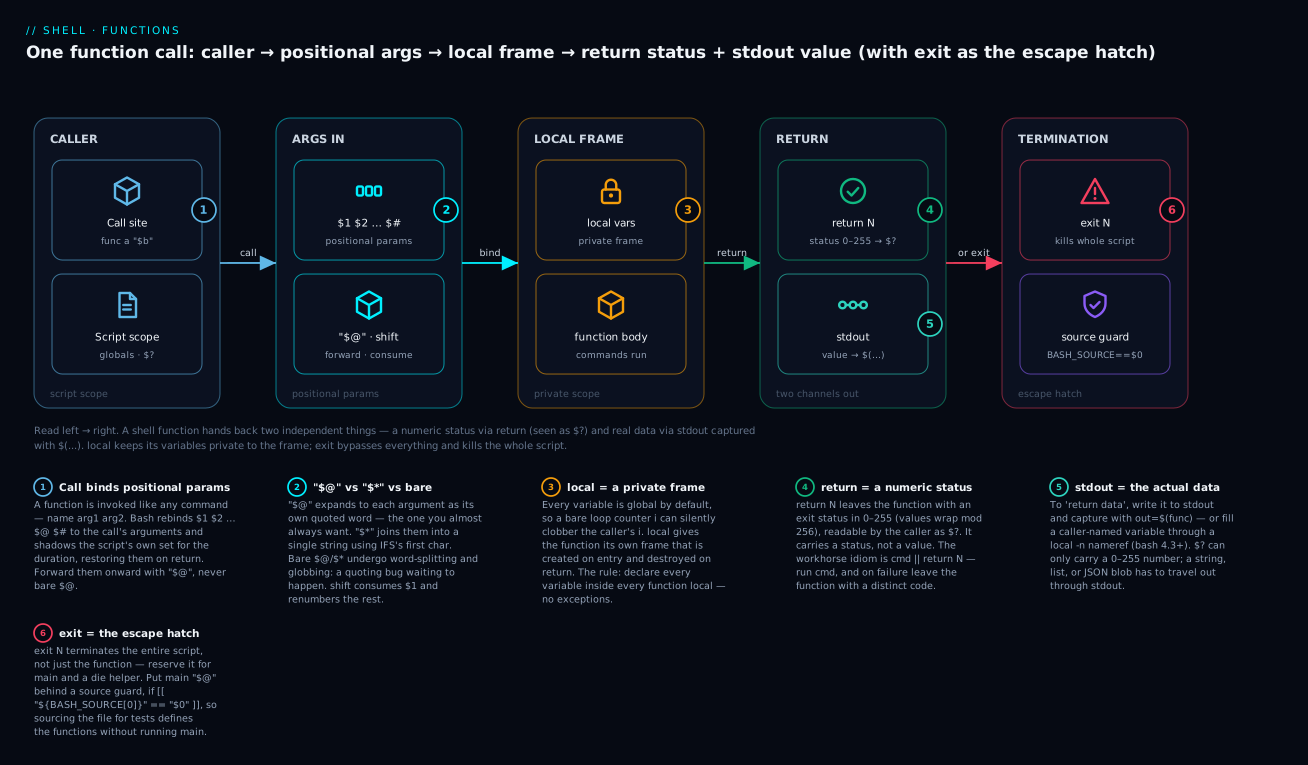
The diagram traces one function call from left to right: the caller invokes the function and its arguments are bound to positional parameters ($1, $2, … "$@"); the body runs inside a private local frame that vanishes on return; and the function hands back two independent things — a numeric status through return (read as $?) and any actual data through stdout (captured with $(…)) — while exit is the escape hatch that bypasses all of it and stops the entire script.
Prerequisites & what you’ll be able to do
You’ll get the most from this lesson if you’re already comfortable with a few earlier ideas: running a script and reading its exit status with $?; variables, quoting and word-splitting (covered in Variables, quoting, parameter expansion & IFS — the "$@" rules below build directly on it); command substitution (out=$(cmd)); and the basic control flow of if, case and while. If $?, "$var" and $(...) already feel automatic, you’re ready.
After working through this lesson you will be able to:
- Define functions in the portable POSIX form and call, list (
declare -F) and remove (unset -f) them. - Pass and consume arguments correctly — forward them with
"$@", join them with"$*", and walk an option list withshift. - Stop functions from clobbering each other by declaring every variable
local, and explain why bash’s dynamic scope is different from the lexical scope of Python, C or JavaScript. - Choose the right return mechanism — a status code via
return, a value via stdout +$(...), or a by-reference update via alocal -nnameref — and know the cost of each. - Tell
returnfromexitwith confidence, and usecmd || return Nto fail fast with distinct exit codes. - Structure a real script around a
main "$@"entry point behind a source guard, so it runs when executed and stays testable when sourced.
1. Defining functions: two equivalent forms
Bash has two function-definition syntaxes:
# POSIX form
greet() {
  echo "Hello, $1"
}

# bash-specific form (the `function` keyword is technically optional)
function greet {
  echo "Hello, $1"
}

# Mixed form (works in bash but is non-portable; avoid)
function greet() {
  echo "Hello, $1"
}
Use the POSIX form (name() { ... }). It works in every shell — bash, zsh, dash, ash, busybox. The function keyword is bash-specific and adds no semantic value, just visual noise.
A function definition is just a parsed, named block of commands. Defining a function does not execute it. You execute it by calling it like any other command:
greet() {
  echo "Hello, $1"
}

greet Alice          # prints: Hello, Alice
greet Bob            # prints: Hello, Bob
Functions live in the current shell’s namespace, alongside aliases and variables. They take precedence over external commands of the same name (with one important exception we’ll see below).
You can list defined functions with declare -F (names only) or declare -f (full source):
declare -F           # all defined functions
declare -F greet     # confirm `greet` is defined
declare -f greet     # show the body
You can undefine a function with unset -f greet.
2. Arguments arrive as positional parameters
When you call greet Alice, bash sets up the same positional-parameter machinery as for the script itself. Inside the function, $1 is Alice, $2 is empty, $# is 1, and so on. The script’s own $1, $2, etc. are shadowed — the function has its own copy.
greet() {
  echo "First arg: $1"
  echo "Second arg: $2"
  echo "All args: $@"
  echo "Count: $#"
}

greet Alice Bob Charlie
# First arg: Alice
# Second arg: Bob
# All args: Alice Bob Charlie
# Count: 3
After the function returns, the script’s positional parameters are restored. This is the same scoping behaviour the script gets relative to the parent shell.
The same quoting rules from L2 apply: always use "$@" when forwarding arguments, never unquoted $@ or "$*":
wrap() {
  ./real-tool "$@"           # CORRECT — forwards each arg as a separate quoted token
}

wrap "hello world" "foo"     # real-tool sees 2 args: "hello world", "foo"
If you wrote ./real-tool $@ (no quotes), "hello world" would split into two arguments. If you wrote ./real-tool "$*", all args would join into one. Both are wrong for forwarding.
$@ vs $* vs "$@" vs "$*" — the four behaviours
Because forwarding arguments wrongly is such a common bug, it’s worth pinning down all four combinations precisely. Given a function called with three arguments — one two (a single argument containing a space), three, and four (with leading and trailing spaces) — here is exactly what each form expands to:
| Form | Expands to | Use it for |
|---|---|---|
"$@" |
each argument as its own quoted word: [one two] [three] [ four ] |
forwarding args to another command — the default you want |
"$*" |
one word, all args joined by the first character of IFS (a space by default): [one two three four ] |
building a single display/log string from all args |
$@ (bare) |
each arg re-split on IFS and glob-expanded: [one] [two] [three] [four] |
almost never — this is a bug |
$* (bare) |
same word-splitting and globbing as bare $@ |
almost never — this is a bug |
The two quoted forms are the ones that matter. "$@" is transparent forwarding: whatever the caller passed, the next command receives byte-for-byte, argument boundaries intact. "$*" is flattening: everything becomes one string, which is what you want for a log line but never for forwarding.
That "$*" joins on the first character of IFS is a genuinely useful lever — set IFS locally and you have an argument/array joiner in one line:
join_by() {
  local sep="$1"; shift
  local IFS="$sep"
  echo "$*"                 # all remaining args, joined by $sep
}

join_by , a b c             # a,b,c
Only the first character of IFS is used for joining, so join_by ' | ' would join on a space, not on " | " — a classic surprise. For multi-character separators you need printf or a loop.
Two more everyday tools:
$#is the argument count.while (( $# )); do … shift; doneloops until the arguments run out."${@:2}"slices the positional parameters: “all arguments from the second onward,” each still a separate quoted word. It’s the idiom for “drop the sub-command name and forward the rest”:
dispatch() {
  local cmd="$1"                 # first arg is the sub-command
  "handle_${cmd}" "${@:2}"       # forward the remaining args, boundaries intact
}
Empty-argument edge case worth knowing: when there are no positional parameters, "$@" expands to zero words (the next command simply receives no arguments), whereas "$*" expands to a single empty word. That difference is exactly why "$@" stays safe to forward even when nothing was passed.
shift — consuming arguments
shift discards $1 and renumbers everything else. $2 becomes $1, $3 becomes $2, and so on. $# decreases.
process_first_three() {
  for i in 1 2 3; do
    echo "Arg $i: $1"
    shift
  done
}

process_first_three a b c d e
# Arg 1: a
# Arg 2: b
# Arg 3: c
shift N shifts by N at once. Useful when you want to consume an option and its value:
parse_options() {
  while [[ $# -gt 0 ]]; do
    case "$1" in
      --port)
        PORT="$2"
        shift 2          # consume both --port and its value
        ;;
      --verbose)
        VERBOSE=1
        shift            # consume just --verbose
        ;;
      *)
        echo "Unknown: $1" >&2
        return 2
        ;;
    esac
  done
}

parse_options --port 8080 --verbose
This is the foundational pattern for hand-rolled argument parsers. Lesson 17 covers getopts for richer cases.
3. The dangerous default: every variable is global
This is the section that changes how you write shell forever.
counter() {
  COUNT=$((COUNT + 1))
  echo "Counter is now $COUNT"
}

COUNT=0
counter         # Counter is now 1
counter         # Counter is now 2
echo "$COUNT"   # 2
Looks fine, right? Now consider this:
bad_function() {
  i=0
  while (( i < 5 )); do
    (( i++ ))
  done
}

i=100
bad_function
echo "$i"       # 5 — the function CLOBBERED i
Bash variables are global by default. Every assignment inside a function modifies the script-wide state. If your function uses i as a loop counter and the calling code also uses i, the function silently corrupts the caller’s i. This is the source of countless impossible-to-find bugs in larger shell scripts.
The fix: local.
good_function() {
  local i=0
  while (( i < 5 )); do
    (( i++ ))
  done
}

i=100
good_function
echo "$i"       # 100 — caller's i is preserved
local declares a variable scoped to the current function. It comes into existence when the function is entered and is destroyed when the function returns. The caller’s variable of the same name is hidden during the function call (dynamic scope) and restored on return.
The rule: declare every variable inside every function with local. Always. There is no good reason not to. Functions that omit local are bugs waiting to happen.
greet() {
  local name="$1"
  local greeting="${2:-Hello}"
  echo "${greeting}, ${name}"
}
local accepts the same attribute flags as declare:
process() {
  local -i count=0           # integer
  local -a items=()          # array
  local -A by_id=()          # associative array
  local -r MAX=10            # readonly within this function
  local -n ref="$1"          # nameref (advanced — see section 7)
}
local works only inside functions. Calling it outside a function is an error.
Dynamic scope: a subtle pitfall
Bash uses dynamic scope, not lexical. This means a function can see variables declared local in any caller further up the call stack — not just the immediate caller, but any ancestor.
outer() {
  local secret="hidden"
  inner
}

inner() {
  echo "$secret"           # prints "hidden" — inner sees outer's local
}

outer
This is not how Python, JavaScript, C, or any other major language works. Most languages have lexical scope, where inner can’t see outer’s locals. Bash’s dynamic scope means: variables leak through the call stack. Functions in deep call chains can accidentally read or write each other’s “private” state if they happen to use the same variable names.
The mitigation: use long, specific variable names (local user_email instead of local email), and prefix names by function (local greet_name="$1" instead of local name="$1"). This isn’t elegant — it’s the cost of working in a language without lexical scope. For very deep call stacks, use namerefs (section 7) to make data-passing explicit.
The local exit-status trap
There’s one sharp edge to local that bites even experienced people. When you declare and assign in the same breath — local x=$(some_command) — the exit status you read afterwards is the status of local itself (which almost always succeeds), not the status of the command substitution:
bad() {
  local out=$(some_command_that_fails)
  echo "$?"          # 0 — WRONG: this is local's status, not the command's
}

good() {
  local out           # declare first
  out=$(some_command_that_fails)
  echo "$?"          # the command's real status
}
The rule: when you need the exit status of the command feeding a local variable, split the declaration from the assignment — local out on one line, out=$(...) on the next. The same trap applies to declare, export and readonly. shellcheck flags this as SC2155, and it’s one of the most common real-world causes of “my error check never fires.”
4. return vs exit — a critical distinction
Beginners constantly confuse these two. They are not synonyms.
return [N]— exits the current function with status N. The script keeps running.exit [N]— terminates the entire script with status N. Everything stops.
check() {
  if [[ ! -f "$1" ]]; then
    echo "Missing: $1" >&2
    return 1                # exit the function with status 1
  fi
  return 0                  # success
}

check /tmp/foo
echo "Continuing after check"  # this still runs
vs.
check() {
  if [[ ! -f "$1" ]]; then
    echo "Missing: $1" >&2
    exit 1                  # KILL THE WHOLE SCRIPT
  fi
}

check /tmp/foo
echo "This never runs if /tmp/foo doesn't exist"
Use return in functions almost always. Use exit only at the top level (in main) or in a function whose explicit purpose is “die now, don’t continue.”
If you call return from outside a function, bash treats it as exit. If you call exit from inside a function, the whole script terminates. There is no way to “exit just the function and continue the caller” other than return.
The exit code of a function
A function’s exit code is the status of the last command run inside it. If you don’t say return N explicitly, the function returns the exit code of its last command:
last_command_status() {
  ls /tmp           # this runs, returns 0
  ls /nonexistent   # this runs, returns 2 — and is the last command
}

last_command_status
echo "$?"           # 2
This is occasionally what you want. Often you want to be explicit:
last_command_status() {
  ls /tmp || return 1
  ls /nonexistent || return 2
  return 0
}
The cmd || return N pattern is the single most useful function-internal idiom: “run cmd; if it fails, return with status N.”
A function’s status is always an integer in 0–255. return (like exit) accepts that range only: the value is taken modulo 256, so return 300 surfaces as $? = 44, and negative numbers are an error. Treat a return code as a small category of outcome — 0 = success, 1 = generic failure, 2 = usage error, and so on — never as a way to hand back a real number. For an actual number (or any other data), you need stdout.
Returning values from functions
Shell functions cannot return arbitrary values the way functions in other languages can. The “return value” of a function is its exit status — an integer in 0–255. To “return a value,” you have three options:
Option 1: stdout (the most common)
get_user_id() {
  local user="$1"
  awk -F: -v u="$user" '$1 == u {print $3}' /etc/passwd
}

UID="$(get_user_id "$USER")"
echo "Your UID is $UID"
The function writes the value to stdout. The caller captures it with $(...). This is idiomatic and works for any data — strings, numbers, multi-line output. The cost: command substitution forks a subshell (more on this below in section 6).
Option 2: assign to a global variable
LAST_RESULT=""

compute() {
  local x="$1"
  LAST_RESULT=$((x * 2))
}

compute 5
echo "$LAST_RESULT"   # 10
No fork, very fast. The cost: you’ve polluted the global namespace, and the function has hidden side effects on LAST_RESULT. Use this for hot inner loops where the fork cost matters; otherwise prefer stdout.
Option 3: namerefs (bash 4.3+)
compute() {
  local -n out="$1"
  out=$(( $2 * 2 ))
}

compute result 5
echo "$result"        # 10
A nameref is a variable that points to another variable. The function modifies out, but out is bound to whatever name the caller passed in (result here). This is the clean version of “return a value by reference” — no fork, no global pollution. Bash 4.3+ only.
We’ll use all three throughout the course; for now, default to stdout unless you have a specific reason.
Which mechanism should you reach for?
| Mechanism | Fork? | Pollutes globals? | Returns any data? | Reach for it when… |
|---|---|---|---|---|
stdout + $(…) |
yes (a subshell) | no | yes — strings, numbers, multi-line | the default; readable, composable, works in any shell |
| global variable | no | yes | yes | a hot inner loop where the fork cost of $(…) actually shows up |
nameref local -n |
no | no | yes, incl. arrays & multiple values | bash 4.3+, and you want “return by reference” without a global |
Default to stdout until a profiler tells you the fork matters; then switch the hot path to a nameref (or, if you must, a documented global).
5. The main "$@" pattern: turning a script into a structured program
Once you have functions, the natural shape of a non-trivial shell script is:
#!/usr/bin/env bash
set -euo pipefail
IFS=$'\n\t'

# --- Constants ---
readonly DEFAULT_PORT=8080
readonly DEFAULT_LOG_LEVEL=info

# --- Functions ---

usage() {
  cat <<EOF
Usage: $0 [OPTIONS] COMMAND

Options:
  --port N        Port to use (default: ${DEFAULT_PORT})
  --log-level L   Log level (default: ${DEFAULT_LOG_LEVEL})
  -h, --help      Show this help

Commands:
  start    Start the service
  stop     Stop the service
  status   Show service status
EOF
}

log() {
  local level="$1"; shift
  printf '[%s] [%s] %s\n' \
    "$(date -u +%Y-%m-%dT%H:%M:%SZ)" "$level" "$*" >&2
}

require_tool() {
  local tool="$1"
  command -v "$tool" >/dev/null || {
    log error "Required tool not found: $tool"
    return 1
  }
}

cmd_start() {
  log info "Starting service on port ${PORT}"
  # ...
}

cmd_stop() {
  log info "Stopping service"
  # ...
}

cmd_status() {
  log info "Checking service status"
  # ...
}

# --- main ---

main() {
  local PORT="${DEFAULT_PORT}"
  local LOG_LEVEL="${DEFAULT_LOG_LEVEL}"
  local cmd=""

  while [[ $# -gt 0 ]]; do
    case "$1" in
      --port)       PORT="$2"; shift 2 ;;
      --log-level)  LOG_LEVEL="$2"; shift 2 ;;
      -h|--help)    usage; return 0 ;;
      start|stop|status) cmd="$1"; shift ;;
      *)            log error "Unknown argument: $1"; usage; return 2 ;;
    esac
  done

  if [[ -z "$cmd" ]]; then
    log error "Missing command"
    usage
    return 2
  fi

  require_tool curl || return 3
  require_tool jq || return 3

  "cmd_${cmd}"
}

main "$@"
Things to notice:
- One
mainfunction that drives the whole script. - All argument parsing happens inside
main. main "$@"at the very bottom is the entry point.- Sub-commands dispatched by name:
cmd_${cmd}— ifcmdisstart, this callscmd_start. Cleaner than a longcaseblock at the top level. - Every function has
localvariables. logandusageare short utilities.require_toolis a reusable helper.- Errors return distinct exit codes: 2 = usage error, 3 = missing tool.
This is the shape of every production shell script you should write past 100 lines. The main "$@" pattern is borrowed from C and Python and works equally well here.
Why main at the bottom?
Two reasons:
1. Functions must be defined before they’re called. Bash parses top-to-bottom. If main calls cmd_start, then cmd_start must already be defined when main runs. If main is at the top of the file calling functions defined below, it works only if main itself isn’t called until after the file is fully read. The convention is: put main "$@" at the very bottom of the file, so by the time it runs, everything is defined.
2. It makes the script “sourceable” and “testable.” If you put main "$@" at the bottom and someone sources your script, all the functions get defined but main runs too — which they probably didn’t want. The trick is to guard main:
# Only run main if the script is being executed, not sourced
if [[ "${BASH_SOURCE[0]}" == "${0}" ]]; then
  main "$@"
fi
BASH_SOURCE[0] is the path of the current source file. $0 is the path of the running script (or shell). When you run the script directly, they’re equal. When you source it, $0 is your interactive shell (e.g. -bash) but BASH_SOURCE[0] is the file. The guard runs main only in the run-directly case.
This is the canonical pattern for scripts that double as libraries — useful for testing (lesson 19) and for shell-based modular code.
6. The fork cost of $() — and when to care
Every time you write VAR=$(some_command), bash forks a subshell to run some_command. The output is captured, the subshell exits, and VAR is set in the parent.
Forks are cheap on modern Linux — typically 100µs to 1ms. For a script that runs ten of them, you’ll never notice. For a tight loop that runs ten thousand of them, you’ll notice a lot:
# Slow — forks twice per iteration
for i in {1..10000}; do
  TIMESTAMP=$(date +%s)
  ID=$(uuidgen)
  echo "$TIMESTAMP $ID"
done
Each call to date forks a process and execs the binary. Ten thousand iterations = 10,000 forks for date plus 10,000 for uuidgen. On a typical Linux server, that’s 10–60 seconds of pure fork overhead.
The fix: use bash built-ins where possible.
# Fast — no fork per iteration
for i in {1..10000}; do
  printf -v TIMESTAMP '%(%s)T' -1     # bash 4.2+; format current time without forking
  printf -v ID '%s%s' "$$" "$RANDOM"  # cheap pseudo-id
  echo "$TIMESTAMP $ID"
done
printf -v VAR FMT writes the formatted output directly into VAR without a fork. The %(%s)T format with -1 gives the current Unix timestamp using bash’s built-in time formatter.
For the same reason, prefer parameter expansion over sed/awk/cut for simple string manipulation:
# Slow
BASE=$(echo "$FILE" | sed 's|.*/||')

# Fast (no fork, see L2)
BASE="${FILE##*/}"
In a hot loop, this difference can be 100x. Lesson 32 (performance) covers this in depth, but the principle is foundational: forking is what makes shell slow; eliminating forks is what makes shell fast.
7. Namerefs — passing data by reference (bash 4.3+)
Sometimes you need a function that updates a variable in the caller’s scope by name, without using a global. The clean way is local -n:
double_in_place() {
  local -n var="$1"        # var is now an alias for whatever variable the caller named
  var=$((var * 2))
}

x=5
double_in_place x
echo "$x"                  # 10
The local -n var="$1" line says: “create a local variable var that is a reference to whatever variable name was passed as $1.” Inside the function, var and the caller’s x are the same storage.
This works for arrays too:
add_to() {
  local -n arr="$1"
  arr+=("$2")
}

FRUITS=(apple banana)
add_to FRUITS cherry
echo "${FRUITS[@]}"        # apple banana cherry
The classic use case: a function that needs to “return” multiple values. Instead of stdout-and-parse, you pass in references to fill:
parse_url() {
  local url="$1"
  local -n out_proto="$2"
  local -n out_host="$3"
  local -n out_path="$4"

  [[ "$url" =~ ^([^:]+)://([^/]+)(.*)$ ]] || return 1
  out_proto="${BASH_REMATCH[1]}"
  out_host="${BASH_REMATCH[2]}"
  out_path="${BASH_REMATCH[3]}"
}

parse_url "https://example.com/api" PROTO HOST PATH
echo "Protocol: $PROTO, Host: $HOST, Path: $PATH"
Pitfalls:
- Bash 4.3+. Won’t work on macOS’s default bash (3.2). Use
brew install bashor rewrite without namerefs. - The nameref’s name and the caller’s variable name must not clash. If you do
local -n x="$1"and the caller passedx, you get a “circular reference” error. Conventional fix: prefix nameref names with something unlikely to collide (local -n __out="$1"). - Namerefs make scripts harder to reason about because the data flow is hidden. Use sparingly.
8. Function visibility: export -f and subshells
When you fork a subshell (running an external command, a $(...) substitution, or a pipe), the function definitions are not inherited by default. The new process is a fresh shell that doesn’t know your functions exist.
greet() { echo "Hello, $1"; }

bash -c 'greet World'      # bash: greet: command not found
To export a function so subshells inherit it:
greet() { echo "Hello, $1"; }
export -f greet

bash -c 'greet World'      # Hello, World
export -f FUNC is the function-equivalent of export VAR. Useful when you want to call your shell functions inside xargs, find -exec, GNU parallel, etc:
process_file() {
  local f="$1"
  echo "Processing: $f"
  gzip -- "$f"
}
export -f process_file

find /var/log -type f -name '*.log' -print0 | xargs -0 -P 4 -I {} bash -c 'process_file "$@"' _ {}
The bash -c '...' _ {} is a small trick: _ becomes $0 (placeholder), {} becomes $1, and our function is called with the filename. Without export -f, the inner bash wouldn’t know process_file exists.
9. Recursion in shell
Shell functions can recurse. There’s no practical depth limit beyond the bash stack size, and the cost is just function-call overhead (very cheap — no fork).
factorial() {
  local n="$1"
  if (( n <= 1 )); then
    echo 1
    return
  fi
  echo "$(( n * $(factorial $((n - 1))) ))"
}

factorial 5    # 120
Each recursive call is a $(...) substitution, which forks a subshell. So the above isn’t actually fork-free. For real performance you’d accumulate in a global:
RESULT=1
factorial_acc() {
  local n="$1"
  if (( n <= 1 )); then
    return
  fi
  RESULT=$((RESULT * n))
  factorial_acc $((n - 1))
}

RESULT=1
factorial_acc 5
echo "$RESULT"    # 120
Recursion in shell is fine for tree-walking, recursive descent, parsing, etc. — but if you find yourself recursing deep, ask whether shell is the right tool. Lesson 32 covers when to leave shell.
10. Twelve function idioms to memorise
# 1. Always declare arguments local at the top
greet() {
  local name="$1"
  local greeting="${2:-Hello}"
  echo "${greeting}, ${name}"
}

# 2. Forward all arguments
wrap() {
  ./real-tool "$@"
}

# 3. Cmd-or-return: fail-fast inside functions
check() {
  command -v jq >/dev/null || return 1
  jq --version
}

# 4. Stdout return value
hostname_short() {
  hostname -s
}
H="$(hostname_short)"

# 5. Nameref return (bash 4.3+)
get_pid() {
  local -n out="$1"
  out=$$
}
get_pid MY_PID

# 6. Distinct exit codes per failure mode
validate() {
  [[ -f "$1" ]] || return 1
  [[ -r "$1" ]] || return 2
  [[ -s "$1" ]] || return 3
  return 0
}

# 7. main "$@" pattern
main() {
  # ...
}
main "$@"

# 8. Sourceable script guard
if [[ "${BASH_SOURCE[0]}" == "${0}" ]]; then
  main "$@"
fi

# 9. log helper
log() {
  printf '[%s] [%s] %s\n' "$(date -Iseconds)" "$1" "${*:2}" >&2
}

# 10. Check required env once
require_env() {
  local var="$1"
  [[ -n "${!var:-}" ]] || { echo "Required: $var" >&2; exit 2; }
}

# 11. Sub-command dispatch
main() {
  local cmd="$1"; shift
  case "$cmd" in
    start|stop|status|restart) "cmd_${cmd}" "$@" ;;
    *) echo "Unknown: $cmd" >&2; return 2 ;;
  esac
}

# 12. Exported helper for find/xargs
process() { echo "Processing $1"; }
export -f process
find . -type f -print0 | xargs -0 -I {} bash -c 'process "$@"' _ {}
These twelve cover 95% of function-use in real-world scripts.
11. A complete example: a small but realistic deployment script
#!/usr/bin/env bash
# deploy.sh — push a built artifact to a remote host
set -euo pipefail
IFS=$'\n\t'

# ---- Constants ----
readonly REQUIRED_TOOLS=(ssh scp jq curl)

# ---- Helpers ----

log() {
  local level="$1"; shift
  printf '[%s] [%s] %s\n' "$(date -u +%Y-%m-%dT%H:%M:%SZ)" "$level" "$*" >&2
}

die() {
  log error "$*"
  exit 1
}

require_tools() {
  local missing=()
  for tool in "${REQUIRED_TOOLS[@]}"; do
    command -v "$tool" >/dev/null || missing+=("$tool")
  done
  if (( ${#missing[@]} > 0 )); then
    die "Missing tools: ${missing[*]}"
  fi
}

require_env() {
  local var="$1"
  [[ -n "${!var:-}" ]] || die "Required environment variable: $var"
}

# ---- Sub-commands ----

cmd_validate() {
  local artifact="$1"
  log info "Validating ${artifact}"
  [[ -f "$artifact" ]] || { log error "Artifact missing: $artifact"; return 2; }
  [[ -s "$artifact" ]] || { log error "Artifact empty: $artifact"; return 3; }
  log info "OK"
}

cmd_upload() {
  local artifact="$1"
  local host="$2"
  local target="$3"
  log info "Uploading ${artifact} -> ${host}:${target}"
  scp -q -- "$artifact" "${host}:${target}" || { log error "Upload failed"; return 4; }
  log info "Upload OK"
}

cmd_health_check() {
  local url="$1"
  local timeout="${2:-30}"
  log info "Health check: ${url} (timeout ${timeout}s)"
  for ((i=0; i<timeout; i++)); do
    if curl -fsS "$url" >/dev/null 2>&1; then
      log info "Healthy after ${i}s"
      return 0
    fi
    sleep 1
  done
  log error "Health check timed out after ${timeout}s"
  return 5
}

# ---- main ----

main() {
  local artifact="${1:-}"
  local host="${HOST:-}"
  local target="${TARGET_PATH:-/opt/app}"

  [[ -n "$artifact" ]] || die "Usage: $0 ARTIFACT (HOST=... TARGET_PATH=...)"
  require_env HOST
  require_tools

  cmd_validate "$artifact"
  cmd_upload "$artifact" "$host" "$target"
  cmd_health_check "https://${host}/healthz" 60

  log info "Deployment complete"
}

if [[ "${BASH_SOURCE[0]}" == "${0}" ]]; then
  main "$@"
fi
Read this carefully. Every pattern from this lesson is in here:
localfor every function variable.returnfor function-level failures,exitonly at the script-top level.diehelper that combines log + exit.require_toolsandrequire_envas named, reusable helpers.cmd_*sub-command convention.main "$@"at the bottom, behind a sourceable guard.- Distinct exit codes per failure mode (2 = missing, 3 = empty, 4 = upload, 5 = health).
- Strict-mode preamble.
If you can write this cleanly, you have everything you need to grow your shell scripts to 500+ lines without them collapsing under their own weight.
12. What you must internalise before lesson 6
- Why is every variable global by default in bash, and why is that dangerous? (Bash defaults to global; functions can clobber caller state silently.)
- What’s the fix? (
localdeclaration on every variable inside every function.) - What’s the difference between
return Nandexit N? (returnexits a function;exitterminates the entire script.) - What does
cmd || return Ndo? (Run cmd; if it fails, return from the function with status N.) - What are the three ways to “return a value” from a function? (Stdout +
$(...)capture; global variable; namereflocal -n.) - What does
main "$@"do at the bottom of a script? (Callsmainwith the script’s positional parameters, after all functions have been parsed.) - What’s the source-guard idiom? (
if [[ "${BASH_SOURCE[0]}" == "${0}" ]]; then main "$@"; fi— runsmainonly when the script is executed directly, not when sourced.) - What does
export -f FUNCdo? (Marks the function for inheritance by subshells, useful forxargsandfind -exec.) - What is dynamic scope and why does it bite? (Inner functions can see outer functions’ locals — different from C/Python lexical scope; mitigated by long, specific variable names.)
- When does the fork cost of
$(...)matter? (Tight inner loops with thousands of iterations; the fix is bash built-ins likeprintf -vand parameter expansion.)
If any felt fuzzy, re-read. Lesson 6 (arrays) is where we put structured data into scripts and the local and quoting patterns from this lesson become non-negotiable.
Going deeper
The core patterns above will carry you a long way. This section is for when you hit the edges — the behaviours that surprise people who think they already know shell functions.
Functions often run in a subshell — and lose their assignments
A function call itself is not a subshell; it runs in your current shell, which is exactly why local and globals work. But the moment you put a function (or any code) on one side of a pipe, inside $(…), inside ( … ), or in the background with &, that instance runs in a subshell — a forked copy — and any variable it sets there is discarded when the subshell exits:
count=0
seq 5 | while read -r _; do
  (( count++ ))            # runs in a subshell (right side of the pipe)
done
echo "$count"             # 0 — NOT 5; the increments happened in a subshell
This is the single most reported “my variable didn’t change” bug in shell. The fixes: avoid the pipe (while read -r _; do …; done < <(seq 5) — process substitution keeps the loop in the current shell), or on bash enable shopt -s lastpipe (which runs the last pipeline segment in the current shell, when job control is off). The same rule explains why a function called as x=$(myfunc) can’t set a caller global — it ran in the substitution’s subshell.
set -e is suppressed inside a tested function
Under set -e (errexit), a failing command normally aborts the script. But there’s a carve-out that catches everyone: when a function is used as a condition — if myfunc; then, myfunc && …, myfunc || …, or ! myfunc — errexit is disabled for the entire function body, not just the first command. So a function you rely on to “stop on the first error” will happily run to the end when called in a conditional:
set -e
check() {
  false                  # you expect this to abort…
  echo "still running"   # …but under `if check`, this line RUNS
}
if check; then echo ok; fi   # prints: still running  then  ok
If a helper must fail fast internally, use explicit || return N on each step rather than leaning on set -e. Strict mode (set -euo pipefail) makes scripts safer, but it does not rescue you from this particular carve-out.
Functions shadow commands — and how to reach the real one
A function takes precedence over an external command or a shell builtin of the same name. That’s what makes wrappers possible — but it also means a wrapper that calls its own name recurses forever. To call the real command from inside a same-named wrapper, use command (for externals) or builtin (for builtins):
ls() {
  command ls --color=auto "$@"   # `command` bypasses the function → the real /bin/ls
}
cd() {
  builtin cd "$@" || return      # `builtin` reaches the real cd
  ls
}
command -v NAME (used earlier in require_tool) also resolves around functions to find the real executable, which is why it’s the portable “is this installed?” test.
Argument parsing beyond shift
The hand-rolled while [[ $# -gt 0 ]]; do case …; shift; done loop from section 2 is perfect for a handful of flags. Once you need bundled short options (-xvf), --opt=value syntax, or POSIX-correct handling, reach for the getopts builtin — covered in Argument parsing with getopts & long options. The function patterns here don’t change; only the parser inside main gets richer.
Namerefs: circular references and portability
The local -n nameref (section 7) has one failure mode worth internalising: if the nameref variable has the same name as the caller’s variable, bash raises a circular reference error. Convention is to prefix nameref names so they can’t collide with anything a caller would plausibly use — local -n __out="$1". Namerefs are bash 4.3+; macOS ships bash 3.2, so scripts that must run there (or on strict POSIX sh) need the stdout-and-capture approach instead. Note too that POSIX sh has functions and return, but local itself is not in the POSIX standard — it’s a near-universal extension (bash, dash, ash, busybox, ksh all have it), so in practice you can rely on it for Linux scripting, but a strict #!/bin/sh portability audit will flag it.
export -f internals and a security footnote
Exported functions are passed to child bash processes through specially-named environment variables. Historically this mechanism was the vector for Shellshock (CVE-2014-6271): older bash executed trailing code smuggled into those variables. Modern bash is patched, but the lesson stands — never export -f a function whose name or body is influenced by untrusted input, and be aware that an exported function crosses the process boundary as ordinary environment data.
Performance: calls are cheap, captures are not
A plain function call is fork-free — bash just jumps into the parsed body — so functions are essentially free to use liberally, including for recursion (section 9). What costs money is capturing their output: every x=$(func) forks a subshell. In a hot loop that’s the dominant cost, which is exactly why the nameref and global return styles exist. Performance profiling: fork, exec & leaving shell measures this properly; the one-line takeaway is that structuring code into functions costs nothing, but how you get data back out can cost a fork each time.
Practice challenges
Work these in a real bash (use bash 4+ for the nameref one; the rest run anywhere). Try each before opening the solution.
1. Local by default (beginner)
Write a function greet that takes a name and an optional greeting (defaulting to Hello) and prints "<greeting>, <name>". Every variable inside must be local, and calling it must not create or modify any variable in the caller’s scope.
<details> <summary>Solution</summary>
greet() {
  local name="$1"
  local greeting="${2:-Hello}"
  printf '%s, %s\n' "$greeting" "$name"
}

greet Ada             # Hello, Ada
greet Ada "Welcome"   # Welcome, Ada
Why: ${2:-Hello} supplies the default when $2 is unset or empty, and declaring both variables local guarantees the function leaves no trace in the caller.
</details>
2. Stop the clobber (beginner)
The function below corrupts the caller’s i. Fix it without renaming anything the caller uses.
sum_to() {
  total=0
  for (( i=1; i<=$1; i++ )); do (( total += i )); done
  echo "$total"
}
i=99
sum_to 5
echo "caller i is now $i"   # prints 6, not 99 — bug
<details> <summary>Solution</summary>
sum_to() {
  local total=0 i
  for (( i=1; i<=$1; i++ )); do (( total += i )); done
  echo "$total"
}
Why: both total and the loop counter i were global. Declaring them local (you can declare i without initialising it) confines them to the function, so the caller’s i=99 survives.
</details>
3. Join with IFS (intermediate)
Write join_by SEP ITEM... that prints the items separated by the single-character SEP, with no trailing separator. join_by , a b c must print a,b,c.
<details> <summary>Solution</summary>
join_by() {
  local sep="$1"; shift
  local IFS="$sep"
  printf '%s\n' "$*"
}

join_by , a b c          # a,b,c
join_by / usr local bin  # usr/local/bin
Why: "$*" joins all remaining positional parameters using the first character of IFS; setting IFS local means the change is undone automatically when the function returns.
</details>
4. Retry with clean forwarding (intermediate)
Write retry N CMD... that runs CMD (with its arguments) up to N times, stopping at the first success. It must return the command’s outcome, and must forward arguments so that retry 3 grep "a b" file.txt searches for the literal string a b.
<details> <summary>Solution</summary>
retry() {
  local -i max="$1"; shift
  local -i n=0
  until "$@"; do              # "$@" forwards each arg intact
    n+=1
    (( n >= max )) && return 1
    sleep 1
  done
  return 0
}

retry 3 curl -fsS https://example.com/health
Why: quoted "$@" preserves argument boundaries so "a b" stays one argument; until "$@" re-runs the command until it succeeds or the attempt cap is hit; the explicit return values report the outcome.
</details>
5. Return by reference (advanced, bash 4.3+)
Write split_host_port "host:port" HOST_VAR PORT_VAR that fills the two caller-named variables via namerefs, and returns non-zero if the input has no colon. Avoid a subshell.
<details> <summary>Solution</summary>
split_host_port() {
  local input="$1"
  local -n __host="$2"
  local -n __port="$3"
  [[ "$input" == *:* ]] || return 1
  __host="${input%%:*}"     # everything before the first colon
  __port="${input##*:}"     # everything after the last colon
}

split_host_port "db.internal:5432" H P && echo "$H / $P"   # db.internal / 5432
Why: local -n __host="$2" binds __host to whatever variable name the caller passed, so assigning to it updates the caller directly — no $(…) fork and no global. The __ prefix avoids a circular-reference clash with the caller’s names.
(On bash 3.2 / POSIX, where local -n is unavailable, return via stdout instead: split_host_port() { case "$1" in *:*) printf '%s %s\n' "${1%%:*}" "${1##*:}" ;; *) return 1 ;; esac; } and capture with read -r H P < <(split_host_port "db:5432").)
</details>
6. A sourceable main dispatcher (advanced)
Write a self-contained script svc.sh with sub-commands start, stop, and status dispatched by name, a main "$@" entry point, and a source guard so that source svc.sh defines the functions without running main. Unknown commands must return status 2.
<details> <summary>Solution</summary>
#!/usr/bin/env bash
set -euo pipefail

cmd_start()  { echo "starting";  }
cmd_stop()   { echo "stopping";  }
cmd_status() { echo "status ok"; }

main() {
  local cmd="${1:-}"
  case "$cmd" in
    start|stop|status) "cmd_${cmd}" "${@:2}" ;;
    *) echo "usage: $0 {start|stop|status}" >&2; return 2 ;;
  esac
}

if [[ "${BASH_SOURCE[0]}" == "${0}" ]]; then
  main "$@"
fi
Verify the guard both ways:
bash svc.sh status         # status ok   (executed → main runs)
source svc.sh; cmd_start   # starting    (sourced → main did NOT run, function is available)
Why: "cmd_${cmd}" turns the validated sub-command into a function name (no giant case of bodies); "${@:2}" forwards any extra arguments; and the BASH_SOURCE[0] == $0 guard runs main only when the file is executed directly, leaving it importable for tests.
</details>
Common beginner mistakes
These are misconceptions, not typos — each is a wrong mental model, followed by the right one.
“return hands back the function’s result, like in Python.”
It doesn’t. return N sets only the exit status — an integer 0–255 that the caller reads as $?. There is no way for return to hand back a string, a list, or a number outside 0–255. Right model: a function has two output channels — status (return, for pass/fail) and stdout (for data). If you want the value, print it and capture it with result=$(func).
“I’ll skip local for this quick little variable.”
That “quick little variable” is global, and the day some caller three levels up the stack happens to use the same name, your function silently corrupts it and you lose an afternoon. Right model: every variable inside every function is local, declared at the top — no exceptions, no “just this once.”
“I checked $? right after local x=$(cmd) and my error handling never fires.”
local x=$(cmd) returns the status of local, which succeeded — the real status of cmd is thrown away. Right model: split it — local x; x=$(cmd); if (( $? )); then … — or test the command directly. (shellcheck SC2155 catches this.)
“I’ll use exit 1 in my helper to signal failure.”
Inside a normally-called function, exit kills the whole script, which is usually not what a helper should do; and inside a function that happens to run in a subshell (a pipe, a $( )), exit only ends the subshell, so the effect is inconsistent. Right model: helpers return; only main and a deliberate die() use exit.
“for f in $@ loops over my arguments.”
Bare $@ word-splits and glob-expands each argument, so a filename with a space becomes two iterations and a literal * explodes into matching files. Right model: for f in "$@" — quoted — gives you exactly the arguments, boundaries intact.
“I put main at the top so it’s the first thing I read.”
Bash parses top-to-bottom; if main runs before the functions it calls are defined, you get command not found. Right model: define functions first, put main "$@" (behind the source guard) at the bottom, where everything it needs already exists.
“My function set a variable inside a while … | … loop, but the value’s gone afterwards.”
The right-hand side of a pipe runs in a subshell, so its assignments evaporate. Right model: feed the loop with redirection or process substitution (while … done < file or < <(cmd)), or enable shopt -s lastpipe — see Going deeper.
Glossary
- Function — a named, parsed block of commands defined with
name() { …; }. Calling it runs the block in the current shell (no fork), with its own positional parameters. - Positional parameters — the arguments to a function (or script):
$1,$2, …, with$#the count. Inside a function they shadow the script’s own until it returns. $@/$*— all positional parameters. Quoted,"$@"yields each as a separate word (forward args with this);"$*"yields one string joined by the first character ofIFS.IFS— Internal Field Separator: the characters bash splits words on (space, tab, newline by default). Its first character is what"$*"uses to join.shift [N]— discard the firstN(default 1) positional parameters and renumber the rest; the backbone of hand-rolled option parsing.local— declares a variable scoped to the current function; created on entry, destroyed on return. Not POSIX-standard, but supported by every mainstream shell.- Global variable — the bash default: any assignment not declared
localmodifies script-wide state, visible to and mutable by every function. - Dynamic scope — bash’s scoping rule: a function can see the
localvariables of any function currently above it on the call stack. Contrast lexical scope (Python, C, JS), where inner functions cannot see a caller’s locals. return [N]— leave the current function with exit statusN(0–255, taken mod 256). The script continues.exit [N]— terminate the entire script with statusN. Reserve it formainanddie.- Exit status /
$?— the 0–255 result of the last command;0means success. A function’s status is its last command’s, unless set explicitly withreturn. - Command substitution —
$(cmd)— runcmdin a subshell and substitute its stdout. The standard way to capture a function’s “return value.” - Subshell — a forked child shell (created by
(…), a pipe segment,$(…), or&). Variable changes inside it are lost when it exits. - Fork — creating a new process (via
fork()); cheap individually (~100µs–1ms) but costly in tight loops. Function calls don’t fork; output captures do. - Nameref —
local -n ref="$1"— a local variable that is an alias for another variable named by the caller; lets a function update the caller’s variable by reference. Bash 4.3+. readonly/local -r— mark a variable immutable; a further assignment is an error.declare— the builtin that sets variables and attributes (-iinteger,-aarray,-Aassociative,-rreadonly,-nnameref);localaccepts the same flags inside a function.declare -F/-flist function names / bodies.export -f name— mark a function for inheritance by child bash processes (forxargs,find -exec, GNU parallel).main "$@"— the convention of a single top-level function driving the script, invoked at the bottom with all arguments, so a script reads like a structured program.- Source guard —
if [[ "${BASH_SOURCE[0]}" == "${0}" ]]; then main "$@"; fi— runsmainonly when the file is executed directly, sosource-ing it (e.g. for tests) defines the functions without running the program. BASH_SOURCE— array of the source-file paths of the current call stack;BASH_SOURCE[0]is the file currently executing, used by the source guard.- Recursion — a function calling itself; supported in shell and fork-free unless each call captures output with
$(…). errexit/set -e— abort the script on any command failure — but suppressed inside a function used as a condition (if func,func || …).
What’s next
Lesson 6 covers indexed arrays (arr=(a b c), ${arr[@]}, ${#arr[@]}), associative arrays (declare -A by_id), array slicing, the mapfile/readarray builtins for line-oriented data, and the iteration patterns that use arrays as the canonical data structure. Bring everything from lessons 1–5 — every array operation is a quoting and word-splitting decision in disguise. See Arrays: indexed, associative & mapfile.