When a Python or Go developer adds a function, they add a test. When a shell developer adds a function, they… usually don’t. The result: bash codebases that nobody dares refactor, where every change is “deploy and pray,” and where production failures often turn out to be regressions in code that “obviously works.”
This isn’t because shell can’t be tested. It’s because the tooling is less famous. It’s actually as easy as Python’s pytest once you know the pattern.
This lesson covers:
bats-core— the de-facto standard test framework for bash. Clean syntax, isolated test runs, parallel execution.shunit2— the POSIX-shell-friendly alternative. Use this if you support dash/ash/busybox.- Test patterns for pure functions, side-effecting functions, scripts with arguments, and scripts that call external commands.
- Mocking
curl,aws,kubectl, anything by overridingPATH. - Fixtures —
mktemp -d, golden files, isolating tests from each other. - Coverage with
kcov. - CI integration — GitHub Actions and GitLab CI examples that run your test suite on every push.
By the end, you’ll have a tested shell project that’s safe to refactor and a CI pipeline that catches regressions before they reach production.
In a nutshell
“I ran it once and it worked” is not a test — it’s a hope. It holds right up until the night a filename arrives with a space in it, an unquoted $f splits into two arguments, and your backup script silently copies half of what it should. Python and Go developers don’t ship on hope; they add a test next to the function. Shell developers usually don’t — not because bash can’t be tested, but because the tooling is less famous. It’s actually as mechanical as pytest once you’ve seen the pattern: feed a function or script a known input, then check what it printed and the exit code it returned.
That’s the whole game. A test runs your code with a fixed input and asserts on two things: the output and the exit status. Everything in this lesson is machinery for doing that cleanly — capturing output without a failure blowing up the test, faking the network so results are deterministic, and giving each test a clean room so they don’t poison each other.
Think of it as a flight simulator for your scripts. You would never test a new landing procedure by flying real passengers into a real storm. You run it in a simulator: bats is the simulator harness, its run helper is the black-box recorder that captures every reading ($status, $output, $lines), the fake curl/aws/kubectl you drop onto PATH are the synthetic weather (no real network is ever touched), mktemp -d resets the cockpit between every run, and your assertions are the panel of warning lights that tell you exactly which instrument failed. CI is the regulator that refuses to certify a build until every checklist passes.
One honest caveat up front: bats is a separate tool that is frequently not preinstalled — this very build host doesn’t have it — so you pin and install it (in CI, and locally). If your script must run under POSIX /bin/sh rather than bash, you use shunit2 instead. And coverage via kcov is Linux-only. Every sample output below is representative of a real run, not captured live on this macOS host.
Level: Advanced · Time: ~40 min · Prerequisites: you can write and source a bash function, you’re comfortable with strict mode and ShellCheck, and you understand stdout vs stderr and file descriptors. If $?, "$( … )", and 2>&1 are second nature, you’re ready.
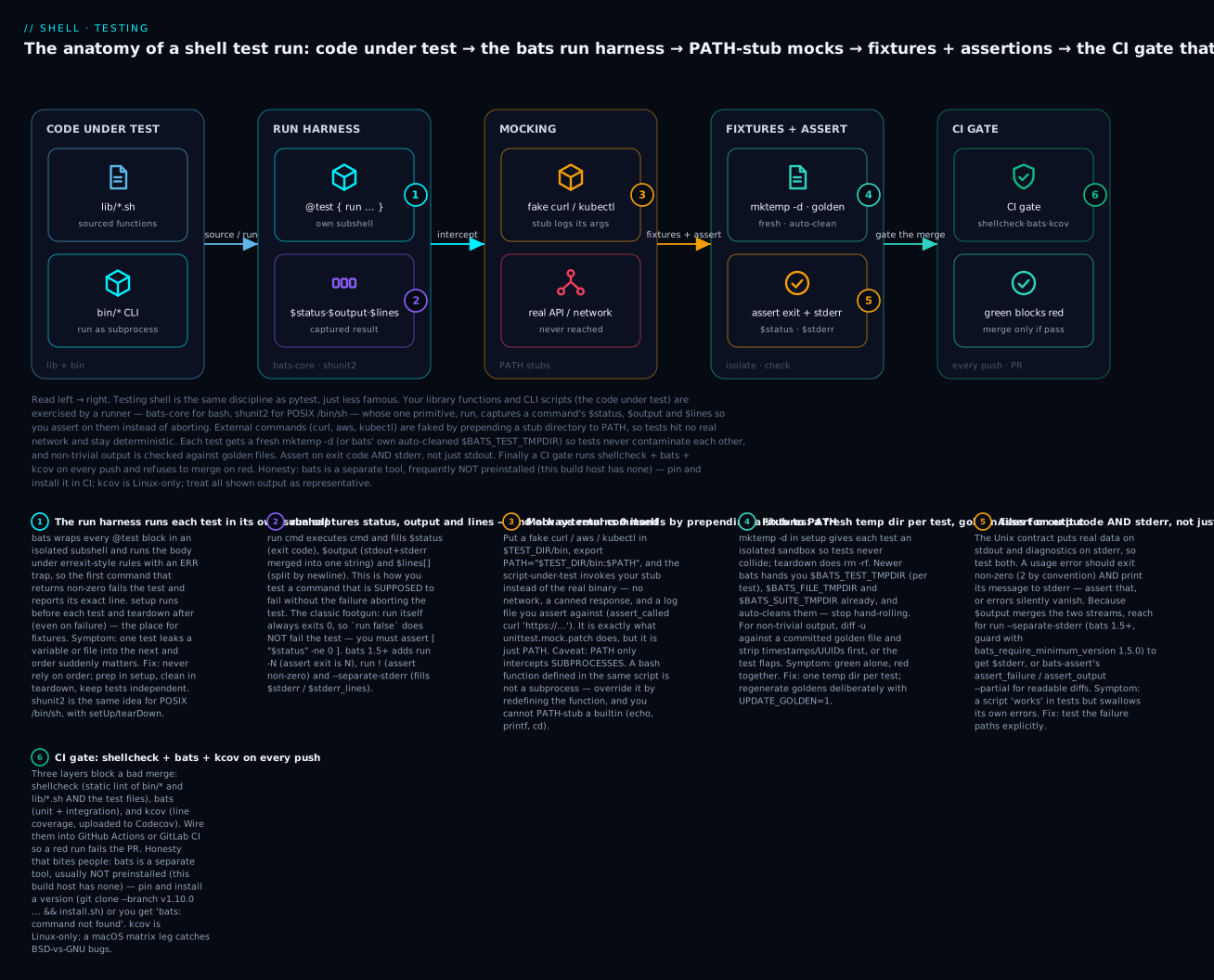
Read the diagram left → right as the path one test travels: your code under test is exercised by the bats run harness (which records $status/$output/$lines in an isolated subshell), external commands are mocked by a stub on PATH so no real network is hit, each test runs against fresh fixtures and asserts on exit code and stderr, and the whole suite becomes a CI gate that blocks a red build from merging.
1. Why test shell? The five most common bugs that tests catch
Before tooling — what are we testing for? In real-world shell, the bugs that bite hardest are:
- Quoting:
mv $f /backup/breaks the moment$fcontains a space. - Off-by-one in arithmetic:
$(( count - 1 ))going negative. - Glob expansion in unexpected places:
[[ $x == *.log ]]succeeds for “anything-dot-log” and you forgot toset -f. - Subshell variable scope:
cmd | while read; do FOUND=1; doneand$FOUNDis empty afterwards. - Exit code propagation:
cmd1 | cmd2returningcmd2’s code, notcmd1’s, andset -o pipefailwas forgotten.
These are exactly the kinds of bugs unit tests find. A 5-line test that runs your function with a filename containing a space catches a class-1 bug for life.
2. bats-core — the modern bash testing framework
bats-core is a maintained fork of the original bats (Bash Automated Testing System). Test files look like this:
#!/usr/bin/env bats

@test "addition works" {
  result=$(( 1 + 1 ))
  [ "$result" -eq 2 ]
}

@test "string contains substring" {
  haystack="hello world"
  [[ $haystack == *world* ]]
}

@test "command succeeds" {
  run echo "hello"
  [ "$status" -eq 0 ]
  [ "$output" = "hello" ]
}
The @test "name" { ... } syntax is bats’s only syntax extension; everything else is plain bash. Each @test block is run in its own subshell, so tests can’t pollute each other.
2.1 Installation
# Recommended: pin a version via git submodule or vendored install.
git clone https://github.com/bats-core/bats-core.git
sudo bats-core/install.sh /usr/local

# Or via package manager (older versions, but fine for casual use):
brew install bats-core           # macOS
sudo apt install bats            # Debian/Ubuntu (often older)
sudo dnf install bats            # Fedora

# In CI, pin a specific version for reproducibility:
git clone --depth=1 --branch=v1.10.0 https://github.com/bats-core/bats-core.git /tmp/bats
sudo /tmp/bats/install.sh /usr/local
Verify:
$ bats --version
Bats 1.10.0
2.2 The run helper — captures output and status
The most important bats primitive:
@test "ls shows expected file" {
  run ls /tmp
  [ "$status" -eq 0 ]
  [[ "$output" == *"somefile"* ]]
}
run executes its arguments and captures:
$status— exit code.$output— combined stdout+stderr (one string).$lines[0],$lines[1], … — output split by newlines.
This is how you test side-effecting code. Without run, a non-zero exit aborts the test (because set -e is on by default in bats); with run, the failure is captured into $status and you can assert on it.
2.3 Common assertions
bats relies on bash’s [ ] and [[ ]] for assertions:
@test "various assertions" {
  # Exit code:
  [ "$status" -eq 0 ]                  # Equal
  [ "$status" -ne 0 ]                  # Not equal
  [ "$status" -lt 5 ]                  # Less than

  # String:
  [ "$output" = "exact" ]              # Exact match
  [ "$output" != "" ]                  # Not empty
  [[ "$output" == prefix* ]]           # Glob match
  [[ "$output" =~ ^[0-9]+$ ]]          # Regex match

  # Lines:
  [ "${#lines[@]}" -eq 3 ]             # Number of lines
  [ "${lines[0]}" = "first" ]          # First line content

  # Files:
  [ -f /path/to/file ]                 # File exists
  [ -d /path/to/dir ]                  # Directory exists
  [ ! -e /path/that/should/not/exist ] # Doesn't exist
}
2.4 bats-assert and bats-support — better failure messages
Plain [ ] gives you “test failed” with no detail. The companion libraries bats-support and bats-assert give you readable diagnostic output:
load 'test_helper/bats-support/load'
load 'test_helper/bats-assert/load'

@test "with assertion library" {
  run echo "hello"
  assert_success                       # equiv. [ "$status" -eq 0 ]
  assert_output "hello"                # equiv. [ "$output" = "hello" ]
  assert_line --index 0 "hello"        # specific line
  refute_output --partial "world"      # output does NOT contain
}
When this fails, you see:
✗ with assertion library
   (in test file test/example.bats, line 6)
     `assert_output "hello world"' failed

     -- output differs --
     expected : hello world
     actual   : hello
     --
vs the plain [ failure:
✗ with assertion library
   (in test file test/example.bats, line 6)
     `[ "$output" = "hello world" ]' failed
The diff is much more actionable. Always install bats-assert + bats-support for serious projects.
Set them up as git submodules:
mkdir -p test/test_helper
git submodule add https://github.com/bats-core/bats-support test/test_helper/bats-support
git submodule add https://github.com/bats-core/bats-assert  test/test_helper/bats-assert
git submodule add https://github.com/bats-core/bats-file    test/test_helper/bats-file
git commit -m "test: add bats helper libraries"
bats-file is also useful — assert_file_exists, assert_file_contains, assert_dir_exists, etc.
2.5 setup / teardown — fixtures
setup() {
  # Runs before each test. Common pattern: make a temp dir.
  TEST_DIR=$(mktemp -d)
  export TEST_DIR

  # If your script depends on env vars, set them here:
  export TZ=UTC
  export LC_ALL=C
}

teardown() {
  # Runs after each test, even on failure. Clean up.
  rm -rf "$TEST_DIR"
}

@test "creates a file" {
  touch "$TEST_DIR/test.txt"
  [ -f "$TEST_DIR/test.txt" ]
}
setup_file() and teardown_file() (newer bats) run once for the whole file — useful for expensive setup like building binaries.
2.6 Running tests
# Single file:
bats test/myscript.bats

# Multiple files / a directory:
bats test/

# With pretty output (TAP is default):
bats --pretty test/

# Parallel execution (much faster on many tests):
bats --jobs 8 test/

# Filter to tests matching a pattern:
bats --filter 'addition' test/
Output looks like:
test/myscript.bats
 ✓ addition works
 ✓ string contains substring
 ✓ command succeeds
 ✗ broken test
   (in test file test/myscript.bats, line 12)
     `[ "$status" -eq 0 ]' failed

4 tests, 1 failure
bats --jobs N runs N tests in parallel. Tests must be independent (no shared state — that’s what setup/teardown is for) for parallelism to be safe.
2.7 Testing exit codes and stderr precisely
Two things trip up almost everyone in the first week with bats, and both are about being precise rather than approximate — testing the exit code and the stream an error went to, not just “did it print something.”
run always succeeds — assert on $status, never on run itself. This is the single most common bats mistake. run captures the failure of its argument; it does not propagate it. So a test that “runs a command that should fail” passes for the wrong reason if you forget the assertion:
@test "WRONG — this passes even though nothing is checked" {
  run false            # run itself returns 0 → the test 'passes'
}

@test "RIGHT — assert the captured status" {
  run false
  [ "$status" -ne 0 ]  # or, on bats 1.5+:  run ! false
}
Since bats 1.5.0 you can state the expectation inline, which reads better and fails louder:
run -1 my_tool --bad-flag       # assert exit status is exactly 1
run !  my_tool --bad-flag       # assert exit status is non-zero (any failure)
run -0 my_tool --version        # assert success explicitly
$output merges stdout and stderr — separate them when the stream matters. By default run folds stdout and stderr into one $output string. That’s fine for “did it print X,” but it defeats the purpose when you want to prove that an error went to stderr while real data went to stdout (the Unix contract from the I/O-redirection lesson). bats 1.5+ gives you run --separate-stderr, which fills $stderr and $stderr_lines and leaves $output as stdout-only:
setup() {
  bats_require_minimum_version 1.5.0     # --separate-stderr needs 1.5+
  load '../test_helper/bats-support/load'
  load '../test_helper/bats-assert/load'
}

@test "usage error: exits 2, message on stderr, nothing on stdout" {
  run --separate-stderr "$BATS_TEST_DIRNAME/../bin/my-tool"   # no args
  [ "$status" -eq 2 ]                       # 2 = usage error by convention
  [ -z "$output" ]                          # stdout is empty …
  [[ "$stderr" == *"usage:"* ]]             # … the diagnostic is on stderr
}

@test "happy path: data on stdout, stderr silent" {
  mock_command curl '{"name":"alice"}' 0
  run --separate-stderr "$BATS_TEST_DIRNAME/../bin/my-tool" 'http://x/api' name
  [ "$status" -eq 0 ]
  [ "$output" = "alice" ]                   # data on stdout
  [ -z "$stderr" ]                          # no noise on stderr
}
Representative failure output when the exit code is wrong:
 ✗ usage error: exits 2, message on stderr, nothing on stdout
   (in test file test/cli.bats, line 4)
     `[ "$status" -eq 2 ]' failed
   status : 0
   stderr : (empty)
On a bats older than 1.5 (no --separate-stderr), capture the streams yourself by redirecting inside a bash -c wrapper — run bash -c '"$1" 2>"$2"' _ my-tool "$BATS_TEST_TMPDIR/err" — then assert on the error file. Either way, the rule is: a script’s error paths deserve tests as much as its happy path. Most 4 AM incidents live in an untested else branch.
3. Testing pure functions
The easiest case: a function with no side effects, no external commands.
Suppose we have:
# lib/string.sh
trim() {
  local s=$1
  s=${s#"${s%%[![:space:]]*}"}        # Strip leading whitespace
  s=${s%"${s##*[![:space:]]}"}        # Strip trailing whitespace
  printf '%s' "$s"
}

starts_with() {
  local prefix=$1 str=$2
  [[ $str == "$prefix"* ]]
}
Test file:
#!/usr/bin/env bats
# test/lib/string.bats

setup() {
  load '../test_helper/bats-support/load'
  load '../test_helper/bats-assert/load'
  source "$BATS_TEST_DIRNAME/../../lib/string.sh"
}

@test "trim removes leading whitespace" {
  result=$(trim "   hello")
  assert_equal "$result" "hello"
}

@test "trim removes trailing whitespace" {
  result=$(trim "hello   ")
  assert_equal "$result" "hello"
}

@test "trim removes both" {
  result=$(trim "  hello  ")
  assert_equal "$result" "hello"
}

@test "trim handles tabs" {
  result=$(trim $'\t\thello\t\t')
  assert_equal "$result" "hello"
}

@test "trim of empty string is empty" {
  result=$(trim "")
  assert_equal "$result" ""
}

@test "trim of whitespace-only is empty" {
  result=$(trim "    ")
  assert_equal "$result" ""
}

@test "starts_with: matching prefix" {
  starts_with "foo" "foobar"
}

@test "starts_with: non-matching prefix" {
  ! starts_with "bar" "foobar"
}

@test "starts_with: empty prefix matches anything" {
  starts_with "" "foobar"
}
Note the ! starts_with pattern — bats considers a false exit as test failure, so ! flips it to success when we expect the function to return non-zero.
3.1 Sourcing patterns
Two ways to bring code under test into the test file:
Sourcing — for libraries:
source "$BATS_TEST_DIRNAME/../lib/mylib.sh"
$BATS_TEST_DIRNAME is the directory of the current test file — use this rather than relative paths so tests work regardless of where bats is invoked.
Running — for executables:
@test "myscript with --version" {
  run "$BATS_TEST_DIRNAME/../bin/myscript" --version
  assert_success
  assert_output --partial "version"
}
You can also export the executable path in setup_file() for cleaner tests:
setup_file() {
  export MYSCRIPT="$BATS_TEST_DIRNAME/../bin/myscript"
}

@test "version flag" {
  run "$MYSCRIPT" --version
  assert_success
}
4. Mocking external commands
The hardest part of shell testing: your script calls curl, aws, kubectl — how do you test it without hitting the real network?
The answer: prepend a mocks directory to PATH and put fake versions of those commands in it.
4.1 The PATH-override pattern
Suppose myscript calls curl:
# bin/fetch-config
#!/usr/bin/env bash
set -Eeuo pipefail
URL=$1
curl -fsS "$URL" -o config.json
Test:
#!/usr/bin/env bats

setup() {
  TEST_DIR=$(mktemp -d)
  export PATH="$TEST_DIR/bin:$PATH"
  mkdir -p "$TEST_DIR/bin"

  # Fake curl that records its args and writes a fixed response.
  cat > "$TEST_DIR/bin/curl" <<'EOF'
#!/usr/bin/env bash
echo "curl called: $*" >> "$TEST_DIR/curl-calls.log"
# Find the -o argument and write to it.
out=""
while [[ $# -gt 0 ]]; do
  case $1 in
    -o) out=$2; shift 2;;
    *)  shift;;
  esac
done
[[ -n $out ]] && echo '{"key":"value"}' > "$out"
exit 0
EOF
  chmod +x "$TEST_DIR/bin/curl"
}

teardown() {
  rm -rf "$TEST_DIR"
}

@test "fetch-config writes config.json" {
  cd "$TEST_DIR"
  run "$BATS_TEST_DIRNAME/../bin/fetch-config" "https://example.com/config"
  [ "$status" -eq 0 ]
  [ -f config.json ]
  run cat config.json
  [[ "$output" == *'"key":"value"'* ]]
}

@test "fetch-config calls curl with the URL" {
  cd "$TEST_DIR"
  "$BATS_TEST_DIRNAME/../bin/fetch-config" "https://example.com/config"
  run cat "$TEST_DIR/curl-calls.log"
  [[ "$output" == *"https://example.com/config"* ]]
}
How it works:
setupcreates$TEST_DIR/bin/curl— a real script that masquerades ascurl.PATH=$TEST_DIR/bin:$PATHputs our fake first, so when the script-under-test runscurl ..., it actually invokes our fake.- The fake records its invocation to a log file (so we can assert what was called) and writes a canned response.
This is the same pattern Python’s unittest.mock.patch does — except in shell it’s just PATH. Simple, no library needed.
4.2 A reusable mock builder
Writing the mock script inline gets repetitive. A small helper:
# test/test_helper/mock.sh

# mock_command NAME [OUTPUT] [EXIT_CODE]
# Creates an executable in $TEST_DIR/bin that prints OUTPUT and exits with EXIT_CODE.
# Records every invocation to $TEST_DIR/<name>-calls.log.
mock_command() {
  local name=$1
  local out=${2:-}
  local code=${3:-0}
  cat > "$TEST_DIR/bin/$name" <<EOF
#!/usr/bin/env bash
echo "\$*" >> "$TEST_DIR/$name-calls.log"
[[ -n '$out' ]] && printf '%s\n' '$out'
exit $code
EOF
  chmod +x "$TEST_DIR/bin/$name"
}

# assert_called COMMAND ARGS_PATTERN
# Asserts the mock COMMAND was invoked with arguments matching the regex.
assert_called() {
  local name=$1 pattern=$2
  local log="$TEST_DIR/$name-calls.log"
  [ -f "$log" ] || return 1
  grep -qE "$pattern" "$log"
}

# assert_call_count COMMAND N
assert_call_count() {
  local name=$1 expected=$2
  local log="$TEST_DIR/$name-calls.log"
  local actual=0
  [ -f "$log" ] && actual=$(wc -l < "$log")
  [ "$actual" -eq "$expected" ]
}
Use it like this:
setup() {
  TEST_DIR=$(mktemp -d)
  mkdir -p "$TEST_DIR/bin"
  export PATH="$TEST_DIR/bin:$PATH"
  source "$BATS_TEST_DIRNAME/test_helper/mock.sh"
}

@test "fetch-config calls curl exactly once" {
  mock_command curl '{"k":"v"}' 0
  cd "$TEST_DIR"
  run "$BATS_TEST_DIRNAME/../bin/fetch-config" "https://example.com/config"
  assert_call_count curl 1
  assert_called curl 'https://example.com/config'
}
Now your test reads cleanly. Mock building is one line per dependency.
4.3 Mocking commands that need different responses on different calls
# Variant: fail on the first call, succeed on the second.
cat > "$TEST_DIR/bin/curl" <<'EOF'
#!/usr/bin/env bash
COUNT_FILE="$TEST_DIR/curl-count"
count=0
[ -f "$COUNT_FILE" ] && count=$(cat "$COUNT_FILE")
count=$((count + 1))
echo "$count" > "$COUNT_FILE"

if [ "$count" -lt 2 ]; then
  echo "transient error" >&2
  exit 22
fi
exit 0
EOF
chmod +x "$TEST_DIR/bin/curl"

@test "fetch-config retries on transient failure" {
  run "$BATS_TEST_DIRNAME/../bin/fetch-config" "https://example.com/config"
  [ "$status" -eq 0 ]
  # Verify it tried twice:
  count=$(cat "$TEST_DIR/curl-count")
  [ "$count" -eq 2 ]
}
This is how you test the retry-with-backoff logic from L17.
4.4 What can’t be mocked easily
- bash builtins (
echo,printf,read,cd) — these don’t go throughPATH. You can override them with bash functions, but it’s tricky. - Functions defined in the same script — these aren’t subprocesses; they’re just code paths. Use code-level dependency injection instead (pass the function name as a parameter).
- Shell features (
<(),|,>>) — tested via the surrounding integration test, not mocking.
For most DevOps scripts, mocking the ~5 external CLIs (curl, aws, kubectl, jq, psql, etc.) is enough.
5. Fixtures and golden files
5.1 The golden-file pattern
For commands that produce non-trivial output (a JSON, a config file), compare against a checked-in expected output:
test/
  fixtures/
    input/
      sample.csv
    expected/
      summary.json
  reports.bats
@test "report generation matches golden output" {
  cp "$BATS_TEST_DIRNAME/fixtures/input/sample.csv" "$TEST_DIR/"
  cd "$TEST_DIR"
  run "$BATS_TEST_DIRNAME/../bin/generate-report" sample.csv

  [ "$status" -eq 0 ]
  diff -u "$BATS_TEST_DIRNAME/fixtures/expected/summary.json" summary.json
}
diff -u produces a unified diff that bats prints on failure. You’ll see exactly what differed.
To regenerate golden files when the expected output legitimately changes:
make update-golden
# or:
UPDATE_GOLDEN=1 bats test/
@test "report generation matches golden output" {
  cp "$BATS_TEST_DIRNAME/fixtures/input/sample.csv" "$TEST_DIR/"
  cd "$TEST_DIR"
  run "$BATS_TEST_DIRNAME/../bin/generate-report" sample.csv
  [ "$status" -eq 0 ]

  if [ "${UPDATE_GOLDEN:-0}" = "1" ]; then
    cp summary.json "$BATS_TEST_DIRNAME/fixtures/expected/summary.json"
  fi
  diff -u "$BATS_TEST_DIRNAME/fixtures/expected/summary.json" summary.json
}
The UPDATE_GOLDEN=1 pattern is borrowed from Go’s go test -update and Python’s pytest --snapshot-update. Useful for test-driven changes to output formats.
5.2 Strategies for non-deterministic output
If your output contains timestamps, UUIDs, or random data, strip them before comparing:
@test "report output (timestamps stripped)" {
  run "$BATS_TEST_DIRNAME/../bin/generate-report" sample.csv

  # Filter out the timestamp line before comparing.
  filtered=$(echo "$output" | grep -v 'generated_at')
  expected=$(grep -v 'generated_at' "$BATS_TEST_DIRNAME/fixtures/expected/summary.txt")
  [ "$filtered" = "$expected" ]
}
Or post-process the output to a normalised form:
normalise() {
  sed -E 's/[0-9]{4}-[0-9]{2}-[0-9]{2}T[0-9:Z]+/<TIMESTAMP>/g'
}
6. shunit2 — for POSIX scripts
If your script runs under /bin/sh (not bash), bats won’t work — it requires bash for its own runtime. Use shunit2.
6.1 Installation and basic test
# macOS:
brew install shunit2

# Manually (vendored in your repo):
curl -L https://raw.githubusercontent.com/kward/shunit2/master/shunit2 \
  -o test/shunit2
chmod +x test/shunit2
Test file:
#!/bin/sh
# test/string_test.sh

. /path/to/lib/string.sh

testTrim() {
  result=$(trim "   hello   ")
  assertEquals "hello" "$result"
}

testStartsWith() {
  if starts_with "foo" "foobar"; then
    :
  else
    fail "expected 'foo' to be a prefix of 'foobar'"
  fi
}

testStartsWithNegative() {
  if starts_with "bar" "foobar"; then
    fail "should not match"
  fi
}

# Load shunit2 — must be the LAST line.
. ./test/shunit2
Run:
$ ./test/string_test.sh
testTrim
testStartsWith
testStartsWithNegative

Ran 3 tests.

OK
6.2 shunit2 vs bats — the trade-off
| bats-core | shunit2 | |
|---|---|---|
| Shell required | bash 3.2+ | /bin/sh (POSIX) |
| Syntax | @test "name" {...} |
testFoo() {...} |
| Per-test isolation | Subshell automatic | Manual via setUp/tearDown |
| Parallel runs | --jobs N built-in |
No |
| Output | TAP, pretty, junit | shunit’s own format |
| Helpers (assert_x) | bats-assert | Built-in (assertEquals, etc.) |
| Adoption | Most modern projects | Older / POSIX projects |
Pick bats-core unless you specifically need POSIX/dash compatibility. The vast majority of shell scripts are bash scripts; bats’s better tooling and parallelism win.
7. Coverage with kcov
kcov is a code-coverage tool that works for shell scripts. It traces execution and produces a line-by-line coverage report.
7.1 Installation
# Linux:
sudo apt install kcov                  # Debian/Ubuntu
sudo dnf install kcov                  # Fedora

# macOS — kcov is Linux-only. In CI (Linux), it works fine.

# Verify:
kcov --version
7.2 Running tests under kcov
# Run bats with kcov instrumenting it:
kcov --include-path=lib,bin coverage/ bats test/

# Open the HTML report:
xdg-open coverage/index.html       # Linux
open coverage/index.html           # macOS
The report shows which lines of your lib/*.sh and bin/* were executed by tests, and which weren’t. A line that’s never hit is a candidate for either deletion or a new test.
7.3 Coverage in CI (with Codecov)
# .github/workflows/test.yml
- name: Run tests with coverage
  run: kcov --include-path=lib,bin coverage/ bats test/

- name: Upload to Codecov
  uses: codecov/codecov-action@v3
  with:
    files: ./coverage/*/cov.xml
Codecov supports the kcov output format. Now every PR shows coverage delta.
8. CI integration
8.1 GitHub Actions
# .github/workflows/test.yml
name: tests

on: [push, pull_request]

jobs:
  test:
    runs-on: ubuntu-latest
    steps:
      - uses: actions/checkout@v4
        with:
          submodules: recursive          # Pull in bats-support / bats-assert.

      - name: Install bats
        run: |
          git clone --depth=1 --branch=v1.10.0 https://github.com/bats-core/bats-core.git /tmp/bats
          sudo /tmp/bats/install.sh /usr/local

      - name: Install shellcheck
        run: sudo apt-get install -y shellcheck

      - name: Run shellcheck
        run: shellcheck bin/* lib/*.sh

      - name: Run bats tests
        run: bats --jobs 4 --pretty test/

      - name: Run kcov for coverage
        run: |
          sudo apt-get install -y kcov
          kcov --include-path=lib,bin coverage/ bats test/

      - name: Upload coverage
        uses: codecov/codecov-action@v3
        with:
          files: ./coverage/*/cov.xml
Three layers of testing: shellcheck (static analysis from L13), bats (unit tests), kcov (coverage). Run all three on every push.
8.2 GitLab CI
# .gitlab-ci.yml
stages:
  - test

shellcheck:
  stage: test
  image: koalaman/shellcheck-alpine
  script:
    - shellcheck bin/* lib/*.sh

bats:
  stage: test
  image: bats/bats:1.10.0
  script:
    - bats --pretty test/

coverage:
  stage: test
  image: ubuntu:24.04
  script:
    - apt-get update && apt-get install -y bats kcov
    - kcov --include-path=lib,bin coverage/ bats test/
  artifacts:
    paths:
      - coverage/
    reports:
      coverage_report:
        coverage_format: cobertura
        path: coverage/*/cobertura.xml
8.3 Run tests across multiple shell/OS combinations
A matrix build catches portability bugs:
jobs:
  test:
    strategy:
      fail-fast: false
      matrix:
        os: [ubuntu-22.04, ubuntu-24.04, macos-13, macos-14]
    runs-on: ${{ matrix.os }}
    steps:
      - uses: actions/checkout@v4
      - run: brew install bats-core || (sudo apt-get update && sudo apt-get install -y bats)
      - run: bats test/
For BSD-vs-GNU bugs (the kind L19 was full of), this is invaluable — run the same tests on macOS to catch BSD-specific failures.
9. A complete tested mini-project
Let’s tie it all together. A small CLI that fetches JSON from a URL and extracts a field:
my-tool/
├── bin/
│   └── my-tool
├── lib/
│   ├── http.sh
│   └── json.sh
├── test/
│   ├── lib/
│   │   ├── http.bats
│   │   └── json.bats
│   ├── integration/
│   │   └── my-tool.bats
│   ├── fixtures/
│   │   └── sample.json
│   └── test_helper/
│       ├── bats-support/  (submodule)
│       ├── bats-assert/   (submodule)
│       └── mock.sh
├── .github/workflows/test.yml
└── Makefile
9.1 The library
# lib/json.sh
extract_field() {
  local json=$1 field=$2
  printf '%s' "$json" | jq -r ".$field"
}
# lib/http.sh
fetch_url() {
  local url=$1
  curl -fsS --max-time 30 "$url"
}
9.2 The CLI
# bin/my-tool
#!/usr/bin/env bash
set -Eeuo pipefail

SCRIPT_DIR=$(cd -- "$(dirname -- "${BASH_SOURCE[0]}")" && pwd)
source "$SCRIPT_DIR/../lib/http.sh"
source "$SCRIPT_DIR/../lib/json.sh"

main() {
  local url=$1 field=$2
  local body
  body=$(fetch_url "$url") || { echo "Failed to fetch $url" >&2; exit 1; }
  extract_field "$body" "$field"
}

main "$@"
9.3 Unit tests for lib/json.sh
# test/lib/json.bats
#!/usr/bin/env bats

setup() {
  load '../test_helper/bats-support/load'
  load '../test_helper/bats-assert/load'
  source "$BATS_TEST_DIRNAME/../../lib/json.sh"
}

@test "extract_field: top-level field" {
  result=$(extract_field '{"name":"alice"}' 'name')
  assert_equal "$result" "alice"
}

@test "extract_field: nested field" {
  result=$(extract_field '{"user":{"name":"bob"}}' 'user.name')
  assert_equal "$result" "bob"
}

@test "extract_field: missing field returns 'null'" {
  result=$(extract_field '{"name":"alice"}' 'age')
  assert_equal "$result" "null"
}

@test "extract_field: invalid JSON exits non-zero" {
  run extract_field 'not json' 'name'
  assert_failure
}
9.4 Integration test for the full CLI (with mocked curl)
# test/integration/my-tool.bats
#!/usr/bin/env bats

setup() {
  load '../test_helper/bats-support/load'
  load '../test_helper/bats-assert/load'
  source "$BATS_TEST_DIRNAME/../test_helper/mock.sh"

  TEST_DIR=$(mktemp -d)
  mkdir -p "$TEST_DIR/bin"
  export PATH="$TEST_DIR/bin:$PATH"
  export TEST_DIR
}

teardown() {
  rm -rf "$TEST_DIR"
}

@test "my-tool extracts a field from the URL response" {
  mock_command curl '{"name":"alice","age":30}' 0
  run "$BATS_TEST_DIRNAME/../../bin/my-tool" 'http://example/api/user/1' 'name'
  assert_success
  assert_output "alice"
}

@test "my-tool exits 1 when curl fails" {
  mock_command curl '' 22
  run "$BATS_TEST_DIRNAME/../../bin/my-tool" 'http://example/missing' 'name'
  assert_failure
  assert_output --partial "Failed to fetch"
}

@test "my-tool extracts nested fields" {
  mock_command curl '{"user":{"name":"bob"}}' 0
  run "$BATS_TEST_DIRNAME/../../bin/my-tool" 'http://example/api' 'user.name'
  assert_success
  assert_output "bob"
}

@test "my-tool calls curl with the right URL" {
  mock_command curl '{"name":"x"}' 0
  "$BATS_TEST_DIRNAME/../../bin/my-tool" 'http://example/abc' 'name'
  assert_called curl 'http://example/abc'
}
9.5 The Makefile
.PHONY: test test-unit test-integration shellcheck coverage clean

test: shellcheck test-unit test-integration

shellcheck:
	shellcheck bin/* lib/*.sh

test-unit:
	bats --pretty test/lib/

test-integration:
	bats --pretty test/integration/

coverage:
	kcov --include-path=lib,bin coverage/ bats test/

clean:
	rm -rf coverage/
Now make test runs everything in a developer’s local checkout, and CI runs the same target. One command, fully covered.
10. Testing patterns by problem type
10.1 Testing scripts that read stdin
@test "process-csv handles standard input" {
  run bash -c 'echo "1,2,3" | "$1"' _ "$BATS_TEST_DIRNAME/../bin/process-csv"
  [ "$status" -eq 0 ]
  [[ "$output" == *"3 fields"* ]]
}
The bash -c wrapper is needed because run doesn’t pipe directly. Or use a heredoc:
@test "process-csv handles heredoc input" {
  run "$BATS_TEST_DIRNAME/../bin/process-csv" <<EOF
1,2,3
4,5,6
EOF
  [ "$status" -eq 0 ]
}
10.2 Testing scripts that prompt the user
For scripts with interactive prompts, provide input via the <<< here-string:
@test "confirm-action accepts 'yes'" {
  run "$BATS_TEST_DIRNAME/../bin/confirm-action" <<< "yes"
  [ "$status" -eq 0 ]
}

@test "confirm-action rejects 'no'" {
  run "$BATS_TEST_DIRNAME/../bin/confirm-action" <<< "no"
  [ "$status" -ne 0 ]
}
10.3 Testing async / background work
For scripts that fork background processes, you have to wait for them. The pattern:
@test "async-job completes and writes result file" {
  run timeout 10 "$BATS_TEST_DIRNAME/../bin/async-job"
  [ "$status" -eq 0 ]
  [ -f "$TEST_DIR/result" ]
}
timeout ensures the test doesn’t hang forever. Use BATS_TEST_TIMEOUT (newer bats) for per-test limits.
10.4 Testing functions that read environment variables
@test "function uses CONFIG_FILE env var" {
  CONFIG_FILE=/tmp/custom-config run my_function
  assert_output --partial "/tmp/custom-config"
}
KEY=VALUE run cmd sets the env var only for that one invocation — perfect for tests.
11. Common pitfalls and how to avoid them
11.1 Pitfall: Tests that pass locally, fail in CI
Almost always one of:
- Locale: CI uses
C.UTF-8, you useen_US.UTF-8. Setexport LC_ALL=Cinsetup. - Time zone: CI is UTC, you’re in IST. Set
export TZ=UTCinsetup. - PATH: CI doesn’t have the binary you have. Vendor it or install it explicitly.
- Dependencies: jq/yq/curl version differences. Pin versions in CI.
The fix: make setup exhaustive — set every environment variable your script reads, in setup.
11.2 Pitfall: Tests that occasionally fail (flaky)
If a test passes 9/10 times, it’s broken. Common causes:
- Race conditions in parallel tests sharing a resource. Use
mktemp -dper test. - Timing — sleeping for “long enough” rather than waiting for a condition. Replace
sleep Nwith a polling loop. - External services — never call real APIs in unit tests. Mock everything.
11.3 Pitfall: Tests that test the implementation, not the behaviour
# BAD — testing implementation:
@test "myfn uses 'awk' to parse" {
  source lib/myfn.sh
  type myfn | grep -q awk    # This breaks if you switch to sed.
}

# GOOD — testing behaviour:
@test "myfn returns the right answer" {
  source lib/myfn.sh
  result=$(myfn input)
  [ "$result" = "expected" ]
}
If you can change the implementation without breaking the test, the test is good. If a refactor breaks tests without changing behaviour, the tests are coupled too tightly.
11.4 Pitfall: Running tests as root
Tests should run as a regular user. If your script needs root, mock the privileged commands (apt-get, systemctl, etc.) and verify they were called correctly. Don’t actually run them.
mock_command sudo '' 0     # sudo becomes a no-op
mock_command systemctl '' 0
Going deeper
Everything above is the daily pattern. This section is the machinery underneath it — the parts that separate “I copied a .bats file and it worked” from “I know why it worked and what breaks it.” These are the questions a senior engineer asks in review.
How bats actually runs a test (and why run exists)
A .bats file is not bash — it’s preprocessed into bash. bats scans for @test "name" { … } blocks and rewrites each into a shell function, then executes each function in its own subshell so one test can’t leak variables, a cd, or set options into the next. Crucially, it runs the body with errexit-style semantics plus an ERR/DEBUG trap: the first command that returns non-zero aborts the test and the trap records the failing line number — that’s how you get (in test file …, line 6) for free.
That single fact explains the entire design of run. Because a bare failing command aborts the test, you cannot write my-tool --bad-flag in a test body and then check its exit code — the test is already dead at that line. run executes its argument in a way that captures the failure into $status instead of aborting, so you can assert on it. The corollary, from §2.7, is unavoidable: run itself always returns 0. Forgetting the $status assertion is the most common way to write a test that proves nothing.
The run flags worth memorising
run cmd                     # capture $status, $output, $lines (stdout+stderr merged)
run -N cmd                  # + assert $status == N            (bats 1.5+)
run ! cmd                   # + assert $status != 0            (bats 1.5+)
run --separate-stderr cmd   # $output = stdout only, $stderr set   (bats 1.5+)
run --keep-empty-lines cmd  # preserve blank lines in $lines[] (bats 1.5+)
Gate any of the 1.5+ forms with bats_require_minimum_version 1.5.0 at the top of setup (or the file) — it fails with a clear message on an older bats instead of a baffling run: bad option.
Stop hand-rolling mktemp — bats gives you temp dirs
Newer bats (1.4+) exports a hierarchy of already-created, auto-cleaned temp directories, so most mktemp -d / teardown rm -rf boilerplate is redundant:
| Variable | Scope | Lifetime |
|---|---|---|
$BATS_TEST_TMPDIR |
one per test | removed after that test |
$BATS_FILE_TMPDIR |
shared by a file | removed after the file |
$BATS_SUITE_TMPDIR |
shared by the whole run | removed after the suite |
$BATS_RUN_TMPDIR |
bats’ own internals | removed at exit |
@test "writes into the per-test tmpdir" {
  touch "$BATS_TEST_TMPDIR/out.txt"
  [ -f "$BATS_TEST_TMPDIR/out.txt" ]
}   # no teardown needed — bats deletes it for you
When a test fails and you want to inspect what it left behind, run with --no-tempdir-cleanup and the directories survive for the post-mortem.
Mocking functions vs external commands — a real distinction
The PATH-stub pattern intercepts subprocesses only. That is exactly right for a script’s external dependencies (curl, aws, kubectl) because the script forks to run them. But it does nothing for two other cases, and knowing which is which saves hours. Verified on this bash-3.2 host:
curl() { echo "MOCK curl $*"; }   # a function shadows the external command …
curl https://x            # -> MOCK curl https://x       (same shell)
type -t curl              # -> function
type -P curl              # -> /usr/bin/curl             (bypass the function to the real binary)

bash -c 'type -t curl'    # -> file    (a child process does NOT inherit the function)
export -f curl            # … unless you export it
bash -c 'type -t curl'    # -> function
The rules that fall out of this:
- A command the script runs as a subprocess → PATH-stub it (or
export -fa function into the child). This is yourcurl/aws/kubectlcase, and it’s what §4 does. - A shell function defined in the same file under test → you can’t PATH-stub it; it’s not a subprocess, so no
PATHentry is ever consulted. Override it by redefining the function after sourcing the library, or design the code to take the dependency as a parameter (injection). - A bash builtin (
echo,printf,cd,read) → not onPATHat all, so no stub reaches it. Override with a function if you truly must, or — better — don’t test builtins, test your logic.type -P nameis the escape hatch to reach the real binary past any function of the same name.
For heavier needs, the bats-mock helper library formalises stubbing (stub curl 'args : output' with call verification and unstub in teardown), but the hand-rolled mock_command from §4.2 covers the overwhelming majority of DevOps scripts.
Flaky tests: retry the symptom, fix the cause
A test that passes 9 runs in 10 is not “mostly working,” it’s broken — a green suite you can’t trust is worse than no suite. bats 1.8+ can retry a flaky test (BATS_TEST_RETRIES=2, or a --retry run), but treat that as a tourniquet, not a cure. The real fixes are structural: give every test its own mktemp -d / $BATS_TEST_TMPDIR (no shared paths or fixed ports), replace sleep 2 with a poll-until-the-condition-is-true loop, and never call a real network service in a unit test — mock it. Pin the environment your script reads (export TZ=UTC LC_ALL=C in setup) so a CI box in UTC and your laptop in IST agree.
Parallelism has teeth — and prerequisites
bats --jobs N runs tests concurrently, which can turn a 3-minute suite into 20 seconds — but it has a dependency most people miss: it requires GNU parallel installed, and it only pays off if your tests are truly independent (that word again: isolated temp dirs, no shared files, no fixed ports). Within a single file tests run serially unless you opt in (BATS_NO_PARALLELIZE_WITHIN_FILE controls the opposite); across files they parallelise freely. Expensive one-time setup (compiling a binary, seeding a DB) belongs in setup_file() / teardown_file() (bats 1.2+), which run once per file rather than once per test.
CI, honestly: bats is usually absent, kcov is Linux-only
The friction that surprises people is that bats is not preinstalled on GitHub/GitLab runners (or on this build host), so a naïve run: bats test/ fails with bats: command not found. Pin and install a known version — git clone --depth=1 --branch=v1.10.0 … && sudo install.sh /usr/local — for reproducibility, or use the official bats/bats:1.10.0 container image in GitLab. Emit machine-readable results for the CI UI with --formatter tap13 or --report-formatter junit (writes a report.xml). Coverage via kcov runs only on Linux, so keep it on the Linux leg of a matrix build and let a macOS leg exist purely to catch BSD-vs-GNU userland bugs (the class of failure L19 was full of). And lint the tests themselves — .bats files are bash, so shellcheck them too (recent ShellCheck understands # shellcheck shell=bats; otherwise force shell=bash).
12. Quick reference card
bats-core essentials
@test "name" {
  run command args
  [ "$status" -eq 0 ]
  [ "$output" = "expected" ]
}

setup()     { TEST_DIR=$(mktemp -d); }
teardown()  { rm -rf "$TEST_DIR"; }
load 'test_helper/bats-support/load'
load 'test_helper/bats-assert/load'
assert_success / assert_failure
assert_equal "$a" "$b"
assert_output "exact" / assert_output --partial "substring"
Mocking in 3 lines
mkdir -p "$TEST_DIR/bin"
export PATH="$TEST_DIR/bin:$PATH"
echo '#!/bin/bash\necho mocked' > "$TEST_DIR/bin/curl" && chmod +x "$_"
Running tests
bats test/                  # All tests
bats --pretty test/         # Friendlier output
bats --jobs 8 test/         # Parallel
bats --filter 'pattern'     # Subset
Project layout
lib/        # functions to test
bin/        # scripts to test
test/
  lib/      # unit tests for functions (one .bats per .sh)
  integration/  # end-to-end tests of bin/* scripts
  fixtures/     # test data
  test_helper/  # bats-support, bats-assert, mock.sh
CI in 5 lines
- run: git clone --depth=1 --branch=v1.10.0 https://github.com/bats-core/bats-core.git /tmp/bats
- run: sudo /tmp/bats/install.sh /usr/local
- run: shellcheck bin/* lib/*.sh
- run: bats --jobs 4 test/
Practice challenges
Work these in order — they escalate from beginner to advanced, and each is a runnable exercise. Because bats is not on this build host, install it first if you want to run them (git clone --depth=1 https://github.com/bats-core/bats-core && sudo bats-core/install.sh /usr/local), or read the expected output as representative. Try each in a real terminal before opening the solution.
Challenge 1 (beginner) — your first passing test
Given lib/case.sh containing to_upper() { printf '%s' "$(printf '%s' "$1" | tr '[:lower:]' '[:upper:]')"; }, write a .bats test that sources it and asserts to_upper hello returns HELLO. (Why tr and not ${1^^}? The ^^ upper-casing is bash 4+; this host is bash 3.2, so tr keeps the exercise portable.)
<details> <summary>Solution</summary>
#!/usr/bin/env bats
setup() { source "$BATS_TEST_DIRNAME/../lib/case.sh"; }

@test "to_upper uppercases its argument" {
  result=$(to_upper hello)
  [ "$result" = "HELLO" ]
}
Run bats test/case.bats → representative: ✓ to_upper uppercases its argument then 1 test, 0 failures. Why: a pure function needs nothing but source + call + compare — the cheapest, highest-value kind of shell test, and the pattern every other test builds on.
</details>
Challenge 2 (beginner) — capture a failure without aborting
Write a test proving that grep NOPE /etc/hostname exits non-zero, without the failure aborting the test. Then explain why omitting the assertion would make the test meaningless.
<details> <summary>Solution</summary>
@test "grep with no match exits non-zero" {
  run grep NOPE /etc/hostname
  [ "$status" -ne 0 ]        # or, on bats 1.5+:  run ! grep NOPE /etc/hostname
}
Why: run captures the exit code into $status instead of aborting (bats runs test bodies under errexit-style rules, so a bare grep that returns 1 would kill the test). If you wrote just run grep NOPE … with no [ "$status" … ], the test would pass unconditionally — because run itself always returns 0. The assertion is the test.
</details>
Challenge 3 (intermediate) — isolate with a fixture
A script bin/count-lines FILE prints the line count of FILE. Write a test that creates a 3-line file in a fresh temp dir, runs the script, asserts the output is 3, and leaves no files behind afterward.
<details> <summary>Solution</summary>
setup()    { TEST_DIR=$(mktemp -d); }
teardown() { rm -rf "$TEST_DIR"; }

@test "count-lines counts a 3-line file" {
  printf 'a\nb\nc\n' > "$TEST_DIR/f.txt"
  run "$BATS_TEST_DIRNAME/../bin/count-lines" "$TEST_DIR/f.txt"
  [ "$status" -eq 0 ]
  [ "$output" -eq 3 ]
}
Why: a per-test mktemp -d (cleaned in teardown) means tests never collide and never leave debris, so the suite is safe to run with --jobs. On bats 1.4+ you could drop setup/teardown entirely and write into the auto-cleaned $BATS_TEST_TMPDIR.
</details>
Challenge 4 (intermediate) — mock curl so the test is offline
bin/fetch FILE URL runs curl -fsS "$URL" -o "$FILE". Write a test that mocks curl via a PATH stub so no network is touched, asserts the output file is created, and asserts the stub was called with the right URL.
<details> <summary>Solution</summary>
setup() {
  TEST_DIR=$(mktemp -d); mkdir -p "$TEST_DIR/bin"
  export PATH="$TEST_DIR/bin:$PATH" TEST_DIR
  cat > "$TEST_DIR/bin/curl" <<'EOF'
#!/usr/bin/env bash
echo "$*" >> "$TEST_DIR/curl.log"
out=""; while [ $# -gt 0 ]; do [ "$1" = -o ] && out=$2; shift; done
[ -n "$out" ] && echo '{"ok":true}' > "$out"
EOF
  chmod +x "$TEST_DIR/bin/curl"
}
teardown() { rm -rf "$TEST_DIR"; }

@test "fetch writes the file and calls curl with the URL" {
  run "$BATS_TEST_DIRNAME/../bin/fetch" "$TEST_DIR/out.json" "https://api/x"
  [ "$status" -eq 0 ]
  [ -f "$TEST_DIR/out.json" ]
  grep -q 'https://api/x' "$TEST_DIR/curl.log"
}
Why: prepending $TEST_DIR/bin to PATH makes the script’s curl resolve to your stub (verified: a PATH stub wins for a subprocess). The stub logs its args so you can assert what was called and writes a canned body — deterministic, offline, and fast.
</details>
Challenge 5 (advanced) — assert the stderr + exit-code contract
bin/greet NAME prints Hello, NAME to stdout and exits 0; with no argument it prints usage: greet NAME to stderr and exits 2. Write two tests that verify the streams separately (data on stdout, error on stderr) and the exact exit codes.
<details> <summary>Solution</summary>
setup() { bats_require_minimum_version 1.5.0; }

@test "greet: name on stdout, exit 0, stderr silent" {
  run --separate-stderr "$BATS_TEST_DIRNAME/../bin/greet" alice
  [ "$status" -eq 0 ]
  [ "$output" = "Hello, alice" ]
  [ -z "$stderr" ]
}

@test "greet: no arg -> usage on stderr, exit 2, stdout silent" {
  run --separate-stderr "$BATS_TEST_DIRNAME/../bin/greet"
  [ "$status" -eq 2 ]
  [ -z "$output" ]
  [[ "$stderr" == *"usage:"* ]]
}
Why: --separate-stderr (bats 1.5+, hence the version guard) splits $output (stdout) from $stderr, so you can prove the Unix contract — diagnostics on stderr, data on stdout — instead of blurring them into one merged string. Exit code 2 for usage errors is the long-standing convention; testing it stops a future refactor from silently returning 0 on bad input.
</details>
Challenge 6 (advanced) — a 3-layer CI gate that fails on red
Write a GitHub Actions job that (a) installs a pinned bats because runners don’t ship it, (b) runs shellcheck on bin/* and lib/*.sh, © runs the bats suite, and (d) fails the build if any layer fails. Make the shellcheck and bats steps independently blocking.
<details> <summary>Solution</summary>
# .github/workflows/test.yml
name: tests
on: [push, pull_request]
jobs:
  test:
    runs-on: ubuntu-latest
    steps:
      - uses: actions/checkout@v4
        with: { submodules: recursive }        # bats-support / bats-assert
      - name: Install pinned bats
        run: |
          git clone --depth=1 --branch=v1.10.0 \
            https://github.com/bats-core/bats-core.git /tmp/bats
          sudo /tmp/bats/install.sh /usr/local
      - name: ShellCheck
        run: shellcheck bin/* lib/*.sh
      - name: bats
        run: bats --jobs 4 --report-formatter junit test/
Why: runners don’t preinstall bats, so step 2 pins a version for reproducibility (skip it and you get bats: command not found). Each run: step is its own process — a non-zero exit from shellcheck or bats fails the job, which blocks the PR. --report-formatter junit gives the CI UI a parseable result. Actions runs each run: under a shell with set -e-style behaviour, so the first failing command stops the step.
</details>
Common beginner mistakes
These are misconceptions about how shell testing thinks, distinct from the symptom-driven pitfalls in §11. Each is a wrong mental model paired with the right one.
“run somecmd fails the test when the command fails.”
Wrong model: run behaves like calling the command directly. Right model: run captures the exit code into $status and then itself returns 0 — always. run false passes. A run line with no following [ "$status" … ] (or assert_success / assert_failure) asserts nothing at all. The whole reason run exists is to stop a failure from aborting the test so you can assert on it — so always follow it with an assertion.
“$output lets me check the error message.”
Wrong model: $output is “what the user sees,” errors included, and that’s enough. Right model: $output is stdout and stderr merged into one string, so a test on $output can’t tell whether a message went to the right stream. Real tools put data on stdout and diagnostics on stderr; verify that split with run --separate-stderr and $stderr (bats 1.5+), or you’ll ship a script whose “errors” are silently mixed into its data output and break the next command in a pipeline.
“I can mock a shell function the same way I mock curl.”
Wrong model: PATH-stubbing intercepts every call by name. Right model: PATH only intercepts subprocesses. curl is an external binary the script forks, so a stub earlier on PATH catches it. A bash function defined in the file under test is not a subprocess — no PATH entry is ever consulted — so you override it by redefining the function (or injecting it), not with a stub. Builtins (printf, cd) can’t be PATH-stubbed at all.
“Tests can share one temp directory.”
Wrong model: one scratch dir for the whole suite keeps things tidy. Right model: shared state is how tests contaminate each other — test A’s leftover file makes test B pass (or fail) for the wrong reason, and --jobs parallelism turns that into a race condition. Give each test its own mktemp -d (or $BATS_TEST_TMPDIR), cleaned in teardown. Isolation is the property that lets you trust a green run.
“bats is installed everywhere, like grep.”
Wrong model: the test runner is part of the OS. Right model: bats is a separate project, usually absent on CI runners and dev machines (this build host has none). A pipeline that just calls bats test/ fails with command not found. Pin and install a version explicitly, or vendor it as a submodule. The same goes for kcov (Linux-only) and the bats-assert / bats-support helpers (git submodules you must check out).
“shunit2 and bats are interchangeable.”
Wrong model: pick whichever; they’re both “shell test frameworks.” Right model: bats requires bash to run its own harness, so it’s for bash scripts; shunit2 runs under POSIX /bin/sh (dash, ash, busybox), so it’s for scripts you must keep POSIX. Your shebang decides: #!/usr/bin/env bash → bats; #!/bin/sh → shunit2. Don’t try to test a dash script with a bash-only runner.
“A green suite means the script is correct.”
Wrong model: tests passing = code proven correct. Right model: tests prove only the cases you wrote. The bug that pages you at 4 AM is in the branch you didn’t test — the filename with a space, the empty API response, the curl timeout, the else no one exercised. Coverage (kcov) shows you the untested lines; the discipline is to test the ugly inputs, not just the happy path.
Glossary
- bats-core — the maintained fork of Bats (Bash Automated Testing System); the de-facto standard test framework for bash. Requires bash to run its own harness.
- shunit2 — a test framework that runs under POSIX
/bin/sh(dash/ash/busybox). The choice when your script isn’t bash. @test "name" { … }— bats’ only syntax extension; declares a test. bats preprocesses each block into a bash function run in its own subshell.run— the core bats helper. Executes its arguments, capturing$status,$output, and$linesinstead of letting a failure abort the test. Always returns 0 itself.$status— the exit code of the command last executed withrun. What you assert exit-code expectations against.$output— the combined stdout+stderr of the lastrun, as one string. Withrun --separate-stderr,$outputbecomes stdout-only.$lines[]—$outputsplit into an array by newline;${lines[0]}is the first line.--keep-empty-linespreserves blanks.$stderr/$stderr_lines[]— stderr captured separately; only populated byrun --separate-stderr(bats 1.5+).setup/teardown— functions bats runs before / after each test; the home for per-test fixtures and cleanup.teardownruns even on failure.setup_file/teardown_file— run once per file (bats 1.2+) for expensive one-time setup like building a binary or seeding a DB.load PATH— bats helper that sources a helper file relative to the test file; used to pull inbats-support/bats-assert.- bats-support — companion library providing the plumbing (error formatting) that bats-assert builds on.
- bats-assert — companion library of readable assertions:
assert_success,assert_failure,assert_output,assert_line,refute_output. - bats-file — companion library of filesystem assertions:
assert_file_exists,assert_file_contains,assert_dir_exists. - Assertion — a check that fails the test if false. In plain bats it’s
[ … ]/[[ … ]]; with bats-assert it’sassert_*with better diagnostics. - Fixture — the known state a test runs against: a temp dir, sample input files, env vars. Set up fresh per test for isolation.
mktemp -d— creates a unique temporary directory; the canonical per-test sandbox, removed inteardown.$BATS_TEST_TMPDIR— a per-test temp dir bats creates and auto-cleans (bats 1.4+); replaces hand-rolledmktemp -d. Siblings:$BATS_FILE_TMPDIR,$BATS_SUITE_TMPDIR,$BATS_RUN_TMPDIR.$BATS_TEST_DIRNAME— the directory of the current.batsfile; used to build paths to the code-under-test independent of where bats was invoked.- Mock / stub — a fake stand-in for a real dependency. In shell, a small script placed earlier on
PATHthan the real command, usually logging its args and returning a canned response. - PATH override — the mocking mechanism:
export PATH="$TEST_DIR/bin:$PATH"so the shell finds your stub before the real binary. Intercepts subprocesses only. export -f— export a bash function into child processes; the way to make a function-mock visible to a subprocess (which otherwise doesn’t inherit it).type -P name— print thePATHbinary forname, bypassing any function or alias of the same name; the escape hatch to reach the real command past a mock.- Golden file — a committed “expected output” file a test compares against with
diff -u. Regenerate deliberately (e.g.UPDATE_GOLDEN=1) when the format legitimately changes. - Unit test — tests one function in isolation (source + call + assert). Integration test — runs a whole
bin/*script end-to-end with mocked externals. - Hermetic test — a test that depends on nothing outside its fixtures: no real network, no ambient environment, pinned
TZ/LC_ALL. The property that makes tests reproducible. - Flaky test — a test that passes and fails non-deterministically. Caused by shared state, timing (
sleep), or real services; fix the cause, don’t just retry. - TAP — Test Anything Protocol, bats’ default machine-readable output.
--report-formatter junitemits JUnit XML for CI dashboards. - kcov — a coverage tool that instruments shell execution to report which lines your tests exercised. Linux-only.
- ShellCheck — the static-analysis linter for shell; the first of the three CI layers (lint → test → coverage). Lint the
.batsfiles too. bats_require_minimum_version X— declares the minimum bats needed (bats 1.7+); fails with a clear message instead of a cryptic error when a newer flag like--separate-stderris used on an old bats.- CI gate — the pipeline stage (GitHub Actions / GitLab CI) that runs shellcheck + bats + kcov on every push and blocks a merge on failure.
13. Wrap-up
Shell scripts deserve the same testing discipline as any other code. The tools are there — bats-core is genuinely pleasant to use, mocking via PATH is mechanical, and CI integration is two lines.
The recipe:
- Pure functions in
lib/*.sh— easy to test, just source and call. - CLI scripts in
bin/*— test viarunwith mocked external commands. - Mocks via
PATHoverride — one helper function, used everywhere. - Fixtures via
mktemp -d— fresh, isolated, auto-cleaned. - CI runs shellcheck + bats + kcov — every push, every PR.
Once you have this in place, refactoring shell becomes safe. Adding features becomes test-first. Production regressions drop to near zero. The investment is small (an afternoon to set up; minutes per test thereafter); the payoff is enormous.
Next: L22 — packaging shell scripts: shebangs, PATH discipline, distro-portable scripts, make install, deb/rpm packaging, and how to ship a shell tool that installs cleanly on any modern Unix.