In a nutshell
Picture the front desk of a busy office tower. An Application Load Balancer (ALB) is the smart receptionist: it opens every request, reads it, and routes on what it says — this caller wants /api/*, send them to the API team; that one asked for admin.example.com, send them upstairs; this is plain HTTP, bounce them to the secure line first. Reading the request is what lets it route by path, host and header, terminate TLS, and turn away attackers with a WAF — and that reading is exactly why it works at layer 7 (HTTP).
A Network Load Balancer (NLB) is the fast switchboard: it never opens the envelope, it just forwards by port — 443 to that pool, 5432 to this one — as fast as the wire allows. It can’t route by URL because it never reads one, but in exchange it gives you static IP addresses, preserves the caller’s real address, and moves raw TCP/UDP at a scale and latency the receptionist can’t match. It works at layer 4 (TCP/UDP).
Both hand their calls to target groups — the teams the calls get routed to. A target group is a pool of backends (EC2 instances, IPs, or a Lambda) plus a health check that keeps knocking — “still alive? still alive?” — and quietly pulls any member that stops answering out of rotation. When people say “the load balancer is down,” they almost always mean “every target is failing its health check and the ALB has nothing healthy left to forward to” — which is why a 503 in this lesson is nearly always a health-check story, not a load-balancer story.
Level: Senior · Time: ~51 min
Prerequisites: core Terraform (HCL, providers, resources, variables, count/for_each, state and modules) from the Foundation tier; an AWS account with credentials configured (aws configure, SSO, or an assumed role); the AWS networking basics — VPC, subnets, route tables and an internet gateway — from the VPC, Subnets, IGW & NAT lesson; and a Route 53 public hosted zone you own for the ACM validation and the alias record.
After this lesson you can:
- Choose correctly between an ALB (L7, URL routing, WAF), an NLB (L4, static IPs, raw TCP/UDP) and — when you inherit one — the legacy Classic ELB.
- Build an internet-facing
aws_lbacross two AZs with a target group, a real health check, an HTTP→HTTPS redirect, and an HTTPS listener whose certificate is a DNS-validated ACM cert. - Route by path and host with
aws_lb_listener_rule, and split traffic by weight for blue-green/canary deploys. - Attach targets statically and let an Auto Scaling Group self-register into the very same target group.
- Diagnose a 503 methodically from
describe-target-healthinstead of blaming the load balancer.
Every public workload on AWS eventually needs something in front of it — something that owns a stable DNS name, spreads traffic across more than one instance in more than one Availability Zone, notices when an instance goes bad and routes around it, and (if it speaks HTTP) terminates TLS and decides where to send /api/* versus /*. AWS gives you a family of load balancers for that job, and picking the wrong member is one of the most expensive architecture mistakes a team makes: the Application Load Balancer (ALB) is a layer-7 reverse proxy that reads the URL, terminates TLS from ACM, and routes on host, path and header; the Network Load Balancer (NLB) is a layer-4 forwarder that never opens the packet, gives you static IPs and the lowest possible latency; and the old Classic Load Balancer (CLB) is the legacy box you should be migrating off. Clicking these together in the console is slow, undocumented, and impossible to reproduce across environments. This lesson builds the whole tier in Terraform, the way you would run it in production.
By the end you will have stood up, from an empty directory, a real internet-facing ALB spanning two public subnets, with an HTTPS listener whose certificate is a public ACM certificate DNS-validated through Route 53, a companion HTTP:80 listener that 301-redirects to HTTPS, a target group with a health check, path-based listener rules, and two EC2 instances running a web server — then curled its DNS name to watch it spread requests across both instances, read target health from the CLI, and torn it all down with terraform destroy. You will also learn exactly when to reach for an NLB instead (static IPs, TCP/UDP, TLS pass-through, extreme throughput), how an Auto Scaling Group registers into a target group instead of a static attachment, how to ship access logs to S3 and attach a WAF, and how cross-zone load balancing differs between ALB and NLB. Above all you will leave able to diagnose the error that every first ALB throws at you: 503 Service Unavailable, whose real cause is almost never the load balancer and almost always a failing health check, a blocking security group, an unattached target, or a cert that never validated.
This is the provider-specific, hands-on layer of the course. It assumes you already know core Terraform — HCL, providers, resources, variables, state and modules from the Foundation and Intermediate tiers — and applies it to a real cloud, relentlessly, with copy-pasteable .tf files and a terraform init → plan → apply → verify → destroy you actually run.
What you’ll build
The scenario is the one you meet on day one of almost any AWS project: a web application that must be reachable on a public HTTPS endpoint, survive a single instance or a whole AZ dying, offload TLS at the edge, route /api/* to a different backend than /*, and bounce plain HTTP up to HTTPS. That is an Application Load Balancer job end to end. Behind it sits a target group of two EC2 instances running Apache, each in a different Availability Zone, reachable only from the load balancer’s security group. The ALB spans two public subnets in two AZs (an ALB legally requires at least two AZs), owns a DNS name you alias from Route 53, terminates TLS using a certificate issued and auto-renewed by AWS Certificate Manager (ACM), and only forwards a request to an instance that is currently passing a health check.
Alongside it we cover the layer-4 story, because half the time an L7 proxy is the wrong answer. A Network Load Balancer is what you put in front of raw TCP or UDP — a database read-replica pool, a game server fleet, an MQTT broker, a gRPC service that needs client-IP visibility, or any case where you want static IPs and the lowest latency and don’t need to read the request. And we place both against the Classic Load Balancer so you can recognise — and retire — the legacy box when you inherit it.
Why Terraform rather than the console, the AWS CLI, or CloudFormation? Because this tier is a graph of a dozen tightly-coupled resources — a load balancer, a target group, two listeners, listener rules, target attachments, an ACM certificate, the Route 53 validation records, the alias record, two security groups, two instances — and every one of them has an ARN or ID that another one references. Terraform’s dependency graph wires those references for you, plans the exact diff before touching anything, waits for the certificate to validate before creating the listener, and lets you stamp the identical stack into dev, staging and prod from one module with different variables. The console gives you none of that; CloudFormation gives you the graph but not the multi-cloud state model, the plan preview, or the for_each ergonomics you already know.
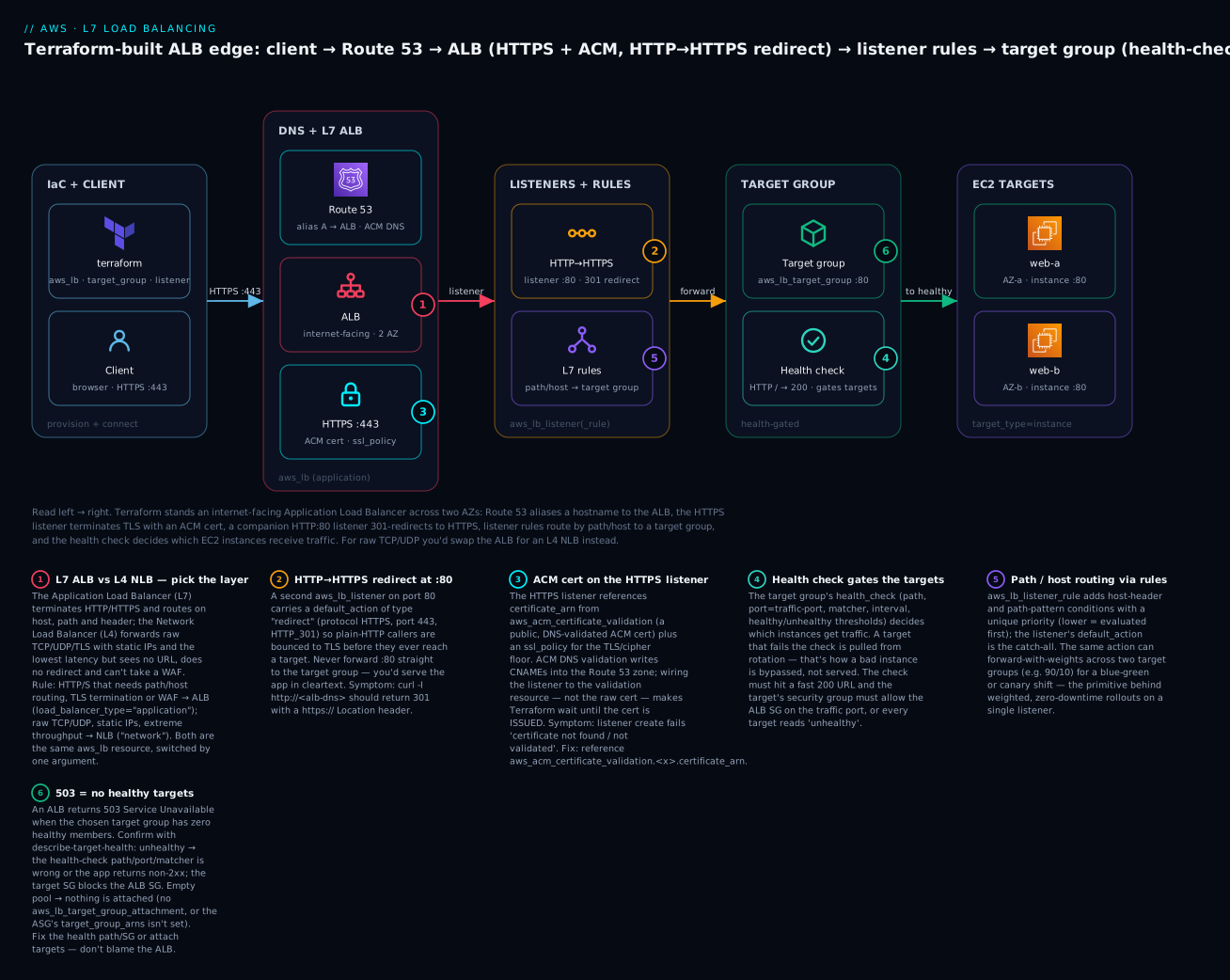
Reading that diagram left to right is reading the request path you are about to build: Terraform provisions the graph, the client resolves the Route 53 alias, hits the ALB on 443, the HTTPS listener terminates TLS with the ACM cert, the HTTP:80 listener would have redirected any plain-HTTP caller up to HTTPS first, the listener rules select a target group by path or host, and the health check guarantees the chosen instance is alive before the ALB forwards. Badge 1 marks the ALB-vs-NLB layer decision; badge 6 marks the 503 you’ll learn to diagnose.
Here is the full inventory of what a single terraform apply will create, and roughly what each part costs if you leave it running (Mumbai / ap-south-1, on-demand, indicative July 2026):
| Resource (Terraform) | AWS object | Role in the build | Rough cost if left up |
|---|---|---|---|
aws_vpc + aws_internet_gateway |
VPC + IGW | The network + internet edge | Free |
2×aws_subnet (public) + route table |
Two public subnets, 2 AZs | ALB needs ≥2 AZs | Free |
aws_security_group ×2 |
ALB SG, web SG | ALB open to world; web open only to ALB | Free |
aws_lb (application) |
Application Load Balancer | The L7 edge | ~₹1,400/mo + LCU (~$16+) |
aws_lb_target_group |
Target group | Health-gated instance set | Free |
aws_lb_listener ×2 |
HTTP:80 redirect, HTTPS:443 | Entry points | Free |
aws_lb_target_group_attachment ×2 |
Target registrations | Attach the two EC2s | Free |
aws_instance ×2 (t3.micro) |
2× EC2 + Apache | The target group members | ~₹1,500/mo total (~$18) |
aws_acm_certificate (+ validation) |
ACM public cert | Listener TLS certificate | Free (public certs) |
aws_route53_record ×N |
Validation CNAMEs + alias | DNS validation + app.<domain> |
~₹0 (per-query pennies) |
The ALB itself is the line item that bills continuously — an hourly charge plus Load Balancer Capacity Units (LCUs) — so this is emphatically a build it, verify it, destroy it lesson, not one to leave running overnight. ACM public certificates are free; you pay only for what they front. Every costly or destructive step below is marked ⚠️.
Where this fits: the target group members here are deliberately thin so the lesson stays about load balancing. The instances, their security groups and key pairs are the subject of the AWS security groups, EC2 & key pairs lesson — we create minimal ones inline. Turning those two static instances into a self-registering, self-healing fleet is the AWS Auto Scaling & launch templates lesson, which attaches to the very target group we build here. And the ACM certificate plus Route 53 hosted zone the listener depends on are built properly in the Route 53, ACM, DNS & SSL lesson; here we consume an existing hosted zone and issue one cert inline.
The ELB family: Classic vs ALB vs NLB vs GWLB
AWS’s “Elastic Load Balancing” (ELB) service is not one product but four generations of load balancer sharing an umbrella. The single decision that governs this whole tier is which one you pick, and that turns almost entirely on which layer of the network stack you balance at and what features you need. Get this right and everything downstream follows; get it wrong and you spend a quarter migrating.
| Load balancer | OSI layer | Terraform | Protocols | Routing on | TLS termination | Static IP | WAF | Status |
|---|---|---|---|---|---|---|---|---|
| Classic (CLB) | L4 + L7 (basic) | aws_elb |
HTTP/S, TCP, SSL | Port only | Yes (basic) | No | No | Legacy — avoid |
| Application (ALB) | L7 (HTTP) | aws_lb (application) |
HTTP, HTTPS, gRPC, WebSocket | Host, path, header, method, query, source-IP | Yes (from ACM) | No (has DNS name) | Yes | Current |
| Network (NLB) | L4 (TCP/UDP) | aws_lb (network) |
TCP, UDP, TLS | Port + protocol only | Yes (TLS listener) | Yes (per-AZ EIP) | No | Current |
| Gateway (GWLB) | L3 (IP) | aws_lb (gateway) |
IP (GENEVE :6081) | Transparent — bump-in-wire | No | N/A | N/A | Current (niche) |
Two things jump out. First, the ALB, NLB and GWLB are all the same Terraform resource — aws_lb — switched by one argument, load_balancer_type. That is a mercy: the target group, listener and attachment resources are shared vocabulary across them. The Classic Load Balancer is a different, older resource (aws_elb) with an all-in-one shape and no separate target groups; you should only be touching it to import and then migrate off. Second, the layer dictates the feature set: only the L7 ALB can read a URL, so only the ALB can do path/host routing, HTTP redirects, and carry an AWS WAF; only the L4 NLB gives you static/Elastic IPs and preserves the client source IP by default.
The Gateway Load Balancer (GWLB) is the odd one out and appears here only so the family is complete: it operates at L3, transparently steering all IP traffic through a fleet of third-party virtual appliances (firewalls, IDS/IPS, deep-packet inspection) using the GENEVE protocol on port 6081, then handing the traffic back. You reach for it when a security vendor’s appliance must sit “bump-in-the-wire” for an entire VPC’s traffic — a centralised inspection pattern, not a web front door. It is not something a typical application team provisions, and we won’t build one; know it exists so you recognise a load_balancer_type = "gateway" when you see it.
That leaves the real day-to-day decision — ALB or NLB — and it comes down to whether you need to read the request:
| Requirement | Choose ALB | Choose NLB |
|---|---|---|
| Route on URL path / hostname / header | Yes | No (can’t see them) |
| HTTP→HTTPS redirect, fixed responses | Yes | No |
| Terminate TLS from an ACM cert | Yes | Yes (TLS listener) |
| Pass TLS through to the target | No | Yes (TCP listener) |
| Static / Elastic IP addresses | No (DNS name only) | Yes |
| Preserve original client source IP | Via X-Forwarded-For header |
Yes, natively (default) |
| UDP or raw TCP (databases, gaming, VoIP) | No (HTTP family only) | Yes |
| Attach an AWS WAF | Yes | No |
| Millions of req/s, ultra-low latency | Good | Best (pass-through) |
| PrivateLink endpoint service front | No | Yes (NLB required) |
The rule of thumb writes itself: if the traffic is HTTP/S and you need to route on URL, redirect, or run a WAF, use an ALB. If it is raw TCP/UDP, or you need static IPs, client-IP preservation without a header, TLS pass-through, PrivateLink, or the absolute lowest latency, use an NLB. A great many designs use both: an ALB for the public web tier, an internal NLB deep inside the VPC fronting a database or a gRPC service, and sometimes an ALB as a target of an NLB when you need a static IP in front of L7 routing.
The ALB in Terraform: aws_lb, target groups, listeners and rules
Start with the ALB, because it is what most teams need and it teaches the vocabulary — load balancer, target group, listener, rule, health check — that the NLB reuses at L4. A working ALB is never one resource; it is a small graph of four resource types wired by ARN.
aws_lb — the load balancer itself
The aws_lb resource is almost empty on its own. For an ALB you set load_balancer_type = "application", hand it security groups (an ALB has SGs; an NLB traditionally does not) and a set of subnets across at least two AZs. internal = false makes it internet-facing (it gets a public DNS name); internal = true makes it private (only reachable inside the VPC).
resource "aws_lb" "web" {
  name               = "kv-web-alb"
  load_balancer_type = "application"
  internal           = false                       # internet-facing
  security_groups    = [aws_security_group.alb.id]  # ALBs have SGs
  subnets            = aws_subnet.public[*].id      # ≥2 subnets, ≥2 AZs

  idle_timeout               = 60      # seconds an idle connection is held
  enable_deletion_protection = false   # set true in prod
  drop_invalid_header_fields = true    # security hardening
  enable_http2               = true

  tags = { Name = "kv-web-alb" }
}
The arguments you actually reach for, and what each governs:
| Argument | What it controls | Default / note |
|---|---|---|
load_balancer_type |
application / network / gateway |
application |
internal |
Public (false) vs private (true) |
false |
security_groups |
SGs on the ALB (ALB only) | Required for ALB |
subnets / subnet_mapping |
AZ coverage; subnet_mapping allows a static EIP (NLB) |
≥2 AZs required |
idle_timeout |
Seconds an idle client connection is kept (ALB) | 60 |
enable_deletion_protection |
Blocks terraform destroy / console delete |
false |
drop_invalid_header_fields |
Drop malformed HTTP headers | false (set true) |
enable_cross_zone_load_balancing |
Spread across AZs (see cross-zone section) | ALB always on; NLB false |
access_logs |
Ship request logs to S3 (block) | Off |
preserve_host_header |
Pass the client Host header unchanged |
false |
The internal vs internet-facing choice is one attribute, but it has real consequences worth stating plainly:
internal = false (internet-facing) |
internal = true (internal) |
|
|---|---|---|
| DNS name resolves to | Public IPs | Private VPC IPs |
| Subnets required | Public (route to IGW) | Private (or public) |
| Reachable from | The internet | Inside the VPC / peered / VPN |
| Typical use | Public web front door | Service-to-service, internal APIs |
An internet-facing ALB must live in public subnets — subnets whose route table has a default route to an Internet Gateway — or it will provision but never be reachable. That subnet-AZ-coverage rule is one of the most common first-build failures, and it’s why the demo builds an explicit VPC with two public subnets.
aws_lb_target_group — where the traffic lands, and the health check
A target group is the pool of things the ALB forwards to, plus the health check that decides which members are eligible. It is decoupled from the load balancer on purpose: you can move a target group between listeners, share it across rules, and — crucially — an Auto Scaling Group registers itself into a target group, not into the ALB directly.
resource "aws_lb_target_group" "web" {
  name        = "kv-web-tg"
  port        = 80
  protocol    = "HTTP"
  vpc_id      = aws_vpc.this.id
  target_type = "instance"     # instance | ip | lambda | alb

  deregistration_delay = 30    # connection-draining seconds (default 300)

  health_check {
    enabled             = true
    protocol            = "HTTP"
    path                = "/"
    port                = "traffic-port"  # same port the target serves on
    matcher             = "200"           # "200-299", "200,302" all valid
    interval            = 15              # seconds between checks
    timeout             = 5               # seconds to wait for a response
    healthy_threshold   = 3               # checks to mark healthy
    unhealthy_threshold = 3               # checks to mark unhealthy
  }

  stickiness {
    enabled = false
    type    = "lb_cookie"
    cookie_duration = 86400
  }

  tags = { Name = "kv-web-tg" }
}
The target_type determines what you can attach, and it is a decision you cannot change later without replacing the target group:
target_type |
You attach | Registered by | When to use |
|---|---|---|---|
instance |
EC2 instance IDs | ALB routes to the instance’s primary IP | Classic EC2 / ASG behind the LB |
ip |
IP addresses (VPC, peered, on-prem) | You register CIDRs / ENIs | Containers (awsvpc), on-prem, cross-VPC |
lambda |
A Lambda function ARN | The ALB invokes the function | Serverless behind an ALB |
alb |
An ALB ARN | An NLB forwards to an ALB | Static IP in front of L7 routing |
The health check is the single most important block in this whole lesson, because a health check with the wrong path or port silently marks every target unhealthy and the ALB then answers 503 — the failure mode you will spend the most time on. Every field earns its keep:
| Health-check field | Meaning | Sensible value |
|---|---|---|
protocol |
HTTP / HTTPS / TCP (NLB) | Match the target’s protocol |
path |
URL the check requests (HTTP/S) | A cheap, dependency-free /healthz |
port |
Port to probe; traffic-port = the serving port |
traffic-port |
matcher |
HTTP status(es) counted as healthy | 200 (or 200-399) |
interval |
Seconds between checks | 15–30 |
timeout |
Seconds to wait per check | 5 (< interval) |
healthy_threshold |
Consecutive passes to mark healthy | 2–3 |
unhealthy_threshold |
Consecutive fails to mark unhealthy | 2–3 |
Two more target-group behaviours matter in production. deregistration_delay (connection draining) is how long the ALB keeps sending in-flight requests to a target you’ve begun removing — 300s by default, which feels forever during a deploy; drop it to 30–60s for fast web apps, keep it high for long-lived connections. And stickiness binds a client to one target so session state on the instance survives — three flavours:
Stickiness type |
How it pins | Use when |
|---|---|---|
lb_cookie (ALB) |
ALB-generated cookie, duration you set | Generic session affinity, no app change |
app_cookie (ALB) |
Your application’s own cookie name | You already emit a session cookie |
source_ip (NLB) |
5-tuple / source IP hash | L4 flows that must land on one target |
Prefer stateless apps and no stickiness where you can — stickiness defeats even load distribution and turns one hot client into one hot instance. Use it only when session state genuinely lives on the target.
One last target-group knob matters for modern backends: protocol_version tells the ALB how to speak to the target — plain HTTP/1.1, HTTP/2, or gRPC. Get it wrong and a gRPC service answers every request with a 502:
protocol_version |
ALB → target speaks | Use for |
|---|---|---|
HTTP1 |
HTTP/1.1 | Standard web apps (default) |
HTTP2 |
HTTP/2 (h2c) | HTTP/2 backends |
GRPC |
gRPC over HTTP/2 | gRPC services (health-check on gRPC status codes) |
aws_lb_listener — the front door (redirect + ACM + forward)
A listener binds a port and protocol on the load balancer to a default action. A production ALB has two: an HTTP:80 listener whose only job is to redirect to HTTPS, and an HTTPS:443 listener that terminates TLS with an ACM certificate and forwards to the target group.
# HTTP :80 — redirect everything to HTTPS, never serve cleartext
resource "aws_lb_listener" "http" {
  load_balancer_arn = aws_lb.web.arn
  port              = 80
  protocol          = "HTTP"

  default_action {
    type = "redirect"
    redirect {
      port        = "443"
      protocol    = "HTTPS"
      status_code = "HTTP_301"   # permanent
    }
  }
}

# HTTPS :443 — terminate TLS with the ACM cert, forward to the target group
resource "aws_lb_listener" "https" {
  load_balancer_arn = aws_lb.web.arn
  port              = 443
  protocol          = "HTTPS"
  ssl_policy        = "ELBSecurityPolicy-TLS13-1-2-2021-06"
  certificate_arn   = aws_acm_certificate_validation.app.certificate_arn

  default_action {
    type             = "forward"
    target_group_arn = aws_lb_target_group.web.arn
  }
}
Two details make this correct rather than merely plausible. The certificate_arn references aws_acm_certificate_validation.app.certificate_arn, not aws_acm_certificate.app.arn — pointing at the validation resource forces Terraform to wait until the certificate is actually ISSUED before it tries to create the listener, which avoids a “certificate not found” race. And the ssl_policy names a predefined TLS/cipher policy — the security floor for the handshake:
default_action.type |
What it does | Key sub-block |
|---|---|---|
forward |
Send to one or more target groups | target_group_arn or forward{} (weighted) |
redirect |
301/302 to another URL/scheme/port | redirect{} |
fixed-response |
Return a canned status + body (e.g. 404) | fixed_response{} |
authenticate-oidc |
OIDC login before forwarding | authenticate_oidc{} |
authenticate-cognito |
Cognito login before forwarding | authenticate_cognito{} |
ssl_policy (common) |
TLS floor | Use for |
|---|---|---|
ELBSecurityPolicy-TLS13-1-2-2021-06 |
TLS 1.2 + 1.3 | Recommended default |
ELBSecurityPolicy-TLS13-1-2-Res-2021-06 |
1.2 + 1.3, restricted ciphers | Stricter compliance |
ELBSecurityPolicy-FS-1-2-Res-2020-10 |
Forward-secrecy only | FS mandates |
ELBSecurityPolicy-2016-08 |
TLS 1.0+ (legacy) | Only for old clients |
You can also attach extra certificates to one HTTPS listener for SNI (many hostnames on one ALB) with aws_lb_listener_certificate — the listener picks the right cert per SNI hostname automatically.
aws_lb_listener_rule — path/host routing and weighted blue-green
The listener’s default_action is the catch-all. Listener rules add conditions — path, host, header, HTTP method, query string, source IP — each with a priority (lower numbers evaluated first) that steer matching requests to a different target group. This is how one ALB fronts many services.
# Route /api/* to the API target group; everything else hits the default.
resource "aws_lb_listener_rule" "api" {
  listener_arn = aws_lb_listener.https.arn
  priority     = 100                       # unique; lower = first

  action {
    type             = "forward"
    target_group_arn = aws_lb_target_group.api.arn
  }
  condition {
    path_pattern { values = ["/api/*"] }
  }
}

# Host-based: admin.<domain> to the admin target group.
resource "aws_lb_listener_rule" "admin" {
  listener_arn = aws_lb_listener.https.arn
  priority     = 200
  action {
    type             = "forward"
    target_group_arn = aws_lb_target_group.admin.arn
  }
  condition {
    host_header { values = ["admin.kloudvin.dev"] }
  }
}
For blue-green or canary deploys, a single forward action can split traffic across two target groups by weight — shift 10% to green, watch, then flip to 100%:
  action {
    type = "forward"
    forward {
      target_group {
        arn    = aws_lb_target_group.blue.arn
        weight = 90
      }
      target_group {
        arn    = aws_lb_target_group.green.arn
        weight = 10
      }
      stickiness {
        enabled  = true
        duration = 300
      }
    }
  }
| Rule condition | Matches on | Example |
|---|---|---|
path_pattern |
URL path | /api/*, /static/* |
host_header |
Host: header |
admin.example.com |
http_header |
Any request header | X-Env: canary |
http_request_method |
Verb | POST, PUT |
query_string |
Query params | ?version=beta |
source_ip |
Client CIDR | 203.0.113.0/24 |
Priorities must be unique per listener and are evaluated ascending; the first match wins, and the default action catches anything unmatched. A classic bug is two rules with the same priority (an apply error) or a broad /* rule with a lower number shadowing a specific one.
Attaching targets — static vs an Auto Scaling Group
Finally, something must actually be in the target group. For a fixed set of instances you use aws_lb_target_group_attachment, one per target:
resource "aws_lb_target_group_attachment" "web" {
  count            = var.instance_count
  target_group_arn = aws_lb_target_group.web.arn
  target_id        = aws_instance.web[count.index].id
  port             = 80
}
But in production you almost never attach instances by hand — an Auto Scaling Group registers every instance it launches into the target group automatically via its target_group_arns, and deregisters them on scale-in. You attach the group once, and membership becomes dynamic:
resource "aws_autoscaling_group" "web" {
  # ... launch template, min/max/desired, vpc_zone_identifier ...
  target_group_arns = [aws_lb_target_group.web.arn]  # self-registers
  health_check_type = "ELB"                          # honour TG health
}
| Attach method | Terraform | Membership | Use when |
|---|---|---|---|
| Static attachment | aws_lb_target_group_attachment |
Fixed, per-instance | A known, small set of instances |
| ASG registration | target_group_arns on the ASG |
Dynamic, scales with fleet | Production — any autoscaled tier |
| Post-hoc ASG attach | aws_autoscaling_attachment |
Dynamic | Wiring an existing ASG to a new TG |
Setting the ASG’s health_check_type = "ELB" is the important half: now the ASG trusts the target group’s health check, so an instance that fails the ALB check is not just pulled from rotation — it’s terminated and replaced. That closes the self-healing loop, and it’s why the Auto Scaling & launch templates lesson attaches to exactly this target group.
The NLB in Terraform: L4, static IPs, TCP/UDP/TLS and client-IP preservation
When the traffic isn’t HTTP — or when you need a static IP, client-IP preservation without a header, TLS pass-through, UDP, PrivateLink, or simply the lowest latency at the highest throughput — you swap the ALB for a Network Load Balancer. It’s the same aws_lb resource with load_balancer_type = "network", and the same target-group and listener resources, but the shape shifts to L4.
resource "aws_lb" "nlb" {
  name               = "kv-nlb"
  load_balancer_type = "network"
  internal           = false

  # subnet_mapping gives each AZ a static Elastic IP — NLB's superpower.
  subnet_mapping {
    subnet_id     = aws_subnet.public[0].id
    allocation_id = aws_eip.nlb_a.id
  }
  subnet_mapping {
    subnet_id     = aws_subnet.public[1].id
    allocation_id = aws_eip.nlb_b.id
  }

  enable_cross_zone_load_balancing = true   # NLB default is FALSE — opt in
}

resource "aws_lb_target_group" "tcp" {
  name        = "kv-tcp-tg"
  port        = 443
  protocol    = "TCP"                 # or UDP, TLS, TCP_UDP
  vpc_id      = aws_vpc.this.id
  target_type = "instance"

  # Preserve the real client source IP to the target (default true for
  # instance/ip TCP targets; the target sees the client, not the NLB).
  preserve_client_ip = true

  health_check {
    protocol = "TCP"                  # or HTTP for a richer check
    port     = "traffic-port"
    interval = 10
  }
}

resource "aws_lb_listener" "tcp" {
  load_balancer_arn = aws_lb.nlb.arn
  port              = 443
  protocol          = "TCP"           # TCP passthrough — no TLS termination
  default_action {
    type             = "forward"
    target_group_arn = aws_lb_target_group.tcp.arn
  }
}
The behaviours that make the NLB a different animal, not just a cheaper ALB:
| NLB trait | Behaviour | Why it matters |
|---|---|---|
| Static / Elastic IPs | One EIP per AZ via subnet_mapping |
Allowlisting, DNS pinning, firewalls that want IPs |
| Client-IP preservation | Target sees the real client IP (default on) | No X-Forwarded-For parsing needed |
| Protocols | TCP, UDP, TLS, TCP_UDP | Databases, DNS, gaming, VoIP, IoT |
| TLS termination or pass-through | TLS listener terminates; TCP passes through |
End-to-end encryption to the target if you want it |
| No security group (historically) | SGs now supported but optional | Control access at the target SG |
| Cross-zone LB | Off by default, and billed when on | Cost/latency trade-off (see below) |
| Idle timeout | 350s for TCP, fixed | Long-lived flows reset silently past it |
| PrivateLink | An NLB backs a VPC endpoint service | Only the NLB can front PrivateLink |
An NLB listener speaks one of four L4 protocols, and whether it terminates TLS or passes it straight through is the sub-decision that trips people up:
NLB listener protocol |
TLS behaviour | Use for |
|---|---|---|
TCP |
Pass-through — the target terminates TLS | End-to-end encryption, any TCP app |
TLS |
NLB terminates TLS with an ACM cert | Offload TLS at the load balancer |
UDP |
Raw UDP | DNS, gaming, VoIP, IoT telemetry |
TCP_UDP |
Both protocols on one port | Services that use both (e.g. DNS) |
The two traps that bite people: the 350-second TCP idle timeout silently drops long-lived connections (gRPC streams, DB sessions, SSH) that go quiet — enable TCP keepalives below 350s on both ends. And cross-zone load balancing is off by default on an NLB (it’s always on and free on an ALB), so without enable_cross_zone_load_balancing = true an NLB only sends a client to targets in the same AZ the client landed in — which can look like uneven load or dead targets if one AZ is thin.
Access logs, WAF and cross-zone load balancing
Three cross-cutting concerns finish the picture: where the logs go, how you screen hostile traffic, and how traffic spreads across AZs.
Access logs to S3. An ALB can write a line per request to S3 — invaluable for debugging a 5xx after the fact and for security forensics. It’s an access_logs block on the aws_lb, plus an S3 bucket whose policy lets ELB write to it. The bucket policy is the fiddly part: in most regions you grant the regional ELB service account (data.aws_elb_service_account) s3:PutObject on the log prefix; newer regions use the logdelivery.elasticloadbalancing.amazonaws.com service principal instead.
data "aws_elb_service_account" "main" {}
data "aws_caller_identity"    "current" {}

resource "aws_s3_bucket" "alb_logs" {
  bucket        = "kv-alb-logs-2026"
  force_destroy = true
}

resource "aws_s3_bucket_policy" "alb_logs" {
  bucket = aws_s3_bucket.alb_logs.id
  policy = jsonencode({
    Version = "2012-10-17"
    Statement = [{
      Effect    = "Allow"
      Principal = { AWS = data.aws_elb_service_account.main.arn }
      Action    = "s3:PutObject"
      Resource  = "${aws_s3_bucket.alb_logs.arn}/alb/AWSLogs/${data.aws_caller_identity.current.account_id}/*"
    }]
  })
}

# then on the ALB, add the block:
#   access_logs {
#     bucket  = aws_s3_bucket.alb_logs.bucket
#     prefix  = "alb"
#     enabled = true
#   }
WAF association. An AWS WAF (WAFv2) web ACL — managed rule groups (OWASP top 10, bot control), rate limits, geo-match, IP allow/deny — attaches to an ALB with one resource. Note WAF only associates with L7 front ends (ALB, API Gateway, CloudFront, AppSync) — never an NLB, because the NLB can’t read L7.
resource "aws_wafv2_web_acl_association" "alb" {
  resource_arn = aws_lb.web.arn
  web_acl_arn  = aws_wafv2_web_acl.this.arn
}
| Front end | AWS WAF attachable? | Why |
|---|---|---|
| ALB | Yes (aws_wafv2_web_acl_association) |
Reads L7 |
| API Gateway / AppSync | Yes | L7 |
| CloudFront | Yes (global scope WAF) | L7 edge |
| NLB | No | L4 — can’t inspect HTTP |
Cross-zone load balancing. This governs whether a load balancer node in AZ-a can send to targets in AZ-b. The behaviour — and the bill — differ by type:
| ALB | NLB | |
|---|---|---|
| Default | Always on | Off |
| Configurable | No (always on) | Yes, per-LB or per-target-group |
| Inter-AZ data charge | Free | Charged when enabled |
| Effect off | N/A | Client only reaches same-AZ targets |
| Terraform | n/a | enable_cross_zone_load_balancing |
The practical upshot: on an ALB you never think about it. On an NLB, leave it off and one thin AZ starves; turn it on and you get even distribution but pay inter-AZ transfer — a deliberate cost/resilience trade-off.
Hands-on: build it with Terraform
⚠️ This provisions real, billable AWS resources — an Application Load Balancer (hourly + LCU) and two EC2 instances. It also requires a Route 53 public hosted zone you own (for the ACM DNS validation and the alias record). Follow it end to end, verify, then run the destroy step. Do not leave it up.
We now assemble everything above into one working project: an internet-facing ALB across two public subnets, an HTTPS listener whose cert is a DNS-validated ACM certificate, an HTTP→HTTPS redirect, a target group with a health check, and two Apache instances. Lay out the files:
mkdir -p alb-demo && cd alb-demo
touch versions.tf provider.tf variables.tf network.tf \
      security.tf compute.tf acm.tf alb.tf outputs.tf
1. Pin Terraform and the provider (versions.tf). Pin aws with ~> so a plan in CI never silently changes behaviour, and use a remote backend — for AWS that is S3 for state plus a DynamoDB table for locking (newer provider/state versions also support S3-native locking via use_lockfile):
# versions.tf
terraform {
  required_version = ">= 1.6.0"

  required_providers {
    aws = {
      source  = "hashicorp/aws"
      version = "~> 5.60"
    }
  }

  # Remote state (AWS = S3 + DynamoDB lock). Create these once, out of band.
  backend "s3" {
    bucket         = "kv-tfstate-2026"
    key            = "alb-demo/terraform.tfstate"
    region         = "ap-south-1"
    dynamodb_table = "kv-tf-locks"
    encrypt        = true
  }
}
2. Configure the provider (provider.tf). Authenticate ahead of time with aws configure / SSO / an assumed role — never put keys in HCL. default_tags stamps every resource for cost attribution:
# provider.tf
provider "aws" {
  region = var.region
  default_tags {
    tags = { project = "tf-course", lesson = "alb-nlb", owner = "vinod" }
  }
}
3. Variables (variables.tf). Parameterise region, sizes, instance count and — because we DNS-validate a real cert — the hosted zone and the app hostname:
# variables.tf
variable "region" {
  type    = string
  default = "ap-south-1"
}
variable "prefix" {
  type    = string
  default = "kv-web"
}
variable "instance_type" {
  type    = string
  default = "t3.micro"
}
variable "instance_count" {
  type    = number
  default = 2
}

variable "hosted_zone_name" {
  type        = string
  description = "Existing public Route 53 zone, trailing dot, e.g. kloudvin.dev."
}
variable "app_fqdn" {
  type        = string
  description = "Hostname to serve, e.g. app.kloudvin.dev"
}
4. Network (network.tf). An internet-facing ALB needs two public subnets in two AZs. We build a minimal VPC, an internet gateway, two public subnets picked from the region’s AZs, and a route table that sends 0.0.0.0/0 to the IGW:
# network.tf
data "aws_availability_zones" "available" { state = "available" }

resource "aws_vpc" "this" {
  cidr_block           = "10.30.0.0/16"
  enable_dns_hostnames = true
  tags                 = { Name = "${var.prefix}-vpc" }
}

resource "aws_internet_gateway" "this" {
  vpc_id = aws_vpc.this.id
}

resource "aws_subnet" "public" {
  count                   = 2
  vpc_id                  = aws_vpc.this.id
  cidr_block              = cidrsubnet(aws_vpc.this.cidr_block, 8, count.index)
  availability_zone       = data.aws_availability_zones.available.names[count.index]
  map_public_ip_on_launch = true
  tags = { Name = "${var.prefix}-public-${count.index}" }
}

resource "aws_route_table" "public" {
  vpc_id = aws_vpc.this.id
  route {
    cidr_block = "0.0.0.0/0"
    gateway_id = aws_internet_gateway.this.id
  }
}

resource "aws_route_table_association" "public" {
  count          = 2
  subnet_id      = aws_subnet.public[count.index].id
  route_table_id = aws_route_table.public.id
}
5. Security groups (security.tf). Two SGs enforce the core rule: the world reaches the ALB; only the ALB reaches the instances. The web SG’s ingress references the ALB SG by ID, not a CIDR — the correct, self-documenting way:
# security.tf
resource "aws_security_group" "alb" {
  name_prefix = "${var.prefix}-alb-"
  vpc_id      = aws_vpc.this.id

  ingress {
    from_port   = 80
    to_port     = 80
    protocol    = "tcp"
    cidr_blocks = ["0.0.0.0/0"]
  }
  ingress {
    from_port   = 443
    to_port     = 443
    protocol    = "tcp"
    cidr_blocks = ["0.0.0.0/0"]
  }
  egress {
    from_port   = 0
    to_port     = 0
    protocol    = "-1"
    cidr_blocks = ["0.0.0.0/0"]
  }
}

resource "aws_security_group" "web" {
  name_prefix = "${var.prefix}-web-"
  vpc_id      = aws_vpc.this.id

  ingress {                         # only the ALB, only on :80
    from_port       = 80
    to_port         = 80
    protocol        = "tcp"
    security_groups = [aws_security_group.alb.id]
  }
  egress {
    from_port   = 0
    to_port     = 0
    protocol    = "-1"
    cidr_blocks = ["0.0.0.0/0"]
  }
}
6. The two web instances (compute.tf). Amazon Linux 2023 via a data-source AMI lookup, one per AZ, each running a tiny Apache page that names its own host so we can see load balancing when we curl:
# compute.tf
data "aws_ami" "al2023" {
  most_recent = true
  owners      = ["amazon"]
  filter {
    name   = "name"
    values = ["al2023-ami-*-x86_64"]
  }
  filter {
    name   = "architecture"
    values = ["x86_64"]
  }
}

locals {
  user_data = base64encode(<<-EOT
    #!/bin/bash
    dnf install -y httpd
    echo "Hello from $(hostname -f) — behind the ALB" > /var/www/html/index.html
    systemctl enable --now httpd
  EOT
  )
}

resource "aws_instance" "web" {
  count                  = var.instance_count
  ami                    = data.aws_ami.al2023.id
  instance_type          = var.instance_type
  subnet_id              = aws_subnet.public[count.index % 2].id
  vpc_security_group_ids = [aws_security_group.web.id]
  user_data_base64       = local.user_data

  tags = { Name = "${var.prefix}-${count.index}" }
}
7. The ACM certificate, DNS-validated via Route 53 (acm.tf). This is the part that ties in Route 53: we request a public cert for app_fqdn, let ACM emit the validation CNAMEs, write them into the hosted zone with for_each, and block on aws_acm_certificate_validation so nothing downstream runs before the cert is ISSUED:
# acm.tf
data "aws_route53_zone" "this" {
  name         = var.hosted_zone_name
  private_zone = false
}

resource "aws_acm_certificate" "app" {
  domain_name       = var.app_fqdn
  validation_method = "DNS"
  lifecycle { create_before_destroy = true }
}

resource "aws_route53_record" "cert_validation" {
  for_each = {
    for dvo in aws_acm_certificate.app.domain_validation_options :
    dvo.domain_name => {
      name   = dvo.resource_record_name
      type   = dvo.resource_record_type
      record = dvo.resource_record_value
    }
  }
  zone_id         = data.aws_route53_zone.this.zone_id
  name            = each.value.name
  type            = each.value.type
  records         = [each.value.record]
  ttl             = 60
  allow_overwrite = true
}

resource "aws_acm_certificate_validation" "app" {
  certificate_arn         = aws_acm_certificate.app.arn
  validation_record_fqdns = [for r in aws_route53_record.cert_validation : r.fqdn]
}
8. The load balancer, target group, listeners and alias (alb.tf). The centrepiece — everything the concept sections built, wired together:
# alb.tf
resource "aws_lb" "web" {
  name               = "${var.prefix}-alb"
  load_balancer_type = "application"
  internal           = false
  security_groups    = [aws_security_group.alb.id]
  subnets            = aws_subnet.public[*].id
  drop_invalid_header_fields = true
}

resource "aws_lb_target_group" "web" {
  name        = "${var.prefix}-tg"
  port        = 80
  protocol    = "HTTP"
  vpc_id      = aws_vpc.this.id
  target_type = "instance"
  deregistration_delay = 30

  health_check {
    path                = "/"
    port                = "traffic-port"
    matcher             = "200"
    interval            = 15
    timeout             = 5
    healthy_threshold   = 3
    unhealthy_threshold = 3
  }
}

resource "aws_lb_target_group_attachment" "web" {
  count            = var.instance_count
  target_group_arn = aws_lb_target_group.web.arn
  target_id        = aws_instance.web[count.index].id
  port             = 80
}

resource "aws_lb_listener" "http" {
  load_balancer_arn = aws_lb.web.arn
  port              = 80
  protocol          = "HTTP"
  default_action {
    type = "redirect"
    redirect {
      port        = "443"
      protocol    = "HTTPS"
      status_code = "HTTP_301"
    }
  }
}

resource "aws_lb_listener" "https" {
  load_balancer_arn = aws_lb.web.arn
  port              = 443
  protocol          = "HTTPS"
  ssl_policy        = "ELBSecurityPolicy-TLS13-1-2-2021-06"
  certificate_arn   = aws_acm_certificate_validation.app.certificate_arn
  default_action {
    type             = "forward"
    target_group_arn = aws_lb_target_group.web.arn
  }
}

# Alias the app hostname straight at the ALB (no IP to hard-code).
resource "aws_route53_record" "app" {
  zone_id = data.aws_route53_zone.this.zone_id
  name    = var.app_fqdn
  type    = "A"
  alias {
    name                   = aws_lb.web.dns_name
    zone_id                = aws_lb.web.zone_id
    evaluate_target_health = true
  }
}
9. Outputs (outputs.tf). Emit the ALB DNS name, the app URL and the target-group ARN so we can curl and check health:
# outputs.tf
output "alb_dns_name"     { value = aws_lb.web.dns_name }
output "app_url"          { value = "https://${var.app_fqdn}/" }
output "target_group_arn" { value = aws_lb_target_group.web.arn }
10. Init. Downloads the provider and wires the backend:
terraform init
# Initializing the backend...
# Initializing provider plugins...
# - Installing hashicorp/aws v5.6x ...
# Terraform has been successfully initialized!
11. Plan. Pass the two required variables and read the summary line — it must create the whole graph and change nothing unexpected:
export TF_VAR_hosted_zone_name="kloudvin.dev."
export TF_VAR_app_fqdn="app.kloudvin.dev"
terraform plan
# ...
# Plan: 19 to add, 0 to change, 0 to destroy.
# Changes to Outputs:
#   + alb_dns_name = (known after apply)
#   + app_url      = "https://app.kloudvin.dev/"
12. Apply. ⚠️ Billing starts here. The slow steps are the ACM DNS validation (~2–4 min for the CNAME to propagate and ACM to issue) and the instances booting Apache:
terraform apply -auto-approve
# aws_acm_certificate.app: Creation complete after 3s
# aws_route53_record.cert_validation["app.kloudvin.dev"]: Creation complete after 32s
# aws_acm_certificate_validation.app: Still creating... [2m0s elapsed]
# aws_acm_certificate_validation.app: Creation complete after 2m41s
# aws_lb.web: Creation complete after 2m55s
# aws_lb_listener.https: Creation complete after 1s
# Apply complete! Resources: 19 added, 0 changed, 0 destroyed.
# Outputs:
# alb_dns_name = "kv-web-alb-123456789.ap-south-1.elb.amazonaws.com"
# app_url      = "https://app.kloudvin.dev/"
13. Verify — prove the redirect, the TLS, and load balancing. First confirm the HTTP:80 listener redirects; then curl the HTTPS URL a few times and watch the hostname change as the ALB spreads requests across both instances; then read target health from the CLI:
ALB=$(terraform output -raw alb_dns_name)

# a) HTTP is redirected, not served:
curl -sI http://$ALB/ | head -n2
# HTTP/1.1 301 Moved Permanently
# Location: https://kv-web-alb-...elb.amazonaws.com:443/

# b) HTTPS serves, and load-balances (give targets ~60s to pass health first):
curl -s https://app.kloudvin.dev/
# Hello from ip-10-30-0-57.ap-south-1.compute.internal — behind the ALB
curl -s https://app.kloudvin.dev/
# Hello from ip-10-30-1-91.ap-south-1.compute.internal — behind the ALB   # LB!

# c) Both targets healthy from the ALB's own point of view:
aws elbv2 describe-target-health \
  --target-group-arn $(terraform output -raw target_group_arn) \
  --query 'TargetHealthDescriptions[].TargetHealth.State' --output text
# healthy  healthy
That healthy healthy from describe-target-health is the single most useful signal on this whole stack: it is the ALB telling you the health check is passing. If instead you see unhealthy and a 503 in the browser, jump to troubleshooting — the TargetHealth.Reason field names the exact cause.
The verification checklist:
| Step | Command | Expect |
|---|---|---|
| ALB DNS resolved | terraform output -raw alb_dns_name |
kv-web-alb-….elb.amazonaws.com |
| HTTP redirects | curl -sI http://$ALB/ |
301 + Location: https://… |
| HTTPS serves | curl -s https://app.<domain>/ |
The Apache “Hello from…” page |
| Load balancing works | repeat the curl | Hostname alternates between the two IPs |
| Targets healthy | aws elbv2 describe-target-health … |
healthy for each target |
| Cert valid & trusted | curl -sv https://app.<domain>/ 2>&1 | grep subject |
CN=app.<domain> (no -k needed) |
14. Destroy. ⚠️ Do this — the ALB bills by the hour.
terraform destroy -auto-approve
# aws_lb.web: Destruction complete after 1m3s
# Destroy complete! Resources: 19 destroyed.
Confirm the ALB is gone (aws elbv2 describe-load-balancers should not list it). The ACM certificate is free and DNS-validated, so it deletes cleanly; the Route 53 validation and alias records are removed with it because Terraform owns them.
Variables, outputs & making it reusable
The demo hard-codes one target group, one health check and one pair of listeners. Real ALBs front several services with several path rules, and copy-pasting blocks is how they rot. Two Terraform patterns turn this into a reusable module: for_each over a map of services to generate a target group + listener rule per service, and — when you’d rather stand on the shoulders of others — the community ALB module.
A for_each-driven services map keeps every new backend to a few lines of data, not a copy-pasted block:
variable "services" {
  type = map(object({
    path_pattern = string
    priority     = number
    health_path  = string
  }))
  default = {
    api = { path_pattern = "/api/*", priority = 100, health_path = "/api/health" }
    web = { path_pattern = "/*",     priority = 200, health_path = "/" }
  }
}

resource "aws_lb_target_group" "svc" {
  for_each = var.services
  name     = "${var.prefix}-${each.key}"
  port     = 80
  protocol = "HTTP"
  vpc_id   = aws_vpc.this.id
  health_check {
    path    = each.value.health_path
    matcher = "200"
  }
}

resource "aws_lb_listener_rule" "svc" {
  for_each     = var.services
  listener_arn = aws_lb_listener.https.arn
  priority     = each.value.priority
  action {
    type             = "forward"
    target_group_arn = aws_lb_target_group.svc[each.key].arn
  }
  condition {
    path_pattern { values = [each.value.path_pattern] }
  }
}
When you’d rather not own the plumbing, the registry module terraform-aws-modules/alb/aws wraps the load balancer, target groups, listeners and rules behind a tidy input shape — production-tested, and the fastest way to a correct ALB:
| Approach | You maintain | Reach for it when |
|---|---|---|
Raw aws_lb* resources |
Everything (max control) | You need an unusual shape, or you’re learning |
for_each over a services map |
One local module | Many similar services, one team’s conventions |
terraform-aws-modules/alb/aws |
Just the inputs | Standard ALB, want it correct fast |
Whichever you choose, expose the ALB’s dns_name, zone_id and arn, and each target group’s arn, as outputs — downstream stacks (Route 53 aliases, WAF associations, ASG registrations) consume exactly those.
Common mistakes and troubleshooting
The ALB’s signature error is 503 Service Unavailable, and it is worth stating the core truth once: a 503 from an ALB almost never means the load balancer is broken — it means the target group it selected has no healthy members. The ALB is reporting a failure it observed downstream. So every 503 investigation starts at the same place — aws elbv2 describe-target-health — and fans out from there. This is the symptom → cause → fix table to keep open during an incident:
| Symptom | Likely cause | Fix |
|---|---|---|
503, targets unhealthy |
Health-check path returns non-2xx, or wrong port | Point health_check.path at a real 200 URL; port = "traffic-port"; fix matcher |
| 503, target group empty | Nothing attached (no attachment / ASG target_group_arns unset) |
Add aws_lb_target_group_attachment or set the ASG’s target_group_arns |
Targets unhealthy, health check times out |
Web SG doesn’t allow the ALB SG on the traffic port | Add ingress on the web SG security_groups = [alb_sg] for the port |
| 502 Bad Gateway | Target closed the connection / bad response / wrong protocol_version |
Check the app is up on the port; for gRPC set protocol_version = "GRPC" |
| 504 Gateway Timeout | Target slower than the ALB idle_timeout |
Raise idle_timeout; fix backend latency |
| Listener create fails: certificate not found | Referenced the raw cert, or cert not validated | Reference aws_acm_certificate_validation.<x>.certificate_arn; check DNS records |
apply fails: at least two subnets in two AZs |
ALB given one subnet / one AZ | Provide ≥2 subnets in ≥2 distinct AZs |
HTTPS works but app.<domain> won’t resolve |
Missing/incorrect Route 53 alias record | Alias A record → aws_lb.dns_name + zone_id, evaluate_target_health |
| Two listener rules — apply error | Duplicate priority on one listener |
Give every aws_lb_listener_rule a unique priority |
| Deploys drop requests | deregistration_delay too high, or too low for long connections |
Tune draining: ~30s for web, higher for long-lived |
| NLB: long connections reset ~6 min | 350s TCP idle timeout | TCP keepalives < 350s on client and target |
| NLB: uneven load / same-AZ only | Cross-zone LB off (NLB default) | enable_cross_zone_load_balancing = true |
Because 503 is the workhorse failure, here is the decision matrix that maps what describe-target-health shows you to the specific misconfiguration — walk it top to bottom:
| Target health says | Meaning | Where the bug is |
|---|---|---|
healthy but browser still 503/5xx |
App flaked after the check, or a rule sends to an empty TG | App stability, the listener rule’s target group |
unhealthy, Reason Target.ResponseCodeMismatch |
Check reached the app, got the wrong status | matcher vs what the app returns; the health path |
unhealthy, Reason Target.Timeout |
Check can’t reach the target | Web SG doesn’t allow the ALB SG; app down on the port |
unhealthy, Reason Target.FailedHealthChecks |
Connection refused / reset | App not listening on the port; wrong port |
unused / no targets |
Target group has no members | No attachment; ASG target_group_arns unset |
draining |
Target is deregistering | Normal during a deploy; waits deregistration_delay |
Beyond 503, the gnarliest real-world traps:
The security-group two-step. The most common “all targets unhealthy” cause isn’t the health path — it’s that the web instances’ security group doesn’t allow the ALB’s security group on the traffic port. Reference the ALB SG by ID in the web SG’s ingress (as the demo does), never a CIDR; then the health check can actually reach the target. This is the single highest-yield thing to check first.
The unvalidated-certificate race. Wire the HTTPS listener’s certificate_arn to the aws_acm_certificate_validation resource, not the raw aws_acm_certificate. The validation resource only completes once ACM sees the DNS CNAMEs and issues the cert, so referencing it makes Terraform order things correctly and wait. Reference the raw cert and the listener can be created against a cert that’s still PENDING_VALIDATION, which fails or serves a bad handshake. Also: ACM DNS validation needs the CNAMEs actually in the zone — allow_overwrite = true on the validation record avoids collisions on re-apply.
The two-AZ rule. An ALB must span at least two subnets in two different Availability Zones, and for an internet-facing ALB those must be public subnets (a route to an IGW). Give it one subnet, or two subnets in the same AZ, and the apply fails outright; give it private subnets and it provisions but is unreachable. Model exactly two public subnets in two AZs, as the demo does.
Health-check economics. A health check that’s too aggressive (short interval, path that hits the database) can hammer a struggling backend into the ground, and one that’s too lax (long interval, high unhealthy_threshold) leaves a dead instance in rotation for minutes. Point the check at a cheap, dependency-free /healthz that returns 200 without touching a database, and keep interval at 15–30s with a 2–3 threshold.
Auth and permissions. The provider itself needs rights: your principal must be able to create load balancers, target groups, EC2 instances, security groups, ACM certs and Route 53 records. A missing route53:ChangeResourceRecordSets on the hosted zone, or elasticloadbalancing:*, is the usual first wall — and it shows up as an AccessDenied on that specific resource, not on the ALB.
Cost, cleanup & production notes
The economics are dominated by the ALB’s continuous billing. An ALB bills a fixed hourly charge plus Load Balancer Capacity Units (LCUs) — a blend of new connections, active connections, processed bytes and rule evaluations — so even an idle ALB runs the clock. The NLB is priced similarly (NLCUs) but is often cheaper for pure L4 throughput. Indicative Mumbai / ap-south-1, on-demand, July 2026:
| Resource | Rough monthly if left up | Notes |
|---|---|---|
| Application Load Balancer | ~₹1,400 + LCU (~$16+) | Hourly + capacity units |
| Network Load Balancer | ~₹1,400 + NLCU (~$16+) | Similar; cheaper per-GB at L4 |
2× t3.micro EC2 |
~₹1,500 (~$18) | The target group members |
| ACM public certificate | Free | You pay only for what it fronts |
| Route 53 hosted zone | ~₹42 (~$0.50) + per-query | Zone you already own |
| This demo, one week | ~₹800 (~$10) | Which is why you destroy it |
Cleanup is terraform destroy — and it’s cleaner than most stacks because ACM and Route 53 records are all Terraform-owned and free. The one gotcha: if you enabled enable_deletion_protection = true, destroy will refuse until you flip it back to false and re-apply. Always confirm with aws elbv2 describe-load-balancers no longer listing the ALB.
Production hardening, the five that matter:
- Remote, locked state. The
backend "s3"block (S3 + DynamoDB lock, or S3-nativeuse_lockfile) shown inversions.tfis non-negotiable for a team — local state on a load-balancing tier is how two engineers clobber each other’s ALB. - Least privilege and deletion protection. Set
enable_deletion_protection = trueon prod load balancers so no one (and no straydestroy) removes the front door. Scope the Terraform principal to exactly the ELB, EC2, ACM and Route 53 actions it needs. - HTTPS-only, modern TLS, and a WAF. Redirect all HTTP to HTTPS (as the demo does), pin a modern
ssl_policy(TLS 1.2+/1.3), and attach anaws_wafv2_web_acl_associationwith managed OWASP + rate-limit rules on any public ALB. - Access logs and tags. Turn on
access_logsto S3 for post-hoc 5xx forensics, and rely ondefault_tagsso every resource carriesproject/owner/envfor cost attribution and cleanup. - Watch drift. Someone will “quickly” add a listener rule or bump a health path in the console. Run
terraform planon a schedule (or a drift-detection pipeline) so config that drifts from code is caught, not discovered during an incident.
Going deeper
The hands-on build gets you a correct, single-service ALB. Production adds a handful of knobs the demo left at their defaults — how traffic is actually distributed, what the box really is behind that DNS name, and how Terraform’s own lifecycle bites when you change or import one. This is the advanced layer, built on facets the core lesson only pointed at.
How targets are actually chosen: routing algorithm and slow start
By default an ALB spreads requests round-robin across healthy targets — simple, even, and completely oblivious to how busy each target already is. That is fine until one target is slow (a cold JVM, a long GC pause, a noisy neighbour): round-robin keeps feeding it at the same rate and tail latency spikes. The fix is a target-group attribute, surfaced in Terraform as load_balancing_algorithm_type:
resource "aws_lb_target_group" "web" {
  # ...name, port, protocol, vpc_id, health_check as before...
  load_balancing_algorithm_type     = "least_outstanding_requests"  # not round_robin
  load_balancing_anomaly_mitigation = "off"                          # only valid with weighted_random
  slow_start                        = 30    # ramp new targets over 30s (0 = disabled)
}
least_outstanding_requests (LOR) sends each new request to the target with the fewest in-flight requests, so it naturally routes around a slow instance instead of piling onto it. weighted_random distributes randomly by target weight and is the only algorithm that supports anomaly mitigation — set load_balancing_anomaly_mitigation = "on" and the ALB temporarily sheds traffic from a target whose error rate spikes above its peers. And slow_start gives a freshly-registered target a ramp window (30–900 s) during which it receives a linearly increasing share of traffic — vital for JIT-compiled runtimes or cold caches that would fall over if handed a full share the instant they pass their first health check.
load_balancing_algorithm_type |
Picks the target by | Reach for it when |
|---|---|---|
round_robin (default) |
Even rotation, ignores load | Uniform, fast, stateless targets |
least_outstanding_requests |
Fewest in-flight requests | Uneven request cost / variable latency |
weighted_random |
Random by weight; supports anomaly mitigation | You want automatic shedding of a flaky target |
Two caveats: slow_start is ignored while a target is the group’s only member (there is nothing to ramp against), and it is incompatible with least_outstanding_requests — you pick a warm-up ramp or in-flight-aware routing, not both.
What an ALB actually is behind the DNS name
The aws_lb resource returns a dns_name, never an IP, and that is not a convenience — it is the architecture. An ALB is not one box; it is a fleet of nodes, one per enabled Availability Zone, each with its own elastic network interface (ENI) and a private IP drawn from that AZ’s subnet. That is why you hand it subnets and why it demands at least two. AWS publishes an A record per node behind the single DNS name and rotates them, so a client resolving the name is already being load-balanced across nodes before any node ever selects a target. The fleet scales itself by adding nodes as traffic climbs — but a sudden 10× spike (a launch, a flash sale) can outrun that scaling, which is why AWS offers pre-warming for known events. You choose the address family with ip_address_type:
ip_address_type |
The ALB serves | Use for |
|---|---|---|
ipv4 (default) |
IPv4 only | Standard workloads |
dualstack |
IPv4 + IPv6 | Clients on either stack |
dualstack-without-public-ipv4 |
IPv6 public, IPv4 private only | IPv6-first, dodging the IPv4 address charge |
Two operational consequences fall straight out of the fleet model. First, never hard-code an ALB’s IP — it changes as nodes come and go; always alias the Route 53 record at the DNS name, as the demo does. Second, those per-AZ ENIs consume real IPs in your subnets, so a cramped /28 public subnet can genuinely run out of addresses while the ALB tries to scale — size load-balancer subnets with headroom.
The target-group name trap: replacement and create_before_destroy
Here is the Terraform-specific gotcha that catches every team eventually. The name on an aws_lb or aws_lb_target_group is immutable — change it and Terraform must replace the resource. But AWS will not let two target groups (or two load balancers) hold the same name at the same instant, so the default destroy-then-create order deadlocks: Terraform cannot create the new one while the old one still owns the name. The same collision fires on any change that forces replacement — switching target_type, changing the group’s port or protocol. The fix is a two-part idiom: a generated name via name_prefix (max 6 characters) plus create_before_destroy:
resource "aws_lb_target_group" "web" {
  name_prefix = "kvweb"          # <= 6 chars; AWS appends a unique suffix
  port        = 80
  protocol    = "HTTP"
  vpc_id      = aws_vpc.this.id

  lifecycle {
    create_before_destroy = true  # new TG (unique name) up before the old is torn down
  }
}
Now a replacement stands up the new target group under a different generated name first, re-points the listener at it, and only then destroys the old one — no name clash, no window where the listener has nowhere to forward. This is the single most common reason a terraform apply fails halfway on this resource family and leaves a half-migrated listener behind.
Importing and refactoring a live load-balancing tier
You will often inherit an ALB somebody built by hand in the console. Bring it under Terraform with import blocks (Terraform 1.5+) — one per resource, because a load-balancing tier is a graph, not a single object, and there is no “import the whole ALB” shortcut:
import {
  to = aws_lb.web
  id = "arn:aws:elasticloadbalancing:ap-south-1:ACCOUNT_ID:loadbalancer/app/kv-web-alb/abc123"
}
import {
  to = aws_lb_target_group.web
  id = "arn:aws:elasticloadbalancing:ap-south-1:ACCOUNT_ID:targetgroup/kv-web-tg/def456"
}
import {
  to = aws_lb_listener.https
  id = "arn:aws:elasticloadbalancing:ap-south-1:ACCOUNT_ID:listener/app/kv-web-alb/abc123/ghi789"
}
Run terraform plan -generate-config-out=alb.tf to scaffold the HCL, reconcile it against reality, then apply. The load balancer, target group, listener and each listener rule all import by their ARN; the one resource you cannot import is aws_lb_target_group_attachment — it is a synthetic join, not a real AWS object — so re-declare it and let Terraform register the target afresh. When you later refactor — say, moving two static attachments created with count to a for_each keyed by instance ID — use a moved block so Terraform re-keys state instead of destroying and recreating live registrations:
moved {
  from = aws_lb_target_group_attachment.web[0]
  to   = aws_lb_target_group_attachment.web["i-0abc123"]
}
mTLS, desync mitigation and X-Forwarded-For
Three security knobs the demo left at their defaults. Mutual TLS (mTLS) makes the ALB require a client certificate — the pattern for B2B APIs and service-to-service edges. You create an aws_lb_trust_store (a CA bundle staged in S3) and reference it from the HTTPS listener:
resource "aws_lb_trust_store" "clients" {
  name                             = "kv-client-ca"
  ca_certificates_bundle_s3_bucket = aws_s3_bucket.ca.bucket
  ca_certificates_bundle_s3_key    = "client-ca-bundle.pem"
}

# ...on the HTTPS aws_lb_listener, add:
  mutual_authentication {
    mode            = "verify"          # off | verify | passthrough
    trust_store_arn = aws_lb_trust_store.clients.arn
  }
verify rejects any client whose cert is not signed by your trust store; passthrough forwards the presented cert to the target to validate itself. Independently, desync_mitigation_mode on the aws_lb (monitor / defensive / strictest, default defensive) governs how strictly the ALB rejects ambiguous HTTP that could enable request-smuggling — raise it to strictest on security-sensitive fronts. And because an ALB terminates the client connection, the target sees the ALB’s IP unless it reads X-Forwarded-For; the xff_header_processing_mode argument (append / preserve / remove) and enable_xff_client_port control exactly what that header carries, which matters the moment a downstream WAF or rate-limiter keys on client IP.
NLB security groups and the client-IP hairpin trap
Two NLB subtleties that quietly cost afternoons. First, NLBs now support security groups (since 2023) — but only if you attach one at creation time. You cannot add an SG to an NLB that was created without one, so always give a new NLB a security_groups argument even if the rules start permissive; retrofitting means rebuilding the NLB. On a PrivateLink-fronted NLB, enforce_security_group_inbound_rules_on_private_link_traffic (on / off) decides whether those SG rules also screen endpoint traffic. Second, preserve_client_ip carries a hairpinning trap: when it is on and a target reaches the NLB and gets routed back to itself, the source and destination IP become identical and the flow breaks on a loopback NAT collision. It also means the target’s security group must now allow the real client CIDRs, not the NLB’s — flip it on expecting “the target simply sees the client” and you can lock yourself out of your own service. Leave preserve_client_ip off for intra-VPC NLBs whose targets might call back through them, and reserve it for the cases that genuinely need the original client address at L4.
Cheat-sheet
The dense reference for this tier — resources, the arguments you reach for most, and the verification commands:
| Resource | Purpose | Must-set arguments |
|---|---|---|
aws_lb |
The load balancer | load_balancer_type, subnets (≥2 AZ), security_groups (ALB) |
aws_lb_target_group |
Health-gated target pool | port, protocol, vpc_id, target_type, health_check |
aws_lb_listener |
Port/proto entry point | load_balancer_arn, port, protocol, default_action |
aws_lb_listener_rule |
Path/host routing | listener_arn, priority, action, condition |
aws_lb_target_group_attachment |
Attach one target | target_group_arn, target_id, port |
aws_lb_listener_certificate |
Extra SNI certs | listener_arn, certificate_arn |
aws_acm_certificate (+ _validation) |
Listener TLS cert | domain_name, validation_method = "DNS" |
aws_wafv2_web_acl_association |
Attach WAF (ALB only) | resource_arn, web_acl_arn |
| Choose | ALB | NLB |
|---|---|---|
load_balancer_type |
application |
network |
| Layer / routing | L7 · host/path/header | L4 · port/protocol |
| Static IP | No (DNS name) | Yes (subnet_mapping + EIP) |
| WAF | Yes | No |
| Cross-zone | Always on (free) | Opt-in (enable_cross_zone_load_balancing) |
| Client IP | X-Forwarded-For |
Preserved natively |
| Verify with | Command |
|---|---|
| Target health | aws elbv2 describe-target-health --target-group-arn <arn> |
| List load balancers | aws elbv2 describe-load-balancers --query 'LoadBalancers[].DNSName' |
| List listeners | aws elbv2 describe-listeners --load-balancer-arn <arn> |
| Curl redirect | curl -sI http://$(terraform output -raw alb_dns_name)/ |
| Curl the app | curl -s https://app.<domain>/ |
Interview and exam questions
1. When would you choose an NLB over an ALB? For raw TCP/UDP traffic, when you need static/Elastic IPs, native client-IP preservation, TLS pass-through to the target, PrivateLink (which requires an NLB), or the absolute lowest latency at the highest throughput. The ALB is for HTTP/S that needs URL/host routing, redirects, or a WAF.
2. An ALB returns 503 for every request. Walk me through diagnosis. Run aws elbv2 describe-target-health. unhealthy → the check reaches the app but gets a bad answer (wrong path/port/matcher, or the app returns non-2xx), or the web SG doesn’t allow the ALB SG on the port. Empty/unused → nothing is attached (no attachment, or the ASG’s target_group_arns isn’t set). healthy but still 503 → a rule is forwarding to a different, empty target group, or the app flaked after the check. Fix at the layer the health state points to; never just recreate the ALB.
3. Why reference aws_acm_certificate_validation.certificate_arn on the HTTPS listener instead of aws_acm_certificate.arn? Because the validation resource only completes once ACM has seen the DNS CNAMEs and issued the certificate. Referencing it makes Terraform’s dependency graph wait for a fully-issued cert before creating the listener, avoiding a “certificate not found / not validated” race. The raw cert can still be PENDING_VALIDATION.
4. How do you make an ALB serve HTTPS only, redirecting HTTP? Two listeners: an HTTP:80 listener whose default_action is type = "redirect" (protocol HTTPS, port 443, HTTP_301), and an HTTPS:443 listener with an ACM certificate_arn, an ssl_policy, and a forward default action. Never forward :80 straight to the target group — that serves cleartext.
5. What’s the difference between target_type = "instance" and "ip"? instance attaches EC2 instance IDs and the ALB routes to the instance’s primary private IP — the classic EC2/ASG case. ip attaches raw IP addresses (VPC, peered VPC, or on-prem over Direct Connect/VPN) — required for awsvpc-mode containers, cross-VPC targets, and hybrid backends. You can’t switch a target group between the two; it forces replacement.
6. How does an Auto Scaling Group get its instances into a target group? You set target_group_arns on the ASG (or use aws_autoscaling_attachment for an existing one). The ASG then registers every instance it launches and deregisters them on scale-in — you never call aws_lb_target_group_attachment for autoscaled instances. Set the ASG’s health_check_type = "ELB" so a target that fails the ALB check is terminated and replaced, closing the self-healing loop.
7. What does deregistration_delay control, and how should you tune it? It’s connection draining — how long the ALB keeps sending in-flight requests to a target you’ve started removing before it’s fully deregistered. Default 300s. Drop it to ~30–60s for stateless web apps so deploys are quick; raise it for long-lived connections you don’t want to cut mid-flight.
8. Why is cross-zone load balancing a non-issue on an ALB but a real decision on an NLB? An ALB always has cross-zone on and free. An NLB has it off by default and billed when on — so without it, an NLB only sends a client to targets in the same AZ the client landed in, which can look like uneven load. Turn it on for even distribution at the cost of inter-AZ data transfer.
9. Can you attach an AWS WAF to an NLB? Why or why not? No. WAF (WAFv2) inspects L7 (HTTP), and an NLB operates at L4 and never sees the HTTP request. WAF associates only with ALB, API Gateway, CloudFront and AppSync. If you must front with an NLB for L4 reasons, terminate TLS and put the WAF on an upstream ALB or CloudFront.
10. (Terraform Associate 003) The target group attachment references aws_instance.web[count.index].id and the listener references aws_lb.web.arn. What guarantees creation order? Terraform’s implicit dependency graph: because each resource references another’s attributes, Terraform orders instance → target group → attachment, and load balancer → listener, automatically. No depends_on is needed for those edges — it’s only for hidden dependencies with no attribute reference.
11. (Terraform Associate 003) You change only the health-check path from / to /healthz. What does terraform plan show, and will it replace the target group? An in-place update (~) to the health_check block, not a replacement — the health check is a mutable property. Plan shows 0 to add, 1 to change, 0 to destroy. (Changing an immutable attribute like target_type or name would force replacement.)
12. Why pin aws with ~> 5.60 and use a remote backend for this stack? A floating provider version means a later apply can change resource behaviour between two green runs; ~> pins the major so upgrades are deliberate. A remote, locked backend (S3 + DynamoDB, or S3-native locking) prevents two engineers from corrupting the state of a shared load-balancing tier.
Practice challenges
Work these against the hands-on project. They escalate from a one-line change to a full refactor. Try each before opening the solution.
1. Give the health check a real endpoint (beginner). The demo probes /. Point it at a dedicated /healthz with matcher = "200-299", then run terraform plan and read the summary line — is this a replacement or an in-place update?
<details> <summary>Solution</summary>
  health_check {
    path                = "/healthz"
    port                = "traffic-port"
    matcher             = "200-299"
    interval            = 15
    timeout             = 5
    healthy_threshold   = 3
    unhealthy_threshold = 3
  }
terraform plan shows Plan: 0 to add, 1 to change, 0 to destroy — a ~ in-place update.
Why: the health_check block is a mutable property of the target group, so changing it never replaces the group (unlike name, port or target_type, which force replacement).
</details>
2. Answer unmatched requests at the edge (beginner). Make the HTTPS listener return a clean 404 for anything that doesn’t match a rule, instead of falling through to the app.
<details> <summary>Solution</summary>
Change the HTTPS listener’s default_action from forward to fixed-response, and move the forward into a rule that matches your real hosts/paths:
  default_action {
    type = "fixed-response"
    fixed_response {
      content_type = "text/plain"
      message_body = "Not found"
      status_code  = "404"
    }
  }
Why: a fixed-response default action answers at the ALB with no target group involved — the correct way to serve a canned 404/maintenance page without wasting a backend round-trip.
</details>
3. Split by path (intermediate). Route /api/* to a second api target group while /* keeps hitting the web target group.
<details> <summary>Solution</summary>
Add the api target group and a listener rule with a unique, lower priority; the listener’s default action stays as the catch-all:
resource "aws_lb_target_group" "api" {
  name        = "${var.prefix}-api-tg"
  port        = 8080
  protocol    = "HTTP"
  vpc_id      = aws_vpc.this.id
  target_type = "instance"
  health_check {
    path    = "/api/health"
    matcher = "200"
  }
}

resource "aws_lb_listener_rule" "api" {
  listener_arn = aws_lb_listener.https.arn
  priority     = 100                       # lower = evaluated first
  action {
    type             = "forward"
    target_group_arn = aws_lb_target_group.api.arn
  }
  condition {
    path_pattern { values = ["/api/*"] }
  }
}
Why: listener rules are evaluated by ascending priority and the first match wins; the default_action catches everything no rule claims, so /api/* peels off to the API pool and /* falls through to web.
</details>
4. Route by load, and warm new targets (intermediate). Switch the web target group from round-robin to least-outstanding-requests and give freshly-launched instances a 30-second ramp.
<details> <summary>Solution</summary>
resource "aws_lb_target_group" "web" {
  # ...name, port, protocol, vpc_id, health_check...
  load_balancing_algorithm_type = "least_outstanding_requests"
  slow_start                    = 30
}
Then confirm the plan is an in-place update — both are mutable attributes.
Why: LOR sends each request to the least-busy target so a slow instance stops attracting its full share, and slow_start ramps a new target’s traffic linearly over 30 s so a cold process isn’t hit with a full load the instant it goes healthy.
</details>
5. Make target-group replacement zero-downtime (advanced). You need to change the target group’s port (an immutable field that forces replacement) on a live ALB without a name-clash failure or a gap where the listener has no group.
<details> <summary>Solution</summary>
Replace name with name_prefix and add a create_before_destroy lifecycle so the new group is built (under a fresh generated name) before the old one is removed:
resource "aws_lb_target_group" "web" {
  name_prefix = "kvweb"           # <= 6 chars
  port        = 8080              # the change that forces replacement
  protocol    = "HTTP"
  vpc_id      = aws_vpc.this.id
  lifecycle {
    create_before_destroy = true
  }
}
Why: AWS forbids two target groups sharing a name simultaneously, so a plain replacement deadlocks; name_prefix guarantees the replacement gets a different name and create_before_destroy orders create-then-swap-then-destroy, keeping the listener always pointed at a live group.
</details>
6. Swap static attachments for a self-registering fleet (advanced). Replace the two aws_lb_target_group_attachment resources with an Auto Scaling Group that registers its own instances into the target group and lets the ALB’s health check drive replacement.
<details> <summary>Solution</summary>
Delete both aws_lb_target_group_attachment blocks and the static aws_instance pair, add a launch template, and attach the group to the target group via target_group_arns:
resource "aws_autoscaling_group" "web" {
  name                = "${var.prefix}-asg"
  min_size            = 2
  max_size            = 4
  desired_capacity    = 2
  vpc_zone_identifier = aws_subnet.public[*].id

  target_group_arns   = [aws_lb_target_group.web.arn]  # self-registers
  health_check_type   = "ELB"                           # honour the TG health check
  health_check_grace_period = 90

  launch_template {
    id      = aws_launch_template.web.id
    version = "$Latest"
  }
}
Why: the ASG registers every instance it launches into the target group and deregisters on scale-in, so you never call aws_lb_target_group_attachment for autoscaled fleets; health_check_type = "ELB" means an instance that fails the ALB check is terminated and replaced, closing the self-healing loop.
</details>
Common beginner mistakes
These are conceptual traps — the mental models that send beginners down the wrong path — as opposed to the symptom-driven fixes in the troubleshooting table above.
“An ALB and an NLB are interchangeable — I’ll just pick one.” The single most expensive mistake in this lesson. They work at different layers and do different jobs: reaching for an ALB to front a raw Postgres or Redis pool fails outright (it only speaks the HTTP family), and reaching for an NLB when you need URL routing, HTTP→HTTPS redirects or a WAF leaves you unable to do the job at all. Right model: choose the layer first — do you need to read the HTTP request? — then the service.
“The load balancer holds the targets.” It doesn’t. The target group holds the targets and owns the health check; the load balancer only references target groups through its listeners. That decoupling is the whole point — it’s why an Auto Scaling Group registers into a target group, not into the ALB, and why you can move a target group between listeners. Right model: ALB/NLB → listener → (rule) → target group → targets, wired by ARN.
“Point the health check at / — it’s fine.” The app root often touches a database, renders a heavy page, or 302-redirects to a login — any of which the check reads as unhealthy, and now every target drops out and you get a 503 wall. Right model: probe a cheap, dependency-free /healthz that returns a plain 200 without touching a backing service, and make matcher match what it actually returns.
“Just forward port 80 straight to the target group.” That serves your app in cleartext and quietly trains users to trust http://. Right model: the HTTP:80 listener’s only job is a redirect to HTTPS (301); real traffic is only ever served by the HTTPS:443 listener that terminates TLS from ACM.
“Reference the ACM certificate directly on the listener.” Point the listener’s certificate_arn at aws_acm_certificate.app.arn and Terraform can create the listener while the cert is still PENDING_VALIDATION, which fails or serves a broken handshake. Right model: reference aws_acm_certificate_validation.app.certificate_arn so the dependency graph waits for a fully-issued certificate before the listener is built.
“Turn on stickiness — it makes things more reliable.” Stickiness pins a client to one target, which defeats even load distribution and turns one busy client into one hot instance; it also means a target dying takes its pinned sessions with it. Right model: prefer stateless apps and no stickiness; enable it only when session state genuinely lives on the target and can’t be externalised.
“One subnet is enough, and private subnets are fine for a public ALB.” An ALB legally requires two subnets in two AZs — one subnet fails the apply — and an internet-facing ALB needs public subnets (a route to an IGW); give it private ones and it provisions but is unreachable. Right model: exactly two public subnets in two AZs for a public ALB, as the demo builds.
“A 503 means the ALB is broken, so I’ll recreate it.” It almost never means that. A 503 is the ALB reporting that the target group it selected has no healthy members — a downstream failure it observed, not its own. Right model: every 503 starts at aws elbv2 describe-target-health; unhealthy is a health-path/security-group problem, empty is an attachment problem, healthy-but-503 is a rule or app problem. You never fix a 503 by rebuilding the load balancer.
Glossary
Elastic Load Balancing (ELB): AWS’s umbrella service for the four load-balancer generations — Classic, Application, Network and Gateway — that share the elbv2 API (except Classic).
Layer 4 (L4): the transport layer — TCP and UDP. An L4 device routes by IP address and port only, never reading the payload. The NLB is L4.
Layer 7 (L7): the application layer — HTTP/HTTPS. An L7 device reads the request line, headers and URL, so it can route by path or host, terminate TLS, and run a WAF. The ALB is L7.
Application Load Balancer (ALB): an L7 reverse proxy (aws_lb with load_balancer_type = "application"). Terminates TLS, routes by URL/host/header, redirects, and can carry a WAF.
Network Load Balancer (NLB): an L4 forwarder (aws_lb with load_balancer_type = "network"). Static IPs, native client-IP preservation, raw TCP/UDP, PrivateLink, lowest latency.
Classic Load Balancer (CLB): the legacy first generation (aws_elb) — an all-in-one box with no separate target groups. Import it only to migrate off it.
Gateway Load Balancer (GWLB): an L3 balancer (aws_lb with load_balancer_type = "gateway") that transparently steers all IP traffic through third-party appliances via GENEVE on port 6081.
Target group: the pool of backends a load balancer forwards to, plus the health check that decides which members are eligible. Decoupled from the LB and referenced by listeners.
Target type: what a target group holds — instance (EC2 IDs), ip (raw addresses, containers, on-prem), lambda (a function), or alb (an ALB fronted by an NLB). Immutable once set.
Listener: a port + protocol on the load balancer bound to a default action. A production ALB has two — an HTTP:80 redirect and an HTTPS:443 forward.
Default action: what a listener does when no rule matches — forward, redirect, fixed-response, or an authenticate-* login step.
Listener rule: a conditional override on a listener (aws_lb_listener_rule) that matches on path/host/header/method/query/source-IP and forwards elsewhere. Evaluated by ascending priority; first match wins.
Health check: the periodic probe (HTTP/HTTPS/TCP) that decides whether a target receives traffic. A target failing unhealthy_threshold consecutive checks is pulled from rotation; one passing healthy_threshold is returned.
Matcher: the HTTP status code(s) a health check counts as healthy (e.g. 200, 200-299, 200,302). A mismatch here is a classic silent 503 cause.
traffic-port: the health-check port value meaning “probe the same port the target serves on” — the safe default.
Deregistration delay (connection draining): how long the LB keeps sending in-flight requests to a target being removed before it’s fully deregistered. Default 300 s; drop to ~30 s for stateless web apps.
Stickiness (session affinity): pinning a client to one target — lb_cookie (ALB-generated), app_cookie (your cookie), or source_ip (NLB). Defeats even distribution; use only for genuine session state.
Cross-zone load balancing: whether a load-balancer node in one AZ may send to targets in another. Always on and free on an ALB; off by default and billed when enabled on an NLB.
TLS termination: decrypting HTTPS at the load balancer so it can read (and route/firewall) the request. The ALB always terminates; an NLB TLS listener terminates while a TCP listener passes TLS straight through.
ssl_policy: the predefined TLS-version-and-cipher floor for an HTTPS/TLS listener (e.g. ELBSecurityPolicy-TLS13-1-2-2021-06 for TLS 1.2 + 1.3).
SNI (Server Name Indication): the TLS extension that lets one HTTPS listener serve many hostnames, each with its own certificate attached via aws_lb_listener_certificate.
ACM (AWS Certificate Manager): the service that issues and auto-renews the public TLS certificate the HTTPS listener uses; DNS-validated through Route 53 in this lesson.
mTLS (mutual TLS): the ALB requiring a client certificate, validated against an aws_lb_trust_store, via the listener’s mutual_authentication block.
Load balancer capacity unit (LCU/NLCU): the metered billing unit — a blend of new connections, active connections, processed bytes and rule evaluations — charged on top of the fixed hourly rate.
X-Forwarded-For (XFF): the header an ALB adds so the target can see the original client IP, since the ALB terminates the connection and would otherwise appear as the source.
preserve_client_ip: the NLB behaviour that shows the target the real client IP at L4 with no header; default on for instance/ip TCP targets, and the source of the hairpin trap.
Access logs: per-request log lines an ALB writes to S3 for post-hoc 5xx forensics and security auditing, enabled via the access_logs block.
Auto Scaling Group registration: attaching an ASG to a target group via target_group_arns so instances self-register on launch and deregister on scale-in — the production alternative to static attachments.
Key takeaways
- Layer first, service second. The ALB (L7) is a reverse proxy that reads URLs, terminates TLS, redirects and carries a WAF; the NLB (L4) forwards raw TCP/UDP with static IPs, client-IP preservation and the lowest latency. Both are the same
aws_lb, switched byload_balancer_type. The Classic ELB (aws_elb) is legacy — migrate off it. - A working ALB is four resources.
aws_lb+aws_lb_target_group+aws_lb_listener(usually two — an HTTP redirect and an HTTPS forward) + something that attaches targets (aws_lb_target_group_attachment, or an ASG’starget_group_arns). Listener rules add path/host routing on top. - The health check is the point. A load balancer exists to route around dead targets; a check with the wrong path, port, matcher — or a target SG that blocks the ALB SG — silently marks every target unhealthy and yields a 503. Point it at a cheap
/healthzthat returns 200. - 503 = no healthy targets — not the load balancer. Start every 503 at
describe-target-health.unhealthyis a health-path/SG problem, empty is an attachment problem,healthy-but-503 is a rule or an app problem. Never just recreate the ALB. - TLS from ACM, validated via Route 53, wired to the validation resource. Request a DNS-validated ACM cert, write the CNAMEs into the zone, and point the HTTPS listener at
aws_acm_certificate_validation.<x>.certificate_arnso Terraform waits for a fully-issued cert. Redirect HTTP→HTTPS with aredirectdefault action; pin a modernssl_policy. - Two public subnets, two AZs, and the SG two-step. An internet-facing ALB requires ≥2 public subnets in ≥2 AZs; the targets’ SG must allow the ALB’s SG (by ID) on the traffic port. These two are the most common first-build failures.
- Attach the group, not the instances, in production. Let an Auto Scaling Group register into the target group via
target_group_arnswithhealth_check_type = "ELB", so membership is dynamic and unhealthy instances are replaced. - Build it, verify it, destroy it. An ALB bills by the hour plus LCUs even idle —
terraform destroyis part of the exercise, not an afterthought.