In a nutshell
Picture a theatre with two identical stages. One faces the audience — that is production, the live show. The other is a dress-rehearsal stage built to the exact same spec, hidden behind the curtain — that is a deployment slot. You put the new version of the play on the rehearsal stage, run it end to end with the real lights and sound, and only once it is flawless do you rotate the stages so the rehearsal one now faces the audience. The rotation is instant, nobody ever sees a dark theatre, and if opening night goes wrong you rotate straight back. That rotation is a blue-green deployment, and Azure App Service gives it to you for free.
Azure App Service is managed web hosting: you rent a pool of workers (an App Service plan), drop your code or container onto it (a Web App), and Azure runs the servers, the front-end load balancer, TLS and scaling for you — you never patch an OS or build a machine image. The snag is that clicking all of this together in the portal leaves you infrastructure nobody can reproduce, review, or roll back. This lesson declares the whole stack — plan, app, slot, secrets, identity, certificate — in Terraform, so every piece is code you can plan before you apply and destroy in one command.
Two more ideas carry the whole lesson. A managed identity is a badge Azure issues your app so it can read a secret from Key Vault or reach a database with no password stored anywhere — the app proves who it is and is handed a short-lived token. And an App Service plan is a shared wallet: every app and slot placed on it shares its capacity and its monthly bill, which is exactly why one plan hosting ten apps is the economical way to run App Service.
Level: Senior · Time: ~54 min
Prerequisites: you are comfortable with Terraform’s init → plan → apply loop and with resource, variable and output syntax (if not, start with Terraform CLI: Install & First Steps); you have an Azure subscription and the Azure CLI signed in (az login); and you know roughly what a container image and a DNS record are. Deep Key Vault, SQL and DNS coverage lives in the companion Key Vault, SQL Database & DNS lesson.
After this lesson you can:
- Size an
azurerm_service_planby SKU and say which tier unlocks deployment slots, Always On and autoscale. - Provision a
azurerm_linux_web_app(or its Windows sibling) running a container, with app settings, a health check and HTTPS-only. - Give an app a system-assigned managed identity and grant it keyless access to Key Vault, SQL and Storage through RBAC.
- Reference a secret with
@Microsoft.KeyVault(...)so its plaintext never lands in your config or your state file. - Stand up a staging slot, run a blue-green swap, and explain why the slot needs its own role grant.
- Bind a custom domain with a free managed TLS certificate, and order the DNS verification so the cert actually issues.
You have a web app — an API, a storefront, an admin console — and you want it running on a managed platform where you never patch an OS, never build an AMI, and never think about a load balancer. That is Azure App Service: platform-as-a-service web hosting where you rent a pool of workers (an App Service plan), drop your code or container onto it (a Web App), and Azure handles the fleet, the front-end load balancer, TLS termination and scaling. The portal makes the first deploy feel effortless. It also makes the second, third and hundredth deploy an unversioned pile of clicks that nobody can reproduce, review, or roll back. This lesson replaces the clicking with Terraform — every plan, app, slot, secret reference, identity and certificate declared in HCL, planned before it is applied, and destroyable in one command.
We build the real thing, end to end: an azurerm_service_plan sized by SKU, a azurerm_linux_web_app running a container with app settings and connection strings, a Key Vault reference so the database password is never in state as plaintext, a system-assigned managed identity that reaches Key Vault, SQL and Storage with zero stored credentials, a staging slot you swap into production for blue-green releases, and a custom domain fronted by a free managed TLS certificate. Then we init → plan → apply, curl the live hostname to prove it works, and terraform destroy so the lab costs you rupees, not thousands. Along the way we cover the Windows siblings, Function Apps as the serverless cousin, VNet integration, autoscale, and the traps that bite everyone the first time: a container that App Service probes on the wrong port, a Key Vault reference that resolves to @Microsoft.KeyVault(...) literally because the identity was denied, a slot swap that carries the wrong settings, and a managed cert that never issues because the domain was never verified.
By the end you will hold a copy-pasteable module you can point at any environment, and — more importantly — a mental model of which App Service knob maps to which azurerm argument, so you stop translating portal blades in your head and start reading the resource schema like a native.
What you’ll build
The scenario is the most common one in the Azure world: a containerised web application that needs a production URL on your own domain, a safe release path (deploy to staging, verify, swap), and secrets that never live in the app’s config in plaintext. Portal-first teams end up with a plan, an app, a slot and a certificate that four different people created on four different afternoons, none of it in version control. We declare the whole stack once.
Concretely, Terraform will create: a resource group; a Standard (S1) Linux App Service plan (Standard because that is the cheapest tier that has deployment slots); a Linux Web App running a public container image, with always_on enabled, a health-check path, HTTP/2, an app setting that is a Key Vault reference, and a system-assigned managed identity; a Key Vault (RBAC-mode) holding the database password, with a role assignment granting the app’s identity Key Vault Secrets User; a staging deployment slot; and — optionally, gated behind a variable — a custom hostname binding plus a free App Service managed certificate. The blue-green swap itself is not a Terraform resource (Terraform manages desired state; a swap is an imperative operation) — we trigger it with the Azure CLI or a pipeline, which is exactly how it is done in production.
Why Terraform rather than the portal, the az CLI, or ARM/Bicep? Each has a place, but for repeatable multi-environment web hosting Terraform wins on the axes that matter:
| Approach | Repeatable? | Plan/preview before change | Drift detection | Multi-cloud | Best for |
|---|---|---|---|---|---|
| Azure Portal | No — clicks aren’t code | No | No | No | Learning, one-off experiments |
az CLI scripts |
Partly (imperative, order-dependent) | No (runs immediately) | No | No | Glue, one-shot ops, the swap |
| ARM / Bicep | Yes | what-if (Azure-only) |
Weak | No | Azure-only shops standardised on Bicep |
| Terraform (azurerm) | Yes | terraform plan (rich diff) |
Yes (plan shows drift) |
Yes (same tool, all clouds) | Reusable, reviewed, multi-env infra |
Here is the component-to-resource map — the whole lesson in one table, so you know where every piece lands before we write a line:
| What it is (Azure concept) | Terraform resource | Key arguments you’ll set |
|---|---|---|
| Compute you rent (workers + SKU) | azurerm_service_plan |
os_type, sku_name, worker_count |
| The web app itself (Linux) | azurerm_linux_web_app |
service_plan_id, site_config, app_settings, identity |
| The web app itself (Windows) | azurerm_windows_web_app |
same shape, Windows runtimes |
| Config & secrets | app_settings, connection_string, sticky_settings |
KV references, sticky flags |
| Keyless auth | identity {} + azurerm_role_assignment |
SystemAssigned, RBAC roles |
| Blue-green slot | azurerm_linux_web_app_slot |
app_service_id, slot app_settings |
| Custom domain | azurerm_app_service_custom_hostname_binding |
hostname, app_service_name |
| Free TLS cert | azurerm_app_service_managed_certificate + ..._certificate_binding |
custom_hostname_binding_id, ssl_state |
| Serverless sibling | azurerm_linux_function_app |
service_plan_id (Y1/EP1), storage_account_* |
| Scaling | azurerm_monitor_autoscale_setting |
target_resource_id, rules |
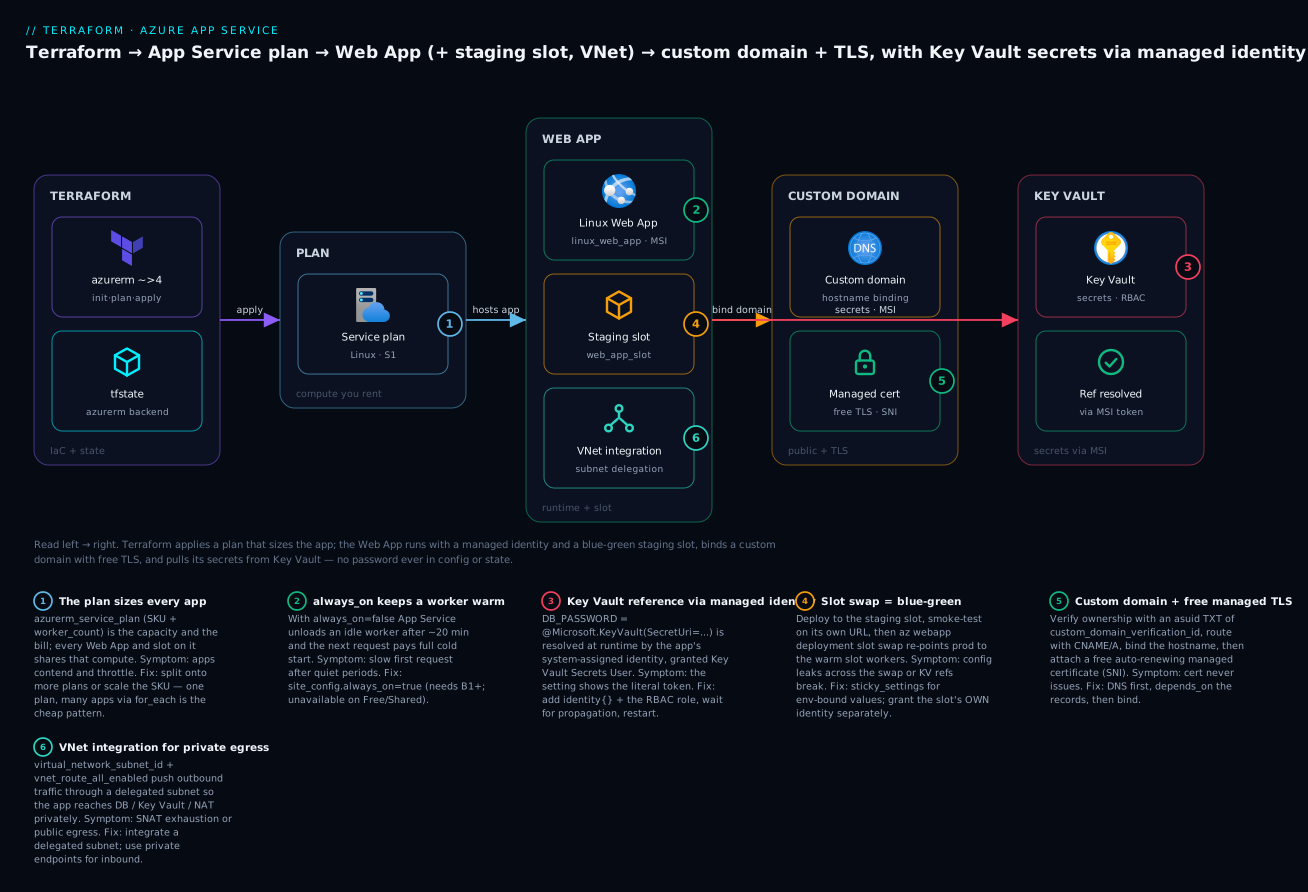
Read the diagram left to right: Terraform applies the plan (which sizes every app on it), the plan hosts the Web App with its staging slot and VNet integration, the app binds a custom domain + TLS, and — the security spine — the app’s managed identity reads secrets from Key Vault so no password is ever written into app config. That single architecture is what the rest of this lesson builds, argument by argument.
App Service plans: the compute you rent
An App Service plan (azurerm_service_plan) is the set of VM workers your apps run on. It has an operating system (os_type), a SKU (sku_name, which fixes vCPU, RAM, feature set and price) and a worker count (worker_count, how many instances). Every Web App and Function App you place on a plan shares its capacity — this is the single most important cost lever in App Service, because you pay for the plan, not per app. Twenty small apps on one S1 plan cost one S1; twenty S1 plans cost twenty times as much.
resource "azurerm_service_plan" "web" {
  name                = "plan-kvn-web-prod"
  resource_group_name = azurerm_resource_group.this.name
  location            = azurerm_resource_group.this.location

  os_type  = "Linux"   # "Linux" | "Windows" | "WindowsContainer"
  sku_name = "S1"      # Standard — cheapest tier WITH deployment slots

  worker_count           = 2      # instances behind the front end (HA)
  zone_balancing_enabled = false  # spread instances across AZs (Pv2/Pv3 only)

  tags = local.tags
}
os_type is set once and cannot change — a Linux plan hosts Linux apps and Linux containers; a Windows plan hosts Windows apps; WindowsContainer is its own thing for Windows containers. Linux plans are cheaper for the same SKU letter and are the default choice unless you need a Windows-only runtime (classic .NET Framework, some COM dependencies).
The SKU is where the real decisions live. Below is the tier table you will return to constantly — what each tier gives you, and specifically the two features this lesson depends on: deployment slots (blue-green) and Always On (no cold starts). Note the trap in the Basic row:
SKU (sku_name) |
Tier | vCPU / RAM | Deployment slots | Scale | Always On | Custom domain + TLS | ~List $/mo | Use for |
|---|---|---|---|---|---|---|---|---|
F1 |
Free | shared / 1 GB | 0 | none | No | No | $0 | Throwaway experiments |
B1 |
Basic | 1 / 1.75 GB | 0 | manual → 3 | Yes | Yes | ~$13 | Dev/test, small internal apps |
S1 |
Standard | 1 / 1.75 GB | 5 | autoscale → 10 | Yes | Yes | ~$70 | Prod apps needing slots |
P0v3 |
Premium v3 | 1 / 4 GB | 20 | autoscale → 30 | Yes | Yes | ~$95 | Prod, memory-hungry |
P1v3 |
Premium v3 | 2 / 8 GB | 20 | autoscale → 30 | Yes | Yes | ~$135 | Prod, pre-warmed, VNet |
I1v2 |
Isolated v2 | 2 / 8 GB | 20 | autoscale → 100 | Yes | Yes | ~$390 | ASE, regulated/isolated |
The row everyone learns the hard way is Basic: B1 gives you Always On and a custom domain, but zero deployment slots. If your lesson (or your prod release process) depends on a staging slot and a swap, you need Standard (S1) or higher. That is exactly why the demo below uses S1, not the cheaper B1. Here is how the plan’s own scaling arguments behave:
| Argument | What it controls | Default | Notes |
|---|---|---|---|
worker_count |
Number of instances (manual scale-out) | 1 | Run ≥2 in prod so one restart isn’t an outage |
per_site_scaling_enabled |
Let individual apps scale independently of the plan | false |
Rarely needed; complicates capacity math |
zone_balancing_enabled |
Spread instances across availability zones | false |
Premium v2/v3 only; needs worker_count ≥ 3 for real AZ spread |
maximum_elastic_worker_count |
Ceiling for Elastic Premium (Functions) | n/a | Only on EP* plans |
Manual worker_count is fine for a fixed baseline; for demand-driven scaling you attach an autoscale setting to the plan (covered later). The mental model: the plan is the wallet and the capacity ceiling; the apps are tenants that share it.
Web Apps: Linux and Windows
A Web App (azurerm_linux_web_app or azurerm_windows_web_app) is one application running on a plan. The two resources have an almost identical schema — the differences are the runtimes inside site_config.application_stack and a few Windows-only knobs. You reference the plan by ID, declare how the app should run in site_config, and that is the skeleton:
resource "azurerm_linux_web_app" "app" {
  name                = "app-kvn-web-prod"
  resource_group_name = azurerm_resource_group.this.name
  location            = azurerm_service_plan.web.location
  service_plan_id     = azurerm_service_plan.web.id

  https_only = true   # redirect HTTP→HTTPS at the platform

  site_config {
    always_on         = true            # keep a warm worker resident (B1+)
    http2_enabled     = true
    minimum_tls_version = "1.2"
    ftps_state        = "Disabled"      # kill FTP; deploy via zip/CI only
    health_check_path = "/healthz"      # per-instance liveness probe
    worker_count      = 2

    application_stack {
      # Container path — a public image, no registry auth needed:
      docker_registry_url = "https://mcr.microsoft.com"
      docker_image_name   = "azuredocs/aci-helloworld:latest"
    }
  }

  identity {
    type = "SystemAssigned"   # the app gets an AAD identity (used below)
  }

  tags = local.tags
}
The heart of a Web App is site_config. It is a big block; these are the arguments you actually set and why each one matters:
site_config argument |
What it does | Sensible prod value | Why it matters |
|---|---|---|---|
always_on |
Keeps a worker warm so idle apps don’t cold-start | true |
Off → ~20-min idle unload → 10–60 s first request |
application_stack {} |
The runtime or container image | your stack | Wrong/empty → app won’t start |
health_check_path |
Path probed per instance; failing instances evicted | /healthz |
Bad path evicts the whole fleet → 503 |
http2_enabled |
Enable HTTP/2 | true |
Faster multiplexed connections |
minimum_tls_version |
Lowest TLS the front end accepts | "1.2" |
Compliance; block legacy TLS |
ftps_state |
FTP/FTPS deployment endpoint | "Disabled" |
FTP is a credential-leak surface |
worker_count |
Per-app instance count | match plan | Overrides plan default per app |
vnet_route_all_enabled |
Route all outbound through the VNet | true (with integration) |
Needed for private egress / NAT GW |
ip_restriction {} |
Inbound allow/deny rules | as needed | Lock the app to a front door / VNet |
app_command_line |
Startup command (Linux) | stack-specific | Override the container/runtime entrypoint |
For the runtime (non-container) path, you set exactly one language inside application_stack. The Linux options:
| Stack | application_stack key |
Example value | Notes |
|---|---|---|---|
| Node.js | node_version |
"20-lts" |
Built-in; reads PORT env var |
| Python | python_version |
"3.12" |
Gunicorn/uvicorn; set app_command_line |
| .NET | dotnet_version |
"8.0" |
Cross-platform on Linux |
| Java | java_version + java_server |
"17" + "JAVA"/"TOMCAT" |
Also java_server_version |
| PHP | php_version |
"8.3" |
Built-in NGINX + PHP-FPM |
| Go / Ruby | go_version / ruby_version |
"1.22" / "3.3" |
Fewer built-ins; container often cleaner |
| Custom container | docker_registry_url + docker_image_name |
see demo | Set WEBSITES_PORT if not 80 |
Linux vs Windows, so you pick the right resource:
azurerm_linux_web_app |
azurerm_windows_web_app |
|
|---|---|---|
Plan os_type |
Linux |
Windows |
| Runtimes | Node/Python/.NET/Java/PHP/Go/Ruby + containers | .NET (incl. Framework), Node, Java, Python (limited) |
| Container support | First-class (Docker) | Windows containers (via WindowsContainer plan) |
| Cost (same SKU) | Lower | Higher (Windows licensing) |
| Startup override | app_command_line |
app_command_line |
| When to use | Default; anything cross-platform | Classic .NET Framework, Windows-only deps |
The rule: default to Linux; reach for Windows only when a dependency forces it. The rest of this lesson uses azurerm_linux_web_app, but every pattern (settings, identity, slots, domains) is identical on the Windows resource.
App settings, connection strings & Key Vault references
Configuration reaches your app three ways, and the distinction is exam-worthy because they surface differently inside the app and behave differently on a slot swap.
App settings (app_settings) are a string map exposed as environment variables to your app. Connection strings (connection_string blocks) are typed (SQL, MySQL, etc.) and exposed with a provider-specific prefix on Windows. Key Vault references are app settings whose value is a special token — @Microsoft.KeyVault(...) — that App Service resolves at runtime using the app’s managed identity, so the secret’s plaintext never appears in your Terraform config, your state, or the app’s settings blade.
resource "azurerm_linux_web_app" "app" {
  # ... (as above) ...

  app_settings = {
    "WEBSITES_PORT"                        = "80"
    "WEBSITE_HEALTHCHECK_MAXPINGFAILURES"  = "5"
    "APP_ENV"                              = "production"

    # Key Vault reference — resolved via the app's managed identity.
    # The value in state is the reference token, NOT the secret.
    "DB_PASSWORD" = "@Microsoft.KeyVault(SecretUri=${azurerm_key_vault_secret.db_password.versionless_id})"
  }

  connection_string {
    name  = "AppDb"
    type  = "SQLAzure"
    value = "Server=tcp:sql-kvn.database.windows.net;Database=appdb;Authentication=Active Directory Default;"
  }

  sticky_settings {
    # These names DO NOT swap between slots — they stay put.
    app_setting_names       = ["APP_ENV"]
    connection_string_names = ["AppDb"]
  }
}
Here is how the three configuration mechanisms differ:
| Mechanism | Terraform | Exposed to app as | Plaintext in state? | Swaps between slots? |
|---|---|---|---|---|
| App setting | app_settings = { K = V } |
Environment variable | Yes (avoid for secrets) | Yes, unless in sticky_settings |
| Connection string | connection_string {} |
Env var w/ type prefix | Yes (avoid for secrets) | Yes, unless sticky |
| Key Vault reference | app_settings value = @Microsoft.KeyVault(...) |
Resolved secret value | No — only the reference | The reference swaps; resolves per-slot identity |
The Key Vault reference format has two accepted shapes; know both because error messages quote them:
| Format | Example | Behaviour |
|---|---|---|
SecretUri (versionless) |
@Microsoft.KeyVault(SecretUri=https://kv.vault.azure.net/secrets/db-pass) |
Always resolves the latest version — best for rotation |
SecretUri (versioned) |
@Microsoft.KeyVault(SecretUri=https://kv.vault.azure.net/secrets/db-pass/abcd123...) |
Pins one version — no auto-rotate |
VaultName + SecretName |
@Microsoft.KeyVault(VaultName=kv;SecretName=db-pass) |
Equivalent shorthand |
Use versionless_id from the Terraform secret resource for the rotation-friendly form, as the demo does. Two things must be true for a reference to resolve, and both are common failure points we’ll hit in troubleshooting: the app must have a managed identity, and that identity must be granted read access to the vault (RBAC Key Vault Secrets User, or an access policy with get). Miss either and the app literally sees the string @Microsoft.KeyVault(...) as its config value — which usually crashes the app at boot with a bewildering parse error.
Sticky settings solve a real slot-swap hazard. When you swap staging into production, by default all app settings and connection strings swap with the app. That is usually what you want — except for the handful that must stay tied to their environment (a slot-specific feature flag, an environment name, a per-slot connection string). Listing those names in sticky_settings pins them to the slot so they never travel across a swap. For deeper Key Vault, SQL and DNS coverage, see the companion Terraform on Azure: Key Vault, SQL Database & DNS lesson.
Managed identity: keyless access to Key Vault, SQL & Storage
The identity {} block gives your Web App an Azure AD (Entra) identity — an on-platform principal your app authenticates as, with no secret to store, rotate or leak. This is the backbone of every “keyless” pattern on Azure: the app proves who it is to Azure AD, gets a token, and calls Key Vault / SQL / Storage / Service Bus with that token. There are two flavours:
| Identity type | Terraform | Lifecycle | Use when |
|---|---|---|---|
| System-assigned | identity { type = "SystemAssigned" } |
Tied to the app; deleted with it | One app, one identity — simplest |
| User-assigned | type = "UserAssigned" + identity_ids = [...] |
Standalone resource, shareable | Many apps share one identity, or pre-grant before app exists |
| Both | type = "SystemAssigned, UserAssigned" |
Mixed | Migration, or one shared + one per-app |
System-assigned is the default choice for a single app. The identity’s principal_id is an output you feed into role assignments:
# Grant the app's identity read access to Key Vault secrets (RBAC-mode vault).
resource "azurerm_role_assignment" "app_kv_secrets" {
  scope                = azurerm_key_vault.this.id
  role_definition_name = "Key Vault Secrets User"
  principal_id         = azurerm_linux_web_app.app.identity[0].principal_id
}
The same identity, different role, reaches other services. The roles you’ll grant most often for keyless access:
| Target service | RBAC role (role_definition_name) |
What it grants |
|---|---|---|
| Key Vault (secrets) | Key Vault Secrets User |
Read secret values (for @Microsoft.KeyVault refs) |
| Key Vault (certs) | Key Vault Certificate User |
Read certificates |
| Storage (blobs) | Storage Blob Data Contributor |
Read/write blobs keylessly |
| Storage (queues) | Storage Queue Data Contributor |
Read/write queue messages |
| Azure SQL | (DB-side) CREATE USER ... FROM EXTERNAL PROVIDER |
AAD auth — no SQL password |
| Container Registry | AcrPull |
Pull images without admin creds |
| Service Bus | Azure Service Bus Data Sender/Receiver |
Send/receive without SAS keys |
Note the SQL row is different: Azure SQL authorises AAD identities inside the database with a CREATE USER [app-name] FROM EXTERNAL PROVIDER T-SQL statement (run once, often via azurerm_mssql_database’s AAD admin plus a null_resource/pipeline step), not via an Azure RBAC role. The connection string then uses Authentication=Active Directory Default with no password — which is exactly the connection string in the previous section. This is how you get a Web App talking to SQL with zero credentials anywhere.
A subtle but critical gotcha: the identity’s principal_id does not exist until the app is created, so the role assignment implicitly depends on the app. And RBAC grants take 30–120 seconds to propagate. If your app boots the instant the role assignment returns, the first Key Vault reference resolution can fail even though Terraform succeeded. In production you handle this with a health-check that tolerates a cold secret, or an app-setting change that restarts the app after propagation.
Deployment slots & blue-green swaps
A deployment slot (azurerm_linux_web_app_slot) is a full, live copy of your app running on the same plan, with its own hostname (app-kvn-web-prod-staging.azurewebsites.net), its own settings, and its own warm workers. You deploy to the staging slot, smoke-test it on its own URL, and then swap — Azure re-points the production hostname to the staging workers (already warm) and the old production workers become the new staging. That is blue-green deployment with near-zero downtime, and it is the single biggest reason to use App Service over a plain VM.
resource "azurerm_linux_web_app_slot" "staging" {
  name           = "staging"
  app_service_id = azurerm_linux_web_app.app.id   # parent app, by ID

  https_only = true

  site_config {
    always_on         = true
    health_check_path = "/healthz"
    application_stack {
      docker_registry_url = "https://mcr.microsoft.com"
      docker_image_name   = "azuredocs/aci-helloworld:latest"
    }
  }

  app_settings = {
    "WEBSITES_PORT" = "80"
    "APP_ENV"       = "staging"   # sticky on the parent, so this stays in staging
  }

  identity {
    type = "SystemAssigned"   # slots get their OWN identity — grant it separately!
  }
}
Two facts here trip up everyone. First, the slot references its parent with app_service_id (the full resource ID), not a name. Second — and this is the one that causes 3 a.m. incidents — a slot has its own managed identity. The principal_id of the production app and the staging slot are different, so a Key Vault role assignment on the production identity does not cover the slot. You must grant the slot’s identity separately, or the app works in production and dies the moment you swap staging in.
The swap is not a Terraform resource. Terraform manages desired state; a swap is an imperative, point-in-time operation. You run it with the CLI or a pipeline:
# Blue-green swap: staging → production (warms staging, then re-points prod)
az webapp deployment slot swap \
  --name app-kvn-web-prod \
  --resource-group rg-kvn-appsvc-demo \
  --slot staging --target-slot production
What actually happens during a swap, and the arguments/settings that govern it:
| Slot / swap concept | What it means | Terraform / CLI control | Gotcha |
|---|---|---|---|
| Slot | A live app copy on the same plan | azurerm_linux_web_app_slot |
Needs Standard+ (S1) SKU |
| Slot count | How many slots the SKU allows | plan SKU | Basic = 0, Standard = 5, Premium = 20 |
| Swap | Re-point prod hostname to slot’s warm workers | az webapp deployment slot swap |
Not a TF resource — imperative |
| Slot-specific setting | Setting that stays with the slot on swap | sticky_settings on the app |
Forget it → prod config leaks to staging |
| Warm-up before swap | Ping a path before completing the swap | WEBSITE_SWAP_WARMUP_PING_PATH app setting |
Prevents cold-start on the swapped-in workers |
| Slot identity | The slot’s own managed identity | identity {} on the slot |
Must be granted RBAC separately from prod |
| Auto-swap | Auto-swap a slot into prod on deploy | auto_swap_slot_name in slot site_config |
Handy for CD, risky without warm-up |
Which settings travel and which stay, at a glance:
| On swap, this… | …swaps with the app | …stays with the slot |
|---|---|---|
Normal app_settings |
Yes | — |
Normal connection_string |
Yes | — |
Setting named in sticky_settings |
— | Yes |
| Managed identity | No — each slot keeps its own | Yes |
| Custom domain binding | No — bound to the production app | Yes (prod hostname stays prod) |
| Public certificate / TLS | Stays with prod hostname | — |
Driving the swap from a pipeline (deploy to staging → automated smoke test → swap → verify → auto-rollback by swapping back on failure) is the production-grade release pattern; the Azure DevOps Pipelines: CI/CD for Terraform lesson wires exactly that.
Custom domains & TLS
Two resources turn app-kvn-web-prod.azurewebsites.net into www.kloudvin.com with a padlock. First, a custom hostname binding (azurerm_app_service_custom_hostname_binding) tells App Service “this app answers for this hostname.” Second, a managed certificate (azurerm_app_service_managed_certificate) issues a free, auto-renewing TLS cert for that hostname, and a certificate binding attaches it with SNI.
Before any of that, Azure must verify you own the domain, via DNS records. For a subdomain (www) you add a CNAME to the app’s default hostname plus a TXT record at asuid.www containing the app’s custom_domain_verification_id. For the apex (kloudvin.com, no subdomain) you use an A record to the app’s inbound IP plus the same asuid TXT.
# 1. DNS: prove ownership + route traffic (Azure DNS zone shown; any DNS works)
resource "azurerm_dns_cname_record" "www" {
  name                = "www"
  zone_name           = azurerm_dns_zone.this.name
  resource_group_name = var.dns_zone_rg
  ttl                 = 300
  record              = azurerm_linux_web_app.app.default_hostname
}

resource "azurerm_dns_txt_record" "asuid_www" {
  name                = "asuid.www"
  zone_name           = azurerm_dns_zone.this.name
  resource_group_name = var.dns_zone_rg
  ttl                 = 300
  record { value = azurerm_linux_web_app.app.custom_domain_verification_id }
}

# 2. Bind the hostname to the app (after DNS resolves + verifies)
resource "azurerm_app_service_custom_hostname_binding" "www" {
  hostname            = "www.kloudvin.com"
  app_service_name    = azurerm_linux_web_app.app.name
  resource_group_name = azurerm_resource_group.this.name

  depends_on = [azurerm_dns_cname_record.www, azurerm_dns_txt_record.asuid_www]

  # The managed cert (below) will manage ssl_state/thumbprint — ignore drift:
  lifecycle { ignore_changes = [ssl_state, thumbprint] }
}

# 3. Free managed TLS certificate for that hostname
resource "azurerm_app_service_managed_certificate" "www" {
  custom_hostname_binding_id = azurerm_app_service_custom_hostname_binding.www.id
}

# 4. Attach the cert with SNI
resource "azurerm_app_service_certificate_binding" "www" {
  hostname_binding_id = azurerm_app_service_custom_hostname_binding.www.id
  certificate_id      = azurerm_app_service_managed_certificate.www.id
  ssl_state           = "SniEnabled"
}
The lifecycle { ignore_changes = [ssl_state, thumbprint] } on the binding is a well-known necessity: the certificate binding sets ssl_state/thumbprint out-of-band, and without ignore_changes Terraform fights it on every plan. Here is how the domain/TLS pieces relate:
| Piece | Resource | Depends on | Note |
|---|---|---|---|
| Ownership proof | asuid TXT record |
— | Value = custom_domain_verification_id |
| Traffic routing | CNAME (www) / A (apex) | — | www → default_hostname; apex → inbound IP |
| Hostname binding | azurerm_app_service_custom_hostname_binding |
DNS above | hostname + app_service_name |
| Free TLS cert | azurerm_app_service_managed_certificate |
the binding | Auto-renews; free; SNI only |
| Cert attachment | azurerm_app_service_certificate_binding |
cert + binding | ssl_state = "SniEnabled" |
Apex versus www, since the DNS differs:
| Aspect | www (subdomain) |
Apex / naked (kloudvin.com) |
|---|---|---|
| Routing record | CNAME → default_hostname |
A → app inbound IP (+ optional asverify CNAME) |
| Verification | TXT at asuid.www |
TXT at asuid (apex) |
| Managed cert | Supported | Supported (was historically limited) |
| Gotcha | CNAME can’t coexist with other apex records | Inbound IP can change if you delete/recreate the app |
Certificate options, so you pick the right one:
| Cert option | Terraform | Cost | Renewal | Use when |
|---|---|---|---|---|
| App Service managed cert | azurerm_app_service_managed_certificate |
Free | Automatic | Standard public HTTPS — default choice |
| Key Vault certificate | azurerm_app_service_certificate (key_vault_secret_id) |
Cert cost | Managed in KV | Wildcards, EV, centralised cert mgmt |
| Uploaded PFX | azurerm_app_service_certificate (pfx_blob) |
Cert cost | Manual | Bring-your-own cert |
For most apps the free managed certificate is the answer — it just works, renews itself, and costs nothing. Reach for a Key Vault certificate when you need a wildcard (*.kloudvin.com, which the managed cert doesn’t cover) or centralised certificate governance. If your app instead sits behind an Application Gateway or Front Door doing TLS termination and WAF, that is a different topology — see Terraform on Azure: Load Balancer, Application Gateway & WAF.
VNet integration & private endpoints
Two networking features come up constantly and are worth a paragraph even though they’re not the focus. Regional VNet integration gives your app a foot in a subnet so its outbound calls (to a database, another service, a NAT Gateway) travel over private networking instead of the shared platform IP — set virtual_network_subnet_id on the app and vnet_route_all_enabled = true in site_config. A private endpoint is the inbound complement: it gives the app a private IP in your VNet so it can be reached only from inside the network, taking it off the public internet entirely.
resource "azurerm_linux_web_app" "app" {
  # ...
  virtual_network_subnet_id = azurerm_subnet.app_integration.id  # outbound → VNet
  site_config {
    vnet_route_all_enabled = true   # route ALL outbound through the VNet
    # ...
  }
}
| Feature | Direction | What it does | Terraform | Needs |
|---|---|---|---|---|
| VNet integration | Outbound | App’s egress uses a delegated subnet | virtual_network_subnet_id + vnet_route_all_enabled |
Delegated subnet, Basic+ |
| Private endpoint | Inbound | App reachable only via private IP | azurerm_private_endpoint (subresource sites) |
Private DNS zone, Premium recommended |
The integration subnet must be delegated to Microsoft.Web/serverFarms and used by nothing else. Private endpoints additionally need a private DNS zone (privatelink.azurewebsites.net) so the app name resolves to the private IP inside the VNet.
Function Apps: the serverless sibling
A Function App (azurerm_linux_function_app) is App Service’s serverless cousin — same plan model, same settings/identity/slots story, but built for event-driven, per-execution workloads (HTTP triggers, queue/timer/blob triggers) and able to run on a Consumption plan where you pay per execution and scale to zero. It needs a storage account for its runtime bookkeeping (triggers, leases, logs), which is the one extra moving part versus a Web App.
resource "azurerm_service_plan" "func" {
  name                = "plan-kvn-func"
  resource_group_name = azurerm_resource_group.this.name
  location            = azurerm_resource_group.this.location
  os_type             = "Linux"
  sku_name            = "Y1"   # Consumption (serverless, pay-per-exec, scale-to-zero)
}

resource "azurerm_linux_function_app" "func" {
  name                = "func-kvn-prod"
  resource_group_name = azurerm_resource_group.this.name
  location            = azurerm_resource_group.this.location
  service_plan_id     = azurerm_service_plan.func.id

  storage_account_name       = azurerm_storage_account.func.name
  storage_uses_managed_identity = true   # keyless — no storage key in config

  site_config {
    application_stack { node_version = "20" }
  }

  identity { type = "SystemAssigned" }
}
Function App hosting plans, which is the decision that defines cost and cold-start behaviour:
| Plan | sku_name |
Scaling | Cold start | Cost model | Use for |
|---|---|---|---|---|---|
| Consumption | Y1 |
Auto, to zero | Yes (idle) | Per-execution + GB-s | Spiky/low-volume events |
| Flex Consumption | (dedicated resource) | Fast, to zero, per-instance concurrency | Reduced | Per-execution, always-ready option | Modern default for serverless |
| Elastic Premium | EP1–EP3 |
Auto, pre-warmed | No (min instances) | Per-instance-hour | VNet + no cold start |
| Dedicated | S1/P1v3 |
Manual/autoscale | No (Always On) | Per-plan | Reuse an existing plan |
Note storage_uses_managed_identity = true — the modern, keyless way to wire the runtime storage account, so no storage access key ends up in config or state. Everything else you learned — app settings, Key Vault references, slots, custom domains, VNet integration — applies to Function Apps unchanged.
Hands-on: build it with Terraform
Now the centrepiece. We will stand up the full stack — plan, Key Vault, Web App with a Key Vault reference and managed identity, and a staging slot — apply it, curl the live app to prove it serves, then destroy it. The custom-domain resources are included but gated behind a variable, because they need a real DNS zone you own; the core demo runs without one. ⚠️ This provisions real, billable Azure resources (an S1 plan is roughly $70/month prorated hourly, so a one-hour lab is cents) — do the destroy step at the end.
Prerequisites: Terraform ≥ 1.6 (or OpenTofu ≥ 1.6 — the azurerm config is identical), the Azure CLI logged in (az login), a subscription you can create resources in, and a remote-state storage account (create once with az storage account create / az storage container create, or use a local backend for the lab).
Step 1 — versions.tf: pin the provider and backend
# versions.tf
terraform {
  required_version = ">= 1.6.0"

  required_providers {
    azurerm = {
      source  = "hashicorp/azurerm"
      version = "~> 4.0"
    }
  }

  backend "azurerm" {
    resource_group_name  = "rg-tfstate"
    storage_account_name = "sttfstatekvn01"   # globally unique, yours
    container_name       = "tfstate"
    key                  = "appservice/demo.tfstate"
  }
}

provider "azurerm" {
  features {}
  subscription_id = var.subscription_id   # azurerm 4.x REQUIRES this (or ARM_SUBSCRIPTION_ID)
}
Two azurerm 4.x facts: features {} is mandatory even when empty, and the provider now requires subscription_id (via the argument or the ARM_SUBSCRIPTION_ID environment variable) — a change that trips people upgrading from 3.x.
Step 2 — variables.tf: parameterise it
# variables.tf
variable "subscription_id" {
  type        = string
  description = "Azure subscription ID to deploy into."
}

variable "location" {
  type    = string
  default = "eastus"
}

variable "prefix" {
  type    = string
  default = "kvn"
}

variable "sku_name" {
  type        = string
  default     = "S1" # Standard — needed for the staging slot
  description = "App Service plan SKU. Must be S1+ for deployment slots."
}

variable "container_image" {
  type    = string
  default = "azuredocs/aci-helloworld:latest"
}

variable "custom_domain" {
  type        = string
  default     = "" # e.g. "www.kloudvin.com" — leave empty to skip domain+TLS
  description = "Set to bind a custom domain + managed TLS cert. Requires a DNS zone you own."
}
Step 3 — main.tf: the whole stack
# main.tf
data "azurerm_client_config" "current" {}

locals {
  suffix = substr(md5(var.subscription_id), 0, 6) # cheap uniqueness for global names
  tags   = { course = "terraform-zero-to-hero", lesson = "app-service", env = "demo" }
}

resource "azurerm_resource_group" "this" {
  name     = "rg-${var.prefix}-appsvc-demo"
  location = var.location
  tags     = local.tags
}

# --- Key Vault (RBAC mode) + a secret + grant the DEPLOYER rights to write it ---
resource "azurerm_key_vault" "this" {
  name                      = "kv-${var.prefix}-${local.suffix}"
  location                  = azurerm_resource_group.this.location
  resource_group_name       = azurerm_resource_group.this.name
  tenant_id                 = data.azurerm_client_config.current.tenant_id
  sku_name                  = "standard"
  enable_rbac_authorization = true # use RBAC, not access policies
  tags                      = local.tags
}

resource "azurerm_role_assignment" "deployer_kv" {
  scope                = azurerm_key_vault.this.id
  role_definition_name = "Key Vault Secrets Officer"
  principal_id         = data.azurerm_client_config.current.object_id
}

resource "azurerm_key_vault_secret" "db_password" {
  name         = "db-password"
  value        = "S3cr3t-do-not-commit-${local.suffix}" # demo only; real secret comes from elsewhere
  key_vault_id = azurerm_key_vault.this.id
  depends_on   = [azurerm_role_assignment.deployer_kv] # wait for RBAC to propagate
}

# --- App Service plan (Standard, Linux) ---
resource "azurerm_service_plan" "web" {
  name                = "plan-${var.prefix}-web"
  resource_group_name = azurerm_resource_group.this.name
  location            = azurerm_resource_group.this.location
  os_type             = "Linux"
  sku_name            = var.sku_name
  worker_count        = 1
  tags                = local.tags
}

# --- Linux Web App: container + settings + KV reference + identity ---
resource "azurerm_linux_web_app" "app" {
  name                = "app-${var.prefix}-web-${local.suffix}"
  resource_group_name = azurerm_resource_group.this.name
  location            = azurerm_service_plan.web.location
  service_plan_id     = azurerm_service_plan.web.id
  https_only          = true
  tags                = local.tags

  site_config {
    always_on           = true
    http2_enabled       = true
    minimum_tls_version = "1.2"
    ftps_state          = "Disabled"
    health_check_path   = "/"
    application_stack {
      docker_registry_url = "https://mcr.microsoft.com"
      docker_image_name   = var.container_image
    }
  }

  app_settings = {
    "WEBSITES_PORT" = "80"
    "APP_ENV"       = "production"
    "DB_PASSWORD"   = "@Microsoft.KeyVault(SecretUri=${azurerm_key_vault_secret.db_password.versionless_id})"
  }

  sticky_settings {
    app_setting_names = ["APP_ENV"] # stays put on a slot swap
  }

  identity { type = "SystemAssigned" }
}

# Grant the app's identity read access to Key Vault secrets (for the KV reference)
resource "azurerm_role_assignment" "app_kv" {
  scope                = azurerm_key_vault.this.id
  role_definition_name = "Key Vault Secrets User"
  principal_id         = azurerm_linux_web_app.app.identity[0].principal_id
}

# --- Staging slot (blue-green) ---
resource "azurerm_linux_web_app_slot" "staging" {
  name           = "staging"
  app_service_id = azurerm_linux_web_app.app.id
  https_only     = true

  site_config {
    always_on         = true
    health_check_path = "/"
    application_stack {
      docker_registry_url = "https://mcr.microsoft.com"
      docker_image_name   = var.container_image
    }
  }

  app_settings = {
    "WEBSITES_PORT" = "80"
    "APP_ENV"       = "staging"
  }

  identity { type = "SystemAssigned" }
}

# The SLOT has its own identity — grant it separately, or KV refs fail after a swap
resource "azurerm_role_assignment" "slot_kv" {
  scope                = azurerm_key_vault.this.id
  role_definition_name = "Key Vault Secrets User"
  principal_id         = azurerm_linux_web_app_slot.staging.identity[0].principal_id
}

# --- Custom domain + free managed TLS (only if var.custom_domain is set) ---
resource "azurerm_app_service_custom_hostname_binding" "custom" {
  count               = var.custom_domain == "" ? 0 : 1
  hostname            = var.custom_domain
  app_service_name    = azurerm_linux_web_app.app.name
  resource_group_name = azurerm_resource_group.this.name
  lifecycle { ignore_changes = [ssl_state, thumbprint] }
}

resource "azurerm_app_service_managed_certificate" "custom" {
  count                      = var.custom_domain == "" ? 0 : 1
  custom_hostname_binding_id = azurerm_app_service_custom_hostname_binding.custom[0].id
}

resource "azurerm_app_service_certificate_binding" "custom" {
  count               = var.custom_domain == "" ? 0 : 1
  hostname_binding_id = azurerm_app_service_custom_hostname_binding.custom[0].id
  certificate_id      = azurerm_app_service_managed_certificate.custom[0].id
  ssl_state           = "SniEnabled"
}
Step 4 — outputs.tf: what you need to verify
# outputs.tf
output "default_hostname" {
  value = "https://${azurerm_linux_web_app.app.default_hostname}"
}

output "staging_hostname" {
  value = "https://${azurerm_linux_web_app_slot.staging.default_hostname}"
}

output "app_principal_id" {
  value = azurerm_linux_web_app.app.identity[0].principal_id
}

output "domain_verification_id" {
  description = "Put this in an asuid TXT record to verify a custom domain."
  value       = azurerm_linux_web_app.app.custom_domain_verification_id
}
Step 5 — init, plan, apply
export ARM_SUBSCRIPTION_ID="<your-sub-id>"   # or pass -var subscription_id=...
terraform init
Initializing the backend...
Initializing provider plugins...
- Installing hashicorp/azurerm v4.x.x...
Terraform has been successfully initialized!
terraform plan -var "subscription_id=$ARM_SUBSCRIPTION_ID"
Terraform will perform the following actions:
  # azurerm_resource_group.this           will be created
  # azurerm_key_vault.this                will be created
  # azurerm_key_vault_secret.db_password  will be created
  # azurerm_service_plan.web              will be created
  # azurerm_linux_web_app.app             will be created
  # azurerm_linux_web_app_slot.staging    will be created
  # azurerm_role_assignment.app_kv        will be created
  # azurerm_role_assignment.slot_kv       will be created
  # azurerm_role_assignment.deployer_kv   will be created

Plan: 9 to add, 0 to change, 0 to destroy.
Changes to Outputs:
  + default_hostname = (known after apply)
terraform apply -var "subscription_id=$ARM_SUBSCRIPTION_ID" -auto-approve
Apply takes a few minutes (the Web App and its slot pull the container image and start). On success:
Apply complete! Resources: 9 added, 0 changed, 0 destroyed.

Outputs:
default_hostname = "https://app-kvn-web-3f9a1c.azurewebsites.net"
staging_hostname = "https://app-kvn-web-3f9a1c-staging.azurewebsites.net"
Step 6 — Verify it actually serves
# The live app should return HTTP 200 and the sample container's HTML:
curl -sSI "$(terraform output -raw default_hostname)"
HTTP/2 200
content-type: text/html; charset=utf-8
...
Confirm the Key Vault reference resolved (this is the moment of truth for managed identity). In the portal, the app’s Environment variables blade shows DB_PASSWORD with a green “Key Vault Reference” source; via CLI:
az webapp config appsettings list \
  --name "$(terraform output -raw default_hostname | sed 's#https://##;s#\.azurewebsites\.net##')" \
  --resource-group rg-kvn-appsvc-demo \
  --query "[?name=='DB_PASSWORD'].{name:name, value:value}" -o table
If the value shows the literal @Microsoft.KeyVault(...) string, the reference failed to resolve — jump to troubleshooting (almost always a missing role assignment or RBAC not yet propagated; a restart fixes the propagation case). Finally, hit the staging slot on its own URL to prove blue-green is wired:
curl -sSI "$(terraform output -raw staging_hostname)" # HTTP/2 200 from staging
To perform the actual swap (imperative, not Terraform):
az webapp deployment slot swap --name <app-name> \
  --resource-group rg-kvn-appsvc-demo --slot staging --target-slot production
Step 7 — ⚠️ Destroy and clean up
terraform destroy -var "subscription_id=$ARM_SUBSCRIPTION_ID" -auto-approve
Destroy complete! Resources: 9 destroyed.
One cleanup nuance: an RBAC-mode Key Vault with soft-delete + purge protection (the default for standard) leaves a soft-deleted vault behind after destroy for the retention window; the name is reserved until it purges or you run az keyvault purge --name kv-.... If you re-apply with the same name before it purges, you’ll get a name-conflict — either purge it or vary the name.
Variables, outputs & making it reusable
The demo is a flat root module — perfect for learning, wrong for scale. Two moves make it reusable. First, wrap it in a module with a clean input surface (name, plan SKU, container image, app settings, a create_slot toggle, an optional custom domain) and outputs (hostname, principal ID). Second, when you need many apps on one plan, drive them with for_each over a map so adding an app is a one-line change:
variable "apps" {
  type = map(object({
    image         = string
    always_on     = optional(bool, true)
    create_slot   = optional(bool, false)
    app_settings  = optional(map(string), {})
  }))
}

resource "azurerm_linux_web_app" "app" {
  for_each            = var.apps
  name                = "app-${var.prefix}-${each.key}"
  resource_group_name = azurerm_resource_group.this.name
  location            = azurerm_service_plan.web.location
  service_plan_id     = azurerm_service_plan.web.id  # all apps SHARE one plan → shared cost
  site_config {
    always_on = each.value.always_on
    application_stack {
      docker_registry_url = "https://mcr.microsoft.com"
      docker_image_name   = each.value.image
    }
  }
  app_settings = each.value.app_settings
  identity { type = "SystemAssigned" }
}
That is the pattern that makes App Service cheap: one plan, many apps via for_each, each app a map entry. Should you use a community module instead of rolling your own? The trade-off:
| Option | Example | When to use |
|---|---|---|
| Roll your own module | the code above | You want full control, a thin surface, few surprises |
| Azure Verified Module | Azure/avm-res-web-site/azurerm |
You want Microsoft-maintained defaults, WAF-aligned patterns |
| Community module | claranet/app-service-linux/azurerm |
Batteries-included (diag settings, slots, insights) |
Azure Verified Modules (AVM) are the current Microsoft-blessed registry modules and a sensible default for teams that want opinionated, tested building blocks; roll your own when the module’s abstraction fights your needs more than it helps. Either way, keep the plan and the apps as separate module instances so you can scale apps without touching plan state.
Autoscale
Manual worker_count is a fixed bill. Autoscale (azurerm_monitor_autoscale_setting) targets the plan and adds/removes instances on metrics — CPU, memory, or a schedule. It needs Standard+ (Basic caps at 3 manual instances, no autoscale).
resource "azurerm_monitor_autoscale_setting" "web" {
  name                = "autoscale-${var.prefix}-web"
  resource_group_name = azurerm_resource_group.this.name
  location            = azurerm_resource_group.this.location
  target_resource_id  = azurerm_service_plan.web.id

  profile {
    name = "cpu-based"
    capacity {
      minimum = 2
      maximum = 10
      default = 2
    }

    rule {
      metric_trigger {
        metric_name        = "CpuPercentage"
        metric_resource_id = azurerm_service_plan.web.id
        time_grain         = "PT1M"
        statistic          = "Average"
        time_window        = "PT5M"
        time_aggregation   = "Average"
        operator           = "GreaterThan"
        threshold          = 70
      }
      scale_action {
        direction = "Increase"
        type      = "ChangeCount"
        value     = "1"
        cooldown  = "PT5M"
      }
    }
    # (mirror rule: LessThan 30 → Decrease by 1)
  }
}
The autoscale knobs and their sane starting values:
| Setting | What it does | Sensible value |
|---|---|---|
capacity.minimum |
Never scale below this | 2 (so one restart isn’t an outage) |
capacity.maximum |
Hard ceiling (cost guardrail) | 10 (or your SKU’s limit) |
metric_trigger.threshold |
Scale-out trigger | CPU > 70% over 5 min |
scale_action.cooldown |
Wait between scale actions | 5–10 min (avoid flapping) |
| Scale-in threshold | Scale-back trigger | CPU < 30% (asymmetric — scale out fast, in slow) |
Always pair a scale-out rule with a scale-in rule (omitted above for brevity) or you ratchet up and never come down. And set minimum ≥ 2 so a single instance restart never zeroes capacity.
Going deeper
The core lesson hands you a production-shaped stack. This section is for the reader who has to run it at scale, migrate an older codebase onto it, or make the swap genuinely bullet-proof: the provider-version landmines, the two App Service resources most people never discover, and what actually happens during a swap.
The legacy azurerm_app_service is gone — migrate to the split resources
Inherit a module written against azurerm 2.x or early 3.x and you will meet azurerm_app_service and azurerm_app_service_plan. Both were deprecated across 3.x and removed in azurerm 4.0 — run terraform init with the 4.x provider against that old code and it will not recognise the resource types at all. The modern schema makes two changes: it splits the app by operating system into azurerm_linux_web_app and azurerm_windows_web_app, and it renames the plan to azurerm_service_plan with a single sku_name in place of the old kind + sku { tier, size } triple.
| Legacy (removed in v4) | Modern replacement | What changed |
|---|---|---|
azurerm_app_service_plan |
azurerm_service_plan |
kind/reserved + sku { tier size } → os_type + sku_name |
azurerm_app_service (Linux) |
azurerm_linux_web_app |
OS split; site_config reshaped; app_service_plan_id → service_plan_id |
azurerm_app_service (Windows) |
azurerm_windows_web_app |
as above, Windows runtimes |
azurerm_app_service_slot |
azurerm_linux_web_app_slot / azurerm_windows_web_app_slot |
OS split; app_service_id reference |
Because the old and new resources are different resource types, a moved {} block will not carry state across — moved only renames within a single type. You migrate by dropping the old address from state and importing the live Azure resource into the new one, which touches nothing in Azure:
# Re-map state to the new resource types — no create/destroy in Azure
terraform state rm azurerm_app_service.legacy
terraform import azurerm_linux_web_app.app \
  /subscriptions/<sub>/resourceGroups/<rg>/providers/Microsoft.Web/sites/<app-name>

terraform state rm azurerm_app_service_plan.legacy
terraform import azurerm_service_plan.web \
  /subscriptions/<sub>/resourceGroups/<rg>/providers/Microsoft.Web/serverfarms/<plan-name>
Run a terraform plan afterwards and expect a few in-place diffs where the new schema surfaces attributes the old one defaulted silently — reconcile those in HCL until the plan is clean before you apply.
Swap declaratively with azurerm_web_app_active_slot
The Hands-on triggers the swap with az webapp deployment slot swap because a swap is, by nature, imperative. There is nonetheless a Terraform resource that models which slot is currently serving production: azurerm_web_app_active_slot (and azurerm_function_app_active_slot for Functions). Point it at a slot and applying it performs the swap:
resource "azurerm_web_app_active_slot" "prod" {
  slot_id                  = azurerm_linux_web_app_slot.staging.id
  overwrite_network_config = true   # keep the target slot's VNet config after the swap
}
Reach for it when you want the desired active version to live in state and version control — GitOps-style promotion where a merged change to slot_id is the swap. The caveats are real: applying it runs a swap as a side effect (so a plan that recreates the slot can trigger an unexpected swap), and most CI pipelines still prefer the explicit CLI step because it sequences cleanly with the deploy → smoke-test → swap flow. Pick one model per app; do not drive the same swap from both Terraform and the CLI or they will fight on every run.
What actually happens during a swap — warm-up internals
A swap is not an atomic pointer flip. App Service runs a multi-phase operation: it applies the target slot’s settings to the source slot’s instances, waits for them to restart and warm, and only then exchanges the hostnames. That warm-up is why a swap is near-zero-downtime — but only if the platform can tell “warm” from “still booting”.
| App setting | Controls | Typical value |
|---|---|---|
WEBSITE_SWAP_WARMUP_PING_PATH |
Path pinged on the instances before the swap completes | /healthz |
WEBSITE_SWAP_WARMUP_PING_STATUSES |
HTTP statuses that count as “warm” | 200,202 |
WEBSITE_WARMUP_PATH |
Path hit after a normal (non-swap) instance restart | /healthz |
For deeper control — validating with production configuration applied before you commit — use a swap with preview (multi-phase swap): az webapp deployment slot swap --action preview applies prod config to staging so you can smoke-test the real configuration, then --action swap completes it (or --action reset aborts and restores). On Windows apps the applicationInitialization element in web.config primes the app locally on every start; the swap-ping settings above are the platform-level equivalent that gate the swap itself.
Let the platform handle login: EasyAuth (auth_settings_v2)
App Service can authenticate users before a request ever reaches your code — the “EasyAuth” feature, configured with the auth_settings_v2 block. The platform runs the OIDC/OAuth dance (Entra ID, GitHub, Google…), keeps a per-user token store, and hands your app a signed identity header, so you write zero auth code:
resource "azurerm_linux_web_app" "app" {
  # ... (as in the Hands-on) ...

  auth_settings_v2 {
    auth_enabled           = true
    require_authentication = true
    unauthenticated_action = "RedirectToLoginPage"
    default_provider       = "azureactivedirectory"

    active_directory_v2 {
      client_id                  = var.aad_client_id
      tenant_auth_endpoint       = "https://login.microsoftonline.com/${var.tenant_id}/v2.0"
      client_secret_setting_name = "MICROSOFT_PROVIDER_AUTHENTICATION_SECRET" # an app-setting NAME
    }

    login {
      token_store_enabled = true
    }
  }
}
Note the pattern that ties back to the secrets section: the client secret is not written inline — you give the name of an app setting (client_secret_setting_name), and that app setting is itself a @Microsoft.KeyVault(...) reference. The secret lives in Key Vault; Terraform state holds only a setting name and a reference token.
Terraform builds the app; your pipeline ships the code
A recurring beginner instinct is to make Terraform deploy the application too. Resist it. Terraform manages infrastructure desired-state that changes rarely; your application artifact changes many times a day. Wire them together and every code push becomes a terraform apply on shared state. Keep the boundary clean: Terraform provisions the plan, app, slot, identity and cert; a CI pipeline pushes the build into them and drives the swap. The modern deploy mechanic is a mounted package — set WEBSITE_RUN_FROM_PACKAGE = "1" and deploy a zip — giving atomic, read-only, instantly-rollback-able releases:
# CI (illustrative): deploy to the staging slot, smoke-test, then swap → prod
steps:
  - name: Deploy build to staging slot
    run: az webapp deploy --name "$APP" --resource-group "$RG" --slot staging --type zip --src-path app.zip
  - name: Smoke-test staging on its own hostname
    run: curl -fsS "https://$APP-staging.azurewebsites.net/healthz"
  - name: Swap staging into production
    run: az webapp deployment slot swap --name "$APP" --resource-group "$RG" --slot staging --target-slot production
That deploy → verify → swap → (rollback-by-swapping-back) loop is the production release pattern the Azure DevOps Pipelines: CI/CD for Terraform lesson wires end to end.
Common mistakes and troubleshooting
App Service has a signature set of failure modes, and almost all of them are configuration, not code. Scan the table, then read the prose on the four nastiest:
| Symptom | Likely cause | Fix |
|---|---|---|
| Container returns 502/503, logs show “didn’t respond to HTTP pings on port: 80” | App listens on a port ≠ 80, WEBSITES_PORT unset |
Set app_settings["WEBSITES_PORT"] to the real port; bind 0.0.0.0 |
App setting shows literal @Microsoft.KeyVault(...) |
Identity missing or not granted vault access | Add identity {} + Key Vault Secrets User role; wait for RBAC; restart |
| KV reference works in prod, breaks after a slot swap | Slot has its own identity, ungranted | Grant azurerm_linux_web_app_slot.<x>.identity[0].principal_id separately |
| Slow first request after idle (~20 min) | always_on = false (or Free/Shared tier) |
Set always_on = true; needs B1+ |
always_on apply errors on F1 |
Feature not on Free/Shared | Move plan to B1+; then enable |
terraform apply fails creating the slot |
SKU has no slots (Basic/Free) | Use sku_name = "S1" or higher |
| Managed cert never issues / apply hangs on cert | Domain not verified / DNS not propagated | Add asuid TXT + CNAME/A first; depends_on DNS; wait for propagation |
| Custom hostname binding “conflict”/drift every plan | Cert binding sets ssl_state/thumbprint out-of-band |
lifecycle { ignore_changes = [ssl_state, thumbprint] } |
azurerm v4 provider error: subscription not specified |
v4 requires subscription_id |
Set provider subscription_id or ARM_SUBSCRIPTION_ID |
| KV secret create fails “Forbidden” | Deployer lacks vault data-plane rights (RBAC mode) | Grant Key Vault Secrets Officer to the deployer; depends_on it |
| App works, sticky setting leaked to staging | Setting not in sticky_settings |
Add its name to sticky_settings.app_setting_names |
| Whole app returns 503 when DB blips | health_check_path hard-fails on a downstream |
Make the health path shallow; don’t fail liveness on optional deps |
Cold start & always_on. The single most common “the app is slow sometimes” report is cold start: with always_on = false, App Service unloads an idle worker after ~20 minutes, and the next request pays full process + container-pull + JIT startup. Set always_on = true (B1 and up) and the platform keeps a warm worker resident. On Free/Shared, always_on isn’t available at all — which is one more reason those tiers are for experiments only. Setting always_on = true on an F1 plan will error at apply.
Slot settings. The blue-green swap carries all non-sticky settings across. The two failure shapes: (1) a setting that must stay with its environment (a slot-specific feature flag) travels on the swap because you forgot sticky_settings — now production has staging’s flag; (2) the swapped-in slot has its own managed identity, ungranted, so every Key Vault reference that worked in production fails the instant staging becomes production. Grant the slot identity, and pin environment-bound settings sticky. These two together cause the majority of “it worked until we swapped” incidents.
Key Vault reference denied. When DB_PASSWORD shows as the literal @Microsoft.KeyVault(...) token, the resolution failed. Walk the chain: is there an identity {} block (does the app have a principal)? Is that principal granted Key Vault Secrets User on this vault (RBAC mode) or get on secrets (access-policy mode)? Has the RBAC assignment propagated (30–120 s)? Is the vault’s network firewall blocking the app? The order Terraform applies is correct, but runtime resolution can lag the role assignment — a restart after propagation is the usual cure, which is why some teams add a settings-hash trigger to force a post-grant restart.
Domain verification. A managed certificate can only issue for a verified hostname, and verification is pure DNS: the asuid.<sub> TXT record must contain the app’s custom_domain_verification_id, and the CNAME/A must resolve to the app before the binding and cert resources apply. Racing them — creating the binding before DNS propagates — makes apply fail or hang. Order with depends_on on the DNS records and accept that DNS propagation is out of Terraform’s control (a few minutes). If you don’t own the zone in Azure DNS, create those records at your registrar first, then apply.
Common beginner mistakes
These are misconceptions, not error messages — the wrong mental model that sends beginners down a wrong path before anything even breaks. (For symptom → cause → fix, use the troubleshooting table above.)
“A deployment slot is a separate, cheaper environment.” It is neither separate nor cheaper. A slot is a live copy of your app running on the same plan, competing for the same CPU and RAM. It costs no extra line item precisely because it is a tenant of the plan you already pay for — but spin up five busy slots on an S1 and they contend with production for capacity. Right model: slots are free tenants of one plan, not standalone environments.
“My app settings stay with their environment across a swap.” The opposite is true, and it is the single most common slot injury: by default every app setting and connection string swaps with the app. A staging-only feature flag or a staging database connection string rides straight into production the moment you swap — unless you list its name in sticky_settings. Right model: settings travel on the swap by default; pin the environment-bound ones sticky so they stay behind.
“The app and its slot share one identity, so one Key Vault grant covers both.” Each slot has its own system-assigned managed identity with a different principal_id. A role assignment on production’s identity does nothing for the staging slot, so Key Vault references that work in production fail the instant staging is swapped in. Right model: grant every slot’s identity its RBAC roles separately.
“Basic (B1) is fine — it’s cheap and it even has Always On.” B1 does have Always On, which lulls people in — but it supports zero deployment slots. If your release process relies on a staging slot and a swap, B1 cannot do it and terraform apply fails creating the slot. Right model: choose the SKU by the feature you need (slots ⇒ Standard/S1+), not by price.
“I’ll just put the database password in an app setting for now.” App settings are stored as plaintext in Terraform state. A secret in app_settings is a secret in your state file, readable by anyone who can read state — and “for now” has a way of becoming forever. Right model: use a @Microsoft.KeyVault(...) reference so state holds only a pointer, and the plaintext never leaves the vault.
“Terraform should deploy my application code too.” Infrastructure changes rarely; your build changes hourly. Coupling them turns every code push into a state mutation on shared infrastructure and makes rollbacks a Terraform problem. Right model: Terraform provisions the plan/app/slot; the CI pipeline ships the artifact and drives the swap.
“Adding the hostname binding will make the free certificate appear.” A managed certificate only issues for a verified hostname, and verification is pure DNS — the asuid TXT record and the CNAME/A must resolve first. Create the binding before DNS propagates and the apply hangs or fails. Right model: DNS first, then the binding, then the certificate.
Cost, cleanup & production notes
What it costs if you leave it running. The dominant line item is the plan, billed hourly whether or not the app gets traffic — the apps and slots on it are free-of-additional-charge tenants. The demo’s other resources are negligible:
| Resource | Demo cost driver | ~Monthly (left running) | Notes |
|---|---|---|---|
| App Service plan (S1) | The compute you rent | ~$70 | Billed hourly; the big number |
| Web App + staging slot | Runs on the plan | $0 extra | Slots share the plan’s capacity |
| Key Vault (standard) | Per-operation | < $1 | Secrets ops are cents |
| Managed TLS certificate | — | $0 | Free, auto-renewing |
| DNS zone (if used) | Per zone + queries | ~$0.50 | Only if you host DNS in Azure |
A one-hour lab on S1 is a few cents. The trap is leaving the plan up — an idle S1 still bills ~$70/month. terraform destroy removes everything; remember the soft-deleted Key Vault caveat (purge it if you’ll re-use the name).
Production hardening. Five notes that separate a demo from production:
| Area | Do this | Why |
|---|---|---|
| State | Remote azurerm backend, blob lease locking, one state per env |
No local terraform.tfstate; locking prevents concurrent-apply corruption |
| Secrets | Only Key Vault references; never a raw secret in app_settings |
Raw values land in state as plaintext |
| Identity | System-assigned identity + least-privilege RBAC; no admin keys, no ACR admin user | Keyless, auditable, rotatable-free |
| Tags & naming | Consistent tags, a naming convention, default_tags-style locals |
Cost allocation, ownership, cleanup |
| Drift | Scheduled terraform plan in CI; alert on non-empty diff |
Someone will click in the portal — catch it |
Beyond those: run ≥2 instances in prod so a restart isn’t an outage; deploy via slot-swap (not in-place) for near-zero-downtime; keep the container image small and same-region (a big image is a slow cold start); and put ignore_changes on the exact attributes the platform mutates out-of-band (cert bindings, some app settings written by extensions) so Terraform doesn’t fight the platform on every plan.
Practice challenges
Work these against the Hands-on module. You can reason through every one on paper — but if you do apply, terraform destroy afterwards (an idle S1 still bills ~$70/month). Each solution states the why in one line.
1. (Beginner) Break the slot on purpose. Change the plan’s sku_name from S1 to B1, run terraform plan/apply, and explain the failure.
<details><summary>Show solution</summary>
terraform apply fails while creating azurerm_linux_web_app_slot.staging, because Basic supports zero deployment slots. Restore sku_name = "S1" (or higher) to fix it. Why: the SKU, not your HCL, gates the slot feature — slots need Standard+.
</details>
2. (Beginner) Add a shallow health check. Give the app a health_check_path that reports process liveness only, and say why it must not check the database.
<details><summary>Show solution</summary>
Set site_config.health_check_path = "/healthz" where /healthz returns 200 as long as the process is up, with no downstream call. Why: a deep health check that fails on a database blip makes App Service evict every instance at once, turning a dependency wobble into a full 503 outage.
</details>
3. (Intermediate) Add a second secret that survives a swap. Add an app setting API_KEY sourced from Key Vault, and make it stay put when staging swaps into production.
<details><summary>Show solution</summary>
Add "API_KEY" = "@Microsoft.KeyVault(SecretUri=${azurerm_key_vault_secret.api_key.versionless_id})" to app_settings, and add "API_KEY" to sticky_settings.app_setting_names. Why: the reference keeps plaintext out of state, and sticky_settings pins the value to its slot so it never travels on the swap.
</details>
4. (Intermediate) Turn one app into many on one plan. Refactor the single azurerm_linux_web_app into a for_each over a map of three apps that all share the one azurerm_service_plan.
<details><summary>Show solution</summary>
Use the for_each = var.apps pattern from Variables, outputs & making it reusable, keying each app off the map and pointing every one at the same service_plan_id. Why: one plan, many apps via for_each is the pattern that makes App Service cheap — adding an app becomes a one-line map entry.
</details>
5. (Advanced) Make the slot’s Key Vault reference resolve after a swap. The production app reads DB_PASSWORD from Key Vault, but after a swap the value shows as the literal @Microsoft.KeyVault(...) token. Fix it in HCL.
<details><summary>Show solution</summary>
Ensure the slot carries an identity { type = "SystemAssigned" } block and a separate azurerm_role_assignment granting Key Vault Secrets User to azurerm_linux_web_app_slot.staging.identity[0].principal_id. Why: a slot has its own identity, ungranted by default, so the production grant does not cover it.
</details>
6. (Advanced) Migrate a legacy app with no downtime. You inherit a stack using azurerm_app_service + azurerm_app_service_plan and must move it to azurerm_linux_web_app + azurerm_service_plan under the v4 provider, without recreating anything in Azure.
<details><summary>Show solution</summary>
terraform state rm the two legacy addresses, then terraform import the live resources into azurerm_service_plan and azurerm_linux_web_app by their Azure IDs; reconcile the resulting plan diffs in HCL. Why: they are different resource types, so a moved block cannot carry state — import re-maps state without touching the running app.
</details>
Cheat-sheet
The resources, at a glance:
| Resource | Purpose |
|---|---|
azurerm_service_plan |
The compute (OS + SKU + workers) apps share |
azurerm_linux_web_app / azurerm_windows_web_app |
The web app itself |
azurerm_linux_web_app_slot |
A blue-green staging slot |
azurerm_linux_function_app |
Serverless sibling |
azurerm_app_service_custom_hostname_binding |
Bind a custom domain |
azurerm_app_service_managed_certificate |
Free auto-renewing TLS cert |
azurerm_app_service_certificate_binding |
Attach the cert (SNI) |
azurerm_role_assignment |
Grant the app’s identity RBAC access |
azurerm_monitor_autoscale_setting |
Metric/schedule-based scaling |
The arguments and settings you’ll reach for most:
| Need | Where | Value |
|---|---|---|
| No cold starts | site_config.always_on |
true (B1+) |
| Container port | app_settings.WEBSITES_PORT |
your port (e.g. "8080") |
| Force HTTPS | resource https_only |
true |
| Health probe | site_config.health_check_path |
"/healthz" |
| Keyless identity | identity { type = "SystemAssigned" } |
— |
| Secret without plaintext | app_settings value |
@Microsoft.KeyVault(SecretUri=...) |
| Pin setting across swap | sticky_settings.app_setting_names |
["APP_ENV"] |
| Slots require | plan sku_name |
S1+ |
| Verify domain | custom_domain_verification_id |
into asuid TXT |
Commands:
terraform init && terraform plan && terraform apply
az webapp deployment slot swap -n <app> -g <rg> --slot staging --target-slot production
az webapp log tail -n <app> -g <rg>                 # live logs (debug 502/cold start)
az keyvault purge --name <kv-name>                  # after destroy, free the name
terraform destroy
Interview and exam questions
1. Why does putting many apps on one App Service plan save money? You pay for the plan (its SKU × instances), not per app. Every Web App and Function App on a plan shares its CPU/RAM, so ten small apps on one S1 cost one S1 — until they contend for capacity, at which point you split them or scale up.
2. Your container returns 502 and logs say “didn’t respond to HTTP pings on port: 80.” What’s wrong? The container listens on a port other than 80 and WEBSITES_PORT is unset, so the platform probes 80 and gets connection-refused. Set app_settings["WEBSITES_PORT"] to the real port and ensure the app binds 0.0.0.0, not 127.0.0.1.
3. What is a Key Vault reference and what must be true for it to resolve? An app setting whose value is @Microsoft.KeyVault(...), resolved at runtime via the app’s managed identity — so the plaintext never enters config or state. It needs (a) a managed identity on the app and (b) that identity granted read on the vault (RBAC Key Vault Secrets User or an access policy get), with RBAC propagated.
4. You swap staging into production and Key Vault references start failing. Why? A slot has its own managed identity, distinct from production’s. If you only granted the production identity vault access, the swapped-in slot’s identity was never granted — grant the slot’s principal_id separately.
5. Why won’t a staging slot deploy on a B1 plan? Basic supports zero deployment slots. Slots require Standard (5 slots) or higher. Use sku_name = "S1" or above.
6. sticky_settings — what problem does it solve? By default a slot swap carries all app settings/connection strings with the app. sticky_settings pins named settings to their slot so environment-bound values (a slot-specific flag, an env name) don’t travel on the swap.
7. Terraform Associate style — how do you keep a secret out of state? Don’t put the plaintext in config at all: use a Key Vault reference in app_settings, so state stores only the reference token. (For values Terraform must read, mark outputs sensitive, but the reference approach keeps the secret entirely out of state.)
8. Why is the slot swap not a Terraform resource? Terraform models desired state; a swap is an imperative, point-in-time operation that flips which workers serve production. You trigger it with az webapp deployment slot swap from a pipeline, keeping Terraform for the declarative topology.
9. What changed about the subscription_id in azurerm v4? It’s now required — set the provider subscription_id argument or ARM_SUBSCRIPTION_ID. In v3 it could be inferred from the CLI context; v4 makes it explicit.
10. Managed certificate vs Key Vault certificate — when each? The free App Service managed certificate for standard public single-hostname HTTPS (auto-renews, zero cost). A Key Vault certificate when you need a wildcard (managed certs don’t cover *.domain), an EV cert, or centralised certificate governance.
11. Terraform Associate style — an app setting shows drift on every plan. How do you stop the noise without abandoning management? Identify the attribute the platform mutates out-of-band (e.g. a cert binding’s ssl_state/thumbprint, or a setting an extension writes) and add lifecycle { ignore_changes = [...] } for exactly those attributes — not the whole resource.
12. How do you eliminate cold starts, and what’s the one tier caveat? Set always_on = true so a warm worker stays resident. Caveat: it needs Basic (B1) or higher — it’s unavailable on Free/Shared, and applying it there errors.
Glossary
- Azure App Service — Managed platform-as-a-service web hosting: you supply code or a container, Azure runs the OS, load balancer, TLS and scaling.
- App Service plan (
azurerm_service_plan) — The pool of VM workers your apps run on, defined by an OS, a SKU and an instance count. The unit you pay for; every app and slot on it shares its capacity. - SKU / tier — The plan’s size-and-feature class (
F1,B1,S1,P1v3,I1v2…). Fixes vCPU, RAM, price, and which features (slots, Always On, autoscale) are available. - Worker / instance — One VM in the plan.
worker_countsets how many run behind the front-end load balancer. - Web App (
azurerm_linux_web_app/azurerm_windows_web_app) — A single application hosted on a plan. Linux and Windows are separate resource types with an almost identical schema. site_config— The block that defines how the app runs: runtime or container image, Always On, health check, TLS floor, HTTP/2, IP rules.- Deployment slot (
azurerm_linux_web_app_slot) — A full live copy of the app on the same plan, with its own hostname, settings and identity. Used as a staging target for blue-green releases. - Swap — The imperative operation that re-points the production hostname to a slot’s already-warm workers. Triggered by
az webapp deployment slot swaporazurerm_web_app_active_slot. - Blue-green deployment — Releasing by running the new version alongside the old and switching traffic in one step, with instant rollback by switching back.
- App setting — A key/value exposed to the app as an environment variable. Stored as plaintext in state — never put a raw secret here.
- Connection string — A typed (SQL/MySQL/…) configuration value, like an app setting but exposed with a provider prefix. Also plaintext in state.
- Key Vault reference — An app setting whose value is a
@Microsoft.KeyVault(...)token that App Service resolves at runtime via the app’s identity, so the plaintext never enters config or state. - Sticky setting (
sticky_settings) — A named app setting or connection string pinned to its slot so it does not travel across a swap. - Managed identity — An Entra (Azure AD) identity issued to the app so it authenticates to Azure services with no stored secret. System-assigned is tied to one app; user-assigned is a shareable standalone resource.
- RBAC role assignment (
azurerm_role_assignment) — Grants an identity a role (e.g.Key Vault Secrets User) on a scope. How the app’s identity earns keyless access to Key Vault, Storage, and the rest. - Always On — A
site_configflag that keeps a worker resident so the app never cold-starts. Needs Basic (B1) or higher. - Cold start — The delay when a request hits an app whose worker was unloaded after idling (~20 minutes with Always On off).
- Health check (
health_check_path) — A path App Service pings per instance; instances that fail it are removed from rotation. - Custom hostname binding (
azurerm_app_service_custom_hostname_binding) — Tells App Service that the app answers for a given hostname; requires prior DNS verification. - Managed certificate (
azurerm_app_service_managed_certificate) — A free, auto-renewing TLS certificate for a bound custom hostname. Single-hostname only — no wildcards. - SNI — Server Name Indication: serving the right certificate per hostname on a shared IP; the
ssl_state = "SniEnabled"binding mode. - VNet integration — Gives the app outbound access into a delegated subnet, so its egress uses private networking.
- Private endpoint — Gives the app a private inbound IP inside a VNet, taking it off the public internet.
- Function App (
azurerm_linux_function_app) — App Service’s serverless sibling for event-driven, per-execution workloads; needs a storage account for runtime bookkeeping. - Consumption plan (
Y1) — A serverless Function App plan that scales to zero and bills per execution. - Autoscale (
azurerm_monitor_autoscale_setting) — Metric- or schedule-driven scaling attached to the plan; needs Standard+. WEBSITES_PORT— The app setting that tells App Service which container port to probe and route to when it is not 80.- EasyAuth (
auth_settings_v2) — App Service’s built-in authentication that runs the OIDC login before requests reach your code.
Key takeaways
- The plan is the wallet.
azurerm_service_plansets OS, SKU and instance count; every app and slot on it shares that capacity and cost. One plan, many apps viafor_eachis the economical pattern. - SKU gates features. Slots need Standard+ (
S1), Always On needs Basic+ (B1), autoscale needs Standard+. Pick the SKU by the feature you require, not just the vCPU. - Managed identity is the keyless backbone.
identity {}+ an RBAC role reaches Key Vault, SQL and Storage with no stored secret — and Key Vault references keep secrets out of both config and state. - Slots have their own identity, and swaps carry non-sticky settings. Grant the slot’s identity separately and pin environment-bound settings with
sticky_settings, or blue-green will surprise you. - The swap is imperative. Terraform builds the slot;
az webapp deployment slot swap(from a pipeline) does the blue-green flip. - Custom domain = DNS first. Verify with an
asuidTXT ofcustom_domain_verification_id, route with CNAME/A, then bind and attach the free managed certificate — andignore_changesthe cert-managed attributes. - Destroy the plan. An idle S1 still bills ~$70/month;
terraform destroyclears the lab, and remember to purge the soft-deleted Key Vault if you’ll reuse the name.