In a nutshell
Picture the app you are about to deploy as a small office. The Key Vault is the safe bolted to the floor — the only place the master password is allowed to live. The Azure SQL database is the filing cabinet full of business records, and it will only unlock for whoever holds that password. Azure DNS is the address book — it turns the name people remember (app.kv-demo.example) into the actual street address (an IP) so requests arrive at the right door. Terraform is the contractor that installs all three, wires the safe to the cabinet, writes the address into the book, and hands you a receipt — the state file — listing exactly what it built.
The reason this trio is taught together is that beginners rarely get hurt on any one of them; they get hurt on the wiring between them: who is allowed to open the safe, whether the master key accidentally ends up written on the receipt, and whether the address in the book actually points anywhere. Get the wiring right and the office is secure; get it wrong and you have either a locked-out app or a leaked password. This lesson builds the whole office end to end and stops at every seam that has burned a real engineer.
Level: Senior · Time: ~80 min · Format: read-through plus one copy-paste apply / destroy cycle.
Prerequisites — you should already be comfortable with:
- Core Terraform: HCL, providers, variables, state, modules,
for_each,depends_on. If any of that is shaky, start with Terraform fundamentals: HCL, providers, state & workflow. - Authenticating the
azurermprovider to a subscription and (ideally) a remote backend — the companion getting-started / provider-auth / remote-backend lesson covers it; this lesson takes it as read. - Enough Azure vocabulary to know what a resource group, a tenant, and a subscription are.
After this lesson you will be able to:
- Stand up a Key Vault in RBAC mode and grant Terraform permission to write the first secret — without the
403that catches everyone. - Generate a SQL admin password with
random_password, store it in Key Vault, and explain exactly why a copy lands in state — and use the modern write-only / ephemeral features to keep it out. - Provision an Azure SQL server + database behind the right firewall rule (and know why
0.0.0.0–0.0.0.0is not what it looks like). - Publish an app hostname with an Azure DNS A record, and explain why it does not resolve until you delegate.
- Choose between SQL-auth and Entra-only passwordless auth, and know when to reach for a private endpoint and private DNS instead of a public firewall rule.
Three Azure services show up in almost every real workload, and they are exactly the three where a wrong click in the portal quietly becomes a security incident: Key Vault (where secrets live), Azure SQL Database (the data that secret protects), and Azure DNS (the name the world uses to reach it). This lesson wires all three together with Terraform in one working, copy-pasteable demo — a Key Vault that uses Azure RBAC and holds a generated SQL admin password, an Azure SQL server + database that consume that password behind a firewall rule, and a public DNS A record that points a hostname at the app. You will run it end to end: terraform init → plan → apply → verify → destroy.
The reason to teach these three as a unit is that their seams are where engineers get hurt. The Key Vault is easy; granting Terraform permission to write the first secret is where the modern RBAC vs access-policy fork lives, and the wrong choice gives you a 403 Forbidden on your own apply. The SQL server is easy; the fact that its admin password — and any secret you read back with a data source — lands in the state file in cleartext is the thing that turns “I used Key Vault” into “I leaked a password.” The firewall rule is one resource; its most-used form (0.0.0.0–0.0.0.0) does not mean what its numbers suggest. And the DNS record is trivial; the delegation that makes it resolve is not in Terraform at all. We cover each seam explicitly, with the exact HCL and the exact failure.
This is a Senior-tier, hands-on lesson. It assumes you already know core Terraform — HCL, providers, variables, state, modules, for_each — and that you can authenticate the azurerm provider to a subscription (via Azure CLI, a service principal, or OIDC). If the provider/auth/remote-backend setup is new to you, the companion lesson Terraform on Azure: getting started, provider authentication & remote backend covers it in full; this lesson takes that as read and pins hashicorp/azurerm ~> 4.0 throughout.
What you’ll build
The scenario is the data tier for a small line-of-business app. The app needs a SQL database; the database needs an admin credential; that credential must never be typed by a human or committed to Git; and the app must be reachable at app.kv-demo.example. In portal terms that is four blades and a dozen fields, several of which default to insecure. In Terraform it is one directory you can read, review, and destroy in a single command — and, crucially, one you can diff: the day someone loosens the SQL firewall by hand, the next plan shows it as drift.
Concretely, terraform apply will stand up: a resource group; a random_password that mints a 24-character admin secret at apply time; a Key Vault with rbac_authorization_enabled = true, soft-delete and purge protection, plus an azurerm_role_assignment granting the caller Key Vault Secrets Officer so Terraform can write; an azurerm_key_vault_secret holding that password; an azurerm_mssql_server (with an Entra ID admin) and an azurerm_mssql_database that use the password; two firewall rules (allow-Azure-services and your client IP); a public IP; a public azurerm_dns_zone; and an azurerm_dns_a_record that points app at the IP. The whole thing costs a few rupees a day if you leave it running and is fully removed by terraform destroy (with one purge-protection caveat we will hit deliberately).
The three services map to Terraform resources like this — keep this table open, it is the spine of the whole lesson:
| Azure service | Primary Terraform resource(s) | What it models | Key companion resource |
|---|---|---|---|
| Key Vault | azurerm_key_vault |
The vault (SKU, tenant, auth mode, network) | azurerm_role_assignment (RBAC) or azurerm_key_vault_access_policy (legacy) |
| Key Vault data | azurerm_key_vault_secret / _key / _certificate |
A stored secret / crypto key / cert | random_password (generate the value) |
| Azure SQL | azurerm_mssql_server |
The logical server (admin, Entra admin, TLS) | azuread_administrator block |
| Azure SQL DB | azurerm_mssql_database |
One database (SKU, size, retention, HA) | azurerm_mssql_firewall_rule (access) |
| Azure DNS | azurerm_dns_zone |
A public DNS zone | azurerm_dns_a_record / _cname_record / alias |
| Private DNS | azurerm_private_dns_zone |
A private zone for private endpoints | azurerm_private_dns_zone_virtual_network_link |
Why Terraform for this at all, rather than the portal, az CLI, or ARM/Bicep? Because these resources are stateful, security-sensitive, and long-lived, which is exactly the profile Terraform is built for:
| Approach | Repeatable | Drift-detectable | Secret handling | Verdict for this tier |
|---|---|---|---|---|
| Portal | No (manual clicks) | No | Human types passwords | Fine to learn a service; unsafe as source of truth |
az CLI scripts |
Partially (imperative) | No | You script the secret plumbing | OK for one-off ops, not lifecycle |
| ARM / Bicep | Yes (declarative) | Weak (what-if only) | Native Key Vault references | Good on Azure-only shops; no cross-cloud, weaker module ecosystem |
Terraform (azurerm) |
Yes | Yes (plan = drift) |
random_password + Key Vault, but ⚠️ value in state |
Best fit: one language for KV+SQL+DNS+network, reviewable, destroyable |
The one honest caveat in that table — secrets can land in Terraform state — is not a reason to avoid Terraform; it is a thing you manage, and half of this lesson is how. Let’s build the pieces.
Azure Key Vault as code
A Key Vault is a hardened, access-controlled store for three kinds of material: secrets (arbitrary strings — passwords, connection strings, API keys), keys (asymmetric/symmetric crypto keys you use without exporting), and certificates (X.509 certs with lifecycle). The azurerm_key_vault resource creates the vault itself; separate resources create the material inside it.
The vault has two SKUs. The difference is where keys live, not how many secrets you can store:
| Setting | standard |
premium |
|---|---|---|
| Secrets & certificates | Yes | Yes |
| Software-protected keys | Yes | Yes |
| HSM-backed keys (FIPS 140-2 L2) | No | Yes |
| Typical use | App secrets, connection strings | Regulated CMK / bring-your-own-key |
| Relative cost | Lower | Higher (per-key HSM charge) |
Here is the vault. Note rbac_authorization_enabled (the modern auth mode — more on the fork below), the soft-delete/purge settings, and the network_acls block:
data "azurerm_client_config" "current" {}

resource "azurerm_key_vault" "kv" {
  name                = "kv-demo-prod-001"          # 3-24 chars, globally unique
  location            = azurerm_resource_group.rg.location
  resource_group_name = azurerm_resource_group.rg.name
  tenant_id           = data.azurerm_client_config.current.tenant_id
  sku_name            = "standard"

  # --- modern auth: Azure RBAC on the data plane ---
  rbac_authorization_enabled = true                 # azurerm v4 name (was enable_rbac_authorization)

  # --- data protection (⚠️ purge protection is irreversible) ---
  soft_delete_retention_days = 90
  purge_protection_enabled   = true

  # --- network ---
  public_network_access_enabled = true
  network_acls {
    default_action             = "Deny"
    bypass                     = "AzureServices"
    ip_rules                   = [var.my_ip_cidr]    # e.g. "203.0.113.10/32"
    virtual_network_subnet_ids = []
  }

  tags = local.tags
}
RBAC authorization vs access policies — the fork
This is the single most important decision in the file, and the one that most often produces a 403 on your first apply. A vault authorizes data-plane operations (read/write a secret, use a key) one of two ways, set by rbac_authorization_enabled:
| Dimension | Azure RBAC (rbac_authorization_enabled = true) |
Access policies (= false, the default/legacy) |
|---|---|---|
| Where permissions live | Azure RBAC role assignments at vault/secret scope | An access-policy list inside the vault resource |
| Terraform resource | azurerm_role_assignment |
azurerm_key_vault_access_policy |
| Granularity | Per-object (grant on one secret) possible | Per-vault, per operation-category |
| Model | Consistent with all other Azure RBAC | Vault-only, separate mental model |
| Propagation | Role assignment can take seconds–minutes to apply | Immediate on the vault write |
| Microsoft guidance | Recommended | Legacy; kept for compatibility |
| Classic gotcha | Your own principal has no data access until you grant a role | Forgetting yourself in the policy list |
With RBAC, the vault’s ARM (management-plane) creation does not grant you rights to write secrets. You must add a role assignment, and — because the secret write depends on that grant — you must order it with depends_on:
resource "azurerm_role_assignment" "kv_secrets_officer" {
  scope                = azurerm_key_vault.kv.id
  role_definition_name = "Key Vault Secrets Officer"          # write/read/delete secrets
  principal_id         = data.azurerm_client_config.current.object_id
}
The built-in Key Vault roles you will actually use:
| Role | Data plane it grants | Assign to |
|---|---|---|
| Key Vault Secrets Officer | Full secret CRUD (get/set/list/delete/purge/recover) | Terraform identity that writes secrets |
| Key Vault Secrets User | Read secret values only | Apps / managed identities that consume secrets |
| Key Vault Certificates Officer | Full certificate management | Cert automation |
| Key Vault Crypto Officer | Create/manage keys | Key management |
| Key Vault Crypto User | Use keys (encrypt/decrypt/sign) | Apps doing crypto, CMK consumers |
| Key Vault Administrator | All data-plane operations | Break-glass admins only |
| Key Vault Reader (management) | See vault metadata, not secret values | Auditors |
The legacy alternative, for a vault with rbac_authorization_enabled = false, is an access policy — note it lives as its own resource and uses verb lists:
# Only valid when rbac_authorization_enabled = false
resource "azurerm_key_vault_access_policy" "legacy" {
  key_vault_id = azurerm_key_vault.kv.id
  tenant_id    = data.azurerm_client_config.current.tenant_id
  object_id    = data.azurerm_client_config.current.object_id

  secret_permissions = ["Get", "List", "Set", "Delete", "Recover", "Purge"]
  key_permissions    = ["Get", "List", "Create", "Delete"]
}
⚠️ Do not mix modes. If
rbac_authorization_enabled = true, anazurerm_key_vault_access_policyis ignored (and will error). If it’sfalse,azurerm_role_assignmentat vault scope has no data-plane effect. Pick one; for anything new, pick RBAC.
Secrets, keys and certificates
The three material types are three resources. They differ in what they hold and what “the value” even is:
| Resource | Holds | You provide | Read back gives | Common use |
|---|---|---|---|---|
azurerm_key_vault_secret |
Arbitrary string | value (the string) |
The plaintext value | Passwords, conn strings, API keys |
azurerm_key_vault_key |
Crypto key | key_type, key_size/curve, key_opts |
Public key + ops (never the private key) | CMK, signing, wrap/unwrap |
azurerm_key_vault_certificate |
X.509 cert + key | A certificate (import) or a certificate_policy (generate) |
Cert data, thumbprint, a linked secret | TLS certs, mTLS, code signing |
The secret — this is the one our SQL password uses. Its value comes from random_password, and it depends_on the role assignment so Terraform actually has permission when it writes:
resource "random_password" "sql" {
  length           = 24
  special          = true
  override_special = "!#$%*-_=+"
  min_upper        = 2
  min_lower        = 2
  min_numeric      = 2
}

resource "azurerm_key_vault_secret" "sql_admin_password" {
  name         = "sql-admin-password"
  value        = random_password.sql.result
  key_vault_id = azurerm_key_vault.kv.id
  content_type = "password"

  depends_on = [azurerm_role_assignment.kv_secrets_officer]  # RBAC must land first
}
A key (for example a customer-managed key you’d point storage or SQL TDE at) and a self-generated certificate look like this — you won’t need them for the SQL demo, but they round out the trio:
resource "azurerm_key_vault_key" "cmk" {
  name         = "cmk-tde"
  key_vault_id = azurerm_key_vault.kv.id
  key_type     = "RSA"
  key_size     = 2048
  key_opts     = ["decrypt", "encrypt", "sign", "unwrapKey", "verify", "wrapKey"]
  depends_on   = [azurerm_role_assignment.kv_crypto_officer]
}

resource "azurerm_key_vault_certificate" "self_signed" {
  name         = "app-tls"
  key_vault_id = azurerm_key_vault.kv.id

  certificate_policy {
    issuer_parameters { name = "Self" }
    key_properties {
      exportable = true
      key_type   = "RSA"
      key_size   = 2048
      reuse_key  = true
    }
    secret_properties { content_type = "application/x-pkcs12" }
    x509_certificate_properties {
      subject            = "CN=app.kv-demo.example"
      validity_in_months = 12
      key_usage          = ["digitalSignature", "keyEncipherment"]
    }
  }
  depends_on = [azurerm_role_assignment.kv_certs_officer]
}
Soft-delete, purge protection and the destroy trap
Key Vault has two layers of deletion safety, and the second one will bite your terraform destroy on purpose the first time you meet it:
| Setting | Argument | Effect | Reversible? |
|---|---|---|---|
| Soft-delete | soft_delete_retention_days (7–90) |
Deleted vault/secret is recoverable for N days; the name stays reserved | Recover within window |
| Purge protection | purge_protection_enabled = true |
You cannot hard-delete (purge) before the window elapses — even as admin | No — one-way once on |
Soft-delete is always on for vaults now (you only tune the retention days). Purge protection is opt-in and irreversible: once true, you cannot set it back to false, and a destroyed vault’s name is locked until soft-delete retention expires. The provider’s features block controls whether destroy even attempts a purge:
provider "azurerm" {
  subscription_id = var.subscription_id     # required in azurerm v4
  features {
    key_vault {
      purge_soft_delete_on_destroy    = true   # try to purge on destroy...
      recover_soft_deleted_key_vaults = true   # ...and recover a soft-deleted one on create
    }
  }
}
⚠️ Even with
purge_soft_delete_on_destroy = true, a vault withpurge_protection_enabled = truewill not purge until its soft-delete window passes. For a throwaway demo, either leave purge protection off, or accept that the name is parked for the retention period. In production you want purge protection on — it is a compliance control — and you simply never destroy the vault casually.
Consuming a secret (and why the value lands in state)
Two other pieces of Terraform can read a secret back: the azurerm_key_vault_secret data source and any resource attribute that references random_password.sql.result. Both write the plaintext into the state file. This is the security seam of the entire lesson:
| How a secret is used | Value in state? | When to use it |
|---|---|---|
random_password → resource attribute (our SQL password) |
Yes (.result is in state) |
Bootstrapping a credential you must set once |
data "azurerm_key_vault_secret" → resource attribute |
Yes (.value is in state) |
Terraform must know the value to configure a resource |
App-side Key Vault reference (@Microsoft.KeyVault(...)) |
No | App Service / Functions read the secret at runtime |
| Managed identity reads KV at runtime | No | Any app that can hold an identity |
The rule that follows: prefer letting the application read Key Vault at runtime (via a Key Vault reference or its managed identity granted Key Vault Secrets User) so the secret never enters Terraform state at all. Use Terraform to provision the vault, generate the secret, and grant the identity — not to shuttle the plaintext into the next resource where you can avoid it. When Terraform genuinely must know a value (like setting a SQL admin password once), keep the blast radius small: an encrypted, RBAC-locked remote backend (Azure Storage blob) so the state itself is protected. The companion remote-backend lesson shows that backend; treat it as mandatory whenever secrets touch state.
Azure SQL Database as code
Azure SQL Database is a PaaS relational database. Its topology in Terraform is two resources: an azurerm_mssql_server (a logical server — an endpoint and an administration boundary, not a VM you can log into) and one or more azurerm_mssql_database on it. Access is governed separately by firewall rules and/or private endpoints.
The server carries the admin identity and the security posture:
| Argument | Purpose | Note |
|---|---|---|
name |
Global DNS label → <name>.database.windows.net |
Must be globally unique, lowercase |
version |
Logical server version | Effectively always "12.0" |
administrator_login |
SQL-auth admin username | Immutable after create |
administrator_login_password |
SQL-auth admin password | ⚠️ write-only; lands in state |
azuread_administrator {} |
Entra ID admin (see below) | Enables Entra auth |
minimum_tls_version |
Enforce TLS floor | Set "1.2" |
public_network_access_enabled |
Public endpoint on/off | false when using private endpoint only |
resource "azurerm_mssql_server" "sql" {
  name                         = "sql-demo-prod-001"
  resource_group_name          = azurerm_resource_group.rg.name
  location                     = azurerm_resource_group.rg.location
  version                      = "12.0"
  administrator_login          = var.sql_admin_login
  administrator_login_password = random_password.sql.result   # ⚠️ in state
  minimum_tls_version          = "1.2"
  public_network_access_enabled = true

  azuread_administrator {
    login_username              = var.entra_admin_upn
    object_id                   = var.entra_admin_object_id
    tenant_id                   = data.azurerm_client_config.current.tenant_id
    azuread_authentication_only = false     # true = disable SQL-auth entirely
  }

  tags = local.tags
}
Entra ID admin and passwordless auth
The azuread_administrator block designates an Entra ID user or group as a database administrator. Its real payoff is azuread_authentication_only = true, which disables SQL authentication altogether — then there is no admin password to generate, store, or leak, and you drop the administrator_login* arguments entirely:
| Auth model | Server arguments | Password in state? | Recommended for |
|---|---|---|---|
| SQL auth only | administrator_login + administrator_login_password |
Yes | Legacy apps, bootstrapping |
| SQL + Entra | Both, plus azuread_administrator {} |
Yes (SQL pw still set) | Migration window |
| Entra-only | azuread_administrator { azuread_authentication_only = true } |
No (no SQL pw at all) | New workloads |
We use SQL auth in the demo precisely so the Key Vault + random_password flow is visible end to end. In production, Entra-only is the target: the app authenticates with its managed identity, mapped to a database user via CREATE USER [<identity>] FROM EXTERNAL PROVIDER, and no password exists anywhere.
Purchasing models: DTU vs vCore
The database SKU (sku_name) is the money and performance decision, and it comes in two purchasing models. Getting this table right saves the most rupees:
| Model | sku_name examples |
Sizing unit | Scales | Best for |
|---|---|---|---|---|
| DTU – Basic | Basic |
5 DTU, 2 GB max | Fixed tiers | Tiny dev/test DBs |
| DTU – Standard | S0–S12 |
10–3000 DTU | Tier steps | Predictable small/medium apps |
| DTU – Premium | P1–P15 |
125–4000 DTU | Tier steps | Latency-sensitive, zone-redundant |
| vCore – General Purpose | GP_Gen5_2 … GP_Gen5_80 |
vCores + storage | Independently | Most production; balanced cost |
| vCore – GP Serverless | GP_S_Gen5_2 … |
Auto-scales vCores; auto-pause | Per-second billing | Intermittent/dev workloads |
| vCore – Business Critical | BC_Gen5_2 … |
vCores + local SSD + replicas | Independently | Low-latency, HA, read replica |
| vCore – Hyperscale | HS_Gen5_2 … |
Up to 100 TB | Rapid, independent | Very large / fast-growing DBs |
DTU bundles compute+IO+storage into one number (simple, less tunable); vCore separates compute and storage (transparent, tunable, supports serverless auto-pause and reserved-capacity discounts). For a first production DB, General Purpose vCore is the safe default; serverless GP is the cheapest thing that is still “real” for dev because it pauses when idle.
The database resource carries size, HA and retention:
resource "azurerm_mssql_database" "db" {
  name         = "appdb"
  server_id    = azurerm_mssql_server.sql.id      # v4 uses server_id (not server_name/rg)
  sku_name     = "S0"                             # DTU Standard S0 for the demo
  max_size_gb  = 250
  collation    = "SQL_Latin1_General_CP1_CI_AS"
  zone_redundant       = false                    # Premium/BC (and newer GP) only
  storage_account_type = "Geo"                    # Geo | Zone | Local | GeoZone backups

  short_term_retention_policy {
    retention_days = 7                            # 1-35 days of PITR
  }
  long_term_retention_policy {
    weekly_retention  = "P4W"                     # ISO-8601 durations
    monthly_retention = "P12M"
    yearly_retention  = "P5Y"
    week_of_year      = 1
  }

  tags = local.tags
}
Key database arguments and their traps:
| Argument | What it does | Trap |
|---|---|---|
server_id |
Which server hosts the DB | v4 arg name; v3 used server_name+resource_group_name |
sku_name |
Purchasing tier | Cross-model change (DTU↔vCore) can force a longer op |
max_size_gb |
Storage ceiling | Must fit the tier’s max; shrinking may be blocked |
zone_redundant |
Spread replicas across AZs | Not on Basic/Standard/GP-classic; set false there or apply fails |
storage_account_type |
Backup redundancy | Geo default; Local/Zone cheaper, less durable |
short_term_retention_policy |
Point-in-time restore window | 1–35 days |
long_term_retention_policy |
Weekly/monthly/yearly backups | ISO-8601 strings (P4W, P12M, P5Y) |
| For serverless | auto_pause_delay_in_minutes, min_capacity |
Required on GP_S_*; omit on provisioned |
Firewall rules — the resource that lies about its name
By default a SQL server accepts no connections. You open access with azurerm_mssql_firewall_rule — and its most common form does not mean what its IP range suggests:
| Rule (start–end IP) | What it actually allows | Safe? |
|---|---|---|
0.0.0.0 – 0.0.0.0 |
“Allow Azure services and resources” (not the internet!) | Convenient; broad (any Azure tenant’s resources) |
<your IP> – <your IP> |
Just your client | ✅ Yes, for admin access |
10.0.0.0 – 10.0.0.255 |
A specific range | ✅ Scoped |
0.0.0.0 – 255.255.255.255 |
The entire internet | ❌ Never |
# "Allow Azure services" — the special 0.0.0.0 / 0.0.0.0 rule
resource "azurerm_mssql_firewall_rule" "allow_azure" {
  name             = "AllowAzureServices"
  server_id        = azurerm_mssql_server.sql.id
  start_ip_address = "0.0.0.0"
  end_ip_address   = "0.0.0.0"
}

# Your workstation, so you can connect and verify
resource "azurerm_mssql_firewall_rule" "my_ip" {
  name             = "AdminWorkstation"
  server_id        = azurerm_mssql_server.sql.id
  start_ip_address = var.my_ip
  end_ip_address   = var.my_ip
}
⚠️ The
0.0.0.0–255.255.255.255“open to the world” rule is the classic breach vector — someone adds it “just to test” and forgets. Because it is now in Terraform, a reviewer sees it in the PR diff and blocks it, and aplanflags it if it appears out of band. That reviewability is the whole point.
For production, prefer a private endpoint over any public firewall rule. The three connectivity postures:
| Posture | How | Public exposure | Needs |
|---|---|---|---|
| Public + firewall | azurerm_mssql_firewall_rule allow-list |
Public endpoint, IP-scoped | Nothing extra |
| Private endpoint | azurerm_private_endpoint + private DNS |
None (public_network_access_enabled = false) |
VNet, subnet, private DNS zone |
| Service endpoint | azurerm_mssql_virtual_network_rule |
Public endpoint, VNet-scoped | VNet + subnet service endpoint |
The private-endpoint path (which ties into the private DNS section next):
resource "azurerm_private_endpoint" "sql" {
  name                = "pe-sql"
  location            = azurerm_resource_group.rg.location
  resource_group_name = azurerm_resource_group.rg.name
  subnet_id           = azurerm_subnet.data.id

  private_service_connection {
    name                           = "psc-sql"
    private_connection_resource_id = azurerm_mssql_server.sql.id
    subresource_names              = ["sqlServer"]
    is_manual_connection           = false
  }

  private_dns_zone_group {
    name                 = "sql"
    private_dns_zone_ids = [azurerm_private_dns_zone.sql.id]
  }
}
Connection strings
You rarely hardcode a connection string, but you often output one (marked sensitive) or feed one to an app setting. The forms differ by auth:
| Auth | Connection string shape | Sensitive? |
|---|---|---|
| SQL auth | Server=tcp:<fqdn>,1433;Database=<db>;User ID=<login>;Password=<pw>;Encrypt=True; |
Yes (has the password) |
| Entra – Default | Server=tcp:<fqdn>,1433;Database=<db>;Authentication=Active Directory Default;Encrypt=True; |
No secret |
| Entra – Managed Identity | ...;Authentication=Active Directory Managed Identity;Encrypt=True; |
No secret |
The recommended output uses Entra (no secret in the string), so it need not be sensitive — but if you ever emit the SQL-auth form, mark the output sensitive = true.
Azure DNS as code
Azure DNS hosts DNS zones on Azure’s global name-server fleet. Two flavors: public zones (internet-resolvable) and private zones (resolvable only inside linked VNets — the backbone of private-endpoint name resolution). Our demo publishes the app on a public zone.
The zone and its record resources:
| Resource | Record type | Points at | Notes |
|---|---|---|---|
azurerm_dns_zone |
— | (the zone itself) | Public; Azure assigns 4 name servers |
azurerm_dns_a_record |
A | IPv4 address(es) or an Azure resource (alias) | records or target_resource_id |
azurerm_dns_aaaa_record |
AAAA | IPv6 | Same alias option |
azurerm_dns_cname_record |
CNAME | Another hostname | Single record value |
azurerm_dns_txt_record |
TXT | Text (SPF, verification) | record { value = ... } blocks |
azurerm_dns_mx_record |
MX | Mail exchangers | record { preference, exchange } |
azurerm_dns_ns_record |
NS | Delegation to child zone | For subdomain delegation |
resource "azurerm_dns_zone" "public" {
  name                = var.dns_zone_name        # e.g. "kv-demo.example"
  resource_group_name = azurerm_resource_group.rg.name
}

resource "azurerm_public_ip" "app" {
  name                = "pip-app"
  location            = azurerm_resource_group.rg.location
  resource_group_name = azurerm_resource_group.rg.name
  allocation_method   = "Static"
  sku                 = "Standard"
}

# Plain A record: static IP you manage
resource "azurerm_dns_a_record" "app" {
  name                = "app"                     # → app.kv-demo.example
  zone_name           = azurerm_dns_zone.public.name
  resource_group_name = azurerm_resource_group.rg.name
  ttl                 = 300
  records             = [azurerm_public_ip.app.ip_address]
}
Alias records vs plain records
A plain A record stores a literal IP. An alias record stores a target_resource_id and tracks the Azure resource — if the public IP changes, the record follows automatically. You set one or the other, never both:
| Record style | Argument | Behavior on resource change | Use when |
|---|---|---|---|
| Plain | records = [ip] |
Stale until you re-apply | IP is static/external |
| Alias | target_resource_id = <id> |
Auto-updates to the resource’s current IP | Pointing at an Azure Public IP / Traffic Manager / Front Door |
# Alias A record: follows the Public IP automatically (omit `records`)
resource "azurerm_dns_a_record" "app_alias" {
  name                = "app"
  zone_name           = azurerm_dns_zone.public.name
  resource_group_name = azurerm_resource_group.rg.name
  ttl                 = 300
  target_resource_id  = azurerm_public_ip.app.id
}
The catch that trips everyone: a public Azure DNS zone only resolves once you delegate it — copy the four name servers Azure assigned (
azurerm_dns_zone.public.name_servers) into your domain registrar’s NS records for that name. Terraform creates the zone; it cannot delegate a domain it doesn’t manage. Until you delegate,nslookup app.kv-demo.examplereturns nothing.
Public vs private DNS zones
For private endpoints, name resolution must return the private IP inside the VNet. That’s what a private DNS zone does — it overrides the public *.database.windows.net name with the endpoint’s private address:
| Aspect | Public zone (azurerm_dns_zone) |
Private zone (azurerm_private_dns_zone) |
|---|---|---|
| Resolvable from | The internet | Only linked VNets |
| Delegation | NS records at registrar | None — linked, not delegated |
| Endpoint link | n/a | azurerm_private_dns_zone_virtual_network_link |
| SQL private zone name | n/a | privatelink.database.windows.net (fixed) |
| Auto-registration | n/a | Optional (registration_enabled) |
resource "azurerm_private_dns_zone" "sql" {
  name                = "privatelink.database.windows.net"   # fixed name for SQL
  resource_group_name = azurerm_resource_group.rg.name
}

resource "azurerm_private_dns_zone_virtual_network_link" "sql" {
  name                  = "sql-link"
  resource_group_name   = azurerm_resource_group.rg.name
  private_dns_zone_name  = azurerm_private_dns_zone.sql.name
  virtual_network_id     = azurerm_virtual_network.vnet.id
  registration_enabled   = false
}
Each Azure service has a specific privatelink zone name (SQL is privatelink.database.windows.net, blob is privatelink.blob.core.windows.net, Key Vault is privatelink.vaultcore.azure.net). Use the exact string, or resolution silently returns the public IP.
Hands-on: build it with Terraform
Now the centerpiece — a complete directory you can copy, apply, verify, and destroy. It builds the full stack from the diagram: random_password → Key Vault (RBAC secret) → SQL server + database (firewalled, using the secret) → DNS A record.
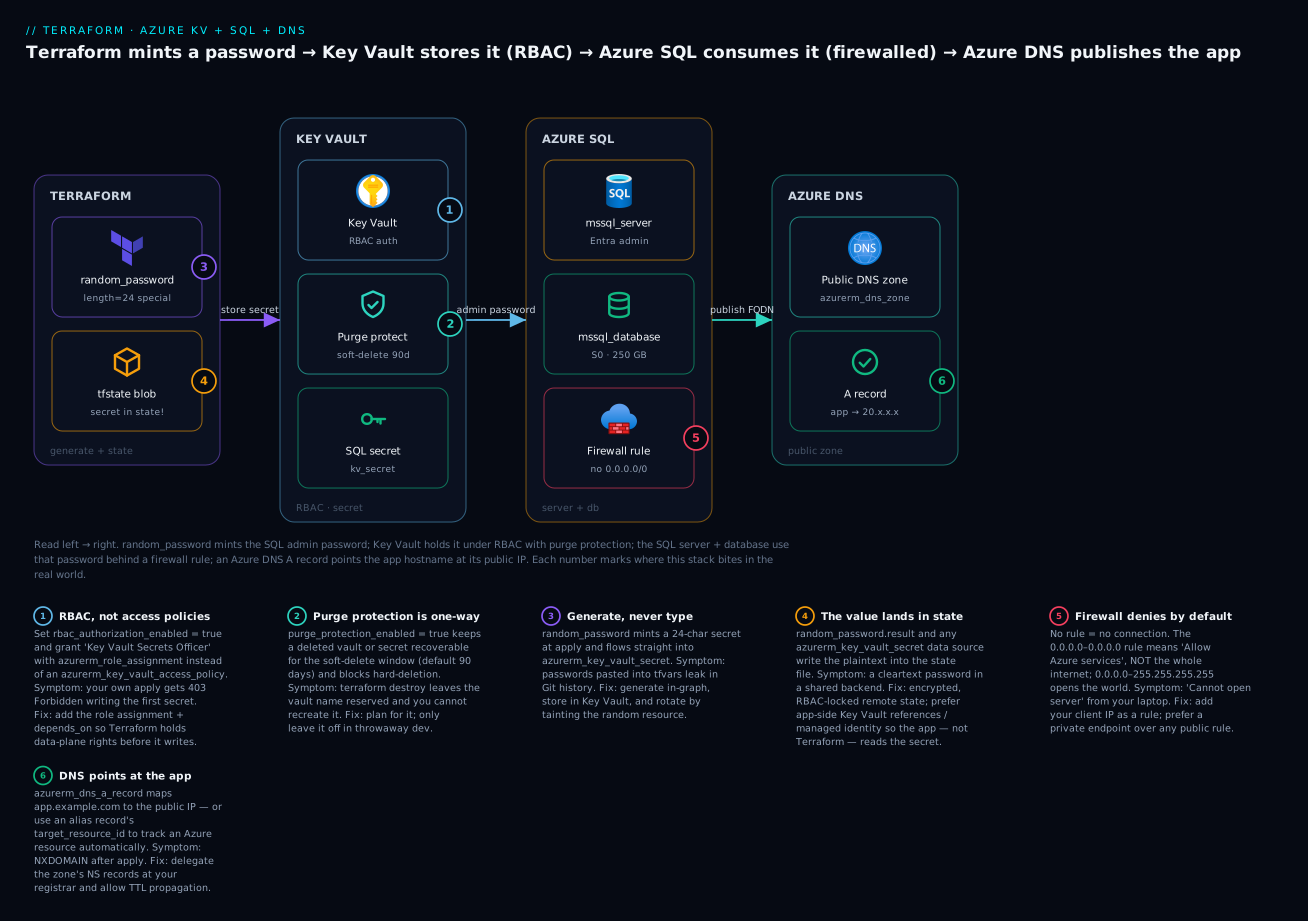
Read it left→right: Terraform mints the password and (unavoidably) records it in state; Key Vault stores it under RBAC with purge protection; the SQL server and database consume it behind a firewall rule; and Azure DNS publishes the app’s hostname. The six badges are the six things that go wrong in production — we hit each one below.
The directory has five files:
| File | Contains |
|---|---|
versions.tf |
required_version, required_providers, backend, provider (with the KV features) |
variables.tf |
Inputs: subscription, location, names, admin identity, your IP, zone name |
main.tf |
RG, random_password, Key Vault + role assignment + secret, SQL server + DB + firewall, public IP, DNS zone + A record |
outputs.tf |
FQDNs, the app hostname, a (sensitive) connection string |
terraform.tfvars |
Your actual values (⚠️ never commit real secrets) |
versions.tf — providers pinned, remote state, and the KV feature that governs destroy:
terraform {
  required_version = ">= 1.6"

  required_providers {
    azurerm = { source = "hashicorp/azurerm", version = "~> 4.0" }
    azuread = { source = "hashicorp/azuread", version = "~> 3.0" }
    random  = { source = "hashicorp/random",  version = "~> 3.6" }
  }

  # Remote state — keep the (secret-bearing) state encrypted & RBAC-locked
  backend "azurerm" {
    resource_group_name  = "rg-tfstate"
    storage_account_name = "sttfstateprod001"
    container_name       = "tfstate"
    key                  = "keyvault-sql-dns.tfstate"
  }
}

provider "azurerm" {
  subscription_id = var.subscription_id     # required by azurerm v4
  features {
    key_vault {
      purge_soft_delete_on_destroy    = true
      recover_soft_deleted_key_vaults = true
    }
  }
}

provider "azuread" {}
provider "random" {}
variables.tf:
variable "subscription_id" { type = string }

variable "location" {
  type    = string
  default = "centralindia"
}

variable "prefix" {
  type    = string
  default = "kvdemo"
}

variable "sql_admin_login" {
  type    = string
  default = "sqladminuser"
}

variable "entra_admin_upn"       { type = string }   # you@tenant.onmicrosoft.com
variable "entra_admin_object_id" { type = string }   # objectId of that user/group

variable "my_ip"      { type = string }               # "203.0.113.10"
variable "my_ip_cidr" { type = string }               # "203.0.113.10/32"

variable "dns_zone_name" {
  type    = string
  default = "kv-demo.example"
}
main.tf — the whole stack:
data "azurerm_client_config" "current" {}

locals {
  tags = {
    project   = "kv-sql-dns-demo"
    managedBy = "terraform"
    env       = "demo"
  }
}

resource "azurerm_resource_group" "rg" {
  name     = "rg-${var.prefix}-demo"
  location = var.location
  tags     = local.tags
}

# ---------- Terraform generates the credential ----------
resource "random_password" "sql" {
  length           = 24
  special          = true
  override_special = "!#$%*-_=+"
  min_upper        = 2
  min_lower        = 2
  min_numeric      = 2
}

# ---------- Key Vault (RBAC) ----------
resource "azurerm_key_vault" "kv" {
  name                       = "kv-${var.prefix}-001"
  location                   = azurerm_resource_group.rg.location
  resource_group_name        = azurerm_resource_group.rg.name
  tenant_id                  = data.azurerm_client_config.current.tenant_id
  sku_name                   = "standard"
  rbac_authorization_enabled = true
  soft_delete_retention_days = 7        # min 7; keep short for a demo
  purge_protection_enabled   = false    # ⚠️ demo only — set true in prod

  network_acls {
    default_action = "Allow"            # demo; use "Deny" + ip_rules in prod
    bypass         = "AzureServices"
  }
  tags = local.tags
}

resource "azurerm_role_assignment" "kv_secrets_officer" {
  scope                = azurerm_key_vault.kv.id
  role_definition_name = "Key Vault Secrets Officer"
  principal_id         = data.azurerm_client_config.current.object_id
}

resource "azurerm_key_vault_secret" "sql_admin_password" {
  name         = "sql-admin-password"
  value        = random_password.sql.result
  key_vault_id = azurerm_key_vault.kv.id
  content_type = "password"
  depends_on   = [azurerm_role_assignment.kv_secrets_officer]  # RBAC lands first
}

# ---------- Azure SQL ----------
resource "azurerm_mssql_server" "sql" {
  name                          = "sql-${var.prefix}-001"
  resource_group_name           = azurerm_resource_group.rg.name
  location                      = azurerm_resource_group.rg.location
  version                       = "12.0"
  administrator_login           = var.sql_admin_login
  administrator_login_password  = random_password.sql.result   # ⚠️ in state
  minimum_tls_version           = "1.2"
  public_network_access_enabled = true

  azuread_administrator {
    login_username              = var.entra_admin_upn
    object_id                   = var.entra_admin_object_id
    tenant_id                   = data.azurerm_client_config.current.tenant_id
    azuread_authentication_only = false
  }
  tags = local.tags
}

resource "azurerm_mssql_database" "db" {
  name        = "appdb"
  server_id   = azurerm_mssql_server.sql.id
  sku_name    = "S0"
  max_size_gb = 250
  collation   = "SQL_Latin1_General_CP1_CI_AS"
  tags        = local.tags
}

resource "azurerm_mssql_firewall_rule" "allow_azure" {
  name             = "AllowAzureServices"
  server_id        = azurerm_mssql_server.sql.id
  start_ip_address = "0.0.0.0"
  end_ip_address   = "0.0.0.0"
}

resource "azurerm_mssql_firewall_rule" "my_ip" {
  name             = "AdminWorkstation"
  server_id        = azurerm_mssql_server.sql.id
  start_ip_address = var.my_ip
  end_ip_address   = var.my_ip
}

# ---------- Azure DNS ----------
resource "azurerm_public_ip" "app" {
  name                = "pip-${var.prefix}-app"
  location            = azurerm_resource_group.rg.location
  resource_group_name = azurerm_resource_group.rg.name
  allocation_method   = "Static"
  sku                 = "Standard"
}

resource "azurerm_dns_zone" "public" {
  name                = var.dns_zone_name
  resource_group_name = azurerm_resource_group.rg.name
}

resource "azurerm_dns_a_record" "app" {
  name                = "app"
  zone_name           = azurerm_dns_zone.public.name
  resource_group_name = azurerm_resource_group.rg.name
  ttl                 = 300
  target_resource_id  = azurerm_public_ip.app.id   # alias → tracks the IP
}
outputs.tf:
output "key_vault_uri" {
  value = azurerm_key_vault.kv.vault_uri
}

output "sql_server_fqdn" {
  value = azurerm_mssql_server.sql.fully_qualified_domain_name
}

output "app_hostname" {
  value = "app.${azurerm_dns_zone.public.name}"
}

output "zone_name_servers" {
  description = "Delegate these NS records at your registrar."
  value       = azurerm_dns_zone.public.name_servers
}

output "sql_connection_string" {
  description = "Entra (passwordless) connection string."
  value       = "Server=tcp:${azurerm_mssql_server.sql.fully_qualified_domain_name},1433;Database=${azurerm_mssql_database.db.name};Authentication=Active Directory Default;Encrypt=True;"
}
Run it, step by step
Step 1 — terraform init. Downloads the three providers and wires the Azure backend. Expect:
Initializing the backend...
Initializing provider plugins...
- Installing hashicorp/azurerm v4.x.x...
- Installing hashicorp/azuread v3.x.x...
- Installing hashicorp/random v3.x.x...
Terraform has been successfully initialized!
Step 2 — terraform plan -out tfplan. Read the summary line — it should propose creating everything and nothing destructive:
Plan: 11 to add, 0 to change, 0 to destroy.
Notice the random_password and the two administrator_login_password occurrences are shown as (sensitive value) — Terraform redacts them in plan output, but they still land in state. That redaction is cosmetic; the state protection (encrypted backend) is what matters.
Step 3 — terraform apply tfplan. Watch the ordering: random_password is instant; the role assignment applies and Terraform waits on it (depends_on) before writing the secret; the SQL server (a minute or two) precedes the database and firewall rules. On success:
Apply complete! Resources: 11 added, 0 changed, 0 destroyed.

Outputs:
app_hostname      = "app.kv-demo.example"
key_vault_uri     = "https://kv-kvdemo-001.vault.azure.net/"
sql_server_fqdn   = "sql-kvdemo-001.database.windows.net"
zone_name_servers = tolist(["ns1-01.azure-dns.com.", ...])
Step 4 — verify. Confirm each service independently, not just “apply succeeded”:
| Check | Command | Expected |
|---|---|---|
| Secret is in KV | az keyvault secret show --vault-name kv-kvdemo-001 --name sql-admin-password --query value -o tsv |
The 24-char password |
| DB exists & tier | az sql db show -g rg-kvdemo-demo -s sql-kvdemo-001 -n appdb -o table |
appdb, Online, Standard/S0 |
| Firewall rules | az sql server firewall-rule list -g rg-kvdemo-demo -s sql-kvdemo-001 -o table |
AllowAzureServices, AdminWorkstation |
| DNS record | az network dns record-set a list -g rg-kvdemo-demo -z kv-demo.example -o table |
app with the IP |
| Connect (Entra) | sqlcmd -S sql-kvdemo-001.database.windows.net -d appdb -G -Q "SELECT 1" |
1 |
The -G flag on sqlcmd uses Entra auth (your logged-in identity, which is the azuread_administrator). If you’d rather test SQL auth, pull the password from Key Vault and pass -U sqladminuser -P "<pw>".
Step 5 — terraform destroy. ⚠️ This tears down real (billed) resources:
Plan: 0 to add, 0 to change, 11 to destroy.
...
Destroy complete! Resources: 11 destroyed.
Because we set purge_protection_enabled = false and soft_delete_retention_days = 7, the vault soft-deletes cleanly; its name is parked for 7 days. Had purge protection been true, destroy would remove the vault but you could not purge (or reuse the name) until the window elapsed — the deliberate trap we flagged. If you must reuse the name immediately in a demo, either change the vault name or manually recover/purge a non-protected soft-deleted vault with az keyvault purge --name <vault> (only works without purge protection).
Variables, outputs & making it reusable
The demo hardcodes structure but parameterizes the moving parts. To make it a reusable module, lift the resources into modules/data-tier/ and expose a tight input surface. A for_each over a map of databases turns “one DB” into “N DBs on the shared server”:
variable "databases" {
  type = map(object({
    sku_name    = string
    max_size_gb = number
  }))
  default = {
    appdb     = { sku_name = "S0", max_size_gb = 250 }
    reporting = { sku_name = "S1", max_size_gb = 500 }
  }
}

resource "azurerm_mssql_database" "db" {
  for_each    = var.databases
  name        = each.key
  server_id   = azurerm_mssql_server.sql.id
  sku_name    = each.value.sku_name
  max_size_gb = each.value.max_size_gb
  tags        = local.tags
}
A sensible module input surface:
| Input | Type | Why expose it |
|---|---|---|
prefix / location |
string | Naming + region per environment |
kv_sku / purge_protection |
string / bool | Standard-vs-premium; prod turns protection on |
databases |
map(object) | Add DBs without touching the module |
entra_admin_* |
string | Environment-specific admin group |
allowed_ips |
list(string) | Firewall allow-list per env |
use_private_endpoint |
bool | Toggle public firewall vs private endpoint |
dns_zone_name |
string | Zone per environment |
You don’t have to write the vault or role-assignment plumbing yourself — Microsoft’s Azure Verified Modules (AVM) publish maintained, tested equivalents:
| Need | Registry module | Roll-your-own when |
|---|---|---|
| Key Vault | Azure/avm-res-keyvault-vault/azurerm |
You need bespoke network/policy shapes |
| Role assignment | Azure/avm-res-authorization-roleassignment/azurerm |
Trivial single grants (inline is fine) |
| Naming | Azure/naming/azurerm |
You have a strict internal naming standard |
| SQL server/DB | community azurerm SQL modules |
You want full control of HA/retention wiring |
Use AVM for the vault (its RBAC/network handling is fiddly and worth not re-deriving); keep the SQL + DNS inline or in a thin local module where you want the retention/firewall logic visible in review. The trade-off is the usual one: registry modules buy you tested defaults and lose you some transparency. For how to author and version your own, see the module lessons in this course; the architecting-ladder lesson covers when a local module should graduate to a shared, versioned one.
Common mistakes and troubleshooting
Every row here is something that has cost a real engineer real time on exactly this stack:
| # | Symptom | Cause | Fix |
|---|---|---|---|
| 1 | apply fails writing the secret: 403 Forbidden / does not have secrets set permission |
RBAC vault, but the caller has no data-plane role yet (or it hasn’t propagated) | Add azurerm_role_assignment (Secrets Officer) + depends_on on the secret; re-run if it’s a propagation lag |
| 2 | access_policy block “not allowed” / has no effect |
Vault has rbac_authorization_enabled = true |
Use azurerm_role_assignment, not azurerm_key_vault_access_policy — don’t mix modes |
| 3 | destroy leaves the vault; name can’t be reused |
purge_protection_enabled = true |
Expected — wait out soft_delete_retention_days, or don’t enable purge protection in dev |
| 4 | Recreating a vault: name already in use / conflict | A prior soft-deleted vault holds the name | recover_soft_deleted_key_vaults = true, or az keyvault purge (only if not purge-protected) |
| 5 | A password appears in terraform.tfstate in cleartext |
random_password.result / secret data source is referenced by a resource |
Accept it’s inherent; protect state (encrypted, RBAC-locked backend); prefer app-side KV references / MI |
| 6 | SQL connect fails: Cannot open server ‘…’ requested by the login | No firewall rule for your client IP | Add an azurerm_mssql_firewall_rule for your IP; 0.0.0.0/0.0.0.0 is Azure services, not you |
| 7 | Server “open to the world” flagged in review | Someone added 0.0.0.0–255.255.255.255 |
Remove it; use scoped IPs or a private endpoint; the PR diff is your control |
| 8 | azurerm_mssql_database apply fails on zone_redundant |
Set true on Basic/Standard/GP-classic |
Set false, or move to Premium/Business Critical |
| 9 | nslookup app.<zone> returns nothing after apply |
Zone created but not delegated at the registrar | Copy zone_name_servers output into the registrar’s NS records; wait for TTL |
| 10 | Private-endpoint app resolves the public SQL IP | Missing/mis-named privatelink.database.windows.net zone or VNet link |
Create the exact privatelink zone + virtual_network_link |
| 11 | Provider error: subscription_id is required | azurerm v4 needs it explicitly | Set subscription_id in the provider block or ARM_SUBSCRIPTION_ID |
| 12 | Deprecation warning on enable_rbac_authorization |
v4 renamed it | Use rbac_authorization_enabled (old name removed in v5) |
Four of these deserve a sentence of context. Row 1 (the 403) is the number-one first-run failure on RBAC vaults: management-plane creation gives you nothing on the data plane, so Terraform can create the vault but not write a secret into it until the role assignment lands — and role assignments can take a beat to propagate, so the depends_on matters as much as the grant. Row 5 (secret in state) is not a bug to fix but a property to manage: any value Terraform must know is written to state, redaction in plan output notwithstanding; the mitigation is a locked-down backend plus, wherever possible, letting the app read Key Vault itself so Terraform never touches the plaintext. Row 6 (firewall) catches everyone once because the 0.0.0.0–0.0.0.0 rule reads like “all IPs” but means “allow other Azure services” — your laptop still needs its own rule. Row 9 (DNS) is the reminder that Terraform’s job ends at the zone: resolution only works after you delegate the zone’s name servers at whoever holds the parent domain.
Cost, cleanup & production notes
Left running, this demo is cheap but not free. Approximate India-region monthly costs:
| Resource | Config | Rough monthly cost | Notes |
|---|---|---|---|
| Key Vault | Standard, few secrets | ~₹0–20 | Priced per 10k operations; near-zero at rest |
| Azure SQL DB | S0 (10 DTU) |
~₹1,200–1,300 | The dominant cost; serverless GP is cheaper if idle |
| Public IP | Standard, static | ~₹250–300 | Billed even when unattached |
| Azure DNS zone | 1 public zone | ~₹40 + query fees | ₹40/zone/mo + per-million-query |
| Total | ~₹1,500–1,900/mo | Well within a personal budget if destroyed |
⚠️ The SQL database is the meter that spins. If you’re only learning, use a serverless General Purpose SKU (
GP_S_Gen5_1) withauto_pause_delay_in_minutes = 60so it pauses when idle, or simplyterraform destroybetween sessions. Nothing here needs to run overnight.
To clean up: terraform destroy removes all 11 resources. The only residue is the soft-deleted vault name (parked for the retention window) and, if you enabled purge protection, the inability to purge until it expires. Everything else is gone and billing stops.
Five production hardening notes for this exact tier:
| Hardening | What to change | Why |
|---|---|---|
| Passwordless SQL | azuread_authentication_only = true; drop administrator_login* |
No password to generate, store, or leak |
| Private endpoint | public_network_access_enabled = false + azurerm_private_endpoint + private DNS |
Remove the public SQL surface entirely |
| Purge protection ON | purge_protection_enabled = true on the real vault |
Compliance; prevents malicious/accidental purge |
| Locked-down state | Azure blob backend, RBAC + private endpoint on the storage account | State holds secrets — protect it like production data |
| Least-privilege grants | App gets Secrets User (read), not Officer; Terraform identity scoped tightly | Blast-radius control |
Two of those tie back to earlier lessons: the SQL server (and the app in front of it) authenticate with managed identity rather than secrets — the same pattern the App Service lesson uses to consume Key Vault via a slot-safe reference, and the Application Gateway / WAF lesson fronts with a public IP that this very DNS record would point at.
Going deeper
The lesson so far builds a working stack. This section is for the reader who has to run one in production — the facets that decide whether it survives an audit, a scale-up, and a rotation.
The passwordless path: a managed identity reads Key Vault at runtime
The single most valuable upgrade to this stack removes Terraform from the secret’s runtime path entirely. Instead of Terraform reading the password and injecting it, the application holds a managed identity, that identity is granted Key Vault Secrets User (read-only), and the app fetches the secret itself at boot. Terraform provisions the vault, generates the secret, and grants the identity — it never shuttles the plaintext into another resource, so nothing new lands in state.
# A user-assigned identity the app (App Service, Function, container, VM) runs as
resource "azurerm_user_assigned_identity" "app" {
  name                = "id-${var.prefix}-app"
  location            = azurerm_resource_group.rg.location
  resource_group_name = azurerm_resource_group.rg.name
}

# Grant that identity READ-ONLY access to secrets — not Officer
resource "azurerm_role_assignment" "app_secrets_user" {
  scope                = azurerm_key_vault.kv.id
  role_definition_name = "Key Vault Secrets User"
  principal_id         = azurerm_user_assigned_identity.app.principal_id
}
The app then references the secret with a Key Vault reference (@Microsoft.KeyVault(SecretUri=...) in an App Service setting) or calls the SDK with DefaultAzureCredential. Terraform’s job ends at “the vault exists, the secret exists, the identity can read it.” The App Service lesson wires exactly this reference on a deployment slot. Grant Secrets User, never Secrets Officer, to a consumer — read is all it needs, and least privilege is the whole point of splitting the roles.
Keeping the secret out of state: ephemeral resources and write-only arguments
For years the honest caveat in this lesson — “the password lands in state” — had only operational mitigations (lock the backend). Modern Terraform adds a language-level fix. Two version-gated features matter:
| Feature | Introduced | What it does | Caveat |
|---|---|---|---|
| Ephemeral resources / values | Terraform 1.10 | ephemeral "azurerm_key_vault_secret" reads a secret during the run and never writes it to state or plan |
Ephemeral values may only feed provider config, other ephemeral blocks, or write-only args |
Write-only arguments (*_wo) |
Terraform 1.11 + a recent azurerm ~> 4 |
An argument like administrator_login_password_wo is sent to the API but not stored in state |
Paired with a _wo_version you bump to force a re-send |
Put together, the SQL password can flow from the vault to the server without either resource persisting it:
# Read the secret ephemerally — its value never enters state (Terraform 1.10+)
ephemeral "azurerm_key_vault_secret" "sql" {
  name         = "sql-admin-password"
  key_vault_id = azurerm_key_vault.kv.id
}

resource "azurerm_mssql_server" "sql" {
  name                = "sql-${var.prefix}-001"
  resource_group_name = azurerm_resource_group.rg.name
  location            = azurerm_resource_group.rg.location
  version             = "12.0"
  administrator_login = var.sql_admin_login

  # write-only: sent to Azure but NOT saved in state (Terraform 1.11+, recent azurerm ~> 4)
  administrator_login_password_wo         = ephemeral.azurerm_key_vault_secret.sql.value
  administrator_login_password_wo_version = 1     # bump to rotate
  minimum_tls_version                     = "1.2"
}
The one piece of honesty to keep: if you generate with random_password, its .result is still in state. To close that last gap, feed the write-only argument from an ephemeral input variable (variable "sql_admin_password" { type = string; ephemeral = true }, supplied by your pipeline’s secret store) or from the ephemeral Key Vault read above, where the value originated in the vault rather than in random_password. Flag these clearly in review — a teammate still on Terraform 1.8 cannot run them.
Elastic pools: many databases, one budget
A single azurerm_mssql_database buys dedicated capacity. When you run dozens of small databases (the classic SaaS “one DB per tenant”), paying for peak capacity per DB is wasteful — most are idle most of the time. An elastic pool buys one bucket of DTUs/vCores that all its databases share:
resource "azurerm_mssql_elasticpool" "pool" {
  name                = "ep-${var.prefix}-001"
  resource_group_name = azurerm_resource_group.rg.name
  location            = azurerm_resource_group.rg.location
  server_name         = azurerm_mssql_server.sql.name
  max_size_gb         = 100

  sku {
    name     = "StandardPool"
    tier     = "Standard"
    capacity = 100          # DTUs shared across the whole pool
  }
  per_database_settings {
    min_capacity = 0
    max_capacity = 50       # any one DB may burst to 50 DTU
  }
}

resource "azurerm_mssql_database" "tenant" {
  for_each        = var.tenants
  name            = each.key
  server_id       = azurerm_mssql_server.sql.id
  elastic_pool_id = azurerm_mssql_elasticpool.pool.id   # join the pool
  sku_name        = "ElasticPool"                       # required once pooled
}
The trade: pooled databases share a noisy-neighbour ceiling (bounded by per_database_settings.max_capacity), and a few tuning knobs move from the database up to the pool. Reach for a pool when you have many databases with uncorrelated load; keep dedicated SKUs for the few that are busy and predictable.
Private-endpoint DNS, resolved end to end
The earlier private-endpoint snippet works, but the why is where people lose an afternoon. When you turn off public access and add a private endpoint, the public name sql-x.database.windows.net still exists — but it must now resolve to a private IP inside your VNet. The chain that makes that happen:
- Azure turns
sql-x.database.windows.netinto a CNAME →sql-x.privatelink.database.windows.net. - Your private DNS zone named exactly
privatelink.database.windows.netholds an A record forsql-x→ the endpoint’s private IP. - The
private_dns_zone_groupblock on the private endpoint auto-creates that A record — you do not write it by hand. - A virtual network link attaches the zone to the VNet so the VNet’s resolver consults it.
Miss any link and resolution silently falls back to the public IP — the app “works” but the traffic never went private. In a hub-and-spoke network the private zones usually live in the hub and are linked to every spoke; an endpoint in a spoke still registers its A record into the hub zone. The zone name is not a convention you can shorten: privatelink.database.windows.net for SQL, privatelink.vaultcore.azure.net for Key Vault, privatelink.blob.core.windows.net for blob. The virtual network lesson provides the VNet/subnet wiring this assumes.
Encrypting SQL with a customer-managed key, and rotating secrets
Two production concerns tie the three services back together. TDE with a customer-managed key (CMK) points Azure SQL’s transparent data encryption at the azurerm_key_vault_key from the vault, so you control the key that encrypts the database at rest:
resource "azurerm_mssql_server_transparent_data_encryption" "tde" {
  server_id        = azurerm_mssql_server.sql.id
  key_vault_key_id = azurerm_key_vault_key.cmk.versionless_id   # rotates with the key
}
Using versionless_id lets the key rotate under the server without a Terraform change. Secret rotation works the same way: an azurerm_key_vault_secret is versioned — writing a new value creates a new version, and the version-less URI always tracks “latest”. When you rotate the SQL password, update the secret and (if you adopted write-only) bump administrator_login_password_wo_version; Terraform re-sends the new value on the next apply. Never delete-and-recreate a secret to rotate it — you throw away the version history the vault keeps for audit and rollback.
One more sharp edge: RBAC is eventually consistent
The depends_on on the secret orders creation of the role assignment before the secret write, but Entra ID role assignments propagate asynchronously — occasionally the grant exists in ARM while the data plane has not caught up, and you still get a transient 403. In flaky pipelines, a small time_sleep (from the hashicorp/time provider) between the role assignment and the first secret write buys the propagation a few seconds:
resource "time_sleep" "rbac_propagation" {
  depends_on      = [azurerm_role_assignment.kv_secrets_officer]
  create_duration = "30s"
}
Then set depends_on = [time_sleep.rbac_propagation] on the secret. It is a pragmatic wart, not elegance — but it turns a 1-in-10 flaky apply into a reliable one.
Practice challenges
Do these against the demo directory from the hands-on section. Each solution is one small change; the why is the point.
1. (Beginner) Store a second secret and output its identifier — never its value. Add an API-key secret to the vault and expose its URI as an output, safely.
<details> <summary>Solution</summary>
resource "azurerm_key_vault_secret" "api_key" {
  name         = "third-party-api-key"
  value        = var.api_key            # supplied at apply; variable marked sensitive
  key_vault_id = azurerm_key_vault.kv.id
  depends_on   = [azurerm_role_assignment.kv_secrets_officer]
}

output "api_key_secret_id" {
  value = azurerm_key_vault_secret.api_key.versionless_id   # the URI, not the value
}
Why: outputting .versionless_id publishes where the secret is, not what it is — the app resolves it at runtime. Output .value and you have printed the secret to the console and (again) into state.
</details>
2. (Beginner) Lock the Key Vault network down to your IP. The demo left network_acls at default_action = "Allow". Close it.
<details> <summary>Solution</summary>
network_acls {
  default_action = "Deny"
  bypass         = "AzureServices"
  ip_rules       = [var.my_ip_cidr]     # e.g. "203.0.113.10/32"
}
Why: Deny flips the vault from “anyone who authenticates” to “only these networks, then authenticate”. Leaving bypass = "AzureServices" lets trusted Azure services still reach it — drop that too for the strictest posture.
</details>
3. (Intermediate) Turn one database into a map of databases. Use for_each so adding a DB is a one-line map entry, not a copy-pasted block.
<details> <summary>Solution</summary>
variable "databases" {
  type = map(object({ sku_name = string, max_size_gb = number }))
  default = {
    appdb     = { sku_name = "S0", max_size_gb = 250 }
    reporting = { sku_name = "S1", max_size_gb = 500 }
  }
}

resource "azurerm_mssql_database" "db" {
  for_each    = var.databases
  name        = each.key
  server_id   = azurerm_mssql_server.sql.id
  sku_name    = each.value.sku_name
  max_size_gb = each.value.max_size_gb
}
Why: for_each keys resources by map key, so reporting gets a stable address (azurerm_mssql_database.db["reporting"]) — remove it from the map and only that DB is destroyed, unlike count, which renumbers and churns the rest.
</details>
4. (Intermediate) Grant an app identity read-only secret access. Add a managed identity that can read the SQL password but not write or delete secrets.
<details> <summary>Solution</summary>
resource "azurerm_user_assigned_identity" "app" {
  name                = "id-${var.prefix}-app"
  location            = azurerm_resource_group.rg.location
  resource_group_name = azurerm_resource_group.rg.name
}

resource "azurerm_role_assignment" "app_read" {
  scope                = azurerm_key_vault.kv.id
  role_definition_name = "Key Vault Secrets User"     # read only
  principal_id         = azurerm_user_assigned_identity.app.principal_id
}
Why: Secrets User grants get-only. The app reads the secret at runtime with this identity, so the plaintext never has to pass through Terraform into an app-setting resource. </details>
5. (Advanced) Make the server passwordless. Remove the SQL admin password entirely and force Entra-only authentication.
<details> <summary>Solution</summary>
resource "azurerm_mssql_server" "sql" {
  name                = "sql-${var.prefix}-001"
  resource_group_name = azurerm_resource_group.rg.name
  location            = azurerm_resource_group.rg.location
  version             = "12.0"
  # no administrator_login / administrator_login_password at all

  azuread_administrator {
    login_username              = var.entra_admin_upn
    object_id                   = var.entra_admin_object_id
    tenant_id                   = data.azurerm_client_config.current.tenant_id
    azuread_authentication_only = true    # <- disables SQL auth
  }
}
Then delete random_password.sql and the azurerm_key_vault_secret. Why: with azuread_authentication_only = true there is no SQL password to generate, store, rotate, or leak — the whole Key-Vault-for-the-password concern disappears, and apps connect with their managed identity mapped via CREATE USER [...] FROM EXTERNAL PROVIDER.
</details>
6. (Advanced) Take SQL private. Turn off the public endpoint and reach the database only through a private endpoint with private DNS.
<details> <summary>Solution</summary>
resource "azurerm_mssql_server" "sql" {
  # ...
  public_network_access_enabled = false     # no public endpoint
}

resource "azurerm_private_dns_zone" "sql" {
  name                = "privatelink.database.windows.net"   # exact name required
  resource_group_name = azurerm_resource_group.rg.name
}

resource "azurerm_private_dns_zone_virtual_network_link" "sql" {
  name                  = "sql-link"
  resource_group_name   = azurerm_resource_group.rg.name
  private_dns_zone_name = azurerm_private_dns_zone.sql.name
  virtual_network_id    = azurerm_virtual_network.vnet.id
}

resource "azurerm_private_endpoint" "sql" {
  name                = "pe-sql"
  location            = azurerm_resource_group.rg.location
  resource_group_name = azurerm_resource_group.rg.name
  subnet_id           = azurerm_subnet.data.id

  private_service_connection {
    name                           = "psc-sql"
    private_connection_resource_id = azurerm_mssql_server.sql.id
    subresource_names              = ["sqlServer"]
    is_manual_connection           = false
  }
  private_dns_zone_group {
    name                 = "sql"
    private_dns_zone_ids = [azurerm_private_dns_zone.sql.id]
  }
}
Why: the public firewall rules become irrelevant once public_network_access_enabled = false; resolution now flows through the exact-named privatelink zone, whose A record the private_dns_zone_group creates for you. You also drop both azurerm_mssql_firewall_rule blocks (this needs a VNet + subnet from the network lesson).
</details>
Common beginner mistakes
These are misconceptions, not error messages — the wrong mental model that produces the failures in the troubleshooting table above.
-
“We use Key Vault, so no secrets are in Terraform state.” Key Vault protects secrets at rest in Azure; it does nothing about the copy Terraform keeps.
random_password.result, anazurerm_key_vault_secretdata source, and any attribute Terraform must know all land in state in cleartext. Right model: state is a full copy of everything Terraform had to compute. Keep secrets out of it (runtime managed identity, write-only arguments) or lock the backend down — do not assume the vault did it for you. See the state deep-dive. -
“
sensitive = trueencrypts the value.” It only redacts the value in CLI output and plan diffs. The plaintext is unchanged in the state file. Right model:sensitiveis a display flag, not encryption; protection comes from where the state lives (an encrypted, RBAC-locked backend), never from the marker. -
“The vault exists, so Terraform can write a secret to it.” Creating the vault is a management-plane action; writing a secret is a data-plane action, and on an RBAC vault the two are separate grants. Right model: management-plane ownership ≠ data-plane access. Add the Key Vault Secrets Officer role assignment and
depends_onit, or the first secret write 403s. -
“
0.0.0.0–0.0.0.0opens SQL to the whole internet.” That special range means “allow other Azure services”, not the internet. The genuinely-open rule is0.0.0.0–255.255.255.255. Right model: read the SQL firewall’s special cases literally; your own laptop still needs its own rule, and the all-internet range is the one a reviewer exists to block. -
“I created the DNS zone, so
app.myzoneresolves now.” Terraform created a zone Azure is willing to answer for — but the internet still routes the parent domain via your registrar. Right model: creating a zone and delegating it are two different acts; until you copy thename_serversoutput into the registrar’s NS records, nothing resolves. -
“Turning on
purge_protection_enabledis just extra safety, so always set it.” In a demo it locks the vault name for the whole soft-delete window and blocks destroy-and-recreate. Right model: purge protection is a one-way, compliance-grade control — correct for a production vault you never casually destroy, wrong for a throwaway you rebuild hourly. -
“An alias A record and a plain A record are interchangeable.” A plain record stores a literal IP that goes stale; an alias stores a
target_resource_idand tracks the resource. Setting both errors. Right model: choose by what you point at — a literal or external IP → plainrecords; an Azure Public IP / Front Door / Traffic Manager → aliastarget_resource_id.
Glossary
- Key Vault — an Azure service that stores secrets, keys, and certificates behind access control and audit logging; the “safe”.
- Secret / key / certificate — the three material types a vault holds: an arbitrary string (password, connection string), a crypto key used without exporting it, and an X.509 certificate with lifecycle.
- Data plane vs management plane — the management plane creates and configures the vault (ARM); the data plane reads and writes the secrets inside it. On an RBAC vault they need separate permissions.
- RBAC (role-based access control) — Azure’s standard permission model: you assign a role to a principal at a scope. The modern way to authorize a vault (
rbac_authorization_enabled = true). - Access policy — the legacy, vault-local permission list (
azurerm_key_vault_access_policy); mutually exclusive with RBAC mode. - Role assignment — the resource (
azurerm_role_assignment) that grants a role (e.g. Key Vault Secrets Officer) to a principal; propagates asynchronously. - Principal / object ID — the Entra ID identity (user, group, service principal, or managed identity) a role is granted to, identified by its object ID.
- Tenant — an Entra ID (Azure AD) directory instance; the identity boundary a subscription trusts.
- Managed identity — an Azure-managed service principal an app runs as, so it authenticates to Key Vault/SQL without a stored secret. User-assigned is standalone; system-assigned is tied to one resource.
- Soft-delete — deleted vaults/secrets stay recoverable for a retention window (7–90 days), and their names stay reserved.
- Purge protection — an irreversible setting that forbids hard-deleting (purging) a vault/secret before its soft-delete window elapses — even for admins.
random_password— a Terraform resource that generates a random string at apply time; its.resultis stored in state.- State (state file) — Terraform’s record of what it manages and every value it computed; holds secrets in cleartext unless you avoid or protect them.
- Remote backend — where state is stored centrally (here, an Azure Storage blob) so it can be locked, encrypted, and shared.
- Ephemeral resource / value — a Terraform 1.10 construct whose data exists only during a run and is never written to state or plan.
- Write-only argument (
*_wo) — a Terraform 1.11 argument whose value is sent to the API but not stored in state, paired with a_wo_versionyou bump to re-send. - Drift — real infrastructure diverging from what state records; a
terraform planreveals it. - Azure SQL (logical) server —
azurerm_mssql_server: an administrative endpoint (<name>.database.windows.net), not a VM you log into; it hosts databases. - Database (PaaS) —
azurerm_mssql_database: one managed database on a logical server, sized by a purchasing SKU. - DTU vs vCore — two SQL purchasing models: DTU bundles compute+IO+storage into one number (simple); vCore separates them (tunable, supports serverless and reserved capacity).
- Elastic pool — a shared capacity bucket (
azurerm_mssql_elasticpool) that many databases draw from, cheaper than per-DB provisioning when most are idle. - Entra ID (formerly Azure AD) — Azure’s identity provider;
azuread_administratordesignates an Entra admin for SQL, andazuread_authentication_only = truedisables password auth. - Firewall rule —
azurerm_mssql_firewall_rule: an IP allow-list on the SQL server’s public endpoint;0.0.0.0–0.0.0.0means “Azure services”, not the internet. - Private endpoint — a private IP inside your VNet that reaches a PaaS service, replacing the public endpoint (
public_network_access_enabled = false). - Private DNS zone —
azurerm_private_dns_zone: an internal-only zone (for SQL, the fixed nameprivatelink.database.windows.net) that resolves a service’s name to its private-endpoint IP inside linked VNets. - Virtual network link — attaches a private DNS zone to a VNet so that VNet’s resolver uses it.
- Public DNS zone —
azurerm_dns_zone: an internet-resolvable zone, usable only after you delegate its name servers at the domain registrar. - Delegation — pointing a parent domain’s NS records at Azure’s assigned name servers so the internet routes queries to your zone.
- A record vs alias record — a plain A record stores a literal IP (
records); an alias stores atarget_resource_idand auto-tracks an Azure resource’s current IP. - TTL — time-to-live: how long resolvers cache a DNS answer before re-querying.
- TDE / CMK — Transparent Data Encryption encrypts the database at rest; with a customer-managed key it uses your
azurerm_key_vault_keyinstead of a Microsoft-managed one. - FQDN — fully qualified domain name, e.g.
sql-x.database.windows.net; a server’sfully_qualified_domain_nameoutput. - Connection string — the string an app uses to reach the database; the SQL-auth form contains the password (sensitive), the Entra forms do not.
Cheat-sheet
Resources and their load-bearing arguments:
| Resource | Must-set arguments | Watch out |
|---|---|---|
azurerm_key_vault |
tenant_id, sku_name, rbac_authorization_enabled, soft_delete_retention_days |
purge_protection_enabled is one-way |
azurerm_role_assignment |
scope, role_definition_name, principal_id |
Propagation lag; depends_on from secrets |
azurerm_key_vault_secret |
name, value, key_vault_id |
Value lands in state |
azurerm_key_vault_key |
key_type, key_size/curve, key_opts |
Needs Crypto Officer role |
azurerm_mssql_server |
version="12.0", administrator_login[_password] or Entra-only |
Password in state; minimum_tls_version="1.2" |
azurerm_mssql_database |
server_id, sku_name |
zone_redundant tier limits |
azurerm_mssql_firewall_rule |
server_id, start_ip_address, end_ip_address |
0.0.0.0/0.0.0.0 = Azure services |
azurerm_dns_zone |
name |
Must delegate NS at registrar |
azurerm_dns_a_record |
records or target_resource_id |
Never both; alias auto-tracks |
azurerm_private_dns_zone |
exact privatelink.* name |
Wrong name → resolves public IP |
Command quick-reference:
| Task | Command |
|---|---|
| Init / plan / apply | terraform init · terraform plan -out tfplan · terraform apply tfplan |
| Show a secret | az keyvault secret show --vault-name <v> --name <n> --query value -o tsv |
| List firewall rules | az sql server firewall-rule list -g <rg> -s <server> -o table |
| Show DB | az sql db show -g <rg> -s <server> -n <db> -o table |
| List DNS A records | az network dns record-set a list -g <rg> -z <zone> -o table |
| Get zone name servers | az network dns zone show -g <rg> -n <zone> --query nameServers |
| Connect via Entra | sqlcmd -S <server>.database.windows.net -d <db> -G -Q "SELECT 1" |
| Purge a soft-deleted vault | az keyvault purge --name <vault> (only if not purge-protected) |
| Destroy | terraform destroy |
Interview and exam questions
1. What’s the difference between RBAC authorization and access policies on a Key Vault, and which do you pick? Access policies are a vault-local permission list (azurerm_key_vault_access_policy); RBAC uses standard Azure role assignments (azurerm_role_assignment) and is Microsoft’s recommendation. Set rbac_authorization_enabled = true and grant Key Vault Secrets Officer/User. Don’t mix — with RBAC on, access policies are ignored.
2. Why does your first apply get a 403 writing a secret to a brand-new RBAC vault? Creating the vault (management plane) grants no data-plane rights. You must add a role assignment (Secrets Officer) for the Terraform identity and depends_on it from the secret, since role propagation isn’t instant.
3. A colleague says “we use Key Vault, so no secrets are in Terraform state.” True? Not necessarily. random_password.result and the azurerm_key_vault_secret data source both write plaintext into state. Key Vault helps only if the app reads it at runtime (KV reference / managed identity). If Terraform must know the value, protect the state backend.
4. What does the SQL firewall rule 0.0.0.0–0.0.0.0 actually allow? “Allow Azure services and resources” — not the whole internet. The internet-open rule is 0.0.0.0–255.255.255.255, which you should never use. Your own client needs a rule for its specific IP.
5. Explain purge protection and how it affects terraform destroy. With purge_protection_enabled = true, a deleted vault/secret can’t be hard-deleted before the soft-delete window elapses — even by an admin, even by the provider’s purge_soft_delete_on_destroy. Destroy removes the vault but the name is parked; it’s a one-way, compliance-grade control.
6. DTU vs vCore — how do you choose? DTU (Basic, S0–S12, P1–P15) bundles compute+IO+storage into one number: simple, less tunable. vCore (GP_, BC_, HS_, and serverless GP_S_) separates compute and storage: transparent, supports serverless auto-pause and reserved capacity. Default to GP vCore for production; serverless GP for cheap dev.
7. Your DNS A record resolves nowhere after a successful apply. Why? The public zone isn’t delegated. Azure gave you four name servers (name_servers output); you must set them as NS records at the domain’s registrar. Terraform can’t delegate a domain it doesn’t control.
8. Plain A record vs alias A record? Plain stores a literal IP in records; alias stores target_resource_id and auto-tracks the Azure resource’s current IP. Set one, never both. Use alias when pointing at an Azure Public IP, Traffic Manager, or Front Door.
9. How do you make this SQL stack passwordless? Set azuread_administrator { azuread_authentication_only = true } and drop administrator_login/administrator_login_password. The app connects with its managed identity, mapped to a DB user via CREATE USER [...] FROM EXTERNAL PROVIDER. No secret is generated, stored, or leaked.
10. (Associate-style) Why depends_on on the azurerm_key_vault_secret when it already references the vault by key_vault_id? The implicit dependency is on the vault, not on the role assignment that grants write permission. Without an explicit depends_on the role assignment, Terraform may try to write the secret before the grant lands → 403.
11. (Associate-style) You changed enable_rbac_authorization and got a deprecation warning. What now? azurerm v4 renamed it to rbac_authorization_enabled (old name removed in v5). Update the argument; the behavior is identical.
12. Where’s the right place to point this app’s public DNS record in production? Usually not a raw VM IP but a fronting layer — an Application Gateway/Load Balancer public IP or Front Door — via an alias record so it tracks the resource automatically. The DNS zone stays here; the target is whatever the ingress lesson provisions.
Key takeaways
- Wire the seams, not just the resources. The value of doing Key Vault + SQL + DNS together is learning the joints: the RBAC grant Terraform needs before it can write a secret, the password that flows from
random_passwordinto both the vault and the SQL server, and the DNS record that fronts it. - RBAC over access policies. Set
rbac_authorization_enabled = true, grant Secrets Officer to the writer and Secrets User to the app, anddepends_onthe grant from the secret. It’s the modern, consistent, recommended model — andenable_rbac_authorizationis deprecated in v4. - Assume the value lands in state.
random_password.resultand secret data sources put plaintext in state. Protect the backend (encrypted, RBAC-locked) and prefer app-side Key Vault references / managed identity so Terraform never handles the secret when it doesn’t have to. - Purge protection is a one-way, compliance-grade trap. Great in production, annoying in demos — it blocks destroy-and-recreate until the soft-delete window passes. Know before you enable it.
- The SQL firewall rule doesn’t mean what it says.
0.0.0.0–0.0.0.0is “Azure services,” not the internet; your client needs its own rule; and0.0.0.0–255.255.255.255is the breach vector a code-reviewed diff exists to catch. Prefer a private endpoint. - DNS ends at delegation. Terraform creates the zone and records; resolution only works once you copy the zone’s name servers into the registrar. Alias records auto-track Azure resources; plain records don’t.
- Destroy to stop the meter. The
S0database is the cost; use serverless GP orterraform destroybetween sessions to keep this an under-₹2,000 exercise.