Once you can declare a resource, the next thing you reach for is logic: “tag every resource with the environment,” “build one security-group rule per port in a list,” “default this value if the caller did not set it,” “render a config file from a template.” Terraform has no if statements, no loops, and no functions you can define yourself — and yet it does all of the above, every day, in production, at scale. It does it through expressions: a pure, side-effect-free language of operators, built-in functions, for-expressions, conditional expressions, and the dynamic block. This lesson is the complete reference to that language. By the end you will know the full function catalogue by category, you will write for-expressions and dynamic blocks fluently, you will know exactly how the a ? b : c conditional short-circuits, and you will reach for try/can the moment a lookup might not exist.
This is Terraform 1.9+ / OpenTofu behaviour, and one of its happiest facts is that you never have to guess: the terraform console REPL evaluates any expression on the spot against your real state and variables. Throughout, expressions are written so you can paste them straight into terraform console (or tofu console) and watch them return. Functions are built in — you cannot write your own and you cannot install more — but the catalogue is large enough that the constraint is rarely felt. OpenTofu is the open-source fork of Terraform and shares the identical expression language, console, and function set, so everything here applies to both; where OpenTofu has added a function Terraform lacks, I say so.
In a nutshell
Think of Terraform’s expressions and built-in functions as the formulas in a spreadsheet. You type a handful of raw inputs into a few cells — an environment name, a CIDR block, a list of ports — and formulas in the surrounding cells turn those few values into a whole populated sheet: totals, labels, derived columns. Terraform works the same way. You give a module a small set of variables, and expressions — merge, for, a conditional, cidrsubnet — expand them into the dozens of tagged, named, correctly-sized resources that actually get built. The functions are the formula library; the for-expression and the conditional are the SUMIF and IF of that library; and just like a spreadsheet, nothing has side effects — every cell is recalculated from its inputs, never executed step by step.
That mental model explains the two rules beginners bump into most. First, you cannot write your own function — the formula library is fixed (though it is large), and the way you reuse logic is to name an expression in a local, not to define a function. Second, an expression can never do anything — read an API, change a file, ask a question — it can only compute a value from values it already has. Once those two ideas click, the rest of this lesson is just learning which formulas exist and how the for, conditional, and dynamic syntax stitch them together.
Level: Intermediate · Time: ~40 min
You’ll need basic HCL fluency (blocks, arguments, the value types) and a passing acquaintance with count/for_each. You’ll come away able to read any expression and predict its result, write for-expressions and dynamic blocks from scratch, reach for try/can/coalesce at the right moment, and test every one of them live in terraform console.
Learning objectives
After working through this lesson you will be able to:
- Navigate the complete built-in function catalogue by category and pick the right function for a transformation, lookup, encoding, or conversion.
- Write for-expressions that transform and filter lists and maps, including the map-producing form, grouping mode, and the
iffilter. - Generate repeated nested blocks with the
dynamicblock, controlling the iterator withfor_each,content, and a customiteratorname. - Use conditional expressions (
a ? b : c) correctly, including how they short-circuit, the type-unification rule, and the common “feature flag” and “default” idioms. - Render files from templates with
templatefileand the template directives%{if}and%{for}. - Make lookups safe with
tryandcan, and know when each is the right tool. - Validate any expression interactively in
terraform consoleand avoid the classic type and short-circuit traps.
Prerequisites
You should be comfortable reading basic HCL — resource, variable, output, and local blocks — and the value types (string, number, bool, list, set, map, object, tuple, null). If those are new, read HCL, In Depth: Blocks, Arguments, Expressions, Types & Templates first; this lesson assumes the syntax and concentrates on the expression layer that sits on top of it. You will also get more from this if you have met count and for_each as resource meta-arguments — see Terraform Resources & Meta-Arguments, In Depth — because for-expressions and dynamic blocks reuse the same iteration mental model at the value level. This lesson sits in the HCL module of the Terraform Zero-to-Hero ladder, between the language syntax and provisioners. All you need installed is the terraform (or tofu) CLI; almost every example runs in terraform console with no cloud account at all.
Core concepts: expressions are pure and evaluated, not executed
Three ideas underpin everything below, and holding them in your head prevents most confusion.
Terraform’s expression language is pure. An expression takes values in and produces a value out. It cannot read a file twice and get different answers (within a run), cannot call an API, and cannot mutate anything. file("x.txt") reads the file at plan time, on the machine running Terraform, and that is the value forever in that run. This purity is why Terraform can build a dependency graph and run things in parallel: expressions have no order-dependent side effects.
Functions are built in and fixed. You call them as name(arg, arg, ...). There is no user-defined function (the closest thing is a local, which names a reusable expression, not a parameterised one), and you cannot add functions from a registry. The set ships with the binary. There is one expansion syntax — the expansion symbol ... — that spreads a list into a function’s variadic arguments, e.g. min([3, 1, 2]...) is min(3, 1, 2).
for, the conditional, and dynamic are part of the language, not functions. A for-expression ([for x in list : x]), a conditional (cond ? a : b), and a dynamic block are syntax, evaluated by HCL itself. They are not entries in the function catalogue, and you will not find for in the functions list — but they are where most real expression power comes from, so they get their own sections below.
A fourth idea is purely practical: terraform console is your laboratory. Run terraform console in any initialised directory and you get a REPL where any expression — function call, for-expression, conditional, reference to a variable or resource — evaluates immediately. There is no faster way to learn this material or to debug a gnarly expression than to paste fragments into the console.
The function catalogue, by category
Terraform groups its built-in functions into the categories below. The tables list the functions you will actually reach for, with a one-line description and a worked example whose result is shown. Paste any example into terraform console. (A handful of niche functions — parseint’s exotic bases, textdecodebase64 charsets, and so on — are omitted for brevity; the categories themselves are complete.)
Numeric functions
| Function | What it does | Example → result |
|---|---|---|
abs(n) |
Absolute value | abs(-7) → 7 |
ceil(n) |
Round up to integer | ceil(4.1) → 5 |
floor(n) |
Round down to integer | floor(4.9) → 4 |
max(...) |
Largest of the arguments | max(3, 1, 2) → 3 |
min(...) |
Smallest of the arguments | min(3, 1, 2) → 1 |
pow(x, y) |
x raised to y | pow(2, 10) → 1024 |
log(x, base) |
Logarithm | log(16, 2) → 4 |
signum(n) |
Sign as -1/0/1 | signum(-3) → -1 |
parseint(s, base) |
Parse string in given base to a number | parseint("ff", 16) → 255 |
The gotcha: max and min are variadic, so to apply them to a list you must expand it — max(var.sizes...), not max(var.sizes) (the latter is a type error because a list is not a number). This expansion ... is the single most-forgotten piece of numeric-function syntax.
String functions
| Function | What it does | Example → result |
|---|---|---|
lower(s) / upper(s) |
Change case | upper("eu-west-1") → "EU-WEST-1" |
title(s) |
Title-case each word | title("hello world") → "Hello World" |
trimspace(s) |
Strip leading/trailing whitespace | trimspace(" hi ") → "hi" |
trim(s, cut) |
Strip given leading/trailing chars | trim("--x--", "-") → "x" |
trimprefix(s, p) / trimsuffix(s, x) |
Remove a known prefix/suffix | trimprefix("prod-app", "prod-") → "app" |
substr(s, off, len) |
Substring (-1 len = to end) |
substr("terraform", 0, 4) → "terr" |
strrev(s) |
Reverse a string | strrev("abc") → "cba" |
replace(s, find, with) |
Replace literal or /regex/ |
replace("a.b.c", ".", "-") → "a-b-c" |
regex(pattern, s) |
Extract first match (errors if none) | regex("[0-9]+", "v12") → "12" |
regexall(pattern, s) |
All matches as a list | regexall("[a-z]+", "a1b2") → ["a","b"] |
split(sep, s) |
String → list | split(",", "a,b,c") → ["a","b","c"] |
join(sep, list) |
List → string | join("-", ["a","b"]) → "a-b" |
format(spec, ...) |
printf-style formatting | format("%s-%03d", "vm", 7) → "vm-007" |
formatlist(spec, ...) |
format over lists, element-wise |
formatlist("%s.example.com", ["a","b"]) → ["a.example.com","b.example.com"] |
startswith(s, p) / endswith(s, x) |
Boolean prefix/suffix test | startswith("prod-app", "prod") → true |
chomp(s) |
Strip trailing newlines | chomp("line\n") → "line" |
indent(n, s) |
Indent all lines after the first | indent(2, "a\nb") → "a\n b" |
Two traps worth flagging. First, format’s verbs are real: %s (string), %d (integer), %f (float), %t (bool), %v (natural format), %% (a literal percent), with width/zero-padding like %03d. Using %d on a non-integer is an error. Second, replace switches to regex mode when the search argument is wrapped in slashes (replace(s, "/[0-9]+/", "N")); without slashes it is a literal substring replace. Mixing those up is a common “why didn’t my replace work” bug.
Collection functions
This is the largest and most-used category — the workhorses for shaping lists, sets, and maps.
| Function | What it does | Example → result |
|---|---|---|
length(x) |
Count of list/map/string | length(["a","b","c"]) → 3 |
concat(l1, l2, ...) |
Join lists end-to-end | concat([1,2],[3]) → [1,2,3] |
merge(m1, m2, ...) |
Merge maps; later keys win | merge({a=1},{a=2,b=3}) → {a=2,b=3} |
lookup(map, key, default) |
Map value or a default | lookup({a=1}, "b", 0) → 0 |
element(list, i) |
Indexed element, wraps modulo length | element(["a","b"], 3) → "b" |
index(list, value) |
First index of a value (errors if absent) | index(["a","b"], "b") → 1 |
contains(list, value) |
Membership test | contains(["a","b"], "b") → true |
keys(map) / values(map) |
Map keys / values as lists (keys sorted) | keys({b=1,a=2}) → ["a","b"] |
coalesce(...) |
First non-null, non-empty argument | coalesce("", null, "x") → "x" |
coalescelist(...) |
First non-empty list | coalescelist([], [1,2]) → [1,2] |
flatten(list) |
Flatten one level of nesting | flatten([[1,2],[3]]) → [1,2,3] |
distinct(list) |
Remove duplicates, keep order | distinct([1,1,2]) → [1,2] |
sort(list) |
Sort a list of strings | sort(["b","a"]) → ["a","b"] |
reverse(list) |
Reverse element order | reverse([1,2,3]) → [3,2,1] |
slice(list, from, to) |
Sublist [from, to) |
slice([1,2,3,4], 1, 3) → [2,3] |
chunklist(list, n) |
Split into sublists of size n | chunklist([1,2,3], 2) → [[1,2],[3]] |
setunion / setintersection / setsubtract |
Set algebra | setintersection(["a","b"],["b","c"]) → ["b"] |
setproduct(...) |
Cartesian product of sets | setproduct(["a"],[1,2]) → [["a",1],["a",2]] |
zipmap(keys, vals) |
Two lists → a map | zipmap(["a","b"],[1,2]) → {a=1,b=2} |
range(...) |
Generate a number sequence | range(3) → [0,1,2] |
transpose(map) |
Invert a map(list(string)) |
transpose({a=["x"]}) → {x=["a"]} |
The four you will use the most, and their gotchas:
mergeis the foundation of every “base tags plus per-resource tags” pattern:merge(local.common_tags, { Role = "web" }). Later arguments override earlier keys, which is exactly the override semantics you want.lookupis the safe map read with a fallback. Note the modern idiomvar.config["key"]errors if the key is missing, whereaslookup(var.config, "key", "default")does not — though for deeply nested optional access,try(below) is now usually cleaner.coalescereturns the first argument that is neithernullnor an empty string, which makes it the canonical “use the override if set, otherwise the default” tool:coalesce(var.custom_name, "default-name"). Beware that it treats""as empty — if an empty string is a valid value you must usecoalesce(var.x == null ? null : var.x, ...)or a conditional instead.flatten+ a nested for-expression is the standard recipe for turning a map-of-lists (e.g. “each subnet has a list of allowed ports”) into a flat list you canfor_eachover — covered in the for-expression section.
A subtle distinction the exam loves: element wraps (it takes the index modulo the list length, so it never errors on a too-large index), whereas direct indexing list[i] errors when i is out of range. Use element deliberately when you want round-robin behaviour (e.g. spreading instances across a list of subnets); use list[i] when an out-of-range index should be a loud failure.
Encoding functions
| Function | What it does | Example → result |
|---|---|---|
jsonencode(x) |
Value → JSON string | jsonencode({a=1}) → "{\"a\":1}" |
jsondecode(s) |
JSON string → value | jsondecode("[1,2]") → [1,2] |
yamlencode(x) |
Value → YAML string | yamlencode({a=1}) → "a: 1\n" |
yamldecode(s) |
YAML string → value | yamldecode("a: 1") → {a=1} |
base64encode(s) / base64decode(s) |
Base64 round-trip | base64encode("hi") → "aGk=" |
base64gzip(s) |
Gzip then base64 (e.g. user-data) | used for compressing cloud-init |
csvdecode(s) |
CSV string → list of objects | csvdecode("a,b\n1,2") → [{a="1",b="2"}] |
urlencode(s) |
Percent-encode for URLs | urlencode("a b") → "a%20b" |
textencodebase64(s, enc) |
Encode text in a charset then base64 | for non-UTF-8 payloads |
The single most valuable habit here: build IAM policies, container definitions, and any JSON the provider wants as native HCL and wrap it in jsonencode rather than writing a heredoc string. You get type-checking, interpolation, and no quoting nightmares. jsonencode is the bridge between Terraform’s typed values and the string-shaped JSON that AWS, Azure, and GCP APIs expect. base64gzip deserves a mention because cloud providers cap user-data/custom-data size; gzipping before base64 is the standard way to fit a large cloud-init payload under the limit.
Filesystem functions
| Function | What it does | Notes |
|---|---|---|
file(path) |
Read a file as a string | Read at plan time; errors if missing |
fileexists(path) |
Boolean existence test | Use to guard a file() call |
fileset(path, pattern) |
Set of filenames matching a glob | fileset(path.module, "configs/*.yaml") |
filebase64(path) |
Read a file as base64 (binary-safe) | For binary blobs |
templatefile(path, vars) |
Render a template file with variables | The big one — see its own section |
abspath(path) |
Make a path absolute | |
dirname(path) / basename(path) |
Path components | |
pathexpand(path) |
Expand a leading ~ to the home dir |
The non-negotiable rule with filesystem functions: always anchor paths to path.module (the directory of the current module), not a relative path that depends on where the user runs Terraform. file("${path.module}/cloud-init.yaml") works no matter the working directory; file("cloud-init.yaml") breaks the moment the module is called from elsewhere. The path references are path.module (this module’s dir), path.root (the root module’s dir), and path.cwd (the process working directory — rarely what you want). fileset pairs beautifully with for_each to manage “one resource per file in a folder.”
Date and time functions
| Function | What it does | Example → result |
|---|---|---|
timestamp() |
Current UTC time, RFC 3339 | timestamp() → "2026-06-15T10:00:00Z" |
timeadd(t, dur) |
Add a duration to a time | timeadd(timestamp(), "24h") |
timecmp(a, b) |
Compare two times → -1/0/1 | timecmp("...","...") → 1 |
formatdate(spec, t) |
Format a timestamp | formatdate("YYYY-MM-DD", timestamp()) → "2026-06-15" |
plantimestamp() |
The plan’s timestamp (stable across the run) | newer; stable within a plan/apply pair |
There is a large, sharp gotcha with timestamp(): it returns a different value on every evaluation, so any attribute set to timestamp() will show a diff on every plan and force perpetual updates. Never use it for a resource argument you expect to be stable. It is appropriate only for things that genuinely should change each run (a “last applied” tag you have deliberately added to ignore_changes, or a unique suffix combined with other logic). For a value that should be stable across a single plan/apply, prefer plantimestamp(). formatdate’s specifiers (YYYY, MM, DD, hh, mm, ss, ZZZ) are their own mini-language — consult the docs when you need an exact format.
Hash and cryptographic functions
| Function | What it does | Example → result |
|---|---|---|
md5(s) |
MD5 hex digest | md5("x") → 32-hex string |
sha1 / sha256 / sha512 |
SHA hex digests | sha256("x") → 64-hex string |
base64sha256(s) |
SHA-256, base64-encoded | for ETag-style checks |
filemd5 / filesha256 / filesha512 |
Hash a file’s contents | trigger redeploys on file change |
bcrypt(s) |
Bcrypt password hash | non-deterministic — see gotcha |
uuid() |
Random v4 UUID | non-deterministic — see gotcha |
uuidv5(ns, name) |
Deterministic name-based UUID | stable for a given input |
The pattern that makes the file* hashes valuable: set a trigger like etag = filemd5("${path.module}/app.zip") on an object so that changing the file changes the hash changes the plan — Terraform redeploys only when the content actually changed. The matching gotcha is the non-deterministic functions: uuid(), bcrypt(), and timestamp() produce a new value every run, so wiring them directly into an argument causes perpetual diffs. When you need a stable random value, use the random provider (random_uuid, random_password) whose output is stored in state, or uuidv5 which is deterministic for a given namespace and name.
IP-network functions
| Function | What it does | Example → result |
|---|---|---|
cidrhost(prefix, n) |
The nth host IP in a CIDR | cidrhost("10.0.0.0/24", 5) → "10.0.0.5" |
cidrnetmask(prefix) |
Netmask for an IPv4 CIDR | cidrnetmask("10.0.0.0/24") → "255.255.255.0" |
cidrsubnet(prefix, newbits, n) |
Carve the nth subnet, adding newbits |
cidrsubnet("10.0.0.0/16", 8, 2) → "10.0.2.0/24" |
cidrsubnets(prefix, ...newbits) |
Carve several subnets at once | cidrsubnets("10.0.0.0/16", 8, 8) → ["10.0.0.0/24","10.0.1.0/24"] |
These three are how you compute subnet ranges instead of hard-coding them — the difference between a VPC module that takes one /16 and derives everything, and one that demands a wall of literal CIDRs. cidrsubnet(prefix, newbits, n) reads as “take this prefix, extend the mask by newbits more bits, and give me subnet number n”: cidrsubnet("10.0.0.0/16", 8, 0) is 10.0.0.0/24. The companion cidrsubnets returns several at once and is ideal in a for-expression that builds a subnet per availability zone. cidrhost then picks specific addresses inside a subnet (e.g. .1 for a gateway). The gotcha is bit-budget arithmetic: newbits plus the existing prefix length must not exceed 32 for IPv4, and n must fit in 2^newbits — overflow is a plan-time error, which is at least a loud failure.
Type-conversion and safety functions
| Function | What it does | Example → result |
|---|---|---|
tostring(x) |
Convert to string | tostring(42) → "42" |
tonumber(x) |
Convert to number | tonumber("42") → 42 |
tobool(x) |
Convert to bool | tobool("true") → true |
tolist(x) |
Convert to list | tolist(["a","b"]) |
toset(x) |
Convert to set (dedupes, unordered) | toset(["a","a","b"]) → ["a","b"] |
tomap(x) |
Convert to map | tomap({a="1"}) |
type(x) |
(OpenTofu) report a value’s type | type([1,2]) → tuple |
can(expr) |
Run an expression, return bool success | can(tonumber("x")) → false |
try(e1, e2, ...) |
First expression that succeeds | try(var.x.y, "default") |
nonsensitive(x) |
Strip the sensitive mark (use with care) | for outputting derived non-secrets |
sensitive(x) |
Mark a value sensitive | hide a computed value from output |
The to* family is mostly used to satisfy a type constraint or to coerce a value into the shape a resource expects — most commonly toset, because for_each requires a set or map, so for_each = toset(var.names) is one of the most-typed expressions in all of Terraform. try and can are important enough to get their own section below. type() is an OpenTofu addition (handy for debugging in tofu console); Terraform has no exact equivalent, so do not rely on it if you target both. Treat nonsensitive as a sharp tool — using it to silence a sensitive-value error often just leaks a secret into output.
For-expressions: transforming and filtering collections
A for-expression builds a new collection by iterating over an existing one. It is not a function and not a loop with side effects — it is a comprehension that evaluates to a value. There are two bracket forms, and the bracket you choose decides the output type.
List/tuple form uses [ ... ] and produces a tuple:
# Upper-case every name
[for name in var.names : upper(name)]
# ["app","web"] -> ["APP","WEB"]
Map/object form uses { ... } with a key => value arrow and produces an object:
# Build a map keyed by name
{ for name in var.names : name => upper(name) }
# ["app","web"] -> { app = "APP", web = "WEB" }
You can iterate a list (binding one temporary variable: the element) or with two temporaries to get index/key as well:
# List: index + value
[for i, v in var.names : "${i}:${v}"]     # ["0:app","1:web"]
# Map: key + value
{ for k, v in var.config : k => v.size }  # one entry per config key
The two power features:
The if filter drops elements that fail a predicate:
# Only the enabled rules
[for r in var.rules : r.name if r.enabled]
Grouping mode (the ... after the value) collects multiple elements under the same key into a list — the canonical “group by” operation:
# Group instance names by their tier
{ for inst in var.instances : inst.tier => inst.name... }
# -> { web = ["w1","w2"], db = ["d1"] }
The combination that solves a recurring real problem is flatten plus a nested for-expression. Suppose each subnet declares a list of allowed ports and you need one flat list of {subnet, port} pairs to for_each over for security-group rules:
locals {
  rules = flatten([
    for subnet_key, subnet in var.subnets : [
      for port in subnet.ports : {
        subnet = subnet_key
        port   = port
      }
    ]
  ])
}
# Then key it for for_each:
# for_each = { for r in local.rules : "${r.subnet}-${r.port}" => r }
The inner for-expression produces a list per subnet; flatten collapses the list-of-lists into a single list; a final map-form for-expression gives each pair a stable string key suitable for for_each. This “nested-for → flatten → re-key” idiom is one of the most important patterns in the whole language — almost every “N children per parent” problem reduces to it. The gotcha when keying for for_each: the keys must be unique strings known at plan time, which is exactly why we build "${r.subnet}-${r.port}" rather than relying on positional indices.
One ordering note: a for-expression over a map or set processes keys in sorted order, and the map output form is unordered by definition (it is keyed). The list output form preserves the input’s iteration order. If you need a specific order out of a set, sort it first.
Splat expressions: the shorthand for “this attribute from every element”
A splat expression is concise sugar for a very common for-expression: “give me attribute x from every element of this list.” Instead of [for o in var.objs : o.id] you write var.objs[*].id. With a resource that used count, aws_instance.web[*].id is the list of all instance IDs.
aws_instance.web[*].private_ip   # list of all private IPs
var.users[*].name                # "name" from each user object
The splat has a friendly property: applied to a value that is null or a single (non-list) object, it still behaves sensibly — a null splats to [], and a single object splats to a one-element list — which avoids a class of “is it a list or one thing” errors. The boundary to remember: the splat only reaches one level and only pulls attributes; the moment you need filtering, a computed key, or to descend two levels, switch to a full for-expression. Splat is for the simple case; for-expressions are for everything else.
Dynamic blocks: generating repeated nested blocks
count and for_each repeat whole resources. But many resources contain repeatable nested blocks — ingress rules in a security group, setting blocks in an Elastic Beanstalk environment, rule blocks in a lifecycle policy — and you cannot put for_each on a nested block directly. The dynamic block is how you generate nested blocks from a collection.
The anatomy: the dynamic keyword is followed by the name of the nested block you are generating (as a label), a for_each that supplies the collection, and a content block that is the body of each generated nested block. Inside content, a temporary object named after the block (by default) exposes .key and .value:
resource "aws_security_group" "web" {
  name = "web"

  dynamic "ingress" {
    for_each = var.ingress_rules         # a list/map of rule objects
    content {
      from_port   = ingress.value.from
      to_port     = ingress.value.to
      protocol    = ingress.value.protocol
      cidr_blocks = ingress.value.cidrs
    }
  }
}
This generates one ingress { ... } block per element of var.ingress_rules. The iterator variable here is ingress (same as the block name) and exposes .key (the index or map key) and .value (the element). Three things to know in full:
The iterator argument renames the temporary. When you nest dynamic blocks of the same name, or simply want a clearer name, set iterator:
dynamic "ingress" {
  for_each = var.ingress_rules
  iterator = rule                       # rename ingress -> rule
  content {
    from_port = rule.value.from
    to_port   = rule.value.to
  }
}
for_each accepts a list, set, or map, with the same semantics as the resource-level meta-argument: with a map or set you get stable keys; with a list, .key is the positional index. Because the order and identity of generated nested blocks can matter (a security group’s rules, say), prefer a map or set keyed by something stable over a raw list, so reordering the input does not churn the plan.
Conditionally emitting zero or one block is just a for_each over an empty or single-element collection — there is no if on a dynamic block. The idiom is to feed it a list that is empty when the feature is off:
dynamic "logging" {
  for_each = var.enable_logging ? [1] : []   # one block or none
  content {
    target_bucket = var.log_bucket
  }
}
[1] produces exactly one logging block; [] produces none. This “condition ? [1] : []” pattern is the standard way to make an optional nested block.
A word of restraint, because this is where HCL gets unreadable fastest: a dynamic block over a clear, well-typed input is a gift; three levels of nested dynamics over loosely-typed maps is a maintenance liability. The companion lesson Mastering Terraform Dynamic Blocks, Complex Types & Validation goes deep on designing the input types (object types with optional() defaults, validation) that keep dynamic blocks legible; here the point is the mechanism. Use dynamic blocks when the number of nested blocks is genuinely data-driven; write them out literally when there are two or three and they will not change.
Conditional expressions and short-circuit evaluation
The conditional expression is Terraform’s only branching construct: condition ? true_value : false_value. The condition must be a bool; the two result values must be convertible to a common type (Terraform unifies them — if one is a string and the other a number, both become strings; if the types cannot be unified, it is an error).
instance_type = var.environment == "prod" ? "m6i.xlarge" : "t3.micro"
Two idioms cover most usage:
Feature flags decide whether to create something, usually via count or a dynamic block:
resource "aws_nat_gateway" "this" {
  count = var.enable_nat ? 1 : 0
  # ...
}
Defaults pick an override if present, otherwise a fallback. The conditional and coalesce overlap here; reach for the conditional when “empty string is valid” or the test is more than null-ness:
name = var.custom_name != "" ? var.custom_name : "default-${var.env}"
The subtlety that trips people, and a favourite exam question, is short-circuit evaluation. Terraform evaluates only the chosen branch — the unchosen branch is not evaluated, so it cannot error. That is what makes this safe even when the resource may not exist:
# If count is 0, aws_nat_gateway.this[0] would error — but the
# false branch is never evaluated when enable_nat is false:
nat_gateway_id = var.enable_nat ? aws_nat_gateway.this[0].id : null
Because the true branch (aws_nat_gateway.this[0].id) is only reached when enable_nat is true (and the gateway therefore exists), there is no out-of-range error. Rely on this deliberately. The matching trap: the condition itself is always evaluated, so var.list[0] != "" ? ... : ... still errors when var.list is empty — guard the condition too, e.g. length(var.list) > 0 && var.list[0] != "" ? ..., and remember Terraform’s &&/|| also short-circuit left-to-right.
templatefile: rendering files from a template
templatefile(path, vars) reads a template file, substitutes the variables you pass in the second argument (a map), and returns the rendered string. It is how you generate cloud-init/user-data, config files, and any text artefact that needs interpolation — and it superseded the old template_file data source, which you should not use in new code.
Given a template init.tpl:
#!/bin/bash
echo "Hello from ${hostname}"
%{ for pkg in packages ~}
apt-get install -y ${pkg}
%{ endfor ~}
You render it with:
user_data = templatefile("${path.module}/init.tpl", {
  hostname = "web-01"
  packages = ["nginx", "curl"]
})
The template language is HCL’s own string-template syntax: ${...} for interpolation and directives %{ if cond }...%{ else }...%{ endif } and %{ for x in list }...%{ endfor } for logic. The ~ on a directive (%{ for ... ~} / %{~ endfor }) strips the surrounding whitespace/newline, which is essential for producing clean output without stray blank lines. Three rules keep templatefile painless:
- Only the variables in the map are visible inside the template — the template cannot see your
var.*,local.*, or resources. Pass everything it needs explicitly. This is a feature: templates are pure functions of their inputs. - For structured output (JSON/YAML), prefer
jsonencode/yamlencodeto hand-templating the braces. Build the value in HCL, encode it, and you avoid an entire genre of quoting and trailing-comma bugs. - Anchor the path to
path.modulefor the same reason asfile(). And notetemplatefilereads at plan time, so a missing template is a plan-time error.
try and can: safe lookups and graceful fallbacks
Real configuration is full of maybe-present values — an optional object attribute, a map key that some environments set and others do not, a deeply-nested field. Two functions handle this without a wall of lookup and contains checks.
try(expr1, expr2, ...) evaluates its arguments in order and returns the first one that succeeds (does not produce an error). It is the clean way to express “use this nested value if it exists, otherwise fall back”:
# Use the per-env override if present; otherwise the default; otherwise null
log_level = try(var.env_config[var.env].log_level, var.default_log_level, "info")
If var.env_config[var.env] does not exist, or it exists but has no log_level, the first argument errors, so try moves on. This collapses what would otherwise be nested contains/lookup calls into one readable line. The caveat: try catches type and lookup errors, not arbitrary logic, and you should not use it to paper over a genuinely wrong configuration — only for values that are legitimately optional.
can(expr) runs an expression and returns a boolean: true if it succeeded, false if it errored. It throws the value away and keeps only success/failure, which makes it perfect inside a validation condition:
variable "cidr" {
  type = string
  validation {
    condition     = can(cidrhost(var.cidr, 0))
    error_message = "Must be a valid CIDR block."
  }
}
Here can turns “did cidrhost accept this string” into a boolean the validation can use. The rule of thumb: try when you want the value (with a fallback); can when you only want to know whether it would work (typically in a validation or a conditional). Both are the modern, idiomatic replacement for elaborate defensive lookup/contains chains.
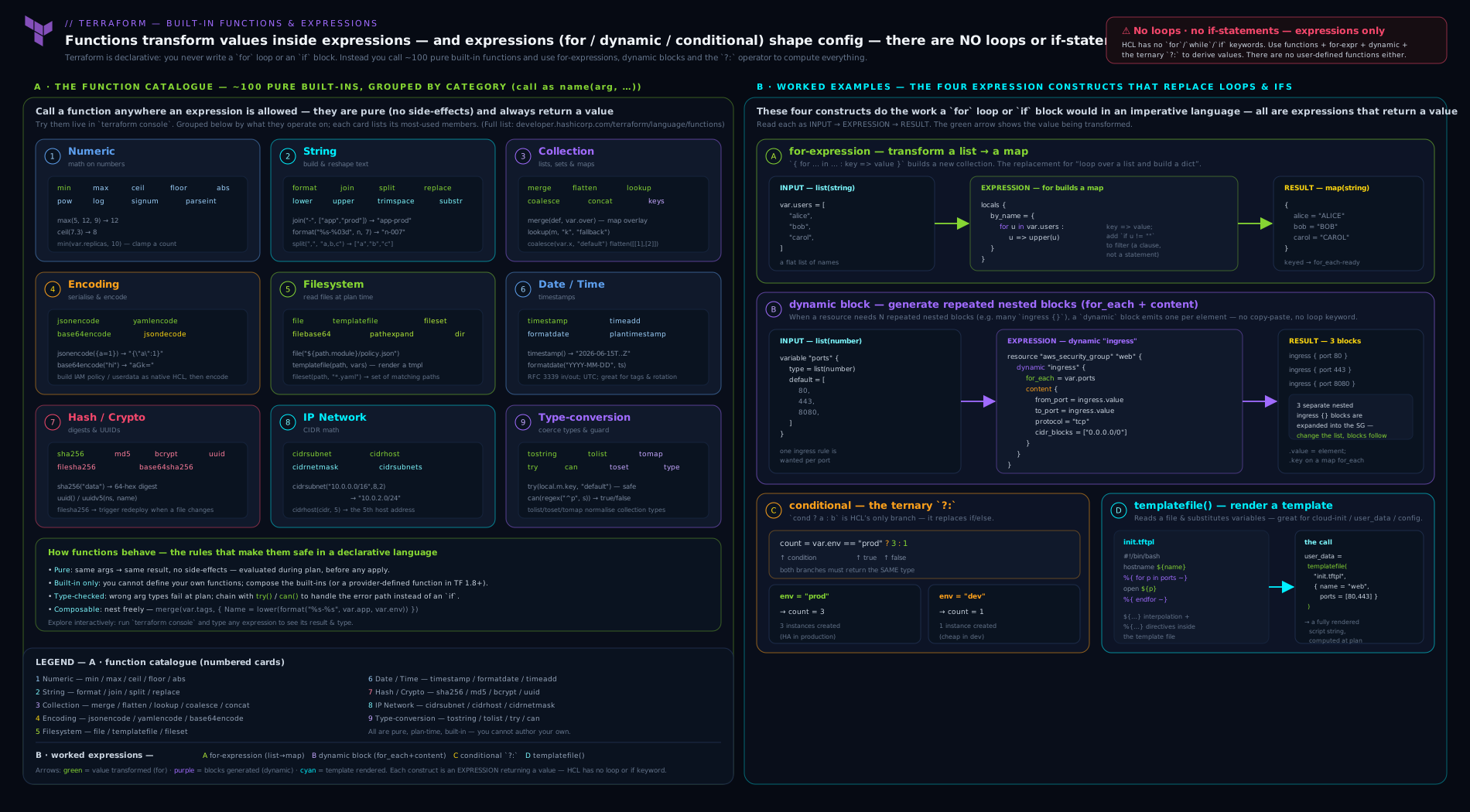
The diagram traces how a typed input collection flows through a for-expression (transform and filter), gets re-keyed for for_each, and is materialised either as repeated resources or, via a dynamic block’s content, as repeated nested blocks — with conditionals and try/can guarding the values along the way.
Hands-on lab: the expression language in the console and on disk
This lab needs no cloud account. You will exercise the function catalogue, for-expressions, conditionals, and try in terraform console, then prove a dynamic block and templatefile work against the free local provider.
1. Set up a scratch module. Create a directory and a single file:
mkdir tf-expr-lab && cd tf-expr-lab
Create main.tf:
terraform {
  required_version = ">= 1.9.0"
  required_providers {
    local = { source = "hashicorp/local", version = "~> 2.5" }
  }
}

variable "services" {
  type = map(object({
    port    = number
    public  = optional(bool, false)
  }))
  default = {
    api = { port = 8080, public = true }
    db  = { port = 5432 }
  }
}

locals {
  # for-expression: map of name => "name:port"
  endpoints = { for k, v in var.services : k => "${k}:${v.port}" }

  # for-expression with if filter: only public service names
  public_services = [for k, v in var.services : k if v.public]

  # conditional + coalesce + merge
  common_tags = { managed_by = "terraform" }
  all_tags    = merge(local.common_tags, { count = tostring(length(var.services)) })
}

output "endpoints" { value = local.endpoints }
output "public_services" { value = local.public_services }
output "all_tags" { value = local.all_tags }
Initialise:
terraform init
Expected: Terraform installs the local provider and reports success.
2. Drive the console. Start the REPL and paste expressions:
terraform console
> upper("eu-west-1")
"EU-WEST-1"
> merge({a=1}, {a=2, b=3})
{ "a" = 2, "b" = 3 }
> [for n in ["app","web"] : upper(n)]
[ "APP", "WEB", ]
> { for k, v in var.services : k => v.port }
{ "api" = 8080, "db" = 5432 }
> [for k, v in var.services : k if v.public]
[ "api", ]
> var.services["api"].public ? "exposed" : "private"
"exposed"
> try(var.services["cache"].port, "no cache configured")
"no cache configured"
> can(cidrhost("10.0.0.0/24", 5))
true
> cidrsubnet("10.0.0.0/16", 8, 3)
"10.0.3.0/24"
> coalesce("", null, "fallback")
"fallback"
Each line should return the value shown. Type exit to leave the console. This is the fastest possible feedback loop for the whole language — keep this console open whenever you write expressions.
3. Prove a dynamic block and templatefile on disk. Add a template file nginx.conf.tpl:
%{ for name, svc in services ~}
upstream ${name} { server 127.0.0.1:${svc.port}; }
%{ endfor ~}
Append to main.tf:
resource "local_file" "nginx" {
  filename = "${path.module}/out/nginx.conf"
  content  = templatefile("${path.module}/nginx.conf.tpl", { services = var.services })
}

# A dynamic-block demonstration object rendered to JSON
locals {
  sg_rules = [for k, v in var.services : {
    name = k
    port = v.port
  } if v.public]
}

resource "local_file" "rules" {
  filename = "${path.module}/out/rules.json"
  content  = jsonencode(local.sg_rules)
}
Apply:
terraform apply -auto-approve
Expected: two files appear under out/. Validate:
cat out/nginx.conf
cat out/rules.json
nginx.conf should contain one clean upstream line per service (no stray blank lines, thanks to the ~ whitespace strip), and rules.json should be a JSON array containing only the public service (api), proving the if filter and jsonencode worked end to end.
4. Cleanup.
terraform destroy -auto-approve
cd .. && rm -rf tf-expr-lab
Cost note: This lab uses only terraform console and the hashicorp/local provider, which write files on your own machine. There is no cloud spend — the entire lab is free.
Going deeper
Everything above is the day-to-day language. This section is for the reader who already writes for-expressions in their sleep and wants the sharp edges: what the evaluator does with values it does not yet know, the newer functions that widen the catalogue, and the console flags that let you test all of it.
Known-at-plan-time: the rule behind half the “for_each” errors
for_each (on a resource, and inside a dynamic block) has a requirement that goes beyond “unique string keys”: the set of keys must be known at plan time. Terraform builds resource addresses like aws_instance.web["api"] from those keys before it plans, so it cannot accept keys that will only be known after something else is applied. This is why
# ERROR: the keys come from an attribute computed on apply
resource "aws_route53_record" "r" {
  for_each = { for inst in aws_instance.web : inst.id => inst.private_ip }
  # ...
}
fails with “Invalid for_each argument … depends on resource attributes that cannot be determined until apply.” The id of each instance is unknown until the instances exist, so the keys are unknown, so Terraform refuses to plan. The .value side of for_each may be unknown — that is fine, it becomes (known after apply) — but the keys must be knowable now. The fixes are the usual ones: key by an input you control (a name from var.*) rather than a computed attribute, or split the apply into two stages with -target when a genuine dependency forces it.
Unknown-value propagation
The concept underneath that rule is worth stating on its own, because it explains a lot of plan output. A value Terraform cannot compute until apply is unknown (it renders as (known after apply)). Unknown-ness is contagious through expressions:
- Any function of an unknown is unknown:
upper(aws_instance.web.id)is unknown until the id exists. - A conditional whose condition is unknown yields an unknown result, even if both branches are known — Terraform cannot pick a branch yet, so the whole expression is
(known after apply). - Collection lengths matter:
length(x)is unknown ifx’s length is unknown, and bothcountandfor_eachreject an unknown length/keyset for the reason above. try/cando not rescue an unknown — an unknown is not an error, sotry(unknown, "fallback")stays unknown rather than falling back, andcan(unknown)is itself unknown.trycatches errors, not unknowns.
The practical upshot: when a plan shows a surprising (known after apply) on something you thought was static, trace back to the first unknown input feeding the expression — usually a not-yet-created resource attribute — and decide whether to key or branch on a known value instead.
templatefile vs templatestring (1.9)
templatefile(path, vars) renders a template that lives on disk. Terraform 1.9 added templatestring(str, vars), which renders a template held in a string value — a variable, a data source result, an object fetched from elsewhere — without you first writing it to a file:
# Terraform 1.9+  — template text comes from a variable, not a file
rendered = templatestring(var.config_template, {
  hostname = "web-01"
  packages = ["nginx", "curl"]
})
The directive and interpolation syntax is identical to templatefile; only the source differs. Use templatefile when the template is a checked-in artefact (the common case), and templatestring when the template itself is data — for example a template pulled from a Git or HTTP data source, or handed in by a caller who should not have to drop a file into your module. On Terraform before 1.9 the only ways to render a string template were the removed template_file data source or a templatefile against a local_file you wrote first; templatestring retires those workarounds.
Provider-defined functions: provider:: (1.8)
The “you cannot add functions” rule gained a careful exception in Terraform 1.8: provider-defined functions. A provider can now ship functions alongside its resources and data sources, called with the namespaced syntax provider::<local-name>::<function>(...):
terraform {
  required_providers {
    aws  = { source = "hashicorp/aws" }
    time = { source = "hashicorp/time" }
  }
}

# Provider-supplied functions, resolved from the declared providers:
locals {
  parsed_arn = provider::aws::arn_parse("arn:aws:iam::111122223333:role/example")
  parts      = provider::time::rfc3339_parse("2026-06-15T10:00:00Z")
}
The catalogue is still fixed per provider version — you are not writing the function, the provider author did — but it means domain-specific helpers (ARN parsing, timestamp decomposition, cloud-specific conversions) no longer have to be faked with regex and split. The function is only available once the provider is declared in required_providers and installed. OpenTofu implements the same provider-function mechanism. Treat provider:: functions as the modern first stop when a transformation is really the provider’s domain knowledge, not generic string surgery.
Testing against unknowns: terraform console -plan
Plain terraform console evaluates against the last known state, which means expressions referencing a not-yet-created resource error out or read stale values. Running terraform console -plan makes the console run a plan first, so it can evaluate expressions against planned values and show you (known after apply) exactly where a real plan would:
terraform console -plan # evaluate against planned, not just stored, values
Reach for -plan when you are debugging an expression that depends on resources the plan will create — it is the honest way to see how unknown values flow through your for-expressions and conditionals before you apply. For pure function and variable experimentation (no resource references), the plain console is faster because it skips the plan.
A note on splat and unknowns
The splat’s friendly null → [], single-object → one-element behaviour (covered above) is a type convenience, not an unknown rescue: aws_instance.web[*].id over instances that do not yet exist is an unknown list, not []. And the older attribute-only splat (list.*.id, with a bare dot) survives for backward compatibility, but the full splat list[*].id is the current form — it handles nested indexing and the null/single-value cases the legacy form does not. Prefer [*] in new code.
Practice challenges
Six escalating expression-writing drills. Try each in terraform console (define the var.* in a scratch variables.tf, or inline the literals) before opening the solution.
1 — Upper-case a list (beginner). Given var.regions = ["us-east-1", "eu-west-1", "ap-south-1"], write one expression that returns the three names upper-cased as a list.
<details> <summary>Solution</summary>
[for r in var.regions : upper(r)]
# -> ["US-EAST-1", "EU-WEST-1", "AP-SOUTH-1"]
Why: the list-form [ ... ] for-expression applies a function to each element and preserves the list shape.
</details>
2 — List to keyed map (beginner). Turn the same var.regions into a map from each region name to its character length.
<details> <summary>Solution</summary>
{ for r in var.regions : r => length(r) }
# -> { "us-east-1" = 9, "eu-west-1" = 9, "ap-south-1" = 10 }
Why: the { ... } form with a => arrow produces a map/object; here the element becomes the key and length(r) the value.
</details>
3 — Filter with the if clause (intermediate). Given var.instances = { web = { size = "large", public = true }, db = { size = "small", public = false } }, return a list of just the names of the public instances.
<details> <summary>Solution</summary>
[for k, v in var.instances : k if v.public]
# -> ["web"]
Why: iterating a map binds k, v; the if v.public filter drops the private entries; projecting k returns names, not objects.
</details>
4 — Compute subnets per AZ (intermediate–advanced). From var.vpc_cidr = "10.0.0.0/16" and var.azs = ["a", "b", "c"], build a map of az => /24 subnet, one /24 per AZ.
<details> <summary>Solution</summary>
{ for i, az in var.azs : az => cidrsubnet(var.vpc_cidr, 8, i) }
# -> { a = "10.0.0.0/24", b = "10.0.1.0/24", c = "10.0.2.0/24" }
Why: the index/value form (i, az) feeds cidrsubnet’s netnum from i while keying the map by the stable AZ name — so removing an AZ does not renumber the others in state.
</details>
5 — The flatten + nested-for idiom (advanced). Given var.subnets = { app = { ports = [80, 443] }, db = { ports = [5432] } }, build a single flat map keyed "<subnet>-<port>" whose values are { subnet, port } objects, ready to drop into for_each.
<details> <summary>Solution</summary>
{ for r in flatten([
    for sk, s in var.subnets : [
      for p in s.ports : { subnet = sk, port = p }
    ]
  ]) : "${r.subnet}-${r.port}" => r }
# -> {
#   "app-80"   = { subnet = "app", port = 80 },
#   "app-443"  = { subnet = "app", port = 443 },
#   "db-5432"  = { subnet = "db",  port = 5432 }
# }
Why: the inner for makes one list of pairs per subnet, flatten collapses the list-of-lists, and the outer map-form for gives each pair a unique string key — the exact shape for_each demands.
</details>
6 — Validate and default safely (advanced). Write a variable validation that accepts only a string parsing as a valid CIDR, and — separately — an expression that reads var.cfg[var.env].retention, falling back to 30 when either the env key or the retention attribute is missing, without erroring.
<details> <summary>Solution</summary>
variable "cidr" {
  type = string
  validation {
    condition     = can(cidrhost(var.cidr, 0))
    error_message = "Must be a valid CIDR block."
  }
}

# elsewhere:
retention = try(var.cfg[var.env].retention, 30)
Why: can turns a maybe-erroring call into the boolean a validation needs; try returns the first argument that does not error, so a missing key or attribute falls straight through to 30. Note try rescues errors, not unknowns.
</details>
Common beginner mistakes
These are misconceptions rather than error messages — the wrong mental model that produces the error in the first place. (For symptom-to-fix lookups, see the troubleshooting table below.)
-
“A for-expression is a loop.” It looks like one, so beginners expect statements, ordering,
break/continue, and side effects. It is a comprehension: a pure transformation that evaluates to a new collection. There is nothing to break out of and nothing is mutated — you describe the output, you do not step through it. -
“The brackets are just style.”
[for ...]and{for ... => ...}are not interchangeable — the bracket picks the output type. Square brackets produce a list/tuple; curly braces with a=>arrow produce a map/object. Reaching for a map result with[ ](or forgetting the=>) is the most common “why is this the wrong type” error. -
“
coalesceandtryare the same defaulting tool.” They overlap but differ at the core:coalescepicks the first non-null, non-empty value — every argument must still be a valid expression;trypicks the first expression that does not error and only evaluates later arguments when earlier ones throw. Usecoalescefor “default when null/empty,”tryfor “default when the lookup might not exist.” -
“I’ll put an
ifon the dynamic block.” There is no conditional on adynamicblock. You emit zero or one nested block by feedingfor_eachan empty-or-single collection:for_each = var.enabled ? [1] : []. The[1]/[]list is the conditional. -
“
base64encodehides my secret.” Base64 is reversible encoding, not encryption. Encoding a password to satisfy an API does nothing to protect it — the plaintext is trivially recoverable, and it still lands in state. Secrets belong in a secrets provider, neverfile()-d orbase64encode-d into an argument. -
“
element(list, i)is just indexing.”elementwraps — it takes the index modulo the list length and therefore never errors on a too-large index — whereaslist[i]errors wheniis out of range. That difference is a feature: pickelementfor deliberate round-robin,list[i]when out-of-range should fail loudly. -
“
for_eachaccepts a list.” It technically tolerates one, but then it keys by position, so inserting or removing an element reshuffles every downstream key and churns the plan.for_eachwants a set or a map of stable strings known at plan time — reach fortoset(...)or a keyed map, not a raw list.
Common mistakes & troubleshooting
| Symptom | Likely cause | Fix |
|---|---|---|
Invalid function argument: a list was provided where a number is required |
Passing a list to a variadic function like max(var.nums) |
Expand with ...: max(var.nums...) |
Inconsistent conditional result types |
The two branches of a ? b : c are incompatible types |
Make both branches the same type (e.g. both string, or both null/object) |
| Perpetual diff on every plan | A non-deterministic function (timestamp(), uuid(), bcrypt()) wired into an argument |
Use the random provider, uuidv5, or plantimestamp(); or ignore_changes if truly intended |
Invalid index / index out of range |
Direct list[i] on a possibly-empty list, often in a conditional’s condition |
Guard with length(list) > 0 first, or use element() for wrap, or try() |
replace does nothing |
Search string not slash-wrapped, so regex was treated literally | Wrap the pattern in slashes for regex mode: replace(s, "/[0-9]+/", "") |
templatefile errors with “vars not allowed” / can’t see a value |
Template references a variable not in the second-arg map | Pass every referenced name explicitly in the vars map |
| Dynamic block churns the plan when input reorders | for_each over a list keys by position |
Key by a map/set with stable keys instead of a raw list |
coalesce returns the default even though I set a value |
The set value is "", which coalesce treats as empty |
Use a conditional var.x != null ? var.x : default, or coalesce only when “” is genuinely empty |
Best practices
- Build JSON/YAML with
jsonencode/yamlencode, never by hand. Type-checked, interpolated, no quoting bugs — this single habit eliminates a whole class of errors in IAM policies and container definitions. - Anchor every filesystem path to
path.module.file,templatefile,fileset, and thefile*hashes all break under a relative path the moment the module is called from elsewhere. - Prefer
for_eachovercount, andtoset/maps over lists, when identity matters. Stable keys mean reordering inputs does not churn the plan — true for resources and for dynamic blocks alike. - Reach for
tryfor optional lookups andcanfor validations instead of nestedlookup/containschains; they read better and fail more clearly. - Lift complex expressions into
locals. A named local is testable in the console, reusable, and self-documenting; an eight-function one-liner buried in a resource argument is none of those. - Validate interactively. Paste any non-trivial expression into
terraform consolebefore committing it — it is faster than a plan and catches type errors immediately. - Use the
~whitespace strip in templates to keep generated config clean; unstripped directives leave blank lines that break some parsers. - Avoid non-deterministic functions in stable arguments. Keep
timestamp(),uuid(), andbcrypt()out of anything you expect to stay put.
Security notes
The expression layer touches security in a few specific ways. First, file() and templatefile() read whatever is on disk at plan time and inline it into state and plan output — never file() a secret (a private key, a password file) into a resource argument, because it then lives in plaintext in the state file and in any saved plan. Pass secrets through the random or a secrets provider, or a sensitive variable, and keep the file contents out of state. Second, base64encode is not encryption — it is reversible encoding; encoding a secret to satisfy an API does not protect it, and the plaintext is trivially recoverable from state. Third, treat nonsensitive() as a loaded gun: it removes the sensitive marking, and using it to silence an error frequently leaks a secret into CLI output, logs, or an output value. Use it only when you have derived a genuinely non-secret value from a sensitive input (e.g. the length of a password) and can justify it. Finally, the hash functions are appropriate for change-detection, not for password storage in any serious sense — bcrypt exists for compatibility with resources that demand a bcrypt hash, but managing real credentials belongs in a secrets manager, not in HCL expressions.
Interview & exam questions
-
Why is there no user-defined function in Terraform, and what is the closest equivalent? Terraform’s language is intentionally declarative and minimal; allowing arbitrary functions would invite imperative, hard-to-reason-about configuration. The closest equivalent is a
local, which names a reusable expression (not a parameterised function). For genuine custom logic you step outside to a provider, an external data source, or a module. (Since Terraform 1.8, providers may also ship their ownprovider::functions — but you still do not author them.) -
What is the difference between
count+element()andfor_eachfor repeating something, and why iselement“safe” on a too-large index?countkeys by position (fragile to reordering) andelementwraps the index modulo the list length, so it never errors on an out-of-range index — useful for round-robin (spreading across subnets).for_eachkeys by a stable map/set key, so identity survives reordering. Directlist[i]errors out of range;elementdoes not. -
Explain short-circuit evaluation in a conditional and give a case where it prevents an error. Terraform evaluates only the selected branch of
a ? b : c. Sovar.enable ? aws_x.this[0].id : nullis safe even whencount = 0, because thetruebranch is reached only whenenableis true (and the resource exists). The condition itself is always evaluated, so guard it too. -
You need one nested
ingressblock per element of a list. How? And how do you emit zero or one block conditionally? Use adynamicblock:dynamic "ingress" { for_each = var.rules; content { ... } }, referencingingress.value. To emit zero or one block, feedfor_eacha list that is empty or single-element:for_each = var.enabled ? [1] : []. -
What is the
flatten+ nested-for idiom for, and why re-key afterwards? It turns a “N children per parent” structure (e.g. a map of subnets each with a list of ports) into a single flat list of pairs. You re-key it with a final map-form for-expression ({ for r in list : "${r.subnet}-${r.port}" => r }) becausefor_eachrequires unique string keys known at plan time. -
Difference between
tryandcan?try(a, b, ...)returns the first argument that succeeds (gives you the value with a fallback).can(expr)returns a boolean for whether the expression succeeded (throws the value away). Usetryfor optional lookups,caninsidevalidationconditions. Neither rescues an unknown value — both handle errors only. -
Why does setting an argument to
timestamp()cause a perpetual diff, and what should you use instead?timestamp()returns a new value on every evaluation, so the argument always differs from state and forces an update each plan. Use therandomprovider (stored in state),uuidv5(deterministic),plantimestamp()(stable within a plan), orignore_changesif the churn is intentional. -
When does
replaceuse a regular expression versus a literal match?replace(s, search, with)treatssearchas a regex when it is wrapped in slashes ("/[0-9]+/") and as a literal substring otherwise. Forgetting the slashes is a common “my replace didn’t match” bug. -
You have a
map(object(...))and want a list of just the objects whoseenabledis true. Write it.[for k, v in var.things : v if v.enabled]— a list-form for-expression with aniffilter. (For names instead of objects, projectkorv.name.) -
Why prefer
jsonencodeover a heredoc for an IAM policy, and what is the security caveat aboutbase64encode?jsonencodebuilds the JSON from typed HCL — type-checked, interpolated, no quoting/trailing-comma bugs. The caveat:base64encodeis encoding, not encryption — encoding a secret does not protect it; the plaintext is recoverable from state. -
What does the splat expression
aws_instance.web[*].iddo, and what is its one-level limitation? It produces the list ofidfrom every element (everycountinstance). It only reaches one level and only pulls an attribute; for filtering, computed keys, or two-level descent you must use a full for-expression. Anullsplats to[]and a single object to a one-element list. -
How do you stop a
templatefiletemplate from emitting stray blank lines around a%{ for }loop? Use the whitespace-strip marker~on the directives (%{ for x in list ~}/%{~ endfor }), which trims the surrounding newline/whitespace so the generated output has no blank lines. -
Why can’t a
for_eachkey be a not-yet-created resource’s attribute, and how do you tell?for_eachkeys become resource addresses, which Terraform must fix at plan time; a computed attribute is unknown until apply, so Terraform errors with “…depends on resource attributes that cannot be determined until apply.” Key by a value you already know (an input/name), or split the apply. The tell in a plan is a(known after apply)where you expected a concrete key. -
What does
templatestringadd overtemplatefile, and when did it arrive? Added in Terraform 1.9,templatestring(str, vars)renders a template held in a string value (a variable ordatasource) rather than a file on disk — useful when the template itself is data. Same directive syntax; only the source differs.
Quick check
- To pass a list to the variadic
max, what syntax do you need? - Which bracket form of a for-expression produces a map, and what symbol separates key from value?
- True or false: in
a ? b : c, bothbandcare always evaluated. - Which function returns a boolean for whether an expression succeeded, and where is it most used?
- To emit exactly one optional nested block with a
dynamicblock, what do you pass tofor_each?
Answers
- The expansion symbol
...:max(var.list...). A baremax(var.list)is a type error because a list is not a number. - The
{ ... }form with a=>arrow:{ for k, v in m : k => v }. The[ ... ]form produces a tuple/list. - False. Only the selected branch is evaluated (short-circuit); this is what makes
enable ? resource[0].id : nullsafe when the resource may not exist. The condition itself is always evaluated. can(expr)— most used inside a variablevalidationblock’scondition. (tryreturns a value, not a boolean.)- A single-element collection when on, empty when off:
for_each = var.enabled ? [1] : [].[1]yields one block;[]yields none.
Exercise
Build a small “subnet plan” module that exercises the whole expression toolkit. Starting from a single variable vpc_cidr (a /16) and var.azs (a list of availability-zone names):
- Use a for-expression with
cidrsubnetto produce amapofaz => subnet_cidr, carving one/24per AZ (cidrsubnet(var.vpc_cidr, 8, i)), keyed by AZ name (use the index/value form). - Add a variable
extra_rulesthat is amap(object({ port = number, public = optional(bool, false) })), and a local that uses aflatten+ nested-for (or a filtered for-expression) to build a list of only the public rules, each re-keyed to a stable string. - Use a conditional to choose a NAT strategy string:
"single"whenlength(var.azs) == 1, else"per-az". - Render a YAML summary of the whole plan with
yamlencodeand write it to a file via thelocalprovider, thencatit. - In
terraform console, prove yourcidrsubnetmap, your filtered rule list, and your conditional all return what you expect; usetryto read a key fromextra_rulesthat does not exist and show it falls back gracefully.
Write two or three sentences on why you keyed the subnet map by AZ name rather than by index, in terms of what happens to the plan when an AZ is removed from the middle of the list — this is the same for_each-stability argument that runs through the whole language.
Certification mapping
This lesson maps to the HashiCorp Certified: Terraform Associate (003) exam objective Read, generate, and modify configuration — specifically the sub-points on using built-in functions, writing expressions (conditionals, for-expressions, splat), and using dynamic blocks to generate nested configuration. It also reinforces Interact with Terraform modules (passing typed inputs that flow through these expressions) and underpins Implement and maintain state indirectly, since for_each keys (built with for-expressions) determine resource addresses in state. The exam does not require you to memorise the entire catalogue, but it does test that you can read an expression and predict its result, know that conditionals short-circuit, understand the dynamic block mechanism, and recognise try/can. The later Terraform Associate Prep Kit drills these as practice questions.
Glossary
- Expression — A pure, side-effect-free piece of HCL that evaluates to a value (literal, reference, operator chain, function call, for-expression, conditional).
- Built-in function — A fixed, provided function called as
name(args); you cannot define your own or install more. - Variadic function — A function taking a variable number of arguments (e.g.
max,min,merge,concat); expand a list into it with.... - Expansion symbol (
...) — Spreads a list into a function’s variadic arguments:max(list...). - For-expression — A comprehension that builds a new collection:
[for x in c : f(x)](list) or{ for k, v in c : k => f(v) }(map), with an optionaliffilter and grouping.... - Splat expression — Shorthand for projecting one attribute from every element:
list[*].attr. - Conditional expression —
condition ? a : b; only the selected branch is evaluated (short-circuit); branch types are unified. - Dynamic block —
dynamic "name" { for_each = ...; content { ... } }; generates repeated nested blocks from a collection, with an optionaliterator. - Iterator — The temporary variable inside a dynamic block exposing
.keyand.value; named after the block by default, renameable withiterator. - templatefile — Function that renders a template file (with
${}interpolation and%{if}/%{for}directives) using a vars map; whitespace-strip with~. try— Returns the first argument expression that evaluates without error; for optional values with fallbacks.can— Returns a boolean for whether an expression succeeds; used chiefly invalidationconditions.- Short-circuit evaluation — Evaluating only the necessary branch/operand; applies to conditionals and
&&/||. jsonencode/yamlencode— Convert a typed HCL value to a JSON/YAML string; the safe way to produce structured config.cidrsubnet— Carves the nth subnet out of a prefix by extending the masknewbitsbits; the basis of computed subnetting.coalesce/coalescelist—coalescereturns the first non-null, non-empty argument;coalescelistreturns the first non-empty list. The canonical “use the override if set, else the default” tools.- Unknown value (“known after apply”) — A value Terraform cannot compute until apply (typically a not-yet-created resource attribute). It propagates through expressions — any function of an unknown is unknown — and cannot serve as a
for_eachkey orcountlength. - Known at plan time — A value Terraform can fully resolve during
plan.for_eachkeys andcountvalues must be known then; unknown ones make Terraform refuse to plan. templatestring— (Terraform 1.9) Renders a template supplied as a string value rather than read from a file; identical directive/interpolation syntax totemplatefile.- Provider-defined function — (Terraform 1.8) A function shipped by a provider and called as
provider::<local-name>::<function>(...); widens the catalogue per provider without you defining a function yourself. OpenTofu supports the same mechanism. terraform console -plan— Opens the REPL after running a plan, so expressions evaluate against planned values (showing(known after apply)for unknowns) instead of only stored state.- OpenTofu — The Linux Foundation open-source fork of Terraform; shares the identical expression language, console, and function set (with a few additions such as
type()).
Next steps
You can now read and write the full expression language — the function catalogue, for-expressions, splats, conditionals, dynamic blocks, templatefile, and try/can — which is the layer that turns static resource declarations into flexible, data-driven configuration. The natural next step is the one escape hatch that breaks the pure-expression model: running commands. Continue with Terraform Provisioners, In Depth: local-exec, remote-exec, connection, null_resource & terraform_data, which covers the last-resort tools for executing scripts during create and destroy, why HashiCorp counsels against them, and the modern terraform_data replacement for null_resource.