A module interface is an API. The difference between a module your platform team trusts and one they fork is almost never the resources inside it; it’s whether the inputs are typed, invalid combinations are rejected at plan time, and optional knobs default sanely instead of forcing every caller to specify everything. Terraform’s type system, dynamic blocks, and the validation/precondition/postcondition family let you build that interface entirely in HCL. They also give you enough rope to write code nobody can read. This is a guide to using the sharp tools well and knowing when to put them down.
I’ll assume Terraform 1.9 or later. optional() defaults landed stable in 1.3, precondition/postcondition in 1.2, and cross-object input validation in 1.9, so version pinning matters for several of these patterns.
In a nutshell
Three Terraform features almost always show up together, so this lesson teaches them as one toolkit: complex types (how you describe the shape of an input), dynamic blocks (how you stamp out repeated nested configuration), and the validation/precondition/postcondition family (how you reject bad input before it does damage). Together they turn a module from a bag of loose settings into a small, well-guarded API.
Start with the one idea that unlocks the rest. A dynamic block is a for-loop for configuration. Imagine a form with room for exactly one “lifecycle rule,” but you actually have five rules in a list. A dynamic block is the rubber stamp that reads your list and stamps the rule sub-block onto the form once per item — five items in, five blocks out; zero items in, zero blocks out. You describe one block template; Terraform repeats it for you.
Complex types are how the list arrives in the first place. Instead of forcing a caller to pass ten separate scalar variables and hoping they line up, you declare one typed object — “a bucket has a name, an optional versioning flag, and a list of lifecycle_rules” — and Terraform checks the shape for you. optional(type, default) (stable since Terraform 1.3) lets attributes be omitted and quietly filled in, so callers write two lines instead of twenty.
Validation is the bouncer at the door. A validation block rejects malformed input the instant a plan starts (“environment must be one of dev/staging/prod”); a precondition checks an invariant against computed values just before Terraform touches a resource; a postcondition checks that the result came out right. Bad input dies with a message you wrote, not a cloud-provider stack trace three minutes into an apply.
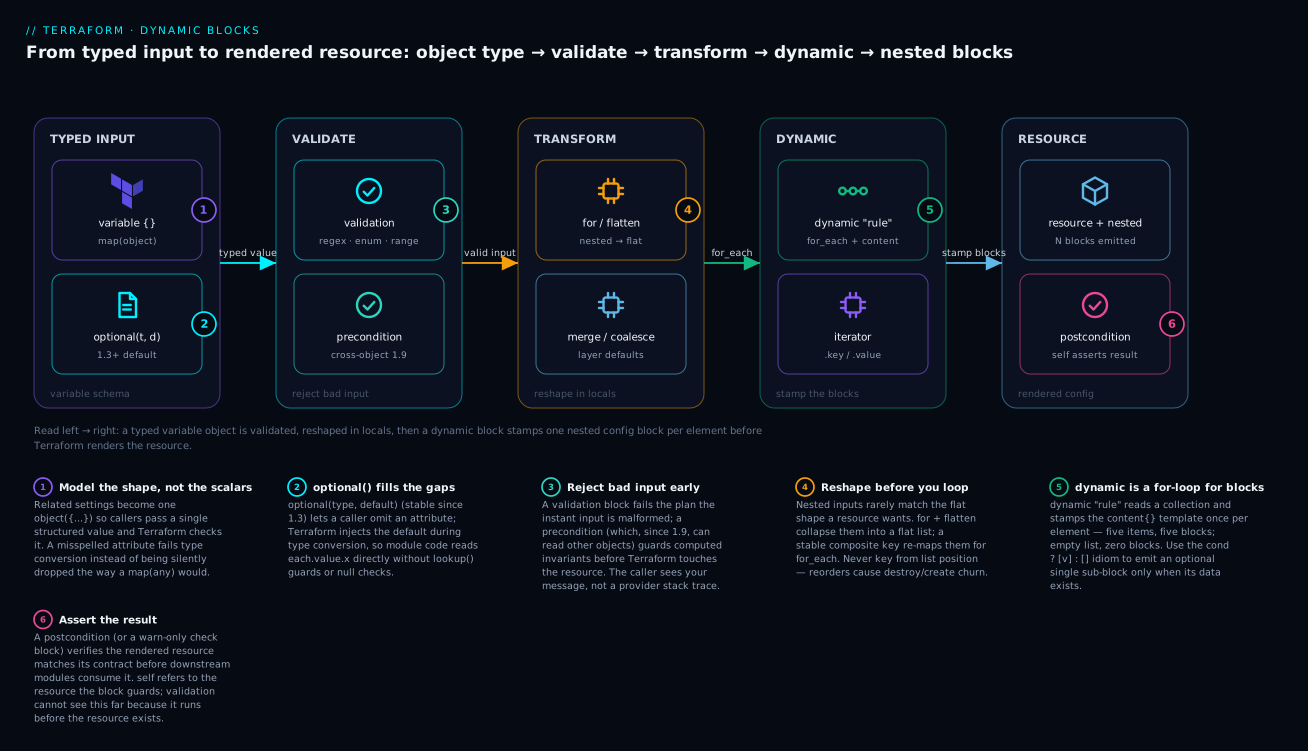
Read it left to right: a typed variable object flows through input validation, gets reshaped in locals, and a dynamic block stamps out one nested configuration block per list element before Terraform renders the final resource.
Level: Intermediate · Time: ~35 min
Prerequisites. You should be comfortable with basic HCL — resources, variables, and the terraform plan/apply workflow — and have met for_each/count at least once. If any of that is shaky, read Terraform Fundamentals: HCL, Providers, State & Workflow and Resources & Meta-Arguments: count, for_each, lifecycle first. The HCL Syntax Deep Dive and Functions & Expressions for Dynamic Conditionals cover the type and function machinery this lesson leans on.
After this lesson you will be able to:
- Model related inputs as a single typed
objectand give optional attributes sane defaults withoptional(). - Generate a variable number of nested blocks with
dynamic, including the conditional single-element-list idiom for optional sub-blocks. - Write multi-rule
validationblocks (including Terraform 1.9 cross-variable rules) that reject bad input at plan time with clear messages. - Choose correctly between
validation,precondition,postcondition, andcheckfor any given invariant. - Recognize when advanced HCL has become a liability and push the logic somewhere testable.
1. Design module inputs with object types and optional() defaults
The weakest module interface is a pile of scalar variables: bucket_name, bucket_versioning, bucket_lifecycle_days, bucket_logging_target. Callers can’t tell which scalars belong together, and you can’t express “if logging is on, a target is required.” Model the input as a typed object instead, and use optional() to give attributes defaults so callers only specify what they need.
variable "buckets" {
  description = "Map of logical name => bucket configuration."
  type = map(object({
    name           = string
    versioning     = optional(bool, false)
    force_destroy  = optional(bool, false)
    storage_class  = optional(string, "STANDARD")
    lifecycle_rules = optional(list(object({
      id                       = string
      prefix                   = optional(string, "")
      expiration_days          = optional(number)
      transition_to_ia_days    = optional(number)
      noncurrent_expiration    = optional(number)
    })), [])
    tags = optional(map(string), {})
  }))
  default = {}
}
Two properties of optional() matter. First, the second argument is a default that Terraform fills in during type conversion before your code sees the value, so inside the module you write each.value.versioning (guaranteed non-null) instead of lookup(each.value, "versioning", false). Second, defaults apply at the level they’re declared: a caller who omits lifecycle_rules gets [], and a caller who supplies one rule with only id and expiration_days gets prefix = "" filled in automatically.
A caller’s input collapses to the essentials:
module "data_lake" {
  source = "./modules/s3-buckets"

  buckets = {
    raw = {
      name       = "acme-data-lake-raw"
      versioning = true
      lifecycle_rules = [
        { id = "expire-tmp", prefix = "tmp/", expiration_days = 7 },
      ]
    }
    curated = {
      name = "acme-data-lake-curated"
      # everything else defaulted
    }
  }
}
A typed object that rejects unknown attributes is a feature, not a limitation. If a caller misspells
versionning, conversion fails with a clear error instead of silently ignoring the key the way an untypedmap(any)would.
2. Generate nested blocks with dynamic and the for_each iterator
Once lifecycle_rules is a list, you can’t write a fixed number of nested blocks. dynamic generates them. It takes the block label as its own label, a for_each collection, and a content {} template that runs once per element. Inside content, the iterator object exposes .key and .value.
resource "aws_s3_bucket" "this" {
  for_each      = var.buckets
  bucket        = each.value.name
  force_destroy = each.value.force_destroy
  tags          = each.value.tags
}

resource "aws_s3_bucket_lifecycle_configuration" "this" {
  # Only create the config resource for buckets that actually have rules.
  for_each = { for k, v in var.buckets : k => v if length(v.lifecycle_rules) > 0 }
  bucket   = aws_s3_bucket.this[each.key].id

  dynamic "rule" {
    for_each = each.value.lifecycle_rules
    content {
      id     = rule.value.id
      status = "Enabled"

      filter {
        prefix = rule.value.prefix
      }

      # Nested dynamic: emit expiration only when a day count is set.
      dynamic "expiration" {
        for_each = rule.value.expiration_days != null ? [rule.value.expiration_days] : []
        content {
          days = expiration.value
        }
      }

      dynamic "transition" {
        for_each = rule.value.transition_to_ia_days != null ? [rule.value.transition_to_ia_days] : []
        content {
          days          = transition.value
          storage_class = "STANDARD_IA"
        }
      }
    }
  }
}
The iterator is named after the block by default (rule, expiration, transition). When a nested dynamic label collides with an outer one or the auto-derived name reads badly, rename it explicitly with iterator:
dynamic "setting" {
  for_each = var.app_settings
  iterator = cfg
  content {
    namespace = cfg.value.namespace
    name      = cfg.key
    value     = cfg.value.value
  }
}
The single most important idiom here is the conditional single-element list: for_each = condition ? [value] : []. A dynamic block over an empty list produces zero blocks; over a one-element list, exactly one. That is how you include an optional sub-block only when its data is present, without a separate resource. Reach for dynamic only when block count or content genuinely varies by input; if a block is always present, write it literally.
3. Conditional blocks, null handling, and the merge/coalesce toolkit
Optional inputs mean nulls, and nulls behave differently across HCL functions in ways that bite. Keep three rules straight:
coalesce(a, b, c)returns the first non-null and non-empty argument. It errors if every argument is null or empty, so it’s for picking a value, not for defaulting to empty.coalescelist(a, b)is the list analogue and returns the first non-empty list.try(expr, fallback)swallows errors (including indexing into something that doesn’t exist), not nulls.try(local.x.y, "default")is the safe way to reach into a structure that may not have attributey.
A common mistake is using coalesce to default to an empty string or map; it throws because the empty value is treated as absent. Use a conditional or try for that case.
locals {
  # Merge precedence: caller tags win over module defaults.
  common_tags = {
    ManagedBy   = "terraform"
    Module      = "s3-buckets"
    Environment = var.environment
  }

  # coalesce picks the first real value; never feed it only-empty args.
  resolved_kms_key = coalesce(var.kms_key_arn, var.default_kms_key_arn)
}

resource "aws_s3_bucket" "this" {
  for_each = var.buckets
  bucket   = each.value.name
  # Later keys override earlier ones in merge().
  tags     = merge(local.common_tags, each.value.tags)
}
merge() is right-biased: later maps win on key collisions, which is the precedence you want when layering caller overrides on top of module defaults. For conditionally including whole attributes, merge an empty map:
locals {
  encryption_block = var.kms_key_arn != null ? {
    sse_algorithm     = "aws:kms"
    kms_master_key_id = var.kms_key_arn
  } : {
    sse_algorithm = "AES256"
  }
}
4. Variable validation with multiple validation blocks and regex
A single variable can carry as many validation blocks as you have rules. Terraform evaluates all of them and surfaces every failure, so write one rule per failure mode with a specific error_message. The condition must reference the variable and must return true when valid.
variable "environment" {
  type        = string
  description = "Deployment environment slug."

  validation {
    condition     = contains(["dev", "staging", "prod"], var.environment)
    error_message = "environment must be one of: dev, staging, prod."
  }
}

variable "bucket_prefix" {
  type        = string
  description = "DNS-compatible prefix for bucket names."

  validation {
    condition     = can(regex("^[a-z0-9][a-z0-9-]{1,40}[a-z0-9]$", var.bucket_prefix))
    error_message = "bucket_prefix must be 3-42 lowercase alphanumerics or hyphens, not starting/ending with a hyphen."
  }

  validation {
    condition     = !strcontains(var.bucket_prefix, "--")
    error_message = "bucket_prefix must not contain consecutive hyphens."
  }
}
can(regex(...)) is the workhorse: regex() throws when there’s no match, and can() converts that throw into false. Two accuracy notes. Use the ^...$ anchors deliberately, because regex matches anywhere in the string otherwise and "ab_CD" would pass a pattern meant to forbid underscores. And remember that as of Terraform 1.9, a validation condition may reference other variables and data sources, not just var.<self>, which lets you express cross-field rules at the input layer:
variable "replica_count" {
  type    = number
  default = 1
}

variable "multi_az" {
  type    = bool
  default = false

  validation {
    # Cross-variable rule: multi-AZ is meaningless with a single replica.
    condition     = var.multi_az == false || var.replica_count >= 2
    error_message = "multi_az requires replica_count >= 2."
  }
}
Keep validation for things knowable from input alone: formats, enums, ranges, mutually exclusive flags. Anything that depends on a computed attribute or a remote lookup belongs in a precondition.
5. Precondition and postcondition lifecycle checks on resources and outputs
validation runs against raw input. precondition and postcondition live in a lifecycle block (or in check blocks and output blocks) and run during plan/apply, so they can reference computed values, other resources, and data sources. A precondition asserts an invariant must hold before Terraform acts on the resource; a postcondition asserts something about the result.
data "aws_caller_identity" "current" {}

resource "aws_s3_bucket" "this" {
  for_each = var.buckets
  bucket   = each.value.name

  lifecycle {
    # Catch a foot-gun before the destroy is planned, not after.
    precondition {
      condition     = each.value.force_destroy == false || var.environment != "prod"
      error_message = "force_destroy must not be enabled for buckets in prod (${each.value.name})."
    }
  }
}

resource "aws_s3_bucket_public_access_block" "this" {
  for_each                = aws_s3_bucket.this
  bucket                  = each.value.id
  block_public_acls       = true
  block_public_policy     = true
  ignore_public_acls      = true
  restrict_public_buckets = true

  lifecycle {
    postcondition {
      condition     = self.block_public_policy && self.restrict_public_buckets
      error_message = "Public access block did not fully apply; refusing to proceed."
    }
  }
}
self is only available inside postcondition and refers to the resource the block is attached to. Postconditions on outputs are an underused guardrail: they let a module assert its own contract before exporting a value, so a downstream module never receives garbage.
output "bucket_arns" {
  description = "ARNs of all managed buckets, keyed by logical name."
  value       = { for k, b in aws_s3_bucket.this : k => b.arn }

  precondition {
    condition     = length(aws_s3_bucket.this) == length(var.buckets)
    error_message = "Bucket count mismatch; some buckets failed to materialize."
  }
}
For invariants that aren’t tied to a single resource’s lifecycle, use a standalone check block. Unlike preconditions, a failing check assertion emits a warning and does not block apply, which is the right severity for advisory drift signals and post-deploy health probes.
check "tls_minimum" {
  data "http" "endpoint" {
    url = "https://${var.public_endpoint}/healthz"
  }

  assert {
    condition     = data.http.endpoint.status_code == 200
    error_message = "Health endpoint returned ${data.http.endpoint.status_code}."
  }
}
6. Transform data with for expressions, flatten, and setproduct
Module internals frequently need to reshape a nested input into a flat collection suitable for for_each. Two functions do most of the heavy lifting: flatten collapses one level of nesting, and setproduct builds the Cartesian product of two or more sets. The canonical pattern is a nested for that emits objects, wrapped in flatten, then re-keyed into a map.
locals {
  # Input: map of bucket => list of CORS origins.
  # Goal: one flat list of {bucket, origin} pairs for a per-rule resource.
  bucket_cors = flatten([
    for bucket_key, cfg in var.buckets : [
      for origin in cfg.cors_origins : {
        bucket = bucket_key
        origin = origin
      }
    ]
  ])

  # Re-key with a STABLE composite key so addressing is deterministic.
  bucket_cors_map = {
    for pair in local.bucket_cors :
    "${pair.bucket}:${pair.origin}" => pair
  }
}
setproduct is the tool when you genuinely want every combination, for example expanding regions x environments:
locals {
  regions      = ["us-east-1", "eu-west-1"]
  environments = ["dev", "prod"]

  # Returns a list of [region, env] tuples.
  deployments = {
    for pair in setproduct(local.regions, local.environments) :
    "${pair[0]}-${pair[1]}" => {
      region      = pair[0]
      environment = pair[1]
    }
  }
}
The non-obvious rule: the value of a composite key must be unique, and the key string you build must be stable across runs. Building keys from list indices ("${idx}") is the classic trap; if the input list reorders, every key shifts and Terraform plans a destroy/create storm. Always key from intrinsic identity (names, IDs), never position.
7. Avoid the count vs for_each addressing trap on collections
This is the single most expensive HCL mistake in production, so it gets its own step. count indexes resources by integer position: aws_s3_bucket.this[0], [1], [2]. for_each indexes by map key: aws_s3_bucket.this["raw"], ["curated"]. When you manage a collection of similar things, the addressing scheme decides what happens when the collection changes.
Consider three buckets managed with count = length(var.bucket_names) over ["raw", "curated", "archive"]. Remove "curated" from the middle. The list becomes ["raw", "archive"], so index [1] flips from curated to archive and index [2] disappears. Terraform reads that as: modify [1] (rename curated -> archive in place, which for an S3 bucket means destroy and recreate) and destroy [2]. You lost the archive bucket to delete the curated one.
# FRAGILE: positional addressing on a mutable collection.
resource "aws_s3_bucket" "bad" {
  count  = length(var.bucket_names)
  bucket = var.bucket_names[count.index]
}

# CORRECT: stable, key-based addressing.
resource "aws_s3_bucket" "good" {
  for_each = toset(var.bucket_names)
  bucket   = each.value
}
With for_each, the address is aws_s3_bucket.good["curated"]. Remove that key and Terraform destroys exactly that one resource and leaves the others untouched. The rule is mechanical: use count only for “create N copies” or a boolean on/off toggle (count = var.enabled ? 1 : 0); use for_each for every collection of distinct things. If you’ve already shipped count over a collection and need to migrate, do it with moved blocks mapping each index to its new key so the change is config-driven and reviewable rather than a state mv by hand.
moved {
  from = aws_s3_bucket.bad[0]
  to   = aws_s3_bucket.good["raw"]
}
8. Readability tradeoffs: when to push logic out of HCL
Every technique above puts computation in configuration, and that has a ceiling. A triple-nested for inside a flatten inside a merge, gated by a ternary, is technically correct and operationally hostile: the next engineer can’t predict the plan, and a typo produces a 400-line diff. Some honest limits:
- HCL has no named, unit-testable functions or loops. Past a couple of
forlevels, intent disappears into bracket soup. dynamicblocks are harder to debug than static ones because the rendered block isn’t in your source.- Heavy data munging in
localsis invisible toterraform planuntil something breaks; there’s no step-through.
| Logic lives best in… | When |
|---|---|
| Static HCL | Fixed structure, no variation by input |
dynamic + for |
Block count/content varies by typed input, shallow nesting |
validation / preconditions |
Asserting invariants and rejecting bad input early |
| External data / templates | Generation, lookups, anything you’d want to unit-test |
| A real language (CDKTF, a generator) | Combinatorial expansion, complex transforms, reuse across stacks |
When you find yourself reaching for the fourth nested loop, that’s the signal to generate the configuration upstream, model the data with an external data source, or move to a programmatic tool. The goal of advanced HCL is a simple interface backed by just enough cleverness, not a demonstration of how much the language can do.
Going deeper
The eight steps above are the working patterns. This section is the layer underneath them — the type system’s exact rules, the moments Terraform silently rewrites your values, and the timing model that decides when each guardrail fires. None of it is required to ship a working module, but all of it is what separates “works on my inputs” from “hard to misuse.”
The full type system: primitives, collections, and structural types
Terraform has three families of type. Primitives are string, number, and bool. Collection types — list(T), set(T), map(T) — hold any number of elements that all share one type T. Structural types — object({...}) and tuple([...]) — hold a fixed set of elements whose types can differ. The distinction that trips people up is homogeneous vs heterogeneous: a list is “N of the same thing,” a tuple is “these specific things in this order,” a map is “named values all of one type,” and an object is “named attributes each with its own type.”
| Type | Shape | Indexed by | Homogeneous? | Typical use |
|---|---|---|---|---|
string / number / bool |
single value | — | — | scalars |
list(T) |
ordered, duplicates ok | integer position | yes | ordered sequences |
set(T) |
unordered, unique | not indexable | yes | membership, for_each |
map(T) |
key → value | string key | yes (values) | keyed lookups |
tuple([...]) |
fixed positions, mixed types | integer position | no | fixed heterogeneous rows |
object({...}) |
named attributes, mixed types | attribute name | no | module input schemas |
Two practical consequences. A set has no positions, so you cannot write var.my_set[0]; convert with tolist() first, or iterate it directly (which is exactly why resource for_each loves sets). And object is the only type that lets attributes carry optional(), which is why every non-trivial module input ends up an object or a map(object(...)) rather than a map(any).
Type conversion and coercion: where Terraform quietly rewrites your values
Terraform converts values automatically whenever the target type is unambiguous, and most of the time that is a convenience. The failure mode is when the conversion succeeds but not the way you expected.
- Primitive coercion. The string
"5"becomes the number5where a number is wanted, andtruebecomes"true"where a string is wanted. So a variable typednumberwill happily accept"5"from a.tfvarsfile or aTF_VAR_environment variable — usually fine, occasionally surprising when a leading zero or a trailing.0round-trips differently. anyunifies to a common type.list(any)andmap(any)don’t mean “anything goes per element” — they mean “find one type that fits every element.”["a", 1, true]typed aslist(any)coerces every element tostring, yielding["a", "1", "true"]. If you actually want mixed types preserved, use atupleor anobject, neverlist(any).- Structural → collection. A
tuplecollapses to alistwhen all its elements share a type; anobjectcollapses to amapwhen all its attributes share a type. This is whymerge()of two objects returns a map, and why an accidentalmapconversion can strip the per-attribute typing you were relying on. nullis a value, not a type.nullis assignable to any type and means “unset.” It is not the same as"",0,[], or{}. Passingnullwhere the type isobject(...)with nooptional()wrapper is an error; passing it to anoptional()attribute yields that attribute’s default.
The defensive habit: type your variables precisely (object, not any; list(string), not bare list) and let conversion errors surface at plan time instead of discovering the coercion later in a rendered resource.
optional() internals, null, and nullable
optional() only appears inside an object type, and it does exactly two things. optional(string) marks an attribute as omittable and defaults it to null when absent. optional(string, "STANDARD") marks it omittable and defaults it to the supplied value, injected during type conversion — before any expression in your module reads it. That injection timing is the whole point: downstream code sees a fully-populated object and never has to write lookup(each.value, "x", default).
Defaults propagate through nesting from the inside out. If lifecycle_rules is optional(list(object({ prefix = optional(string, "") })), []), then a caller who omits the list gets [], and a caller who supplies a rule with no prefix gets "" — both defaults are applied in the same conversion pass.
nullable is a different knob and operates at the variable level, not the attribute level:
variable "replica_count" {
  type     = number
  default  = 3
  nullable = false # a caller may not pass null; null coalesces to the default
}
With nullable = false (the default is true), if a caller explicitly passes null Terraform substitutes the variable’s default instead of letting null flow into the module. Use it on any variable whose downstream code would break on null. Note the layering: nullable governs the variable; optional() governs attributes inside an object type. They compose but solve different problems.
dynamic block internals: scope, plan-time knowability, and what you can’t generate
A dynamic block is a rendering instruction, not a runtime loop. Three internals are worth knowing:
- The iterator is a scoped temporary. Inside
content {}, the symbol (default: the block label, or whatever you name viaiterator) exists only within thatcontentbody and shadows nothing outside it. Unlike a resource-levelfor_each, adynamicblock’sfor_eachaccepts a list, set, or map — when you iterate a list,.keyis the integer index and.valueis the element; when you iterate a map,.keyis the map key. - The block set should be knowable at plan time. Terraform must decide how many blocks to render while building the plan. The individual
.valuefields can be unknown (computed) values, but deriving the collection itself from an attribute that won’t exist until apply can produce an “Invalid for_each argument” style error. Keep the driving collection rooted in variables/locals, not in a not-yet-created resource’s output. - You can’t generate everything.
dynamicproduces repeatable nested configuration blocks only. You cannot use it to generate meta-argument blocks such aslifecycle, nor to produce a resource’s owncount/for_each/depends_on/provider. Those are structural and must be written literally.
The readability tax is real: because the rendered block never appears in your source, a wrong content field shows up only in the plan diff. The mitigation is discipline — shallow nesting, an explicit iterator name when the default reads badly, and a hard stop at two levels of nested dynamic.
sensitive (and ephemeral) values on complex types
Marking a variable sensitive = true taints its value and everything derived from it: use a sensitive string to build a map, and the whole map is redacted in plan output. That propagation is the feature — a secret can’t leak by being embedded in a larger structure — but it is also coarse:
variable "db" {
  type = object({
    host     = string
    username = string
    password = string
  })
  sensitive = true # redacts the WHOLE object, host and username included
}
Two consequences follow from sensitivity being value-level, not field-level. First, marking the object sensitive hides the non-secret host and username too, which can make plans harder to review; if only one field is secret, model that secret as its own variable. Second, a sensitive value — or anything derived from one — cannot be used as a for_each key or a count; Terraform rejects it, because doing so would leak the secret through resource addresses. The sensitive() and nonsensitive() functions let you toggle the mark deliberately when you have proven a value is safe to reveal.
For genuine secrets that should never touch state at all, Terraform 1.10’s ephemeral values and resources are the newer answer: an ephemeral value exists only during a single run and is never persisted to state or plan files, closing the gap that sensitive (which still writes the value to state) leaves open. Flag it as version-gated — it is unavailable before 1.10, and OpenTofu’s equivalent differs.
The evaluation model: when validation, preconditions, and checks actually run
The four assertion mechanisms look similar but fire at different phases and with different consequences. Choosing correctly is mostly about when the information you need exists and how loud a failure should be.
| Mechanism | Lives in | Fires | May reference | On failure |
|---|---|---|---|---|
validation |
variable block |
input parsing, before the plan graph | var.self, and (1.9+) other variables & data sources |
error — halts |
precondition |
lifecycle of a resource/data/output |
during plan/apply, before acting on the object | computed values, other resources/data — not self |
error — halts |
postcondition |
lifecycle of a resource/data/output |
during plan/apply, after the object is known | self plus computed values |
error — halts |
check assert |
standalone check block |
end of plan, and again on apply/refresh | its own scoped data sources, resources |
warning — does not halt |
The mechanical decision tree: if the rule is knowable from raw input alone (format, enum, range, mutually-exclusive flags), it is a validation. If it depends on a computed value or another object and must block the run, it is a precondition (guarding the inputs to an action) or a postcondition (guarding the result). If it is advisory — drift you want surfaced but not enforced, or a post-deploy health probe — it is a check block, whose failures are warnings so a flaky endpoint never blocks an unrelated apply. Note that check blocks re-run on every plan and refresh, which is what makes them suitable as continuous assertions rather than one-shot gates.
Common beginner mistakes
These are misconceptions, not error messages — the wrong mental model that produces working-but-wrong code.
“A dynamic block is just a cleaner way to write any block.” It isn’t cleaner; it’s indirect. A dynamic block whose for_each is a fixed one-element list, or that wraps a block you always want, has added a layer you can’t see in the source for zero benefit. Right model: write blocks literally by default, and reach for dynamic only when the number of blocks varies with input.
“optional(string) defaults to an empty string.” It defaults to null. Only optional(string, "") gives you "". If your module code runs length(each.value.prefix) on an attribute you declared optional(string) and the caller omitted it, you get a null error, not zero. Right model: supply the second argument whenever downstream code can’t tolerate null.
“validation can check that the resource turned out correctly.” A validation block runs before the plan graph even exists; it can only see raw input values. Anything about a computed attribute, another resource, or the real world is invisible to it. Right model: input shape → validation; computed invariant → precondition/postcondition; advisory → check.
“coalesce() is how I default to an empty value.” coalesce() treats empty as absent and errors if every argument is null or empty, so coalesce(var.x, "") throws exactly when var.x is null. Right model: use try(var.x, "") or var.x != null ? var.x : "" for empty defaults; keep coalesce for picking among real values.
“Marking one field sensitive hides just that field.” Sensitivity is a property of the whole value. Mark an object sensitive and every field — including the innocuous name — is redacted, and the value can no longer key a for_each. Right model: isolate the actual secret into its own variable, or use ephemeral values (1.10) for data that shouldn’t reach state.
“I have a list, so I’ll use count.” count addresses by position, so deleting a middle element renames every later resource and triggers destroy/recreate churn (see step 7). Right model: for_each over a map or set keyed by stable identity, so removing one key touches exactly one resource.
Practice challenges
Work these in a scratch directory. None of them need a real cloud account — terraform validate and terraform console are enough to check most, and where a resource type appears it is illustrative. Each solution notes why in one line.
1. Collapse scalars into a typed object (beginner). You have three variables — bucket_name (string), versioning (bool, usually false), and storage_class (string, usually "STANDARD"). Replace them with a single object variable where the last two are optional with those defaults.
<details><summary>Solution</summary>
variable "bucket" {
  type = object({
    name          = string
    versioning    = optional(bool, false)
    storage_class = optional(string, "STANDARD")
  })
}
Why: one object keeps related settings together, and optional(type, default) lets a caller pass just name while the module still reads fully-populated attributes.
</details>
2. Generate blocks from a list (beginner–intermediate). Given var.ingress_rules typed list(object({ port = number, cidr = string })), generate one ingress {} block per element on a security-group-style resource.
<details><summary>Solution</summary>
variable "ingress_rules" {
  type = list(object({
    port = number
    cidr = string
  }))
  default = []
}

resource "aws_security_group" "this" {
  name = "app-sg"

  dynamic "ingress" {
    for_each = var.ingress_rules
    content {
      from_port   = ingress.value.port
      to_port     = ingress.value.port
      protocol    = "tcp"
      cidr_blocks = [ingress.value.cidr]
    }
  }
}
Why: one dynamic "ingress" stamps one ingress {} block per list element, and an empty list yields zero blocks with no special-casing.
</details>
3. Emit an optional sub-block only when present (intermediate). Add a logging {} block to a bucket resource that appears only when var.log_bucket is non-null.
<details><summary>Solution</summary>
dynamic "logging" {
  for_each = var.log_bucket != null ? [var.log_bucket] : []
  content {
    target_bucket = logging.value
    target_prefix = "logs/"
  }
}
Why: the conditional single-element list renders exactly one block when the value exists and none when it is null — the canonical “optional sub-block” idiom.
</details>
4. Two validation rules, two messages (intermediate). Give a name variable one rule for format (starts with a letter; lowercase letters, digits, hyphens only) and a separate rule for length (3–24 characters), each with its own error_message.
<details><summary>Solution</summary>
variable "name" {
  type = string

  validation {
    condition     = can(regex("^[a-z][a-z0-9-]*$", var.name))
    error_message = "name must start with a letter and contain only lowercase letters, digits, and hyphens."
  }

  validation {
    condition     = length(var.name) >= 3 && length(var.name) <= 24
    error_message = "name must be between 3 and 24 characters."
  }
}
Why: two rules, two messages — Terraform reports every failing rule, so a caller sees exactly what is wrong rather than one error at a time. </details>
5. Cross-variable validation (advanced, 1.9+). Given var.min_size and var.max_size, reject any input where min_size > max_size, using a validation block (not a precondition).
<details><summary>Solution</summary>
variable "min_size" {
  type = number
}

variable "max_size" {
  type = number

  validation {
    condition     = var.max_size >= var.min_size
    error_message = "max_size must be greater than or equal to min_size."
  }
}
Why: since Terraform 1.9 a validation condition may read other variables, so this ordering invariant is enforced at input parse time, before any resource is planned.
</details>
6. Flatten a nested map and guard the keys (advanced). Given var.vpcs typed map(object({ subnets = list(string) })), build a for_each-ready map keyed "vpc:subnet", and add an output precondition that fails if two composite keys collide.
<details><summary>Solution</summary>
variable "vpcs" {
  type = map(object({
    subnets = list(string)
  }))
}

locals {
  subnet_pairs = flatten([
    for vpc_key, cfg in var.vpcs : [
      for subnet in cfg.subnets : {
        vpc    = vpc_key
        subnet = subnet
      }
    ]
  ])

  subnets = {
    for pair in local.subnet_pairs :
    "${pair.vpc}:${pair.subnet}" => pair
  }
}

output "subnet_keys" {
  value = keys(local.subnets)

  precondition {
    condition = length(local.subnets) == length(distinct([
      for p in local.subnet_pairs : "${p.vpc}:${p.subnet}"
    ]))
    error_message = "Duplicate vpc:subnet pair detected; composite keys must be unique."
  }
}
Why: flatten collapses the nested loop into a flat list, the composite string key is stable and identity-based, and the output precondition catches a silent key collision before it becomes a plan-time “duplicate key” error.
</details>
Verify
Validate the type system, validation rules, and lifecycle checks before you trust the module. These commands are non-destructive.
# 1. Syntax and internal consistency, including type/validation wiring.
terraform init -backend=false
terraform validate

# 2. Canonical formatting (catches dynamic/for indentation drift).
terraform fmt -recursive -check -diff

# 3. Prove validation/precondition messages fire on bad input.
#    Expect a non-zero exit and your custom error_message.
terraform plan -var 'environment=production'   # not in [dev,staging,prod]

# 4. Inspect the resolved type structure of an input, defaults included.
echo 'var.buckets' | terraform console
Use terraform console to confirm optional() defaults materialize as expected; type an input expression and watch Terraform fill the missing attributes. To prove the count-vs-for_each addressing, run terraform state list after an apply and confirm resources are addressed by key (["raw"]), not index ([0]). For the full module surface, a native test file asserts both happy-path planning and that invalid inputs fail:
# tests/validation.tftest.hcl
run "rejects_bad_environment" {
  command = plan

  variables {
    environment = "production"
    buckets     = {}
  }

  expect_failures = [var.environment]
}
Run it with terraform test. The expect_failures list turns a failing validation into a passing test, which is how you regression-guard your guardrails.
Checklist
Glossary
- Complex type — any Terraform type that holds more than one value: the collection types (
list,set,map) and the structural types (object,tuple). - Primitive type —
string,number, orbool; a single scalar value. - Collection type —
list(T),set(T), ormap(T); any number of elements that all share the element typeT. - Structural type —
object({...})ortuple([...]); a fixed set of elements whose types may differ. objecttype — a structural type with named attributes, each with its own type; the standard shape for a module’s input schema.tupletype — a structural type with a fixed number of positional elements of possibly-different types.set— an unordered collection of unique values with no positional index; ideal forfor_eachand membership tests.optional()— a modifier used inside anobjecttype to mark an attribute as omittable;optional(type, default)(stable since Terraform 1.3) supplies a default injected during type conversion.nullable— a variable-level setting;nullable = falseforbids anullvalue and substitutes the variable’s default ifnullis passed.- Type coercion / conversion — Terraform’s automatic rewriting of a value to the expected type (e.g.
"5"→5, or a homogeneoustuple→list). dynamicblock — a construct that generates zero or more repeated nested configuration blocks from a collection, one per element.contentblock — the template body inside adynamicblock, evaluated once per element to produce a single generated block.iterator— the temporary symbol exposing.keyand.valueinside adynamicblock’scontent; defaults to the block label and is renamable with theiteratorargument.for_each(meta-argument) — creates one instance of a resource/module per map key or set member, addressed by key; the safe way to manage a collection.count— creates N instances of a resource addressed by integer index; correct only for “N copies” or a booleancount = var.enabled ? 1 : 0toggle.- Conditional single-element list — the
for_each = cond ? [value] : []idiom that renders exactly one optional block when a value is present and none when it isn’t. validationblock — a rule inside avariablethat rejects malformed input at parse time with a customerror_message; a variable may carry many.precondition— alifecycleassertion that must hold before Terraform acts on an object; may reference computed values but notself.postcondition— alifecycleassertion about the result of an object; may referenceself.checkblock — a standalone, top-level assertion whose failures are warnings (not errors); re-runs on plan and refresh, suited to advisory drift and health probes.self— inside apostcondition, a reference to the resource the block is attached to.sensitive— a mark that redacts a value (and everything derived from it) in plan output; value-level, so it can’t be scoped to a single object field, and sensitive values can’t key afor_each.- Ephemeral value/resource — a Terraform 1.10 construct for data that exists only during a run and is never written to state or plan files.
flatten— a function that collapses one level of list nesting, the core of turning a nestedforinto a flatfor_eachcollection.coalesce/try—coalescereturns the first non-null/non-empty argument (and errors if all are empty);tryreturns the first argument that evaluates without error, the safe way to reach into a maybe-missing structure.