In a nutshell
Terraform doesn’t track your resources by their real cloud names — it tracks them by the address you gave them in code, like aws_s3_bucket.logs. Rename that resource, tuck it inside a module, or add a for_each key, and the address changes even though the actual bucket in the cloud is byte-for-byte the same. Terraform can’t see that the object is unchanged; it only sees an address it no longer recognizes and an address it has never met. Its instinct is brutal and literal: destroy the old one, create a new one.
Picture your state file as a postal address book and each resource as a house. The house never physically moves. But if the city renumbers the street, the address book now points at nothing — so the “delivery” (your infrastructure) gets cancelled and re-ordered from scratch. A moved block is a change-of-address form: you tell Terraform “the thing that used to live at address A now lives at address B — same house, just relabel it,” and the destroy-and-recreate quietly evaporates. import is the mirror image — “here is a house that already exists; start managing it” — and removed is “stop managing this house, but do not bulldoze it.”
The old way to do all three was to run terraform state mv, terraform import, and terraform state rm by hand, against live state, one workspace at a time. The modern way is to write moved, import, and removed blocks: plain configuration you commit to git, review in a pull request, and let every environment apply identically. This lesson is the safe playbook for exactly that.
Level: Intermediate · Time: ~40 min
Before you start, you should be comfortable with:
- How Terraform state maps a config address to a real cloud object — see Terraform State Deep Dive.
count,for_each, and instance keys like["a"]— see Resources & Meta-Arguments.- Reading a
terraform planand telling a create from a replace from a destroy. - Module inputs/outputs and the
module.<name>.<type>.<name>address form — see Authoring Modules.
After this lesson you’ll be able to:
- Rename resources and pull them in and out of modules with zero destroys in the plan.
- Adopt click-ops resources into state with
importblocks and generate their starting HCL. - Bulk-import a whole fleet from a map using
for_eachon animportblock. - Hand a resource to another team by dropping it from state — without destroying it — using a
removedblock. - Wire a CI gate that fails any refactor PR whose plan proposes a delete.
- Recover cleanly when a state refactor goes wrong.
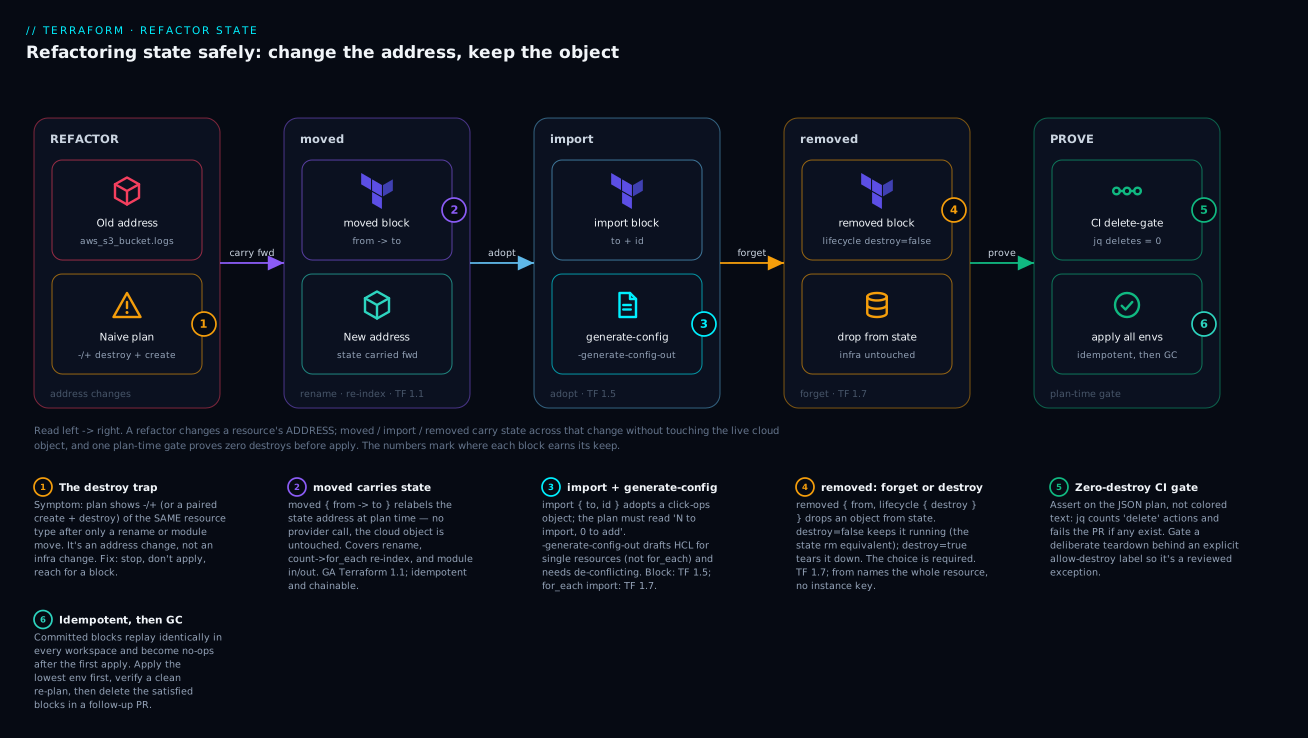
Read it left to right: a refactor changes a resource’s address, the three config-driven blocks (moved, import, removed) carry state across that change without touching the live cloud object, and one plan-time gate proves zero destroys before anything reaches apply — the same committed change replaying safely in every workspace.
The single most dangerous word in a Terraform plan is destroy. You rename a resource for clarity, wrap a few resources in a module to DRY up three environments, and suddenly terraform plan proposes to tear down a database and replace it. The infrastructure is identical; only the address in state changed. Terraform sees an orphan and a stranger and reconciles them the only way it knows how.
Historically the fix was terraform state mv, terraform import, and terraform state rm run by hand against live state. Those imperative commands are unreviewable, un-replayable, and per-workspace. If you run them once in dev and forget to run them in prod, the divergence surfaces as a destroy in the worst possible place. Since Terraform 1.1 (moved), 1.5 (config-driven import), and 1.7 (removed), all three operations are expressible as configuration: committed to git, reviewed in a PR, applied identically across every workspace, and self-deleting once the refactor lands. This is the playbook I use for restructuring state on running production systems.
1. Why renames and module moves trigger destroy/create
Terraform tracks every managed object by its resource address in state: aws_s3_bucket.logs, or module.network.aws_subnet.private["a"]. The address is the identity. The cloud-side ID (the actual bucket name, the subnet subnet-0abc) lives inside that state entry but is not how Terraform matches config to reality during planning.
When you change the address — rename the resource, move it into a module, add for_each so the key changes — Terraform diffs addresses, not cloud IDs. The old address has config but no state match (it reads as “needs to be created from scratch… but wait, it’s gone”), and the old state entry has no config match (it reads as “managed object no longer in config: destroy it”). The result is the dreaded pair:
  # aws_s3_bucket.application_logs will be created
  + resource "aws_s3_bucket" "application_logs" { ... }

  # aws_s3_bucket.logs will be destroyed
  - resource "aws_s3_bucket" "logs" { ... }
Same bucket. Different label. The job of moved, import, and removed is to teach Terraform that an address changed identity without the underlying object changing, so the plan collapses to a no-op (or a benign in-place update).
Rule of thumb: if a plan shows a paired create + destroy of the same kind of resource and you only edited names or module structure, you have a refactor problem, not an infrastructure problem. Stop. Do not apply. Reach for a
movedblock.
2. Renaming and re-homing resources with moved blocks
A moved block is a directive that says “the object previously at address A is now at address B; carry its state forward.” It runs during plan, before Terraform computes any create/destroy, so the diff never materializes.
The simplest case is a rename:
# Old: resource "aws_s3_bucket" "logs"
# New name for clarity:
resource "aws_s3_bucket" "application_logs" {
  bucket = "acme-app-logs-prod"
}

moved {
  from = aws_s3_bucket.logs
  to   = aws_s3_bucket.application_logs
}
Moving resources into a module is the high-value case. Say you have three flat copies of a VPC and you finally extract a network module:
module "network" {
  source = "./modules/network"
  cidr   = "10.20.0.0/16"
}

moved {
  from = aws_vpc.main
  to   = module.network.aws_vpc.this
}

moved {
  from = aws_subnet.private["a"]
  to   = module.network.aws_subnet.private["a"]
}
moved blocks are declarative and idempotent. Once the move has been applied in a workspace, the block is a no-op there forever; running it again does nothing. That is exactly why it is safe to commit one block and let it ripple across dev, staging, and prod on their normal apply cadence — each workspace processes the move the first time it plans and ignores it thereafter. Chaining is allowed (A -> B, then later B -> C), and Terraform resolves the chain, so you can leave history in place across several refactors.
A few hard constraints worth internalizing:
- You can only move within the same configuration / state.
moveddoes not pull objects across separate root modules or backends — that is animport/removedjob (Step 7). - The resource type must stay the same.
movedrenames addresses; it does not convert anaws_instanceinto something else. - Keep
movedblocks at the root of the configuration that owns the destination, not buried inside the child module, when you are pulling resources up or down across the module boundary you control.
After the refactor has shipped everywhere, the blocks are dead weight. You can delete them in a later release — removing a satisfied moved block produces no plan change.
3. Config-driven import with -generate-config-out
moved handles objects Terraform already manages. Import is for objects that exist in the cloud but not in state — a resource someone created in the console, or one you are adopting from another tool. Before 1.5 this meant terraform import ADDR ID (imperative, one resource at a time, and you still had to hand-write the HCL). The import block makes it declarative and plannable, and -generate-config-out writes the HCL for you.
Add an import block pointing at the target address and the cloud ID:
import {
  to = aws_iam_role.ci_deployer
  id = "ci-deployer"
}
Now generate configuration. The flag must point at a file that does not yet exist — Terraform refuses to overwrite:
terraform plan -generate-config-out=generated.tf
Terraform reads the live resource, emits matching HCL into generated.tf, and shows you a plan that imports rather than creates:
  # aws_iam_role.ci_deployer will be imported
  resource "aws_iam_role" "ci_deployer" {
      name = "ci-deployer"
      ...
  }

Plan: 1 to import, 0 to add, 0 to change, 0 to destroy.
Generated config is a starting point, not a finished artifact — HashiCorp documents this explicitly, and the format may change between minor versions. Treat it as a first draft:
- Resolve conflicting arguments by hand. The generator can emit mutually exclusive attributes (the canonical example is
ipv6_address_countvsipv6_addressesonaws_instance). The plan will error until you delete one. - Replace hard-coded values with references. Generated config inlines literals where you almost certainly want
var.*,module.*, or data-source references. - Sensitive attributes are not populated. You must fill secrets and other sensitive values yourself.
Move the cleaned-up resource out of generated.tf into its proper file, then run terraform apply. Applying an import block writes the object into state and reconciles it against config. Leave the import block in place until you have applied in every workspace, then delete it. Like moved, a satisfied import block is a no-op — Terraform notices the object is already in state and skips it — so a stale block is harmless but clutters the config.
4. Bulk-importing with for_each and import blocks
Importing twenty manually-created log groups one block at a time is tedious. import blocks accept for_each, so you can drive imports from a map and import a whole fleet in one apply.
locals {
  legacy_log_groups = {
    "api"     = "/acme/api"
    "worker"  = "/acme/worker"
    "scheduler" = "/acme/scheduler"
  }
}

resource "aws_cloudwatch_log_group" "this" {
  for_each          = local.legacy_log_groups
  name              = each.value
  retention_in_days = 30
}

import {
  for_each = local.legacy_log_groups
  to       = aws_cloudwatch_log_group.this[each.key]
  id       = each.value
}
The to argument uses the instance key so each map entry maps to one resource instance; id is the import identifier for that specific object.
The critical limitation: -generate-config-out does not work with for_each (or count) on import blocks or on the target resource. Terraform errors with “the given import block is not compatible with config generation.” The practical workflow is therefore two-phase:
- Write the resource HCL by hand (or generate it for a single representative resource without
for_each, then refactor tofor_each). - Add the
for_eachimportblock and runterraform planto confirm the import map is correct before applying.
Always review the plan output line by line — confirm it shows N to import, 0 to destroy. A typo in an id produces an import failure (loud, safe); a typo in a to key can leave a real resource unmanaged while a planned resource gets created (quiet, dangerous).
5. Decommissioning from state with removed blocks
The mirror of import is removed: take an object out of Terraform’s management. The old way was terraform state rm ADDR — imperative, unreviewable, and it always orphaned the object whether you meant to or not. The removed block (Terraform 1.7+) makes this a reviewed config change with an explicit choice about the object’s fate.
Delete the resource block from your configuration, then add a removed block for the same address:
removed {
  from = aws_s3_bucket.legacy_artifacts

  lifecycle {
    destroy = false
  }
}
The nested lifecycle block is required and the destroy argument is the entire point of the feature:
destroy |
Effect |
|---|---|
false |
Forget the object: drop it from state, leave the real infrastructure running. The state-rm equivalent — for handing a resource to another team or tool. |
true |
Remove from state and destroy the real infrastructure on apply. |
The from address must not include instance keys or indices — you reference the resource as a whole (aws_s3_bucket.legacy_artifacts), not aws_s3_bucket.legacy_artifacts["x"]. A removed block can also reference an entire module, which removes every resource that module managed:
removed {
  from = module.legacy_cache

  lifecycle {
    destroy = false
  }
}
If you need cleanup to run on the way out — deregistering from an external system, for example — removed blocks support destroy-time provisioners only. Every provisioner must set when = destroy:
removed {
  from = aws_instance.bastion

  lifecycle {
    destroy = true
  }

  provisioner "local-exec" {
    when    = destroy
    command = "echo 'decommissioned ${self.id}' >> /var/log/teardown.log"
  }
}
As with moved and import, once every workspace has processed the removal you delete the removed block. Until then it is idempotent — a workspace that has already forgotten the object treats the block as a no-op.
6. Refactoring across module boundaries and provider aliases
Real refactors cross boundaries. Two cases deserve specific handling.
Promoting resources between parent and child modules. When you pull a resource out of a child module up into the root (or push one down), the moved block lives in the configuration that contains the destination address and references the full source path:
# Pulling a security group out of the network module up to root
moved {
  from = module.network.aws_security_group.shared
  to   = aws_security_group.shared
}
Because moved operates on addresses within one state, both endpoints must resolve in the same root configuration. If the resource is genuinely leaving this state for another root module, that is not a moved — you removed { destroy = false } it here and import it there (Step 7).
Provider aliases. A resource’s state entry records which provider configuration manages it. If you are re-homing a resource that targets an aliased provider (a different region or account), the destination resource must carry the matching provider argument, and the moved block handles the address change as usual:
provider "aws" {
  alias  = "eu"
  region = "eu-west-1"
}

resource "aws_kms_key" "eu_data" {
  provider = aws.eu
}

moved {
  from = aws_kms_key.data_eu
  to   = aws_kms_key.eu_data
}
moved does not change the provider association — it carries the existing state forward. If you are actually migrating an object to a different provider/account, that is a destroy-and-recreate or a cross-state removed/import, not a rename.
7. Validating with plan and CI guardrails
Every block above is validated the same way: read the plan and trust nothing else. The non-negotiable check before any apply is that the plan for a pure refactor shows zero destroys:
terraform plan -out=refactor.tfplan
terraform show -json refactor.tfplan > plan.json
Then assert on the machine-readable plan instead of eyeballing colored text. This jq filter prints every address Terraform intends to delete:
jq -r '
  .resource_changes[]
  | select(.change.actions | index("delete"))
  | .address
' plan.json
For a clean state refactor that list must be empty. Wire that into CI as a hard gate so an accidental destroy can never reach apply:
# .github/workflows/terraform.yml (excerpt)
- name: Terraform Plan
  run: |
    terraform plan -out=tf.plan
    terraform show -json tf.plan > tf.plan.json

- name: Block accidental deletes
  run: |
    DELETES=$(jq -r '
      [ .resource_changes[]
        | select(.change.actions | index("delete"))
        | .address ] | length
    ' tf.plan.json)
    echo "Resources marked for deletion: $DELETES"
    if [ "$DELETES" -ne 0 ]; then
      echo "::error::Plan deletes $DELETES resource(s). Refactor PRs must be zero-destroy."
      jq -r '.resource_changes[] | select(.change.actions | index("delete")) | .address' tf.plan.json
      exit 1
    fi
When a genuine teardown is intended (removed { destroy = true }), gate it behind an explicit label or variable so the destroy is a deliberate, reviewed exception rather than the default-allowed case. A belt-and-braces complement is prevent_destroy on irreplaceable resources, which causes the plan itself to error if anything proposes their deletion:
resource "aws_db_instance" "primary" {
  # ...
  lifecycle {
    prevent_destroy = true
  }
}
Treat prevent_destroy as a safety interlock, not a workflow — it stops the plan hard, which is the point.
Verify
Walk this checklist on a real refactor before you apply to production:
- Lock and target a single workspace first. Run the refactor against
devend-to-end before touchingprod. Because the blocks are committed config, the higher environments will replay the exact same moves. - Confirm zero destroys on a pure refactor. Run the
jqdelete filter from Step 7 against the JSON plan. Empty output is the pass condition. - Confirm the import count matches your intent. For
importblocks, the plan summary should readN to importwith0 to addfor the resources you are adopting —0 to addproves Terraform matched existing objects rather than planning new ones. - Apply, then re-plan to a clean no-op. The post-apply plan should be empty (or show only intentional in-place updates). A lingering create/destroy means a
moved/importaddress did not match. - Verify state, not just plan. Run
terraform state listand confirm the new addresses exist and the old ones are gone. Spot-check one object withterraform state show ADDRto confirm the cloud ID carried over intact. - Garbage-collect the blocks. After every workspace has applied, delete the satisfied
moved/import/removedblocks in a follow-up PR and confirm that PR also plans to zero changes.
Rollback and recovering from a botched refactor
State refactors are reversible if — and only if — you have state backups. Before any state-mutating apply, snapshot state:
terraform state pull > backup-$(date +%Y%m%d-%H%M%S).tfstate
If you use an S3 backend, enable bucket versioning and DynamoDB locking so every state write is recoverable and concurrent applies are impossible. With a backup in hand, recovery paths are:
- A
movedwent the wrong way. Add a reversingmoved { from = B, to = A }block, or revert the original block before the move is applied. Because moves are idempotent, the reverse is just another reviewed config change. - An
importadopted the wrong object. Add aremoved { from = <that address>, lifecycle { destroy = false } }to forget it again —destroy = falseguarantees the real resource is untouched while you fix theid. - A bad apply corrupted state. Restore the snapshot you pulled:
terraform state push backup-<timestamp>.tfstate(or restore the prior object version from your versioned backend), then re-plan to confirm you are back to a known-good baseline before retrying.
The meta-rule: never run a state-mutating apply you cannot undo. Backup first, prove zero-destroy in CI, apply to the lowest environment, verify, then promote. The blocks are designed so that the same committed change produces the same safe outcome in every workspace — which is the entire reason to prefer them over imperative state mv / import / state rm.
Checklist
Going deeper
The playbook above is the ninety-percent path. This section is the machinery underneath it — the exact difference between the imperative commands and the declarative blocks, the re-indexing cases that trip people up, how each block reads in a plan, and the version gates you have to respect.
One state file, three verbs
Every managed object in state is a small record: a resource address (module.network.aws_subnet.private["a"]), the provider that manages it, and a bag of attributes including the real cloud id. Planning matches config addresses to state addresses. The three blocks each touch a different part of that record:
movedchanges only the address — the id, attributes, and provider association ride along untouched. No provider API call is made for the move itself.importadds a record: it writes the cloud id you supply into state and reads the object’s attributes back so config and reality line up.removeddeletes the record from state (and, only if you ask, destroys the real object too).
Because all three are configuration, they are reviewed in a PR, versioned in git, and — crucially — replayed identically in every workspace. That single property is the whole argument against the imperative commands:
| Operation | Imperative CLI | Declarative block | First supported in |
|---|---|---|---|
| Rename / re-home an address | terraform state mv A B |
moved block |
Terraform 1.1 |
| Adopt an existing object | terraform import ADDR ID |
import block |
Terraform 1.5 (for_each: 1.7) |
| Drop an object from state | terraform state rm ADDR |
removed block (destroy = false) |
Terraform 1.7 |
| Tear an object down on the way out | delete the resource + apply |
removed block (destroy = true) |
Terraform 1.7 |
| Change a resource’s provider source | terraform state replace-provider |
(no block equivalent) | — |
The CLI commands mutate one state file the instant you press enter — no plan, no review, no record that it happened, and no automatic replay in staging and prod. The blocks turn each of these into a normal, reviewable diff. The last row is the exception that proves the rule: changing which provider namespace owns a resource (say hashicorp/aws → a registry fork) is still a job for terraform state replace-provider; there is no configuration block for it, and it is unrelated to the provider alias changes covered in Step 6.
moved beyond the rename: re-indexing count ↔ for_each
The single most common moved case the core playbook doesn’t spell out is switching a resource from count to for_each. It is the textbook address change: count addresses instances by integer position (aws_instance.web[0]), for_each addresses them by map/set key (aws_instance.web["blue"]). Flip the meta-argument and every instance address changes at once — a fleet-wide destroy/create unless you map each one:
resource "aws_instance" "web" {
  for_each      = toset(["blue", "green", "canary"])
  ami           = var.ami
  instance_type = "t3.small"
}

moved {
  from = aws_instance.web[0]
  to   = aws_instance.web["blue"]
}
moved {
  from = aws_instance.web[1]
  to   = aws_instance.web["green"]
}
moved {
  from = aws_instance.web[2]
  to   = aws_instance.web["canary"]
}
This is exactly why experienced teams reach for for_each over count from day one: adding or removing a middle element of a count list re-indexes everything after it, and each re-index is a destroy/create. With for_each, keys are stable — removing "green" touches only "green". The count → for_each migration above is the one-time tax you pay to get that stability.
moved blocks chain and resolve transitively. If release 1 ships A -> B and release 2 ships B -> C, a workspace that skipped release 1 still lands at C correctly — Terraform walks the chain. That is what makes it safe to leave old moved blocks in place across several refactors and garbage-collect them all in one later PR.
import: the CLI command versus the block
Both spellings adopt an existing object; they are not equivalent in safety:
terraform import (CLI) |
import block |
|
|---|---|---|
| When it runs | immediately, mutates state on the spot | at plan time; nothing changes until apply |
| Preview | none — you find out after | full plan: N to import, 0 to add |
| Generates HCL | no (you hand-write it first) | yes, via -generate-config-out (single resources only) |
| Fleets | one command per object | for_each over a map (Terraform 1.7+) |
| Replays across workspaces | no — rerun by hand everywhere | yes — it is committed config |
The block’s superpower is that the import is plannable: you see 0 to add before touching state, which is your proof that Terraform matched a real object instead of planning a brand-new one next to it. Remember the two hard limits from the core lesson: -generate-config-out refuses to run with for_each/count, and it writes a first draft (conflicting attributes, inlined literals, empty secrets) you must clean up before it is production HCL.
removed: forget versus destroy, and why the choice is mandatory
terraform state rm had exactly one behaviour: forget the object, always leave it running. The removed block re-implements that as lifecycle { destroy = false } — but by making the destroy argument required, it forces every teardown PR to state its intent in writing:
destroy = false→ thestate rmequivalent: drop from state, infra keeps running. Use it to hand a resource to another team or another root module.destroy = true→ drop from state and destroy the real object on apply. Use it for a genuine, reviewed decommission.
A removed block’s from names the whole resource — never an instance key (aws_s3_bucket.legacy is valid, aws_s3_bucket.legacy["x"] is not) — and it can name an entire module.<name> to forget everything that module managed. removed blocks accept destroy-time provisioners only (when = destroy), which is how you deregister from an external system on the way out.
How each block reads in a plan
Read the plan, trust nothing else — and know what “good” looks like for each block:
| Block | Representative plan signal | Pass condition |
|---|---|---|
moved |
the paired create + destroy simply disappears | 0 to destroy for that resource (a benign ~ update is fine if config also changed) |
import |
Plan: N to import, 0 to add, 0 to change, 0 to destroy |
0 to add — you matched existing objects |
removed, destroy = false |
address shown leaving state; real infra count unchanged | 0 to destroy |
removed, destroy = true |
Plan: 0 to add, 0 to change, N to destroy |
destroy count equals exactly what you intend |
Ordering and interactions
moved, import, and removed are all resolved at plan time, before Terraform computes create/update/destroy actions, so they compose predictably:
movedthen a config change. Terraform relabels first, then diffs the new address against config. You may legitimately see an in-place~update — that is the config change, not the move.- Do not
movedinto an occupied address. If thetoaddress already holds state, the plan errors. Move the occupant out first (chains help). importproves matching before mutating. A1 to addnext to your import means thetoaddress or afor_eachkey did not line up — fix it before apply, never after.- Type is immutable across
moved. It relabels; it never converts anaws_instanceinto another type. A type change is a destroy/recreate — orremovedhere plusimportof the new type there.
Version gates and OpenTofu
Every feature here is version-gated — flag the minimum in your required_version so a teammate on an older CLI gets a clear error instead of a silent mis-plan:
| Feature | Terraform | OpenTofu (confirm in its changelog) |
|---|---|---|
moved blocks |
1.1 | 1.6+ |
import blocks + -generate-config-out |
1.5 | 1.6+ |
for_each on import blocks |
1.7 | 1.7+ |
removed blocks (with lifecycle { destroy }) |
1.7 | 1.7+ |
removed destroy-time provisioners |
1.7 | 1.7+ |
OpenTofu implements the same three blocks; because its version numbers diverged from Terraform after the fork, pin against its changelog rather than assuming the Terraform number carries over. The HCL is otherwise identical.
When the blocks can’t help: cross-state moves
The blocks operate on one state file. To move an object into a different state/backend — splitting a monolith into per-team roots, for example — there is no single block that spans both. The reviewed pattern is a pair: removed { destroy = false } in the source root to forget it, and an import block in the destination root to adopt it by the same cloud id. The imperative alternative — terraform state mv -state-out=other.tfstate …, or a pull/push dance — still exists for emergencies and local experiments, but it is exactly the unreviewable, per-workspace surgery the blocks were built to replace.
Gating the deliberate destroy
The zero-destroy CI gate in Step 7 is the default. For the rare, intended teardown (removed { destroy = true }, or a real replacement), do not weaken the gate globally — make the exception explicit and auditable by requiring a label on the PR:
# Allow deletes ONLY when the PR carries an explicit "allow-destroy" label
- name: Guard destroys behind a label
  env:
    LABELS: "${{ join(github.event.pull_request.labels.*.name, ',') }}"
  run: |
    DELETES=$(jq -r '[ .resource_changes[]
      | select(.change.actions | index("delete")) ] | length' tf.plan.json)
    if [ "$DELETES" -ne 0 ] && [[ ",$LABELS," != *",allow-destroy,"* ]]; then
      echo "::error::Plan deletes $DELETES resource(s) without the allow-destroy label."
      exit 1
    fi
Now a destroy can only ship when a human deliberately labels the PR allow-destroy, and the label is recorded in the merge history — a reviewed exception, not a silent default.
Practice challenges
Work these in order; each <details> holds a worked solution and a one-line why. Assume Terraform 1.7+ unless noted, and prove every answer with terraform plan before you would ever apply.
Challenge 1 — Rename with zero destroys (beginner)
You have resource "aws_s3_bucket" "logs" in state. Rename it to aws_s3_bucket.app_logs for clarity, with no destroy in the plan.
<details> <summary>Solution</summary>
resource "aws_s3_bucket" "app_logs" {
  bucket = "acme-app-logs-prod"
}

moved {
  from = aws_s3_bucket.logs
  to   = aws_s3_bucket.app_logs
}
Why: the moved block carries the existing state entry to the new address at plan time, so the create/destroy pair never materializes.
</details>
Challenge 2 — Prove zero destroys from the JSON plan (beginner)
Write a single command that fails (non-zero exit) if a saved JSON plan contains any delete action — the assertion your CI gate is built on.
<details> <summary>Solution</summary>
terraform show -json tf.plan > tf.plan.json

jq -e '
  [ .resource_changes[]
    | select(.change.actions | index("delete")) ] | length == 0
' tf.plan.json
Why: jq -e sets its exit code from the result — true (no deletes) exits 0, false exits non-zero — turning “any deletes?” into a pass/fail CI step without parsing colored text.
</details>
Challenge 3 — Migrate count to for_each (intermediate)
An existing aws_instance.web uses count = 3. Switch it to for_each over ["blue", "green", "canary"] without replacing the three running instances.
<details> <summary>Solution</summary>
resource "aws_instance" "web" {
  for_each      = toset(["blue", "green", "canary"])
  ami           = var.ami
  instance_type = "t3.small"
}

moved {
  from = aws_instance.web[0]
  to   = aws_instance.web["blue"]
}
moved {
  from = aws_instance.web[1]
  to   = aws_instance.web["green"]
}
moved {
  from = aws_instance.web[2]
  to   = aws_instance.web["canary"]
}
Why: count addresses by integer index and for_each by key, so every instance address changes — one moved per instance remaps position to key. (Order the keys so each index lands on the instance you actually want to keep.)
</details>
Challenge 4 — Adopt a click-ops IAM role (intermediate)
An IAM role ci-deployer was created in the console. Bring it under Terraform management and generate its starting HCL, with a plan that imports rather than creates.
<details> <summary>Solution</summary>
import {
  to = aws_iam_role.ci_deployer
  id = "ci-deployer"
}
terraform plan -generate-config-out=generated.tf
# Expect: Plan: 1 to import, 0 to add, 0 to change, 0 to destroy.
Then de-conflict generated.tf (drop mutually exclusive attributes, swap inlined literals for var.*/references, fill any sensitive values), move it into a proper file, and apply.
Why: the import block is plannable — 0 to add proves you matched the existing role — and -generate-config-out drafts the HCL so you are editing, not writing from scratch.
</details>
Challenge 5 — Bulk-import a fleet (advanced)
Twenty CloudWatch log groups were created by hand. Adopt them all in one apply from a map, knowing config generation is unavailable for for_each.
<details> <summary>Solution</summary>
locals {
  legacy_log_groups = {
    api       = "/acme/api"
    worker    = "/acme/worker"
    scheduler = "/acme/scheduler"
    # ...and the rest of the fleet
  }
}

resource "aws_cloudwatch_log_group" "this" {
  for_each          = local.legacy_log_groups
  name              = each.value
  retention_in_days = 30
}

import {
  for_each = local.legacy_log_groups
  to       = aws_cloudwatch_log_group.this[each.key]
  id       = each.value
}
Confirm the plan reads N to import, 0 to add before applying. Requires Terraform 1.7+ for for_each on import blocks.
Why: -generate-config-out refuses for_each, so you hand-write the resource once and let the map drive both the resource instances and their imports; each key maps one entry to one object by its id.
</details>
Challenge 6 — Hand a database to another team, no downtime (advanced)
aws_db_instance.primary must leave this root module and be managed by a different team’s root module — without a moment of the real database being torn down.
<details> <summary>Solution</summary>
# In THIS root module — forget it, keep it running:
removed {
  from = aws_db_instance.primary

  lifecycle {
    destroy = false
  }
}
# In the OTHER team's root module — adopt the same live object:
import {
  to = aws_db_instance.primary
  id = "acme-prod-db"   # RDS DB instance identifier (placeholder)
}
Snapshot state on both sides first; apply the removed here, confirm 0 to destroy, then apply the import there and confirm 0 to add.
Why: removed with destroy = false is the reviewed state rm — it drops the entry while the real database keeps running — so the destination root can import the identical object with zero interruption. No single block spans two state files, so this is deliberately a two-block, two-apply pair.
</details>
Common beginner mistakes
- “I’ll just run
terraform state mvreal quick.” It mutates one state file, unreviewed, with no automatic replay. Do it as amovedblock instead, so the PR history and every workspace get the exact same change. The imperative commands are the emergency tool, not the default. - “A
movedblock moves the cloud resource.” It does not touch the cloud at all — no provider API call is made for the move. It only relabels the address in state. The house never moves; you are updating the address book. - “A
removedblock deletes my infrastructure.” Only whendestroy = true. The argument is required precisely so you have to choose:destroy = falseforgets the object and leaves it running (thestate rmequivalent). - “I can
moveda resource into a different type.” No — the type is fixed across a move. Convertingaws_instanceinto another resource type is a destroy/recreate, or aremoved-here-plus-import-there pair, not a rename. - “
-generate-config-outgives me finished HCL.” It is a first draft: it can emit mutually exclusive attributes, it inlines literals you want as references, and it leaves secrets blank. Always de-conflict and re-plan to a clean no-op before you trust it. - “I can
for_each-import and generate the config.” You cannot —-generate-config-outrefusesfor_each/count. Hand-write the resource (or generate one representative instance, then refactor), then add thefor_eachimportblock. - “Instance keys go in the
removedfromaddress.” They do not.movedandimportuse instance keys (...["blue"]);removed’sfromnames the whole resource (or an entiremodule.<name>), never a single index. - “Once applied, I must keep the blocks forever.” They are idempotent no-ops after the first apply. Once every workspace has applied, delete them in a follow-up PR that itself plans to zero changes — a satisfied block is clutter, not a safeguard.
- “The colored plan text is enough.” A single stray destroy hides easily in a long diff. Assert on the JSON plan with
jqso a machine, not a tired reviewer, catches the delete.
Glossary
- Resource address — how Terraform names a managed object in config and state, e.g.
aws_s3_bucket.logsormodule.network.aws_subnet.private["a"]. Refactoring is fundamentally the act of changing an address; the blocks in this lesson stop that change from being read as destroy/create. - Instance key — the
[0](fromcount) or["blue"](fromfor_each) suffix that identifies one instance of a multi-instance resource.movedandimportuse it;removeddoes not. - State — Terraform’s record binding each config address to a real cloud object (its
idand attributes). Planning compares config addresses to state addresses, not to raw cloud IDs. movedblock — declarative directive (from/to) that carries a state entry to a new address at plan time. GA in Terraform 1.1. Idempotent, chainable, and does not call the provider.importblock — declarative adoption (to/id) of an object that exists in the cloud but not in state. Terraform 1.5; supportsfor_eachfrom 1.7. Plannable, unlike the CLI command.removedblock — declarative removal (from+ requiredlifecycle { destroy }) that drops an object from state, optionally destroying it. Terraform 1.7.- Config-driven refactor — doing a state operation by committing a block (
moved/import/removed) rather than running an imperative CLI command, so it is reviewed, versioned, and replayed identically everywhere. -generate-config-out— plan flag that writes draft HCL for imported resources to a new file. Does not supportfor_each/count; produces a first draft, not finished config.terraform import/state mv/state rm— the imperative CLI commands the three blocks replace. They mutate a single state file immediately, without a plan, review, or automatic replay across workspaces.terraform state replace-provider— the imperative command that changes which provider source (registry namespace) manages resources. Distinct from provider aliases, and it has no configuration-block equivalent.- Idempotent / no-op — an operation that has no further effect once it has run. A satisfied
moved/import/removedblock plans to zero changes, which is why stale blocks are harmless clutter you delete later. prevent_destroy— alifecycleargument that makes the plan itself error if anything proposes deleting the resource. A safety interlock for irreplaceable objects, not a workflow.- Destroy-time provisioner — a
provisionerwithwhen = destroy, the only kind aremovedblock accepts, used to run cleanup (e.g. deregistering from an external system) as an object leaves management. - Brownfield — infrastructure that already exists (often click-ops or made by another tool) and is being adopted into Terraform, typically via
import. - Orphan — a state entry with no matching config (Terraform wants to destroy it) or, loosely, a config address with no matching state (Terraform wants to create it). An unhandled address change produces one of each — the create/destroy pair.
- Cross-state move — relocating an object between two separate state files/backends. No single block spans both; the reviewed pattern is
removed { destroy = false }in the source plusimportin the destination.