In a nutshell
Imagine you hire a contractor to build and maintain a house. Every time they add a room or repaint a wall they jot it in a notebook: what they built and where it is. Next visit they read the notebook, glance at the house, and change only what needs changing. Lose that notebook and the contractor walks in blind — they can no longer tell the rooms they built from the ones the owner added, so they either rebuild everything or freeze. Terraform state is that notebook. It is Terraform’s memory of every real resource it created and the ID the cloud handed back. Lose it or corrupt it and Terraform forgets which real resources it owns — the next plan cheerfully offers to build a second copy of everything.
That one idea explains the entire lesson. Because state is memory, three habits fall straight out of it, and you will meet all three below: state must be protected (a lock stops two people scribbling in the notebook at once), it must be changed only with the right tools (the terraform state commands, never a text editor), and it is more revealing than it looks (it writes your passwords down in plain sight). Build those three reflexes — lock it, use the commands, guard the secrets — and state stops being the thing that scares you.
You need no cloud account and no spend to learn any of this: the hands-on lab runs entirely on your laptop with the random and local providers, which create nothing in any cloud. By the end you will open a state file and know what every line means, reach for the right state subcommand without guessing, and be able to explain to a reviewer why “sensitive” does not mean “encrypted”.
Level: Intermediate · Time: ~45 min · You need first: the core init / plan / apply / destroy loop and the ability to read basic HCL (resources, variables, outputs). You will leave able to: read the state file field by field, run every terraform state command safely, reason about locking and force-unlock, adopt-or-revert drift with -refresh-only, and harden a backend so its plaintext secrets are not a liability.
Every other Terraform concept — providers, the plan, modules, the dependency graph — ultimately serves one file. State is how Terraform remembers what it built. Take that file away and Terraform forgets it owns anything: the next plan proposes to create a duplicate of every resource that already exists, because as far as Terraform is concerned the world is empty. State is therefore simultaneously the most important and the most dangerous artefact in the entire toolchain — the thing that makes incremental, idempotent infrastructure possible, and the thing that turns a careless command into a 3 a.m. incident.
This lesson is the mechanics lesson for state. Two sister lessons cover the other halves of the story: Remote State at Scale is about operating state for big teams (splitting it, sharing it across stacks, the org-wide guardrails), and State Surgery is the incident-response playbook for when state is corrupt, locked by a dead process, or split-brained. This one stays deliberately at the foundation: what state actually is, what is inside the file byte for byte, the complete terraform state subcommand surface with every flag, how the addressing you feed those commands works, how locking protects you and how force-unlock betrays you, and the single most-asked interview fact about state — that it stores your secrets in plaintext. By the end you should be able to read a state file, reach for the right state subcommand without guessing, explain locking to a sceptical reviewer, and harden a backend so its secrets are not a liability. Everything here applies identically to OpenTofu (the open-source fork), with the one big exception I will flag loudly: OpenTofu can encrypt state client-side, and Terraform cannot.
Learning objectives
After working through this lesson you will be able to:
- Explain what state is, the three jobs it does (mapping, metadata, performance), and precisely why Terraform cannot work without it.
- Read the anatomy of the state file —
version,terraform_version,serial,lineage,outputs, and theresources/instancesarray — and explain why you must never hand-edit it. - Use every
terraform statesubcommand (list,show,mv,rm,pull,push,replace-provider) with the right flags, and know which command to reach for in each situation. - Write correct resource addresses — module paths,
countindexes[0],for_eachkeys["name"]— for any state operation, and quote them so your shell does not mangle them. - Explain how state locking works across the major backends (DynamoDB, Azure blob lease, GCS/S3 lockfile), what
-lockand-lock-timeoutdo, and whyforce-unlockis a loaded gun. - Describe how sensitive data ends up in state in plaintext, where else it leaks (plan files, logs, outputs), and the full set of mitigations including OpenTofu state encryption.
- Use
terraform refreshand the saferplan -refresh-onlycorrectly, and know why the standalone command is deprecated.
Prerequisites
You should already be comfortable with the core workflow — init, plan, apply, destroy — and able to read basic HCL (resources, variables, outputs). If those are shaky, start with Terraform Fundamentals, which introduces state at a high level; this lesson is the deep dive that grounds it in the actual file and commands. A free cloud account is not required: the entire hands-on lab uses the local, random, and null providers, so you can run every command on your laptop with nothing to clean up and zero spend. This sits in the State module of the Terraform Zero-to-Hero ladder, immediately after provisioners and immediately before the Terragrunt deep dive; it is the foundation the two scale/recovery state lessons build on, so do this one first.
What state is, and the three jobs it does
When you run terraform apply, Terraform creates real cloud resources — a VPC, a database, a DNS record — each of which the cloud gives back a unique identifier (vpc-0a1b2c3d, /subscriptions/.../virtualNetworks/vnet-hub, and so on). Your .tf files never mention those IDs; they only describe what you want. Something has to remember the bridge between “the resource I called aws_vpc.main in my code” and “the real object vpc-0a1b2c3d in the cloud”. That bridge is state.
State does three distinct jobs, and naming them tells you exactly why it cannot be thrown away:
| Job | What it stores | What breaks without it |
|---|---|---|
| Mapping (the core job) | The binding from each configuration address (aws_vpc.main) to its real-world resource ID and provider |
Terraform cannot tell “update the thing I already made” from “make a brand-new thing”, so it re-creates everything — duplicate resources, or destroy-and-recreate churn. |
| Metadata | Resource dependencies, provider configuration references, the schema version of each resource, and (for deletions) the order to tear things down | Terraform loses the dependency ordering it needs to destroy resources safely (e.g. delete the subnet before the VPC). |
| Performance / caching | The last-known attribute values of every managed resource | Without a cache Terraform would have to query the provider API for every resource on every plan; for large estates that is slow and rate-limit-prone. State lets plan diff against the cache and refresh selectively. |
A useful one-sentence definition to keep: state is Terraform’s source of truth about what it manages, mapping your declared resources to real infrastructure plus the metadata needed to plan changes safely. It is not a backup of your infrastructure and it is not your configuration — it is the memory that connects the two.
Desired state vs current state vs real-world state
Three “states” float around in conversation; an interviewer will check you can separate them.
- Desired state — what your
.tfconfiguration says should exist. - Stored state — what the state file records exists (the last time Terraform looked).
- Real-world state — what actually exists in the cloud right now.
A terraform plan compares desired against stored (optionally refreshing stored from real-world first). When stored and real-world disagree because someone changed something in the console, that gap is drift — covered in the refresh section below and, in depth, in the surgery lesson.
Anatomy of the state file: never hand-edit this
State is a single JSON document. By default Terraform writes it to terraform.tfstate in your working directory (the local backend); with a remote backend the same JSON lives in S3, Azure Blob Storage, GCS, or Terraform Cloud instead, but the shape is identical. Pull a copy and look at the top:
terraform state pull > current.tfstate
jq '{version, terraform_version, serial, lineage}' current.tfstate
{
  "version": 4,
  "terraform_version": "1.9.5",
  "serial": 23,
  "lineage": "8f2a1c9e-4b3d-4a77-9f12-2d6e5a0b1c34"
}
Every field earns its place. Memorise this table — the top four fields show up in interviews constantly, and confusing version with terraform_version is a classic stumble:
| Field | What it is | Why it matters |
|---|---|---|
version |
The state file format version (currently 4, stable since Terraform 0.13) |
This is the schema of the JSON itself, not your Terraform binary version. Editing it by hand or mismatching it corrupts the file. |
terraform_version |
The Terraform/OpenTofu binary version that last wrote the state | Terraform refuses to operate on state written by a newer binary than yours, to avoid format surprises. This is why a teammate’s apply on a newer CLI can lock others out. |
serial |
A monotonically increasing integer, bumped on every write | The backend uses it for optimistic locking: a write whose serial is not higher than the stored one is a stale/lost write. A lower serial overwriting a higher one means you have lost changes. |
lineage |
A UUID generated once, when the state is first created | Identifies a single state’s history. Two state files with different lineage are not versions of one another — pushing across a lineage boundary is the canonical split-brain trigger. |
outputs |
The root-module output values, with their value, type, and a sensitive flag |
This is how terraform output and terraform_remote_state read values — and why outputs (even “sensitive” ones) sit in state in plaintext. |
resources |
The array of every managed resource and data source, each with its module, mode (managed/data), type, name, provider, and an instances array |
The heart of the file: the actual mapping. Each instance carries attributes (the cached values), schema_version, and for count/for_each, an index_key. |
check_results |
Results of check blocks and pre/postconditions from the last apply |
Lets Terraform report assertion outcomes; you never edit it. |
A single resource instance inside resources[].instances[] looks like this (trimmed):
{
  "mode": "managed",
  "type": "random_pet",
  "name": "server",
  "provider": "provider[\"registry.terraform.io/hashicorp/random\"]",
  "instances": [
    {
      "schema_version": 0,
      "attributes": {
        "id": "harmless-cougar",
        "length": 2,
        "separator": "-"
      },
      "dependencies": ["random_integer.seed"]
    }
  ]
}
Notice three things that drive every later decision. First, attributes is the performance cache — those are the values plan diffs against. Second, dependencies is the metadata that orders teardown. Third — and this is the security headline of the whole lesson — attributes holds whatever the resource exposes, verbatim and unencrypted. If this were a database resource, its admin password would be sitting right there in plaintext.
The one rule of the state file: never hand-edit it. It is tempting to open
terraform.tfstateand tweak a value, but the JSON has invariants — theserial, thelineage, schema versions, dependency arrays, and a checksum on remote backends — that are easy to break and impossible to eyeball. Every legitimate change to state has a dedicated, safe command (theterraform statesubcommands below) that maintains those invariants for you. If you genuinely must edit raw JSON in an incident, do it on a pulled copy withjq, bump theserial, andpushit back — the technique is in the surgery lesson, and even there it is the tool of last resort.
The terraform state command family, exhaustively
terraform state is the safe, supported interface for inspecting and surgically modifying state without hand-editing JSON. Every subcommand operates on resource addresses (covered next) and most of the mutating ones automatically take a local backup to a timestamped *.backup file. Here is the complete surface, with the flags that matter:
| Subcommand | What it does | Mutates state? | Key flags & notes |
|---|---|---|---|
terraform state list |
Lists the addresses of every resource (and data source) tracked in state | No (read-only) | Accepts an optional address/pattern to filter (state list 'module.network.*'); -id=<id> filters by real-world ID; -state=<path> reads a specific local file. The first command to run when orienting yourself. |
terraform state show <address> |
Prints the attributes of one resource as stored in state, in HCL-like form | No (read-only) | Shows the cached values including IDs; great for finding a resource’s real ID before an import or rm. Sensitive values are shown (it reads raw state). |
terraform state mv <src> <dst> |
Renames/moves a resource’s address in state without touching the real resource | Yes | Use after a refactor (rename, wrap in a module, count→for_each re-key). -state-out=<path> moves into a different state file; -dry-run previews; -lock-timeout. Prefer declarative moved {} blocks in config for routine refactors — see below. |
terraform state rm <address> |
Forgets a resource — removes it from state while leaving the real infrastructure running | Yes | Use to hand a resource to another state, or to drop a phantom entry whose backing object was deleted out of band. Does not destroy anything. Prefer the declarative removed {} block for reviewable, in-config removals. |
terraform state pull |
Downloads and prints the raw state JSON to stdout (works for local and remote backends) | No | The canonical way to back up (terraform state pull > backup.tfstate) and to inspect remote state with jq. Always do this before any mutating operation. |
terraform state push <file> |
Uploads a local state file to the configured backend | Yes (overwrites) | The most dangerous command in Terraform. Enforces the serial and lineage guards by default; -force bypasses them and is a footgun — never use it unless you have personally reconciled both files. |
terraform state replace-provider <from> <to> |
Rewrites the provider source address for every resource in state in one shot | Yes | For registry namespace moves — the classic registry.terraform.io/-/aws → registry.terraform.io/hashicorp/aws, or the Terraform↔OpenTofu split. -auto-approve skips the prompt; -lock-timeout. |
A few important relatives that are not under terraform state but operate on the same data — know where the boundary is, because interviewers blur it:
| Command | Relationship to state | Note |
|---|---|---|
terraform import <address> <id> |
Adds an existing real resource into state | The imperative form. Prefer the declarative import {} block (Terraform 1.5+ / OpenTofu) — it is plan-reviewable and can generate config with -generate-config-out. Briefly here; depth in the surgery lesson. |
terraform state vs terraform taint/untaint |
taint marked a resource for replacement in state |
Deprecated. Use terraform apply -replace=<address> instead — it is plan-visible and does not pre-mutate state. |
terraform force-unlock <LOCK_ID> |
Removes a lock, not a resource | A top-level command, not a state subcommand. Covered in the locking section. |
terraform refresh |
Updates attributes in state from the real world |
Deprecated standalone; use terraform apply -refresh-only. See the refresh section. |
terraform show |
Renders the whole state (or a saved plan) as text/JSON | terraform show -json emits machine-readable state; read-only. |
terraform output |
Reads outputs out of state | -json/-raw; honours the sensitive flag (redacts in CLI but the value is still in state). |
state mv/state rmvsmoved {}/removed {}blocks. Modern Terraform gives you declarative equivalents for the two most common surgeries. Amoved { from = ... to = ... }block in your config renames an address automatically on the next apply, and aremoved { from = ... lifecycle { destroy = false } }block forgets a resource without destroying it — both live in code, show up inplan, and are reviewable in a pull request. Reach for the CLIstatesubcommands for one-off corrections, incident response, or cross-file moves; reach for the blocks for refactors that should be permanent and peer-reviewed. The blocks are the modern default for routine work.
Worked examples of each mutating command
These are the patterns you will actually type. Back up first, every time — terraform state pull > backup.tfstate.
# LIST — orient yourself
terraform state list
# random_pet.server
# local_file.greeting["app"]
# module.network.aws_subnet.private[0]

# SHOW — inspect one resource's stored attributes (and real id)
terraform state show 'local_file.greeting["app"]'

# MV — rename after refactoring a resource into a module
terraform state mv aws_s3_bucket.logs module.logging.aws_s3_bucket.this

# MV — re-key when converting count -> for_each (note the quotes!)
terraform state mv 'aws_instance.web[0]' 'aws_instance.web["az-a"]'

# RM — forget a resource without destroying the real thing
terraform state rm aws_db_instance.legacy_replica

# REPLACE-PROVIDER — after a registry namespace change
terraform state replace-provider \
  registry.terraform.io/-/aws \
  registry.terraform.io/hashicorp/aws

# PULL / PUSH — backup, then (rarely) restore an edited copy
terraform state pull > backup.tfstate
terraform state push edited.tfstate   # serial/lineage guards enforced
Resource addressing: the coordinates for every state op
Every state subcommand takes a resource address, and getting the syntax wrong is the single biggest source of friction. An address is built from up to four parts:
| Part | Syntax | Example |
|---|---|---|
| Module path | module.<name> (repeat for nesting) |
module.network.module.subnets |
| Resource mode + type + name | <type>.<name> (managed) or data.<type>.<name> (data source) |
aws_subnet.private, data.aws_ami.ubuntu |
count index |
[<integer>] |
aws_subnet.private[0] |
for_each key |
["<string-key>"] |
aws_subnet.private["az-a"] |
Putting it together, a deeply nested, for_each-keyed address reads:
module.network.module.subnets.aws_subnet.private["az-a"]
Two rules save you from the most common mistakes:
- Quote addresses that contain brackets or quotes so your shell does not interpret them.
terraform state show 'aws_subnet.private["az-a"]'— single-quote the whole thing. Forgetting this is whystate mv aws_instance.web[0] ...mysteriously “does nothing”: the shell ate the brackets. countkeys are integers,for_eachkeys are strings.aws_subnet.private[0]is acountinstance;aws_subnet.private["a"]is afor_eachinstance. This is exactly why convertingcounttofor_eachrequires astate mvto re-key each instance — the addresses genuinely change.
You can preview valid addresses any time with terraform state list, and validate a specific one with terraform state show <address>; if it prints attributes, the address is real.
State locking: how concurrency stays safe
State has a fatal failure mode: two apply runs writing the same file at once. Run A reads serial 23, run B reads serial 23, both compute changes against that snapshot, both write — and whichever writes second clobbers the first, silently dropping resources from tracking. The fix is a lock: before any operation that could write state, Terraform asks the backend for an exclusive lock; a second run that wants the same lock either waits or fails fast. This is why a remote backend without locking is, in the words of the scale lesson, “just a more convenient way to corrupt state”.
Which operations lock
Anything that can mutate state acquires a lock: apply, destroy, plan (it may refresh and write), refresh, import, and the mutating state subcommands (mv, rm, push, replace-provider). Read-only commands — state list, state show, output, show — do not need a write lock. The local backend uses OS-level file locking; remote backends use a backend-specific mechanism:
| Backend | Locking mechanism | What the lock is, physically | Notes |
|---|---|---|---|
local |
OS advisory file lock | A lock on terraform.tfstate on disk |
Single-machine only; useless for teams. |
s3 |
Native S3 lockfile (use_lockfile = true, Terraform 1.10+/OpenTofu) or a DynamoDB table (legacy) |
A sibling <key>.tflock object, or a DynamoDB item keyed by LockID |
DynamoDB table needs a primary key named exactly LockID (String). The native lockfile removes that extra resource — prefer it on new setups. |
azurerm |
Native blob lease | A lease held on the state blob itself | No extra resource to provision — locking is built into the blob. The lease auto-expires, which bounds stuck locks. |
gcs |
Native lockfile | A <key>.tflock object alongside the state |
Locking is automatic; no extra config. |
HCP Terraform / TFC (cloud block) |
Managed | Internal to the platform | Locking, versioning, and encryption are all handled for you. |
The locking flags
Three CLI flags control locking on the commands that take a write lock:
| Flag | Default | Effect | When to change it |
|---|---|---|---|
-lock=true|false |
true |
Whether to acquire a lock at all | Almost never set false. Only in tightly controlled read-only automation where you are certain no write occurs. Disabling locking on an apply is how teams corrupt state. |
-lock-timeout=<duration> |
0s (fail immediately) |
How long to wait for a held lock before giving up | Set in CI (e.g. -lock-timeout=300s) so a benign concurrent run waits five minutes instead of failing instantly. |
(the force-unlock command) |
— | Manually removes a lock | Last resort, see below. |
# CI-friendly: wait up to 5 minutes for a lock rather than failing fast
terraform apply -lock-timeout=300s

# A normal run holds the lock only for the duration of the operation
terraform plan
force-unlock: the loaded gun
When a CI job is killed mid-apply (OOM, cancelled pipeline, closed laptop), the lock can outlive the process. The next run fails with a message that includes the lock ID, who held it, the operation, and when:
Error: Error acquiring the state lock

Lock Info:
  ID:        f4c2b3a1-6d5e-4f8a-9b2c-1e7d3a0f5c91
  Operation: OperationTypeApply
  Who:       runner@ci-agent-07
  Created:   2026-06-15 09:14:22 +0000 UTC
You clear it with the ID from the error:
terraform force-unlock f4c2b3a1-6d5e-4f8a-9b2c-1e7d3a0f5c91
force-unlockdoes not check whether the lock-holder is actually gone. It removes the lock entry, full stop. If a teammate’sapplyis still running and you break their lock, you now have two concurrent writers — exactly the corruption locking exists to prevent. Confirm the holding process is genuinely dead first (the CI job is terminated, the pipeline shows failed, the laptop is closed), then unlock. This is why a mature team treatsforce-unlockas a deliberate, logged, ideally two-person action and never wires it into a pipeline retry — an auto-unlock loop will eventually unlock a live apply.
If force-unlock itself cannot reach the backend (a deleted lock table, a corrupt lease), you clear the lock at the source — delete the DynamoDB item, break the Azure blob lease, or remove the .tflock object. Those backend-specific commands live in the surgery lesson; for everyday stuck locks, force-unlock <ID> after confirming the holder is dead is all you need.
Sensitive data in state: it is plaintext
This is the most important security fact in all of Terraform, and the single most common interview question on state. The state file stores resource attributes exactly as the provider returns them, in plaintext. That includes:
- Database and cache admin passwords (
aws_db_instance.password,azurerm_postgresql.administrator_password). - Generated secrets from
random_password, private keys fromtls_private_key. - Connection strings, access keys, certificates, and any other attribute the resource exposes.
Marking a variable or output sensitive = true does not encrypt anything. It only redacts the value from CLI output and plan diffs (it prints (sensitive value) instead of the secret). The value still lands in terraform.tfstate in the clear. A reviewer who has only ever seen the redacted plan output is often shocked to grep the state file and find the password sitting there.
# The secret is hidden in plan/apply output...
terraform plan
#   + password = (sensitive value)

# ...but it is RIGHT THERE in state, in plaintext:
terraform state pull | jq '.resources[] | select(.type=="random_password") | .instances[0].attributes.result'
# "Xy9$kPzq2!mLr8Wd"
Where else secrets leak
State is the big one, but not the only one. Know the full surface:
| Leak vector | What leaks | Mitigation |
|---|---|---|
| State file | Every sensitive attribute, in plaintext | Encrypt the backend at rest; restrict access; never commit .tfstate; OpenTofu client-side encryption. |
Saved plan files (-out=plan.tfplan) |
Plan files contain the values to be written, including sensitive ones, unencrypted | Treat *.tfplan as a secret artefact: short retention, restricted access, never commit. |
| CLI / CI logs | sensitive redacts most, but provider error messages or terraform output misuse can spill values |
Mark variables/outputs sensitive; scrub CI logs; avoid -json output to shared logs. |
terraform_remote_state outputs |
Every output of the producer stack is readable by any consumer that can read the backend | Never put secrets in remote-state outputs. Fetch secrets from a secrets manager instead (see the scale lesson). |
| Version control | A committed .tfstate is a permanent credential leak in Git history |
.tfstate and .tfstate.backup in .gitignore, always. |
The mitigations, in order of leverage
- Encrypt the backend at rest (highest leverage, mandatory). Every production backend supports server-side encryption:
encrypt = trueon S3 (ideally with a customer-managedkms_key_id), storage-service encryption on Azure (optionally customer-managed keys), default encryption on GCS. This means state on disk in the cloud is ciphertext. - Restrict access with least-privilege RBAC. The backend is a secrets store; treat it like one. Scope write access to the specific CI workload identity and a tiny break-glass group — on Azure,
Storage Blob Data Contributoron the state container, not the subscription; on AWS, an IAM policy on the one bucket/key, nots3:*. Nobody should have standing write access to production state from a laptop. - Never commit state, and isolate the backend on the network.
.gitignorethe local files; put the remote backend behind a private endpoint / VPC endpoint and deny public network access so state is never reachable from the open internet. - Avoid putting secrets in state in the first place. Where possible, fetch secrets at apply time from a secrets manager (Vault, AWS Secrets Manager, Azure Key Vault) via a data source rather than generating them in Terraform, and pass
ephemeralvalues (Terraform 1.10+) that are not persisted to state for the inputs that support them. - OpenTofu client-side state encryption (the one big fork difference). OpenTofu (1.7+) can encrypt the entire state and plan files client-side, before they ever reach the backend, using AES-GCM with keys from PBKDF2 passphrases, AWS KMS, GCP KMS, or Azure Key Vault. Terraform has no equivalent — its only at-rest protection is the backend’s server-side encryption. If state-secret exposure is a hard compliance requirement, this is a genuine reason to choose OpenTofu.
# OpenTofu only: encrypt state and plan client-side before they hit the backend
terraform {
  encryption {
    key_provider "aws_kms" "this" {
      kms_key_id = "arn:aws:kms:us-east-1:111122223333:key/abcd-..."
      region     = "us-east-1"
      key_spec   = "AES_256"
    }
    method "aes_gcm" "this" {
      keys = key_provider.aws_kms.this
    }
    state { method = method.aes_gcm.this }
    plan  { method = method.aes_gcm.this }
  }
}
refresh and -refresh-only: reconciling state with reality
State is a cache, and caches go stale when someone changes a resource outside Terraform (a console click, another tool, an autoscaler). That gap between stored and real-world state is drift. Terraform reconciles it by refreshing: querying each resource’s provider for its current attributes and updating the cache.
There are three ways this happens, and the trend is away from the blunt one:
| Mechanism | What it does | Status / when |
|---|---|---|
Implicit refresh during plan/apply |
By default, plan refreshes state in-memory before computing the diff, so the plan reflects real-world drift |
The normal path. Skip it with -refresh=false to plan against the cache only (faster, but blind to drift). |
terraform plan -refresh-only |
Computes a plan that only reconciles state with reality — it shows you drift without proposing to revert it | The safe, modern way to inspect drift. Pair with apply -refresh-only to adopt the real values into state. |
terraform refresh |
Updates state from the real world and writes immediately | Deprecated. It is exactly apply -refresh-only -auto-approve with no review step — which is why it was deprecated in favour of the reviewable form. Avoid it. |
The discipline that prevents an outage: when you suspect drift, inspect before you clobber.
# SAFE: see what drifted, change nothing
terraform plan -refresh-only

# Decide per attribute, then either ADOPT reality into state...
terraform apply -refresh-only

# ...or REVERT to code with a normal apply (plans the resource back to config)
terraform apply
The trap is panicking and running a bare terraform apply, which reverts a legitimate emergency hotfix the on-call engineer made at 3 a.m. -refresh-only first, decide second. (The full drift-vs-reality decision tree, including ignore_changes, is in the surgery lesson.)
Importing into state, briefly
When a resource already exists in the cloud but not in state — created by ClickOps, another tool, or a previous Terraform run whose state was lost — you bring it under management with import. This adds a mapping to state without creating anything. The modern form is the declarative import {} block:
import {
  to = aws_s3_bucket.logs
  id = "kloudvin-logs-prod"
}

resource "aws_s3_bucket" "logs" {
  # config matching the live bucket
}
terraform plan   # confirm "1 to import, 0 to change" before applying
terraform apply
Prefer the block over the legacy terraform import <address> <id> CLI: the block is plan-reviewable, batchable, and can scaffold config with terraform plan -generate-config-out=generated.tf. Each resource type has its own import-ID format (an aws_route53_record is ZONEID_name_type, not just an ARN), so check the provider docs’ “Import” section. This is the headline; the full import-and-rebuild workflow — including rebuilding an entire lost state from scratch — lives in the State Surgery lesson.
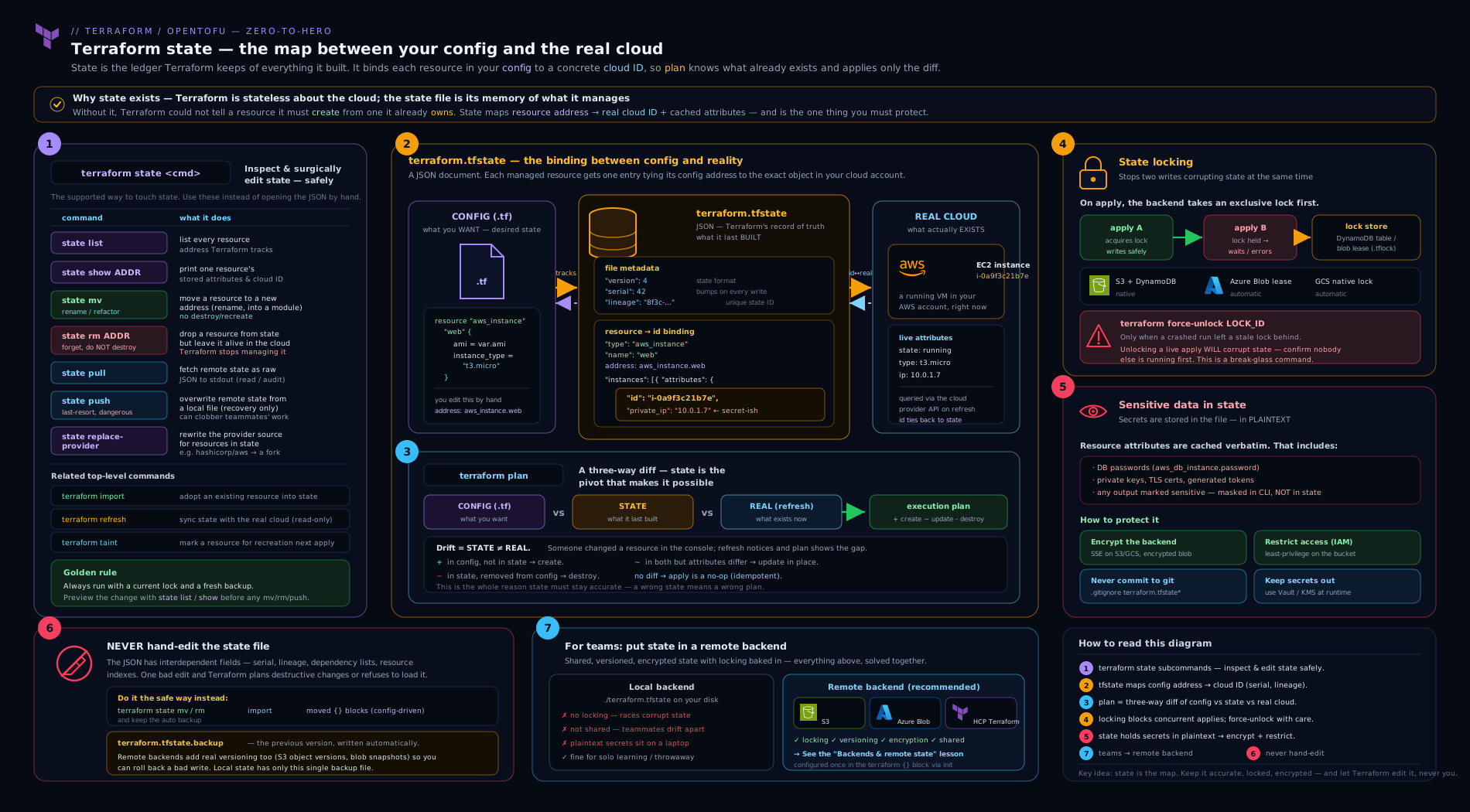
The diagram traces the full picture: your configuration and the real cloud on either side, the state file in the middle holding the mapping plus cached attributes (with secrets in plaintext), the lock that serialises writes, and the terraform state subcommands acting on addresses within the file.
Going deeper
Everything so far is the ground floor. Three mechanics sit one level below it — rarely taught, occasionally load-bearing at 3 a.m., and each a favourite of the harder interview.
Deposed objects: the ghost that create_before_destroy leaves behind
Add lifecycle { create_before_destroy = true } to a resource — the standard trick for zero-downtime replacement of things like launch templates, TLS certificates, or DNS records — and a replacement provisions the new object before destroying the old one. If that final destroy step fails (a provider timeout, a dependency still attached, credentials expired mid-run), Terraform cannot simply drop the old object from state: it still exists in the cloud, still costs money, still holds a name or an IP. So it parks it as a deposed object. The old instance is moved aside under a random 8-character deposed key while the new instance takes the primary slot; in the JSON that instance grows a deposed field holding that key. You usually meet it in plan output, not in the file:
# aws_instance.web (deposed object a1b2c3d4) will be destroyed
The happy path is to do nothing clever: the next terraform apply retries the destroy of every deposed object automatically, so deposed objects normally self-heal. They only become a problem when the destroy keeps failing — the backing object was deleted out of band, or a provider bug leaves it un-destroyable — and then that line clogs every future plan with a phantom “will be destroyed”. Clearing a stuck deposed object is state surgery (you cannot target it with an ordinary state show), so it lives in the State Surgery lesson; the reflex to keep here is simply to recognise the word “deposed” and know it means “a leftover from a before-destroy replacement”, not “Terraform is about to break something”.
schema_version and the silent state upgrade
Every instance you saw in the anatomy section carries a schema_version integer, and here is what it is for. A provider’s resource schema evolves between releases — an attribute is renamed, a type tightens, a default moves into computed. When that happens the provider author bumps the resource’s schema version and ships a state upgrader: a function that rewrites an old-shape instance into the new shape. Upgrade the provider, run any command, and Terraform notices your stored schema_version (say 0) is behind the provider’s current version (say 2), runs the upgraders 0 → 1 → 2 in memory, and persists the migrated instance. It is invisible, automatic, and the deepest reason the “never hand-edit state” rule exists: a value you tweak by hand can violate an invariant the next upgrader assumes, with no schema to catch you. It is also why you cannot casually downgrade a provider after a schema bump — providers ship upgraders, not downgraders, so an older provider may be unable to read state its newer self already migrated.
errored.tfstate: when apply succeeds but the save fails
The failure mode that terrifies people the first time they see it: an apply that creates the resources successfully and then cannot persist state, because the backend blinked — a network drop, an expired token, an IAM change mid-run, the lock table deleted under it. Terraform will not silently lose the new mapping. It writes the fresh state to a local file named errored.tfstate in the working directory and prints an error telling you to push it once the backend is reachable:
# after fixing the backend, upload the state the apply could not save:
terraform state push errored.tfstate
Until you do, the remote state is stale — it does not know about the resources the apply just built — so the next plan proposes to create duplicates, the exact “lost memory” failure this whole lesson is about, except recoverable because the memory was saved to disk. The discipline: if any apply ends with an errored.tfstate on disk, treat it as an incident, reconcile and state push it before anyone else runs a plan, and only then delete it.
Hands-on lab
This lab needs no cloud account and costs nothing — it uses the random, local, and null providers, all of which run entirely on your machine. You will create state, read it with every read-only state command, perform safe surgery with mv and rm, prove that a “sensitive” value is plaintext in state, and trigger and inspect a lock. Allow about 20 minutes.
1. Scaffold the project.
mkdir tf-state-lab && cd tf-state-lab
# main.tf
terraform {
  required_version = ">= 1.9"
  required_providers {
    random = { source = "hashicorp/random", version = "~> 3.6" }
    local  = { source = "hashicorp/local",  version = "~> 2.5" }
  }
}

resource "random_password" "db" {
  length  = 20
  special = true
}

resource "random_pet" "server" {
  length = 2
}

resource "local_file" "greeting" {
  for_each = toset(["app", "web"])
  filename = "${path.module}/hello-${each.key}.txt"
  content  = "Hello from ${each.key}: ${random_pet.server.id}"
}

output "db_password" {
  value     = random_password.db.result
  sensitive = true
}
2. Init and apply.
terraform init
terraform apply -auto-approve
Expected (abridged):
random_password.db: Creation complete after 0s
random_pet.server: Creation complete after 0s
local_file.greeting["app"]: Creation complete after 0s
local_file.greeting["web"]: Creation complete after 0s

Apply complete! Resources: 4 added, 0 changed, 0 destroyed.

Outputs:
db_password = <sensitive>
3. Read state with the read-only commands.
terraform state list
# local_file.greeting["app"]
# local_file.greeting["web"]
# random_password.db
# random_pet.server

terraform state show 'local_file.greeting["app"]'
# shows filename, content, the file's id (a content hash), etc.
4. Prove the “sensitive” output is plaintext in state. This is the key learning moment:
# Redacted in CLI:
terraform output db_password
# (error) Output "db_password" is marked sensitive...  -> use -raw to see it

# But the raw secret is sitting in state unencrypted:
terraform state pull | jq -r '.resources[] | select(.type=="random_password") | .instances[0].attributes.result'
# e.g. Xy9$kPzq2!mLr8Wd   <- plaintext
5. Back up, then do safe surgery with mv and rm.
# ALWAYS back up before mutating
terraform state pull > backup.tfstate

# Rename random_pet.server -> random_pet.host (state mv; real value untouched)
terraform state mv random_pet.server random_pet.host
# Now update main.tf to rename the resource block to "host" too, then:
terraform plan      # should show NO changes if the rename is consistent

# Forget one file from state WITHOUT deleting the file on disk
terraform state rm 'local_file.greeting["web"]'
ls hello-web.txt    # the file still exists on disk
terraform state list | grep web || echo "no longer in state"
If you skipped editing
main.tfafter thestate mv,planwill instead show a create ofrandom_pet.serverand thehostaddress as orphaned — a perfect illustration of whystate mvand config must change together (or why amoved {}block, which does both, is safer).
6. Trigger and inspect a lock (local backend). Open a second terminal in the same directory and run a long no-op while holding the lock; in the first terminal a concurrent op will report the lock. With the local backend the window is tiny, so the cleanest demonstration is to read the lock info Terraform prints on contention, and to practise the unlock command syntax:
# If you ever see "Error acquiring the state lock", note the ID and (after
# confirming no live writer) clear it:
# terraform force-unlock <LOCK_ID>
7. Validation. Confirm state is healthy and matches config:
terraform plan -detailed-exitcode
#   exit 0 = no changes (clean)   exit 2 = changes pending   exit 1 = error
A -detailed-exitcode of 0 proves stored state, config, and the real world all agree.
Cleanup.
terraform destroy -auto-approve
rm -f backup.tfstate hello-*.txt
# optionally: rm -rf .terraform .terraform.lock.hcl terraform.tfstate*
Cost note. Zero. The random, local, and null providers create nothing in any cloud — there is no spend and nothing to leak. This is the recommended way to practise all state operations safely before you ever point them at production.
Practice challenges
Work these from the Hands-on lab project above (the random + local build — no cloud, no spend). They escalate from orientation to production design. Try each before opening the solution.
1. Orient yourself (beginner). Without opening any file, list every address Terraform tracks and count how many local_file instances are in state.
<details> <summary>Solution</summary>
terraform state list
terraform state list | grep -c local_file    # -> 2
Why: state list is the read-only orientation command — it never locks or mutates, so it is always the safe first move.
</details>
2. Read one attribute, quote it right (beginner). Print the cached id of local_file.greeting["app"] straight from state.
<details> <summary>Solution</summary>
terraform state show 'local_file.greeting["app"]' # read the id field
Why: state show reads the attribute cache; the single quotes stop the shell from eating the [ and ". Drop them and the command “does nothing”.
</details>
3. Prove “sensitive” is not “encrypted” (intermediate). Show that the generated DB password is redacted by terraform output but sits in plaintext in the state file.
<details> <summary>Solution</summary>
terraform output db_password    # redacted; needs -raw to print
terraform state pull | jq -r '.resources[]
  | select(.type=="random_password") | .instances[0].attributes.result'
# -> the plaintext password, e.g. Xy9$kPzq2!mLr8Wd
Why: sensitive = true only redacts CLI/plan output; the provider still writes the value into state verbatim. Protect the file, not the display.
</details>
4. Re-key declaratively with a moved block (intermediate). Rename random_pet.server to random_pet.host without the CLI, and prove the plan is a no-op change.
<details> <summary>Solution</summary>
# in main.tf: rename the resource block "server" -> "host" AND add:
moved {
  from = random_pet.server
  to   = random_pet.host
}
terraform plan # "0 to add, 0 to change, 0 to destroy" + the move
Why: a moved {} block is the declarative, plan-reviewable alternative to terraform state mv — it changes the address in state without touching the real object, and it lives in the pull request.
</details>
5. Inspect drift before you clobber it (advanced). Delete one managed file out of band, then use the command that shows drift without proposing to revert it.
<details> <summary>Solution</summary>
rm hello-app.txt                 # out-of-band change: the real object is gone
terraform plan -refresh-only     # SEE the drift; changes nothing
terraform apply                  # restore the file from config
# (or: terraform apply -refresh-only to ADOPT reality into state instead)
Why: plain plan/apply reconcile toward config; -refresh-only reconciles state toward reality and lets you decide per attribute — the discipline that stops a panic-apply reverting a legitimate hotfix.
</details>
6. Design the hardening (advanced). State holds those secrets in plaintext. Name the backend controls, in order of leverage, that keep it from being a breach — and the one thing only OpenTofu can do.
<details> <summary>Solution</summary>
- Encrypt the backend at rest —
encrypt = truewith a customer-managedkms_key_idon S3; storage-service / CMK encryption on Azure; default encryption on GCS. - Least-privilege RBAC scoped to the one state object — the CI workload identity plus a tiny break-glass group, never an account/subscription wildcard.
- Network-isolate the backend (private / VPC endpoint, public access denied) and never commit
.tfstate. - Keep secrets out of state where you can — fetch from a secrets manager via a data source, and use
ephemeralvalues (Terraform 1.10+) that are not persisted.
The OpenTofu-only capability: client-side state and plan encryption (1.7+), which encrypts the file before it reaches the backend. Terraform has no equivalent.
Why: the plaintext-secret problem is a file-access problem, so the highest-leverage controls guard the file (encryption + RBAC + isolation); OpenTofu’s client-side encryption is the only way to keep secrets out of the at-rest blob entirely. </details>
Common mistakes & troubleshooting
| Symptom | Likely cause | Fix |
|---|---|---|
state mv 'aws_instance.web[0]' ... “does nothing” or errors |
Shell ate the brackets/quotes | Single-quote the entire address: 'aws_instance.web[0]'. |
| Plan wants to create a resource that already exists | Resource is not in state (lost state, never imported, or state rm’d) |
import {} block the existing resource; confirm “1 to import, 0 to change”. |
Error acquiring the state lock on every run |
Stale lock from a killed apply |
Confirm no live writer, then terraform force-unlock <ID> from the error. |
terraform apply reverted a legitimate console hotfix |
Ran a bare apply on drift instead of inspecting | Use plan -refresh-only first; apply -refresh-only to adopt, plain apply to revert — decide per attribute. |
Error: state snapshot was created by Terraform vX.Y, newer than current |
A teammate wrote state with a newer CLI | Upgrade your CLI to match (tfenv/tfswitch); never downgrade state by hand. |
Secret found in terraform.tfstate despite sensitive = true |
sensitive only redacts output, never encrypts state |
Encrypt the backend, restrict access, never commit state; OpenTofu state encryption for client-side. |
state push rejected: “serial is older” / lineage mismatch |
Pushing a stale or foreign state file | Bump serial above the backend’s current value (after reconciling); never -force across a lineage boundary — see surgery lesson. |
| Plan is slow / hits provider rate limits on a big estate | Full refresh of a huge state on every plan | Split state along lifecycle seams (scale lesson); use -refresh=false for quick iteration when you know nothing drifted. |
Common beginner mistakes
These are misconceptions, not error messages (those are in the troubleshooting table above) — the wrong mental model, why it bites, and the model to hold instead.
| Misconception | Why it’s wrong | The right mental model |
|---|---|---|
| “State is a backup of my infrastructure.” | State records the mapping and last-known attributes, not the resources themselves. You cannot restore a dropped database from state — only the knowledge that Terraform owned it. | State is an index, not an archive. Back up the data separately; back up state to preserve the mapping. |
“sensitive = true keeps my password safe.” |
It only redacts the value from CLI and plan output. The plaintext still lands in terraform.tfstate. |
sensitive is a display filter, not encryption. Protect the file — backend encryption, RBAC, no commits. |
| “It’s just JSON, I’ll fix it in my editor.” | The file has invisible invariants — serial, lineage, schema_version, remote checksums — that are trivial to break and impossible to eyeball. |
Every legitimate edit has a state subcommand or a moved/removed/import block. The text editor is never the tool. |
| “I renamed a resource and Terraform wants to destroy and recreate it — it’s buggy.” | Terraform keys resources by address; a rename is a new address, so it reads as delete-old + create-new. | Tell Terraform it is the same object: a moved {} block (or state mv). The destroy/create then vanishes. |
“terraform state rm deletes the resource.” |
rm removes the entry from state only — the real resource keeps running, now unmanaged. destroy is what deletes. |
rm = forget; destroy = delete. Never reach for rm expecting cleanup. |
| “A remote backend means my state is safe from concurrency.” | Remote storage is not remote locking. Without a lock, two applies still clobber each other. | Remote storage ≠ locking. Verify the backend locks (DynamoDB / native lockfile, blob lease) — otherwise it is just a convenient way to corrupt state. |
“force-unlock is how you clear a stuck run.” |
It removes the lock, not the run. If the holder is still alive you now have two writers — the exact corruption locking prevents. | Confirm the holder is genuinely dead first; force-unlock is a last resort, never a pipeline retry. |
Best practices
- Use a remote backend with locking from the first day a second person (or CI) touches the repo. Local state is for solo learning only.
- Back up before every mutating
stateoperation —terraform state pull > backup-$(date +%s).tfstate. It costs nothing and turns a disaster into an undo. - Prefer declarative
moved {}/removed {}/import {}blocks over the imperativestate mv/rm/importCLI for anything that should be permanent and reviewed; keep the CLI for incidents and one-offs. - Quote every address containing brackets or quotes so the shell does not mangle it.
- Never hand-edit the state JSON. Every legitimate change has a safe command that preserves serial, lineage, and checksums.
- Treat
force-unlockas a deliberate, logged action, never a pipeline retry step; confirm the lock-holder is dead first. - Inspect drift with
plan -refresh-onlybefore reconciling; never panic-apply. - Keep state small — split by lifecycle and ownership so each apply’s blast radius is bounded (depth in the scale lesson).
- Enable backend versioning and soft delete so corruption is a one-version rollback, not a rebuild.
Security notes
State is a high-value secrets store; the controls are non-negotiable.
- Encryption at rest is mandatory.
encrypt = true(S3, ideally with a CMK), storage-service encryption (Azure), default encryption (GCS). For defence in depth, customer-managed keys. - Least-privilege RBAC, scoped to the one state object, granted to the CI workload identity and a small break-glass group — never a subscription/account wildcard, never standing laptop write access to prod.
- Network isolation — private endpoint / VPC endpoint, public access denied.
- Never commit state.
.tfstate,.tfstate.backup, and*.tfplanbelong in.gitignore; a committed state file is a permanent credential leak. - Audit logging on the backend (Azure Storage diagnostics, S3 access logs / CloudTrail data events) so every read, write, and lock is attributable.
- No secrets in remote-state outputs — any consumer that can read the backend reads every output.
- Prefer OpenTofu client-side state encryption where exposure of state secrets is a hard compliance requirement — it is the only way to keep secrets out of the at-rest blob entirely.
Interview & exam questions
1. What is Terraform state and why can it not be regenerated from .tf files?
State is the mapping from your declared resources to their real-world IDs, plus metadata (dependencies) and a cache of last-known attributes. The configuration is reproducible, but the binding between aws_vpc.main and vpc-0a1b2c3d is not — only state holds it, which is why losing state means Terraform proposes to recreate everything.
2. What are the three jobs state does?
Mapping (config address → real ID, the core job), metadata (dependencies and teardown ordering), and performance (caching attributes so plan need not query every resource every time).
3. Difference between version, terraform_version, serial, and lineage in the state file?
version is the state format version (4). terraform_version is the binary that last wrote it. serial is a per-write counter used for optimistic locking (a lower serial overwriting a higher one means lost writes). lineage is a UUID identifying one state’s history — different lineages are not versions of each other and pushing across them causes split-brain.
4. Does sensitive = true encrypt the value in state?
No — and this is the classic trap. sensitive only redacts the value from CLI/plan output. The value is stored in state in plaintext. Protect it via backend encryption, access control, and (in OpenTofu) client-side state encryption.
5. Walk through the terraform state subcommands.
list (addresses), show (one resource’s attributes), mv (rename/move without touching the resource), rm (forget without destroying), pull (dump raw JSON, for backup), push (upload a local file — most dangerous), replace-provider (rewrite provider source addresses). list/show/pull are read-only; the rest mutate and should be preceded by a backup.
6. How does state locking work, and which backends provide it?
Before a write, Terraform acquires an exclusive lock from the backend; a second run waits (-lock-timeout) or fails. S3 uses a native .tflock (1.10+) or a DynamoDB LockID table; Azure uses a blob lease; GCS uses a .tflock; HCP/TFC manages it. A backend without locking can be corrupted by concurrent applies.
7. What does force-unlock do and what is the danger?
It removes a lock entry by ID without verifying the holder is gone. If a real apply is still running, breaking its lock creates two concurrent writers and corrupts state. Always confirm the holding process is dead first; never automate it in a retry loop.
8. terraform state rm vs terraform destroy — what is the difference?
destroy deletes the real infrastructure and removes it from state. state rm removes the resource from state only, leaving the real infrastructure running (Terraform simply forgets it). Use rm to hand a resource to another state or drop a phantom entry.
9. Why is terraform refresh deprecated, and what replaces it?
The standalone command writes refreshed state with no review — it is effectively apply -refresh-only -auto-approve. Use terraform plan -refresh-only to see drift and apply -refresh-only to adopt it, so the reconciliation is reviewable.
10. You renamed a resource and now plan wants to destroy the old one and create a new one. What happened and how do you fix it without downtime?
The address changed, so Terraform sees the old address as gone and the new one as new. Fix it by telling Terraform it is the same object: add a moved { from = old to = new } block (preferred, reviewable) or run terraform state mv old new. Then plan shows no changes.
11. How do you bring an existing, manually-created resource under Terraform management?
Import it. Write an import { to = <address> id = <real-id> } block plus a matching resource block, plan to confirm “1 to import, 0 to change”, then apply. Prefer the block over the legacy terraform import CLI because it is plan-reviewable and can generate config.
12. Where, besides the state file, can secrets leak — and how do you stop it?
Saved plan files (*.tfplan) contain values unencrypted; CI logs can spill via error messages or output misuse; terraform_remote_state exposes every producer output to any consumer; a committed .tfstate is a Git-history leak. Mitigate with backend encryption + RBAC, secret plan-file handling, no secrets in remote-state outputs, .gitignore for state/plans, and OpenTofu client-side encryption.
Quick check
- True or false: marking an output
sensitive = trueencrypts it inside the state file. - Which
terraform statesubcommand forgets a resource without destroying the real infrastructure? - In the address
module.net.aws_subnet.private["az-a"], which part tells you the resource usesfor_eachrather thancount? - What is the danger of running
terraform force-unlockwithout checking first? - Which command safely shows you drift without proposing to revert it?
Answers
- False.
sensitiveonly redacts CLI/plan output; the value is stored in state in plaintext. Protect it with backend encryption, access control, or OpenTofu client-side state encryption. terraform state rm— it removes the resource from state only; the real resource keeps running.- The
["az-a"]string key.for_eachinstances are keyed by string (["az-a"]);countinstances are keyed by integer ([0]). - It removes the lock without confirming the holder is dead, so if a real
applyis still running you get two concurrent writers and corrupted state. terraform plan -refresh-only— it reconciles state against reality and reports drift without proposing to change any resource.
Exercise
Starting from the lab project:
- Add an
aws-free second resource usingfor_eachover a map (e.g. anotherlocal_filekeyed by{ api = "8080", ui = "3000" }) so you have a richer state to operate on. Apply. - Convert one of your existing
for_eachresources to a different key set (drop one key, add one) and observe in the plan howfor_eachadds and destroys only the changed keys, leaving others untouched — contrast this mentally with howcountwould have shuffled every index. - Back up state (
terraform state pull > backup.tfstate), then useterraform state mvto re-key one instance to a newfor_eachkey, update the config to match, and prove withterraform planthat there are now no changes — demonstrating a non-destructive re-key. - Use
terraform state pull | jqto locate the plaintext value of yourrandom_passwordand write one sentence on exactly which backend control you would add to protect it in production. - Run
terraform plan -detailed-exitcodeand record the exit code; explain what0versus2would each mean. Finish withterraform destroy.
Write two or three sentences on the difference you observed between state mv (imperative, CLI) and a moved {} block (declarative, in-config) for the re-key — this is a common interview discriminator.
Certification mapping
This lesson maps to the HashiCorp Certified: Terraform Associate (003) exam, principally the objective “Implement and maintain state”: the purpose of state, local vs remote state and backends, state locking and force-unlock, sensitive data in state and how to protect it, and the terraform state subcommands (list, show, mv, rm, pull, push, replace-provider). It also touches “Use Terraform outside the core workflow” (import, the import {} block, state surgery, -replace superseding taint) and “Read, generate, and modify configuration” (resource addressing, moved/removed/import blocks). Expect several questions that hinge on the two facts this lesson hammers: sensitive does not encrypt state, and state rm does not destroy the resource. The companion Terraform Associate Prep Kit drills these as practice questions.
Glossary
- State — Terraform’s record mapping declared resources to real-world IDs and attributes, plus dependency metadata; its memory of the world.
- State file —
terraform.tfstate, the JSON document holding state (local or, in a backend, remote). - Backend — Where state is stored and locked (
local,s3,azurerm,gcs, HCP/TFCcloud). - serial — A monotonically increasing counter bumped on every state write; used for optimistic locking.
- lineage — A UUID identifying one state’s history; different lineages are not versions of each other (split-brain risk).
- State locking — Exclusive write access to state during an operation, preventing concurrent corruption.
- force-unlock — A command that removes a lock by ID without verifying the holder is gone; last resort.
- Resource address — The coordinate of a resource in state: module path + type.name + optional
[index]/["key"]. - Drift — Divergence between stored state and real-world infrastructure, usually from out-of-band changes.
-refresh-only— A plan/apply mode that reconciles state with reality without proposing to revert resources.state mv/moved {}— Imperative / declarative ways to change a resource’s address without touching the resource.state rm/removed {}— Imperative / declarative ways to forget a resource from state without destroying it.- import /
import {}— Bringing an existing real resource under Terraform management by adding it to state. - Sensitive value — A value marked
sensitiveto redact it from CLI output; still stored in state in plaintext. - State encryption — Client-side encryption of state/plan files; available in OpenTofu (1.7+), not Terraform.
create_before_destroy— Alifecyclesetting that provisions a replacement before destroying the old object (zero-downtime replacement); the source of deposed objects.- Deposed object — An old resource instance left in state under a random deposed key when a
create_before_destroyreplacement’s destroy step failed; the nextapplyretries its destroy. schema_version— The per-instance integer recording which version of the provider’s resource schema the stored attributes match.- State upgrader — A provider function that migrates a stored instance from an older
schema_versionto the current one, run automatically on provider upgrade (there is no downgrader). errored.tfstate— A local file Terraform writes when an apply succeeds but state cannot be saved to the backend;terraform state pushit once the backend is reachable.- Optimistic locking — The
serial-based guard that rejects a state write whose serial is not higher than the stored one, catching lost or stale writes. -detailed-exitcode— Aplanflag whose exit status encodes drift:0clean,2changes pending,1error; used by CI gates.-refresh=false— Aplan/applyflag that skips refreshing state from the real world, trading drift-awareness for speed on large estates.
Next steps
You can now read a state file, reach for the right terraform state subcommand without guessing, address any resource precisely, reason about locking, and harden a backend against the plaintext-secrets problem. The next move is to stop running raw terraform per environment and let a thin wrapper generate your backend, providers, and remote-state wiring for you. Continue with Terragrunt Configuration, In Depth, which dissects every block, function, and hook in terragrunt.hcl — including the remote_state and generate blocks that turn the backend boilerplate you configured by hand here into one DRY definition across every stack. For the operational and recovery sides of state, go deeper with Remote State at Scale (splitting, cross-stack sharing, org guardrails) and State Surgery (corruption, split-brain, and rebuilding lost state).