In a nutshell
Think of Terraform state as the ledger for your infrastructure: one authoritative book that records what exists, what its cloud ID is, and what settings it has. On a solo laptop that ledger is a notebook in your drawer — fine until a second person needs to write in it. Remote state at scale is about moving that ledger into a shared vault the whole team plus every CI robot can read and write safely: only one pen touches the page at a time (a lock), every version is photocopied before it changes (versioning), the vault is bolted shut (encryption + RBAC), and the single fat ledger is split into thin per-team volumes so a spill on page 900 doesn’t smear the whole book (isolation / blast radius).
Get this right and Terraform scales from one engineer to fifty without the 3 a.m. incident where two applies raced and half your resources silently vanished from tracking. Get it wrong and the ledger is a shared document with no locking — the fastest way ever invented to corrupt state. The mental model to hold the whole lesson: a shared, locked ledger that many people write to, one at a time, in small books.
Level: Advanced · Time: ~30 min
Prerequisites. You should already understand what state is and why Terraform keeps it — the terraform.tfstate file, its serial/lineage, and terraform state list/state show. If any of that is fuzzy, read Terraform state deep dive first, and Backends deep dive for how a backend is wired at init. Comfort with one cloud’s CLI (Azure, AWS, or GCP) and with the plan/apply loop is assumed.
After this lesson you can:
- Stand up a locked, encrypted, versioned remote backend on
azurerm,s3(native lockfile or DynamoDB),gcs, or HCP Terraform. - Drive one root module across dev/staging/prod with partial backend config and a consistent
<stack>/<env>/<region>key scheme — no copy-pasted root modules. - Split a monolithic god-state along lifecycle/ownership seams and move resources without destroying them using
removed+importblocks. - Share data across stacks deliberately —
terraform_remote_state, provider data lookups, or a parameter store — knowing the coupling trade-off of each. - Recover safely: back up,
force-unlocka stuck lock, restore a prior state version, and re-home a provider — without turning a small divergence into an outage.
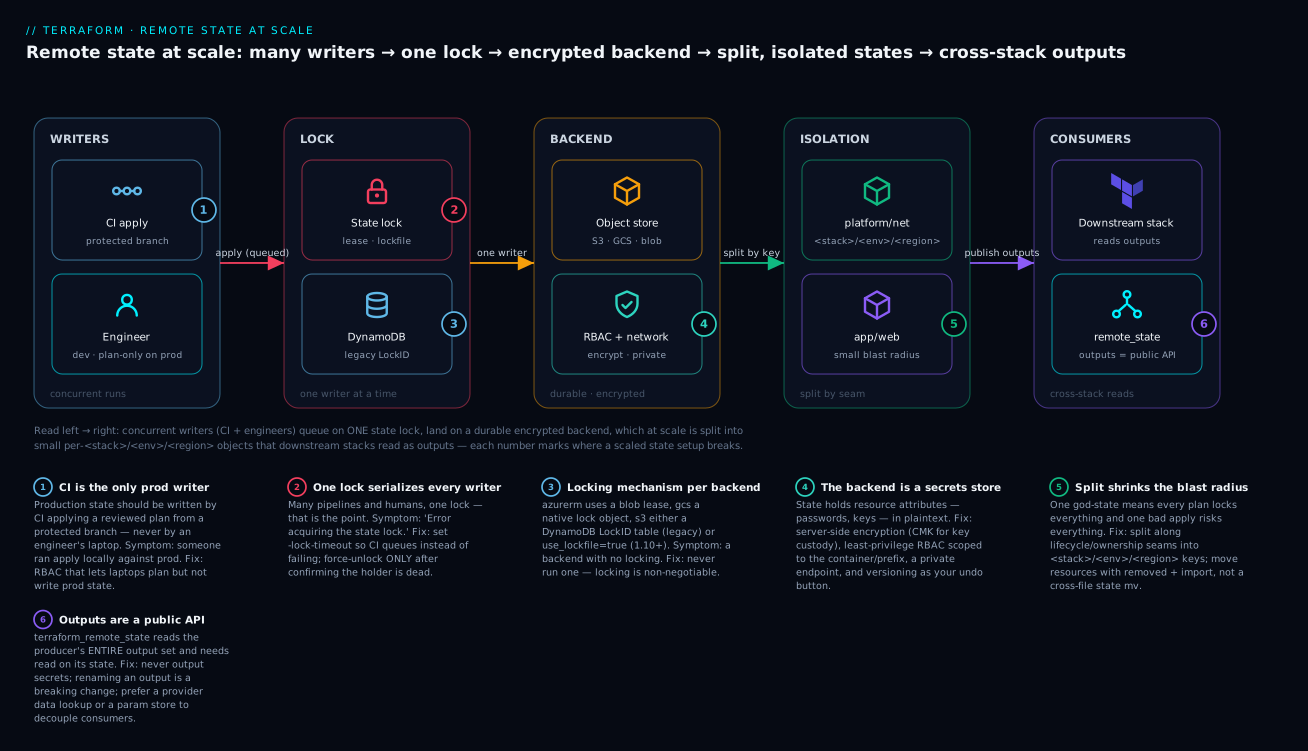
The diagram reads left → right: concurrent writers (CI and engineers) queue behind a single state lock, which serializes them onto one durable, encrypted, versioned backend; at scale that backend holds not one god-state but many small per-<stack>/<env>/<region> objects, and downstream stacks read the producer’s outputs as a public API — each numbered badge marks where a scaled setup typically breaks.
State is the part of Terraform that turns a clean codebase into a 3 a.m. incident. A monolithic terraform.tfstate in someone’s home directory works fine for one engineer and falls apart the moment a second person, a CI runner, and a main branch all want to apply at once. This is a practitioner’s guide to running remote state for real teams: backends with locking, per-environment keys without copy-paste, splitting a god-state into seams, sharing data across stacks, and the surgery you’ll eventually need when state and reality disagree.
1. Why local state breaks teams
Local state fails in three specific, predictable ways, and naming them tells you exactly what a remote backend has to solve.
- Concurrency. State has no lock. Two
applyruns racing against the same file produce a last-writer-wins corruption where resources silently vanish from tracking, then get duplicated on the next plan. - Secrets. State stores resource attributes verbatim, including passwords, connection strings, and generated keys, in plaintext. A local
terraform.tfstatecommitted to Git (it happens constantly) is a credential leak. - Blast radius. One enormous state file means every
planreads and locks everything, everyapplyrisks everything, and a single corrupt write can take down unrelated systems. The size of your state file is the size of your worst-case mistake.
The fix is not “put the file on a share.” It’s a backend that provides remote storage, locking, encryption, and versioning as one unit. Locking is the non-negotiable part: a remote backend without locking is just a more convenient way to corrupt state.
2. Configuring a remote backend with locking
Pick the backend that matches your cloud, but the requirements are identical: durable storage, a locking mechanism, server-side encryption, and object versioning. Here are the three that cover almost everyone.
Azure Storage (azurerm). Locking uses native blob leases, so there’s no extra table to provision. Create the storage account and container out-of-band (with CLI or a bootstrap stack), then point the backend at it.
az group create -n rg-tfstate -l eastus2

az storage account create \
  -n sttfstateprod001 -g rg-tfstate -l eastus2 \
  --sku Standard_ZRS \
  --min-tls-version TLS1_2 \
  --allow-blob-public-access false

az storage container create \
  --account-name sttfstateprod001 -n tfstate \
  --auth-mode login

# Enable blob versioning and soft delete for break-glass recovery
az storage account blob-service-properties update \
  --account-name sttfstateprod001 -g rg-tfstate \
  --enable-versioning true \
  --enable-delete-retention true --delete-retention-days 30
# backend.tf
terraform {
  backend "azurerm" {
    resource_group_name  = "rg-tfstate"
    storage_account_name = "sttfstateprod001"
    container_name       = "tfstate"
    key                  = "platform/hub-network.tfstate"
    use_azuread_auth     = true   # auth via Entra ID / OIDC, not account keys
  }
}
Prefer use_azuread_auth = true over storage account keys so access is governed by RBAC and your CI’s workload identity rather than a long-lived shared secret. The blob lease gives you locking for free.
AWS S3. Modern Terraform (1.10+) supports native S3 locking via the use_lockfile argument, which writes a .tflock object alongside the state. The older pattern used a DynamoDB table for the lock, and you’ll still see it in the wild.
# backend.tf  (S3 with native lockfile, Terraform >= 1.10)
terraform {
  backend "s3" {
    bucket       = "kloudvin-tfstate-prod"
    key          = "platform/hub-network.tfstate"
    region       = "us-east-1"
    encrypt      = true
    use_lockfile = true   # native S3 locking; no DynamoDB table required
  }
}
If you’re on an older version or already run the DynamoDB table, keep using it: provision a table with a primary key named exactly LockID (string) and reference it with dynamodb_table. Enable bucket versioning and a bucket policy that enforces encryption regardless of which path you choose.
HCP Terraform / Terraform Cloud. State, locking, encryption, and versioning are managed for you; you configure a cloud block instead of a backend block.
terraform {
  cloud {
    organization = "kloudvin"
    workspaces {
      name = "platform-hub-network-prod"
    }
  }
}
| Backend | Locking mechanism | Versioning | Notes |
|---|---|---|---|
azurerm |
Native blob lease | Blob versioning + soft delete | No extra lock resource to manage |
s3 |
use_lockfile (1.10+) or DynamoDB |
S3 bucket versioning | Enforce SSE via bucket policy |
HCP/TFC cloud |
Managed | Managed (state history UI) | No backend infra to run |
3. Partial backend config and per-environment keys
You cannot use variables or interpolation inside a backend block; it’s read too early in Terraform’s lifecycle. The mechanism that lets you avoid duplicating a root module per environment is partial configuration: declare the backend type and the static parts in code, and supply the environment-specific values at init time.
# backend.tf  -- partial: type only, no environment specifics
terraform {
  backend "azurerm" {
    use_azuread_auth = true
  }
}
# envs/prod.azurerm.tfbackend
resource_group_name  = "rg-tfstate"
storage_account_name = "sttfstateprod001"
container_name       = "tfstate"
key                  = "platform/hub-network.tfstate"
terraform init -backend-config=envs/prod.azurerm.tfbackend
The same root module initializes against dev, staging, or prod purely by swapping the -backend-config file, with no code duplication. The discipline that makes this safe is a consistent key convention so two environments can never collide on one state object. A scheme like <stack>/<environment>/<region>.tfstate (for example platform/prod/eastus2.tfstate) is self-documenting and sortable in the storage browser.
Workspaces (
terraform workspace) are a different tool. They store multiple states under one backend key with aenv:/prefix and are fine for short-lived or ephemeral variants. For long-lived production environments, distinct backend keys (and ideally distinct storage accounts/buckets, even distinct subscriptions) give you stronger blast-radius and RBAC isolation than workspaces do. Don’t use a single workspace-switched state to separate dev from prod.
4. Splitting a monolithic state file
A god-state is the inevitable end of a successful repo: networking, data, identity, and a dozen apps all in one file, where every plan takes minutes and every apply is terrifying. Split it.
Find the seams. Cut along lifecycle and ownership, not resource type. Things that are created, destroyed, and changed together stay together; things with independent change cadence and different owning teams become separate states. The classic decomposition is foundational and slow-moving at the bottom, fast-moving at the top: networking/DNS, then shared data (databases, key vaults), then per-application stacks. A good seam is one where the upper layer only needs a handful of IDs from the lower layer (covered in section 5).
Move resources without destroying them. Within a single state, terraform state mv renames addresses. To relocate resources into a different state file, point state mv at the destination state explicitly. Always pull a backup first.
# Back up both states before any surgery
terraform state pull > backup-source-$(date +%Y%m%d%H%M%S).tfstate

# Move a resource to a DIFFERENT state file (-state-out writes the destination)
terraform state mv \
  -state-out=../network-stack/terraform.tfstate \
  azurerm_virtual_network.hub \
  azurerm_virtual_network.hub
The cross-state state mv workflow is fiddly with remote backends because it operates on local files; the reliable pattern is to state pull both states to local files, move between them, and state push the results back, applying with the new code in each repo afterward.
A cleaner, declarative alternative for removing a resource from one state without destroying the real infrastructure (so you can import it into another) is the removed block, paired with an import block on the receiving side:
# In the SOURCE stack: drop it from state, keep the real resource
removed {
  from = azurerm_virtual_network.hub
  lifecycle {
    destroy = false   # forget it, do NOT destroy it
  }
}
# In the DESTINATION stack: adopt the existing resource into state
import {
  to = azurerm_virtual_network.hub
  id = "/subscriptions/<sub>/resourceGroups/rg-hub/providers/Microsoft.Network/virtualNetworks/vnet-hub"
}

resource "azurerm_virtual_network" "hub" {
  # configuration matching the live resource
}
This pair is safer than raw state mv across files because each side is plan-reviewable in its own PR. Run terraform plan on both stacks and confirm the source shows a forget (not a destroy) and the destination shows an import with no changes.
5. Cross-stack data sharing
Once state is split, the upper layer needs values from the lower layer. There are three ways to wire stacks together, in increasing order of decoupling.
1. terraform_remote_state data source. Read another stack’s outputs directly from its backend. It’s built in and zero-infrastructure, but it couples the consumer to the producer’s backend location and exposes every output (so never put secrets in remote-state outputs).
data "terraform_remote_state" "network" {
  backend = "azurerm"
  config = {
    resource_group_name  = "rg-tfstate"
    storage_account_name = "sttfstateprod001"
    container_name       = "tfstate"
    key                  = "platform/prod/network.tfstate"
    use_azuread_auth     = true
  }
}

resource "azurerm_subnet_network_security_group_association" "app" {
  subnet_id                 = data.terraform_remote_state.network.outputs.app_subnet_id
  network_security_group_id = azurerm_network_security_group.app.id
}
2. Provider data lookups. Skip Terraform state entirely and query the cloud API for the resource by name or tag. This fully decouples the stacks (the producer could even be ClickOps or a different tool), at the cost of a hard dependency on a stable naming/tagging convention.
data "azurerm_virtual_network" "hub" {
  name                = "vnet-hub"
  resource_group_name = "rg-hub"
}
# use data.azurerm_virtual_network.hub.id downstream
3. Published outputs via a registry/parameter store. Have the producer write its contract to a neutral store (Azure App Configuration, AWS SSM Parameter Store) and have consumers read from there. This is the most decoupled and the most operational overhead; it’s worth it at platform scale where you don’t want dozens of consumers reaching into your state file.
| Approach | Coupling | Secrets-safe | Best for |
|---|---|---|---|
terraform_remote_state |
Tied to producer’s backend + outputs | No (outputs are readable) | Tightly related stacks in one org |
| Provider data lookup | Tied to naming/tags only | Yes (reads live API) | Cross-team or mixed-tooling |
| Parameter store | Tied to a published contract | Yes (with RBAC on the store) | Platform-scale, many consumers |
Whatever you choose, treat a producer stack’s outputs as a public API, exactly like a module interface: removing or renaming an output is a breaking change for every downstream stack.
6. State surgery toolkit
Eventually state and reality diverge: a resource was created out-of-band, a provider was renamed, or a botched apply left orphans. These are the four operations that fix it. Back up state before every one of them.
terraform state pull > pre-surgery-$(date +%Y%m%d%H%M%S).tfstate
import — adopt existing infrastructure. Prefer the declarative import block (Terraform 1.5+) over the legacy terraform import CLI: it’s plan-reviewable and lives in code.
import {
  to = azurerm_resource_group.app
  id = "/subscriptions/<sub>/resourceGroups/rg-app"
}
terraform plan    # confirm "1 to import, 0 to change" before applying
terraform apply
state rm — stop tracking without destroying. Removes a resource from state while leaving the real thing alone. Use it to hand a resource off to another stack or to drop a stale entry.
terraform state rm azurerm_storage_account.legacy
state replace-provider — re-home a provider. When a provider’s source address changes (the canonical example is the HashiCorp-to-OpenTofu split, or a registry namespace move), rewrite every resource’s provider reference in state in one shot.
terraform state replace-provider \
  registry.terraform.io/-/azurerm \
  registry.terraform.io/hashicorp/azurerm
Recovering from corruption. If state is truncated or unparseable, do not run apply. Restore from a version: backends with versioning keep prior copies. On Azure, list and promote a previous blob version; on S3, restore a previous object version. Then verify with a no-op plan before touching anything.
# Azure: find recent versions of the state blob
az storage blob list \
  --account-name sttfstateprod001 -c tfstate \
  --prefix "platform/prod/network.tfstate" \
  --include v --auth-mode login -o table
If your lock is stuck (a CI job was killed mid-apply), clear it deliberately with the lock ID from the error message, never blindly:
terraform force-unlock <LOCK_ID>
force-unlockremoves the lock without verifying the holder is actually gone. Confirm no apply is in flight first. Forcing a lock while a real apply is running is exactly how you create the corruption you’re trying to recover from.
7. Protecting state
State is a high-value, sensitive asset; treat the backend like a secrets store, because it is one.
- Encryption. Server-side encryption at rest is mandatory and on by default for these backends (
encrypt = truefor S3; storage service encryption for Azure). For defense in depth, consider customer-managed keys. - RBAC, least privilege. Lock the storage account/bucket down to the specific CI workload identities and a small break-glass group. On Azure, scope a role like Storage Blob Data Contributor to the state container, not the subscription. Nobody should have standing write access to production state from a laptop.
- Versioning + soft delete. Already enabled in section 2. This is your undo button; without it, corruption is permanent.
- Network isolation. Put the state storage behind a private endpoint / VPC endpoint and deny public network access so state is never reachable from the open internet.
- Break-glass recovery. Document and rehearse the restore-from-version procedure before you need it. A recovery runbook you’ve never run is a hope, not a plan.
8. Operational guardrails
The last mile is policy that keeps a team from hurting itself.
- Lock timeouts. Set
-lock-timeoutso CI waits for a lock to free instead of failing instantly on a benign concurrent run.terraform apply -lock-timeout=300swaits up to five minutes. - A force-unlock policy.
force-unlockshould be a deliberate, logged, ideally two-person action, not something baked into a pipeline retry. Pipelines that auto-force-unlock will eventually unlock a live apply. - Audit logging. Enable access logging on the backend (Azure Storage diagnostic logs to a Log Analytics workspace; S3 server access logging / CloudTrail data events) so every read, write, and lock on state is attributable. In HCP Terraform, the run history and audit log give you this natively.
- One human-in-the-loop boundary. Production state should only be written by CI applying a reviewed plan from a protected branch, never by an engineer running
applylocally against prod.
Going deeper
The sections above are the working playbook. This section is the layer underneath it — how the pieces actually behave, where they bite at scale, and the version caveats that separate a setup that survives an incident from one that becomes the incident.
Backend types, compared for real
The section-2 table covers the three most common backends; here is the fuller field guide including GCS, the DynamoDB-vs-lockfile split, and — the part that usually decides the choice — the auth model and operational cost.
| Backend | Locking | Auth (preferred) | History / restore | Extra infra | Best for |
|---|---|---|---|---|---|
azurerm |
Blob lease (automatic) | Entra ID / OIDC (use_azuread_auth) |
Blob versioning + soft delete | None | Azure shops |
s3 + use_lockfile (1.10+) |
.tflock object via conditional write |
IAM role / OIDC | Bucket versioning | None — drop DynamoDB | New AWS setups |
s3 + DynamoDB (legacy) |
Conditional PutItem on LockID |
IAM role / OIDC | Bucket versioning | A DynamoDB table | Existing AWS setups |
gcs |
Native lock object (automatic) | ADC / workload identity federation | Object versioning | None | GCP shops |
HCP Terraform / TFC (cloud) |
Managed, server-side | terraform login / team tokens |
State history UI + one-click rollback | None (SaaS) | Teams wanting managed runs + RBAC |
local |
None | n/a | Your “undo” is git, badly | None | One person, throwaway only |
The GCS backend deserves a mention because it is the quietest of the three clouds: locking is native (it writes a lock object; no separate table like DynamoDB), and the state object is <prefix>/default.tfstate inside a versioned bucket.
# backend.tf  (Google Cloud Storage; native locking, no extra table)
terraform {
  backend "gcs" {
    bucket = "kloudvin-tfstate-prod"   # versioned; uniform bucket-level access
    prefix = "platform/prod/network"    # object → <prefix>/default.tfstate
  }
}
The decision is rarely about features — all four cloud paths give you locking, encryption, and versioning. It’s about auth and blast radius: pick the backend whose native identity model (Entra ID, IAM roles, workload identity federation) lets you grant CI write access without a long-lived key, and whose account/project boundary you can use to isolate prod from everything else.
How locking actually works — and why force-unlock is dangerous
“Locking” is not one mechanism; each backend implements it differently, and knowing which one you have tells you exactly what a stuck lock means.
azurermacquires a blob lease on the state blob. A lease is a short, renewable exclusive claim; Terraform holds and auto-renews it for the duration of the operation. A killed process leaves the lease held until it expires or you break it.s3+use_lockfile(1.10+) writes a<key>.tflockobject using a conditional write (create-only, so a second writer’s create fails). This is why it needs no DynamoDB table — S3’s own conditional-write semantics are the lock. A killed process leaves the.tflockobject sitting there.s3+ DynamoDB (legacy) does a conditionalPutItemon an item whose partition key isLockID; the condition “this item must not already exist” is what makes it exclusive. A killed process leaves the lock row in the table.gcswrites a native lock object in the bucket, same idea as the S3 lockfile.- HCP Terraform manages the lock server-side; you can view and release it in the UI.
In every case the lock is advisory and stateful: it’s a thing that exists (a lease, an object, a row) that a well-behaved Terraform checks before writing. force-unlock simply deletes that thing — the lease, the .tflock, the DynamoDB row — without checking whether the process that created it is still alive. That is the entire danger: if you force-unlock while a real apply is mid-flight, you have just authorized a second concurrent writer, which is precisely the race that corrupts state. The safe order is always: (1) confirm from CI logs / process state that the holder is genuinely dead, (2) then force-unlock <LOCK_ID> with the ID from the error, (3) plan to confirm no damage. Wrap -lock-timeout around routine runs so benign contention waits instead of failing:
terraform apply -lock-timeout=300s # wait up to 5 min for the lock, then proceed
Partial backend config: the mechanics
Why can’t you interpolate inside a backend block? Because Terraform must fetch state before it evaluates your configuration — variables, locals, and data sources don’t exist yet at the moment it needs to know where state lives. So the backend block is parsed in an early, pre-variable phase, and anything dynamic in it is an error by design. Partial configuration is the escape hatch: put only the static, non-secret parts in the block and feed the rest at init.
-backend-config accepts either a file or an inline key=value, and they merge, with later values winning:
# File form (recommended): one .tfbackend per environment
terraform init -backend-config=envs/prod.azurerm.tfbackend

# Inline form (handy for the single dynamic value in CI)
terraform init \
  -backend-config=envs/prod.azurerm.tfbackend \
  -backend-config="key=platform/prod/eastus2.tfstate"   # overrides the file's key
Terraform records the resolved backend in .terraform/ after init. Two flags govern changing it later, and confusing them is a classic foot-gun:
terraform init -reconfigurediscards the recorded backend and wires up the new one without copying any existing state. Use it when the state object is new/empty or you’ve already moved the data yourself.terraform init -migrate-statewires up the new backend and offers to copy the existing state into it. Use it for an actual move.
Reach for -reconfigure when you only changed how you point at the same state; reach for -migrate-state when the state itself is relocating.
Migrating between backends
Backend migration is routine — local→remote when a project grows, DynamoDB→use_lockfile to shed the table, one bucket/subscription to another during a re-org. The interactive path handles most of it:
# 1. Edit backend.tf to the NEW backend, then:
terraform init -migrate-state    # prompts: "copy existing state to the new backend?" → yes
terraform plan                    # MUST report: No changes
For cross-account or cross-cloud moves where an in-place copy can’t reach both sides, do it by hand and verify at every step:
terraform state pull > migrate.tfstate     # from the OLD backend
# ...edit backend.tf to the NEW backend...
terraform init -reconfigure                # wire up the new (empty) backend, no copy
terraform state push migrate.tfstate       # push the pulled state into it
terraform plan                              # MUST report: No changes
The one rule that makes migration safe: lock everyone else out first, back up, and treat any plan result other than “No changes” as a failed migration — do not apply your way out of it.
Workspace vs directory isolation — the internals
terraform workspace and a directory-per-environment look interchangeable until you see what each does to the backend. Workspaces keep multiple states under one backend, distinguished by a path derived from your key — for the s3 backend, non-default workspaces live under an env:/<workspace>/ prefix; other backends weave the workspace name into the object path similarly. Crucially, all workspaces share one bucket/container, one bucket policy, one set of credentials, one RBAC boundary. Anyone who can write the dev workspace can reach the prod workspace’s state object.
That is fine for same-trust, ephemeral variants — a per-pull-request environment, a region fan-out of identical infra — where you want one owner and one credential. It is wrong for dev vs prod, where the entire point is that a dev mistake (or a dev credential leak) must not be able to touch prod. For that, use distinct backend keys and, ideally, distinct accounts/subscriptions so the blast-radius and RBAC boundary is real, not just a path prefix.
One more workspace gotcha: interpolating terraform.workspace into resource names or counts couples your configuration to which workspace is selected, and a wrong terraform workspace select silently plans against the wrong environment. Distinct directories make the target explicit in the path you cd into.
State splitting and blast-radius math
The case for splitting isn’t aesthetic; it’s operational cost you can estimate. A single plan reads and refreshes the entire state and holds the lock the whole time. A 2,000-resource god-state means a plan that takes minutes, refreshes every provider, and blocks every other team on one lock. Split that into networking / data / per-app stacks and each plan drops from O(all resources) to O(one stack’s resources) — faster, safer, and independently lockable so teams stop queueing behind each other.
The invariant that keeps splits sane is dependency direction: lower layers (networking, DNS, shared data) must never depend on upper layers (apps). Data flows up — apps read a handful of IDs from the network stack, never the reverse. If you find an app output feeding back into the network stack, that’s not a seam, it’s a cycle, and it will bite you at destroy time.
terraform_remote_state vs decoupled sharing — the coupling ledger
Section 5 ranks the three sharing mechanisms; here is the nuance that decides between them at scale. terraform_remote_state reads the producer’s entire state object — which means (a) the consumer needs read access to that state, not just to a value, and (b) it can see every output, so one carelessly-exported secret is now readable by every consumer. It also executes at plan time and creates an ordering dependency: if the producer and consumer run in different pipelines, a consumer that plans immediately after the producer applies may read a stale output. Order your pipelines (producer applies, then consumer), or decouple.
Provider data lookups and a parameter-store contract both trade a little friction for that decoupling: a lookup binds you only to a naming/tagging convention (and reads the live API, so no stale-output risk and no secret exposure), while a published contract in SSM/App Configuration binds you only to the published keys and can be RBAC-scoped per value. The mental model that keeps it all straight: a producer’s outputs are a versioned public API. Adding one is safe; renaming or removing one is a breaking change for every downstream stack, and you should treat it with the same care as breaking an HTTP endpoint.
Encryption at rest and access control — beyond the defaults
Server-side encryption is on by default, which is necessary but not sufficient, because the platform holds the key. For real key custody — the ability to rotate, audit, and revoke — use customer-managed keys (CMK): Azure Key Vault keys for the storage account, an SSE-KMS key for the S3 bucket, CMEK for the GCS bucket. Revoking the key instantly renders the state unreadable, which is exactly what you want during a credential-compromise response.
The one thing SSE does not do is keep plaintext out of the stored object before it reaches the backend — the state JSON, secrets and all, is what gets written and then encrypted at rest. If you need the stored bytes themselves to be ciphertext the platform can’t read, that’s client-side state encryption, and here Terraform and OpenTofu diverge: stock Terraform has no built-in client-side state encryption, whereas OpenTofu (1.7+) ships an encryption {} block that encrypts state and plan client-side before they hit the backend.
# OpenTofu 1.7+ ONLY — encrypt state/plan client-side before it hits the backend.
# (Stock Terraform has no built-in client-side state encryption.)
terraform {
  encryption {
    key_provider "pbkdf2" "team" {
      passphrase = var.state_passphrase   # or an aws_kms / gcp_kms / openbao provider
    }
    method "aes_gcm" "default" {
      keys = key_provider.pbkdf2.team
    }
    state { method = method.aes_gcm.default }
    plan  { method = method.aes_gcm.default }
  }
}
Access control is the other half. Scope write access to the specific CI workload identities and a tiny break-glass group; on Azure, grant Storage Blob Data Contributor on the container, not the subscription; on AWS, scope the bucket/prefix in the IAM policy. Deny public network access and front the store with a private endpoint. And enforce the boundary in CI, not just in docs — this is where the human-in-the-loop rule lives: plan on every pull request, apply only from the protected branch, all via OIDC so there’s no long-lived key to leak.
# .github/workflows/terraform.yml — plan on PR, apply only from main via OIDC
name: terraform
on:
  pull_request:
  push:
    branches: [main]
permissions:
  id-token: write        # OIDC: no long-lived cloud keys
  contents: read
jobs:
  terraform:
    runs-on: ubuntu-latest
    steps:
      - uses: actions/checkout@v4
      - uses: hashicorp/setup-terraform@v3
      - name: Init (partial backend config)
        run: terraform init -backend-config=envs/prod.azurerm.tfbackend
      - name: Plan
        run: terraform plan -lock-timeout=300s -out=tfplan
      - name: Apply (main only — the one human-reviewed writer)
        if: github.ref == 'refs/heads/main'
        run: terraform apply -lock-timeout=300s tfplan
Verify
Confirm the backend, locking, and recovery story actually work end to end:
# 1. The backend initializes and reports the right type and key
terraform init -backend-config=envs/prod.azurerm.tfbackend
terraform state list | head    # state is reachable and populated

# 2. Locking is real: hold a lock in one shell...
terraform plan -lock-timeout=0   # acquires and holds briefly
# ...a concurrent apply elsewhere should block or error on the lock

# 3. A split/import is non-destructive
terraform plan   # expect "to import" / "has moved" / "forget", 0 to destroy

# 4. Versioning gives you a restore point
az storage blob list --account-name sttfstateprod001 -c tfstate \
  --prefix "platform/prod" --include v --auth-mode login -o table
A healthy result: init binds to the correct key, concurrent runs serialize on the lock, restructuring plans show zero destroys, and prior state versions are listable for break-glass restore.
Common beginner mistakes
The traps here aren’t syntax errors — they’re wrong mental models that produce confident, dangerous actions. Each below is the misconception, why it’s wrong, and the model to replace it with.
-
“Remote state means my state is safe.” Remote storage without locking is less safe than local — now multiple machines race the same object instead of one. The safety comes from the lock, not from the remoteness. Right model: a backend is storage plus locking plus encryption plus versioning, as one unit; drop any of the four and you’ve built a faster way to corrupt state.
-
“Workspaces separate my environments.” Workspaces share one backend, one bucket policy, one credential, and one blast radius; anyone who can write
devcan reachprod. Right model: workspaces are for same-trust ephemeral variants; dev-vs-prod isolation needs distinct keys and ideally distinct accounts/subscriptions. -
“I’ll just put the bucket name in a variable in the backend block.” You can’t — the backend is read before variables are evaluated, so
var.in abackendblock is an error by design, not a bug. Right model: static bits in the block, everything else via partial config (-backend-config). -
“
terraform_remote_stateonly exposes the outputs I reference.” It reads the producer’s entire output set and needs read access to the whole state object; any secret you accidentally output is now readable by every consumer. Right model: outputs are a public API — never output secrets, and treat a rename as a breaking change. -
“
force-unlockfixes a stuck pipeline.”force-unlockdeletes the lock without checking whether a real apply is still running. If one is, you’ve just enabled the second writer that corrupts state. Right model: confirm the holder is dead first; make force-unlock a logged, deliberate action, never a pipeline retry step. -
“
terraform state rmdeletes the resource.” It removes the resource from state; the real cloud resource keeps running (now unmanaged). And it is not how you delete infrastructure — that’sdestroy. Right model:state rm= “stop tracking, leave it alone”;destroy= “delete the real thing.” Confusing them either orphans resources or deletes something you meant to keep. -
“We’ll split the state later.” The god-state you postpone splitting is the one that grows too scary to touch — every
planslower, everyapplyriskier, every team blocked on one lock. Right model: draw the ownership/lifecycle seams early, while moves are small and boring.
Practice challenges
Work these in order; each builds on the last. Try before opening the solution.
-
Stand up a locked backend (beginner). Create a versioned, encrypted state store and write a
backendblock that authenticates with a workload identity (not an account key). Prove locking exists. <details><summary>Solution</summary>Use the section-2
azurermblock (use_azuread_auth = true) or thes3block withuse_lockfile = trueandencrypt = true, over a bucket/container that has versioning enabled. Confirm locking by running twoplans at once — the second should report Error acquiring the state lock.Why: locking + encryption + versioning + OIDC auth are the four non-negotiables of a scaled backend; a store missing any one is not production-ready. </details>
-
One module, two environments (beginner → intermediate). Drive a single root module against
devandprodusing partial config, with no code duplication and no chance of a key collision. <details><summary>Solution</summary>Keep a type-only
backend "azurerm" { use_azuread_auth = true }block, and one file per env:envs/dev.azurerm.tfbackendandenvs/prod.azurerm.tfbackend, each with a distinctkeylikeplatform/dev/eastus2.tfstateandplatform/prod/eastus2.tfstate. Init withterraform init -reconfigure -backend-config=envs/<env>.azurerm.tfbackend.Why: a consistent
<stack>/<env>/<region>key means two environments can never write the same object, and partial config removes the copy-pasted root module. </details> -
Prove locking, then clear it safely (intermediate). Hold a lock, watch a concurrent run block, read the lock error, and
force-unlockcorrectly. <details><summary>Solution</summary>Start a long
plan/applyin one shell; in another, run any state operation and read the Error acquiring the state lock message — it prints the lock ID and holder. Only after confirming the first process has actually exited, runterraform force-unlock <LOCK_ID>; thenterraform planto confirm no damage.Why: serialization is the entire value of a lock;
force-unlockis safe only once you’ve verified the holder is dead — otherwise you enable the two-writer race it’s meant to recover from. </details> -
Move a resource without destroying it (intermediate → advanced). Relocate one resource from a monolith into a separate stack using declarative blocks, and verify both sides are non-destructive. <details><summary>Solution</summary>
In the source stack add a
removedblock withlifecycle { destroy = false }for the resource; in the destination stack add animportblock plus a matchingresourcedefinition. Runterraform planon both: source must show a forget (0 to destroy), destination an import with 0 changes.Why:
removed+importis plan-reviewable in each repo’s PR, which is far safer than a cross-fileterraform state mvthat operates blindly on local files. </details> -
Migrate a backend and prove it’s non-destructive (advanced). Move a state object to a new backend (local → remote, or DynamoDB-locking →
use_lockfile) and prove nothing changed. <details><summary>Solution</summary>Edit
backend.tfto the target backend, thenterraform init -migrate-stateand accept the copy prompt — or do it by hand:terraform state pull > migrate.tfstate,terraform init -reconfigure,terraform state push migrate.tfstate. In both cases the acceptance test isterraform planreporting No changes.Why: a correct migration only moves where state lives, never what it says — any plan result other than “No changes” means the migration failed and you must not apply. </details>
-
Decouple a cross-stack read (advanced). Wire a consumer to a producer’s value in a way that is secret-safe and survives the producer changing its backend location. <details><summary>Solution</summary>
Replace a
terraform_remote_stateread with either a provider data lookup (data "azurerm_virtual_network" "hub"by name) or a parameter-store contract (producer writesapp_subnet_idto SSM / App Configuration; consumer reads it). Both avoid coupling to the producer’s backend path and never expose the full output set.Why: a lookup binds only to a naming convention and reads the live API (no stale-output risk, no secret exposure); a published contract binds only to agreed keys and can be RBAC-scoped per value. </details>
Glossary
- Remote state. Terraform state stored in a shared backend (blob/bucket/SaaS) instead of a local file, so a whole team and its CI can use it.
- Backend. The configured place state lives, bundling remote storage, locking, encryption, and versioning as one unit (
azurerm,s3,gcs, HCPcloud). - State lock. An exclusive claim held during a write so only one
applytouches state at a time; implemented as a blob lease, a.tflockobject, or a DynamoDB row depending on the backend. use_lockfile. The S3 backend argument (Terraform 1.10+) that locks via a native.tflockobject using conditional writes, removing the need for a DynamoDB table.- DynamoDB lock table. The legacy S3 locking mechanism: a table with primary key
LockIDon which Terraform does a conditional write to acquire the lock. - Blob lease. Azure’s exclusive, renewable claim on a blob; the
azurermbackend’s native lock, requiring no extra resource. - Partial backend configuration. Declaring only the backend type and static parts in code and supplying environment-specific values at
initvia-backend-config(because variables can’t be used in abackendblock). .tfbackendfile. A file ofkey = valuebackend settings passed toterraform init -backend-config=..., typically one per environment.- State key. The object path/name of a state file within a backend; a consistent
<stack>/<env>/<region>scheme keeps environments from colliding. - Workspace. Terraform’s mechanism for multiple states under one backend key (an
env:/prefix on S3); good for ephemeral, same-trust variants, weak for dev-vs-prod isolation. - Blast radius. The set of infrastructure a single
plan/applycan read, lock, or damage; smaller, split states mean a smaller worst-case mistake. terraform_remote_state. A data source that reads another stack’s outputs directly from its backend — convenient but coupling, and it exposes every output.- Outputs-as-API. The discipline of treating a producer stack’s outputs like a public API: additive changes are safe, renames/removals are breaking.
removedblock. Declarative config (Terraform 1.7+) that drops a resource from state; withlifecycle { destroy = false }it forgets the resource without destroying it.importblock. Declarative config (Terraform 1.5+) that adopts an existing real resource into state, plan-reviewable before apply.force-unlock. A command that deletes a stuck lock by ID without verifying the holder is gone — deliberate and logged only, never automated.state mv/state rm. Rename/relocate an address in state / stop tracking a resource without destroying it; neither touches the real cloud resource by itself.state replace-provider. Rewrites the provider source address for every resource in state in one shot (e.g., a registry-namespace or Terraform→OpenTofu move).- Client-side state encryption. Encrypting state before it reaches the backend so the stored bytes are ciphertext; a native OpenTofu (1.7+) feature — stock Terraform has none.
-migrate-state/-reconfigure.initflags: migrate copies existing state into the new backend; reconfigure re-points without copying.
Checklist
Pitfalls and next steps
The recurring failures are boringly consistent: a backend with no locking; secrets read out of a terraform_remote_state output; terraform import run without a backup and without reviewing the plan; force-unlock wired into a retry loop; and a “we’ll split it later” monolith that’s now too scary to touch. Every one is cheap to prevent and brutal to unwind under incident pressure.
From here, codify the boundaries you’ve drawn: enforce the key-naming and “no secrets in outputs” rules with policy as code (Sentinel or OPA/Conftest) at the plan stage, wrap state operations in a thin internal CLI so engineers can’t fat-finger a cross-state state mv, and add automated drift detection that plans every stack on a schedule so divergence between state and reality surfaces in a dashboard rather than in an outage. Remote state stops being a liability the day it becomes locked, versioned, least-privileged, and small enough that no single apply can ruin your week.