If you have ever copied a backend.tf into a fifth environment directory and changed one bucket key by hand, you already know the failure mode Terragrunt exists to fix. This article walks through a real multi-account, multi-environment layout: generating backend and provider config, sharing inputs cleanly, wiring dependencies between modules, and promoting a change from dev to prod without copy-paste.
In a nutshell
Imagine a rubber stamp. You carve the design once — the shape of a VPC, a cluster, a database — and then you stamp it onto dev, staging, and prod, changing only the ink: the account number, the region, a CIDR block, a machine size. Terragrunt is that stamp for Terraform. You write the backend, the provider, and the shared wiring exactly once in a file called root.hcl, and every environment directory includes it and overrides only the handful of values that genuinely differ. Nobody hand-copies a backend.tf into a fifth folder and fat-fingers one bucket key — because there is only one carving.
Terragrunt does not replace Terraform. It is a thin wrapper that runs the normal terraform (or tofu) binary for you, and just before it does, it generates the boilerplate — the backend block, the provider block — from that single template, filling in the blanks from tiny per-environment fact files (account.hcl, region.hcl). The state key is derived from the folder path, so two components can never overwrite each other’s state; the provider’s IAM role is derived from the account file, so a dev apply physically cannot reach into prod. The payoff is promotion: shipping a change from dev to prod becomes a one-line edit that a reviewer can read in five seconds.
Level: Intermediate · Time: ~25 min
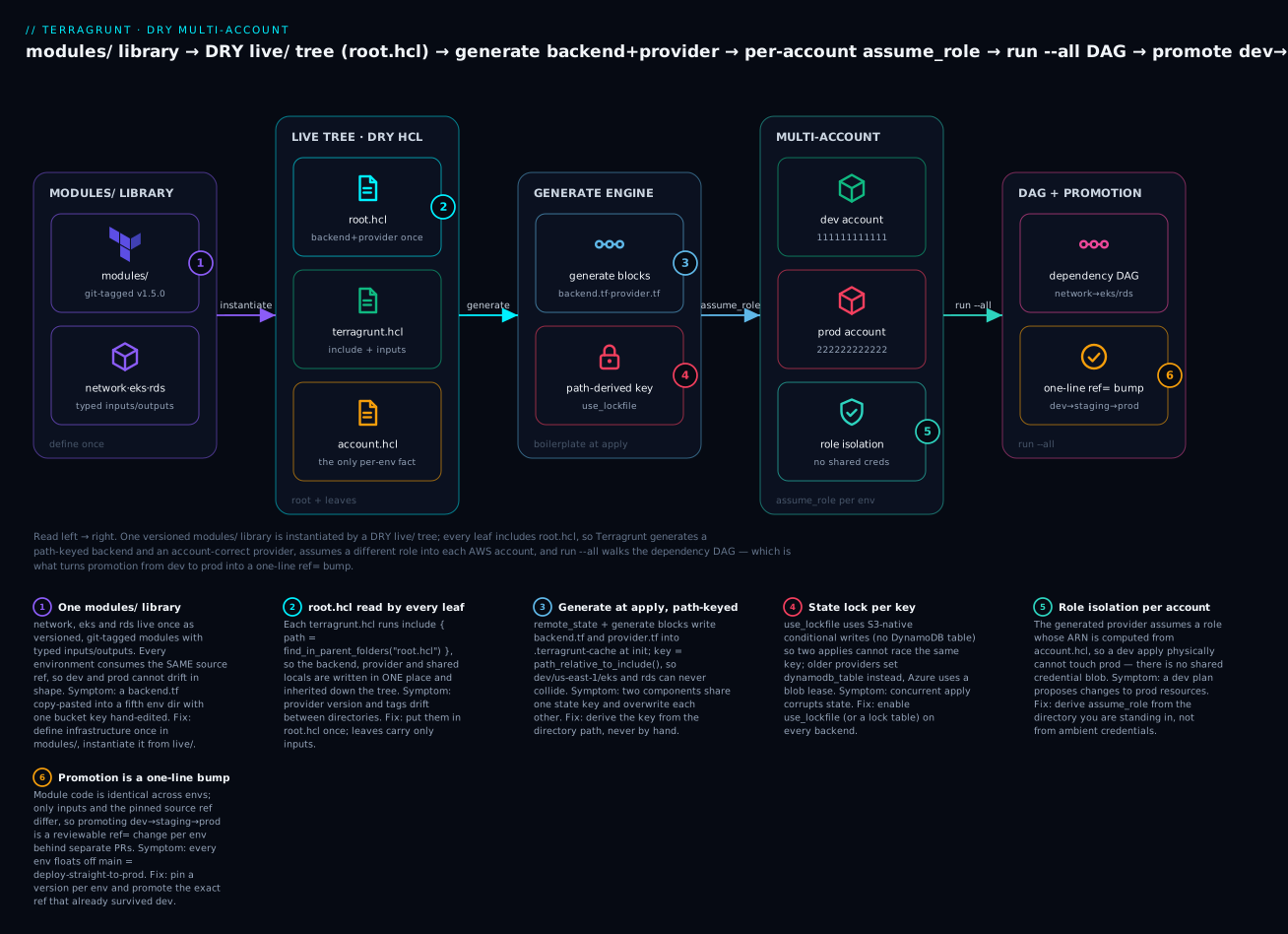
Read the layout left → right: one versioned modules/ library is instantiated by a DRY live/ tree whose root.hcl every leaf includes, so Terragrunt generates a path-keyed backend and an account-correct provider, assumes a different IAM role into each AWS account, and run --all walks the dependency DAG — which is what turns promotion from dev to prod into a single ref= bump.
Before you start, you should be comfortable with Terraform’s backend, provider, and variable/output blocks and know what remote state is — see Terragrunt fundamentals if include, remote_state, and dependency are new to you. After this lesson you can: lay out a live/ + modules/ repo across multiple AWS accounts; generate path-keyed backends and account-scoped providers from one root.hcl; wire inter-module dependencies with safe mock_outputs; run a whole environment in dependency order with run --all; and promote an identical, version-pinned module from dev through prod as a reviewable one-line change.
What Terragrunt actually solves
Plain Terraform forces a choice. Either you use workspaces (one state, branching logic on terraform.workspace, no per-environment provider config) or you copy a root module per environment. The copy approach is honest about isolation but produces duplication: every environment repeats a backend block, a provider block, and a wall of variable defaults that drift apart over time.
Terragrunt is a thin wrapper around the terraform/tofu binary. It does not replace Terraform; it orchestrates it. Each leaf directory holds a terragrunt.hcl that points at a module, declares inputs, and lets Terragrunt generate the boilerplate at apply time. The result: backend keys, provider versions, and account wiring live in exactly one place.
Terragrunt works identically against OpenTofu. Set
TERRAGRUNT_TFPATH=tofu(orterraform_binary = "tofu"in your config) and every command below is unchanged.
1. Repository layout: live vs. modules
Separate the definition of infrastructure (reusable modules) from the instantiation of it (the live tree). Modules can live in this repo or a versioned registry; the live tree is environment-specific and changes constantly.
infra/
  modules/                      # reusable, versioned Terraform modules
    network/
    eks/
    rds/
  live/
    root.hcl                    # account-agnostic shared config
    dev/
      account.hcl               # account_id, account_name
      us-east-1/
        region.hcl              # aws_region
        network/
          terragrunt.hcl
        eks/
          terragrunt.hcl
        rds/
          terragrunt.hcl
    prod/
      account.hcl
      us-east-1/
        region.hcl
        network/
          terragrunt.hcl
        eks/
          terragrunt.hcl
        rds/
          terragrunt.hcl
The hierarchy environment / region / component is the load-bearing convention. The directory path is the identity of a unit of infrastructure, and we will derive the state key directly from it so two components can never collide.
2. Generating backend config with remote_state
Put the backend definition in live/root.hcl once. The key is derived from the relative path between the root config and the leaf, so each component lands at a unique, predictable path in state.
# live/root.hcl
remote_state {
  backend = "s3"

  generate = {
    path      = "backend.tf"
    if_exists = "overwrite_terragrunt"
  }

  config = {
    bucket = "acme-tfstate-${local.account_vars.locals.account_id}"
    key    = "${path_relative_to_include()}/terraform.tfstate"
    region = local.region_vars.locals.aws_region

    encrypt        = true
    use_lockfile   = true
  }
}

locals {
  account_vars = read_terragrunt_config(find_in_parent_folders("account.hcl"))
  region_vars  = read_terragrunt_config(find_in_parent_folders("region.hcl"))
}
A few details that matter for correctness:
path_relative_to_include()returns the path from the included (parent) config to the current unit, e.g.dev/us-east-1/eks. That becomes the state key, so isolation is automatic.if_exists = "overwrite_terragrunt"only overwrites files Terragrunt itself generated, leaving any hand-writtenbackend.tfuntouched.use_lockfile = trueuses S3-native conditional writes for state locking. This is the current approach and removes the need for a DynamoDB lock table; on older Terraform/provider versions you would instead setdynamodb_tablehere.
For an Azure backend the shape is the same, only the config differs:
remote_state {
  backend = "azurerm"
  generate = {
    path      = "backend.tf"
    if_exists = "overwrite_terragrunt"
  }
  config = {
    resource_group_name  = "rg-tfstate"
    storage_account_name = "acmetfstate${local.account_vars.locals.account_id}"
    container_name       = "tfstate"
    key                  = "${path_relative_to_include()}/terraform.tfstate"
  }
}
3. Generating provider config with generate blocks
remote_state only handles the backend. For the provider, use a generate block so every component gets a consistently configured, account-correct provider without repeating it.
# live/root.hcl  (continued)
generate "provider" {
  path      = "provider.tf"
  if_exists = "overwrite_terragrunt"
  contents  = <<EOF
provider "aws" {
  region = "${local.region_vars.locals.aws_region}"

  assume_role {
    role_arn = "arn:aws:iam::${local.account_vars.locals.account_id}:role/terraform-exec"
  }

  default_tags {
    tags = {
      Environment = "${local.account_vars.locals.account_name}"
      ManagedBy   = "terragrunt"
    }
  }
}
EOF
}
This is where multi-account isolation becomes real: each environment’s account.hcl carries a different account_id, so the generated provider assumes a role in the right account. There is no shared credential blob and no chance of pointing a dev apply at prod — the role ARN is computed from the directory you are standing in.
# live/prod/account.hcl
locals {
  account_name = "prod"
  account_id   = "222222222222"
}
# live/dev/account.hcl
locals {
  account_name = "dev"
  account_id   = "111111111111"
}
4. Sharing inputs with include and read_terragrunt_config
Each leaf terragrunt.hcl pulls in the root via an include block. include is what activates the generated backend and provider; without it the leaf would have neither.
# live/dev/us-east-1/network/terragrunt.hcl
include "root" {
  path = find_in_parent_folders("root.hcl")
}

terraform {
  source = "${dirname(find_in_parent_folders("root.hcl"))}/../modules/network"
  # In production, prefer a pinned, versioned source:
  # source = "git::git@github.com:acme/infra-modules.git//network?ref=v1.4.0"
}

locals {
  env_vars = read_terragrunt_config(find_in_parent_folders("account.hcl"))
}

inputs = {
  vpc_cidr            = "10.10.0.0/16"
  environment         = local.env_vars.locals.account_name
  enable_nat_gateway  = true
  single_nat_gateway  = true   # one NAT in dev to save money
}
read_terragrunt_config parses another HCL file and exposes its locals, so common facts (account name, region, org-wide CIDR plan) are defined once and read everywhere. Inputs declared in the leaf are merged with anything from the included config, with the leaf winning — that is exactly the override behavior you want for per-environment tuning.
Pin your module
sourceto a tag or commit in anything beyond a sandbox. An unpinnedsourcemeans a plan today and an apply tomorrow can run different module code. Versioned sources are also what make promotion (Step 7) a deliberate, reviewable act.
5. Wiring dependencies between modules
EKS needs the VPC’s subnet IDs. RDS needs them too. Encode that with a dependency block, which reads another unit’s outputs and exposes them as dependency.<name>.outputs.<key>.
# live/dev/us-east-1/eks/terragrunt.hcl
include "root" {
  path = find_in_parent_folders("root.hcl")
}

terraform {
  source = "${dirname(find_in_parent_folders("root.hcl"))}/../modules/eks"
}

dependency "network" {
  config_path = "../network"

  mock_outputs = {
    vpc_id             = "vpc-00000000000000000"
    private_subnet_ids = ["subnet-1111", "subnet-2222", "subnet-3333"]
  }
  mock_outputs_allowed_terraform_commands = ["validate", "plan", "init"]
}

inputs = {
  cluster_name       = "dev-platform"
  kubernetes_version = "1.31"
  vpc_id             = dependency.network.outputs.vpc_id
  subnet_ids         = dependency.network.outputs.private_subnet_ids
}
The mock_outputs block is the part people get wrong. When you plan the EKS unit and the network has not been applied yet, its real outputs do not exist — the plan would fail trying to read them. Mock values let plan, validate, and init proceed with placeholders. The mock_outputs_allowed_terraform_commands allowlist is critical: it ensures apply and destroy are never fed fake subnet IDs. An apply will only run once the real outputs are available.
Because RDS depends on ../network the same way, Terragrunt now knows the order: network first, then EKS and RDS. You did not write that order anywhere; it is inferred from the dependency graph.
6. run-all for whole-environment plans and applies
run-all walks every terragrunt.hcl under the current directory, builds the dependency DAG, and runs your command in topological order — applying dependencies before dependents and parallelizing independent units.
# Stand up the entire dev/us-east-1 stack in dependency order
cd infra/live/dev/us-east-1
terragrunt run-all plan
terragrunt run-all apply
Two operational notes:
- Always read a
run-all planbefore arun-all apply. Because of mocked outputs, arun-all planon a green field shows approximate plans for downstream modules. Treat it as a sanity check on intent, not a byte-exact preview. - For non-interactive CI, add
--terragrunt-non-interactive. To target a subset, use--terragrunt-include-dir/--terragrunt-exclude-dir. To keep going past a failure during teardown experiments,run-allreports per-unit results so you can see exactly which unit broke.
A minimal CI stage (GitHub Actions) for a single environment:
name: terragrunt-plan
on: [pull_request]

jobs:
  plan:
    runs-on: ubuntu-latest
    permissions:
      id-token: write          # OIDC, no long-lived keys
      contents: read
    steps:
      - uses: actions/checkout@v4
      - uses: aws-actions/configure-aws-credentials@v4
        with:
          role-to-assume: arn:aws:iam::111111111111:role/ci-terraform
          aws-region: us-east-1
      - uses: gruntwork-io/terragrunt-action@v2
        with:
          tg_command: "run-all plan"
          tg_dir: "infra/live/dev/us-east-1"
7. A promotion workflow: dev to staging to prod
Promotion is the payoff. The module code is identical across environments; only the inputs and account wiring differ, and those live in small, reviewable files. A change flows like this:
- Edit the module in
modules/and tag a release, e.g.v1.5.0. - Bump dev by changing the
ref=inlive/dev/.../terragrunt.hcl, open a PR, review therun-all plan, merge, apply. - Bake, then bump staging to
v1.5.0. Same diff, different directory, separate PR. - Promote to prod by changing the same
ref=underlive/prod/.... The prod PR diff is one line, which is precisely what you want a reviewer to see.
Environment-specific behavior stays in inputs, not code. The prod overrides are explicit and isolated:
# live/prod/us-east-1/network/terragrunt.hcl  (inputs only)
inputs = {
  vpc_cidr           = "10.30.0.0/16"
  single_nat_gateway = false   # one NAT per AZ in prod for resilience
}

# live/prod/us-east-1/eks/terragrunt.hcl  (inputs only)
inputs = {
  cluster_name = "prod-platform"
  node_min     = 3
  node_max     = 20
}
Because the backend key is derived from the path and the provider role is derived from account.hcl, the prod state is in the prod account’s bucket and the apply assumes the prod role — guaranteed by structure, not by a runbook step someone might skip.
Keep the module version pinned per environment rather than floating all environments off
main. The whole point of promotion is that prod runs code that already survived dev and staging. If every environment tracksmain, you have re-invented “deploy straight to prod.”
Going deeper
The seven steps above are the recipe. This section is the why underneath the recipe — what Terragrunt is actually doing between your keystroke and Terraform’s, and the design decisions that separate a live/ tree a new hire can read from one that becomes its own legacy system.
The generate lifecycle: what happens between terragrunt apply and terraform apply
When you run terragrunt apply in a leaf, a precise sequence happens before Terraform ever starts:
- Parse and evaluate. Terragrunt reads the leaf
terragrunt.hcland everyincluded config, evaluatinglocals,read_terragrunt_config, and functions likefind_in_parent_folders. - Fetch the source. It copies the module
sourceinto a scratch directory under.terragrunt-cache/(a git source is cloned at the pinnedref). - Generate. It writes the files declared by
remote_stateand everygenerateblock into that scratch directory —backend.tf,provider.tf. - Delegate. It
cds into the scratch directory and runsterraform initwith the backend config, then your actual command.
The if_exists field decides what happens when a generated filename already exists in the source module:
if_exists value |
Behavior | Use when |
|---|---|---|
overwrite_terragrunt |
Overwrite only files a previous Terragrunt run generated (tracked by a signature comment); leave hand-written files alone | Default. Safe even if a module ships its own versions.tf |
overwrite |
Overwrite the file unconditionally | You want Terragrunt to own the file completely |
skip |
Leave the existing file, generate nothing | The module already ships a correct backend/provider |
error |
Fail loudly if the file exists | You want to catch an accidental hand-written backend.tf |
remote_state is essentially a specialised generate "backend" block: it writes a backend.tf and wires the values into terraform init -backend-config, whereas a bare generate block only writes a file. That is why you use remote_state for the backend and generate for the provider. (The Terragrunt blocks, functions & hooks deep-dive enumerates every block and function in this pipeline.)
find_in_parent_folders, include, and the config hierarchy
find_in_parent_folders("account.hcl") walks up the directory tree from the current leaf and returns the path of the first account.hcl it meets, erroring if it reaches the filesystem root without a hit. Give it a second argument to return a fallback instead of erroring:
locals {
  region_vars = read_terragrunt_config(
    find_in_parent_folders("region.hcl", "${get_terragrunt_dir()}/region.hcl")
  )
}
The path functions are a frequent source of confusion because they answer different questions:
| Function | Answers | Example value |
|---|---|---|
path_relative_to_include() |
Path from the included parent config to this unit | dev/us-east-1/eks |
path_relative_from_include() |
Path from this unit back up to the parent | ../../../.. |
get_terragrunt_dir() |
Absolute dir of the current terragrunt.hcl |
/repo/live/dev/us-east-1/eks |
get_parent_terragrunt_dir() |
Absolute dir of the included root config |
/repo/live |
path_relative_to_include() is what makes the state key both unique and human-readable — it is the directory identity, projected into the state bucket.
A leaf can carry more than one include. Label them and Terragrunt merges them in order; add merge_strategy = "deep" so nested maps combine instead of replacing, and expose = true to reference a parent’s parsed content as include.<label>.<...>:
include "root" {
  path = find_in_parent_folders("root.hcl")
}

include "envcommon" {
  path           = "${dirname(find_in_parent_folders("root.hcl"))}/_envcommon/eks.hcl"
  merge_strategy = "deep"
  expose         = true
}
Layering _envcommon for component-shared config
root.hcl holds what every unit shares (backend, provider). But the EKS defaults that are identical across dev, staging, and prod — the add-ons list, the OIDC settings, the module version — belong one level down, in a per-component common file. Put them in live/_envcommon/eks.hcl:
# live/_envcommon/eks.hcl
locals {
  source_base = "git::git@github.com:acme/infra-modules.git//eks"
  module_ref  = "v1.5.0"
}

terraform {
  source = "${local.source_base}?ref=${local.module_ref}"
}

inputs = {
  kubernetes_version = "1.31"
  enable_irsa        = true
  cluster_addons     = ["vpc-cni", "coredns", "kube-proxy"]
}
The dev leaf then shrinks to only what is genuinely dev-specific:
# live/dev/us-east-1/eks/terragrunt.hcl
include "root" {
  path = find_in_parent_folders("root.hcl")
}
include "envcommon" {
  path           = "${dirname(find_in_parent_folders("root.hcl"))}/_envcommon/eks.hcl"
  merge_strategy = "deep"
}

dependency "network" {
  config_path = "../network"
  mock_outputs = {
    vpc_id             = "vpc-00000000000000000"
    private_subnet_ids = ["subnet-1111", "subnet-2222", "subnet-3333"]
  }
  mock_outputs_allowed_terraform_commands = ["validate", "plan", "init"]
}

inputs = {
  cluster_name = "dev-platform"
  node_min     = 1
  node_max     = 4
  vpc_id       = dependency.network.outputs.vpc_id
  subnet_ids   = dependency.network.outputs.private_subnet_ids
}
Deep merge means cluster_name and the node bounds are added while kubernetes_version and cluster_addons are inherited. Promotion to prod is then the same file with node_min = 3, node_max = 20 — and, when you cut v1.6.0, a single module_ref bump in a prod-scoped _envcommon (or a per-env override) that each environment picks up in the order you promote it.
dependency vs dependencies, and getting mock_outputs right
Two different blocks control ordering, and they are not interchangeable:
| Block | Reads outputs? | Purpose |
|---|---|---|
dependency "net" { config_path = ... } |
Yes — exposes dependency.net.outputs.* |
Pass one unit’s outputs into another’s inputs |
dependencies { paths = [...] } |
No | Force apply/destroy ordering when you don’t need the values |
The dependency block attributes worth knowing:
| Attribute | What it does |
|---|---|
mock_outputs |
Placeholder outputs used before the dependency is applied |
mock_outputs_allowed_terraform_commands |
The allowlist of commands that may see the mocks — exclude apply/destroy |
mock_outputs_merge_strategy_with_state |
shallow/deep — merge mocks with any real outputs already in state, so a partially-applied dependency uses real values where it has them |
skip_outputs |
Set true to use only mocks and never read real state (fast plans, ordering-only deps) |
The rule to burn in: mocks exist so plan/validate/init can run on a green field; the allowlist is what stops apply from ever writing a fake subnet-1111 into a real cluster. If you catch yourself adding apply to that list to “make the error go away,” you are about to build infrastructure on placeholder IDs.
Per-account providers and role assumption
The generated provider is the entire cross-account safety story. Because its role_arn is computed from account.hcl, standing in live/prod/... produces a provider that assumes the prod role; standing in live/dev/... produces the dev role. Harden it with a session name and an external ID:
provider "aws" {
  region = "${local.region_vars.locals.aws_region}"

  assume_role {
    role_arn     = "arn:aws:iam::${local.account_vars.locals.account_id}:role/terraform-exec"
    session_name = "terragrunt-${local.account_vars.locals.account_name}"
    external_id  = "${local.account_vars.locals.account_name}-tg"
  }

  default_tags {
    tags = {
      Environment = "${local.account_vars.locals.account_name}"
      ManagedBy   = "terragrunt"
    }
  }
}
Locally, engineers set a base profile (AWS_PROFILE) whose credentials are merely allowed to assume those per-account roles; in CI, an OIDC token assumes a bootstrap role that can in turn assume the exec role. Either way there is no long-lived key in the repo, and the blast radius of any single credential is one account. This is the difference between “we have a policy that you shouldn’t apply dev config to prod” and “the dev credential cannot reach prod, full stop.”
DRY vs. explicitness — the tradeoff nobody warns you about
Terragrunt makes it possible to remove all duplication. That is not the same as wise. Deep include chains and clever read_terragrunt_config graphs can produce a live/ tree where a new hire cannot tell what a leaf will actually deploy without running terragrunt render (newer builds: terragrunt render --format json). A useful split:
DRY it (put in root.hcl / _envcommon) |
Keep it explicit (in the leaf) |
|---|---|
| Backend config and state-key derivation | CIDR ranges and subnet plans |
Provider config, assume_role, default_tags |
Instance / node sizes and counts |
| Provider version constraints | Feature flags (single vs. multi-AZ NAT) |
| Org-wide tags and naming conventions | Anything a reviewer must see to approve a prod change |
The reviewer test is the tiebreaker: if hiding a value in a shared file would make a prod PR diff misleading, keep that value in the leaf. DRY is a means to fewer mistakes, not an end in itself — a config so abstract that no human can predict its output has traded one class of error for a worse one.
Drift across accounts
State is isolated per unit, so drift is per-unit too — a manual change to the dev cluster does not show up when you plan prod. Detect it on a schedule with a non-interactive plan that signals on any change:
# Nightly drift sweep across an environment; -detailed-exitcode returns 2 on changes
terragrunt run --all plan \
  --terragrunt-non-interactive \
  --terragrunt-working-dir infra/live/prod \
  -- -detailed-exitcode -lock=false
Terragrunt aggregates the child exit codes, so any unit reporting 2 surfaces as a non-zero job exit — route that to an alert. Because each unit has its own state and its own generated provider, the report tells you exactly which component in which account drifted — prod/us-east-1/rds and nothing else — instead of one giant undifferentiated plan. Run it per account (or over all of live/) and you get a per-environment drift dashboard for free. For the state-scale side of this — many small states versus few large ones — see remote state at scale.
The current direction: the CLI redesign and Stacks
Recent Terragrunt renamed the *-all commands: run --all plan supersedes run-all plan (and the long-deprecated plan-all/apply-all); the old forms still work but print a deprecation warning, which is why this article shows run-all in the core steps and run --all here. The include/exclude flags were likewise renamed toward --queue-include-dir / --queue-exclude-dir. Newer still is Terragrunt Stacks — a terragrunt.stack.hcl that declares reusable unit and stack blocks with a values map, generating a live/-style tree from one file instead of hand-maintaining every leaf. It is the natural next step once the hand-written live/ tree itself starts to feel repetitive; the Terragrunt Stacks deep-dive covers it.
Verify
Confirm the wiring does what you think before trusting it.
# 1. Inspect the generated files for one unit (do not commit these)
cd infra/live/dev/us-east-1/eks
terragrunt init
cat backend.tf provider.tf      # exception to the usual no-cat rule: confirm generation

# 2. Confirm the dependency graph and apply order
cd infra/live/dev/us-east-1
terragrunt graph-dependencies    # emits Graphviz DOT; pipe to `dot -Tpng` if desired

# 3. Validate every unit without touching cloud state
terragrunt run-all validate

# 4. Confirm state isolation: keys must differ per component
aws s3 ls s3://acme-tfstate-111111111111/dev/us-east-1/ --recursive
You are looking for three things: each unit generated its own backend.tf/provider.tf, the dependency graph shows network upstream of eks and rds, and the S3 listing shows distinct keys like dev/us-east-1/network/terraform.tfstate and dev/us-east-1/eks/terraform.tfstate.
Checklist
When Terragrunt is the wrong tool
Terragrunt earns its keep when you have many near-identical stacks across accounts and regions. It is overhead you should decline when:
- You have one or two environments. Two copied root modules are easier to read than a generated-config indirection layer a new hire has to learn.
- Your platform has a native equivalent. Terraform stacks (HCP/Terraform) and workspace-per-environment cover a real slice of this. If you are all-in on Terraform Cloud, evaluate it before adding Terragrunt.
- You can express it as one configurable module. If environments differ only by variable values and you are comfortable with workspaces, a single root with
*.tfvarsper environment may be enough.
The exit ramp matters too. Because Terragrunt only generates standard Terraform files and calls the normal binary, leaving is tractable: commit the generated backend.tf/provider.tf, inline the inputs as .tfvars, and you are back to vanilla Terraform with state intact. Adopt it for the duplication it removes, not because it is fashionable — and keep the generated output boring enough that walking away is always an option.
Practice challenges
Work these against the infra/live layout from this article. Replace the placeholder account IDs with your own. You can check most of them without any cloud access using terragrunt render and terragrunt run --all validate.
1. (Beginner) Derive the state key. A new unit lives at live/prod/us-east-1/rds/terragrunt.hcl and includes root.hcl from live/. What state key will remote_state write, and why can it never collide with the EKS unit next to it?
<details> <summary>Solution</summary>
The key is prod/us-east-1/rds/terraform.tfstate.
Why: the backend config sets key = "${path_relative_to_include()}/terraform.tfstate", and path_relative_to_include() returns the directory path from the included root.hcl down to this unit — prod/us-east-1/rds. That path is unique per directory, so the EKS unit next door lands at prod/us-east-1/eks/terraform.tfstate and the two can never overwrite each other.
</details>
2. (Beginner) Add a second region. Stand up dev/eu-west-1 alongside dev/us-east-1. What is the minimum you must add, and what changes in the generated backend and provider?
<details> <summary>Solution</summary>
Add live/dev/eu-west-1/region.hcl with locals { aws_region = "eu-west-1" }, then the component directories (each an include "root" + terraform.source + inputs).
Why: account.hcl is inherited from dev/, so only the region fact and the leaves are new. The generated provider’s region and the backend’s region/key are recomputed from the new directory path plus region.hcl, giving fully isolated state under dev/eu-west-1/... with no change to root.hcl.
</details>
3. (Intermediate) A correct dependency block. RDS needs the VPC’s vpc_id and private_subnet_ids from ../network. Write the dependency block so plan works on a green field but apply can never use fake IDs.
<details> <summary>Solution</summary>
dependency "network" {
  config_path = "../network"

  mock_outputs = {
    vpc_id             = "vpc-00000000000000000"
    private_subnet_ids = ["subnet-1111", "subnet-2222", "subnet-3333"]
  }
  mock_outputs_allowed_terraform_commands = ["validate", "plan", "init"]
}
Why: the allowlist omits apply and destroy, so those commands demand the network’s real outputs and error out until the network is applied — mocks only ever unblock read-only commands.
</details>
4. (Intermediate) Extract _envcommon. Both the dev and prod EKS leaves repeat kubernetes_version and cluster_addons. Extract them so each leaf keeps only its size and name, yet prod can still override the version during a staged upgrade.
<details> <summary>Solution</summary>
Create live/_envcommon/eks.hcl with a terraform { source = "...?ref=v1.5.0" } and inputs = { kubernetes_version = "1.31", cluster_addons = ["vpc-cni","coredns","kube-proxy"] }. In each leaf add:
include "envcommon" {
  path           = "${dirname(find_in_parent_folders("root.hcl"))}/_envcommon/eks.hcl"
  merge_strategy = "deep"
}
and leave only cluster_name / node_min / node_max in the leaf’s inputs.
Why: deep merge inherits the shared inputs while letting the leaf add or override keys, so a prod-only kubernetes_version = "1.32" in the leaf wins over the common 1.31 for a controlled, one-environment-at-a-time upgrade.
</details>
5. (Advanced) Cross-account drift gate in CI. Write a step that fails the job when any unit under live/ has drifted, across all accounts, without prompting for input.
<details> <summary>Solution</summary>
terragrunt run --all plan \
  --terragrunt-non-interactive \
  --terragrunt-working-dir infra/live \
  -- -detailed-exitcode -lock=false
Why: -detailed-exitcode makes Terraform return 2 when a plan has changes; Terragrunt aggregates the child exit codes, so any drifted unit surfaces as a non-zero job exit that fails the step and can trigger an alert. --terragrunt-non-interactive stops it blocking on prompts, and -lock=false avoids taking a lock for a read-only sweep.
</details>
6. (Advanced) Promote v1.5.0 to prod. v1.4.0 runs in prod; v1.5.0 is baked in dev and staging. What is the exact prod change, and what two structural facts guarantee the prod apply lands in the prod account and prod state — not dev’s?
<details> <summary>Solution</summary>
Edit the single ref= (or the module_ref local if prod is promoted through _envcommon) under live/prod/... from v1.4.0 to v1.5.0, open a prod-only PR, review the one-line run-all plan, then apply.
Why: (1) the backend key is derived from the live/prod/... path, so state is written to the prod bucket under a prod key; (2) the generated provider’s assume_role ARN is computed from prod/account.hcl, so the apply assumes the prod role. Structure — not a runbook step someone could skip — pins the apply to the prod account and prod state.
</details>
Common beginner mistakes
- “Terragrunt is a different language that replaces Terraform.” No — it is a thin wrapper that shells out to the normal
terraform/tofubinary, and everything it produces is standard Terraform. Right model: Terragrunt orchestrates Terraform; it does not reimplement it, which is exactly why the exit ramp is cheap. - “I should commit the generated
backend.tfandprovider.tf.” No — they are regenerated into.terragrunt-cache/on every run and belong in.gitignore. Commit theterragrunt.hclthat describes them. (Commit the generated files only as a deliberate step of leaving Terragrunt.) - “I’ll add
applytomock_outputs_allowed_terraform_commandsto fix the error.” That lets a real apply run on placeholder IDs. Right model: the error is correct — apply the dependency first; mocks are for read-only commands only. - “
run-all planon a green field is an accurate prod preview.” No — downstream units show approximate plans built from mocked outputs. Right model: treat it as an intent sanity-check; the exact plan appears once dependencies are applied. - “Point every environment’s
sourceatmainso fixes land everywhere at once.” That is deploy-straight-to-prod with extra steps. Right model: pin a version per environment and promote it dev → staging → prod so prod only ever runs code that already survived the lower environments. - “
find_in_parent_foldersfinds a file anywhere in the repo.” No — it walks strictly up from the current directory and returns the first match, erroring if there is none. Right model: parent facts must physically live above the leaf in the tree. - “Terragrunt does the state locking for me.” No — the backend does (
use_lockfilefor S3, a lock table on older setups, a blob lease on Azure). Terragrunt only generates that backend config. Right model: locking is a backend feature you must enable. - “DRY means removing every repeated value.” Over-abstraction hides the values a reviewer needs to see. Right model: DRY the boilerplate (backend, provider, versions); keep environment-shaping values (CIDRs, sizes, feature flags) explicit in the leaf.
- “
path_relative_to_include()andpath_relative_from_include()are interchangeable.” They point in opposite directions — one is the path down to the unit (your state key), the other is the path back up to the parent. Swapping them corrupts your state layout.
Glossary
- Terragrunt — A thin wrapper around the
terraform/tofubinary that generates boilerplate (backend, provider) and orchestrates multiple modules, so you don’t repeat config per environment. - Unit — A single leaf
terragrunt.hcland the one module instance it configures; the atom Terragrunt plans and applies. root.hcl— The one shared, account-agnostic config every leafincludes; holdsremote_state,generate, and commonlocals. (Older setups named itterragrunt.hclat the root, which caused confusion with leaves.)terragrunt.hcl— A leaf config: itincludes the root, pointsterraform.sourceat a module, and declaresinputs.remote_stateblock — Declares the backend once; it both writes abackend.tfand wiresterraform init -backend-config. Thekeyis usually derived from the directory path.generateblock — Writes an arbitrary file (typicallyprovider.tf) into the module directory before Terraform runs;if_existscontrols collisions.includeblock — Pulls a parent config (e.g.root.hcl) into a leaf; it is what activates the generated backend and provider. Multiple labeled includes merge in order.find_in_parent_folders(name)— Walks up the directory tree and returns the first matching file’s path (or a supplied fallback), erroring if none is found.path_relative_to_include()— The path from the included parent down to the current unit; the canonical source of a unique, readable state key.read_terragrunt_config(path)— Parses another HCL file and exposes itslocals, so per-environment facts (account, region) are defined once and read anywhere.inputs— The map Terragrunt passes to the module as Terraform variables; leaf inputs override included ones.dependencyblock — Reads another unit’s outputs and exposes them asdependency.<name>.outputs.<key>, also creating an apply-ordering edge.dependenciesblock — Declares ordering-only edges (paths = [...]) without reading outputs.mock_outputs— Placeholder output values adependencysupplies so read-only commands can run before the real unit is applied; gated by an allowlist.run --all(formerlyrun-all) — Walks every unit under a directory, builds the dependency DAG, and runs a command in topological order, parallelizing independent units.- DAG (dependency graph) — The directed acyclic graph Terragrunt infers from
dependency/dependenciesblocks; it decides apply order (e.g. network before eks/rds). _envcommon— A convention for per-component config shared across all environments,included alongsideroot.hclso leaves shrink to only what differs.- Promotion — Shipping an identical, version-pinned module from dev → staging → prod by bumping the
ref=per environment behind separate PRs. assume_role— The provider setting that makes Terragrunt take on a per-account IAM role computed fromaccount.hcl, isolating each environment’s blast radius.- Path-derived state key — A state key computed from the directory path so two components can never share (and overwrite) each other’s state.
.terragrunt-cache— The scratch directory where Terragrunt copies the module source and writes generated files before running Terraform; git-ignored.- Drift — Real infrastructure diverging from what the code says; detected per-unit with a scheduled
run --all plan -detailed-exitcode. - OpenTofu — The open-source Terraform fork; Terragrunt drives it identically via
TERRAGRUNT_TFPATH=tofuorterraform_binary = "tofu". - Terragrunt Stacks — The newer
terragrunt.stack.hclmodel that declares reusableunit/stackblocks with avaluesmap to generate alive/tree from one file.
Next steps
Add a _envcommon/ layer for component config shared across all environments (the EKS inputs that never change between dev and prod), include it alongside root.hcl, and let each environment override only what truly differs. That collapses the last of the duplication and makes the promotion diff smaller still.