A team ran a webhook handler on a dedicated VM. The VM cost money every hour of every day even though the endpoint received a few thousand calls between 9am and 6pm and nothing overnight. Worse, the VM needed patching, the disk filled with logs nobody read, and a kernel update once took the endpoint down for forty minutes. Moving the handler to Azure Functions cut the compute bill by roughly 90%, removed the patching entirely, and — because the platform scaled the handler from zero to dozens of instances on its own — survived a traffic spike that would have toppled the single VM. That is the serverless trade in one story: you stop renting a machine and start renting executions, and you hand the platform the jobs (provisioning, scaling, patching, load-balancing) you used to do by hand.
Azure Functions is Azure’s Functions-as-a-Service offering: you write a function — a small piece of code with a single entry point — and declare the event that triggers it (an HTTP request, a queue message, a blob upload, a timer, a Cosmos DB change) plus the inputs and outputs it binds to (read a document, write to a queue, push to Event Hubs) declaratively, so you write logic, not client boilerplate. The platform runs your function only when its trigger fires, scales the number of concurrent instances to match the event rate, and — on the serverless plans — bills you per execution and per gigabyte-second of memory, dropping to zero when nothing is happening. This is the natural home for glue code, automation, event processing, lightweight APIs and scheduled jobs.
This article is the working reference a senior engineer keeps open. We go plan by plan (Consumption, Flex Consumption, Premium, Dedicated and Container Apps), trigger by trigger and binding by binding, through the scale controller that decides how many instances you get and the cold start that makes the first request slow, into concurrency and partitioning (the knobs that decide throughput and ordering), and across the Durable Functions patterns — function chaining, fan-out/fan-in, async HTTP, monitor, human interaction and aggregator — that let stateless functions run stateful, long-running workflows. Every concept carries the real limits (timeouts, payload sizes, instance caps), an az/Bicep snippet where it applies, and — because half of all Functions incidents are the same dozen mistakes — a symptom→cause→confirm→fix playbook. Read the prose once; keep the tables open when you are building or on call.
By the end you will know which plan to pick and what each one actually fixes, why your function fired twice and how to make that safe, why messages piled up in a poison queue at 2am, why a Premium plan still cold-started, and how to wire identity, networking and observability so the thing is production-grade rather than a demo that happened to ship.
What problem this solves
Most real work in a cloud system is event-shaped, not request-shaped. A file lands in storage and needs a thumbnail. An order message arrives on a queue and needs validating. A timer fires at 02:00 and a cleanup must run. A row changes in Cosmos DB and a downstream cache must update. A webhook calls in and a record must be written. None of these need a server sitting idle waiting; they need code that runs when the event happens and then stops. Running that code on always-on infrastructure (a VM, an always-warm App Service, a Kubernetes deployment) means paying 24/7 for capacity used a fraction of the time, plus owning the patching, scaling rules and load-balancing yourself.
Without serverless, the pain is concrete: you over-provision for the peak (a flash sale, a nightly batch) and waste money the other 23 hours; or you under-provision and the spike takes you down. You write the same connection-management, retry and dead-letter plumbing for every integration. You patch OS and runtime on a schedule that competes with shipping features. You build autoscaling rules and hope they react fast enough. And when traffic genuinely goes to zero overnight, you keep paying anyway.
Who hits this: anyone building integrations and automation (the classic “glue” between SaaS, queues, storage and databases), event processors (image/file pipelines, IoT and telemetry, change-feed reactors), lightweight or spiky APIs (webhooks, back-office endpoints, bursty public APIs), and scheduled jobs (reports, cleanups, syncs). Azure Functions removes the server from all of them — you provide the handler and the trigger, Azure provides everything else. But it is not a universal hammer: long-running compute, very low-latency APIs that cannot tolerate any cold start, and workloads that need persistent local state fit other models better, and a big part of using Functions well is knowing where its edges are.
The whole field, framed before the deep dive — the event source, the question it forces, and where Functions fits:
| Workload shape | What triggers it | The serverless win | When Functions is wrong |
|---|---|---|---|
| Webhook / lightweight API | HTTP request | Scale-to-zero; pay per call; no VM | Strict sub-100 ms p99 with no cold-start tolerance |
| Event/stream processing | Queue, Event Hubs, Service Bus, Event Grid | Auto-scale to the backlog; built-in checkpointing | Heavy stateful stream joins (use Stream Analytics/Flink) |
| File / blob pipeline | Blob trigger / Event Grid on Storage | Runs per file; fans out automatically | Very high-rate blob events (prefer Event Grid source) |
| Scheduled job | Timer (CRON) | No always-on host for a nightly task | Sub-second scheduling precision |
| Change reactor | Cosmos DB / SQL change feed | Reacts to data changes without polling | Need transactional consistency across writes |
| Long workflow / orchestration | Durable Functions | Stateful, long-running, checkpointed | Single sub-second synchronous call |
Learning objectives
By the end of this article you can:
- Choose the right hosting plan (Consumption, Flex Consumption, Premium/Elastic Premium, Dedicated/App Service, Container Apps) for a given latency, scale, networking and cost profile — and explain what each one fixes.
- Wire any of the core triggers (HTTP, Timer, Queue Storage, Service Bus, Event Hubs, Event Grid, Blob, Cosmos DB) and use input/output bindings to read and write Azure services without client boilerplate.
- Explain how the scale controller decides instance count per trigger type, why cold starts happen, and how Always Ready/pre-warmed instances, Flex
alwaysReadyand concurrency tuning reduce them. - Tune concurrency, batching and partitioning (host.json
batchSize,maxConcurrentCalls, Event Hubs partitions, sessions) to trade throughput against ordering and downstream pressure. - Implement the Durable Functions patterns — function chaining, fan-out/fan-in, async HTTP API, monitor, human interaction and aggregator (entities) — and reason about replay, determinism and the task hub.
- Make event handlers idempotent and poison-safe: handle at-least-once delivery, retries, dead-letter/poison queues and out-of-order events.
- Secure and isolate a function app with managed identity, Key Vault references, VNet integration and private endpoints, and observe it with Application Insights end to end.
- Read the limits and error reference (timeouts, payload sizes, instance caps, host errors) and right-size cost on the serverless and Premium plans.
Prerequisites & where this fits
You should be comfortable with the Azure basics: a resource group, an App Service plan vs a serverless plan, running az in Cloud Shell, reading JSON output, and the idea of a managed identity. Familiarity with HTTP, queues and JSON helps; you do not need deep Kubernetes or messaging-broker knowledge — we build it up. A function app always needs a backing storage account (it stores triggers’ state, the Durable task hub, and runtime metadata there), so a passing familiarity with Azure Storage account fundamentals is useful.
This sits in the Compute / Serverless track and is the event-driven sibling of the request-driven PaaS world. The decision of whether serverless functions are the right compute at all lives upstream in Azure App Service vs Container Apps vs AKS; read that first if you are still choosing a model. Once you are running Functions in production, the operational reflexes transfer directly from Troubleshooting Azure App Service: 502/503, Cold Starts & Restart Loops — the front-end/worker mental model and Application Insights workflow are the same. Functions almost always read secrets via Azure Key Vault: Secrets, Keys & Certificates and config via Azure App Configuration: Feature Flags, Dynamic Config & Key Vault References, and you observe them through Azure Monitor & Application Insights for Observability. When a function needs private outbound to a database, Azure Private Endpoint vs Service Endpoint is the networking decision it forces.
A quick map of who owns what when a function misbehaves, so you escalate to the right place fast:
| Layer | What lives here | Who usually owns it | Failure classes it causes |
|---|---|---|---|
| Event source (queue/hub/blob) | Messages, partitions, backlog | App / platform team | Backlog growth, duplicate delivery, ordering |
| Trigger + scale controller | Instance count decision, polling | Microsoft (platform) | Slow scale-out, no scale (host down), cold start |
| Function host (runtime) | Your code, bindings, concurrency | App / dev team | Crash, timeout, throttled downstream, OOM |
| Backing storage account | Trigger state, Durable task hub | App + platform | Host won’t start, Durable stalls, throttling |
| Identity & config | Managed identity, KV refs, settings | App + platform | Boot failure, 403 to dependencies |
| Network (VNet / PE) | Outbound to DB/PaaS, DNS | Platform + network | Timeouts, name-resolution failures |
Core concepts
Six mental models make every later section obvious.
A function is a handler plus a trigger. The unit of work is a function: one entry point with exactly one trigger (the event that starts it) and zero or more bindings (declarative inputs and outputs). One or more functions live inside a function app, which is the deployment, scaling and configuration boundary — the function app is what you create, scale, give an identity, and put on a plan. All functions in an app share the app’s plan, settings, identity and storage account.
The trigger defines the contract; bindings remove the boilerplate. A trigger delivers an event payload and starts execution (an HTTP request body, a queue message, a blob stream). An input binding hands your function data pulled from a service before it runs (a Cosmos DB document keyed off the trigger); an output binding writes your function’s return value to a service after it runs (append to a queue, upsert a document). Bindings are declared in attributes/decorators or function.json, so the SDK manages the client, connection and serialization for you — you read and write parameters, not SDK objects.
The platform decides scale; you decide concurrency. Azure does not run your function on a server you manage. A component called the scale controller watches each trigger’s signal (HTTP request rate, queue length, Event Hubs lag) and adds or removes instances (worker sandboxes) to keep up — from zero to the plan’s maximum. Within each instance, concurrency settings decide how many invocations run at once. Scale (instances) is the platform’s job; concurrency (per-instance parallelism) is yours, and the two multiply into throughput.
Stateless by default; stateful on purpose. A plain function is stateless — it must not rely on in-memory state surviving between invocations, because the next invocation may run on a different instance (or the instance may have been recycled). State lives outside the function (a database, a queue, a cache). When you genuinely need stateful, long-running coordination — “call A, then B, wait for approval, then C” running for minutes, hours or days — Durable Functions provides it via an orchestrator that checkpoints its progress to storage and replays deterministically.
Delivery is at-least-once; design for it. Queue, Service Bus, Event Hubs and Event Grid triggers deliver at least once — under retries, redelivery or scale events, your function can see the same message more than once and events can arrive out of order. This is not a bug to fix; it is a property to design around with idempotency (processing the same event twice has the same effect as once) and poison/dead-letter handling (a message that keeps failing is set aside, not retried forever).
No server, but always a storage account. “Serverless” means you do not manage servers — it does not mean there is no state. Every function app is bound to a storage account (the AzureWebJobsStorage connection) that holds runtime metadata, trigger leases/checkpoints, the Durable task hub, and (for some plans) the deployment package. If that storage account is unreachable, throttled, or its keys rotate without updating the setting, the host fails to start — a surprising amount of “Functions is down” is really “the storage account is unhappy.”
The vocabulary in one table
Pin down every moving part before the deep sections. The glossary repeats these for lookup; this is the mental model side by side:
| Term | One-line definition | Where it lives | Why it matters |
|---|---|---|---|
| Function | One handler with one trigger + bindings | Inside a function app | The unit of execution and billing |
| Function app | Deployment/scaling/config boundary | On a plan | What you create, scale, give identity |
| Trigger | The event that starts a function | Per function | Defines payload + scaling signal |
| Binding | Declarative input/output to a service | Per function | Removes client boilerplate |
| Hosting plan | Where/how the app runs and is billed | Per function app | Decides scale, cold start, cost, networking |
| Scale controller | Platform component that adds/removes instances | Microsoft-managed | Decides how fast you scale to load |
| Instance | A worker sandbox running your app | On the plan | Cold start happens when a new one spins up |
| Concurrency | Invocations running at once per instance | host.json / settings | Throughput vs downstream pressure |
| Cold start | First-request latency on a fresh instance | Instance lifecycle | Slow first call; mitigated, not eliminated |
AzureWebJobsStorage |
The app’s backing storage connection | App setting | Host won’t start if it’s broken |
| Durable Functions | Stateful orchestration on top of Functions | Extension + task hub | Long-running, checkpointed workflows |
| Task hub | Durable’s state store (queues + tables) | In the storage account | Where orchestration progress is persisted |
| Poison / dead-letter | Where repeatedly-failing messages go | Queue/Service Bus | Stops infinite retry of a bad message |
| Managed identity | The app’s Entra identity for auth | On the function app | Passwordless access to KV/DB/Storage |
Hosting plans: pick the one that fits, not the cheapest by default
The single highest-leverage decision is the hosting plan. It determines how the app scales, whether it ever scales to zero, how cold starts behave, what networking it can do, the maximum timeout, and how you are billed. Picking “Consumption because it’s cheapest” and then fighting cold starts and VNet limits for a month is the most common early mistake.
There are five plans in practice. Consumption is the original serverless plan: scale-to-zero, pay per execution, modest cold starts, a hard 10-minute timeout. Flex Consumption is the modern serverless plan: scale-to-zero and fast per-instance concurrency control, VNet integration, alwaysReady instances to kill cold starts, and per-instance memory you choose — it is the default new-build recommendation. Premium (Elastic Premium, EP) gives pre-warmed instances (no cold start), VNet integration, longer/unbounded timeouts and more memory, billed per vCPU/GB allocated. Dedicated (App Service plan) runs Functions on a plan you already pay for (good for steady load or co-locating with web apps), with no scale-to-zero. Container Apps hosts a containerized function app on the Container Apps/KEDA platform when you want microservices, Dapr, or container parity.
Lay the five plans side by side on the axes that actually decide the choice:
| Plan | Scale-to-zero | Cold starts | Max timeout | VNet integration | Billing model | Best for |
|---|---|---|---|---|---|---|
| Consumption | Yes | Yes (modest) | 5 min default, 10 min max | No (legacy: limited) | Per-execution + GB-s | Spiky/low-traffic glue, demos |
| Flex Consumption | Yes | Yes — killed with alwaysReady |
Configurable, long | Yes (built-in) | Per-execution + GB-s + alwaysReady | New serverless builds (default) |
| Premium (EP1–EP3) | No (min 1) | None (pre-warmed) | Unbounded (default 30 min) | Yes | Per vCPU/GB allocated (always-on) | Steady + need warm + VNet + long runs |
| Dedicated (App Service) | No | Per App Service rules | Unbounded (Always On) | Yes | App Service plan (instance-hours) | Co-locate with web apps; predictable load |
| Container Apps | Yes (to 0 via KEDA) | Yes (scale-from-zero) | Long (revision-based) | Yes | vCPU/GB per second | Containers, Dapr, microservices parity |
The same plans as a capability grid against the features people actually need:
| Capability | Consumption | Flex Consumption | Premium (EP) | Dedicated | Container Apps |
|---|---|---|---|---|---|
| Scale to zero | Yes | Yes | No | No | Yes |
| Pre-warmed / always-ready | No | Yes (alwaysReady) |
Yes (pre-warmed count) | n/a (Always On) | No (min replicas) |
| VNet integration | No | Yes | Yes | Yes | Yes |
| Per-instance concurrency control | Limited | Yes | Yes | Yes | Yes (KEDA) |
| Choose instance memory | No | Yes | Yes (EP SKU) | Yes (SKU) | Yes |
| Unbounded execution time | No (10 min) | Long | Yes | Yes | Long |
| Deployment slots | No | (evolving) | Yes | Yes | Revisions |
| Linux + Windows | Both | Linux | Both | Both | Linux (containers) |
And the decision as a table — match what you’re feeling to the plan that fixes it:
| If you need… | Because… | Pick |
|---|---|---|
| Cheapest possible for bursty/low traffic | You pay nothing at idle | Consumption (or Flex) |
| Scale-to-zero plus no cold start plus VNet | Modern serverless, private deps | Flex Consumption |
| Zero cold start with steady load and long runs | Latency-sensitive, > 10 min jobs | Premium (EP) |
| To run on a plan you already pay for | Co-located web apps, steady load | Dedicated |
| Container image, Dapr, or K8s-style ops | Microservice parity | Container Apps |
| Strict isolation / dedicated tenancy | Compliance, ASE-style | Premium on ASE / Dedicated |
Create a Flex Consumption app (the modern default) with az:
RG=rg-fn-prod
LOC=centralindia
STG=stfnprod$RANDOM            # storage account (globally unique)
APP=fn-orders-prod-$RANDOM     # function app (globally unique)

az group create -n $RG -l $LOC -o table
az storage account create -n $STG -g $RG -l $LOC --sku Standard_LRS -o table

# Flex Consumption: choose runtime, version, instance memory, and region
az functionapp create -n $APP -g $RG \
  --storage-account $STG \
  --flexconsumption-location $LOC \
  --runtime dotnet-isolated --runtime-version 8.0 \
  --instance-memory 2048 \
  -o table
The equivalent in Bicep, with system-assigned identity and an alwaysReady instance to remove cold start on the HTTP path:
resource plan 'Microsoft.Web/serverfarms@2023-12-01' = {
  name: 'flex-orders'
  location: location
  sku: { tier: 'FlexConsumption', name: 'FC1' }
  properties: { reserved: true } // Linux
}

resource fnApp 'Microsoft.Web/sites@2023-12-01' = {
  name: 'fn-orders-prod'
  location: location
  kind: 'functionapp,linux'
  identity: { type: 'SystemAssigned' }
  properties: {
    serverFarmId: plan.id
    functionAppConfig: {
      runtime: { name: 'dotnet-isolated', version: '8.0' }
      scaleAndConcurrency: {
        instanceMemoryMB: 2048
        maximumInstanceCount: 100
        alwaysReady: [ { name: 'http', instanceCount: 1 } ] // warm pool for HTTP
      }
      deployment: {
        storage: {
          type: 'blobContainer'
          value: '${stg.properties.primaryEndpoints.blob}deployments'
          authentication: { type: 'SystemAssignedIdentity' }
        }
      }
    }
  }
}
Runtime, language and worker model
Independent of plan, you pick a runtime stack and version. .NET has two models: isolated worker (your function runs in its own process out-of-proc from the host — the recommended model, decoupled from the host’s .NET version) and the legacy in-process model (being retired). The other stacks — Node.js, Python, Java, PowerShell — always run out-of-process via the language worker. Pick the version deliberately: an unsupported runtime version blocks deploys and security updates.
| Stack | Models / notes | Trigger style | When to pick |
|---|---|---|---|
| .NET (isolated) | Out-of-proc; decoupled from host | Attributes | New .NET builds (recommended) |
| .NET (in-process) | Legacy; tied to host version | Attributes | Existing apps only; migrate off |
| Node.js (v4 model) | Code-first programming model | app.http(...) etc. |
JS/TS teams, fast iteration |
| Python (v2 model) | Decorator-based | @app.route etc. |
Data/ML glue, scripting |
| Java | Annotations | @FunctionName |
JVM shops, Spring-adjacent |
| PowerShell | Scripting | function.json |
Ops automation, Azure mgmt |
| Custom handler | Any language over HTTP | Custom handler contract | Go/Rust/other; container only realistically |
Triggers: the event that starts a function
Every function has exactly one trigger. The trigger decides the payload shape, the scaling signal the controller watches, the delivery guarantee, and the failure/retry behaviour. Knowing each trigger’s real limits is the difference between a pipeline that holds under load and one that silently drops or duplicates.
The full trigger catalogue, with the property that bites:
| Trigger | Fires on | Delivery guarantee | Scaling signal | Key limit / gotcha |
|---|---|---|---|---|
| HTTP | Inbound HTTP request | Synchronous (caller-driven) | Request rate | Response within timeout; large bodies via stream |
| Timer | CRON schedule (NCRONTAB) | Singleton (one instance) | Time | Missed runs on restart unless RunOnStartup; 6-field CRON incl. seconds |
| Queue Storage | New message in a queue | At-least-once | Queue length | 64 KB message; 5 dequeues → poison queue |
| Service Bus | Message in queue/subscription | At-least-once | Active message count | Lock duration; sessions for ordering; 256 KB/1 MB (Premium) |
| Event Hubs | Event batch on a partition | At-least-once | Partition lag (lease) | One instance per partition; checkpointing; ordering per partition |
| Event Grid | Discrete event (HTTP push) | At-least-once | Event push | Handshake validation; retries with backoff; dead-letter to blob |
| Blob (polling) | New/updated blob | At-least-once (eventual) | Scan / receipts | High latency at scale → use Event Grid source |
| Blob (Event Grid) | Blob event via Event Grid | At-least-once | Event push | Near-real-time; the production choice for blobs |
| Cosmos DB | Change feed (inserts/updates) | At-least-once | Lease lag | Needs a lease container; no deletes in feed |
| Durable orchestration | Orchestrator/activity/entity | Internal (replay) | Control queue | Determinism rules; managed by the extension |
HTTP trigger
The HTTP trigger turns a function into a web endpoint. It is synchronous — the caller waits for your response — so the request must complete within the platform/front-end timeout (about 230 seconds at the load balancer, far less than the function timeout). Configure the route, methods, and authorization level (the function-key model): anonymous (no key), function (per-function key), admin (host key). For real auth, put Easy Auth/Entra ID or API Management/Application Gateway in front rather than relying on function keys alone.
# Read a function's invoke URL and (default) key
az functionapp function show -g $RG -n $APP --function-name HttpOrders \
  --query "invokeUrlTemplate" -o tsv
| Setting | Values | Default | When to change | Gotcha |
|---|---|---|---|---|
authLevel |
anonymous / function / admin | function | anonymous behind APIM/Entra |
Keys are not real auth; rotate them |
methods |
GET/POST/PUT/… | GET, POST | Restrict to what you accept | Over-permissive methods = attack surface |
route |
template e.g. orders/{id} |
function name | Clean REST routing | Route collisions return 404 |
| Response timeout | bounded by LB ~230 s | — | Long work → return 202 + async | Don’t block; use Durable async pattern |
| Max request body | streamable; ~100 MB practical | — | Large uploads | Buffer vs stream; memory pressure |
Timer trigger
A timer fires on a NCRONTAB schedule — a six-field CRON that includes seconds ({second} {minute} {hour} {day} {month} {day-of-week}). It is a singleton: only one instance runs the timer (coordinated via a storage lock), so a scaled-out app does not fire the timer N times. Missed occurrences (host was down) are not back-filled unless you opt in; set RunOnStartup only for development — it fires on every restart/scale event, which can surprise you.
// .NET isolated: every day at 02:00:00 (note the leading seconds field)
[Function("NightlyCleanup")]
public void Run([TimerTrigger("0 0 2 * * *")] TimerInfo timer) { /* ... */ }
| CRON example | Meaning |
|---|---|
0 */5 * * * * |
Every 5 minutes |
0 0 * * * * |
Every hour, on the hour |
0 0 2 * * * |
Every day at 02:00 |
0 30 9 * * 1-5 |
09:30, Monday–Friday |
*/30 * * * * * |
Every 30 seconds |
0 0 0 1 * * |
Midnight on the 1st of each month |
Queue Storage trigger
Fires when a message lands in an Azure Storage queue. Delivery is at-least-once; a message that fails processing is retried up to 5 times (default maxDequeueCount), then moved to a poison queue named <queue>-poison. Messages are capped at 64 KB (base64 ~48 KB of payload) — for larger payloads, store the blob and queue a pointer. Tune batch size and concurrency in host.json.
{
  "extensions": {
    "queues": {
      "batchSize": 16,
      "newBatchThreshold": 8,
      "maxDequeueCount": 5,
      "visibilityTimeout": "00:00:30",
      "maxPollingInterval": "00:00:02"
    }
  }
}
| Setting | What it does | Default | Trade-off |
|---|---|---|---|
batchSize |
Messages fetched per instance at once | 16 | Higher = throughput, more memory/downstream load |
newBatchThreshold |
Refill trigger (fetch more when below) | batchSize/2 | Controls steady-state concurrency |
maxDequeueCount |
Retries before poison queue | 5 | Lower = fail fast; higher = ride transient errors |
visibilityTimeout |
How long a message is hidden while processing | 0 | Too short = duplicate processing |
maxPollingInterval |
Backoff when the queue is empty | 1 min | Lower = faster pickup, more storage transactions |
Service Bus trigger
For enterprise messaging — ordering (sessions), dead-lettering, transactions, topics/subscriptions — use Service Bus rather than Storage queues. Delivery is at-least-once with a lock (PeekLock): the message is locked while you process it, and you must finish before the lock duration expires or it’s redelivered. Use sessions for FIFO ordering within a key. Failed messages go to the built-in dead-letter sub-queue after maxDeliveryCount. Standard tier caps messages at 256 KB, Premium at 1 MB (or 100 MB with large-message support).
{
  "extensions": {
    "serviceBus": {
      "maxConcurrentCalls": 16,
      "maxConcurrentSessions": 8,
      "prefetchCount": 0,
      "autoCompleteMessages": true,
      "maxAutoLockRenewalDuration": "00:05:00"
    }
  }
}
| Setting | What it does | Default | When to change |
|---|---|---|---|
maxConcurrentCalls |
Parallel non-session messages per instance | 16 | Lower to protect a fragile downstream |
maxConcurrentSessions |
Parallel sessions per instance | 8 | Tune for ordered-stream fan-out |
prefetchCount |
Messages cached locally ahead of processing | 0 | Higher = throughput, risk of lock expiry |
autoCompleteMessages |
Auto-complete on success | true | Set false for manual settlement control |
maxAutoLockRenewalDuration |
Auto-renew the lock for long work | 5 min | Raise for long handlers; cap to avoid stuck locks |
Event Hubs trigger
For high-throughput telemetry/streaming, Event Hubs partitions the stream; the trigger assigns one instance per partition (via leases) and processes events in batches, checkpointing progress so a restart resumes where it left off — but a redelivered batch after a crash means at-least-once and possible reprocessing. Ordering is per-partition only. Max parallelism equals the partition count, so partitions are your scale ceiling — size them up front (they’re hard to change later).
{
  "extensions": {
    "eventHubs": {
      "maxEventBatchSize": 100,
      "batchCheckpointFrequency": 1,
      "prefetchCount": 300
    }
  }
}
| Concept | What it controls | Limit / note |
|---|---|---|
| Partition count | Max concurrent instances | Set at creation; 1–32 (more on Premium/Dedicated) |
maxEventBatchSize |
Events per invocation | Bigger batch = throughput, larger memory |
batchCheckpointFrequency |
Batches between checkpoints | Higher = fewer storage writes, more reprocessing on crash |
| Throughput units / PUs | Ingress/egress capacity | TU on Standard; CUs on Dedicated |
| Ordering | FIFO per partition only | No global ordering across partitions |
Event Grid, Blob and Cosmos DB triggers
Event Grid delivers discrete events over HTTP push (Storage events, custom events, system topics). It validates the endpoint with a handshake, retries with exponential backoff on failure, and dead-letters to a blob container after the retry window. It is the right way to react to blob events at scale.
Blob trigger has two modes. The legacy polling mode scans the container and tracks receipts — simple but with high latency at scale (minutes) and a risk of missing events on very high churn. The production choice is Event Grid-based blob events, which push near-real-time and don’t degrade with container size.
Cosmos DB trigger consumes the change feed (inserts and updates, not deletes) using a lease container to track progress across partitions; like Event Hubs it scales with the source’s physical partitions and delivers at-least-once.
| Trigger | Latency | Scaling unit | Critical gotcha |
|---|---|---|---|
| Event Grid | Near-real-time | Event push (parallel) | Must answer validation handshake (200) |
| Blob (polling) | Minutes at scale | Container scan | Misses/lags on high churn — avoid in prod |
| Blob (Event Grid) | Seconds | Event push | Requires Event Grid + storage event subscription |
| Cosmos DB change feed | Seconds | Source partitions | Needs a lease container; no deletes; not transactional |
Bindings: read and write services without the client code
A binding connects your function to a service declaratively. An input binding supplies data before your function runs; an output binding writes your return value after. The trigger is itself a special binding (direction in, trigger). Bindings cover most Azure data services and remove the connect/auth/serialize/dispose boilerplate — but they trade flexibility for convenience, and for anything fancy (transactions, custom retry, streaming) you still use the SDK directly.
// .NET isolated: triggered by a queue message, read a Cosmos doc, write to another queue
[Function("EnrichOrder")]
[QueueOutput("orders-enriched")]                                   // output binding
public string Run(
    [QueueTrigger("orders-in")] string orderId,                    // trigger
    [CosmosDBInput("shop","orders", Id="{orderId}", PartitionKey="{orderId}")] Order order) // input
{
    order.Enriched = true;
    return JsonSerializer.Serialize(order);
}
The bindings you reach for, and the direction(s) each supports:
| Binding | In | Out | Trigger | Typical use |
|---|---|---|---|---|
| HTTP | — | — | Yes | Web endpoints |
| Timer | — | — | Yes | Schedules |
| Queue Storage | Yes | Yes | Yes | Lightweight work queues |
| Service Bus | — | Yes | Yes | Enterprise messaging |
| Event Hubs | — | Yes | Yes | Streaming / telemetry out |
| Event Grid | — | Yes | Yes | Event publishing |
| Blob Storage | Yes | Yes | Yes | File read/write |
| Table Storage | Yes | Yes | — | Cheap key-value state |
| Cosmos DB | Yes | Yes | Yes | Documents + change feed |
| SQL (Azure SQL) | Yes | Yes | Yes | Relational read/write/feed |
| SignalR Service | Yes | Yes | — | Real-time push to clients |
| Durable client/entity | Yes | Yes | Yes | Start/query orchestrations |
Two binding pitfalls worth knowing before you ship:
| Pitfall | What happens | Fix |
|---|---|---|
Binding expression typo ({orderId} vs {OrderId}) |
Binding resolves empty → null arg → crash | Match the trigger property name exactly (case-sensitive) |
| Output binding never written | Silent no-op (you returned but didn’t set it) | Return the bound value, or use IAsyncCollector.AddAsync |
| Connection setting missing | Binding can’t auth → host error at load | Set <Name>__serviceUri/connection app setting (identity-based preferred) |
| Large payload through a binding | Memory pressure, timeout | Stream via SDK; pass a pointer, not the blob |
Scaling and cold starts: the part everyone underestimates
On the serverless plans the scale controller is a platform component that watches each trigger’s signal and decides how many instances to run — from zero to the plan maximum. It reacts differently per trigger: HTTP scales on request rate/latency, queues scale on queue length, Event Hubs/Cosmos scale on partition lag, and the controller adds instances in steps (it won’t go from 0 to 200 in one tick). This is why a sudden burst sees a brief ramp, and why a queue that suddenly gets 100k messages drains over a minute or two rather than instantly.
A cold start is the latency the first request on a fresh instance pays: the platform allocates a sandbox, mounts your app, starts the language worker, JITs/loads your code, and primes connections — typically 1–10+ seconds depending on stack, package size and dependencies. It bites whenever an instance is created: scaling out, scaling back up from zero, or after a recycle. On Consumption you cannot avoid it entirely; Flex Consumption offers alwaysReady instances (a warm pool that’s always running for a given group); Premium keeps pre-warmed instances so scale-out never exposes a cold worker; Dedicated stays warm because it never scales to zero.
How each plan handles scale and cold start:
| Plan | Scales from 0 | Cold-start exposure | Warm mechanism | Max instances (typical) |
|---|---|---|---|---|
| Consumption | Yes | On every new instance | None | ~200 |
| Flex Consumption | Yes | Only when above alwaysReady count |
alwaysReady warm pool |
High (configurable cap) |
| Premium (EP) | No (min 1) | None | Pre-warmed instance count | Up to ~20–100 by SKU |
| Dedicated | No | Per App Service (Always On) | Always On | Plan instance cap |
| Container Apps | Yes (KEDA) | On scale-from-zero | Min replicas > 0 | Replica cap |
What actually eats the cold-start budget, and how to cut each:
| Cold-start cost | Typical magnitude | Reduce it by | Trade-off |
|---|---|---|---|
| Sandbox + mount | 0.5–2 s | alwaysReady/pre-warmed; smaller package |
Costs warm capacity |
| Language worker start | 0.3–3 s | Lighter runtime; .NET isolated trimming | Build complexity |
| Dependency load / DI | 0.5–5 s | Fewer/lighter packages; lazy init | First real call still primes |
| First connection (DB/KV) | 0.2–3 s | Reuse clients (static); pooled drivers | Must be singleton-safe |
| Package pull (large zip/container) | 1–30 s | Run-from-package; small image; same-region | Build discipline |
Set Flex alwaysReady and Premium pre-warmed counts:
# Flex Consumption: keep 2 instances of the 'http' group always warm
az functionapp scale config set -g $RG -n $APP \
  --always-ready-instances http=2

# Premium (EP): pre-warm 3 instances + raise the elastic maximum
az functionapp plan update -g $RG -n premium-plan \
  --min-instances 1 --max-burst 20
az resource update --resource-group $RG \
  --name $APP --resource-type "Microsoft.Web/sites" \
  --set properties.preWarmedInstanceCount=3
The scale knobs by plan, and what each caps:
| Knob | Plan | What it sets | Default | Why change |
|---|---|---|---|---|
maximumInstanceCount |
Flex | Upper bound on instances | plan default | Protect a downstream; cap cost |
alwaysReady |
Flex | Warm instances per group | 0 | Kill cold start on hot paths |
preWarmedInstanceCount |
Premium | Buffer instances before traffic | 1 | Cover scale-out latency |
minimumElasticInstanceCount |
Premium | Always-running floor | 1 | Steady warm baseline |
functionAppScaleLimit |
Consumption/Premium | Hard instance cap | none | Stop runaway scale to a fragile dep |
WEBSITE_MAX_DYNAMIC_APPLICATION_SCALE_OUT |
Consumption | Per-app scale cap | platform | Limit a single app’s footprint |
Concurrency, batching and partitioning: throughput vs ordering
Scale (instances) multiplies with concurrency (parallel invocations per instance) to give throughput. Push concurrency too high and you overwhelm a downstream (a database hits connection limits, an API throttles); too low and you under-use each instance and pay for more instances than you need. Each trigger family has its own concurrency model, and a few share the dynamic concurrency feature (the host auto-tunes concurrency from observed success/latency).
The concurrency model per trigger, and the lever:
| Trigger | Concurrency lever | Where set | Ordering implication |
|---|---|---|---|
| HTTP | Instances × in-process parallelism | platform / host | None (stateless) |
| Queue Storage | batchSize + newBatchThreshold |
host.json | None (no ordering) |
| Service Bus (no session) | maxConcurrentCalls |
host.json | None |
| Service Bus (sessions) | maxConcurrentSessions |
host.json | FIFO within a session |
| Event Hubs | partitions × batch size | hub + host.json | FIFO within a partition |
| Cosmos DB | source partitions × lease | Cosmos + lease | Per-partition |
| Durable | maxConcurrentActivityFunctions / orchestrations |
host.json | Orchestrator-controlled |
Enable dynamic concurrency to let the host find the sweet spot under variable load:
{
  "concurrency": {
    "dynamicConcurrencyEnabled": true,
    "snapshotPersistenceEnabled": true
  }
}
The ordering-vs-throughput trade, stated plainly:
| You want… | Mechanism | Cost |
|---|---|---|
| Maximum throughput, order irrelevant | High concurrency, many partitions/instances | Downstream pressure; must be idempotent |
| Strict ordering within a key | Service Bus sessions or Event Hubs partition key | Throughput capped by key/partition count |
| Even fan-out, no hot key | Good partition-key design (high cardinality) | Lose per-key ordering |
| Protect a fragile downstream | Cap maxConcurrentCalls / functionAppScaleLimit |
Slower drain; possible backlog |
A worked sizing example: an Event Hub with 8 partitions gives at most 8 concurrent instances for that trigger, regardless of how many messages pile up — if each instance processes a batch of 100 in 200 ms, your ceiling is ~4,000 events/sec. Need 40,000/sec? You need ~80 partitions (or fewer with bigger batches and faster handlers). The partition count, chosen at creation, is your scale ceiling — this is the single most common Event Hubs capacity mistake.
Durable Functions: stateful workflows on stateless compute
Plain functions are stateless and short-lived; many real processes are stateful and long-running — “validate, charge, ship, notify, and if anything fails, compensate,” running over minutes to days, surviving restarts. Durable Functions is an extension that adds this without a separate workflow engine. You write an orchestrator function (which coordinates) that calls activity functions (which do the work), and the framework checkpoints the orchestrator’s progress to the task hub in storage. When the orchestrator awaits, the platform can unload it entirely (you pay nothing while it waits hours for an approval) and later replay the orchestrator function from the start, using the checkpointed history to skip already-completed steps — which is why orchestrator code must be deterministic (no DateTime.Now, no random, no direct I/O; use the context’s APIs).
The three function types in Durable, and the rules each obeys:
| Type | Role | Constraints | Example |
|---|---|---|---|
| Orchestrator | Coordinates the workflow | Deterministic: no I/O, no clocks/random, no await except on durable APIs |
“call A → B → wait → C” |
| Activity | Does the actual work | Any code, side effects allowed | Charge a card, send email |
| Entity | Stateful actor (small state) | Single-threaded per entity key | A per-user counter, a cart |
| Client | Starts/queries orchestrations | Triggered by HTTP/queue/etc. | Webhook that kicks off a flow |
The orchestration patterns
The patterns are the reason Durable exists. Each solves a class of coordination problem cleanly:
| Pattern | Problem it solves | Mechanism |
|---|---|---|
| Function chaining | Run steps in strict sequence (output → input) | await ctx.CallActivityAsync in order |
| Fan-out / fan-in | Parallelize N items, then aggregate | Start N activities, await Task.WhenAll |
| Async HTTP API | Long job behind a quick HTTP 202 + status URL | Client starts orchestration, returns status endpoint |
| Monitor | Poll a resource until a condition, with timeout | Orchestrator loops with CreateTimer |
| Human interaction | Wait for approval/input (minutes–days) | WaitForExternalEvent + timeout |
| Aggregator (entities) | Accumulate state from many events, single-threaded | Durable Entities |
Fan-out/fan-in — process every line of an order in parallel, then reconcile:
[Function("ProcessOrder")]
public static async Task<OrderResult> Run(
    [OrchestrationTrigger] TaskOrchestrationContext ctx)
{
    var order = ctx.GetInput<Order>();

    // Fan out: one activity per line item, all in parallel
    var tasks = order.Lines.Select(line =>
        ctx.CallActivityAsync<LineResult>("ProcessLine", line)).ToList();

    // Fan in: wait for all, then aggregate
    LineResult[] results = await Task.WhenAll(tasks);
    return new OrderResult(results);
}
Human-interaction with a timeout (approve within 72 hours or escalate):
using var cts = new CancellationTokenSource();
DateTime deadline = ctx.CurrentUtcDateTime.AddHours(72);       // deterministic clock
Task timeout = ctx.CreateTimer(deadline, cts.Token);
Task<bool> approval = ctx.WaitForExternalEvent<bool>("ApprovalEvent");

if (approval == await Task.WhenAny(approval, timeout)) {
    cts.Cancel();
    if (approval.Result) await ctx.CallActivityAsync("Ship", order);
} else {
    await ctx.CallActivityAsync("Escalate", order);             // timed out
}
The determinism rules — break one and you get non-deterministic replay (the classic Durable bug):
| Don’t (in an orchestrator) | Why | Do instead |
|---|---|---|
DateTime.Now / DateTimeOffset.UtcNow |
Different value on replay | ctx.CurrentUtcDateTime |
Guid.NewGuid() / random |
Non-deterministic | ctx.NewGuid() |
| Direct HTTP / DB / file I/O | Side effects re-run on replay | Call an activity that does the I/O |
Task.Delay / Thread.Sleep |
Not durable; blocks | ctx.CreateTimer(...) |
await non-durable tasks |
Breaks the replay model | Only await durable APIs |
| Static mutable state | Leaks across replays/instances | Pass state through the orchestrator |
Durable behaviours and limits you should size for:
| Aspect | Behaviour | Limit / note |
|---|---|---|
| Task hub storage | Queues + tables in the storage account | Throttling here stalls all orchestrations |
| History growth | Each step appends to history | Use ContinueAsNew for eternal/long loops |
| Concurrency | maxConcurrentActivityFunctions etc. |
Tune in host.json to protect downstreams |
| Backend choice | Azure Storage (default), Netherite, MSSQL | Netherite/MSSQL for high throughput |
| Versioning | In-flight orchestrations pin to old code | Don’t break history shape on deploy |
| Sub-orchestrations | Orchestrators calling orchestrators | Compose large workflows; mind history size |
The reference architecture for a serverless order workflow that combines several of these patterns is in Reference Architecture: Serverless API on Azure.
Idempotency, retries and poison messages: designing for at-least-once
Because every messaging trigger delivers at least once, a correct function must produce the same result whether it sees a message once or five times — that’s idempotency. The realistic failure flow: your function pulls a message, does half the work, then crashes (or its lock/visibility expires); the message becomes visible again and is redelivered; without idempotency you double-charge a card or write a duplicate row.
The idempotency techniques, and when each fits:
| Technique | How it works | Best for |
|---|---|---|
| Idempotency key (dedup store) | Record a unique message id; skip if seen | Side-effecting writes (charge, email) |
| Upsert by natural key | Write is “set to X” not “add X” | Database records |
| Conditional write (ETag/If-Match) | Reject if state changed underneath | Optimistic concurrency |
| Idempotent downstream | The API itself dedups on a key | Payment providers with idem keys |
| Exactly-once via transaction | Settle message + write atomically | Service Bus + DB (sessions/Tx) |
Retries: the host has a retry policy (fixed or exponential) for trigger-level retries, plus the source’s own redelivery (queue dequeue count, Service Bus delivery count). After retries are exhausted, the message is poisoned/dead-lettered — moved aside so it stops blocking the queue. You must monitor and drain these, or failures pile up silently.
[Function("ChargeOrder")]
[FixedDelayRetry(5, "00:00:10")]              // host retry: 5 attempts, 10 s apart
public async Task Run([ServiceBusTrigger("orders","charge")] OrderMessage msg)
{ /* idempotent charge */ }
The delivery/retry mechanics per source, and where the failed message ends up:
| Source | Redelivery counter | Default before set-aside | Set-aside destination |
|---|---|---|---|
| Queue Storage | dequeueCount |
5 | <queue>-poison |
| Service Bus | DeliveryCount |
10 (maxDeliveryCount) |
Built-in dead-letter sub-queue |
| Event Hubs | (no per-message DLQ) | n/a — checkpoint advances | None — handle in code or sideline |
| Event Grid | retry schedule | ~24 h window | Dead-letter blob container |
| Cosmos DB | lease retry | per host policy | None — handle in code |
A symptom→cause→confirm→fix table for the messaging failure classes, because this is where production bites:
| # | Symptom | Likely cause | Confirm (exact path/cmd) | Fix |
|---|---|---|---|---|
| 1 | Messages in <q>-poison growing |
Handler throws every time on a bad message | Check the poison queue depth in Storage; read a message | Make handler tolerant; fix data; reprocess after fix |
| 2 | Same record processed twice | At-least-once + no idempotency | App Insights shows duplicate operation ids | Add idempotency key / upsert |
| 3 | Service Bus messages re-appear after ~30s | Lock expired before processing finished | maxAutoLockRenewalDuration too low; long handler |
Raise lock renewal; shorten work; checkpoint |
| 4 | Out-of-order processing | No sessions / multiple partitions | Events on different partitions/instances | Use sessions or partition key for ordering |
| 5 | Backlog never drains | Scale ceiling hit (partitions, scale limit) | Partition count = max instances; functionAppScaleLimit |
Add partitions; raise/relax the cap |
| 6 | Dead-letter on Service Bus filling | maxDeliveryCount exceeded |
DLQ depth in the portal/CLI | Inspect DLQ, fix root cause, resubmit |
| 7 | Event Grid events lost | Endpoint failed validation or 5xx’d | Event Grid metrics: delivery failures | Return 200 on validation; fix handler; check DLQ blob |
Networking and identity for production functions
Demos run on default networking and connection strings; production needs private outbound and passwordless identity. On Flex Consumption, Premium, Dedicated and Container Apps you can VNet-integrate the function app so its outbound traffic flows through your virtual network, then reach databases and PaaS via private endpoints — keeping traffic off the public internet. (Plain Consumption cannot VNet-integrate — a frequent reason to choose Flex.) For identity, give the app a managed identity and use identity-based connections for triggers/bindings (<Name>__serviceUri + an RBAC role) instead of connection strings, and Key Vault references for any remaining secrets.
The networking/identity options and what each requires:
| Capability | Mechanism | Plans that support it | Why |
|---|---|---|---|
| Private outbound to VNet | VNet integration | Flex, Premium, Dedicated, Container Apps | Reach private DB/PaaS; egress control |
| Private inbound | Private endpoint on the app | Premium, Dedicated, Flex (evolving) | No public ingress |
| Reach PaaS privately | Private endpoint on target + DNS | Any VNet-integrated plan | Storage/SQL/Cosmos off the internet |
| Passwordless to PaaS | Managed identity + RBAC | All | No secrets to leak/rotate |
| Identity-based trigger/binding conn | <Name>__serviceUri + role |
All (binding-dependent) | Remove connection strings |
| Secrets when unavoidable | Key Vault reference | All | Secret out of app settings plaintext |
| Restrict who can call HTTP | Access restrictions / Easy Auth / APIM | All | Lock the endpoint |
Wire identity-based access end to end — give the app an identity and grant it queue + blob roles, no keys:
# 1) System-assigned identity
az functionapp identity assign -g $RG -n $APP
PID=$(az functionapp identity show -g $RG -n $APP --query principalId -o tsv)

# 2) Grant it data-plane roles on the storage account (queues + blobs)
SID=$(az storage account show -n $STG -g $RG --query id -o tsv)
az role assignment create --assignee $PID --role "Storage Queue Data Contributor" --scope $SID
az role assignment create --assignee $PID --role "Storage Blob Data Owner"       --scope $SID

# 3) Point the trigger/binding at the account by URI (identity-based), not a key
az functionapp config appsettings set -g $RG -n $APP --settings \
  "Orders__queueServiceUri=https://$STG.queue.core.windows.net/" \
  "Orders__credential=managedidentity"
// Reference a Key Vault secret from an app setting (the app's MI must have 'Key Vault Secrets User')
appSettings: [
  {
    name: 'PaymentApiKey'
    value: '@Microsoft.KeyVault(SecretUri=https://kv-shop.vault.azure.net/secrets/payment-key/)'
  }
]
The identity roles a function commonly needs, by what it touches:
| The function… | Needs role | On |
|---|---|---|
| Reads/writes Storage queues | Storage Queue Data Contributor | The storage account |
| Reads/writes blobs | Storage Blob Data Contributor/Owner | The storage account |
| Reads/writes Cosmos DB | Cosmos DB Built-in Data Contributor | The Cosmos account |
| Reads Key Vault secrets | Key Vault Secrets User | The key vault |
| Sends to Service Bus | Azure Service Bus Data Sender | The namespace/queue |
| Receives from Service Bus | Azure Service Bus Data Receiver | The namespace/queue |
| Sends to Event Hubs | Azure Event Hubs Data Sender | The namespace/hub |
Limits and the error reference
Keep this open. First, the platform limits that shape design decisions:
| Limit | Consumption | Flex / Premium | Note |
|---|---|---|---|
| Max execution time | 5 min default, 10 min hard | Long / unbounded (EP default 30 min) | The classic reason to leave Consumption |
| Max instances | ~200 | High (configurable) | Per-app scale cap available |
| Memory per instance | ~1.5 GB | Choose (e.g. 512 MB–4 GB+) | Flex/Premium let you size it |
| HTTP response timeout | ~230 s (front end) | ~230 s | Return 202 + async for long work |
| Queue message size | 64 KB | 64 KB | Pointer pattern for larger |
| Service Bus message | 256 KB (Std) / 1 MB (Prem) | same | Large-message support on Premium |
| App settings size | ~32 KB total | same | Don’t stuff payloads into settings |
| Storage dependency | Required | Required | Host won’t start without it |
The host/runtime errors you’ll actually see, and what each means:
| Error / symptom | Meaning | Likely cause | First fix |
|---|---|---|---|
| “Azure Functions runtime is unreachable” | Host can’t start | AzureWebJobsStorage broken (key rotated, firewall, deleted) |
Fix the storage connection/identity/firewall |
| HTTP 503 on the function URL | No healthy host/instance | Host crash-looping; cold start mid-deploy | Check App Insights traces; redeploy |
| HTTP 429 from your function | Throttled | Daily quota (Consumption) or downstream throttling | Check functionAppScaleLimit/quota; back off |
| Function timeout (504-like) | Exceeded functionTimeout |
Long work on Consumption (10 min cap) | Move to Premium/Flex or use Durable async |
| Binding error at load | Function not indexed | Missing connection setting / bad binding | Set the connection app setting; fix binding |
| Messages stuck, none processed | Trigger not firing | Host down, or storage/lease unreachable | Check host status + storage health |
| Duplicate executions | At-least-once + retries | Crash mid-process; lock expiry | Add idempotency |
| “Did not find functions with language…” | Wrong runtime/worker | FUNCTIONS_WORKER_RUNTIME mismatch |
Match runtime to your code |
| Cold start spikes | Fresh instance latency | Scale-out / scale-from-zero | alwaysReady/pre-warmed; smaller package |
| Durable orchestration stuck | Replay/determinism or task-hub issue | Non-deterministic orchestrator; storage throttled | Fix determinism; check task-hub storage |
The critical app settings for a function app, beyond the bindings:
| Setting | Controls | Typical value | Note |
|---|---|---|---|
AzureWebJobsStorage |
Backing storage connection | (account/identity) | Required; identity-based preferred |
FUNCTIONS_EXTENSION_VERSION |
Runtime major version | ~4 |
Pin to a supported major |
FUNCTIONS_WORKER_RUNTIME |
Language worker | dotnet-isolated/node/python |
Must match your code |
WEBSITE_RUN_FROM_PACKAGE |
Run from immutable package | 1 |
Atomic deploys, faster cold start |
APPLICATIONINSIGHTS_CONNECTION_STRING |
Telemetry target | (connection string) | Always set in prod |
functionTimeout (host.json) |
Per-function max duration | plan-dependent | Bounded by plan’s hard cap |
WEBSITE_CONTENTAZUREFILECONNECTIONSTRING |
Content share (some plans) | (account) | Keep consistent with storage |
functionAppScaleLimit |
Max instances | none/number | Protect downstreams |
Architecture at a glance
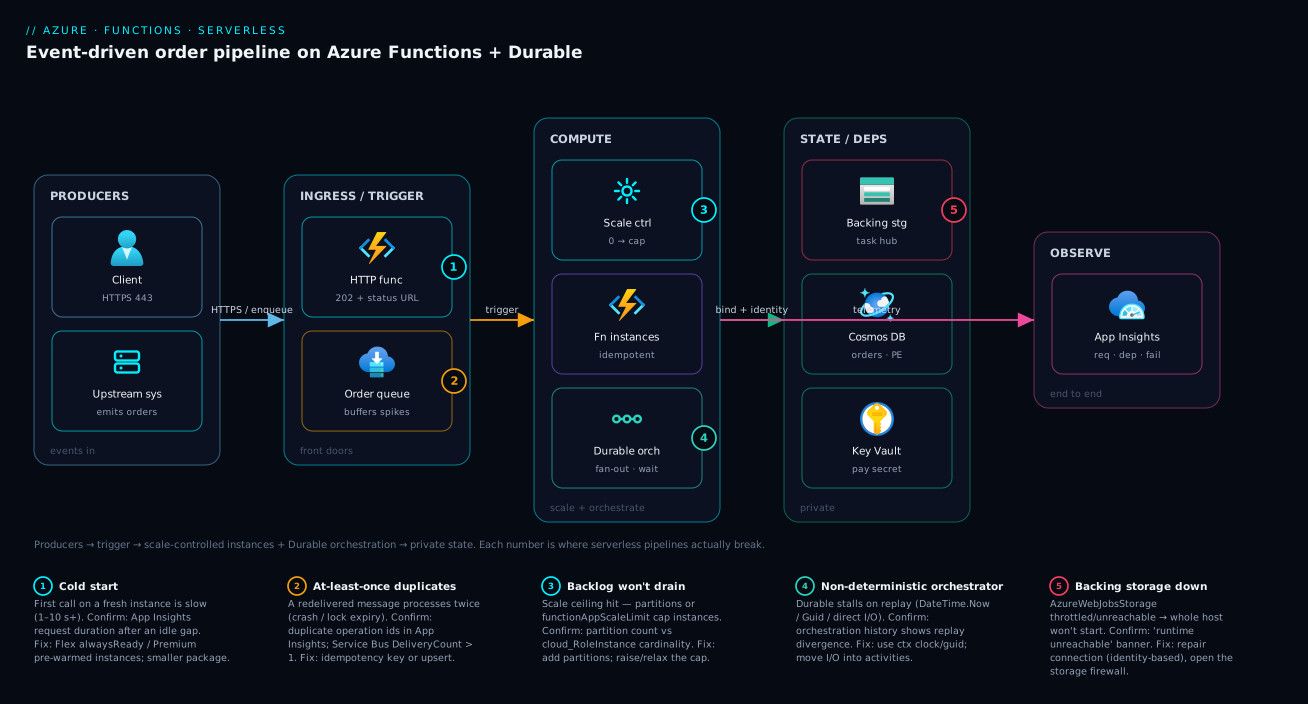
The diagram traces a real serverless order pipeline left to right, and marks the five hops where things break. Producers — a public client over HTTPS and an upstream system dropping messages — enter on the left. The ingress/trigger zone holds the two front doors: an HTTP-triggered function (behind Application Gateway/Easy Auth, scaling on request rate) and a Service Bus queue that buffers order messages and absorbs spikes so the back end never has to. From there the compute zone is the heart: the scale controller decides how many function instances run (zero to the cap), and a Durable orchestrator coordinates the multi-step workflow — fanning out line-item activities in parallel and waiting for an approval — checkpointing its state to the task hub. The state/dependencies zone is everything the functions read and write through bindings and identity: the backing storage account (runtime state + task hub), Cosmos DB for orders, Key Vault for the payment secret, all reached privately. Finally the observability plane (Application Insights) sees every invocation, dependency call and failure across the whole path.
Read the numbered badges as the failure map. Badge 1 sits on the trigger: a cold start on a fresh instance makes the first call slow — confirm with App Insights request duration after a gap, fix with alwaysReady/pre-warmed instances. Badge 2 is on the queue→instance hop: at-least-once delivery means duplicate processing — confirm with duplicate operation ids, fix with idempotency. Badge 3 is the scale ceiling: a backlog that won’t drain because partitions or the scale limit cap concurrency — confirm by comparing partition count to instance count, fix by adding partitions or raising the cap. Badge 4 is the Durable orchestrator: a non-deterministic orchestrator stalls or misbehaves on replay — confirm with the orchestration history, fix by removing clocks/random/I/O. Badge 5 is the backing storage: if AzureWebJobsStorage is throttled or unreachable, the whole host won’t start — confirm with “runtime unreachable,” fix the storage connection/firewall/identity. The lesson the picture teaches: the function code is the small part; the event source, the scale ceiling, the state store and the delivery guarantee are where serverless systems actually live or die.
Real-world scenario
Saffron Mart, a mid-size Indian grocery e-commerce company, ran its order pipeline on a pair of always-on App Service instances and a couple of VMs for background jobs. Order processing — validate, reserve stock, charge, generate invoice, notify — was a synchronous chain inside the web app, so a slow payment provider made checkout itself slow, and the nightly invoice batch needed its own VM that sat idle 23 hours a day. Monthly spend on this machinery was about ₹62,000, and during festival sales the synchronous chain buckled: checkout p95 climbed past 8 seconds and stock oversold because two requests reserved the same item.
The platform team (three engineers) moved the pipeline to Azure Functions on Flex Consumption. Checkout became a thin HTTP-triggered function that did one thing — validate the cart and drop an order message on a Service Bus queue — then returned 202 Accepted with a status URL. A Durable Functions orchestrator, started from the queue, ran the real workflow: a fan-out to reserve each line item in parallel, then an activity to charge (idempotent, keyed on the order id, against a payment provider that supports idempotency keys), then invoice generation, then notification. The nightly invoice job became a timer-triggered function — no VM. Everything authenticated with a managed identity: the queue, Cosmos DB and Key Vault (for the payment key) were all reached without a single connection string, and Cosmos was behind a private endpoint.
The first festival sale on the new system exposed three lessons. First, cold starts: at the very start of the flash sale, the first wave of checkout calls saw 4–6 second latencies because the app had scaled to zero overnight and the burst hit cold instances. They set Flex alwaysReady=2 on the HTTP group and the cold spikes vanished. Second, duplicate charges: an early bug — a non-idempotent charge activity — meant a redelivered message double-charged a handful of customers during a transient Service Bus lock expiry. The fix was a dedup store keyed on the order id, checked before charging; the lock-renewal duration was also raised because the charge call occasionally took longer than the default lock. Third, backlog: at peak the order queue briefly grew to ~40,000 messages and drained slower than expected — the team had capped functionAppScaleLimit too conservatively at 20 while protecting Cosmos; raising it to 60 and bumping Cosmos throughput cleared it in under two minutes.
The outcome: checkout p95 dropped from 8 s to 310 ms (because checkout no longer waited for the workflow), stock oversell went to zero (line-item reservation became an idempotent, ordered-per-item operation via session-keyed messaging), the nightly VM was deleted, and the monthly bill fell to about ₹28,000 — the serverless pipeline cost nothing at 3am and scaled itself during the sale. The architecture lesson on the team wall: “Make checkout drop a message and walk away. The workflow is Durable’s problem, the scale is the platform’s problem, and at-least-once is your problem — so be idempotent.”
The migration as a before/after, because the shape of the change is the lesson:
| Concern | Before (App Service + VMs) | After (Functions + Durable) | Effect |
|---|---|---|---|
| Checkout latency (p95) | ~8 s (synchronous chain) | 310 ms (drop message, return 202) | 25× faster perceived |
| Order workflow | Inline, blocking | Durable orchestration (fan-out + approval) | Resilient, checkpointed |
| Nightly invoices | Dedicated VM, idle 23h | Timer-triggered function | VM deleted |
| Stock oversell at peak | Race on shared item | Idempotent, session-ordered reserve | Zero oversell |
| Secrets | Connection strings in config | Managed identity + KV references | No secrets to leak |
| Cold start at sale start | n/a (always-on, expensive) | Killed with Flex alwaysReady=2 |
No first-wave spikes |
| Monthly cost | ~₹62,000 | ~₹28,000 | ~55% lower |
Advantages and disadvantages
The event-driven, pay-per-execution model both enables the wins above and introduces a class of problems you don’t have with always-on compute. Weigh it honestly:
| Advantages (why serverless helps) | Disadvantages (why it bites) |
|---|---|
| Scale-to-zero: pay nothing at idle; ideal for spiky/low traffic | Cold starts add first-request latency on fresh instances |
| Automatic scale to the event rate — no autoscale rules to write | The platform decides scale; bursty ramps and ceilings can surprise you |
| Bindings remove client boilerplate for dozens of services | Bindings hide details; complex needs (Tx, streaming) still need the SDK |
| Durable Functions gives stateful workflows without a workflow engine | Orchestrator determinism rules are subtle; non-deterministic bugs are nasty |
| No servers to patch, scale or load-balance | You can’t ssh to “the server”; you debug through logs/App Insights |
| Per-execution billing tracks real usage closely | At-least-once delivery forces idempotency on you (duplicate executions) |
| Tight integration with the Azure event ecosystem | Vendor lock-in: triggers/bindings/Durable are Azure-specific |
| Strong fit for glue, automation, event processing, schedules | Wrong for long-running compute, ultra-low-latency APIs, persistent local state |
Where each matters: serverless is right when work is event-shaped and intermittent, when you want to ship logic not operate hosts, and when occasional cold starts are tolerable (or killable with warm pools). It’s wrong for steady high-CPU compute (you’d pay more than a reserved VM and fight timeouts), for APIs with a hard sub-100 ms p99 and zero cold-start tolerance (use Premium-warmed or a different model), and for anything needing durable local disk or in-memory state across calls. The disadvantages are all manageable — but only if you design for them up front, which is the entire point of this article.
Hands-on lab
Build a queue-triggered, idempotent function on the free-friendly Consumption plan, watch it process and poison a bad message, then tear it down. Run in Cloud Shell (Bash); the runtime + a small storage account stay inside or near the free tier.
Step 1 — Variables and resource group.
RG=rg-fn-lab
LOC=centralindia
STG=stfnlab$RANDOM        # globally-unique, 3-24 lowercase
APP=fn-lab-$RANDOM        # globally-unique
az group create -n $RG -l $LOC -o table
Step 2 — Storage account + Consumption function app (.NET isolated).
az storage account create -n $STG -g $RG -l $LOC --sku Standard_LRS -o table
az functionapp create -n $APP -g $RG \
  --consumption-plan-location $LOC \
  --runtime dotnet-isolated --runtime-version 8.0 \
  --functions-version 4 \
  --storage-account $STG -o table
Expected: a function app row, state = Running.
Step 3 — Create the work queue and the (auto-created) poison queue.
KEY=$(az storage account keys list -n $STG -g $RG --query "[0].value" -o tsv)
az storage queue create -n orders-in --account-name $STG --account-key "$KEY" -o table
# The 'orders-in-poison' queue is created automatically on first poison event.
Step 4 — Deploy a queue-triggered function. (Author locally with func init/func new and func azure functionapp publish $APP, or deploy a zip.) The handler is idempotent — it records processed ids in Table storage and skips duplicates, and it throws on a deliberately bad payload so you can watch poisoning:
[Function("ProcessOrder")]
public async Task Run([QueueTrigger("orders-in")] string body)
{
    var msg = JsonSerializer.Deserialize<OrderMsg>(body)
              ?? throw new InvalidOperationException("bad payload"); // -> retried -> poison
    if (await AlreadyProcessed(msg.Id)) return;                     // idempotent skip
    await DoWork(msg);
    await MarkProcessed(msg.Id);
}
Step 5 — Send a good message and watch it process.
GOOD='{"Id":"o-1001","Item":"rice-5kg"}'
az storage message put -q orders-in --content "$GOOD" \
  --account-name $STG --account-key "$KEY" -o table
# Stream logs and watch the invocation succeed:
az webapp log tail -n $APP -g $RG
Expected: one successful invocation in the log; the message disappears from orders-in.
Step 6 — Send a bad message and watch it poison.
az storage message put -q orders-in --content 'not-json' \
  --account-name $STG --account-key "$KEY" -o table
# After ~5 dequeue attempts it lands in orders-in-poison:
sleep 5
az storage message peek -q orders-in-poison --account-name $STG --account-key "$KEY" -o table
Expected: after the retries, the bad message appears in orders-in-poison — proof that one bad message doesn’t block the queue forever.
Step 7 — Confirm idempotency. Re-send the same good id (o-1001); the handler runs but the AlreadyProcessed check skips the work — no duplicate side effect. Verify in the log: the invocation completes without doing work twice.
Step 8 — Teardown.
az group delete -n $RG --yes --no-wait
You’ve now seen the three things that define serverless event processing in production: it scales to the queue, it sets bad messages aside instead of looping, and it stays correct under duplicate delivery because you made it idempotent.
Common mistakes & troubleshooting
The same dozen mistakes account for most Functions incidents. Each is symptom → root cause → confirm (exact path/command) → fix.
1. “Azure Functions runtime is unreachable” — the whole app is down.
Root cause: The backing storage account (AzureWebJobsStorage) is broken — its access key rotated without updating the setting, a firewall now blocks the app, or the account/container was deleted.
Confirm: Portal banner on the function app; az functionapp config appsettings list -n $APP -g $RG --query "[?name=='AzureWebJobsStorage']"; check the storage account’s networking/firewall and that the key matches.
Fix: Repair the connection (new key or, better, switch to identity-based AzureWebJobsStorage__accountName + role); allow the app through the storage firewall; never let the host’s storage be unreachable.
2. Function runs twice (or N times) for one event.
Root cause: At-least-once delivery plus a crash/lock-expiry mid-process; the message is redelivered. Not a platform bug — expected behaviour.
Confirm: App Insights requests/traces show the same operation/message id processed more than once; Service Bus DeliveryCount > 1.
Fix: Make the handler idempotent — dedup store keyed on message id, upsert by natural key, or use a downstream that dedups. Never assume exactly-once.
3. Messages pile up in the poison/dead-letter queue.
Root cause: The handler throws on certain messages every time (bad data, a downstream that’s down), so they exhaust retries and are set aside — and nobody is draining them.
Confirm: Storage <queue>-poison depth, or Service Bus DLQ depth (az servicebus queue show ... --query countDetails.deadLetterMessageCount).
Fix: Alert on poison/DLQ depth; read a poisoned message to find the cause; fix the data/downstream; reprocess (move messages back). Make handlers tolerant of expected-bad input rather than throwing.
4. Long-running function times out.
Root cause: The work exceeds the plan’s max execution time — 10 minutes hard on Consumption.
Confirm: App Insights shows the invocation cut at the timeout; functionTimeout in host.json vs the plan cap.
Fix: Move to Premium/Flex (long/unbounded timeout) for genuinely long work, or refactor to Durable Functions (the async pattern: return immediately, run the long workflow in pieces).
5. HTTP function returns 502/503 intermittently.
Root cause: Cold start mid-deploy, host crash-looping, or the response exceeded the ~230 s front-end timeout.
Confirm: App Insights requests with failures; correlate to deploys/scale events; check function duration against 230 s.
Fix: Use alwaysReady/pre-warmed instances; fix the crash (see traces); for long work return 202 + status URL instead of blocking. (Same front-end mechanics as App Service 502/503 troubleshooting.)
6. The app won’t scale out — backlog grows.
Root cause: A scale ceiling: Event Hubs/Cosmos partition count caps instances, or functionAppScaleLimit/WEBSITE_MAX_DYNAMIC_APPLICATION_SCALE_OUT is set low, or you’re on Dedicated (no elastic scale).
Confirm: Compare partition count to instance count (App Insights cloud_RoleInstance cardinality); read the scale-limit settings.
Fix: Add partitions (at the source — can’t change later cheaply), raise/remove the scale cap, or move to a plan that scales elastically.
7. Cold-start latency on a “warm” Premium plan.
Root cause: Pre-warmed count is 1 (default) and a burst scaled out faster than the buffer covered; or you scaled past maxBurst.
Confirm: App Insights shows latency spikes correlated with new cloud_RoleInstance values during a burst.
Fix: Raise preWarmedInstanceCount and maxBurst; keep the deployment package small; reuse clients so per-instance warm-up is cheap.
8. Timer fired multiple times / didn’t fire after a restart.
Root cause: For multiples — a misconfiguration broke the singleton lock (rare) or you confused it with RunOnStartup firing on every restart. For misses — the host was down during the schedule and you didn’t opt into catch-up.
Confirm: Function execution log timestamps; check for RunOnStartup=true; verify the storage lock container.
Fix: Remove RunOnStartup in production; rely on the storage-backed singleton; for critical schedules, make the job idempotent and tolerant of a missed/duplicate run.
9. Durable orchestration is stuck or behaves nondeterministically.
Root cause: The orchestrator violates determinism (used DateTime.Now, Guid.NewGuid(), direct I/O, or awaited a non-durable task), so replay diverges from history; or the task-hub storage is throttled.
Confirm: Query the orchestration status/history (az rest to the Durable status endpoint, or the Durable Functions monitor); look for replay errors; check the storage account metrics for throttling.
Fix: Remove all non-deterministic calls from the orchestrator (move I/O to activities, use ctx.CurrentUtcDateTime/ctx.NewGuid()); if storage is the bottleneck, scale it or switch the Durable backend (Netherite/MSSQL).
10. Binding resolves to null / function isn’t found.
Root cause: A binding expression name doesn’t match the trigger property (case-sensitive), or a required connection app setting is missing, so the function fails to index.
Confirm: Startup logs show “no functions found” or an indexing error; the binding parameter is null at runtime.
Fix: Match {property} exactly to the trigger’s field; set the binding’s connection app setting (<Name>__serviceUri or connection string); redeploy and re-check the function list.
11. 403 / auth failures calling a dependency (DB, Key Vault, Storage).
Root cause: The managed identity isn’t enabled, or lacks the data-plane RBAC role on the target, or the target’s firewall blocks the app’s outbound.
Confirm: az functionapp identity show; az role assignment list --assignee <principalId> --scope <targetId>; the target’s networking blade.
Fix: Assign the identity; grant the data role (e.g. Storage Blob Data Contributor, Key Vault Secrets User), not just control-plane Reader; allow the app’s subnet/outbound through the target firewall (private endpoint preferred).
12. Costs higher than expected on Consumption. Root cause: A chatty trigger (a queue that’s never empty, an aggressively-polling timer) or a function that runs far more often/longer than assumed; or a runaway retry loop reprocessing poison messages. Confirm: App Insights execution count × duration; the cost analysis blade filtered to the function app; check poison-queue churn. Fix: Reduce invocation frequency (batch, raise polling interval), shorten execution, fix retry loops, and consider Premium if steady load makes per-execution pricing lose to a flat plan.
Best practices
- Pick the plan for the workload, not the price tag. Flex Consumption for most new builds (scale-to-zero + VNet +
alwaysReady); Premium for steady, latency-sensitive or long-running; Dedicated to co-locate with web apps; Consumption only for truly spiky/low glue. - Keep functions small and single-purpose. One trigger, one job. Compose with queues and Durable orchestration, not with giant multi-responsibility handlers.
- Stay stateless; put state outside. Never rely on in-memory or local-disk state surviving between invocations or across instances. Use a database, queue or cache.
- Be idempotent by default. Every messaging trigger is at-least-once. Design handlers so processing the same event twice is safe (dedup key, upsert, conditional write).
- Reuse clients. Create
HttpClient, DB and SDK clients once (static/singleton), not per invocation — per-call clients exhaust connections and slow cold start. - Use managed identity and Key Vault references. No connection strings in app settings where an identity-based connection works; grant least-privilege data-plane roles.
- Monitor poison/dead-letter depth and host health. Alert on poison-queue/DLQ growth, host “unreachable,” 5xx rate, and execution duration — not just “is it up.”
- Tune concurrency to protect downstreams. Cap
maxConcurrentCalls/functionAppScaleLimitso a scale-out doesn’t DDoS your own database; enable dynamic concurrency where it helps. - Size partitions up front. Event Hubs/Cosmos partition count is your scale ceiling and is painful to change later — provision for the peak you’ll plausibly hit.
- Keep orchestrators deterministic. No clocks, randomness or I/O in orchestrator code; all side effects go in activities. This is the #1 Durable correctness rule.
- Deploy from package, wire Application Insights from day one.
WEBSITE_RUN_FROM_PACKAGE=1gives atomic deploys and faster cold start; App Insights turns a two-hour mystery into a two-minute lookup. - Right-size the backing storage and keep it healthy. It’s a hard dependency for the host and the Durable task hub — don’t share it with a noisy workload, and watch it for throttling.
Security notes
- Managed identity over secrets. Use the function app’s system- or user-assigned managed identity for triggers, bindings and dependency calls; reserve Key Vault references for secrets that have no identity-based path. Grant least privilege — the specific data-plane role, scoped to the resource.
- Lock down the HTTP surface. Function keys (
authLevel) are not authentication. Put Easy Auth/Entra ID or API Management/Application Gateway + WAF in front of HTTP-triggered functions, and use access restrictions to limit who can reach the endpoint. - Private networking for outbound. On Flex/Premium/Dedicated, VNet-integrate and reach databases/PaaS via private endpoints so traffic never traverses the public internet; force outbound through the VNet where egress control matters.
- Protect the backing storage account. It holds runtime state and the Durable task hub. Use identity-based access, restrict its firewall to the app, disable shared-key access where possible, and don’t expose it publicly.
- Don’t leak in errors or health endpoints. Keep stack traces and internal topology out of HTTP responses and any health/diagnostic endpoint; send detail to App Insights, not the caller.
- Secure the deployment supply chain. Use
WEBSITE_RUN_FROM_PACKAGEfrom a trusted, access-controlled source; for container-based functions, pull from a private registry via managed identity and scan/pin images. - Rotate and scope what’s left. Any remaining keys (function keys, leftover connection strings) should be rotated and least-scoped; prefer to eliminate them.
The security controls and what each prevents:
| Control | Mechanism | Secures against | Also prevents |
|---|---|---|---|
| Managed identity + RBAC | identity + data role |
Secrets in plaintext settings | Rotation breaking the app |
| Key Vault references | @Microsoft.KeyVault(...) |
Secret values in config | Hand-rolled secret handling |
| Easy Auth / APIM in front | Entra ID / APIM policy | Anonymous abuse of HTTP funcs | Key-only “auth” being bypassed |
| VNet integration + PE | Private outbound/inbound | Public-internet exposure of deps | Data exfil over public paths |
| Storage hardening | Firewall + identity, no shared key | Tampering with runtime/task hub | Host-takeover via storage |
| Run-from-package + scanning | Immutable, scanned artifact | Tampered/unknown code | Surprise breaking deploys |
Cost & sizing
What drives the bill, by plan:
- Consumption / Flex Consumption bill per execution count and resource consumption (GB-seconds: memory × duration), with a monthly free grant (roughly 1 million executions and 400,000 GB-s) — so genuinely spiky/low workloads can cost near zero. Flex adds a charge for any
alwaysReadyinstances you keep warm. - Premium (Elastic Premium) bills per vCPU-second and GB-second of allocated instances, always-on (minimum 1) — you pay for warm capacity whether or not it’s busy. It wins over Consumption when load is steady enough that per-execution pricing would exceed a flat warm plan, or when you need no-cold-start/VNet/long-timeouts.
- Dedicated (App Service plan) is just the plan instance-hours you already pay for — marginal cost of adding functions is near zero if the plan has headroom.
- Container Apps bills vCPU/GB per second of active replicas (scale-to-zero supported), plus request charges.
The cost levers and what each buys:
| Cost driver | What you pay for | Rough INR/month (illustrative) | When it dominates |
|---|---|---|---|
| Consumption executions + GB-s | Per-run + memory×time (free grant first) | ₹0–3,000 for spiky/low traffic | Bursty, low-to-moderate volume |
Flex alwaysReady instances |
Warm pool (per instance) | ~₹3,000–6,000 per warm instance | Killing cold start on hot paths |
| Premium EP1 (1 instance) | Always-on vCPU/GB | ~₹12,000–18,000 | Steady load, warm + VNet + long runs |
| Dedicated (shared plan) | Plan instance-hours | marginal if plan exists | Co-located with web apps |
| Backing storage | Transactions + capacity | ~₹200–1,500 | High trigger/Durable churn |
| App Insights ingestion | Per-GB telemetry | ~₹1,000–3,000 | High-volume tracing (sample it) |
Sizing guidance: start on Consumption/Flex and measure; if your monthly execution × duration cost approaches the price of an EP1, or you keep fighting cold starts/VNet, move to Premium. Keep functions short (duration is half the GB-s bill), batch where it cuts invocation count, and enable Application Insights adaptive sampling so a traffic spike doesn’t spike the telemetry bill. The biggest hidden cost is a retry/poison loop silently reprocessing bad messages forever — alert on poison depth so it never runs up the meter. For the broader cost-control workflow, see Azure FinOps & Cost Management at Scale.
Interview & exam questions
1. What is the difference between a trigger and a binding? A trigger is the single event that starts a function and supplies its payload (and is the scaling signal); a binding is a declarative input or output connection to a service. Every function has exactly one trigger and zero or more input/output bindings; the trigger is technically a special binding with direction trigger.
2. When would you choose Flex Consumption over Consumption? When you need scale-to-zero and features Consumption lacks — chiefly VNet integration (private outbound to databases/PaaS), alwaysReady warm instances to eliminate cold start, per-instance memory sizing, and per-instance concurrency control. Flex is the modern serverless default; plain Consumption is for the simplest spiky glue.
3. Why might a function execute the same message twice, and how do you make that safe? Queue/Service Bus/Event Hubs/Event Grid triggers deliver at least once; a crash or lock/visibility expiry mid-processing causes redelivery. You make it safe with idempotency — a dedup store keyed on the message id, an upsert by natural key, a conditional (ETag) write, or an idempotent downstream — so processing twice has the same effect as once.
4. What is a cold start and which plans eliminate it? Cold start is the latency the first request on a freshly created instance pays (sandbox allocation, worker start, code load, connection priming). Premium eliminates it with pre-warmed instances; Flex Consumption removes it for the hot path with alwaysReady instances; Dedicated stays warm (Always On). Plain Consumption cannot fully avoid it.
5. Why must Durable orchestrator functions be deterministic? The platform checkpoints an orchestrator’s progress and replays the function from the start to rebuild state after an await or restart. If the code uses non-deterministic operations (DateTime.Now, Guid.NewGuid(), direct I/O, non-durable awaits), replay diverges from the recorded history and the orchestration breaks. Use ctx.CurrentUtcDateTime, ctx.NewGuid(), and put all side effects in activity functions.
6. Describe the fan-out/fan-in pattern in Durable Functions. The orchestrator starts many activity functions in parallel (e.g. one per item), collecting their tasks, then awaits all of them (Task.WhenAll) and aggregates the results. It’s the pattern for parallelizing independent work and then reconciling — far simpler than hand-rolling parallel queue workers plus a join.
7. What is the maximum execution time on the Consumption plan, and what do you do about a longer job? 10 minutes (5-minute default, 10-minute hard cap). For longer work, move to Premium/Flex (long or unbounded timeout) or refactor to Durable Functions using the async HTTP pattern — return 202 immediately and run the long workflow as checkpointed orchestrator/activity steps that aren’t bound by a single function’s timeout.
8. How does the scale controller decide how many instances to run, and what caps it? It watches each trigger’s scaling signal — HTTP request rate, queue length, Event Hubs/Cosmos partition lag — and adds/removes instances in steps from zero to the plan max. The cap is the plan’s maximum plus trigger-specific ceilings: Event Hubs/Cosmos give one instance per partition, and you can set functionAppScaleLimit/WEBSITE_MAX_DYNAMIC_APPLICATION_SCALE_OUT to bound it.
9. What happens to a message that keeps failing, on Storage queues vs Service Bus? On Storage queues, after maxDequeueCount (default 5) the message is moved to a <queue>-poison queue. On Service Bus, after maxDeliveryCount (default 10) it goes to the built-in dead-letter sub-queue. In both cases you must monitor and drain these or failures accumulate silently.
10. Why is the backing storage account so important to a function app? It holds runtime metadata, trigger leases/checkpoints, the Durable task hub, and (some plans) the deployment package via the AzureWebJobsStorage connection. If it’s unreachable, throttled, or its key rotates without updating the setting, the host fails to start (“runtime unreachable”) — a large share of “Functions is down” is really a storage problem.
11. How do you give a function passwordless access to Cosmos DB or Key Vault? Enable a managed identity on the function app and grant it the data-plane RBAC role on the target (e.g. Cosmos DB Built-in Data Contributor, Key Vault Secrets User), then use an identity-based connection (<Name>__serviceUri + __credential=managedidentity) or a Key Vault reference — no connection strings or keys in app settings.
12. When is Azure Functions the wrong choice? For long-running, steady high-CPU compute (you’d pay more than a reserved VM and fight timeouts), ultra-low-latency APIs with a hard sub-100 ms p99 and zero cold-start tolerance, and workloads needing persistent local state or disk across invocations. Those fit App Service, AKS, Container Apps with min replicas, or VMs better.
These map to AZ-204 (Developer Associate) — implement Azure Functions (triggers, bindings, Durable Functions) and develop event-based and message-based solutions; AZ-104 touches the hosting/scaling/monitoring angle; and the networking/identity content (VNet integration, managed identity, private endpoints) reaches AZ-500/AZ-700. A compact cert mapping:
| Question theme | Primary cert | Objective area |
|---|---|---|
| Triggers, bindings, Durable patterns | AZ-204 | Implement Azure Functions; event/message solutions |
| Plans, scaling, cold start | AZ-204 / AZ-104 | Implement & configure compute |
| Idempotency, poison/dead-letter | AZ-204 | Message-based solutions |
| Managed identity, Key Vault refs | AZ-204 / AZ-500 | Secure solutions; manage identity |
| VNet integration, private endpoints | AZ-700 | Design & implement network connectivity |
| Monitoring with App Insights | AZ-204 | Instrument, monitor & troubleshoot |
Quick check
- Your HTTP-triggered function needs to reach a private Azure SQL database and you want scale-to-zero. Which plan, and why not plain Consumption?
- A queue-triggered function occasionally charges a customer twice. What property of the trigger explains this, and what’s the fix?
- True or false: adding more instances will fix an Event Hubs trigger that can’t keep up with its backlog.
- Your Durable orchestrator works on first run but behaves erratically after the host restarts mid-workflow. Name two things in the orchestrator code to check.
- The function app shows “Azure Functions runtime is unreachable” and nothing runs. What’s the most likely root cause?
Answers
- Flex Consumption — it offers scale-to-zero and VNet integration (so it can reach the private SQL endpoint), plus
alwaysReadyto kill cold start. Plain Consumption can’t VNet-integrate, so it can’t reach the private database. - The trigger delivers at least once; a crash or lock/visibility expiry mid-process causes redelivery, so the same message is processed twice. Fix with idempotency — e.g. a dedup store keyed on the order id checked before charging, or an idempotency key on the payment call.
- False. Event Hubs scales to at most one instance per partition, so the partition count is the ceiling regardless of instance settings. Add partitions (at the source) or process larger batches faster; more instances alone won’t help.
- Check that the orchestrator (a) uses
ctx.CurrentUtcDateTime/ctx.NewGuid()instead ofDateTime.Now/Guid.NewGuid(), and (b) performs no direct I/O and onlyawaits durable APIs (all side effects moved into activity functions). Non-determinism breaks replay. - The backing storage account (
AzureWebJobsStorage) is broken or unreachable — a rotated access key not updated in the setting, a firewall now blocking the app, or a deleted account/container. Repair the connection (prefer identity-based) and the host starts.
Glossary
- Azure Functions — Azure’s Functions-as-a-Service: run event-triggered code, scale automatically, and (on serverless plans) pay per execution with scale-to-zero.
- Function — one handler with a single trigger and zero or more bindings; the unit of execution and billing.
- Function app — the deployment, scaling, configuration and identity boundary that hosts one or more functions on a plan.
- Trigger — the event that starts a function (HTTP, Timer, Queue, Service Bus, Event Hubs, Event Grid, Blob, Cosmos DB, Durable); also the scaling signal.
- Binding — a declarative input or output connection to a service that removes client boilerplate; directions are
in,out,trigger. - Hosting plan — Consumption, Flex Consumption, Premium (Elastic Premium), Dedicated (App Service), or Container Apps; decides scale, cold start, networking, timeout and billing.
- Scale controller — the platform component that adds/removes instances based on each trigger’s signal, from zero to the plan maximum.
- Instance — a worker sandbox running your function app; a new one incurs a cold start.
- Cold start — first-request latency on a freshly created instance (sandbox + worker start + code load + connection priming).
- Concurrency — how many invocations run at once per instance (e.g.
batchSize,maxConcurrentCalls); multiplies with instances for throughput. AzureWebJobsStorage— the app’s backing storage connection holding runtime state, trigger leases and the Durable task hub; the host won’t start without it.- Durable Functions — an extension providing stateful, long-running orchestration via orchestrator, activity and entity functions, checkpointed to a task hub and replayed deterministically.
- Orchestrator function — coordinates a workflow; must be deterministic (no clocks, randomness or I/O — only durable APIs).
- Activity function — does the actual work in a Durable workflow; side effects are allowed here.
- Durable entity — a stateful, single-threaded actor keyed by id (aggregator pattern).
- Task hub — the queues and tables in the storage account where Durable persists orchestration state.
- At-least-once delivery — messaging triggers may deliver an event more than once and out of order; design for it with idempotency.
- Idempotency — processing the same event twice has the same effect as once (dedup key, upsert, conditional write).
- Poison / dead-letter queue — where a repeatedly-failing message is set aside (
<queue>-poisonfor Storage; the DLQ sub-queue for Service Bus) so it stops blocking processing. - NCRONTAB — the six-field CRON (including a seconds field) used by the Timer trigger.
alwaysReady/ pre-warmed instances — warm instances kept running (Flex / Premium) so the hot path never pays a cold start.
Next steps
You can now choose a plan, wire triggers and bindings, reason about scale and cold starts, orchestrate with Durable Functions, and make handlers idempotent and observable. Build outward:
- Next: Reference Architecture: Serverless API on Azure — see these patterns assembled into a complete, production serverless system.
- Related: Azure App Service vs Container Apps vs AKS — the upstream decision of whether Functions (vs containers) is the right compute model.
- Related: Troubleshooting Azure App Service: 502/503, Cold Starts & Restart Loops — the same front-end/worker diagnostic reflexes apply to HTTP functions.
- Related: Azure Monitor & Application Insights for Observability — instrument every invocation, dependency and failure across the pipeline.
- Related: Azure Key Vault: Secrets, Keys & Certificates — get Key Vault references right so a missing secret never crash-loops the app.
- Related: Deploy KEDA: Event-Driven Autoscaling with Kafka & Service Bus — the same event-driven scaling model on Kubernetes/Container Apps.